Owashi MT5
- Experts
- Version: 2.6
- Activations: 5

[Overview]
"Owashi" is an EA that targets EURJPY on the M15 chart, built around long-side trend following.
EURJPY tends to sustain trends on the long side, while the short side tends to move sharply in a short time. It resembles GBPJPY but is less turbulent, which makes it easier to work with in some respects.
With this in mind, the long side holds positions for a long time from the early stage of a trend, and the short side adds short-term counter-trend trades against overbought conditions.
The long side is the main strategy. It avoids phases in which the daily chart shows strong, turbulent downward pressure, and enters when it detects the start of a trend. It exits when price moves against it, and follows with a trailing stop once the trade is in profit.
The short side supports the long side. It exits when the decline has progressed, or when the holding time reaches 15 hours.
No grid, no averaging down, no martingale. Hedged positions can occur, but this can be switched off with a parameter. TP/SL is always placed, so losses are limited.
Average holding time is about 42 hours for buys and about 14 hours for sells. Positions are carried over the weekend.
According to backtest analysis, it trades about 70 to 110 times a year.
This EA was tuned on markets since 2012, a period of yen weakness, and its edge lies in rising markets. Therefore, in markets where volatility surges and prices crash, as in the euro crisis, or where a downtrend persists at the weekly level, losses may exceed those in the backtest. In that case, this EA is expected to reach the end of its life.
During development, MT5 real ticks and MT4 TDS were used together to curb overfitting and ensure reproducibility.
To prevent unnecessary losses, it also includes plenty of support features that make operating mistakes less likely: automatic chart setup, magic number duplication alert, and entry prevention when funds are insufficient.
In addition, the trade detail output and on-chart trade history display used during development are included as they are.
The design is easy to use for those new to system trading, while also meeting the needs of experienced users. Please try it on a demo first.
[Live Forward Test]
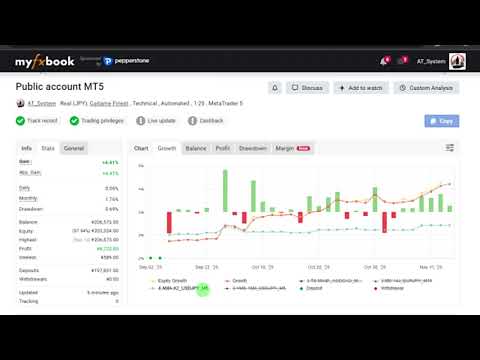
Please open the myfxbook page from the description of my video channel.
[Setup]
- Symbol | EURJPY
- Timeframe | M15
- GMT | +2/+3 (brokers with 5 daily bars per week only)
- MT4 chart bars setting | 1000 or more
*Even if placed on an FX pair other than EURJPY, the chart is automatically switched to EURJPY and set up.
[Specifications]
- Positions | 2 (1 per side)
- Hedging | Yes (configurable)
- Max TP/SL | Buy 260/160 pips, Sell 140/200 pips (configurable)
- Weekend carry-over | Yes (configurable)
- Year-end/New Year | Dec 21 - Jan 3: no new entries, closing only
[Parameter Overview]
- Initial Balance | The balance used as the base for Lot Growth Rate. Enter your balance at the start of operation, in the account currency.
- Lot Growth Rate | Sudden lot changes carry high risk, so lot changes can be controlled. 0 fixes the base at Initial Balance; 100 links it fully to the selected balance.
- Allowed range from average spread | The allowed margin above the internally measured average spread. During rollover hours, a maximum value alone is hard to control with, so setting a margin from the average covers a wider range.
- Export trade info to CSV | Outputs details such as execution spread, average spread and slippage at the time of each trade.
*Logs tend to be output twice when a trade closes at TP/SL, so please be aware of this.
- Show P/L pips on chart | Shows trade lines and pips on the chart.
[How to Determine the Compound Lot Size]
Please decide the lot size at your own risk, according to your trading environment and funds. There is no recommended value.
When Lot Calculation Mode is set to 1=Balance or 2=Free Margin, the lot size is determined as follows.
- Base balance = Initial Balance + (balance of 1 or 2 - Initial Balance) x (Lot Growth Rate / 100)
- Lot = Base balance x (Risk Percent / 100) / (SL pips x profit/loss per pip per 1 lot)
*For SL pips, the larger of the buy and sell values is used.
[Example Setup Procedure]
1. Enter your balance at the start of operation in Initial Balance, in the account currency.
2. Run a backtest optimization on two parameters: Risk Percent and Lot Growth Rate.
3. Look at the maximum drawdown in the results list and choose a combination you can tolerate.
*In backtests, exchange conversion rates may be calculated as approximations. The lot size will not exactly match live operation, so please use it as a guide.