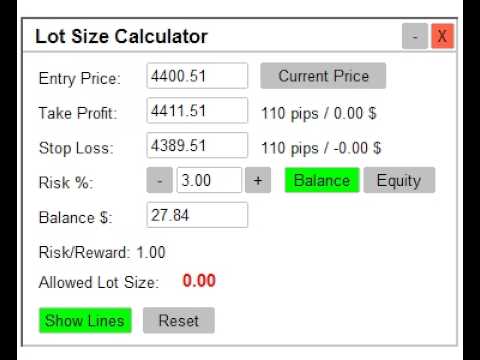
Lot Size Calculator Indicator MT5
- Indicators
- Version: 1.0
- Activations: 10

Lot Size Calculation MT5 x Calculation of Lot Size x Position Size Calculation
Lot Size Calculator MT5 is a practical risk management tool designed to help traders calculate an appropriate lot size based on their account balance or equity, risk percentage, entry price, stop loss, and take profit.
The calculator provides an easy-to-use interactive panel directly on the MT5 chart, allowing you to adjust your trading parameters and instantly review the calculated lot size, pip distances, monetary values, and risk/reward ratio.
Key Features
Lot Size Calculation x Calculation of Lot Size x Position Size Calculation
Calculate the Allowed Lot Size based on:
- Entry Price
- Stop Loss
- Risk Percentage
- Account Balance or Equity
The calculator determines the risk amount and calculates the corresponding lot size based on the stop-loss distance and symbol pip value.
Entry Price
Enter your desired entry price manually or use the Current Price button to quickly set the entry level to the current market Bid price.
Take Profit & Stop Loss
Set your own:
- Take Profit
- Stop Loss
The corresponding horizontal chart lines can be moved directly with the mouse, and the values in the calculator update automatically.
Risk Percentage
Specify the percentage of your account balance or equity that you are willing to risk.
The risk percentage can be edited manually or adjusted using the + / − buttons. The value is limited between 0% and 100%.
Balance or Equity Mode
Choose whether calculations should be based on:
Balance
or
Equity
The calculator automatically uses the selected account value unless you manually enter a custom value.
Risk/Reward Ratio
The calculator automatically calculates the Risk/Reward ratio using the Take Profit and Stop Loss distances.
Pip Distance & Money Calculation
The panel displays the distance to Take Profit and Stop Loss in pips, together with the corresponding monetary value for the calculated lot size.
Interactive Chart Lines
The calculator displays three customizable horizontal levels:
- Entry Line
- Take Profit Line
- Stop Loss Line
Each line supports customizable color, style, and width.
You can drag the lines directly on the chart and the calculator automatically updates the corresponding price values.
Draggable Panel
The calculator panel can be dragged anywhere on the chart using its header.
The dragging system is optimized for smooth movement and updates at approximately 60 FPS.
Minimize & Restore
Minimize the panel when you want a cleaner chart while keeping the indicator active. The minimized state can be remembered and restored.
Show / Hide Trading Lines
Use the Show Lines button to quickly display or hide the Entry, Take Profit, and Stop Loss lines on the chart. The selected visibility state is saved for the chart.
Reset Function
The Reset button restores the main calculation values to their default logic, including Entry Price, Stop Loss, Take Profit, and Risk %.
Symbol-Aware Default Settings
The indicator includes predefined default pip gaps for several commonly used symbols, including:
- BTCUSD
- ETHUSD
- XAUUSD
- USTEC
Other symbols use the standard default gap configured in the indicator logic.
Customization
Customize the calculator's visual appearance through settings such as:
- Panel background color
- Header color
- Text color
- Accent color
- Border color
- Font size
- Entry line color/style/width
- Take Profit line color/style/width
- Stop Loss line color/style/width
- Initial panel X/Y position
How to Use
- Attach Lot Size Calculator MT5 to your chart.
- Set the Entry Price, Take Profit, and Stop Loss.
- Select Balance or Equity.
- Enter your desired Risk %.
- Review the calculated Allowed Lot Size.
- Adjust the chart lines or price values as needed.
- Use Show Lines, Reset, Minimize, or Close according to your workflow.
Suitable For
This tool can be useful for traders who want to:
- Calculate position size before entering a trade
- Control risk based on account balance or equity
- Plan Entry, Stop Loss, and Take Profit levels
- Quickly evaluate Risk/Reward
- Visualize trade levels directly on the chart
- Perform manual trade planning
- Improve consistency in position sizing
Important
Lot Size Calculator MT5 is a calculation and trade-planning tool.
It does not automatically place trades or function as an Expert Advisor. It is designed to help traders manually determine an appropriate position size and visualize their planned trade levels.
Calculate your lot size. Plan your risk. Trade with greater precision.