Algorithmic Ict Trader
- Experts
-
Nurmukhammadkhuja Umarkhonov
 Nurmukhammadkhuzha Umarkhonov | MQL5 Algo Developer
 - Version: 11.0
- Activations: 10
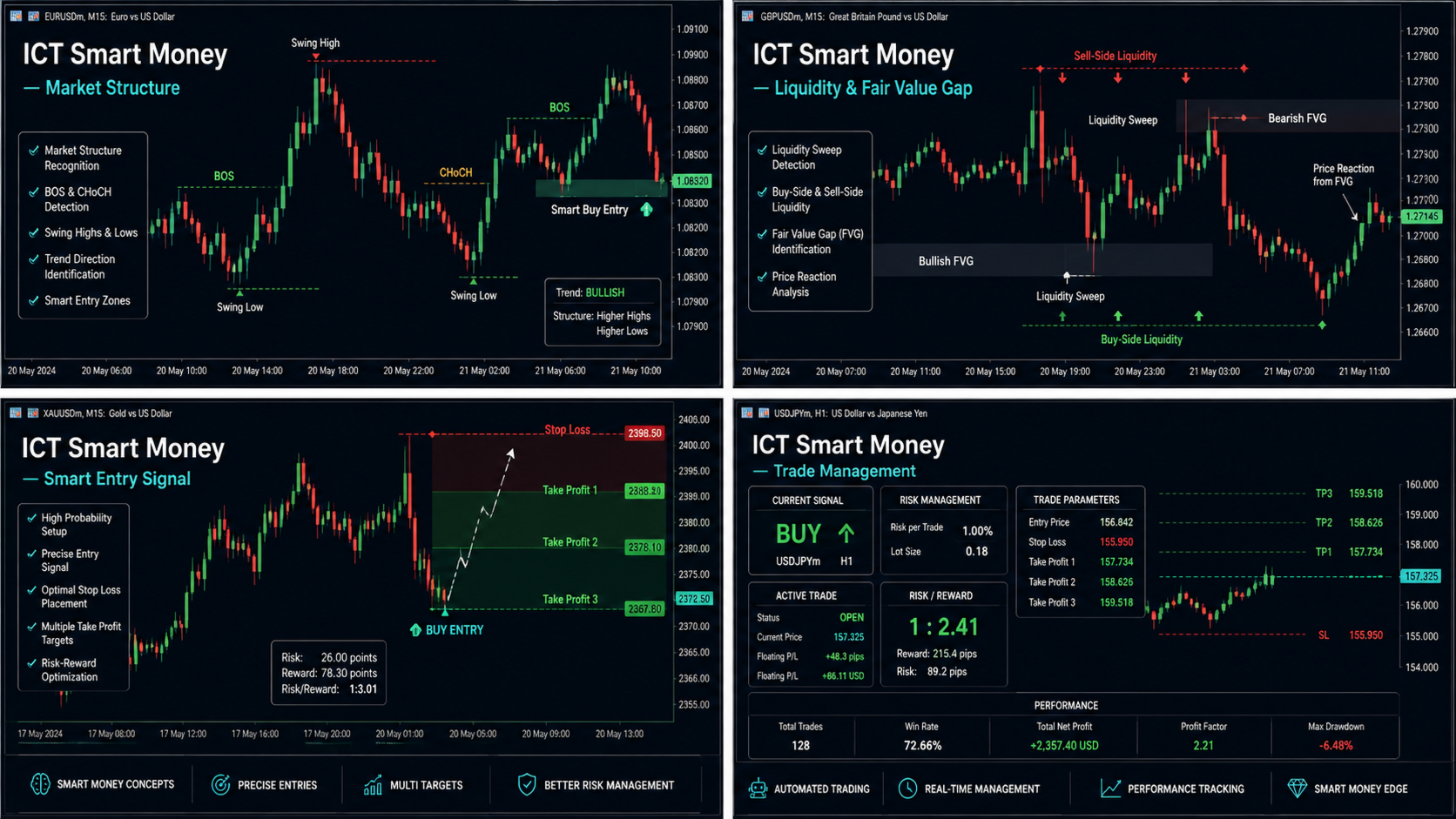
ICT Smart Money Scalper is an automated trading Expert Advisor for MetaTrader 5, designed to identify short-term trading opportunities using ICT (Inner Circle Trader) and Smart Money concepts.
The Expert Advisor analyzes price action and looks for a combination of several factors, including Fair Value Gap (FVG), Order Block, Liquidity Sweep, candle direction, and market volatility. A trade is opened only when the required strategy conditions are confirmed.
Key Advantages
• ICT + Smart Money Logic — analyzes price movement using FVG, Order Block, and Liquidity Sweep concepts.
• Fair Value Gap — identifies price imbalances that may serve as potential entry zones.
• Liquidity Sweep — detects situations where price takes liquidity above local highs or below local lows.
• Order Block — provides additional confirmation for the expected market direction.
• ATR Volatility Filter — avoids trading when market volatility is too low.
• Trading Session Filter — allows trading to be restricted to a specific server-time period, such as the London and New York sessions.
• Dynamic Lot Calculation — automatically calculates position size based on account balance and the selected risk percentage.
• Daily Loss Protection — when the configured maximum daily loss is reached, the EA stops opening new trades and closes positions opened by the Expert Advisor.
• Breakeven — automatically moves the Stop Loss toward the breakeven area after the position reaches the configured profit level.
• Trailing Stop — automatically follows profitable positions by adjusting the Stop Loss.
• Spread Protection — prevents new trades when the current spread exceeds the configured maximum value.
• Open Position Limit — allows you to set the maximum number of simultaneously open trades for the current symbol.
How It Works
The Expert Advisor evaluates the market on each new bar and performs a sequence of market-condition checks.
1. Daily Risk Control
The EA first checks the current drawdown relative to the account balance at the beginning of the day.
If the daily loss reaches the value specified in Maximum Daily Loss, new trades are blocked and positions opened by the EA are closed.
2. Trading Time Filter
When the time filter is enabled, the EA opens trades only within the configured server-time range.
This allows trading to be focused on selected market sessions.
3. Spread Check
Before searching for a trading signal, the EA checks the current spread.
If the spread is higher than the configured maximum value, no new trade is opened.
4. Volatility Check
The ATR (Average True Range) indicator is used to evaluate market activity.
If market volatility is below the configured threshold, the trading signal is ignored.
5. ICT Signal Detection
The EA analyzes recent candles and checks multiple conditions.
BUY conditions:
-
a liquidity sweep of a local low is detected;
-
a bullish Fair Value Gap is identified;
-
the previous candle meets the Bullish Order Block condition;
-
the confirmation candle closes above its opening price.
SELL conditions:
-
a liquidity sweep of a local high is detected;
-
a bearish Fair Value Gap is identified;
-
the previous candle meets the Bearish Order Block condition;
-
the confirmation candle closes below its opening price.
A trading signal is generated only when the required conditions are met.
Position Management
After opening a trade, the Expert Advisor automatically sets the Stop Loss and Take Profit levels.
When the configured profit level is reached, Breakeven can be activated, moving the Stop Loss toward the breakeven area.
The Trailing Stop can also be enabled to automatically follow the price as the trade moves into profit.
Risk Management
The position size can be configured in two ways:
Dynamic Lot — the EA automatically calculates the lot size based on account balance and the selected risk percentage.
Fixed Lot — the user specifies a fixed position size manually.
An additional daily loss limit is available for enhanced risk control.
Input ParametersRisk Warning: Automated trading does not guarantee profits. Trading results depend on the trading instrument, timeframe, EA settings, broker conditions, and market environment. Always test the Expert Advisor in the Strategy Tester and on a demo account before using it on a real trading account.
Risk & Money Management
Risk per trade (%) — percentage of account balance used to calculate the risk for each trade.
Maximum Daily Loss Limit (%) — maximum allowed daily loss as a percentage of the account balance at the beginning of the trading day.
Fixed Lot — fixed lot size. Set to 0.0 to enable automatic lot calculation.
Max Simultaneous Open Trades per Symbol — maximum number of simultaneously open positions for the current symbol.
Trade Settings
Stop Loss in Points — Stop Loss distance in points.
Take Profit in Points — Take Profit distance in points.
Max Allowed Spread in Points — maximum allowed spread for opening a new trade.
EA Magic Number — unique Magic Number used to identify positions opened by this Expert Advisor.
Trailing & Breakeven
Enable Auto-Breakeven — enables or disables automatic Breakeven.
Profit Points to Trigger Breakeven — number of profitable points required before Breakeven is activated.
Enable Trailing Stop — enables or disables the Trailing Stop.
Trailing Distance Points — distance of the Trailing Stop from the current market price.
Session Time Filter
Enable Trading Sessions Filter — enables or disables the trading-time filter.
Trading Start Hour — beginning of the allowed trading period according to server time.
Trading End Hour — end of the allowed trading period according to server time.
ICT & Volatility Settings
Lookback Bars for Liquidity & Order Block — number of historical bars used to analyze liquidity and Order Block conditions.
Minimum Fair Value Gap Points — minimum required size of the Fair Value Gap.
ATR Volatility Period — period used for the ATR indicator.
Minimum Volatility Threshold — minimum volatility level required for a trading signal.
Who Is This EA For?ICT Smart Money Scalper is designed for traders who use ICT, Smart Money, Fair Value Gap, Order Block, and Liquidity Sweep concepts and want to automate signal detection and position management.
The Expert Advisor can be used on different trading instruments and timeframes, provided that the settings are properly tested and optimized for the selected market.
Always test the EA before using it on a real account and carefully consider the risks of automated trading.