Nasdaq Titan Pro MT4
- Experts
-
Marcin Piotr Drozdz
 Hello,
I develop Expert Advisors and automated trading tools for the MetaTrader 4 and MetaTrader 5 platforms. My main area of interest is systematic trading in index markets, particularly NASDAQ/US100. - Version: 1.80
- Updated: 17 September 2026
- Activations: 10
NASDAQ TITAN PRO – Automated Expert Advisor for NASDAQ 100
NASDAQ TITAN PRO is a fully automated Expert Advisor for MetaTrader 5, designed for trading the NASDAQ 100 index.
Depending on the broker, the instrument may be listed as NASDAQ100, NAS100, US100, USTEC, USTECH, FUS100 or a similar symbol.
The EA includes two separate and independent trading strategies. Each strategy has its own settings and can be enabled or disabled independently. Both strategies can operate simultaneously, or each strategy can work on its own.
Recommended timeframe for the main strategy: M15.
No Martingale. No classic Grid. No automatic lot escalation after losses.
NASDAQ TITAN PRO does not use Martingale or a classic Grid system based on automatically increasing position size after consecutive losses.
Main Strategy
The main strategy analyzes the market automatically and makes trading decisions only when the required conditions are met, using additional filters that control signal quality, market direction, volatility and trading time conditions.
The user can enable or disable individual filters, adjust strategy parameters to personal preferences and broker conditions, and specify whether the EA should trade BUY, SELL or only one selected direction.
Additional Inside Bar Strategy
NASDAQ TITAN PRO also includes an independent Inside Bar strategy. It has its own settings, Magic Number and independent position size. It can operate independently, simultaneously with the main strategy, or be completely disabled.
Position Management
NASDAQ TITAN PRO includes advanced automatic position management mechanisms.
Available functions include:
- Take Profit,
- Stop Loss,
- Emergency Stop Loss,
- Break Even,
- Trailing Stop,
- automatic position closing when exit conditions are met,
- optional position reversal when an opposite signal appears,
- optional Trend Re-entry.
Break Even, Trailing Stop, Take Profit, Stop Loss and Emergency Stop Loss can be configured individually, allowing the user to adjust position protection levels according to their own risk management approach.
Signal Filters
The main strategy includes a set of optional filters designed to reduce the number of trades and define more precisely the conditions under which the EA may open a position.
Available filters include:
- signal candle size filter,
- signal candle quality filter,
- candle close position filter,
- ADX/DMI filter,
- channel width filter,
- EMA High/Low Channel Filter,
Each filter can be configured independently.
Time Hours
The Nasdaq Titan strategy uses fixed trading windows that automatically shift according to the Nasdaq Session Open Hour / Minute setting. Enter the opening time of the regular Nasdaq cash session in your broker’s server time, not your local time. The default 15:30 may not match your broker. After a clock change, check the setting and update it if necessary. A red reminder appears below the panel for seven calendar days from the US or European clock-change date. The trading windows apply only to entries by the Nasdaq Titan Pro strategy. The Inside Bar strategy operates independently of this filter.
Optional Additional Orders
The main strategy includes an optional module for additional Limit orders.
The module is disabled by default and is not required for the main strategy to operate.
The user can define:
- the number of additional orders,
- position size,
- distance between consecutive levels.
Activating this function increases total market exposure and should only be used after determining the maximum acceptable level of risk.
NASDAQ TITAN PRO does not use a Martingale mechanism that increases position size after consecutive losses.
Visualization and Information Panel
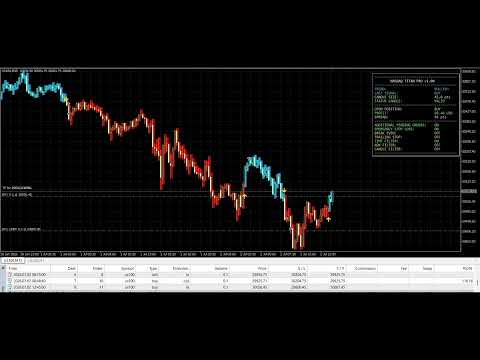
The EA includes a built-in information panel displaying the most important information about the current state of the system.
The system can also mark signals directly on the chart and color selected candles according to the current signal direction.
The panel also displays the status of the additional Inside Bar strategy.
Configuration
Instrument: NASDAQ 100 / NASDAQ100 / NAS100 / US100 / USTEC / USTECH / FUS100
Platform: MetaTrader 5
Recommended timeframe for the main strategy: M15
The position size of both strategies can be configured independently.
Before using the Expert Advisor on a live account, users are advised to perform their own historical tests and forward testing on a demo account.
A stable VPS is recommended for continuous EA operation.
Risk Information
Trading Forex, CFDs, futures and other leveraged financial instruments involves the risk of losing part or all of the invested capital.
Historical results, backtests and examples presented on the product page do not guarantee similar results in the future.
Results may vary depending on the broker, symbol specifications, spread, commission, slippage, historical data quality, server time, liquidity and order execution conditions.
Users should test the EA independently and adjust position size and other risk management parameters according to their account size and individual risk tolerance.