Stop Gambling MT5 EA
- Utilities
- Version: 2.1
- Updated: 24 June 2026
- Activations: 5

Stop Gambling | Daily Loss Limit Enforcer
Stop trading when it matters most. Stop Gambling automatically closes all your positions when you hit your daily loss limit. No exceptions, no second chances.
Revenge trading and overtrading after a losing streak are the number one account killers for retail traders. Stop Gambling removes the human element entirely. When your limit is reached, the EA acts instantly. You do not get a choice.
How It Works
Set your maximum daily loss percentage once. From that moment, the EA monitors your account equity on every tick and every second. The moment your floating losses hit the threshold, every open position is closed at market.
The session limit is locked when trading begins. You cannot raise it mid-session. You can lower it, but never back up.
Hard Loss Limit Enforcement
When your equity drops by your set percentage from the session baseline, all positions are closed immediately. No confirmation, no delay.
Profit Protection Ratchet
As you close profitable trades, your session baseline automatically ratchets up to protect realized gains.
- Your risk is always measured from your highest realized equity level, not just where you started
- Unrealized spikes do not move the baseline — only closed profits count
- The ratchet only moves up, never down
Session Limit Locked at Start
The loss percentage is locked when your session begins. Input changes are ignored mid-session.
- You set your rules before the market opens, not during a losing streak
- You can tighten your limit mid-session if you want to be more conservative
- You cannot raise it
Per-Account State Persistence
The EA saves its state per account to a file that survives terminal restarts, EA removal, and chart changes.
- Changing timeframes or recompiling does not reset your session
- Each trading account has its own independent state
- The session resets at midnight New York time
CALM Mode and ANXIOUS Mode
Stop Gambling has two trading modes, switchable directly from the on-chart panel at any time.
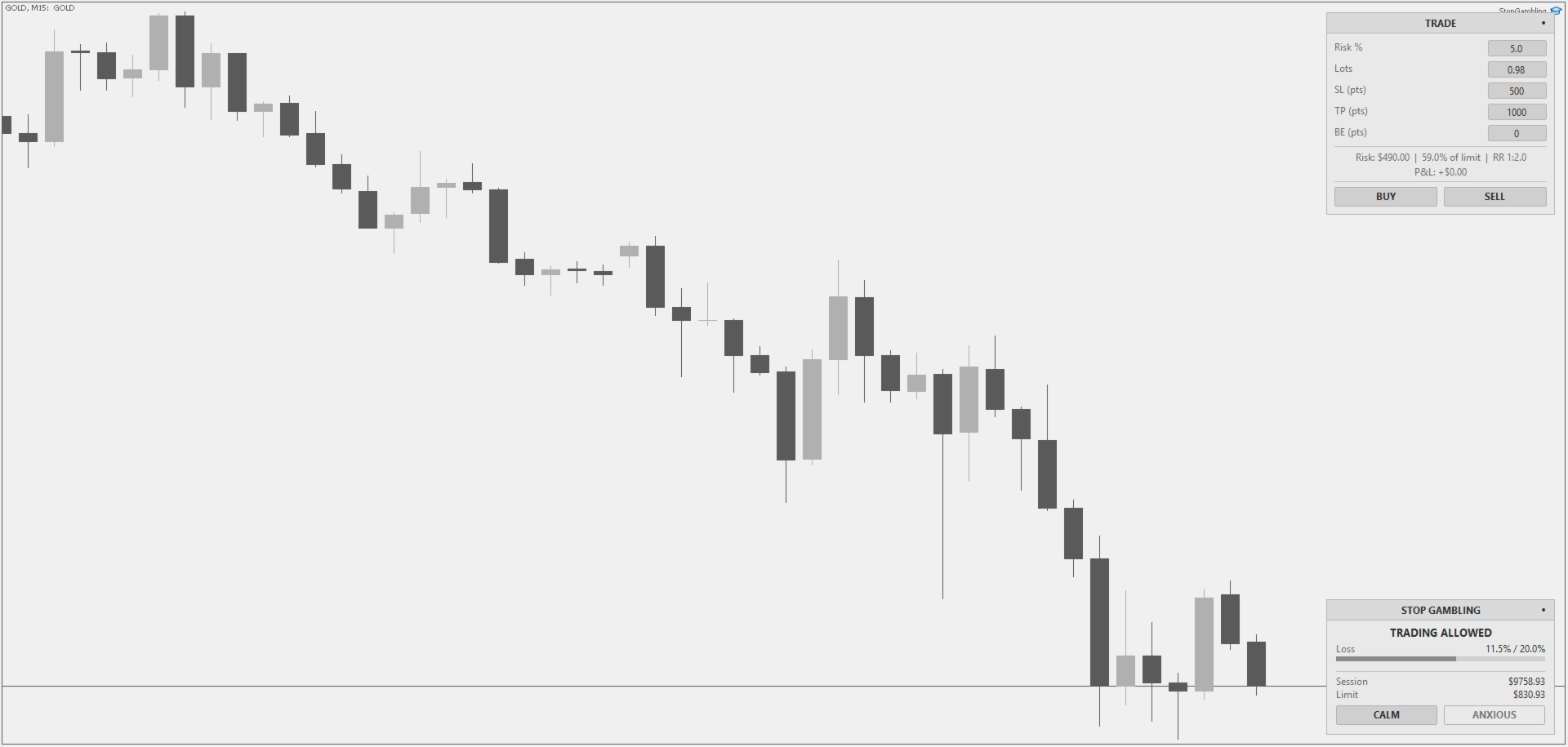
CALM Mode is the default. Only your session loss limit is active. The panel bar shows how close your current floating losses are to the limit. When the threshold is reached, all positions close. Simple and clean.
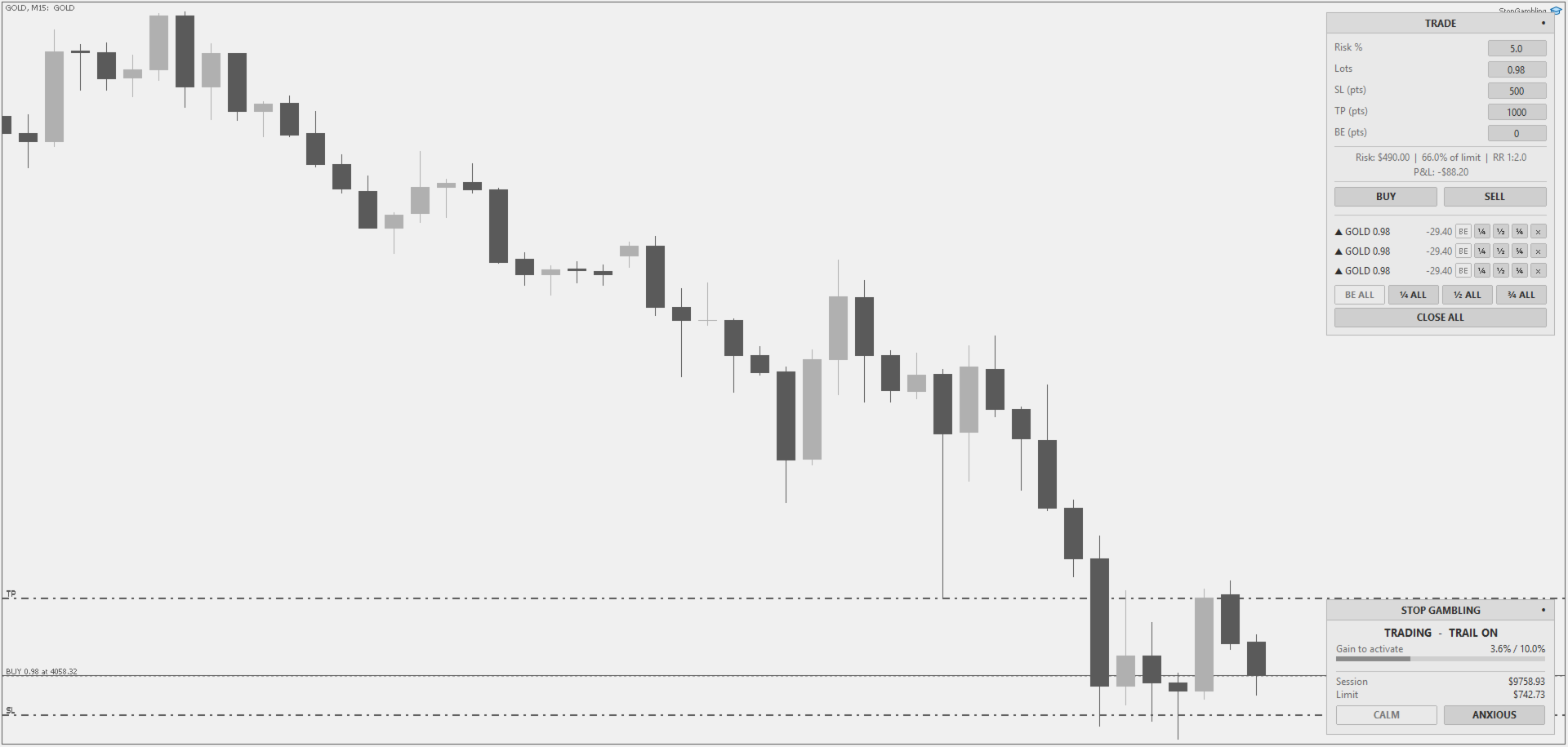
ANXIOUS Mode adds a profit-protecting trailing stop on top of the loss limit. Use this when you are in a winning streak and want to guarantee you walk away up on the day.
Anxious Mode works in two phases.
Phase 1, waiting to activate: after switching to Anxious Mode, nothing changes until your account gains the Trailing Activation percentage from your session start balance.
- The panel bar shows your progress toward the activation threshold
- If you are currently below your session start, the panel shows Recover first
- You must get back above your starting balance before the trailing stop can arm itself
Phase 2, trailing floor active: once your gains reach the activation threshold, a trailing floor is set at your peak equity minus the Trailing Pullback percentage.
- The panel bar shows how close your current equity is to the floor
- If equity drops down and touches the floor, all open positions are closed immediately
- Your gains are locked in and your session baseline resets to the new higher balance
- You are free to keep trading from there, with the loss limit now protecting your locked-in profit
Switching back to CALM Mode at any time disables the trailing stop. Switching to ANXIOUS Mode again requires reaching the activation threshold from the current baseline.
Trade Execution Panel
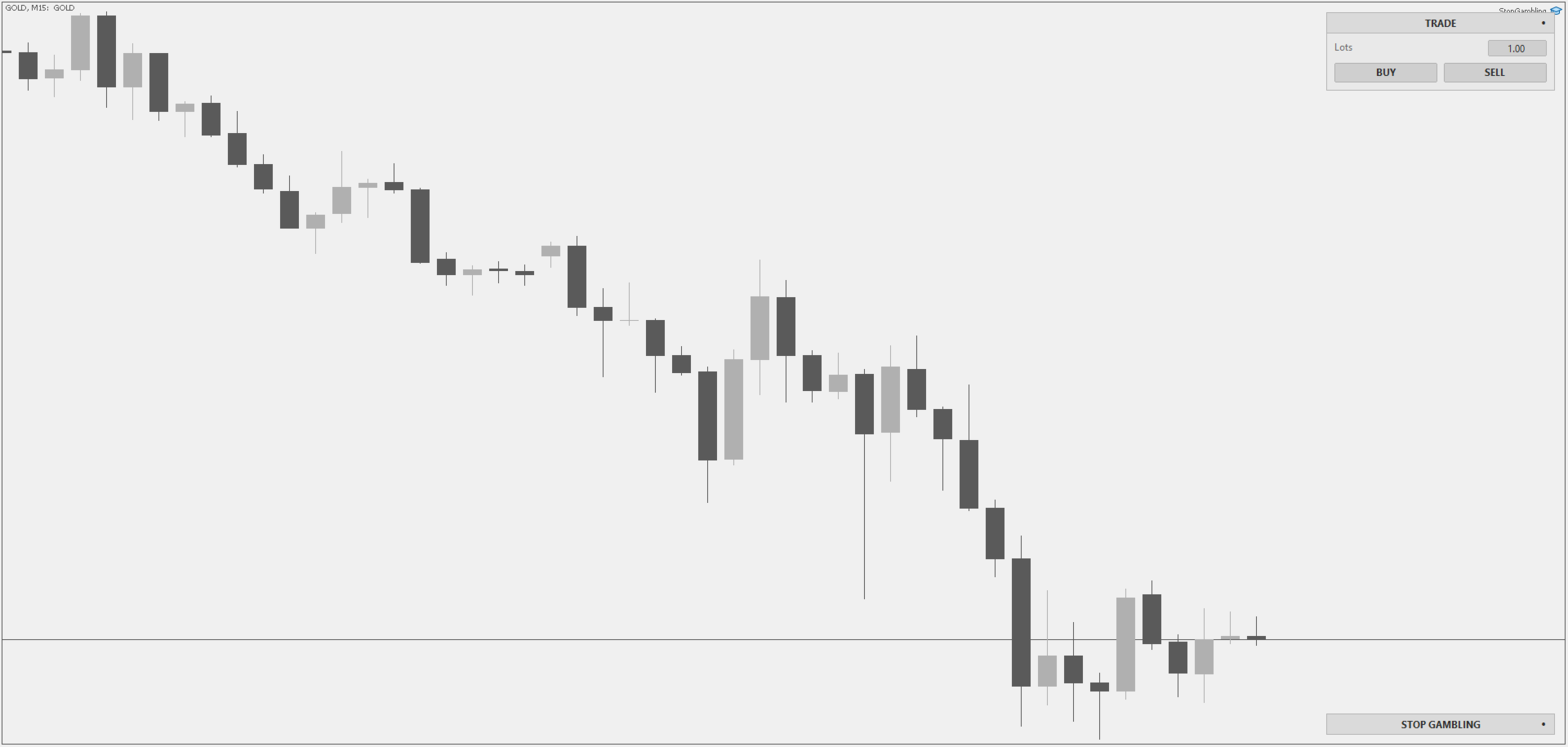
Stop Gambling includes a built-in one-click trade panel that sits alongside the risk monitor on your chart.
- Two modes — minimized shows only lot size and BUY/SELL for pure quick-fire market entries with no SL or TP applied. Expanded activates the full risk setup. Toggle with the dot button
- Risk-based lot sizing — type your risk percentage and lot size calculates automatically from your SL distance and account balance. Change SL and lot size updates live
- SL, TP, and BE buffer inputs — set stop loss, take profit, and breakeven buffer in points directly from the panel before placing any trade
- Live risk display — see exact dollar risk and percentage of your remaining daily allowance before you click buy or sell. Risk/reward ratio shown automatically when TP is set
- Live P&L display — running total P&L across all open positions always visible
- Position management — each open position shows a full action row: move to breakeven, close 25%, 50%, or 75%, or close fully
- Bulk management — BE ALL, ¼ ALL, ½ ALL, ¾ ALL, and CLOSE ALL act on every position simultaneously with a single click
- Smart button states — buttons dim automatically when the action is not viable. Breakeven unavailable when the position is in loss. Partials unavailable when lot size is too small
- Scrolling position list — up to five positions visible at once with scroll controls for larger books
Panel and Appearance
The on-chart panel can be positioned in six locations: top left, top center, top right, bottom left, bottom center, or bottom right. Choose light or dark theme to match your chart setup. Price and time scales can be hidden to keep your chart clean. Click the dot in the top right corner of the trade panel to toggle between minimized mode (quick-fire entry, no SL or TP) and expanded mode (full risk setup).
Language Support
The panel and all alerts are fully localized. Supported languages: English, Russian, Chinese, Spanish, Portuguese, Japanese, German, Korean, French, Italian, Turkish.
Input Parameters
Panel Theme (default Light): visual theme for the on-chart panel. Choose Light or Dark.
Panel Position (default Top Center): position of the risk monitor panel. Choose from six anchor positions.
Language (default English): language for the panel display and all alert messages.
Hide Price and Time Scales (default False): hides the chart price and time scales while the EA is active. Scales are restored when the EA is removed.
Maximum Loss % (default 20.0): maximum loss percentage before all positions close. Valid range is 1 to 99.
Trailing Activation % (default 10.0): gain percentage from session start required to activate the trailing floor. Only applies in Anxious Mode.
Trailing Pullback % (default 5.0): drop percentage from peak equity that triggers position close and gain lock-in. Only applies in Anxious Mode.
Show Trading Panel (default True): shows or hides the built-in trade execution panel.
Trade Panel Position (default Top Left): position of the trade execution panel. Choose from six anchor positions.
Important Notes
- Works on any symbol and timeframe
- Attach to one chart per account
- Requires Algo Trading to be enabled in MetaTrader 5
- The limit is equity-based and includes floating P&L. Unrealized losses count toward your threshold