
Adaptive SuperTrend with Trend Quality Index — 4-Layer Confluence Signal System for MetaTrader 4 and MetaTrader 5

Introduction
Standard SuperTrend indicators use a fixed ATR multiplier that remains constant regardless of market conditions. When a strong trend develops, fixed bands lag behind — too wide to catch early entries. When the market turns choppy, those same bands whipsaw on every minor fluctuation. Every flip produces an identical arrow whether backed by strong momentum or triggered by random noise.
Trend Quorum solves both problems. It introduces a Trend Quality Index (TQI) — a continuous 0-to-1 composite score from four independent factors — that dynamically modulates SuperTrend band width on every bar. High-quality trends compress bands to capture moves earlier. Choppy conditions widen bands to filter false signals. Three optional confluence filters (EMA Cloud, ADX, Multi-Timeframe) act as gates that must "vote" in agreement before any signal fires. Every signal receives a strength rating based on how many filters confirm.
Download the indicator:
- MetaTrader 5: Trend Quorum MT5
- MetaTrader 4: Trend Quorum MT4
The non-repainting architecture evaluates only confirmed closed bars. Built-in risk management calculates ATR-based SL and three TP levels with hit detection. A 10-section dashboard displays trend direction, TQI, confluence status, indicators, market context, and trade P&L. Eleven alert conditions cover signals, trend changes, TP/SL hits, and TQI thresholds via popup, push, and email.
What Is Trend Quality Trading
Not all trends are equal. A steady directional move with aligned structure is fundamentally different from an erratic, mean-reverting market. The Trend Quality Index quantifies this by measuring four factors:
- Efficiency Ratio — directional purity: how much movement is net directional vs wasted on noise
- Volatility Regime — whether ATR is expanding (new directional phase) or contracting (consolidation)
- Price Structure — where close sits within the recent range (edges = conviction, middle = indecision)
- Momentum Persistence — percentage of bars aligned with the overall window direction
These four factors combine via configurable weights (0.35/0.20/0.25/0.20) into a single 0-to-1 score. TQI of 0.8 = strong, efficient, persistent trend. TQI of 0.2 = noisy, directionless market.
The critical insight: TQI tells the trader HOW GOOD the trend is, not just its direction. A SuperTrend can be bullish with TQI 0.15 (unreliable) or bullish with TQI 0.85 (high-conviction). Standard SuperTrend cannot make this distinction.
The Problem with Standard SuperTrend
The standard SuperTrend uses upper/lower bands at a fixed ATR multiple. Price closing beyond a band flips the trend. The ratchet mechanism prevents the active band from moving against the trend. Elegant in concept, but the fixed multiplier creates systematic problems:
In strong trends, a multiplier of 2.0 places bands too far from price — the trend must develop significant momentum before the initial flip, and the trailing band gives back profit before any reversal signal. Reducing to 1.5 catches entries earlier but generates constant whipsaws in ranging markets.
A single fixed number cannot simultaneously be tight enough for trending markets and wide enough for choppy markets. The optimal multiplier depends on current market character, which changes continuously.
Beyond band width, standard SuperTrend provides no quality measurement — every flip produces an identical signal. And relying on a single indicator without cross-validation exposes the trader to SuperTrend's specific failure modes, particularly vulnerability to volatility spikes that temporarily push price through a band before reversing.
Dynamic Band Compression via TQI
The TQI directly modulates the SuperTrend multiplier through a nonlinear compression function:
tqiMult = 1 - qualityStrength + qualityStrength * (0.6 + 0.8 * pow(1 - tqi, qualityCurve))
The qualityStrength parameter (default 0.4) controls TQI influence. The qualityCurve (default 1.5) shapes the response — higher values concentrate compression toward high-TQI environments.
High TQI → tqiMult drops below 1.0 → bands compress → tighter trailing stop → earlier trend change detection. Safe because whipsaw probability is low in clean trends.
Low TQI → tqiMult rises toward 1.0+ → bands widen → price must make a more convincing move to flip → filters out marginal crossovers in noise.
Asymmetric bands add another layer: the active band (trailing behind price) tightens more aggressively than the passive band (reversal side). This ratchet effect follows trends closely while requiring larger moves to reverse. Asymmetry Strength (default 0.5) controls the degree.
Character-flip detection allows trend changes even without a price-band crossover. When TQI collapses from above 0.55 to below 0.25, and the trend has persisted at least 5 bars, the indicator recognizes a regime change. This catches reversals 2-5 bars earlier than pure price-break systems.
Non-Repainting Signal Architecture
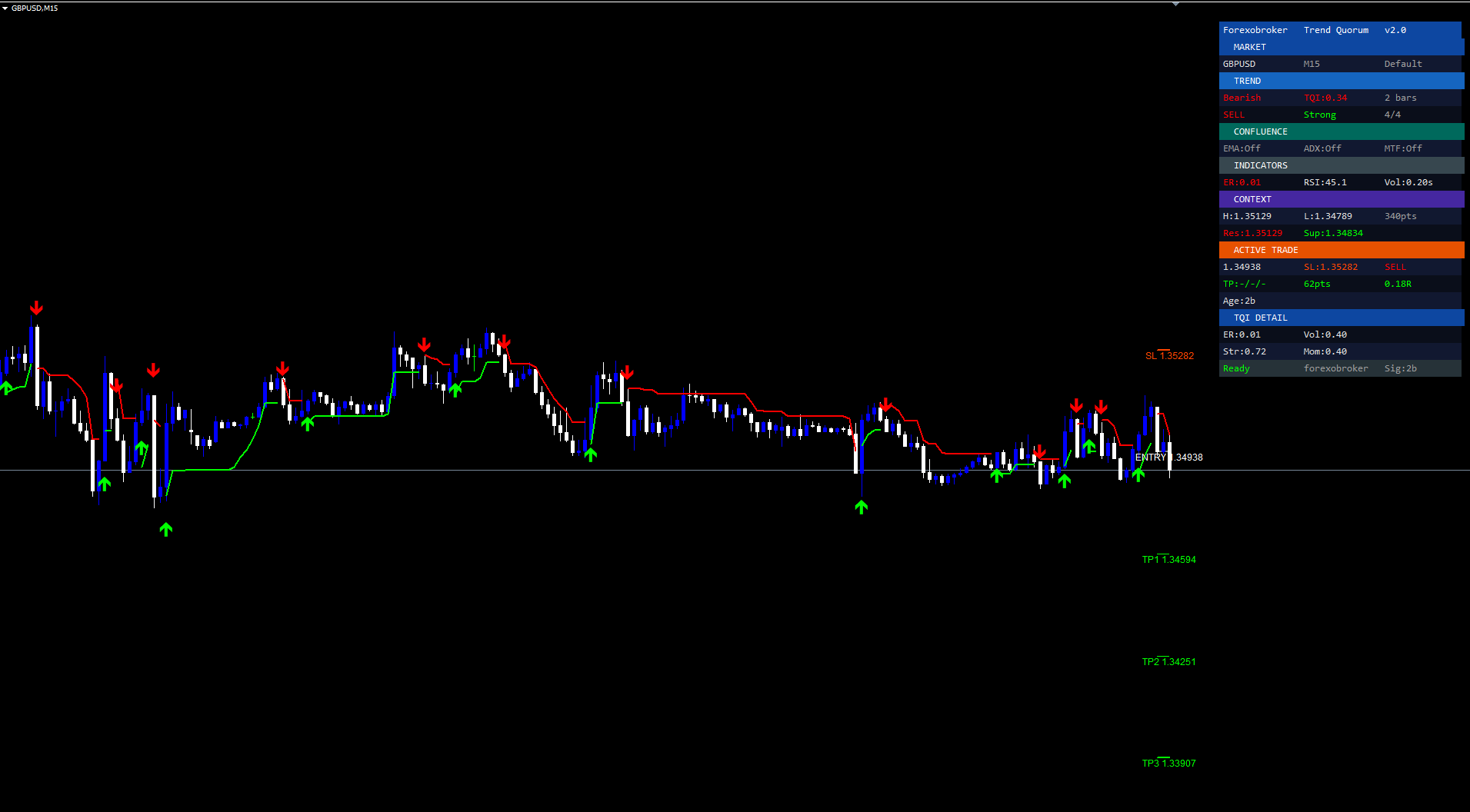
Repainting occurs when an indicator changes output after a bar closes — arrows appear mid-bar and vanish on close, creating false backtesting accuracy.
Trend Quorum eliminates this: signals are calculated only on confirmed closed bars. The main loop processes shift 1 (most recently completed bar) for signal detection. Shift 0 is used only for TP/SL tracking and dashboard updates. Once an arrow is printed, it never moves or disappears.
During historical loading, the indicator processes all past bars and draws arrows at every confirmed signal, providing complete and accurate signal history.
The 4-Layer Confluence System
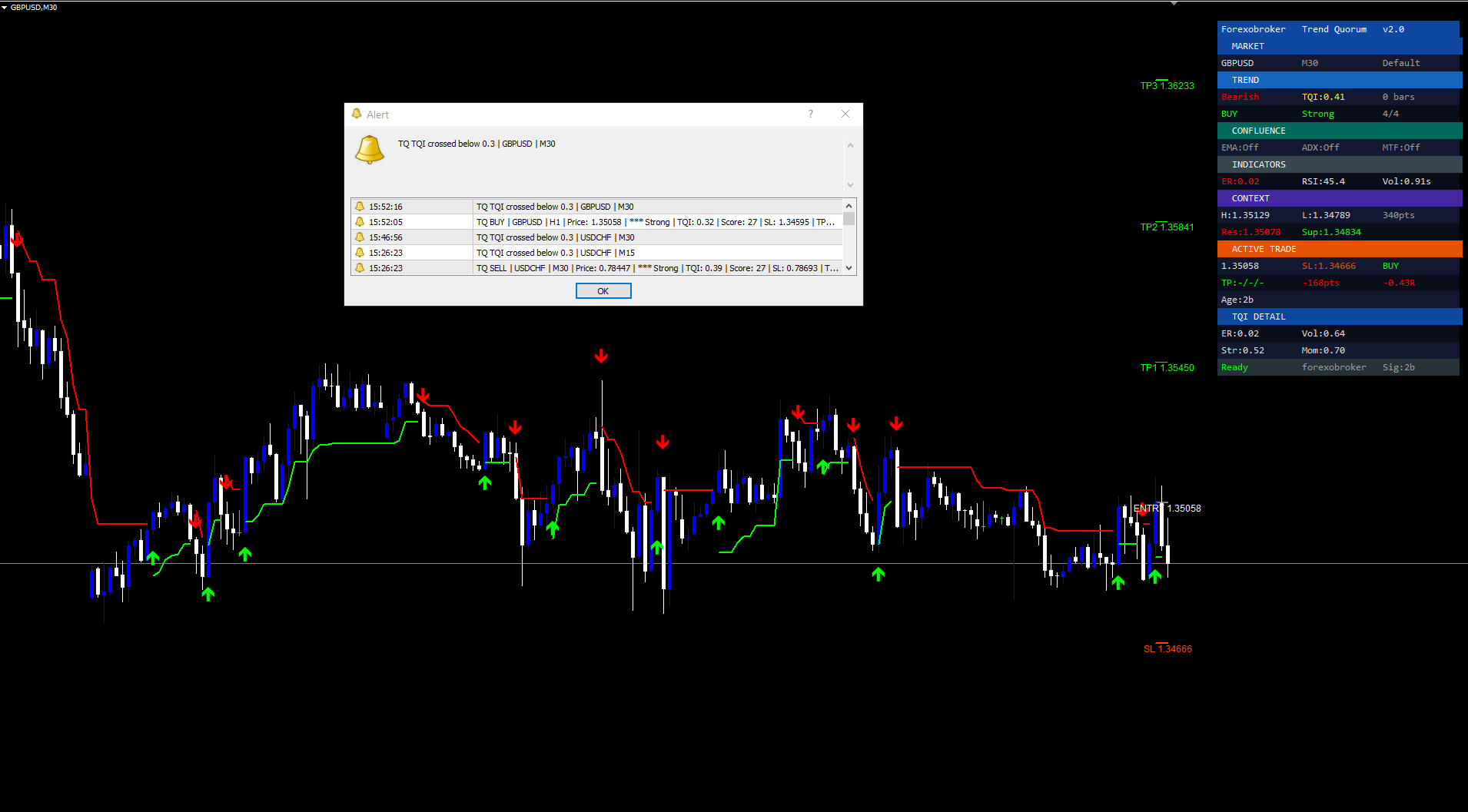
A SuperTrend flip alone is not sufficient for a high-quality signal. Trend Quorum uses four independent layers forming a voting system — the "quorum."
Layer 1: SuperTrend Flip (always active). The adaptive band crossing or character-flip provides the directional trigger. Always counted in confluence.
Layer 2: EMA Cloud (off by default). Fast EMA (9) and slow EMA (21). BUY requires bullish cloud (fast > slow); SELL requires bearish. The visual cloud fill shows intermediate trend direction. Excellent at eliminating counter-trend signals during pullbacks.
Layer 3: ADX Trend Strength (off by default). ADX (period 14) must exceed threshold (default 20). ADX > 20 = trending; below = ranging. Rejects signals in flat consolidation. Threshold of 25 is stricter for even higher quality.
Layer 4: MTF Confirmation (off by default). Higher-timeframe trend must agree. Auto-select: M1-M5→H1, M15→H4, H1→D1, H4→W1, D1→MN1 (or manual override). Methods: SuperTrend or EMA Cross on HTF. Prevents counter-trend entries against the dominant direction.
Each enabled filter that passes adds one point. Maximum 4/4. Signal strength: 4/4 = Strong (three stars), 3/4 = Medium (two stars), 1-2/4 = Weak (one star). Disabled filters automatically pass — the system never penalizes leaving a filter off.
The "quorum" metaphor: each filter is a board member casting a vote. The signal fires only when enough votes agree. Traders configure which filters participate and how many must agree.
ATR-Based Risk Management
Every signal includes a complete risk framework calculated from ATR.
Stop Loss: Derived from the most recent pivot level plus ATR buffer. BUY SL = last pivot low - (1.5 x ATR). SELL SL = last pivot high + (1.5 x ATR). Ensures stops are placed beyond genuine structural levels.
Three Take Profit Levels:
- TP1 at 1.0R — risk distance equals reward
- TP2 at 2.0R — twice the risk distance
- TP3 at 3.0R — three times the risk distance
Hit detection tracks each level. When reached, the line turns turquoise and the label shows "HIT." Dashboard displays status as Y/-- for each level. Trade resets on TP3 hit, SL hit, or timeout (100 bars).
Visual OBJ_TREND lines extend rightward from the signal bar. Gray = entry, red = SL, green = TP levels. Price labels at right end for easy reading.
This supports multiple position strategies: close 1/3 at TP1 (breakeven trade), 1/3 at TP2, let final 1/3 run to TP3. Or adjust R-multiples: 2R/4R/6R for swing, 0.5R/1R/1.5R for scalping.
The Real-Time Dashboard
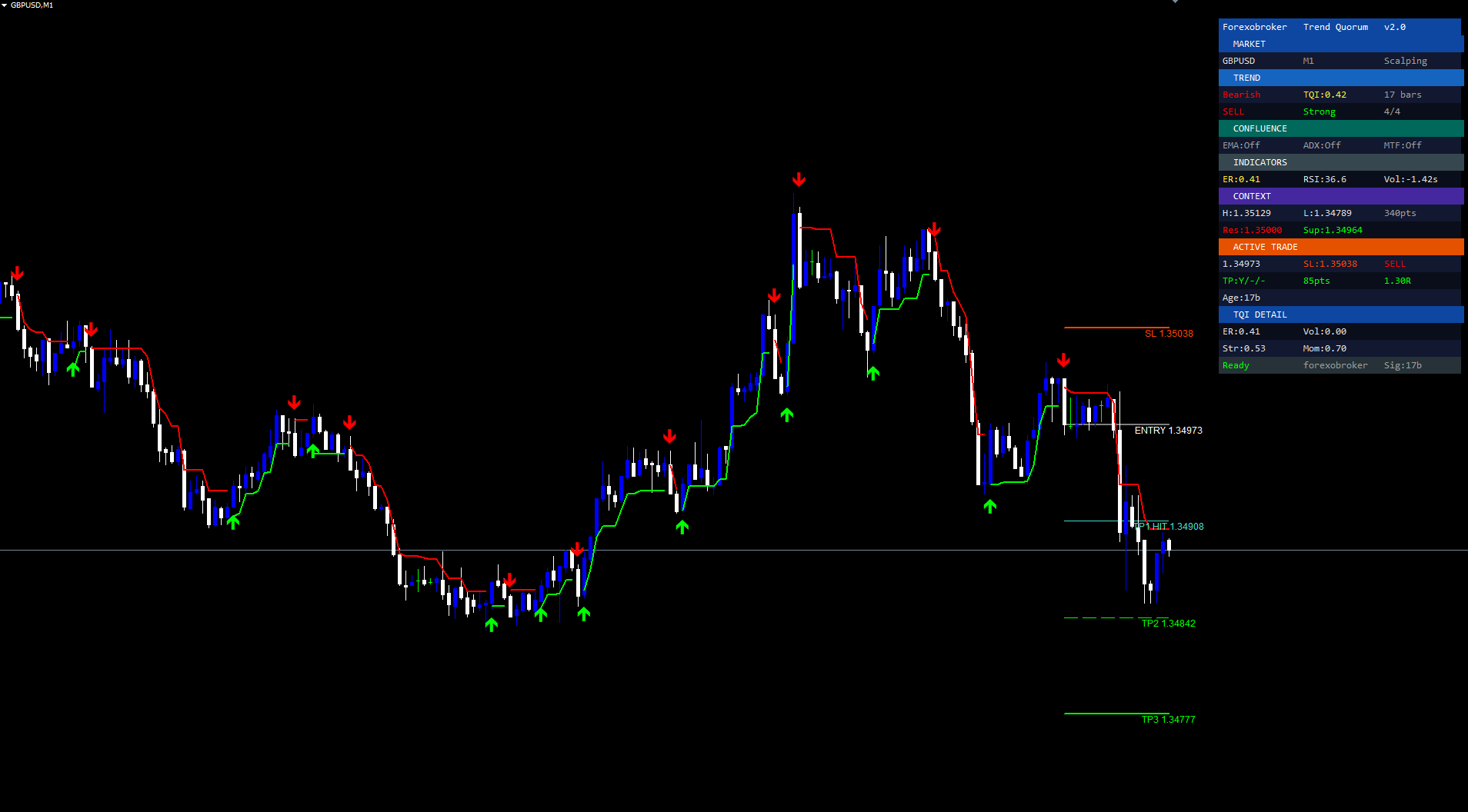
A 10-section panel in the upper-right corner provides complete market and trade context at a glance.
Market. Author branding, indicator name, version. Symbol, timeframe, active preset.
Trend. SuperTrend direction (Bullish/Bearish, color-coded), TQI value (green/yellow/red), trend age in bars. Signal direction, strength rating, confluence count.
Confluence. EMA Cloud status (Bullish/Bearish/Off), ADX value (Strong/Weak/Off), MTF direction (Off or aligned). Instantly shows which factors agree.
Indicators. Efficiency Ratio (with regime label), RSI reading, Volume Z-score.
Context. Session high/low, range in points. Nearest pivot resistance and support levels.
Active Trade (when tracking). Entry, SL, TP hit status, P&L in points and R-multiples, trade age.
TQI Detail. Component breakdown: Efficiency, Volatility, Structure, Momentum values.
Footer. Warmup status, bars since last signal.
The dashboard computes absolute pixel coordinates from CHART_WIDTH_IN_PIXELS and anchors to CORNER_LEFT_UPPER . Repositions on CHARTEVENT_CHART_CHANGE .
The Alert System
Eleven alert conditions cover every critical moment:
- Buy Signal — confirmed buy with all confluence gates passing
- Sell Signal — confirmed sell with all gates passing
- Any Signal — either buy or sell (catch-all)
- Trend Change Bullish — SuperTrend flips bull (ungated by confluence)
- Trend Change Bearish — SuperTrend flips bear (ungated)
- TP1 Hit — first take profit reached
- TP2 Hit — second take profit reached
- TP3 Hit — third take profit reached
- SL Hit — stop loss reached
- TQI High (>0.7) — strong trend environment developing
- TQI Low (<0.3) — trend quality collapsed, choppy warning
Signal alerts include: symbol, timeframe, price, strength rating, TQI value, score, SL, TP1, TP2, TP3. Three channels: Alert() popup, SendNotification() push, SendMail() email. All guarded once-per-bar.
Practical Trading Workflow
Step 1: Apply and Select Preset
Drag Trend Quorum from Navigator > Indicators > Market onto any chart. Auto preset selects Scalping for M1-M5, Default for M15-H4, Swing for D1+.
Step 2: Enable Confluence Filters
Start with EMA Cloud + ADX for directional alignment and trend strength. Add MTF for higher-TF confirmation on swing setups.
Step 3: Wait for Signal Arrow
Arrow appears when confirmed bar close triggers a SuperTrend flip and all enabled gates agree. Don't anticipate — wait for bar close.
Step 4: Check Dashboard Context
Prioritize Strong (4/4) signals. Confirm TQI > 0.5, Trending regime, RSI not extreme. Context section shows session range and pivots.
Step 5: Set Alerts
Enable push notifications for TP/SL hits. Alert messages include full trade details for acting without opening the chart.
Step 6: Manage Trade
Monitor TP progression in Active Trade section. Scale out at TP1/TP2, let remainder run to TP3. P&L shows points and R-multiples in real time.
Timeframe Considerations
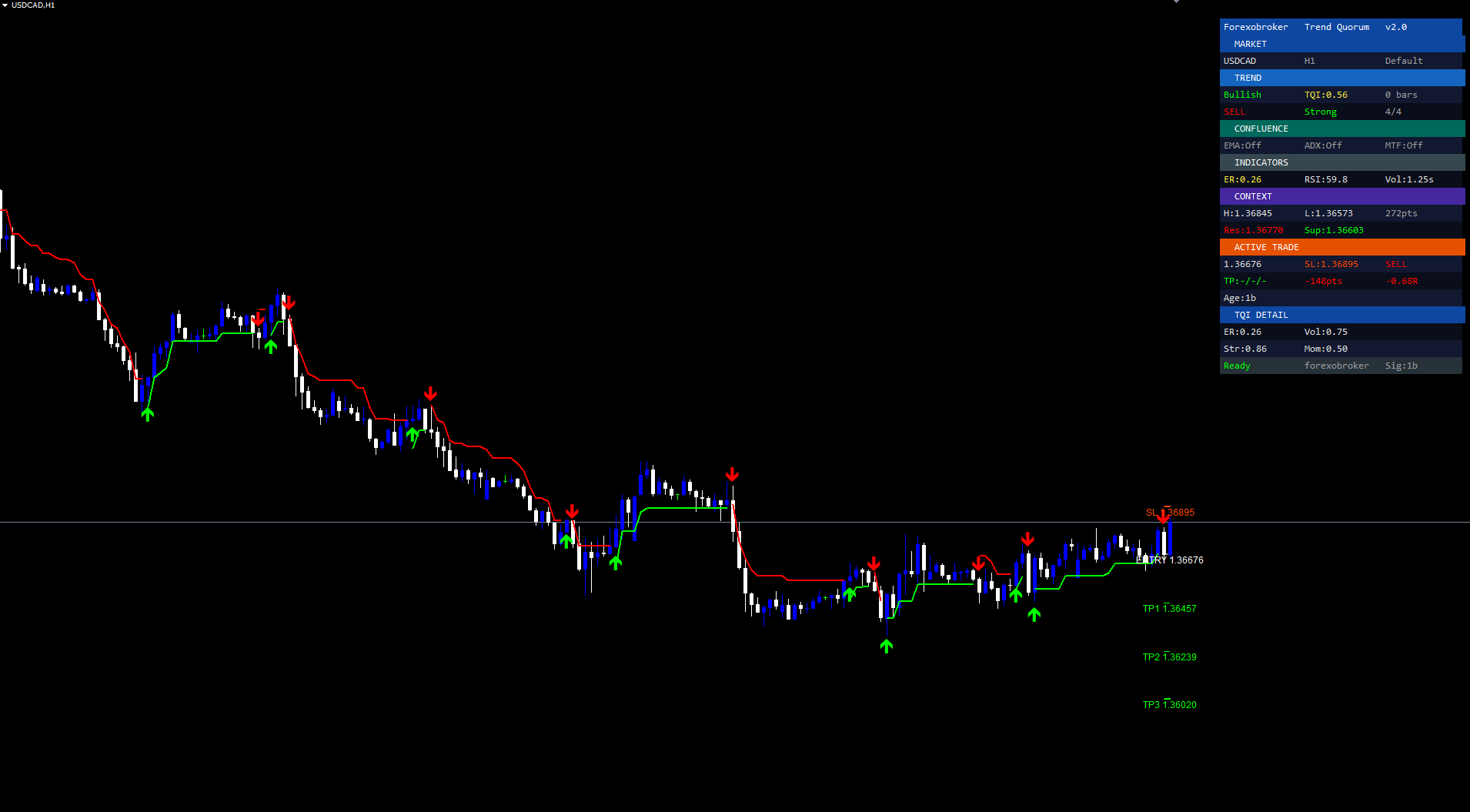
Lower TF (M1-M15): Scalping preset. ATR 10, Mult 1.5. TQI reacts fast, signals frequent. Enable EMA Cloud + ADX (threshold 25) to reject intraday chop.
Medium TF (M30-H4): Default preset. ATR 14, Mult 2.0. Best balance of frequency and reliability. Enable all three filters for high-conviction setups.
Higher TF (D1-W1): Swing preset. ATR 21, Mult 2.5. Signals infrequent but structurally significant. Wider stops, larger R-multiples.
Multi-Chart Setup
Add to multiple instruments with push notifications. Receive mobile alerts when any instrument generates a signal. The MTF filter provides cross-timeframe analysis without running the indicator on a second chart.
Parameter Reference
Main Settings
| Parameter | Default | Description |
|---|---|---|
| Preset | Auto | Auto/Custom/Scalping/Default/Swing/Crypto |
| ATR Length | 13 | ATR calculation period |
| Base Band Width | 2.0 | Base SuperTrend multiplier |
Adaptive Engine
| Parameter | Default | Description |
|---|---|---|
| Vol-Adaptive Bands | true | ER-based band width adjustment |
| Efficiency Window | 20 | ER lookback period |
| Adaptation Strength | 0.5 | ER modulation strength |
| ATR Baseline | 100 | Baseline SMA period for volatility regime |
Trend Quality Engine
| Parameter | Default | Description |
|---|---|---|
| Enable TQI | true | Master switch |
| Quality Influence | 0.4 | TQI modulation strength (0-1) |
| Quality Curve | 1.5 | Nonlinear response power |
| Smooth Multipliers | true | EMA-smooth band multipliers |
| Asymmetric Bands | true | Active tightens, passive widens |
| Asymmetry Strength | 0.5 | Asymmetry degree |
| Efficiency-Weighted ATR | true | Scale ATR by ER |
| Character-Flip | true | Flip on TQI collapse |
| Min Trend Age | 5 | Bars before char-flip allowed |
| High/Low TQI | 0.55/0.25 | Char-flip thresholds |
| Weights | 0.35/0.20/0.25/0.20 | Efficiency/Vol/Structure/Momentum |
| Structure Window | 20 | Price Structure lookback |
| Momentum Window | 10 | Momentum Persistence lookback |
Confluence Filters
| Parameter | Default | Description |
|---|---|---|
| EMA Cloud | false | Fast 9 / Slow 21, cloud fill |
| ADX Filter | false | Length 14, Threshold 20.0 |
| MTF Confirmation | false | Auto-select or manual TF, SuperTrend/EMA method |
Risk Management
| Parameter | Default | Description |
|---|---|---|
| SL Buffer | 1.5 xATR | Stop-loss distance beyond pivot |
| TP1/TP2/TP3 | 1.0R/2.0R/3.0R | Take-profit R-multiples |
| Label Offset | 10 bars | Line extension forward |
| Mark TP Hits | true | Turquoise color on hit |
| Trade Timeout | 100 bars | Auto-close tracking |
Signal Score, Visual, Colors, Alerts
Structure in Score (true), Pivot Strength (3), RSI (14), Volume Z (20). Show SuperTrend/Arrows/Dashboard (all true). Bull=Lime, Bear=Red, SL=OrangeRed, TP=Lime. Alerts=true, Push=true, Email=false.
Recommended Profiles
Scalping (M1-M15): ATR 10, Mult 1.5, ER 14, RSI 9, SL 1.0. EMA Cloud ON, ADX ON (25).
Default (M15-H4): ATR 14, Mult 2.0, ER 20, RSI 14, SL 1.5. All filters ON.
Swing (H4-D1): ATR 21, Mult 2.5, ER 30, RSI 21, SL 2.0. All filters ON, MTF=Weekly.
Crypto 24/7: ATR 14, Mult 2.8, ER 20, RSI 14, SL 2.5. Wider bands for crypto volatility.
Installation
Trend Quorum installs automatically from the MQL5.com Market:
- Purchase from the product page
- Auto-installs to MetaTrader
- Open Navigator (Ctrl+N) > Indicators > Market
- Find Trend Quorum, drag onto chart
- Configure parameters, click OK
No manual file copying required. Works on all timeframes and instruments. Available for both MT4 and MT5. Allow a warmup period (~100-200 bars) on first load. Ensure sufficient historical data (500+ bars recommended).
Conclusion
Trend Quorum replaces the fixed-multiplier SuperTrend with an adaptive system that measures trend quality in real time. The TQI provides continuous assessment of how favorable the environment is for directional trading, and dynamic band compression translates that into tighter entries during clean trends and wider filtering during noise. Three confluence filters add independent confirmation that traders can toggle to balance signal frequency vs quality. Character-flip detection catches regime changes that standard SuperTrend misses entirely.
ATR-based risk management provides SL and three TP levels anchored to structural pivots. The 10-section dashboard and 11-condition alert system keep traders informed without constant chart monitoring. Presets and extensive configurability allow tuning from conservative swing setups to aggressive scalping, while Auto provides sensible defaults.
Download the indicator:
- MetaTrader 5: Trend Quorum MT5
- MetaTrader 4: Trend Quorum MT4
CONTACT & SUPPORT
- Email: info@forexobroker.com
- Questions: Use the Comments section on the product page or send a private message
- Bug Reports: Please include your broker name, account type, and a screenshot
-
✅ All MQL Tools: https://www.mql5.com/en/users/forexobroker/ ✅
--------------------------------------------------------------------------------------------------------------
🏦 **Broker I use**: https://icmarkets.com/?camp=55869
🏦 **Broker For EU Traders I use 1**: https://www.ictrading.com?camp=91414
🏦 **Broker I use 2**: https://one.exnessonelink.com/boarding/sign-up/a/c_thuv62ocfq
💻 **VPS**: https://chocoping.com/processing/aff.php?aff=738
💼 **Companies I use for getting funded**:
Fundednext: https://fundednext.com/?fpr=kestutis39
The5ers: https://www.the5ers.com/?afmc=16kl
FTMO: https://trader.ftmo.com/?affiliates=nRAyOhmFRnEnFdOpdLeh
Risk Disclaimer
Trading financial instruments carries high risk and may not suit all investors. Leverage can work against you. Consider your objectives, experience, and risk appetite before trading.
Past indicator signals do not guarantee future results. Trend Quorum is an analytical tool measuring current conditions — it does not predict future prices. All trading involves risk of loss.
This article is for educational purposes only and is not investment advice. The author is not a registered investment advisor. Trading decisions are solely your responsibility.
Always use proper risk management, appropriate position sizing, and test on a demo account before live trading. Past performance is not indicative of future results.




