
Manual trading requires more than accurate market analysis. Incorrect position sizing, excessive risk, delayed Stop Loss placement, or poor trade management can negatively affect results even when the entry signal is correct.
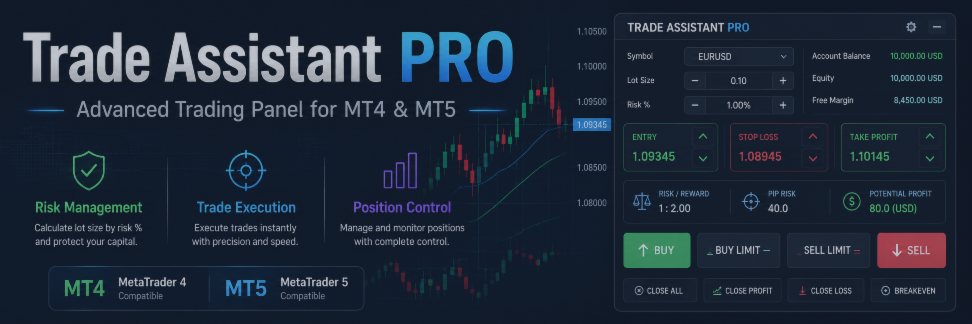
Trade Assistant PRO is a professional trading panel for MetaTrader 4 and MetaTrader 5. It combines risk calculation, order placement, and position management in one convenient interface directly on the chart.
Product versions:
A Practical Tool for Manual Traders
Trade Assistant PRO is not an automated trading system and does not search for market entries. The trader analyzes the market and makes the trading decision, while the panel helps prepare and execute the trading plan.
You can set Entry, Stop Loss, and Take Profit levels directly on the chart, evaluate risk and potential profit, calculate the required position size, and manage the trade through a single interface.
Risk and Lot Size Calculation
One of the main functions of Trade Assistant PRO is automatic position-size calculation.
The trader sets the acceptable risk, and the panel calculates the lot size based on:
-
Stop Loss distance;
-
symbol specifications;
-
minimum and maximum volume;
-
lot step;
-
selected risk calculation mode.
Risk can be specified as a percentage of balance, equity, free margin, or as a fixed amount in the account currency. This helps maintain consistent money-management rules across different trading instruments.
Market and Pending Orders
The panel supports the main order types:
-
Buy and Sell;
-
Buy Stop and Sell Stop;
-
Buy Limit and Sell Limit.
Before opening a trade, the trader can see the complete setup on the chart. Entry, Stop Loss, and Take Profit lines can be moved to adjust the trading scenario according to current market conditions.
The panel also supports Risk/Reward settings, allowing Take Profit to be calculated automatically in relation to the selected Stop Loss.
Position Management
Trade Assistant PRO provides several tools for managing open positions.
The Break Even function can move Stop Loss to the entry price automatically after the market reaches a specified distance. An additional offset can be applied to cover spread and commission.
Several Trailing Stop methods are available:
-
fixed-distance trailing;
-
ATR trailing;
-
Moving Average trailing;
-
Fractals trailing;
-
Parabolic SAR trailing;
-
trailing by the previous candle’s high or low.
Partial Close allows the trader to secure part of the profit while keeping the remaining position open. The remaining volume can then be moved to Break Even or managed with a Trailing Stop.
Additional Features
Trade Assistant PRO supports pending-order management and OCO logic, where the activation of one order automatically cancels the opposite trading scenario.
The panel also supports hidden Stop Loss and Take Profit levels and virtual pending orders. These functions are managed internally, so the MetaTrader terminal must remain running for correct execution.
The information panel displays the main trade parameters, including risk, position size, spread, and active position-management functions.
Who Is Trade Assistant PRO For?
The panel is designed for traders who prefer manual trading but want to reduce routine operations and improve execution discipline.
It can be used for scalping, intraday trading, breakout strategies, pullback trading, level-based trading, and trend-following approaches.
Trade Assistant PRO does not replace a trading strategy and does not guarantee profits. Its purpose is to help traders calculate risk accurately, place orders faster, and manage positions according to predefined rules.
Choose the version for your platform:




