
User Guide: FxS Triangular Arbitrage EA
Welcome to the official user guide for FxS Triangular Arbitrage EA, a specialized trading algorithm designed to identify and capitalize on triangular arbitrage opportunities in the forex, crypto, and metals markets. This guide will walk you through everything you need to know about the EA, from its core features and mechanics to how to configure each setting for optimal performance.
📌 What is FxS Triangular Arbitrage EA?
FxS Triangular Arbitrage EA is an advanced trading robot for MetaTrader 5 that leverages price inefficiencies among a set of three correlated currency pairs—known as a "triad" or "pair ring." By continuously scanning price discrepancies, the EA identifies arbitrage opportunities and executes trades when profit thresholds are met.
✨ Key Features
-
🔁 Triangular Arbitrage Logic: Trades based on price discrepancies between three interconnected pairs.
-
⚙️ Predefined and Custom Triads: Choose from built-in combinations or define your own.
-
📊 Real-Time Dashboard (optional): Displays key stats and arbitrage data.
-
💡 Risk Management Controls: Max daily/weekly loss protection.
-
📈 Visual Analysis: Option to plot max price differences for strategy optimization.
-
🔐 Inverted Pair Handling: Adjust directional logic for custom or exotic pairs.
🧠 How It Works (Mechanics)
The EA tracks three pairs that form a triangle (e.g., EUR/USD, USD/JPY, EUR/JPY). It calculates the theoretical price of the third leg based on the other two and identifies any discrepancies between theoretical and actual prices. If the arbitrage gap exceeds the total cost of trading (including commissions), the EA enters synchronized trades on all three legs to capture the profit.
🌍 Supported Triads (Pair Rings)
The EA supports both predefined and custom triads. Below is a list of available combinations:
| 12 Buit-in Forex Pair Rings | |
|---|---|
| GBP/USD - EUR/USD - EUR/GBP | |
| EUR/USD - USD/JPY - EUR/JPY | |
| GBP/USD - USD/CHF - GBP/CHF | |
| EUR/USD - USD/CHF - EUR/CHF | |
| AUD/USD - USD/JPY - AUD/JPY | |
| USD/CAD - CAD/JPY - USD/JPY .... 1 for Crypto | |
| BTC/EUR - EUR/USD - BTC/USD 1 for Metals | |
| XAU/EUR - EUR/USD - XAU/USD You can also enter your own custom triads. | |
⚙️ Input Parameters Explained
🔽 ==== Trading Settings ====
-
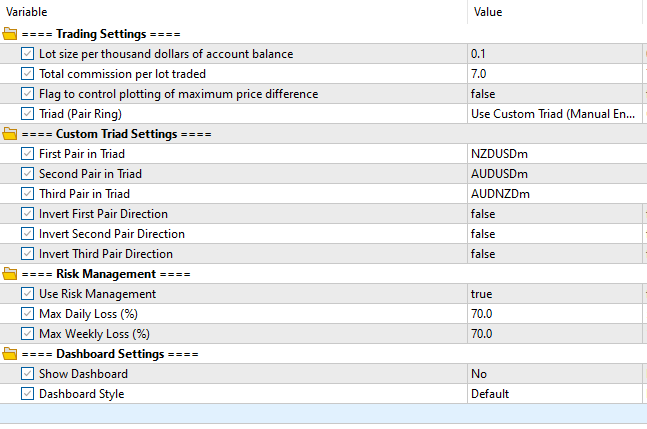
Lot size per thousand dollars of account balance: Defines trade size. For example, 0.1 means 0.1 lots for every $1000 in account balance.
-
Total commission per lot traded: Input total round-trip commission per 1 lot (broker dependent).
-
Flag to control plotting of maximum price difference: When enabled ( true ), plots the maximum price difference among the triad for analysis.
-
Triad (Pair Ring): Selects which predefined triad to trade.
🔽 ==== Custom Triad Settings ====
Use these only if you selected to Use Custom Triad (Manual Entry) for Triad (Pair Ring) input parameter .
-
First Pair, Second Pair, Third Pair: Enter the symbols for your custom triangle (e.g., "USDZAR" , "ZAREUR" , "EURUSD" ).
Ensure the entered 3 pairs follow either one of these patterns:
- Classic Loop (A/B → B/C → C/A)
- Forward Cross (A/B → B/C → A/C)
- Backward Cross (B/A → B/C → C/A)
- Middle Cross (A/B → C/B → C/A)
- Reverse Classic Loop (B/A → C/B → A/C)
-
Invert First Pair / Invert Second Pair / Invert Third Pair: If the direction of any pair needs to be reversed for accurate arbitrage logic, enable these flags.
🔽 ==== Risk Management ====
-
Use Risk Management: When enabled ( true ), activates the below risk limits.
-
Max Daily Loss (%) / Max Weekly Loss (%): Prevents trading after daily or weekly drawdowns exceed the specified percentage. Useful for capital preservation.
🔽 ==== Dashboard Settings ====
-
Show Dashboard: Enables or disables the real-time trading dashboard overlay. Choose between:
-
No : Minimal view (performance optimized)
-
Yes : Full interface for monitoring
✅ Input Parameter Example
✅ Getting Started – Step-by-Step
For a detailed description of how to get started, refer to our installation manual.
🛑 Important Notes
-
Ensure all triad pairs are available and visible in the Market Watch window.
-
Latency and spreads can impact arbitrage performance—best results occur in low-spread and fast-execution environments.
-
Always test with a demo account before going live to ensure compatibility with your broker.
📣 Final Thoughts
The FXS Triangular Arbitrage EA is a powerful, niche tool for traders seeking to exploit inefficiencies across markets. Whether you're working with forex majors, crypto assets, or metals, this EA allows both automation and flexibility through its advanced logic and customization options.
Make sure to tailor your setup, test configurations thoroughly, and monitor performance to fully unlock the EA’s potential.




