

Interactive Supply and Demand Zone Manager in MQL5 (Part V): Persisting Zones Across Terminal and EA Restarts
 204
204
 0
0

Introduction
In Part IV, we extended the Interactive Supply and Demand Zone Manager beyond zone detection and lifecycle tracking by connecting validated supply and demand zones to a trading layer. The framework could now evaluate zone interactions and use them as part of an automated trading workflow.
After a restart of the Expert Advisor or the trading terminal, the zone engine in its previous form could rediscover rectangles on the chart but lost all runtime continuity: lifecycle status (Virgin/Broken/Inactive), interaction history and touch counts, scores and tiering, buy/sell trigger flags, blacklist entries, and the managed geometry of user-drawn zones. In practice this causes restored zones to behave as new ones — risks include duplicate or inappropriate trade entries, incorrect filtering, desynchronized visuals and logic, and the need for users to redraw or reconfigure manual boxes.
Part V remedies this by adding a persistence layer that records the logical state of the zone engine per trading context (symbol + timeframe). The persistence design intentionally separates runtime behavior from durable state: SZonePersist is a plain-data snapshot that captures identity, geometry, timing, scores/telemetry, lifecycle flags and user time anchors; CZone remains responsible for detection, lifecycle evaluation and trading. On OnInit(), the framework restores the saved zone properties and lifecycle flags, reconciles their chart objects, and applies the existing startup relevance checks. Persistence remains separate from detection and execution.
Note: Part V supports zone-state restoration across normal shutdowns and restarts when a usable snapshot is available; it does not implement transactional crash-safe writes or restore the complete trading-engine state.
Architectural Focus of This Phase
The objective is to preserve the logical state of the zone engine independently from the lifetime of the EA process.
This phase therefore focuses on four areas:
- Persisting zone state so active zones can be reconstructed after a restart.
- Restoring lifecycle and interaction state rather than treating restored zones as newly detected structures.
- Reconciling persisted state with chart objects, including restoring user-zone price boundaries and left time anchors while retaining the framework’s right-edge extension policy.
- Registering user-drawn zones into the managed collection with an initial baseline score so they can be evaluated by the existing trading pipeline.
To achieve this, we introduce persistence as another layer around the existing zone engine, allowing the framework to retain its state while keeping detection, lifecycle management, and trading responsibilities intact.
Designing the Persistence Snapshot
Before implementing the save and restore workflow, the framework needs a representation of zone state that can exist independently of the runtime CZone object.
The persistence layer introduces SZonePersist, a plain-data structure that contains the information required to reconstruct a logical zone after the EA restarts. This separation is deliberate. The persistence module does not need to understand how CZone performs detection, lifecycle evaluation, trading, or chart rendering. It only needs to store the state required to rebuild the zone later.
//+------------------------------------------------------------------+
//| SZonePersist: Plain-data snapshot of ONE logical zone            |
//| (decoupled from the CZone runtime class so this module never     |
//|  needs to "understand" the lifecycle engine).                    |
//+------------------------------------------------------------------+
struct SZonePersist
  {
   //--- Identity / Provenance
   string            name;                        // Stable chart-object / zone identifier
   int               zone_type;                   // ENUM_ZONE_TYPE (Support/Resistance/Neutral)
   int               zone_status;                 // ENUM_ZONE_STATUS (Virgin/Broken/Inactive)
   bool              is_user_zone;                // AUTO or USER provenance

   //--- Geometry
   double            top;
   double            bottom;

   //--- Timing
   datetime          created;                     // exact generation timestamp
   datetime          last_touch_time;             // last price test interaction
   datetime          broken_time;                 // breakout confirmation stamp

   //--- Score
   int               zone_score;                  // static structural weight score
   double            current_zone_score;          // LIVE score used by trading gate
   string            zone_tier;                   // categorized tier label

   //--- Telemetry
   double            initial_volume_ratio;
   double            departure_velocity;
   int               touch_count;
   int               bounce_count;
   int               failure_count;
   double            max_reaction_pips;
   int               resurrection_count;
   string            breakout_quality;

   //--- Lifecycle flags (affect next state transition)
   bool              is_pending;
   bool              is_broken;
   int               consecutive_closes_outside;
   int               consecutive_rejection_closes;
   bool              buy_triggered;
   bool              sell_triggered;

   //--- Part V Stored time anchors (USER left anchor and managed right edge)
   datetime          time_left;                     // OBJPROP_TIME 0 (left edge of the rectangle the user drew)
   datetime          time_right;                    // Stored right anchor (0 = unspecified; use current time on restoration)
  };
The structure groups the state required to reconstruct a zone into four areas: identity and provenance, geometry and timing, score and telemetry, and lifecycle state. This preserves not only where the zone is, but also the information accumulated throughout its lifetime. For user-drawn zones, the left time anchor and framework-assigned right anchor are stored. Registration and manual modification set the right edge to the current time, and runtime rendering continues extending it; the original finite drawing length is not preserved. Transient rendering properties are intentionally excluded. These belong to the chart layer and can be recreated from the restored logical state.
This keeps the boundary clear: SZonePersist stores what the zone is and what its current state is, while CZone remains responsible for runtime management.
Establishing the Persistence Path
Before a zone can survive an EA or terminal restart, the framework first needs a well-defined location in which its state can be stored.
This is handled by SetupPersistencePath().
//+------------------------------------------------------------------+
//| Setup persistence folder and assign the state file path          |
//+------------------------------------------------------------------+
void SetupPersistencePath(void)
  {
   FolderCreate(ZP_FOLDER, FILE_COMMON);
   g_persist.SetPath(PersistFilePath());
  }
The purpose of this function is deliberately narrow. It prepares the environment required by the persistence layer rather than performing any zone serialization itself. Keeping this responsibility separate means the rest of the framework does not need to know how the storage location is prepared.
This becomes important because persistence is not part of the zone-detection process. The detection engine continues to operate on its runtime collection of CZone objects, while the persistence layer provides a separate mechanism for making that runtime state durable.
Once the persistence path has been established, the framework needs to determine which persistence file belongs to the current chart context.
That responsibility is handled by PersistFilePath(). Snapshots are stored under Terminal\Common\Files\DynamicSR\V5. File identity uses only symbol and chart timeframe, so this version assumes one writer per symbol/timeframe in the shared storage location. Accounts, EA instances, and parameter sets are not isolated by the filename.
#define ZP_FOLDER "DynamicSR\\V5" // Folder under Terminal/Common/Files
//+------------------------------------------------------------------+
//| Part V Logical-state persistence helpers                         |
//+------------------------------------------------------------------+
string PersistFilePath(void)
  {
   return ZP_FOLDER + "\\DSR5_" + _Symbol + "_" + IntegerToString(_Period) + ".bin";
  }
Rather than treating persistence as one global store, the framework builds the file identity from the trading context in which the EA is running. This allows the saved state for one symbol and timeframe to remain distinct from another.
For example, the state associated with a zone engine running on one symbol and timeframe should not accidentally be loaded when the same EA is attached to a different chart context.
This gives the persistence layer two important properties:
- A known storage location — established by SetupPersistencePath().
- A context-specific persistence identity — produced by PersistFilePath().
At this point, no zone has been saved yet. The framework has simply established where persistent state belongs and how the correct snapshot is identified.
That separation is intentional. The next stage is to determine when the live zone state has changed enough to require persistence, and how an individual runtime zone is converted into a form that can be stored.
Detecting State Changes
With the persistence location established, the next problem is deciding when the runtime state actually needs to be written to storage.
The framework handles this through MarkPersistDirty().
//+------------------------------------------------------------------+
//| Mark persistence state for the next save cycle                   |
//+------------------------------------------------------------------+
void MarkPersistDirty(void)
  {
   g_persist_dirty = true;
  }
Rather than writing the entire zone state to disk whenever any part of the EA executes, the framework marks the persistence state as dirty when a change occurs that should eventually be preserved.
This creates a simple distinction between two conditions:
- Clean — the persisted snapshot already represents the current state.
- Dirty — the runtime state has changed, and the stored snapshot may no longer be current.
The function itself does not perform the save. It simply records that persistence work is required. That separation is useful because zone state can change as part of normal runtime processing. A zone may progress through its lifecycle, accumulate interactions, change its score, or otherwise acquire information that must survive a restart. The component detecting that change does not need to perform file operations immediately.
Instead, it signals the persistence layer.
The next step is therefore to determine what information from the runtime CZone object should actually be preserved.
That conversion is handled by PersistZoneToRecord().
//+------------------------------------------------------------------+
//| Copy runtime zone state into a persistence record                |
//+------------------------------------------------------------------+
void PersistZoneToRecord(const CZone *z, SZonePersist &r)
  {
   r.name                  = z.name;
   r.zone_type             = (int)z.type;
   r.zone_status           = (int)z.status;
   r.is_user_zone          = z.is_user_zone;
   r.top                   = z.top;
   r.bottom                = z.bottom;
   r.created               = z.created;
   r.last_touch_time       = z.last_touch_time;
   r.broken_time           = z.broken_time;
   r.zone_score            = z.zone_score;
   r.current_zone_score    = z.Current_zone_score;
   r.zone_tier             = z.zone_tier;
   r.initial_volume_ratio  = z.initial_volume_ratio;
   r.departure_velocity    = z.departure_velocity;
   r.touch_count           = z.touch_count;
   r.bounce_count          = z.bounce_count;
   r.failure_count         = z.failure_count;
   r.max_reaction_pips     = z.max_reaction_pips;
   r.resurrection_count    = z.resurrection_count;
   r.breakout_quality      = z.breakout_quality;
   r.is_pending            = z.is_pending;
   r.is_broken             = z.is_broken;
   r.consecutive_closes_outside     = z.consecutive_closes_outside;
   r.consecutive_rejection_closes   = z.consecutive_rejection_closes;
   r.buy_triggered         = z.buy_triggered;
   r.sell_triggered        = z.sell_triggered;
   r.time_left             = z.time_left;              // Part V real time anchors
   r.time_right            = z.time_right;
  }
Here, the framework moves from change detection to state representation.
A live CZone contains runtime information used by the engine, but the persistence layer should not simply attempt to store the entire runtime object as-is. Instead, the relevant state is mapped into a persistence record containing the information required to reconstruct the zone later.
This creates a boundary between the two representations: Runtime CZone → Persistence Record.
The runtime object remains responsible for zone behavior, while the persistence record provides a stable representation of the information that needs to survive beyond the lifetime of the EA instance.
With changes now identifiable and individual zones convertible into persistence records, the framework has the pieces required to construct a complete snapshot.
Building and Saving the Zone Snapshot
Once the framework knows that persistence is required and can convert an individual CZone into a persistence record, it can construct a complete representation of the current zone engine state.
This is handled by SavePersistState().
//+------------------------------------------------------------------+
//| Save the current zone and blacklist state                        |
//+------------------------------------------------------------------+
void SavePersistState(void)
  {
   SZonePersist records[];
   int n = active_zones.Total();
   if(n <= 0)
      ArrayResize(records, 0);
   else
     {
      ArrayResize(records, n);
      int fill = 0;
      for(int i = 0; i < n; i++)
        {
         CZone *z = (CZone*)active_zones.At(i);
         if(z == NULL)
            continue;
         PersistZoneToRecord(z, records[fill]);
         fill++;
        }
      ArrayResize(records, fill);
     }

   double blk[];
   int bc = blacklist.Total();
   if(bc <= 0)
      ArrayResize(blk, 0);
   else
     {
      ArrayResize(blk, bc);
      for(int i = 0; i < bc; i++)
         blk[i] = StringToDouble(blacklist.At(i));
     }

   g_persist_dirty = !g_persist.SaveSnapshot(records, blk);
  }
SavePersistState() operates at the level of the zone collection, rather than an individual zone. It takes the current runtime state maintained by the framework and builds the set of persistence records that will represent that state across a restart. The dirty flag is cleared only when SaveSnapshot() returns true. When SaveSnapshot() reports failure, the dirty flag remains set for another attempt, including during startup.
The process can therefore be viewed as: Runtime zone collection → persistence records → snapshot.
This is where the earlier separation between runtime objects and persistence data becomes useful. The persistence routine does not need to reproduce the internal behavior of a CZone; it only needs to gather the state that the framework has explicitly identified as durable.
Once the snapshot has been assembled, the actual storage operation is delegated to the persistence component.
That responsibility belongs to CZonePersistence::SaveSnapshot().
//+------------------------------------------------------------------+
//| CZonePersistence::SaveSnapshot                                   |
//| Binary layout:                                                   |
//| Header  : MAGIC(int) | FORMAT_VERSION(int)                       |
//| Zones   : count(int) { SZonePersist record }*count               |
//| Blacklist: count(int) | double price*count                       |
//| FileFlush() flushes buffered writes; this is not an atomic save. |
//| This represents CURRENT logical state (deleted zones ARE NOT     |
//| present here - the caller only feeds what is logically alive).   |
//+------------------------------------------------------------------+
bool CZonePersistence::SaveSnapshot(SZonePersist &zones[],double &blacklist_prices[])
  {
   if(m_path == "")
      return false;

   int h = FileOpen(m_path,FILE_WRITE|FILE_BIN|FILE_COMMON);
   if(h == INVALID_HANDLE)
     {
      PrintFormat("[Part V][PERSIST] Save failed. FileOpen error: %d",GetLastError());
      return false;
     }

//--- Header
   FileWriteInteger(h,(int)ZP_MAGIC,INT_VALUE);
   FileWriteInteger(h,ZP_FORMAT_VERSION,INT_VALUE);

//--- Zones
   int zc = ArraySize(zones);
   FileWriteInteger(h,zc,INT_VALUE);
   for(int i=0;i<zc;i++)
      WriteZone(h,zones[i]);

//--- Blacklist
   int bc = ArraySize(blacklist_prices);
   FileWriteInteger(h,bc,INT_VALUE);
   for(int i=0;i<bc;i++)
      FileWriteDouble(h,blacklist_prices[i]);

   FileFlush(h);                    // flush buffered writes
   FileClose(h);
   return true;
  }
This function forms the boundary between the zone engine and the storage mechanism.
The zone manager knows what state needs to be preserved. CZonePersistence knows how that state is written to persistent storage. This keeps file-handling details out of the zone-management logic and allows the persistence mechanism to remain independent of zone detection and lifecycle processing.
Architectural note: durability versus crash-safety
FileFlush() flushes buffered file writes, but it does not make replacement of the snapshot atomic. SaveSnapshot() currently writes a single state file directly, with a magic marker and format version for validation, but without a backup copy, checksum, or temporary-file swap.
Part V preserves state across normal EA and terminal restarts; it does not provide transactional crash recovery. A crash or termination during writing can leave an incomplete snapshot. The loader rejects files that fail its format, completeness, or value checks, and startup proceeds without restoring that snapshot. Without a checksum, these checks do not detect every possible form of corruption.
The same distinction applies to the dirty-state mechanism: changes are persisted during the normal runtime cycle and are also handled during graceful deinitialization, but a hard termination can occur before the latest change reaches storage.
This is an intentional scope boundary for Part V. The persistence layer supports normal restart restoration; crash-safe transactional persistence would require additional mechanisms such as atomic replacement or backup snapshots.
Loading the Persisted Snapshot
Saving the snapshot gives the framework a durable representation of its zone state, but persistence is only useful if that information can be recovered when the EA starts again.
The restoration process begins with LoadPersistState().
//+------------------------------------------------------------------+
//| Restore persisted zones and blacklist state                      |
//+------------------------------------------------------------------+
void LoadPersistState(void)
  {
   active_zones.Clear();
   blacklist.Clear();

   SZonePersist records[];
   double blk[];
   int version = g_persist.LoadSnapshot(records, blk);
   if(version < 0)
     {
      PrintFormat("[Part V][PERSIST] No usable snapshot (code %d). Starting fresh.", version);
      return;
     }

   int bc = ArraySize(blk);
   for(int i = 0; i < bc; i++)
      blacklist.Add(DoubleToString(blk[i], _Digits));

   int n = ArraySize(records);
   for(int i = 0; i < n; i++)
     {
      CZone *z = RebuildZoneFromRecord(records[i]);
      if(z != NULL)
         active_zones.Add(z);
     }

   PrintFormat("[Part V][PERSIST] Restored %d zones / %d blacklist entries (format v%d).",
               active_zones.Total(), blacklist.Total(), version);
  }
Unlike the saving process, which starts with live runtime objects, loading starts with the persisted representation. The function requests the previously stored snapshot and uses it as the source for rebuilding the framework's logical state.
The actual file-reading and deserialization work remains inside the persistence component, through CZonePersistence::LoadSnapshot().
//+------------------------------------------------------------------+
//| CZonePersistence::LoadSnapshot                                   |
//| Returns FORMAT_VERSION on success, or a negative code:           |
//|    -1  no file / open error                                      |
//|    -2  invalid/incomplete data or allocation failure             |
//|    -3  unsupported format version                                |
//| On success fills zones[] and blacklist_prices[] (resized).       |
//+------------------------------------------------------------------+
int CZonePersistence::LoadSnapshot(SZonePersist &zones[],double &blacklist_prices[])
  {
   ResetLastError();
   m_read_error = false;
   ArrayResize(zones,0);
   ArrayResize(blacklist_prices,0);
   if(m_path == "")
      return -1;

   int h = FileOpen(m_path,FILE_READ|FILE_BIN|FILE_COMMON);
   if(h == INVALID_HANDLE)
      return -1;

   if(FileSize(h) < 16)
     {
      FileClose(h);
      return -2;
     }

//--- Header
   int magic = FileReadInteger(h,INT_VALUE);
   if(GetLastError() != 0 || magic != (int)ZP_MAGIC)
     {
      FileClose(h);
      return -2;
     }
   int version = FileReadInteger(h,INT_VALUE);
   if(GetLastError() != 0)
     {
      FileClose(h);
      return -2;
     }
   if(version < 1 || version > ZP_FORMAT_VERSION)
     {
      FileClose(h);
      return -3;
     }
//--- Part V version 1 files read via legacy layout (time anchors defaulted); newer versions via version field

//--- Zones
   int zc = FileReadInteger(h,INT_VALUE);
   if(GetLastError() != 0 || zc < 0 || zc > 100000)
     {
      FileClose(h);
      return -2;
     }
   if(ArrayResize(zones,zc) != zc)
     {
      FileClose(h);
      ArrayResize(zones,0);
      return -2;
     }
   for(int i=0;i<zc;i++)
     {
      if(!ReadZone(h,zones[i],version))
        {
         FileClose(h);
         ArrayResize(zones,0);
         return -2;
        }
     }

//--- Blacklist
   if(FileTell(h) > FileSize(h) || FileSize(h) - FileTell(h) < 4)
     {
      FileClose(h);
      ArrayResize(zones,0);
      return -2;
     }
   ResetLastError();
   int bc = FileReadInteger(h,INT_VALUE);
   if(GetLastError() != 0 || bc < 0 || bc > 100000)
     {
      FileClose(h);
      ArrayResize(zones,0);
      return -2;
     }
   if(FileTell(h) > FileSize(h) || FileSize(h) - FileTell(h) != (ulong)bc * 8)
     {
      FileClose(h);
      ArrayResize(zones,0);
      return -2;
     }
   if(ArrayResize(blacklist_prices,bc) != bc)
     {
      FileClose(h);
      ArrayResize(zones,0);
      ArrayResize(blacklist_prices,0);
      return -2;
     }
   for(int i=0;i<bc;i++)
     {
      ResetLastError();
      blacklist_prices[i] = FileReadDouble(h);
      if(GetLastError() != 0 || !MathIsValidNumber(blacklist_prices[i]))
        {
         FileClose(h);
         ArrayResize(zones,0);
         ArrayResize(blacklist_prices,0);
         return -2;
        }
     }

   FileClose(h);
   return version;
  }
LoadSnapshot() checks the supported version and blacklist payload. The ReadString() and ReadZone() helpers in the accompanying source provide string-length, record-completeness, and basic zone-value checks. On a detected failure, it returns a negative code and clears the output arrays. These checks provide basic validation rather than checksum-based integrity verification.
This keeps the storage format separate from the zone engine. LoadSnapshot() is concerned with reading the stored data and making it available to the caller, including the persistence format and its associated validation or version handling.
LoadPersistState() then uses those records to restore the state expected by the runtime engine.
This distinction matters because loading a record is not the same thing as recreating a runtime zone. The persistence layer can recover the stored data, but the zone engine still needs an actual CZone object that can participate in lifecycle processing and future updates.
That conversion is handled by RebuildZoneFromRecord().
//+------------------------------------------------------------------+
//| Rebuild a runtime zone from its persisted state                  |
//+------------------------------------------------------------------+
CZone* RebuildZoneFromRecord(const SZonePersist &r)
  {
   CZone *z = new CZone((r.top + r.bottom) / 2.0,
                        (ENUM_ZONE_TYPE)r.zone_type,
                        r.created,
                        g_cached_atr);
   if(z == NULL)
      return NULL;
   z.name        = r.name;
   z.is_user_zone= r.is_user_zone;
   z.top         = r.top;
   z.bottom      = r.bottom;
   z.price_level = (r.top + r.bottom) / 2.0;
   z.height      = r.top - r.bottom;
   z.created          = r.created;
   z.last_touch_time  = r.last_touch_time;
   z.broken_time      = r.broken_time;
   z.status       = (ENUM_ZONE_STATUS)r.zone_status;
   z.is_broken    = r.is_broken;
   z.is_pending   = r.is_pending;
   z.consecutive_closes_outside   = r.consecutive_closes_outside;
   z.consecutive_rejection_closes = r.consecutive_rejection_closes;
   z.buy_triggered  = r.buy_triggered;
   z.sell_triggered = r.sell_triggered;
   z.time_left  = r.time_left;                         // Part V real time anchors
   z.time_right = r.time_right;
   z.zone_score           = r.zone_score;
   z.Current_zone_score   = r.current_zone_score;
   z.zone_tier            = r.zone_tier;
   z.initial_volume_ratio = r.initial_volume_ratio;
   z.departure_velocity   = r.departure_velocity;
   z.touch_count        = r.touch_count;
   z.bounce_count       = r.bounce_count;
   z.failure_count      = r.failure_count;
   z.max_reaction_pips  = r.max_reaction_pips;
   z.resurrection_count = r.resurrection_count;
   z.breakout_quality   = r.breakout_quality;
   z.was_drawn          = false;
   return z;
  }
RebuildZoneFromRecord() takes the persisted representation and reconstructs a live zone from it. The reconstructed object is not treated as a newly detected zone. Its saved properties and lifecycle flags are restored rather than initialized as a newly detected zone. The restored collection remains subject to the startup relevance checks.
At this stage, the logical zone state has been recovered. However, the framework has one more responsibility before restoration is complete: the chart itself must agree with that restored state.
Reconciling Restored Zones with the Chart
Restoring the logical state of a zone does not automatically restore the chart object that represents it.
The framework therefore performs a reconciliation step through ReconcileChartObjects().
//+------------------------------------------------------------------+
//| Reconcile persisted zones with chart objects                     |
//+------------------------------------------------------------------+
void ReconcileChartObjects(void)
  {
//--- 1. Ensure every restored zone has a chart object (recreate if missing)
   for(int i = 0; i < active_zones.Total(); i++)
     {
      CZone *z = (CZone*)active_zones.At(i);
      if(z == NULL)
         continue;

      if(ObjectFind(0, z.name) < 0)
        {
         if(ObjectCreate(0, z.name, OBJ_RECTANGLE, 0, (z.time_left != 0) ? z.time_left : z.created, z.top, (z.time_right != 0) ? z.time_right : TimeCurrent(), z.bottom))   // Part V restore stored anchors (right edge remains framework-managed)
           {
            ObjectSetInteger(0, z.name, OBJPROP_BACK, true);
            ObjectSetInteger(0, z.name, OBJPROP_RAY_RIGHT, true);
            ObjectSetInteger(0, z.name, OBJPROP_SELECTABLE, true);
            ObjectSetInteger(0, z.name, OBJPROP_FILL, !z.is_broken);
            ObjectSetString(0, z.name, OBJPROP_TEXT, z.is_user_zone ? "USER" : "AUTO");
            z.was_drawn = true;
           }
        }
      else
        {
         ObjectSetDouble(0, z.name, OBJPROP_PRICE, 0, z.top);
         ObjectSetDouble(0, z.name, OBJPROP_PRICE, 1, z.bottom);
         z.was_drawn = true;
        }

      ObjectSetInteger(0, z.name, OBJPROP_COLOR, z.GetColor());
      //--- Part V apply persisted time anchors to the chart object
      ObjectSetInteger(0, z.name, OBJPROP_TIME, 0, (z.time_left != 0) ? z.time_left : z.created);
      ObjectSetInteger(0, z.name, OBJPROP_TIME, 1, (z.time_right != 0) ? z.time_right : TimeCurrent());
     }

//--- 2. Discover orphan USER rectangles with no persisted state -> normal USER birth path
   int total_objects = ObjectsTotal(0);
   for(int o = total_objects - 1; o >= 0; o--)
     {
      string oname = ObjectName(0, o);
      if(ObjectGetInteger(0, oname, OBJPROP_TYPE) != OBJ_RECTANGLE)
         continue;
      if(GetZoneByName(oname) != NULL)
         continue;
      if(StringSubstr(oname, 0, 2) == "S_" || StringSubstr(oname, 0, 2) == "R_")
        {
         ObjectDelete(0, oname);
         continue;
        }
      if(RegisterUserZone(oname))
         MarkPersistDirty();
     }
  }
The responsibility of this function is to compare the restored zone state with the objects currently present on the chart and bring the visual layer back into agreement with the runtime state.
This is particularly important across terminal and EA restarts. The CZone object reconstructed from persistence exists in memory, while its corresponding rectangle may no longer exist on the chart. In that situation, reconciliation recreates the missing chart representation using the persisted zone information.
For user-drawn zones, reconciliation restores the saved price boundaries and left time anchor. The right edge remains framework-managed and continues extending during runtime. A chart object represents the zone; it is not the source of the zone's lifecycle state. The persisted runtime state remains authoritative, while ReconcileChartObjects() restores the visual representation needed to reflect that state.
This also allows the framework to handle cases where the chart and persistence state are not initially identical. An object may be missing, already present, or require its visual properties to be synchronized with the restored zone state.
The startup sequence can therefore be understood as two related restorations:
- Logical restoration
Persistent snapshot → CZone
- Visual reconciliation
CZone → chart object
This separation prevents the chart from becoming a second, competing source of truth for zone state.
Restored zones have their saved lifecycle state and chart representation available again. Those retained by the subsequent startup relevance check then enter normal runtime processing.
Bringing User-Drawn Zones into the Managed Pipeline
User-drawn zones were already supported in earlier parts of the framework. Part IV established that only zones meeting MinZoneScore were eligible for automated trading. Part V keeps the trading score threshold while assigning newly registered user rectangles MinZoneScore as their initial baseline; they do not undergo automatic candidate scoring.
//+------------------------------------------------------------------+
//| Registers a Raw Manual User Box into a Tracked Engine Object     |
//+------------------------------------------------------------------+
bool RegisterUserZone(string obj_name)
  {
   if(ObjectFind(0, obj_name) < 0 || GetZoneByName(obj_name) != NULL)   // Part V duplicate guard: skip already-restored/registered (stops per-restart growth)
      return false;

   double boundary_p1 = ObjectGetDouble(0, obj_name, OBJPROP_PRICE, 0);
   double boundary_p2 = ObjectGetDouble(0, obj_name, OBJPROP_PRICE, 1);
   double bid = SymbolInfoDouble(_Symbol, SYMBOL_BID);

//--- Get current volatility context safely from structural global state
   double passed_atr = g_cached_atr;

   ENUM_ZONE_TYPE derived_type = ((boundary_p1 + boundary_p2) / 2.0 > bid) ? ZONE_RESISTANCE : ZONE_SUPPORT;
   CZone* new_zone = new CZone((boundary_p1 + boundary_p2) / 2.0, derived_type, TimeCurrent(), passed_atr);

   new_zone.name = obj_name;
   new_zone.is_user_zone = true;
   new_zone.was_recently_moved = true;
   new_zone.top = MathMax(boundary_p1, boundary_p2);
   new_zone.bottom = MathMin(boundary_p1, boundary_p2);
   new_zone.height = new_zone.top - new_zone.bottom;
   new_zone.price_level = (new_zone.top + new_zone.bottom) / 2.0;
   new_zone.was_drawn = true;

//--- Part V USER birth score: manual drawing is the hypothesis assign MinZoneScore
   new_zone.zone_score           = MinZoneScore;
   new_zone.Current_zone_score   = MinZoneScore;
   if(MinZoneScore >= 95)
      new_zone.zone_tier = "ELITE";
   else
      if(MinZoneScore >= 80)
         new_zone.zone_tier = "HIGH";
      else
         if(MinZoneScore >= 50)
            new_zone.zone_tier = "MODERATE";
         else
            new_zone.zone_tier = "LOW";

   new_zone.time_left  = (datetime)ObjectGetInteger(0, obj_name, OBJPROP_TIME, 0);   // Part V real left anchor the user drew
   new_zone.time_right = TimeCurrent();                    // Part V framework-managed right edge starts at current time
   ObjectSetInteger(0, obj_name, OBJPROP_TIME, 1, TimeCurrent());
   ObjectSetString(0, obj_name, OBJPROP_TEXT, "USER");
   ObjectSetInteger(0, obj_name, OBJPROP_RAY_RIGHT, true);
   ObjectSetInteger(0, obj_name, OBJPROP_BACK, true);
   ObjectSetInteger(0, obj_name, OBJPROP_FILL, true);
   ObjectSetInteger(0, obj_name, OBJPROP_COLOR, new_zone.GetColor());

   active_zones.Add(new_zone);
   MarkPersistDirty();   // Part V newly registered USER zone must be persisted
   return true;
  }
A user-drawn rectangle does not have enough detection data to receive the same structural score as an automatically detected zone. Instead, it enters the managed pipeline with MinZoneScore as its initial strength.
This gives the zone a valid starting point without creating a separate scoring or trading path. From this point, the zone is managed like any other zone. Its lifecycle state, interactions, scoring changes, and buy/sell trigger flags can therefore be persisted alongside automatically detected zones. The result is a single managed pipeline: the user provides the zone, while the framework assigns its initial baseline score and continues evaluating it through the existing lifecycle and trading machinery.
Integrating Persistence into the EA Lifecycle
Persistence is connected to the EA through its three main lifecycle points: OnInit(), OnTick(), and OnDeinit(). Startup also removes zones that are no longer relevant to the current price, so the restored count may differ from the final active count. The initialization flag marks completion of startup reconstruction, not confirmation that the initial save succeeded.
Initialization: OnInit()
//+------------------------------------------------------------------+
//| Expert Initialization Function                                   |
//+------------------------------------------------------------------+
int OnInit(void)
  {
//--- Part V Startup reconstruction: restore persisted + chart state, then detect only new zones
//--- Part V keep existing rectangles during initialization for reconciliation

   active_zones.FreeMode(true);
   active_zones.Clear();
   blacklist.Clear();

//--- Force MetaTrader core to stream visual object events
   ChartSetInteger(0, CHART_EVENT_OBJECT_CREATE, true);
   ChartSetInteger(0, CHART_EVENT_OBJECT_DELETE, true);

   atr_handle = iATR(_Symbol, _Period, 14);
   if(atr_handle == INVALID_HANDLE)
     {
      Print("[BOOT ERROR] Failed to instantiate core ATR indicator handle.");
      return(INIT_FAILED);
     }

//--- Initial local data copy for startup procedures
   UpdateGlobalVolatilityCache(); // Sets g_cached_atr safely
   logger.Initialize();

//--- Part V Restore persisted logical state + reconcile chart BEFORE auto-detection,
//--- so already-restored AUTO zones and blacklist remain authoritative in
//--- future duplicate-suppression / creation guards.
   SetupPersistencePath();
   LoadPersistState();
   ReconcileChartObjects();

//--- Sync and find ONLY genuinely new dynamic zones (restored ones are deduplicated)
   DetectDynamicZones(g_cached_atr, true); // Pass true to perform deep historical boot scan on startup
   NukeIrrelevantZones();
//--- Part V Persist the reconciled baseline after startup reconstruction
   SavePersistState();
   g_persist_loaded = true;

//--- INITIALIZE THE TRADING ENGINE INFRASTRUCTURE COMPONENTS
   if(CheckTradingSignals)
     {
      g_trade = new CTradeManager(MagicNumber,
                                  LotSize,
                                  MaxSpreadPoints,
                                  UseTrailingStop,
                                  (int)TrailingStartPips,
                                  (int)TrailingStepPips);

      g_strategy = new CZoneStrategy(MinZoneScore,
                                     BounceConfirmCloses,
                                     RiskRewardRatio,
                                     ATRBufferMultiplier,
                                     InpUseHTFFilter,
                                     InpHtfTimeframe,
                                     InpHtfMaPeriod,
                                     InpUseHTFRsiFilter,     // Enable HTF RSI Exhaustion Filter
                                     InpHtfRsiPeriod,        // HTF RSI Period
                                     InpHtfRsiOverbought,    // HTF RSI Overbought Threshold
                                     InpHtfRsiOversold,      // HTF RSI Oversold Threshold
                                     InpApproachBars,
                                     InpApproachThreshold);
     }

   Print(">>> successfully initialized");
   return(INIT_SUCCEEDED);
  }
The startup sequence restores persisted state and reconciles its chart representation before the historical detection scan runs. This keeps restored zones and blacklist entries authoritative, preventing them from being mistaken for newly detected zones.
Runtime: OnTick()//+------------------------------------------------------------------+ //| Expert Tick Function | //+------------------------------------------------------------------+ void OnTick(void) { datetime current_candle_time = iTime(_Symbol, _Period, 0); bool is_new_bar = (current_candle_time != last_bar_time); //--- Part V Flush any material state changes accumulated since the last tick if(g_persist_dirty) SavePersistState(); if(is_new_bar) { last_bar_time = current_candle_time; //--- Single point of entry update for data pipeline UpdateGlobalVolatilityCache(); //--- Downstream distribution using pristine global state context ResolvePendingInteractions(g_cached_atr); DetectDynamicZones(g_cached_atr, false); // Pass false to scan ONLY the single newly matured bar open MergeZones(g_cached_atr); //--- State Machine Lifecycle Evaluation Pipeline (Using MergeSensitivity) MonitorZoneLifecycle(logger, active_zones, g_cached_atr, MergeSensitivity); UpdateZoneVisuals(true); ChartRedraw(0); } else { //--- State Machine Lifecycle Evaluation Pipeline (Run on every tick to capture immediate manual adjustments) MonitorZoneLifecycle(logger, active_zones, g_cached_atr, MergeSensitivity); UpdateZoneVisuals(false); } //--- Tick-by-tick risk management and dynamic trailing updates if(CheckTradingSignals && CheckPointer(g_trade) != POINTER_INVALID) { g_trade.UpdateTrailingStop(_Symbol); } }
During normal execution, zone processing remains unchanged. State-changing operations mark persistence as dirty, and the save cycle writes the current logical state when required.
This keeps persistence alongside the existing engine rather than embedding it into detection or lifecycle logic
Shutdown: OnDeinit()
//+------------------------------------------------------------------+
//| Expert Deinitialization Function                                 |
//+------------------------------------------------------------------+
void OnDeinit(const int reason)
  {
//--- Part V Final save attempt as an extra safeguard (not the sole persistence point)
   if(g_persist_loaded && g_persist_dirty)
      SavePersistState();

   ObjectsDeleteAll(0, -1, OBJ_RECTANGLE);

   active_zones.Clear();
   blacklist.Clear();

   if(atr_handle != INVALID_HANDLE)
     {
      IndicatorRelease(atr_handle);
      atr_handle = INVALID_HANDLE;
     }

//--- DEALLOCATE STRATEGY AND EXECUTION LAYER POINTERS SAFELY FROM MEMORY
   if(CheckPointer(g_trade) == POINTER_DYNAMIC)
     {
      delete g_trade;
      g_trade = NULL;
     }
   if(CheckPointer(g_strategy) == POINTER_DYNAMIC)
     {
      delete g_strategy;
      g_strategy = NULL;
     }

   PrintFormat(">>> Deinitialization Engine detached smoothly. Reason Code: %d", reason);
   ChartRedraw();
  }
OnDeinit() provides the final opportunity to save any remaining dirty state before the EA instance ends. After the final save attempt, OnDeinit() deliberately removes all rectangle objects from the chart, including unrelated rectangles. Managed zones can be recreated from a usable snapshot on the next attachment; unmanaged drawings are not included in that snapshot.
The resulting lifecycle is straightforward:
- OnInit() — restore and reconcile.
- OnTick() — process normally and persist changes.
- OnDeinit() — attempt to save remaining dirty state.
Persistence therefore extends the lifetime of the zone engine without changing the responsibilities of detection, lifecycle management, or trading.
Operational Walkthrough
To demonstrate zone deletion and blacklist persistence across restarts, attach the EA to a chart with existing zones and allow it to establish an initial snapshot.

Fig. 1. Initial zone state displayed by the framework
Next, deliberately delete one or more automatically generated zones from the chart. This tests whether a user deletion is reflected in the managed collection and subsequently in the persisted state rather than being recreated on the next startup. The chart-event deletion handler is included in the accompanying source code; it removes deleted zones from the managed collection, records exclusion prices for AUTO zones, and marks persistence dirty. These prices suppress nearby generation candidates using the proximity threshold; they do not identify individual pivots.
Detach the EA and attach it again. The startup log should report the latest number of restored zones and blacklist entries. In our test, the first restart restored 7 zones/2 blacklist entries. After deleting a zone, the next restart restored 6 zones/3 blacklist entries. We repeated the process once more, and the following restart restored 5 zones/4 blacklist entries. This sequence demonstrates that AUTO-zone deletions and blacklist entries are retained across detach-and-reattach cycles.
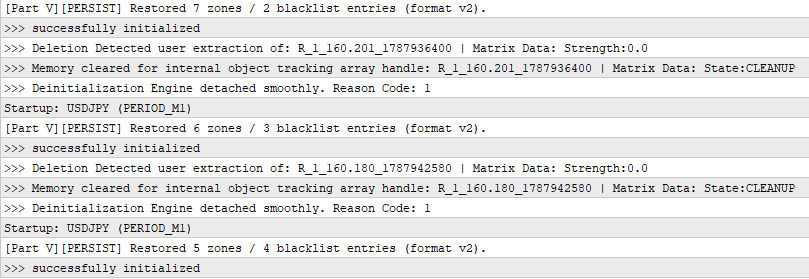
Fig. 2. Restored zone and blacklist counts across EA restarts
Conclusion
Part V completes another important layer of the zone manager by allowing its logical state to survive beyond the lifetime of a single EA instance. The framework can now save managed zones, lifecycle flags, accumulated telemetry, price-based blacklist entries, and user-zone price boundaries and stored time anchors. On restart, it restores usable snapshots, reconciles chart objects, and applies the existing startup relevance check before normal processing.
Just as importantly, persistence remains separated from detection, lifecycle management, and trading. It extends the framework without changing the responsibilities of the systems already established in the previous parts. With the zone engine now able to retain its state across sessions, the next step is to expand where that state can originate.
In the next part, we will focus on multi-timeframe zone creation, allowing the framework to discover and manage zones across different market timeframes.
| File | Description |
|---|---|
| MasterLog2.mqh | A reusable logging module used by the Expert Advisor. It provides the logging functionality required by the project. |
| DynamicSR5.mq5 | The main Expert Advisor. It demonstrates the Dynamic Support and Resistance interaction engine presented in this article and serves as the entry point for the accompanying source code. |
| TradeManager.mqh | Implements the trade execution and position management layer. It is responsible for submitting, monitoring, and managing orders generated by the strategy while remaining independent of the decision-making process. |
| ZoneStrategy.mqh | Implements the trading decision engine. It evaluates qualified supply and demand zones through a sequence of validation filters before generating trade requests that are delegated to the trade manager for execution. |
| ZonePersistence.mqh | Provides versioned binary storage and restoration of the zone manager's logical state. |
| MQL5.zip | An archive with the MQL5 folder as its root, containing all files listed above. Unpack it into the terminal installation directory to place DynamicSR5.mq5 in MQL5\Experts\DynamicSR\V5\ and the accompanying .mqh files in MQL5\Include\DynamicSR\V5\. |
Warning: All rights to these materials are reserved by MetaQuotes Ltd. Copying or reprinting of these materials in whole or in part is prohibited.
This article was written by a user of the site and reflects their personal views. MetaQuotes Ltd is not responsible for the accuracy of the information presented, nor for any consequences resulting from the use of the solutions, strategies or recommendations described.

 Price Action Analysis Toolkit Development (Part 86): Validating the Entire Sample Library
 Neural Networks in Trading: Training Deep Spiking Models (Conclusion)
 Variational Mode Decomposition: Building the Solver, and Measuring What Hindsight Buys
 Forecast Reconciliation (MinT): One Engine for Timeframe Hierarchies and Currency Graphs

- Free trading apps
- Over 8,000 signals for copying
- Economic news for exploring financial markets
You agree to website policy and terms of use