

Building a Position Lifecycle Manager in MQL5 (Part 1): The Foundation of Reusable Position Management
 1 435
1 435
 0
0

Introduction
Opening a trade is only the beginning of its lifecycle. Once a position enters the market, it must continue to be monitored and managed until it is eventually closed. While MetaTrader 5 provides the functions required to open, modify, and close positions, it does not provide a reusable framework for managing a position after it has been created. As a result, every Expert Advisor must implement its own trade management logic.
This often leads to the same management code being rewritten across different projects. Although trading strategies may use different entry conditions, the logic responsible for tracking open positions, applying management rules, and responding to changes during a trade's lifetime is frequently very similar.
In this article, we introduce a Position Lifecycle Manager that separates position management from trade generation. We build a dedicated framework that discovers open positions, tracks their lifecycle, applies management decisions, and removes completed positions from active tracking. This keeps management logic separate from the trading strategy.
To demonstrate the framework, we integrate it with the MQL5 Standard Library MACD Expert Advisor. The strategy remains unchanged; the Position Lifecycle Manager handles positions after entry. This allows the framework to be evaluated independently and later integrated into other Expert Advisors with minimal changes.
Each tracked position is represented by its own managed object. Instead of repeatedly querying the terminal for position information, the framework maintains additional runtime state throughout the trade's lifetime. This enables management decisions to consider both the current position and the actions that have already been performed.
The framework is built around four core principles:
- State-based management: Positions progress through well-defined lifecycle stages.
- Separation of responsibilities: Trading strategies remain responsible for generating trades, while the Position Lifecycle Manager manages them after entry.
- Object-oriented design: Each tracked position is represented by an independent object that maintains its own state and management information.
- Reusable architecture: The framework is designed to integrate with different trading strategies without requiring changes to its internal implementation.
In this first part, we establish the core architecture of the Position Lifecycle Manager. We implement position discovery, lifecycle tracking, state transitions, and cleanup. The management rules introduced in this article provide the foundation for the more advanced capabilities that will be developed in later parts of the series.
The Position Lifecycle Manager Architecture
Managing a position involves more than tracking an open trade. The framework stores lifecycle data, coordinates decisions, and determines when tracking ends. Traditional Expert Advisors often combine trade generation and position management in the same codebase, making the management logic difficult to reuse across different strategies. The Position Lifecycle Manager introduces a dedicated management layer that operates independently of the trading strategy. The Expert Advisor remains responsible for generating trades, while the manager automatically discovers newly opened positions, creates their managed representation, and begins tracking their lifecycle.
The framework follows a layered architecture in which each component has a clearly defined responsibility:
- Expert Advisor – analyses the market and executes trades.
- Position Manager – coordinates all active managed positions.
- Managed Position – represents an individual trade and maintains its lifecycle state.
- Risk Engine – provides supporting calculations required by the management process.
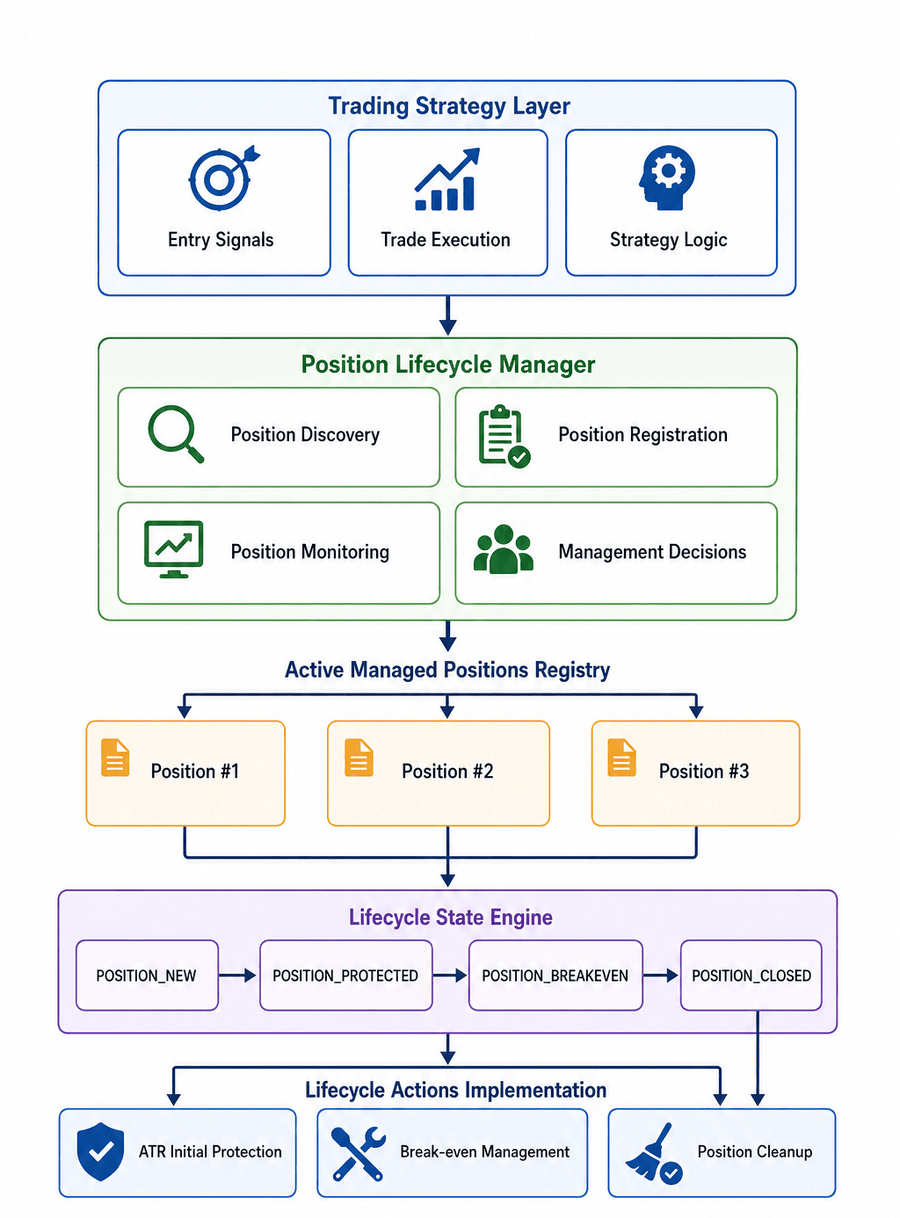
Fig. 1. Position Lifecycle Manager Architecture
This architecture separates trade generation from position management. The trading strategy determines when trades are created, while the Position Lifecycle Manager monitors existing positions, applies lifecycle actions, and removes completed trades from active tracking. Because the responsibilities are independent, the same Position Lifecycle Manager can be integrated with different trading strategies without modifying its internal implementation.
Defining the Position Lifecycle States
Before a position can be managed, the framework requires a clear representation of the stages a trade can occupy throughout its lifetime. A MetaTrader 5 position contains trading information such as symbol, volume, entry price, stop loss, and current profit. However, it does not store additional management history. The platform cannot determine whether a position has already received protection, completed a break-even transition, or required cleanup.
Without an internal state model, the manager would need to reevaluate every position from the beginning during each execution cycle. Lifecycle states solve this problem by recording the current stage of each managed position.
//+------------------------------------------------------------------+
//| Enumeration of position lifecycle states                         |
//+------------------------------------------------------------------+
enum ENUM_POSITION_LIFECYCLE_STATE
  {
   POSITION_NEW,
   POSITION_PROTECTED,
   POSITION_BREAKEVEN,
   POSITION_CLOSED
  };
The initial framework defines four lifecycle stages.
POSITION_NEW
Represents a newly discovered position that has been registered by the manager but has not yet completed any management action. At this stage, the framework creates the managed position object, stores its initial information, and prepares it for further processing.
POSITION_PROTECTED
Indicates that the position has completed its initial protection stage. This state only records that the transition has occurred; the logic responsible for calculating protection levels remains separate.POSITION_BREAKEVEN
Indicates that the break-even transition has already been completed. Recording this state prevents the same management action from being executed repeatedly and allows each position to progress independently.POSITION_CLOSED
Represents a position that no longer exists in the trading environment. Once this state is reached, the manager performs cleanup and removes the position from active tracking. The lifecycle model transforms position management from a collection of repeated condition checks into a controlled state-driven process. Each managed position maintains awareness of its current stage and completed actions.
With the lifecycle model defined, the next step is creating the object responsible for representing an individual managed position.
The Managed Position Object: CManagedPosition
A MetaTrader 5 position contains the information required for trading operations, but it does not store the runtime information required by a position management system. To bridge this gap, the Position Lifecycle Manager introduces a dedicated object that represents each tracked position throughout its lifetime. Instead of relying only on terminal data, the framework maintains an internal representation containing the information required for lifecycle management.
The CManagedPosition class maintains:
- position identity,
- initial trade information,
- current lifecycle state,
- management-related runtime data.
//+------------------------------------------------------------------+
//| Class representing a single managed trade position               |
//+------------------------------------------------------------------+
class CManagedPosition : public CObject
  {
private:
   //--- member variables for position tracking and state
   ulong                        m_ticket;
   string                       m_symbol;
   ENUM_POSITION_TYPE           m_position_type;
   double                       m_volume;
   double                       m_entry_price;
   double                       m_current_sl;
   double                       m_initial_risk;
   ENUM_POSITION_LIFECYCLE_STATE m_lifecycle_state;
   CTrade                       m_trade_client;
   CPositionInfo                m_position_info;

public:
   //--- constructor
                     CManagedPosition(void) : m_ticket(0),
                     m_symbol(""),
                     m_position_type(POSITION_TYPE_BUY),
                     m_volume(0.0),
                     m_entry_price(0.0),
                     m_current_sl(0.0),
                     m_initial_risk(0.0),
                     m_lifecycle_state(POSITION_NEW)
     {
     }

   //--- destructor
                    ~CManagedPosition(void)
     {
     }
By encapsulating position data inside individual objects, each trade can be processed independently while the manager coordinates the overall execution flow.
The separation of responsibilities is therefore:
- CPositionManager – controls the collection of active positions and coordinates processing.
- CManagedPosition– stores the data and state associated with a single position.
Managing Position Identity and Initialization
After creating a managed position object, the framework must establish a connection between the internal representation and the corresponding MetaTrader 5 position. The initialization process is handled through the Init()function. Its purpose is to read the existing terminal position and populate the managed object with the information required for lifecycle processing.
   //--- initialize managed position properties from an open terminal position
   void              Init(const ulong ticket, const ulong magic_number)
     {
      m_ticket = ticket;
      m_trade_client.SetExpertMagicNumber(magic_number);

      //--- select position by ticket to read its properties
      if(m_position_info.SelectByTicket(m_ticket))
        {
         m_symbol = m_position_info.Symbol();
         m_position_type = m_position_info.PositionType();
         m_volume = m_position_info.Volume();
         m_entry_price = m_position_info.PriceOpen();
         m_current_sl = m_position_info.StopLoss();
         m_lifecycle_state = POSITION_NEW;

         if(InpEnableLogging)
            Print("Position detected, ticket: ", m_ticket);
        }
     }
The initialization process performs three main operations.
1. Store the Position IdentityThe position ticket becomes the unique reference connecting the managed object with the corresponding MetaTrader 5 position. This allows the manager to correctly identify and update each tracked position.
2. Capture the Initial Trade InformationThe object stores the initial properties of the position, including:
- symbol,
- position type,
- volume,
- entry price,
- current stop loss.
These values provide the initial data required for future management decisions.
3. Assign the Initial Lifecycle StateAfter initialization, the position begins in POSITION_NEW. At this stage, the position has been discovered and registered, but no lifecycle transition has been completed.
The object is now ready to be processed by the position manager.
The Position Manager: Coordinating Managed Positions
While CManagedPosition represents an individual trade, the system requires a central component responsible for coordinating multiple managed objects. CPositionManager coordinates between the MetaTrader 5 environment and the managed position objects. Its responsibilities include:
- discovering new positions,
- creating managed position objects,
- updating active positions,
- removing completed objects from tracking.
The manager controls the execution flow but does not contain every management rule. Calculations and individual management actions are delegated to specialized components, while CPositionManager ensures that each tracked position is processed correctly.
//+------------------------------------------------------------------+
//| Main orchestrator class for position lifecycle management        |
//+------------------------------------------------------------------+
class CPositionManager
  {
private:
   //--- member variables for orchestration and engines
   CArrayObj            m_managed_positions;
   CRiskEngine          m_risk_engine;
   bool                 m_is_initialized;

   //--- check if a position ticket is already tracked in the collection
   bool              IsPositionTracked(const ulong ticket)
     {
      for(int i = 0; i < m_managed_positions.Total(); i++)
        {
         CManagedPosition *pos = dynamic_cast<CManagedPosition*>(m_managed_positions.At(i));
         if(pos != NULL && pos.GetTicket() == ticket)
            return true;
        }
      return false;
     }

public:
   //--- constructor
                     CPositionManager(void) : m_is_initialized(false)
     {
     }

   //--- destructor
                    ~CPositionManager(void)
     {
      m_managed_positions.Clear();
     }
The manager maintains the resources required to coordinate active positions:
CArrayObj      m_managed_positions;
CRiskEngine    m_risk_engine;
m_managed_positions stores the collection of managed position objects currently controlled by the framework, while m_risk_engine provides supporting calculations required during position processing.
The separation of responsibilities keeps the manager focused on coordination rather than implementing every management operation directly.
The architecture can therefore be summarized as:
- CPositionManager – coordinates managed position objects.
- CManagedPosition – represents an individual trade.
- Supporting components – provide specialized functionality when required.
With the coordinator established, the next step is understanding how positions are discovered and connected to the management system.
Automatic Position Discovery
A position manager cannot process a trade until it has registered that position internally. MetaTrader 5 provides access to active positions through the trading environment, but these positions must first be connected to the objects maintained by the Position Lifecycle Manager.
During execution, the manager performs automatic discovery:
- Reads available positions from MetaTrader 5.
- Checks whether each position is already tracked.
- Creates and initializes a new CManagedPosition object when required.
- Adds the object to the active management collection.
//--- automatically discover and register new positions
if(InpAutoDetectPositions)
  {
   int total_positions = PositionsTotal();

   for(int i = total_positions - 1; i >= 0; i--)
     {
      ulong ticket = PositionGetTicket(i);

      if(ticket <= 0)
         continue;

      //--- process only positions belonging to this EA
      if(PositionGetString(POSITION_SYMBOL) != Symbol() ||
         PositionGetInteger(POSITION_MAGIC) != InpMagicNumber)
         continue;

      //--- register newly discovered positions
      if(!IsPositionTracked(ticket))
        {
         CManagedPosition *new_pos = new CManagedPosition();

         if(new_pos != NULL)
           {
            new_pos.Init(ticket, InpMagicNumber);
            m_managed_positions.Add(new_pos);
           }
        }
     }
  }
The discovery process uses the position ticket as the unique identifier. Before creating a new managed object, the manager verifies whether the ticket already exists:
IsPositionTracked(ticket)
If the position is not found, a new managed object is created and registered. From this point onward, the position becomes part of the internal management system and can progress through its defined lifecycle.
Applying Initial ATR Protection
Once a position has been discovered and registered, it enters the first stage of its lifecycle. Before progressing to later states, the framework applies an initial protective stop loss. Instead of using a fixed distance, the framework uses the Average True Range (ATR) indicator to calculate protection based on current market volatility.
The calculation is delegated to CRiskEngine, allowing the lifecycle manager to remain independent from the risk model.
- CManagedPosition determines when protection should be applied.
- CRiskEngine calculates the required stop-loss level.
This separation allows different protection methods to be introduced without modifying the lifecycle workflow.
Calculating the Initial Stop Loss
The CRiskEngine manages the ATR calculation process. During initialization, it creates the ATR indicator handle and stores the parameters required for later calculations.
   //--- initialize risk parameters and atr indicator
   void              Init(const bool use_atr, const int atr_period, const double atr_multiplier, const string symbol)
     {
      m_use_atr = use_atr;
      m_atr_period = atr_period;
      m_atr_multiplier = atr_multiplier;

      //--- create atr indicator handle if enabled
      if(m_use_atr)
        {
         m_atr_handle = iATR(symbol, PERIOD_CURRENT, m_atr_period);
         if(m_atr_handle == INVALID_HANDLE)
            Print("Error creating ATR indicator in RiskEngine");
        }
     }
When initial protection is requested, the engine retrieves the latest ATR value and calculates the required distance using the configured multiplier. For buy positions, the stop loss is placed below the entry price. For sell positions, it is placed above the entry price. The resulting price is normalized according to the symbol's trading precision before being returned.
   //--- calculate initial stop loss using atr
   double            CalculateInitialStopLoss(const string symbol, const ENUM_POSITION_TYPE pos_type, const double entry_price)
     {
      //--- return zero if atr protection is disabled or handle is invalid
      if(!m_use_atr || m_atr_handle == INVALID_HANDLE)
         return 0.0;

      double atr_values[];
      ArraySetAsSeries(atr_values, true);

      //--- copy latest atr value
      if(CopyBuffer(m_atr_handle, 0, 0, 1, atr_values) <= 0)
        {
         Print("Error copying ATR buffer values");
         return 0.0;
        }

      double atr_value = atr_values[0];
      double risk_distance = atr_value * m_atr_multiplier;
      double sl = 0.0;

      //--- compute stop loss based on position type
      if(pos_type == POSITION_TYPE_BUY)
        {
         sl = entry_price - risk_distance;
        }
      else
         if(pos_type == POSITION_TYPE_SELL)
           {
            sl = entry_price + risk_distance;
           }

      //--- normalize final calculated stop loss price
      return PositionManagerUtils::NormalizePrice(symbol, sl);
     }
  };
Notice that the Risk Engine does not modify the position directly. Its responsibility ends after producing a valid stop-loss price. Applying that value to the trading position remains the responsibility of the lifecycle manager.
Applying Protection During Position Processing
During each update cycle, the managed position checks whether the position still exists. If the position has been closed, its state changes to POSITION_CLOSED. For positions in the POSITION_NEW state, the managed position requests an initial stop-loss calculation from CRiskEngine. When a valid value is returned and the modification succeeds, the stop loss is applied, and the lifecycle state changes to POSITION_PROTECTED.
   //--- update lifecycle state and apply management rules
   void              Update(CRiskEngine &risk_engine, const bool use_atr, const bool use_be, const double be_trigger, const double be_offset)
     {
      //--- check if position still exists in terminal
      if(!m_position_info.SelectByTicket(m_ticket))
        {
         m_lifecycle_state = POSITION_CLOSED;
         return;
        }

      //--- handle state: POSITION_NEW -> Apply initial protection
      if(m_lifecycle_state == POSITION_NEW)
        {
         if(use_atr)
           {
            double initial_sl = risk_engine.CalculateInitialStopLoss(m_symbol, m_position_type, m_entry_price);
            if(initial_sl > 0.0)
              {
               double tp = m_position_info.TakeProfit();
               if(m_trade_client.PositionModify(m_ticket, initial_sl, tp))
                 {
                  m_current_sl = initial_sl;
                  m_lifecycle_state = POSITION_PROTECTED;

                  if(InpEnableLogging)
                     Print("Initial protection applied for ticket: ", m_ticket);
                 }
              }
           }
         else
           {
            //--- if atr protection is disabled, transition directly
            m_lifecycle_state = POSITION_PROTECTED;
           }
        }
Updating the lifecycle state after successful protection prevents the same action from being executed again during later update cycles. The position can now progress to subsequent lifecycle stages.
Implementing Break-Even Inside the Lifecycle
The break-even transition is handled inside the Update() function of CManagedPosition. A position is evaluated for break-even only after the initial protection stage has been completed, ensuring that lifecycle actions occur in the correct order.
//--- handle state: POSITION_PROTECTED -> Check for breakeven transition
if(m_lifecycle_state == POSITION_PROTECTED && use_be)
  {
   double current_bid = SymbolInfoDouble(m_symbol, SYMBOL_BID);
   double current_ask = SymbolInfoDouble(m_symbol, SYMBOL_ASK);

   double trigger_distance = PositionManagerUtils::PipsToPrice(m_symbol, be_trigger);
   double offset_distance  = PositionManagerUtils::PipsToPrice(m_symbol, be_offset);

   bool trigger_hit = false;
   double new_sl = 0.0;

//--- evaluate buy positions
   if(m_position_type == POSITION_TYPE_BUY)
     {
      if(current_bid >= (m_entry_price + trigger_distance))
        {
         new_sl = PositionManagerUtils::NormalizePrice(
                     m_symbol,
                     m_entry_price + offset_distance);

         trigger_hit = (new_sl > m_current_sl);
        }
     }

//--- evaluate sell positions
   else
      if(m_position_type == POSITION_TYPE_SELL)
        {
         if(current_ask <= (m_entry_price - trigger_distance))
           {
            new_sl = PositionManagerUtils::NormalizePrice(
                        m_symbol,
                        m_entry_price - offset_distance);

            trigger_hit = (new_sl < m_current_sl || m_current_sl == 0.0);
           }
        }

//--- apply breakeven protection
   if(trigger_hit)
     {
      double tp = m_position_info.TakeProfit();

      if(m_trade_client.PositionModify(m_ticket, new_sl, tp))
        {
         m_current_sl = new_sl;
         m_lifecycle_state = POSITION_BREAKEVEN;

         if(InpEnableLogging)
            Print("Lifecycle state changed to BREAKEVEN for ticket: ", m_ticket);
        }
     }
  }
After the stop-loss modification succeeds, the managed position updates its lifecycle state to POSITION_BREAKEVEN. This records that the transition has been completed and prevents the same action from being executed again during future update cycles.
Architectural Note
The break-even rule implemented in this version is intentionally simple. The lifecycle system is responsible only for managing the transition:
Is this position ready for the next management stage?
The decision logic determines:
What conditions should allow that transition?
By separating these responsibilities, the break-even model can evolve without changing the lifecycle architecture.
For example, future break-even models could consider:
- Volatility adjustment – adapting the trigger distance according to current market conditions.
- Market structure confirmation – requiring price structure conditions such as higher highs, higher lows, or key level breaks.
- Volume confirmation – validating that the price movement is supported by sufficient market participation.
These changes affect only the transition criteria, while the lifecycle framework remains unchanged.
Position Cleanup and Lifecycle Completion
The final stage of position management is handling completed trades. Once a position is closed, its terminal representation is no longer available in MetaTrader 5, so the manager must remove the corresponding object from active tracking.
During processing, the manager updates each managed position and removes objects that have reached the POSITION_CLOSED state.
//--- step 2: update all active managed positions and clean up closed ones
for(int i = m_managed_positions.Total() - 1; i >= 0; i--)
  {
   CManagedPosition *pos = dynamic_cast<CManagedPosition*>(m_managed_positions.At(i));

   if(pos == NULL)
      continue;

//--- update the managed position according to its current lifecycle state
   pos.Update(
      m_risk_engine,
      InpUseATRProtection,
      InpUseBreakEven,
      InpBreakEvenTrigger,
      InpBreakEvenOffset
   );

//--- remove positions that have completed their lifecycle
   if(pos.GetState() != POSITION_CLOSED)
      continue;

   if(InpEnableLogging)
      Print("Position closed, removing from manager, ticket: ", pos.GetTicket());

   m_managed_positions.Delete(i);
  }
When a position is removed from the collection, the internal representation remains synchronized with the trading environment and completed trades are no longer processed. With discovery, protection, break-even handling, and cleanup implemented, the Position Lifecycle Manager now provides the foundation for managing a trade throughout its complete lifecycle.
Integrating the Position Lifecycle Manager into an Expert Advisor
The final step is connecting the Position Lifecycle Manager with an existing Expert Advisor. For demonstration, the framework is integrated with the standard MACD Expert Advisor example included with MetaTrader 5. The MACD strategy remains unchanged in its market analysis and entry logic. The integration adds the position management layer required to monitor and manage trades after execution.
The general integration structure is illustrated below:
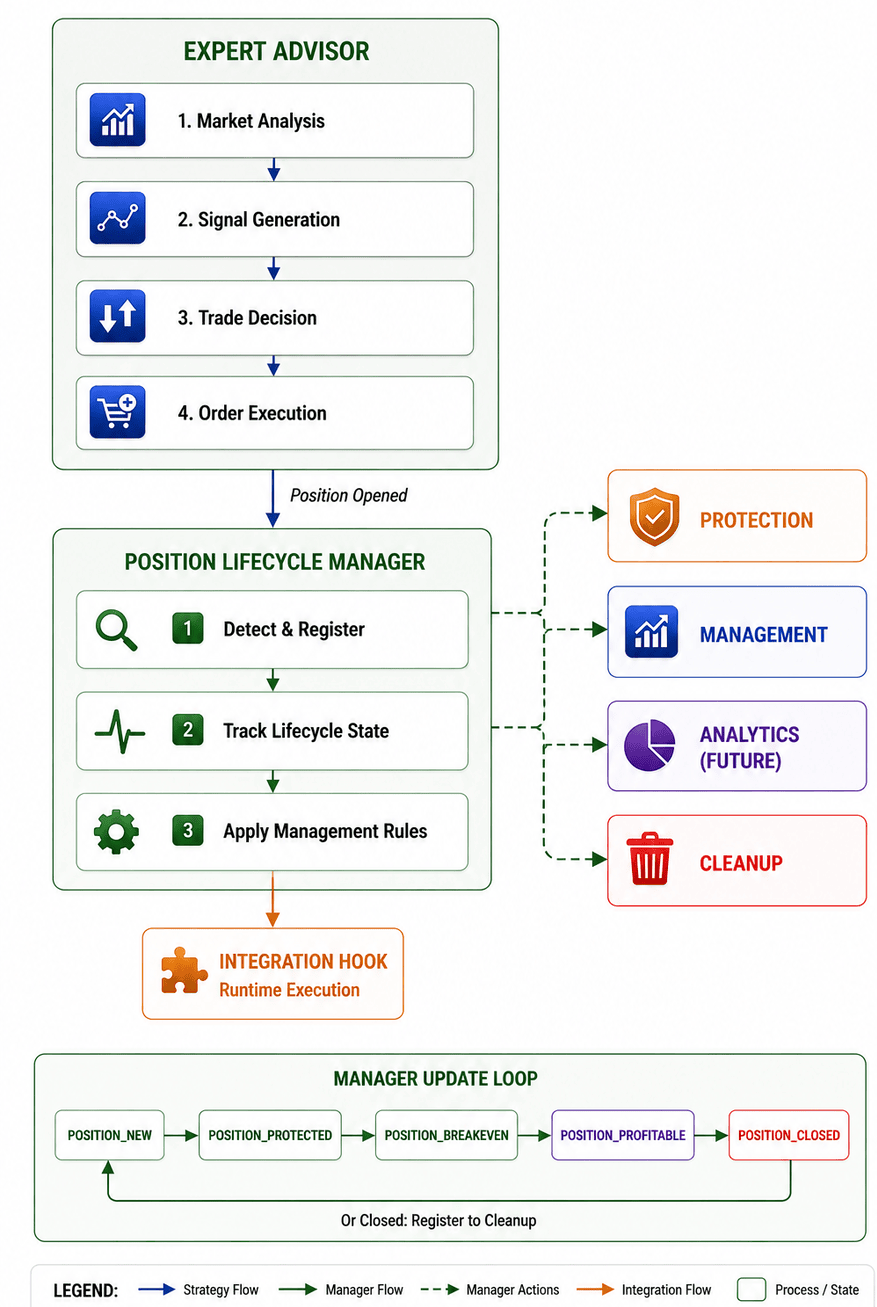
Fig. 2. Position Lifecycle Manager Integration Flow
The flowchart shows how an existing Expert Advisor can connect with the Position Lifecycle Manager. The same approach can be applied to other strategies by initializing the manager and allowing it to process positions during execution.
Adapting the Strategy for Lifecycle ManagementThe original MACD example combines trade generation and position handling in a single Expert Advisor. To integrate the lifecycle framework, overlapping management logic is removed.
The Expert Advisor continues to handle:
- entry decisions,
- trade execution,
- take profit assignment.
The original trailing stop implementation is removed because stop management is now handled by the Position Lifecycle Manager. The MACD signal-based exit logic is also disabled by default to prevent conflicts with the lifecycle process.
input double InpLots          = 0.1;                  // Lots
input int    InpTakeProfit    = 50;                   // Take Profit (in pips)
//--- DELETED: input int    InpTrailingStop  = 30;    // Trailing Stop Level (in pips) - Replaced by CPositionManager framework inputs
input int    InpMACDOpenLevel = 3;                    // MACD open level (in pips)
input int    InpMACDCloseLevel= 2;                    // MACD close level (in pips)
input int    InpMATrendPeriod = 26;                   // MA trend period
input bool   InpUseMACDExit   = false;                // Disabled original MACD signal-based exits
Future versions can extend the framework with additional management capabilities, such as dynamic take profit handling and advanced exit logic.
Including the Position Manager Module
The first step is adding the required position management module.
//--- Include the custom modular position lifecycle framework
#include <PositionManager\PositionManager.mqh>
The module provides access to:
- CPositionManager,
- managed position tracking,
- lifecycle processing,
- supporting management components.
The strategy does not need to access the internal implementation of the manager. It only interacts with the interface required to initialize and process the component.
Creating the Manager Instance
The Expert Advisor creates a single instance of CPositionManager.
//--- global expert
CSampleExpert ExtExpert;
//--- Global instance for the modular position lifecycle manager framework
CPositionManager ExtPositionManager;
Individual CManagedPosition objects are created automatically during position discovery. The Expert Advisor only interacts with the manager interface.
Initializing the Position Lifecycle Manager
During startup, the manager is initialized inside the Expert Advisor's Init() function.
//+------------------------------------------------------------------+
//| Expert initialization function                                   |
//+------------------------------------------------------------------+
int OnInit(void)
  {
//--- create all necessary objects
   if(!ExtExpert.Init())
      return(INIT_FAILED);

//--- Initialize the modular position lifecycle manager framework
   if(!ExtPositionManager.Initialize())
      return(INIT_FAILED);

//--- succeed
   return(INIT_SUCCEEDED);
  }
The initialization stage prepares the internal resources required for position processing. After successful initialization, the Position Lifecycle Manager is ready to monitor positions created by the trading strategy.
Processing Positions During Runtime
The final integration step occurs inside OnTick(). The strategy continues operating normally, while the position manager receives execution time to process lifecycle updates.//+------------------------------------------------------------------+ //| Expert new tick handling function | //+------------------------------------------------------------------+ void OnTick(void) { //--- Delegate post-execution position tracking, state machine, ATR protection, and break-even management to CPositionManager ExtPositionManager.Process(); static datetime limit_time=0; // last trade processing time + timeout //--- don't process if timeout if(TimeCurrent()>=limit_time) { //--- check for data if(Bars(Symbol(),Period())>2*InpMATrendPeriod) { //--- change limit time by timeout in seconds if processed if(ExtExpert.Processing()) limit_time=TimeCurrent()+ExtTimeOut; } } }
During runtime:
- CPositionManager::Process() evaluates the current position environment.
- New positions are detected and registered.
- Existing managed positions continue through their lifecycle.
- Completed positions are removed from active tracking.
The strategy does not need to know the current lifecycle stage of each trade. That information is maintained internally by the Position Lifecycle Manager.
Integration Result
After integration, the Expert Advisor operates through two independent layers: the strategy layer and the position management layer. The tester output below confirms that the Position Lifecycle Manager is initialized correctly and successfully manages the position lifecycle.

The MACD example serves only as a demonstration environment. The Position Lifecycle Manager remains a reusable component that can be integrated into other Expert Advisors requiring structured position handling.
This separation allows trade generation and position management components to be extended independently.
Conclusion
In this first part, we established the foundation of a reusable Position Lifecycle Manager for MQL5. The framework introduces a structured approach to post-entry position management by maintaining lifecycle states and processing positions through defined stages.
The implementation introduced the core components required for lifecycle-based management:
- automatic position discovery,
- managed position objects,
- lifecycle state tracking,
- ATR-based protection,
- break-even transitions,
- position cleanup.
The integration with the standard MACD Expert Advisor demonstrated that structured position management can be added without changing the strategy's core trading logic. The result is a reusable framework where trade generation and position management remain independent. Future parts can extend this foundation with additional capabilities, including dynamic trailing systems, partial position management, manual trade interception, trade analytics, and more advanced risk models.
| File Name | Description |
|---|---|
| PositionManager_MACD_Sample.mq5 | The demonstration Expert Advisor entry point. It contains the original MACD trading logic while integrating the Position Lifecycle Manager. The EA remains responsible for market analysis and trade execution, while forwarding runtime updates to the position management framework. |
| PositionManager.mqh | Implements the central orchestration layer of the framework. It discovers active positions, creates managed position objects, maintains the collection of tracked positions, coordinates lifecycle processing, and removes completed positions from active management. |
| ManagedPosition.mqh | Implements the behavior of an individual managed position. It stores position identity, initial trade information, lifecycle state, and runtime management data while controlling the progression of a single position through its defined lifecycle stages. |
| RiskEngine.mqh | Provides the calculation layer required by the management process. In this first implementation, it handles ATR-based protection calculations while keeping risk calculations independent from lifecycle control logic. |
| Common.mqh | Contains shared definitions used throughout the framework, including lifecycle enumerations, common constants, configuration values, and supporting declarations required by multiple components. |
| MQL5.zip | An archive containing the complete MQL5 folder structure. Extract it into the MetaTrader 5 terminal directory so that PositionManager_MACD_Sample.mq5 is placed under MQL5\Experts\PositionManager\ and all supporting .mqh files are placed under MQL5\Include\PositionManager\. |
Warning: All rights to these materials are reserved by MetaQuotes Ltd. Copying or reprinting of these materials in whole or in part is prohibited.
This article was written by a user of the site and reflects their personal views. MetaQuotes Ltd is not responsible for the accuracy of the information presented, nor for any consequences resulting from the use of the solutions, strategies or recommendations described.

 Building a Visual Position Planning Tool for MetaTrader 5
 Deterministic Dendritic Cell Algorithm (dDCA)
 Neural Networks in Trading: An End-to-End Multivariate Time Series Forecasting Model (Key Components)
 Neural Networks in Trading: An End-to-End Multivariate Time Series Forecasting Model (GinAR)

- Free trading apps
- Over 8,000 signals for copying
- Economic news for exploring financial markets
You agree to website policy and terms of use