

Developing Smart Chart Objects in MQL5 (Part 1): Building a Stateful Trendline Management Framework
 2 394
2 394
 0
0

Introduction
Trendlines remain one of the most widely used tools for analyzing market structure. They provide traders with a simple visual method of identifying potential areas of support, resistance, continuation, and invalidation directly from the chart.
However, in MetaTrader 5, a trendline is only a graphical object. The platform stores its anchor points, coordinates, and visual properties, but the object itself has no understanding of the market events occurring around it. It does not know when price has approached the line, how many times the level has been tested, whether a reaction has occurred, or whether a breakout represents a meaningful structural change.
This creates a gap between what traders see on the chart and what an automated system can process. A manually drawn trendline can remain visible while market conditions continue to evolve around it. Without an additional management layer, every interaction must either be interpreted manually or handled through custom logic built directly around the raw chart object.
To overcome this limitation, this article explores the process of transforming a standard MetaTrader 5 trendline into a managed and interactive object. Instead of treating trendlines as simple graphical elements, we introduce a framework where each trendline is represented as an independent entity with its own identity, lifecycle, and internal state.
The Trendline Manager provides the foundation for this approach. Existing chart trendlines can be discovered, registered, monitored, and evaluated throughout their lifetime. The system tracks important lifecycle events such as price proximity, confirmed touches, bounce attempts, and breakouts while maintaining a clear separation between chart interaction, geometric calculations, and trendline state management.
The framework introduced in this article focuses on several architectural principles:
- Object encapsulation: Each chart trendline is represented through a managed entity that stores its state, history, and behavior instead of relying directly on the raw MetaTrader 5 object.
- Event-driven management: Chart changes are handled through MetaTrader 5 chart events, allowing the system to respond to user actions such as object creation or modification without repeatedly scanning the entire chart.
- Lifecycle-based evaluation: Trendlines move through defined states during their lifetime, allowing interactions to be evaluated progressively instead of immediately reacting to individual price movements.
- Confirmed market evaluation: Completed candles are used when analyzing market behavior, reducing false transitions caused by temporary intrabar movements.
- Separation of responsibilities: Chart handling, mathematical calculations, and lifecycle management are isolated into dedicated components, making the framework easier to extend and maintain.
The objective of this project is not to create a predictive trendline trading strategy. Instead, the goal is to establish a reliable engineering framework that gives ordinary MetaTrader 5 chart objects additional awareness, historical context, and controlled behavior.
Throughout this phase, we will focus on building the foundation required for an interactive trendline manager: how chart objects are discovered, how they are converted into managed entities, how market interactions are evaluated, and how each trendline maintains its lifecycle as new price data becomes available.
The Trendline Manager Architecture
A trendline management system requires more than detecting whether price has crossed a line. The framework must first establish a connection between the chart object created by the user and the internal logic responsible for monitoring its behavior.
In MetaTrader 5, chart objects exist independently from application logic. A manually drawn trendline is created by the user and stored by the terminal, but the program must build its own representation if it wants to track state, record interactions, and manage lifecycle changes over time.
The Smart Trendline Manager solves this by introducing a layered architecture where each component has a specific responsibility.
The workflow begins with the chart object itself. When a user creates a trendline, the system identifies the object, registers it with the manager, and creates a managed representation containing the information required for runtime evaluation.
From this point, the trendline is no longer treated as only a visual element. It becomes an object capable of maintaining:
- its current lifecycle state,
- previous interaction history,
- confirmation progress,
- and visual representation on the chart.
The framework follows a coordinated lifecycle pipeline where each stage handles a specific responsibility such as discovery, synchronization, evaluation, validation, and state management.
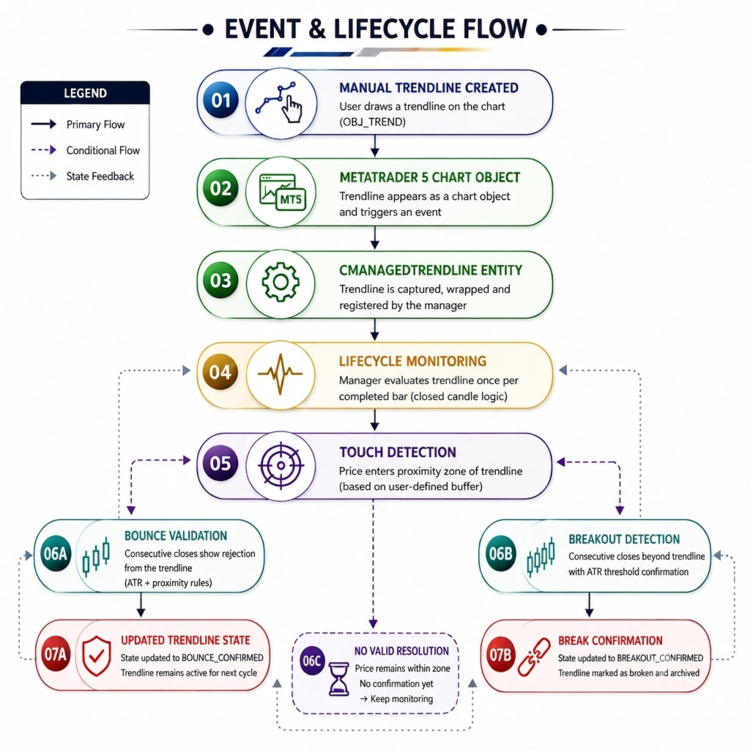
Fig. 1. Architectural framework flow diagram
The architecture separates two different sources of events:
User-driven events originate from direct chart interaction:
- creating a trendline,
- moving a trendline,
- modifying chart objects. These actions are captured through MetaTrader 5 chart events and allow the manager to immediately synchronize its internal representation.
Market-driven events originate from incoming price data:
- price approaching a trendline,
- confirmed interaction,
- bounce validation,
- breakout confirmation. Unlike user actions, market evaluation is intentionally based on completed candle information. This prevents temporary intrabar movements from immediately changing the lifecycle state of a trendline.
The result is a separation between responsiveness and reliability:
- chart modifications are handled immediately through events,
- market decisions are processed through controlled confirmation logic.
This architecture allows the framework to avoid the limitations of a simple trendline checker. Instead of repeatedly asking whether price is above or below a line, the manager maintains a complete lifecycle for each trendline from creation to final resolution.
Before examining the individual functions responsible for implementing this behavior, the next step is understanding the main components that make up the framework and how they interact during execution.Configuring the Trendline Management Environment
Before implementing the trendline discovery and lifecycle logic, we first need to define the runtime parameters that control how the framework interprets chart interactions.
Unlike a normal MetaTrader 5 trendline, a managed trendline requires additional context. The system must understand what qualifies as a meaningful interaction, how much price movement is required before confirming a breakout, and how much evidence is needed before considering a bounce valid.
These behaviors are not embedded directly inside the lifecycle engine. Instead, they are exposed through configurable inputs, allowing the framework to be adapted to different market conditions without modifying the underlying architecture.
//+------------------------------------------------------------------+
//| Input Parameters                                                 |
//+------------------------------------------------------------------+
input string InpPrefix              = DEFAULT_TRENDLINE_PREFIX;    // Prefix filter for managed trendline objects
input double InpProximityPts        = DEFAULT_TOUCH_PROXIMITY_PTS; // Price distance used to detect trendline interaction

input int    InpATRPeriod           = 14;                          // ATR calculation period for volatility measurement
input double InpBreakATRMult        = 1.0;                         // ATR distance required beyond trendline before break confirmation
input int    InpBreakConfirmCloses  = 2;                           // Number of consecutive closes required to confirm breakout
input double InpBounceATRMult       = 1.0;                         // ATR distance required away from trendline before bounce confirmation
input int    InpBounceConfirmCloses = 2;                           // Number of consecutive closes required to confirm rejection
At this stage, the framework begins separating itself from traditional static chart objects. We are no longer only concerned with where a trendline exists. We now begin defining how the trendline behaves throughout its lifetime:
- when price is considered close enough to interact with the line,
- how volatility influences confirmation thresholds,
- how many candle closes are required before confirming a breakout,
- and how bounce validation is performed.
This introduces the concept of trendline lifecycle management. A trendline is no longer treated as a permanent drawing object. It becomes a managed entity operating under defined behavioral rules.
Defining the Trendline Lifecycle States
Before a trendline can be evaluated, the framework requires a clear definition of the possible states a trendline can occupy during runtime.
A native MetaTrader 5 trendline only contains graphical information. It has no concept of being active, waiting for confirmation, broken, or successfully respected. To introduce this behavior, the framework defines a dedicated state model.
//--- Trendline Lifecycle States
enum ENUM_TRENDLINE_STATE
  {
   TRENDLINE_STATE_UNKNOWN       = 0, // Initial uncalculated state
   TRENDLINE_STATE_ACTIVE        = 1, // Active line with price nearby (Untouched)
   TRENDLINE_STATE_TOUCH_PENDING = 2, // Price inside proximity band; waiting for resolution
   TRENDLINE_STATE_BOUNCED       = 3, // Confirmed rejection away from line by ATR threshold
   TRENDLINE_STATE_BROKEN        = 4, // Price closed beyond the line by ATR threshold
   TRENDLINE_STATE_RETESTED      = 5, // Price retesting broken line from opposite side
   TRENDLINE_STATE_EXPIRED       = 6  // Out of time range or manually flagged
  };

//--- Interaction/Breakout Types
enum ENUM_BREAKOUT_TYPE
  {
   BREAKOUT_NONE = 0,                 // No breakout detected
   BREAKOUT_BULLISH,                  // Price closed above line
   BREAKOUT_BEARISH                   // Price closed below line
  };
These enumerations act as the behavioral foundation of the trendline engine. Instead of immediately changing state after a single price movement, each trendline progresses through controlled lifecycle stages. For example:
- an active trendline waits for meaningful interaction,
- a touched trendline enters a pending resolution phase,
- a confirmed reaction becomes a bounce event,
- a validated violation becomes a breakout event.
This state-driven architecture becomes important later when implementing visual state updates, touch tracking, breakout confirmation, bounce validation, and lifecycle transitions.
The Core Object Wrapper: CManagedTrendline
A native MetaTrader 5 trendline only contains the information required to draw a line on the chart. It stores anchor coordinates, visual properties, and an object name, but it has no concept of behavior. While the lifecycle model defines how a managed trendline behaves, the framework still requires a runtime representation capable of maintaining that behavior.
This responsibility is fulfilled by the CManagedTrendline class. Acting as the internal representation of a single chart trendline, each instance maintains its own identity, coordinate information, lifecycle state, interaction history, confirmation progress, and visual state. Rather than repeatedly reading raw chart properties and recalculating behavior from scratch, the framework encapsulates everything required to monitor and manage a trendline throughout its lifetime.
//+------------------------------------------------------------------+
//| Encapsulates a single chart trendline object and its state.      |
//| Inherits from CObject to enable CArrayObj collection management. |
//+------------------------------------------------------------------+
class CManagedTrendline : public CObject
  {
private:
   //--- Object Identity
   string               m_name;                    // Chart object name
   long                 m_chart_id;                // Target chart ID

   //--- Time & Price Coordinates
   datetime             m_time1;                   // Anchor 1 timestamp
   double               m_price1;                  // Anchor 1 price
   datetime             m_time2;                   // Anchor 2 timestamp
   double               m_price2;                  // Anchor 2 price

   //--- State & Tracking
   ENUM_TRENDLINE_STATE m_state;                   // Current lifecycle state
   int                  m_touch_count;             // Total touches recorded
   int                  m_bounce_count;            // Total confirmed bounces recorded
   datetime             m_last_touch_time;         // Timestamp of last touch
   datetime             m_break_time;              // Timestamp of breakout
   bool                 m_was_recently_moved;      // Flag indicating direct user drag/modification

   //--- Pending Resolution Tracking
   int                  m_pending_close_count; 	   // Number of completed candles observed in pending state
   int                  m_break_close_count;       // Accumulated breakout confirmation closes
   int                  m_bounce_close_count;      // Accumulated bounce confirmation closes
   bool                 m_support_context;         // Locked interaction context (true = support, false = resistance)

   //--- Settings & Volatility Thresholds
   double               m_proximity_pts;           // Touch tolerance in points
   double               m_break_atr_mult;          // ATR multiplier for BROKEN confirmation
   int                  m_break_confirm_closes;    // Required closes for breakout confirmation
   double               m_bounce_atr_mult;         // ATR multiplier for BOUNCED confirmation
   int                  m_bounce_confirm_closes;   // Required closes for bounce confirmation
   double               m_touch_atr_mult;          // ATR multiplier for TOUCH_PENDING trigger

private:
   //--- Internal Styling Helpers
   void                 UpdateVisualState();

public:
                     CManagedTrendline(const string name,
                     long chart_id = 0,
                     double proximity_pts = DEFAULT_TOUCH_PROXIMITY_PTS,
                     double break_atr = DEFAULT_BREAK_ATR_MULT,
                     int break_confirm_closes = 1,
                     double bounce_atr = DEFAULT_BOUNCE_ATR_MULT,
                     int bounce_confirm_closes = 1);
                    ~CManagedTrendline();

   //--- Lifecycle & State Engine
   bool                 RefreshProperties();
   bool                 Update(const double &open[], const double &high[], const double &low[], const double &close[], const datetime &time[], const double atr);
   void                 EvaluateLiveDrag();

   //--- Object Getters
   string               GetName()          const { return m_name; }
   ENUM_TRENDLINE_STATE GetState()         const { return m_state; }
   int                  GetTouchCount()    const { return m_touch_count; }
   int                  GetBounceCount()   const { return m_bounce_count; }
   bool                 WasRecentlyMoved() const { return m_was_recently_moved; }

   //--- Coordinate Conversion & Price Helpers
   double               GetPriceAtBarIndex(int bar_index, const datetime &time[]) const;
  };
The class inherits from CObject, allowing individual trendline instances to be stored inside the manager's dynamic object collection. This allows every trendline to exist as an independent runtime entity while still being controlled by the central manager.
Managing Trendline Identity and State
Every managed trendline requires a persistent identity. The framework maintains a relationship between the original MetaTrader 5 chart object and its internal representation, storing items such as a chart identifier, object name, anchor coordinates, current lifecycle state, and previous interaction information.
//+------------------------------------------------------------------+
//| Constructor                                                      |
//+------------------------------------------------------------------+
CManagedTrendline::CManagedTrendline(const string name,
                                     long chart_id,
                                     double proximity_pts,
                                     double break_atr,
                                     int break_confirm_closes,
                                     double bounce_atr,
                                     int bounce_confirm_closes)
   : m_name(name),
     m_chart_id(chart_id),
     m_time1(0),
     m_price1(0.0),
     m_time2(0),
     m_price2(0.0),
     m_state(TRENDLINE_STATE_UNKNOWN),
     m_touch_count(0),
     m_bounce_count(0),
     m_last_touch_time(0),
     m_break_time(0),
     m_was_recently_moved(false),
     m_pending_close_count(0),
     m_break_close_count(0),
     m_bounce_close_count(0),
     m_support_context(false),
     m_proximity_pts(proximity_pts),
     m_break_atr_mult(break_atr),
     m_break_confirm_closes(break_confirm_closes),
     m_bounce_atr_mult(bounce_atr),
     m_bounce_confirm_closes(bounce_confirm_closes),
     m_touch_atr_mult(DEFAULT_TOUCH_ATR_MULT)
  {
   RefreshProperties();
   UpdateVisualState();

//--- Debug log on successful creation
   PrintFormat("//--- [SmartTrendline] Managed Trendline Created: '%s' | Initial State: %s",
               m_name, EnumToString(m_state));
  }
The reason for storing this information internally is to avoid treating every market update as a fresh calculation. A trendline needs memory. For example, the system must know whether price has already touched the line, whether a breakout is currently being confirmed, whether a previous bounce occurred, and whether a state transition has already happened. Without internal state, every candle would be evaluated as an isolated event.
Synchronizing With the Chart Object
Although the managed trendline stores its own internal state, the chart object remains the source of visual truth. A trader can manually move a trendline at any moment by dragging its anchor points. Because of this, the framework must synchronize its internal coordinates with the current chart object properties via the RefreshProperties() function.
//+------------------------------------------------------------------+
//| Refreshes anchor coordinates directly from chart properties.     |
//+------------------------------------------------------------------+
bool CManagedTrendline::RefreshProperties()
  {
   if(!ObjectGetInteger(m_chart_id, m_name, OBJPROP_TIME, 0, m_time1) ||
      !ObjectGetDouble(m_chart_id, m_name, OBJPROP_PRICE, 0, m_price1) ||
      !ObjectGetInteger(m_chart_id, m_name, OBJPROP_TIME, 1, m_time2) ||
      !ObjectGetDouble(m_chart_id, m_name, OBJPROP_PRICE, 1, m_price2))
     {
      return false;
     }

//--- Mark flag so live engine evaluates immediate tick proximity
   m_was_recently_moved = true;

//--- Default state to active if previously unknown or edited
   if(m_state == TRENDLINE_STATE_UNKNOWN)
      m_state = TRENDLINE_STATE_ACTIVE;

   return true;
  }
The important architectural decision here is that the framework does not assume ownership over the chart object. Instead, it maintains a controlled relationship where user actions modify the MetaTrader 5 chart object, which in turn refreshes the internal representation. This allows the system to support manual interaction while still maintaining automated lifecycle management.
Separating Geometry from Behavior
A trendline requires mathematical calculations to determine its projected price value at a specific point in time. However, geometric calculations are not part of the lifecycle engine. The framework isolates these calculations into the dedicated geometry component.
//+------------------------------------------------------------------+
//| Evaluates price projection relative to bar index using Geometry. |
//+------------------------------------------------------------------+
double CManagedTrendline::GetPriceAtBarIndex(int bar_index, const datetime &time[]) const
  {
   if(bar_index < 0 || bar_index >= ArraySize(time))
      return 0.0;

   Point2D p1, p2;
   p1.x = (double)m_time1;
   p1.y = m_price1;
   p2.x = (double)m_time2;
   p2.y = m_price2;

   return CGeometry::GetYAtX(p1, p2, (double)time[bar_index]);
  }
This separation of responsibilities is intentional: geometry handles mathematical operations, while CManagedTrendline handles lifecycle decisions. This prevents the trendline object from becoming responsible for unrelated calculations and keeps the architecture easier to extend.
Immediate Evaluation During User Interaction
One important design decision in the framework is separating manual interaction from market evaluation. A trader dragging a trendline is a direct user action, and waiting for the next completed candle before acknowledging the change would create an unnecessary delay. For this reason, manually modified trendlines receive immediate evaluation through EvaluateLiveDrag().
//+------------------------------------------------------------------+
//| Immediate On-Tick Live Drag Proximity Evaluation Routine.        |
//+------------------------------------------------------------------+
void CManagedTrendline::EvaluateLiveDrag()
  {
   if(!m_was_recently_moved)
      return;

//--- Lower flag after one-shot evaluation
   m_was_recently_moved = false;

//--- Only evaluate active lines
   if(m_state != TRENDLINE_STATE_ACTIVE)
      return;

   double live_bid = SymbolInfoDouble(_Symbol, SYMBOL_BID);

   Point2D p1, p2;
   p1.x = (double)m_time1;
   p1.y = m_price1;
   p2.x = (double)m_time2;
   p2.y = m_price2;

   double line_price = CGeometry::GetYAtX(p1, p2, (double)TimeCurrent());

   if(line_price == 0.0)
      return;

   double proximity_margin = m_proximity_pts * _Point;

//--- Check if live bid is within proximity threshold upon manual edit/drag
   if(MathAbs(live_bid - line_price) <= proximity_margin)
     {
      ENUM_TRENDLINE_STATE previous_state = m_state;

      m_touch_count++;
      m_last_touch_time = TimeCurrent();
      m_pending_close_count = 0;
      m_break_close_count = 0;
      m_bounce_close_count = 0;
      m_support_context = (live_bid >= line_price);
      m_state            = TRENDLINE_STATE_TOUCH_PENDING;

      PrintFormat("//--- [SmartTrendline] Object '%s' Live Drag Touch Intercept: %s -> %s | Total Touches: %d",
                  m_name, EnumToString(previous_state), EnumToString(m_state), m_touch_count);

      UpdateVisualState();
     }
  }
This creates a hybrid evaluation model where user interactions trigger an immediate proximity check, while market behavior relies on completed candle evaluation. Responsiveness and reliability require different approaches: user actions should feel immediate, while market decisions should remain confirmation-based.
The Trendline Lifecycle Engine
The central responsibility of CManagedTrendline is managing how a trendline moves between lifecycle states. A common implementation mistake is treating any price crossing as a breakout. However, markets frequently produce temporary movements around technical levels, and a wick beyond a trendline does not necessarily represent a structural violation.
The framework therefore uses a pending resolution model handled by the Update() function.
//+------------------------------------------------------------------+
//| Core State Machine & Pending Resolution Engine Routine.          |
//+------------------------------------------------------------------+
bool CManagedTrendline::Update(const double &open[], const double &high[], const double &low[], const double &close[], const datetime &time[], const double atr)
  {
   if(ArraySize(close) < 3)
      return false;

//--- Evaluate latest closed bar (Bar 1)
   int bar_idx = 1;
   double expected_price = GetPriceAtBarIndex(bar_idx, time);
   if(expected_price == 0.0)
      return false;

   double current_close = close[bar_idx];

//--- Signed Difference: Positive = Above line (Support context), Negative = Below line (Resistance context)
   double signed_diff  = current_close - expected_price;
   double dist_to_line = MathAbs(signed_diff);

   ENUM_TRENDLINE_STATE previous_state = m_state;

//--- Convert point tolerance input to price units
   double proximity_price = m_proximity_pts * _Point;

//--- STATE 1: ACTIVE -> Shift to TOUCH_PENDING on Volatility/Proximity
   if(m_state == TRENDLINE_STATE_ACTIVE)
     {
      //--- Calculate dynamic touch threshold (ATR multiplier + static point proximity)
      double touch_threshold = (atr * m_touch_atr_mult) + proximity_price;

      if(dist_to_line <= touch_threshold ||
         MathAbs(high[bar_idx] - expected_price) <= touch_threshold ||
         MathAbs(low[bar_idx] - expected_price) <= touch_threshold)
        {
         if(m_last_touch_time != time[bar_idx])
           {
            m_touch_count++;
            m_last_touch_time = time[bar_idx];
            m_pending_close_count = 0;
            m_break_close_count = 0;
            m_bounce_close_count = 0;
            m_support_context = (current_close >= expected_price);
            m_state            = TRENDLINE_STATE_TOUCH_PENDING;
           }
        }
     }
//--- STATE 2: TOUCH_PENDING -> Deterministic Completed-Candle Resolution
   else
      if(m_state == TRENDLINE_STATE_TOUCH_PENDING)
        {
         m_pending_close_count++;

         double break_threshold  = (atr * m_break_atr_mult) + proximity_price;
         double bounce_threshold = (atr * m_bounce_atr_mult) + proximity_price;
         //--- SUPPORT INTERACTION CONTEXT
         if(m_support_context)
           {
            if(signed_diff <= -break_threshold)
              {
               m_break_close_count++;
               m_bounce_close_count = 0;
              }
            else
               if(signed_diff >= bounce_threshold)
                 {
                  m_bounce_close_count++;
                  m_break_close_count = 0;
                 }
               else
                 {
                  m_break_close_count = 0;
                  m_bounce_close_count = 0;
                 }
           }
         //--- RESISTANCE INTERACTION CONTEXT
         else
           {
            if(signed_diff >= break_threshold)
              {
               m_break_close_count++;
               m_bounce_close_count = 0;
              }
            else
               if(signed_diff <= -bounce_threshold)
                 {
                  m_bounce_close_count++;
                  m_break_close_count = 0;
                 }
               else
                 {
                  m_break_close_count = 0;
                  m_bounce_close_count = 0;
                 }
           }

         PrintFormat("//--- [SmartTrendline] '%s' Pending | Candles=%d | Break=%d | Bounce=%d",
                     m_name, m_pending_close_count, m_break_close_count, m_bounce_close_count);

         if(m_break_close_count >= m_break_confirm_closes)
           {
            m_state = TRENDLINE_STATE_BROKEN;
            m_break_time = time[bar_idx];
           }
         else
            if(m_bounce_close_count >= m_bounce_confirm_closes)
              {
               m_state = TRENDLINE_STATE_BOUNCED;
              }
        }
      //--- STATE 3: BOUNCED -> Record bounce count telemetry and reset to ACTIVE for subsequent retests
      else
         if(m_state == TRENDLINE_STATE_BOUNCED)
           {
            m_bounce_count++;
            PrintFormat("//--- [SmartTrendline] Object '%s' Bounce Confirmed! Total Bounces: %d", m_name, m_bounce_count);
            m_state = TRENDLINE_STATE_ACTIVE;
           }

//-- Handle state transition log & visual update
   if(m_state != previous_state)
     {
      PrintFormat("//--- [SmartTrendline] Object '%s' State Changed: %s -> %s | Total Touches: %d | Total Bounces: %d",
                  m_name, EnumToString(previous_state), EnumToString(m_state), m_touch_count, m_bounce_count);

      UpdateVisualState();
     }

   return true;
  }
Instead of making immediate decisions, the engine enters a pending-resolution phase. During this phase, it evaluates distance to the projected trendline, volatility-adjusted thresholds, and consecutive closes. It changes state only after the confirmation counters meet the configured requirements. This allows the lifecycle engine to distinguish between temporary price movement, valid rejection, and confirmed structural failure while reducing false transitions caused by market noise.
Visual Representation of Lifecycle State
A managed object should not only maintain internal state; it should also communicate that state visually. The UpdateVisualState() function synchronizes lifecycle information with chart appearance.
//+------------------------------------------------------------------+
//| Updates line visual appearance based on internal state.          |
//+------------------------------------------------------------------+
void CManagedTrendline::UpdateVisualState()
  {
   color target_color = TrendlineDefaults::ActiveColor;
   ENUM_LINE_STYLE target_style = TrendlineDefaults::ActiveStyle;
   int target_width = TrendlineDefaults::DefaultWidth;

   switch(m_state)
     {
      case TRENDLINE_STATE_ACTIVE:
      case TRENDLINE_STATE_BOUNCED:
         target_color = TrendlineDefaults::ActiveColor;
         target_style = TrendlineDefaults::ActiveStyle;
         break;

      case TRENDLINE_STATE_TOUCH_PENDING:
         target_color = TrendlineDefaults::TouchedColor;
         target_style = TrendlineDefaults::ActiveStyle;
         target_width = TrendlineDefaults::DefaultWidth + 1;
         break;

      case TRENDLINE_STATE_BROKEN:
         target_color = TrendlineDefaults::BrokenColor;
         target_style = TrendlineDefaults::BrokenStyle;
         break;

      case TRENDLINE_STATE_RETESTED:
         target_color = TrendlineDefaults::RetestedColor;
         target_style = TrendlineDefaults::ActiveStyle;
         break;

      default:
         break;
     }

//--- Apply visual modifications to chart object
   ObjectSetInteger(m_chart_id, m_name, OBJPROP_COLOR, target_color);
   ObjectSetInteger(m_chart_id, m_name, OBJPROP_STYLE, target_style);
   ObjectSetInteger(m_chart_id, m_name, OBJPROP_WIDTH, target_width);
   ChartRedraw(m_chart_id);
  }
The chart becomes an additional debugging interface. Instead of relying only on logs or internal variables, the user can immediately observe the lifecycle state of each managed trendline. Active trendlines are displayed in lime, pending interactions are highlighted in yellow, and confirmed breakouts are marked in red. This visual feedback makes it easier to verify state transitions and understand how the lifecycle engine responds to market events directly from the chart.
Architectural Note: Lifecycle Extension BoundariesThe current implementation focuses on the primary trendline interaction cycle: detecting market approaches, validating reactions, and confirming structural breaks. A confirmed bounce does not change the identity of the trendline. The structure remains valid, allowing the lifecycle to return from BOUNCED back to ACTIVE and continue monitoring future interactions. However, a confirmed breakout currently represents the end of the managed lifecycle. Once a trendline reaches the BROKEN state, the framework does not attempt to revive, recycle, or reinterpret the structure.
More advanced lifecycle behavior, including trendline retesting, expiration handling, and potential revival after a previous breakout, is intentionally reserved for future extensions. These features require additional rules for determining when a previously broken structure regains relevance and are therefore separated from the core interaction engine.
The Trendline Manager: Coordinating Managed Entities
With CManagedTrendline responsible for the behavior of an individual trendline, the next challenge is coordinating multiple managed entities during runtime. A chart may contain several trendlines, each maintaining its own geometry, lifecycle state, and interaction history. Managing these objects directly from the indicator layer would quickly introduce duplicated logic and tightly coupled responsibilities The framework introduces the CTrendlineManager class. It discovers and registers trendlines, maintains the collection, forwards market data, removes invalid references, and coordinates updates.
//+------------------------------------------------------------------+
//| Orchestration engine for discovering and managing trendlines.    |
//| Manages object lifecycle using a safe CArrayObj collection.      |
//+------------------------------------------------------------------+
class CTrendlineManager
  {
private:
   long              m_chart_id;              // Target chart context
   string            m_prefix;                // Prefix filter for manual objects
   CArrayObj         m_lines;                 // Managed trendline collection array
   datetime          m_last_processed_bar;    // Timestamp of last processed closed bar

   //--- Configurable Threshold Settings
   double            m_proximity_pts;         // Touch Proximity Threshold (Points)
   double            m_break_atr_mult;        // Break ATR Multiplier
   int               m_break_confirm_closes;  // Consecutive Closes for Break
   double            m_bounce_atr_mult;       // Bounce ATR Multiplier
   int               m_bounce_confirm_closes; // Consecutive Closes for Bounce

private:
   //--- Internal Collection Helpers
   int               FindIndexByName(const string name);
   bool              IsManaged(const string name);

public:
                     CTrendlineManager(const string prefix = DEFAULT_TRENDLINE_PREFIX,
                     double proximity_pts = DEFAULT_TOUCH_PROXIMITY_PTS,
                     double break_atr_mult = 1.0,
                     int break_confirm_closes = 2,
                     double bounce_atr_mult = 1.0,
                     int bounce_confirm_closes = 2,
                     long chart_id = 0);
                    ~CTrendlineManager();

   //--- Lifecycle & Event Methods
   bool              Init();
   void              Update(const double &open[], const double &high[], const double &low[], const double &close[], const datetime &time[], const double atr);
   void              HandleChartEvent(const int id, const long &lparam, const double &dparam, const string &sparam);

   //--- Discovery & Registration
   int               DiscoverTrendlines();
   bool              RegisterTrendline(const string name);
   bool              UnregisterTrendline(const string name);

   //--- Collection Accessors
   int               GetTotalManaged() const { return m_lines.Total(); }
   CManagedTrendline* GetLine(const int index);
  };
//+------------------------------------------------------------------+
//| Constructor                                                      |
//+------------------------------------------------------------------+
CTrendlineManager::CTrendlineManager(const string prefix,
                                     double proximity_pts,
                                     double break_atr_mult,
                                     int break_confirm_closes,
                                     double bounce_atr_mult,
                                     int bounce_confirm_closes,
                                     long chart_id)
   : m_prefix(prefix),
     m_proximity_pts(proximity_pts),
     m_break_atr_mult(break_atr_mult),
     m_break_confirm_closes(break_confirm_closes),
     m_bounce_atr_mult(bounce_atr_mult),
     m_bounce_confirm_closes(bounce_confirm_closes),
     m_chart_id(chart_id),
     m_last_processed_bar(0)
  {
//--- Enable automatic memory management for CArrayObj elements
   m_lines.FreeMode(true);
  }
The manager does not interpret market behavior or decide lifecycle outcomes. Its responsibility is orchestration: discovering objects, maintaining managed references, forwarding events, and delivering market updates to each trendline entity. Instead, it provides the structure required for multiple independent trendlines to operate together, keeping each trendline responsible for its own state transitions while the manager handles the larger system workflow.
Discovering Existing Trendlines
One of the first responsibilities of the manager is identifying trendlines that already exist on the chart. A common assumption is that object events are enough to track chart objects, but MetaTrader 5 events only occur after the indicator is running. This creates an important edge case: a trader may already have manually drawn trendlines before attaching the indicator.
Without an initial discovery phase, existing objects would remain unmanaged, only newly created trendlines would be recognized, and the framework would have an incomplete view of the chart. The DiscoverTrendlines() function solves this by performing an initial scan when the manager starts.
//+------------------------------------------------------------------+
//| Scans chart for objects matching prefix and registers them.      |
//+------------------------------------------------------------------+
int CTrendlineManager::DiscoverTrendlines()
  {
   int registered_count = 0;
   int total_objects = ObjectsTotal(m_chart_id, -1, OBJ_TREND);

   for(int i = total_objects - 1; i >= 0; i--)
     {
      string name = ObjectName(m_chart_id, i, -1, OBJ_TREND);

      //--- Check prefix filter match
      if(StringFind(name, m_prefix) == 0)
        {
         if(!IsManaged(name))
           {
            if(RegisterTrendline(name))
               registered_count++;
           }
        }
     }

   if(registered_count > 0)
     {
      PrintFormat("[SmartTrendline] Discovery complete: %d new trendlines registered.", registered_count);
     }

   return registered_count;
  }
This creates a hybrid discovery model: initial discovery provides the starting state, while event handling maintains the system afterwards.
Registering Trendlines into the Framework
Finding a chart object is only the first step. A native MetaTrader 5 trendline cannot participate in lifecycle management until it is converted into a managed entity via RegisterTrendline().
//+------------------------------------------------------------------+
//| Registers a new trendline object into the collection.            |
//+------------------------------------------------------------------+
bool CTrendlineManager::RegisterTrendline(const string name)
  {
   if(IsManaged(name))
      return false;

   CManagedTrendline *new_line = new CManagedTrendline(name, m_chart_id, m_proximity_pts, m_break_atr_mult, m_break_confirm_closes, m_bounce_atr_mult, m_bounce_confirm_closes);
   if(new_line == NULL)
      return false;

   if(m_lines.Add(new_line))
     {
      //--- Overwrite visual properties directly on user object
      ObjectSetInteger(m_chart_id, name, OBJPROP_RAY_RIGHT, true);
      ObjectSetInteger(m_chart_id, name, OBJPROP_BACK, true);
      ObjectSetInteger(m_chart_id, name, OBJPROP_WIDTH, TrendlineDefaults::DefaultWidth);
      ObjectSetInteger(m_chart_id, name, OBJPROP_COLOR, TrendlineDefaults::ActiveColor);

      PrintFormat("//--- [SmartTrendline] Registered user trendline: '%s'", name);
      return true;
     }

   delete new_line;
   return false;
  }
The registration process creates the relationship where a chart object becomes a managed entity equipped with internal state, interaction tracking, confirmation logic, and controlled lifecycle behavior.
Updating Managed Trendlines
Once objects are registered, the manager becomes responsible for delivering market updates to each managed entity. The manager does not calculate breakout conditions or bounce validation itself; instead, it provides the required data and allows each object to evaluate its own lifecycle.
//+------------------------------------------------------------------+
//| Orchestrates lifecycle updates across all managed trendlines.    |
//+------------------------------------------------------------------+
void CTrendlineManager::Update(const double &open[], const double &high[], const double &low[], const double &close[], const datetime &time[], const double atr)
  {
   if(ArraySize(time) < 3)
      return;

//--- Enforce time series indexing (Index 0 = current live bar, Index 1 = last closed bar)
   ArraySetAsSeries(open, true);
   ArraySetAsSeries(high, true);
   ArraySetAsSeries(low, true);
   ArraySetAsSeries(close, true);
   ArraySetAsSeries(time, true);

//--- 1. Live Drag Branch: Process immediate touch evaluation if user moved lines
   bool has_moved_lines = false;
   int total = m_lines.Total();

   for(int i = 0; i < total; i++)
     {
      CManagedTrendline *line = (CManagedTrendline*)m_lines.At(i);
      if(line != NULL && line.WasRecentlyMoved())
        {
         has_moved_lines = true;
         line.EvaluateLiveDrag();
        }
     }

//--- 2. Closed-Bar Gate: Skip closed-bar evaluation unless a new bar has completed
//--- Bar 1 is now guaranteed to be the most recent completed/closed candle
   bool is_new_bar = (time[1] != m_last_processed_bar);
   if(!is_new_bar && !has_moved_lines)
      return;

   if(is_new_bar)
     {
      m_last_processed_bar = time[1];

      //--- Standard closed-bar state machine processing
      for(int i = 0; i < total; i++)
        {
         CManagedTrendline *line = (CManagedTrendline*)m_lines.At(i);
         if(line != NULL)
           {
            // --- DIAGNOSTIC PRINT
            double debug_expected = line.GetPriceAtBarIndex(1, time);
            PrintFormat("//--- [DEBUG] Line: %s | Bar Time[1]: %s | Close[1]: %.5f | ExpectedLinePrice: %.5f | Diff: %.5f",
                        line.GetName(), TimeToString(time[1]), close[1], debug_expected, (close[1] - debug_expected));

            line.Update(open, high, low, close, time, atr);
           }
        }
     }
  }
This maintains the separation of responsibilities: the manager controls when updates occur, while each managed trendline determines how those updates affect its own lifecycle.
Handling Chart Events
MetaTrader 5 provides an event-driven system for chart object interaction. Rather than repeatedly scanning every chart object looking for changes, the manager listens for relevant events using HandleChartEvent().
//+------------------------------------------------------------------+
//| Handles MT5 chart events and dispatches object lifecycle actions. |
//+------------------------------------------------------------------+
void CTrendlineManager::HandleChartEvent(const int id, const long &lparam, const double &dparam, const string &sparam)
  {
//--- 1. Creation Event: Intercept any user-drawn trendline instantly
   if(id == CHARTEVENT_OBJECT_CREATE)
     {
      if(ObjectGetInteger(m_chart_id, sparam, OBJPROP_TYPE) == OBJ_TREND)
        {
         // Skip system-generated lines
         if(StringSubstr(sparam, 0, 3) == "SYS")
            return;

         RegisterTrendline(sparam);
        }
     }

//--- 2. Drag / End Edit / Interaction Events: Catch modifications & missed registrations
   else
      if(id == CHARTEVENT_OBJECT_DRAG || id == CHARTEVENT_OBJECT_ENDEDIT || id == CHARTEVENT_OBJECT_CHANGE)
        {
         int index = FindIndexByName(sparam);
         if(index >= 0)
           {
            CManagedTrendline *line = (CManagedTrendline*)m_lines.At(index);
            if(line != NULL)
              {
               line.RefreshProperties();
               PrintFormat("//--- [SmartTrendline] Line modified by user: %s", sparam);
              }
           }
         else
           {
            //--- Replicate creation check on edit if missed during rapid drawing
            if(ObjectGetInteger(m_chart_id, sparam, OBJPROP_TYPE) == OBJ_TREND)
              {
               if(StringSubstr(sparam, 0, 3) != "SYS")
                  RegisterTrendline(sparam);
              }
           }
         ChartRedraw(m_chart_id);
        }

      //--- 3. Deletion Event: Replicates RemoveZoneByName memory lookup
      else
         if(id == CHARTEVENT_OBJECT_DELETE)
           {
            //--- Fast internal memory lookup via sparam string match
            if(IsManaged(sparam))
              {
               UnregisterTrendline(sparam);
               ChartRedraw(m_chart_id);
              }
           }
  }
The manager can respond to actions such as creating a new trendline, modifying an existing object, or deleting a managed object, avoiding unnecessary polling and keeping the system synchronized with user interaction.
Connecting the Framework Through the Indicator Layer
The final component of the architecture is the MetaTrader 5 indicator itself. Unlike traditional indicators where most calculations and decision-making happen directly inside OnCalculate(), the Smart Trendline Manager follows a different approach where the indicator acts only as the entry point between MetaTrader 5 and the internal framework. Its responsibilities are limited to receiving platform events, creating required resources, forwarding market data, and managing the lifetime of the framework components. The actual trendline behavior remains inside the dedicated manager and managed entity classes.
Initialization and Resource Ownership
The OnInit() function is responsible for preparing the environment required by the framework by enabling required chart events, creating the trendline manager, performing the initial discovery process, and creating the ATR calculation handle.
//+------------------------------------------------------------------+
//| Custom indicator initialization function                         |
//+------------------------------------------------------------------+
int OnInit()
  {
//--- Enable MT5 chart object deletion events
   ChartSetInteger(0, CHART_EVENT_OBJECT_DELETE, true);

//--- Instantiate Manager with User Inputs
   g_manager = new CTrendlineManager(InpPrefix,
                                     InpProximityPts,
                                     InpBreakATRMult,
                                     InpBreakConfirmCloses,
                                     InpBounceATRMult,
                                     InpBounceConfirmCloses);
   if(g_manager == NULL)
     {
      Print("//--- [SmartTrendline] Critical Error: Failed to allocate CTrendlineManager.");
      return INIT_FAILED;
     }

//--- Initialize Manager and Perform Discovery Scan
   if(!g_manager.Init())
     {
      Print("//--- [SmartTrendline] Critical Error: Failed to initialize CTrendlineManager.");
      delete g_manager;
      g_manager = NULL;
      return INIT_FAILED;
     }

//--- Initialize ATR Handle
   g_atr_handle = iATR(_Symbol, _Period, InpATRPeriod);
   if(g_atr_handle == INVALID_HANDLE)
     {
      Print("//--- [SmartTrendline] Critical Error: Failed to create ATR handle.");
      delete g_manager;
      g_manager = NULL;
      return INIT_FAILED;
     }

   PrintFormat("//--- [SmartTrendline] Initialized | Prefix: '%s' | Prox: %.1f pts | Break: %.2fx ATR (%d Closes) | Bounce: %.2fx ATR (%d Closes) | ATR Period: %d",
               InpPrefix, InpProximityPts, InpBreakATRMult, InpBreakConfirmCloses, InpBounceATRMult, InpBounceConfirmCloses, InpATRPeriod);

   return INIT_SUCCEEDED;
  }
An important architectural decision here is resource ownership. The indicator owns platform resources (ATR handles, MetaTrader 5 event registration, indicator lifecycle), while the manager owns application behavior (trendline registration, object management, lifecycle processing).
Market Data Flow Through OnCalculate()
In MetaTrader 5, OnCalculate() is called repeatedly as new market data arrives. A common mistake is using this function as the location for the entire trading or analysis engine. The Smart Trendline Manager instead treats OnCalculate() as a dispatcher.
//+------------------------------------------------------------------+
//| Custom indicator iteration function                              |
//+------------------------------------------------------------------+
int OnCalculate(const int rates_total,
                const int prev_calculated,
                const datetime &time[],
                const double &open[],
                const double &high[],
                const double &low[],
                const double &close[],
                const long &tick_volume[],
                const long &volume[],
                const int &spread[])
  {
//--- Minimum Bar Safety Check
   if(rates_total < 3)
      return 0;

//--- Enforce Series Indexing (Bar 0 = Current Bar, Bar 1 = Last Closed Bar)
   ArraySetAsSeries(time, true);
   ArraySetAsSeries(open, true);
   ArraySetAsSeries(high, true);
   ArraySetAsSeries(low, true);
   ArraySetAsSeries(close, true);

//--- Fetch Latest ATR Value
   double atr_buffer[1];
   if(CopyBuffer(g_atr_handle, 0, 0, 1, atr_buffer) <= 0)
     {
      return prev_calculated;
     }
   double current_atr = atr_buffer[0];

//--- Pass Bar Arrays and ATR to Manager Lifecycle Routine
   if(g_manager != NULL)
     {
      g_manager.Update(open, high, low, close, time, current_atr);
     }

   return rates_total;
  }
This keeps the MetaTrader 5 execution model separate from the lifecycle engine, ensuring that trendline evaluation is based on completed candles rather than continuous tick movement to prevent false breakouts and unstable lifecycle transitions.
Forwarding Platform Events Through the Indicator Layer
MetaTrader 5 delivers chart interaction events through the indicator's OnChartEvent() handler. The indicator does not process trendline behavior directly; instead, it forwards these events to the trendline manager, which owns the object lifecycle logic.
//+------------------------------------------------------------------+
//| Chart Event Handler                                              |
//+------------------------------------------------------------------+
void OnChartEvent(const int id,
                  const long &lparam,
                  const double &dparam,
                  const string &sparam)
  {
//--- Forward All Chart Events Directly to Orchestrator
   if(g_manager != NULL)
     {
      g_manager.HandleChartEvent(id, lparam, dparam, sparam);

      //--- Unblock instant visual feedback on drag/edit events
      if(id == CHARTEVENT_OBJECT_DRAG || id == CHARTEVENT_OBJECT_ENDEDIT || id == CHARTEVENT_OBJECT_CREATE)
        {
         ChartRedraw(0);
        }
     }
  }
Using events provides immediate response, lower processing overhead, cleaner synchronization, and better scalability. The framework follows the principle of reacting to changes instead of constantly searching for them.
Operational Walkthrough
With the framework implemented, it is useful to observe how the manager behaves during normal chart interaction. The following sequence demonstrates the typical lifecycle of a managed trendline from creation to registration and subsequent market evaluation.
Draw a standard MetaTrader 5 trendline using the platform's built-in drawing tools. No special object type or manual configuration is required.

Fig. 2. Inserting Trendlines on Metatrader 5
As soon as the trendline is created, the framework intercepts the chart event, validates the object, and registers it with the CTrendlineManager. From this point forward, the trendline is no longer treated as a passive graphical object but as a managed entity capable of tracking its own lifecycle and interaction history.
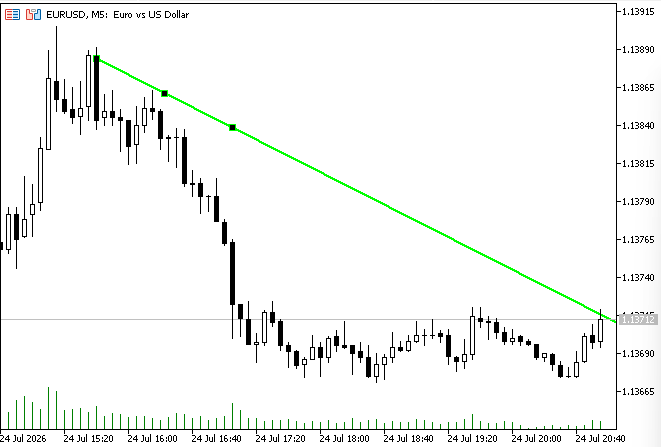
Fig. 3. Intercepted trendline
As new completed candles become available, the manager forwards market data to the registered trendline. Depending on price behavior, the trendline transitions through its lifecycle, detecting proximity, pending interaction, confirmed bounces, or validated breakouts according to the configured confirmation rules. Whenever the lifecycle changes, the framework immediately updates the trendline's visual appearance. This provides instant feedback on the current state of the object while keeping the chart synchronized with the internal lifecycle engine.
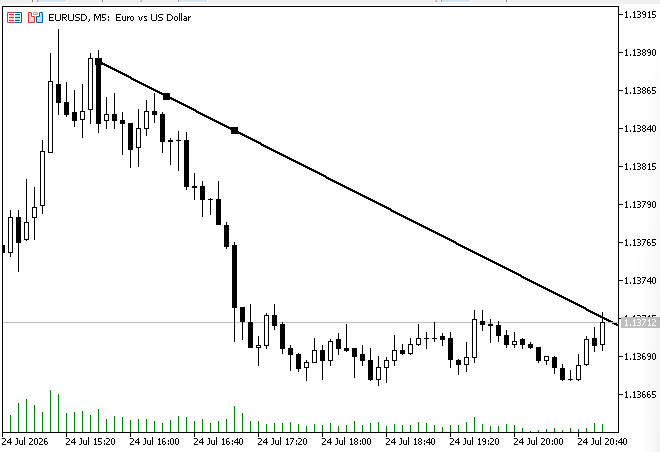
Fig. 4. Visual Trendline feedback change upon confirmed price touch or proximity threshold reached
Conclusion
Throughout this article, we transformed an ordinary MetaTrader 5 trendline from a passive chart object into a managed runtime entity capable of maintaining its own lifecycle. Rather than relying solely on graphical properties, the framework introduced a structured architecture where each trendline can be discovered, registered, monitored, and evaluated as market conditions evolve.
To achieve this, we separated responsibilities across dedicated components. The trendline manager coordinates discovery and object ownership, managed trendlines maintain their own behavioral state, and the geometry layer performs the mathematical calculations required for evaluation. Combined with MetaTrader 5's event system and confirmation-based market analysis, this architecture provides a clean and extensible foundation for interactive chart objects.
Equally important is the lifecycle-driven approach adopted throughout the framework. Instead of reacting immediately to every price movement, trendlines transition through controlled states as evidence accumulates from completed candles. This reduces false reactions while allowing the framework to distinguish between temporary interactions, confirmed bounces, and validated breakouts in a deterministic manner.
The objective of this project was not to build a complete trading strategy, but to establish a reusable engineering framework that gives standard MetaTrader 5 chart objects awareness of their surrounding market activity. The architecture presented here forms a solid foundation upon which more advanced behavior can be implemented while preserving a clear separation of responsibilities.
In future iterations, we will build upon this foundation by introducing additional capabilities such as notifications, analytical metrics, strategy integration, and more sophisticated interaction models. Because the core architecture is modular and lifecycle-driven, these enhancements can be incorporated without requiring fundamental changes to the underlying framework. The Smart Trendline Manager combines event-driven programming, object-oriented design, and lifecycle management. It shows how traditional chart objects can become maintainable, state-aware components for advanced analytics in MetaTrader 5.
| File Name | Description |
|---|---|
| SmartTrendlineManager.mq5 | The main indicator entry point. It connects MetaTrader 5 events and market data with the internal framework by creating the trendline manager, forwarding chart interactions, and passing market updates for lifecycle evaluation. |
| TrendlineManager.mqh | Implements the orchestration layer of the framework. It discovers existing trendlines, registers managed entities, handles chart events, maintains the collection of active trendlines, and coordinates lifecycle updates across multiple objects. |
| ManagedTrendline.mqh | Implements the behavior of an individual managed trendline. It encapsulates trendline geometry, lifecycle states, interaction tracking, confirmation logic, and visual state updates while remaining independent from the manager. |
| Common.mqh | Contains shared definitions used throughout the framework, including common constants, enumerations, default configuration values, and supporting declarations required by multiple components. |
| Geometry.mqh | Provides the geometric calculations required by the framework, including trendline projection and price evaluation at specific chart positions. This module remains independent from lifecycle logic to keep calculations reusable and isolated. |
| MQL5.zip | An archive containing the complete MQL5 folder structure. Extract it into the MetaTrader 5 terminal directory so that SmartTrendlineManager.mq5 is placed under MQL5\Indicators\SmartTrendlineManager\ and all supporting .mqh files are placed under MQL5\Include\SmartTrendline\. |
Warning: All rights to these materials are reserved by MetaQuotes Ltd. Copying or reprinting of these materials in whole or in part is prohibited.
This article was written by a user of the site and reflects their personal views. MetaQuotes Ltd is not responsible for the accuracy of the information presented, nor for any consequences resulting from the use of the solutions, strategies or recommendations described.

 How To Debug MQL5 Code in MetaEditor
 Building a Hidden Risk of Ruin Auditor in MQL5
 Designing a Partial Close Engine in MQL5 with Configurable Profit Ladders
 Institutional-Grade Multi-Currency Portfolio Engine in MQL5 (Part 1): Architecture of a Multi-Currency EA Framework

- Free trading apps
- Over 8,000 signals for copying
- Economic news for exploring financial markets
You agree to website policy and terms of use