

Price Action Analysis Toolkit Development (Part 86): Validating the Entire Sample Library
 109
109
 0
0

Contents
- Introduction
- Designing library-wide validation
- MQL5 implementation
- Operating and reviewing the batch
- Testing
- Conclusion
Introduction
The visual reviewer developed in Part 85 made a stored validation result easier to understand. A sample could be selected, validated, and displayed on its historical chart, where the two lows, the neckline, and the decisive candle were drawn from the validator's own indices. That approach remains useful when the purpose is to study one formation closely.
Individual review requires selecting and validating each sample separately. That is useful for inspecting a formation, but it does not provide a count of the statuses across the stored collection. A batch action supplies this collection view while leaving detailed chart inspection available.
The new VALIDATE ALL control copies the in-memory collection. It applies the existing double-bottom validator to every sample and counts the four outcomes. The run also writes a CSV report. It includes the timestamp, validator settings, totals, and one detailed result row per sample. The original SAMPLE_<ID>.csv files are not edited.
After this change, the trader can see how the stored examples are distributed across the four statuses. The developer receives one detailed row for every sample, including the selected indices, measurements, and reason. Individual chart review remains available when one of those rows needs to be examined against its candles.
Designing library-wide validation
Two questions, two controls
VALIDATE SELECTED and VALIDATE ALL remain separate. The first answers, "What did the validator find in this sample?" It retains the selected sample and result so SHOW ON CHART can reconstruct the formation. The second answers, "How did the current rule set classify the stored collection?" It processes every record and produces totals plus a CSV report.
Combining the two actions would make the interface less clear. A batch run may contain several confirmed results, but SHOW ON CHART can display only one sample at a time. It would be misleading to let a collection result behave like a retained chart subject. When VALIDATE ALL is pressed, the panel discards the retained individual result and requests removal of its drawing. If cleanup fails, the batch does not start. Otherwise, the result area displays the collection totals after validation completes. A sample must be selected and validated again before it can be shown on the chart.
The totals do not replace chart inspection. They identify the records worth opening, while the visual reviewer shows whether the selected lows and neckline agree with the intended formation.
Recording the settings with the results
A status has meaning only in relation to the settings that produced it. With a pivot strength of two, a candle must satisfy one local-low definition. Changing the strength changes the candidates available to the pair evaluator. Minimum separation, maximum low difference, required depth, symmetry, breakout buffer, and failure tolerance can also change the final classification.
The report stores the active settings, report schema, sample format and validator revision alongside the results. Floating-point settings use seventeen significant digits. Repeating a classification also requires the same source samples and validator implementation; the report alone does not contain the full candle arrays. Sample IDs identify records within the library, while a separate filename distinguishes each saved run. The source SAMPLE_<ID>.csv files remain unchanged.
Reusing the tested validator
The batch coordinator does not contain a second definition of a double bottom. It calls ValidateDoubleBottom() for each stored sample. The mandatory geometry rules, pair search, score, and decisive-close classification therefore remain identical to individual validation.
Using one function avoids maintaining two rule implementations. Matching single and batch results still requires identical candle data, settings and validator code, with both calls completing successfully. A comparison should therefore check the selected indices and measurements as well as the status.
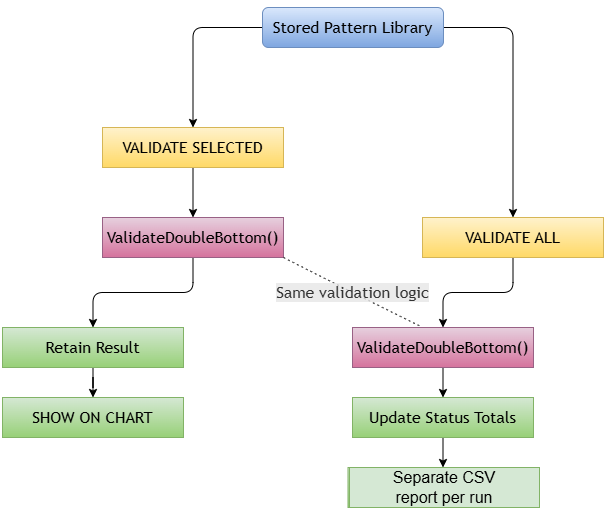
Figure 1. Individual and library-wide validation using the same rule engine.
The coordinator has a narrower responsibility: obtain the collection, validate each element, update status counters, and pass the completed arrays to the CSV writer. It does not inspect chart objects, navigate through history, or calculate alternative measurements.
Stable IDs instead of assumed positions
Sample IDs do not need to be consecutive. A deleted record leaves a gap, and the library does not renumber later samples because the ID is also part of the persistent filename. Renumbering would weaken references made in notes, screenshots, and earlier reports.
Batch validation works on the array returned by GetAllSamples(). It never loops from ID 1 to the sample count or constructs guessed filenames. A deletion gap therefore has no effect on the records included in the run: the library, not an assumed numeric sequence, defines the batch.
Stored candles, not the current chart
Every SPatternSample contains its symbol, timeframe, and complete candle array. Structural validation uses those stored candles. The chart on which the panel is attached does not provide replacement prices for a batch run.
Because validation uses stored candles, the pattern library can include multiple markets and timeframes. Chart context is required only when SHOW ON CHART attempts to draw a selected result. Batch computation and visualization therefore have different context requirements.
Structuring the CSV report
Three sections in one CSV:
The UTF-8 CSV uses explicit SECTION,SUMMARY, SECTION,SETTINGS and SECTION,RESULTS records. Each section has its own header and column count. The results section has 23 columns and one row per sample. A parser must process these sections separately rather than treating the whole file as one rectangular table.
The first section gives the collection totals. The second shows the rules that produced them. The third provides enough detail to investigate why each sample received its status. Keeping the three sections together prevents the settings from being separated from their results.
The report begins with these batch fields:
- BATCH_TIME: records the last known server time read after the validation loop, including seconds. It is not local terminal time, a unique run identifier or the time when report saving completed. Without new quotes, this server timestamp may remain unchanged.
- PATTERN_TYPE: stores the text DOUBLE_BOTTOM_CANDIDATE. REPORT_SCHEMA, VALIDATOR_REVISION and SAMPLE_FORMAT identify the report and validation contracts; TIME_BASIS describes the timestamp.
- TOTAL: records the number of samples processed.
- INVALID, CANDIDATE, CONFIRMED and FAILED: record the status counts.
The settings section stores pivot strength, minimum low separation, maximum low difference, minimum depth, minimum symmetry, breakout buffer, and failure tolerance. These values are written from the same SDoubleBottomSettings structure passed to each validation call.
The result table starts with sample identity and context: ID, symbol, timeframe, start time, end time, and candle count. It then stores status, score, selected indices, prices, and the validator's reason. An INVALID row keeps index values at -1 when no accepted structure exists. This is preferable to inserting plausible coordinates that were never selected.
Separate reports for each run
Reports are saved in MQL5\Files\PatternLibrary\DOUBLE_BOTTOM_CANDIDATE with names beginning VALIDATION_SUMMARY_. A local date/time and a per-run counter distinguish filenames; the writer rejects a collision instead of overwriting an existing report. The local filename timestamp is separate from the server-based BATCH_TIME field.
The writer creates a temporary file, checks the byte count and flush diagnostics, closes it, then reopens it and compares every byte with the intended UTF-8 payload. Only a matching file is renamed to its final CSV name. Error messages identify the failed operation and include an available diagnostic code. Possible causes include paths, permissions, storage problems and file locks.
This is an immediate readback check, not a guarantee against later modification or power loss. A failed temporary-file cleanup is reported. The Experts log records the final report path after a successful export. Earlier reports remain available for comparison; source sample files are not rewritten.
Preserving numerical precision
Report serialization uses seventeen significant digits for settings, prices, scores and measurements. It does not query SYMBOL_DIGITS or use the digits of the chart hosting the panel. Export therefore does not require the sample symbol to be available in Market Watch.
The purpose is to retain the calculated double values for later comparison. Some decimals may display binary floating-point tails, and scientific notation may appear for extreme magnitudes. A spreadsheet can apply shorter display formatting without changing the exported file. Precision here concerns serialization; it does not establish the accuracy of the source quotes or the validity of a formation.
System architecture
Part 86 adds DoubleBottomBatchValidator.mqh and extends the existing panel. The library, single-sample validator, renderer, and storage modules retain their previous responsibilities.
The panel initiates the action and displays the final totals. The batch module coordinates the run. CPatternLibrary supplies actual stored samples, including non-consecutive IDs. ValidateDoubleBottom() evaluates each sample with the active settings. The batch writer then creates the consolidated CSV in the pattern folder.
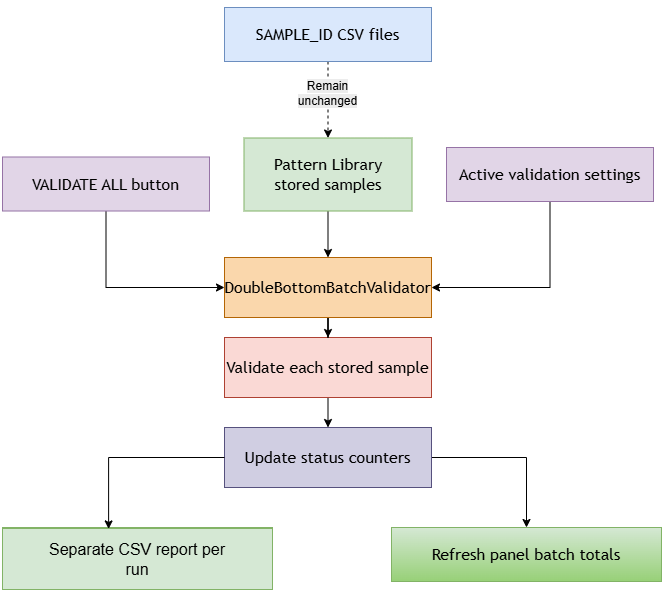
Figure 2. Batch-validation flow from the stored library to panel totals and a consolidated CSV report.
The panel receives only the totals needed on the chart. The CSV receives the detailed sample rows. Neither output changes the source sample files.
MQL5 implementation
The completed project contains nine source files. Eight continue the recorder, validator, and visual reviewer. The new batch module owns collection-wide processing and report creation. The excerpts below follow the execution path from the summary contract to the panel event. The attachment contains the complete compile-ready source tree.
1. Declaring the batch summary
The summary separates completion of validation from completion of export. validation_complete becomes true only after every sample has been evaluated and counted. report_file remains empty until a verified report has been published. A failed export can therefore leave usable totals without producing a save-success message.
#define DOUBLE_BOTTOM_REPORT_SCHEMA "1"
#define DOUBLE_BOTTOM_VALIDATOR_REVISION "P86-1"

//--- Separates completed validation from successful report publication
struct SDoubleBottomBatchSummary
  {
   datetime          generated_at;
   bool              validation_complete;
   int               total;
   int               invalid_count;
   int               candidate_count;
   int               confirmed_count;
   int               failed_count;
   string            report_file;
  };

//+------------------------------------------------------------------+
//| Resets the counts and report state before a batch                |
//+------------------------------------------------------------------+
void InitDoubleBottomBatchSummary(SDoubleBottomBatchSummary &summary)
  {
   summary.generated_at = 0;
   summary.validation_complete = false;
   summary.total = 0;
   summary.invalid_count = 0;
   summary.candidate_count = 0;
   summary.confirmed_count = 0;
   summary.failed_count = 0;
   summary.report_file = "";
  }
2. Preparing storage and counting statuses
The report uses the candidate folder shared by the recorder and reviewer. All four known statuses are counted explicitly. An unknown value returns false instead of being hidden inside the INVALID total.
//+------------------------------------------------------------------+
//| Creates the report directory without changing source records     |
//+------------------------------------------------------------------+
bool PrepareDoubleBottomSummaryFolder(string &error)
  {
   string folders[2];
   folders[0] = STORAGE_FOLDER;
   folders[1] = GetPatternFolder(PATTERN_DOUBLE_BOTTOM_CANDIDATE);
   for(int i = 0; i < 2; i++)
     {
      ResetLastError();
      if(!FolderCreate(folders[i]))
        {
         int code = GetLastError();
         if(code != ERR_FILE_IS_DIRECTORY)
           {
            error = "Cannot create report folder. Error: " + IntegerToString(code);
            return(false);
           }
        }
     }
   return(true);
  }
//+------------------------------------------------------------------+
//| Counts only explicitly recognized validation states              |
//+------------------------------------------------------------------+
bool CountDoubleBottomBatchStatus(const ENUM_DOUBLE_BOTTOM_STATUS status,
                                  SDoubleBottomBatchSummary &summary)
  {
   switch(status)
     {
      case DOUBLE_BOTTOM_INVALID:   summary.invalid_count++;   return(true);
      case DOUBLE_BOTTOM_CANDIDATE: summary.candidate_count++; return(true);
      case DOUBLE_BOTTOM_CONFIRMED: summary.confirmed_count++; return(true);
      case DOUBLE_BOTTOM_FAILED:    summary.failed_count++;    return(true);
     }
   return(false);
  }
The following helpers preserve numeric precision and quote textual fields, including commas, quotation marks and embedded line breaks.
//+------------------------------------------------------------------+
//| Preserves seventeen significant digits without symbol metadata   |
//+------------------------------------------------------------------+
string DoubleBottomBatchNumber(const double value)
  {
   return(StringFormat("%.17g", value));
  }
//+------------------------------------------------------------------+
//| Quotes a CSV field, including embedded commas and line breaks    |
//+------------------------------------------------------------------+
string QuoteDoubleBottomBatchCsvField(const string value)
  {
   string escaped = value;
   StringReplace(escaped, "\"", "\"\"");
   return("\"" + escaped + "\"");
  }
3. Writing the CSV report
Before opening a file, the writer checks completion state, parallel array sizes and status totals. It recounts the result rows and rejects unknown statuses or recorded execution errors.//+------------------------------------------------------------------+ //| Rejects mismatched arrays, unknown states and inconsistent totals| //+------------------------------------------------------------------+ bool CheckDoubleBottomBatchRows(SPatternSample &samples[], SDoubleBottomValidation &results[], const SDoubleBottomBatchSummary &summary, string &error) { int count = ArraySize(samples); if(!summary.validation_complete || count < 1 || count != ArraySize(results) || count != summary.total) { error = "Incomplete batch or inconsistent sample/result sizes."; return(false); } SDoubleBottomBatchSummary counted; InitDoubleBottomBatchSummary(counted); for(int i = 0; i < count; i++) { if(results[i].execution_error || !CountDoubleBottomBatchStatus(results[i].status, counted)) { error = "Batch contains an execution error or unknown status."; return(false); } } if(counted.invalid_count != summary.invalid_count || counted.candidate_count != summary.candidate_count || counted.confirmed_count != summary.confirmed_count || counted.failed_count != summary.failed_count) { error = "Batch counters do not match result rows."; return(false); } return(true); }The UTF-8 payload is written in binary mode so the number of bytes written can be checked directly. FileFlush() and FileClose() return no Boolean result; error diagnostics and a complete readback provide the export checks.
//+------------------------------------------------------------------+
//| Writes the complete UTF-8 payload and checks byte count and flush|
//+------------------------------------------------------------------+
bool WriteDoubleBottomBatchBytes(const int handle, uchar &bytes[],
                                 const int count, string &error)
  {
   ResetLastError();
   uint written = FileWriteArray(handle, bytes, 0, count);
   int code = GetLastError();
   if(written != (uint)count || code != 0)
     {
      error = "Report write failed. Error: " + IntegerToString(code);
      return(false);
     }
   ResetLastError();
   FileFlush(handle);
   code = GetLastError();
   if(code != 0)
     {
      error = "Report flush failed. Error: " + IntegerToString(code);
      return(false);
     }
   return(true);
  }
//+------------------------------------------------------------------+
//| Reopens the closed file and compares every byte with the payload |
//+------------------------------------------------------------------+
bool VerifyDoubleBottomBatchFile(const string path, uchar &expected[],
                                 const int count, string &error)
  {
   ResetLastError();
   int handle = FileOpen(path, FILE_READ|FILE_BIN);
   if(handle == INVALID_HANDLE)
     {
      error = "Cannot reopen report for verification. Error: " +
              IntegerToString(GetLastError());
      return(false);
     }
   uchar actual[];
   bool ok = FileSize(handle) == (ulong)count;
   if(ok)
      ok = ArrayResize(actual, count) == count;
   if(ok)
      ok = FileReadArray(handle, actual, 0, count) == (uint)count;
   FileClose(handle);
   if(ok)
     {
      for(int i = 0; i < count; i++)
        {
         if(actual[i] != expected[i])
           {
            ok = false;
            break;
           }
        }
     }
   if(!ok)
      error = "Report byte verification failed.";
   return(ok);
  }
The writer constructs the three marked sections, verifies the temporary file and publishes a separate report. The payload and verification buffer are held in memory, so report size contributes to memory use. The function does not claim crash-safe atomic persistence.
//+------------------------------------------------------------------+
//| Writes and verifies a separate report for this completed batch   |
//+------------------------------------------------------------------+
bool SaveDoubleBottomBatchSummary(SPatternSample &samples[],
                                  SDoubleBottomValidation &results[],
                                  const SDoubleBottomSettings &settings,
                                  SDoubleBottomBatchSummary &summary,
                                  string &error)
  {
   summary.report_file = "";
   if(!CheckDoubleBottomSettings(settings, error) ||
      !CheckDoubleBottomBatchRows(samples, results, summary, error) ||
      !PrepareDoubleBottomSummaryFolder(error))
      return(false);

//--- Mark each CSV section and record the contracts needed for comparison
   string report = "SECTION,SUMMARY\r\n";
   report += "REPORT_SCHEMA,VALIDATOR_REVISION,SAMPLE_FORMAT,BATCH_TIME,TIME_BASIS,PATTERN_TYPE,TOTAL,INVALID,CANDIDATE,CONFIRMED,FAILED\r\n";
   report += DOUBLE_BOTTOM_REPORT_SCHEMA + "," + DOUBLE_BOTTOM_VALIDATOR_REVISION +
             ",2," + TimeToString(summary.generated_at, TIME_DATE|TIME_SECONDS) +
             ",LAST_KNOWN_SERVER_TIME_AFTER_VALIDATION,DOUBLE_BOTTOM_CANDIDATE," +
             IntegerToString(summary.total) + "," + IntegerToString(summary.invalid_count) +
             "," + IntegerToString(summary.candidate_count) + "," +
             IntegerToString(summary.confirmed_count) + "," + IntegerToString(summary.failed_count) + "\r\n";
   report += "SECTION,SETTINGS\r\n";
   report += "PIVOT_STRENGTH,MIN_LOW_SEPARATION,MAX_LOW_DIFFERENCE_PCT,MIN_DEPTH_PCT,MIN_SYMMETRY_PCT,BREAKOUT_BUFFER_PCT,FAILURE_TOLERANCE_PCT\r\n";
   report += IntegerToString(settings.pivot_strength) + "," +
             IntegerToString(settings.min_low_separation) + "," +
             DoubleBottomBatchNumber(settings.max_low_difference_pct) + "," +
             DoubleBottomBatchNumber(settings.min_depth_pct) + "," +
             DoubleBottomBatchNumber(settings.min_symmetry_pct) + "," +
             DoubleBottomBatchNumber(settings.breakout_buffer_pct) + "," +
             DoubleBottomBatchNumber(settings.failure_tolerance_pct) + "\r\n";
   report += "SECTION,RESULTS\r\n";
   report += "SAMPLE_ID,SYMBOL,TIMEFRAME_INT,START_TIME,END_TIME,BARS,STATUS,SCORE,FIRST_LOW_INDEX,SECOND_LOW_INDEX,NECKLINE_INDEX,BREAKOUT_INDEX,FAILURE_INDEX,SEPARATION_BARS,FIRST_LOW_PRICE,SECOND_LOW_PRICE,NECKLINE_PRICE,PATTERN_DEPTH,DEPTH_PCT,LOW_DIFFERENCE_PCT,SYMMETRY_PCT,RECOVERY_PCT,REASON\r\n";
   for(int i = 0; i < ArraySize(samples); i++)
     {
      //--- Serialize stored values without querying the active chart or symbol
      SPatternSample sample = samples[i];
      SDoubleBottomValidation result = results[i];
      report += IntegerToString(sample.id) + "," + QuoteDoubleBottomBatchCsvField(sample.symbol) +
                "," + IntegerToString((int)sample.timeframe) + "," +
                TimeToString(sample.start_time, TIME_DATE|TIME_SECONDS) + "," +
                TimeToString(sample.end_time, TIME_DATE|TIME_SECONDS) + "," +
                IntegerToString(sample.bars) + "," + DoubleBottomStatusToString(result.status) + "," +
                DoubleBottomBatchNumber(result.score) + "," +
                IntegerToString(result.first_low_index) + "," + IntegerToString(result.second_low_index) + "," +
                IntegerToString(result.neckline_index) + "," + IntegerToString(result.breakout_index) + "," +
                IntegerToString(result.failure_index) + "," + IntegerToString(result.separation_bars) + "," +
                DoubleBottomBatchNumber(result.first_low_price) + "," +
                DoubleBottomBatchNumber(result.second_low_price) + "," +
                DoubleBottomBatchNumber(result.neckline_price) + "," +
                DoubleBottomBatchNumber(result.pattern_depth) + "," +
                DoubleBottomBatchNumber(result.depth_pct) + "," +
                DoubleBottomBatchNumber(result.low_difference_pct) + "," +
                DoubleBottomBatchNumber(result.symmetry_pct) + "," +
                DoubleBottomBatchNumber(result.recovery_pct) + "," +
                QuoteDoubleBottomBatchCsvField(result.reason) + "\r\n";
     }

//--- Use a per-run filename and never overwrite an existing report
   string stamp = TimeToString(TimeLocal(), TIME_DATE|TIME_SECONDS);
   StringReplace(stamp, ".", "");
   StringReplace(stamp, ":", "");
   StringReplace(stamp, " ", "_");
   string path = GetPatternFolder(PATTERN_DOUBLE_BOTTOM_CANDIDATE) +
                 "VALIDATION_SUMMARY_" + stamp + "_" +
                 IntegerToString((long)GetMicrosecondCount()) + ".csv";
   string temporary = path + ".tmp";
   if(FileIsExist(path) || FileIsExist(temporary))
     {
      error = "Report filename collision; retry the batch.";
      return(false);
     }
   uchar bytes[];
   int count = StringToCharArray(report, bytes, 0, WHOLE_ARRAY, CP_UTF8) - 1;
   if(count <= 0)
     {
      error = "Cannot encode report as UTF-8.";
      return(false);
     }
   ResetLastError();
   int handle = FileOpen(temporary, FILE_WRITE|FILE_BIN);
   if(handle == INVALID_HANDLE)
     {
      error = "Cannot open report file. Check path, permissions, disk and file locks. Error: " +
              IntegerToString(GetLastError());
      return(false);
     }
   bool ok = WriteDoubleBottomBatchBytes(handle, bytes, count, error);
   ResetLastError();
   FileClose(handle);
   int close_error = GetLastError();
   if(close_error != 0)
     {
      error = "Report close diagnostic: " + IntegerToString(close_error);
      ok = false;
     }
   if(ok)
      ok = VerifyDoubleBottomBatchFile(temporary, bytes, count, error);
   if(ok)
     {
      ResetLastError();
      ok = FileMove(temporary, 0, path, 0);
      if(!ok)
         error = "Cannot publish report. Error: " + IntegerToString(GetLastError());
     }
   if(!ok)
     {
      if(FileIsExist(temporary) && !FileDelete(temporary))
         error += " Temporary file cleanup failed: " + temporary;
      return(false);
     }
   summary.report_file = path;
   error = "";
   return(true);
  }
4. Processing the actual collection
The coordinator checks the library and settings, obtains a checked snapshot and allocates a parallel results array. It rejects an empty library and aborts on detected execution failures, unknown statuses or an inconsistent Boolean/status pair. Completed validation is recorded before export begins.//+------------------------------------------------------------------+ //| Validates a copied collection before attempting report export | //+------------------------------------------------------------------+ bool ValidateDoubleBottomLibrary(CPatternLibrary *library, const SDoubleBottomSettings &settings, SDoubleBottomBatchSummary &summary, string &error) { InitDoubleBottomBatchSummary(summary); if(CheckPointer(library) == POINTER_INVALID || !library.IsReady()) { error = "The pattern library is not available."; return(false); } if(!CheckDoubleBottomSettings(settings, error)) return(false); SPatternSample samples[]; if(!library.GetAllSamples(samples)) { error = "Cannot allocate the sample snapshot."; return(false); } summary.total = ArraySize(samples); if(summary.total == 0) { error = "The pattern library does not contain any samples."; return(false); } SDoubleBottomValidation results[]; if(ArrayResize(results, summary.total) != summary.total) { error = "Cannot allocate batch results."; return(false); } for(int i = 0; i < summary.total; i++) { if(IsStopped()) { error = "Batch interrupted before completion."; return(false); } bool accepted = ValidateDoubleBottom(samples[i], settings, results[i]); if(results[i].execution_error || accepted != (results[i].status != DOUBLE_BOTTOM_INVALID) || !CountDoubleBottomBatchStatus(results[i].status, summary)) { error = "Validator execution failed for sample #" + IntegerToString(samples[i].id) + ": " + results[i].reason; return(false); } } //--- This is the last known server time, not the report completion time summary.generated_at = TimeCurrent(); summary.validation_complete = true; return(SaveDoubleBottomBatchSummary(samples, results, settings, summary, error)); }
GetAllSamples() returns false when its outer snapshot allocation fails. The validator also checks allocation of its swing-low array and sets execution_error if that allocation fails. These supporting changes are included in PatternLibrary.mqh and DoubleBottomValidator.mqh.
An ordinary false return with INVALID and no execution_error remains a reportable rejection, including unsuitable sample input. Invalid settings are rejected before the loop. The execution_error flag identifies the explicitly detected allocation failure; it is not a catch-all handler for terminal termination or every possible runtime failure.
Processing is synchronous. Validation cost grows with the number of samples and possible swing-low pairs, and the interface may pause during a large batch. The code checks for a stop request between samples, not inside every pair comparison.
5. Adding the panel control
VALIDATE SELECTED and VALIDATE ALL share a row and use the same width as the other paired buttons. The result area displays either individual measurements or batch totals. The object-click handler routes the new button to OnValidateAllSamples().
//--- Create individual and collection-wide validation controls
   CreateObject(m_btn_validate_name, OBJ_BUTTON, x+10, y+320,
                bw, 28, "VALIDATE SELECTED");
   ObjectSetInteger(m_chart_id, m_btn_validate_name, OBJPROP_COLOR, clrBlack);
   ObjectSetInteger(m_chart_id, m_btn_validate_name, OBJPROP_BORDER_COLOR, clrBlack);
   ObjectSetInteger(m_chart_id, m_btn_validate_name, OBJPROP_FONTSIZE, 10);
   CreateObject(m_btn_validate_all_name, OBJ_BUTTON, x+20+bw, y+320,
                bw, 28, "VALIDATE ALL");
   ObjectSetInteger(m_chart_id, m_btn_validate_all_name, OBJPROP_COLOR, clrBlack);
   ObjectSetInteger(m_chart_id, m_btn_validate_all_name, OBJPROP_BORDER_COLOR, clrBlack);
   ObjectSetInteger(m_chart_id, m_btn_validate_all_name, OBJPROP_FONTSIZE, 10);
The panel uses separate label objects for result rows. It does not rely on newline characters inside a single OBJ_LABEL. The complete class declarations, object names, event branch and cleanup are included in PatternRecorderPanel.mqh.
6. Running the batch from the panel
The handler resets the retained chart subject and checks cleanup before starting. Totals appear only when validation_complete is true. Export failure is reported separately, while the full error or successful report path is written to the Experts log.
//+------------------------------------------------------------------+
//| Validates the collection and reports export failures separately  |
//+------------------------------------------------------------------+
void CRecorderPanel::OnValidateAllSamples()
  {
//--- Discard the retained subject and require successful chart cleanup
   m_has_validation = false;
   ClearValidationInfo();
   if(!m_renderer.Clear())
     {
      ShowStatus("Review cleanup failed. Retry CLEAR MARKERS.", true);
      return;
     }
   SDoubleBottomBatchSummary summary;
   string error;
   bool saved = ValidateDoubleBottomLibrary(m_library, m_validation_settings,
                                             summary, error);
   if(summary.validation_complete)
      ShowBatchValidationSummary(summary);
   if(!saved)
     {
      ShowStatus("Batch validation: " + error, true);
      Print("Batch validation: ", error);
      return;
     }
   ShowStatus("Validated " + IntegerToString(summary.total) +
              " samples. Summary CSV saved.", false);
   Print("Batch report: MQL5\\Files\\", summary.report_file);
   ChartRedraw(m_chart_id);
  }
Batch validation does not alter sample membership or order, so the sample list does not need to be rebuilt. Individual chart review requires selecting and validating a sample again.
7. Keeping the summary readable
Each counter occupies its own row in the shared result area. SetTextRows() creates one OBJ_LABEL per line and wraps long text, leaving the report path in the Experts log. This avoids compressing all five counters into one line. Readability still depends on chart space, font scaling and the available panel width.
//+------------------------------------------------------------------+
//| Displays each batch counter on its own chart label               |
//+------------------------------------------------------------------+
void CRecorderPanel::ShowBatchValidationSummary(
                              const SDoubleBottomBatchSummary &summary)
  {
   string text = "Batch: " + IntegerToString(summary.total) +
                 "\nInvalid: " + IntegerToString(summary.invalid_count) +
                 "\nCandidate: " + IntegerToString(summary.candidate_count) +
                 "\nConfirmed: " + IntegerToString(summary.confirmed_count) +
                 "\nFailed: " + IntegerToString(summary.failed_count);
   SetTextRows(m_validation_info_name, text, 10, m_y+355, clrBlack);
  }
Operating and reviewing the batch
Extract the supplied archive into the terminal's Data Folder. The files are already arranged under MQL5\Experts\PatternRecorder and MQL5\Include\PatternRecorder. Compile DoubleBottomRecorderEA.mq5 in MetaEditor. The completed package compiles with zero errors and zero warnings.
The project uses the candidate sample format from the supplied Part 83–85 source: FORMAT 2 in MQL5\Files\PatternLibrary\DOUBLE_BOTTOM_CANDIDATE. Compatibility requires the expected schema and valid candle data, not merely matching column names. Legacy DOUBLE_BOTTOM files are not automatically converted. Keep the original library backed up and confirm the loaded count before running a batch.
To run a collection validation:
- Attach the Expert Advisor and confirm that Recorded Samples shows the expected library count.
- Review the validation inputs in the Expert Advisor properties. These are the settings that will be written into the report.
- Keep the source samples and validator package used for the run so the exported results can be compared later.
- Press VALIDATE ALL.
- Read the totals in the panel and confirm the green save message.
- Read the report filename in the Experts log. Open File - Open Data Folder, then MQL5\Files\PatternLibrary\DOUBLE_BOTTOM_CANDIDATE, and open that VALIDATION_SUMMARY_*.csv file as UTF-8.
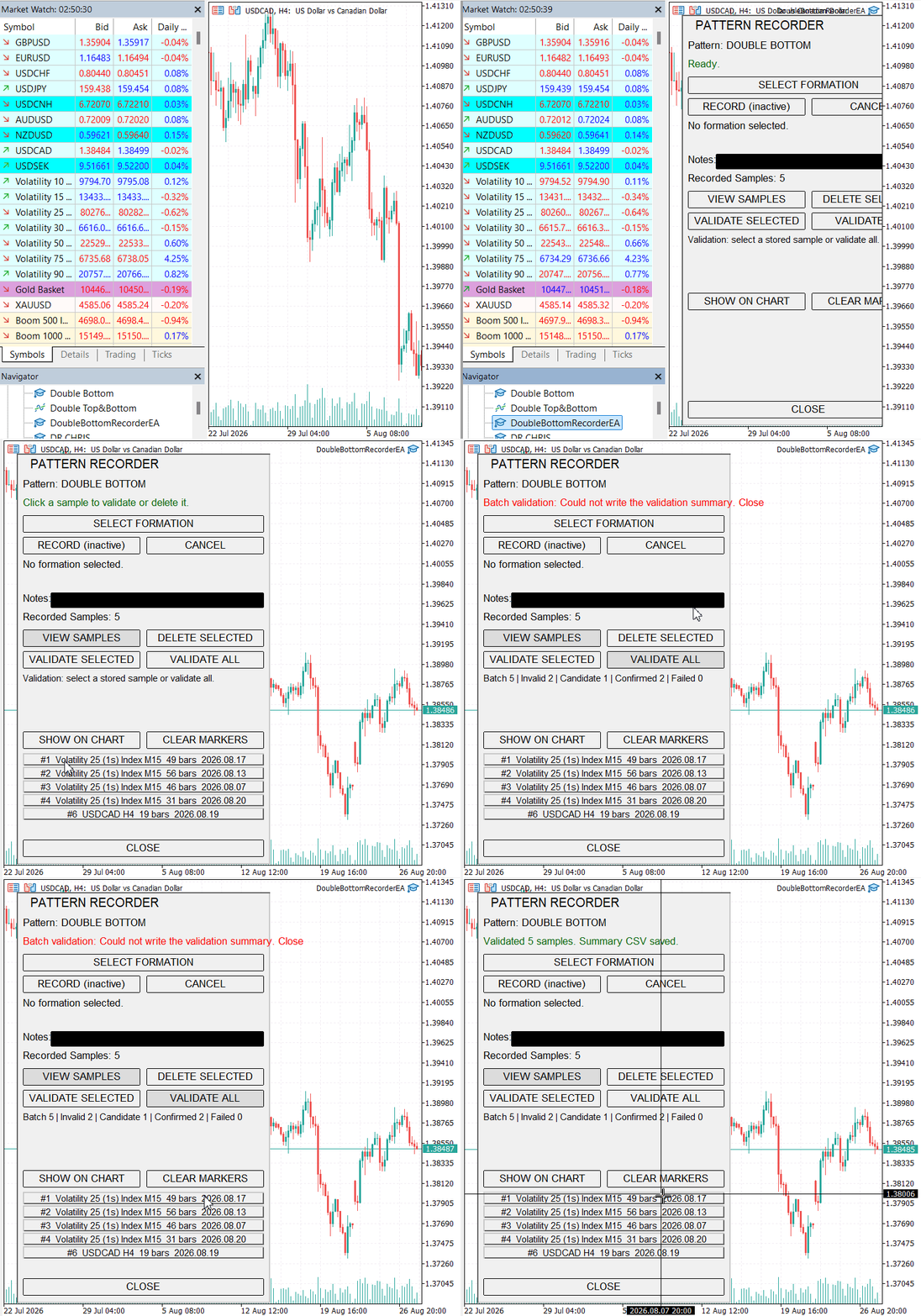
Figure 3. Collection validation process.
The batch can be launched from any chart because it evaluates stored candle arrays. To inspect a result visually, first use a chart matching its stored symbol and timeframe. Then use VIEW SAMPLES, select the record, press VALIDATE SELECTED with the same settings, and choose SHOW ON CHART. A chart change can reinitialize the EA, so validation must follow that change.
Reading the summary CSV
Confirm the batch header and settings
When opening the file, first verify the batch row and settings section. The status values must be read together with the pivot, separation, depth, low-difference, symmetry, breakout, and failure settings that produced them.
TOTAL should equal the result-row count and the sum of the four status counts. The writer checks these relationships before export and compares the saved bytes with the intended payload. Counter agreement alone cannot detect every altered value, and these checks do not protect a report from edits made after saving.
The result rows can then be sorted by status or sample ID. Sorting by score is useful within accepted structures, but INVALID rows should not be ranked as though a zero score represented weak accepted geometry. For an invalid result, the reason field is the important output.
What each status means in the report
INVALID means that the validator did not retain a pair under the active mandatory rules. The sample may contain too few complete candles, fewer than two qualifying swing lows or swing lows whose pairs fail separation, depth, low-difference or symmetry requirements. The reason narrows the path, while individual chart review helps determine whether the stored label or the rule definition deserves attention.
CANDIDATE means an accepted pair was found, but the stored interval ended without the first decisive close crossing either outcome level. It is not a prediction that confirmation will occur later. It describes the evidence available inside that sample boundary.
CONFIRMED means a candle closed above the calculated breakout level before a failure close occurred. BREAKOUT_INDEX identifies the first such candle. The row retains the same selected lows and neckline used to calculate the score.
FAILED means the structure passed its mandatory geometry but a candle closed below the failure level before breakout. FAILURE_INDEX identifies that first decisive close. A failed record is not useless data; it shows acceptable shape without the desired outcome and is important when studying whether geometry alone is informative.
Tracing a row back to the chart
SAMPLE_ID connects a summary row to SAMPLE_<ID>.csv and to the panel list. Symbol, timeframe, and dates provide a second identity check. The stored indices are array positions inside that sample, not shifts on the current chart.
For an accepted row, begin with FIRST_LOW_INDEX, SECOND_LOW_INDEX, and NECKLINE_INDEX. Their separation and prices describe the selected geometry. DEPTH_PCT, LOW_DIFFERENCE_PCT, SYMMETRY_PCT, and RECOVERY_PCT explain the score's components. The decisive index then distinguishes a candidate from a confirmed or failed result.
If a row looks surprising, do not edit the summary to make it agree with the manual label. Open the source sample, run individual validation with the same settings and show it on the matching chart. This returns the reported indices to the candles from which they were calculated.
Status counts do not measure profitability. The sample format does not store entry, spread, stops, exits, or realized return. The batch report therefore cannot estimate trading performance.
For the trader, this process makes it easier to move from the overall distribution to a specific candidate, confirmation, failure, or rejection. For the developer, the CSV exposes the exact indices and measurements returned by the validator, while the chart reviewer confirms how those values map to candles.
Testing
Validating the stored collection
The test used a Deriv USDCAD M30 chart with 12 stored samples, numbered #2 through #13. The collection contained seven USDCAD H4 samples and five USDCAD M30 samples. This allowed the batch to process records from two timeframes while the Expert Advisor remained attached to an M30 chart.
Both runs used the following settings:
| Setting | Value |
|---|---|
| Pivot strength | 2 |
| Minimum low separation | 5 bars |
| Maximum low difference | 20% |
| Minimum depth | 0.05% |
| Minimum symmetry | 40% |
| Breakout buffer | 0% |
| Failure tolerance | 10% |
I pressed VALIDATE ALL without first validating an individual sample. The panel displayed the totals on separate rows and reported that the summary CSV had been saved.
| Status | Count |
|---|---|
| INVALID | 5 |
| CANDIDATE | 0 |
| CONFIRMED | 7 |
| FAILED | 0 |
| Total | 12 |
The exported report contained 12 result rows. Samples #2, #3, #5, #7 and #8 were classified as INVALID. Samples #4, #6, #9, #10, #11, #12 and #13 were CONFIRMED. The status counts summed to 12 and matched the panel.
The report included all seven H4 samples despite the hosting chart being M30. It also processed the stored IDs without requiring a record numbered #1.
Comparing batch and individual results
After the batch, I selected samples #10 and #13 separately, pressed VALIDATE SELECTED, and displayed each result with SHOW ON CHART. Their individual results agreed with the corresponding CSV rows at the panel’s displayed precision.
| Measurement | Sample #10 | Sample #13 |
|---|---|---|
| Status | CONFIRMED | CONFIRMED |
| Structural score | 87.4 | 94.5 |
| First low index | 18 | 12 |
| Second low index | 28 | 32 |
| Neckline index | 24 | 23 |
| Neckline price | 1.37868 | 1.40233 |
| Confirmation index | 31 | 43 |
The chart navigated to each recorded period and displayed its annotations. These comparisons checked agreement between the batch report and individual validation for two samples. They did not independently establish that the selected formations were the correct market interpretation.
Repeating the batch and checking the reports
I ran VALIDATE ALL again after the individual reviews. The panel returned the same totals, and a second report was saved under a different filename:
VALIDATION_SUMMARY_20261009_075629_52953077380.csv
VALIDATION_SUMMARY_20261009_075720_53003918970.csv
Comparison of the two files found identical settings and all 12 result rows unchanged. Within the report contents, only BATCH_TIME differed: the first recorded 2026.10.09 05:56:29, and the second recorded 2026.10.09 05:57:19. These are the last known server times captured after validation, while the filenames use local time.
Both files contained the SUMMARY, SETTINGS and RESULTS section markers. The RESULTS header and each result row contained 23 fields. Quoted reasons containing commas remained within a single field.
The report retained greater numerical precision than the panel. For example, sample #10’s score was exported as 87.408759124097799 and displayed as 87.4. This difference reflects display rounding.
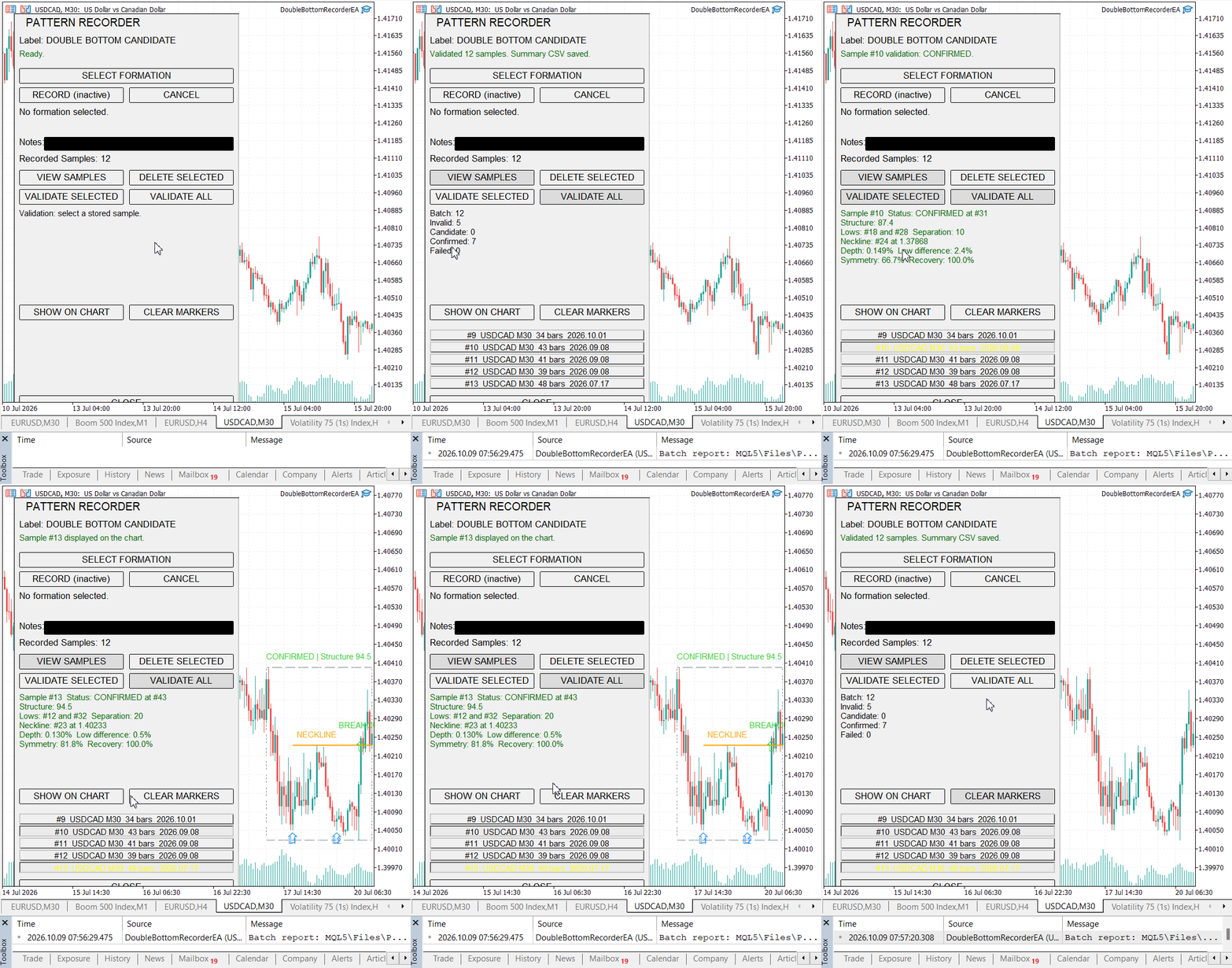
Figure 4. Batch validation of 12 stored samples, individual review of samples #10 and #13, and a repeated batch run.
Requiring individual validation before chart review
In a separate check, I pressed VALIDATE ALL and then SHOW ON CHART without validating an individual sample. The panel displayed "Validate a selected sample before showing it." The batch totals remained visible, and no pattern annotations appeared.
This demonstrated that completing a batch does not provide a retained individual result for chart review. A sample must be selected and validated before its structure can be displayed.
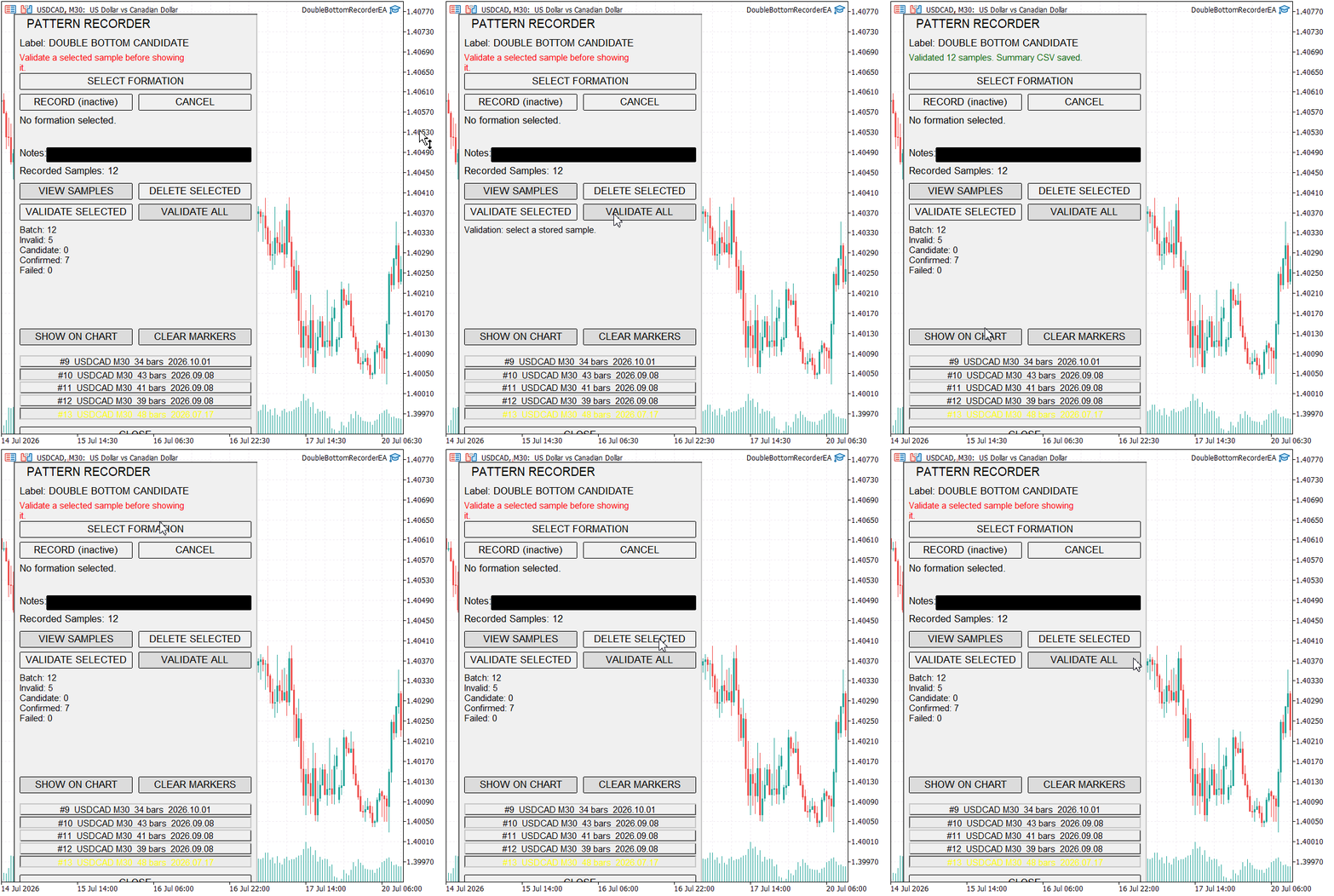
Figure 5. SHOW ON CHART requests individual validation after a batch run.
Scope of the results
The recordings and exported files demonstrate processing of the 12-record collection, inclusion of H4 samples from an M30 chart, consistent totals across repeated runs, preservation of separate reports, and agreement with individual validation for two samples. They also demonstrate that batch results cannot be used directly for chart rendering.
The collection contained one symbol and produced INVALID and CONFIRMED results only. These recordings do not demonstrate CANDIDATE or FAILED classifications, an empty library, invalid settings, file-operation failures, unavailable symbols or large-library performance. Exact chart-object coordinates and trading performance were not evaluated.
Conclusion
Individual validation explains one stored double-bottom sample. Part 86 adds the missing collection view. One panel action now applies the unchanged validator to every sample held by the library, counts INVALID, CANDIDATE, CONFIRMED, and FAILED outcomes, and writes a detailed CSV report.
The report records its time basis, schema and validator revision, active settings, sample context, selected indices, measurements, score and reason. Original sample files remain untouched. Non-consecutive IDs are handled through the library array, and seventeen-significant-digit serialization preserves numeric values without relying on symbol availability.
The batch report provides a collection view, while its detailed rows remain tied to sample IDs and candle indices. This supports comparison of results under recorded settings. It does not measure trading performance or establish that every stored label represents a valid market formation.
The visual reviewer remains the place to examine a particular formation. The batch report shows which stored samples produced each status and keeps those results available outside the terminal.
Attachments
| Name | Type | Responsibility |
|---|---|---|
| DoubleBottomRecorderEA.mq5 | Expert Advisor | Initializes validation settings, the library, and the panel, then forwards chart events. |
| DoubleBottomBatchValidator.mqh | Include | Validates the complete sample collection, counts statuses, and writes the summary CSV. |
| DoubleBottomRenderer.mqh | Include | Navigates to and annotates one accepted stored validation result. |
| DoubleBottomValidator.mqh | Include | Detects swing lows, evaluates pairs, calculates measurements, and assigns status. |
| PatternData.mqh | Include | Defines the shared candle, sample, and pattern structures. |
| PatternExtractor.mqh | Include | Extracts candles from the selected interval and normalizes their prices. |
| PatternLibrary.mqh | Include | Owns the in-memory collection and coordinates sample persistence. |
| PatternRecorderPanel.mqh | Include | Manages recording, selection, individual review, and batch-validation controls. |
| PatternStorage.mqh | Include | Reads, writes, discovers, and deletes source sample CSV files. |
| VALIDATION_SUMMARY_20261009_075720_53003918970.csv | CSV report | Contains settings, totals and detailed results for the 12-sample test. |
| MQL5.zip | Archive | Contains the complete source tree arranged for extraction into the MetaTrader 5 Data Folder. |
Warning: All rights to these materials are reserved by MetaQuotes Ltd. Copying or reprinting of these materials in whole or in part is prohibited.
This article was written by a user of the site and reflects their personal views. MetaQuotes Ltd is not responsible for the accuracy of the information presented, nor for any consequences resulting from the use of the solutions, strategies or recommendations described.

 Variational Mode Decomposition: Building the Solver, and Measuring What Hindsight Buys
 Interactive Supply and Demand Zone Manager in MQL5 (Part V): Persisting Zones Across Terminal and EA Restarts
 Uncertainty as a Model (Part 4): Random Processes — The Dynamics of Uncertainty
 Neural Networks in Trading: Training Deep Spiking Models (Conclusion)

- Free trading apps
- Over 8,000 signals for copying
- Economic news for exploring financial markets
You agree to website policy and terms of use