

Implementing an LLM Agent with SQL Memory in MetaTrader 5
 133
133
 0
0

You have already connected the language model to MetaTrader 5 and are receiving real-time trading signals. The system works — but it starts each new bar from scratch. It does not remember that yesterday the RSI on EURUSD produced a false signal at the same time of day. It does not know that the agent made three mistakes in a bearish market and none in a bullish market. It does not realize that its last five recommendations ended in losses, and it continues to act with the same confidence it had at the start.
This is not a flaw in the language model — it is an architectural limitation. By definition, an LLM does not have long-term memory between queries. Every API call is like striking up a new conversation with a stranger. An Expert Advisor (EA) can run for weeks, accumulate statistics, and make recurring pattern-based mistakes — and the model will never know.
The purpose of this article is to remove this limitation. We will add persistent SQL memory to the LLM+MetaTrader 5 architecture — a knowledge base that accumulates data across sessions, is passed into the context of each query, and allows the agent to learn from its own mistakes. Success criteria are defined from an engineering perspective: the agent knows its historical accuracy by instrument/symbol and timeframe; each query to the model includes relevant context from past decisions; the database is automatically updated when a position is closed.
Why a Context Window Is Not Enough
The first idea that comes to mind is simply to include the trade history as plain text, directly in the body of the request. The last 100 signals take about 8,000 tokens. That sounds reasonable.
But this solution falls apart for three reasons.
The first reason is cost. Each query to grok-3-mini or a similar model is billed based on the number of input tokens. If you trade eight currency pairs on the M15 timeframe, that is 256 requests per day per pair, for a total of 2,048 requests. With 8,000 tokens of context per request, the cost adds up quickly.
The second is irrelevance. The model cannot automatically extract the relevant information from a stream of text. If you submit 100 records, but only three are relevant at the current moment, the model processes the entire set with equal attention. The signal is drowned out by the noise.
The third is persistence. A context window lasts for exactly one request. Restart the server, and the history disappears. The SQLite database persists across sessions, restarts, and Expert Advisor (EA) versions.
The right approach is not to pass the entire history, but to pass only what is relevant right now. That is the purpose of the SQL memory layer.
Architecture: What Is Added to the Existing System
The following Python packages are required for the system to work:
pip install requests numpy
The system is built on top of the WebSocket server described in the previous articles in this series. One new component is added: MemoryLayer, a wrapper around SQLite that reads and writes through a single interface.
MetaTrader 5 (EA_Memory_Agent.mq5)
    │
    ├─ ANALYZE:SYMBOL:csv  ────────────────────────────┐
    │                                                  │
    ├─ RESULT:SYMBOL:signal:pnl  ──────────────────┐   │
    │                                          WebSocket
    │                                              │   │
 Python server (llm_server_memory.py)              │   │
    │                                              │   │
    ├─ MemoryLayer (SQLite)                        │   │
    │   ├─ write_decision()  ◄─────────────────────┘   │
    │   ├─ get_context() → relevant fragment           │
    │   └─ get_stats() → accuracy by symbol            │
    │                                                  │
    ├─ build_prompt(context, stats) ──────────────┐    │
    │                                             │    │
    └─ Grok (xAI API)  ◄──────────────────────────┘    │
        {"signal","comment","confidence"}  ────────────┘
The Expert Advisor sends an ANALYZE command with the prices; the server retrieves the relevant context and agent statistics from the database, includes them in the system prompt, and queries the model. After a position is closed, the Expert Advisor sends RESULT, and the database is updated. The loop is closed.
Database Structure
Two tables. The first one stores all of the agent decisions, and the second one stores aggregated statistics.
CREATE TABLE IF NOT EXISTS decisions (
    id          INTEGER PRIMARY KEY AUTOINCREMENT,
    timestamp   TEXT    NOT NULL,
    symbol      TEXT    NOT NULL,
    timeframe   TEXT    NOT NULL,
    signal      TEXT    NOT NULL,   -- buy / sell / hold
    confidence  REAL,
    comment     TEXT,
    pnl         REAL,               -- NULL before closing
    outcome     TEXT,               -- win / loss / open
    rsi         REAL,
    ma_align    TEXT,               -- above / below / mixed
    volatility  TEXT                -- low / normal / high
)

CREATE TABLE IF NOT EXISTS agent_stats (
    symbol      TEXT,
    timeframe   TEXT,
    total       INTEGER DEFAULT 0,
    wins        INTEGER DEFAULT 0,
    losses      INTEGER DEFAULT 0,
    avg_pnl     REAL    DEFAULT 0,
    best_signal TEXT,               -- buy / sell
    PRIMARY KEY (symbol, timeframe)
)
The fields rsi, ma_align, and volatility represent the market regime at the time the decision is made. They are needed for relevance-based retrieval: when RSI is currently at 68, the database returns decisions made at similar RSI values, rather than everything indiscriminately.
The MemoryLayer Class: Key Methods
import sqlite3
import json
from datetime import datetime, timedelta
from typing import Optional

class MemoryLayer:
    def __init__(self, db_path: str = "agent_memory.db"):
        self.conn = sqlite3.connect(db_path, check_same_thread=False)
        self._init_tables()

    def _init_tables(self):
        self.conn.executescript("""
            CREATE TABLE IF NOT EXISTS decisions (
                id          INTEGER PRIMARY KEY AUTOINCREMENT,
                timestamp   TEXT    NOT NULL,
                symbol      TEXT    NOT NULL,
                timeframe   TEXT    NOT NULL,
                signal      TEXT    NOT NULL,
                confidence  REAL,
                comment     TEXT,
                pnl         REAL,
                outcome     TEXT    DEFAULT 'open',
                rsi         REAL,
                ma_align    TEXT,
                volatility  TEXT
            );
            CREATE TABLE IF NOT EXISTS agent_stats (
                symbol      TEXT,
                timeframe   TEXT,
                total       INTEGER DEFAULT 0,
                wins        INTEGER DEFAULT 0,
                losses      INTEGER DEFAULT 0,
                avg_pnl     REAL    DEFAULT 0.0,
                best_signal TEXT,
                PRIMARY KEY (symbol, timeframe)
            );
        """)
        self.conn.commit()

    def write_decision(self, symbol: str, timeframe: str,
                       signal: str, confidence: float,
                       comment: str, rsi: float,
                       ma_align: str, volatility: str) —> int:
        cur = self.conn.execute(
            """INSERT INTO decisions
               (timestamp, symbol, timeframe, signal, confidence,
                comment, rsi, ma_align, volatility)
               VALUES (?,?,?,?,?,?,?,?,?)""",
            (datetime.utcnow().isoformat(), symbol, timeframe,
             signal, confidence, comment, rsi, ma_align, volatility)
        )
        self.conn.commit()
        return cur.lastrowid

    def update_result(self, decision_id: int, pnl: float):
        outcome = "win" if pnl > 0 else "loss"
        self.conn.execute(
            "UPDATE decisions SET pnl=?, outcome=? WHERE id=?",
            (pnl, outcome, decision_id)
        )
        self.conn.commit()
        self._refresh_stats(decision_id)

    def _refresh_stats(self, decision_id: int):
        row = self.conn.execute(
            "SELECT symbol, timeframe FROM decisions WHERE id=?",
            (decision_id,)
        ).fetchone()
        if not row:
            return
        symbol, timeframe = row
        stats = self.conn.execute(
            """SELECT COUNT(*), SUM(outcome='win'), SUM(outcome='loss'),
                      AVG(pnl)
               FROM decisions
               WHERE symbol=? AND timeframe=? AND outcome != 'open'""",
            (symbol, timeframe)
        ).fetchone()
        total, wins, losses, avg_pnl = stats
        # determine which signal has historically been more accurate
        buy_wr = self.conn.execute(
            """SELECT AVG(outcome='win') FROM decisions
               WHERE symbol=? AND timeframe=? AND signal='buy'
               AND outcome != 'open'""",
            (symbol, timeframe)
        ).fetchone()[0] or 0
        sell_wr = self.conn.execute(
            """SELECT AVG(outcome='win') FROM decisions
               WHERE symbol=? AND timeframe=? AND signal='sell'
               AND outcome != 'open'""",
            (symbol, timeframe)
        ).fetchone()[0] or 0
        best_signal = "buy" if buy_wr >= sell_wr else "sell"
        self.conn.execute(
            """INSERT INTO agent_stats VALUES (?,?,?,?,?,?,?)
               ON CONFLICT(symbol, timeframe) DO UPDATE SET
               total=excluded.total, wins=excluded.wins,
               losses=excluded.losses, avg_pnl=excluded.avg_pnl,
               best_signal=excluded.best_signal""",
            (symbol, timeframe, total or 0, int(wins or 0),
             int(losses or 0), avg_pnl or 0.0, best_signal)
        )
        self.conn.commit()

    def get_context(self, symbol: str, timeframe: str,
                    rsi: float, limit: int = 5) -> str:
        """Relevant context: similar RSI conditions, last N decisions."""
        similar = self.conn.execute(
            """SELECT signal, outcome, pnl, comment, rsi
               FROM decisions
               WHERE symbol=? AND timeframe=? AND outcome != 'open'
               AND ABS(rsi - ?) < 8
               ORDER BY timestamp DESC LIMIT ?""",
            (symbol, timeframe, rsi, limit)
        ).fetchall()

        recent = self.conn.execute(
            """SELECT signal, outcome, pnl, comment
               FROM decisions
               WHERE symbol=? AND timeframe=? AND outcome != 'open'
               ORDER BY timestamp DESC LIMIT 3""",
            (symbol, timeframe)
        ).fetchall()

        parts = []
        if similar:
            parts.append("Similar RSI conditions in the past:")
            for sig, out, pnl, cmt, r in similar:
                pnl_str = f"{pnl:+.2f}" if pnl is not None else "?"
                parts.append(
                    f"  [{sig.upper()}] → {out} ({pnl_str} pts) | RSI≈{r:.0f} | {cmt}"
                )
        if recent:
            parts.append("Recent decisions:")
            for sig, out, pnl, cmt in recent:
                pnl_str = f"{pnl:+.2f}" if pnl is not None else "?"
                parts.append(
                    f"  [{sig.upper()}] → {out} ({pnl_str} pts) | {cmt}"
                )
        return "\n".join(parts) if parts else "No historical data yet."

    def get_stats(self, symbol: str, timeframe: str) -> str:
        row = self.conn.execute(
            "SELECT total, wins, losses, avg_pnl, best_signal "
            "FROM agent_stats WHERE symbol=? AND timeframe=?",
            (symbol, timeframe)
        ).fetchone()
        if not row or row[0] == 0:
            return "No statistics yet — acting on current data only."
        total, wins, losses, avg_pnl, best_signal = row
        win_rate = 100 * wins / total if total else 0
        return (
            f"Agent stats on {symbol}/{timeframe}: "
            f"{total} trades, win-rate {win_rate:.0f}%, "
            f"avg PnL {avg_pnl:+.2f} pts. "
            f"Historically stronger signal: {best_signal.upper()}."
        )
The get_context() method is central to the design. It does not return the entire history; instead, it looks for decisions with a similar RSI (a deviation of no more than 8 points) and adds the three most recent decisions to help understand the current sequence. The final text is 200–400 tokens long — a minor addition to the context.
Building a Prompt with Memory
The `build_prompt_with_memory()` function constructs the system prompt that the agent receives on each request.
def build_prompt_with_memory(symbol: str, timeframe: str,
                              memory: MemoryLayer,
                              rsi: float) —> str:
    stats   = memory.get_stats(symbol, timeframe)
    context = memory.get_context(symbol, timeframe, rsi)

    return f"""You are a disciplined quantitative trading agent with persistent memory.

SELF—KNOWLEDGE:
{stats}

HISTORICAL CONTEXT (similar market conditions):
{context}

RULES:
1. If your win—rate on this instrument is below 40% — be extra conservative.
2. If recent 3 decisions were all losses — reduce confidence by 0.1.
3. If historical context shows repeated failures on this signal type — downgrade it.
4. Never ignore your own track record.

OUTPUT: Reply ONLY with valid JSON, no markdown.
Example: {{"signal": "buy", "comment": "MA aligned, RSI rising from 42", "confidence": 0.74}}
signal must be exactly: buy  sell  or  hold
BIAS: hold only when genuinely uncertain. Commit to a direction.
"""
The three sections in the prompt serve different functions. SELF-KNOWLEDGE gives the agent an overall picture of its performance: it knows that on this instrument it has a 58% win rate, and that sell signals have historically been more accurate than buy signals. HISTORICAL CONTEXT provides specific examples of similar situations: “last time, at RSI≈65, I gave a buy signal — it ended in a loss.” RULES translate this information into explicit behavioral adjustments.
Server Integration
The server's core logic differs only slightly from previous versions. This adds MemoryLayer initialization and two call points.
import threading, json, numpy as np
from memory_layer import MemoryLayer

memory    = MemoryLayer("agent_memory.db")
send_lock = threading.Lock()

def handle_analyze(symbol: str, prices: list[float]) —> dict:
    close  = np.array(prices, dtype=float)
    ind    = calc_indicators(close)          # your existing function
    rsi    = ind["rsi14"]

    system = build_prompt_with_memory(
        symbol    = symbol,
        timeframe = "M15",         # can be passed from an Expert Advisor (EA)
        memory    = memory,
        rsi       = rsi
    )
    user   = build_market_context(symbol, ind)  # your existing function
    raw    = ask_grok(system, user)

    result = json.loads(raw)
    signal     = result.get("signal", "hold")
    confidence = float(result.get("confidence", 0.5))
    comment    = result.get("comment", "")

    # Save the agent decision—get an ID for the subsequent `update_result`
    decision_id = memory.write_decision(
        symbol     = symbol,
        timeframe  = "M15",
        signal     = signal,
        confidence = confidence,
        comment    = comment,
        rsi        = rsi,
        ma_align   = ind.get("ma_align", "mixed"),
        volatility = ind.get("volatility", "normal")
    )

    result["decision_id"] = decision_id
    return result

def handle_result(symbol: str, decision_id: int, pnl: float):
    memory.update_result(decision_id, pnl)
    return {"status": "ok"}
```

Note: `decision_id` returns to the EA together with the signal. The EA should remember it and return when sending `RESULT`. This is the only connection between the decision and its outcome.

---

## MQL5 Expert Advisor (EA): Commands and ID Tracking

The EA sends two commands. Analysis command:
```
ANALYZE:EURUSD:1.0912,1.0915,...,1.0921
The response contains a `decision_id` — the Expert Advisor (EA) stores it in a global variable along with the open position's ticket.
string   g_activeSymbol     = "";
int      g_activeDecisionId = -1;
ulong    g_activeTicket     = 0;

// When parsing the server's response:
g_activeDecisionId = (int)resp["decision_id"];
g_activeTicket     = ticket;
The result command is sent when the position is closed:
double pnl = GetDealProfit(g_activeTicket);   // existing function
if(pnl != EMPTY_VALUE && g_activeDecisionId >= 0)
{
    string cmd = StringFormat(
        "RESULT:%s:%d:%.2f",
        g_activeSymbol,
        g_activeDecisionId,
        pnl
    );
    WebSocketSend(cmd);   // your existing sending function
    g_activeDecisionId = -1;
    g_activeTicket     = 0;
}
```

PnL normalization in points, not in money, retains the validity of comparisons between different lots and instruments — the same principle as in the previous articles of the series.

---

## What the agent sees after a week of real trading

After 30–40 closed trades, the agent prompt no longer starts from scratch. Instead, it sees, for instance:
```
SELF-KNOWLEDGE:
Agent stats on EURUSD/M15: 34 trades, win-rate 53%, avg PnL +1.8 pts.
Historically stronger signal: SELL.

HISTORICAL CONTEXT (similar market conditions):
Similar RSI conditions in the past:
  [BUY] → loss (-4.20 pts) | RSI≈67 | MA aligned but upper BB resistance
  [SELL] → win (+3.10 pts) | RSI≈65 | Bearish divergence confirmed
  [BUY] → loss (-2.80 pts) | RSI≈69 | Momentum weakening
Recent decisions:
  [SELL] → win (+2.40 pts) | Short-term downtrend confirmed
  [HOLD] → open | Conflicting signals
  [BUY]  → loss (-3.60 pts) | False breakout
The agent reads this before looking at the current market. The agent sees that when RSI is around 65–70, its buy trades have historically been unprofitable. It sees that the last three agent decisions were a losing buy signal, a neutral decision, and a profitable sell signal. It sees that sell signals perform better.
This does not guarantee the right decision. But this fundamentally changes the basis on which the agent begins analyzing the current bar.
Errors You Should Be Aware Of
The development of this system revealed several non-trivial problems, the solutions to which are not obvious from the documentation.
A race condition involving `decision_id` when the signal changes. When the signal on a new bar changes from "buy" to "sell," the execution order in OnTick is as follows: First, ParseAnalyzeResponse is called and g_decisionId is updated; then, ExecuteSignal calls CloseByType to close the old position and immediately calls OpenSell, setting g_posDecisionId = g_decisionId. As a result, CheckClosedPosition finds a closed position on the next tick, but sends a RESULT with the ID of the new position instead of the closed one. The database updates the wrong record. The solution is to save `savedDecId` and `savedTicket` locally inside `ExecuteSignal` before calling `CloseByType`, and to send the `RESULT` immediately at the moment of closing via a separate `SendResultForClosed` function, without waiting for the next tick.
EMPTY_VALUE is not available immediately in the Strategy Tester. The GetDealProfitByPosition function sometimes returns EMPTY_VALUE immediately after a position is closed in the Strategy Tester — the trade has not yet appeared in history. The standard HistorySelect(0, TimeCurrent() + 86400) call works with a delay in the tester. A reliable solution: When an EMPTY_VALUE is received, pause for 200 ms and repeat the request once. This is sufficient for 99% of cases in the tester and does not cause any noticeable delay in live trading.
How to Check If the Memory Is Working
Starting the system and seeing "decision_id=13" in the console does not constitute a test. A real check means making sure that the agent actually changes its behavior under the influence of accumulated history, rather than simply ignoring the context in the prompt.
The easiest way is to compare two runs using the same data. In the first run, the database is empty, and the agent operates without a history. In the second run, the database already contains the results of the first run. If the signal distribution between the runs is the same, memory has no effect. If the second run shows noticeably fewer buy signals in the RSI zones where the first run systematically lost money, then adaptation is working.
The second method is to make a direct query to the database after the run. Open agent_memory.db in any SQLite browser and run the following:
SELECT signal, outcome, rsi,
       AVG(pnl) as avg_pnl,
       COUNT(*) as cnt
FROM decisions
WHERE symbol='EURUSD' AND timeframe='M15'
AND outcome != 'open'
GROUP BY signal,
         CASE WHEN rsi < 30 THEN 'oversold'
              WHEN rsi > 70 THEN 'overbought'
              ELSE 'neutral' END
ORDER BY signal, avg_pnl;
This query shows the average return for each signal type in different RSI zones. If a BUY signal at RSI > 70 yields avg_pnl = −3.2, but the agent continues to issue buy signals under these conditions, then something in the prompt is not working as expected. If, after enough history has accumulated, the agent switches to hold or sell in this zone, everything is working as it should.
The third method is to look at the best_signal column in the agent_stats table. This field is recalculated automatically each time a position is closed. If it is set to buy at the start of the run and to sell after 20 trades, it means the system is correctly tracking which direction produces more winning trades for this instrument, and the agent reads this in the SELF-KNOWLEDGE block before each decision.
It is important to understand that an LLM does not guarantee 100% compliance with the prompt's rules in every case. The model may ignore the historical context if the current market signals appear convincing. This isn't a bug — it's just the nature of language models. Memory does not turn an agent into a deterministic automaton; rather, it shifts the probability of an agent decision toward what has worked in the past. The difference between an “agent without memory” and an “agent with memory” is not a hard-and-fast rule, but a statistical shift in behavior over a span of 100+ trades.
Test Results
The system was tested on the EUR/USD pair, on the M15 timeframe, using the platform of a well-known ECN broker (Build 5672), with 100% modeling quality. Testing period: October 1, 2025 – March 16, 2026. Initial deposit: USD 10,000; lot size: 0.01; leverage: 1:500. Expert Advisor (EA) parameters: SL 1,200 points, TP 2,000 points, analysis every 10 bars, InpMinConf = 0.00001 — effectively no confidence filter.
During the test period, the Expert Advisor executed 101 trades: 52 short trades (55.77% profitable) and 49 long trades (51.02% profitable). The overall percentage of profitable trades is 53.47% (54 out of 101), and the percentage of losing trades is 46.53% (47 out of 101).
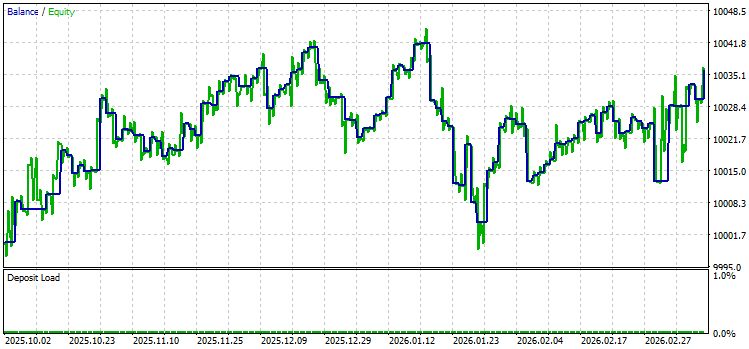
Net profit was USD 35.97, with gross profit of USD 181.29 and a gross loss of USD 145.32. Profit factor: 1.25; expected payoff: USD 0.36 per trade. The average profitable trade is USD 3.36, and the average losing trade is USD 3.07. The best trade yielded a profit of USD 15.77, while the worst resulted in a loss of USD 12.11.
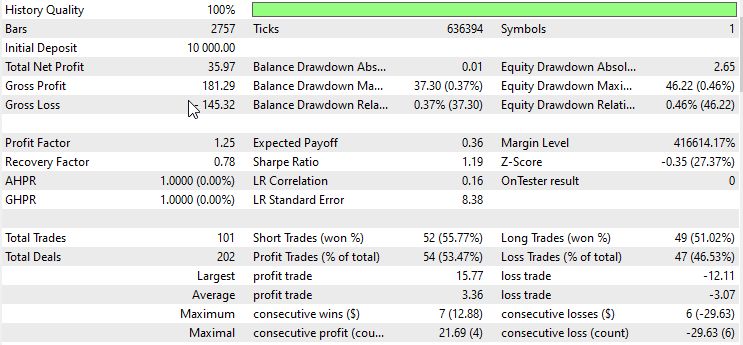
Drawdowns were minimal: the maximum balance drawdown was USD 37.30 (0.37%), and the maximum equity drawdown was USD 46.22 (0.46%). The recovery factor is 0.78, and the Sharpe ratio is 1.19. The Z-score was −0.35 (27.37%), indicating no statistically significant serial dependence between wins and losses.
The longest winning streak was 7 consecutive trades (USD 12.88), and the longest losing streak was 6 trades (USD 29.63). The average streak in both directions was 2 trades.
The correlation of profit with MFE (Maximum Favorable Excursion) was 0.69, and with MAE (Maximum Adverse Excursion) it was 0.69. The correlation between MFE and MAE is 0.18. The strong correlation between profit and MFE suggests that the agent is fairly effective at holding onto profitable positions until the target is reached. The low correlation between MFE and MAE confirms that trades fall into two distinct categories: those that immediately move in the desired direction and those that quickly move into loss — there are few intermediate back-and-forth moves.
Important: This is the result of a single run on a single instrument with a fixed lot size. The purpose of the test is not to demonstrate profitability, but to confirm that the memory architecture is functioning correctly: agent decisions are recorded, results are updated, and context influences subsequent signals. A profit factor of 1.25 and a win rate of 53% with minimal drawdown indicate that the memory-based agent, at the very least, does not degrade over a run of 101 trades — and this is already a starting point for further optimization.
Key Challenges and Important Considerations
Cold start. For the first 10–15 trades, the agent operates without any meaningful history. The context is empty; the statistics are zero. The system's behavior during this period is identical to that of a system without memory. This is normal and to be expected.
Market drift. The database stores everything indiscriminately. A pattern that worked in February when volatility was low may not work in March when volatility is high. The "volatility" field in the schema allows you to filter the context by market regime — this is a recommended improvement for the next iteration.
Database size. With 50 trades per day, the database grows by approximately 50 KB per day. This is negligible. If needed, you can add cleanup for records older than 90 days — one SQL command in a scheduled task.
Thread safety. SQLite supports multiple readers, but only one writer at a time. When trading multiple symbols in parallel, `write_decision()` must be called via a lock — `threading.Lock()` — similar to `send_lock` in previous versions of the system.
db_lock = threading.Lock()

def safe_write(symbol, timeframe, signal, **kwargs) —> int:
    with db_lock:
        return memory.write_decision(symbol, timeframe, signal, **kwargs)
```
What Is Next
The architecture described implements the first level of memory: the agent is aware of its history and uses it when making decisions. But it still does not know exactly which market regimes its patterns work in and which they do not.
The next logical step is regime-based memory. Break the history into clusters: trending market, sideways market, high volatility. For each request, determine the current regime and send the agent only the context from the corresponding cluster. An agent that made mistakes in a sideways market will stop applying its “trend-based” experience in a range-bound market.
A parallel avenue is combining memory with the evolutionary architecture from the previous article. Each of the 20 agents, using a different prompt, maintains its own SQL database. Fitness is evaluated not only based on PnL, but also on memory quality: an agent that makes better use of its history to improve accuracy gains an advantage in selection. That is a different task — but it is built on the same foundation.
Launch Instructions
The first step is the Python server. Get your xAI API key on the official Grok API site — console.x.ai. Obtaining the key itself is free, but continued use will require adding funds to your account to purchase tokens. Sometimes, if you ask the original Grok Chat nicely, it may provide a test API key — valid for a limited time and with tokens in the balance.
Next, install Python and open the Run dialog by pressing Win + R. Then use this window to install the dependencies:
pip install requests numpy Copy the llm_server_memory.py file — the server file itself — to any working directory (I keep my server folders on my desktop), then paste the key into the `XAI_API_KEY` server variable directly in the LLM server code:
# ─── SETTINGS ───────────────────────────────────────────────────────────────
XAI_API_KEY = ""          # ← paste the xAI key from console.x.ai
XAI_URL     = "https://api.x.ai/v1/chat/completions"
MODEL       = "grok-4-1-fast-reasoning"
HOST        = "127.0.0.1"
PORT        = 8976
MAX_TOKENS  = 1200
DB_PATH     = "agent_memory.db"
Next, right-click the server's .py file to open its source code, choose “Edit in IDLE” from the context menu, and start the server by clicking Run or pressing F5:

Next — preparing MetaTrader 5. Before compiling the Expert Advisor (EA), install the WinHTTP header file. This file for working with WebSockets was originally described in this article by developer Francis Dube. Copy the WinHTTP.mqh file to the following folder:
<MT5 data folder>\MQL5\Include\WinAPI\ The MetaTrader 5 data directory can be opened via the menu: File → Open Data Directory. If the WinAPI folder is missing, create it manually. Without this file, the Expert Advisor (EA) will not compile: the compiler will return the error “WinHTTP.mqh — no such file or directory.”
And finally — compiling and running the Expert Advisor (EA). Open EA_Memory_Agent.mq5 in MetaEditor (press F4 from the terminal), and compile it by pressing F7. If the compilation is successful, the MetaEditor log should show 0 errors and 0 warnings.
Drag the compiled Expert Advisor (EA) onto the chart of the desired instrument.
If everything goes well, after launch you will see the agents running inside Python:
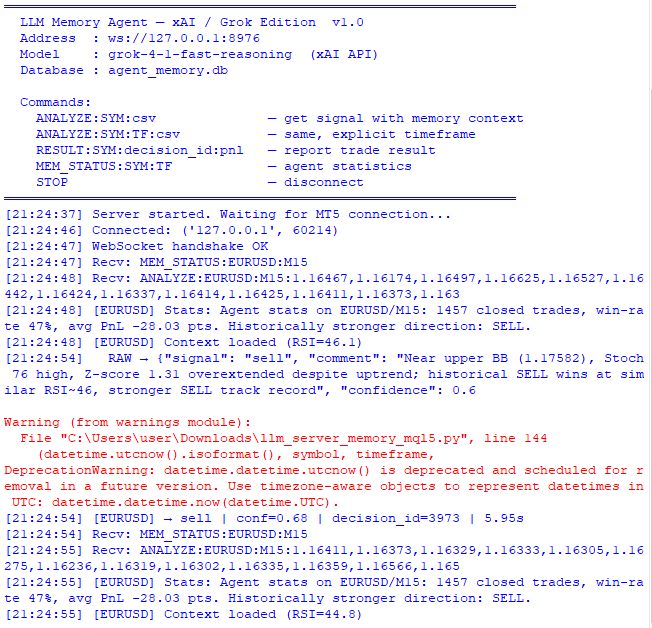
We will also see the results of the first trade opening:
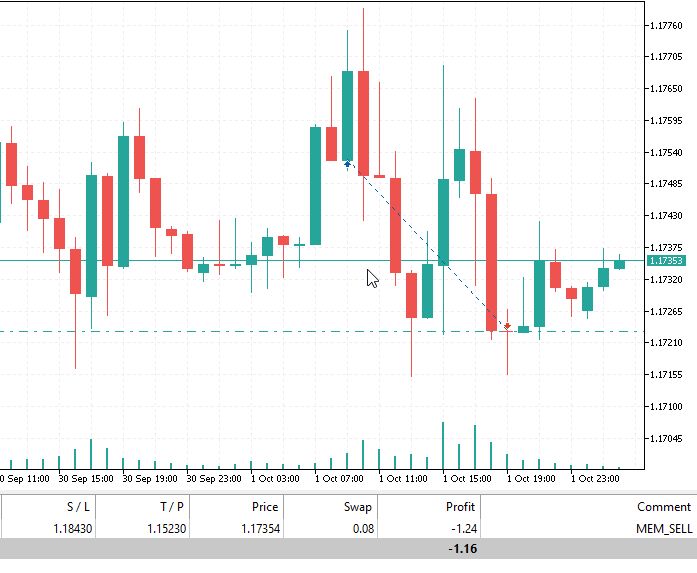
Conclusion
We started with an architectural constraint: a language model without memory starts from scratch every time, ignoring accumulated experience. We eliminated this limitation with a persistent SQL knowledge base that accumulates across sessions and is passed into the context of each query.
After reading this, you will have a reproducible framework: a two-table database schema with support for relevance-based searches by market conditions; the `MemoryLayer` class with methods for recording agent decisions, updating results, and building a context fragment; a prompt-building function with an agent self-knowledge block and historical context; the RESULT protocol for feedback between the Expert Advisor (EA) and the server; and recommendations on thread safety when trading multiple symbols in parallel.
The system is tested in the Strategy Tester using controlled metrics: signal accuracy, win-rate dynamics as memory accumulates, and the agent's behavior under conditions where it has historically made mistakes. Adaptation becomes visible and measurable, rather than merely promised.
| File name | Contents and purpose |
|---|---|
| http://llm_server_memory_mql5.py | Python server for the system |
| EA_Memory_Agent.mq5 | MQL5 — trading Expert Advisor |
| winhttp.mqh | Included library |
Translated from Russian by MetaQuotes Ltd.
Original article: https://www.mql5.com/ru/articles/21980
Warning: All rights to these materials are reserved by MetaQuotes Ltd. Copying or reprinting of these materials in whole or in part is prohibited.
This article was written by a user of the site and reflects their personal views. MetaQuotes Ltd is not responsible for the accuracy of the information presented, nor for any consequences resulting from the use of the solutions, strategies or recommendations described.

 Recovering Option-Implied Probability Distributions Across Four Markets in MQL5
 Uncertainty as a Model (Part 4): Random Processes — The Dynamics of Uncertainty
 How to Detect and Normalize Chart Objects in MQL5 (Part 6): Manipulating Chart Objects with MetaTrader 5 Agentic AI Assistant
 Variational Mode Decomposition: Building the Solver, and Measuring What Hindsight Buys

- Free trading apps
- Over 8,000 signals for copying
- Economic news for exploring financial markets
You agree to website policy and terms of use