

How to Detect and Normalize Chart Objects in MQL5 (Part 5): Fibonacci in Focus
 1 565
1 565
 0
0

Contents
- Bridging Automated Placement and Manual Analysis
- What We Built in Previous Parts
- The Problem with Manual Fibonacci Objects
- Fibonacci Object Types in MQL5 – A Quick Tour
- Updates to Part 4 Source Files
- Implementation: FibonacciNormalizer.mqh
- Implementation: FibonacciNormalizationTest.mq5
- Testing and Results
- File Structure Summary
- Table of Attached Files
- Conclusion
Bridging Automated Placement and Manual Analysis
In Part 4 of this series, we built an automated placement layer that detects swing points and programmatically draws analytical objects—trendlines, support/resistance, channels, pitchforks, and Fibonacci tools. That system allowed an Expert Advisor to map out market structure and evaluate price interactions completely on its own.
However, automated object placement introduces a new challenge: reconciling programmatic objects with human discretion. Code-generated objects use predictable names and standardized properties. Manually drawn objects are unpredictable. If an EA places automated objects over an existing manual Fibonacci tool, the chart becomes cluttered with duplicates.
This article addresses that challenge directly. We focus on Fibonacci by building a robust detection and normalization pipeline across all six native MQL5 Fibonacci object types. This system scans the chart for user-drawn Fibonacci tools, forces their underlying properties into a predictable state, and enforces a crucial design rule: manual objects take priority over automated ones. By the end, your EA will seamlessly evaluate both human analysis and code-generated objects without missing a beat.
What We Built in Previous Parts
Before diving into Fibonacci normalization, let's trace how our system has evolved across the entire series. Understanding where we started makes it clear why active normalization is the logical next step.
Our journey through chart object algorithms has progressed through four key milestones:
- Part 1 and Part 2 (Passive Object Collection): In Part 1 and Part 2, we established the core mechanics of scanning chart objects and storing their properties in custom memory structures (SChartObjectInfo and SComplexObjectInfo). That initial framework operated on a passive, read-only paradigm—reading anchor points and level arrays exactly as they existed without altering chart state.
- Part 3 (Signal Triggering & Coexistence): In Part 3, we introduced live signal evaluation, monitoring price touches and breakouts against user-drawn lines. However, manual objects and EA logic simply coexisted without structural coordination.
- Part 4 (Autonomous Swing Detection & Placement): In Part 4, we gave the EA full autonomy by building six modular components:
- SwingDetector: Scans price history using a local-extrema algorithm to identify swing highs and lows with high computational efficiency.
- ObjectPlacer: Uses detected swings to programmatically draw analytical objects while enforcing placement quotas.
- MarketCache: Pre-fetches and caches OHLC price data to avoid redundant API calls during tick-by-tick processing.
- SignalEvaluator: Monitors analytical objects on the chart to detect price touches, crosses, or breakouts, generating signal scores.
- TopologyManager: Serves as the central conductor orchestrating scanning, placement, tracking, and signal harvesting.
- AdaptiveTrade: Handles order execution with dynamic stop-loss and take-profit calculations adapted to instrument volatility.
While the Part 4 architecture excelled at generating its own objects, it lacked a bridge back to human analysis. If a trader draws a custom Fibonacci retracement, reading raw properties with the passive approach from Parts 1–2 can cause array-out-of-range errors. This occurs when the trader adds or removes levels. In Part 5, we shift from passive observation to active normalization by extending TopologyManager.mqh and ObjectPlacer.mqh with FibonacciNormalizer.mqh to bridge this gap completely.
The Problem with Manual Fibonacci Objects
Imagine this scenario: you manually draw a Fibonacci retracement on the chart from a major swing low to a swing high and set your EA to evaluate limit entries at the 0.618 level. It works cleanly during testing, but during live execution, the EA suddenly skips trades or generates erroneous calculations.
The root cause lies in object variability. Traders frequently modify Fibonacci tools—renaming them, adding custom ratio levels (such as 0.786 or 0.886), altering line colors, or toggling right-ray extensions. Because MQL5 chart objects store properties as generic arrays and flags, calling ObjectGetDouble() or ObjectGetInteger() on an unnormalized user object returns whatever arbitrary parameters the trader set.
Without standardizing these properties, an EA cannot reliably index level arrays or calculate precise price interactions. To solve this, our system executes a two-phase process:
- Detection: Locate all Fibonacci-family objects on the chart regardless of their specific naming conventions.
- Normalization: Standardize level arrays, visual properties, and interaction flags into a predictable format without altering the trader's anchor coordinates.
Why Focus Specifically on the Fibonacci Family?
You might wonder: "Why focus specifically on normalizing Fibonacci objects when traders also manually draw trendlines, channels, and support/resistance lines?"
The answer comes down to structural complexity. Simple chart objects like trendlines (OBJ_TREND) or horizontal lines (OBJ_HLINE) store simple, fixed properties—two coordinates or a single price. Reading them programmatically using the methods built in Parts 1 and 2 is straightforward and rarely breaks an EA's logic.
Fibonacci objects, however, are complex array-driven containers. A single Fibonacci object stores dynamic internal arrays (OBJPROP_LEVELS and OBJPROP_LEVELVALUE) that a trader can freely modify—adding custom levels, deleting core ratios, or altering level descriptions. Furthermore, MQL5 features six distinct Fibonacci types, where the exact same property index represents a price percentage in one tool, a time offset in another, and a spatial radius in a third. Because Fibonacci tools are highly customizable and mathematically diverse, they are a major source of runtime errors when reading manual chart objects. By solving normalization for the entire Fibonacci family first, we establish a rigid blueprint that easily extends to simpler line objects.
Fibonacci Object Types in MQL5 – A Quick Tour
MetaTrader 5 provides six distinct Fibonacci-based analytical objects. Each is represented by an ENUM_OBJECT constant:
- OBJ_FIBO – Classic Fibonacci Retracement, calculating horizontal price levels between two anchor points based on ratio fractions.
- OBJ_FIBOFAN – Fibonacci Fan, projecting angled trendlines radiating from an anchor point based on vertical ratio divisions.
- OBJ_FIBOTIMES – Fibonacci Time Zones, placing vertical time markers spaced according to Fibonacci sequence intervals.
- OBJ_FIBOARC – Fibonacci Arcs, drawing curved support/resistance arcs centered at an anchor point using price-distance radii.
- OBJ_FIBOCHANNEL – Fibonacci Channel, drawing parallel channel bounds adjusted to price swing widths.
- OBJ_EXPANSION – Fibonacci Expansion, using three anchor points to project directional extension targets.
Each object type interprets internal properties differently. For instance, OBJPROP_LEVELVALUE represents a price percentage on an OBJ_FIBO, but represents time offsets in seconds on an OBJ_FIBOTIMES. Our normalization logic is fully type-aware, applying the correct mathematical and visual transformations to each specific tool.
Updates to Part 4 Source Files
To support full Fibonacci detection, normalization, and signal analysis, we made targeted upgrades to several core files from Part 4.
1. Structures.mqh – Added signalTime Field
We expanded the TradeSignal structure introduced in Part 3 to record the exact timestamp of signal generation, facilitating cooldown tracking and signal logging across scanning cycles.
//+------------------------------------------------------------------+
//| Trade Signal Structure                                           |
//+------------------------------------------------------------------+
struct TradeSignal
  {
   string          objectName;
   ENUM_OBJECT     objectType;
   ENUM_ORDER_TYPE orderType;
   double          entryPrice;
   double          stopLoss;
   double          takeProfit;
   double          confidence;
   string          reason;
   bool            isValid;
   datetime        signalTime;     //--- NEW: Time when signal was generated
  };
2. MathHelpers.mqh – Native Indicator Buffering & Overloads
We updated GetEMA() to use MQL5's native iMA() handle and CopyBuffer() pattern, ensuring full compiler compliance, and added utility overloads for coordinate calculations.
//+------------------------------------------------------------------+
//| Retrieves Exponential Moving Average value                       |
//+------------------------------------------------------------------+
double GetEMA(const int period)
  {
   //--- Use a handle for EMA calculation
   int handle = iMA(_Symbol, _Period, period, 0, MODE_EMA, PRICE_CLOSE);
   if(handle == INVALID_HANDLE)
     return(0);

   double emaArray[];
   ArraySetAsSeries(emaArray, true);

   if(CopyBuffer(handle, 0, 0, 1, emaArray) < 1)
     return(0);

   return(emaArray[0]);
  }
3. SignalEvaluator.mqh – Full Fibonacci Family Support
We expanded SignalEvaluator.mqh from supporting only standard retracements to evaluating all six Fibonacci geometries via dedicated analysis methods.
//+------------------------------------------------------------------+
//| Analyzes trade signals across all chart object geometries        |
//+------------------------------------------------------------------+
bool AnalyzeSignal(const MarketSnapshot &snapshot, TradeSignal &signal)
  {
   signal.isValid = false;
   double threshold = m_threshold * g_point * 10;

   switch(m_type)
     {
      case OBJ_TREND:         return(AnalyzeTrendline(snapshot, signal, threshold));
      case OBJ_HLINE:         return(AnalyzeHorizontalLine(snapshot, signal, threshold));
      case OBJ_FIBO:          return(AnalyzeFibonacciRetracement(snapshot, signal, threshold));
      case OBJ_FIBOFAN:       return(AnalyzeFibonacciFan(snapshot, signal, threshold));
      case OBJ_FIBOTIMES:     return(AnalyzeFibonacciTimeZones(snapshot, signal, threshold));
      case OBJ_FIBOARC:       return(AnalyzeFibonacciArcs(snapshot, signal, threshold));
      case OBJ_FIBOCHANNEL:   return(AnalyzeFibonacciChannel(snapshot, signal, threshold));
      case OBJ_EXPANSION:     return(AnalyzeFibonacciExpansion(snapshot, signal, threshold));
      case OBJ_CHANNEL:       return(AnalyzeChannel(snapshot, signal, threshold));
      case OBJ_PITCHFORK:     return(AnalyzePitchfork(snapshot, signal, threshold));
      default:                return(false);
     }
  }
4. ObjectPlacer.mqh – Manual Priority Enforcement
In Part 4, ObjectPlacer.mqh drew objects on every detected swing without checking for human drawings. In Part 5, before placing automated Fibonacci objects, it checks whether a manual Fibonacci tool already exists across the target coordinates using IsManualObjectExists().
//+------------------------------------------------------------------+
//| Places all analytical objects with manual priority checks        |
//+------------------------------------------------------------------+
void PlaceAll(const int lookback, const int minBars,
              const bool placeTrendlines, const bool placeSR,
              const bool placeFibonacci, const bool placeChannels,
              const bool placePitchforks)
  {
   Cleanup();

   SSwingPoint swings[];
   CSwingDetector::FindSwings(swings, lookback, minBars);

   if(ArraySize(swings) < 2)
     return;

   int placed = 0;
   int maxToPlace = MathMin(m_maxObjects, ArraySize(swings) / 2);

   if(placeFibonacci)
     {
      for(int i = 0; i < ArraySize(swings) - 1 && placed < maxToPlace; i++)
        {
         //--- Honor human discretion: skip auto placement if a manual object exists
         if(IsManualObjectExists(swings[i].price, swings[i+1].price,
                                swings[i].time, swings[i+1].time))
           {
            if(m_debug)
              Print("Manual object exists - skipping automated placement");
            continue;
           }
         PlaceFibonacciRetracement(swings[i], swings[i+1], placed);
         placed++;
        }
     }
  }
5. TopologyManager.mqh – Integrated Normalization
TopologyManager.mqh incorporates a CFibonacciNormalizer instance. During the refresh cycle, all Fibonacci objects are detected and normalized before signal evaluators are instantiated.
//+------------------------------------------------------------------+
//| Refreshes object evaluators and applies normalization            |
//+------------------------------------------------------------------+
void RefreshObjects(const bool normalizeUserObjects = false)
  {
   datetime now = TimeCurrent();

   if(now - m_lastScan < m_scanInterval)
     return;

   //--- Normalize all Fibonacci objects first
   string fiboNames[];
   int fiboCount = m_fiboNormalizer.FindFibonacciObjects(fiboNames, false);

   if(fiboCount > 0)
     m_fiboNormalizer.NormalizeAll(fiboNames, normalizeUserObjects);

   //--- Clear old evaluators and instantiate fresh ones
   ClearEvaluators();

   int total = ObjectsTotal(m_chartId);
   for(int i = 0; i < total; i++)
     {
      string name = ObjectName(m_chartId, i);
      ENUM_OBJECT type = (ENUM_OBJECT)ObjectGetInteger(m_chartId, name, OBJPROP_TYPE);

      if(IsAnalyticalObject(type))
        {
         int index = ArraySize(m_evaluators);
         ArrayResize(m_evaluators, index + 1);
         m_evaluators[index] = new CSignalEvaluator(
           m_chartId, name, type, m_touchThreshold, m_slMultiplier, m_tpMultiplier
         );
        }
     }

   m_lastScan = now;
  }
6. AutoObjectTradingSystem.mq5 – User Input Controls
The main EA includes explicit inputs controlling user-object normalization and detailed logging options.
input group "--- Fibonacci Normalization ---"
input bool     InpNormalizeUserFibos = false;   // Normalize user-drawn Fibonacci objects
input bool     InpEnableDebug        = false;   // Enable debug logging
Implementation: FibonacciNormalizer.mqh
The core innovation of Part 5 is FibonacciNormalizer.mqh. This class isolates object identification, anchor-point validation, and level normalization into a modular, standalone component. Below is a detailed breakdown of each class method and standalone helper function that powers the normalization engine.
Header, Properties, and Forward Declarations
The file begins with the canonical copyright header and includes the necessary supporting modules – Structures.mqh for object definitions and MathHelpers.mqh for utility functions. Following the includes, we declare forward references for each type-specific normalizer. This pattern allows the class methods to call these standalone normalization functions even though they are defined later in the file, maintaining clean code organization.
//+------------------------------------------------------------------+
//|                                          FibonacciNormalizer.mqh |
//|                                Copyright 2026, Clemence Benjamin |
//|                                             https://www.mql5.com |
//+------------------------------------------------------------------+
#property copyright "Copyright 2026, Clemence Benjamin"
#property link      "https://www.mql5.com"

#include "../Common/Structures.mqh"
#include "../Helpers/MathHelpers.mqh"

//+------------------------------------------------------------------+
//| Forward Declarations for Type-Specific Normalizers               |
//+------------------------------------------------------------------+
void NormalizeFiboRetracement(const long chartId, const string objName);
void NormalizeFiboFan(const long chartId, const string objName);
void NormalizeFiboTimeZones(const long chartId, const string objName, const bool adjustToChartTF = true);
void NormalizeFiboArcs(const long chartId, const string objName);
void NormalizeFiboChannel(const long chartId, const string objName);
void NormalizeFiboExpansion(const long chartId, const string objName);
Class Declaration and Member Variables
The CFibonacciNormalizer class stores three private members: m_chartId (the target chart handle), m_prefix (a naming prefix to distinguish EA-generated objects from user-drawn ones), and m_debug (a boolean flag to control diagnostic logging). The public interface exposes five key methods: the constructor and destructor for object lifecycle management, a detection method to locate all Fibonacci objects, a bulk normalization entry point, and two helper validation methods for type and anchor-point verification.
//+------------------------------------------------------------------+
//| Class: CFibonacciNormalizer                                      |
//| Purpose: Detects and normalizes Fibonacci chart objects          |
//+------------------------------------------------------------------+
class CFibonacciNormalizer
  {
private:
   long           m_chartId;
   string         m_prefix;
   bool           m_debug;

public:
                  CFibonacciNormalizer(const long chartId, const string prefix, const bool debug = false);
                 ~CFibonacciNormalizer();

   int            FindFibonacciObjects(string &names[], const bool filterByPrefix = true);
   void           NormalizeAll(string &names[], const bool normalizeUserObjects = false);
   void           NormalizeObject(const string name);
   bool           IsFibonacciType(const ENUM_OBJECT type);
   bool           IsValidFibonacciObject(const string name);
  };
Constructor and Destructor
The constructor initializes the member variables with the provided parameters, storing the chart handle, object prefix, and debug flag for later use. The destructor is empty because the class does not allocate any dynamic resources directly; all cleanup is handled by the caller or the MQL5 runtime.
//+------------------------------------------------------------------+
//| Constructor                                                      |
//+------------------------------------------------------------------+
CFibonacciNormalizer::CFibonacciNormalizer(const long chartId, const string prefix, const bool debug)
  {
   m_chartId = chartId;
   m_prefix = prefix;
   m_debug = debug;
  }

//+------------------------------------------------------------------+
//| Destructor                                                       |
//+------------------------------------------------------------------+
CFibonacciNormalizer::~CFibonacciNormalizer()
  {
  }
Type Validation – IsFibonacciType()
This method determines whether a given ENUM_OBJECT value belongs to the Fibonacci family. By centralizing this check into a single function, we ensure consistent type filtering across all detection and normalization routines. The method returns true for the six Fibonacci object types: OBJ_FIBO, OBJ_FIBOFAN, OBJ_FIBOTIMES, OBJ_FIBOARC, OBJ_FIBOCHANNEL, and OBJ_EXPANSION.
//+------------------------------------------------------------------+
//| Validates if type belongs to Fibonacci family                    |
//+------------------------------------------------------------------+
bool CFibonacciNormalizer::IsFibonacciType(const ENUM_OBJECT type)
  {
   return(type == OBJ_FIBO || type == OBJ_FIBOFAN || type == OBJ_FIBOTIMES ||
          type == OBJ_FIBOARC || type == OBJ_FIBOCHANNEL || type == OBJ_EXPANSION);
  }
Anchor-Point Validation – IsValidFibonacciObject()
This method validates that a Fibonacci object has two distinct anchor points with different prices and times. It retrieves the price and time of each anchor using ObjectGetDouble() and ObjectGetInteger() with the appropriate indices. If either price or time is identical, the object is degenerate and cannot be used for meaningful calculations; the method returns false in such cases.
//+------------------------------------------------------------------+
//| Validates Fibonacci object anchor points                         |
//+------------------------------------------------------------------+
bool CFibonacciNormalizer::IsValidFibonacciObject(const string name)
  {
   double p1 = ObjectGetDouble(m_chartId, name, OBJPROP_PRICE, 0);
   double p2 = ObjectGetDouble(m_chartId, name, OBJPROP_PRICE, 1);
   datetime t1 = (datetime)ObjectGetInteger(m_chartId, name, OBJPROP_TIME, 0);
   datetime t2 = (datetime)ObjectGetInteger(m_chartId, name, OBJPROP_TIME, 1);

   return(p1 != p2 && t1 != t2);
  }
Detection – FindFibonacciObjects()
This method scans all objects on the chart, filtering by Fibonacci type and anchor-point validity. It loops through every chart object using ObjectsTotal() and ObjectName(), checks the type via IsFibonacciType(), and validates the anchors with IsValidFibonacciObject(). The filterByPrefix parameter allows the caller to restrict results to objects with a specific naming prefix, which is useful for distinguishing EA-generated objects from user-drawn ones.
//+------------------------------------------------------------------+
//| Finds all Fibonacci objects on chart                             |
//+------------------------------------------------------------------+
int CFibonacciNormalizer::FindFibonacciObjects(string &names[], const bool filterByPrefix)
  {
   ArrayResize(names, 0);
   int total = ObjectsTotal(m_chartId);
   int found = 0;

   for(int i = 0; i < total; i++)
     {
      string name = ObjectName(m_chartId, i);
      if(filterByPrefix && m_prefix != "" && StringFind(name, m_prefix) != 0)
        continue;

      ENUM_OBJECT type = (ENUM_OBJECT)ObjectGetInteger(m_chartId, name, OBJPROP_TYPE);
      if(IsFibonacciType(type) && IsValidFibonacciObject(name))
        {
         ArrayResize(names, found + 1);
         names[found] = name;
         found++;
        }
     }
   return(found);
  }
Single-Object Normalization – NormalizeObject()
This method handles the normalization of a single Fibonacci object by dispatching to the appropriate type-specific normalizer. It retrieves the object's type using ObjectGetInteger() with OBJPROP_TYPE, then uses a switch statement to call the correct standalone normalization function for each of the six Fibonacci types. If the object type is not recognized, the method simply returns without making any changes.
//+------------------------------------------------------------------+
//| Normalizes a single Fibonacci object                             |
//+------------------------------------------------------------------+
void CFibonacciNormalizer::NormalizeObject(const string name)
  {
   ENUM_OBJECT type = (ENUM_OBJECT)ObjectGetInteger(m_chartId, name, OBJPROP_TYPE);

   switch(type)
     {
      case OBJ_FIBO:          NormalizeFiboRetracement(m_chartId, name); break;
      case OBJ_FIBOFAN:       NormalizeFiboFan(m_chartId, name); break;
      case OBJ_FIBOTIMES:     NormalizeFiboTimeZones(m_chartId, name, true); break;
      case OBJ_FIBOARC:       NormalizeFiboArcs(m_chartId, name); break;
      case OBJ_FIBOCHANNEL:   NormalizeFiboChannel(m_chartId, name); break;
      case OBJ_EXPANSION:     NormalizeFiboExpansion(m_chartId, name); break;
      default:                return;
     }
  }
Bulk Normalization – NormalizeAll()
This method applies normalization to all objects in a provided array of names. It iterates through the array, checking each object's prefix to determine whether it is user-drawn. If normalizeUserObjects is false, any object whose name does not contain the EA's prefix is skipped. This provides fine-grained control over which objects are normalized, preventing accidental modification of the trader's custom drawings.
//+------------------------------------------------------------------+
//| Normalizes all detected Fibonacci objects                        |
//+------------------------------------------------------------------+
void CFibonacciNormalizer::NormalizeAll(string &names[], const bool normalizeUserObjects)
  {
   for(int i = 0; i < ArraySize(names); i++)
     {
      string name = names[i];
      bool isUserObject = (StringFind(name, m_prefix) != 0);
      if(!normalizeUserObjects && isUserObject)
        continue;
      NormalizeObject(name);
     }
  }
Type-Specific Normalization – Retracement (OBJ_FIBO)
This function normalizes a Fibonacci retracement to the standard level set: 0.0, 0.236, 0.382, 0.5, 0.618, 0.764, and 1.0. It also sets a consistent visual style: Dodger Blue color, width 2, solid line style, ray mode disabled, and non-selectable. These properties ensure the object is both visually consistent and safe from accidental user modification during live trading.
//+------------------------------------------------------------------+
//| Normalizes Fibonacci Retracement (OBJ_FIBO)                      |
//+------------------------------------------------------------------+
void NormalizeFiboRetracement(const long chartId, const string objName)
  {
   double standardLevels[] = {0.0, 0.236, 0.382, 0.5, 0.618, 0.764, 1.0};
   int levelCount = ArraySize(standardLevels);
   ObjectSetInteger(chartId, objName, OBJPROP_LEVELS, levelCount);

   for(int i = 0; i < levelCount; i++)
     ObjectSetDouble(chartId, objName, OBJPROP_LEVELVALUE, i, standardLevels[i]);

   ObjectSetInteger(chartId, objName, OBJPROP_COLOR, clrDodgerBlue);
   ObjectSetInteger(chartId, objName, OBJPROP_WIDTH, 2);
   ObjectSetInteger(chartId, objName, OBJPROP_STYLE, STYLE_SOLID);
   ObjectSetInteger(chartId, objName, OBJPROP_RAY_RIGHT, false);
   ObjectSetInteger(chartId, objName, OBJPROP_SELECTABLE, false);
  }
Type-Specific Normalization – Fan (OBJ_FIBOFAN)
Fibonacci fans use a different level set that represents slope ratios rather than price percentages. This function sets the fan levels to 0.382, 0.5, 0.618, and 1.0, and applies a consistent Red color for visual distinction. Unlike retracements, fans do not have a ray mode property that needs adjustment.
//+------------------------------------------------------------------+
//| Normalizes Fibonacci Fan (OBJ_FIBOFAN)                           |
//+------------------------------------------------------------------+
void NormalizeFiboFan(const long chartId, const string objName)
  {
   double standardFans[] = {0.382, 0.5, 0.618, 1.0};
   int count = ArraySize(standardFans);
   ObjectSetInteger(chartId, objName, OBJPROP_LEVELS, count);
   for(int i = 0; i < count; i++)
     ObjectSetDouble(chartId, objName, OBJPROP_LEVELVALUE, i, standardFans[i]);
   ObjectSetInteger(chartId, objName, OBJPROP_COLOR, clrRed);
  }
Type-Specific Normalization – Time Zones (OBJ_FIBOTIMES)
Time zones are unique because their level values represent time offsets in seconds, not price ratios. This function uses Fibonacci bar counts (1, 2, 3, 5, 8, 13, 21). Each count is converted to seconds via PeriodSeconds(). The adjustToChartTF parameter allows the caller to override this behavior and use a fixed 60-second offset instead, preserving compatibility with user-drawn time zones that were intended for a specific timeframe.
//+------------------------------------------------------------------+
//| Normalizes Fibonacci Time Zones (OBJ_FIBOTIMES)                  |
//+------------------------------------------------------------------+
void NormalizeFiboTimeZones(const long chartId, const string objName, const bool adjustToChartTF = true)
  {
   int barOffsets[] = {1, 2, 3, 5, 8, 13, 21};
   int count = ArraySize(barOffsets);
   ObjectSetInteger(chartId, objName, OBJPROP_LEVELS, count);
   for(int i = 0; i < count; i++)
     {
      double offsetSeconds = adjustToChartTF ? barOffsets[i] * (double)PeriodSeconds() : barOffsets[i] * 60.0;
      ObjectSetDouble(chartId, objName, OBJPROP_LEVELVALUE, i, offsetSeconds);
     }
   ObjectSetInteger(chartId, objName, OBJPROP_COLOR, clrGreen);
  }
Type-Specific Normalization – Arcs (OBJ_FIBOARC)
Fibonacci arcs require special handling because they have a OBJPROP_SCALE property that controls the visual size of the arcs. This function sets the level values to 0.382, 0.5, 0.618, and 1.0, then calculates a dynamic scale factor based on the price range between the anchor points. The scale is clamped between 10 and 1000 to prevent extreme values that would render the arcs invisible or excessively large.
//+------------------------------------------------------------------+
//| Normalizes Fibonacci Arcs (OBJ_FIBOARC)                          |
//+------------------------------------------------------------------+
void NormalizeFiboArcs(const long chartId, const string objName)
  {
   double standardArcs[] = {0.382, 0.5, 0.618, 1.0};
   int count = ArraySize(standardArcs);
   ObjectSetInteger(chartId, objName, OBJPROP_LEVELS, count);
   for(int i = 0; i < count; i++)
     ObjectSetDouble(chartId, objName, OBJPROP_LEVELVALUE, i, standardArcs[i]);

   double p1 = ObjectGetDouble(chartId, objName, OBJPROP_PRICE, 0);
   double p2 = ObjectGetDouble(chartId, objName, OBJPROP_PRICE, 1);
   double point = SymbolInfoDouble(_Symbol, SYMBOL_POINT);
   double scale = (MathAbs(p2 - p1) / (point <= 0 ? 0.00001 : point)) * 0.2;

   ObjectSetDouble(chartId, objName, OBJPROP_SCALE, MathMin(MathMax(scale, 10), 1000));
   ObjectSetInteger(chartId, objName, OBJPROP_COLOR, clrBlue);
  }
Type-Specific Normalization – Channel (OBJ_FIBOCHANNEL)
Fibonacci channels use levels from 0.0 to 1.0 to represent positions between the lower and upper channel bounds. This function sets the standard channel levels to 0.0, 0.382, 0.5, 0.618, and 1.0, and applies an Orange color with width 2 for clear visual distinction.
//+------------------------------------------------------------------+
//| Normalizes Fibonacci Channel (OBJ_FIBOCHANNEL)                   |
//+------------------------------------------------------------------+
void NormalizeFiboChannel(const long chartId, const string objName)
  {
   double standardChannelLevels[] = {0.0, 0.382, 0.5, 0.618, 1.0};
   int count = ArraySize(standardChannelLevels);
   ObjectSetInteger(chartId, objName, OBJPROP_LEVELS, count);
   for(int i = 0; i < count; i++)
     ObjectSetDouble(chartId, objName, OBJPROP_LEVELVALUE, i, standardChannelLevels[i]);
   ObjectSetInteger(chartId, objName, OBJPROP_COLOR, clrOrange);
  }
Type-Specific Normalization – Expansion (OBJ_EXPANSION)
Fibonacci expansions use extension ratios that go above 1.0 to project price targets beyond the measured move. This function sets the standard expansion levels to 0.0, 0.618, 1.0, 1.618, and 2.618, and applies a Purple color.
//+------------------------------------------------------------------+
//| Normalizes Fibonacci Expansion (OBJ_EXPANSION)                   |
//+------------------------------------------------------------------+
void NormalizeFiboExpansion(const long chartId, const string objName)
  {
   double standardExpansions[] = {0.0, 0.618, 1.0, 1.618, 2.618};
   int count = ArraySize(standardExpansions);
   ObjectSetInteger(chartId, objName, OBJPROP_LEVELS, count);
   for(int i = 0; i < count; i++)
     ObjectSetDouble(chartId, objName, OBJPROP_LEVELVALUE, i, standardExpansions[i]);
   ObjectSetInteger(chartId, objName, OBJPROP_COLOR, clrPurple);
  }
Implementation: FibonacciNormalizationTest.mq5
To safely test detection and normalization without placing live orders, we built a diagnostic EA: FibonacciNormalizationTest.mq5. This non-trading EA scans the chart, identifies Fibonacci objects, and optionally applies normalization. All activity is logged to the Experts journal.
Header, Includes, and Input Parameters
The test EA begins with the standard copyright header and includes the FibonacciNormalizer module and MathHelpers. The input parameters control whether normalization is applied, whether user-drawn objects are included, debug logging verbosity, the scan interval in seconds, and the naming prefix for EA-generated objects.
//+------------------------------------------------------------------+
//|                               FibonacciNormalizationTest.mq5     |
//|                                Copyright 2026, Clemence Benjamin |
//|                                             https://www.mql5.com |
//+------------------------------------------------------------------+
#property copyright "Copyright 2026, Clemence Benjamin"
#property link      "https://www.mql5.com"
#property version   "1.00"
#property strict

#include <ChartObjectsAlgorithms-Part5/Core/FibonacciNormalizer.mqh>
#include <ChartObjectsAlgorithms-Part5/Helpers/MathHelpers.mqh>

//--- Input parameters
input bool     InpNormalize     = true;      // Enable normalization
input bool     InpNormalizeUser = false;     // Normalize user objects too
input bool     InpDebug         = true;      // Enable debug logging
input int      InpLogInterval   = 5;         // Log interval in seconds
input string   InpPrefix        = "EA_FIBO_"; // Object prefix for EA-created objects
Global Variables and Lifecycle Functions
The global variable g_normalizer holds a pointer to the CFibonacciNormalizer instance, and g_lastLog tracks the last logging timestamp for throttling output. On initialization, the EA creates the normalizer instance and validates that it was created successfully. On deinitialization, the EA deletes the normalizer to prevent memory leaks.
//--- Global variables
CFibonacciNormalizer* g_normalizer = NULL;
datetime              g_lastLog = 0;

//+------------------------------------------------------------------+
//| Expert initialization function                                   |
//+------------------------------------------------------------------+
int OnInit()
  {
   g_normalizer = new CFibonacciNormalizer(ChartID(), InpPrefix, InpDebug);
   if(CheckPointer(g_normalizer) == POINTER_INVALID)
     return(INIT_FAILED);

   Print("=== Fibonacci Normalization Test Initialized ===");
   return(INIT_SUCCEEDED);
  }

//+------------------------------------------------------------------+
//| Expert deinitialization function                                 |
//+------------------------------------------------------------------+
void OnDeinit(const int reason)
  {
   if(g_normalizer != NULL)
     {
      delete g_normalizer;
      g_normalizer = NULL;
     }
  }
OnTick – Scan, Log, and Normalize
The OnTick function performs the diagnostic scan at intervals controlled by InpLogInterval. It calls FindFibonacciObjects to retrieve all Fibonacci objects on the chart, logs a summary of the findings, and if normalization is enabled, applies normalization to the detected objects. This provides a clean, repeatable way to verify that the detection and normalization logic works correctly before deploying the main EA.
//+------------------------------------------------------------------+
//| Expert tick function                                             |
//+------------------------------------------------------------------+
void OnTick()
  {
   if(g_normalizer == NULL)
     return;

   datetime now = TimeCurrent();
   if(now - g_lastLog < InpLogInterval)
     return;

   g_lastLog = now;

   string names[];
   int found = g_normalizer.FindFibonacciObjects(names, false);
   PrintFormat("Found %d Fibonacci objects on chart", found);

   if(InpNormalize && found > 0)
     {
      g_normalizer.NormalizeAll(names, InpNormalizeUser);
      Print("Normalization cycle completed successfully.");
     }
  }
Testing and Results
To validate the detection and normalization pipeline in a real-world scenario, we conducted a live test using the FibonacciNormalizationTest.mq5 EA on a USDJPY H1 chart. The test was designed to simulate a typical workflow: the EA is already running on the chart, and the trader manually draws a Fibonacci retracement object. The system must detect the new object and apply normalization automatically.
The test environment consisted of a clean chart with no Fibonacci objects initially. The EA was attached with normalization enabled, InpNormalizeUser set to true, and logging set to a 5-second interval. The Experts journal was monitored to capture the detection and normalization output.
Test Procedure
The test was executed in two distinct phases to demonstrate the complete detection and normalization workflow.
In Phase 1, the EA was attached to the chart with no Fibonacci objects present. The EA performed its periodic scans, logging that no Fibonacci objects were found. This phase established that the detection routine was active and correctly reported the absence of objects.
In Phase 2, a Fibonacci retracement was manually drawn on the chart using the MetaTrader 5 drawing tools. The object was initially displayed with the default settings: a thin, gray line with a broken appearance. Within the next scan cycle, the EA detected the new object, logged its original properties, applied normalization, and transformed the object visually. The anchor line changed from the default thin gray to a thick Dodger Blue, clearly demonstrating the EA's intervention.
Experts Journal Output
Below is the Experts journal output. The first entries show the EA scanning and finding no Fibonacci objects.
2026.07.22 15:24:02.829 FibonacciNormalizationTest (USDJPY,H1)  === Fibonacci Normalization Test v1.00 ===
2026.07.22 15:24:02.848 FibonacciNormalizationTest (USDJPY,H1)  Symbol: USDJPY, Period: PERIOD_H1
2026.07.22 15:24:02.848 FibonacciNormalizationTest (USDJPY,H1)  Normalization: ENABLED
2026.07.22 15:24:02.848 FibonacciNormalizationTest (USDJPY,H1)  Normalize user objects: YES
2026.07.22 15:24:02.849 FibonacciNormalizationTest (USDJPY,H1)  Prefix: EA_FIBO_
2026.07.22 15:24:02.849 FibonacciNormalizationTest (USDJPY,H1)  ==========================================
2026.07.22 15:24:02.886 FibonacciNormalizationTest (USDJPY,H1)  --- Scan at 2026.07.22 13:24 ---
2026.07.22 15:24:02.886 FibonacciNormalizationTest (USDJPY,H1)  Found 0 Fibonacci objects on the chart
2026.07.22 15:24:02.886 FibonacciNormalizationTest (USDJPY,H1)  No Fibonacci objects found. Draw some on the chart and try again.
2026.07.22 15:24:09.333 FibonacciNormalizationTest (USDJPY,H1)  --- Scan at 2026.07.22 13:24 ---
2026.07.22 15:24:09.333 FibonacciNormalizationTest (USDJPY,H1)  Found 0 Fibonacci objects on the chart
2026.07.22 15:24:09.333 FibonacciNormalizationTest (USDJPY,H1)  No Fibonacci objects found. Draw some on the chart and try again.
2026.07.22 15:24:14.976 FibonacciNormalizationTest (USDJPY,H1)  --- Scan at 2026.07.22 13:24 ---
2026.07.22 15:24:14.976 FibonacciNormalizationTest (USDJPY,H1)  Found 0 Fibonacci objects on the chart
2026.07.22 15:24:14.976 FibonacciNormalizationTest (USDJPY,H1)  No Fibonacci objects found. Draw some on the chart and try again.
2026.07.22 15:24:19.951 FibonacciNormalizationTest (USDJPY,H1)  --- Scan at 2026.07.22 13:24 ---
2026.07.22 15:24:19.951 FibonacciNormalizationTest (USDJPY,H1)  Found 0 Fibonacci objects on the chart
2026.07.22 15:24:19.951 FibonacciNormalizationTest (USDJPY,H1)  No Fibonacci objects found. Draw some on the chart and try again.
2026.07.22 15:24:25.526 FibonacciNormalizationTest (USDJPY,H1)  --- Scan at 2026.07.22 13:24 ---
2026.07.22 15:24:25.526 FibonacciNormalizationTest (USDJPY,H1)  Found 0 Fibonacci objects on the chart
2026.07.22 15:24:25.526 FibonacciNormalizationTest (USDJPY,H1)  No Fibonacci objects found. Draw some on the chart and try again.
After the manual object was drawn, the EA detected it and applied normalization.
2026.07.22 15:30:55.450 FibonacciNormalizationTest (USDJPY,H1)  --- Scan at 2026.07.22 13:30 ---
2026.07.22 15:30:55.451 FibonacciNormalizationTest (USDJPY,H1)  Found 1 Fibonacci objects on the chart
2026.07.22 15:30:55.453 FibonacciNormalizationTest (USDJPY,H1)  Object: H1 Fibo 4760
2026.07.22 15:30:55.453 FibonacciNormalizationTest (USDJPY,H1)    Type: OBJ_FIBO
2026.07.22 15:30:55.453 FibonacciNormalizationTest (USDJPY,H1)    Levels: 10
2026.07.22 15:30:55.453 FibonacciNormalizationTest (USDJPY,H1)    Color: clrDimGray
2026.07.22 15:30:55.454 FibonacciNormalizationTest (USDJPY,H1)    Level values: 0.000, 0.236, 0.382, 0.500, 0.618, 1.000, 1.618, 2.618, 4.236, 0.780
2026.07.22 15:30:55.454 FibonacciNormalizationTest (USDJPY,H1)    EA-generated: NO
2026.07.22 15:30:55.454 FibonacciNormalizationTest (USDJPY,H1)  --- Normalization ---
2026.07.22 15:30:55.454 FibonacciNormalizationTest (USDJPY,H1)  Normalized Fibonacci object: H1 Fibo 4760 (OBJ_FIBO)
2026.07.22 15:30:55.482 FibonacciNormalizationTest (USDJPY,H1)  After normalization: H1 Fibo 4760
2026.07.22 15:30:55.482 FibonacciNormalizationTest (USDJPY,H1)    Levels: 7 - 0.000, 0.236, 0.382, 0.500, 0.618, 0.764, 1.000
2026.07.22 15:30:55.482 FibonacciNormalizationTest (USDJPY,H1)    Color: clrDodgerBlue
2026.07.22 15:30:55.482 FibonacciNormalizationTest (USDJPY,H1)  Normalization complete.
2026.07.22 15:30:55.482 FibonacciNormalizationTest (USDJPY,H1)  --- End of scan ---
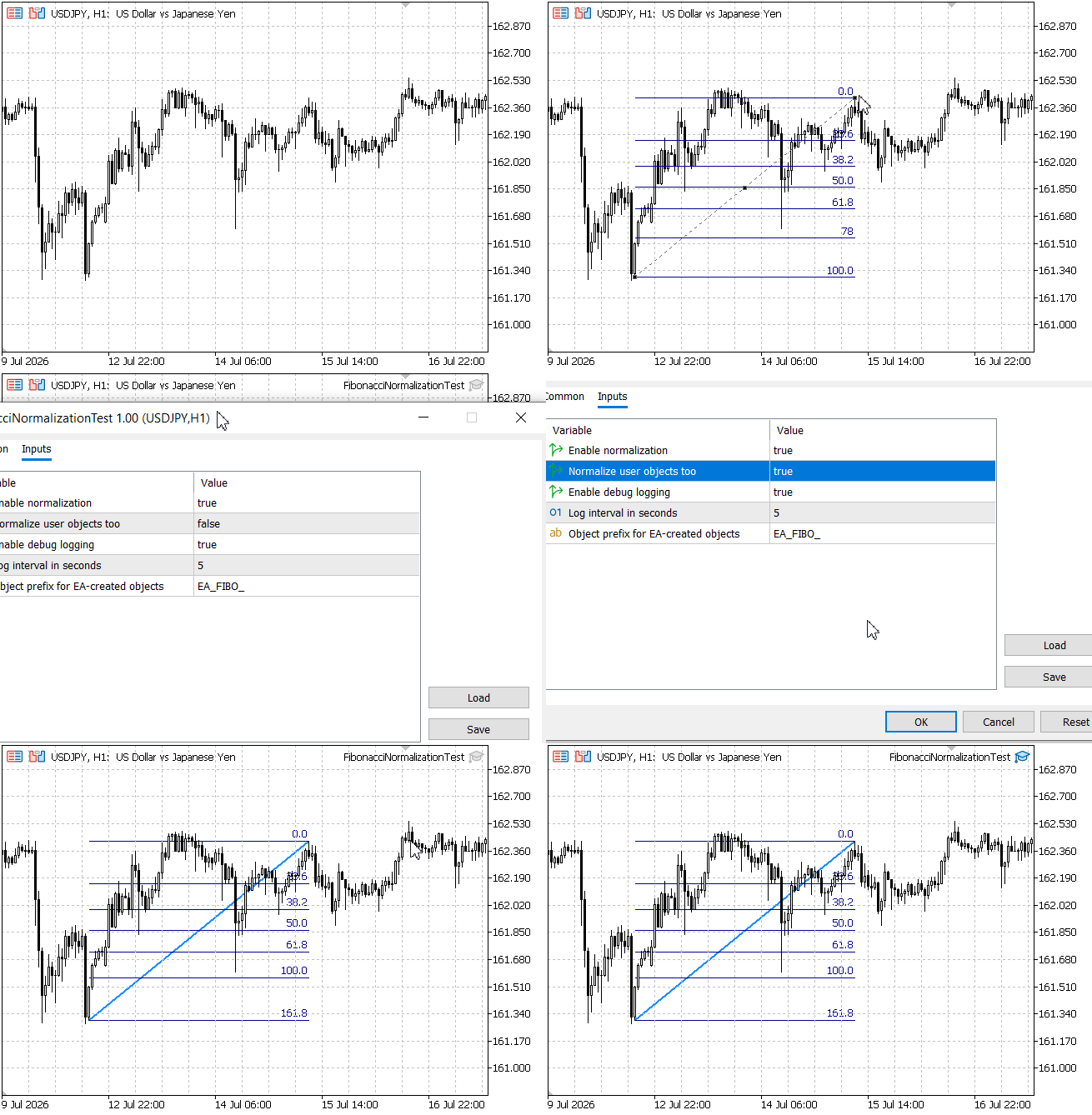
Fig. 1. Test EA output showing detection and normalization results.
Observed Visual Transformation
Before normalization, the Fibonacci retracement was displayed with the default MetaTrader 5 settings: a thin gray line (clrDimGray) with a standard appearance. The anchor line appeared broken or faint, as is typical for newly drawn objects using the default template.
After detection and normalization, the object's appearance changed. The anchor line became a thick Dodger Blue (clrDodgerBlue) with a solid style and width 2. This transformation occurred within seconds of releasing the mouse after drawing the object, providing clear visual confirmation that the EA was actively monitoring and normalizing chart objects.
The visual change is not merely cosmetic—it signals that the object's underlying properties have been standardized. The EA can now reliably read the level array, knowing that it contains exactly the standard set of Fibonacci ratios (0.0, 0.236, 0.382, 0.5, 0.618, 0.764, 1.0) in the correct order.
Results Summary
The following table summarizes the test results for the manually drawn Fibonacci retracement object before and after normalization.
| Property | Before Normalization | After Normalization |
|---|---|---|
| Object Name | H1 Fibo 4760 | H1 Fibo 4760 (unchanged) |
| Object Type | OBJ_FIBO | OBJ_FIBO (unchanged) |
| Level Count | 10 | 7 |
| Level Values | 0.000, 0.236, 0.382, 0.500, 0.618, 1.000, 1.618, 2.618, 4.236, 0.780 | 0.000, 0.236, 0.382, 0.500, 0.618, 0.764, 1.000 |
| Color | clrDimGray (thin, broken appearance) | clrDodgerBlue (thick, solid appearance) |
| Width | Default | 2 |
| EA-Generated | NO (user-drawn) | NO (user-drawn) |
| Anchor Points | Preserved | Preserved (unchanged) |
The results demonstrate that the normalization routine successfully:
- Detected the user-drawn Fibonacci retracement object regardless of its custom name.
- Reduced the level count from 10 to the standard 7 levels.
- Removed non-standard extension levels (1.618, 2.618, 4.236) and the out-of-order level (0.780).
- Applied the standard level set: 0.0, 0.236, 0.382, 0.5, 0.618, 0.764, and 1.0.
- Changed the color from clrDimGray to clrDodgerBlue and increased the width to 2, transforming the visual appearance from a thin broken line to a thick solid line.
- Preserved the object's anchor points and name, maintaining the trader's original placement.
Troubleshooting Tips
If the test EA does not produce the expected results, consider the following common issues:
- No objects found: Ensure that at least one Fibonacci object is drawn on the chart. The detection routine only identifies OBJ_FIBO, OBJ_FIBOFAN, OBJ_FIBOTIMES, OBJ_FIBOARC, OBJ_FIBOCHANNEL, and OBJ_EXPANSION.
- Normalization fails or visual changes do not occur: Verify that the EA has permission to modify objects. In MetaTrader, go to Tools > Options > Expert Advisors and ensure "Allow automated trading" is checked and "Allow modifying objects" is enabled. Also confirm that InpNormalizeUser is set to true.
- Duplicate objects appear: Check that the manual priority check is working correctly. The IsManualObjectExists() method compares anchor points with a small price threshold; if the threshold is too tight, duplicates might still be created. Adjust the threshold value if necessary.
- Time zones not aligning: If time zones appear at incorrect positions, verify that the adjustToChartTF parameter is set appropriately for your chart's timeframe.
The test confirms that detection and normalization work as expected and can be integrated into the main EA. The system correctly detects user-drawn Fibonacci objects, applies consistent normalization, and provides immediate visual feedback to the trader, building confidence that the EA is actively managing chart objects.
File Structure Summary
MQL5/
├── Include/
│   └── ChartObjectsAlgorithms-Part5/
│       ├── Common/
│       │   ├── Structures.mqh         // Added signalTime field
│       │   └── Globals.mqh            // Global parameters
│       ├── Helpers/
│       │   ├── MathHelpers.mqh        // Updated iMA CopyBuffer implementation
│       │   └── ObjectHelpers.mqh      // Object creation routines
│       ├── Core/
│       │   ├── SwingDetector.mqh      // Swing detection utility
│       │   ├── ObjectPlacer.mqh       // Updated with manual priority logic
│       │   ├── MarketCache.mqh        // Data cache
│       │   ├── SignalEvaluator.mqh    // Expanded for all 6 Fibonacci types
│       │   └── FibonacciNormalizer.mqh // NEW: Detection & normalization engine
│       ├── Engine/
│       │   └── TopologyManager.mqh    // Integrated normalization & prioritization
│       └── Execution/
│           └── AdaptiveTrade.mqh      // Adaptive execution
└── Experts/
    └── ChartObjectsAlgorithms-Part5/
        ├── AutoObjectTradingSystem.mq5    // Main EA with Part 5 updates
        └── FibonacciNormalizationTest.mq5 // NEW: Diagnostic test EA
Table of Attached Files
All files are organized in the modular structure described above under MQL5/Include/ChartObjectsAlgorithms-Part5/ and MQL5/Experts/ChartObjectsAlgorithms-Part5/. The complete archive MQL5.zip contains all files in their correct subdirectories for easy installation.
| File Name | Type | Status | Description |
|---|---|---|---|
| Structures.mqh | Include | Updated | Core data structures: SSwingPoint, MarketSnapshot, and TradeSignal (now with signalTime). |
| Globals.mqh | Include | Unchanged | Global cached values: point, digits, and price cache arrays. |
| MathHelpers.mqh | Include | Updated | Utility functions: GetEMA (updated with CopyBuffer), GetLineValueAtTime, ObjectTypeToString. |
| ObjectHelpers.mqh | Include | Unchanged | Object creation and cleanup: CreateHorizontalLineObject, CleanupObjectsWithPrefix. |
| SwingDetector.mqh | Include | Unchanged | CSwingDetector class for identifying swing highs and lows. |
| ObjectPlacer.mqh | Include | Updated | CObjectPlacer class – enhanced with manual priority checks for all six Fibonacci types. |
| MarketCache.mqh | Include | Unchanged | CMarketDataCache class for efficient price data caching. |
| SignalEvaluator.mqh | Include | Updated | CSignalEvaluator class – expanded for all six Fibonacci types. |
| FibonacciNormalizer.mqh | Include | New | CFibonacciNormalizer class – complete detection and normalization engine. |
| TopologyManager.mqh | Include | Updated | CTopologyManager class – integrated normalization and manual priority logic. |
| AdaptiveTrade.mqh | Include | Unchanged | ExecuteAdaptiveTrade function – order placement adapted to any instrument. |
| AutoObjectTradingSystem.mq5 | Expert Advisor | Updated | Main EA with Part 5 updates – includes normalization inputs and integration. |
| FibonacciNormalizationTest.mq5 | Expert Advisor | New | Diagnostic test EA for validating detection and normalization. |
Installation: Extract the MQL5.zip archive directly into your MetaTrader 5 installation folder (where the MQL5 folder is located). The archive already contains the correct folder structure, so you can simply merge it with your existing MQL5 folder. Compile all files in MetaEditor (F7).
Conclusion
This article has taken a deep dive into one of the most challenging aspects of automating Fibonacci-based trading: detecting and normalizing manually drawn objects so that they can be processed reliably alongside automated ones by an Expert Advisor.
We began by revisiting the foundational scanning tools from Parts 1 and 2, the signal triggers from Part 3, and the automated object placement framework built in Part 4. We then addressed its core limitation: while the EA could generate and monitor its own structured objects, it lacked a unified pipeline to handle manually drawn Fibonacci tools—or defer to human insight when a trader draws on the chart.
To solve this, we expanded our modular architecture across the entire Fibonacci family (Retracements, Fans, Time Zones, Arcs, Channels, and Expansions):
- FibonacciNormalizer.mqh: Built a dedicated normalizer that detects Fibonacci objects regardless of their names, standardizes level arrays, and enforces visual consistency across all six Fibonacci types.
- ObjectPlacer.mqh & TopologyManager.mqh: Integrated manual priority checks so automated placements automatically yield whenever a user has drawn a Fibonacci object on the same price structure.
- SignalEvaluator.mqh: Upgraded the evaluation engine to analyze price interactions and calculate entry, stop, and target levels across all six Fibonacci geometries.
- FibonacciNormalizationTest.mq5: Created a non-trading diagnostic EA to inspect and normalize chart objects in real time before live deployment.
A core design principle drives this entire pipeline: manual objects take priority. By respecting human analysis and forcing variable chart geometry into a predictable state, we eliminate runtime errors and enable sophisticated hybrid trading strategies.
With these tools in hand, you can now build Expert Advisors that seamlessly blend human discretion with automated execution. The hidden variability is gone—the robot can finally trust what it sees on the chart.
The complete source code is attached below. Happy coding!
Warning: All rights to these materials are reserved by MetaQuotes Ltd. Copying or reprinting of these materials in whole or in part is prohibited.
This article was written by a user of the site and reflects their personal views. MetaQuotes Ltd is not responsible for the accuracy of the information presented, nor for any consequences resulting from the use of the solutions, strategies or recommendations described.

 Automating Terminal Startup for Service Tasks
 Machine Learning Without the Black Box: The Tsetlin Machine for Trading
 Neural Networks in Trading: An Intelligent Forecast Pipeline (Conclusion)
 Building a Position Sizing Engine in MQL5 with Multiple Risk Models

- Free trading apps
- Over 8,000 signals for copying
- Economic news for exploring financial markets
You agree to website policy and terms of use