

How to Test and Customize Built-in MQL5 Programs: Envelopes with Alligator Strategy
 171
171
 0
0

In the previous article in this series, we established two practical ways to improve a built-in MQL5 program: optimize its exposed inputs and customize its source code by adding a market filter. That discussion showed why testing should begin with the original behavior before any modification is made. We apply the same method to a built-in indicator. The Envelopes indicator provides location, and the Alligator indicator provides directional context that a boundary crossing alone lacks.
Built-in indicators are more useful when we understand what their buffers measure and where defaults can mislead. We can then join complementary tools with explicit rules. In this article, we create Envelope_Alligator_Strategy.mq5. It separates trend pullbacks from range-oriented reversals, confirms the Alligator state across completed bars, suppresses repeated arrows, and can issue closed-bar popup alerts. The objective is not to claim that either built-in indicator is defective. It is to turn two interpretive frameworks into one transparent and testable decision aid.
Contents
- Why Envelopes need context
- Strategy rules
- Program architecture
- Implementation
- Operation and customization
- Testing plan
- Limitations
- Conclusion
- Attachments
Why Envelopes need context
The iEnvelopes() function returns a handle whose buffer 0 is the upper line and buffer 1 is the lower line. Each boundary is displaced from the moving average by a percentage. A widening or narrowing distance may reflect changes in the level of the moving average, but a fixed-percentage envelope is not a direct volatility estimator. More importantly, reaching a boundary does not automatically imply reversal.
In a range, movement beyond a boundary can be temporary and the price may return toward the center. During a directional move, however, the price can remain near one boundary or repeatedly cross it without producing a reversal. This difference is the main weakness of interpreting Envelopes alone: the same lower-band event can represent a range extreme, a healthy bullish pullback, or accelerating bearish pressure. We therefore need a second component that describes the market state before an envelope crossing becomes a signal candidate.
The standard Alligator is defined as three smoothed moving-average components: Jaws, Teeth, and Lips. The common configuration uses periods 13, 8, and 5 with forward visual shifts 8, 5, and 3, calculated with the Smoothed Moving Average method on PRICE_MEDIAN, which is (high + low) / 2. In this implementation, we reproduce those components with three unshifted iMA() source series and apply the configured shifts only to the visible plots, not to the source indices used by the signal logic. Their order gives us a compact state filter. Lips above Teeth above Jaws indicates an upward raw order; Jaws above Teeth above Lips indicates a downward raw order; any other arrangement is neutral. The filter keeps these cases distinct from directional orders that have not yet persisted for InpTrendMinBars. A persistent order confirms only the indicator state used by this method; it does not prove that the market is trending or predict the next move.
Why the built-in configurations need interpretation
Neither indicator is broken in its standard form, but neither supplies a complete entry decision. The Envelopes indicator identifies a relative location around a moving average without knowing whether the market is trending or ranging. Alligator describes the organization of three averages without defining an exact envelope event. A trader who treats either display as an automatic buy-or-sell instruction can therefore enter late, trade against a persistent move, or react repeatedly to noise.
The Alligator is intentionally smooth and therefore lagging. Its three averages react at different speeds, while their forward visual shifts make the familiar open-mouth formation appear ahead of the source bars used to calculate it. In a sustained trend, this helps organize direction, but the clean separation may become obvious only after part of the move has already occurred. In a range, the lines can remain interwoven and alternate order frequently. The indicator is therefore better used as a state framework than as a standalone trigger.
The Envelopes indicator has a different limitation. Its percentage deviation is fixed, while volatility varies by symbol, timeframe, and market session. A narrow percentage can generate frequent crossings on one instrument, whereas the same setting may rarely be reached on another. The built-in calculation also follows its moving average, so it describes where the price is relative to a delayed center rather than forecasting where the price will move next.
| Built-in limitation | Practical consequence | Response in this project |
|---|---|---|
| An envelope crossing has no market-state context | A trader may sell an upper-band ride or buy into bearish continuation | The filter distinguishes confirmed direction, unconfirmed direction, and neutral line arrangement |
| One Alligator ordering can appear briefly during noise | Fast changes can produce unstable directional interpretations | InpTrendMinBars must be satisfied before a directional order can authorize a signal |
| A boundary condition can remain true across several bars | The same market event may create repeated signals | Crossing logic and InpSignalCooldown convert the condition into spaced events |
| The trader must continuously watch two separate indicators | A qualified setup may be noticed late or missed | One chart indicator combines the lines, arrows, and optional closed-bar popup |
| Default values are not universal | Signal frequency changes substantially between instruments and timeframes | Periods, methods, applied sources, deviation, confirmation, and cooldown remain inputs |
The project therefore addresses interpretation, confirmation, repetition, and monitoring. It does not remove lag or discover a universally correct deviation. Those remaining limitations are preserved as visible inputs and testing responsibilities rather than hidden behind a fixed signal claim.
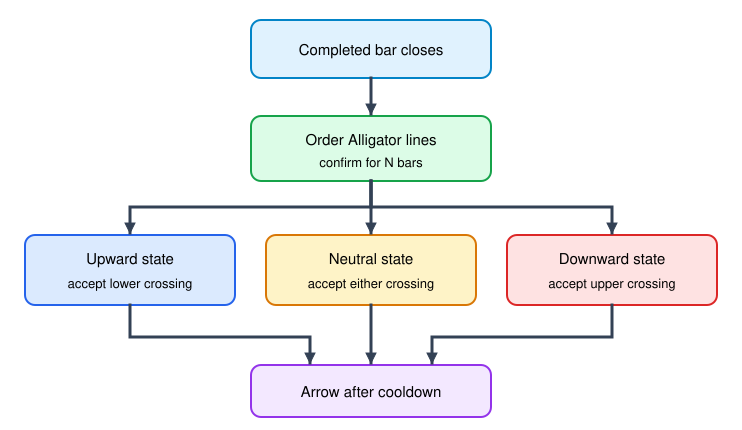
Fig. 1. Envelope interpretation changes with the Alligator state
Strategy rules
The indicator produces chart setups rather than orders, which keeps signal research separate from financial execution. It evaluates completed bars, so the current forming bar cannot create an arrow. This boundary does not by itself protect against later history corrections, newly loaded bars, or broker-data changes. A directional crossing is accepted only after the corresponding raw Alligator order persists for InpTrendMinBars. A genuinely unordered arrangement remains the method's neutral case, while a directional order below the threshold is unconfirmed and authorizes no signal. After a signal is written, InpSignalCooldown prevents the same direction from appearing again until enough bars have passed.
| State | Envelope event | Output | Interpretation |
|---|---|---|---|
| Confirmed upward or neutral | The close crosses from above to at or below the lower line | Buy arrow | Trend pullback or range mean reversion |
| Confirmed downward or neutral | The close crosses from below to at or above the upper line | Sell arrow | Trend rally or range mean reversion |
| Downward | Lower-line crossing | No signal | Counter-trend buy is filtered |
| Upward | Upper-line crossing | No signal | Counter-trend sell is filtered |
| Unconfirmed upward or downward order | Either crossing | No signal | The persistence threshold has not yet been met |
The neutral state means only that neither strict line order is present. The method allows both range-oriented directions in that state as a testable design hypothesis, not as proof that the market is ranging or that mean reversion is more likely. Unconfirmed upward and downward orders are separate states and pass neither signal. A stricter continuation-only variant can remove the neutral case and accept crossings only in FILTER_CONFIRMED_UP or FILTER_CONFIRMED_DOWN. That variant requires its own testing and must not be mixed with results from the rules shown here.
Program architecture
The custom indicator creates four built-in handles and does not duplicate formulas maintained by MetaTrader 5. One Envelopes handle supplies the upper and lower boundaries, while three unshifted moving-average handles supply Jaws, Teeth, and Lips for this implementation. CopyBuffer() transfers those five series into indicator buffers only after all four handles report sufficient calculated history. The state filter then writes a diagnostic value for neutral, unconfirmed, or confirmed order. The crossing detector compares consecutive completed bars, and the signal stage writes to the buy and sell buffers regardless of whether their plots are visible. Input validation, copy-count checks, cooldown control, and closed-bar alert gating form the operational boundary around that data flow.
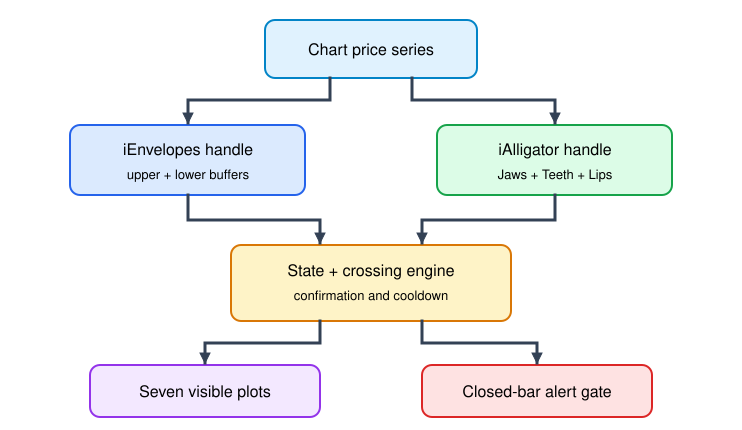
Fig. 2. Indicator components and data flow
Implementation
The complete attachment is organized as a pipeline. The declaration block defines what the indicator can display and configure. OnInit() validates that configuration, maps the visible buffers, and creates the four built-in indicator handles. OnCalculate() waits for those dependencies, copies their buffers, classifies the Alligator state, detects envelope crossings, and writes qualified arrows. OnDeinit() closes the lifecycle by releasing all four handles.
Declaring the display and diagnostic plots
The program defines five line plots, two arrow plots, and one hidden diagnostic plot. The first two reproduce the Envelopes boundaries. The next three reproduce Jaws, Teeth, and Lips. The following two hold buy and sell markers, while the final buffer exposes the filter state in the Data Window without adding another line to the chart. The indicator therefore declares eight buffers and eight plots.
#property indicator_chart_window
#property indicator_buffers 8
#property indicator_plots   8
#property indicator_label1  "Envelope Upper"
#property indicator_type1   DRAW_LINE
#property indicator_color1  clrDodgerBlue
#property indicator_label2  "Envelope Lower"
#property indicator_type2   DRAW_LINE
#property indicator_color2  clrTomato
#property indicator_label3  "Alligator Jaws"
#property indicator_type3   DRAW_LINE
#property indicator_color3  clrBlue
#property indicator_label4  "Alligator Teeth"
#property indicator_type4   DRAW_LINE
#property indicator_color4  clrRed
#property indicator_label5  "Alligator Lips"
#property indicator_type5   DRAW_LINE
#property indicator_color5  clrLimeGreen
#property indicator_label6  "Buy"
#property indicator_type6   DRAW_ARROW
#property indicator_color6  clrLime
#property indicator_label7  "Sell"
#property indicator_type7   DRAW_ARROW
#property indicator_color7  clrRed
#property indicator_label8  "Alligator State"
#property indicator_type8   DRAW_NONE
This declaration fixes the relationship between plot number and buffer number before any calculation begins. Later code must preserve the same order when it calls SetIndexBuffer().
Separating Envelopes, Alligator, and signal inputs
The inputs expose three layers of control. The Envelopes group defines the average and percentage boundaries. The Alligator group defines the three smoothing periods, their visual shifts, the averaging method, and the applied source. The final group controls state confirmation, signal spacing, arrows, and alerts.
//--- Envelope inputs
input int                InpEnvPeriod=20;                // Envelope period
input ENUM_MA_METHOD     InpEnvMethod=MODE_SMA;          // Envelope method
input ENUM_APPLIED_PRICE InpEnvApplied=PRICE_CLOSE;      // Envelope applied price
input double             InpDeviation=0.5;               // Envelope deviation (%)
//--- Alligator inputs
input int                InpJawsPeriod=13;               // Jaws period
input int                InpJawsShift=8;                 // Jaws visual shift
input int                InpTeethPeriod=8;               // Teeth period
input int                InpTeethShift=5;                // Teeth visual shift
input int                InpLipsPeriod=5;                // Lips period
input int                InpLipsShift=3;                 // Lips visual shift
input ENUM_MA_METHOD     InpGatorMethod=MODE_SMMA;       // Alligator method
input ENUM_APPLIED_PRICE InpGatorApplied=PRICE_MEDIAN;   // Alligator applied price
//--- Signal inputs
input int                InpTrendMinBars=2;              // State confirmation bars
input int                InpSignalCooldown=3;            // Bars between same signals
input bool               InpShowSignals=true;            // Show signal arrows
input bool               InpAlerts=false;                 // Closed-bar popup alerts
These defaults provide a starting configuration rather than a universal solution. InpDeviation has the greatest direct effect on crossing frequency, while InpTrendMinBars and InpSignalCooldown control how aggressively those crossings become visible signals.
Rejecting invalid configurations
InputsAreValid() runs before buffers or handles are created. It receives no arguments because it reads the inputs directly. The function rejects an unusable envelope period, a nonpositive deviation, nonpositive Alligator periods, zero-length confirmation or cooldown values, and negative visual shifts. It also enforces Jaws > Teeth > Lips because this article's interpretation assumes that methodological hierarchy. Other positive period orders may be accepted by the MQL5 API, but they belong to a different method and are outside this implementation.
//+------------------------------------------------------------------+
//| Validates the user inputs                                        |
//+------------------------------------------------------------------+
bool InputsAreValid()
  {
//--- Envelope period, deviation and signal pacing must be positive
   if(InpEnvPeriod<2 || InpDeviation<=0.0 || InpTrendMinBars<1 ||
      InpSignalCooldown<1)
      return(false);
//--- Alligator periods must be at least one bar
   if(InpJawsPeriod<1 || InpTeethPeriod<1 || InpLipsPeriod<1)
      return(false);
//--- Enforce the period hierarchy required by this strategy method
   if(InpJawsPeriod<=InpTeethPeriod || InpTeethPeriod<=InpLipsPeriod)
      return(false);
//--- Visual shifts cannot be negative
   if(InpJawsShift<0 || InpTeethShift<0 || InpLipsShift<0)
      return(false);
   return(true);
  }
OnInit() converts a false result into INIT_PARAMETERS_INCORRECT. This prevents a partially initialized indicator from continuing with settings outside the method's stated domain. The result does not imply that every rejected positive-period combination is technically invalid for iAlligator().
Mapping buffers and configuring their display
The next stage maps each dynamic array to the plot declared earlier. SetIndexBuffer() uses INDICATOR_DATA for all eight arrays because each one is drawn or exposed in the Data Window. The code applies the familiar Alligator visual shifts, assigns Wingdings arrow codes 233 and 234, and defines EMPTY_VALUE as the absence of an arrow. InpShowSignals changes only the arrow plots to DRAW_NONE; calculation and alerts continue to use the populated signal buffers.
//+------------------------------------------------------------------+
//| Initializes buffers, plots, and built-in indicator handles       |
//+------------------------------------------------------------------+
int OnInit()
  {
   if(!InputsAreValid())
     {
      Print("Invalid Envelopes or Alligator inputs");
      return(INIT_PARAMETERS_INCORRECT);
     }

//--- Bind each buffer to its plot index
   SetIndexBuffer(0,UpperBuffer,INDICATOR_DATA);
   SetIndexBuffer(1,LowerBuffer,INDICATOR_DATA);
   SetIndexBuffer(2,JawsBuffer,INDICATOR_DATA);
   SetIndexBuffer(3,TeethBuffer,INDICATOR_DATA);
   SetIndexBuffer(4,LipsBuffer,INDICATOR_DATA);
   SetIndexBuffer(5,BuyBuffer,INDICATOR_DATA);
   SetIndexBuffer(6,SellBuffer,INDICATOR_DATA);
   SetIndexBuffer(7,StateBuffer,INDICATOR_DATA);

//--- Apply the visual shifts, arrow styling and empty values
   PlotIndexSetInteger(2,PLOT_SHIFT,InpJawsShift);
   PlotIndexSetInteger(3,PLOT_SHIFT,InpTeethShift);
   PlotIndexSetInteger(4,PLOT_SHIFT,InpLipsShift);
   PlotIndexSetInteger(5,PLOT_ARROW,233);
   PlotIndexSetInteger(6,PLOT_ARROW,234);
   PlotIndexSetInteger(5,PLOT_ARROW_SHIFT,10);
   PlotIndexSetInteger(6,PLOT_ARROW_SHIFT,-10);
   PlotIndexSetDouble(5,PLOT_EMPTY_VALUE,EMPTY_VALUE);
   PlotIndexSetDouble(6,PLOT_EMPTY_VALUE,EMPTY_VALUE);
   if(!InpShowSignals)
     {
      PlotIndexSetInteger(5,PLOT_DRAW_TYPE,DRAW_NONE);
      PlotIndexSetInteger(6,PLOT_DRAW_TYPE,DRAW_NONE);
     }

//--- Reserve enough history for indicator warm-up before the first plot
   ExtMinBars=MathMax(InpEnvPeriod,InpJawsPeriod)+InpTrendMinBars+2;
   for(int plot=0; plot<8; plot++)
      PlotIndexSetInteger(plot,PLOT_DRAW_BEGIN,ExtMinBars);

//--- Create the built-in Envelope handle
   ExtEnvelope=iEnvelopes(_Symbol,_Period,InpEnvPeriod,0,InpEnvMethod,
                          InpEnvApplied,InpDeviation);
//--- Build this implementation from three unshifted SMMA-based iMA sources; the shift is visual only
   ExtJawsHandle=iMA(_Symbol,_Period,InpJawsPeriod,0,InpGatorMethod,
                     InpGatorApplied);
   ExtTeethHandle=iMA(_Symbol,_Period,InpTeethPeriod,0,InpGatorMethod,
                      InpGatorApplied);
   ExtLipsHandle=iMA(_Symbol,_Period,InpLipsPeriod,0,InpGatorMethod,
                     InpGatorApplied);
   if(ExtEnvelope==INVALID_HANDLE || ExtJawsHandle==INVALID_HANDLE ||
      ExtTeethHandle==INVALID_HANDLE || ExtLipsHandle==INVALID_HANDLE)
     {
      PrintFormat("Indicator handle creation failed. Error %d",GetLastError());
      return(INIT_FAILED);
     }

//--- Publish the short name and the price precision
   IndicatorSetString(INDICATOR_SHORTNAME,
                      StringFormat("Envelope Alligator (%d, %.2f%%)",
                                   InpEnvPeriod,InpDeviation));
   IndicatorSetInteger(INDICATOR_DIGITS,_Digits);
   return(INIT_SUCCEEDED);
  }
In this implementation, the shifts determine only where the three Alligator component plots appear on the chart. The underlying iMA() handles use shift zero, so CopyIndicatorData() reads every source from position zero. The calculation therefore compares values that belong to the same source-bar index, while PLOT_SHIFT moves only their visible plots forward. Consequently, the visual line order at an arrow's horizontal position is not a reliable proxy for the state used by the algorithm. Use the diagnostic state buffer or compare the source-index values without PLOT_SHIFT when verifying a signal.
Creating the built-in indicator handles
After the plots are ready, OnInit() creates one Envelopes handle and three unshifted iMA() handles for the current symbol and timeframe. The Envelopes handle exposes its upper and lower buffers. The three moving-average handles independently supply Jaws, Teeth, and Lips using their configured periods, method, and applied price. The program checks all four results because OnCalculate() cannot operate if any dependency failed.
A successful return gives OnCalculate() four stable data sources. The short name also records the envelope period and deviation so separate configurations can be distinguished in the chart indicator list.
Waiting for and copying the five source buffers
OnCalculate() first fixes the incoming arrays in chronological order, with the oldest element at index zero. This makes the forward loop and its i-1 comparisons independent of the default indexing direction supplied by the terminal. ExtMinBars is calculated as max(InpEnvPeriod, InpJawsPeriod) + InpTrendMinBars + 2. The maximum period covers indicator warm-up, InpTrendMinBars covers the required persistence, and two additional bars cover the previous-bar crossing comparison and exclusion of the current forming bar. Visual shifts are absent from this formula because they move plots but do not change the source indices used for calculation.
BarsCalculated() then confirms that all four handles have produced the requested values. Version 1.14 receives each CopyBuffer() result in a reusable dynamic work array rather than asking the terminal to resize a mapped indicator buffer. All five copies start at position zero because the three moving-average handles are unshifted; the configured Jaws, Teeth, and Lips shifts are applied later by PLOT_SHIFT. CopySourceBuffer() sizes and checks one receiver at a time, so a failure identifies the exact source, copied count, requested count, and error code. CopyIndicatorData() transfers values to the five mapped line buffers only after all source copies succeed. Repeated identical errors are suppressed until a complete transfer restores normal operation.
//+------------------------------------------------------------------+
//| Reports one message for each distinct buffer-copy failure        |
//+------------------------------------------------------------------+
void ReportCopyFailure(const string buffer_name,
                       const int copied,
                       const int requested,
                       const int error_code)
  {
//--- Suppress an identical failure until a successful transfer occurs
   string signature=StringFormat("%s:%d:%d:%d",buffer_name,copied,
                                 requested,error_code);
   if(signature==ExtLastCopyFailure)
      return;
   ExtLastCopyFailure=signature;
   PrintFormat("CopyBuffer %s failed. Copied=%d requested=%d error=%d",
               buffer_name,copied,requested,error_code);
  }

//+------------------------------------------------------------------+
//| Copies one source buffer into a resizable work array             |
//+------------------------------------------------------------------+
bool CopySourceBuffer(const int handle,
                      const int buffer_number,
                      const int count,
                      const string buffer_name,
                      double &target[])
  {
//--- Size the dynamic receiver before requesting terminal data
   ResetLastError();
   if(ArrayResize(target,count)!=count)
     {
      ReportCopyFailure(buffer_name,-1,count,GetLastError());
      return(false);
     }
//--- Check this transfer independently so the failed source is known
   ResetLastError();
   int copied=CopyBuffer(handle,buffer_number,0,count,target);
   if(copied!=count)
     {
      ReportCopyFailure(buffer_name,copied,count,GetLastError());
      return(false);
     }
   return(true);
  }

//+------------------------------------------------------------------+
//| Copies complete source data into the mapped display buffers      |
//+------------------------------------------------------------------+
bool CopyIndicatorData(const int count)
  {
//--- Receive source data in arrays that CopyBuffer can safely resize
   if(!CopySourceBuffer(ExtEnvelope,0,count,"Envelope upper",ExtUpperData))
      return(false);
   if(!CopySourceBuffer(ExtEnvelope,1,count,"Envelope lower",ExtLowerData))
      return(false);
   if(!CopySourceBuffer(ExtJawsHandle,0,count,"Alligator jaws",ExtJawsData))
      return(false);
   if(!CopySourceBuffer(ExtTeethHandle,0,count,"Alligator teeth",ExtTeethData))
      return(false);
   if(!CopySourceBuffer(ExtLipsHandle,0,count,"Alligator lips",ExtLipsData))
      return(false);

//--- Commit only a complete five-buffer snapshot to the visible plots
   for(int i=0;i<count;i++)
     {
      UpperBuffer[i]=ExtUpperData[i];
      LowerBuffer[i]=ExtLowerData[i];
      JawsBuffer[i]=ExtJawsData[i];
      TeethBuffer[i]=ExtTeethData[i];
      LipsBuffer[i]=ExtLipsData[i];
     }
   ExtLastCopyFailure="";
   return(true);
  }
The copied result is the complete input for the custom logic. No envelope formula or Alligator smoothing formula is duplicated inside this indicator; the built-in implementations remain responsible for those calculations.
Before rebuilding history, OnCalculate() clears both signal buffers and the diagnostic state buffer. This step is essential because a recalculation may cause a bar that previously qualified to stop qualifying. Resetting the arrays prevents an old arrow or state value from surviving only because the new pass did not overwrite it.
Classifying and confirming the Alligator state
RawState() receives one bar index and returns 1 for Lips above Teeth above Jaws, -1 for the reverse order, and 0 when neither strict order exists. The main loop counts consecutive directional bars, then maps the result to five explicit filter states: confirmed down (-2), unconfirmed down (-1), neutral (0), unconfirmed up (1), and confirmed up (2). StateBuffer exposes that value for each processed bar. This prevents neutral arrangement from being confused with a directional order that has not yet met InpTrendMinBars.
//--- Filter states published through the hidden State buffer
enum ENUM_FILTER_STATE
  {
   FILTER_CONFIRMED_DOWN=-2,
   FILTER_UNCONFIRMED_DOWN=-1,
   FILTER_NEUTRAL=0,
   FILTER_UNCONFIRMED_UP=1,
   FILTER_CONFIRMED_UP=2
  };
//+------------------------------------------------------------------+
//| Returns the ordered Alligator state for one bar                  |
//+------------------------------------------------------------------+
int RawState(const int index)
  {
//--- Bullish order: lips above teeth above jaws
   if(LipsBuffer[index]>TeethBuffer[index] &&
      TeethBuffer[index]>JawsBuffer[index])
      return(1);
//--- Bearish order: jaws above teeth above lips
   if(JawsBuffer[index]>TeethBuffer[index] &&
      TeethBuffer[index]>LipsBuffer[index])
      return(-1);
//--- Any other order is neutral
   return(0);
  }
//+------------------------------------------------------------------+
//| Calculates market states and closed-bar envelope signals         |
//+------------------------------------------------------------------+
int OnCalculate(const int rates_total,
                const int prev_calculated,
                const datetime &time[],
                const double &open[],
                const double &high[],
                const double &low[],
                const double &close[],
                const long &tick_volume[],
                const long &volume[],
                const int &spread[])
  {
//--- Use chronological indexing: the oldest element is at index zero
   ArraySetAsSeries(time,false);
   ArraySetAsSeries(high,false);
   ArraySetAsSeries(low,false);
   ArraySetAsSeries(close,false);

//--- Wait for enough bars and for the indicator data to be ready
   if(rates_total<ExtMinBars)
      return(0);
   if(BarsCalculated(ExtEnvelope)<rates_total ||
      BarsCalculated(ExtJawsHandle)<rates_total ||
      BarsCalculated(ExtTeethHandle)<rates_total ||
      BarsCalculated(ExtLipsHandle)<rates_total)
      return(prev_calculated);
   if(!CopyIndicatorData(rates_total))
      return(prev_calculated);

//--- Rebuild the complete signal history for deterministic state
   ArrayInitialize(BuyBuffer,EMPTY_VALUE);
   ArrayInitialize(SellBuffer,EMPTY_VALUE);
   ArrayInitialize(StateBuffer,EMPTY_VALUE);
   int run_up=0;
   int run_down=0;
   int last_buy=-InpSignalCooldown;
   int last_sell=-InpSignalCooldown;

//--- Walk every closed bar once and evaluate the strategy
   for(int i=1; i<rates_total-1 && !IsStopped(); i++)
     {
      int state=RawState(i);
      //--- Track how long the Alligator has held one direction
      if(state>0)
        {
         run_up++;
         run_down=0;
        }
      else
         if(state<0)
           {
            run_down++;
            run_up=0;
           }
         else
           {
            run_up=0;
            run_down=0;
           }

      //--- Upgrade a sustained direction to a confirmed state
      ENUM_FILTER_STATE filter_state=FILTER_NEUTRAL;
      if(run_up>=InpTrendMinBars)
         filter_state=FILTER_CONFIRMED_UP;
      else
         if(run_down>=InpTrendMinBars)
            filter_state=FILTER_CONFIRMED_DOWN;
         else
            if(state>0)
               filter_state=FILTER_UNCONFIRMED_UP;
            else
               if(state<0)
                  filter_state=FILTER_UNCONFIRMED_DOWN;
      StateBuffer[i]=(double)filter_state;

      //--- Detect a fresh close beyond an Envelope band
      bool lower_entry=(close[i]<=LowerBuffer[i] &&
                        close[i-1]>LowerBuffer[i-1]);
      bool upper_entry=(close[i]>=UpperBuffer[i] &&
                        close[i-1]<UpperBuffer[i-1]);

      //--- A signal is allowed in a confirmed or neutral market
      bool buy_state=(filter_state==FILTER_CONFIRMED_UP ||
                      filter_state==FILTER_NEUTRAL);
      bool sell_state=(filter_state==FILTER_CONFIRMED_DOWN ||
                       filter_state==FILTER_NEUTRAL);

      //--- Emit at most one arrow per direction within the cooldown
      if(buy_state && lower_entry &&
         i-last_buy>=InpSignalCooldown)
        {
         BuyBuffer[i]=low[i];
         last_buy=i;
        }
      else
         if(sell_state && upper_entry &&
            i-last_sell>=InpSignalCooldown)
           {
            SellBuffer[i]=high[i];
            last_sell=i;
           }
     }

//--- Alert once when the most recent closed bar produced a signal
   int closed=rates_total-2;
   if(InpAlerts && time[closed]!=ExtLastAlertBar)
     {
      if(BuyBuffer[closed]!=EMPTY_VALUE)
        {
         Alert(_Symbol," buy setup at ",DoubleToString(close[closed],_Digits));
         ExtLastAlertBar=time[closed];
        }
      else
         if(SellBuffer[closed]!=EMPTY_VALUE)
           {
            Alert(_Symbol," sell setup at ",DoubleToString(close[closed],_Digits));
            ExtLastAlertBar=time[closed];
           }
     }
   return(rates_total);
  }
A neutral bar resets both counters. A confirmed state therefore represents uninterrupted indicator ordering for at least InpTrendMinBars. This is confirmation of the filter condition only, not a claim that a market trend has been independently established.
Detecting crossings and applying the cooldown
The envelope event is defined as a crossing, not a continuing touch. A lower event requires the current close to be at or below the current lower boundary while the previous close was above the previous lower boundary. The upper event applies the opposite comparison. This converts a condition that may remain true for several bars into one identifiable transition.
A confirmed upward or neutral state can accept the lower crossing. A confirmed downward or neutral state can accept the upper crossing. Unconfirmed directional orders authorize neither event. last_buy and last_sell independently enforce the minimum spacing for each direction, so a recent buy does not block a sell. This preserves responsiveness to reversals, but it also allows tightly alternating buy and sell arrows. A separate global cooldown would be required if the strategy must suppress opposite-direction noise as well.
Restricting alerts to completed bars
The loop stops before rates_total-1, which excludes the current forming bar under the indicator's chronological indexing. The alert stage then inspects rates_total-2, the most recently completed bar. ExtLastAlertBar stores that bar's opening time and prevents repeated popups on subsequent ticks.
This gate separates visual recalculation from user notification. The buffers may be rebuilt to preserve deterministic history, but one completed signal bar produces no more than one popup during the active indicator session.
Releasing resources during removal
OnDeinit() receives the terminal's removal reason, although this indicator does not need to branch on it. Each valid handle is released independently. This cleanup applies when the indicator is removed, the chart closes, the timeframe changes, or the inputs force reinitialization.
//+------------------------------------------------------------------+
//| Releases the built-in indicator handles                          |
//+------------------------------------------------------------------+
void OnDeinit(const int reason)
  {
//--- Free every indicator handle created in OnInit
   if(ExtEnvelope!=INVALID_HANDLE)
      IndicatorRelease(ExtEnvelope);
   if(ExtJawsHandle!=INVALID_HANDLE)
      IndicatorRelease(ExtJawsHandle);
   if(ExtTeethHandle!=INVALID_HANDLE)
      IndicatorRelease(ExtTeethHandle);
   if(ExtLipsHandle!=INVALID_HANDLE)
      IndicatorRelease(ExtLipsHandle);
  }
With cleanup complete, the entire lifecycle is synchronized: validated inputs create the handles, copied buffers drive the state and crossing rules, qualified events populate arrows and alerts, and deinitialization returns the allocated indicator resources.
Operation and customization
Save Envelope_Alligator_Strategy.mq5 under MQL5\Indicators, compile it in MetaEditor, and attach it to a chart from Navigator → Indicators. The standard Alligator can normally be found under Navigator → Indicators → Bill Williams and may be added as a visual reference, while Envelopes is available under Navigator → Indicators → Trend. This custom indicator does not call the built-in iAlligator() handle directly; instead, it reconstructs the three Alligator components from unshifted moving-average handles and combines them with Envelopes and the arrow logic in one calculation context. Start with one symbol and timeframe, then compare each arrow with the line order and the corresponding envelope crossing before changing any input.
| Input | Default | Purpose | Customization effect |
|---|---|---|---|
| InpEnvPeriod | 20 | Envelope average length | Higher values smooth the center |
| InpDeviation | 0.5% | Percentage distance of each boundary | Higher values reduce crossing frequency |
| InpTrendMinBars | 2 | Required consecutive Alligator states | Higher values reduce fast state changes |
| InpSignalCooldown | 3 | Minimum spacing by direction | Higher values suppress clustered arrows |
| InpAlerts | false | Closed-bar popup notification | Enable only after visual validation |
Deviation is symbol-dependent because a percentage that is wide for EURUSD may be narrow for gold, an index, or a volatile equity. Do not assume that 0.3%, 0.5%, or 1.0% is universally suitable. Compare these values on the same symbol, timeframe, and historical interval while keeping other inputs constant. Record signal frequency, maximum adverse movement after each arrow, the time taken to return toward the center, and whether the state filter rejected useful or harmful crossings. Do not select a setting from win rate alone because a high win rate can coexist with infrequent large losses.
Testing plan
The indicator does not trade, so its first validation stage is logical and visual rather than financial. Compilation would confirm only MQL5 syntax and type rules. It would not confirm that arrows match the intended strategy. The source and snippets have been checked statically for the stated state transitions, buffer clearing, and bounds, but this is not compile or runtime evidence. Terminal testing must compare each arrow with StateBuffer at the same source index, not with the visually shifted Alligator lines at the arrow's horizontal position. MetaEditor output and chart observations must be recorded separately when the program is run.
| Scenario | Procedure | Expected evidence |
|---|---|---|
| Initialization | Compile and attach with defaults | Two envelope lines, three Alligator lines, and no handle error |
| Rejected method inputs | Set deviation to zero, an Alligator period to zero, or break the required Jaws > Teeth > Lips hierarchy | INIT_PARAMETERS_INCORRECT and a Journal message |
| Unconfirmed upward order | With InpTrendMinBars=2, locate the first completed bar where Lips > Teeth > Jaws and force an upper or lower crossing | StateBuffer=1 and neither signal buffer is populated at that index |
| Confirmed upward order | At index i, use two consecutive Lips > Teeth > Jaws bars; set close[i-1] above Lower[i-1] and close[i] at or below Lower[i] | StateBuffer[i]=2, BuyBuffer[i]=low[i], and SellBuffer[i]=EMPTY_VALUE |
| Confirmed downward order | At index i, use two consecutive Jaws > Teeth > Lips bars; set close[i-1] below Upper[i-1] and close[i] at or above Upper[i] | StateBuffer[i]=-2, SellBuffer[i]=high[i], and BuyBuffer[i]=EMPTY_VALUE |
| Neutral arrangement | At index i, use neither strict line order and create one defined envelope crossing | StateBuffer[i]=0 and only the direction matching that crossing is populated |
| Hidden arrows with alerts | Set InpShowSignals=false and InpAlerts=true, then produce a completed-bar signal | Arrow plots remain hidden, the signal buffer is populated, and one popup is issued |
| Alert gate | Enable alerts and wait through several ticks after one closed-bar signal | One popup for that bar |
| History refresh | Change timeframe and return | The same bars retain the same arrows only when the loaded history and built-in buffer values are unchanged |
The table defines reproducible logic checks, but the present article does not report their execution. For later performance research, first formalize how an arrow becomes an entry, how and when the position exits, and how spread, commission, slippage, and position sizing are handled. An Expert Advisor or a separate data-export harness can then apply that specification. Without those rules, the article can assess signal occurrence and subsequent price behavior, but it cannot report strategy profitability. Any parameter study should separate development, out-of-sample, and forward periods.
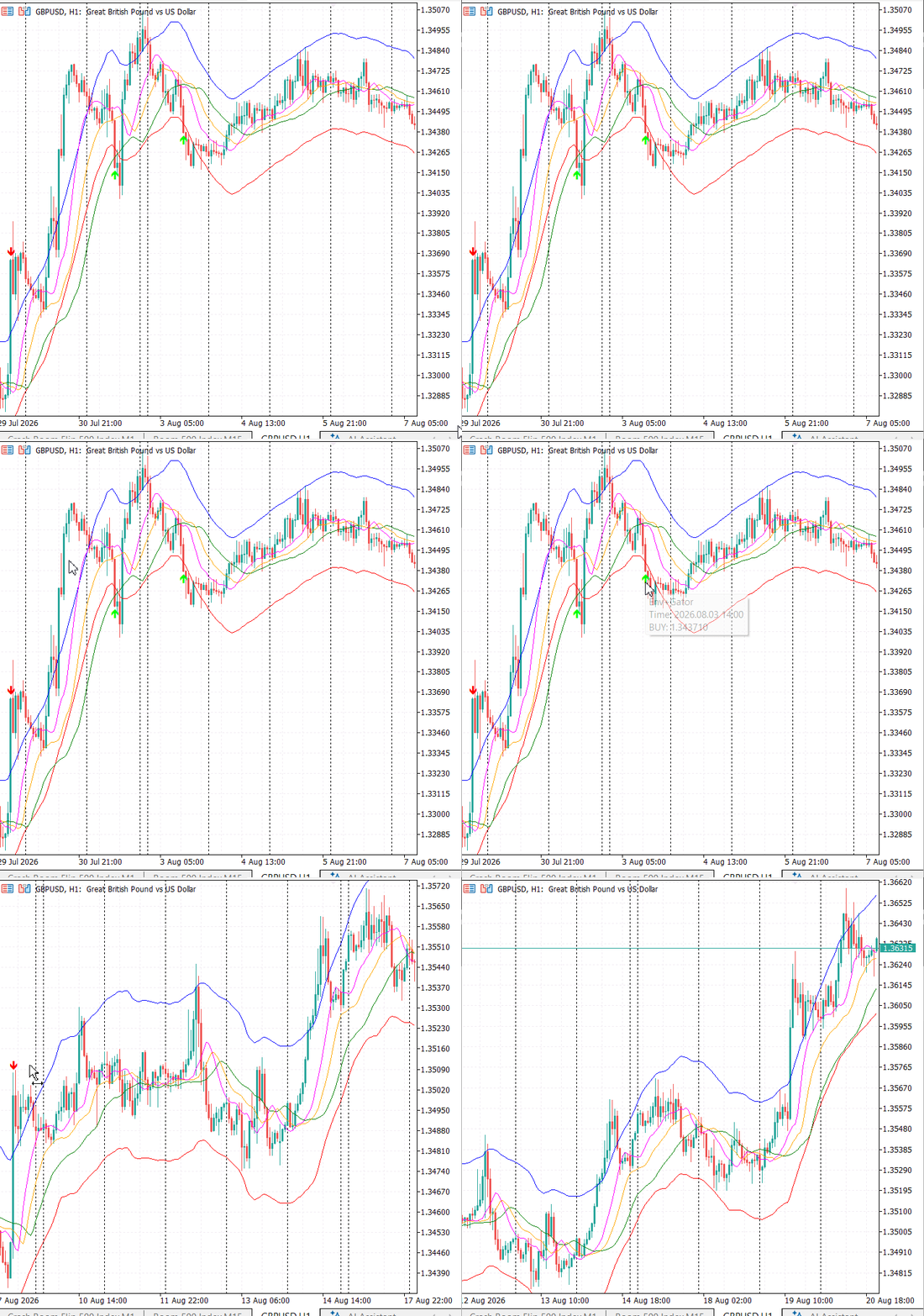
Fig. 4. Illustrative live-chart example
Limitations
The combined indicator solves several usability problems, but it still inherits important properties from both built-in calculations. These limitations are not defects that can be removed with one extra condition. They define the next research questions and prevent the arrows from being presented as automatic trading instructions.
- Alligator lag remains. State confirmation reduces unstable order changes, but the three smoothed averages can still remain directional near the end of a move. Increasing InpTrendMinBars adds further confirmation delay.
- The deviation remains fixed. InpDeviation is configurable, but it does not automatically expand and contract with Average True Range or another volatility measure.
- The neutral state is broad. A line arrangement that is neither strict upward nor strict downward can occur in a range, a temporary pause, or a developing reversal. Unconfirmed directional orders are now separated, but the neutral category still does not prove that the market is ranging.
- The timeframe context is local. The indicator reads the current chart only. It does not require agreement from a higher-timeframe Alligator or market structure filter.
- An arrow is not a trade plan. No spread rule, stop-loss, take-profit, position sizing, order ownership, or portfolio exposure control is implemented.
- The alert channel is limited. The current source provides a one-time popup on a completed signal bar. It does not yet send mobile push notifications or email, repeat an active alert, restrict alerts by session, or warn before the price reaches a boundary.
- The cooldown is direction-specific. Repeated buys and repeated sells are spaced independently. A buy does not delay a sell, so alternating boundary events can still produce closely spaced opposite arrows.
- Deterministic rebuilding has a cost. Recalculating the complete historical signal sequence keeps confirmation and cooldown behavior reproducible, but it is less efficient on unusually deep histories than a carefully persisted incremental state. Rebuilding from the currently available history does not guarantee identical arrows after broker corrections or history expansion.
Extensions to address after this project
The next version can build on the verified signal engine without changing the central Envelopes–Alligator rule. The most useful improvement is a richer notification layer because a trader should not have to watch the chart continuously after the logic has already isolated a qualified setup. These additions should be implemented and tested as a separate stage so the current article does not claim behavior that is absent from its attachment.
| Future extension | Built-in or current limitation addressed | Required verification |
|---|---|---|
| ATR-based or adaptive deviation | A fixed percentage cannot follow changing volatility | Compare signal stability across volatility regimes and symbols |
| Higher-timeframe Alligator confirmation | Current-chart line ordering can disagree with the broader trend | Test missing history, synchronization, and additional lag |
| Mobile push and email channels | Popup alerts require access to the desktop terminal | Test terminal permissions, delivery settings, and failure messages |
| Repeat interval and session filter | One popup may be missed or may arrive outside the trading session | Use server time explicitly and prevent duplicate notification floods |
| Heads-up distance alert | A crossing notification can arrive too late for manual preparation | Define the distance by points, percentage, or volatility and gate repeated warnings |
| Matching Expert Advisor | Arrows do not define execution or risk | Add spread, volume, stops, ownership, duplicate, and account-mode safeguards |
Multi-channel alerts also require terminal configuration outside the indicator. Mobile notifications depend on Tools → Options → Notifications and a valid MetaQuotes ID, while email depends on Tools → Options → Email and valid SMTP settings. These external permissions, delivery failures, and tester limitations must be documented when that extension is implemented.
Conclusion
We transformed a descriptive band into a context-dependent signal tool without hiding the limitations of its source indicators. The Envelopes indicator defines relative location, while the Alligator-style buffers used in this implementation provide an ordered indicator state. That state is classified as confirmed direction, unconfirmed direction, or neutral arrangement before the crossing rule is applied. It is a property of the indicator values, not proof of a market trend or range. Explicit state diagnostics, deterministic buffer clearing, crossing events, direction-specific cooldown control, resource cleanup, and completed-bar popup alerts make the result suitable for structured logical and visual testing.
The project also establishes a clear boundary between what has been implemented and what should follow. Adaptive deviation, higher-timeframe context, multi-channel notifications, pre-alerts, session control, and automated execution remain future extensions. Treating them as separate stages protects the current lesson from unsupported claims and gives each addition its own reproducible test plan.
Key lessons
| Lesson | Practical meaning |
|---|---|
| Define the filter explicitly | An Envelopes boundary touch is only a location event. The strategy must state which Alligator conditions authorize a signal. |
| Keep neutral and unconfirmed states separate | A mixed line arrangement is not equivalent to a directional order that has not yet met InpTrendMinBars. |
| Separate calculation from visual placement | The algorithm compares unshifted source-index values, while PLOT_SHIFT moves the displayed Jaws, Teeth, and Lips lines forward. |
| Recognize the boundary of completed-bar logic | Using completed bars excludes the current forming bar, but it does not prevent later historical-data corrections or recalculation. |
| Separate signals from performance claims | An arrow is not a complete trade. Formal entry, exit, cost, and position-management rules are required before performance can be assessed. |
Attachments
| Filename | Type | Purpose |
|---|---|---|
| Envelope_Alligator_Strategy.mq5 | Custom indicator | Plots Envelopes, Alligator lines, and filtered closed-bar arrows |
Warning: All rights to these materials are reserved by MetaQuotes Ltd. Copying or reprinting of these materials in whole or in part is prohibited.
This article was written by a user of the site and reflects their personal views. MetaQuotes Ltd is not responsible for the accuracy of the information presented, nor for any consequences resulting from the use of the solutions, strategies or recommendations described.

 Machine Learning Under Constraint (Part 3): De-Risking Near the Profit Target and the News-Window Rule
 Price Action Analysis Toolkit Development (Part 83): Building a Reusable Double-Bottom Pattern Library
 Foundation Models for Trading (Part III): Running a Generative AI Forecaster Inside MetaTrader 5
 Certified Robustness Radius: Knowing How Much Noise Your ONNX Trading Model Can Survive

- Free trading apps
- Over 8,000 signals for copying
- Economic news for exploring financial markets
You agree to website policy and terms of use