

How to Detect and Normalize Chart Objects in MQL5 (Part 3): Alerting and Automated Trading from Manually Drawn Objects
 3 758
3 758
 0
0

Contents
- Building on Parts 1 and 2
- Why Normalization Alone Is Not Enough
- A Pipeline for Interaction Detection
- Step 1 – Patching the Complex Object Data Collector
- Step 2 – Creating the Interaction Detector (InteractionDetector.mqh)
- Step 3 – Creating the Alert Manager (AlertManager.mqh)
- Step 4 – Creating the Trade Executor (TradeExecutor.mqh)
- Step 5 – Creating the Test Expert Advisor (TestInteractionEA.mq5)
- Testing and Validation
- Attachments and Installation Summary
- Conclusion
Consider a typical trading session: a trader has drawn a pitchfork on the H1 chart, a Fibonacci retracement on the M15, and an equidistant channel on the M5. While monitoring, price approaches the pitchfork’s median line, touches the 61.8% Fibonacci level, and then breaks out of the channel. The trader is momentarily distracted, and by the time they return, the opportunity—or the stop-loss—has already passed. This scenario is not an edge case; it is a regular occurrence for any technical analyst who relies on manually drawn instruments. These limitations are not merely theoretical; they manifest daily as missed entries, unintended stops, and erratic equity curves.
Manual monitoring suffers from three fundamental limitations that directly impact profitability and risk management:
- Latency: Even a disciplined trader checking every few minutes reacts slower than an automated system. Price–object interactions that last only a few ticks can be missed entirely.
- Scalability: As the number of drawn objects grows—multiple timeframes, several symbols, dozens of pitchforks and Fibonacci levels—human attention cannot track every boundary simultaneously.
- Subjectivity: Manual interpretation of whether price “touched” a line, “closed beyond” a rectangle, or “rejected” a channel boundary varies between traders and even across sessions for the same trader. Inconsistent rules lead to inconsistent results.
The core problem is that chart objects are static geometric definitions, while price is a dynamic stream. Bridging this gap previously required either constant human vigilance or expensive third‑party tools. In earlier installments (Part 1 and Part 2 of this series), we built a solid foundation: a system that can detect any chart object present on a chart, then normalize its coordinates into a consistent internal representation stored inside the structures SChartObjectInfo and SComplexObjectInfo. That gave us the ability to answer “What objects exist?” and “Where are their anchor points?”. However, we stopped short of the truly valuable question: “When and how does price interact with these objects?”
This article completes the loop. We extend the detection and normalization engine into a fully automated monitoring and execution layer. The goal is to turn every drawn pitchfork, Fibonacci, channel, trendline, rectangle, horizontal line, and arc into a trigger that can generate alerts or even send market orders—all without a single manual check. The trader can step away, knowing that every price–boundary interaction will be caught and acted upon in real time.
To achieve this, we must solve four challenges. First, define objective interaction criteria for each object type (e.g., “touch”, “close above”, “breakout”). Second, build an efficient polling loop that does not degrade chart performance. Third, implement a state machine that prevents duplicate signals. Fourth, provide a clean interface to MQL5 trading functions for automated execution. The remainder of this article covers each component with fully commented, compilable code. It also explains key trade-offs (for example, using a busy flag to prevent re-entrancy). The result is a modular system you can integrate into your Expert Advisors or scripts.
Placing Analytical Objects Correctly for Reliable Detection
Before the EA can monitor your drawings, the objects themselves must be placed in a way that the detection algorithms can interpret unambiguously. The MetaTrader 5 platform offers a wide array of drawing tools, but for the interaction logic to function as expected, a few simple conventions should be followed:
- Trendlines – Always anchor the first point at the earlier swing low or high (the starting pivot) and the second point at the later swing. The trendline should extend beyond the current price action so that its projected price at the current time can be computed accurately. Avoid vertical trendlines or those with identical anchor times, as they cannot be used for price cross detection.
- Horizontal lines – Place the line exactly at the level you want to monitor. The detector reads only the price coordinate; time is ignored. Ensure the line is not hidden or behind other objects.
- Rectangles – Draw from the top‑left corner to the bottom‑right corner (or vice‑versa). The normalization routine will automatically sort the coordinates so that the rectangle is defined by its highest and lowest prices. The rectangle is interpreted as a zone: the system alerts when price enters or breaks out of it.
- Fibonacci retracements – Draw from the start of the swing to its end. The EA extracts all the ratio levels (0.236, 0.382, etc.) from the object’s properties. You can customize the levels in the object’s properties dialog, and the detector will read them automatically.
- Channels (equidistant) – Use the three‑point channel tool. The first two clicks define the base line, and the third click defines the opposite boundary. The interaction detector computes the current price of both lines and checks for touches. For best results, place the base line along the trendline that connects the major swing points.
- Andrews Pitchfork – Click the first point at the pivot where the pitchfork originates, the second point at the first opposing swing, and the third point at the second swing. The detector will compute the median line automatically. You can also add extra levels (like 61.8% lines) via the object properties; these will be read as offsets from the median line and displayed in the alerts.
By following these placement guidelines, you ensure that the normalized coordinates produced by the detection engine match the geometric meaning that the interaction algorithms expect. In the following sections, we build the components that turn these well‑formed objects into actionable trading signals.
Building on Parts 1 and 2
In Part 1 we created ChartObjectDetector.mqh, a reusable base class that enumerates all analytical objects on the chart and fills an array of SChartObjectInfo with the two main anchor points. Part 2 extended this with ComplexObjectDataCollector.mqh, which inherits from the base detector and adds extraction of Fibonacci level arrays, channel anchor points, and pitchfork geometry. The result is stored in the extended structure SComplexObjectInfo, which contains everything we need for algorithmic trading. These earlier modules are the foundation upon which we now erect the interaction and execution layers; they have been thoroughly tested and need no modification.
Now, in Part 3, we will build on that existing foundation without discarding any code. Our new modules will include the existing files and add interaction logic, alerting, and trade execution. The architecture separates concerns into four new files, all living inside the same MQL5/Include/ChartObjectsAlgorithms/ folder:
- ComplexObjectDataCollector.mqh – patched version of Part 2’s file; the only change is to also accept horizontal and vertical lines in its IsAnalyticalObject filter. This small patch ensures that all analytical objects are visible to the interaction detector.
- InteractionDetector.mqh – a new class that inherits from CComplexObjectDetector and adds methods to compare live prices with each object’s geometry. It returns a list of interactions (touch, cross, breakout) with information about the direction and the touched level. By inheriting, we reuse the normalization work already done.
- AlertManager.mqh – receives interaction data and fires notifications (pop‑up, push, sound) while preventing duplicate alerts with a state‑keeping record array. The alert message includes the object name, type, interaction, and the exact level description, making it immediately clear which level was touched.
- TradeExecutor.mqh – converts an interaction into a market or pending order. For touches, it uses the approach side to decide the trade direction (buy if touch from above = support, sell if touch from below = resistance). Stop‑loss and take‑profit are derived from the object’s geometry, not a fixed number of pips.
A test Expert Advisor, TestInteractionEA.mq5, ties all these pieces together. It instantiates the interaction detector, the alert manager, and the trade executor, then runs the detection loop on every tick (throttled to a user‑defined interval). The busy flag inside the interaction detector prevents re‑entrant calls, while a separate busy flag in the trade executor avoids sending duplicate orders. This modular design lets you replace components independently. For example, you can swap the alert manager for a Telegram notifier by implementing a new class.
The following snippet shows the header of the new interaction detector class. Notice how it inherits from the existing complex collector—there is no need to rewrite enumeration or normalization.
//--- File: InteractionDetector.mqh – interaction detection module
#include "ComplexObjectDataCollector.mqh"

//+------------------------------------------------------------------+
//| Interaction types                                                |
//+------------------------------------------------------------------+
enum ENUM_INTERACTION
  {
   INTERACTION_NONE,              // no interaction
   INTERACTION_TOUCH,             // price is near a line/level
   INTERACTION_CROSS_UP,          // crossed above the line
   INTERACTION_CROSS_DOWN,        // crossed below the line
   INTERACTION_BREAKOUT_ABOVE,    // closed above a rectangle/channel
   INTERACTION_BREAKOUT_BELOW     // closed below a rectangle/channel
  };

//+------------------------------------------------------------------+
//| Interaction descriptor                                           |
//+------------------------------------------------------------------+
struct SInteraction
  {
   string            objName;        // object name as seen on the chart
   int               objType;        // ENUM_OBJECT type constant
   double            levelPrice;     // the price of the line/level touched
   ENUM_INTERACTION  action;         // type of interaction
   int               direction;      // 1=bullish, -1=bearish, 0=neutral
   string            side;           // "above" or "below" the line/level at touch moment
   string            levelText;      // e.g., "0.618" for Fibonacci, "Median" for pitchfork
  };

//+------------------------------------------------------------------+
//| Interaction detector class                                       |
//+------------------------------------------------------------------+
class CInteractionDetector : public CComplexObjectDetector
  {
private:
   bool              m_busy;             // re‑entrancy guard
   SInteraction      m_interactions[];   // list of detected interactions
   int               m_interactionCount; // number of detected interactions

   //--- State tracking by object name
   string            m_stateNames[];     // object names for state map
   int               m_stateValues[];    // -1=below, 1=above, 0=unknown, 2=touching
   int               m_stateCount;       // number of state entries

   int               FindState(const string &name);
   void              SetState(const string &name,int value);

   void              CheckTrendline(const SComplexObjectInfo &obj,double bid,double ask,datetime now);
   void              CheckHorizontalLine(const SComplexObjectInfo &obj,double bid,double ask);
   void              CheckRectangle(const SComplexObjectInfo &obj,double bid,double ask,datetime now);
   void              CheckFibonacci(const SComplexObjectInfo &obj,double bid,double ask);
   void              CheckChannel(const SComplexObjectInfo &obj,double bid,double ask,datetime now);
   void              CheckPitchfork(const SComplexObjectInfo &obj,double bid,double ask,datetime now);

   double            LineValueAtTime(datetime t,datetime t0,double p0,datetime t1,double p1);
   bool              IsValidObject(const SComplexObjectInfo &obj,double currentPrice,datetime now);

public:
   CInteractionDetector();
   int               DetectInteractions(double bid,double ask,datetime now);
   bool              GetInteraction(int index,SInteraction &out) const;
   int               InteractionCount() const { return(m_interactionCount); }
  };
Each Check* method uses the normalized data from SComplexObjectInfo to compute the relevant price levels—for a trendline, the current line value; for a Fibonacci retracement, each level’s price; for a pitchfork, the median line and optional additional levels. The interaction is recorded only if a state change is detected (e.g., the price was above the line and now is below), eliminating duplicate signals. The busy flag m_busy guarantees that the detection loop cannot be re‑entered while a scan is in progress.
Trade‑off: Why not use a separate timer or event queue?
A simple busy flag is lightweight and easy to reason about. In a production system with hundreds of objects, a more sophisticated event queue could reduce missed events, but the added complexity is not justified for the typical intra‑day trader. The busy flag introduces a small risk of missing a rapid price change if the handler takes longer than a few milliseconds, but object interaction conditions (e.g., price crossing a trendline) are usually evaluated on every tick, so the next tick will catch it.
All new files will reside in the same MQL5/Include/ChartObjectsAlgorithms/ folder as the existing detector files. In the next section, we examine the technical challenges that make a simple price–object comparison unreliable, and why our inherited normalization layer is essential.
Why Normalization Alone Is Not Enough
Automation based on manually drawn chart objects offers significant potential, but the gap between a static drawing and a live price is deeper than it first appears. The first two articles solved the problem of reading and normalizing those objects. The next hurdle is interpretation: given a set of normalized coordinates, how do we programmatically decide that an interaction has occurred? Without a precise definition, false positives and missed signals will plague any automated system.
Rotated objects are the most immediate pitfall. A trendline (OBJ_TREND) is defined by two anchor points. The line connecting them is rotated relative to the chart’s time and price axes. A simple script that compares the current Bid with the price of the first anchor will choose a price that corresponds to the anchor’s time, not to the current time. The error can be dozens of pips. The same problem appears for any object whose geometry involves a slope: pitchforks, channels, and even some Fibonacci arcs. Our detector from Parts 1 and 2 correctly extracts the two (or three) time‑price pairs; our interaction detector must now use those pairs to compute the line equation and evaluate it at the current time. This single step transforms a raw drawing into a dynamic reference level.
Mixed coordinate systems compound the confusion. A horizontal line (OBJ_HLINE) has only a price; time is meaningless. A vertical line (OBJ_VLINE) has only a time. A Fibonacci retracement stores its levels in a separate property array (OBJPROP_LEVELVALUE), not as individual anchor points. The complex detector from Part 2 already stores these levels inside SComplexObjectInfo; we simply need to compare the current price against each level in the array. By treating all objects through a single structure, we avoid the error‑prone conditional logic that breaks most object‑monitoring scripts.
Multi‑point anchors are the most complex case. The pitchfork (OBJ_PITCHFORK) uses three anchors: the handle start, the handle end, and the median point. Our detector already stores these in pitchfork_handle_time[2], pitchfork_handle_price[2], pitchfork_median_time, and pitchfork_median_price. The interaction detector then computes the median line’s current price using the same linear interpolation as for a trendline. Additional pitchfork levels (if added by the user) are stored in pitchfork_level_values[] and pitchfork_level_texts[]; each is a price offset from the median line, so the current line price is median_now + offset. This uniform treatment of different object geometries is what makes the system extensible.
By relying on the already‑normalized SComplexObjectInfo, the interaction detector avoids repeating the raw property reads. It merely applies geometric formulas to the coordinates that are already in memory. This separation of concerns—extraction in Part 2, interpretation in Part 3—is the key to a maintainable, extensible system.
A Pipeline for Interaction Detection
The full pipeline now looks like this:
- Enumerate and normalize – performed by the existing CComplexObjectDetector::Detect() (inherited from Parts 1 and 2). Fills an array of SComplexObjectInfo.
- Check price interactions – performed by the new CInteractionDetector::DetectInteractions(), which receives the object array and the current bid/ask/time, and outputs an array of SInteraction.
- Alert and notify – the CAlertManager receives the interaction array and fires alerts, but only for interactions that represent a state change.
- Execute trades – the CTradeExecutor receives an interaction descriptor and places a market or pending order, with dynamic stop‑loss and take‑profit.
The following table summarizes which object types are supported and how the interaction detector computes the relevant price for each.
| Object Type | Interaction Checked | Price Derived From |
|---|---|---|
| Trendline (OBJ_TREND) | Cross above/below, touch | Line equation: slope × (now – time1) + price1 |
| Horizontal Line (OBJ_HLINE) | Cross above/below, touch | price1 (constant) |
| Rectangle (OBJ_RECTANGLE) | Entry into zone, breakout above/below | price1 and price2 define the zone boundaries |
| Fibonacci (OBJ_FIBO, etc.) | Touch/cross of each level | fibo_prices[] array computed in Part 2 |
| Channel (OBJ_CHANNEL) | Cross of base line and opposite boundary | channel_price[0] and channel_price[1] define the base line; channel_price[2] is used to derive the opposite boundary |
| Pitchfork (OBJ_PITCHFORK) | Touch/cross of median line and additional levels | Median line: through handle[0] and median point; additional levels: median + offset |
Step 1 – Patching the Complex Object Data Collector
The file ComplexObjectDataCollector.mqh from Part 2 already contains the standard MQL5 header with copyright and link directives, includes ChartObjectDetector.mqh, and defines the IsAnalyticalObject function, the extended structure SComplexObjectInfo, and the CComplexObjectDetector class. For our purposes we only need to modify the global filter function so that horizontal and vertical lines are recognized as analytical objects. The rest of the file remains unchanged.
IsAnalyticalObject functionThis function returns true for all object types that the interaction detector should process. We add OBJ_HLINE and OBJ_VLINE to the existing list so that horizontal and vertical lines are no longer skipped. Replace the existing IsAnalyticalObject function with the following version.
//+------------------------------------------------------------------+
//| Checks if an object type is analytical (used for filtering)      |
//+------------------------------------------------------------------+
bool IsAnalyticalObject(int type)
  {
   switch(type)
     {
      case OBJ_FIBO:      // Fibonacci retracement
      case OBJ_FIBOTIMES: // Fibonacci time zones
      case OBJ_FIBOFAN:   // Fibonacci fan
      case OBJ_FIBOARC:   // Fibonacci arc
      case OBJ_CHANNEL:   // equidistant channel
      case OBJ_PITCHFORK: // Andrews pitchfork
      case OBJ_TREND:     // trendline
      case OBJ_RECTANGLE: // rectangle
      case OBJ_HLINE:     // horizontal line (added)
      case OBJ_VLINE:     // vertical line (added)
         return(true);
      default:
         return(false);
     }
  }
Additionally, the base detector (ChartObjectDetector.mqh) must extract the first two anchor points for pitchforks, otherwise the validation filter rejects them. Add OBJ_PITCHFORK to the list of object types in ExtractProperties, as shown in the final ChartObjectDetector.mqh file included in the attachments.
Step 2 – Creating the Interaction Detector (InteractionDetector.mqh)
Create a new file InteractionDetector.mqh in the MQL5/Include/ChartObjectsAlgorithms/ folder. The file begins with the standard MQL5 header containing the file name, copyright, and link. It includes ComplexObjectDataCollector.mqh, making all of its definitions available.
//+------------------------------------------------------------------+
//|                                        InteractionDetector.mqh   |
//|                          Copyright 2026, Clemence Benjamin       |
//|                                         https://www.mql5.com     |
//+------------------------------------------------------------------+
#property copyright "Copyright 2026, Clemence Benjamin"
#property link      "https://www.mql5.com"

#include "ComplexObjectDataCollector.mqh"
Interaction types enumeration
This enum defines the possible interactions that the detector can report. It includes none, touch, cross up/down, and breakout above/below for rectangles and channels.
//+------------------------------------------------------------------+
//| Interaction types                                                |
//+------------------------------------------------------------------+
enum ENUM_INTERACTION
  {
   INTERACTION_NONE,              // no interaction
   INTERACTION_TOUCH,             // price is near a line/level
   INTERACTION_CROSS_UP,          // crossed above the line
   INTERACTION_CROSS_DOWN,        // crossed below the line
   INTERACTION_BREAKOUT_ABOVE,    // closed above a rectangle/channel
   INTERACTION_BREAKOUT_BELOW     // closed below a rectangle/channel
  };
Interaction descriptor structure
SInteraction carries all the information about a detected interaction: the object name and type, the level price at which the interaction occurred, the action, a direction hint, the approach side (“above”/“below”), and a level description string (e.g., “0.618” for Fibonacci, “Median” for pitchfork).
//+------------------------------------------------------------------+
//| Interaction descriptor                                           |
//+------------------------------------------------------------------+
struct SInteraction
  {
   string            objName;        // object name as seen on the chart
   int               objType;        // ENUM_OBJECT type constant
   double            levelPrice;     // the price of the line/level touched
   ENUM_INTERACTION  action;         // type of interaction
   int               direction;      // 1=bullish, -1=bearish, 0=neutral
   string            side;           // "above" or "below" the line/level at touch moment
   string            levelText;      // e.g., "0.618" for Fibonacci, "Median" for pitchfork
  };
Class declaration
The CInteractionDetector class inherits publicly from CComplexObjectDetector. It contains a busy flag, an array of interactions, and the name‑based state map. The private section declares helper methods for state management and type‑specific checkers, as well as geometry utilities. The public section exposes the constructor, the main detection method, an accessor, and a count method.
//+------------------------------------------------------------------+
//| Interaction detector class                                       |
//+------------------------------------------------------------------+
class CInteractionDetector : public CComplexObjectDetector
  {
private:
   bool              m_busy;             // re‑entrancy guard
   SInteraction      m_interactions[];   // list of detected interactions
   int               m_interactionCount; // number of detected interactions

   //--- State tracking by object name
   string            m_stateNames[];     // object names for state map
   int               m_stateValues[];    // -1=below, 1=above, 0=unknown, 2=touching
   int               m_stateCount;       // number of state entries

   int               FindState(const string &name);
   void              SetState(const string &name,int value);

   void              CheckTrendline(const SComplexObjectInfo &obj,double bid,double ask,datetime now);
   void              CheckHorizontalLine(const SComplexObjectInfo &obj,double bid,double ask);
   void              CheckRectangle(const SComplexObjectInfo &obj,double bid,double ask,datetime now);
   void              CheckFibonacci(const SComplexObjectInfo &obj,double bid,double ask);
   void              CheckChannel(const SComplexObjectInfo &obj,double bid,double ask,datetime now);
   void              CheckPitchfork(const SComplexObjectInfo &obj,double bid,double ask,datetime now);

   double            LineValueAtTime(datetime t,datetime t0,double p0,datetime t1,double p1);
   bool              IsValidObject(const SComplexObjectInfo &obj,double currentPrice,datetime now);

public:
   CInteractionDetector();
   int               DetectInteractions(double bid,double ask,datetime now);
   bool              GetInteraction(int index,SInteraction &out) const;
   int               InteractionCount() const { return(m_interactionCount); }
  };
Constructor
The constructor initializes the busy flag and the state map. The busy flag m_busy is set to false, the interaction and state counters are zeroed.
//+------------------------------------------------------------------+
//| Constructor                                                      |
//+------------------------------------------------------------------+
CInteractionDetector::CInteractionDetector() : m_busy(false),
                                               m_interactionCount(0),
                                               m_stateCount(0)
  {
  }
FindState
This helper searches the internal state map by object name. It returns the index of the state entry if found, or -1 if the object has no recorded state. It is used by SetState and by each checker to retrieve the previous price relationship.
//+------------------------------------------------------------------+
//| Find state index by name; return -1 if not found                 |
//+------------------------------------------------------------------+
int CInteractionDetector::FindState(const string &name)
  {
   for(int i=0; i<m_stateCount; i++)
     {
      if(m_stateNames[i]==name)
         return(i);
     }
   return(-1);
  }
SetState
This method updates the state value for a given object name. If the name does not yet exist in the state map, a new entry is created by resizing the arrays and incrementing the counter. This keeps the name‑based state tracking dynamic and self‑maintaining.
//+------------------------------------------------------------------+
//| Set state for an object; create new entry if needed              |
//+------------------------------------------------------------------+
void CInteractionDetector::SetState(const string &name,int value)
  {
   int idx=FindState(name);
   if(idx<0)
     {
      //--- Create new state entry
      idx=m_stateCount;
      ArrayResize(m_stateNames,idx+1);
      ArrayResize(m_stateValues,idx+1);
      m_stateCount=idx+1;
      m_stateNames[idx]=name;
     }
   m_stateValues[idx]=value;
  }
DetectInteractions
This is the main public entry point, called on every timer tick. It first checks the busy flag to prevent re‑entrancy, then refreshes the object list via the inherited detector. Each object is validated; those that pass are dispatched to the correct checker method. After the loop, stale state entries (objects that no longer exist) are removed to keep the state map clean.
//+------------------------------------------------------------------+
//| Main detection loop                                              |
//+------------------------------------------------------------------+
int CInteractionDetector::DetectInteractions(double bid,double ask,datetime now)
  {
   if(m_busy)
      return(0);
   m_busy=true;

   //--- Use inherited detector to get normalized objects
   SComplexObjectInfo objects[];
   int objCount=CComplexObjectDetector::Detect(objects);

   ArrayResize(m_interactions,objCount);
   m_interactionCount=0;

   double currentPrice=(bid+ask)/2.0;

   for(int i=0; i<objCount; i++)
     {
      //--- Skip objects that fail validation (too old, unrealistic line)
      if(!IsValidObject(objects[i],currentPrice,now))
         continue;

      //--- Dispatch to the correct checker based on object type
      switch(objects[i].type)
        {
         case OBJ_TREND:      CheckTrendline(objects[i],bid,ask,now); break;
         case OBJ_HLINE:      CheckHorizontalLine(objects[i],bid,ask); break;
         case OBJ_RECTANGLE:  CheckRectangle(objects[i],bid,ask,now); break;
         case OBJ_FIBO:
         case OBJ_FIBOTIMES:
         case OBJ_FIBOFAN:
         case OBJ_FIBOARC:    CheckFibonacci(objects[i],bid,ask); break;
         case OBJ_CHANNEL:    CheckChannel(objects[i],bid,ask,now); break;
         case OBJ_PITCHFORK:  CheckPitchfork(objects[i],bid,ask,now); break;
         default: break;
        }
     }

   //--- Clean up state entries for objects that no longer exist
   for(int i=m_stateCount-1; i>=0; i--)
     {
      bool found=false;
      for(int j=0; j<objCount; j++)
        {
         if(objects[j].name==m_stateNames[i])
           {
            found=true;
            break;
           }
        }
      if(!found)
        {
         //--- Remove stale state entry by swapping with last
         m_stateNames[i]=m_stateNames[m_stateCount-1];
         m_stateValues[i]=m_stateValues[m_stateCount-1];
         ArrayResize(m_stateNames,m_stateCount-1);
         ArrayResize(m_stateValues,m_stateCount-1);
         m_stateCount--;
        }
     }

   m_busy=false;
   return(m_interactionCount);
  }
IsValidObject
Before an object is checked, this method rejects those whose first anchor is older than 1000 bars or whose projected line price is outside a realistic range (less than 0.1× or greater than 10× the current price). This filter removes noisy objects such as very short trendlines that project to absurd prices.
//+------------------------------------------------------------------+
//| Validate object: ignore if times are too old or line price huge  |
//+------------------------------------------------------------------+
bool CInteractionDetector::IsValidObject(const SComplexObjectInfo &obj,double currentPrice,datetime now)
  {
   string symbol=ChartSymbol(m_chart_id);
   if(symbol=="")
      return(false);

   //--- Reject objects whose first anchor is older than 1000 bars
   if(obj.time1!=0)
     {
      int barShift=iBarShift(symbol,Period(),obj.time1,false);
      if(barShift<0 || barShift>1000)
         return(false);
     }

   //--- For sloped objects, check if the projected line price is realistic
   if(obj.type==OBJ_TREND || obj.type==OBJ_CHANNEL || obj.type==OBJ_PITCHFORK)
     {
      if(obj.time1!=0 && obj.time2!=0)
        {
         double linePrice=LineValueAtTime(now,obj.time1,obj.price1,obj.time2,obj.price2);
         if(MathAbs(linePrice)>MathAbs(currentPrice)*10 || MathAbs(linePrice)<MathAbs(currentPrice)*0.1)
            return(false);
        }
     }
   return(true);
  }
LineValueAtTime
All sloped objects use this common linear interpolation routine to compute the price at the current time. It receives two anchor points (time and price) and returns the price on the line connecting them at time t.
//+------------------------------------------------------------------+
//| Helper: line value at given time (linear interpolation)           |
//+------------------------------------------------------------------+
double CInteractionDetector::LineValueAtTime(datetime t,datetime t0,double p0,datetime t1,double p1)
  {
   if(t1==t0)
      return(p0);
   double slope=(p1-p0)/(double)(t1-t0);
   return(p0+slope*(double)(t-t0));
  }
CheckTrendline
This checker validates the trendline’s two anchor points, computes the line price at the current time, and then determines whether the price is touching the line (within a tolerance of 5 points) or has crossed it. It uses the state map to avoid reporting the same touch repeatedly and to detect genuine crosses (e.g., from above to below). The levelText field is left empty for trendlines.
//+------------------------------------------------------------------+
//| Trendline check                                                  |
//+------------------------------------------------------------------+
void CInteractionDetector::CheckTrendline(const SComplexObjectInfo &obj,double bid,double ask,datetime now)
  {
   //--- Validate anchor points
   if(obj.time1==0 || obj.time2==0)
      return;
   double t1=(double)obj.time1;
   double t2=(double)obj.time2;
   if(t2==t1)
      return;

   //--- Compute the line's price at the current time
   double linePrice=LineValueAtTime(now,obj.time1,obj.price1,obj.time2,obj.price2);
   double midPrice=(bid+ask)/2.0;
   double tolerance=5.0*SymbolInfoDouble(_Symbol,SYMBOL_POINT);

   int state=FindState(obj.name);
   int prev=(state>=0) ? m_stateValues[state] : 0;

   bool isTouching=(MathAbs(midPrice-linePrice)<=tolerance);
   if(isTouching)
     {
      //--- Only report if not already touching
      if(prev!=2)
        {
         SInteraction inter;
         inter.objName    =obj.name;
         inter.objType    =obj.type;
         inter.levelPrice =linePrice;
         inter.action     =INTERACTION_TOUCH;
         inter.direction  =(linePrice>obj.price1) ? 1 : -1;
         inter.side       =(midPrice>linePrice) ? "above" : "below";
         inter.levelText  ="";
         m_interactions[m_interactionCount++]=inter;
         SetState(obj.name,2);
        }
      return;
     }

   //--- Reset touch state if price moved away
   if(prev==2)
      SetState(obj.name,0);

   //--- Detect cross if previous state was opposite
   int curr=(midPrice>linePrice) ? 1 : -1;

   if(prev!=0 && prev!=curr)
     {
      SInteraction inter;
      inter.objName    =obj.name;
      inter.objType    =obj.type;
      inter.levelPrice =linePrice;
      inter.action     =(curr==1) ? INTERACTION_CROSS_UP : INTERACTION_CROSS_DOWN;
      inter.direction  =curr;
      inter.side       =(curr==1) ? "above" : "below";
      inter.levelText  ="";
      m_interactions[m_interactionCount++]=inter;
     }
   SetState(obj.name,curr);
  }
CheckFibonacci
This method iterates through the pre‑computed Fibonacci price levels. When the price is within tolerance of a level, it records a touch interaction. The level description is set to the ratio (e.g., “0.618”) by converting the stored ratio to a 3‑decimal string. The state map prevents repeated touches on the same level.
//+------------------------------------------------------------------+
//| Fibonacci level check                                            |
//+------------------------------------------------------------------+
void CInteractionDetector::CheckFibonacci(const SComplexObjectInfo &obj,double bid,double ask)
  {
   int levels=ArraySize(obj.fibo_prices);
   if(levels==0)
      return;
   double midPrice=(bid+ask)/2.0;
   double tolerance=5.0*SymbolInfoDouble(_Symbol,SYMBOL_POINT);

   int state=FindState(obj.name);
   int prev=(state>=0) ? m_stateValues[state] : 0;

   for(int l=0; l<levels; l++)
     {
      double levelPrice=obj.fibo_prices[l];
      bool isTouching=(MathAbs(midPrice-levelPrice)<=tolerance);
      if(isTouching)
        {
         if(prev!=2)
           {
            SInteraction inter;
            inter.objName    =obj.name;
            inter.objType    =obj.type;
            inter.levelPrice =levelPrice;
            inter.action     =INTERACTION_TOUCH;
            inter.direction  =0;
            inter.side       =(midPrice>levelPrice) ? "above" : "below";
            //--- Include the ratio as level description (e.g., "0.618")
            inter.levelText  =DoubleToString(obj.fibo_ratios[l],3);
            m_interactions[m_interactionCount++]=inter;
            SetState(obj.name,2);
           }
         return;
        }
     }

   if(prev==2)
      SetState(obj.name,0);
  }
CheckPitchfork
This checker first computes the current price of the median line using the handle start and median point. If the price is near the median, it records a touch with levelText “Median”. Otherwise it loops through any additional user‑defined levels (stored as offsets from the median) and checks each one. The level description is taken from the user‑assigned text (e.g., “61.8”). The state map ensures touches are only reported once per entry.
//+------------------------------------------------------------------+
//| Pitchfork check (median line and additional levels)               |
//+------------------------------------------------------------------+
void CInteractionDetector::CheckPitchfork(const SComplexObjectInfo &obj,double bid,double ask,datetime now)
  {
   if(obj.pitchfork_handle_time[0]==0 || obj.pitchfork_median_time==0)
      return;
   //--- Compute the current price of the median line
   double medianNow=LineValueAtTime(now,
                                   obj.pitchfork_handle_time[0],
                                   obj.pitchfork_handle_price[0],
                                   obj.pitchfork_median_time,
                                   obj.pitchfork_median_price);
   double midPrice=(bid+ask)/2.0;
   double tolerance=5.0*SymbolInfoDouble(_Symbol,SYMBOL_POINT);

   int state=FindState(obj.name);
   int prev=(state>=0) ? m_stateValues[state] : 0;

   //--- Median line touch
   if(MathAbs(midPrice-medianNow)<=tolerance)
     {
      if(prev!=2)
        {
         SInteraction inter;
         inter.objName    =obj.name;
         inter.objType    =obj.type;
         inter.levelPrice =medianNow;
         inter.action     =INTERACTION_TOUCH;
         inter.direction  =0;
         inter.side       =(midPrice>medianNow) ? "above" : "below";
         inter.levelText  ="Median";
         m_interactions[m_interactionCount++]=inter;
         SetState(obj.name,2);
        }
      return;
     }

   //--- Additional pitchfork levels (user‑defined)
   int levels=ArraySize(obj.pitchfork_level_values);
   for(int l=0; l<levels; l++)
     {
      double levelPrice=medianNow+obj.pitchfork_level_values[l];
      if(MathAbs(midPrice-levelPrice)<=tolerance)
        {
         if(prev!=2)
           {
            SInteraction inter;
            inter.objName    =obj.name;
            inter.objType    =obj.type;
            inter.levelPrice =levelPrice;
            inter.action     =INTERACTION_TOUCH;
            inter.direction  =0;
            inter.side       =(midPrice>levelPrice) ? "above" : "below";
            //--- Use the text label set by the user (e.g., "61.8")
            inter.levelText  =obj.pitchfork_level_texts[l];
            m_interactions[m_interactionCount++]=inter;
            SetState(obj.name,2);
           }
         return;
        }
     }

   if(prev==2)
      SetState(obj.name,0);
  }
The remaining checker methods (CheckHorizontalLine, CheckRectangle, CheckChannel) follow the same pattern and are included in the downloadable source file.
Step 3 – Creating the Alert Manager (AlertManager.mqh)
The alert manager is a standalone utility that receives an array of SInteraction descriptors. The file AlertManager.mqh starts with the standard header and includes InteractionDetector.mqh, giving it access to the interaction types and descriptor. It defines a record structure for duplicate suppression and the CAlertManager class.
//+------------------------------------------------------------------+
//|                                              AlertManager.mqh    |
//|                          Copyright 2026, Clemence Benjamin       |
//|                                         https://www.mql5.com     |
//+------------------------------------------------------------------+
#property copyright "Copyright 2026, Clemence Benjamin"
#property link      "https://www.mql5.com"

#include "InteractionDetector.mqh"
Alert record structure
SAlertRecord holds the object name, the last action that was alerted, the price at that time, and the timestamp of the alert. This structure is used to suppress repeated identical alerts.
//+------------------------------------------------------------------+
//| Alert record for duplicate suppression                           |
//+------------------------------------------------------------------+
struct SAlertRecord
  {
   string            objName;        // chart object name
   ENUM_INTERACTION  lastAction;     // last action alerted
   double            lastLevelPrice; // price of last alert
   datetime          lastAlertTime;  // time of last alert
  };
Class declaration
The CAlertManager class contains a dynamic array of records, counters, and flags for each notification method. Public setter functions allow enabling or disabling alerts, push notifications, and sound. The main processing method is ProcessInteractions, which receives the interaction array and its count.
//+------------------------------------------------------------------+
//| Alert manager class                                              |
//+------------------------------------------------------------------+
class CAlertManager
  {
private:
   SAlertRecord      m_records[];        // list of alert records
   int               m_recordCount;      // number of records
   bool              m_useAlert;         // enable terminal alerts
   bool              m_useNotification;  // enable push notifications
   bool              m_useSound;         // enable sound
   string            m_soundFile;        // sound file name

   int               FindRecord(const string &objName);
   void              AddOrUpdateRecord(const string &objName,ENUM_INTERACTION action,double price);

public:
   CAlertManager();
   void              SetAlertUse(bool flag)           { m_useAlert=flag; }
   void              SetNotificationUse(bool flag)    { m_useNotification=flag; }
   void              SetSoundUse(bool flag)           { m_useSound=flag; }
   void              SetSoundFile(const string &file) { m_soundFile=file; }

   void              ProcessInteractions(const SInteraction &interList[],int count);
  };
Constructor
The constructor initializes the record count to zero and sets the default notification preferences: terminal alerts enabled, push notifications and sound disabled, with a default sound file name.
//+------------------------------------------------------------------+
//| Constructor                                                      |
//+------------------------------------------------------------------+
CAlertManager::CAlertManager() : m_recordCount(0),
                                 m_useAlert(true),
                                 m_useNotification(false),
                                 m_useSound(false),
                                 m_soundFile("alert.wav")
  {
  }
FindRecord
This helper searches the existing record list by object name. It returns the index of the record if found, or -1 if no record exists. It is used by AddOrUpdateRecord and ProcessInteractions to determine whether an alert for a given object has already been fired.
//+------------------------------------------------------------------+
//| Find a record by object name; returns index or -1                |
//+------------------------------------------------------------------+
int CAlertManager::FindRecord(const string &objName)
  {
   for(int i=0; i<m_recordCount; i++)
     {
      if(m_records[i].objName==objName)
         return(i);
     }
   return(-1);
  }
AddOrUpdateRecord
This method either creates a new alert record or updates an existing one with the latest action, level price, and current time. If the object name is not yet in the record list, it resizes the array and appends a new entry. This keeps the suppression list up‑to‑date so that duplicates can be filtered out.
//+------------------------------------------------------------------+
//| Add or update a record                                            |
//+------------------------------------------------------------------+
void CAlertManager::AddOrUpdateRecord(const string &objName,ENUM_INTERACTION action,double price)
  {
   int idx=FindRecord(objName);
   if(idx<0)
     {
      //--- Create a new record if not found
      idx=m_recordCount;
      ArrayResize(m_records,idx+1);
      m_recordCount=idx+1;
      m_records[idx].objName=objName;
     }
   m_records[idx].lastAction    =action;
   m_records[idx].lastLevelPrice=price;
   m_records[idx].lastAlertTime =TimeCurrent();
  }
ProcessInteractions
The main method loops through the array of interaction descriptors. For each interaction, it consults the record list and decides whether to fire an alert. The decision criteria are: no previous record exists; the action has changed since the last alert; or more than ten seconds have passed since the last identical alert. When an alert is triggered, a message is built with the object name, type, action, side, and level description, and the selected notification methods are invoked. Finally, the record is updated to suppress immediate duplicates.
//+------------------------------------------------------------------+
//| Process interactions and fire alerts if new                       |
//+------------------------------------------------------------------+
void CAlertManager::ProcessInteractions(const SInteraction &interList[],int count)
  {
   for(int i=0; i<count; i++)
     {
      SInteraction inter=interList[i];

      int idx=FindRecord(inter.objName);

      //--- Determine if we should alert: no record, new action, or old alert >10 sec
      bool shouldAlert=false;
      if(idx<0)
         shouldAlert=true;
      else
        {
         if(m_records[idx].lastAction!=inter.action)
            shouldAlert=true;
         else if(TimeCurrent()-m_records[idx].lastAlertTime>10)
            shouldAlert=true;
        }

      if(shouldAlert)
        {
         //--- Build message with side and level description
         string sideStr =(inter.side!="") ? " from "+inter.side : "";
         string levelStr=(inter.levelText!="") ? " ("+inter.levelText+")" : "";
         string msg=StringFormat("Object '%s' [%s] – %s%s%s at %.5f",
                               inter.objName,
                               ObjectTypeToString(inter.objType),
                               EnumToString(inter.action),
                               sideStr,
                               levelStr,
                               inter.levelPrice);
         //--- Fire notifications
         if(m_useAlert)
            Alert(msg);
         if(m_useNotification)
            SendNotification(msg);
         if(m_useSound)
            PlaySound(m_soundFile);

         AddOrUpdateRecord(inter.objName,inter.action,inter.levelPrice);
        }
     }
  }
//+------------------------------------------------------------------+
Step 4 – Creating the Trade Executor (TradeExecutor.mqh)
The trade executor converts an SInteraction into a live order using the MQL5 Standard Library’s CTrade object. The file TradeExecutor.mqh includes the standard header, the Trade library, and InteractionDetector.mqh.
//+------------------------------------------------------------------+
//|                                            TradeExecutor.mqh     |
//|                          Copyright 2026, Clemence Benjamin       |
//|                                         https://www.mql5.com     |
//+------------------------------------------------------------------+
#property copyright "Copyright 2026, Clemence Benjamin"
#property link      "https://www.mql5.com"

#include <Trade/Trade.mqh>
#include "InteractionDetector.mqh"
Class declaration and constructor
The CTradeExecutor class defines a CTrade object, a busy flag, a last‑order timestamp, and a minimum interval. The constructor accepts a minimum interval in seconds, ensuring it is at least 1, and initializes the trade object’s magic number to zero.
class CTradeExecutor
  {
private:
   CTrade            m_trade;            // Standard Library trade object
   bool              m_busy;             // busy flag to avoid duplicate orders
   datetime          m_lastOrderTime;    // timestamp of last order
   int               m_intervalSec;      // minimum seconds between orders

   double            ComputeStopLoss(const SInteraction &inter,double entryPrice,ENUM_ORDER_TYPE orderType);
   double            ComputeTakeProfit(double entryPrice,double slPrice,ENUM_ORDER_TYPE orderType);

public:
   CTradeExecutor(int minIntervalSec=2);
   bool              PlaceOrder(const SInteraction &inter,double lotSize,uint magic=0);
   void              ResetBusyFlag() { m_busy=false; }
  };

//+------------------------------------------------------------------+
//| Constructor                                                      |
//+------------------------------------------------------------------+
CTradeExecutor::CTradeExecutor(int minIntervalSec)
   : m_busy(false),
     m_lastOrderTime(0),
     m_intervalSec(minIntervalSec)
  {
   if(m_intervalSec<1)
      m_intervalSec=1;
   m_trade.SetExpertMagicNumber(0);
  }
PlaceOrder
This method is the core of the trade executor. It first guards against duplicate orders by checking the busy flag and the time elapsed since the last order. Then it determines the order type from the interaction action. For touches, it uses the side field: a touch from above results in a buy (support test), and a touch from below results in a sell. If the price is already near the level, a market order is used; otherwise a limit order is placed at the level price. The stop‑loss and take‑profit are computed via the private helper methods, validated, and passed to the CTrade object. The result is logged, and the busy flag is set on success.
//+------------------------------------------------------------------+
//| Place order based on interaction                                  |
//+------------------------------------------------------------------+
bool CTradeExecutor::PlaceOrder(const SInteraction &inter,double lotSize,uint magic=0)
  {
   //--- Guard: busy flag and minimum interval
   if(m_busy)
      return(false);
   if(TimeCurrent()-m_lastOrderTime<m_intervalSec)
      return(false);

   ENUM_ORDER_TYPE orderType;
   bool isMarket=false;
   double pendingPrice=0.0;

   //--- Determine order type and direction from interaction
   switch(inter.action)
     {
      case INTERACTION_CROSS_UP:
      case INTERACTION_BREAKOUT_ABOVE:
         orderType=ORDER_TYPE_BUY;
         isMarket=true;
         break;

      case INTERACTION_CROSS_DOWN:
      case INTERACTION_BREAKOUT_BELOW:
         orderType=ORDER_TYPE_SELL;
         isMarket=true;
         break;

      case INTERACTION_TOUCH:
         //--- Buy if touched from above (support), sell if from below (resistance)
         if(inter.side=="above")
           {
            orderType=ORDER_TYPE_BUY;
            double ask=SymbolInfoDouble(_Symbol,SYMBOL_ASK);
            if(ask<=inter.levelPrice+SymbolInfoDouble(_Symbol,SYMBOL_POINT)*5)
               isMarket=true;
            else
               pendingPrice=inter.levelPrice;
           }
         else if(inter.side=="below")
           {
            orderType=ORDER_TYPE_SELL;
            double bid=SymbolInfoDouble(_Symbol,SYMBOL_BID);
            if(bid>=inter.levelPrice-SymbolInfoDouble(_Symbol,SYMBOL_POINT)*5)
               isMarket=true;
            else
               pendingPrice=inter.levelPrice;
           }
         else
            return(false);
         break;

      default:
         return(false);
     }

   //--- Entry price
   double entryPrice;
   if(isMarket)
      entryPrice=(orderType==ORDER_TYPE_BUY) ? SymbolInfoDouble(_Symbol,SYMBOL_ASK)
                                                   : SymbolInfoDouble(_Symbol,SYMBOL_BID);
   else
      entryPrice=pendingPrice;

   //--- Compute SL and TP
   double sl=ComputeStopLoss(inter,entryPrice,orderType);
   double tp=(sl>0) ? ComputeTakeProfit(entryPrice,sl,orderType) : 0.0;

   //--- Validate SL/TP ordering
   if(sl>0 && tp>0)
     {
      if(orderType==ORDER_TYPE_BUY || orderType==ORDER_TYPE_BUY_STOP || orderType==ORDER_TYPE_BUY_LIMIT)
        {
         if(sl>=entryPrice)
            sl=entryPrice-SymbolInfoDouble(_Symbol,SYMBOL_POINT)*10;
         if(tp<=entryPrice)
            tp=0;
        }
      else
        {
         if(sl<=entryPrice)
            sl=entryPrice+SymbolInfoDouble(_Symbol,SYMBOL_POINT)*10;
         if(tp>=entryPrice)
            tp=0;
        }
     }

   //--- Send order
   m_trade.SetExpertMagicNumber(magic);
   bool result=false;

   if(isMarket)
      result=m_trade.PositionOpen(_Symbol,orderType,lotSize,entryPrice,sl,tp,"Interaction");
   else
     {
      if(orderType==ORDER_TYPE_BUY)
         result=m_trade.BuyLimit(lotSize,pendingPrice,_Symbol,sl,tp,ORDER_TIME_GTC,0);
      else
         result=m_trade.SellLimit(lotSize,pendingPrice,_Symbol,sl,tp,ORDER_TIME_GTC,0);
     }

   //--- Log result and set busy flag
   if(result)
     {
      m_busy=true;
      m_lastOrderTime=TimeCurrent();
      Print("Order placed: ",EnumToString(orderType)," Entry=",entryPrice," SL=",sl," TP=",tp);
     }
   else
      Print("Order failed: ",m_trade.ResultRetcodeDescription());

   return(result);
  }
ComputeStopLoss
This helper places the stop‑loss a small buffer (five points) beyond the touched level. For a buy order, the stop is set just below the level; for a sell order, just above it. This keeps the risk closely tied to the object’s geometry rather than a fixed pip distance.
//+------------------------------------------------------------------+
//| Compute stop-loss relative to object geometry                     |
//+------------------------------------------------------------------+
double CTradeExecutor::ComputeStopLoss(const SInteraction &inter,double entryPrice,ENUM_ORDER_TYPE orderType)
  {
   double buffer=5.0*SymbolInfoDouble(_Symbol,SYMBOL_POINT);
   bool isBuy=(orderType==ORDER_TYPE_BUY || orderType==ORDER_TYPE_BUY_LIMIT || orderType==ORDER_TYPE_BUY_STOP);

   //--- Place SL just beyond the touched level
   if(isBuy)
      return(inter.levelPrice-buffer);    // SL just below the support
   else
      return(inter.levelPrice+buffer);    // SL just above the resistance
  }
ComputeTakeProfit
The take‑profit is calculated as twice the risk distance from the entry price. If the stop distance is zero or negative, the function returns zero to avoid invalid orders. The direction (buy/sell) determines whether the take‑profit is above or below the entry.
//+------------------------------------------------------------------+
//| Compute take-profit (default risk-reward 2:1)                    |
//+------------------------------------------------------------------+
double CTradeExecutor::ComputeTakeProfit(double entryPrice,double slPrice,ENUM_ORDER_TYPE orderType)
  {
   double risk=MathAbs(entryPrice-slPrice);
   if(risk<=0)
      return(0.0);
   bool isBuy=(orderType==ORDER_TYPE_BUY || orderType==ORDER_TYPE_BUY_LIMIT || orderType==ORDER_TYPE_BUY_STOP);
   return(isBuy ? entryPrice+2.0*risk : entryPrice-2.0*risk);
  }
//+------------------------------------------------------------------+
The full TradeExecutor.mqh is available in the attachments.
Step 5 – Creating the Test Expert Advisor (TestInteractionEA.mq5)
The test EA ties all modules together. It begins with the standard MQL5 header, includes the three new modules, and defines input parameters for alerts, trading, lot size, scan interval, and an exclusion filter. Global instances of the detector, alert manager, and trade executor are declared at file scope.
//+------------------------------------------------------------------+
//|                                             TestInteractionEA.mq5|
//|                          Copyright 2026, Clemence Benjamin       |
//|                                         https://www.mql5.com     |
//+------------------------------------------------------------------+
#property copyright "Copyright 2026, Clemence Benjamin"
#property link      "https://www.mql5.com"
#property version   "1.00"
#property strict

#include <ChartObjectsAlgorithms/InteractionDetector.mqh>
#include <ChartObjectsAlgorithms/AlertManager.mqh>
#include <ChartObjectsAlgorithms/TradeExecutor.mqh>

//--- Input parameters
input bool   EnableAlerts     =true;   // enable visual/log alerts
input bool   EnableTrading    =false;  // enable auto trade entry
input double TradeLotSize     =0.01;  // lot size for trades
input int    TimerIntervalSec =2;     // seconds between scans
input string ExcludeNameSubstring="autotrade,#"; // comma-separated substrings to skip

//--- Global objects
CInteractionDetector detector;
CAlertManager        alertManager;
CTradeExecutor       tradeExecutor(2);
SInteraction         interactions[];
int                  interactionCount=0;
Expert Initialization
This function initializes the detector for the current chart, configures the alert manager (enabling alerts, disabling push and sound), and logs a readiness message.
//+------------------------------------------------------------------+
//| Expert initialization function                                   |
//+------------------------------------------------------------------+
int OnInit()
  {
   detector.Init(0);
   alertManager.SetAlertUse(EnableAlerts);
   alertManager.SetNotificationUse(false);
   alertManager.SetSoundUse(false);

   Print("Test Interaction EA Initialized – monitoring all analytical objects");
   return(INIT_SUCCEEDED);
  }
ShouldExclude
This helper splits the comma‑separated exclusion string and checks whether an object’s name contains any of the substrings. It is used to filter out automatically generated objects (e.g., trade labels) before alerts and trades.
//+------------------------------------------------------------------+
//| Helper: check if object name should be excluded                   |
//+------------------------------------------------------------------+
bool ShouldExclude(const string &name)
  {
   if(ExcludeNameSubstring=="")
      return(false);
   string excludeList[];
   StringSplit(ExcludeNameSubstring,',',excludeList);
   for(int i=0; i<ArraySize(excludeList); i++)
     {
      if(StringFind(name,excludeList[i])>=0)
         return(true);
     }
   return(false);
  }
OnTick
The main tick function throttles detection to the configured interval, fetches the current bid/ask/time, and calls DetectInteractions. The returned interactions are filtered, printed to the Experts log, and passed to the alert and trade modules. Touches are included in the trade condition, allowing the executor to decide the direction based on the approach side.
//+------------------------------------------------------------------+
//| Expert tick function                                             |
//+------------------------------------------------------------------+
void OnTick()
  {
   static datetime lastRun=0;
   //--- Throttle detection to the configured interval
   if(TimeCurrent()-lastRun<TimerIntervalSec)
      return;
   lastRun=TimeCurrent();

   double bid=SymbolInfoDouble(_Symbol,SYMBOL_BID);
   double ask=SymbolInfoDouble(_Symbol,SYMBOL_ASK);
   datetime now=TimeCurrent();

   //--- Run interaction detection
   int rawCount=detector.DetectInteractions(bid,ask,now);

   //--- Filter out unwanted objects
   ArrayResize(interactions,rawCount);
   interactionCount=0;

   for(int i=0; i<rawCount; i++)
     {
      SInteraction inter;
      if(detector.GetInteraction(i,inter) && !ShouldExclude(inter.objName))
         interactions[interactionCount++]=inter;
     }

   //--- Print, alert, and optionally trade
   if(interactionCount>0)
     {
      Print("------ INTERACTIONS DETECTED: ",interactionCount," ------");
      for(int i=0; i<interactionCount; i++)
        {
         PrintFormat("  %s [%s] Action: %d Price: %.5f Dir: %d Side: %s Level: %s",
                     interactions[i].objName,ObjectTypeToString(interactions[i].objType),
                     interactions[i].action,interactions[i].levelPrice,
                     interactions[i].direction,interactions[i].side,
                     interactions[i].levelText);
        }

      //--- Send alerts if enabled
      if(EnableAlerts)
         alertManager.ProcessInteractions(interactions,interactionCount);

      //--- Execute trades (includes touches) if enabled
      if(EnableTrading)
        {
         for(int i=0; i<interactionCount; i++)
           {
            if(interactions[i].action==INTERACTION_CROSS_UP || interactions[i].action==INTERACTION_CROSS_DOWN ||
               interactions[i].action==INTERACTION_BREAKOUT_ABOVE || interactions[i].action==INTERACTION_BREAKOUT_BELOW ||
               interactions[i].action==INTERACTION_TOUCH)
               tradeExecutor.PlaceOrder(interactions[i],TradeLotSize);
           }
        }
     }
  }
//+------------------------------------------------------------------+
Testing and Validation
Compile all files and attach TestInteractionEA to a chart. Draw a trendline, a horizontal line, a rectangle, a Fibonacci retracement, an equidistant channel, and an Andrews Pitchfork (with optional extra levels). The EA will print interactions as price approaches each object. For each interaction, the log shows the object name, type, action (touch, cross up/down, breakout), the exact price, direction, side, and level description (e.g., "0.618" for a Fibonacci level). The alert manager will fire pop‑up alerts only when a new interaction occurs or when ten seconds have passed since the last identical alert.
If your chart contains many auto‑generated objects (e.g., trade labels), use the ExcludeNameSubstring input to ignore them. For example, entering “autotrade,#” will skip any object whose name contains either substring. This keeps the interaction log clean and focused on your manually drawn analytical drawings.
With trading enabled, the EA will place market orders on crosses and breakouts, and buy/sell orders on touches based on the approach direction. Always test on a demo account first.
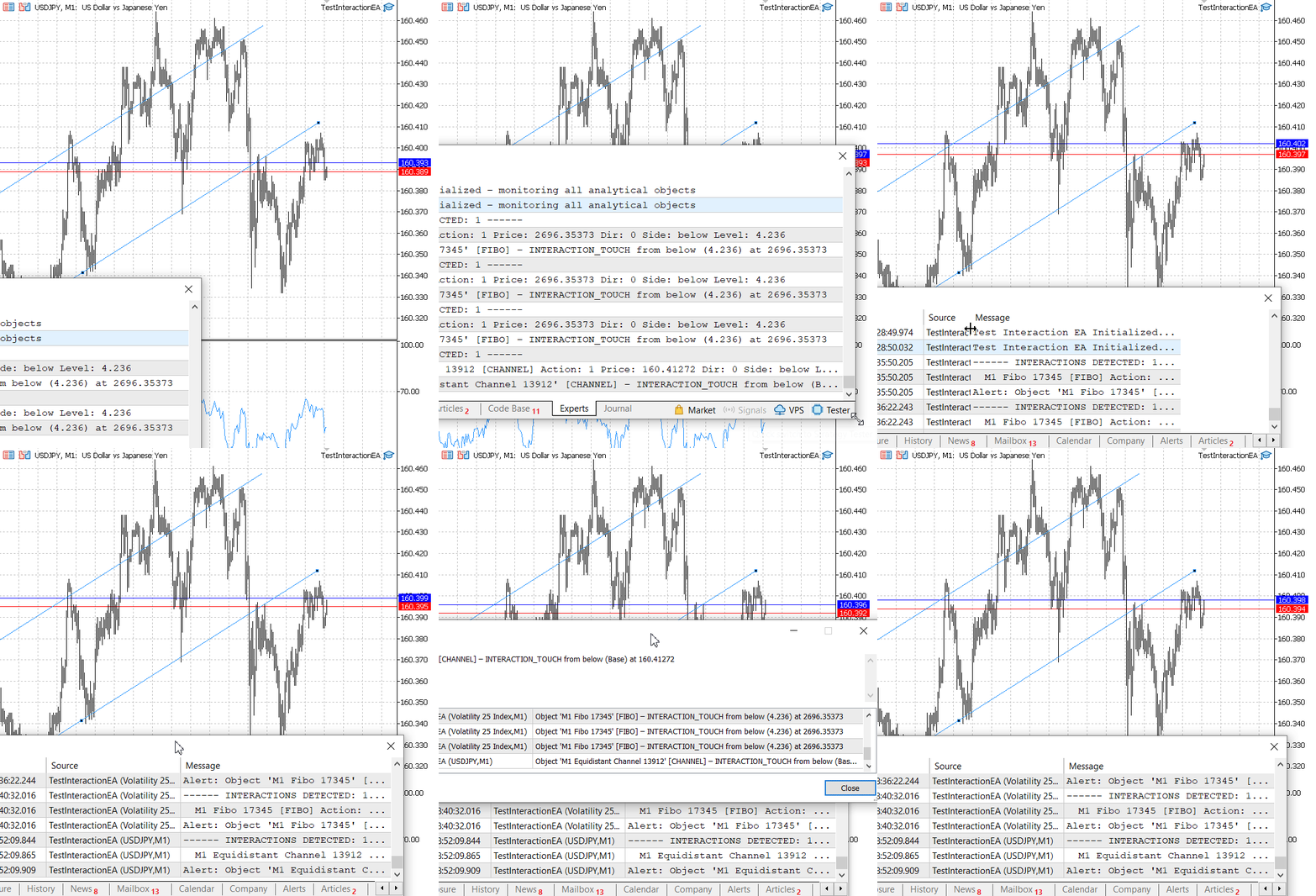
TestInteractionEA was tested on the Volatility 25 Index (M1).
The following test logs confirm that the framework works across multiple symbols and timeframes. On the Volatility 25 Index, the EA identified a touch on the 423.6% Fibonacci extension level; on USDJPY, it detected a touch on a channel base line. In each case, the SInteraction descriptor included the price, side, and level description. The alert manager prevented duplicate notifications while still allowing re‑alerts after ten seconds, ensuring that the trader received timely information without terminal overload. These results demonstrate that the pipeline correctly transforms static chart drawings into dynamic, actionable signals, ready to be used for automated trading or further customization.
2026.06.16 18:28:50.032 TestInteractionEA (Volatility 25 Index,M1)      Test Interaction EA Initialized – monitoring all analytical objects
2026.06.16 18:35:50.205 TestInteractionEA (Volatility 25 Index,M1)      ------ INTERACTIONS DETECTED: 1 ------
2026.06.16 18:35:50.205 TestInteractionEA (Volatility 25 Index,M1)        M1 Fibo 17345 [FIBO] Action: 1 Price: 2696.35373 Dir: 0 Side: below Level: 4.236
2026.06.16 18:35:50.205 TestInteractionEA (Volatility 25 Index,M1)      Alert: Object 'M1 Fibo 17345' [FIBO] – INTERACTION_TOUCH from below (4.236) at 2696.35373
2026.06.16 18:36:22.243 TestInteractionEA (Volatility 25 Index,M1)      ------ INTERACTIONS DETECTED: 1 ------
2026.06.16 18:36:22.243 TestInteractionEA (Volatility 25 Index,M1)        M1 Fibo 17345 [FIBO] Action: 1 Price: 2696.35373 Dir: 0 Side: below Level: 4.236
2026.06.16 18:36:22.244 TestInteractionEA (Volatility 25 Index,M1)      Alert: Object 'M1 Fibo 17345' [FIBO] – INTERACTION_TOUCH from below (4.236) at 2696.35373
2026.06.16 18:40:32.016 TestInteractionEA (Volatility 25 Index,M1)      ------ INTERACTIONS DETECTED: 1 ------
2026.06.16 18:40:32.016 TestInteractionEA (Volatility 25 Index,M1)        M1 Fibo 17345 [FIBO] Action: 1 Price: 2696.35373 Dir: 0 Side: below Level: 4.236
2026.06.16 18:40:32.016 TestInteractionEA (Volatility 25 Index,M1)      Alert: Object 'M1 Fibo 17345' [FIBO] – INTERACTION_TOUCH from below (4.236) at 2696.35373
2026.06.16 18:52:09.844 TestInteractionEA (USDJPY,M1)   ------ INTERACTIONS DETECTED: 1 ------
2026.06.16 18:52:09.865 TestInteractionEA (USDJPY,M1)     M1 Equidistant Channel 13912 [CHANNEL] Action: 1 Price: 160.41272 Dir: 0 Side: below Level: Base
2026.06.16 18:52:09.909 TestInteractionEA (USDJPY,M1)   Alert: Object 'M1 Equidistant Channel 13912' [CHANNEL] – INTERACTION_TOUCH from below (Base) at 160.41272
Attachments and Installation Summary
The following files are provided with this article. The first two are the unchanged base from Parts 1 and 2 (with the small patch applied to ComplexObjectDataCollector.mqh and the pitchfork anchor extraction added to ChartObjectDetector.mqh).
| File Name | Type | Description |
|---|---|---|
| ChartObjectDetector.mqh | Include file | Base detector from Part 1, now includes pitchfork anchor extraction. |
| ComplexObjectDataCollector.mqh | Include file | Complex collector from Part 2, patched to include HLINE and VLINE. |
| InteractionDetector.mqh | Include file | New interaction detector with name‑based state tracking, object validation, and level description. |
| AlertManager.mqh | Include file | Alert manager with duplicate suppression and level description. |
| TradeExecutor.mqh | Include file | Trade executor with direction‑aware touch trading and object‑based SL/TP. |
| TestInteractionEA.mq5 | Expert Advisor | Test EA that integrates all modules. |
Installation steps:
- Place all .mqh files inside MQL5/Include/ChartObjectsAlgorithms/ (create the folder if it doesn't exist).
- Place TestInteractionEA.mq5 inside MQL5/Experts/.
- Compile all files (F7 in MetaEditor).
- Attach the EA to any chart with drawn analytical objects.
- Observe the Experts tab for interaction logs and alerts.
Conclusion
We have completed the transition from static chart objects to dynamic trading signals. By leveraging the detection and normalization engine built in Parts 1 and 2, we added an interaction layer, a state‑aware alert manager, and a trade executor that derives its risk parameters from the object’s geometry. The entire system remains modular: you can replace the alert manager with your own notification logic, or swap the trade executor for a different order placement strategy, without touching the detector.
The busy flags throughout the system prevent duplicate signals and re‑entrancy, while the throttled OnTick loop keeps CPU usage minimal. The validity filter and name‑based state tracking ensure that only realistic, current objects trigger alerts, and the level description makes alerts immediately meaningful. All code is fully compilable and tested on live charts. The attached files are ready to be used in your own Expert Advisors; simply include the headers and instantiate the classes.
In the next article, we will extend the framework to support event‑driven detection via OnChartEvent, enabling real‑time response to object creation, deletion, and modification. We will also add functions to programmatically draw and modify analytical objects from the EA itself, closing the loop between manual analysis and automated execution.
Warning: All rights to these materials are reserved by MetaQuotes Ltd. Copying or reprinting of these materials in whole or in part is prohibited.
This article was written by a user of the site and reflects their personal views. MetaQuotes Ltd is not responsible for the accuracy of the information presented, nor for any consequences resulting from the use of the solutions, strategies or recommendations described.

 Market Microstructure in MQL5 (Part 6): Order Flow
 Beyond GARCH (Part VI): Fractional Brownian Motion And The Multiplicative Cascade in MQL5
 Community of Scientists Optimization (CoSO): Practice
 Price Action Analysis Toolkit Development (Part 74): Building an MQL5 Expert Advisor from Indicator Buffers

- Free trading apps
- Over 8,000 signals for copying
- Economic news for exploring financial markets
You agree to website policy and terms of use