

From Novice to Expert: Trading Multi-Symbol Basket
 150
150
 0
0

Most introductory Expert Advisor (EA) examples make decisions for one symbol at a time. Related markets, however, often move as a group. This article develops a multi-symbol basket EA. It uses PCA to construct a synthetic spread, measures deviation with a z-score, and coordinates the sequential submission and compensating closure of its trade legs.
Contents
- Understanding Multi-Symbol Basket Trading
- From Individual Prices to a Synthetic Spread
- PCA, Singular Value Decomposition, and Basket Weights
- Designing the Basket Architecture
- Preparing and Synchronizing Symbol Data
- Calculating PCA Weights and Stabilizing Their Orientation
- Measuring the Spread and Z-Score
- Presenting Status with Chart Comments
- Translating Weights into Trade Directions
- Coordinating Sequential Basket Execution
- Operating the Expert Advisor
- Testing and Interpreting Results
- Limitations and Extensions
- Conclusion
- Key Lessons
- Attachments
Understanding Multi-Symbol Basket Trading
A basket is a coordinated position made from several instruments. Its value is not the market price of one symbol; it is a weighted combination of all selected symbols. A positive weight and a negative weight have different meanings during execution: when we buy the synthetic basket, positive-weight legs are bought and negative-weight legs are sold. Selling the synthetic basket reverses those directions.
The intended progression is from a trader who can operate one symbol to a developer who can manage a statistical position across three to five symbols. The example uses EURUSD, GBPUSD, USDJPY, and AUDUSD by default, but broker suffixes must be entered exactly as they appear in Market Watch. The EA uses no DLL, WebRequest, external runtime, or Market product.
This is an educational engineering example, not a profitability claim. PCA identifies directions of variation in a dataset; it does not by itself establish cointegration, future mean reversion, or an economically valid portfolio. Those properties require separate statistical and trading evaluation.
From Individual Prices to a Synthetic Spread
Raw prices cannot be added directly when instruments have different quote scales. The EA therefore takes the latest closed bars for every symbol and standardizes each column:

Where: x' t,i is the standardized closing price of instrument i at bar t; xt,i is the original closing price of that instrument at the same bar; μ i is the mean closing price of instrument i over the selected historical window; σ i is the standard deviation of its closing prices over that window; t identifies the bar; and i identifies the instrument within the basket.
The synthetic spread at bar t is the dot product of that standardized price row and the PCA weight vector:

Where: St is the synthetic basket spread at bar t; x' t is the row vector containing the standardized prices of all basket instruments at that bar; w is the PCA weight vector; wi is the weight assigned to instrument i; the dot symbol denotes the vector dot product; t identifies the bar; and i identifies an individual basket instrument. The dot product is equivalent to summing wi * x' t,i across all validated instruments.
Normalizing the weights so that the sum of their absolute values equals one gives each value a proportional role in the requested lot allocation. A weight of +0.30 requests approximately thirty percent of the configured lot-allocation base before broker volume-step and minimum-volume adjustments, while -0.20 requests approximately twenty percent in the opposite direction. These percentages do not represent monetary risk, margin, capital, or profit-and-loss sensitivity because contract size, tick value, quote currency, volatility, and rounding differ among symbols.
PCA, Singular Value Decomposition, and Basket Weights
MQL5 provides native matrix and vector types, including transpose, matrix multiplication, dot product, covariance-related operations, and singular value decomposition (SVD). These operations allow the algorithm to remain inside the terminal without a Python bridge. The available methods and their NumPy analogues are listed in the MQL5 matrix and vector documentation.
After standardization, the EA centers every column again, constructs the covariance matrix, and applies SVD. The code searches the returned singular-value vector for its lowest value and selects the matching column from the right-singular-vector matrix. This selection targets the lowest-variance linear combination in the current sample.
A low-variance component is only a candidate for further investigation. Low historical variance does not establish stationarity, mean reversion, liquidity, tradability, or positive expectancy. This educational implementation applies PCA to standardized prices and contains no mandatory correlation, cointegration, Augmented Dickey-Fuller, Johansen, half-life, or out-of-sample stability test. Those omissions prevent the z-score thresholds from being interpreted as statistically validated mean-reversion signals.
Designing the Basket Architecture
The architecture separates data preparation, statistical calculation, state decisions, chart reporting, and execution. That separation matters because a valid signal is not yet a valid order: symbol properties, account mode, available prices, volume steps, and server responses must still pass their own checks.
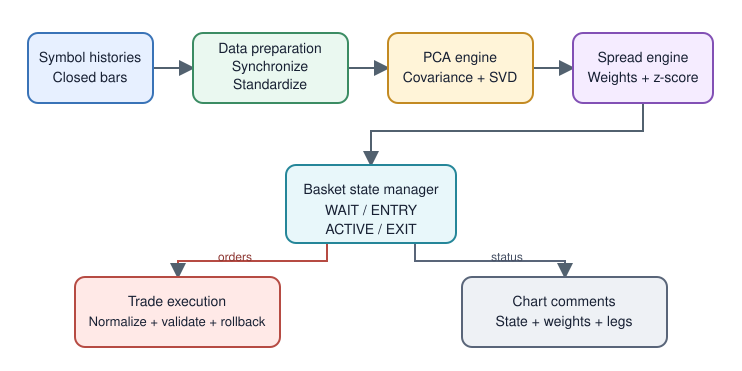
Fig. 1. Data, signal, execution, and verification boundaries in the multi-symbol basket EA
The central workflow begins with configured, time-aligned price histories and ends only after every owned leg has been closed. Signed weights connect the statistical basket to real BUY and SELL requests. The implementation does not assume that synchronization proves correlation or a stable statistical relationship.
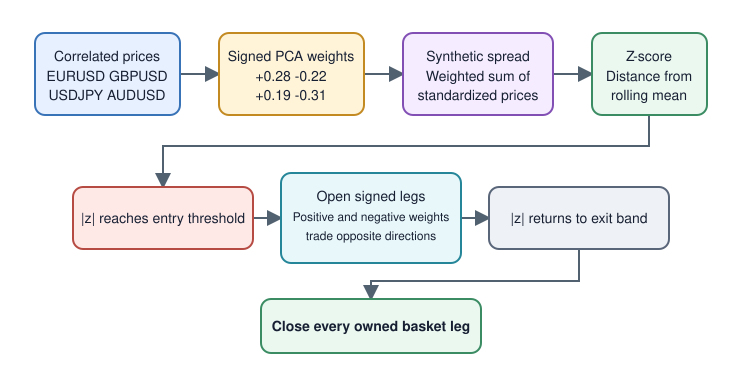
Fig. 2. From standardized prices to a candidate low-variance component and basket-deviation signal
| State | Meaning | Permitted action |
|---|---|---|
| INITIALIZING | Symbols and history are being prepared | No trading |
| WAITING | No newer common bar is ready, or the z-score is inside the entry band | Continue monitoring |
| LONG SIGNAL | The spread is below the negative entry threshold | Buy the synthetic basket |
| SHORT SIGNAL | The spread is above the positive entry threshold | Sell the synthetic basket |
| ACTIVE | At least one owned basket position exists; completeness must be verified separately | Monitor the exit band and leg integrity |
| ERROR | Data or execution failed | Report and wait for the next valid cycle |
The event handler below connects the main stages of the EA. On each chart-symbol tick, it asks the loader for the newest closed bar shared by every basket symbol. A normal wait leaves the EA in WAITING or ACTIVE, whereas an actual loading failure enters ERROR. Only a newly available common bar advances the calculation. PCA weights are recalculated only while the basket is flat; an active basket retains its entry component so that its exit z-score keeps the same definition.
//+------------------------------------------------------------------+
//| Process each newly available common basket bar                   |
//+------------------------------------------------------------------+
void OnTick()
  {
//--- Find and load the newest closed bar shared by every symbol.
   const ENUM_PRICE_LOAD_RESULT load_result=LoadSynchronizedPrices();
   if(load_result==PRICE_LOAD_WAITING)
     {
      g_state=(HasOwnedPositions() ? BASKET_ACTIVE : BASKET_WAITING);
      UpdateChartComment();
      return;
     }
   if(load_result==PRICE_LOAD_ERROR)
     {
      g_state=BASKET_ERROR;
      UpdateChartComment();
      return;
     }

//--- Count only common basket bars that are ready for calculation.
   g_bars_since_pca++;
//--- Keep the entry component fixed while owned positions remain open.
   if(!HasOwnedPositions() &&
      (g_bars_since_pca >= InpRecalculateBars || WeightsAreEmpty()))
     {
      if(!CalculatePCAWeights())
         {
          g_state = BASKET_ERROR;
          UpdateChartComment();
          return;
         }
      g_bars_since_pca = 0;
     }

   CalculateSpreadStatistics();
   ManageBasketState();
   CheckSignalAlert();
   UpdateChartComment();
  }
Preparing and Synchronizing Symbol Data
BuildSymbolList() trims the configured symbol names, removes duplicates, calls SymbolSelect(), and requires at least three valid instruments. The resulting array becomes the common symbol list used by history loading, weight calculation, reporting, and trade execution. This prevents an empty fifth input or repeated symbol from silently changing the intended portfolio.
The loader first reads each symbol's latest closed-bar time with iTime(..., 1). The oldest of those times is the newest candidate that all symbols can share. It then asks CopyRates() for a complete window ending at that common time. If a symbol has not yet exposed the candidate bar, the loader returns PRICE_LOAD_WAITING rather than reporting an error. Missing full history or zero price variation returns PRICE_LOAD_ERROR. The remembered g_last_common_bar prevents duplicate calculations and trade decisions from repeated ticks.
datetime common_time=0;
for(int column=0; column<ArraySize(g_symbols); column++)
  {
   const datetime latest=iTime(g_symbols[column],_Period,1);
   if(latest<=0)
     {
      g_status_message=StringFormat("Waiting for closed history: %s",g_symbols[column]);
      return(PRICE_LOAD_WAITING);
     }
   if(common_time==0 || latest<common_time)
      common_time=latest;
  }

if(common_time<=g_last_common_bar)
  {
   g_status_message=StringFormat("Waiting for next common bar after %s",
                                 TimeToString(g_last_common_bar));
   return(PRICE_LOAD_WAITING);
  }
All statistical and trading calculations run once per newly available common closed bar. Attach the EA to a liquid chart whose timeframe matches the intended basket horizon because its ticks trigger checks for the next shared observation. The timer does not calculate signals or submit orders; it only refreshes the displayed position state between chart-symbol ticks.
Calculating PCA Weights and Stabilizing Their Orientation
The algorithm searches the returned singular-value vector for its minimum value and selects the corresponding right-singular vector. This vector represents the lowest-variance direction found in the standardized sample. Dividing it by the sum of its absolute components preserves each sign and produces relative lot coefficients. It does not create risk-balanced or capital-balanced exposure.
//--- Decompose the covariance matrix into its principal directions.
if(!covariance.SVD(left_vectors,right_vectors,singular_values))
   return(false);

//--- Find the direction with the minimum variance.
int minimum_index=0;
for(int i=1; i<(int)singular_values.Size(); i++)
   if(singular_values[i]<singular_values[minimum_index])
      minimum_index=i;

//--- Extract that direction as the portfolio weight vector.
vector candidate=right_vectors.Col(minimum_index);
//--- Normalize so the weights sum to 1 in absolute value.
double absolute_sum=0.0;
for(int i=0; i<(int)candidate.Size(); i++)
   absolute_sum+=MathAbs(candidate[i]);
candidate=candidate/absolute_sum;
An eigenvector can be multiplied by -1 without changing its mathematical meaning. If that arbitrary flip were allowed between recalculations, labels and intended leg directions could appear to reverse even when the component itself had not materially changed. The EA therefore compares the new and previous vectors with a dot product. A negative result means their orientations oppose one another, so the candidate is multiplied by -1 before it becomes the active weight vector. This corrects sign ambiguity only; it does not detect component rotation, near-equal singular values, or an unstable covariance structure.
//--- Preserve the PCA direction between recalculations.
if(!WeightsAreEmpty() && candidate.Dot(g_weights)<0.0)
   candidate=candidate*(-1.0);
g_weights=candidate;
Measuring the Spread and Z-Score
Every standardized history row is multiplied by the current weight vector, producing one synthetic spread observation for each completed bar. The resulting spread history supplies the reference mean and standard deviation. The latest observation is then converted into a z-score, allowing one threshold system to express its distance from the sample mean. The value is a descriptive deviation measure, not proof that the series will return to that mean:
//+------------------------------------------------------------------+
//| Calculate the historical spread distribution and current z-score |
//+------------------------------------------------------------------+
void CalculateSpreadStatistics()
  {
//--- Build the spread history: for each bar, spread = weight vector dot standardized prices.
//--- Standardized prices and absolute-sum-normalized weights produce
//--- a dimensionless series; mean reversion is not established here.
   vector history(g_prices.Rows());
   for(int row=0; row<(int)g_prices.Rows(); row++)
      history[row]=g_prices.Row(row).Dot(g_weights);

//--- Latest spread value and its historical mean/std.
   g_spread=history[history.Size()-1];
   g_spread_mean=history.Mean();
   g_spread_std=history.Std();
   if(g_spread_std<=1.0e-12)
      g_spread_std=1.0;   // Guard against degenerate (flat) spread
//--- Z-score: how many standard deviations the spread is away from its mean.
   g_zscore=(g_spread-g_spread_mean)/g_spread_std;
  }
z = (S latest - mean(S)) / standard_deviation(S)
Where: z is the z-score of the latest spread observation; Slatest is the most recent synthetic spread value; S represents the complete spread series in the rolling window; mean(S) is the arithmetic mean of that series; and standard_deviation(S) is its standard deviation. A positive z places the latest spread above its rolling mean, while a negative value places it below the mean; the absolute value states the distance in standard-deviation units.
With the defaults, a z-score at or above +2.0 requests a short synthetic basket, while a value at or below -2.0 requests a long synthetic basket. These are strategy rules based on a mean-return hypothesis; PCA does not validate that hypothesis. An active basket closes when the absolute z-score reaches 0.5 or less. The entry and exit bands are separated to avoid repeatedly opening and closing around one boundary.
ManageBasketState() turns those thresholds into trading decisions. It first gives an existing basket priority, allowing an exit to be completed before any new entry is considered. When no owned positions remain, it checks the short and long entry conditions and otherwise returns to the waiting state. This ordering prevents contradictory entry and exit actions during the same processing cycle.
//+------------------------------------------------------------------+
//| Translate the z-score into basket actions                        |
//+------------------------------------------------------------------+
void ManageBasketState()
  {
//--- CASE A: a basket is already open.
   if(HasOwnedPositions())
     {
      g_state=BASKET_ACTIVE;
      g_status_message="Basket positions are active";
      //--- Exit when the z-score returns inside the configured exit band.
      if(MathAbs(g_zscore)<=InpExitZ)
         {
          if(CloseOwnedPositions("Z-score exit"))
             {
              g_state=BASKET_WAITING;
              g_status_message="Basket closed inside the exit band";
             }
          else
             {
              g_state=BASKET_ERROR;
              g_status_message="One or more basket legs could not be closed";
             }
         }
      return;
     }

//--- CASE B: no open basket -> look for entry signals.
//--- Z-score >= +InpEntryZ: the spread is unusually HIGH,
//--- sell the synthetic basket under the configured return hypothesis.
   if(g_zscore>=InpEntryZ)
     {
      g_state=BASKET_SHORT_SIGNAL;
      g_status_message="Positive deviation: short synthetic basket";
      if(OpenBasket(-1))   // basket_direction = -1 (sell)
         {
          g_state=BASKET_ACTIVE;
          g_status_message="Short synthetic basket opened";
         }
      else
         {
          g_state=BASKET_ERROR;
          if(g_status_message=="Positive deviation: short synthetic basket")
              g_status_message="Short basket entry failed";
         }
      return;
     }

//--- Z-score <= -InpEntryZ: the spread is unusually LOW,
//--- buy the synthetic basket under the configured return hypothesis.
   if(g_zscore<=-InpEntryZ)
     {
      g_state=BASKET_LONG_SIGNAL;
      g_status_message="Negative deviation: long synthetic basket";
      if(OpenBasket(1))    // basket_direction = +1 (buy)
         {
          g_state=BASKET_ACTIVE;
          g_status_message="Long synthetic basket opened";
         }
      else
         {
          g_state=BASKET_ERROR;
          if(g_status_message=="Negative deviation: long synthetic basket")
              g_status_message="Long basket entry failed";
         }
      return;
     }

//--- CASE C: z-score is inside the entry band -> do nothing.
   g_state=BASKET_WAITING;
   g_status_message="Z-score is inside the entry band";
  }
The spread statistics and PCA weights use the same rolling sample. This means the current observation contributes to the component, mean, and standard deviation against which it is evaluated. The result is in-sample and its estimated extremity can be smoothed by its own inclusion. A more rigorous study should calculate parameters on a training window and evaluate the next bar out of sample.
Once a basket opens, the EA suspends scheduled PCA recalculation until all owned legs are closed. The exit z-score therefore retains the component used during entry within one uninterrupted EA run. The current example does not persist that entry vector across terminal restarts or EA reattachment, so an active basket should not be reconstructed after a restart without adding durable basket-state storage.
Presenting Status with Chart Comments
UpdateChartComment() builds a multiline string containing state, data time, z-score, thresholds, spread statistics, position count, weights, intended directions, and per-symbol status. Each refresh reconstructs the text from the current EA variables, which keeps the display consistent with the latest calculation and position state. Comment() writes the string in the upper-left corner of the chart. It can be cleared with an empty string and does not operate during Strategy Tester optimization, as documented in the MQL5 Comment reference.
//--- Build the information panel line by line.
string text="PCA MULTI-SYMBOL BASKET\n";
text+="State: "+StateText()+"\n";
text+=StringFormat("Z-score: %+.3f | Entry: +/-%.2f | Exit: +/-%.2f\n",
                   g_zscore,InpEntryZ,InpExitZ);
text+=StringFormat("Open legs: %d | Magic: %I64u\n",
                   CountOwnedPositions(),InpMagicNumber);
//--- Display the complete status in the chart's upper-left corner.
Comment(text);
The chart comment is informational rather than interactive. It gives the trader a compact view of what the algorithm currently sees without allowing the presentation layer to alter a signal or order. The Experts log remains the source for detailed errors, rejected trade requests, and compensating-close messages that require more diagnostic detail.
Translating Weights into Trade Directions
Execution must preserve the sign of every PCA weight. Applying one direction to every symbol would create a different position from the calculated synthetic basket, so each leg combines the requested basket direction with its own weight sign. The short expression below performs that mapping consistently for every instrument before an order request is prepared.
The direction rule is:
| Basket action | Weight sign | Leg action |
|---|---|---|
| Buy basket | Positive | BUY |
| Buy basket | Negative | SELL |
| Sell basket | Positive | SELL |
| Sell basket | Negative | BUY |
//--- The weight sign determines the leg direction relative to the basket.
const int leg_direction=
   (g_weights[i]>=0.0 ? basket_direction : -basket_direction);
The configured InpBasketVolume is a lot-allocation base, not the volume of every leg and not a monetary-risk budget. Each requested volume is calculated as InpBasketVolume * abs(weight), so larger absolute weights request a larger share of the base lots. The value is then checked against the symbol's minimum, maximum, and volume step. Contract size, tick value, quote currency, margin, volatility, and rounding still determine the real economic exposure. A leg that falls below the broker's minimum volume invalidates the entire entry instead of being silently omitted.
Coordinating Sequential Basket Execution
Multi-symbol market entry is not atomic at the trade server: earlier requests may succeed before a later leg fails. Before the first request, OpenBasket() calculates and validates every requested volume. Direction, current tick, filling policy, and protective prices are then checked inside OpenLeg() immediately before each individual request, not in one complete preflight pass. The legs are submitted sequentially, and the EA attempts to close newly owned legs if any request fails. This is a compensating closure, not a transaction or a guaranteed rollback. Prices can change during the sequence, margin can become insufficient, and a compensating close can fail or execute at a worse price.
//+------------------------------------------------------------------+
//| Open signed legs; compensate owned legs after an entry failure   |
//+------------------------------------------------------------------+
bool OpenBasket(const int basket_direction)
  {
//--- Safety: never open a second basket while one is already open.
   if(HasOwnedPositions())
      return(false);
//--- Netting accounts cannot hold opposite legs on the same symbol.
   if(IsNettingAccount() && HasAnyBasketPosition())
     {
      g_status_message="Netting conflict on a basket symbol";
      return(false);
     }

//--- Pre-compute every leg volume: base volume scaled by |weight|,
//--- then normalized to the broker's volume step.
   double volumes[];
   ArrayResize(volumes,ArraySize(g_symbols));
   for(int i=0; i<ArraySize(g_symbols); i++)
     {
      volumes[i]=NormalizeVolume(g_symbols[i],InpBasketVolume*MathAbs(g_weights[i]));
      if(volumes[i]<=0.0)
         {
          g_status_message=StringFormat("Volume too small for %s",g_symbols[i]);
          Print(g_status_message);
          return(false);
         }
     }

//--- Open each leg. The sign of the weight decides the leg direction
//--- relative to the basket direction (positive weight -> same side,
//--- negative weight -> opposite side, creating the synthetic spread).
   for(int i=0; i<ArraySize(g_symbols); i++)
     {
      const int leg_direction=(g_weights[i]>=0.0 ? basket_direction : -basket_direction);
      if(!OpenLeg(g_symbols[i],volumes[i],leg_direction))
         {
          //--- Attempt compensating closure of legs opened by this entry.
          PrintFormat("Basket entry failed on %s; attempting compensation.",
                       g_symbols[i]);
          const bool compensated=CloseOwnedPositions("Entry compensation");
          g_state=BASKET_ERROR;
          g_status_message=(compensated
                       ? StringFormat("Entry compensated after %s failed",g_symbols[i])
                       : StringFormat("Residual exposure after %s failed",g_symbols[i]));
          return(false);
         }
     }
   return(true);
  }
For every symbol, the EA retrieves a current MqlTick, digits, point size, minimum stop distance, minimum and maximum volume, and volume step. These properties are symbol-specific, so using the chart symbol's settings for every leg could produce invalid prices, stops, or volumes. The SymbolInfoDouble documentation notes that SymbolInfoTick() is preferable when current Bid and Ask data are needed together.
The code uses CTrade but does not treat its Boolean return alone as execution proof. It also checks ResultRetcode(). A new leg is accepted only after TRADE_RETCODE_DONE; TRADE_RETCODE_DONE_PARTIAL is treated as failure because a partial fill changes the intended lot proportions, and TRADE_RETCODE_PLACED is not treated as a completed market leg. The compensating-close path is then attempted. This follows the same principle stated for OrderSend(): successful request submission does not by itself guarantee execution. Server response fields and return codes are carried in MqlTradeResult.
//--- Send the market order.
const bool sent=(direction>0)
                  ? g_trade.Buy(volume,symbol,0.0,stop_loss,take_profit,"PCA_BASKET")
                  : g_trade.Sell(volume,symbol,0.0,stop_loss,take_profit,"PCA_BASKET");
//--- Accept only a complete fill; partial volume distorts the basket.
const uint retcode=g_trade.ResultRetcode();
const bool accepted=(retcode==TRADE_RETCODE_DONE);
if(!sent || !accepted)
   return(false);
Position ownership uses both the magic number and membership in the configured basket. This double filter ensures that normal and compensating close operations act only on positions associated with this strategy. On hedging accounts, the EA closes owned tickets individually. On netting accounts, positions for the same symbol merge, so initialization and entry refuse to proceed when any basket symbol already has a position. This conservative boundary prevents the example from changing an unrelated net position.
InpCloseOnRemoval defaults to false. Removing an EA should not unexpectedly liquidate an active portfolio unless the trader deliberately enables that behavior. When enabled, the option provides an explicit lifecycle rule for traders who want deinitialization to close all owned basket legs.
InpStopLossPoints and InpTakeProfitPoints default to zero because an independent exit on one symbol breaks the intended basket proportions. Non-zero values remain available as optional emergency controls, but the current state check detects only whether at least one owned position exists; it does not prove that every intended leg and volume is still present. A production version should store an entry manifest and enter an error or recovery state when any leg is missing or partially closed.
Operating the Expert Advisor
| Input | Default | Purpose |
|---|---|---|
| InpWindowBars | 50 | Closed bars used for standardization and PCA |
| InpEntryZ | 2.0 | Absolute entry threshold |
| InpExitZ | 0.5 | Absolute z-score exit band |
| InpRecalculateBars | 5 | Bars between PCA weight updates |
| InpSymbol1...5 | Four FX symbols | Three to five exact broker symbol names |
| InpBasketVolume | 0.10 | Volume allocation base distributed by absolute weights |
| InpMagicNumber | 20260810 | Deterministic position ownership |
| InpStopLossPoints | 0 | Optional per-leg stop distance in points; disabled by default to preserve basket composition |
| InpTakeProfitPoints | 0 | Optional per-leg target distance in points; disabled by default to preserve basket composition |
| InpCloseOnRemoval | false | Optional liquidation during deinitialization |
- Copy PCA_MultiSymbol_Basket_EA.mq5 into MQL5/Experts.
- Compile it in MetaEditor and record the exact error and warning count.
- Confirm all configured symbols exist in Market Watch, including broker suffixes.
- Open a liquid chart and choose the basket timeframe.
- Enable algorithmic trading only after checking the account type, volume allocation, stop distances, and Experts log.
- Observe the comment until synchronized data, weights, and a WAITING state appear.
- Use a demo account before considering controlled forward testing.
Testing and Interpreting Results
After compiling PCA_MultiSymbol_Basket_EA.mq5, make the configured basket symbols available in Market Watch. Open the chart and timeframe that will provide the EA's timing reference, then attach the EA from the Navigator. Review the input values before confirming the attachment. Once sufficient synchronized history is available, the chart comment should show the basket state, calculation time, z-score thresholds, spread statistics, owned-position count, magic number, and one row for every validated symbol. The Experts log should be checked if the comment reports an error or unavailable history.
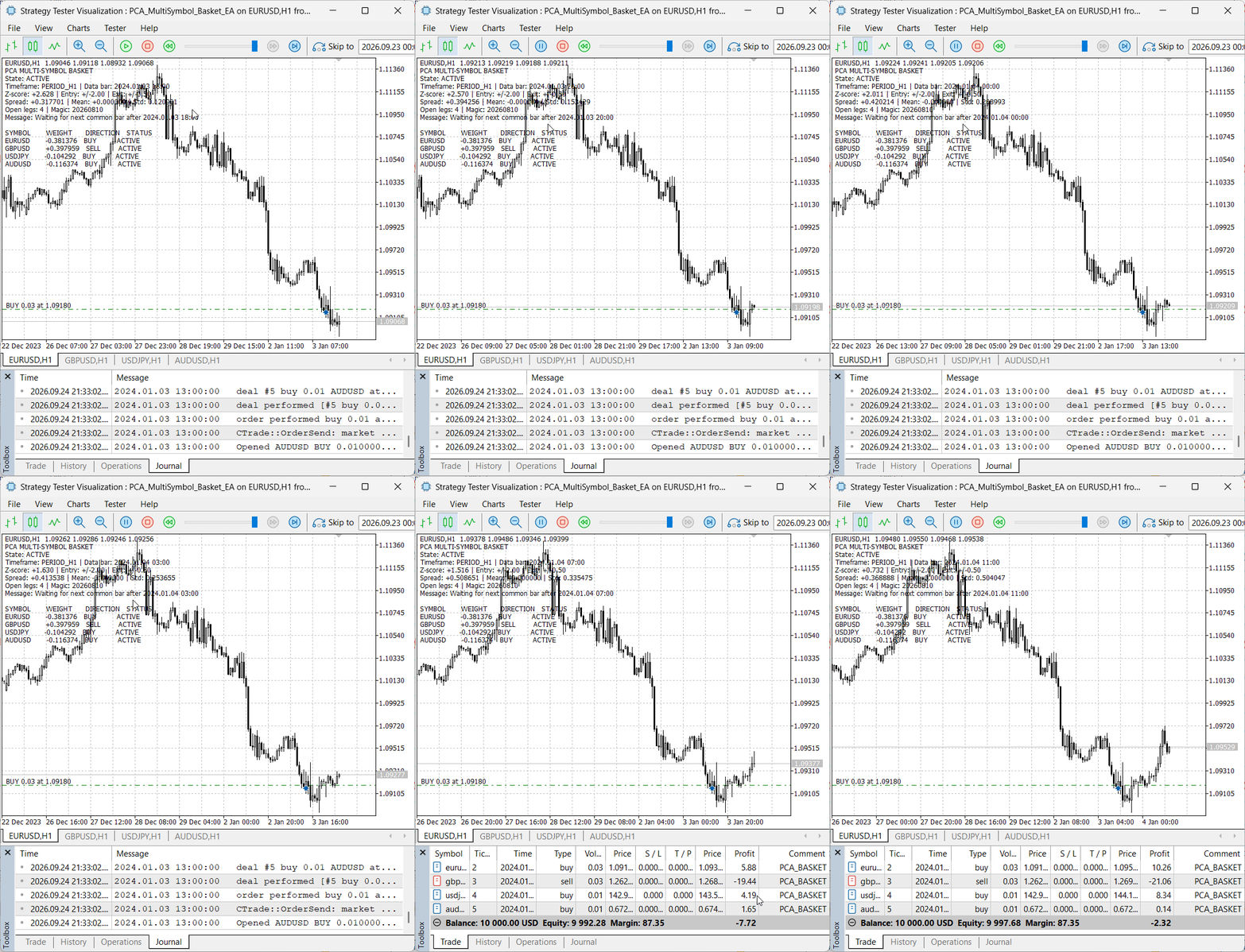
Fig. 3. Visual Strategy Tester run with all four basket legs active after common-bar synchronization
We configured the visual Strategy Tester for EURUSD H1 over 1 January–31 December 2024, with a 10,000 USD initial deposit and 1:100 leverage. The journal confirms successful initialization and records the configured inputs, including a 50-bar window, entry and exit thresholds of 2.0 and 0.5, and disabled per-leg stop-loss and take-profit values. EURUSD, GBPUSD, USDJPY, and AUDUSD were selected as the basket instruments.
Observed in our Strategy Tester visualization: Figure 3 shows the EA in the ACTIVE state with four open legs. At the displayed positive z-score of +2.628, which is above the +2.0 entry threshold, the EA sells the synthetic basket. It therefore buys the negative-weight EURUSD, USDJPY, and AUDUSD legs and sells the positive-weight GBPUSD leg. All four rows show ACTIVE. The message "Waiting for next common bar" is a normal waiting condition after the current shared H1 bar has been processed; it is not an ERROR condition.
Observed in our Strategy Tester journal: At 2024.01.03 13:00, the tester recorded four completed entry deals with return code 10009: EURUSD BUY 0.03 at 1.09180, GBPUSD SELL 0.03 at 1.26235, USDJPY BUY 0.01 at 142.956, and AUDUSD BUY 0.01 at 0.67283. These directions match the weights displayed in Figure 3. At 2024.01.04 14:00, the journal records the four opposite deals and identifies each closure as a "Z-score exit." This provides evidence for one complete four-leg entry-and-exit path, rather than only a display-state change.
We configured the test range to cover the 2024 calendar year, and our animation records the visual run in progress. However, the journal extract contains several tester sessions, and the session associated with Figure 3 has no final-balance line before its shutdown. Our evidence therefore confirms multi-leg execution and a four-leg closure sequence triggered by the z-score exit rule, but it does not by itself verify completion of the entire annual pass or establish profitability, robustness, latency, compensation behavior, or partial-fill recovery. Those claims require the final Strategy Tester report and the complete journal from one identified run.
| Scenario | Expected result | Evidence to record |
|---|---|---|
| Fewer than three valid symbols | Initialization fails without trading | Experts log |
| Insufficient history | ERROR comment identifies the symbol | Chart and log |
| A basket symbol has not exposed the next common bar | EA remains WAITING or ACTIVE and skips duplicate calculation without entering ERROR | Chart status and logged common-bar times |
| Positive and negative weights | Opposite per-leg directions | Comment and trade request log |
| Requested leg below minimum volume | No basket leg opens | Experts log |
| One leg rejected | EA enters ERROR and attempts to close previously opened owned legs | Deals, compensating-close log, and residual-position check |
| A leg is only partially filled | Leg is rejected as incomplete, EA enters ERROR, and compensating closure is attempted | Server retcode, deals, requested versus filled volume, and residual-position check |
| PCA update interval elapses while a basket is active | Entry weights remain unchanged until all owned legs close | Timestamped weight and position logs |
| Insufficient total margin on a later leg | EA enters ERROR and attempts compensating closure; no success guarantee is claimed | Margin values, server retcode, deals, and remaining positions |
| Absolute z-score enters exit band | All owned legs close | Deals and comment |
| EA removed with default input | Positions remain and comment clears | Terminal state |
| Netting conflict | Initialization or entry is refused | Experts log |
| Tester optimization | Trading logic runs without visible Comment output | Tester journal |
Algorithm correctness and profitability are separate questions. Performance testing should include real spreads, commission, slippage assumptions, the broker's available symbol history, multiple market regimes, and out-of-sample or forward periods. A single profitable pass is not evidence of robustness.
Limitations and Extensions
- PCA on standardized prices identifies a low-variance sample component; it does not prove stationarity, cointegration, mean reversion, liquidity, or positive expectancy.
- The algorithm has no mandatory correlation, ADF, Johansen, half-life, singular-value-separation, or component-stability filter.
- The rolling calculation uses the latest observation to estimate PCA weights and its own z-score, creating an in-sample dependency.
- Weights remain fixed during an active basket in one uninterrupted run, but the entry vector is not persisted across terminal restarts or EA reattachment.
- Sequential market orders cannot provide atomic all-or-nothing execution. A compensating close may suffer slippage, fail, or leave residual exposure.
- Partial opening fills are rejected, but the trade server may already have created residual exposure that the compensating-close path must remove.
- There is no pre-check of total basket margin, so a later leg can fail after earlier legs have opened.
- Per-leg SL and TP are disabled by default. Enabling them can break basket composition before the z-score exit occurs.
- HasOwnedPositions() confirms that an owned position exists; it does not verify that every intended leg and volume remains intact.
- Normalized weights allocate requested lots only; they do not equalize tick value, contract size, quote-currency exposure, margin, volatility, or monetary risk.
- Common-bar alignment can pause calculation when instruments have different sessions, delayed bars, or incomplete histories.
- Chart comments provide text only and are unavailable during tester optimization.
Useful extensions include return-based or cointegration-residual inputs, currency and tick-value exposure balancing, mandatory relationship and stationarity tests, eigenvalue-gap monitoring, a maximum-spread filter, a full-basket margin pre-check, a basket-level loss limit, persistent entry weights and a leg manifest, execution tracking through OnTradeTransaction(), separate training and evaluation windows, CSV research output, and walk-forward component validation.
Conclusion
Multi-symbol trading changes the unit of reasoning from one order to a coordinated portfolio. We have implemented a PCA-based low-variance component, converted its deviation into explicit entry and exit rules, frozen the component while owned legs are active, and added sequential execution with compensating closure after failure. The result is an educational engineering framework, not evidence of stationarity, mean reversion, atomic execution, or profitability. Chart comments make the current operating state visible, while the limitations define the statistical and execution tests still required before practical use.
Key Lessons
| Lesson | Description |
|---|---|
| Synchronize before calculation | Every covariance observation must refer to the same closed-bar time. |
| Standardize unlike price scales | Centering and scaling prevents quote magnitude from dominating the component. |
| Preserve signed weights | The sign determines whether a leg follows or opposes the basket direction. |
| Stabilize component orientation | A dot-product check prevents arbitrary eigenvector sign flips between updates. |
| Treat entry as sequential execution | A rejected or partial leg requires compensating closure, which is an attempt rather than an atomic rollback guarantee. |
| Check server outcomes | A Boolean trade-method result is not sufficient evidence of execution. |
| Separate display from decisions | Chart comments report the state without becoming part of signal or execution logic. |
| Test claims independently | Statistical construction, code correctness, execution quality, and profitability need different evidence. |
Attachments
| File Name | Type | Description |
|---|---|---|
| PCA_MultiSymbol_Basket_EA.mq5 | Expert Advisor | Complete PCA basket EA with chart-comment status output |
Warning: All rights to these materials are reserved by MetaQuotes Ltd. Copying or reprinting of these materials in whole or in part is prohibited.
This article was written by a user of the site and reflects their personal views. MetaQuotes Ltd is not responsible for the accuracy of the information presented, nor for any consequences resulting from the use of the solutions, strategies or recommendations described.

 Building a Market Behavior Analyzer in MQL5
 Market Microstructure in MQL5 (Part 9): Pullback Quality
 Features of Experts Advisors
 Intrinsic Time: From the Directional-Change Scaling Laws to the Alpha Engine

- Free trading apps
- Over 8,000 signals for copying
- Economic news for exploring financial markets
You agree to website policy and terms of use