

Price Action Analysis Toolkit Development (Part 82): Annotating Historical Bookmarks with Reliable Timeframe Switching
 167
167
 0
0

Contents
- Introduction
- Historical Bookmarks as Visual References
- Navigating Across Symbols and Timeframes
- Application Integration and EA Lifecycle
- Refreshing Annotations Safely
- Testing
- Conclusion
- Attachments
Introduction
Part 81 transformed the History Navigator from a date-entry tool into a persistent historical-reference system. A trader could save a breakout, rejection candle, market-structure shift, liquidity sweep, or unusual period of volatility, then retrieve it after restarting MetaTrader 5. However, those saved locations remained confined to a list, and recalling one from a different chart context exposed a platform constraint: changing the symbol or timeframe reinitializes the attached Expert Advisor.
This article addresses both limitations in a single update. It draws matching bookmarks directly on the chart as labelled reference points, then transfers a selected bookmark through the reinitialization boundary when another symbol or timeframe is required. The request is saved before the chart change. The new dialog instance restores it and executes it only after the history series is ready.
The result is a practical historical-analysis workflow. A trader can see saved events in their price-action context, select any stored location, and return to it without repeating date entry or manually reconstructing the required chart configuration.
Historical Bookmarks as Visual References
The bookmark data structure introduced in Part 81 already contains everything required for a chart annotation:
//+------------------------------------------------------------------+
//| Defines a persistent historical bookmark                         |
//+------------------------------------------------------------------+
struct SBookmark
  {
//--- Display name shown in the navigator and annotation label.
   string            name;
//--- Chart context required to restore the bookmark.
   string            symbol;
   ENUM_TIMEFRAMES   timeframe;
//--- Persistent historical location and optional study notes.
   datetime          dateTime;
   string            notes;
  };
The annotation uses dateTime for its horizontal location and name for its visible label. The symbol and timeframe establish the chart context in which that marker is relevant. An H1 bookmark for EURUSD is therefore distinct from an H1 bookmark for another instrument and from an EURUSD bookmark created on a different period.
Creating unique annotation names
Each annotation name combines a short instance prefix, an allocation counter, and a suffix identifying the line or label. Before creating the objects, the navigator checks both proposed names and advances the counter if either is occupied. Bookmark text is excluded from identifiers, avoiding collisions caused by duplicate names or punctuation and keeping identifiers within the 63-character limit.
//+------------------------------------------------------------------+
//| Builds an annotation object name                                 |
//+------------------------------------------------------------------+
string CNavigatorDialogAnnotations::GetAnnotationName(const uint serial,string suffix) const
  {
   return(m_annotationPrefix+IntegerToString(serial)+"_"+suffix);
  }
This helper formats the name. CreateAnnotationForBookmark() allocates the counter value and checks for existing names before creating the objects.
Drawing the line and text label
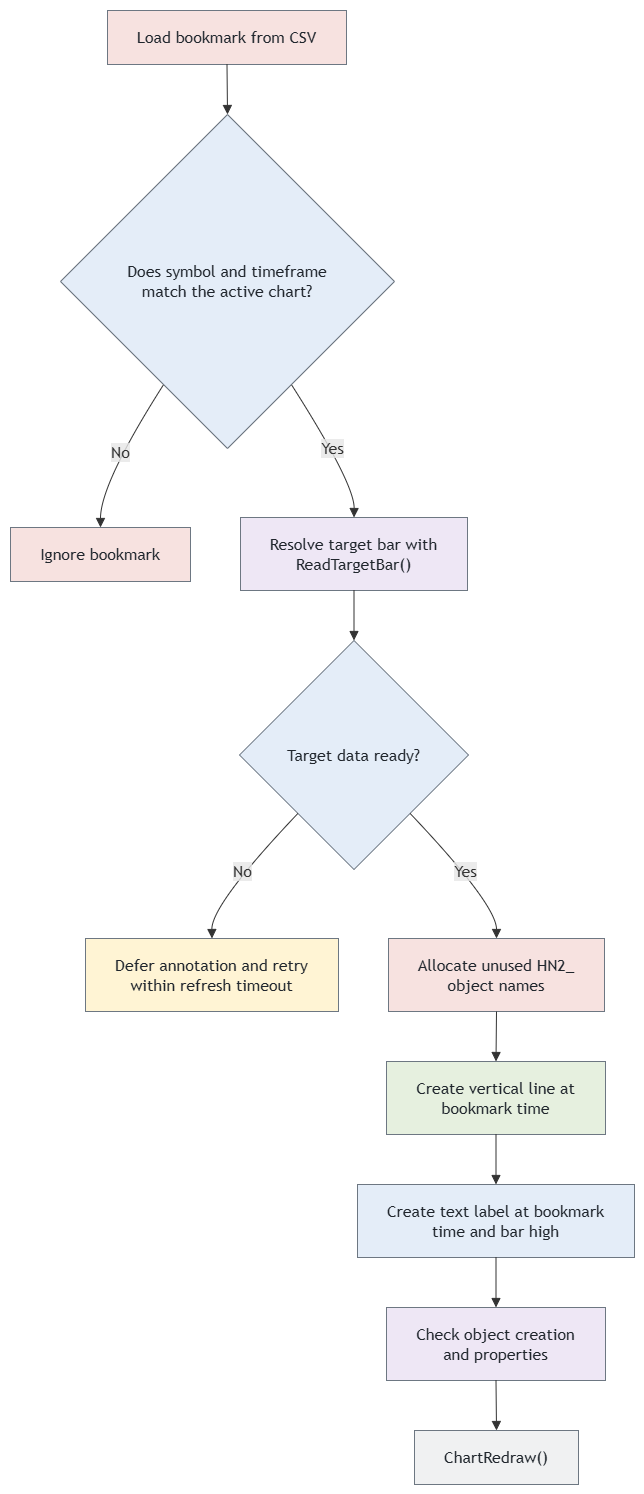
Figure 1. Creating an annotation only for the active bookmark context.
CreateAnnotationForBookmark() draws an OBJ_VLINE at the saved timestamp and an OBJ_TEXT label at the resolved bar high. It checks object creation and property-setting results, verifies object existence, and reads back key properties. Failures are logged and mark the refresh as incomplete.
//+------------------------------------------------------------------+
//| Creates a line and label for a bookmark                          |
//+------------------------------------------------------------------+
void CNavigatorDialogAnnotations::CreateAnnotationForBookmark(const SBookmark &bm)
  {
   if(bm.symbol!=Symbol()||bm.timeframe!=Period())
      return;
//--- Keep the chart caption compact; the complete name remains in storage.
   string label=bm.name;
   if(StringLen(label)>60)
      label=StringSubstr(label,0,57)+"...";
   MqlRates bar;
   int shift;
   if(!ReadTargetBar(bm.dateTime,bar,shift))
     {
      m_annotationsIncomplete=true;
      return;
     }
   string lineName,textName;
//--- Identity is per allocation, independent of user names and duplicate records.
   do
     {
      m_annotationSerial++;
      lineName=GetAnnotationName(m_annotationSerial,"L");
      textName=GetAnnotationName(m_annotationSerial,"T");
     }
   while(ObjectFind(0,lineName)>=0||ObjectFind(0,textName)>=0);
   ResetLastError();
   if(!ObjectCreate(0,lineName,OBJ_VLINE,0,bm.dateTime,0))
     {
      m_annotationsIncomplete=true;
      Print("Line creation failed: ",GetLastError());
      return;
     }
   if(!TrackObject(lineName))
     {
      ObjectDelete(0,lineName);
      m_annotationsIncomplete=true;
      return;
     }
   if(ObjectFind(0,lineName)<0)
     {
      m_annotationsIncomplete=true;
      Print("Queued line creation did not complete.");
      return;
     }
   bool ok=ObjectSetInteger(0,lineName,OBJPROP_COLOR,clrBlue)&&
   ObjectSetInteger(0,lineName,OBJPROP_STYLE,STYLE_SOLID)&&
   ObjectSetInteger(0,lineName,OBJPROP_WIDTH,1)&&
   ObjectSetInteger(0,lineName,OBJPROP_SELECTABLE,false);
   if(!ObjectCreate(0,textName,OBJ_TEXT,0,bm.dateTime,bar.high))
     {
      m_annotationsIncomplete=true;
      Print("Label creation failed: ",GetLastError());
      return;
     }
   if(!TrackObject(textName))
     {
      ObjectDelete(0,textName);
      m_annotationsIncomplete=true;
      return;
     }
   if(ObjectFind(0,textName)<0)
     {
      m_annotationsIncomplete=true;
      Print("Queued label creation did not complete.");
      return;
     }
   ok=ObjectSetString(0,textName,OBJPROP_TEXT,label)&&ok;
   ok=ObjectSetInteger(0,textName,OBJPROP_COLOR,clrBlue)&&ok;
   ok=ObjectSetInteger(0,textName,OBJPROP_FONTSIZE,10)&&ok;
   ok=ObjectSetString(0,textName,OBJPROP_FONT,"Arial")&&ok;
   ok=ObjectSetInteger(0,textName,OBJPROP_ANCHOR,ANCHOR_LEFT_LOWER)&&ok;
   ok=ObjectSetInteger(0,textName,OBJPROP_SELECTABLE,false)&&ok;
//--- Synchronous reads verify key properties after queued setters execute.
   ok=(ObjectGetString(0,textName,OBJPROP_TEXT)==label)&&ok;
   ok=(ObjectGetInteger(0,lineName,OBJPROP_COLOR)==clrBlue)&&ok;
   if(!ok)
     {
      m_annotationsIncomplete=true;
      Print("Annotation properties failed: ",GetLastError());
     }
  }
The bar high anchors the label to the bookmarked price data. If the target bar is unavailable, annotation creation is deferred until the data can be resolved. Long captions are shortened for display, while the complete bookmark name remains in storage.
Navigating Across Symbols and Timeframes
Changing a chart’s symbol or timeframe with ChartSetSymbolPeriod() causes the attached EA to be reinitialized. One approach to continuing navigation across this boundary is to preserve the request outside the dialog object and validate it during the next OnInit() call. The navigator uses temporary terminal Global Variables for this hand-off.
The navigation path is therefore:
- Read the selected bookmark.
- If its chart context already matches, use the common navigation path and check target-bar availability.
- Otherwise, store the complete target context and request metadata in temporary terminal Global Variables.
- Request the stored symbol and timeframe with ChartSetSymbolPeriod().
- Allow MetaTrader 5 to deinitialize and reinitialize the EA.
- Restore the request in the new dialog instance.
- Validate the destination context, then wait for synchronization and target-bar availability within the request timeout.
- Rebuild annotations, navigate to the target, and clear the pending state.
The key point is that there is no Sleep() after ChartSetSymbolPeriod(). The call is asynchronous, and the existing EA instance cannot reliably continue the operation. Navigation is deliberately transferred to the new instance instead.
Persisting the pending request
Ordinary dialog members do not survive reinitialization. The navigator stores a pending request containing the target symbol, timeframe, timestamp, format version, creation tick count, and completion flag. The symbol is encoded as a length and UTF-16 code units in numeric Global Variables, keeping the chart-specific key names short.
//+------------------------------------------------------------------+
//| Stores navigation state before a chart change                    |
//+------------------------------------------------------------------+
bool CNavigatorDialogAnnotations::QueuePendingNavigation(const SBookmark &bookmark)
  {
   ClearPendingNavigation();
   int n=StringLen(bookmark.symbol);
   if(bookmark.dateTime<=0||bookmark.dateTime>32535215999||n<1||n>255||!HNValidTimeframe(bookmark.timeframe))
      return(false);
   bool ok=PutPending("Version",2)&&PutPending("Time",(double)bookmark.dateTime)&&
   PutPending("Timeframe",(double)bookmark.timeframe)&&
   PutPending("Tick",(double)GetTickCount64())&&PutPending("Length",n);
//--- UTF-16 code units are exact small integers in terminal global doubles.
   for(int i=0;i<n&&ok;i++)
      ok=PutPending("S"+IntegerToString(i),(double)StringGetCharacter(bookmark.symbol,i));
   if(!ok||!PutPending("Flag",1))
     {
      ClearPendingNavigation();
      return(false);
     }
   m_waitingSwitch=true;
   m_requestTick=GetTickCount64();
   return(true);
  }
The previous request is cleared before a replacement is written, and the completion flag is written last. This marks a completed write sequence but does not establish freshness or atomicity by itself. Restoration also checks the required fields, request age, and destination context. If writing fails, the partial request is cleared and the chart change is not requested.
//+------------------------------------------------------------------+
//| Restores and validates pending navigation                        |
//+------------------------------------------------------------------+
void CNavigatorDialogAnnotations::RestorePendingNavigation(void)
  {
//--- Ordinary attachment, restart, recompilation and input changes never replay.
   if(_UninitReason!=REASON_CHARTCHANGE)
     {
      ClearPendingNavigation();
      return;
     }
   double flag,version,stamp,tf,tick,len;
   bool ok=GlobalVariableGet(PendingNavigationKey("Flag"),flag)&&flag==1&&
   GlobalVariableGet(PendingNavigationKey("Version"),version)&&version==2&&
   GlobalVariableGet(PendingNavigationKey("Time"),stamp)&&stamp>0&&
   stamp<=32535215999&&MathFloor(stamp)==stamp&&
   GlobalVariableGet(PendingNavigationKey("Timeframe"),tf)&&tf==(double)Period()&&
   GlobalVariableGet(PendingNavigationKey("Tick"),tick)&&tick>=0&&
   tick<=(double)GetTickCount64()&&(double)GetTickCount64()-tick<=60000&&
   GlobalVariableGet(PendingNavigationKey("Length"),len)&&len>=1&&len<=255&&
   MathFloor(len)==len;
   string symbol="";
   if(ok)
      for(int i=0;i<(int)len;i++)
        {
         double code;
         if(!GlobalVariableGet(PendingNavigationKey("S"+IntegerToString(i)),code)||code<1||code>65535||
            MathFloor(code)!=code)
           {
            ok=false;
            break;
           }
         symbol+=ShortToString((ushort)code);
        }
   if(!ok||symbol!=Symbol())
     {
      ClearPendingNavigation();
      return;
     }
   m_pendingNavigationTime=(datetime)stamp;
   m_pendingNavigationTimeframe=(ENUM_TIMEFRAMES)(int)tf;
   m_pendingSymbol=symbol;
   m_requestTick=(ulong)tick;
   m_pendingNavigation=true;
   RequestDeferredRefresh();
  }
Requests expire after 60 seconds, measured with GetTickCount64(), and restoration is accepted only after REASON_CHARTCHANGE. Incomplete, expired, or mismatched requests are discarded. Temporary Global Variables survive EA reinitialization within the running terminal session but are removed when the terminal shuts down.
Requesting the new chart
Once the pending state is available, the dialog queues the required chart context and returns from the click handler. The new OnInit() call restores the pending request and activates the timer-driven readiness check.
//+------------------------------------------------------------------+
//| Writes one value to temporary terminal state                     |
//+------------------------------------------------------------------+
bool CNavigatorDialogAnnotations::PutPending(const string suffix,const double value)
  {
   string key=PendingNavigationKey(suffix);
   return(GlobalVariableTemp(key)&&GlobalVariableSet(key,value)!=0);
  }
A successful ChartSetSymbolPeriod() call confirms that the chart-change command was queued. The destination symbol and timeframe are verified after reinitialization; successful command submission does not establish that the context or history is ready.
//+------------------------------------------------------------------+
//| Clears persisted navigation state                                |
//+------------------------------------------------------------------+
void CNavigatorDialogAnnotations::ClearPendingNavigation(const string symbol)
  {
   string prefix=PendingNavigationKey("");
   GlobalVariableDel(PendingNavigationKey("Flag"));
   for(int i=GlobalVariablesTotal()-1;i>=0;i--)
     {
      string name=GlobalVariableName(i);
      if(StringFind(name,prefix)==0&&!GlobalVariableDel(name))
         Print("Failed to clear pending key: ",name);
     }
   m_waitingSwitch=false;
  }
Application Integration and EA Lifecycle
The preceding sections implement bookmark storage, chart annotations, and the pending-navigation hand-off. This section connects the components to the Expert Advisor lifecycle: dialog creation, timer setup, event forwarding, and safe destruction during chart reinitialization.
The implementation remains divided into the three files introduced in the previous part.
| File | Responsibility |
|---|---|
| BookmarkStorageAnnotations.mqh | Defines SBookmark and manages CSV loading, validation, addition, deletion, and saving. |
| CNavigatorDialogAnnotations.mqh | Creates the navigator interface, manages bookmarks and annotations, and transfers navigation across chart reinitialization. |
| HistoryNavigatorAnnotations.mq5 | Creates and destroys the dialog, restores pending navigation, and forwards chart and timer events. |
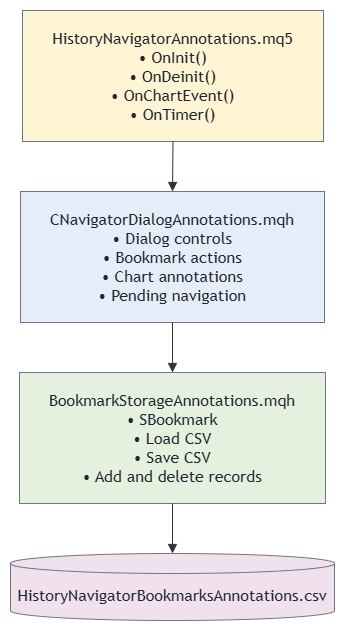
Figure 2. Responsibilities and communication between the History Navigator source files.
OnDeinit() continues to destroy the dialog cleanly for normal removal, recompilation, chart closure, or a manual timeframe change:
//+------------------------------------------------------------------+
//| Releases the dialog with the terminal reason                     |
//+------------------------------------------------------------------+
void OnDeinit(const int reason)
  {
   EventKillTimer();

   PrintFormat("HistoryNavigatorAnnotations: deinitializing. reason=%d",reason);

   if(g_dialog!=NULL)
     {
      //--- Pass the terminal's actual reason. CAppDialog::Destroy() defaults to
      //--- REASON_PROGRAM, which calls ExpertRemove() for an Expert Advisor.
      if(reason!=REASON_CHARTCHANGE)
         g_dialog.CancelPendingNavigation();
      g_dialog.Destroy(reason);
      delete g_dialog;
      g_dialog=NULL;
     }
  }
In the inspected Standard Library implementation, CAppDialog::Destroy() defaults to REASON_PROGRAM and calls ExpertRemove() for an Expert Advisor when that reason is supplied. Passing the actual deinitialization reason avoids this removal branch during REASON_CHARTCHANGE. The terminal then attempts a separate initialization of the EA, which can still fail during dialog creation or timer setup.
The same lifecycle also occurs when a trader changes timeframe manually. For bookmark recall, it is now an intentional part of the architecture: the old instance stores the request, and the new one completes it.
Refreshing Annotations Safely
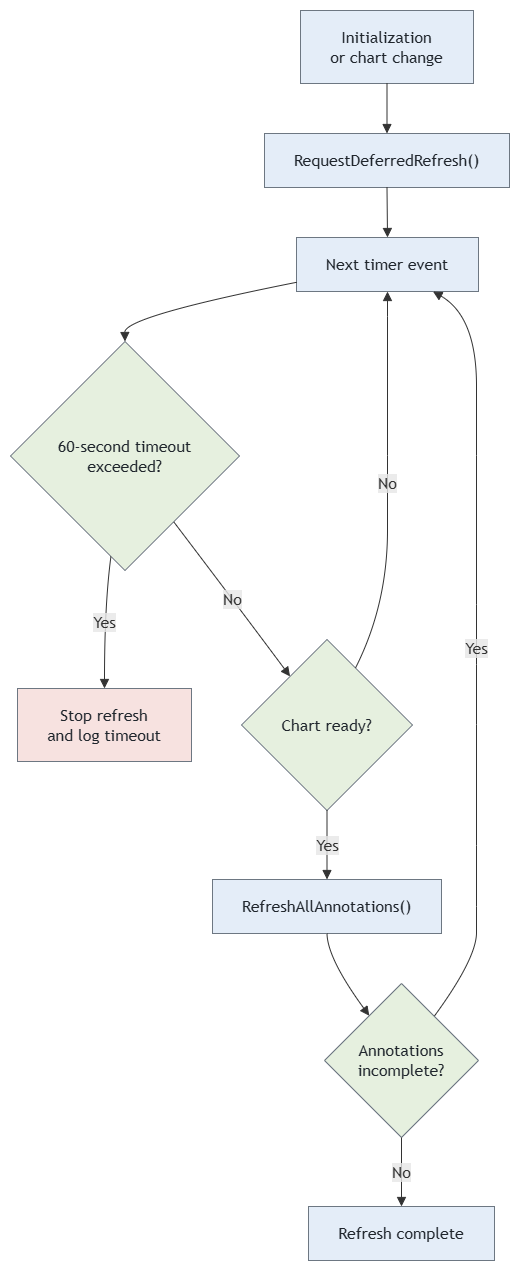
Figure 3. Timer-driven annotation refresh with readiness checks and a bounded retry period.
Annotations must be recreated after the chart becomes usable. Immediately after initialization or a manual chart change, the chart can temporarily have no visible bars or incomplete historical data. The dialog uses its timer to defer the refresh until the chart is stable.
//+------------------------------------------------------------------+
//| Schedules a deferred annotation refresh                          |
//+------------------------------------------------------------------+
void CNavigatorDialogAnnotations::RequestDeferredRefresh(void)
  {
   if(!m_bNeedRefresh)
      m_refreshStarted=GetTickCount64();
   m_bNeedRefresh=true;
   m_lastChartChangeTick=GetTickCount();
   m_stableBarCount=-1;
  }
Unavailable target data is retried within a bounded period. A request that expires ends without reporting successful navigation. An unchanged bar count provides a short debounce; it does not prove synchronization or target-date availability. The navigator also checks SERIES_SYNCHRONIZED and resolves the requested bar with CopyRates(). The loaded range and the corresponding iBarShift() result are checked before navigation or annotation creation proceeds.
//+------------------------------------------------------------------+
//| Checks whether chart data is synchronized and stable             |
//+------------------------------------------------------------------+
bool CNavigatorDialogAnnotations::IsChartStable(void)
  {
//--- Check if chart has visible bars
   int visibleBars=(int)ChartGetInteger(0,CHART_VISIBLE_BARS);
   if(visibleBars<=0)
      return(false);

//--- Check if symbol and period are valid
   if(Symbol()==""||Period()==0)
      return(false);

//--- Equal bar counts are a debounce only, not a synchronization guarantee.
   if(!SeriesInfoInteger(Symbol(),Period(),SERIES_SYNCHRONIZED))
      return(false);
//--- Check if there are bars available
   int bars=Bars(Symbol(),Period());
   if(bars<=0)
      return(false);

//--- Check if bar count has stabilised (not changing rapidly)
   if(m_stableBarCount==-1)
     {
      m_stableBarCount=bars;
      return(false);
     }
//--- If bar count changed, update and wait
   if(m_stableBarCount!=bars)
     {
      m_stableBarCount=bars;
      return(false);
     }
//--- Use a local monotonic clock. TimeCurrent() can remain unchanged until
//--- the next market tick, which would otherwise block the refresh forever.
   if((uint)(GetTickCount()-m_lastChartChangeTick) < 1000)
      return(false);

   return(true);
  }
GetTickCount() measures the refresh delay, while GetTickCount64() measures request and refresh timeouts. Neither depends on incoming market ticks.
//+------------------------------------------------------------------+
//| Resolves and validates the requested historical bar              |
//+------------------------------------------------------------------+
bool CNavigatorDialogAnnotations::ReadTargetBar(const datetime target,MqlRates &bar,int &shift)
  {
   if(target<=0||target>TimeCurrent())
      return(false);
   MqlRates rates[1];
//--- Date-based request initiates loading if this historical region is absent.
   if(CopyRates(Symbol(),Period(),target,1,rates)!=1)
      return(false);
   if(!SeriesInfoInteger(Symbol(),Period(),SERIES_SYNCHRONIZED))
      return(false);
   int total=Bars(Symbol(),Period());
   if(total<=0||target<iTime(Symbol(),Period(),total-1))
      return(false);
   shift=iBarShift(Symbol(),Period(),target,false);
   if(shift<0||iTime(Symbol(),Period(),shift)!=rates[0].time)
      return(false);
//--- Gaps map to the nearest preceding available bar, not an invented candle.
   if(rates[0].time<=0||rates[0].time>target||!MathIsValidNumber(rates[0].high))
      return(false);
   bar=rates[0];
   return(true);
  }
Once the chart is stable and synchronized, RefreshAllAnnotations() removes registered annotations and attempts to recreate bookmarks matching the active chart. Each bookmark’s target data is checked before its objects are created; incomplete refreshes are retried within the timeout.
Designing Annotations for Price-Action Study
An annotation should identify a location without becoming part of the signal being studied. This is why the initial implementation uses a thin, solid blue vertical line and a small label rather than a large colored box, arrow, or background area. The marker draws attention to a point in time while leaving candles, volume, indicators, and manually drawn levels visible.
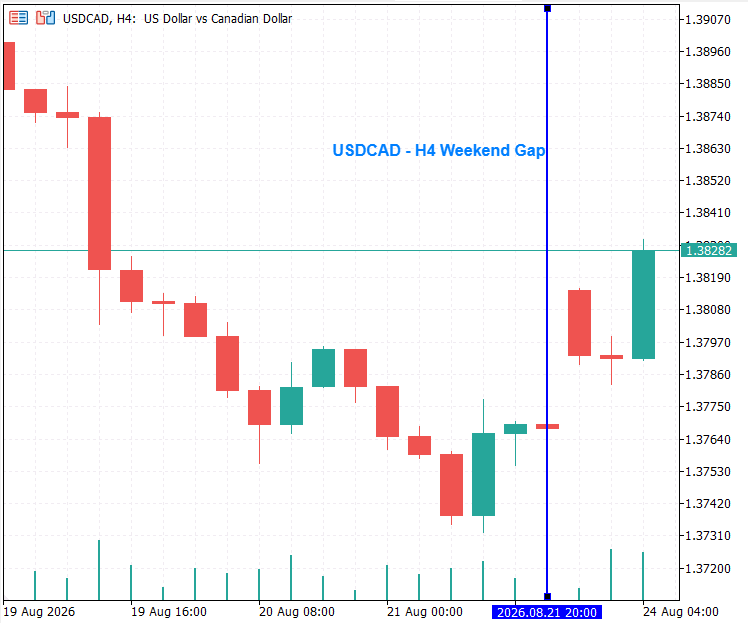
Figure 4. Annotations Design.
The vertical line identifies the event time precisely. Its label provides the human meaning that a timestamp alone cannot supply. A name such as London breakout, weekly range failure, or post-news reversal is much easier to recognize than a raw date. The notes field remains in the navigator rather than being rendered in full on the chart. Long notes are valuable for recording context, but displaying them permanently would make a chart increasingly difficult to read.
The visual design also distinguishes a bookmark from a trade signal. The marker is a research reference, not an instruction to buy or sell. A line may identify the first impulsive move of a trend, a failed breakout, or a prior swing point. The subsequent interpretation remains the responsibility of the analyst.
Naming bookmarks effectively
Bookmark names are part of the analytical record. Short, descriptive names make the list and labels useful months after the initial study. A consistent naming style is particularly helpful when the bookmark file grows.
For example, a trader might use the following pattern:
YYYY.MM.DD — setup or event — direction
2024.08.05 — Tokyo reversal — bullish
H4 range break — failed
Daily supply reaction — second test
The name should identify the reason for preserving the event, while the notes can record additional observations. Notes may include the higher-timeframe bias, the location of liquidity, the session, confirmation seen on a lower timeframe, or questions to revisit later. This combination turns the CSV file into a compact research journal rather than a collection of unexplained timestamps.
//+------------------------------------------------------------------+
//| Builds text for a bookmark list entry                            |
//+------------------------------------------------------------------+
string CNavigatorDialogAnnotations::BookmarkDisplay(const SBookmark &bookmark) const
  {
//--- Present the identifying fields in the bookmark list.
  return(bookmark.name+" | "+bookmark.symbol+" | "+
         EnumToString(bookmark.timeframe)+" | "+
         TimeToString(bookmark.dateTime,TIME_DATE|TIME_MINUTES));
  }
Why annotations are filtered by timeframe
The same price event can have a different meaning on different timeframes. A one-hour rejection may be a useful entry trigger, while the daily chart may show it only as a small candle inside a broader range. Showing every bookmark on every timeframe would create clutter and would imply a level of equivalence that does not exist.
Filtering annotations by both symbol and timeframe preserves the original analytical context. It also creates a useful workflow: a trader can maintain separate collections of bookmarks for daily structure, H4 decision areas, H1 setups, and lower-timeframe executions, all in the same storage file. Each chart displays only the references created for its own purpose.
//+------------------------------------------------------------------+
//| Filters annotations by the active chart context                  |
//+------------------------------------------------------------------+
//--- Ignore bookmarks created for other chart contexts.
if(bookmark.symbol!=Symbol() || bookmark.timeframe!=Period())
  return;
Managing Annotation Ownership and Cleanup
Chart objects are shared by the user and attached programs, so a matching prefix does not establish ownership. The navigator records the object names it allocates and uses that registry for cleanup. It does not select unrelated objects merely because they share a prefix.
//+------------------------------------------------------------------+
//| Removes annotations allocated by this navigator                  |
//+------------------------------------------------------------------+
void CNavigatorDialogAnnotations::RemoveAllAnnotations(void)
  {
//--- No prefix sweep: only names allocated and recorded by this instance.
   int kept=0;
   for(int i=0;i<ArraySize(m_ownedObjects);i++)
     {
      string name=m_ownedObjects[i];
      if(ObjectFind(0,name)<0)
         continue;
      if(!ObjectDelete(0,name)||ObjectFind(0,name)>=0)
        {
         Print("Could not remove annotation: ",name," error=",GetLastError());
         m_ownedObjects[kept++]=name;
        }
     }
   ArrayResize(m_ownedObjects,kept);
  }
RefreshAllAnnotations() removes registered objects and recreates annotations for bookmarks matching the active chart. Failed deletions remain recorded for another attempt. This ownership convention assumes cooperative chart use; another program deliberately replacing an object under the same registered name cannot be distinguished by name alone.
For a very large bookmark library, a later version could optimize this operation by comparing the desired object names with existing names and updating only the differences. That optimization is unnecessary while the collection is small, and it would add more state-management code to test. In this stage of the toolkit, correctness and predictable cleanup are more valuable than premature optimization.
Deleting a bookmark and its marker
//+------------------------------------------------------------------+
//| Deletes and persists a bookmark with rollback                    |
//+------------------------------------------------------------------+
bool CBookmarkStorageAnnotations::DeleteBookmark(const int index)
  {
   int total=ArraySize(m_bookmarks);

   if(index < 0||index>=total)
     {
      PrintFormat("BookmarkStorageAnnotations: delete rejected. index=%d count=%d",index,total);
      return(false);
     }
   PrintFormat("BookmarkStorageAnnotations: deleting index=%d name='%s'",index,m_bookmarks[index].name);

   SBookmark deleted=m_bookmarks[index];

   for(int i=index; i < total-1; i++)
      m_bookmarks[i]=m_bookmarks[i+1];

   ArrayResize(m_bookmarks,total-1);

   if(!Save())
     {
      ArrayResize(m_bookmarks,total);
      for(int i=total-1; i > index; i--)
         m_bookmarks[i]=m_bookmarks[i-1];
      m_bookmarks[index]=deleted;

      Print("BookmarkStorageAnnotations: delete rolled back due to save failure.");
      return(false);
     }
   return(true);
  }
Bookmark deletion changes the stored collection and its chart presentation. DeleteBookmark() temporarily removes the selected record from memory and attempts to save the collection. If saving reports failure, the method restores the record and returns false. The dialog rebuilds its list and annotations only after success.
This provides application-level rollback for reported failures. It does not make memory changes and file replacement a crash-atomic transaction.
//+------------------------------------------------------------------+
//| Quotes a CSV text field                                          |
//+------------------------------------------------------------------+
string CBookmarkStorageAnnotations::CsvField(string value) const
  {
   StringReplace(value,"\"","\"\"");
   return("\""+value+"\"");
  }
//+------------------------------------------------------------------+
//| Writes the bookmark collection safely                            |
//+------------------------------------------------------------------+
bool CBookmarkStorageAnnotations::WriteToFile()
  {
   if(!m_loadOK||m_lock==INVALID_HANDLE)
      return(false);
   string text="Name,Symbol,Timeframe,DateTime,Notes\r\n";
   for(int i=0;i<ArraySize(m_bookmarks);i++)
      text+=CsvField(m_bookmarks[i].name)+","+CsvField(m_bookmarks[i].symbol)+","+
   IntegerToString((int)m_bookmarks[i].timeframe)+","+
   IntegerToString((long)m_bookmarks[i].dateTime)+","+
   CsvField(m_bookmarks[i].notes)+"\r\n";
   uchar bytes[];
   int n=StringToCharArray(text,bytes,0,WHOLE_ARRAY,CP_UTF8)-1;
   if(n<0||n>16777213)
      return(false);
   string temp=m_filename+".tmp";
   int h=FileOpen(temp,FILE_WRITE|FILE_BIN);
   if(h==INVALID_HANDLE)
      return(false);
   uchar bom[3]=
     {
      239,187,191
     };
   ResetLastError();
   bool ok=(FileWriteArray(h,bom,0,3)==3);
   if(FileWriteArray(h,bytes,0,n)!=(uint)n)
      ok=false;
   FileFlush(h);
   if(GetLastError()!=0||FileSize(h)!=(ulong)(n+3))
      ok=false;
   FileClose(h);
   if(!ok)
     {
      FileDelete(temp);
      return(false);
     }
//--- Keep a recovery copy. FileMove is not claimed to be crash-atomic.
   if(FileIsExist(m_filename)&&!FileCopy(m_filename,0,m_filename+".bak",FILE_REWRITE))
     {
      FileDelete(temp);
      return(false);
     }
   if(!FileMove(temp,0,m_filename,FILE_REWRITE))
     {
      Print("Bookmark replacement failed. Previous data retained in .bak when available.");
      FileDelete(temp);
      return(false);
     }
   return(true);
  }
Interaction Workflow Across Chart Contexts
The Go To button is both a context-restoration and historical-positioning command. When the selected bookmark matches the current chart, navigation proceeds once the required historical data is available. When it belongs to another symbol or timeframe, it begins the pending-navigation hand-off and completes the same positioning step from the new EA instance.
The recommended workflow is:
- Attach the History Navigator to any chart.
- Review the visible labels and vertical lines for bookmarks matching that chart.
- Select any bookmark from the persistent list.
- Press Go To.
- If necessary, allow the navigator to change the chart and reinitialize.
- Wait for context and history validation; the dialog navigates if the target becomes available before the request expires.
- Use the date controls to examine related periods, then save any additional discoveries as new bookmarks.
If a selected bookmark belongs to another context, the navigator records the request before calling ChartSetSymbolPeriod(). The old dialog is expected to disappear during the platform transition. The new dialog reads the pending request and validates its age, symbol, and timeframe before continuing, so a valid request does not require the user to select the bookmark again.
This behavior keeps the user workflow concise while respecting the platform lifecycle. It also avoids a timing-dependent delay: the navigation operation happens only after the new chart has the bars required by NavigateToDateTime().
Centre positioning remains shared
Date entry and bookmark recall share NavigateToDateTime(). After resolving the requested bar, the navigator passes its series index to CenterChartOnBar(). Series index zero identifies the newest bar, whereas CHART_BEGIN uses the oldest end of the chart as its origin, so the index must be converted before scrolling.
//+------------------------------------------------------------------+
//| Navigates to a specified historical time                         |
//+------------------------------------------------------------------+
void CNavigatorDialogAnnotations::NavigateToDateTime(datetime target)
  {
   if(target<=0||target>TimeCurrent())
     {
      UpdateStatus("Invalid or future bookmark time.",clrRed);
      return;
     }
   MqlRates bar;
   int idx;
   if(!ReadTargetBar(target,bar,idx))
     {
      if(!m_pendingNavigation||m_pendingNavigationTime!=target)
        {
         CancelPendingNavigation();
         m_pendingNavigation=true;
         m_pendingNavigationTime=target;
         m_pendingNavigationTimeframe=Period();
         m_pendingSymbol=Symbol();
         m_requestTick=GetTickCount64();
        }
      RequestDeferredRefresh();
      UpdateStatus("Waiting for target history (60s limit).",clrBlue);
      return;
     }
   if(!CenterChartOnBar(idx))
     {
      UpdateStatus("Chart positioning failed. See Experts log.",clrRed);
      return;
     }
   m_lastNavigatedTime=target;
   UpdateStatus("Found: "+TimeToString(bar.time,TIME_DATE|TIME_MINUTES),clrGreen);
   RequestDeferredRefresh();
  }
Keeping this single navigation path is important for maintenance. Direct date entry and bookmark recall must produce the same result when supplied with the same timestamp. If separate navigation routines were used, a change to bar lookup, chart shift, or history validation could make one path behave differently from the other.
//+------------------------------------------------------------------+
//| Centers the chart on a historical bar                            |
//+------------------------------------------------------------------+
bool CNavigatorDialogAnnotations::CenterChartOnBar(int barIndex)
  {
   int total=Bars(Symbol(),Period());
   if(total<=0||barIndex<0||barIndex>=total)
      return(false);
   if(!ChartSetInteger(0,CHART_AUTOSCROLL,false)||!ChartSetInteger(0,CHART_SHIFT,false))
      return(false);
   ChartRedraw();
   int visible=(int)ChartGetInteger(0,CHART_VISIBLE_BARS);
   if(visible<1)
      return(false);
//--- Series 0 is newest. CHART_BEGIN's origin is the oldest bar.
   int offset=(total-1)-barIndex-visible/2;
   if(offset<0)
      offset=0;
   if(!ChartNavigate(0,CHART_BEGIN,offset))
      return(false);
   ChartRedraw();
//--- Verify the observed viewport and correct using its series coordinates.
   int desired=(int)MathMin(total-1,barIndex+visible/2);
   int first=(int)ChartGetInteger(0,CHART_FIRST_VISIBLE_BAR);
   if(first!=desired&&!ChartNavigate(0,CHART_CURRENT_POS,first-desired))
      return(false);
   ChartRedraw();
   first=(int)ChartGetInteger(0,CHART_FIRST_VISIBLE_BAR);
   bool shown=(barIndex<=first&&barIndex>=first-visible+1);
   if(!shown)
      PrintFormat("Centering failed: target=%d first=%d visible=%d",barIndex,first,visible);
//--- Near either history boundary the terminal may clamp the desired center.
   return(shown);
  }
The method checks the resulting viewport and adjusts it when necessary. The target is verified to be visible, although exact centering may be constrained near either history boundary.
Data Quality and Historical Availability
A stored timestamp does not guarantee that the corresponding history is available. The navigator requests the target bar, checks synchronization and the loaded range, and retries within the request timeout. Broker history depth and the terminal’s maximum-bar setting can still prevent navigation.
This distinction is useful during research. A missing result can mean that history has not yet been downloaded, that a broker uses a different symbol suffix, or that the selected timeframe has insufficient data. It should not silently be treated as a successful navigation.
Annotation creation uses the same target-bar checks. If the required data is unavailable, the annotation is deferred.
With exact=false, iBarShift() resolves the nearest preceding available bar. During a data gap, that bar is not necessarily a candle containing a traded event.
Symbol matching is exact. A bookmark for EURUSD does not automatically match EURUSD.a or an equivalent contract at another broker. Transferring bookmarks may require explicit symbol mapping and verification of timestamp interpretation and historical availability.
CSV records as durable research data
The CSV file stores the bookmark name, symbol, integer timeframe, integer timestamp, and notes. Files are written in UTF-8 with a BOM. Text fields are quoted, embedded quotation marks are doubled, and a quote-aware reader preserves commas and line breaks within fields. Files without a BOM are interpreted using the current Windows ANSI code page.
//+------------------------------------------------------------------+
//| Reads one CSV field                                              |
//+------------------------------------------------------------------+
bool CBookmarkStorageAnnotations::ReadField(const string text,int &pos,string &value,bool &endrow) const
  {
   value="";
   endrow=false;
   int n=StringLen(text);
   bool quoted=(pos<n&&StringGetCharacter(text,pos)==34);
   if(quoted)
      pos++;
   bool closed=!quoted;
   while(pos<n)
     {
      ushort c=StringGetCharacter(text,pos);
      if(quoted&&!closed)
        {
         if(c==34)
           {
            if(pos+1<n&&StringGetCharacter(text,pos+1)==34)
              {
               value+="\"";
               pos+=2;
               continue;
              }
            closed=true;
            pos++;
            continue;
           }
         value+=StringSubstr(text,pos++,1);
         continue;
        }
      if(c==44)
        {
         pos++;
         return(true);
        }
      if(c==13||c==10)
        {
         pos++;
         if(c==13&&pos<n&&StringGetCharacter(text,pos)==10)
            pos++;
         endrow=true;
         return(true);
        }
      if(quoted||c==34)
         return(false);
      value+=StringSubstr(text,pos++,1);
     }
   endrow=true;
   return(closed);
  }
This compatibility path cannot repair records whose field boundaries are already corrupted or guarantee portability between different ANSI code pages. Malformed files are rejected, and writes are disabled for that instance to prevent replacement with a partial collection.
The file represents the current research collection. It can be inspected and backed up, but it does not retain an edit history or records that have been deleted.
Saving writes and checks a temporary file, retains the previous CSV as a backup, and then attempts replacement. Reported failures return false so the calling operation can restore its in-memory state. The backup supports recovery; file replacement is not claimed to be crash-atomic.
//+------------------------------------------------------------------+
//| Parses and validates bookmark records                            |
//+------------------------------------------------------------------+
bool CBookmarkStorageAnnotations::ParseCSV(const string text)
  {
   int pos=0,row=0;
   while(pos<StringLen(text))
     {
      string fields[5];
      for(int j=0;j<5;j++)
        {
         bool endrow;
         if(!ReadField(text,pos,fields[j],endrow)||endrow!=(j==4))
            return(false);
        }
      if(row++==0&&fields[0]=="Name"&&fields[1]=="Symbol"&&fields[2]=="Timeframe"&&fields[3]=="DateTime"&&
         fields[4]=="Notes")
         continue;
      if(fields[0]==""||fields[1]=="")
         return(false);
      for(int j=2;j<=3;j++)
        {
         if(fields[j]==""||StringLen(fields[j])>12)
            return(false);
         for(int k=0;k<StringLen(fields[j]);k++)
           {
            ushort c=StringGetCharacter(fields[j],k);
            if(c<48||c>57)
               return(false);
           }
        }
      long tf=StringToInteger(fields[2]),dt=StringToInteger(fields[3]);
      if(tf<=0||tf>49153||!HNValidTimeframe((ENUM_TIMEFRAMES)tf)||dt<=0||dt>32535215999)
         return(false);
      int i=ArraySize(m_bookmarks);
      if(ArrayResize(m_bookmarks,i+1)!=i+1)
         return(false);
      m_bookmarks[i].name=fields[0];
      m_bookmarks[i].symbol=fields[1];
      m_bookmarks[i].timeframe=(ENUM_TIMEFRAMES)tf;
      m_bookmarks[i].dateTime=(datetime)dt;
      m_bookmarks[i].notes=fields[4];
     }
   return(true);
  }
An exclusive file handle allows one navigator instance at a time to load and edit the shared collection.
User Interface Considerations
The navigator keeps the bookmark form compact because it is intended to sit beside a live chart rather than replace it. The name field captures the short label seen in the list and chart annotation. The notes field retains detail without forcing it onto the screen. The list provides a summary containing the name, symbol, timeframe, and time, so the user can inspect the essential context before choosing an action.
Selection state is kept separately as m_selectedIndex. This protects bookmark operations from relying on visual text as an identifier. The list is a presentation layer; CBookmarkStorageAnnotations remains the source of data. Pending navigation stores the complete target context and request metadata independently of m_selectedIndex because the interface and its selection state are recreated during a chart transition.
An interface can become confusing if buttons appear to work but silently do nothing. For that reason, each rejection path updates the status label. Examples include an empty bookmark name, no selected list row, an invalid stored record, failure to persist the pending request, failure to request the chart change, and unavailable history. These messages make the tool easier to use and reduce the need to inspect the Experts log for ordinary user actions.
//+------------------------------------------------------------------+
//| Updates controls for the selected bookmark                       |
//+------------------------------------------------------------------+
void CNavigatorDialogAnnotations::OnListSelect(void)
  {
   int index=(int)m_listBookmarks.Value();

   if(index < 0||index>=m_bookmarkStorage.Count())
     {
      m_selectedIndex=-1;
      return;
     }
   m_selectedIndex=index;
   SBookmark bm=m_bookmarkStorage.GetBookmark(index);
   m_editBookmarkName.Text(bm.name);
   m_editBookmarkNotes.Text(bm.notes);

   PrintFormat("HistoryNavigatorAnnotations: list selection index=%d name='%s'",index,bm.name);
  }
Loading bookmark chart... indicates that a chart change has been requested. Context validation and historical navigation are still pending.
Testing
Verifying bookmark navigation and annotations
The first test verified bookmark recall on the active chart. The History Navigator was attached to EURUSD on the H4 timeframe, where a January 2025 NFP bookmark had been saved. The January employment report was released on 7 February 2025, so the February timestamp is consistent with the report’s January reference period. After selecting the bookmark and pressing Go To, the navigator located the corresponding historical bar and centered the chart around the stored event.
The chart displays a blue vertical line at the saved event time together with the label EURUSD H4 — January NFP. The bookmark list remains available beside the chart, showing the EURUSD entry and an additional GBPUSD H4 bookmark. Only annotations matching the active symbol and timeframe are drawn.
The status message Found: 07.02.2025 12:00 identifies the H4 bar containing the event. The blue time marker at 2025.02.07 13:30 represents the precise saved bookmark timestamp inside that H4 candle. This distinction is expected: the bar begins at 12:00, while the event occurred later within that bar.
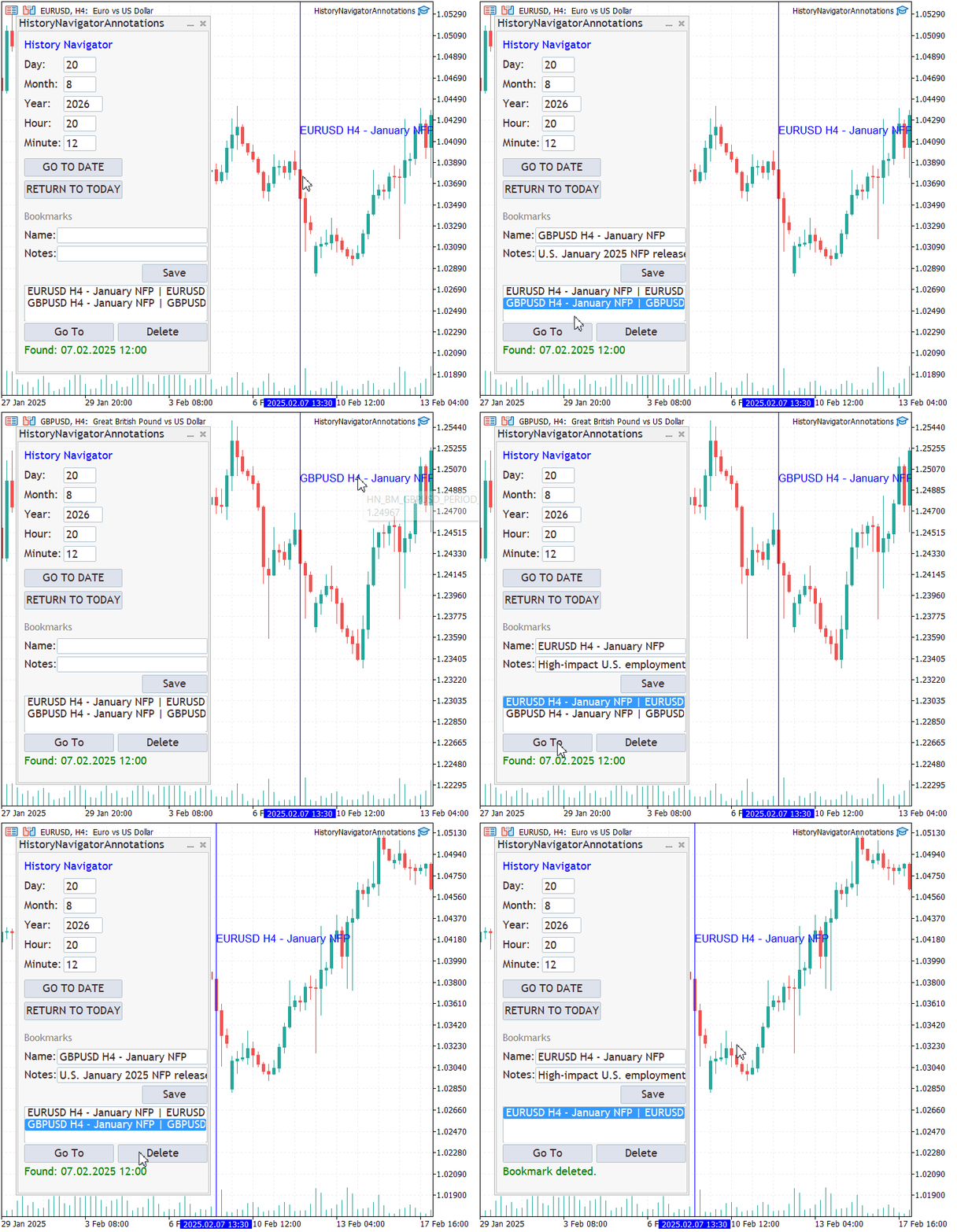
Figure 5. Bookmark navigation and annotation on EURUSD H4.
Verifying cross-timeframe bookmark navigation
The cross-timeframe test began on the USDCAD M30 chart. A previously saved Bearish Reversal bookmark belonging to the USDCAD H4 timeframe was selected from the navigator and recalled with the Go To button.
The chart then changed from M30 to H4. After the chart transition, the History Navigator remained available on the H4 chart and completed the pending navigation automatically. The blue vertical line and Bearish Reversal label were recreated at the saved timestamp, while the status message confirmed that the relevant H4 bar had been found.
The saved timestamp is 07.08.2026 08:30, whereas the status message reports Found: 07.08.2026 08:00. This is expected because the saved time falls inside the H4 candle that opened at 08:00. The annotation retains the exact bookmark time, while navigation identifies the containing historical bar.
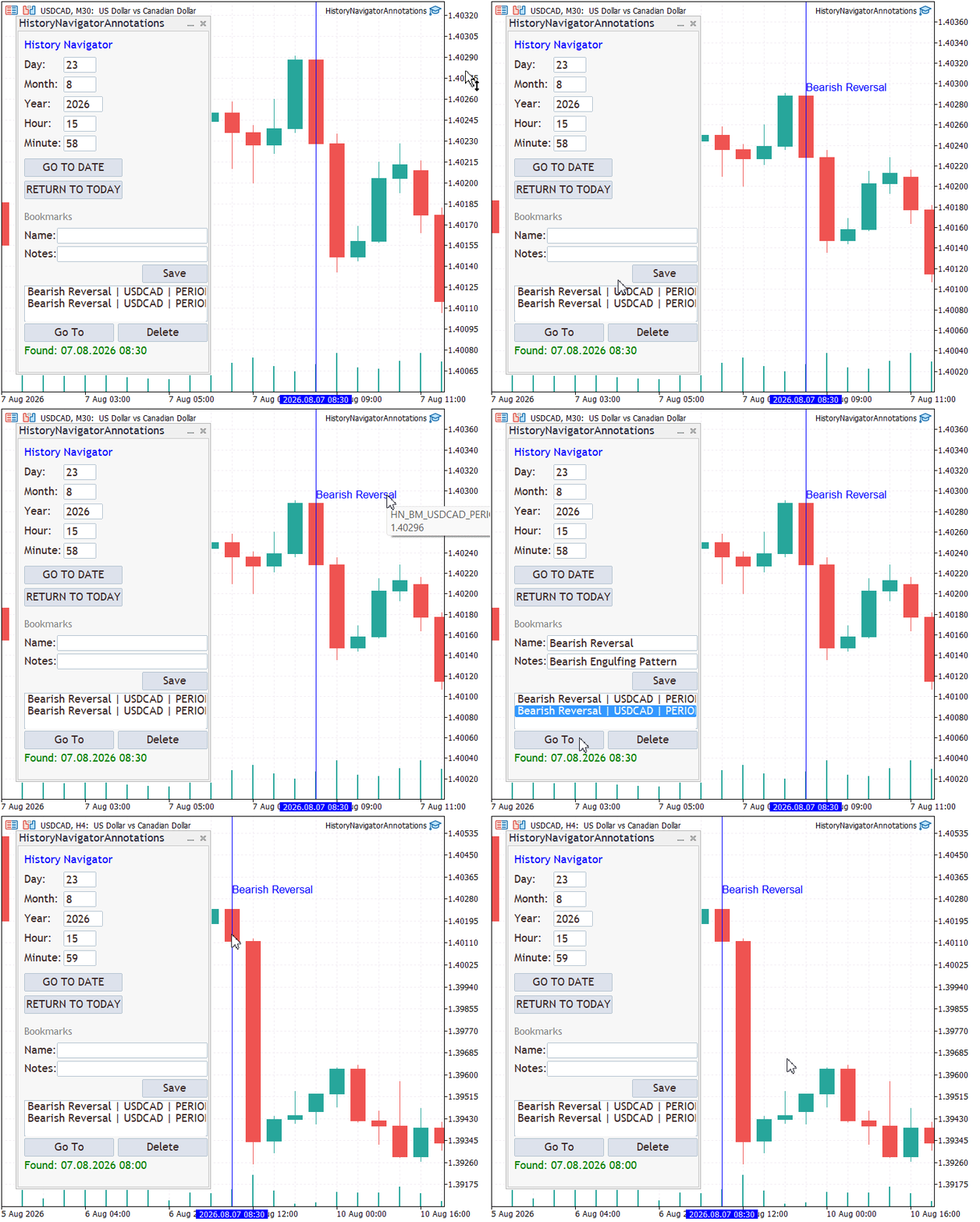
Figure 6. Cross-timeframe bookmark navigation from USDCAD M30 to USDCAD H4.
Conclusion
In this article, we extended the persistent bookmark system with direct chart annotations. Bookmarks now become visible historical reference points, making it easier to compare significant price-action events in their original context.
Bookmark recall transfers a short-lived request across EA reinitialization using temporary terminal Global Variables. The new instance validates the request’s age and chart context, checks synchronization and target-bar availability, and attempts navigation within a bounded period.
The History Navigator combines persistent bookmarks, context-filtered annotations, and validated chart navigation. Successful recall depends on the saved symbol being available, the request remaining valid, and the required history becoming ready.
The deferred-operation pattern is also reusable beyond bookmarks: preserve only the data needed to resume work, recreate transient controls in OnInit(), wait for data readiness, carry out the operation, and remove the persisted request. Future instalments can build on this foundation with bookmark categories, color-coded annotations, filters, searchable notes, and interactive labels.
Attachments
| Name | Type | Purpose |
|---|---|---|
| BookmarkStorageAnnotations.mqh | Include | Defines the bookmark model and CSV persistence layer. |
| CNavigatorDialogAnnotations.mqh | Include | Implements the annotated navigator and pending-navigation hand-off. |
| HistoryNavigatorAnnotations.mq5 | Expert Advisor | Initializes the dialog and forwards chart and timer events. |
| MQL5.zip | Archive | Complete project archive containing all source files arranged in the required MetaTrader 5 directory structure. Extract the archive into the terminal's Data Folder so all files are placed automatically in their correct locations. |
Warning: All rights to these materials are reserved by MetaQuotes Ltd. Copying or reprinting of these materials in whole or in part is prohibited.
This article was written by a user of the site and reflects their personal views. MetaQuotes Ltd is not responsible for the accuracy of the information presented, nor for any consequences resulting from the use of the solutions, strategies or recommendations described.

 Symbol Correlation Monitor with Live Heatmap in MQL5
 Practical Modules from Other Languages in MQL5 (Part 08): MATPLOTLIB
 The Maximal Information Coefficient: Detecting Any Relationship, and the Null That Decides Whether It Is Real
 Strategy Optimization and Forward Analysis (Part 1): The Pardo Method — A Basic Model

- Free trading apps
- Over 8,000 signals for copying
- Economic news for exploring financial markets
You agree to website policy and terms of use