

Automated Trade Statement Exporter to Excel-Compatible XLSX in MQL5
 994
994
 0
0

Introduction
After a backtest run or a live trading session, the terminal's History tab holds a complete record of every closed trade: entry and exit prices, profit, duration, stop-loss, take-profit. The data is all there, but getting it into Excel for further analysis is not straightforward. The terminal's built-in export produces an HTML file. Opening that file in Excel triggers a format-conversion dialog, column types default to text, and dates require manual reformatting before any formula can reference them. Copy-pasting from the terminal loses structure entirely and does not scale beyond a handful of trades.
This article builds an MQL5 script that solves the problem directly. The script reads closed trade history, reconstructs each trade from its constituent deal pair using the two-pass SL/TP lookup pattern, and writes a fully structured XLSX file to MQL5/Files/. The output file opens directly in Excel or Google Sheets with no conversion step, no dialog box, and no manual reformatting. Prices are stored as numbers, dates are stored as Excel date serial numbers with a date format applied, and the header row is bold. The implementation separates trade reconstruction, XML generation, and file assembly into four distinct modules with clearly bounded responsibilities.
Why XLSX Over CSV or HTML
CSV is the simplest export format, but it carries a fundamental limitation for trade data. Every field in a CSV file is a string. When Excel opens a CSV, it attempts to infer column types, and the inference fails in predictable ways: prices with five decimal places are sometimes parsed as dates, date strings in non-standard formats are left as text, and profit figures with a negative sign are occasionally treated as formulas. The analyst must manually reformat every numeric column before any formula can operate on the data correctly.
XLSX avoids all of these problems. A SpreadsheetML worksheet stores each cell with an explicit type declaration. A price cell is stored as a number. A date cell is stored as a serial number with a named date format attached. When Excel opens the file, it reads those type declarations directly and renders each column correctly without inference. The file also opens natively in Google Sheets, LibreOffice Calc, and any other OOXML-compatible spreadsheet application. For a trade statement that an analyst will open repeatedly and run formulas against, XLSX is the only format that requires zero preparation after export.
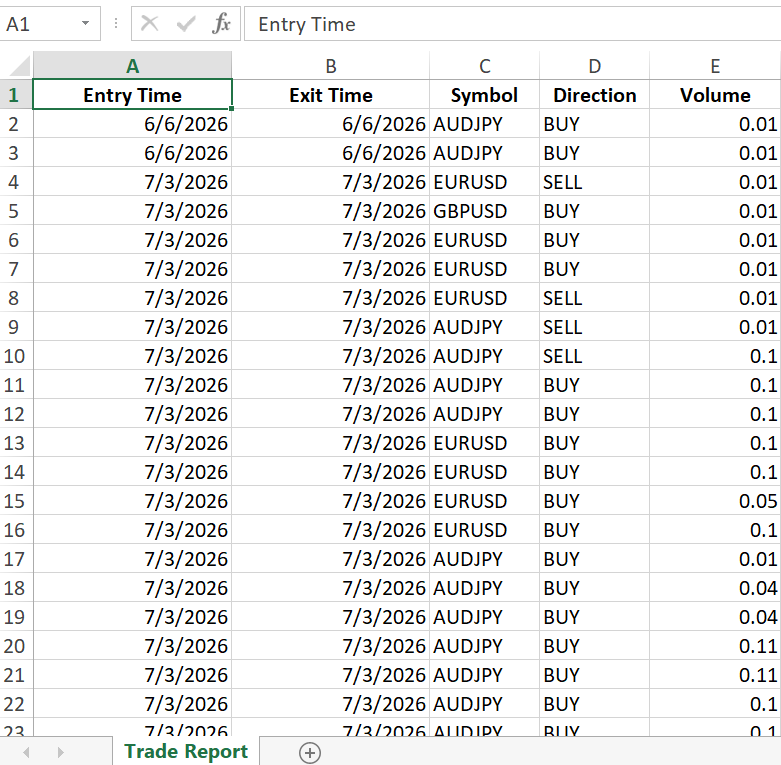
The generated trade_statement.xlsx file open in Excel
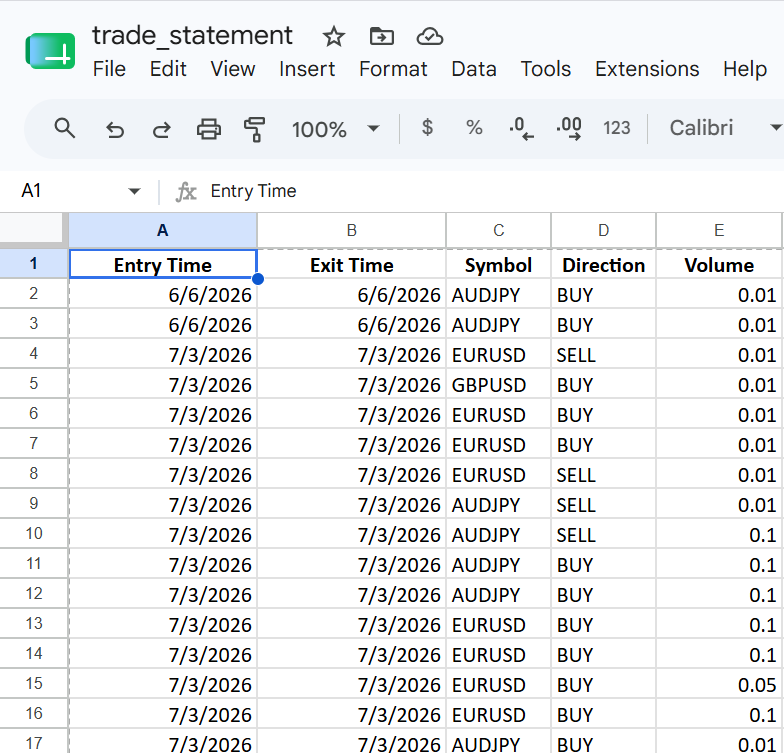
The same trade_statement.xlsx file open in Google Sheets after uploading, confirming that date columns are recognized as dates, numeric columns are formatted as numbers, and no conversion dialog was required.
The SpreadsheetML Format
An XLSX file is a ZIP archive. Inside that archive is a set of XML files organized into a specific folder structure. The format is defined by the Office Open XML standard maintained by ECMA International as ECMA-376. No Excel installation is required to produce a valid XLSX file. Any tool that can write XML and produce a ZIP archive can generate an XLSX file that Excel, Google Sheets, and LibreOffice Calc will open.
The minimum set of files needed for a valid, openable XLSX file is seven. Each plays a specific role.
- [Content_Types].xml lives at the archive root and maps every file path inside the ZIP to its MIME type. Excel reads this file first to discover what the archive contains. Without it, Excel refuses to open the file.
- _rels/.rels is the root relationships file. It declares the relationship between the archive root and the workbook, identifying xl/workbook.xml as the workbook part using a fixed relationship type URI from the OOXML specification.
- xl/workbook.xml defines the workbook itself. It lists the worksheets in the workbook, giving each a name and an r:id attribute that links it to a relationship entry.
- xl/_rels/workbook.xml.rels maps the r:id values in xl/workbook.xml to their actual file paths inside the archive, pointing at xl/worksheets/sheet1.xml, xl/sharedStrings.xml, and xl/styles.xml.
- xl/worksheets/sheet1.xml is the worksheet containing all cell data organized in rows and columns.
- xl/sharedStrings.xml holds a table of string values referenced by index from worksheet cells. Column header labels are stored here to avoid repeating identical string literals inside the worksheet XML.
- xl/styles.xml defines the cell styles and number formats. It is required for date formatting and for the bold header row style.
MQL5 writes each of these XML files individually to MQL5/Files/ using standard file I/O functions. Once all files are in the correct relative structure inside a staging folder, a single call to ShellExecuteW() invokes PowerShell's .NET ZipFile.CreateFromDirectory to package them into a valid ZIP archive with the .xlsx extension.
Cell Types, Dates, and Styles
SpreadsheetML defines cell types through the t attribute on the <c> element. This implementation uses three.
- An inline string cell carries t="inlineStr" and places its value inside an <is><t> child element. The value lives directly in the cell element rather than in the shared strings table. The direction and symbol columns use this type.
- A number cell omits the t attribute entirely. The value is placed inside a <v> child element as a plain decimal number. Price, profit, volume, and R-multiple columns use this type.
- A shared string cell carries t="s". Its <v> element contains an integer index into the shared strings table. All header row cells use this type.
Dates require special handling. SpreadsheetML has no native date type. Dates are stored as number cells containing an Excel date serial number: the integer count of days elapsed since January 1, 1900. A cell containing a date serial number looks identical to any other number cell in the XML. What distinguishes it as a date is a s attribute on the <c> element referencing a style index in xl/styles.xml. That style index must point to an <xf> element whose numFmtId references a date number format. If the style index is wrong or the applyNumberFormat="1" attribute is omitted, Excel displays the serial number as a plain integer.
The following snippet shows a header cell, a date cell, and a number cell in context:
<!-- Header cell: shared string index 0, bold centered style (s="1") -->
<c r="A1" t="s" s="1">
  <v>0</v>
</c>

<!-- Date cell: serial number, date style (s="2") -->
<c r="A2" s="2">
  <v>46179</v>
</c>

<!-- Price cell: number, no style needed -->
<c r="F2">
  <v>1.08523</v>
</c>
The xl/styles.xml file declares three <xf> entries in its <cellXfs> section. Index 0 is the default style. Index 1 applies bold font and centered alignment for header cells. Index 2 applies numFmtId="14", which is Excel's built-in short date format. The <fills> section must declare two placeholder entries before any real fills, and the <cellStyleXfs> section must contain at least one base format record. Omitting any of these structural requirements causes Excel to display a repair prompt when opening the file.
Trade History Reconstruction
MetaTrader 5 records trading activity as individual deal records rather than as complete trades. A trade that opens and closes is represented by at least two deals: one with DEAL_ENTRY_IN marking the position opening, and one with DEAL_ENTRY_OUT marking the position closing. All deals belonging to the same trade share the same DEAL_POSITION_ID value.
Reconstructing a complete trade requires selecting the full deal history for the requested date range using HistorySelect(), then iterating every deal returned by HistoryDealGetTicket(). For each deal, HistoryDealGetInteger() with DEAL_ENTRY identifies whether the deal opens or closes a position. Entry deals are stored in parallel arrays keyed by DEAL_POSITION_ID. When an exit deal is encountered, its position ID is used to locate the matching entry, and the two are combined into a CTradeRecord.
Stop-loss and take-profit values present a challenge. HistoryDealGetDouble() exposes DEAL_SL and DEAL_TP fields on the deal record, but these fields are often zero for deals executed in live trading or during backtests that do not persist SL/TP to the deal record. The two-pass lookup handles this case. The first pass reads DEAL_SL and DEAL_TP directly from the deal record. If either value is zero, the second pass retrieves the order ticket from the deal using DEAL_ORDER, then calls HistoryOrderGetDouble() with ORDER_SL and ORDER_TP to retrieve the values from the originating order record.
ZIP Packaging with ShellExecuteW
Once the individual XML component files are written to a staging folder in the correct relative structure, they must be packaged into a single ZIP archive with an .xlsx extension. Excel opens XLSX files by extracting the ZIP and reading the XML files inside.
MQL5 provides access to external Windows functions through #import. This implementation imports ShellExecuteW from shell32.dll to invoke PowerShell. Rather than using the Compress-Archive PowerShell cmdlet, which depends on the Microsoft.PowerShell.Archive module and can fail silently in non-interactive sessions, the implementation uses .NET's System.IO.Compression.ZipFile class directly. This class is part of the .NET Framework itself and is always available without module auto-loading.
The PowerShell command takes this form:
Add-Type -AssemblyName System.IO.Compression.FileSystem;
[System.IO.Compression.ZipFile]::CreateFromDirectory(
    'C:\path\to\staging\',
    'C:\path\to\output.xlsx',
    [System.IO.Compression.CompressionLevel]::Optimal,
    $false
)
The fourth argument, $false, sets includeBaseDirectory to false. This ensures the XML files land at the ZIP root rather than inside a subfolder named after the staging directory, which is required for Excel to recognize the file structure correctly.
The entire command is wrapped in a PowerShell try/catch block with $ErrorActionPreference='Stop'. On success, the script writes a small done marker file into MQL5/Files/. On failure, it writes the exception message into an error marker file. MQL5 polls for either marker file every 400 milliseconds, up to a 15-second timeout. This means the script reports the exact .NET exception text if anything goes wrong, rather than waiting silently and timing out. Once the done marker appears, the script reads it, cleans up the staging files, and completes in under one second for typical trade statement sizes.
On Linux or Wine environments, ShellExecuteW and PowerShell are not available. An alternative approach would call the system zip command through a different import. That adaptation is outside the scope of this article, but the staging folder structure and XML files are identical regardless of the ZIP tool.
Implementation — TradeRecord.mqh
CTradeRecord is a plain data struct that holds all fields describing one completed trade. It carries the entry ticket, entry and exit times and prices, stop-loss, take-profit, profit, volume, symbol, direction, magic number, and comment. Three computed methods are declared on the struct: RMultiple(), which expresses profit in units of initial risk; DurationSeconds(), which returns the trade's holding period in seconds; and PipsProfit(), which converts the price movement to pips. Both CTradeLoader and CXlsxBuilder read this struct directly, so it lives in its own file to guarantee a single shared definition.
Class Declaration
//+------------------------------------------------------------------+
//|                                                  TradeRecord.mqh |
//+------------------------------------------------------------------+

#ifndef TRADERECORD_MQH
#define TRADERECORD_MQH

//+------------------------------------------------------------------+
//| Holds all data describing one completed round-trip trade.        |
//+------------------------------------------------------------------+
struct CTradeRecord
  {
private:
   //--- no private data; all fields are public for direct access

public:
   ulong             entry_ticket;   // ticket of the entry deal
   ulong             exit_ticket;    // ticket of the exit deal
   datetime          entry_time;     // server time of position open
   datetime          exit_time;      // server time of position close
   double            entry_price;    // fill price of the entry deal
   double            exit_price;     // fill price of the exit deal
   double            stop_loss;      // SL at entry; zero if unset
   double            take_profit;    // TP at entry; zero if unset
   double            profit;         // net profit in account currency
   double            volume;         // lot size of the trade
   string            symbol;         // traded instrument
   string            comment;        // order comment from the broker
   ENUM_DEAL_TYPE    direction;      // DEAL_TYPE_BUY or DEAL_TYPE_SELL
   long              magic;          // EA magic number; zero if manual

   double            RMultiple(void) const;
   int               DurationSeconds(void) const;
   double            PipsProfit(void) const;
  };
The struct stores raw trade fields in plain public members so that both CTradeLoader and CXlsxBuilder can read them without accessor overhead. entry_ticket and exit_ticket identify the two deal records from which the struct was built. stop_loss and take_profit may be zero if neither the deal record nor the originating order carried those values. direction uses ENUM_DEAL_TYPE rather than a boolean so the value is self-documenting when inspected in a debugger. Both computed methods are declared const so they can be called through the const CTradeRecord & references used in CXlsxBuilder.
RMultiple()
//+------------------------------------------------------------------+
//| Expresses profit as a multiple of the initial risk amount.       |
//+------------------------------------------------------------------+
double CTradeRecord::RMultiple(void) const
  {
   if(stop_loss == 0.0)
      return(0.0); // no SL means R cannot be computed

   double risk_per_unit = MathAbs(entry_price - stop_loss);
   if(risk_per_unit == 0.0)
      return(0.0); // degenerate: SL equals entry price

   double profit_per_unit = (direction == DEAL_TYPE_BUY)
                            ? (exit_price - entry_price)
                            : (entry_price - exit_price);
   return(profit_per_unit / risk_per_unit);
  }
RMultiple() divides the per-unit profit by the per-unit risk distance from entry to stop-loss. If stop_loss is zero, the method returns zero because risk is undefined. The direction check is necessary because a buy trade profits when exit is above entry, while a sell trade profits when exit is below entry.
DurationSeconds()
//+------------------------------------------------------------------+
//| Returns the holding period of the trade in whole seconds.        |
//+------------------------------------------------------------------+
int CTradeRecord::DurationSeconds(void) const
  {
   return((int)(exit_time - entry_time));
  }
MQL5 datetime values are Unix timestamps stored as integers, so subtracting entry_time from exit_time directly produces a signed integer count of seconds.
PipsProfit()
//+------------------------------------------------------------------+
//| Converts profit to pips using the symbol's pip value.            |
//+------------------------------------------------------------------+
double CTradeRecord::PipsProfit(void) const
  {
   double pip_size = ::SymbolInfoDouble(symbol, SYMBOL_POINT) * 10.0;
   if(pip_size == 0.0)
      return(0.0); // guard against division by zero on unknown symbols

   double price_diff = (direction == DEAL_TYPE_BUY)
                       ? (exit_price - entry_price)
                       : (entry_price - exit_price);
   return(price_diff / pip_size);
  }
SymbolInfoDouble() retrieves the instrument's point size, which is multiplied by 10 to convert from points to pips for five-decimal instruments. The direction-aware price difference is then divided by the pip size to yield the pip count. A zero guard prevents division by zero when the symbol is absent from the market watch.
Implementation — TradeLoader.mqh
CTradeLoader encapsulates all interaction with the MetaTrader 5 deal history API. Its single public method Load() selects history for a requested date range, iterates all deals, reconstructs complete trades by pairing entry and exit deals on their shared DEAL_POSITION_ID, applies the two-pass SL/TP lookup, and populates an output array of CTradeRecord structs.
Class Declaration
//+------------------------------------------------------------------+
//|                                                  TradeLoader.mqh |
//+------------------------------------------------------------------+

#ifndef TRADELOADER_MQH
#define TRADELOADER_MQH

#include "TradeRecord.mqh"

//+------------------------------------------------------------------+
//| Reads closed trade history and fills an array of CTradeRecord.   |
//+------------------------------------------------------------------+
class CTradeLoader
  {
private:
   string            m_symbol;  // symbol filter; empty string = all symbols
   long              m_magic;   // magic filter; 0 = all magic numbers

   double            FetchSL(ulong deal_ticket, ulong order_ticket);
   double            FetchTP(ulong deal_ticket, ulong order_ticket);

public:
                     CTradeLoader(void);
                    ~CTradeLoader(void);

   int               Load(datetime from, datetime to,
                          const string &symbol, long magic,
                          CTradeRecord &out[]);
  };
m_symbol and m_magic are set at the start of each Load() call before deal iteration begins. The private FetchSL() and FetchTP() methods implement the two-pass lookup individually for each value, making the logic straightforward to follow in isolation.
Constructor
//+------------------------------------------------------------------+
//| Constructor — initializes filter fields to neutral values.       |
//+------------------------------------------------------------------+
CTradeLoader::CTradeLoader(void)
  {
   m_symbol = ""; // empty = no symbol filter
   m_magic  = 0;  // zero = no magic filter
  }
The constructor sets m_symbol to an empty string and m_magic to zero, representing the accept-all state. These values are overwritten at the start of every Load() call.
Destructor
//+------------------------------------------------------------------+
//| Destructor — no heap resources to release.                       |
//+------------------------------------------------------------------+
CTradeLoader::~CTradeLoader(void)
  {
//--- CTradeLoader owns no dynamically allocated objects
  }
CTradeLoader holds only primitive members and one MQL5-managed string. No explicit cleanup is needed.
FetchSL()
//+------------------------------------------------------------------+
//| Returns the SL for a deal, falling back to the order record.     |
//+------------------------------------------------------------------+
double CTradeLoader::FetchSL(ulong deal_ticket, ulong order_ticket)
  {
   double sl = ::HistoryDealGetDouble(deal_ticket, DEAL_SL);
   if(sl == 0.0 && order_ticket > 0)
      sl = ::HistoryOrderGetDouble(order_ticket, ORDER_SL); // second pass via order
   return(sl);
  }
FetchSL() reads the stop-loss from the deal record first. If that value is zero and a valid order ticket exists, it performs a second read from the originating order record using HistoryOrderGetDouble() with ORDER_SL. The order ticket is obtained from the deal via DEAL_ORDER and is passed in by the caller.
FetchTP()
//+------------------------------------------------------------------+
//| Returns the TP for a deal, falling back to the order record.     |
//+------------------------------------------------------------------+
double CTradeLoader::FetchTP(ulong deal_ticket, ulong order_ticket)
  {
   double tp = ::HistoryDealGetDouble(deal_ticket, DEAL_TP);
   if(tp == 0.0 && order_ticket > 0)
      tp = ::HistoryOrderGetDouble(order_ticket, ORDER_TP); // second pass via order
   return(tp);
  }
FetchTP() follows the same two-pass pattern as FetchSL(), reading DEAL_TP first and falling back to ORDER_TP if the deal record carries zero.
Load()
//+------------------------------------------------------------------+
//| Selects history and fills out[] with reconstructed trade records.|
//+------------------------------------------------------------------+
int CTradeLoader::Load(datetime from, datetime to,
                       const string &symbol, long magic,
                       CTradeRecord &out[])
  {
   m_symbol = symbol;
   m_magic  = magic;
   ::ArrayResize(out, 0); // start with an empty output array

   if(!::HistorySelect(from, to))
     {
      ::Print("CTradeLoader::Load: HistorySelect failed");
      return(0);
     }

   int total_deals = (int)::HistoryDealsTotal();

//--- first pass: collect all entry deals, keyed by position ID
   ulong entry_tickets[];
   ulong position_ids[];
   int   entry_count = 0;

   ::ArrayResize(entry_tickets, total_deals);
   ::ArrayResize(position_ids,  total_deals);

   for(int i = 0; i < total_deals; i++)
     {
      ulong ticket = ::HistoryDealGetTicket(i);
      if(ticket == 0)
         continue;

      //--- apply symbol filter
      if(m_symbol != "" &&
         ::HistoryDealGetString(ticket, DEAL_SYMBOL) != m_symbol)
         continue;

      //--- apply magic filter
      if(m_magic != 0 &&
         ::HistoryDealGetInteger(ticket, DEAL_MAGIC) != m_magic)
         continue;

      ENUM_DEAL_ENTRY entry_type =
         (ENUM_DEAL_ENTRY)::HistoryDealGetInteger(ticket, DEAL_ENTRY);

      if(entry_type == DEAL_ENTRY_IN)
        {
         entry_tickets[entry_count] = ticket;
         position_ids[entry_count]  =
            ::HistoryDealGetInteger(ticket, DEAL_POSITION_ID);
         entry_count++;
        }
     }

//--- second pass: match exit deals to entry deals by position ID
   for(int i = 0; i < total_deals; i++)
     {
      ulong ticket = ::HistoryDealGetTicket(i);
      if(ticket == 0)
         continue;

      ENUM_DEAL_ENTRY entry_type =
         (ENUM_DEAL_ENTRY)::HistoryDealGetInteger(ticket, DEAL_ENTRY);

      if(entry_type != DEAL_ENTRY_OUT)
         continue;

      ulong pos_id =
         ::HistoryDealGetInteger(ticket, DEAL_POSITION_ID);

      //--- locate the matching entry deal by position ID
      int match = -1;
      for(int j = 0; j < entry_count; j++)
        {
         if(position_ids[j] == pos_id)
           {
            match = j;
            break;
           }
        }

      if(match < 0)
         continue; // orphaned exit deal; no matching entry found

      ulong entry_tkn  = entry_tickets[match];
      ulong order_tkn  =
         ::HistoryDealGetInteger(ticket, DEAL_ORDER);

      int idx = ::ArraySize(out);
      ::ArrayResize(out, idx + 1);

      out[idx].entry_ticket  = entry_tkn;
      out[idx].exit_ticket   = ticket;
      out[idx].entry_time    =
         (datetime)::HistoryDealGetInteger(entry_tkn, DEAL_TIME);
      out[idx].exit_time     =
         (datetime)::HistoryDealGetInteger(ticket, DEAL_TIME);
      out[idx].entry_price   =
         ::HistoryDealGetDouble(entry_tkn, DEAL_PRICE);
      out[idx].exit_price    =
         ::HistoryDealGetDouble(ticket, DEAL_PRICE);
      out[idx].profit        =
         ::HistoryDealGetDouble(ticket, DEAL_PROFIT);
      out[idx].volume        =
         ::HistoryDealGetDouble(entry_tkn, DEAL_VOLUME);
      out[idx].symbol        =
         ::HistoryDealGetString(entry_tkn, DEAL_SYMBOL);
      out[idx].comment       =
         ::HistoryDealGetString(ticket, DEAL_COMMENT);
      out[idx].direction     =
         (ENUM_DEAL_TYPE)::HistoryDealGetInteger(entry_tkn, DEAL_TYPE);
      out[idx].magic         =
         ::HistoryDealGetInteger(entry_tkn, DEAL_MAGIC);

      //--- SL/TP: two-pass lookup (deal record first, order record fallback)
      out[idx].stop_loss   = FetchSL(entry_tkn, order_tkn);
      out[idx].take_profit = FetchTP(entry_tkn, order_tkn);
     }

   return(::ArraySize(out));
  }
Load() operates in two passes over the full deal list. The first pass collects all entry deals that pass the symbol and magic filters, storing their tickets and position IDs in parallel arrays. The second pass iterates every deal again looking for exit deals, performs a linear search through the entry arrays for a matching position ID, and constructs a CTradeRecord from the paired deals. The SL/TP fields are populated last using the private two-pass helpers. The function returns the total number of trades written to out[], giving the caller an immediate count without a separate call.
Implementation — XlsxBuilder.mqh
CXlsxBuilder generates every XML component required for a valid XLSX file. Its methods return strings rather than writing to disk, keeping file I/O strictly out of this class. This separation means the XML output can be tested in isolation without touching the file system, as the verification script in Section 11 demonstrates.
Class Declaration
//+------------------------------------------------------------------+
//|                                                  XlsxBuilder.mqh |
//+------------------------------------------------------------------+

#ifndef XLSXBUILDER_MQH
#define XLSXBUILDER_MQH

#include "TradeRecord.mqh"

//+------------------------------------------------------------------+
//| Generates all XML components for a valid XLSX file.              |
//| Returns strings only; never touches the file system.             |
//+------------------------------------------------------------------+
class CXlsxBuilder
  {
private:
   string            m_sheet_name;   // worksheet tab label shown in Excel

   string            BuildHeaderRow(void);
   string            BuildTradeRow(const CTradeRecord &trade, int row_index);
   string            CellRef(int col, int row);
   long              DateToSerial(datetime dt);
   string            EscapeXml(const string &s);

public:
                     CXlsxBuilder(void);
                    ~CXlsxBuilder(void);

   void              SetSheetName(const string &name);
   string            BuildContentTypes(void);
   string            BuildRootRels(void);
   string            BuildWorkbook(void);
   string            BuildWorkbookRels(void);
   string            BuildStyles(void);
   string            BuildSharedStrings(const string &headers[], int count);
   string            BuildSheet(const CTradeRecord &trades[], int count);
  };
m_sheet_name controls the worksheet tab label that Excel displays. All string-returning build methods are public so that CXlsxWriter can call them in the correct order. The five private helpers are internal utilities called only from within BuildSheet() and BuildSharedStrings().
Constructor
//+------------------------------------------------------------------+
//| Constructor — sets the default worksheet tab name.               |
//+------------------------------------------------------------------+
CXlsxBuilder::CXlsxBuilder(void)
  {
   m_sheet_name = "Trade Report"; // default tab label visible in Excel
  }
The constructor sets a sensible default for the sheet name. Callers that want a different label can invoke SetSheetName() before calling BuildWorkbook().
Destructor
//+------------------------------------------------------------------+
//| Destructor — no heap resources to release.                       |
//+------------------------------------------------------------------+
CXlsxBuilder::~CXlsxBuilder(void)
  {
//--- all members are MQL5-managed strings; no manual cleanup needed
  }
CXlsxBuilder holds only an MQL5-managed string. No explicit cleanup is required.
SetSheetName()
//+------------------------------------------------------------------+
//| Sets the worksheet tab name used in BuildWorkbook().             |
//+------------------------------------------------------------------+
void CXlsxBuilder::SetSheetName(const string &name)
  {
   m_sheet_name = name;
  }
SetSheetName() must be called before BuildWorkbook() because that method embeds m_sheet_name into the workbook XML.
EscapeXml()
//+------------------------------------------------------------------+ //| Escapes the five XML-significant characters in a string value. | //+------------------------------------------------------------------+ string CXlsxBuilder::EscapeXml(const string &s) { string r = s; ::StringReplace(r, "&", "&"); // ampersand must be first ::StringReplace(r, "<", "<"); // less-than opens a tag ::StringReplace(r, ">", ">"); // greater-than closes a tag ::StringReplace(r, "\"", """); // double quote breaks attribute values ::StringReplace(r, "'", "'"); // single quote breaks attribute values return(r); }
EscapeXml() replaces the five characters that have syntactic meaning inside XML. Ampersand must be replaced first, because all four entity references that follow begin with an ampersand. Replacing < before & would be harmless, but replacing & after < would cause the just-written < to be re-escaped into &lt;. Without escaping, a trade comment such as <scalp> would be interpreted as an XML tag, corrupting the cell element structure and causing Excel to display a repair error when opening the file. Double-quote and single-quote are escaped because broker comments may contain these characters, and they appear inside XML attribute values in some cell constructs.
DateToSerial()
//+------------------------------------------------------------------+
//| Converts a MQL5 datetime to an Excel date serial number.         |
//+------------------------------------------------------------------+
long CXlsxBuilder::DateToSerial(datetime dt)
  {
//--- Excel epoch: Jan 1 1900 = serial 1; Unix epoch offset = 25569 days
//--- Add 1 to compensate for Excel's phantom Feb 29 1900 (leap year bug)
   long unix_days = (long)dt / 86400; // seconds → whole days
   return(unix_days + 25569 + 1);
  }
DateToSerial() converts a MQL5 datetime value, which is a Unix timestamp in seconds, to an Excel date serial number. The conversion requires two adjustments. The first is the epoch shift: Excel counts days from January 1, 1900, while Unix timestamps count seconds from January 1, 1970. The offset between these epochs is 25569 days. The second is a quirk in Excel's implementation: Excel incorrectly treats 1900 as a leap year, inserting a phantom February 29 at serial 60. All dates on or after March 1, 1900 must be shifted forward by one to align with Excel's counting. Adding 1 to the result corrects for this. For a concrete example: January 15, 2024 has Unix timestamp 1705276800, which divides to 19737 days, and adding 25570 produces 45307, which is the serial Excel renders as 1/15/2024.
CellRef()
//+------------------------------------------------------------------+
//| Returns an A1-style cell reference string for col and row.       |
//+------------------------------------------------------------------+
string CXlsxBuilder::CellRef(int col, int row)
  {
//--- handles columns 1–26 (A–Z); sufficient for 13-column statement
   string col_str = ::ShortToString((ushort)('A' + col - 1));
   return(col_str + ::IntegerToString(row));
  }
CellRef() converts one-based column and row indices to an A1-style reference string. The character arithmetic 'A' + col - 1 shifts through the ASCII alphabet: column 1 maps to A, column 13 maps to M. ShortToString() converts the ushort code point to a single-character string.
BuildContentTypes()
//+------------------------------------------------------------------+
//| Returns the [Content_Types].xml string for the XLSX archive.     |
//+------------------------------------------------------------------+
string CXlsxBuilder::BuildContentTypes(void)
  {
   string xml = "<?xml version=\"1.0\" encoding=\"UTF-8\" standalone=\"yes\"?>\r\n";
   xml += "<Types xmlns=\"http://schemas.openxmlformats.org/package/2006/content-types\">\r\n";
   xml += "  <Default Extension=\"rels\" ";
   xml +=      "ContentType=\"application/vnd.openxmlformats-package.relationships+xml\"/>\r\n";
   xml += "  <Default Extension=\"xml\" ";
   xml +=      "ContentType=\"application/xml\"/>\r\n";
   xml += "  <Override PartName=\"/xl/workbook.xml\" ";
   xml +=      "ContentType=\"application/vnd.openxmlformats-officedocument";
   xml +=      ".spreadsheetml.sheet.main+xml\"/>\r\n";
   xml += "  <Override PartName=\"/xl/worksheets/sheet1.xml\" ";
   xml +=      "ContentType=\"application/vnd.openxmlformats-officedocument";
   xml +=      ".spreadsheetml.worksheet+xml\"/>\r\n";
   xml += "  <Override PartName=\"/xl/sharedStrings.xml\" ";
   xml +=      "ContentType=\"application/vnd.openxmlformats-officedocument";
   xml +=      ".spreadsheetml.sharedStrings+xml\"/>\r\n";
   xml += "  <Override PartName=\"/xl/styles.xml\" ";
   xml +=      "ContentType=\"application/vnd.openxmlformats-officedocument";
   xml +=      ".spreadsheetml.styles+xml\"/>\r\n";
   xml += "</Types>";
   return(xml);
  }
BuildContentTypes() produces the [Content_Types].xml file that Excel reads first when opening an XLSX archive. It registers default content types for .rels and .xml extensions, then declares override content types for each named XML part. If any part in the archive is missing from this declaration, Excel reports a corruption error.
BuildRootRels()
//+------------------------------------------------------------------+
//| Returns the _rels/.rels root relationships file content.         |
//+------------------------------------------------------------------+
string CXlsxBuilder::BuildRootRels(void)
  {
   string xml = "<?xml version=\"1.0\" encoding=\"UTF-8\" standalone=\"yes\"?>\r\n";
   xml += "<Relationships xmlns=\"http://schemas.openxmlformats.org/package/2006/relationships\">\r\n";
   xml += "  <Relationship Id=\"rId1\" ";
   xml +=      "Type=\"http://schemas.openxmlformats.org/officeDocument/2006/relationships/officeDocument\" ";
   xml +=      "Target=\"xl/workbook.xml\"/>\r\n";
   xml += "</Relationships>";
   return(xml);
  }
BuildRootRels() declares the single root relationship that connects the archive root to the workbook file. The Type URI is the fixed string defined by the OOXML specification for the office document relationship. Excel follows this relationship to locate the workbook before reading anything else.
BuildWorkbook()
//+------------------------------------------------------------------+
//| Returns the xl/workbook.xml content listing the single worksheet.|
//+------------------------------------------------------------------+
string CXlsxBuilder::BuildWorkbook(void)
  {
   string xml = "<?xml version=\"1.0\" encoding=\"UTF-8\" standalone=\"yes\"?>\r\n";
   xml += "<workbook xmlns=\"http://schemas.openxmlformats.org/spreadsheetml/2006/main\" ";
   xml +=         "xmlns:r=\"http://schemas.openxmlformats.org/officeDocument/2006/relationships\">\r\n";
   xml += "  <sheets>\r\n";
//--- sheet name is escaped in case it contains XML-significant characters
   xml += "    <sheet name=\"" + EscapeXml(m_sheet_name) + "\" ";
   xml +=          "sheetId=\"1\" r:id=\"rId1\"/>\r\n";
   xml += "  </sheets>\r\n";
   xml += "</workbook>";
   return(xml);
  }
BuildWorkbook() declares a single worksheet named with the value of m_sheet_name. The sheet name is passed through EscapeXml() because a caller might set it to a string that contains XML-significant characters. The r:id attribute links this sheet declaration to the corresponding entry in the workbook relationships file.
BuildWorkbookRels()
//+------------------------------------------------------------------+
//| Returns the xl/_rels/workbook.xml.rels relationship file.        |
//+------------------------------------------------------------------+
string CXlsxBuilder::BuildWorkbookRels(void)
  {
   string xml = "<?xml version=\"1.0\" encoding=\"UTF-8\" standalone=\"yes\"?>\r\n";
   xml += "<Relationships xmlns=\"http://schemas.openxmlformats.org/package/2006/relationships\">\r\n";
   xml += "  <Relationship Id=\"rId1\" ";
   xml +=      "Type=\"http://schemas.openxmlformats.org/officeDocument/2006/relationships/worksheet\" ";
   xml +=      "Target=\"worksheets/sheet1.xml\"/>\r\n";
   xml += "  <Relationship Id=\"rId2\" ";
   xml +=      "Type=\"http://schemas.openxmlformats.org/officeDocument/2006/relationships/sharedStrings\" ";
   xml +=      "Target=\"sharedStrings.xml\"/>\r\n";
   xml += "  <Relationship Id=\"rId3\" ";
   xml +=      "Type=\"http://schemas.openxmlformats.org/officeDocument/2006/relationships/styles\" ";
   xml +=      "Target=\"styles.xml\"/>\r\n";
   xml += "</Relationships>";
   return(xml);
  }
BuildWorkbookRels() maps the three r:id references used in the workbook to their file paths within the xl/ folder. rId1 resolves to sheet1.xml, rId2 to sharedStrings.xml, and rId3 to styles.xml. All target paths are relative to xl/.
BuildStyles()
//+------------------------------------------------------------------+
//| Returns xl/styles.xml with bold header style and date format.    |
//+------------------------------------------------------------------+
string CXlsxBuilder::BuildStyles(void)
  {
   string xml = "<?xml version=\"1.0\" encoding=\"UTF-8\" standalone=\"yes\"?>\r\n";
   xml += "<styleSheet xmlns=\"http://schemas.openxmlformats.org/spreadsheetml/2006/main\">\r\n";

//--- font 0 = normal, font 1 = bold (used by header row)
   xml += "  <fonts count=\"2\">\r\n";
   xml += "    <font><sz val=\"11\"/><name val=\"Calibri\"/></font>\r\n";
   xml += "    <font><b/><sz val=\"11\"/><name val=\"Calibri\"/></font>\r\n";
   xml += "  </fonts>\r\n";

//--- two placeholder fills required by the OOXML schema before real fills
   xml += "  <fills count=\"2\">\r\n";
   xml += "    <fill><patternFill patternType=\"none\"/></fill>\r\n";
   xml += "    <fill><patternFill patternType=\"gray125\"/></fill>\r\n";
   xml += "  </fills>\r\n";

//--- one empty border entry required as the default border
   xml += "  <borders count=\"1\">\r\n";
   xml += "    <border><left/><right/><top/><bottom/><diagonal/></border>\r\n";
   xml += "  </borders>\r\n";

//--- cellStyleXfs: base format record required by the OOXML schema
   xml += "  <cellStyleXfs count=\"1\">\r\n";
   xml += "    <xf numFmtId=\"0\" fontId=\"0\" fillId=\"0\" borderId=\"0\"/>\r\n";
   xml += "  </cellStyleXfs>\r\n";

//--- style index 0=default, 1=bold centered header, 2=date format
   xml += "  <cellXfs count=\"3\">\r\n";
   xml += "    <xf numFmtId=\"0\"  fontId=\"0\" fillId=\"0\" borderId=\"0\" xfId=\"0\"/>\r\n";
   xml += "    <xf numFmtId=\"0\"  fontId=\"1\" fillId=\"0\" borderId=\"0\" xfId=\"0\">\r\n";
   xml += "      <alignment horizontal=\"center\"/>\r\n";
   xml += "    </xf>\r\n";
//--- numFmtId 14 = Excel built-in short date; applyNumberFormat required
   xml += "    <xf numFmtId=\"14\" fontId=\"0\" fillId=\"0\" borderId=\"0\" xfId=\"0\" ";
   xml +=      "applyNumberFormat=\"1\"/>\r\n";
   xml += "  </cellXfs>\r\n";

   xml += "</styleSheet>";
   return(xml);
  }
BuildStyles() constructs a minimal but schema-valid xl/styles.xml. The file must declare fonts, fills, borders, cellStyleXfs, and cellXfs sections in that order. Omitting any section causes Excel to display a repair prompt. The two fill entries before any real fills are a requirement of the OOXML schema: the first two fill slots are reserved for the none and gray125 patterns. Style index 1 applies fontId="1" for the bold font and centers text horizontally for header readability. Style index 2 applies numFmtId="14", which is Excel's built-in short date format. If applyNumberFormat="1" is omitted, Excel displays the date serial number as a plain integer rather than a formatted date.
BuildSharedStrings()
//+------------------------------------------------------------------+
//| Returns xl/sharedStrings.xml containing the column header names. |
//+------------------------------------------------------------------+
string CXlsxBuilder::BuildSharedStrings(const string &headers[], int count)
  {
   string xml = "<?xml version=\"1.0\" encoding=\"UTF-8\" standalone=\"yes\"?>\r\n";
   xml += "<sst xmlns=\"http://schemas.openxmlformats.org/spreadsheetml/2006/main\" ";
   xml +=     "count=\"" + ::IntegerToString(count) + "\" ";
   xml +=     "uniqueCount=\"" + ::IntegerToString(count) + "\">\r\n";

   for(int i = 0; i < count; i++)
     {
      //--- each header escaped in case it contains XML-significant characters
      xml += "  <si><t>" + EscapeXml(headers[i]) + "</t></si>\r\n";
     }

   xml += "</sst>";
   return(xml);
  }
BuildSharedStrings() receives the column header strings as an array and writes each one as an <si><t>...</t></si> entry. The count and uniqueCount attributes on the root <sst> element must reflect the actual number of strings present. Each header string is passed through EscapeXml().
BuildHeaderRow()
//+------------------------------------------------------------------+
//| Returns the XML for the header row using shared string refs.     |
//+------------------------------------------------------------------+
string CXlsxBuilder::BuildHeaderRow(void)
  {
   int col_count = 13; // This must match the column count in BuildTradeRow()
   string row = "    <row r=\"1\">\r\n";
   for(int i = 1; i <= col_count; i++)
     {
      //--- t="s" = shared string reference; s="1" = bold centered style
      row += "      <c r=\"" + CellRef(i, 1) + "\" t=\"s\" s=\"1\">";
      row += "<v>" + ::IntegerToString(i - 1) + "</v>";
      row += "</c>\r\n";
     }
   row += "    </row>\r\n";
   return(row);
  }
BuildHeaderRow() generates row 1 with one cell per column header. Each cell carries t="s" for shared string reference, s="1" for the bold centered style, and a <v> element containing the zero-based index into the shared strings table.
BuildTradeRow()
//+------------------------------------------------------------------+
//| Returns the XML for one trade data row at the given row index.   |
//+------------------------------------------------------------------+
string CXlsxBuilder::BuildTradeRow(const CTradeRecord &trade, int row_index)
  {
   int    r   = row_index;
   string row = "    <row r=\"" + ::IntegerToString(r) + "\">\r\n";

//--- col 1: entry time as date serial; s="2" applies the date style
   row += "      <c r=\"" + CellRef(1, r) + "\" s=\"2\">";
   row += "<v>" + ::IntegerToString(DateToSerial(trade.entry_time)) + "</v>";
   row += "</c>\r\n";

//--- col 2: exit time as date serial
   row += "      <c r=\"" + CellRef(2, r) + "\" s=\"2\">";
   row += "<v>" + ::IntegerToString(DateToSerial(trade.exit_time)) + "</v>";
   row += "</c>\r\n";

//--- col 3: symbol as inline string
   row += "      <c r=\"" + CellRef(3, r) + "\" t=\"inlineStr\">";
   row += "<is><t>" + EscapeXml(trade.symbol) + "</t></is>";
   row += "</c>\r\n";

//--- col 4: direction as inline string
   string dir = (trade.direction == DEAL_TYPE_BUY) ? "BUY" : "SELL";
   row += "      <c r=\"" + CellRef(4, r) + "\" t=\"inlineStr\">";
   row += "<is><t>" + dir + "</t></is>";
   row += "</c>\r\n";

//--- col 5: volume (number; omit t attribute for default numeric type)
   row += "      <c r=\"" + CellRef(5, r) + "\">";
   row += "<v>" + ::DoubleToString(trade.volume, 2) + "</v>";
   row += "</c>\r\n";

//--- col 6: entry price to five decimal places
   row += "      <c r=\"" + CellRef(6, r) + "\">";
   row += "<v>" + ::DoubleToString(trade.entry_price, 5) + "</v>";
   row += "</c>\r\n";

//--- col 7: exit price
   row += "      <c r=\"" + CellRef(7, r) + "\">";
   row += "<v>" + ::DoubleToString(trade.exit_price, 5) + "</v>";
   row += "</c>\r\n";

//--- col 8: stop loss; may be zero if not set
   row += "      <c r=\"" + CellRef(8, r) + "\">";
   row += "<v>" + ::DoubleToString(trade.stop_loss, 5) + "</v>";
   row += "</c>\r\n";

//--- col 9: take profit; may be zero if not set
   row += "      <c r=\"" + CellRef(9, r) + "\">";
   row += "<v>" + ::DoubleToString(trade.take_profit, 5) + "</v>";
   row += "</c>\r\n";

//--- col 10: profit in account currency
   row += "      <c r=\"" + CellRef(10, r) + "\">";
   row += "<v>" + ::DoubleToString(trade.profit, 2) + "</v>";
   row += "</c>\r\n";

//--- col 11: holding period in seconds
   row += "      <c r=\"" + CellRef(11, r) + "\">";
   row += "<v>" + ::IntegerToString(trade.DurationSeconds()) + "</v>";
   row += "</c>\r\n";

//--- col 12: R-multiple to two decimal places
   row += "      <c r=\"" + CellRef(12, r) + "\">";
   row += "<v>" + ::DoubleToString(trade.RMultiple(), 2) + "</v>";
   row += "</c>\r\n";

//--- col 13: broker comment as inline string; always escaped
   row += "      <c r=\"" + CellRef(13, r) + "\" t=\"inlineStr\">";
   row += "<is><t>" + EscapeXml(trade.comment) + "</t></is>";
   row += "</c>\r\n";

   row += "    </row>\r\n";
   return(row);
  }
BuildTradeRow() writes all thirteen columns for one trade. The two date columns carry s="2" to apply the date style. String columns use t="inlineStr" with values wrapped in <is><t> elements. Numeric columns omit the t attribute entirely, which is the SpreadsheetML default for number cells. The comment field is passed through EscapeXml() because broker comments are free text and may contain any character.
BuildSheet()
//+------------------------------------------------------------------+
//| Returns the xl/worksheets/sheet1.xml content for all trades.     |
//+------------------------------------------------------------------+
string CXlsxBuilder::BuildSheet(const CTradeRecord &trades[], int count)
  {
   string xml = "<?xml version=\"1.0\" encoding=\"UTF-8\" standalone=\"yes\"?>\r\n";
   xml += "<worksheet xmlns=\"http://schemas.openxmlformats.org/spreadsheetml/2006/main\" ";
   xml +=           "xmlns:r=\"http://schemas.openxmlformats.org/officeDocument/2006/relationships\">\r\n";

//--- column widths: date cols wider; comment col widest
   xml += "  <cols>\r\n";
   xml += "    <col min=\"1\"  max=\"2\"  width=\"18\" customWidth=\"1\"/>\r\n";
   xml += "    <col min=\"3\"  max=\"4\"  width=\"10\" customWidth=\"1\"/>\r\n";
   xml += "    <col min=\"5\"  max=\"10\" width=\"12\" customWidth=\"1\"/>\r\n";
   xml += "    <col min=\"11\" max=\"11\" width=\"12\" customWidth=\"1\"/>\r\n";
   xml += "    <col min=\"12\" max=\"12\" width=\"10\" customWidth=\"1\"/>\r\n";
   xml += "    <col min=\"13\" max=\"13\" width=\"30\" customWidth=\"1\"/>\r\n";
   xml += "  </cols>\r\n";

   xml += "  <sheetData>\r\n";
   xml += BuildHeaderRow(); // row 1 = bold column headers

//--- data rows start at row 2 so they follow immediately below the header
   for(int i = 0; i < count; i++)
     {
      xml += BuildTradeRow(trades[i], i + 2);
     }

   xml += "  </sheetData>\r\n";
   xml += "</worksheet>";
   return(xml);
  }
BuildSheet() assembles the complete worksheet XML. The <cols> section sets default column widths so the file opens with readable proportions. BuildHeaderRow() is called first to produce row 1, then BuildTradeRow() is called for each trade with a row index starting at 2. Both BuildHeaderRow() and BuildTradeRow() are private; all external code calls only BuildSheet().
Implementation — XlsxWriter.mqh
CXlsxWriter owns the complete file-writing pipeline. It calls CXlsxBuilder to generate each XML component string, writes the strings to a staging folder in the correct relative paths, invokes PowerShell's .NET ZipFile class through ShellExecuteW() to package them, polls for a marker file that the PowerShell script writes on success or failure, reads back any error text, and then cleans up the staging files.
Import Block and Class Declaration
//+------------------------------------------------------------------+
//|                                                   XlsxWriter.mqh |
//+------------------------------------------------------------------+

#ifndef XLSXWRITER_MQH
#define XLSXWRITER_MQH

//--- Import ShellExecuteW directly from the Windows shell library.
#import "shell32.dll"
int ShellExecuteW(int    hwnd,
                  string lpOperation,
                  string lpFile,
                  string lpParameters,
                  string lpDirectory,
                  int    nShowCmd);
#import

#include "XlsxBuilder.mqh"

//+------------------------------------------------------------------+
//| Orchestrates XML generation, file staging, ZIP, and cleanup.     |
//| The ZIP step now writes its own success/error marker file so     |
//| MQL5 can find out exactly what happened inside the hidden        |
//| PowerShell process instead of only guessing from a timeout.      |
//+------------------------------------------------------------------+
class CXlsxWriter
  {
private:
   string            m_output_path;   // final XLSX filename (relative to MQL5/Files/)
   string            m_temp_folder;   // staging subfolder name under MQL5/Files/
   string            m_base_path;     // absolute path to MQL5/Files/ with trailing slash
   string            m_done_rel;      // relative marker filename signalling success
   string            m_err_rel;       // relative marker filename signalling failure

   bool              WriteComponent(const string &rel_path,
                                    const string &content);
   void              CleanupTempFolder(void);
   void              CleanupMarkers(void);
   string            StripTrailingSlash(const string &path);
   string            ReadTextFile(const string &rel_path);
   int               PollForMarkers(int timeout_ms);

public:
                     CXlsxWriter(void);
                    ~CXlsxWriter(void);

   bool              Write(const CTradeRecord &trades[], int count,
                           const string &filename);
   string            GetOutputPath(void);
  };
ShellExecuteW is imported directly from shell32.dll rather than via a header file, because the standard WinUser32.mqh include is not present in all MetaTrader 5 installations. The #import block declares the Unicode variant of the function with the exact Windows API signature. MQL5 strings are internally wide strings, so ShellExecuteW is the correct choice over ShellExecuteA.
m_done_rel and m_err_rel store the relative filenames of the two marker files the PowerShell script writes to signal its outcome. Using marker files rather than a fixed sleep makes the wait as short as possible: the poller exits the moment either file appears, which in practice takes under one second for a typical trade statement.
Constructor
//+------------------------------------------------------------------+
//| Constructor — initializes path fields to empty strings.          |
//+------------------------------------------------------------------+
CXlsxWriter::CXlsxWriter(void)
  {
   m_output_path = "";
   m_temp_folder = "";
   m_base_path   = "";
   m_done_rel    = "";
   m_err_rel     = "";
  }
All path fields are initialized to empty strings. They are all populated at the start of Write() once the caller-supplied filename is available.
Destructor
//+------------------------------------------------------------------+
//| Destructor — no heap resources to release.                       |
//+------------------------------------------------------------------+
CXlsxWriter::~CXlsxWriter(void)
  {
//--- path strings are MQL5-managed; no manual cleanup needed
  }
CXlsxWriter holds only MQL5-managed strings. The destructor body is empty.
StripTrailingSlash()
//+------------------------------------------------------------------+
//| Removes a trailing backslash from a path string if present.      |
//+------------------------------------------------------------------+
string CXlsxWriter::StripTrailingSlash(const string &path)
  {
   string s = path;
   int len = StringLen(s);
   if(len > 0 && StringGetCharacter(s, len - 1) == '\\')
      StringSetCharacter(s, len - 1, 0); // remove trailing separator
   return(s);
  }
TerminalInfoString(TERMINAL_DATA_PATH) occasionally returns a path ending with a backslash on some MetaTrader 5 builds. StripTrailingSlash() removes it before any path concatenation, so the assembled absolute paths never contain a double backslash.
ReadTextFile()
//+------------------------------------------------------------------+
//| Reads a small text file relative to MQL5/Files/ and returns its  |
//| content as a single string, or "" if the file cannot be opened.  |
//+------------------------------------------------------------------+
string CXlsxWriter::ReadTextFile(const string &rel_path)
  {
   int handle = ::FileOpen(rel_path, FILE_READ | FILE_TXT | FILE_ANSI);
   if(handle == INVALID_HANDLE)
      return("");

   string content = "";
   while(!::FileIsEnding(handle))
     {
      content += ::FileReadString(handle) + " ";
     }
   ::FileClose(handle);
   return(content);
  }
ReadTextFile() is used solely to read the content of the error marker file when PowerShell reports a failure. The file contains the text of the .NET exception that was caught inside the PowerShell try/catch block, which is then logged to the Experts tab so the operator knows exactly what went wrong.
PollForMarkers()
//+------------------------------------------------------------------+
//| Polls for either the done marker or the error marker.            |
//| Returns 1 on done marker found, -1 on error marker found,        |
//| 0 if neither appeared within the timeout.                        |
//+------------------------------------------------------------------+
int CXlsxWriter::PollForMarkers(int timeout_ms)
  {
   int elapsed  = 0;
   int interval = 400; // poll frequently since the ZIP step is fast

   while(elapsed < timeout_ms)
     {
      if(::FileIsExist(m_err_rel))
         return(-1);
      if(::FileIsExist(m_done_rel))
         return(1);
      ::Sleep(interval);
      elapsed += interval;
     }
   return(0);
  }
PollForMarkers() checks for the error marker before the done marker on each iteration, so a fast-failing PowerShell script is detected immediately without waiting out the full timeout. The 400 ms poll interval is short enough that the total wait feels near-instant for a file that appears within one second.
WriteComponent()
//+------------------------------------------------------------------+
//| Writes one XML component file to the staging folder.             |
//+------------------------------------------------------------------+
bool CXlsxWriter::WriteComponent(const string &rel_path,
                                 const string &content)
  {
   string full_path = m_temp_folder + "\\" + rel_path;
   int handle = ::FileOpen(full_path, FILE_WRITE | FILE_TXT | FILE_ANSI);
   if(handle == INVALID_HANDLE)
     {
      ::PrintFormat("CXlsxWriter::WriteComponent: cannot open '%s' error %d",
                    full_path, ::GetLastError());
      return(false);
     }
   ::FileWriteString(handle, content);
   ::FileClose(handle);
   return(true);
  }
WriteComponent() constructs the full MQL5-relative path by prepending the staging folder name, opens the file with FileOpen() using FILE_WRITE | FILE_TXT | FILE_ANSI, writes the entire content string in a single FileWriteString() call to avoid any partial-write state, and closes the handle with FileClose(). Each caller passes named string variables rather than literals, which satisfies MQL5's requirement that const string & parameters receive lvalues.
CleanupTempFolder()
//+------------------------------------------------------------------+
//| Deletes the known staging XML files after the ZIP step completes.|
//+------------------------------------------------------------------+
void CXlsxWriter::CleanupTempFolder(void)
  {
   string files[] =
     {
      "[Content_Types].xml",
      "_rels\\.rels",
      "xl\\workbook.xml",
      "xl\\_rels\\workbook.xml.rels",
      "xl\\worksheets\\sheet1.xml",
      "xl\\sharedStrings.xml",
      "xl\\styles.xml"
     };

   for(int i = 0; i < ArraySize(files); i++)
     {
      string path = m_temp_folder + "\\" + files[i];
      if(::FileIsExist(path))
         ::FileDelete(path);
     }
  }
CleanupTempFolder() iterates the known list of component file paths and deletes each one. MQL5's file API cannot delete directories, so empty subdirectory stubs may persist in MQL5/Files/ after cleanup. These empty folders do not interfere with subsequent export runs.
CleanupMarkers()
//+------------------------------------------------------------------+
//| Deletes the done/error marker files left by the PowerShell step. |
//+------------------------------------------------------------------+
void CXlsxWriter::CleanupMarkers(void)
  {
   if(::FileIsExist(m_done_rel))
      ::FileDelete(m_done_rel);
   if(::FileIsExist(m_err_rel))
      ::FileDelete(m_err_rel);
  }
CleanupMarkers() removes both marker files after the poll completes regardless of which one appeared, so they do not accumulate in MQL5/Files/ across multiple export runs.
Write()
//+------------------------------------------------------------------+
//| Full pipeline: generate XML, stage files, ZIP, and clean up.     |
//| The ZIP step uses .NET's System.IO.Compression.ZipFile directly, |
//| wrapped in try/catch, so a failure writes a readable error       |
//| marker file instead of vanishing inside a hidden process.        |
//+------------------------------------------------------------------+
bool CXlsxWriter::Write(const CTradeRecord &trades[], int count,
                        const string &filename)
  {
   m_output_path = filename;
   long ts = (long)::TimeCurrent();
   m_temp_folder = "xlsx_staging_" + ::IntegerToString(ts);
   m_done_rel    = "xlsx_done_"    + ::IntegerToString(ts) + ".flag";
   m_err_rel     = "xlsx_err_"     + ::IntegerToString(ts) + ".flag";

//--- build the absolute path to MQL5/Files/ with no trailing slash issue
   string data_path = StripTrailingSlash(
                         ::TerminalInfoString(TERMINAL_DATA_PATH));
   m_base_path = data_path + "\\MQL5\\Files\\";

   ::PrintFormat("CXlsxWriter::Write: base  = %s", m_base_path);
   ::PrintFormat("CXlsxWriter::Write: stage = %s", m_temp_folder);

   CXlsxBuilder builder;

   string headers[] =
     {
      "Entry Time", "Exit Time", "Symbol", "Direction",
      "Volume", "Entry Price", "Exit Price",
      "Stop Loss", "Take Profit", "Profit",
      "Duration (s)", "R-Multiple", "Comment"
     };
   int hcount = ::ArraySize(headers);

//--- Writes all seven XML component files into the staging subfolder

   string p1 = "[Content_Types].xml";
   string c1 = builder.BuildContentTypes();
   if(!WriteComponent(p1, c1))
      return(false);

   string p2 = "_rels\\.rels";
   string c2 = builder.BuildRootRels();
   if(!WriteComponent(p2, c2))
      return(false);

   string p3 = "xl\\workbook.xml";
   string c3 = builder.BuildWorkbook();
   if(!WriteComponent(p3, c3))
      return(false);

   string p4 = "xl\\_rels\\workbook.xml.rels";
   string c4 = builder.BuildWorkbookRels();
   if(!WriteComponent(p4, c4))
      return(false);

   string p5 = "xl\\worksheets\\sheet1.xml";
   string c5 = builder.BuildSheet(trades, count);
   if(!WriteComponent(p5, c5))
      return(false);

   string p6 = "xl\\sharedStrings.xml";
   string c6 = builder.BuildSharedStrings(headers, hcount);
   if(!WriteComponent(p6, c6))
      return(false);

   string p7 = "xl\\styles.xml";
   string c7 = builder.BuildStyles();
   if(!WriteComponent(p7, c7))
      return(false);

//--- All XML files confirmed written; build absolute paths for the ZIP step
   string stage_abs = m_base_path + m_temp_folder;
   string output_abs = m_base_path + m_output_path;
   string done_abs   = m_base_path + m_done_rel;
   string err_abs     = m_base_path + m_err_rel;

//--- Removes any leftover markers or output file from a prior run
   CleanupMarkers();
   if(::FileIsExist(m_output_path))
      ::FileDelete(m_output_path);

//--- Builds a PowerShell script that uses .NET ZipFile directly rather
//--- than the Compress-Archive cmdlet. This avoids any dependency on
//--- the Microsoft.PowerShell.Archive module failing to auto-load in
//--- a hidden, non-interactive session. includeBaseDirectory=$false
//--- ensures the XML files land at the ZIP root, not inside a
//--- subfolder, which is required for Excel to recognize the file.
//--- Any exception is caught and written to the error marker file so
//--- MQL5 can read back exactly what went wrong.
   string ps_cmd = "";
   ps_cmd += "$ErrorActionPreference='Stop';";
   ps_cmd += "try {";
   ps_cmd +=   "Add-Type -AssemblyName System.IO.Compression.FileSystem;";
   ps_cmd +=   "if(Test-Path '" + output_abs + "'){Remove-Item '" + output_abs + "' -Force};";
   ps_cmd +=   "[System.IO.Compression.ZipFile]::CreateFromDirectory("
               +      "'" + stage_abs + "',"
               +      "'" + output_abs + "',"
               +      "[System.IO.Compression.CompressionLevel]::Optimal,"
               +      "$false"
               +    ");";
   ps_cmd +=   "Set-Content -Path '" + done_abs + "' -Value 'OK';";
   ps_cmd += "} catch {";
   ps_cmd +=   "$_.Exception.Message | Set-Content -Path '" + err_abs + "';";
   ps_cmd += "}";

   string ps_args = "-NoProfile -NonInteractive -WindowStyle Hidden -Command \""
                    + ps_cmd + "\"";

   ::PrintFormat("CXlsxWriter::Write: ps_cmd = %s", ps_cmd);

//--- ShellExecuteW: lpDirectory = m_base_path for a predictable working dir
   int result = ShellExecuteW(0, "open", "powershell.exe", ps_args, m_base_path, 0);
   if(result <= 32)
     {
      ::PrintFormat("CXlsxWriter::Write: ShellExecuteW failed, result=%d "
                    "(check Tools>Options>Expert Advisors>Allow DLL imports)",
                    result);
      return(false);
     }

   ::PrintFormat("CXlsxWriter::Write: PowerShell launched (result=%d), polling for markers...",
                 result);

//--- poll for the done or error marker; the ZIP step is fast for a
//--- statement of this size, so 15 seconds is generous headroom
   int marker = PollForMarkers(15000);

   if(marker == 1)
     {
      ::Print("CXlsxWriter::Write: done marker found, ZIP step succeeded.");
      CleanupMarkers();
      CleanupTempFolder();
      return(true);
     }

   if(marker == -1)
     {
      string err_text = ReadTextFile(m_err_rel);
      ::PrintFormat("CXlsxWriter::Write: PowerShell reported an error: %s", err_text);
      CleanupMarkers();
      return(false);
     }

//--- neither marker appeared: PowerShell itself may not have started
//--- the script body at all (e.g. DLL imports blocked at a deeper level,
//--- or antivirus intercepted the launch silently)
   ::Print("CXlsxWriter::Write: no marker appeared within 15 s. PowerShell may "
           "not be executing the script body. Confirm 'Allow DLL imports' is "
           "enabled and that no antivirus policy is blocking powershell.exe "
           "launches from MetaTrader 5.");
   return(false);
  }

//+------------------------------------------------------------------+
//| Returns the output filename for log messages in the caller.      |
//+------------------------------------------------------------------+
string CXlsxWriter::GetOutputPath(void)
  {
   return(m_output_path);
  }
Write() begins by generating a timestamp-based staging folder name and two marker filenames, all derived from the same timestamp to ensure uniqueness across concurrent runs. It resolves the absolute MQL5/Files/ path using TerminalInfoString(TERMINAL_DATA_PATH) with the trailing slash stripped. After writing all seven XML components, it constructs the PowerShell command string. The PowerShell script uses $ErrorActionPreference='Stop' so any error terminates immediately and falls into the catch block rather than continuing silently. The try branch writes OK to the done marker, and the catch branch writes the exception message to the error marker. PollForMarkers() then returns with one of three outcomes, each of which produces a specific, actionable log message rather than a generic timeout.
Implementation — TradeStatementExporter.mq5
TradeStatementExporter.mq5 is the entry-point script. It accepts five inputs, loads closed trade history for the specified range and filters, and calls CXlsxWriter to produce the output file.
Input Block
//+------------------------------------------------------------------+
//|                                      TradeStatementExporter.mq5  |
//+------------------------------------------------------------------+

#property script_show_inputs

#include <Xlsx/TradeRecord.mqh>
#include <Xlsx/TradeLoader.mqh>
#include <Xlsx/XlsxWriter.mqh>

//--- Inputs shown in the script dialog
input string   InpSymbol         = "";                     // Symbol filter (empty = all)
input long     InpMagic          = 0;                      // Magic number filter (0 = all)
input datetime InpFromDate       = 0;                      // History start date (0 = earliest)
input datetime InpToDate         = 0;                      // History end date (0 = now)
input string   InpOutputFilename = "trade_statement.xlsx"; // Output filename in MQL5/Files/
The five inputs give full control over which trades are included and where the output goes. InpSymbol defaults to an empty string, which the loader interprets as no symbol filter. InpMagic defaults to zero, meaning all magic numbers. Both date inputs default to zero, which the script resolves to the full available history range. #property script_show_inputs ensures the dialog appears when the script is run, giving the user the opportunity to adjust the inputs before execution.
OnStart()
//+------------------------------------------------------------------+
//| Script entry point: load trades and write the XLSX file.         |
//+------------------------------------------------------------------+
void OnStart()
  {
//--- resolve date range; zero means "use the full available range"
   datetime from = (InpFromDate == 0) ? 0             : InpFromDate;
   datetime to   = (InpToDate   == 0) ? TimeCurrent() : InpToDate;

   uint t_start = GetTickCount(); // for elapsed-time logging

//--- load trade history from the terminal
   CTradeLoader loader;
   CTradeRecord trades[];

   int count = loader.Load(from, to, InpSymbol, InpMagic, trades);

   if(count == 0)
     {
      Print("TradeStatementExporter: no trades found for the given filters.");
      return;
     }

   PrintFormat("TradeStatementExporter: %d trades loaded.", count);

//--- write the XLSX file
   CXlsxWriter writer;
   bool ok = writer.Write(trades, count, InpOutputFilename);

   if(!ok)
     {
      Print("TradeStatementExporter: write failed. Check the journal for details.");
      return;
     }

   uint elapsed = GetTickCount() - t_start;
   PrintFormat("TradeStatementExporter: export complete. File: MQL5/Files/%s  (%d ms)",
               writer.GetOutputPath(), elapsed);
  }
OnStart() resolves the date range, instantiates CTradeLoader and calls Load(), and exits with a log message if no trades were found rather than producing an empty file. On a successful load it calls CXlsxWriter::Write(). If the write fails, the Experts tab already contains specific error messages from within WriteComponent() or from the PowerShell marker. The final PrintFormat() logs the output path and elapsed time so the trader knows exactly where to find the file and how long the export took.
Verification — TestXlsxBuilder.mq5
TestXlsxBuilder.mq5 exercises CXlsxBuilder directly without touching trade history or the file system. It constructs trade records by hand, calls the builder methods, and checks the output strings using the ASSERT macro.
ASSERT Macro and Setup
//+------------------------------------------------------------------+
//|                                             TestXlsxBuilder.mq5  |
//+------------------------------------------------------------------+

#include <Xlsx/TradeRecord.mqh>
#include <Xlsx/XlsxBuilder.mqh>

//--- ASSERT: prints PASSED or FAILED with the test description string
#define ASSERT(cond, msg) \
   if(!(cond)) { PrintFormat("ASSERT FAILED : %s", msg); } \
   else        { PrintFormat("ASSERT PASSED : %s", msg); }
The ASSERT macro evaluates a boolean condition and prints either ASSERT PASSED or ASSERT FAILED to the Experts log alongside the test description. Using a macro keeps the call sites compact while preserving the ability to print the test name without calling a function.
OnStart()
//+------------------------------------------------------------------+ //| Script entry point: build sample data and assert XML content. | //+------------------------------------------------------------------+ void OnStart() { //--- profitable BUY trade; comment contains & to exercise EscapeXml CTradeRecord buy; buy.entry_ticket = 10001; buy.exit_ticket = 10002; buy.entry_time = StringToTime("2024.01.15 09:00:00"); buy.exit_time = StringToTime("2024.01.15 14:30:00"); buy.entry_price = 1.08500; buy.exit_price = 1.09000; buy.stop_loss = 1.08200; buy.take_profit = 1.09100; buy.profit = 50.00; buy.volume = 0.10; buy.symbol = "EURUSD"; buy.comment = "test & entry"; // ampersand to test EscapeXml buy.direction = DEAL_TYPE_BUY; buy.magic = 12345; //--- losing SELL trade with a < in the comment to test further escaping CTradeRecord sell; sell.entry_ticket = 10003; sell.exit_ticket = 10004; sell.entry_time = StringToTime("2024.01.16 10:00:00"); sell.exit_time = StringToTime("2024.01.16 11:00:00"); sell.entry_price = 1.09200; sell.exit_price = 1.09500; sell.stop_loss = 1.09400; sell.take_profit = 1.08900; sell.profit = -30.00; sell.volume = 0.10; sell.symbol = "EURUSD"; sell.comment = "<scalp>"; // angle brackets to test EscapeXml sell.direction = DEAL_TYPE_SELL; sell.magic = 12345; CTradeRecord trades[2]; trades[0] = buy; trades[1] = sell; CXlsxBuilder builder; //--- generate the sheet XML for both trades string sheet_xml = builder.BuildSheet(trades, 2); //--- Test 1: BUY direction string present in sheet XML ASSERT(StringFind(sheet_xml, "BUY") >= 0, "Sheet XML contains BUY direction string"); //--- Test 2: SELL direction string present in sheet XML ASSERT(StringFind(sheet_xml, "SELL") >= 0, "Sheet XML contains SELL direction string"); //--- Test 3: ampersand in comment escaped to & ASSERT(StringFind(sheet_xml, "&") >= 0, "Ampersand in comment is escaped to &"); //--- Test 4: raw & not present outside an entity reference //--- Confirm < in comment is escaped to < (not left as raw angle bracket) ASSERT(StringFind(sheet_xml, "<scalp>") >= 0, "Angle brackets in comment escaped to <scalp>"); //--- Test 5: date serial number for 2024.01.15 00:00:00 //--- Unix timestamp 1705276800 / 86400 = 19737 days + 25569 + 1 = 45307 datetime test_dt = StringToTime("2024.01.15 00:00:00"); long expected = 45307; //--- rebuild with just one trade to check the entry_time serial CTradeRecord one_trade[1]; one_trade[0] = buy; string one_sheet = builder.BuildSheet(one_trade, 1); ASSERT(StringFind(one_sheet, IntegerToString(expected)) >= 0, "Date serial 45307 present for 2024.01.15"); //--- Test 6: shared strings XML contains "Entry Time" header string headers[] = { "Entry Time", "Exit Time", "Symbol", "Direction", "Volume", "Entry Price", "Exit Price", "Stop Loss", "Take Profit", "Profit", "Duration (s)", "R-Multiple", "Comment" }; string ss_xml = builder.BuildSharedStrings(headers, ArraySize(headers)); ASSERT(StringFind(ss_xml, "Entry Time") >= 0, "Shared strings XML contains 'Entry Time' header"); //--- Test 7: shared strings XML contains "R-Multiple" ASSERT(StringFind(ss_xml, "R-Multiple") >= 0, "Shared strings XML contains 'R-Multiple' header"); //--- Test 8: styles XML carries numFmtId="14" for date formatting string styles_xml = builder.BuildStyles(); ASSERT(StringFind(styles_xml, "numFmtId=\"14\"") >= 0, "Styles XML contains date numFmtId 14"); //--- Test 9: content types XML contains the worksheet override entry string ct_xml = builder.BuildContentTypes(); ASSERT(StringFind(ct_xml, "spreadsheetml.worksheet") >= 0, "Content types XML contains worksheet content type override"); //--- Test 10: workbook XML contains the configured sheet name string wb_xml = builder.BuildWorkbook(); ASSERT(StringFind(wb_xml, "Trade Report") >= 0, "Workbook XML contains default sheet name 'Trade Report'"); //--- Test 11: workbook rels XML maps rId1 to sheet1.xml string wr_xml = builder.BuildWorkbookRels(); ASSERT(StringFind(wr_xml, "sheet1.xml") >= 0, "Workbook rels XML maps rId1 to worksheets/sheet1.xml"); //--- Test 12: styles XML contains the bold font declaration ASSERT(StringFind(styles_xml, "<b/>") >= 0, "Styles XML contains bold font declaration"); Print("TestXlsxBuilder: all assertions complete. Review lines above for results."); }
The test constructs a BUY trade with an ampersand in the comment and a SELL trade with angle brackets in the comment, exercising the two most important escaping paths in EscapeXml(). Test 3 confirms that the ampersand was replaced with &, which would otherwise produce malformed XML that Excel would refuse to open. Test 4 confirms that <scalp> was replaced with <scalp>, preventing the comment from being interpreted as an XML tag. Test 5 verifies the date serial arithmetic against a known correct value. Tests 6 through 12 confirm that all structural XML components contain their critical content markers.
Extending the Exporter
A second worksheet can be added to the same workbook to display aggregate statistics. BuildWorkbook() would declare a second <sheet> element, BuildWorkbookRels() would add a matching relationship entry, and a new CXlsxBuilder::BuildSummarySheet() method would compute win rate, average R-multiple, total profit, and trade count from the CTradeRecord array before writing them into a separate xl/worksheets/sheet2.xml file. The staging and ZIP steps in CXlsxWriter would include the additional file without any other changes to the pipeline.
Conditional formatting can be applied inside xl/worksheets/sheet1.xml by adding a <conditionalFormatting> element after the <sheetData> element. A rule with type="cellIs" and operator="greaterThan" on the profit column would instruct Excel to fill profitable rows with a green background, and a matching rule with operator="lessThan" would fill losing rows with red. The fill styles referenced by these rules must be declared in xl/styles.xml as <dxf> differential format entries inside a <dxfs> section, which requires extending BuildStyles().
Scheduling the export to run at the end of each trading day would require converting the script into an EA and using EventSetTimer() to trigger OnTimer() at the market close time. The OnTimer() handler would instantiate CTradeLoader and CXlsxWriter and call them exactly as OnStart() does now, with InpFromDate set to the start of the current day and InpToDate set to the current server time. The EA could also send a WebRequest notification to a monitoring endpoint after a successful export.
Limitations
The ShellExecuteW() approach requires DLL imports to be enabled in the terminal settings under Tools > Options > Expert Advisors > Allow DLL imports. Without this setting, ShellExecuteW returns a result of 5 or less and the write fails immediately. On Linux or Wine environments running MetaTrader 5, shell32.dll may not be present, and the #import will fail at compile time or produce errors at runtime.
Each export run regenerates the XLSX file from scratch. The script reads all trades within the date range, builds the full XML for all of them, and overwrites any existing output file. There is no incremental write mode that appends new trades to an existing file.
The SpreadsheetML implementation covers the minimum viable file set. Features such as charts, pivot tables, named ranges, data validation, and freeze panes require additional XML elements and in some cases additional parts inside the archive.
Very large trade histories with tens of thousands of trades may cause the XML string built in BuildSheet() to be slow to assemble in MQL5. String concatenation in MQL5 is not buffered. For histories of that size, writing the sheet XML incrementally to a file using repeated FileWriteString() calls rather than assembling a single return string would significantly reduce peak memory use and construction time.
Conclusion
Building this script leaves the reader with four working components. CTradeRecord holds every field describing a single completed trade along with computed methods for R-multiple, duration, and pip profit. CTradeLoader reads the MetaTrader 5 deal history API, pairs entry and exit deals by their shared position ID, and resolves stop-loss and take-profit values using the two-pass fallback to the originating order record. CXlsxBuilder generates all seven XML components required for a valid XLSX file, applying correct cell types, date serial number conversion, XML escaping for all five hazardous characters, and the minimal style set needed for bold headers and formatted date columns. CXlsxWriter orchestrates the complete pipeline: staging the XML files in a timestamped temp folder, invoking PowerShell's .NET ZipFile.CreateFromDirectory through a direct ShellExecuteW call, polling for a done or error marker file that the PowerShell script writes on completion, reading back any exception text on failure, and cleaning up the staging files.
The concrete operational guarantees are these: all trades within the requested date range that pass the symbol and magic filters are included. The file opens directly in Excel and Google Sheets without a conversion step. Price and profit columns are stored as numbers, date columns as serial numbers with a date format applied, and the header row is bold and centered. The script logs the trade count, each intermediate path, the done-marker confirmation, and the total elapsed time on completion. The honest limitations are the dependency on DLL imports and PowerShell being available on Windows, the absence of incremental write support, and the linear growth in XML string construction time for very large trade histories.
Programs used in the article:
| # | Name | Type | Description |
|---|---|---|---|
| 1 | TradeRecord.mqh | Include File | Defines the struct that holds all fields and computed metrics for a single closed trade. |
| 2 | TradeLoader.mqh | Include File | Reads MetaTrader 5 deal history, reconstructs complete trades by pairing entry and exit deals, and resolves SL/TP via two-pass lookup. |
| 3 | XlsxBuilder.mqh | Include File | Generates the seven XML component strings required for a valid XLSX file, including the worksheet rows, shared strings, styles, and structural relationship files. |
| 4 | XlsxWriter.mqh | Include File | Writes the XML components to a staging folder, invokes PowerShell's .NET ZipFile class via ShellExecuteW, polls for a success or error marker, and cleans up the temporary files. |
| 5 | TradeStatementExporter.mq5 | Script | Accepts user inputs for date range, symbol, magic number, and output filename, loads trade history, and calls the writer to produce the XLSX file in MQL5/Files/. |
| 6 | TestXlsxBuilder.mq5 | Script | Constructs sample trade records manually and asserts that the XML builder produces correct direction strings, escaped characters, date serial numbers, column headers, and style identifiers. |
| 7 | Xlsx_Builder.zip | Zip Archive | Zip archive containing all the attached files and their paths relative to the terminal's root folder. |
Warning: All rights to these materials are reserved by MetaQuotes Ltd. Copying or reprinting of these materials in whole or in part is prohibited.
This article was written by a user of the site and reflects their personal views. MetaQuotes Ltd is not responsible for the accuracy of the information presented, nor for any consequences resulting from the use of the solutions, strategies or recommendations described.

 Building Your Personal Expert Advisor (Part 1): From Fragile Script to Working EA
 Bayesian Online Change-Point Detection (BOCPD) in MQL5: One Regime-Break Signal, Three Ways to Use It
 The Blue Monkey (BM) Algorithm
 Creating a Probabilistic Market-Neutral Trading Robot Based on a Return Distribution

- Free trading apps
- Over 8,000 signals for copying
- Economic news for exploring financial markets
You agree to website policy and terms of use