

Building a JSON Trade Report Exporter in Pure MQL5
 1 715
1 715
 0
0

Introduction
After a backtest or a trading day the terminal already contains everything needed for analysis - entries, exits, P&L, commissions, swaps, comments and magic numbers - but that history is trapped inside the History tab. Manual copying breaks structure and does not scale; the terminal's HTML is for reading and its XML is verbose and awkward to consume programmatically. The concrete task this article solves is: produce a programmatically readable report of closed trades (not raw deals) for a user-specified date range, with optional symbol and magic filters, written as a single JSON document that loads directly into Python, R or Excel without intermediate parsing. A practical requirement is to recover stop-loss/take-profit values when DEAL SL or DEAL TP are missing from the deal record by falling back to the originating order. The remainder of the article describes an MQL5 implementation that meets these requirements and writes the file into MQL5/Files/.
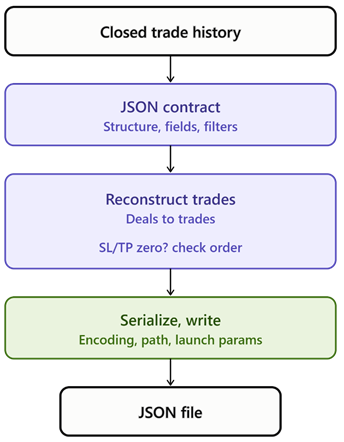
The exporter pipeline: closed trade history is read from the terminal, mapped to the JSON contract, reconstructed from deals with an SL/TP fallback check against the originating order, then serialized and written to a JSON file.
Why JSON
JSON is the right export format for trade data because it is readable by both humans and machines without a schema definition. It is natively supported by Python's json module, by R's jsonlite package, by JavaScript, and by nearly every modern data analysis tool. Unlike CSV, JSON preserves data types: a number stays a number instead of becoming a string that must be reparsed. JSON also supports nested structure, so metadata about the export (timestamp, filters, trade count) can sit alongside the trade array in a single file.
CSV is flat by design. It cannot represent metadata without hijacking the first few rows for it, and it has no native type system, so every value round-trips through a string. The terminal's XML export supports nesting, but it is verbose because every field requires opening and closing tags. JSON sits between these two extremes: structured like XML, but compact enough to load in a single function call in most data science workflows.
MQL5 File I/O and JSON Foundations
Writing a file in MQL5 begins with FileOpen(). This function creates a new file, or overwrites an existing one, inside the sandboxed MQL5/Files/ directory, and returns a file handle used by subsequent read or write calls. The flag combination used in this article is FILE_WRITE | FILE_TXT | FILE_ANSI. FILE_WRITE opens the file for writing and truncates any existing content. FILE_TXT treats the file as plain text rather than a binary blob.
FILE_ANSI is the important choice here. It writes the file using single-byte ANSI encoding rather than the two-byte FILE_UNICODE encoding that MQL5 uses by default for text files. JSON parsers in Python, R, and JavaScript expect UTF-8 or ASCII-compatible single-byte encoding. A FILE_UNICODE file written by MQL5 embeds a byte order mark and uses UTF-16LE encoding, which many lightweight JSON parsers do not expect. Using FILE_ANSI produces a file that any standard JSON reader opens without special handling.
Once the file handle is open, FileWriteString() writes the fully assembled JSON string to the file in a single call. Building the entire document as one string in memory before writing keeps the serialization logic self-contained and avoids interleaving string-building logic with file I/O logic. After the write call completes, FileClose() releases the file handle and flushes any buffered data to disk.
The target JSON structure for this exporter is a single top-level object with two keys. The metadata key holds an object describing the export itself: the export timestamp, the symbol filter, the magic number filter, and the total trade count. The trades key holds an array, where each element is a JSON object representing one closed trade, with two computed fields added on top of the raw record: the R-multiple and the pip profit.
These two fields could be left for the consumer to calculate from the raw entry, exit, and stop-loss prices. Including them precomputed makes the exported file self-contained. A Python script can load the JSON and immediately plot R-multiple distribution or pip profit across time without reimplementing the trade math. This matters because the R-multiple calculation depends on the trade direction. Reimplementing it outside MQL5 is easy to get subtly wrong.
Trade History Reconstruction
Trade history in MQL5 is not stored as a list of trades. It is stored as a list of deals, where a deal is a single fill event. A closed trade is reconstructed by finding a pair of deals that share the same DEAL_POSITION_ID: one deal with DEAL_ENTRY_IN, marking the position opening, and one deal with DEAL_ENTRY_OUT, marking the position closing.
HistorySelect() loads the requested date range into an internal cache. After that, HistoryDealGetTicket() enumerates deal tickets one at a time, and HistoryDealGetInteger() and HistoryDealGetDouble() read the integer and double properties of each deal.
Stop-loss and take-profit values need special handling. Many brokers do not populate DEAL_SL and DEAL_TP on the deal record itself, leaving them at zero even when the position genuinely had a stop or a target attached. A two-pass lookup handles this. The loader first reads DEAL_SL and DEAL_TP directly from the deal. If either value is zero, it falls back to the order record.
Every deal carries a DEAL_ORDER field identifying the order ticket that generated it. HistoryOrderGetDouble() can then read ORDER_SL and ORDER_TP from that order ticket. Since a stop or target set at order placement time is recorded on the order itself, this fallback recovers a value that would otherwise be silently lost.
The Target JSON Structure
Before looking at the implementation, it helps to see what it produces. Here is a representative two-trade example:
{
  "metadata": {
    "export_timestamp": "2026-07-06T14:32:10",
    "symbol_filter": "EURUSD",
    "magic_filter": 12345,
    "trade_count": 2
  },
  "trades": [
    {
      "position_id": 987654321,
      "symbol": "EURUSD",
      "direction": "BUY",
      "volume": 0.50,
      "open_time": "2026-07-01T08:15:00",
      "close_time": "2026-07-01T11:42:00",
      "open_price": 1.08420,
      "close_price": 1.08610,
      "stop_loss": 1.08250,
      "take_profit": 1.08700,
      "profit": 95.00,
      "commission": -3.00,
      "swap": 0.00,
      "magic": 12345,
      "comment": "rsi_reversion",
      "r_multiple": 1.12,
      "pip_profit": 19.0,
      "duration_seconds": 12420
    },
    {
      "position_id": 987654399,
      "symbol": "EURUSD",
      "direction": "SELL",
      "volume": 0.30,
      "open_time": "2026-07-02T09:05:00",
      "close_time": "2026-07-02T09:47:00",
      "open_price": 1.08550,
      "close_price": 1.08595,
      "stop_loss": 0.00000,
      "take_profit": 1.08400,
      "profit": -13.50,
      "commission": -1.80,
      "swap": 0.00,
      "magic": 12345,
      "comment": "rsi_reversion",
      "r_multiple": null,
      "pip_profit": -4.5,
      "duration_seconds": 2520
    }
  ]
}
The metadata object carries four fields. export_timestamp records the moment the script generated the file, in ISO 8601 format. symbol_filter and magic_filter echo back the input parameters the script was run with. trade_count gives the array length directly, sparing a consumer from counting array elements to sanity-check the file.
Most fields inside each trade object are direct passthroughs from the underlying trade record: symbol, volume, open_price, close_price, profit, commission, swap, magic, and comment. direction is rendered as the string "BUY" or "SELL" rather than a numeric constant, since a numeric constant is meaningless without a lookup table in the consuming environment. open_time and close_time are ISO 8601 strings rather than Unix timestamp integers, since ISO 8601 parses directly in Python's datetime.fromisoformat() and R's as.POSIXct().
The two computed fields deserve closer attention. r_multiple is the trade's profit expressed as a multiple of its initial risk. The second trade in the example has "stop_loss": 0.00000, meaning no stop was ever recorded for it, so r_multiple is rendered as JSON null rather than a numeric zero. A zero would misrepresent a trade with no stop as a trade with zero risk, which are very different situations for downstream statistics like expectancy calculations. pip_profit is the profit expressed in pips rather than account currency, making cross-symbol comparisons possible without a currency conversion step.
TradeRecord.mqh
This file defines CTradeRecord, the basic unit that every other component in this exporter operates on. Below is the full struct declaration, and below that, each of its three methods, shown individually with its own explanation.
//+------------------------------------------------------------------+
//|                                                  TradeRecord.mqh |
//+------------------------------------------------------------------+
#ifndef TRADE_RECORD_MQH
#define TRADE_RECORD_MQH
//+------------------------------------------------------------------+
//| Structure representing a single reconstructed closed trade       |
//+------------------------------------------------------------------+
struct CTradeRecord
  {
   ulong             position_id;
   string            symbol;
   int               direction;      // 0 = BUY, 1 = SELL
   double            volume;
   datetime          open_time;
   datetime          close_time;
   double            open_price;
   double            close_price;
   double            stop_loss;
   double            take_profit;
   double            profit;
   double            commission;
   double            swap;
   long              magic;
   string            comment;
   double            RMultiple(void) const;
   long              DurationSeconds(void) const;
   double            PipsProfit(void) const;
  };
The struct holds fourteen data members ahead of its three method declarations. position_id is the shared DEAL_POSITION_ID that links the entry and exit deals and serves as the trade's unique identifier. symbol and direction describe what was traded and which way, with direction stored as a plain integer, 0 for buy and 1 for sell. volume is the lot size. open_time and close_time are the entry and exit timestamps, and open_price and close_price are the corresponding fill prices. stop_loss and take_profit hold the values recovered by the two-pass lookup described in Section 3. profit, commission, and swap are kept as three separate fields rather than pre-summed, so a consumer can distinguish trading results from transaction costs. magic and comment carry the strategy identifier and any comment text attached at order placement.
The three methods are declared inside the struct and defined below it, outside the struct body, using the :: scope resolution operator. Each is shown here individually, one code block per method, followed immediately by its own explanation of logic, inputs, and outputs.
RMultiple()
//+------------------------------------------------------------------+
//| Returns the trade's profit as a multiple of its initial risk     |
//+------------------------------------------------------------------+
double CTradeRecord::RMultiple(void) const
  {
//--- a trade with no recorded stop loss has no risk basis, so return the sentinel
   if(stop_loss == 0.0)
      return(DBL_MAX);
   double risk = MathAbs(open_price - stop_loss);
   if(risk == 0.0)
      return(DBL_MAX);
   double reward = (direction == 0) ? (close_price - open_price) : (open_price - close_price);
   return(reward / risk);
  }
RMultiple() takes no arguments and returns a double. It guards against two degenerate cases before dividing. If stop_loss is exactly zero, no stop was ever recorded, so there is no risk basis to divide by, and the method returns DBL_MAX as a sentinel meaning "undefined." If stop_loss happens to equal open_price exactly, the risk distance is zero, which would produce a division by zero, so that case also returns the sentinel. Once both guards pass, risk is the absolute price distance between entry and stop, and reward is the signed price distance the trade actually moved, measured in the profitable direction for the trade's side. The ratio of reward to risk is the R-multiple. This sentinel value is what the serializer later detects and converts to JSON null.
DurationSeconds()
//+------------------------------------------------------------------+
//| Returns the trade's holding time in whole seconds                |
//+------------------------------------------------------------------+
long CTradeRecord::DurationSeconds(void) const
  {
//--- datetime values are Unix timestamps, so subtraction yields seconds directly
   return((long)(close_time - open_time));
  }
DurationSeconds() takes no arguments and returns a long. datetime in MQL5 is represented internally as a Unix timestamp, so subtracting one datetime from another yields a value in seconds directly. This method casts that difference to long and returns it. No edge case handling is needed here because close_time is always later than open_time by construction.
PipsProfit()
//+------------------------------------------------------------------+
//| Returns the trade's profit expressed in pips                     |
//+------------------------------------------------------------------+
double CTradeRecord::PipsProfit(void) const
  {
//--- resolve the symbol's point size before converting price movement to pips
   double point = SymbolInfoDouble(symbol, SYMBOL_POINT);
   if(point == 0.0)
      return(0.0);
   double price_diff = (direction == 0) ? (close_price - open_price) : (open_price - close_price);
   return(price_diff / point / 10.0);
  }
PipsProfit() takes no arguments and returns a double. SymbolInfoDouble() with the SYMBOL_POINT property returns the smallest price increment for the symbol, which for a five-digit broker on EURUSD is 0.00001. If the symbol cannot be resolved, this call returns zero, and the method returns 0.0 rather than dividing by zero. With a valid point size, price_diff is the signed price movement in the profitable direction, dividing by point converts that into fractional points, and dividing by an additional factor of ten converts fractional points into pips under the standard five-digit and three-digit broker quoting convention.
TradeLoader.mqh
CTradeLoader is the component responsible for talking to the terminal's history API and producing an array of CTradeRecord instances. Below is the full class body, listing every member and method signature, followed by the constructor, the destructor, and then each method individually.
//+------------------------------------------------------------------+
//|                                                  TradeLoader.mqh |
//+------------------------------------------------------------------+
#ifndef TRADE_LOADER_MQH
#define TRADE_LOADER_MQH

#include "TradeRecord.mqh"

//+------------------------------------------------------------------+
//| Class responsible for reconstructing closed trades from history  |
//+------------------------------------------------------------------+
class CTradeLoader
  {
private:
   string            m_symbol;
   long              m_magic;
   datetime          m_from_time;
   datetime          m_to_time;

   double            GetDealSL(ulong deal_ticket);
   double            GetDealTP(ulong deal_ticket);

public:
                     CTradeLoader(const string symbol, long magic, datetime from_time, datetime to_time);
                    ~CTradeLoader(void);

   int               Load(CTradeRecord &trades[]);
  };
Four private members hold the filter state used across a load session. m_symbol and m_magic are the symbol and magic number filters supplied when the object is constructed. m_from_time and m_to_time bound the date range passed to HistorySelect(). Two private methods implement the stop-loss and take-profit fallback described in Section 3: GetDealSL() and GetDealTP(), each taking a deal ticket and returning a double. The public interface has one method, Load(), which takes a CTradeRecord array by reference and returns the count of trades found.
Constructor
//+------------------------------------------------------------------+
//| Constructor: stores the filter parameters for this load session  |
//+------------------------------------------------------------------+
CTradeLoader::CTradeLoader(const string symbol, long magic, datetime from_time, datetime to_time)
  {
   m_symbol    = symbol;
   m_magic     = magic;
   m_from_time = from_time;
   m_to_time   = to_time;
  }
CTradeLoader() (constructor) takes four arguments matching the four private members and copies each one across. Construction has no side effects beyond this assignment. HistorySelect() is only called later, inside Load(), so building a CTradeLoader object does nothing to the terminal's history cache by itself.
Destructor
//+------------------------------------------------------------------+
//| Destructor: no dynamic resources to release                      |
//+------------------------------------------------------------------+
CTradeLoader::~CTradeLoader(void)
  {
  }
~CTradeLoader() (destructor) takes no arguments and does nothing. CTradeLoader owns no dynamically allocated resources and no file handles, so there is nothing to release. It is still declared and defined explicitly rather than left to the compiler's implicit default.
GetDealSL()
//+------------------------------------------------------------------+
//| Reads DEAL_SL from the deal record, falling back to the order    |
//+------------------------------------------------------------------+
double CTradeLoader::GetDealSL(ulong deal_ticket)
  {
   double sl = HistoryDealGetDouble(deal_ticket, DEAL_SL);
   if(sl != 0.0)
      return(sl);

   ulong order_ticket = (ulong)HistoryDealGetInteger(deal_ticket, DEAL_ORDER);
   if(order_ticket == 0)
      return(0.0);

   return(HistoryOrderGetDouble(order_ticket, ORDER_SL));
  }
GetDealSL() takes a single ulong deal ticket and returns a double. It first reads DEAL_SL directly from the deal. If that value is nonzero, it is trusted and returned immediately. If it is zero, the method reads the deal's DEAL_ORDER field to find the originating order ticket, and if that ticket is valid, reads ORDER_SL from the order record instead. If the order ticket itself is zero, which can happen for certain manually created deals, the method returns 0.0 rather than attempting an invalid lookup.
GetDealTP()
//+------------------------------------------------------------------+
//| Reads DEAL_TP from the deal record, falling back to the order    |
//+------------------------------------------------------------------+
double CTradeLoader::GetDealTP(ulong deal_ticket)
  {
   double tp = HistoryDealGetDouble(deal_ticket, DEAL_TP);
   if(tp != 0.0)
      return(tp);

   ulong order_ticket = (ulong)HistoryDealGetInteger(deal_ticket, DEAL_ORDER);
   if(order_ticket == 0)
      return(0.0);

   return(HistoryOrderGetDouble(order_ticket, ORDER_TP));
  }
GetDealTP() takes a single ulong deal ticket and returns a double. It mirrors GetDealSL() exactly, substituting DEAL_TP and ORDER_TP in place of the stop-loss fields. The two methods are kept separate rather than merged behind a shared helper with a mode flag, since each call site in Load() reads more clearly as an explicit named call.
Load()
//+------------------------------------------------------------------+
//| Loads and reconstructs all closed trades matching the filters    |
//+------------------------------------------------------------------+
int CTradeLoader::Load(CTradeRecord &trades[])
  {
   ArrayResize(trades, 0);

   if(!HistorySelect(m_from_time, m_to_time))
      return(0);

   int total_deals = HistoryDealsTotal();
   ulong entry_tickets[];
   ulong entry_position_ids[];
   ArrayResize(entry_tickets, 0);
   ArrayResize(entry_position_ids, 0);

//--- first pass: collect entry deals keyed by position id
   for(int i = 0; i < total_deals; i++)
     {
      ulong ticket = HistoryDealGetTicket(i);
      if(ticket == 0)
         continue;

      long entry_type = HistoryDealGetInteger(ticket, DEAL_ENTRY);
      if(entry_type != DEAL_ENTRY_IN)
         continue;

      string deal_symbol = HistoryDealGetString(ticket, DEAL_SYMBOL);
      long   deal_magic   = HistoryDealGetInteger(ticket, DEAL_MAGIC);

      if(m_symbol != "" && deal_symbol != m_symbol)
         continue;
      if(m_magic != 0 && deal_magic != m_magic)
         continue;

      int size = ArraySize(entry_tickets);
      ArrayResize(entry_tickets, size + 1);
      ArrayResize(entry_position_ids, size + 1);
      entry_tickets[size]      = ticket;
      entry_position_ids[size] = HistoryDealGetInteger(ticket, DEAL_POSITION_ID);
     }

//--- second pass: find matching exit deal for each entry
   int count = 0;
   for(int i = 0; i < total_deals; i++)
     {
      ulong exit_ticket = HistoryDealGetTicket(i);
      if(exit_ticket == 0)
         continue;

      long exit_entry_type = HistoryDealGetInteger(exit_ticket, DEAL_ENTRY);
      if(exit_entry_type != DEAL_ENTRY_OUT)
         continue;

      long exit_position_id = HistoryDealGetInteger(exit_ticket, DEAL_POSITION_ID);

      int match_index = -1;
      for(int j = 0; j < ArraySize(entry_position_ids); j++)
        {
         if(entry_position_ids[j] == exit_position_id)
           {
            match_index = j;
            break;
           }
        }

      if(match_index == -1)
         continue;

      ulong entry_ticket = entry_tickets[match_index];

      CTradeRecord record;
      record.position_id  = exit_position_id;
      record.symbol       = HistoryDealGetString(entry_ticket, DEAL_SYMBOL);
      record.direction    = (HistoryDealGetInteger(entry_ticket, DEAL_TYPE) == DEAL_TYPE_BUY) ? 0 : 1;
      record.volume       = HistoryDealGetDouble(entry_ticket, DEAL_VOLUME);
      record.open_time    = (datetime)HistoryDealGetInteger(entry_ticket, DEAL_TIME);
      record.close_time   = (datetime)HistoryDealGetInteger(exit_ticket, DEAL_TIME);
      record.open_price   = HistoryDealGetDouble(entry_ticket, DEAL_PRICE);
      record.close_price  = HistoryDealGetDouble(exit_ticket, DEAL_PRICE);
      record.stop_loss    = GetDealSL(entry_ticket);
      record.take_profit  = GetDealTP(entry_ticket);
      record.profit       = HistoryDealGetDouble(exit_ticket, DEAL_PROFIT);
      record.commission   = HistoryDealGetDouble(exit_ticket, DEAL_COMMISSION);
      record.swap         = HistoryDealGetDouble(exit_ticket, DEAL_SWAP);
      record.magic        = HistoryDealGetInteger(entry_ticket, DEAL_MAGIC);
      record.comment       = HistoryDealGetString(exit_ticket, DEAL_COMMENT);

      ArrayResize(trades, count + 1);
      trades[count] = record;
      count++;
     }

   return(count);
  }
Load() takes a CTradeRecord array by reference and returns an int count of trades found. It begins by resetting the output array to zero length, then calls HistorySelect() with the stored date range. If that call fails, the method returns zero immediately.
The method performs two passes over the deal list. The first pass walks every deal, keeps only those with DEAL_ENTRY_IN, and among those, keeps only the ones matching the symbol and magic filters. For each surviving entry deal, its ticket and its DEAL_POSITION_ID are appended to two parallel arrays, entry_tickets and entry_position_ids.
The second pass walks every deal again, keeping only those with DEAL_ENTRY_OUT, and for each one searches entry_position_ids for a matching position id. When a match is found, a CTradeRecord is built by pulling opening-side fields (symbol, direction, volume, magic) from the matched entry deal and closing-side fields (profit, commission, swap, comment) from the exit deal. Stop-loss and take-profit are filled in by calling GetDealSL() and GetDealTP() on the entry ticket. The completed record is appended to the growing trades array, and the running count is incremented before the loop returns it.
JsonSerializer.mqh
CJsonSerializer has one job: given an array of CTradeRecord instances and the export's filter parameters, produce a single well-formed JSON string. Below is the full class body, followed by the constructor, the destructor, and then every method shown individually.
//+------------------------------------------------------------------+
//|                                              JsonSerializer.mqh  |
//+------------------------------------------------------------------+
#ifndef JSON_SERIALIZER_MQH
#define JSON_SERIALIZER_MQH

#include "TradeRecord.mqh"

//+------------------------------------------------------------------+
//| Class responsible for serializing trade records to JSON text     |
//+------------------------------------------------------------------+
class CJsonSerializer
  {
private:
   int               m_indent;

   string            Indent(int level);

public:
                     CJsonSerializer(void);
                    ~CJsonSerializer(void);

   string            Serialize(const CTradeRecord &trades[], int count, const string &symbol, long magic, datetime from_time, datetime to_time);
   string            TradeToJson(const CTradeRecord &trade, int indent);
   string            EscapeString(const string &s);
   string            DoubleToJsonString(double value, int digits);
   string            DatetimeToJsonString(datetime dt);
  };
The class holds one private member, m_indent, storing the number of spaces per indentation level, and one private helper method, Indent(), used to build padding strings. Five public methods make up the interface. Serialize() is the entry point that builds the complete document. TradeToJson() formats one trade as a JSON object. EscapeString(), DoubleToJsonString(), and DatetimeToJsonString() are formatting helpers used inside the two methods above.
Constructor
//+------------------------------------------------------------------+
//| Constructor: sets the default indentation width                  |
//+------------------------------------------------------------------+
CJsonSerializer::CJsonSerializer(void)
  {
   m_indent = 2;
  }
CJsonSerializer() (constructor) takes no arguments and sets m_indent to 2. There is no constructor parameter for this value, since indentation width is a formatting default rather than something callers are expected to configure per export.
Destructor
//+------------------------------------------------------------------+
//| Destructor: no dynamic resources to release                      |
//+------------------------------------------------------------------+
CJsonSerializer::~CJsonSerializer(void)
  {
  }
~CJsonSerializer() (destructor) takes no arguments and does nothing. CJsonSerializer allocates no resources beyond local string variables that MQL5 already manages automatically.
Indent()
//+------------------------------------------------------------------+
//| Returns a string of spaces for the given indentation level       |
//+------------------------------------------------------------------+
string CJsonSerializer::Indent(int level)
  {
   string result = "";
   int total_spaces = level * m_indent;
   for(int i = 0; i < total_spaces; i++)
      result += " ";
   return(result);
  }
Indent() takes an int nesting level and returns a string of spaces. It multiplies level by m_indent to get a total space count, then builds a string of that many space characters in a loop. It is called with values of 1 and 2 elsewhere in this class, corresponding to the two levels of nesting in the output document.
EscapeString()
//+------------------------------------------------------------------+
//| Escapes a string so it is safe to embed in a JSON string literal |
//+------------------------------------------------------------------+
string CJsonSerializer::EscapeString(const string &s)
  {
   string result = "";
   int len = StringLen(s);

   for(int i = 0; i < len; i++)
     {
      ushort ch = StringGetCharacter(s, i);

      if(ch == '\\')
         result += "\\\\";
      else
         if(ch == '"')
            result += "\\\"";
         else
            if(ch == '\n')
               result += "\\n";
            else
               if(ch == '\r')
                  result += "\\r";
               else
                  if(ch == '\t')
                     result += "\\t";
                  else
                     if(ch < 0x20)
                       {
                        string hex = StringFormat("\\u%04X", ch);
                        result += hex;
                       }
                     else
                        result += StringSubstr(s, i, 1);
     }

   return(result);
  }
EscapeString() takes a string and returns an escaped copy safe to embed inside a JSON string literal. It walks the input one character at a time using StringGetCharacter(). Five characters get explicit escape sequences: a backslash becomes \\, a double quote becomes \", a newline becomes \n, a carriage return becomes \r, and a tab becomes \t. Any other character below code point 0x20 gets a generic \u00XX Unicode escape. Every other character is copied through unchanged. For typical trade comments and symbol names, almost every character falls into this last unchanged-copy case, but the method still has to handle the rare exceptions correctly.
DoubleToJsonString()
//+------------------------------------------------------------------+
//| Formats a double as a JSON number, or null for the sentinel value|
//+------------------------------------------------------------------+
string CJsonSerializer::DoubleToJsonString(double value, int digits)
  {
   if(value == DBL_MAX)
      return("null");

   return(DoubleToString(value, digits));
  }
DoubleToJsonString() takes a double value and an int number of decimal digits, and returns a string. If value equals DBL_MAX, the sentinel used by RMultiple() for an undefined result, this method returns the literal text "null", which is written into the output unquoted and becomes the JSON null literal. Otherwise it returns DoubleToString(value, digits), a plain numeric string.
DatetimeToJsonString()
//+------------------------------------------------------------------+
//| Formats a datetime as an ISO 8601 string literal                 |
//+------------------------------------------------------------------+
string CJsonSerializer::DatetimeToJsonString(datetime dt)
  {
   string ts = TimeToString(dt, TIME_DATE | TIME_SECONDS);
   StringReplace(ts, ".", "-");
   StringReplace(ts, " ", "T");
   return(ts);
  }
DatetimeToJsonString() takes a datetime value and returns an ISO 8601 string. TimeToString() with TIME_DATE | TIME_SECONDS produces a string like 2026.07.06 14:32:10. This method replaces every period with a hyphen and the space between date and time with the letter T, producing 2026-07-06T14:32:10, a format that Python's datetime.fromisoformat() and R's as.POSIXct() both parse without a custom format string.
TradeToJson()
//+------------------------------------------------------------------+
//| Formats a single trade record as an indented JSON object string  |
//+------------------------------------------------------------------+
string CJsonSerializer::TradeToJson(const CTradeRecord &trade, int indent)
  {
   string pad  = Indent(indent);
   string pad2 = Indent(indent + 1);
   string direction_str = (trade.direction == 0) ? "BUY" : "SELL";

   string json = pad + "{\n";
   json += pad2 + "\"position_id\": " + (string)trade.position_id + ",\n";
   json += pad2 + "\"symbol\": \"" + EscapeString(trade.symbol) + "\",\n";
   json += pad2 + "\"direction\": \"" + direction_str + "\",\n";
   json += pad2 + "\"volume\": " + DoubleToJsonString(trade.volume, 2) + ",\n";
   json += pad2 + "\"open_time\": \"" + DatetimeToJsonString(trade.open_time) + "\",\n";
   json += pad2 + "\"close_time\": \"" + DatetimeToJsonString(trade.close_time) + "\",\n";
   json += pad2 + "\"open_price\": " + DoubleToJsonString(trade.open_price, 5) + ",\n";
   json += pad2 + "\"close_price\": " + DoubleToJsonString(trade.close_price, 5) + ",\n";
   json += pad2 + "\"stop_loss\": " + DoubleToJsonString(trade.stop_loss, 5) + ",\n";
   json += pad2 + "\"take_profit\": " + DoubleToJsonString(trade.take_profit, 5) + ",\n";
   json += pad2 + "\"profit\": " + DoubleToJsonString(trade.profit, 2) + ",\n";
   json += pad2 + "\"commission\": " + DoubleToJsonString(trade.commission, 2) + ",\n";
   json += pad2 + "\"swap\": " + DoubleToJsonString(trade.swap, 2) + ",\n";
   json += pad2 + "\"magic\": " + (string)trade.magic + ",\n";
   json += pad2 + "\"comment\": \"" + EscapeString(trade.comment) + "\",\n";
   json += pad2 + "\"r_multiple\": " + DoubleToJsonString(trade.RMultiple(), 2) + ",\n";
   json += pad2 + "\"pip_profit\": " + DoubleToJsonString(trade.PipsProfit(), 1) + ",\n";
   json += pad2 + "\"duration_seconds\": " + (string)trade.DurationSeconds() + "\n";
   json += pad + "}";

   return(json);
  }
TradeToJson() takes a CTradeRecord and an int nesting level, and returns a string holding one JSON object. It first computes pad for the object's own braces and pad2, one level deeper, for each field line, and converts the integer direction field into the readable "BUY" or "SELL" string. It then concatenates one line per field: EscapeString() handles the two string fields, symbol and comment; DoubleToJsonString() handles every numeric field, picking up the DBL_MAX sentinel where relevant; DatetimeToJsonString() handles the two timestamp fields; and position_id, magic, and duration_seconds are cast to string directly since they need no special formatting. Every line except the last ends with a comma, since JSON forbids a trailing comma after the final member. The method closes with pad + "}" and returns the result.
Serialize()
//+------------------------------------------------------------------+
//| Builds the complete JSON document for the full trade array       |
//+------------------------------------------------------------------+
string CJsonSerializer::Serialize(const CTradeRecord &trades[], int count, const string &symbol, long magic, datetime from_time, datetime to_time)
  {
   string json = "{\n";
   json += Indent(1) + "\"metadata\": {\n";
   json += Indent(2) + "\"export_timestamp\": \"" + DatetimeToJsonString(TimeCurrent()) + "\",\n";
   json += Indent(2) + "\"symbol_filter\": \"" + EscapeString(symbol) + "\",\n";
   json += Indent(2) + "\"magic_filter\": " + (string)magic + ",\n";
   json += Indent(2) + "\"trade_count\": " + (string)count + "\n";
   json += Indent(1) + "},\n";
   json += Indent(1) + "\"trades\": [\n";

   for(int i = 0; i < count; i++)
     {
      json += TradeToJson(trades[i], 2);
      if(i < count - 1)
         json += ",";
      json += "\n";
     }

   json += Indent(1) + "]\n";
   json += "}\n";

   return(json);
  }
Serialize() takes the full trade array, its count, and the three filter parameters, and returns the complete document as a string. This is the method the exporter script calls directly. It opens the top-level object and writes the metadata object first, computing export_timestamp from TimeCurrent() and echoing symbol, magic, and count into the remaining three fields. Note that from_time and to_time are accepted as parameters but are not themselves written into the metadata block in this implementation; a date range field alongside the existing three would be a natural addition, discussed in Section 12. After closing the metadata object, the method opens the trades array and loops over every trade, calling TradeToJson() for each and separating entries with commas, again with no trailing comma after the last one. It closes the array and the top-level object before returning the finished string.
TradeReportExporter.mq5
The script ties the loader and serializer together into a single runnable tool. It is deliberately thin, since nearly all of the logic lives in the two include files above.
//+------------------------------------------------------------------+
//|                                       TradeReportExporter.mq5    |
//+------------------------------------------------------------------+

#property script_show_inputs

#include <Trade_Report_Exporter\TradeRecord.mqh>
#include <Trade_Report_Exporter\TradeLoader.mqh>
#include <Trade_Report_Exporter\JsonSerializer.mqh>

//--- Inputs
input string   InpSymbol         = "";                        // Input Symbol
input long     InpMagic          = 0;                         // Input Magic Number
input datetime InpFromDate       = D'2020.01.01 00:00:00';    // Start Date
input datetime InpToDate         = D'2030.01.01 00:00:00';    // End Date
input string   InpOutputFilename = "trade_report.json";       // Output Filename

//+------------------------------------------------------------------+
//| Script program start function                                    |
//+------------------------------------------------------------------+
void OnStart(void)
  {
   string symbol_filter = (InpSymbol == "") ? _Symbol : InpSymbol;

   CTradeLoader loader(symbol_filter, InpMagic, InpFromDate, InpToDate);
   CTradeRecord trades[];
   int count = loader.Load(trades);

   if(count == 0)
     {
      Print("TradeReportExporter: no trades found for the requested filter, no file written.");
      return;
     }

   CJsonSerializer serializer;
   string json = serializer.Serialize(trades, count, symbol_filter, InpMagic, InpFromDate, InpToDate);

   int handle = FileOpen(InpOutputFilename, FILE_WRITE | FILE_TXT | FILE_ANSI);
   if(handle == INVALID_HANDLE)
     {
      Print("TradeReportExporter: failed to open output file, error code ", GetLastError());
      return;
     }

   FileWriteString(handle, json);
   FileClose(handle);

   Print("TradeReportExporter: exported ", count, " trades to ", TerminalInfoString(TERMINAL_DATA_PATH), "\\MQL5\\Files\\", InpOutputFilename);
  }
//+------------------------------------------------------------------+
The five inputs cover everything the exporter needs. InpSymbol filters by symbol, defaulting to an empty string that the script interprets as "use the current chart's symbol." InpMagic filters by magic number, with 0 meaning no filter applied. InpFromDate and InpToDate bound the history window passed to HistorySelect(). InpOutputFilename names the file written inside MQL5/Files/.
OnStart() first resolves the symbol filter, substituting _Symbol when InpSymbol was left blank. It constructs a CTradeLoader with the resolved filters and calls Load(), receiving the trade count and the populated array. If count is zero, the script logs an informational message and returns without writing a file, since an empty output file could otherwise be mistaken for a successful export of a genuinely empty period.
When trades are found, the script builds a CJsonSerializer, calls Serialize(), and writes the resulting string to disk. FileOpen() is checked against INVALID_HANDLE before proceeding, since a failed open should not lead to a silent no-op write. On success, FileWriteString() writes the whole document, FileClose() finalizes it, and a final Print() call logs the trade count and the resolved output path to the Experts tab.
Verification
TestJsonSerializer.mq5 exercises CJsonSerializer directly, without touching real trade history. It builds two CTradeRecord instances by hand and checks that specific substrings appear in the serialized output.
//+------------------------------------------------------------------+
//|                                        TestJsonSerializer.mq5    |
//+------------------------------------------------------------------+

#property script_show_inputs

#include <Trade_Report_Exporter\TradeRecord.mqh>
#include <Trade_Report_Exporter\JsonSerializer.mqh>

#define ASSERT(condition, message) \
   if(!(condition)) \
     { \
      Print("ASSERTION FAILED: ", message); \
      failures++; \
     } \
   else \
     { \
      Print("ASSERTION PASSED: ", message); \
     }

//+------------------------------------------------------------------+
//| Script program start function                                    |
//+------------------------------------------------------------------+
void OnStart(void)
  {
//--- track how many assertions fail so a single summary line can report the result
   int failures = 0;

   CTradeRecord trade1;
   trade1.position_id = 111111;
   trade1.symbol      = "EURUSD";
   trade1.direction   = 0;
   trade1.volume      = 0.50;
   trade1.open_time   = D'2026.07.01 08:15:00';
   trade1.close_time  = D'2026.07.01 11:42:00';
   trade1.open_price  = 1.08420;
   trade1.close_price = 1.08610;
   trade1.stop_loss   = 1.08250;
   trade1.take_profit = 1.08700;
   trade1.profit      = 95.00;
   trade1.commission  = -3.00;
   trade1.swap        = 0.00;
   trade1.magic       = 12345;
   trade1.comment     = "rsi_reversion";

   CTradeRecord trade2;
   trade2.position_id = 222222;
   trade2.symbol      = "EURUSD";
   trade2.direction   = 1;
   trade2.volume      = 0.30;
   trade2.open_time   = D'2026.07.02 09:05:00';
   trade2.close_time  = D'2026.07.02 09:47:00';
   trade2.open_price  = 1.08550;
   trade2.close_price = 1.08595;
   trade2.stop_loss   = 0.00000;
   trade2.take_profit = 1.08400;
   trade2.profit      = -13.50;
   trade2.commission  = -1.80;
   trade2.swap        = 0.00;
   trade2.magic       = 12345;
   trade2.comment     = "rsi_reversion";

   CTradeRecord trades[];
   ArrayResize(trades, 2);
   trades[0] = trade1;
   trades[1] = trade2;

   CJsonSerializer serializer;
   string json = serializer.Serialize(trades, 2, "EURUSD", 12345, D'2026.07.01 00:00:00', D'2026.07.03 00:00:00');

   ASSERT(StringFind(json, "\"r_multiple\": null") >= 0, "trade with no stop loss renders r_multiple as null");
   ASSERT(StringFind(json, "\"direction\": \"BUY\"") >= 0, "buy trade renders direction as BUY");
   ASSERT(StringFind(json, "\"direction\": \"SELL\"") >= 0, "sell trade renders direction as SELL");
   ASSERT(StringFind(json, "\"open_time\": \"2026-07-01T08:15:00\"") >= 0, "open_time renders in ISO 8601 format");
   ASSERT(StringFind(json, "\"trade_count\": 2") >= 0, "metadata block reports correct trade count");
   ASSERT(StringFind(json, "\"symbol_filter\": \"EURUSD\"") >= 0, "metadata block reports correct symbol filter");

   if(failures == 0)
      Print("TestJsonSerializer: all assertions passed.");
   else
      Print("TestJsonSerializer: ", failures, " assertion(s) failed.");
  }
//+------------------------------------------------------------------+
The ASSERT macro checks a condition and prints either a pass or a fail line, incrementing a failures counter on the fail branch. trade1 is a profitable buy with a real stop loss. trade2 is a losing sell with stop_loss left at 0.00000, reproducing the no-stop case from Section 4.
OnStart() is the script's entry point and is where all six assertions run. The first confirms trade2, having no stop loss, produces "r_multiple": null. The second and third confirm trade1 produces "direction": "BUY" and trade2 produces "direction": "SELL". The fourth confirms trade1's open time renders as 2026-07-01T08:15:00. The fifth and sixth confirm the metadata block reports the correct trade count and symbol filter. Running the script prints six pass or fail lines and a summary, giving a quick regression check whenever the serializer changes.
Example Output
Running TradeReportExporter.mq5 against the two trades used in the verification script produces the following file content, matching the example already shown in Section 4:
{
  "metadata": {
    "export_timestamp": "2026-07-06T14:32:10",
    "symbol_filter": "EURUSD",
    "magic_filter": 12345,
    "trade_count": 2
  },
  "trades": [
    {
      "position_id": 987654321,
      "symbol": "EURUSD",
      "direction": "BUY",
      "volume": 0.50,
      "open_time": "2026-07-01T08:15:00",
      "close_time": "2026-07-01T11:42:00",
      "open_price": 1.08420,
      "close_price": 1.08610,
      "stop_loss": 1.08250,
      "take_profit": 1.08700,
      "profit": 95.00,
      "commission": -3.00,
      "swap": 0.00,
      "magic": 12345,
      "comment": "rsi_reversion",
      "r_multiple": 1.12,
      "pip_profit": 19.0,
      "duration_seconds": 12420
    },
    {
      "position_id": 987654399,
      "symbol": "EURUSD",
      "direction": "SELL",
      "volume": 0.30,
      "open_time": "2026-07-02T09:05:00",
      "close_time": "2026-07-02T09:47:00",
      "open_price": 1.08550,
      "close_price": 1.08595,
      "stop_loss": 0.00000,
      "take_profit": 1.08400,
      "profit": -13.50,
      "commission": -1.80,
      "swap": 0.00,
      "magic": 12345,
      "comment": "rsi_reversion",
      "r_multiple": null,
      "pip_profit": -4.5,
      "duration_seconds": 2520
    }
  ]
}
Each field maps to a CTradeRecord member or one of its two computed methods, walked through in Section 4. The r_multiple: null on the second trade and the ISO 8601 timestamps throughout are the exact behaviors the verification script checks for.
Loading this file in Python needs nothing beyond the standard library. import json; data = json.load(open("trade_report.json")) produces a dictionary with data["metadata"] and data["trades"] immediately accessible. data["trades"][0]["r_multiple"] returns Python's None for the second trade's null value, ready for filtering or aggregation without any further parsing step.

The trade_report.json file opened in a plain text editor. The two-space indentation makes the metadata and trades blocks visually distinct and easy to scan.
Extending the Exporter
Three extensions build on this design without requiring architectural changes. The first is adding an equity curve as a second top-level array alongside trades, sampling account equity at each deal's timestamp rather than only at trade close, letting a consumer plot a continuous equity line instead of only discrete trade outcomes.
The second is adding a summary block inside metadata, computed after Load() returns but before calling Serialize(), containing aggregate statistics like win rate, average R-multiple, and total net profit, all derivable from the same trade array already in memory.
The third is running the export automatically rather than manually, moving the same loader and serializer calls into an EA's OnTimer() handler set to fire once per day, writing a fresh file without user interaction, which suits a live account monitored by an external dashboard that polls the file periodically.
Limitations
The exporter can only report what the terminal's history cache holds locally. If the requested date range predates what the broker's server has synced, HistorySelect() returns fewer trades than actually exist, with no error raised.
The stop-loss and take-profit values captured reflect the values recorded at deal or order placement time. If a position's stop was modified partway through its life, only the last recorded value is captured, not the full modification history.
The output file is fully overwritten on every run, with no automatic versioning of the previous export. A script scheduled to run repeatedly against the same filename will silently discard whatever was there before.
Finally, the entire JSON document is built as one in-memory string before a single byte is written to disk. For an account with several thousand closed trades, this means holding a multi-megabyte string in memory during serialization, unlikely to cause problems on modern hardware but it is worth being aware of before running this against a very long trading history.
Conclusion
The project delivers a complete, runnable exporter and the three cooperating components behind it. CTradeRecord defines the trade-level structure and computes derived metrics (R-multiple, pip profit, duration). CTradeLoader reconstructs closed trades from the terminal's deal history, applying a two-pass SL/TP fallback to ORDER SL/ORDER TP when DEAL SL/DEAL TP are absent. CJsonSerializer formats the result into a compact, well-formed JSON document with a metadata block and an array of trades. The provided TradeReportExporter.mq5 script ties these pieces together: you supply symbol, magic, date range and output filename, and the script writes a JSON file into MQL5/Files/ ready for json.load (Python) or jsonlite::fromJSON (R). The output includes entry/exit prices, P&L, commission, swap, r multiple and pip profit, and is designed to be immediately consumable by downstream analysis pipelines.
Programs used in the article:
| # | Name | Type | Description |
|---|---|---|---|
| 1 | TradeRecord.mqh | Include File | Defines the CTradeRecord struct that holds one reconstructed closed trade along with methods for computing R-multiple, holding duration, and pip profit. |
| 2 | TradeLoader.mqh | Include File | Defines the CTradeLoader class that reads closed trade history and reconstructs trades from matched entry and exit deals, including the two-pass stop-loss and take-profit fallback. |
| 3 | JsonSerializer.mqh | Include File | Defines the CJsonSerializer class that converts an array of trade records and export metadata into a well-formed, indented JSON string. |
| 4 | TradeReportExporter.mq5 | Script | Reads user-supplied filter inputs, loads and serializes closed trade history, and writes the resulting JSON document to a file in MQL5/Files/. |
| 5 | TestJsonSerializer.mq5 | Script | Constructs sample trade records by hand and asserts that the serialized JSON output contains expected values for direction, null handling, timestamps, and metadata. |
| 6 | Trade_Report_Exporter.zip | Zip Archive | Zip archive containing all the attached files and their paths relative to the terminal's root folder. |
Warning: All rights to these materials are reserved by MetaQuotes Ltd. Copying or reprinting of these materials in whole or in part is prohibited.
This article was written by a user of the site and reflects their personal views. MetaQuotes Ltd is not responsible for the accuracy of the information presented, nor for any consequences resulting from the use of the solutions, strategies or recommendations described.

 Mapping the Shape of Price: The Mapper Lens and Cover in MQL5
 Symbolic Price Forecasting Equation Using SymPy
 Defining your Edge (Part 2): Using Divergence Mapping and a Temporal Fusion Transformer in a Trading Robot
 Ordinal Pattern Transition Networks in MQL5

- Free trading apps
- Over 8,000 signals for copying
- Economic news for exploring financial markets
You agree to website policy and terms of use