

Building Your Personal Expert Advisor (Part 3): Risk Management II—Margin and Allowable Risk
 1 158
1 158
 0
0

Table of Contents
- Introduction
- What Was Missed: Risk and Margin Are Not the Same
- Fix 1: Capping the Lot to What Free Margin Can Support
- Fix 2: An Adaptive Margin Cap
- Testing the Margin Checks
- Tidying Up: The Pre-Trade Validation Gate
- Adjustments to the Existing Code
- Final Thoughts
- Conclusion
Introduction
In Part 2, we replaced the EA's fixed lot size with risk-based position sizing. CalculateLotSize() takes a risk percentage and the current ATR-based stop distance and returns a lot size that loses approximately that percentage of the balance if the stop is hit. We also validated the stop distance against the broker's minimum stop level, confined the volume to the broker's minimum, maximum, and step rules, and added an optional layer that reduces risk during drawdowns. That gave us a lot size that is correct from a risk standpoint, not one the account can necessarily afford to open. Those are different things, and this article closes the gap:
- A risk-correct lot that needs more margin than the account has free, so the order is rejected outright.
- A lot that is affordable but consumes nearly all free margin, leaving the account exposed to a margin call.
- Validation logic scattered through the OpenPosition() function with no single place to point at and call "the last check before we trade."
The article assumes you are working from the EA produced in Part 2 and are comfortable with what CalculateLotSize() does. As always, the crossover logic stays untouched because this is not a strategy article.
Scope of This Article
By the end of this part, we will have the following:
- Added a margin check that caps the risk-based lot to what free margin can actually support.
- Made that cap configurable, with a hard floor where the trade is skipped rather than shrunk.
- Added an optional adaptive layer that tightens the cap as the account's margin level deteriorates.
- Collected the position check, risk sizing, and margin check into one named pre-trade validation gate.
None of this is specific to a moving average crossover. Any EA that calculates a lot size before sending an order needs the same check.
What Was Missed: Risk and Margin Are Not the Same Thing
Risk is money you lose if the stop is hit. Margin is money tied up the moment the position opens, whether the trade wins, loses, or closes flat. They are two separate constraints on the same trade, and the previous part of the series only solved the first.
CalculateLotSize() has no concept of margin. It reads the balance and applies a risk percentage. It converts the stop distance into monetary risk per lot, then divides and rounds according to the broker's volume rules. Free margin appears nowhere in it. MetaTrader will let the EA build an order for a volume the account cannot support, and the trade server will be the one to say no. Here is how that shows up in practice.
Problem 1: A Tight Stop Produces a Bigger Lot
This usually happens during a calm-looking market condition. Low volatility means a small ATR, a small stop distance, and therefore very little risk per lot per point of adverse movement. To still lose the target percentage when that small stop is hit, CalculateLotSize() has to compute a larger lot than it would on a wide stop. A larger lot needs more margin, and on a smaller account it can need more than is actually free.
As an illustration of the mechanism, take a symbol where one standard lot risks roughly $10 per pip, a $2,000 account on 1:100 leverage, and 1% risk per trade, giving a $20 risk budget:
- With a 20-pip stop, one lot risks $200, so the $20 budget produces a 0.10-lot trade needing around $100 of margin.
- Tighten the stop to 8 pips, and one lot risks $80, so the same $20 budget produces a 0.25-lot trade needing around $250 of margin.
The risk figure never moved, but the margin requirement more than doubled. On a small account, the second trade is the one that comes back as TRADE_RETCODE_NO_MONEY, and a risk model that looked correct on paper never executes at all.
Problem 2: Affordable, but Only Just
A quieter problem is an affordable lot that consumes nearly all free margin. This can leave the account one adverse move away from a margin call. RiskPercent says nothing about this. It governs the loss realized if the stop is hit, not the capital committed while the position is open. A trade can risk 1% of the balance and still tie up most of the free margin, and the EA as it stands has no opinion about that.
Problem 3: The EA Only Sees Its Own Trades
CalculateLotSize() sizes each trade as though it were the only thing on the account. It is usually not. A manual trade, a second EA on another chart, or, since this EA uses an AllowHedging option, an opposing position from itself, all consume margin that a single-trade-in-isolation calculation knows nothing about.
The fix for all three is the same: before sending the order, ask the account what it can actually afford and size accordingly.
Fix 1: Capping the Lot to What Free Margin Can Support
The plan is straightforward. After CalculateLotSize() produces the risk-based lot, that lot passes through a second function that works out the largest volume free margin can safely support and returns whichever of the two is smaller.
Adding the Input
One new input controls how much of the free margin a single trade may plan on using:
input double MaxMarginUsagePercent = 50.0; // Max % of free margin one new trade may use
The default of 50% matters. Without a cap, a single trade could be sized up to the last dollar of free margin. Capping at half leaves the account room to move even on a maximum-size trade.
Pricing One Lot With OrderCalcMargin()
To know how many lots we can afford, we first need to know what one lot costs in margin:
//--- Margin required for a single lot
   double marginPerLot = 0.0;
   ResetLastError();
   if(!OrderCalcMargin(orderType, _Symbol, 1.0, price, marginPerLot) || marginPerLot <= 0.0)
     {
      PrintFormat("%s: OrderCalcMargin() failed. Error %d", __FUNCTION__, GetLastError());
      return 0.0;
     }
OrderCalcMargin() takes an order type, a symbol, a volume, and a price; returns true on success; and writes the required margin into the last parameter.
Two things should be noted. First, we ask about exactly one lot, not the candidate lot size. Margin for a market order scales linearly with volume, so the cost of one lot is enough to size any lot, and asking once and dividing is simpler than probing for a volume that fits. This is a common approach for margin-aware sizing in MQL5. Second, we do not calculate margin by hand from leverage and contract size. OrderCalcMargin() already accounts for both, along with the symbol's margin rate and any currency conversion. Hand-rolling the arithmetic from raw specifications is how EAs quietly break on the first unfamiliar symbol.
Turning Free Margin into a Maximum Lot
With the per-lot cost known, the affordable volume falls out of a few account and symbol readings:
 double marginCapPercent = GetMarginUsageCap();
   if(marginCapPercent <= 0.0)
     {
      Print("Margin check: account margin level is too low for new exposure. Trade skipped.");
      return 0.0;
     }

   double freeMargin    = AccountInfoDouble(ACCOUNT_MARGIN_FREE);
   double usedMargin    = AccountInfoDouble(ACCOUNT_MARGIN);
   double allowedMargin = freeMargin * (marginCapPercent / 100.0);

   double minLot  = SymbolInfoDouble(_Symbol, SYMBOL_VOLUME_MIN);
   double lotStep = SymbolInfoDouble(_Symbol, SYMBOL_VOLUME_STEP);

   double maxAffordableLot = MathFloor((allowedMargin / marginPerLot) / lotStep) * lotStep;
ACCOUNT_MARGIN_FREE is the margin still available for new positions. ACCOUNT_MARGIN is what is already committed and not used in the arithmetic but printed, because a trader reading a log line about a resized trade wants to know how much of the account was already in use.
The last line does two jobs. Dividing the allowed margin by the per-lot cost gives the raw affordable volume; dividing by lotStep, flooring, and multiplying back rounds that down to a volume the broker accepts. MathFloor() ensures that rounding up by even one step would put us back over the cap we just calculated.
The Complete Function
//+------------------------------------------------------------------+
//| Cap the risk-based lot size to the account's free margin         |
//+------------------------------------------------------------------+
double ValidateMarginForLot(ENUM_ORDER_TYPE orderType, double lotSize, double price)
  {
//--- Margin required for a single lot
   double marginPerLot = 0.0;
   ResetLastError();
   if(!OrderCalcMargin(orderType, _Symbol, 1.0, price, marginPerLot) || marginPerLot <= 0.0)
     {
      PrintFormat("%s: OrderCalcMargin() failed. Error %d", __FUNCTION__, GetLastError());
      return 0.0;
     }

   double marginCapPercent = MaxMarginUsagePercent;

   double freeMargin    = AccountInfoDouble(ACCOUNT_MARGIN_FREE);
   double usedMargin    = AccountInfoDouble(ACCOUNT_MARGIN);
   double allowedMargin = freeMargin * (marginCapPercent / 100.0);

   double minLot  = SymbolInfoDouble(_Symbol, SYMBOL_VOLUME_MIN);
   double lotStep = SymbolInfoDouble(_Symbol, SYMBOL_VOLUME_STEP);

   double maxAffordableLot = MathFloor((allowedMargin / marginPerLot) / lotStep) * lotStep;

   if(maxAffordableLot < minLot)
     {
      //--- Leverage and contract size aren't used in the calculation but only for logging
      long   leverage     = AccountInfoInteger(ACCOUNT_LEVERAGE);
      double contractSize = SymbolInfoDouble(_Symbol, SYMBOL_TRADE_CONTRACT_SIZE);
      PrintFormat("Margin check: cannot safely support even the minimum lot (%.2f).", minLot);
      PrintFormat("Free: %.2f | Used: %.2f | Leverage: 1:%d | Contract Size: %.0f. Trade skipped.",
                  freeMargin, usedMargin, (int)leverage, contractSize);
      return 0.0;
     }

   if(lotSize > maxAffordableLot)
     {
      PrintFormat("Margin check: risk-based lot %.2f exceeds the %.1f%% margin-usage cap.", lotSize, marginCapPercent);
      PrintFormat("Free: %.2f | Used: %.2f | %.2f lots affordable. Reducing to %.2f.",
                  freeMargin, usedMargin, maxAffordableLot, maxAffordableLot);
      return maxAffordableLot;
     }

   return lotSize;
  }
The two branches in the middle are where the policy lives. The first case triggers when even the broker's minimum lot cannot be margined safely. There is no smaller valid size to fall back to, so the trade is skipped. Leverage and contract size appear in this log line only because they are not part of the calculation. OrderCalcMargin() has already priced them in, but "how much free margin, at what leverage, on a symbol with what contract size" is usually asked when a trade is refused. The second triggers when the risk-based lot is merely larger than what is affordable. Here the EA reduces the size rather than rejecting the trade, because a smaller valid trade beats no trade. The trader ends up with less exposure than RiskPercent asked for, and the log says so, with the numbers that explain why.
Integrating the New Function
The function gets called inside OpenPosition() immediately after the lot size is calculated, since it needs that value as its input. The order type comes from the direction the EA already has:
//--- Lot size from the validated stop distance
   double lotSize = CalculateLotSize(stopDistance);
   if(lotSize <= 0)
     {
      Print("Calculated lot size is invalid. Trade skipped.");
      return;
     }

//--- Cap the lot to what free margin can safely support
   ENUM_ORDER_TYPE orderType = (direction == 1) ? ORDER_TYPE_BUY : ORDER_TYPE_SELL;
   lotSize = ValidateMarginForLot(orderType, lotSize, price);
   if(lotSize <= 0)
     {
      Print("Trade skipped: insufficient free margin to safely open a position.");
      return;
     }
Risk sizing answers, "What lot matches the loss I am willing to take?" Margin checking answers, "Can I actually hold that lot open?" The second needs the first's answer as its input, so the margin check runs after the risk calculation, never before it.
Fix 2: An Adaptive Margin Cap
A fixed 50% cap treats a healthy account and a stressed one exactly alike. We can do better, and this is the same shape as Part 2's adaptive risk layer: a static input, an optional override, and behavior that scales between two thresholds.
The Signal: Margin Level
The reading we scale against is ACCOUNT_MARGIN_LEVEL, which MetaTrader calculates as equity divided by used margin, expressed as a percentage. A high number means plenty of equity relative to committed margin; a low number means the account is close to a margin call. It is an account-wide signal, reflecting every position on the account rather than only the ones this EA opened, which makes it the right measure for Problem 3, where exposure the EA cannot see is what makes the account easily broken.
Adding the Inputs
input bool   EnableAdaptiveMarginCap = false;     // Scale the margin cap with account-wide margin level
input double MarginLevelSafe         = 500.0;     // Margin safe level [%] full cap applies
input double MarginLevelDanger       = 150.0;     // Margin caution level [%] new trades are blocked
This adaptive risk layer is optional; therefore, it is off by default. Leave EnableAdaptiveMarginCap at false and the EA behaves exactly as it did after Fix 1.
Building the Function
//+------------------------------------------------------------------+
//| Return the margin-usage cap [%] this trade may consume.          |
//+------------------------------------------------------------------+
double GetMarginUsageCap()
  {
   if(!EnableAdaptiveMarginCap)
      return MaxMarginUsagePercent;

//--- No margin currently used anywhere on the account (flat)
   double marginUsed = AccountInfoDouble(ACCOUNT_MARGIN);
   if(marginUsed <= 0.0)
      return MaxMarginUsagePercent;

   double marginLevel = AccountInfoDouble(ACCOUNT_MARGIN_LEVEL);

//--- Account-wide margin level already stressed - block new exposure
   if(marginLevel <= MarginLevelDanger)
     {
      PrintFormat("Adaptive Margin Cap | Margin Level: %.1f%% at/below danger threshold (%.1f%%).",
                  marginLevel, MarginLevelDanger);
      return 0.0;
     }

//--- Margin level healthy - full cap applies
   if(marginLevel >= MarginLevelSafe)
      return MaxMarginUsagePercent;

//--- Scale linearly between the danger and safe thresholds
   double ratio = (marginLevel - MarginLevelDanger) / (MarginLevelSafe - MarginLevelDanger);
   double cap = MaxMarginUsagePercent * ratio;

   PrintFormat("Adaptive Margin Cap | Margin Level: %.1f%% | Cap Scaled To: %.1f%% (baseline %.1f%%)",
               marginLevel, cap, MaxMarginUsagePercent);

   return cap;
  }
Reading from the top, there are four exits:
- Adaptive mode off: return the static input unchanged.
- No margin in use anywhere: the account is flat, so equity divided by zero used margin tells us nothing. Return the baseline cap.
- If the margin level is at or below MarginLevelDanger, return 0.0, blocking the trade. The problem here is not the size of the trade; the account should not be adding exposure at all.
- Between the two thresholds (safe level and danger level): scale the cap proportionally to how far into the band the account has fallen.
That last case is the reason for the function. Without it, the EA would snap from fully open at a 151% margin to fully closed at 150%. With it, an account at a 325% margin—halfway between the thresholds—gets half the baseline cap, so a 50% default margin cap becomes 25%.
Integrating the Function
Only one line inside ValidateMarginForLot() changes. From:
double marginCapPercent = MaxMarginUsagePercent;To:
   double marginCapPercent = GetMarginUsageCap();
   if(marginCapPercent <= 0.0)
     {
      Print("Margin check: account margin level is too low for new exposure. Trade skipped.");
      return 0.0;
     }
Everything downstream already reads marginCapPercent. The log line that reports the cap now prints the scaled figure rather than the raw input. The new guard is what turns GetMarginUsageCap()'s 0.0 into a skipped trade. This way, the calling function neither knows nor cares whether adaptive mode is on; it asks for a number and uses it.
Testing the Margin Checks
Three Strategy Tester runs, each isolating one path through the two functions. RiskPercent was raised to 2% for these runs specifically, to force a risk-based lot large enough to collide with the margin cap.
A 2% test setting was chosen to make the mechanism visible, not a recommended live value.
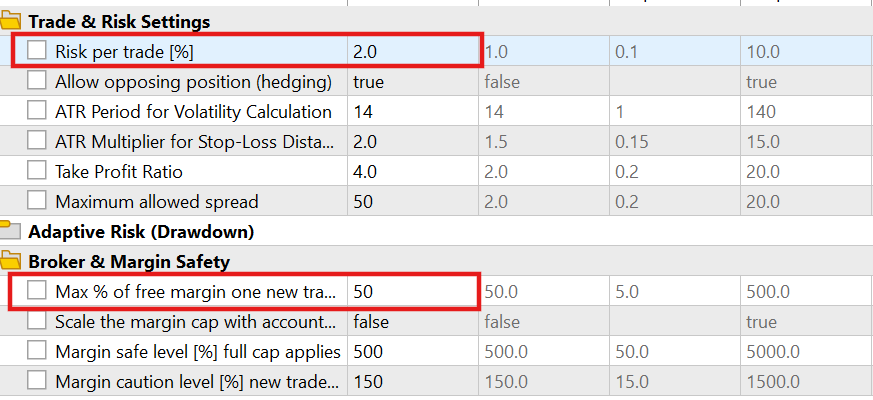
Test 1: static cap
MaxMarginUsagePercent at its default 50%, adaptive mode off. A signal produced a risk-based lot of 11.11, far beyond what half the free margin could support. The margin check caught it and executed 1.99 lots instead, matching what ValidateMarginForLot() calculated as affordable.

Test 2: adaptive cap
EnableAdaptiveMarginCap on, MarginLevelDanger at its default of 150%. During the run, the account's margin level read 140%, below the danger threshold, and no new trades opened at all, which means that GetMarginUsageCap() returned 0.0 and the guard in ValidateMarginForLot() turned it into a skip.
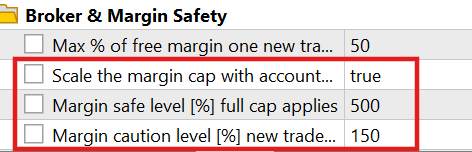

Test 3: adaptive scaling
A later point in the same run showed the margin level at roughly 450%, which is above the danger threshold but below MarginLevelSafe. The cap was scaled down from the 50% baseline to roughly 43%, and an oversized lot was reduced against that scaled figure rather than the baseline.
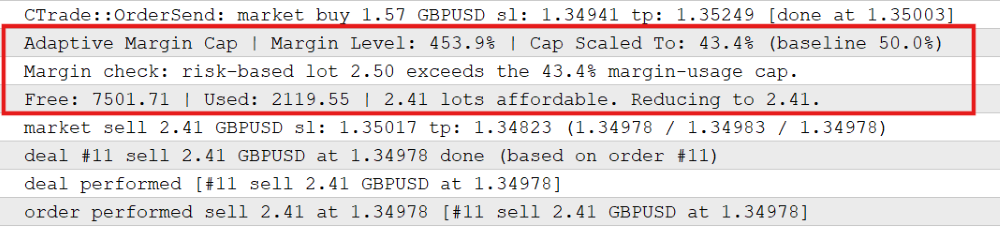
The table below illustrates the test results directly:
| Test | Settings | Risk-based Lot | Results |
|---|---|---|---|
| Static Cap. | MaxMarginUsagePercent = 50, adaptive off. | 11.11 lots | Reduced to 1.99 lots |
| Adaptive, below danger zone. | Adaptive on, margin level 140% (< 150% danger). | — | Blocked outright, no trade opened. |
| Adaptive, scaled. | Adaptive on, margin level ~450% (between thresholds, safe level 500%, danger level 150%). | 2.5 lots | Cap scaled to ~43%; oversized lot reduced against the scaled cap to 2.41 lots. |
All three paths—reduce, hard block, and scaled reduce—behaved as designed.
Tidying Up: The Pre-Trade Validation Gate
The previous part of the series ended by extracting OpenPositions() out of OnTick(), because the same logic was duplicated across the buy and sell branches. This part ends with a similar cleanup, for a different reason.
OpenPosition() now runs three independent checks before it builds anything: the position-limit check from Part 1, the risk-based sizing from Part 2, and the margin cap from this part. Each can block the trade. Functionally, these three checks form the final pre-trade validation gate. Previously, they were just sequential statements inside a function whose job is to send an order. There was nothing you could name.
//+------------------------------------------------------------------+
//| Final pre-trade validation gate.                                 |
//+------------------------------------------------------------------+
bool PassesPreTradeValidation(int direction, double stopDistance, double price, double &validatedLotSize)
  {
   validatedLotSize = 0.0;

//--- Position awareness check, same rule as Part 1
   bool canOpenTrade = false;
   if(AllowHedging)
      canOpenTrade = (CountOpenPositionsByDirection(direction) == 0);
   else
      canOpenTrade = (CountOpenPositions() == 0);

   if(!canOpenTrade)
      return false;

//--- Lot size from the validated stop distance
   double lotSize = CalculateLotSize(stopDistance);
   if(lotSize <= 0)
     {
      Print("Calculated lot size is invalid. Trade skipped.");
      return false;
     }

//--- Cap the lot to what free margin can safely support
   ENUM_ORDER_TYPE orderType = (direction == 1) ? ORDER_TYPE_BUY : ORDER_TYPE_SELL;
   lotSize = ValidateMarginForLot(orderType, lotSize, price);
   if(lotSize <= 0)
     {
      Print("Trade skipped: insufficient free margin to safely open a position.");
      return false;
     }

   validatedLotSize = lotSize;
   return true;
  }
The function returns a bool for the decision and writes the final lot into validatedLotSize, passed by reference, so a single call answers both "Should this trade happen?" and "At what size?"
What OpenPosition() looks like now
//+------------------------------------------------------------------+
//| Size, validate, and open a trade in the given direction          |
//| direction: 1 = Buy, -1 = Sell                                    |
//+------------------------------------------------------------------+
void OpenPosition(int direction, double price, double stopDistance, int digits)
  {
   double lotSize = 0.0;
   if(!PassesPreTradeValidation(direction, stopDistance, price, lotSize))
      return;

//--- SL/TP and execution, direction-specific
   double sl, tp;
   if(direction == 1)
     {
      sl = NormalizeDouble(price - stopDistance, digits);
      tp = NormalizeDouble(price + (stopDistance * TPRatio), digits);
      if(!trade.Buy(lotSize, _Symbol, 0.0, sl, tp, "Fixed EA Buy"))
         PrintFormat("Buy failed. Retcode: %u (%s)", trade.ResultRetcode(),
                     trade.ResultRetcodeDescription());
     }
   else
     {
      sl = NormalizeDouble(price + stopDistance, digits);
      tp = NormalizeDouble(price - (stopDistance * TPRatio), digits);
      if(!trade.Sell(lotSize, _Symbol, 0.0, sl, tp, "Fixed EA Sell"))
         PrintFormat("Sell failed. Retcode: %u (%s)", trade.ResultRetcode(),
                     trade.ResultRetcodeDescription());
     }
  }
OpenPosition() no longer contains any validation logic of its own. It asks the gate whether to trade; if yes, it builds the stops and sends the order. This is a behavior-preserving refactor. Nothing about when a trade opens or what size it opens at has changed. The same three checks run in the same order with the same results. What changed is that they now exist somewhere else with a name.
That is the practical payoff of "separation of responsibilities," a principle that is easy to treat as an abstraction until it costs you something. The image below illustrates this well:
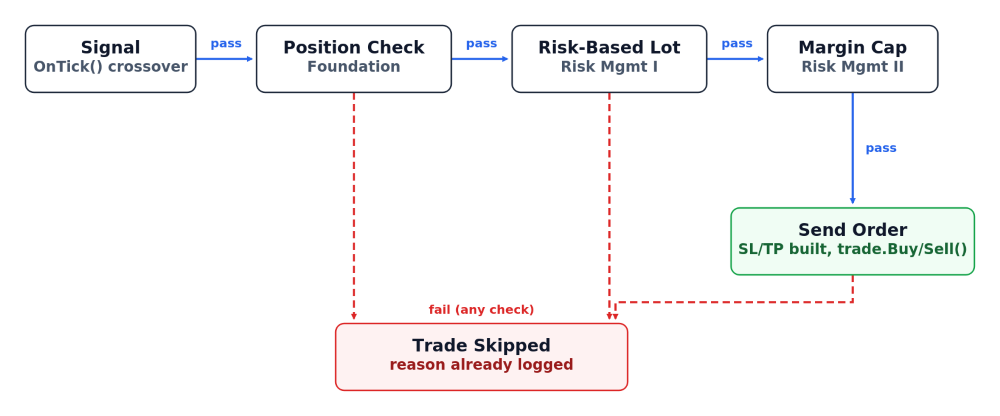
The complete path from a detected signal to an order, or to a logged reason why not:
- OnTick() detects a crossover and calls OpenPosition().
- OpenPosition() calls PassesPreTradeValidation().
- Inside the function gate: position-limit check, then the risk-based lot, then the margin cap.
- On pass, validateLotSize holds the final lot, and OpenPosition() builds the stops and sends the order.
- On failure at any step, the gate returns false, a log line then explains which check stopped the trade, and nothing further runs.
Adjustments to the Existing Code
Two smaller changes came with the new logic. None alter trading behavior, but they both matter for an EA that keeps growing.
Grouping the Inputs
Through the previous parts, inputs were a flat list of twelve parameters separated only by a blank line. Adding four more takes it to sixteen. The input block is now organized into input group sections: Trading Signal, Trade & Risk Settings, Adaptive Risk (Drawdown), Broker & Margin Safety, and General.
input group "Broker & Margin Safety"
input double MaxMarginUsagePercent   = 50.0;      // Max % of free margin one new trade may use
input bool   EnableAdaptiveMarginCap = false;     // Scale the margin cap with account-wide margin level
input double MarginLevelSafe         = 500.0;     // Margin safe level [%] full cap applies
input double MarginLevelDanger       = 150.0;     // Margin caution level [%] new trades are blocked
Input groups change nothing about how the EA runs. It affects only how MetaTrader's Inputs tab presents the parameters, collapsing them under labeled headers instead of one long undifferentiated column. It is easy to skip early on, when five inputs fit on screen without effort, and stops being optional once the list crosses into double digits and spans genuinely different concerns. If your EA inputs are becoming difficult to scan, add the grouping now rather than waiting until the list is unreadable.
Two New Startup Checks
OnInit() gained two validations:
   if(MaxMarginUsagePercent <= 0 || MaxMarginUsagePercent > 100)
     {
      Print("MaxMarginUsagePercent must be between 0 and 100.");
      return INIT_PARAMETERS_INCORRECT;
     }

   if(EnableAdaptiveMarginCap && MarginLevelSafe <= MarginLevelDanger)
     {
      Print("MarginLevelSafe must be greater than MarginLevelDanger.");
      return INIT_PARAMETERS_INCORRECT;
     }
Both make configuration mistakes fail fast at initialization instead of surfacing later during execution. The first checks if the margin usage per trade is less than zero or greater than 100. The hard-coded 100% margin is a reasonable default for most traders. The second matters because it checks if MarginLevelSafe were less than or equal to MarginLevelDanger; the scaling in GetMarginUsageCap() would divide by zero or produce a negative ratio.
A Note on Stop Level and Freeze Level
Broker constraints like minimum volume, volume step, stop level, and freeze level often get listed together, as though they all apply at the same moment. They do not, and this EA implements one of the last two while deliberately skipping the other.
SYMBOL_TRADE_STOPS_LEVEL, handled in Part 2, is the minimum distance a stop-loss may sit from the current price when opening a position. It applies directly to what this EA does on every trade. SYMBOL_TRADE_FREEZE_LEVEL is different. It restricts modifying or deleting an existing position's stop-loss or a pending order when price gets close to it. It says nothing about opening a fresh market order.
This EA never modifies an existing position and never places a pending order, so a freeze-level check here would guard against a scenario that cannot occur in this code. That changes the moment trailing stops arrive, because a trailing stop does exactly what a freeze level governs: it modifies the stop on an already-open position. That is where the check belongs, and where it will appear later on in the series.
Final Thoughts
Common Pitfalls and Solutions
| Pitfall | Solution |
|---|---|
| Assuming a risk-correct lot size is automatically tradable. | Check the lot against free margin with OrderCalcMargin() before sending the order. |
| Calculating the required margin by hand from leverage and contract size. | Use OrderCalcMargin(), which already accounts for both, plus margin rate and currency conversion. |
| Letting one trade plan use all available free margin. | Cap single-trade margin usage at a configurable percentage of free margin. |
| Rounding the affordable lot up to the nearest volume step. | Round down with MathFloor(); rounding up puts the trade back over the cap. |
| Reducing a lot size silently, or rejecting the trade outright whenever it does not fit. | Reduce to the affordable lot and log the original lot, the cap, and the final size; skip only when even the minimum lot cannot be supported. |
| Running the margin check before the risk calculation. | Size for risk first, then cap for margin. The margin check needs the risk-based lot as its input. |
| Implementing a broker check for a scenario the EA cannot reach. | Implement the constraints the code actually encounters; note the rest and the part where they will apply. |
What This EA Still Cannot Do
OrderCalcMargin() calculates required margin as if no other positions or pending orders exist on the account. On an account already holding positions, actual consumed margin can differ from this isolated per-trade figure.
We should be precise about the setting this depends on. AllowHedging in this EA only determines whether the EA itself permits opposing positions; it does not indicate the account’s actual ACCOUNT_MARGIN_MODE. On a netting account, only one net position can exist per symbol, so the isolated per-trade estimate generally remains close to the account’s actual exposure. On a hedging account, multiple separately margined positions can coexist on the same symbol, making the no-other-positions assumption less representative of the account’s true margin commitment. Therefore, on a hedging account with AllowHedging = true, treat the logged margin figures as per-trade estimates. Do not interpret them as the account's actual available headroom. Portfolio-level margin checks across several simultaneous positions are not handled. This will be treated once the series moves from single-trade risk to strategy-wide risk.
ValidateMarginForLot() only prices market Buy and Sell orders, matching what this EA currently sends. Pending orders entered away from the market are not handled, and order-type-specific sizing is a natural next subject in risk management. And as covered above, freeze level is not implemented because there is nothing in this EA yet for it to apply to.
Conclusion
A position size can be correct from a risk perspective and still be unsuitable for the account. This article closes the gap by making margin part of the trade decision. The EA now takes the lot produced by risk-based sizing, checks what the account can safely support, reduces the volume when necessary, and skips the trade when even the broker's minimum lot cannot be supported. The optional adaptive margin cap adds another layer of protection by tightening that limit as the account's margin level deteriorates.
This gives a clearer and safer path from signal to execution. Position limits, risk-based sizing, and margin checks now pass through a single PassesPreTradeValidation() gate before an order is built. The EA also reports the numbers behind a rejection or reduction, so a trade that does not open is no longer a silent failure. At the same time, the implementation remains honest about its limits: the margin calculation is still an isolated estimate and does not provide a complete picture of portfolio-wide exposure, particularly on hedging accounts with multiple positions.
The important distinction is that risk sizing determines how much the trade should risk; margin validation determines whether the account can reasonably carry that trade. Both checks belong before an order reaches the trade server.
Warning: All rights to these materials are reserved by MetaQuotes Ltd. Copying or reprinting of these materials in whole or in part is prohibited.
This article was written by a user of the site and reflects their personal views. MetaQuotes Ltd is not responsible for the accuracy of the information presented, nor for any consequences resulting from the use of the solutions, strategies or recommendations described.

 Implementing a Continuous LLM Adaptation System for Algorithmic Trading
 Eco-inspired Evolutionary Algorithm (ECO)
 MQL5 Bootstrap (IV): Trailing and Break-even Stop Helpers
 From Basic to Intermediate: Classes (II)

- Free trading apps
- Over 8,000 signals for copying
- Economic news for exploring financial markets
You agree to website policy and terms of use