

From Simple Close Buttons to a Rule-Based Risk Dashboard in MQL5
 3 992
3 992
 0
0

From Simple Close Buttons to a Rule-Based Risk Dashboard in MQL5
During short periods of extreme volatility, managing multiple open positions in MetaTrader 5 becomes a severe execution bottleneck for any trader relying strictly on manual interfaces. The native Toolbox requires closing trades sequentially, highlighting the line, right-clicking, and confirming the operation. Each mouse click and window interaction introduces seconds of latency that translates into measurable slippage and extra exposure. For example, closing ten positions sequentially can add several seconds of unneeded market exposure and incur meaningful negative P/L on fast moves. The requirement is therefore concrete: provide a one-click, on-chart control that displays live floating P/L, executes bulk and conditional closures from the chart without external DLLs, and works entirely within the native MQL5 Standard Library and CTrade environment.
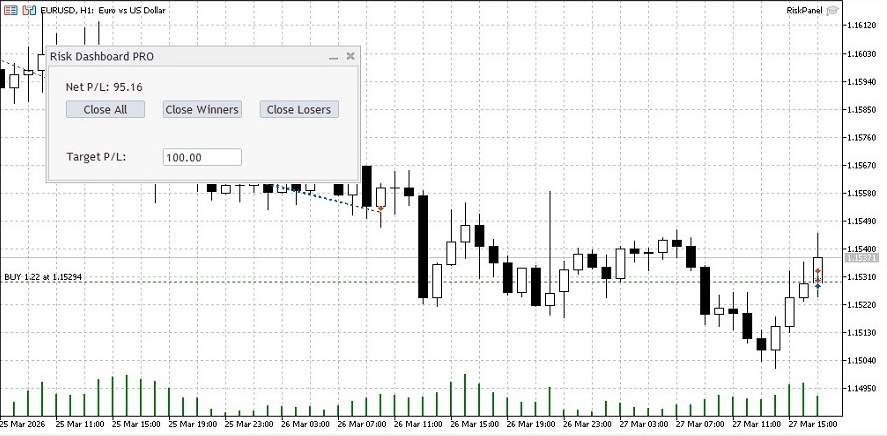
This article implements that exact solution, transitioning from a basic utility script to a compact, draggable Rule-Based Risk Management Dashboard built on CAppDialog that lets traders view real-time exposure and send instant conditional close commands directly from the active chart.
The Case for Native Interface Libraries
Building graphical interfaces in MQL5 usually forces developers down two distinct paths. The first is utilizing the Canvas class to draw pixel-perfect custom graphics, which offers extreme visual flexibility but demands hundreds of lines of code just to handle a basic mouse hover state or window drag event. The second path is utilizing the native Standard Library controls, specifically the dialog and button classes.
For risk management tools where execution speed, stability, and code maintainability are paramount, the standard library is the undisputed choice. By inheriting from the CAppDialog class, we bypass the immense complexity of raw graphical rendering. The operating system handles the window states, minimizing the CPU overhead and preventing the terminal from freezing during intense market data updates. This allows us to focus entirely on the mathematical risk engine and the trade execution logic rather than reinventing the wheel for visual elements.
Architectural Setup and Execution Safety
A professional risk dashboard must filter market noise and isolate its operations strictly. Closing all positions blindly is a catastrophic structural flaw if the trading account runs multiple Expert Advisors simultaneously. We establish our foundational safety by defining external input filters for the Magic Number and the active symbol. This ensures our execution engine only manages the exact basket of trades it is specifically assigned to monitor. We rely on the native MQL5 Standard Library for the graphical components and the execution routing, defining our dependencies clearly at the absolute top of the source file.
//+------------------------------------------------------------------+
//| Include standard library files and declare execution constraints |
//+------------------------------------------------------------------+
#include <Controls\Dialog.mqh>
#include <Controls\Button.mqh>
#include <Controls\Label.mqh>
#include <Controls\Edit.mqh>
#include <Trade\Trade.mqh>

//--- User Inputs for Filtering
input long   InpMagicNumber       = 0;     // Target Magic Number (0 = All)
input bool   InpCurrentSymbolOnly = true;  // Filter by Current Symbol Only
We architect our core controller by inheriting from the CAppDialog class. This grants us immediate access to window management, dragging capabilities, and internal charting events without rewriting thousands of lines of graphical backend code. Inside the class definition, we instantiate specific objects to handle our interactions. The interface requires interactive buttons to liquidate specific market conditions, a dynamic text label to project the net floating profit, and a user input field to define automated execution targets. Encapsulating all these graphical objects and the CTrade execution instance inside a single unified class prevents scope leakage and keeps the global environment perfectly clean.
//+------------------------------------------------------------------+
//| Class: CRiskPanel                                                |
//| Purpose: Interactive on-chart risk management dashboard          |
//+------------------------------------------------------------------+
class CRiskPanel : public CAppDialog
  {
private:
   CButton           m_btn_close_all;     // Button to close all filtered positions
   CButton           m_btn_close_winners; // Button to close only profitable positions
   CButton           m_btn_close_losers;  // Button to close only losing positions
   CLabel            m_lbl_drawdown;      // Label to display net floating P/L
   CEdit             m_edit_target;       // Input field for automated target profit
   CLabel            m_lbl_target_info;   // Label for the target input field
   CTrade            m_trade;             // Trade execution object

public:
                     CRiskPanel(void);
                    ~CRiskPanel(void);

   //--- Create the panel and its elements
   virtual bool      Create(const long chart,const string name,const int subwin,const int x1,const int y1,const int x2,const int y2);
   bool              CreateButtons(void);
   bool              CreateLabels(void);
   bool              CreateInputFields(void);

   //--- Logic and event handlers
   void              UpdatePanel(void);
   double            CalculateRisk(void);
   void              ExecuteBasketClose(int filter_type);
   void              CheckAutoTarget(double current_profit);
   virtual bool      OnEvent(const int id,const long &lparam,const double &dparam,const string &sparam);
  };

//+------------------------------------------------------------------+
//| Constructor                                                      |
//+------------------------------------------------------------------+
CRiskPanel::CRiskPanel(void)
  {
  }

//+------------------------------------------------------------------+
//| Destructor                                                       |
//+------------------------------------------------------------------+
CRiskPanel::~CRiskPanel(void)
  {
  }
Constructing the Graphical Topology
The visual assembly process cascades through a series of dedicated creation methods. These methods construct the bounding boxes for each interactive element relative to the panel's internal coordinates rather than the chart's absolute dimensions. This relative positioning matrix ensures the layout remains structurally intact when the user drags the dashboard across volatile price action. Building the interface procedurally requires careful pixel mapping. We assign specific horizontal offsets for each button so they align perfectly side by side without overlapping, creating a seamless user experience.
//+------------------------------------------------------------------+
//| Creates interactive buttons on the panel                         |
//+------------------------------------------------------------------+
bool CRiskPanel::CreateButtons(void)
  {
   // Close All Button
   if(!m_btn_close_all.Create(m_chart_id,m_name+"CloseAll",m_subwin,20,40,110,60)) return(false);
   if(!m_btn_close_all.Text("Close All")) return(false);
   if(!Add(m_btn_close_all)) return(false);

   // Close Winners Button
   if(!m_btn_close_winners.Create(m_chart_id,m_name+"CloseWinners",m_subwin,130,40,220,60)) return(false);
   if(!m_btn_close_winners.Text("Close Winners")) return(false);
   if(!Add(m_btn_close_winners)) return(false);

   // Close Losers Button
   if(!m_btn_close_losers.Create(m_chart_id,m_name+"CloseLosers",m_subwin,240,40,330,60)) return(false);
   if(!m_btn_close_losers.Text("Close Losers")) return(false);
   if(!Add(m_btn_close_losers)) return(false);

   return(true);
  }
We implement a user input field using the CEdit class. This specifically transforms the utility from a manual clicker into an automated rule-based engine. The trader defines a monetary target directly in this field on the chart interface. The algorithm later parses this string into a floating-point value and continuously monitors the market. When the dynamic equity breaches this numerical threshold, the system autonomously flattens the basket without requiring physical interaction from the trader.
//+------------------------------------------------------------------+
//| Creates input fields for automated rules                         |
//+------------------------------------------------------------------+
bool CRiskPanel::CreateInputFields(void)
  {
   // Target Profit Input
   if(!m_edit_target.Create(m_chart_id,m_name+"TargetProfit",m_subwin,130,95,220,115)) return(false);
   if(!m_edit_target.Text("100.00")) return(false);
   if(!Add(m_edit_target)) return(false);
   return(true);
  }
Advanced Position Filtering and Portfolio Isolation
Accurate risk mapping demands absolute precision regarding which assets are currently floating in the market. Relying solely on a raw loop over the entire terminal pool is an amateur approach that often leads to unintended liquidations. Imagine running a highly calibrated grid system on the EURUSD while simultaneously scalping the SP500 index on another chart. A global closure command triggered from the EURUSD chart would destroy the SP500 grid architecture instantly. To prevent this cross-contamination, we iterate backwards through the entire pool of open positions using the native PositionsTotal function. For every ticket identified, the engine actively cross-references the predefined symbol and magic number constraints.
The string comparison ensures that if the user explicitly requests current symbol isolation, any asset trading outside the active chart is completely ignored by the math engine. Furthermore, evaluating the POSITION_MAGIC property guarantees that manual interventions do not interfere with algorithmic portfolios operating under different identification tags. Only positions surviving this strict double filtration are aggregated.
A crucial historical note on the evolution of MQL5 financial metrics involves the reading of broker commissions. In legacy versions of the language, developers routinely called the POSITION_COMMISSION property directly during this loop. However, modern terminal architectures have deprecated this property, moving commission data exclusively to the historical Deal records to accommodate complex hedging structures. To avoid compiler warnings and ensure future-proof execution, we strictly sum the raw position profit alongside accumulated swap charges to calculate the true absolute net exposure of the targeted basket.
//+------------------------------------------------------------------+
//| Calculates absolute net exposure based on strict filters         |
//+------------------------------------------------------------------+
double CRiskPanel::CalculateRisk(void)
  {
   double net_profit = 0.0;
   int total = PositionsTotal();

   // Loop backwards to safely evaluate positions
   for(int i = total - 1; i >= 0; i--)
     {
      ulong ticket = PositionGetTicket(i);
      if(ticket > 0)
        {
         // Apply symbol and magic number isolation
         if(InpCurrentSymbolOnly && PositionGetString(POSITION_SYMBOL) != _Symbol) continue;
         if(InpMagicNumber != 0 && PositionGetInteger(POSITION_MAGIC) != InpMagicNumber) continue;

         // Aggregate raw profit and swap
         net_profit += PositionGetDouble(POSITION_PROFIT) + PositionGetDouble(POSITION_SWAP);
        }
     }
   return(net_profit);
  }
Trade Server Return Codes and Diagnostic Auditing
Execution robustness is what separates basic educational scripts from institutional production frameworks. Sending a market order through the CTrade class is not a guaranteed event. A basic loop invoking a close command fails catastrophically during requotes, sudden connection drops, or when the broker changes margin requirements during major news releases. We engineer the closure sequence to strictly intercept the trade server's return codes.
If an execution request bounces, the software parses the internal error identifier via the ResultRetcodeDescription method and prints it directly to the terminal logs for immediate diagnostic auditing. For instance, if a user attempts to trigger a mass closure but the global Algo Trading button is toggled off at the top of the terminal, the server will silently reject the operation to protect the client. By capturing the return code programmatically, the dashboard provides transparent feedback in the Experts tab, alerting the trader immediately that the algorithmic permissions are compromised rather than leaving them wondering why the market exposure remains active.
//+------------------------------------------------------------------+
//| Executes the liquidation sequence and handles server errors      |
//+------------------------------------------------------------------+
void CRiskPanel::ExecuteBasketClose(int filter_type)
  {
   int total = PositionsTotal();
   for(int i = total - 1; i >= 0; i--)
     {
      ulong ticket = PositionGetTicket(i);
      if(ticket > 0)
        {
         // Apply security filters
         if(InpCurrentSymbolOnly && PositionGetString(POSITION_SYMBOL) != _Symbol) continue;
         if(InpMagicNumber != 0 && PositionGetInteger(POSITION_MAGIC) != InpMagicNumber) continue;

         double profit = PositionGetDouble(POSITION_PROFIT) + PositionGetDouble(POSITION_SWAP);

         // Apply profitability condition (1=Winners, -1=Losers)
         if(filter_type == 1 && profit <= 0) continue;
         if(filter_type == -1 && profit >= 0) continue;

         // Execute trade and intercept server rejections
         if(!m_trade.PositionClose(ticket))
           {
            PrintFormat("Close failed for ticket %I64u. Code: %d, Desc: %s", ticket, m_trade.ResultRetcode(), m_trade.ResultRetcodeDescription());
           }
        }
     }
  }
Bypassing Event Routing Conflicts
To guarantee maximum compatibility across all compiler builds and to robustly intercept both native chart objects and standard library events, we manually route the graphical interactions. Relying on legacy macro mappings often leads to method hiding warnings in modern beta compilers. The virtual OnEvent interceptor solves this elegantly. It catches user clicks by evaluating both standard chart identifiers and custom library constants simultaneously.
The inclusion of the CHARTEVENT_CUSTOM evaluation acts as a protective shield against the CAppDialog class overriding native chart clicks. It reads the active string parameter, matches it against our interface elements, and cascades the logic into the basket closure method using simple integer flags to define the liquidation strategy.
//+------------------------------------------------------------------+
//| Event handler for chart and library events                       |
//+------------------------------------------------------------------+
bool CRiskPanel::OnEvent(const int id,const long &lparam,const double &dparam,const string &sparam)
  {
   // Captures both native chart clicks and the library's internal click events
   if(id == CHARTEVENT_OBJECT_CLICK || id == (CHARTEVENT_CUSTOM+ON_CLICK))
     {
      // Route to Close All
      if(sparam == m_btn_close_all.Name() || lparam == m_btn_close_all.Id())
        {
         ExecuteBasketClose(0);
         return(true);
        }
      // Route to Close Winners
      if(sparam == m_btn_close_winners.Name() || lparam == m_btn_close_winners.Id())
        {
         ExecuteBasketClose(1);
         return(true);
        }
      // Route to Close Losers
      if(sparam == m_btn_close_losers.Name() || lparam == m_btn_close_losers.Id())
        {
         ExecuteBasketClose(-1);
         return(true);
        }
     }
   // Call the base class method for default dialog events
   return(CAppDialog::OnEvent(id,lparam,dparam,sparam));
  }
Timer Polling vs Tick-Driven Updates
The decision to use a timer loop instead of a tick-driven architecture is a deliberate performance optimization. Relying on the OnTick event to refresh graphical elements forces the CPU to redraw the interface hundreds of times per second during high-volatility spikes, which can severely lag the terminal and delay critical trade execution commands. By establishing a fixed one-second polling interval using EventSetTimer, we completely decouple the visual interface from the raw market feed.
Firing repeatedly at a controlled pace, the timer loop extracts the current net equity, formats it for visual projection, and forces a ChartRedraw only when mathematically necessary. Simultaneously, it funnels this data into the automated target validator. If the floating reality breaches the monetary boundary set by the user in the edit field, the protective sequence triggers unconditionally.
//+------------------------------------------------------------------+
//| Autonomously closes basket if floating reality exceeds target    |
//+------------------------------------------------------------------+
void CRiskPanel::CheckAutoTarget(double current_profit)
  {
   double target = StringToDouble(m_edit_target.Text());

   // Trigger closure if target is valid and breached
   if(target > 0 && current_profit >= target)
     {
      PrintFormat("Auto-Target reached! Profit: %.2f >= Target: %.2f", current_profit, target);
      ExecuteBasketClose(0); // 0 = Close all filtered positions
     }
  }

//--- Global Environment
CRiskPanel ExtPanel;

//+------------------------------------------------------------------+
//| Expert initialization function                                   |
//+------------------------------------------------------------------+
int OnInit()
  {
   // Instantiate the panel object
   if(!ExtPanel.Create(0,"Risk Dashboard PRO",0,50,50,410,210))
      return(INIT_FAILED);

   ExtPanel.Run();

   // Establish polling frequency
   EventSetTimer(1);
   return(INIT_SUCCEEDED);
  }

//+------------------------------------------------------------------+
//| Expert deinitialization function                                 |
//+------------------------------------------------------------------+
void OnDeinit(const int reason)
  {
   // Destroy the panel and release resources
   ExtPanel.Destroy(reason);
   EventKillTimer();
  }

//+------------------------------------------------------------------+
//| ChartEvent function                                              |
//+------------------------------------------------------------------+
void OnChartEvent(const int id, const long &lparam, const double &dparam, const string &sparam)
  {
   // Route chart interactions to the panel event listener
   ExtPanel.ChartEvent(id,lparam,dparam,sparam);
  }

//+------------------------------------------------------------------+
//| Timer function                                                   |
//+------------------------------------------------------------------+
void OnTimer()
  {
   // Trigger the panel update sequence
   ExtPanel.UpdatePanel();
  }

//+------------------------------------------------------------------+
//| Expert tick function                                             |
//+------------------------------------------------------------------+
void OnTick()
  {
   // The panel is primarily event and timer driven.
   // OnTick is formally included to define the program as an Expert Advisor.
  }
Conclusion and Future Enhancements
The delivered RiskPanel.mq5 is a compilable Expert Advisor that moves risk control from the Toolbox onto the chart and satisfies the stated requirements comprehensively. It uses only the MQL5 Standard Library to avoid unsafe external integrations. The panel is fully draggable, shows current risk adjusted for swap, processes strict magic number filtration, accepts a user input on-chart, and binds multiple buttons to event handlers for granular bulk actions.
Critically, the implementation incorporates a robust update loop via OnTimer to decouple CPU overhead from tick volume so the label reflects real-time exposure safely. Proper Create and Destroy handling is also maintained to avoid severe resource leaks when removing the instance. This foundation is entirely production-ready for testing and extension. You can add stricter validation blocks, partial-close execution logic dividing the current volume, or an automatic trailing-stop activation sequence when the floating P/L reaches a threshold. The source provides a clear and auditable artifact that codifies requirements, execution paths, and UI events, enabling reproducible testing and further development into a comprehensive algorithmic framework.
| File Name | Description |
|---|---|
| RiskPanel.mq5 | Complete source code for the Rule-Based Risk Dashboard (Version 2.0) |
Warning: All rights to these materials are reserved by MetaQuotes Ltd. Copying or reprinting of these materials in whole or in part is prohibited.
This article was written by a user of the site and reflects their personal views. MetaQuotes Ltd is not responsible for the accuracy of the information presented, nor for any consequences resulting from the use of the solutions, strategies or recommendations described.

 Can DOOM Run in MetaTrader 5: DLLs, Rendering, and MQL5 Input?
 Building a Volume Bubble Indicator in MQL5 Using Standard Deviation
 Chaos optimization algorithm (COA)
 Creating Custom Indicators in MQL5 (Part 11): Enhancing the Footprint Chart with Market Structure and Order Flow Layers

- Free trading apps
- Over 8,000 signals for copying
- Economic news for exploring financial markets
You agree to website policy and terms of use