

File-Based Versioning of EA Parameters in MQL5
 1 818
1 818
 0
0

Table of Contents
- Introduction
- Designing the Parameter Version Structure
- Creating Version 1 with Empty File
- Checksum Verification and Append New Version
- Conclusion
Introduction
When you change input parameters of an MQL5 EA, whether manually in the terminal, during strategy optimization, or while the EA runs through OnInit or OnTick, the common practice of writing a single settings file often overwrites previous configurations and erases history. This makes it difficult to restore a known working setup, compare configurations, or reproduce past results.
This article presents a practical, reproducible solution: an in-EA versioning mechanism that writes each parameter snapshot as a fixed binary record, a struct, into a single append-only file. The EA must be able to:
- save a complete parameter snapshot
- read the latest snapshot
- detect meaningful changes, integrity check
- append a new version without overwriting older ones
The design treats parameters as three logical groups (metadata/versioning, adjustable trading parameters, and integrity), but uses the checksum mainly on the adjustable group to decide whether a new version is required. The result is a compact, reusable template you can drop into an EA to preserve and inspect the evolution of its settings over time.
Designing the Parameter Version Structure
Developing a framework to collectively store all the EA parameters is the first step in putting a parameter versioning system into place. A single record that can be read from or written to a binary file will be represented by this structure. One instance of this structure will be saved in the file each time the EA saves a new configuration. As a result, careful structural design is essential. It establishes the structure, storage, and retrieval of parameter data. Combining all the parameters into a structure is more efficient than storing them individually. By treating linked values as a single entity, this enhances organization. The complete structure can be saved and retrieved in one step instead of writing and reading each value separately. This reduces errors when importing the data, guarantees that the parameters stay connected, and simplifies the code.
Another important advantage is consistency. When a structure is written to a binary file, the data layout remains fixed. This implies that each record kept in the file will have the same internal value arrangement and size. This consistent structure makes it easy for the program to explore the file and find certain records. It becomes particularly useful when multiple versions of parameter records are stored in the same file.
To support parameter versioning, split the structure members into three logical groups. The versioning group is the first. These fields are used to determine the creation date and particular version of a parameter record. This typically consists of a timestamp that indicates the precise moment the version was recorded and a version number that increases with each new save. The EA can track and monitor parameter changes over time with this information.
The adjustable group is the second. The real trading parameters that determine the Expert Advisor's behavior are contained in this group. Stop loss, take profit, lot size, and any other variables that might be changed while trading or testing are a few examples. Grouping them together makes it simple to save and retrieve all configurable parameters at once. These are the values the trader or system changes most frequently. The checksum group constitutes the third. The EA can confirm the accuracy of the saved settings thanks to the checksum. The program recalculates the checksum using the configurable parameters and compares it with the stored value when a record is loaded from the file. It indicates that the parameters are still the same if the values match. If they are different, it can be a sign of corrupted data or a writing mistake.
Example:struct SessionParams { //--- Versioning & Metadata int version_count; datetime saved_at; //--- Adjustable Parameters int take_profit; int stop_loss; double lot_multiplier; int rsi_threshold; int max_trades; //--- Performance Metrics double profit_factor; double win_rate; double max_drawdown; double avg_rrr; //--- Integrity uint checksum; }; SessionParams params; //+------------------------------------------------------------------+ //| Expert initialization function | //+------------------------------------------------------------------+ int OnInit() { //--- return(INIT_SUCCEEDED); }
Explanation:
The first step in creating a struct is to give it a meaningful name, such as SessionParams, that reflects the data it will hold. The struct is then organized into logical groups. The first group contains versioning and metadata, such as a version count and timestamp, which help track when each parameter set was saved and identify the most recent configuration. The second group includes the adjustable parameters that define how the EA operates, like take profit, stop loss, lot multiplier, RSI threshold, and maximum trades, all assigned appropriate data types. Optionally, an additional group can store performance metrics such as profit factor, win rate, drawdown, and risk-reward ratio (RRR) to evaluate each version. Finally, a checksum field is added to ensure data integrity by verifying that stored data remains unchanged.
Creating Version 1 with Empty File
Now that we have successfully created the structure, the next step is to open the binary file, initialize the parameters, and save the first version. Think of this as giving your EA a starting point. Without it, the file will not have any data to build on. Here is a question to consider. What values should your parameters have the first time you save them? Maybe a standard stop loss, a default take profit, or a lot size of 0.1? Whatever makes sense for your strategy, that is what you will put in the struct before writing it. You can even start with zeros for performance metrics since the EA has not traded yet.
Opening the file:
Opening the binary file is the initial step. You must select a file name and launch it in write mode. Write mode is crucial since it lets you save the first record and creates the file if it doesn't already exist.
Example:
SessionParams  params;
string filename = "parameters.bin";
int handle;
//+------------------------------------------------------------------+
//| Expert initialization function                                   |
//+------------------------------------------------------------------+
int OnInit()
  {
//---
   return(INIT_SUCCEEDED);
  }
//+------------------------------------------------------------------+
//| Expert tick function                                             |
//+------------------------------------------------------------------+
void OnTick()
  {
//--- Open or create the binary file
   handle = FileOpen(filename, FILE_READ|FILE_WRITE|FILE_BIN|FILE_COMMON);

//--- Check if file access failed
   if(handle == INVALID_HANDLE)
     {
      Print("ERROR: Cannot access file. Error: ", GetLastError());
      return;
     }
   else
      if(handle != INVALID_HANDLE)
        {
         FileClose(handle);
        }
  }
Explanation:
The first step in storing EA parameters is to open a file using a clear and meaningful name, such as "parameters.bin," and store its handle for future read and write operations. This is done using a function that requires the file name and access flags. In this case, FILE_READ allows existing data to be read, FILE_WRITE enables saving new data, FILE_BIN ensures the struct is stored correctly in binary format, and FILE_COMMON makes the file accessible across all MetaTrader 5 terminals on the same computer. After opening the file, it is important to verify that the handle is valid to confirm successful access; otherwise, an error message should be checked to identify the issue. Once confirmed, the file can be safely used and closed, ensuring it is ready for writing parameter records.
Initializing the Parameters:
Initializing the struct's parameters comes next after the file has been opened. This requires assigning initial values to each field to provide the EA with a complete initial record. A well-defined set of values that the EA can read and expand upon in the future is ensured by initializing the struct.
The versioning fields must be initialized first. The version number is set to 1, and the timestamp is updated to the current time, as this is the first entry. These values aid the EA in monitoring the creation date and parameter version. The EA's behavior is then determined by the configurable settings. Stop loss, take profit, lot size, and any other factors influencing your approach are examples. For the trader or the EA to readily alter these changeable parameters without changing the code, it is crucial that they may be changed using input. You can test different values while maintaining a versioned record in the file by utilizing input variables.
After the adjustable parameters, initialize any performance metrics such as profit factor, win rate, maximum drawdown, or average risk-reward ratio (RRR). For the first record, these can be set to zero since no trades or strategies have occurred yet. Including performance metrics allows the EA to track how each parameter version performs later on.
Lastly, use the customizable parameters to compute and assign a checksum. When the record is read back from the file, the checksum guarantees that it is legitimate and hasn't been corrupted. This gives your parameter versioning mechanism an additional degree of dependability. Before initialization, check whether the file is empty. This step keeps existing data from being overwritten and helps eliminate duplicate starting records. The EA is aware that it must initialize and store the default settings as the initial version if the file is empty.
Example:
int file_size;handle = FileOpen(filename, FILE_READ|FILE_WRITE|FILE_BIN|FILE_COMMON); if(handle == INVALID_HANDLE) { Print("ERROR: Cannot access file. Error: ", GetLastError()); return; } else if(handle != INVALID_HANDLE) { //--- Get current file size file_size = (int)FileSize(handle); //--- If file is empty, create first version if(file_size == 0) { Print("INFO: New file detected. Writing default parameters..."); } FileClose(handle); }
Explanation:
Checking the file's size comes next after it has been opened. A method that returns the total number of bytes currently saved in the file is used to do this. This value is allocated to the file_size variable in the example. The EA can ascertain if the file is empty and prepared for the initial version or if it already contains parameter information by examining the file's size. When the file size is 0, it indicates that there is no data in the file. The EA must initialize and save a default set of values because there are currently no parameter records. To clarify this, the program prints a message alerting the user that the first parameter record is being created and that a new file has been found.
After we confirm that the file is empty, we know that the EA is about to write the very first version of its parameters. This is the point where we can safely proceed to initialize the default parameters. Initializing the struct at this stage ensures that the file will have a complete and consistent first record for the EA to reference.
Example:
//--- Input parameters (user-adjustable settings)
input int TP = 150;
input int SL = 80;
input double L_multiplier = 1.0;
input int RSI_threshold = 55;
input int Max_trades = 3;
else
   if(handle != INVALID_HANDLE)
     {
      file_size = (int)FileSize(handle);
      if(file_size == 0)
        {
         Print("INFO: New file detected. Writing default parameters...");
         params.version_count     = 1;
         params.saved_at       = TimeCurrent();
         params.take_profit    = TP;
         params.stop_loss      = SL;
         params.lot_multiplier = L_multiplier;
         params.rsi_threshold  = RSI_threshold;
         params.max_trades     = Max_trades;
         params.profit_factor  = 0.0;
         params.win_rate       = 0.0;
         params.max_drawdown   = 0.0;
         params.avg_rrr        = 0.0;
         params.checksum       = 0;
        }
      FileClose(handle);
     }
Explanation:
The next step is to define configurable parameters using the input keyword after verifying that the file is empty. This enables traders to change values like take profit, stop loss, lot multiplier, RSI threshold, and maximum trades straight from the EA settings without altering the code. A complete parameter record is then created by assigning these input values to the appropriate fields in a struct instance. Versioning fields are initialized by setting the version count to 1 and recording the current time as a timestamp. Performance metrics are also included but initially set to zero since no trading data exists yet. At this stage, the structure holds a full snapshot of the EA configuration, ready to be stored in the binary file.
Understanding and Calculating the Checksum:
Before saving the parameter record into the file, we introduce another important concept called a checksum. A checksum is a value calculated from a group of data fields and used as a quick way to verify whether that data has changed. Instead of examining every parameter individually, the program can compare a single number that represents them together.
Imagine the parameters inside our structure. We include adjustable values such as take profit, stop loss, lot multiplier, RSI threshold, and maximum number of trades, as well as metadata and performance metrics. One way to detect changes is to compare each field individually with the previous version stored in the file. While this approach works, it becomes inefficient and difficult to maintain as the number of fields increases.
To simplify this process, we use a checksum calculated only from the adjustable parameters. This means only the input trading values contribute to the integrity check, making comparison fast and focused. As a result, only changes in the input parameters are treated as triggers for creating a new version.
This makes it easy to detect differences between parameter versions. When the EA starts, it can calculate a checksum from the current adjustable parameters and compare it with the checksum stored in the latest record in the file. If the two values are identical, it means the parameters have not changed and there is no need to create a new version. If the values are different, the EA knows that at least one parameter has been modified and a new parameter version should be saved.
Example:else if(handle != INVALID_HANDLE) { file_size = (int)FileSize(handle); if(file_size == 0) { Print("INFO: New file detected. Writing default parameters..."); params.version_count = 1; params.saved_at = TimeCurrent(); params.take_profit = TP; params.stop_loss = SL; params.lot_multiplier = L_multiplier; params.rsi_threshold = RSI_threshold; params.max_trades = Max_trades; params.profit_factor = 0.0; params.win_rate = 0.0; params.max_drawdown = 0.0; params.avg_rrr = 0.0; params.checksum = 0; // Calculate checksum uint result_f = 0; result_f ^= (uint)params.take_profit; result_f ^= (uint)params.stop_loss; result_f ^= (uint)(params.lot_multiplier * 1000); result_f ^= (uint)params.rsi_threshold; result_f ^= (uint)params.max_trades; params.checksum = result_f; } FileClose(handle); }
Explanation:
To store the checksum result, a variable is first established. Because it is an unsigned integer type, it can only store whole values that are not negative. Before processing the parameter values, the variable is first set to zero to offer a clean starting point. The XOR operator (^=) is then used to merge the adjustable values of the structure into the variable. Because any change in the input values produces a different result, this operator is frequently employed for checksum computations. The final checksum is created by gradually combining each adjustable parameter with the current result.
Only the adjustable input parameters are used in the checksum because they define the actual trading configuration that the user intentionally changes to influence strategy behavior. These are the values that should trigger a new version when modified. Metadata such as timestamps and version counters are excluded because they change automatically whenever a record is saved and do not represent a real change in strategy settings. Including them would create unnecessary version updates even when the inputs remain the same.
Performance metrics are also excluded because they are generated results from trading activity, not user-defined inputs. They vary during execution and do not reflect intentional parameter adjustments. Including them would make the system treat normal market-driven updates as configuration changes, which would distort the version history.
Writing the Parameter Record to the File:
The record is then written to the binary file following the correct initialization of the parameter structure and the computation of the checksum. By now, the structure has all the necessary components, including performance metrics, version information, adjustable parameters, and a checksum that verifies the accuracy of the stored data.
Example:if(file_size == 0) { Print("INFO: New file detected. Writing default parameters..."); params.version_count = 1; params.saved_at = TimeCurrent(); params.take_profit = TP; params.stop_loss = SL; params.lot_multiplier = L_multiplier; params.rsi_threshold = RSI_threshold; params.max_trades = Max_trades; params.profit_factor = 0.0; params.win_rate = 0.0; params.max_drawdown = 0.0; params.avg_rrr = 0.0; params.checksum = 0; // Calculate checksum uint result_f = 0; result_f ^= (uint)params.take_profit; result_f ^= (uint)params.stop_loss; result_f ^= (uint)(params.lot_multiplier * 1000); result_f ^= (uint)params.rsi_threshold; result_f ^= (uint)params.max_trades; params.checksum = result_f; // Write version 1 to file FileWriteStruct(handle, params); Print("========================================"); Print("INFO: CURRENT PARAMETERS (Loaded)"); Print("========================================"); Print("Version : ", params.version_count); Print("Saved At : ", TimeToString(params.saved_at, TIME_DATE|TIME_SECONDS)); Print("Take Profit : ", params.take_profit); Print("Stop Loss : ", params.stop_loss); Print("Lot Multiplier: ", params.lot_multiplier); Print("RSI Threshold : ", params.rsi_threshold); Print("Max Trades : ", params.max_trades); Print("Profit Factor : ", params.profit_factor); Print("Win Rate : ", params.win_rate, "%"); Print("Max Drawdown : ", params.max_drawdown); Print("Avg RRR : ", params.avg_rrr); Print("Checksum : ", params.checksum); Print("SUCCESS: Created parameter file with version 1."); }
Explanation:
The structure must then be stored in the binary file after it has been completely prepared. The FileWriteStruct function is used for this. This function puts the complete structure straight into the file after receiving the file handle and the structure instance as arguments. The function saves the parameter set as a single fixed-size record, as the structure already groups all the required data. This method guarantees consistency across all records in the file, making them easy to retrieve and analyze at a later time. The entire record is written in a single operation rather than one parameter at a time.
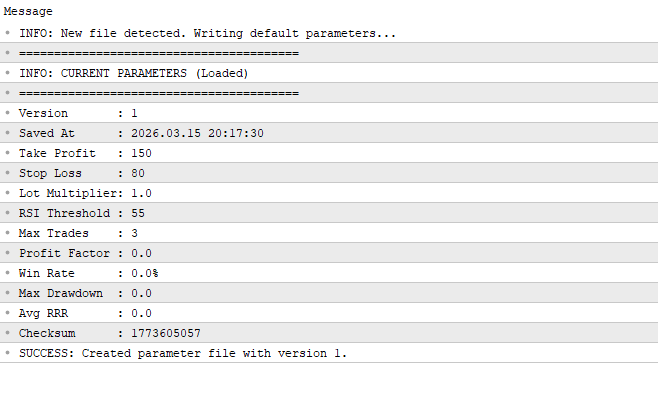
The saved values are shown in the terminal after the structure has been written to the file using a number of Print statements. These notifications confirm that the parameters have been properly initialized and stored. Because it lets the developer see precisely what values were stored in the structure at the time it was written to the file, the printed output is very helpful for debugging.
Output:
Checksum Verification and Append New Version
After the initial record is created, the EA creates a new version whenever parameters change. Each new setting is entered as a new item in the same file rather than replacing earlier data. This method transforms the file into an expanding series of parameter records, each of which represents a distinct EA configuration. This is significant because overwriting parameters causes previous setups to be permanently lost. It makes it challenging to monitor modifications or assess how the plan has evolved. The EA keeps a complete record of all settings by creating new versions instead of replacing old ones, allowing for the study of the parameters in use at any given time.
This system has a simple concept. The EA creates a record every time it detects a change in the adjustable parameters. The record contains a timestamp indicating the moment of modification, the adjusted parameter values, and a new version number. After that, it is added to the binary file, guaranteeing that all earlier iterations are preserved. First, check whether the file is empty. Since there are no records yet, the EA should begin by producing the first version if it is empty. It shows that earlier versions have been saved if the file already has data. The EA uses this check to determine whether to create a new version or initialize the original record.
Finding out how many versions have been stored comes next, after we have verified that the file contains data. The EA can determine the version number for the new parameters by knowing the total number of records in the file. This maintains a distinct change sequence by guaranteeing that every record has a unique version identification. The EA fetches the most recent stored version from the file after determining the total number of versions. The most current settings and their checksum are included in this final version. To ascertain whether any changes have taken place, the EA can read this record and then compare it with the newly entered parameters. A new version will be made and attached to the file if the parameters have changed; otherwise, no new entry is required. This procedure guarantees that only significant modifications to the EA's configuration are appropriately reflected in the version history.
Example:
int struct_size;
int total_versions;
int last_version_offset;
else
   if(handle != INVALID_HANDLE)
     {
      file_size = (int)FileSize(handle);
      if(file_size == 0)
        {
         Print("INFO: New file detected. Writing default parameters...");
         params.version_count     = 1;
         params.saved_at       = TimeCurrent();
         params.take_profit    = TP;
         params.stop_loss      = SL;
         params.lot_multiplier = L_multiplier;
         params.rsi_threshold  = RSI_threshold;
         params.max_trades     = Max_trades;
         params.profit_factor  = 0.0;
         params.win_rate       = 0.0;
         params.max_drawdown   = 0.0;
         params.avg_rrr        = 0.0;
         params.checksum       = 0;

         // Calculate checksum
         uint result_f = 0;
         result_f ^= (uint)params.take_profit;
         result_f ^= (uint)params.stop_loss;
         result_f ^= (uint)(params.lot_multiplier * 1000);
         result_f ^= (uint)params.rsi_threshold;
         result_f ^= (uint)params.max_trades;
         params.checksum = result_f;

         // Write version 1 to file
         FileWriteStruct(handle, params);
         Print("========================================");
         Print("INFO: CURRENT PARAMETERS (Loaded)");
         Print("========================================");
         Print("Version       : ", params.version_count);
         Print("Saved At      : ", TimeToString(params.saved_at, TIME_DATE|TIME_SECONDS));
         Print("Take Profit   : ", params.take_profit);
         Print("Stop Loss     : ", params.stop_loss);
         Print("Lot Multiplier: ", params.lot_multiplier);
         Print("RSI Threshold : ", params.rsi_threshold);
         Print("Max Trades    : ", params.max_trades);
         Print("Profit Factor : ", params.profit_factor);
         Print("Win Rate      : ", params.win_rate, "%");
         Print("Max Drawdown  : ", params.max_drawdown);
         Print("Avg RRR       : ", params.avg_rrr);
         Print("Checksum      : ", params.checksum);
         Print("SUCCESS: Created parameter file with version 1.");
        }
      else
        {
         struct_size = sizeof(SessionParams);
         total_versions = file_size / struct_size;
         Print("File size: ",file_size);
         Print("Struct size: ",struct_size);
         Print("Total versions: ",total_versions);

         last_version_offset = (total_versions - 1) * struct_size;
         FileSeek(handle, last_version_offset, SEEK_SET);
         SessionParams    pre_v_params;
         FileReadStruct(handle, pre_v_params);
        }
      FileClose(handle);
     }
Explanation:
The EA uses previously saved parameter versions when the file is not empty by going into the else block. To find the number of versions kept, it uses sizeof(SessionParams) to calculate the size of a single record and divides the total file size by this value. It uses this information to calculate the most recent record's offset, shift the file pointer to that location, and read the most recent parameters into a structure. Next, using the current input parameters, the EA calculates a new checksum with the adjustable parameters after extracting the checksum of the previous version.
Example:else { struct_size = sizeof(SessionParams); total_versions = file_size / struct_size; Print("File size: ",file_size); Print("Struct size: ",struct_size); Print("Total versions: ",total_versions); last_version_offset = (total_versions - 1) * struct_size; FileSeek(handle, last_version_offset, SEEK_SET); SessionParams pre_v_params; FileReadStruct(handle, pre_v_params); // Calculate last checksum uint result = 0; result ^= (uint)pre_v_params.take_profit; result ^= (uint)pre_v_params.stop_loss; result ^= (uint)(pre_v_params.lot_multiplier * 1000); result ^= (uint)pre_v_params.rsi_threshold; result ^= (uint)pre_v_params.max_trades; uint Prev_checksum = result; Print("\nPREV CHECKSUM: ",Prev_checksum); //Calculate new checksum pre_v_params.take_profit = TP; pre_v_params.stop_loss = SL; pre_v_params.lot_multiplier = L_multiplier; pre_v_params.rsi_threshold = RSI_threshold; pre_v_params.max_trades = Max_trades; uint result_new = 0; result_new ^= (uint)pre_v_params.take_profit; result_new ^= (uint)pre_v_params.stop_loss; result_new ^= (uint)(pre_v_params.lot_multiplier * 1000); result_new ^= (uint)pre_v_params.rsi_threshold; result_new ^= (uint)pre_v_params.max_trades; pre_v_params.checksum = result_new; Print("NEW CHECKSUM: ",pre_v_params.checksum); }
Output:

Explanation:
The code's initial section determines the checksum of the most recent saved parameter version. To create a composite numeric representation of every field in the structure, a variable is initialized at zero. The XOR operation is then used to include the data from the adjustable parameters in the previous record, such as take_profit, stop_loss, L_multiplier, RSI_threshold, and max_trades.
Without changing the actual parameter values, multiplying decimal values guarantees that minute differences are recorded during the checksum computation. The resultant number can be printed to confirm that the preceding checksum was calculated accurately and serves as a compact fingerprint of the most recent configuration. Using the current input parameters, a new checksum is then calculated. The new values are entered into the structure's adjustable fields, and the identical checksum procedure is used once more, scaling decimal values to maintain accuracy. This creates a new numerical representation of the modified configuration, which can then be compared to the previous checksum to identify any modifications.
To determine whether the parameters have changed, the EA analyzes the new and old checksums. A record needs to be made if the two values differ because something has been modified. If they match, no update is required because no modifications have been made. It is not necessary to compare each parameter separately when using this method. The EA can determine whether a new version is required now that both checksums are accessible. The settings have changed since the last saving if the checksums are different.
Example:
Print("NEW CHECKSUM: ",pre_v_params.checksum);

if(pre_v_params.checksum != Prev_checksum)
  {
   FileSeek(handle, 0, SEEK_END);
   pre_v_params.version_count += 1;
   pre_v_params.saved_at = TimeCurrent();

   FileWriteStruct(handle, pre_v_params);
   Print("========================================");
   Print("INFO: NEW SAVED PARAMETERS (Loaded)");
   Print("========================================");
   Print("Version       : ", pre_v_params.version_count);
   Print("Saved At      : ", TimeToString(pre_v_params.saved_at, TIME_DATE|TIME_SECONDS));
   Print("Take Profit   : ", pre_v_params.take_profit);
   Print("Stop Loss     : ", pre_v_params.stop_loss);
   Print("Lot Multiplier: ", pre_v_params.lot_multiplier);
   Print("RSI Threshold : ", pre_v_params.rsi_threshold);
   Print("Max Trades    : ", pre_v_params.max_trades);
   Print("Profit Factor : ", pre_v_params.profit_factor);
   Print("Win Rate      : ", pre_v_params.win_rate, "%");
   Print("Max Drawdown  : ", pre_v_params.max_drawdown);
   Print("Avg RRR       : ", pre_v_params.avg_rrr);
   Print("Checksum      : ", pre_v_params.checksum);
   Print("SUCCESS: Created parameter file with version ", pre_v_params.version_count);

  }
Explanation:
The logic is to spot any differences by comparing the newly calculated value with the last saved version. If it spots a change, it saves the complete parameter structure as a record, increases the version number, moves the file reference to the end of the file, and updates the timestamp. It then prints the details to confirm successful storage. If the values are equal, no new version is created.
Conclusion
You now have a clear, effective method to save a searchable history of configurations and prevent unintentional overwrites of EA settings. The delivered artifact is an append‑only binary file (parameters.bin) where each record is a fixed-size struct containing:
- version count and saved at (metadata),
- all input/adjustable trading parameters (the values you tune),
- optional performance metrics, and
- a checksum for integrity.
Behavioral rules and integration points:
- Create version 1 only when the file is empty (initialization).
- On startup or at regular checkpoints (OnInit/OnTick), load the last record by computing offset = (total_versions - 1) * sizeof(struct).
- Recompute the checksum from the adjustable parameters (scale floats as needed). If the checksum differs from the last saved checksum, increment the version count, update the saved at, and FileWriteStruct the record to the file end; otherwise, do nothing.
- Use the checksum to represent meaningful parameter changes
Warning: All rights to these materials are reserved by MetaQuotes Ltd. Copying or reprinting of these materials in whole or in part is prohibited.
This article was written by a user of the site and reflects their personal views. MetaQuotes Ltd is not responsible for the accuracy of the information presented, nor for any consequences resulting from the use of the solutions, strategies or recommendations described.

 Trading Options Without Options (Part 1): Basic Theory and Emulation Through Underlying Assets
 Building a Trade Analytics System (Part 2): How to Capture Closed Trades and Send JSON in MQL5
 CAPM Model Indicator for the Forex Market
 Automating Trading Strategies in MQL5 (Part 48): Order Blocks, Inducement, Break of Structure

- Free trading apps
- Over 8,000 signals for copying
- Economic news for exploring financial markets
You agree to website policy and terms of use