

Building a Trade Analytics System (Part 2): How to Capture Closed Trades and Send JSON in MQL5
 2 176
2 176
 0
0

Introduction
After setting up an external backend, the next challenge becomes clear: MetaTrader 5 cannot automatically capture closed trades and send them to an external system. Trade data remains inside the terminal unless you export it manually or access it via scripts. This makes it difficult to build a consistent, event-driven data pipeline.
In Part 1, we established the backend foundation by defining the system architecture, creating the data model, and preparing a versioned API to receive trade data. However, that backend remains idle until a mechanism is introduced on the terminal side to supply it with structured trade information.
This article addresses that gap. We develop a lightweight Expert Advisor that listens for trade closures. It extracts relevant data from MetaTrader 5, formats it as JSON, and sends it to the backend via HTTP. The focus is strictly on capturing and transmitting closed trade data reliably and repeatably.
By the end of this article, you will have a working bridge between MetaTrader 5 and your external backend. The system will be able to detect when a position is closed and deliver its details to the API, preparing the ground for storage and analysis in the next part of the series.
Prerequisites
Before proceeding, ensure you are comfortable with the following:
- Basic MQL5 programming. You should understand variables, control flow, and how to write and organize functions.
- Working with MetaTrader 5. You should be able to navigate the platform, attach and remove Expert Advisors, and inspect logs using the Toolbox.
- Using MetaEditor. You should know how to create source files, write code, compile programs, and identify basic errors.
- Familiarity with the series context. Reading Part 1 is recommended to understand the backend setup and API structure, but you can still follow along without it.
Where We Are and What Comes Next
In Part 1, we established the backend foundation for the system. We defined a clear data model, created a lightweight API, and confirmed that the server can run locally and accept requests. At this stage, the backend is ready, but it does not yet receive any data from MetaTrader 5.
This part focuses on completing that connection. We will develop an Expert Advisor that listens for trade closure events inside MetaTrader 5, extracts the relevant trade details, and sends them to the backend in a structured format. The goal is to create a simple and reliable data bridge between the trading terminal and the external system.
By the end of this article, the system will be able to detect when a position is closed and transmit its details to the API. This completes the core pipeline needed to move trade data out of MetaTrader 5 and into an external environment.
Building the Bridge Step-by-Step
At this stage, we move from design into implementation. The best way to follow this section is to build the Expert Advisor alongside the explanation. Active practice will make the concepts clearer and easier to retain. To support this, the complete source file for this section has been provided as tradeAnalyticsBridge.mq5. You are encouraged to download it and keep it open in a separate tab. If you encounter issues during development, you can refer to it and compare your progress.
Begin by opening MetaEditor and creating a new Expert Advisor file. You may use any name, although using a consistent name helps with organization. Once the file is created, paste the following starter code.
//+------------------------------------------------------------------+
//|                                         tradeAnalyticsBridge.mq5 |
//|          Copyright 2026, MetaQuotes Ltd. Developer is Chacha Ian |
//|                          https://www.mql5.com/en/users/chachaian |
//+------------------------------------------------------------------+

#property copyright "Copyright 2026, MetaQuotes Ltd. Developer is Chacha Ian"
#property link      "https://www.mql5.com/en/users/chachaian"
#property version   "1.00"

input string apiEndpointUrl = "http://127.0.0.1:5000/api/v1/trades";

//+------------------------------------------------------------------+
//| Expert initialization function                                   |
//+------------------------------------------------------------------+
int OnInit()
  {
   return(INIT_SUCCEEDED);
  }

//+------------------------------------------------------------------+
//| Expert deinitialization function                                 |
//+------------------------------------------------------------------+
void OnDeinit(const int reason)
  {

   //--- Notify why the program stopped running
   Print("Program terminated! Reason code: ", reason);

  }

//+------------------------------------------------------------------+
//| OnTradeTransaction function                                      |
//+------------------------------------------------------------------+
void OnTradeTransaction(const MqlTradeTransaction& trans,
                        const MqlTradeRequest& request,
                        const MqlTradeResult& result)
  {

   //--- If position closed

  }

//+------------------------------------------------------------------+
The current code represents the foundation of the bridge. Each part has a specific purpose and prepares the program for the logic that follows.
Understanding the Foundation
The header section defines the basic properties of the Expert Advisor. It includes metadata such as version and author information. This does not affect the trading logic but helps maintain clarity and traceability of the program.
//+------------------------------------------------------------------+
//|                                         tradeAnalyticsBridge.mq5 |
//|          Copyright 2026, MetaQuotes Ltd. Developer is Chacha Ian |
//|                          https://www.mql5.com/en/users/chachaian |
//+------------------------------------------------------------------+

#property copyright "Copyright 2026, MetaQuotes Ltd. Developer is Chacha Ian"
#property link      "https://www.mql5.com/en/users/chachaian"
#property version   "1.00"
The input parameter apiEndpointUrl defines the server endpoint where trade data will be sent. Exposing it as an input allows the user to change the destination without modifying the code.
input string apiEndpointUrl = "http://127.0.0.1:5000/api/v1/trades";
The OnInit function is executed when the Expert Advisor is attached to a chart. In this implementation, it simply confirms successful initialization.
//+------------------------------------------------------------------+
//| Expert initialization function                                   |
//+------------------------------------------------------------------+
int OnInit()
  {
   return(INIT_SUCCEEDED);
  }
The OnDeinit function is called when the program is removed. It prints a message indicating why the program stopped. This helps with debugging and monitoring behavior during testing.
//+------------------------------------------------------------------+
//| Expert deinitialization function                                 |
//+------------------------------------------------------------------+
void OnDeinit(const int reason)
  {

   //--- Notify why the program stopped running
   Print("Program terminated! Reason code: ", reason);

  }
The OnTradeTransaction function is the core event handler. It is triggered whenever a trade-related event occurs in the terminal. At this stage, it is empty because we will gradually introduce logic into it as we build the system.
//+------------------------------------------------------------------+
//| OnTradeTransaction function                                      |
//+------------------------------------------------------------------+
void OnTradeTransaction(const MqlTradeTransaction& trans,
                        const MqlTradeRequest& request,
                        const MqlTradeResult& result)
  {

   //--- If position closed

  }
We use OnTradeTransaction because it reacts to trading activity in an event-driven way. This handler triggers only on trade-related events. Continuous per-tick checks are ineffective and can be unreliable. This makes it more precise and better suited for capturing meaningful state changes in the account.
Polling in OnTick requires scanning positions and comparing previous states. This adds complexity and may miss edge cases. By capturing only closed trades, we ensure the data is final and complete. This avoids partial updates and guarantees that each record sent to the backend represents a fully resolved trade, ready for storage or further processing.
Detecting Closed Trades
The workflow of this system begins when a trade is closed. For this reason, we first need a reliable way to detect such events. Let us define a function named IsClosedTradeDeal.
//+------------------------------------------------------------------+
//| Returns true if this transaction is a closed trade deal          |
//+------------------------------------------------------------------+
bool IsClosedTradeDeal(const MqlTradeTransaction &trans)
  {

   if(trans.type != TRADE_TRANSACTION_DEAL_ADD)
     {
      return false;
     }

   if(trans.deal == 0)
     {
      return false;
     }

   if(!HistoryDealSelect(trans.deal))
     {
      return false;
     }

   long deal_entry = HistoryDealGetInteger(trans.deal, DEAL_ENTRY);
   return (deal_entry == DEAL_ENTRY_OUT || deal_entry == DEAL_ENTRY_OUT_BY);
  }
This function filters transactions to identify only those that represent closed trades. It begins by checking whether the transaction type corresponds to a deal being added to history. Only such events are relevant for our purpose. If this condition is not met, the function exits early.
//+------------------------------------------------------------------+
//| Returns true if this transaction is a closed trade deal          |
//+------------------------------------------------------------------+
bool IsClosedTradeDeal(const MqlTradeTransaction &trans)
{

   if(trans.type != TRADE_TRANSACTION_DEAL_ADD)
   {
      return false;
   }
}
Next, it verifies that a valid deal ticket exists. Without a valid ticket, there is no data to inspect.
//+------------------------------------------------------------------+
//| Returns true if this transaction is a closed trade deal          |
//+------------------------------------------------------------------+
bool IsClosedTradeDeal(const MqlTradeTransaction &trans)
{
   ...

   if(trans.deal == 0)
   {
      return false;
   }
}
The function then selects the deal from history using its ticket. This step is required before accessing its properties.
//+------------------------------------------------------------------+
//| Returns true if this transaction is a closed trade deal          |
//+------------------------------------------------------------------+
bool IsClosedTradeDeal(const MqlTradeTransaction &trans)
{

   ...

   if(!HistoryDealSelect(trans.deal))
   {
      return false;
   }
}
Finally, it reads the deal entry type. If the entry indicates an exit from the market, the function returns true. Otherwise, it returns false.
//+------------------------------------------------------------------+
//| Returns true if this transaction is a closed trade deal          |
//+------------------------------------------------------------------+
bool IsClosedTradeDeal(const MqlTradeTransaction &trans)
{

   ...

   long deal_entry = HistoryDealGetInteger(trans.deal, DEAL_ENTRY);
   return (deal_entry == DEAL_ENTRY_OUT || deal_entry == DEAL_ENTRY_OUT_BY);

}
This approach ensures that the system reacts only to completed trades and ignores all other transaction noise.
Making Trade Reasons Readable
Once a closed trade is detected, the next step is to interpret its properties. A trade reason indicates why the trade occurred (manual, Expert Advisor, stop loss, take profit, stop out, mobile, or web). While these are efficient for computation, they are not suitable for external reporting. To address this, we define the function DealReasonToString.
//+------------------------------------------------------------------+
//| Convert deal reason to readable text                             |
//+------------------------------------------------------------------+
string DealReasonToString(const ENUM_DEAL_REASON reason)
  {
   switch(reason)
     {
      case DEAL_REASON_CLIENT:
         return "CLIENT";
      case DEAL_REASON_MOBILE:
         return "MOBILE";
      case DEAL_REASON_WEB:
         return "WEB";
      case DEAL_REASON_EXPERT:
         return "EXPERT";
      case DEAL_REASON_SL:
         return "STOP_LOSS";
      case DEAL_REASON_TP:
         return "TAKE_PROFIT";
      case DEAL_REASON_SO:
         return "STOP_OUT";
      case DEAL_REASON_ROLLOVER:
         return "ROLLOVER";
      case DEAL_REASON_VMARGIN:
         return "VMARGIN";
      case DEAL_REASON_SPLIT:
         return "SPLIT";
      default:
         return "UNKNOWN";
     }
  }
This function maps each deal reason constant to a readable label such as STOP_LOSS or TAKE_PROFIT. The mapping is handled using a switch statement. The purpose of this function is to prepare data for external use. Instead of sending raw numeric codes, we send meaningful values that can be easily interpreted in the backend.
Determining Trade Direction
Similarly, trade direction must be standardized. The function DealTypeToPositionType converts deal type constants into simple labels. A buy deal is mapped to BUY, and a sell deal is mapped to SELL.
//+------------------------------------------------------------------+
//| Convert deal type to BUY / SELL                                  |
//+------------------------------------------------------------------+
string DealTypeToPositionType(const ENUM_DEAL_TYPE deal_type)
  {
   switch(deal_type)
     {
      case DEAL_TYPE_BUY:
         return "BUY";
      case DEAL_TYPE_SELL:
         return "SELL";
      default:
         return "UNKNOWN";
     }
  }
This ensures consistency when transmitting trade data. It also aligns with the structure defined in the backend model.
Locating the Opening Deal
A closed trade only contains part of the required information. To retrieve details such as the entry price and opening time, we must locate the deal that opened the position. The function FindOpeningDealTicket performs this task.
//+------------------------------------------------------------------+
//| Find the opening deal ticket for a given position                |
//+------------------------------------------------------------------+
ulong FindOpeningDealTicket(const ulong position_ticket)
  {

   if(position_ticket == 0)
     {
      return 0;
     }

   if(!HistorySelectByPosition(position_ticket))
     {
      return 0;
     }

   int total_deals = HistoryDealsTotal();

   for(int i = 0; i < total_deals; i++)
     {
      ulong deal_ticket = HistoryDealGetTicket(i);
      if(deal_ticket == 0)
        {
         continue;
        }

      long entry_type = HistoryDealGetInteger(deal_ticket, DEAL_ENTRY);

      if(entry_type == DEAL_ENTRY_IN || entry_type == DEAL_ENTRY_INOUT)
        {
         return deal_ticket;
        }

     }

   return 0;
  }
It begins by validating the position ticket. If the ticket is invalid, the function returns immediately.
//+------------------------------------------------------------------+
//| Find the opening deal ticket for a given position                |
//+------------------------------------------------------------------+
ulong FindOpeningDealTicket(const ulong position_ticket)
{

   if(position_ticket == 0)
   {
      return 0;
   }
}
Next, it selects the trade history for that position. This allows access to all deals associated with it.
//+------------------------------------------------------------------+
//| Find the opening deal ticket for a given position                |
//+------------------------------------------------------------------+
ulong FindOpeningDealTicket(const ulong position_ticket)
{

   ...

   if(!HistorySelectByPosition(position_ticket))
   {
      return 0;
   }
}
The function then loops through the available deals. For each deal, it checks the entry type. When it finds a deal marked as an entry, it returns its ticket.
//+------------------------------------------------------------------+
//| Find the opening deal ticket for a given position                |
//+------------------------------------------------------------------+
ulong FindOpeningDealTicket(const ulong position_ticket)
{

   ...

   int total_deals = HistoryDealsTotal();

   for(int i = 0; i < total_deals; i++)
   {
      ulong deal_ticket = HistoryDealGetTicket(i);
      if(deal_ticket == 0)
      {
         continue;
      }

      long entry_type = HistoryDealGetInteger(deal_ticket, DEAL_ENTRY);

      if(entry_type == DEAL_ENTRY_IN || entry_type == DEAL_ENTRY_INOUT)
      {
         return deal_ticket;
      }
   }

   return 0;
}
This function allows us to link the closing deal with its corresponding opening deal. This step is essential for building a complete trade record.
Structuring Data as JSON
At this point, we have all the necessary data fields. The next step is to prepare them for transmission. All messages in this system are formatted as JSON. This ensures compatibility with the backend API. Since MQL5 does not provide native JSON support, we construct the JSON string manually. This is done in the function BuildTradeJson.
//+------------------------------------------------------------------+
//| Build JSON string from trade data                                |
//+------------------------------------------------------------------+
string BuildTradeJson(
   string symbol,
   long order_ticket,
   long deal_ticket,
   long position_ticket,
   string position_type,
   string position_reason,
   double lot_size,
   double entry_price,
   double stop_loss,
   double take_profit,
   double profit,
   datetime open_time,
   datetime close_time,
   long magic_number
)
  {
   string json = "{";

   json += "\"symbol\":\"" + symbol + "\",";
   json += "\"order_ticket\":" + IntegerToString(order_ticket) + ",";
   json += "\"deal_ticket\":" + IntegerToString(deal_ticket) + ",";
   json += "\"position_ticket\":" + IntegerToString(position_ticket) + ",";
   json += "\"position_type\":\"" + position_type + "\",";
   json += "\"position_reason\":\"" + position_reason + "\",";
   json += "\"lot_size\":" + DoubleToString(lot_size, 2) + ",";
   json += "\"entry_price\":" + DoubleToString(entry_price, _Digits) + ",";
   json += "\"stop_loss\":" + DoubleToString(stop_loss, _Digits) + ",";
   json += "\"take_profit\":" + DoubleToString(take_profit, _Digits) + ",";
   json += "\"profit\":" + DoubleToString(profit, 2) + ",";
   json += "\"open_time\":\"" + TimeToString(open_time, TIME_DATE | TIME_SECONDS) + "\",";
   json += "\"close_time\":\"" + TimeToString(close_time, TIME_DATE | TIME_SECONDS) + "\",";
   json += "\"magic_number\":" + IntegerToString(magic_number);

   json += "}";

   return json;
  }
The function takes all relevant trade fields as input parameters. It then builds a structured string by appending key-value pairs. Each value is formatted according to its type. Numeric values are converted using appropriate formatting functions, while time values are converted into readable strings. The result is a well-structured JSON payload that matches the expected format on the server side.
Sending Data to the Server
With the JSON payload ready, the next step is transmission. The function SendTradeToServer handles this process.
//+------------------------------------------------------------------+
//| Send JSON trade data to backend                                  |
//+------------------------------------------------------------------+
bool SendTradeToServer(const string json_payload)
  {
   string url = apiEndpointUrl;

   string headers = "Content-Type: application/json\r\n";

   char data[];
   StringToCharArray(json_payload, data);

   char result[];
   string result_headers;

   ResetLastError();

   int response = WebRequest(
                     "POST",
                     url,
                     headers,
                     5000,
                     data,
                     result,
                     result_headers
                  );

   if(response == -1)
     {
      Print("WebRequest failed. Error: ", GetLastError());
      return false;
     }

   Print("Server response code: ", response);
   Print("Server response body: ", CharArrayToString(result));

   return (response == 200 || response == 201);
  }
It begins by retrieving the API endpoint from the input parameter. This ensures flexibility across different environments. The function sets the request headers to indicate that the content type is JSON. Next, the JSON string is converted into a character array. This is required because the WebRequest function operates on byte data. The request is then sent using the POST HTTP method. A timeout is defined to prevent indefinite waiting. If the request fails, the function logs the error. If it succeeds, it prints the server response for verification. This function forms the communication layer between MetaTrader and the backend.
Processing a Closed Trade
Now we combine all the components into a single workflow. The function ProcessClosedTrade is responsible for orchestrating the process.
//+------------------------------------------------------------------+
//| Extract, build JSON and send trade                               |
//+------------------------------------------------------------------+
void ProcessClosedTrade(const MqlTradeTransaction &trans)
  {
   ulong close_deal_ticket = trans.deal;

   if(close_deal_ticket == 0)
      return;

   if(!HistoryDealSelect(close_deal_ticket))
      return;

   // --- close-side
   string   symbol          = HistoryDealGetString(close_deal_ticket, DEAL_SYMBOL);
   long     order_ticket    = HistoryDealGetInteger(close_deal_ticket, DEAL_ORDER);
   long     deal_ticket     = (long)close_deal_ticket;
   long     position_ticket = HistoryDealGetInteger(close_deal_ticket, DEAL_POSITION_ID);
   long     deal_type       = HistoryDealGetInteger(close_deal_ticket, DEAL_TYPE);
   long     deal_reason     = HistoryDealGetInteger(close_deal_ticket, DEAL_REASON);

   double   lot_size        = HistoryDealGetDouble(close_deal_ticket, DEAL_VOLUME);
   double   close_price     = HistoryDealGetDouble(close_deal_ticket, DEAL_PRICE);
   double   stop_loss       = HistoryDealGetDouble(close_deal_ticket, DEAL_SL);
   double   take_profit     = HistoryDealGetDouble(close_deal_ticket, DEAL_TP);
   double   profit          = HistoryDealGetDouble(close_deal_ticket, DEAL_PROFIT);

   long     magic_number    = HistoryDealGetInteger(close_deal_ticket, DEAL_MAGIC);
   datetime close_time      = (datetime)HistoryDealGetInteger(close_deal_ticket, DEAL_TIME);

   // --- opening side
   ulong open_deal_ticket = FindOpeningDealTicket((ulong)position_ticket);

   double entry_price = 0.0;
   datetime open_time = 0;

   if(open_deal_ticket != 0 && HistoryDealSelect(open_deal_ticket))
     {
      entry_price = HistoryDealGetDouble(open_deal_ticket, DEAL_PRICE);
      open_time   = (datetime)HistoryDealGetInteger(open_deal_ticket, DEAL_TIME);
     }

   // --- enums
   string position_type   = DealTypeToPositionType((ENUM_DEAL_TYPE)deal_type);
   string position_reason = DealReasonToString((ENUM_DEAL_REASON)deal_reason);

   // --- build JSON
   string json = BuildTradeJson(
                    symbol,
                    order_ticket,
                    deal_ticket,
                    position_ticket,
                    position_type,
                    position_reason,
                    lot_size,
                    entry_price,
                    stop_loss,
                    take_profit,
                    profit,
                    open_time,
                    close_time,
                    magic_number
                 );

   Print("JSON Payload: ", json);

   // --- send
   SendTradeToServer(json);
  }
It selects the closing deal and extracts the relevant properties. These include symbol, volume, price, profit, and identifiers. Next, it retrieves the opening deal using the helper function defined earlier. This provides the entry price and opening time. The function then converts enumerated values into readable strings. This ensures that the final dataset is clean and consistent. Once all data is prepared, it calls the JSON builder function to create the payload. Finally, the payload is printed for inspection and sent to the server. This function represents the complete processing pipeline for a single closed trade.
Preventing Duplicate Processing
Before moving to testing, we need to add a small safety mechanism to prevent the same deal from being processed more than once.
The bridge EA uses OnTradeTransaction, which listens to trade events at the account-level. This means the EA reacts to trade activity on the trading account, not only to activity from the chart where it is attached. For that reason, the bridge should be attached to only one chart. If it is attached to multiple charts, each instance may receive the same account event and send the same trade data to the backend.
Even with that rule in mind, it is still useful to add a simple duplicate check inside the EA. We do this by keeping a list of deal tickets that have already been processed.
First, we declare a dynamic array near the user input variables section:
ulong processedDeals[]; This array stores the tickets of deals that have already passed through the bridge. Before sending a closed trade to the backend, we check whether its deal ticket is already in this list.
To perform that check, we define the following function:
//+------------------------------------------------------------------+
//| Check if deal has already been processed                         |
//+------------------------------------------------------------------+
bool IsDealAlreadyProcessed(ulong deal)
  {
//--- Iterate through processed deals
   for(int i = 0; i < ArraySize(processedDeals); i++)
     {
      if(processedDeals[i] == deal)
         return true;
     }

   return false;
  }
The function loops through the processedDeals array and compares each stored ticket with the current deal ticket. If a match is found, the function returns true. If no match is found, it returns false.
We then update OnTradeTransaction so that a closed deal is processed only once:
//+------------------------------------------------------------------+
//| Trade transaction handler                                        |
//+------------------------------------------------------------------+
void OnTradeTransaction(const MqlTradeTransaction& trans,
                        const MqlTradeRequest& request,
                        const MqlTradeResult& result)
  {
//--- Check if this is a closed trade event
   if(IsClosedTradeDeal(trans))
     {
      ulong deal = trans.deal;

      //--- Prevent duplicate processing
      if(IsDealAlreadyProcessed(deal))
         return;

      //--- Mark deal as processed
      ArrayResize(processedDeals, ArraySize(processedDeals) + 1);
      processedDeals[ArraySize(processedDeals) - 1] = deal;

     }
  }
The logic is simple. When a closed trade is detected, the EA first checks whether the deal ticket has already been processed. If it has, the function exits immediately. If it has not, the ticket is added to the array and the trade is processed.
This does not replace proper deployment discipline. The bridge EA should still be attached to only one chart because it listens to account-level trade events. The duplicate check only adds a protective layer inside the program.
With this addition, the EA is better prepared for testing because it avoids repeated processing of the same deal within the same running instance.
Connecting Everything Together
With all utility functions defined, we now update the event handler.
//+------------------------------------------------------------------+
//| Trade transaction handler                                        |
//+------------------------------------------------------------------+
void OnTradeTransaction(const MqlTradeTransaction& trans,
                        const MqlTradeRequest& request,
                        const MqlTradeResult& result)
  {
//--- Check if this is a closed trade event
   if(IsClosedTradeDeal(trans))
     {
      ulong deal = trans.deal;

      //--- Prevent duplicate processing
      if(IsDealAlreadyProcessed(deal))
         return;

      //--- Mark deal as processed
      ArrayResize(processedDeals, ArraySize(processedDeals) + 1);
      processedDeals[ArraySize(processedDeals) - 1] = deal;

      //--- Process the closed trade
      ProcessClosedTrade(trans);
     }
  }
The OnTradeTransaction function is modified to check whether a closed trade has occurred. If the condition is met, it calls ProcessClosedTrade. This connects the detection logic with the processing pipeline. From this point onward, every closed trade will trigger the full sequence of extraction, formatting, and transmission.
At this stage, the bridge is complete. The Expert Advisor can detect when a trade is closed, extract its details, convert the data into JSON, and send it to the backend. In the next section, we will test this implementation and confirm that the system behaves as expected.
Testing the Bridge in a Local Environment
Before testing the Expert Advisor, the backend server must be running and ready to receive requests. This backend was developed in Part 1. If you are not familiar with the setup, it is recommended to briefly review that section. The same source file, named app.py, has been attached again for reference.
We will perform this test in a local development environment. Begin by opening your terminal and navigating to the backend project directory.
cd mt5TradeAnalyticsBackend
Once inside the project directory, activate the virtual environment.
. .venv/bin/activate
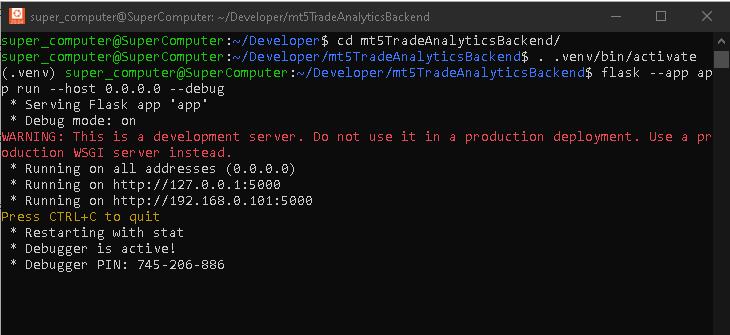
With the environment active, start the Flask server using the following command.
flask --app app run --host 0.0.0.0 --debug
This command starts the backend server and allows it to listen for incoming HTTP requests. The host setting enables access from the local machine, while debug mode provides useful output during development. When the server starts successfully, you should see a message in the terminal indicating that the application is running. A screenshot of this output is provided below for reference.
To confirm that the server is ready to respond, open your browser and enter the following address.
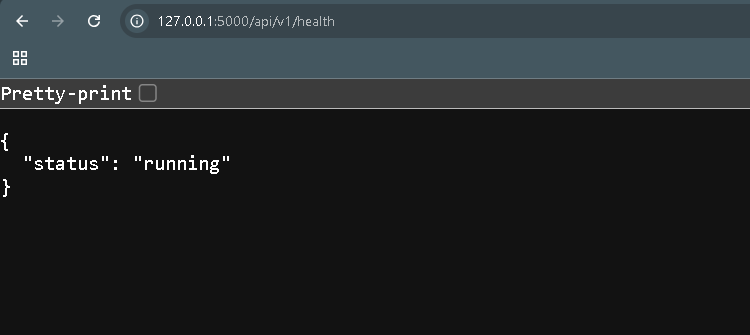
http://127.0.0.1:5000/api/v1/health If everything is working correctly, the browser will display a JSON response indicating that the backend is running. This confirms that the server is active and ready to receive data.
With the backend in place, return to MetaTrader 5 and attach the Expert Advisor to a chart. But before that, we must allow MetaTrader 5 to send HTTP requests to our backend server. By default, MetaTrader 5 blocks external web requests for security reasons. If the backend URL is not listed, the WebRequest function will fail even if the EA code is correct.
Follow these steps:
- Open MetaTrader 5.
- Click Tools on the main menu.
- From the dropdown menu, select Options.
- In the Options window, open the Expert Advisors tab.
- Locate and enable the checkbox named Allow WebRequest for listed URL.
- In the URL list, add the local backend root address:
http://127.0.0.1:5000 - If your Flask server is running on another machine within the same local network, add that machine’s address as well. For example:
http://192.168.1.20:5000 - Click OK to save the changes.
After this step, the bridge EA will be allowed to send requests to the backend endpoint configured in apiEndpointUrl input parameter. Without this configuration, MetaTrader 5 will block the request before it reaches the Flask server.
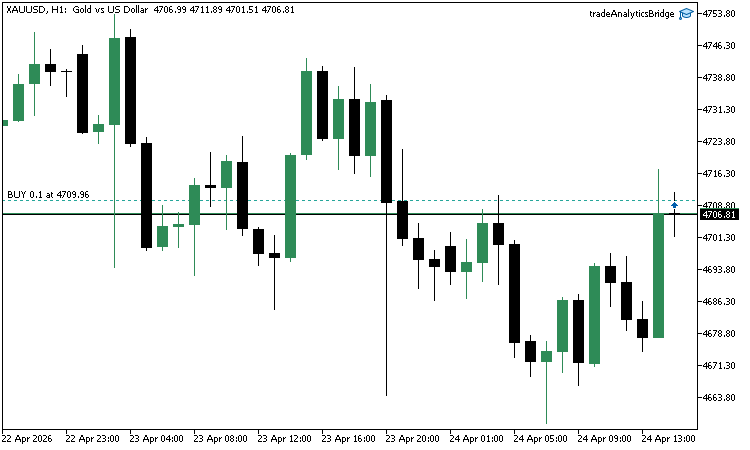
In this example, the EA is attached to the XAUUSD chart on the hourly timeframe. Once attached, the EA begins listening for trade events.

To test the bridge, open a new position. In this case, a position with a volume of 0.10 is opened.
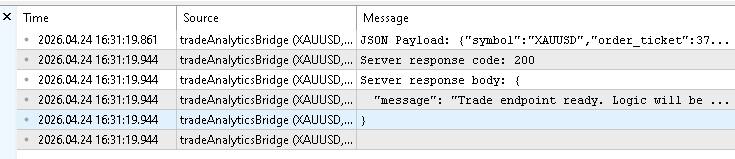
Allow the trade to run for a short period, then close it manually. This action triggers a trade transaction event inside the terminal. After closing the trade, open the Toolbox panel and navigate to the Experts tab. Here, you should see output similar to the following.
2026.04.24 16:31:19.861 tradeAnalyticsBridge (XAUUSD,H1)        JSON Payload: {"symbol":"XAUUSD","order_ticket":370171325,"deal_ticket":270524399,"position_ticket":370071966,"position_type":"SELL","position_reason":"CLIENT","lot_size":0.10,"entry_price":4709.96,"stop_loss":0.00,"take_profit":0.00,"profit":-161.90,"open_time":"2026.04.24 15:18:55","close_time":"2026.04.24 16:31:18","magic_number":0}

2026.04.24 16:31:19.944 tradeAnalyticsBridge (XAUUSD,H1)        Server response code: 200

2026.04.24 16:31:19.944 tradeAnalyticsBridge (XAUUSD,H1)        Server response body: {
2026.04.24 16:31:19.944 tradeAnalyticsBridge (XAUUSD,H1)          "message": "Trade endpoint ready. Logic will be implemented later."
2026.04.24 16:31:19.944 tradeAnalyticsBridge (XAUUSD,H1)        }
A JSON payload is printed, showing the trade details that were captured and formatted by the EA. Immediately after that, the response from the server is displayed. A response code of 200 indicates that the request was received successfully. The server also returns a message confirming that the endpoint is active. A screenshot of the Experts tab is provided below to illustrate this output.
Next, return to the terminal where the backend server is running. You should observe a log entry showing that a POST request was received at the specified endpoint. The presence of this log confirms that the data was transmitted from MetaTrader 5 to the backend without issues. A screenshot of this output is also included.
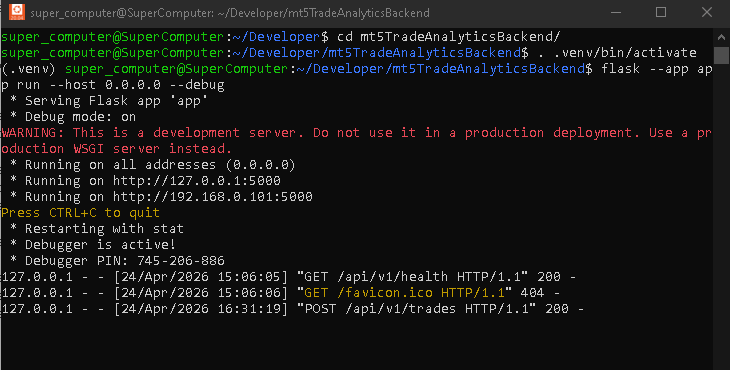
At this stage, the backend does not process or store the received data. This test still confirms that the core objective has been achieved. The Expert Advisor successfully detects a closed trade, extracts its details, and transmits them to the backend in a structured format.
This completes the verification of the bridge. The system is now capable of moving trade data from MetaTrader 5 to an external environment.
Current Limitations
While the bridge developed in this section is functional, it is important to understand its scope. The Expert Advisor captures closed trades and sends them to the backend in a structured format. The following limitations apply:
- There is no retry mechanism for failed requests. If the server is unavailable or a request fails, the trade data may be lost.
- There is no validation of the payload before transmission. The system assumes that all extracted values are correct and properly formatted.
- There is no local storage or queue. Data is sent immediately after a trade is closed, which may not be reliable in unstable network conditions.
- The system processes only closed trades. It does not track open positions, modifications, or partial updates.
These limitations reflect the scope of this part. The focus here is to demonstrate how trade data can be extracted from MetaTrader 5 and sent to an external system in a structured format. Features such as validation, persistence of data, and advanced error handling are beyond the scope of this implementation.
Conclusion
In this part, we focused on building the missing link between MetaTrader 5 and the backend system. The objective was to capture closed trades and transmit their data in a structured format. This has now been achieved with a working Expert Advisor that reacts to trade events and communicates with the external API.
At the end of this article, you now have:
- A working Expert Advisor that listens to trade events using OnTradeTransaction
- A reliable method to detect when a position is closed using deal history
- A complete data extraction process that gathers symbol, tickets, prices, volume, profit, and timestamps
- Clear conversion of internal constants into readable values such as BUY, SELL, STOP_LOSS, and TAKE_PROFIT
- A structured JSON payload that represents each closed trade in a consistent format
- A configurable API endpoint that allows you to control where the data is sent
- A working HTTP communication layer using WebRequest to send data to the backend
- A verified test showing that trade data is transmitted successfully and received by the server
These results confirm that the system is no longer isolated within the trading terminal. Trade data can now be moved out of MetaTrader 5 in a controlled and repeatable way. This establishes a complete bridge between the trading environment and the external backend.
At this stage, the backend receives the data but does not yet store or process it. The next step is to make the API fully functional and connect it to the database. This will allow incoming trade data to be saved and prepared for analysis.
In the next part of the series, we will extend the backend by implementing the logic required to accept incoming data and commit it to the database. This will complete the data pipeline and move the system closer to a usable trade analytics solution.
Attachments
To help you follow along and verify your implementation, the key source files used in this part are provided below. These files represent the complete working components developed throughout the series so far. You can download them and inspect their structure, compare them with your own implementation, or use them as a reference if you encounter issues during development.
| File Name | Description |
|---|---|
| app.py | Flask backend application that defines the API endpoints and initializes the SQLite database. It receives incoming HTTP requests and serves as the entry point for handling trade data. |
| tradeAnalyticsBridge.mq5 | Expert Advisor developed in this part that listens for trade events, detects closed trades, extracts their details, formats the data into JSON, and sends it to the backend using HTTP requests. |
Warning: All rights to these materials are reserved by MetaQuotes Ltd. Copying or reprinting of these materials in whole or in part is prohibited.
This article was written by a user of the site and reflects their personal views. MetaQuotes Ltd is not responsible for the accuracy of the information presented, nor for any consequences resulting from the use of the solutions, strategies or recommendations described.

 File-Based Versioning of EA Parameters in MQL5
 Automating Trading Strategies in MQL5 (Part 48): Order Blocks, Inducement, Break of Structure
 Trading Options Without Options (Part 1): Basic Theory and Emulation Through Underlying Assets
 Using the MQL5 Economic Calendar for News Filter (Part 4): Accurate Backtesting with Static Data

- Free trading apps
- Over 8,000 signals for copying
- Economic news for exploring financial markets
You agree to website policy and terms of use