

Introduction to MQL5 (Part 40): Beginner Guide to File Handling in MQL5 (II)
 1 601
1 601
 0
0

Introduction
Welcome back to Part 40 of the Introduction to MQL5 series. In the previous article, we laid the foundation for file handling in MQL5 by learning how to create and open files using FileSelectDialog and FileOpen. We also built the structure of a simple trading journal and recorded essential account information into a file in a safe and organized way. In this second part, we will continue building on that foundation by focusing on exporting actual trading history into the journal file. You will learn how to access account history within a specified time range and how to extract important trade details such as ticket number, symbol, order type, lot size, open and close times, prices, profit, and trade result. These records will then be written into the journal in a structured and readable format.
This article is written with beginners in mind, just like the others in this series. Every action's reasoning is meticulously dissected, and each step is described in detail. By expanding the trading journal script, we will continue to use the same project-based methodology. You will get a practical grasp of reading trade history and storing it in files in a persistent manner by the end of this article. This is crucial for logging, analysis, reporting, and strategy evaluation in real-world MQL5 applications.
Creating Column Headers for Your Trading Journal
In the previous post, we learned how to use the FileWrite function in MQL5 to write data to files. We used that as the basis for putting data from our programs into a file. We will expand on that understanding in this chapter by creating the trading journal's header row. The header row, which defines the column headings, is the file's first line. These titles serve as labels for every item of information, which facilitates later reading and analysis of the trading data.
TradeID, Symbol, OrderType, LotSize, OpenTime, OpenPrice, StopLoss, TakeProfit, CloseTime, ClosePrice, Profit in dollars, and Result are the headers for our trading notebook. Every one of these headers contains a crucial piece of information about a trade. OrderType indicates whether it is a buy or sell, TradeID stores the ticket number, and Symbol identifies the trading combination. While OpenTime and OpenPrice display the time and price at which the trade was opened, LotSize displays the trade volume. CloseTime and ClosePrice indicate the time and price at which the trade was closed, while StopLoss and TakeProfit reflect the protective thresholds established for the trade. A summary of the transaction outcome is provided by the profit in dollars and the result.
Because it guarantees that all ensuing trade data is arranged under the appropriate column, writing this header row first is crucial. This results in a trading log that is organized and looks professional. Each entry will precisely align under its matching header when trade records are added later. Using the MQL5 functions discussed in the last article, we will demonstrate how to insert this header row into the file in the stages that follow. Your trading log will have an easily legible format as a result, and it can be readily expanded with additional data over time.
Example:input datetime start_time = D'2026.01.01 00:00:00'; // Show history from this date input datetime end_time = D'2026.01.31 00:00:00'; // To this date //+------------------------------------------------------------------+ //| Script program start function | //+------------------------------------------------------------------+ void OnStart() { //--- string arrays_filename[]; string default_filename = "Trading_Journal.csv"; int result = FileSelectDialog("Select a File", NULL,"CSV files|*.csv", FSD_WRITE_FILE,arrays_filename,default_filename); string filename; if(result == 0) { Print("No file selected"); } else if(result > 0) { Print("The trading journal will be saved in ",arrays_filename[0]); filename = arrays_filename[0]; } else { Print(GetLastError()); } int handle = FileOpen(filename, FILE_WRITE|FILE_CSV|FILE_SHARE_READ|FILE_ANSI, ','); if(handle == INVALID_HANDLE) { Print("Error opening file for writing. Error code: ", + GetLastError()); } else if(handle != INVALID_HANDLE) { Print("File Sucessfully Opened"); string account_name = AccountInfoString(ACCOUNT_NAME); double account_balance = AccountInfoDouble(ACCOUNT_BALANCE); long account_login = (long)AccountInfoInteger(ACCOUNT_LOGIN); FileWrite(handle, "Account Name: " + account_name); FileWrite(handle, "Account Balnce: " + DoubleToString(account_balance)); FileWrite(handle, "Account Login: " + IntegerToString(account_login)); FileWrite(handle, "Start Time: ", start_time); FileWrite(handle, "End Time: ", end_time); FileWrite(handle, "Last Update: ", TimeCurrent()); FileWrite(handle, "\nTradeID","Symbol","OrderType", "LotSize", "OpenTime","OpenPrice","StopLoss", "TakeProfit", "CloseTime", "ClosePrice" ,"Profit($)","Result"); FileClose(handle); } }
Output:
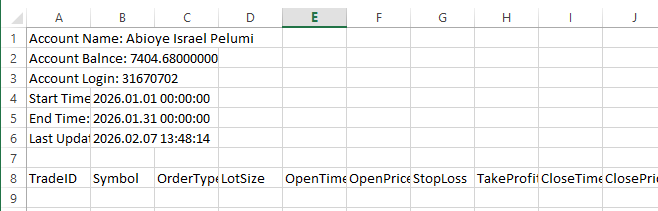
Explanation:
The trade journal's header row is written using the FileWrite function in this line of code. Handle, the first argument, instructs MQL5 on which file to write to. The program wouldn't know which file to access if the handle wasn't legitimate; thus, it must be a previously opened or created file. The first character on the line is "TradeID," where "\n" stands for a newline character. This guarantees that the header and the preceding content do not appear on the same line. The account details and the trade records portion are visually separated by moving to a new line instead.
The remaining values are the trading journal's column titles: Symbol, OrderType, LotSize, OpenTime, OpenPrice, StopLoss, TakeProfit, CloseTime, ClosePrice, Profit($), and Result. A piece of information that will be documented for each deal is represented by each of these. The program writes each of these values in the precise order as they occur in the function when all of these values are passed to FileWrite. All subsequent deals will have structure thanks to this row, which becomes the initial row of the trade data section. To put it simply, this line creates the spreadsheet's first row inside the file. The program and anyone else reading the file may tell what kind of data will be shown beneath each column heading. The file would only include raw dates and numbers without this header, making it more difficult to read and comprehend.
Analogy:
The file is comparable to a neatly structured notebook. To ensure that each subsequent post has a clear meaning, you write column headings at the top of the page. For example, the first row of a student performance sheet might have Student Name, Science, Math, and English. The purpose of the values below those titles is readily clear to anyone who reads the sheet. Similarly, the line that uses FileWrite is writing the file's top column headers. The first value, TradeID, writes the first label, TradeID, and begins a new line. To identify the remaining columns, further values are entered, including Symbol, OrderType, LotSize, OpenTime, OpenPrice, StopLoss, TakeProfit, CloseTime, ClosePrice, Profit($), and Result.
The trade log is arranged and made readable by this header row. All subsequent trades will appear in the appropriate column. The file would include unprocessed dates and numbers without this header, making it challenging to understand. The diary looks clear, organized, and professional when the headers are written first.
Iterating Through Historical Data to Determine Trade Count
The total number of trades within a certain time frame is not fixed when working with multiple trades. To ascertain the entire number of trades before processing them, it is crucial to loop through past account data. We can create a loop that securely and effectively iterates through each trade by knowing the total count. This enables the algorithm to analyze every deal, extract the relevant data, and determine whether it fits the time frame or requirements we are looking for. Imagine it like going through a notebook that contains previous transactions. At first, you don't know how many entries there are in total, but you can figure it out and extract the precise records you require by going over each line one after the other. This guarantees that nothing is omitted from programming and that every deal is considered. Additionally, it eliminates the possibility of mistakes occurring if we attempt to access a trade that does not exist by assuming a set amount of trades.
Establishing a trustworthy trading journal begins with knowing the trade count. A loop that processes each trade individually, gathering information such as the ticket number, symbol, order type, lot size, open and closure times, prices, profit, and outcome, can be constructed once the total number of trades has been established. This method ensures that the trading log includes all pertinent deals for the designated time period and is accurate and comprehensive.
Example:FileWrite(handle, "Account Name: " + account_name); FileWrite(handle, "Account Balnce: " + DoubleToString(account_balance)); FileWrite(handle, "Account Login: " + IntegerToString(account_login)); FileWrite(handle, "Start Time: ", start_time); FileWrite(handle, "End Time: ", end_time); FileWrite(handle, "Last Update: ", TimeCurrent()); FileWrite(handle, "\nTradeID","Symbol","OrderType", "LotSize", "OpenTime","OpenPrice","StopLoss", "TakeProfit", "CloseTime", "ClosePrice" ,"Profit($)","Result"); bool success = HistorySelect(start_time, end_time); //Total Deals int totalDeal = 0; if(success) { for(int i = 0; i < HistoryDealsTotal(); i++) { ulong ticket = HistoryDealGetTicket(i); if(HistoryDealGetInteger(ticket, DEAL_ENTRY) == DEAL_ENTRY_IN) { totalDeal++; } } } FileClose(handle);
Explanation:
The program starts with a selection of the historical deals that took place over a given time frame. By passing it a start time and an end time, the HistorySelect() function selects all trades in the account history to only include those that took place during this range. To inform the program if the selection was successful, the outcome is saved in a boolean variable named success. A true result indicates that deals are available for processing; a false result indicates that either no trades were made during that time or that an error occurred. By doing this, the program is guaranteed to operate solely on legitimate historical data.
A variable to record the overall number of trades is then initialized by the program. Initially, it is set to zero. An if statement is then used by the program to determine whether the history pick was successful. The program loops through every trade if the selection was successful; if not, it bypasses this step. This stops the program from attempting to access trades that aren't there. Iterating through every trade that is possible in the selected historical data is the next stage. Beginning at index 0, the procedure iteratively advances until it achieves the quantity of deals indicated by HistoryDealsTotal(). The program can handle each trade separately because each iteration represents a single contract. The program ensures that no transaction within the specified time frame is missed by performing this.
The program uses HistoryDealGetTicket(i) to acquire the current trade's unique ticket number within the loop. Each trade in MetaTrader 5 has a ticket number that serves as an ID. Like utilizing a serial number to find a specific record in a filing system, this ticket enables the computer to accurately identify and retrieve the trade's information. With HistoryDealGetInteger(ticket, DEAL_ENTRY), the program then determines the trade's nature. Trades that open positions are identified as entries using the constant DEAL_ENTRY_IN. Because we do not want to count other deal types like closing trades or revisions that may be included in account history, this step is crucial. To guarantee that only trades that truly initiated a position are included in the total, the computer compares the deal type to DEAL_ENTRY_IN.
Lastly, the program increases the total number of deals by one each time the condition is satisfied. The total number of entry deals during the designated time frame is stored in the totalDeal variable at the end of the loop. The subsequent processes, such as recording the trades into a trading diary or looping again to gather detailed information for each trade, depend on this total. When processing historical data, the program guarantees accuracy and avoids errors by counting trades first.
Analogy:
Each box symbolizes a trade that has ever occurred on the account; imagine your trading history as a sizable archive room full of boxes of documents. Selecting select boxes to examine is the first action the program takes. The HistorySelect() is an assistant; "Only bring me the boxes dated between January and March" is how the choose function operates. Either the assistant returns empty-handed or with the right boxes. The success variable, which only indicates if the assistant found something to work with, stores the outcome. There are boxes on the table if success is real. The program understands not to proceed blindly if it is untrue because there is nothing to examine.
Next, the program then sets up a counter, which is analogous to pulling out a notebook and writing zero at the top before you begin counting. The number of genuine deals found is tracked by this counter. After that, the program determines whether the assistance truly returned any boxes before the counting starts. The program avoids creating blank space and errors if no boxes were returned because there would be nothing to count. The program begins examining each box individually after it has been verified that they are available. It starts with the first box and keeps going until the final box is returned for that duration. Standing in front of a table and going over each document one by one to make sure none are missed is comparable to this. The loop's steps each symbolize picking up a box and looking inside.
The program examines each box's label, which contains the trade ticket number. This ticket functions similarly to a serial code or file number that is written on the folder. It gives the trade a unique identity and enables the program to extract the relevant information without confusing it with another deal. The program determines the type of document after identifying the trade. While some documents show a trade being opened, others show a trade being closed or adjusted. "Is this document about starting a trade?" is what the DEAL_ENTRY_IN check is equivalent to. Documents that respond "yes" are the only ones that count. Documents representing other things are disregarded.
The program adds a document to the counter each time it locates one that symbolizes beginning a trade. The counter displays the total number of deals opened during the chosen timeframe once all the boxes have been checked. This last figure is crucial because it indicates to the program how many trades it must process next, whether it be for extracting more specific data or recording them into a trading log. Counting first helps to keep things ordered and avoid mistakes later.
Filling the Trade ID Column in the File Using Trade History
Looping through those deals and extracting individual ticket numbers is the next step, now that we know how to obtain the total number of trades made within a given time frame. These ticket numbers, which are entered into the file's Trade ID column, serve as the distinct identifiers for every trade. We begin with the first trade in the chosen time and proceed step-by-step until we reach the final trade because trades are kept in historical sequence. One trade ticket at a time is retrieved throughout this procedure and ready to be written into the file.
This guarantees that each deal is properly recorded and associated with the appropriate row in the trading journal. We preserve a distinct and organized relationship between the transaction history and the file data by extracting tickets one after the other. This method maintains the journal's accuracy and organization while making it simpler to enter additional transaction details later on, such as the symbol, order type, prices, and profit.
The ticket number for each trade will be stored in a dynamic array of type ulong, which we will declare first. This array provides us with an organized method to gather and handle all trade IDs before entering them into the file, as each trade in MetaTrader 5 has a distinct ticket identity.
Example://Trade ID ulong trade_id[]; ArrayResize(trade_id,totalDeal); int j = 0; if(success) { for(int i = 0; i < HistoryDealsTotal(); i++) { ulong ticket = HistoryDealGetTicket(i); if(HistoryDealGetInteger(ticket, DEAL_ENTRY) == DEAL_ENTRY_IN) { trade_id[j] = ticket; j++; // Increment the array index for the next valid ticket } } } for(int i = 0; i < totalDeal; i++) { FileWrite(handle, trade_id[i]); } FileClose(handle);
Output:
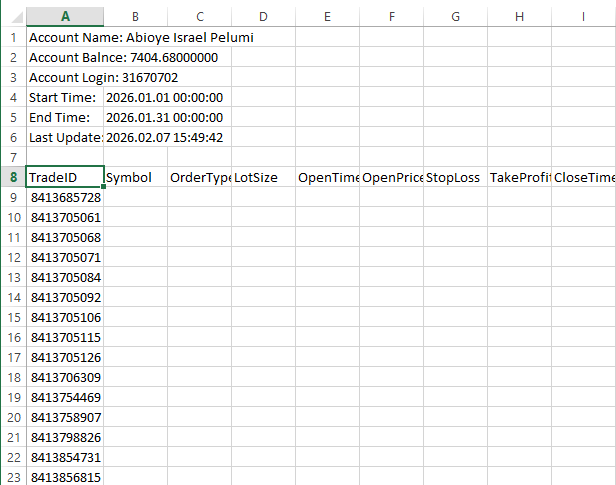
Explanation:
ulong trade_id[] is first declared as a dynamic array to hold trade ticket numbers. Its dynamic nature means that its size is not predetermined at the time of declaration. When it is unknown how many trades will occur until runtime, this is helpful. Notwithstanding this adaptability, the array still needs to have a specified size before values can be added. An "array out of range" error will be displayed by MetaTrader if the program attempts to fill the array without first shrinking it because it would be trying to access memory space that hasn't been allocated.
For this reason, ArrayResize(trade_id, totalDeal); is required. To ensure that every trade ticket is securely stored, the program resizes the array to match the total number of deals that were previously counted. The array is comparable to an empty shelf, to put it simply. The shelf is created by declaring it, but the number of slots is determined by resizing it. Insufficient slots would result in an error when attempting to place goods on it.
Each trade ticket is saved in the array as the computer iterates over the trade history and finds legitimate entry trades. To make sure that only trades involving opened positions are recorded, this occurs inside the condition that looks for DEAL_ENTRY_IN. Here, the variable j is significant. Even though the loop variable i traverses all past transactions, not all of them are considered entry trades. Only when a legitimate trade is discovered does the variable j progress as a distinct index. This ensures that tickets are not overwritten or left with gaps in the array when they are stored consecutively. J is increased each time a valid ticket is added to the array. The next qualifying ticket is positioned in the next available slot as a result of moving the storage position ahead. In the absence of j, the program would either misalign the data or overwrite earlier tickets, resulting in inaccurate or missing journal entries.
The program uses the known number of trades to loop through the array after all trade tickets have been gathered and saved there. FileWrite(handle, trade_id[i]); is used to write each ticket to the file during this loop. This procedure automatically inserts each trade ticket, one after the other, into the Trade ID column of the file since the array was appropriately sized and filled in order. This guarantees that all trade IDs are entered into the trading diary in a clear, organized, and trustworthy manner.
Analogy:
Imagine the dynamic array to be a blank notebook in which you intend to record trade ticket numbers. Declaring the array for the first time is similar to opening a new notebook without determining how many pages it should include. Although you are certain that you would be writing ticket numbers, you are unsure of the amount of trades you will discover. The array is dynamic because of its adaptability. You must, however, determine how many pages the notebook requires before you begin writing. You will run out of room and create an issue if you begin writing without leaving enough pages. It is precisely for this reason that the array must be resized. You are instructing the notebook on how many pages to prepare by utilizing the total number of deals in the previous count. This avoids mistakes that could happen if you attempted to write more than the allotted space.
The computer comes across many documents while searching the trade history; not all of them are helpful. While some records show closing or modifications, others show opening trades. The ticket number is written onto the following blank page in the notebook each time the program detects a legitimate starting deal. A page marker is what the variable j does. It records the next available page on which a legitimate ticket ought to be written. Without this marker, the notebook would become disorganized and untrustworthy since the program might overwrite earlier entries or leave blank pages between.
The program reads the notebook from the first page to the last after all valid ticket numbers have been entered. One line at a time, each ticket number is then entered into the file's Trade ID column. The file has a clear, comprehensive list of trade IDs since the notebook was constructed with the appropriate amount of pages and filled in the right sequence. As a result, the trading log is accurate, simple to read, and prepared for the subsequent stages, which will involve adding more trade details.
Filling the Symbol and Order Type Columns in the File
The Symbol and Order Type fields need to be filled in after the trade ID values have been correctly written into the file. Because they explain what was traded and how the trade was carried out, these two pieces of information are crucial. The symbol indicates the market in question, the order type indicates whether the trade was a buy or a sell, and the Trade ID uniquely identifies a trade. We use the same historical trade data that was previously chosen to accomplish this. Each trade ticket is already in our possession; therefore, we can utilize it to obtain more information about that particular deal. We can determine whether the trade was made on EURUSD, GBPUSD, or any other market that is accessible on the account because the symbol is taken straight from the trade record.
The order type indicates the trade’s direction, specifying if it was a buy or a sell. This distinction offers valuable information when looking at trading records. It enables traders to assess the relative performance of long and short positions, comprehend their market-related behavioral patterns, and improve their overall trading strategy.
Example:
ulong trade_id[];
ArrayResize(trade_id,totalDeal);

string symbol[];
string order_type[];
ArrayResize(symbol,totalDeal);
ArrayResize(order_type,totalDeal);
int j = 0;

if(success)
  {
   for(int i = 0; i < HistoryDealsTotal(); i++)
     {
      ulong ticket = HistoryDealGetTicket(i);


      if(HistoryDealGetInteger(ticket, DEAL_ENTRY) == DEAL_ENTRY_IN)
        {
         trade_id[j] = ticket;

         symbol[j] =  HistoryDealGetString(ticket, DEAL_SYMBOL);

         if(HistoryDealGetInteger(ticket,DEAL_TYPE) == DEAL_TYPE_BUY)
           {
            order_type[j] = "BUY";
           }

         if(HistoryDealGetInteger(ticket,DEAL_TYPE) == DEAL_TYPE_SELL)
           {
            order_type[j] = "SELL";
           }

         j++; // Increment the array index for the next valid ticket

        }
     }
  }

for(int i = 0; i < totalDeal; i++)
  {
   FileWrite(handle, trade_id[i],symbol[i],order_type[i]);
  }
FileClose(handle);
Output:
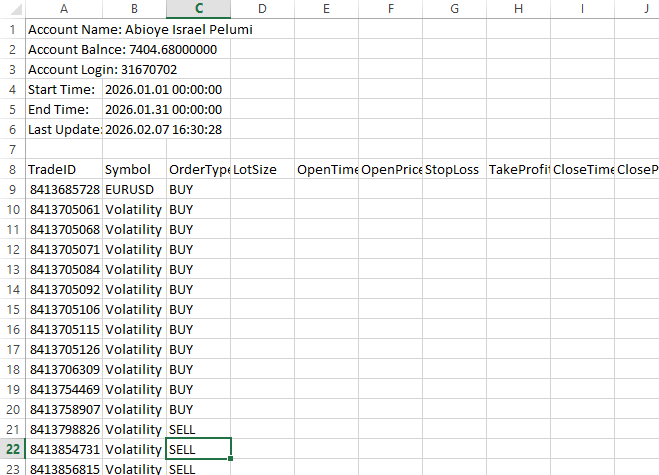
Explanation:
Two dynamic string arrays are declared at the beginning of the procedure to store order type information and symbol names. Because the number of trades fluctuates based on the history that is picked, these arrays initially lack a set size. The arrays are enlarged in accordance with the total number of deals when it has been determined. The program makes sure that each trade's symbol and order type may be recorded correctly by using ArrayResize to allocate the appropriate amount of memory, removing the possibility of array boundary errors.
The program retrieves the symbol for every trade after the arrays are ready. HistoryDealGetString with the DEAL_SYMBOL attribute is used for this. A string-based function is needed since the symbol, such as EURUSD or GBPUSD, is saved as text. The program can directly extract readable text from the transaction record by using HistoryDealGetString. To maintain alignment with the trade ID and other transaction details, the retrieved symbol is subsequently saved in the symbol array at the appropriate index.
The order type for every trade is then determined by the computer. The trade direction is represented by an integer number that is internally saved. The program may determine if the deal was a purchase or a sale by using HistoryDealGetInteger with the DEAL_TYPE field. This internal value is then converted into a format that can be read by humans using a condition. The program adds the text "BUY" to the order_type array if the trade type matches DEAL_TYPE_BUY. The program assigns the text "SELL" if it meets DEAL_TYPE_SELL.
Since the platform's returned raw values are internal constants meant for program logic rather than appearance, these requirements are crucial. Values like DEAL_TYPE_BUY or DEAL_TYPE_SELL, which are not user-friendly and do not appear clean in a trading diary, could be included in the output written to the file if the conditions were not employed. These internal constants are transformed into straightforward text labels, which improves the file's readability, professionalism, and analytical utility.
Recording Trade Entry Information in the Data
The trade entry details must then be entered into the file after the Trade ID, Symbol, and Order Type have been written. Stop Loss, Take Profit, Open Time, Open Price, and Lot Size are some of these specifics. It is crucial to gather this data since it offers a comprehensive view of the execution of each trade, including the position size, time, price levels, and risk management configuration. We can obtain these facts straight from the account history for each trade ticket that is kept in the array. While the Open Time and Open Price indicate the time and price at which the trade was entered, the Lot Size indicates the size of the trade. The levels established to control risk and possible reward are indicated by stop loss and take profit. By logging these numbers, you can make sure the trading journal has all the important entry details for every deal.
Example:
ulong trade_id[];
ArrayResize(trade_id,totalDeal);

string symbol[];
string order_type[];
ArrayResize(symbol,totalDeal);
ArrayResize(order_type,totalDeal);

double lot_size[];
datetime open_time[];
double open_price[];
double stop_l[];
double take_p[];

ArrayResize(lot_size,totalDeal);
ArrayResize(open_time,totalDeal);
ArrayResize(open_price,totalDeal);
ArrayResize(stop_l,totalDeal);
ArrayResize(take_p,totalDeal);

int j = 0;

if(success)
  {
   for(int i = 0; i < HistoryDealsTotal(); i++)
     {
      ulong ticket = HistoryDealGetTicket(i);


      if(HistoryDealGetInteger(ticket, DEAL_ENTRY) == DEAL_ENTRY_IN)
        {
         trade_id[j] = ticket;

         symbol[j] =  HistoryDealGetString(ticket, DEAL_SYMBOL);

         if(HistoryDealGetInteger(ticket,DEAL_TYPE) == DEAL_TYPE_BUY)
           {
            order_type[j] = "BUY";
           }

         if(HistoryDealGetInteger(ticket,DEAL_TYPE) == DEAL_TYPE_SELL)
           {
            order_type[j] = "SELL";
           }

         lot_size[j] = HistoryDealGetDouble(ticket,DEAL_VOLUME);
         open_time[j] = (datetime)HistoryDealGetInteger(ticket,DEAL_TIME);
         open_price[j]  = HistoryDealGetDouble(ticket,DEAL_PRICE);
         stop_l[j] = HistoryDealGetDouble(ticket,DEAL_SL);
         take_p[j] = HistoryDealGetDouble(ticket,DEAL_TP);

         j++; // Increment the array index for the next valid ticket

        }
     }
  }

for(int i = 0; i < totalDeal; i++)
  {
   FileWrite(handle, trade_id[i],symbol[i],order_type[i],lot_size[i],open_time[i],open_price[i],stop_l[i],take_p[i]);
  }

FileClose(handle);
Output:
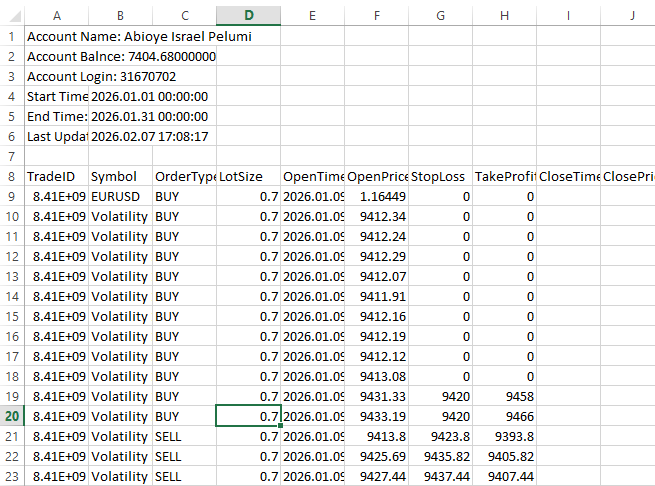
Explanation:
For Lot Size, Open Time, Open Price, Stop Loss, and Take Profit, we construct distinct dynamic arrays to appropriately arrange trade data. Every array has a data type that corresponds to the type of data it holds. Due to the need for decimal accuracy, price and lot values are declared as double, but Open Time accurately represents time-based data by using the datetime type. Even if the precise quantity is unknown in advance, the program can handle any number of trades within the chosen period if these arrays are dynamically declared.
We still need to set aside space for these arrays even though they are dynamic to prevent problems. For each array, we use ArrayResize and set its size to totalDeal, which is the number of trades that were previously counted. Resizing guarantees sufficient memory to hold a value for every deal. Without this step, the program would be attempting to write to memory that has not been allocated, which would result in an "array out of range" error when attempting to store a trade's information. For example, when you declare an array, you get empty boxes, but when you resize the array, the program knows how many boxes you really need. The program retrieves the relevant trade data for every legitimate trade ticket as soon as the arrays are prepared.
Using HistoryDealGetDouble(ticket, DEAL_VOLUME), the lot size of a deal is acquired and saved in the lot_size array. HistoryDealGetInteger(ticket, DEAL_TIME) is used to retrieve open time, which is then cast to datetime and stored in the open_time array. HistoryDealGetDouble(ticket, DEAL_PRICE) is used to retrieve the open price. HistoryDealGetDouble(ticket, DEAL_SL) is used to retrieve the stop loss, and HistoryDealGetDouble(ticket, DEAL_TP) is used to retrieve the take profit. To guarantee that every trade entry information is in line with the appropriate trade ticket, each of these values is kept at the current index j of its matching array.
Before writing the numeric input details into the file, the program can store them in memory by using these arrays. By gathering the data first, we can methodically go over each trade and enter the information into the appropriate trading journal sections. This method guarantees that every trade has all of its entry information precisely and in the correct order while maintaining the file's structure.
Filling the File with Trade Exit Data
It makes sense to include the trade exit information after the entry details have been recorded. To make sure every trade record is comprehensive, profit, result, close time, and close price are added. These specifics display the trade's ultimate result and offer the information required for performance review. Traders can evaluate consistency, pinpoint the advantages and disadvantages of their tactics, and precisely track account growth by keeping track of both entry and exit data.
The program can obtain the exit data straight from the account history by using the trade tickets that are kept in the array. Close Price documents the price at which the position was exited, whereas Close Time indicates the precise moment the trade was ended. Profit determines the trade's financial outcome, while the Result column shows if the trade was profitable, unsuccessful, or broke even. By gathering and documenting these numbers, the journal is full and prepared for analysis since every trade has both entry and exit information.
Example:datetime close_time[]; double close_price[]; double profit[]; string result[]; ArrayResize(close_time,totalDeal); ArrayResize(close_price,totalDeal); ArrayResize(profit,totalDeal); ArrayResize(result,totalDeal); int j = 0; int h = 0; if(success) { for(int i = 0; i < HistoryDealsTotal(); i++) { ulong ticket = HistoryDealGetTicket(i); if(HistoryDealGetInteger(ticket, DEAL_ENTRY) == DEAL_ENTRY_IN) { trade_id[j] = ticket; symbol[j] = HistoryDealGetString(ticket, DEAL_SYMBOL); if(HistoryDealGetInteger(ticket,DEAL_TYPE) == DEAL_TYPE_BUY) { order_type[j] = "BUY"; } if(HistoryDealGetInteger(ticket,DEAL_TYPE) == DEAL_TYPE_SELL) { order_type[j] = "SELL"; } lot_size[j] = HistoryDealGetDouble(ticket,DEAL_VOLUME); open_time[j] = (datetime)HistoryDealGetInteger(ticket,DEAL_TIME); open_price[j] = HistoryDealGetDouble(ticket,DEAL_PRICE); stop_l[j] = HistoryDealGetDouble(ticket,DEAL_SL); take_p[j] = HistoryDealGetDouble(ticket,DEAL_TP); j++; // Increment the array index for the next valid ticket } if(HistoryDealGetInteger(ticket, DEAL_ENTRY) == DEAL_ENTRY_OUT) { trade_id[h] = ticket; close_time[h] = (datetime)HistoryDealGetInteger(ticket,DEAL_TIME); close_price[h] = HistoryDealGetDouble(ticket,DEAL_PRICE); profit[h] = HistoryDealGetDouble(ticket,DEAL_PROFIT); if(profit[h] > 0) { result[h] = "WIN"; } else if(profit[h] < 0) { result[h] = "LOSS"; } else { result[h] = "Break Even"; } h++; } } } for(int i = 0; i < totalDeal; i++) { FileWrite(handle, trade_id[i],symbol[i],order_type[i],lot_size[i],open_time[i],open_price[i],stop_l[i],take_p[i],close_time[i],close_price[i],profit[i] ,result[i]); } FileClose(handle);
Output:
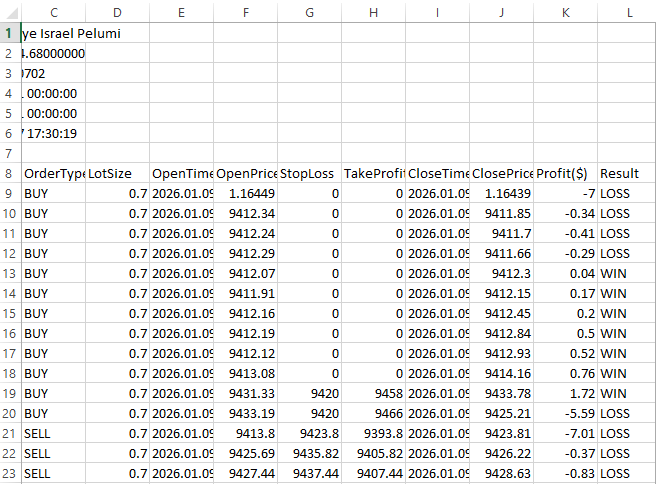
Explanation:
First, we create dynamic arrays for the four exit data points we want to record: result, profit, close time, and close price. Close Time is recorded as a datetime since it captures the precise moment the trade closes. Because the profit and close price are numbers, the double type is employed, and the result is saved as a string that may be used to express text outcomes like "WIN," "LOSS," or "Break Even." These arrays are dynamically declared because we are unsure of the amount of trades ahead of time.
We utilize ArrayResize to allocate memory for each array with a size equal to totalDeal, which was determined previously when counting transactions, to securely store data for every deal. Resizing avoids problems that might arise if we attempt to write outside the array's bounds and guarantees that there is adequate room for each trade's exit information. Imagine this as setting up a series of marked boxes to hold the exit information for every trade.
After that, the variable h is set to zero. The exit information is stored in the arrays using this variable as an index marker. We increase h to advance to the next available slot after storing the data of each trade that indicates a closing action in the arrays at the current h index. Since not all the trades in the history array match closing trades, this is crucial. We have already completed several deals that are entries. The exit arrays may have gaps or overwrite earlier data if there isn't a distinct index h.
Only trades marked as DEAL_ENTRY_OUT are processed by the program after it uses HistoryDealGetInteger(ticket, DEAL_ENTRY) to confirm the kind of each deal. The entry arrays already contain the opening trades, denoted by DEAL_ENTRY_IN. By making this difference, the accuracy and organization of the transaction record are maintained, ensuring that only exit trades are handled at this phase.
Using HistoryDealGetInteger(ticket, DEAL_TIME), the program obtains the close time for each closing trade and casts it to datetime. With HistoryDealGetDouble(ticket, DEAL_PRICE), the close price is obtained, and with HistoryDealGetDouble(ticket, DEAL_PROFIT), the profit is obtained. The matching array at index h contains each of these values. Lastly, the program determines the trade's outcome. The outcome is recorded as "WIN" if the profit exceeds zero. The outcome is recorded as "LOSS" if the profit is less than zero. "Break Even" is the outcome if the profit is precisely zero. By transforming numerical profit statistics into information that can be read by humans, this stage facilitates quick analysis and comprehension of the trading log.
By the time this process is finished, the arrays have all the exit details in the correct sequence and in line with the trades. This methodical technique guarantees that each transaction in the journal has the necessary entry and exit data, ready to be entered into the file for a transparent and expert trading record.
Conclusion
In this article, we explored how to handle trade data files in MQL5 by recording both entry and exit information, including Trade ID, Symbol, Order Type, Lot Size, Open Time, Open Price, Stop Loss, Take Profit, Close Time, Close Price, Profit, and Result. We discovered how to store data in dynamic arrays, get transaction details from account history, and put them sequentially into a file while maintaining accuracy and organization. By doing these actions, you have established the framework for file management in MQL5, establishing a well-organized and user-friendly trading journal that can hold and organize all crucial trade data for later examination and analysis.
Warning: All rights to these materials are reserved by MetaQuotes Ltd. Copying or reprinting of these materials in whole or in part is prohibited.
This article was written by a user of the site and reflects their personal views. MetaQuotes Ltd is not responsible for the accuracy of the information presented, nor for any consequences resulting from the use of the solutions, strategies or recommendations described.

 Automating Market Memory Zones Indicator: Where Price is Likely to Return
 MQL5 Trading Tools (Part 18): Rounded Speech Bubbles/Balloons with Orientation Control
 Risk Management (Part 5): Integrating the Risk Management System into an Expert Advisor
 Price Action Analysis Toolkit Development (Part 61): Structural Slanted Trendline Breakouts with 3-Swing Validation

- Free trading apps
- Over 8,000 signals for copying
- Economic news for exploring financial markets
You agree to website policy and terms of use