

Creating a Traditional Renko Overlay Indicator in MQL5
 3 314
3 314
 0
0

Introduction
Raw candlestick charts contain a lot of short-term noise that breaks algorithmic rules, pollutes signals, and complicates backtesting and visual validation. We aim to remove that noise on the chart itself by discretizing price into fixed steps and exposing the result as an overlay on a MetaTrader 5 chart. Specifically, we use a Renko overlay in MQL5 that tracks movement from candle closes, anchors computations to a clear base price (the first available close), and only produces a new brick when the price shifts by a user-defined brick size. The indicator stores brick closes in a dynamic array, enforces a maximum displayed history, treats trend continuation normally but requires a two‑brick opposite move to confirm a reversal, and renders bricks as rectangle objects while minimizing unnecessary redraws and cleaning up its own objects on reinitialization or removal.
Project Overview and Implementation Plan
To properly structure the logic, data handling, and visualization flow of the indicator from the start, it is best to first have a clear and detailed understanding of what we want to build and how it will be programmatically implemented in MQL5.
What We Are Building
In this article, we are going to build a Renko Overlay Indicator for MetaTrader 5. Unlike the standard candlestick chart, Renko charts filter out time and focus purely on price movement. Each brick only forms when the price moves a fixed distance called the brick size, regardless of how long it takes. Our indicator will draw Renko bricks directly on top of the regular candlestick chart so you can see both at the same time. This gives you the noise-filtering benefit of Renko while still keeping the context of real market candles.
A brick is simply a unit that represents a fixed amount of price movement. It does not depend on time like a candlestick. Instead, it only forms when the price moves a certain distance. That distance is what we call the brick size, which is the minimum movement required to create one brick.
The minimal price movement needed to create a new Renko brick is represented by the brick size, which is defined as a price interval. The proper brick size must be modified in accordance with the various symbols' varying price scales. For instance, a value of 0.0001 in EURUSD indicates one pip movement, making it adequate for capturing typical market movements, whereas a value of 1 is more suited in XAUUSD because of its greater price scale. This guarantees that the indicator behaves uniformly in many markets and generates significant Renko structures without necessitating modifications to the fundamental logic.
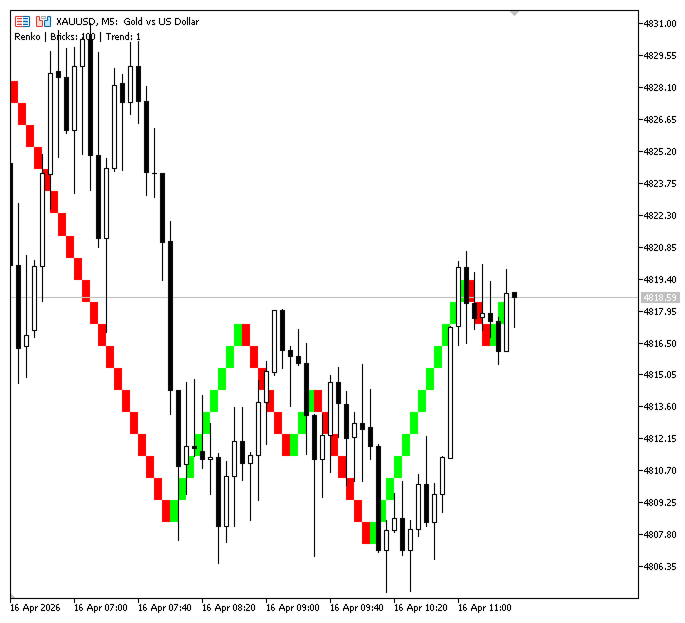
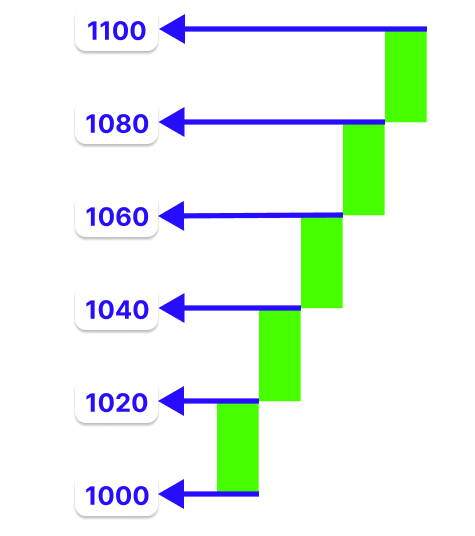
We use each candle's close to measure price movement and convert it into Renko bricks. We can figure out how many bricks to add thanks to this movement. Let's take an example where the base price is 1000 and the brick size is 20 price intervals. If the subsequent candle ends at 1100, we determine the movement by 1100 minus 1000. We divide the result (100) by 20 to get the number of bricks, which comes out to 5. This means that we will create five upward bricks, each of which represents a 20-point move, rather than painting a single candle.
Now imagine the next candle closes at 1095. From the last brick close of 1100, the movement is only 5 price intervals. Since this is less than the brick size of 20, no new brick is formed. This shows how small movements in candlesticks are ignored in Renko. We build a system that reads candle data, measures price changes, converts them into a brick count using the brick size, and adds bricks sequentially. This creates a cleaner structure where only meaningful price movements are displayed, making trends easier to understand.
Implementation Plan
This section breaks the implementation into stages to keep the development flow methodical and coherent.
Determining the Base Price
Determining the base price is the first step in our approach. The calculation of all Renko bricks will begin with this. In this instance, the starting reference value is the close price of the first candle that becomes available.
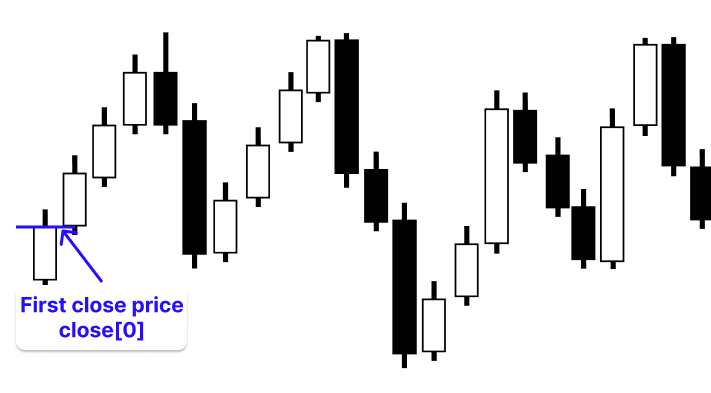
This stage is crucial because all subsequent bricks are computed relative to this base price level. There would be no reliable method for tracking pricing changes or figuring out when a brick is finished without a clear beginning point. Anchoring the system to a base price keeps brick creation, trend detection, and reversals consistent. In addition, we will declare an array that will be used to store the close prices of all Renko bricks as they are generated, allowing us to track and manage the entire brick sequence efficiently throughout the indicator’s operation.
Converting Price Movement into Renko Bricks
The second stage involves iterating through candle data and converting raw price movement into structured Renko bricks. We set the base price as close[0], which serves as the initial reference point for all calculations. From there, we start processing from the second candle (that is, i = 1 in the loop), meaning we skip the first candle because it is already used as the base. We then compare each candle’s closing price against the current reference point, which is either the base price or the most recently formed brick. The difference in price is divided by the brick size to determine how many Renko bricks should be generated from that movement.
To make this clearer, consider a simple 3-bar example. We begin with the first bar, where the close price, for example, 1000, is used as the base price. This value becomes the initial reference point for all subsequent calculations and serves as the starting level for building the first Renko structure.
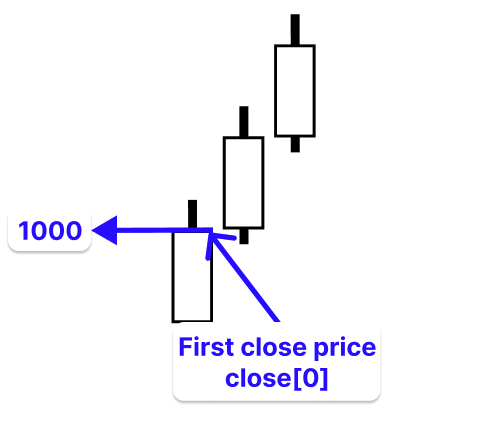
We calculate the change from the base price of 1000 if the second bar ends at 1100, yielding 100 price intervals. This action yields five complete bricks with a brick size of twenty.
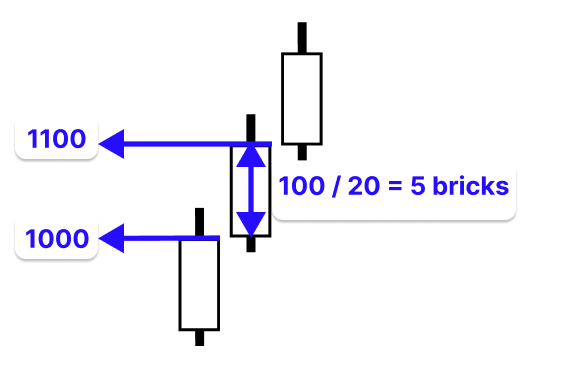
This means the system generates five upward bricks, each representing a 20-price-interval movement. Once these bricks are formed, the close price of the last generated brick becomes the new reference point for future calculations.
We no longer depend on the initial base price on the third bar. Rather, the final completed brick's close price (1100) serves as the new benchmark. For instance, if our brick size is 20 price intervals and the third candle moves 95 price intervals from this revised base price, we divide 95 by 20 to get four complete bricks plus a residual.
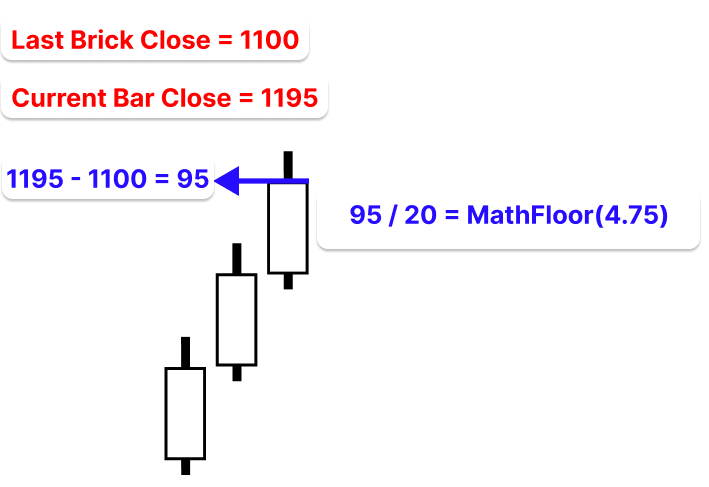
This indicates that just four bricks will be produced because the fifth brick has not yet attained the necessary 20-point movement. Only after further price movement completes the brick size will the remaining 15 price intervals be carried forward and create a new brick.
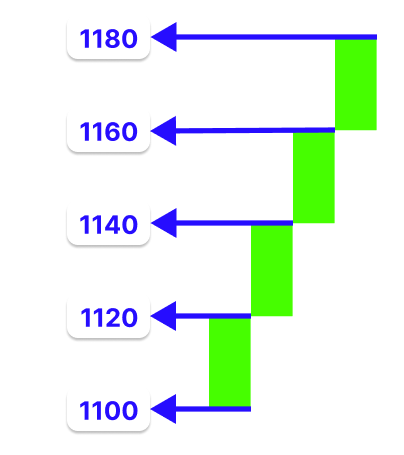
From this point, the same process continues, where every new movement is measured from the last completed brick, ensuring that only fully completed price steps are represented in the Renko structure.
Determining the Trend Direction
This is the next stage we will follow when we start writing the code. In this stage, we determine the trend direction by comparing current price movement with the last confirmed Renko brick close and checking whether enough movement has occurred to continue or reverse the trend.
If there is no active trend, the first valid movement sets the initial trend direction. If the price continues in the same direction as the existing trend, we confirm continuation and keep building new bricks from the last brick close level.
To identify potential trend shifts, we compare the current price with the most recent verified brick close. A reversal will only be considered if the price swings at least 40 price intervals in the opposite direction; for instance, if the brick size is 20 and the last brick closed at 1180. This implies that the price must fall to 1140 or less. The existing trend is maintained, and any movement below this is disregarded.
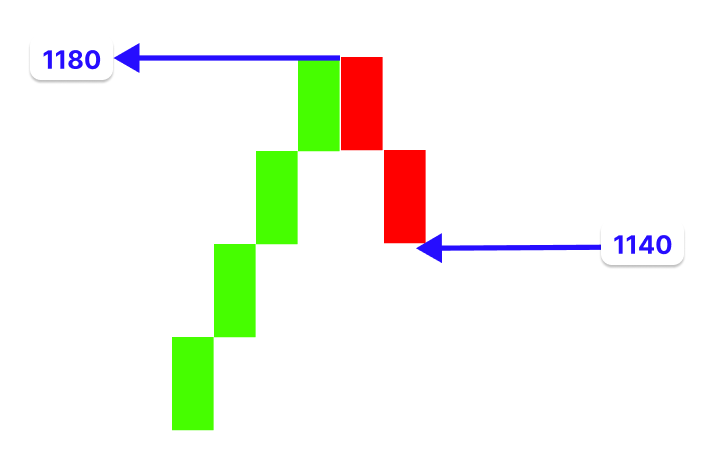
Only when this two-brick movement is completed do we update the trend direction and start building bricks in the new direction. This ensures that only strong and sustained price movement can change the trend, while small retracements are filtered out.
Rendering Renko Bricks on the Main Chart
In this stage, we focus on how the calculated Renko structure is visually displayed on the chart. After the system has generated and confirmed each brick, the next step is to render them in a way that clearly reflects price movement in real time. To achieve this, we use chart objects in MQL5, specifically rectangle objects, to represent each Renko brick. Each brick is drawn between two price levels as a filled rectangle, with its color determined by the direction of the trend. This allows us to visually distinguish upward and downward movement in a clean and structured way directly on the main chart.
The indicator also lets the user change how many bricks are displayed on the chart using an input parameter. The user can choose to show only the most recent bricks to keep the chart simple, succinct, and devoid of unnecessary historical clutter. Each brick is connected to the chart's most recent close bar when it is being drawn. As older bricks are gradually moved or eliminated in accordance with the user-defined limit, this guarantees that the Renko overlay remains in sync with the most recent market data. The algorithm continuously updates the chart by adding new objects and modifying existing ones in response to fresh price data and the formation of new bricks. In a simplified Renko format, this produces a dynamic overlay that changes in real time, providing a clear visual depiction of price movement.
Creating Renko Bricks
In this chapter, we will focus on implementing the core logic responsible for generating Renko bricks from price movement. We will take the concepts discussed earlier and translate them into code by processing candle data, calculating price differences, and determining how many bricks should be formed based on the defined brick size. As each valid movement is detected, we will create the corresponding bricks, update their values step by step, and store their close prices for future calculations. This stage forms the foundation of the entire indicator, as it is where raw price data is transformed into a structured Renko representation.
Determining the Base Price
This serves as the starting point from which all brick calculations will be made. In this implementation, we use the close price of the first available candle as this reference point, and it also acts as the opening level of the first Renko brick.
Example:
#property indicator_chart_window
#property indicator_buffers 0
#property indicator_plots   0

//--- User inputs
input double InpBrickSize  = 1;   // Size of each Renko brick (price intervals)
input int    InpNumBricks  = 100;   // Maximum number of bricks to display

//--- Renko data storage
double rclose[];   // Stores brick close prices
int    rcSize = 0; // Current number of bricks

//+------------------------------------------------------------------+
//| Custom indicator initialization function                         |
//+------------------------------------------------------------------+
int OnInit()
  {
//--- indicator buffers mapping

//---
   return(INIT_SUCCEEDED);
  }
//+------------------------------------------------------------------+
//| Custom indicator iteration function                              |
//+------------------------------------------------------------------+
int OnCalculate(const int rates_total,
                const int prev_calculated,
                const datetime &time[],
                const double   &open[],
                const double   &high[],
                const double   &low[],
                const double   &close[],
                const long     &tick_volume[],
                const long     &volume[],
                const int      &spread[])
  {
//---
// Ensure enough data
   if(rates_total < InpNumBricks + 5)
      return 0;
//--- First initialization
   if(prev_calculated == 0)
     {
      ArrayResize(rclose, 1);
      rclose[0] = close[0]; // First base price
      rcSize = 1;
     }

//--- return value of prev_calculated for next call
   return(rates_total);
  }
//+------------------------------------------------------------------+
Explanation:
The first three lines define that the indicator will be drawn directly on the main chart and that we are not using indicator buffers or plots. This is because our Renko bricks will be drawn using chart objects instead of the traditional buffer-based approach.
We introduce two important user inputs. The first is the brick size, which is defined as a fixed price interval used internally by the indicator. All calculations are based on raw price movement, not points. For example, on EURUSD, a brick size of 0.0001 represents one pip, meaning price must move by 0.0001 to form a new brick. On XAUUSD, a brick size of 1 means the price must move from 4791 to 4792 before a new brick is created. This ensures the same price-based logic works across different instruments without relying on broker-specific point values. The second input defines the maximum number of bricks to display, giving the user control over how much historical data is visible.
The first condition checks whether there is enough historical price data available before the indicator starts building bricks. Since Renko calculations depend on continuous price movement, the system requires a minimum amount of bars before it can safely generate meaningful results. If the available data is less than this required threshold, the function stops execution immediately to prevent incorrect calculations or incomplete brick formation. The second condition handles full initialization or re-initialization of the indicator. This occurs when the indicator is attached, when the timeframe changes, or when the chart is refreshed. In all these cases, the previous internal state becomes invalid because Renko bricks are dependent on the specific timeframe structure.
When this reset is triggered, the system clears any previously stored Renko data by resizing the storage array to hold only a single value. This step is important because it entirely removes outdated brick history and prepares the structure for a fresh build. The close price of the first available bar in the current timeframe is now used to determine the base price. This is significant since each timeframe has a unique data series, so the initial bar close varies based on the timeframe. This value becomes the new reference for all subsequent Renko bricks.
Finally, the brick counter is set to one to indicate that the system now contains only this initial reference value. From here, all new price movements will be measured relative to this base price, ensuring that the Renko structure is rebuilt consistently and correctly from a clean starting state.
Converting Price Movement into Renko Bricks
This step focuses on transforming candle data's raw price movement into structured Renko bricks, as specified in the implementation plan. To do this, we calculate the number of full bricks that can be created by calculating the difference between the current price and the reference level and dividing that movement by the brick size. Partial movement is carried forward, and the reference level is updated to the latest completed brick close. Writing a logic that loops through every candlestick bar that is available is the first stage.
Example://+------------------------------------------------------------------+ //| Custom indicator iteration function | //+------------------------------------------------------------------+ int OnCalculate(const int rates_total, const int prev_calculated, const datetime &time[], const double &open[], const double &high[], const double &low[], const double &close[], const long &tick_volume[], const long &volume[], const int &spread[]) { //--- // Ensure enough data if(rates_total < InpNumBricks + 5) return 0; //--- First initialization if(prev_calculated == 0) { ArrayResize(rclose, 1); rclose[0] = close[0]; // First base price rcSize = 1; } //--- Build Renko bricks int start = (prev_calculated == 0) ? 1 : prev_calculated; for(int i = start; i < rates_total; i++) { } //--- return value of prev_calculated for next call return(rates_total); } //+------------------------------------------------------------------+
Explanation:
This section controls how the indicator decides where to begin processing candle data. It first checks whether the indicator has already processed any bars before. If it has never run before, it starts from the first valid historical candle rather than the current forming one. This is important because the current candle is still changing and may not represent a complete price movement. The indicator doesn't start anew from the beginning if it has already run; instead, it resumes from the last processed place. By ensuring that only new bars are processed, this improves calculation efficiency and avoids having to work on old data again.
After determining the correct starting point, the system then loops through all remaining candlestick bars from that point onward. Each bar is processed sequentially so that price movement can be evaluated and used to build or update the Renko structure step by step.
Next, we’ll be processing each candle sequentially to convert raw price movement into structured Renko logic. For every bar, we take its closing price and compare it against the current reference level, which represents the last confirmed Renko brick close.
Example:
//--- Build Renko bricks
int start = (prev_calculated == 0) ? 1 : prev_calculated;
for(int i = start; i < rates_total; i++)
  {
   double price = close[i];
   double box   = InpBrickSize;

   double last = rclose[0];
   double diff = price - last;
   int bricks = (int)MathFloor(MathAbs(diff) / box);

   if(bricks <= 0)
      continue;
  }
Explanation:
In this part, we use a loop that iterates across all available bars to process each candle individually, beginning with the specified starting index. Since we have used the bar's close price at index 0 as the base price during initialization, the starting index is set to 1. To make sure we are working with entirely correct data, calculations must start from index 1. At initialization, the array rclose[] is used to store the close prices of all Renko bricks that will be generated. Initially, its size is 1, meaning it contains only a single element, close[0], which serves as the base price. As new bricks are formed, this array grows, and rclose[0] constantly holds the most recent Renko brick close, which acts as the current reference point for all new calculations.
For each candle, we compare the current closing price (close[i]) with rclose[0] to determine how far the price has moved away from the last confirmed brick level. This gives us the total movement that will be converted into Renko bricks. To calculate how many bricks can be formed, we first take the absolute value of the price difference using MathAbs. This is important because we are only interested in the size of the movement, not whether it is upward or downward at this stage. The direction is handled separately later in the logic, so removing the sign ensures consistent brick calculation in both directions.
After getting the absolute movement, we divide it by the brick size (InpBrickSize) to determine how many full bricks exist within that movement. We then apply MathFloor to ensure only complete bricks are counted. This removes any partial movement that does not fully reach the brick size, keeping the Renko structure clean, strict, and consistent. To ensure only significant price changes contribute to the construction of the Renko sequence, results that are less than one full brick are entirely disregarded.
Determining the Trend Direction
In this stage, we determine whether the current price movement is continuing in the same direction or reversing compared to the last confirmed Renko brick. This is done by comparing the movement direction with the existing trend state and checking whether enough bricks have been formed to validate a reversal.
Because it regulates how bricks are drawn on the chart, this phase is crucial. Bricks could be plotted in the incorrect sequence or change direction too soon if the trend direction is not accurately determined, which would distort the overall Renko structure. We make sure that the bricks are drawn in a consistent and significant order that appropriately represents market movement by confirming continuation or reversal only when circumstances are satisfied.
Example:int trend = 0; // Trend direction: 1 = up, -1 = down, 0 = undefined //------------------------------------------------+ // Add new brick at the beginning of array | //------------------------------------------------+ void RC_Unshift(double value) { ArrayResize(rclose, rcSize + 1); // Shift elements to the right for(int i = rcSize; i > 0; i--) rclose[i] = rclose[i - 1]; // Insert new value at index 0 rclose[0] = value; rcSize++; } //------------------------------------------------+ // Remove oldest brick (from end) | //------------------------------------------------+ void RC_Pop() { if(rcSize > 0) rcSize--; }
// Ensure enough data
if(rates_total < InpNumBricks + 5)
   return 0;

//--- First initialization
if(prev_calculated == 0)
  {
   ArrayResize(rclose, 1);
   rclose[0] = close[0]; // First base price
   rcSize = 1;
   trend = 0;
  }
//--- Build Renko bricks
int start = (prev_calculated == 0) ? 1 : prev_calculated;

for(int i = start; i < rates_total; i++)
  {
   double price = close[i];
   double box   = InpBrickSize;

   double last = rclose[0];
   double diff = price - last;

   int bricks = (int)MathFloor(MathAbs(diff) / box);

   if(bricks <= 0)
      continue;

//--- Determining the Trend Direction
   int direction = (diff > 0) ? 1 : -1;

//--- Start trend
   if(trend == 0)
     {
      trend = direction;

      for(int b = 0; b < bricks; b++)
        {
         last += trend * box;
         RC_Unshift(last);
        }
      continue;
     }
//--- Continuation
   if(direction == trend)
     {
      for(int b = 0; b < bricks; b++)
        {
         last += trend * box;
         RC_Unshift(last);
        }
     }
//--- Reversal (requires 2 bricks)
   else
      if(bricks >= 2)
        {
         trend = direction;
         for(int b = 0; b < bricks; b++)
           {
            last += trend * box;
            RC_Unshift(last);
           }
        }
// Limit total number of bricks
   while(rcSize > InpNumBricks)
      RC_Pop();
  }
Explanation:
The first function inserts a new brick close to the beginning of rclose[] and preserves order. The array is first resized to accommodate one more element. Because arrays in MQL5 have a fixed size, we must specifically increase the storage capacity before adding a new value. The next step after resizing is to move every element in the array one place to the right. This is accomplished by going backward from the last valid index. Every component is duplicated into the subsequent higher index. This shifting procedure is crucial because it allows index 0 to be used for the newest value while maintaining the current brick closes.
Index 0 is free after all elements have been moved. At this stage, index 0 is filled with the new brick close value. This guarantees that the most recent brick is consistently kept at the front of the array and is readily accessible as the current reference level for computations in the future. To account for the newly inserted brick, the brick counter (rcSize) is finally increased by one. This monitors the number of legitimate bricks that are presently kept in the system. By lowering the number of active items being tracked, the second function is responsible for eliminating the oldest stored brick close from the rclose[] array. First, the function determines if the array has at least one stored brick. This is crucial because trying to delete data from an empty structure would result in invalid memory access.
If there is at least one brick stored, the function reduces the rcSize value by one. This does not physically delete the value from memory or shift the array elements. Instead, it simply reduces the active size of the array, meaning the last element is no longer considered part of the valid Renko data. That final number is essentially disregarded in all subsequent computations and updates by lowering the size counter. Because it doesn't require needless array shifting or reallocation, this method is effective. It keeps the Renko brick storage within the user-specified limit while maintaining system performance.
The Renko structure's current direction is monitored using the variable trend. There are three possible states: 0 indicates that no trend has yet been established, -1 indicates a downward trend, and 1 indicates an upward trend. Because it informs the system that it is beginning anew and has not yet established a market orientation, this initial condition of 0 is crucial. The trend is specifically set to 0 when the indicator is executed for the first time or reset during the first initialization process. This is done in addition to initializing the rclose[] array and setting the base price. The system must stay in an indeterminate state until sufficient data is analyzed because there is currently no reliable price movement history to identify direction.
Once price data begins to be processed, the system calculates the direction of movement by comparing the current price difference. If the difference is positive, the direction is set to 1, and if it is negative, it is set to -1. This gives the system a temporary movement direction based on the current price action. The first condition checks whether the trend is undefined. When trend == 0, it confirms that the system is just starting and has not yet committed to any direction. This is the moment where the first valid price movement is used to establish the market direction. Once this condition is true, the system assigns the detected movement direction (direction) to the trend. This means the system now officially recognizes whether the market is moving upward or downward, and this becomes the foundation for all future Renko brick construction.
The system generates all bricks from the current price movement by going through a loop from b = 0 to bricks - 1 after establishing the trend. Each brick is processed one at a time thanks to counter B. Depending on the trend direction, the brick size (box) is added or subtracted at each step to update the final brick level (last). The structure is updated in real time since each new value, which indicates a finished brick closing, is instantly stored. Without any additional processing, the continue statement merely advances the loop to the following iteration.
It keeps producing bricks in the same manner, step by step, without altering the trend if the present movement direction corresponds with the current trend. The system determines if the movement is powerful enough to create at least two bricks if the direction is different. False reversals are avoided as a result. If the criterion is satisfied, the system updates the trend and uses the same methodical procedure to create new bricks in the opposite direction. The system then determines whether the quantity of bricks stored is beyond the user-specified limit after managing continuation or reversal. If it occurs, the chart is kept tidy and effective by removing the oldest bricks until the size falls within the permitted range.
Rendering Renko Bricks on the Main Chart
In this stage, we take the completed Renko brick data and display it visually on the main chart. Each brick is drawn using chart objects, where its top and bottom levels represent the brick’s price range. The color of each brick is based on the trend direction, allowing clear separation between upward and downward movement.
As new bricks are formed, the chart is continuously updated so that only the most recent and relevant structure is shown. This creates a clean overlay that reflects price movement in a simplified and structured form.
Example:
//--- User inputs
input double InpBrickSize  = 1;   // Size of each Renko brick (price interval)
input int    InpNumBricks  = 100;   // Maximum number of bricks to display
input color  InpUpColor    = clrLime; // Color for bullish bricks
input color  InpDnColor    = clrRed;  // Color for bearish bricks
//--- Prefix for all chart objects
string PREFIX = "RKO_";
//------------------------------------------------+
// Draw or update a Renko brick                   |
//------------------------------------------------+
void DrawBrick(int index, double top, double bottom, bool up)
  {
   string name = PREFIX + IntegerToString(index);

// Define time range for the rectangle
   datetime t1 = iTime(_Symbol, _Period, index + 1);
   datetime t2 = iTime(_Symbol, _Period, index);

// Create object only if it doesn't exist
   if(ObjectFind(0, name) < 0)
      ObjectCreate(0, name, OBJ_RECTANGLE, 0, t1, top, t2, bottom);

// Update visual properties
   ObjectSetInteger(0, name, OBJPROP_COLOR, up ? InpUpColor : InpDnColor);
   ObjectSetInteger(0, name, OBJPROP_FILL, true);
   ObjectSetInteger(0, name, OBJPROP_BACK, true);

// Update position
   ObjectMove(0, name, 0, t1, top);
   ObjectMove(0, name, 1, t2, bottom);
  }
//------------------------------------------------+
// Delete all indicator objects                   |
//------------------------------------------------+
void DeleteAll()
  {
   for(int i = ObjectsTotal(0) - 1; i >= 0; i--)
     {
      string name = ObjectName(0, i);

      // Only delete objects created by this indicator
      if(StringFind(name, PREFIX) == 0)
         ObjectDelete(0, name);
     }
  }
bool need_redraw = false;
//--- First initialization
if(prev_calculated == 0)
  {
   ArrayResize(rclose, 1);
   rclose[0] = close[0]; // First base price
   rcSize = 1;
   trend = 0;
  }

//--- Build Renko bricks
int start = (prev_calculated == 0) ? 1 : prev_calculated;

for(int i = start; i < rates_total; i++)
  {
   double price = close[i];
   double box   = InpBrickSize;
   double last = rclose[0];
   double diff = price - last;

   int bricks = (int)MathFloor(MathAbs(diff) / box);

   if(bricks <= 0)
      continue;
//--- Determining the Trend Direction
   int direction = (diff > 0) ? 1 : -1;

//--- Start trend
   if(trend == 0)
     {
      trend = direction;

      for(int b = 0; b < bricks; b++)
        {
         last += trend * box;
         RC_Unshift(last);
         need_redraw = true;
        }
      continue;
     }

//--- Continuation
   if(direction == trend)
     {
      for(int b = 0; b < bricks; b++)
        {
         last += trend * box;
         RC_Unshift(last);
         need_redraw = true;
        }
     }
//--- Reversal (requires 2 bricks)
   else
      if(bricks >= 2)
        {
         trend = direction;

         for(int b = 0; b < bricks; b++)
           {
            last += trend * box;
            RC_Unshift(last);
            need_redraw = true;
           }
        }

// Limit total number of bricks
   while(rcSize > InpNumBricks)
      RC_Pop();
  }

//--- Draw only when needed
if(need_redraw || prev_calculated == 0)
  {
   for(int i = 1; i < rcSize && i < InpNumBricks; i++)
     {
      double top = MathMax(rclose[i - 1], rclose[i]);
      double bot = MathMin(rclose[i - 1], rclose[i]);
      bool up = (rclose[i - 1] > rclose[i]);

      DrawBrick(i, top, bot, up);
     }
// Redraw chart only when changes occur
   ChartRedraw(0);
  }

// Display info on chart
Comment("Renko | Bricks: ", rcSize, " | Trend: ", trend);
Explanation:
The first function draws each Renko brick on the main chart using rectangle objects and updates its position. The first step is to give each brick object a unique name. This is accomplished by combining the brick index with a predefined prefix. Because it guarantees that each brick has a distinct identity, the index is crucial because it enables the system to change particular bricks in the future without impacting others.
The operation of the time positioning, a crucial component of the layout, comes next. The function retrieves time values from the price series using the current chart index. Two nearby candle times are required: one from the current index and one from the current index plus one. The rectangle's left and right borders are derived from these two times. Although Renko is price-based, each brick is anchored to a time range on the chart for visualization. Bricks can correctly correspond with the underlying price history since the indexing makes sure that they are visibly spaced in accordance with the candle structure of the chart.
After defining the time coordinates, the function checks whether a brick object with the same name already exists. If it does not exist, it creates a new rectangle object using the calculated time boundaries and the provided price levels (top and bottom). This prevents duplication and ensures each brick is created only once. Once the object exists, the visual properties are set. The color depends on whether the brick is bullish or bearish, and the brick is filled to make it visually solid. It is also placed in the background so it does not block candles or other chart elements.
The rectangle position is updated by setting its two corners using time and price levels, ensuring each brick is correctly aligned on the chart both horizontally and vertically. The DeleteAll function handles removing all Renko-related objects when the indicator is reset or removed. It loops through chart objects in reverse order, identifies those belonging to the indicator using a prefix, and deletes them to prevent leftover drawings while avoiding interference with other chart objects.
If an object’s name matches the prefix, it is identified as part of the Renko system and safely deleted, ensuring other chart elements remain untouched. This function is used during initialization to start with a clean chart and during deinitialization to remove all indicator objects. The need_redraw variable acts as a flag to control when the chart should be updated, starting as false and only triggering a redraw when new bricks are created.
The need_redraw variable is set to false at the beginning of each cycle, indicating that no visual update is necessary. It is only set to true when new bricks are added, indicating that the chart has to be updated because the internal structure has changed. This increases efficiency by ensuring that redraws only occur when necessary. To make sure the chart is initially visible, a redraw is initiated either during the first run or when new bricks are added. Since each brick is created by comparing two consecutive values, the system loops through the bricks beginning at index 1 when the condition is satisfied. Every brick in the loop is accurately specified regardless of orientation since the top is set as the higher of the two brick closures and the bottom as the lower.
The brick's direction is then ascertained. An upward brick is indicated if the prior brick close (rclose[i - 1]) is larger than the current brick close (rclose[i]); a downward brick is represented otherwise. The right color is then assigned using this direction. The brick and its index are supplied to the drawing function after the top, bottom, and direction have been established. The visual rectangle on the chart is then created or updated by this function. The chart is updated after every brick has been processed. To reduce overhead, the chart is redrawn only when bricks change. Lastly, a comment is shown on the chart that displays the active trend and the current amount of bricks. This gives a brief overview of the internal condition of the indicator right on the chart.
Output: 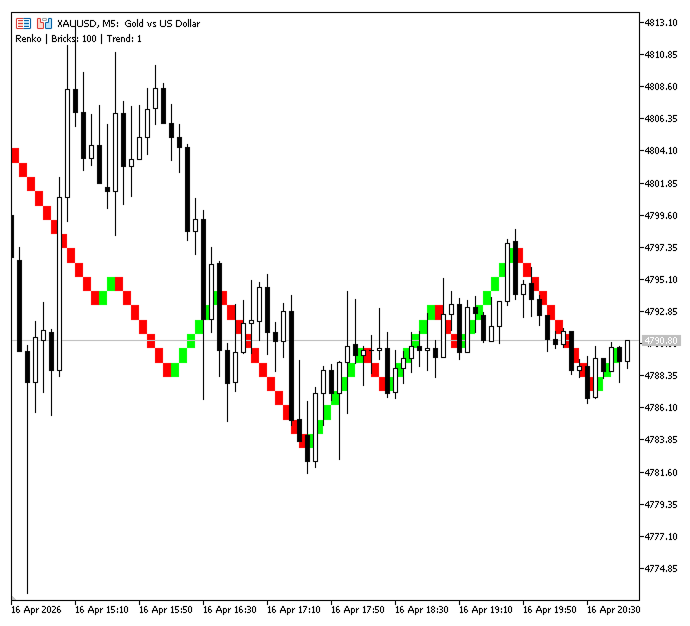
Because lower timeframes display more frequent price movements, making levels appear closer together, while higher timeframes group price movement over longer periods, making them appear more spread out, bricks may appear differently across timeframes. The brick size itself does not change. It is also advisable to choose a brick size that suits the symbol and timeframe for clearer and more meaningful Renko structures.
The indicator builds a separate Renko structure for each chart timeframe. It does not use a single shared Renko dataset across multiple timeframes. Instead, whenever the timeframe is changed, a new Renko sequence is reconstructed based on the price data of the active chart period.
Conclusion
Following the specification above, the final deliverable is a practical Renko Overlay Indicator for MetaTrader 5 that you can compile and run on any symbol/timeframe. It provides the following, verifiable behaviors:
- bricks form only after full brick‑size moves measured from the base or last confirmed brick close
- the first valid movement sets the initial trend, continuation is handled naturally, and reversals require at least two bricks in the opposite direction to avoid false flips
- brick closes are kept in a dynamic array with a user‑controlled cap on displayed bricks
- bricks are drawn as OBJ_RECTANGLE objects on the main chart with color by direction
- redraws occur only when new bricks are added (flagged), and all indicator objects are removed on reset/removal
- a separate Renko structure is built per timeframe and is reconstructed on timeframe change. Choose a brick size appropriate to the instrument's price scale (eg, 0.0001 for EURUSD, 1 for XAUUSD) to obtain meaningful, noise‑filtered Renko structures for trading logic, filtering and visual analysis.
Warning: All rights to these materials are reserved by MetaQuotes Ltd. Copying or reprinting of these materials in whole or in part is prohibited.
This article was written by a user of the site and reflects their personal views. MetaQuotes Ltd is not responsible for the accuracy of the information presented, nor for any consequences resulting from the use of the solutions, strategies or recommendations described.

 Price Movement: Mathematical Models and Technical Analysis
 Markov Chain-Based Matrix Forecasting Model
 Self-Learning Expert Advisor with a Neural Network Based on a Markov State-Transition Matrix
 How to Detect Round-Number Liquidity in MQL5

- Free trading apps
- Over 8,000 signals for copying
- Economic news for exploring financial markets
You agree to website policy and terms of use