

Building a Professional Trading System with Heikin Ashi (Part 2): Developing an EA
 11 151
 0
0

Introduction
This article is the second part of the series "Building a Professional Trading System with Heikin Ashi." In Part One, we built a custom Heikin Ashi indicator using MetaQuotes Language 5 (MQL5), following best practices for custom indicator development. In this next part, we move a step further and develop an Expert Advisor named Zen Breakout, which uses our custom Heikin Ashi indicator and the standard MetaTrader 5 Fractals indicator to generate reliable breakout signals.
The concept is simple:
- When a strong bullish Heikin Ashi candle closes above a recent swing high (detected by the Fractals indicator), the EA opens a long position.
- When a strong bearish Heikin Ashi candle closes below a recent swing low, the EA opens a short position.
Each trade opened by our EA features clearly defined stop-loss and take-profit levels with a configurable risk-to-reward ratio. After reading this article, you will understand how to:
- Hook a custom indicator and a built-in indicator to an EA.
- Implement breakout entry logic using Heikin Ashi and fractals.
- Apply flexible position sizing (manual or based on account risk percentage).
- Package an EA with its indicator together as a single file for easy distribution.
Strategy Concept
The Zen Breakout strategy combines momentum detection with breakout confirmation.
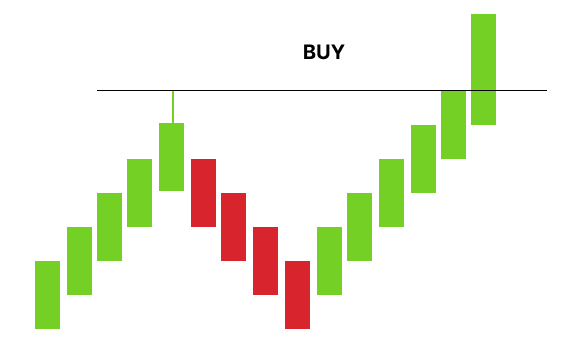
- Long setup
The setup for the long setup is when a strong bullish Heikin Ashi candle closes above the most recent swing high.
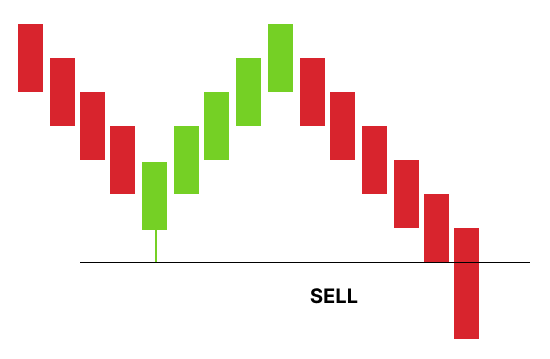
- Short setup
Occurs when a strong Heikin Ashi candle closes below the most recent swing low.
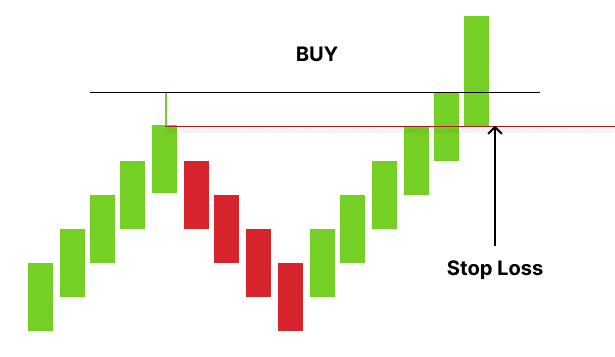
- Stop-loss placement
For long positions, the stop loss is placed at the breakout candle's low.
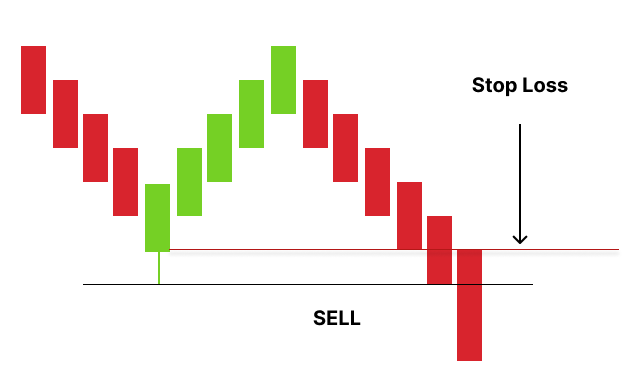
For short positions, the stop loss is placed at the breakout candle's high.
- Take-profit placement
The take-profit is defined using a configurable risk-to-reward ratio. For example, if the risk per trade is 100 points and the risk-to-reward ratio is 1:2, the take-profit will be 200 points away from the entry.
Preparing the EA
To generate trading signals, Zen Breakout will read data directly from two indicators:
- Fractals Indicator
The Fractals indicator comes pre-installed with the MetaTrader 5 terminal and is widely used to identify recent swing highs and lows in the market. In our EA, we will use the iFractals() MQL5 function to initialize the indicator and obtain its handle for further use in our code.
- A custom Heikin Ashi indicator
We will use the custom Heikin Ashi Indicator we created in Part One to detect breakouts with strong momentum. To access it programmatically, we will use the the iCustom() MQL5 function to initialize and get its handle. Additionally, we will package the indicator as a resource within the EA so that it can be distributed as a single, self-contained file.
We shall add the following configurable input parameters to our Zen Breakout EA to make it more flexible.
- magicNumber
The magic number is a unique identifier that the EA assigns to each trade that it opens. This allows the EA to distinguish its trades from those opened manually or by other EAs, ensuring it only modifies or closes its own positions.
- timeFrame
This parameter specifies the chart timeframe the EA should operate on. Users can select from the 21 available timeframes in MetaTrader 5, ranging from M1 (1-minute) to MN1 (monthly).
- lotSizeMode
Determines how the EA calculates lot size for new positions:
- Manual-The user specifies a fixed lot size in the "lotSize" parameter.
- Auto-The EA calculates lot size dynamically based on the account balance and the "riskPerTradePercent" parameter.
- riskPerTradePercent
Specifies the percentage of the account balance to risk per trade (used only when the "lotSizeMode" parameter is set to auto mode). For example, if the account balance is $10000 and this parameter is set to 1.0, the EA will size positions so that a stop-loss hit results in a $100 loss (1% of $10000).
- lotSize
Specifies a fixed lot size for all new trades (used only when the "lotSizeMode" parameter is set to manual mode). For instance, when the "lotSize" parameter is set to 0.5, each new position will be opened with a volume of 0.5 lots.
- RRr (Risk-to-Reward Ratio)
Defines the risk-to-reward ratio for each trade. Users can choose from the seven predefined ratios so that potential profits outweigh potential losses when the take profit level is hit.
Step-by-step guide to writing the Expert Advisor
This article assumes you're already familiar with basic programming concepts and have solid experience using the MQL5 language within MetaTrader 5 and MetaEditor. We won't be covering those topics, so we'll start writing our EA right away. Go ahead and prepare a blank source file in MetaEditor. We're ready to start coding. Let's begin with the initial boilerplate code. We'll use this as our foundation to build out the EA.
//+------------------------------------------------------------------+
//|                                                  zenBreakout.mq5 |
//|          Copyright 2025, MetaQuotes Ltd. Developer is Chacha Ian |
//|                          https://www.mql5.com/en/users/chachaian |
//+------------------------------------------------------------------+
#property copyright "Copyright 2025, MetaQuotes Ltd. Developer is Chacha Ian"
#property link      "https://www.mql5.com/en/users/chachaian"
#property version   "1.10"

//+------------------------------------------------------------------+
//| Expert initialization function                                   |
//+------------------------------------------------------------------+
int OnInit(){

   return(INIT_SUCCEEDED);
}

//+------------------------------------------------------------------+
//| Expert deinitialization function                                 |
//+------------------------------------------------------------------+
void OnDeinit(const int reason){

}

//+------------------------------------------------------------------+
//| Expert tick function                                             |
//+------------------------------------------------------------------+
void OnTick(){

}

//--- Utility functions
//+------------------------------------------------------------------+
The next step is to add the custom functions for our EA. Add the following functions just below the OnTick() function. We will call these functions one by one from within our source code as we develop our EA.
...

//+------------------------------------------------------------------+
//| Expert tick function                                             |
//+------------------------------------------------------------------+
void OnTick(){

}

//--- Utility functions
//+------------------------------------------------------------------+
//| This function configures the chart's appearance.                 |                                   |
//+------------------------------------------------------------------+
bool ConfigureChartAppearance()
{
   if(!ChartSetInteger(0, CHART_COLOR_BACKGROUND, clrWhite)){
      Print("Error while setting chart background, ", GetLastError());
      return false;
   }

   if(!ChartSetInteger(0, CHART_SHOW_GRID, false)){
      Print("Error while setting chart grid, ", GetLastError());
      return false;
   }

   if(!ChartSetInteger(0, CHART_MODE, CHART_LINE)){
      Print("Error while setting chart mode, ", GetLastError());
      return false;
   }

   if(!ChartSetInteger(0, CHART_COLOR_FOREGROUND, clrBlack)){
      Print("Error while setting chart foreground, ", GetLastError());
      return false;
   }

   return true;
}

//+-------------------------------------------------------------------------+
//| Function to generate a unique graphical object name with a given prefix |                                   |
//+-------------------------------------------------------------------------+
string GenerateUniqueName(string prefix){
   int attempt = 0;
   string uniqueName;
   while(true)
   {
      uniqueName = prefix + IntegerToString(MathRand() + attempt);
      if(ObjectFind(0, uniqueName) < 0)
         break;
      attempt++;
   }
   return uniqueName;
}
//+-------------------------------------------------------------------------+
//| Returns true if Heikin Ashi candle is bullish and has no lower wick     |                                   |
//+-------------------------------------------------------------------------+
bool IsBullishBreakoutCandle(int index)
{
   if(index < 0 || index >= ArraySize(heikinAshiOpen)) return false;

   double open  = heikinAshiOpen[index];
   double close = heikinAshiClose[index];
   double low   = heikinAshiLow[index];

   //--- Candle must be bullish and have no lower wick
   return (close > open && low >= MathMin(open, close));
}

//+-------------------------------------------------------------------------+
//| Returns true if Heikin Ashi candle is bearish and has no upper wick     |                                   |
//+-------------------------------------------------------------------------+
bool IsBearishBreakoutCandle(int index)
{
   if(index < 0 || index >= ArraySize(heikinAshiOpen)) return false;

   double open  = heikinAshiOpen[index];
   double close = heikinAshiClose[index];
   double high  = heikinAshiHigh[index];

   //--- Candle must be bearish and have no upper wick
   return (close < open && high <= MathMax(open, close));
}

//+----------------------------------------------------------------------------------------------+
//| Returns the index of the most recent swing high before 'fromIndex'. Returns -1 if not found  |                                   |
//+----------------------------------------------------------------------------------------------+
int FindMostRecentSwingHighIndex(int fromIndex)
{
   if(fromIndex <= 0 || fromIndex >= ArraySize(swingHighs))
      fromIndex = 1;

   for(int i = fromIndex; i < ArraySize(swingHighs); i++)
   {
      if(swingHighs[i] != EMPTY_VALUE)
         return i;
   }

   return -1; //--- No swing high found
}

//+----------------------------------------------------------------------------------------------+
//| Returns the index of the most recent swing low before 'fromIndex'. Returns -1 if not found   |                                   |
//+----------------------------------------------------------------------------------------------+
int FindMostRecentSwingLowIndex(int fromIndex)
{
   if(fromIndex <= 0 || fromIndex >= ArraySize(swingLows))
      fromIndex = 1;

   for(int i = fromIndex; i < ArraySize(swingLows); i++)
   {
      if(swingLows[i] != EMPTY_VALUE)
         return i;
   }

   return -1; // No swing low found
}

//+------------------------------------------------------------------+
//| This function detects a bullish signal                           |
//+------------------------------------------------------------------+
bool IsBullishSignal(datetime &timeStart, int &indexStart, datetime &timeEnd, int &indexEnd)
{
   indexStart = FindMostRecentSwingHighIndex(1);
   double recentSwingHigh               = iHigh(_Symbol, timeframe, indexStart);
   double previousHeikinAshiCandleClose = heikinAshiClose[1];
   double previousHeikinAshiCandleOpen  = heikinAshiOpen[1];

   if(IsBullishBreakoutCandle(1)){
      if(previousHeikinAshiCandleClose > recentSwingHigh && previousHeikinAshiCandleOpen < recentSwingHigh){
         timeStart = iTime(_Symbol, timeframe, indexStart);
         indexEnd  = 0;
         timeEnd   = iTime(_Symbol, timeframe, indexEnd);
         return true;
      }
   }
   return false;
}

//+------------------------------------------------------------------+
//| This function detects a bearish signal                           |
//+------------------------------------------------------------------+
bool IsBearishSignal(datetime &timeStart, int &indexStart, datetime &timeEnd, int &indexEnd)
{
   indexStart = FindMostRecentSwingLowIndex(1);
   double recentSwingLow                = iLow(_Symbol, timeframe, indexStart);
   double previousHeikinAshiCandleClose = heikinAshiClose[1];
   double previousHeikinAshiCandleOpen  = heikinAshiOpen[1];

   if(IsBearishBreakoutCandle(1)){
      if(previousHeikinAshiCandleClose < recentSwingLow && previousHeikinAshiCandleOpen > recentSwingLow){
         timeStart = iTime(_Symbol, timeframe, indexStart);
         indexEnd  = 0;
         timeEnd   = iTime(_Symbol, timeframe, indexEnd);
         return true;
      }
   }
   return false;
}

//+-------------------------------------------------------------------+
//| Function to check if there's a new bar on a given chart timeframe |                           |
//+-------------------------------------------------------------------+
bool IsNewBar(string symbol, ENUM_TIMEFRAMES tf, datetime &lastTm)
{

   datetime currentTime = iTime(symbol, tf, 0);
   if(currentTime != lastTm){
      lastTm       = currentTime;
      return true;
   }
   return false;

}

//+------------------------------------------------------------------+
//| To check if there is an active buy position opened by this EA    |                                 |
//+------------------------------------------------------------------+
bool IsThereAnActiveBuyPosition(ulong magicNm){
   for(int i = PositionsTotal() - 1; i >= 0; i--){
      ulong ticket = PositionGetTicket(i);
      if(ticket == 0){
         Print("Error while fetching position ticket ", _LastError);
         continue;
      }else{
         if(PositionGetInteger(POSITION_MAGIC) == magicNm && PositionGetInteger(POSITION_TYPE) == POSITION_TYPE_BUY){
            return true;
         }
      }
   }
   return false;
}

//+------------------------------------------------------------------+
//| To check if there is an active sell position opened by this EA   |                                 |
//+------------------------------------------------------------------+
bool IsThereAnActiveSellPosition(ulong mgcNumber){
   for(int i = PositionsTotal() - 1; i >= 0; i--){
      ulong ticket = PositionGetTicket(i);
      if(ticket == 0){
         Print("Error while fetching position ticket ", _LastError);
         continue;
      }else{
         if(PositionGetInteger(POSITION_MAGIC) == mgcNumber && PositionGetInteger(POSITION_TYPE) == POSITION_TYPE_SELL){
            return true;
         }
      }
   }
   return false;
}

//+------------------------------------------------------------------+
//| To open a buy position                                           |
//+------------------------------------------------------------------+
bool OpenBuy(){
   double rewardValue = 1.0;
   switch(RRr){
      case ONE_TO_ONE:
         rewardValue = 1.0;
         break;
      case ONE_TO_ONEandHALF:
         rewardValue = 1.5;
         break;
      case ONE_TO_TWO:
         rewardValue = 2.0;
         break;
      case ONE_TO_THREE:
         rewardValue = 3.0;
         break;
      case ONE_TO_FOUR:
         rewardValue = 4.0;
         break;
      case ONE_TO_FIVE:
         rewardValue = 5.0;
         break;
      case ONE_TO_SIX:
         rewardValue = 6.0;
         break;
      default:
         rewardValue = 1.0;
         break;
   }
   ENUM_POSITION_TYPE positionType    = POSITION_TYPE_BUY;
   ENUM_ORDER_TYPE   action           = ORDER_TYPE_BUY;
   double stopLevel                   = iLow(_Symbol, timeframe, 1);
   double askPrice                    = AppData.askPrice;
   double bidPrice                    = AppData.bidPrice;
   double stopDistance                = askPrice - stopLevel;
   double targetLevel                 = askPrice + (stopDistance * rewardValue);
   double lotSz                       = AppData.amountAtRisk / (AppData.contractSize * stopDistance);

   if(lotSizeMode == MODE_AUTO){
      lotSz                              = NormalizeDouble(lotSz, 2);
   }else{
      lotSz                              = NormalizeDouble(lotSize, 2);
   }

   if(!Trade.Buy(lotSz, _Symbol, askPrice, stopLevel, targetLevel)){
      Print("Error while opening a long position, ", GetLastError());
      Print(Trade.ResultRetcode());
      Print(Trade.ResultComment());
      return false;
   }else{
      MqlTradeResult result = {};
      Trade.Result(result);
      AppData.tradeInfo.orderTicket                 = result.order;
      AppData.tradeInfo.type                        = action;
      AppData.tradeInfo.posType                     = positionType;
      AppData.tradeInfo.entryPrice                  = result.price;
      AppData.tradeInfo.takeProfitLevel             = targetLevel;
      AppData.tradeInfo.stopLossLevel               = stopLevel;
      AppData.tradeInfo.openTime                    = AppData.currentGmtTime;
      AppData.tradeInfo.lotSize                     = lotSz;
      return true;
   }

   return false;
}

//+------------------------------------------------------------------+
//| To open a sell position                                          |
//+------------------------------------------------------------------+
bool OpenSel(){
   double rewardValue = 1.0;
   switch(RRr){
      case ONE_TO_ONE:
         rewardValue = 1.0;
         break;
      case ONE_TO_ONEandHALF:
         rewardValue = 1.5;
         break;
      case ONE_TO_TWO:
         rewardValue = 2.0;
         break;
      case ONE_TO_THREE:
         rewardValue = 3.0;
         break;
      case ONE_TO_FOUR:
         rewardValue = 4.0;
         break;
      case ONE_TO_FIVE:
         rewardValue = 5.0;
         break;
      case ONE_TO_SIX:
         rewardValue = 6.0;
         break;
      default:
         rewardValue = 1.0;
         break;
   }
   ENUM_POSITION_TYPE positionType    = POSITION_TYPE_SELL;
   ENUM_ORDER_TYPE   action           = ORDER_TYPE_SELL;
   double stopLevel                   = iHigh(_Symbol, timeframe, 1);
   double bidPrice                    = AppData.bidPrice;
   double askPrice                    = AppData.askPrice;
   double stopDistance                = stopLevel - bidPrice;
   double targetLevel                 = bidPrice - (stopDistance * rewardValue);
   double lotSz                       = AppData.amountAtRisk / (AppData.contractSize * stopDistance);

   if(lotSizeMode == MODE_AUTO){
      lotSz                              = NormalizeDouble(lotSz, 2);
   }else{
      lotSz                              = NormalizeDouble(lotSize, 2);
   }

   if(!Trade.Sell(lotSz, _Symbol, bidPrice, stopLevel, targetLevel)){
      Print("Error while opening a short position, ", GetLastError());
      Print(Trade.ResultRetcode());
      Print(Trade.ResultComment());
      return false;
   }else{
      MqlTradeResult result = {};
      Trade.Result(result);
      AppData.tradeInfo.orderTicket                 = result.order;
      AppData.tradeInfo.type                        = action;
      AppData.tradeInfo.posType                     = positionType;
      AppData.tradeInfo.entryPrice                  = result.price;
      AppData.tradeInfo.takeProfitLevel             = targetLevel;
      AppData.tradeInfo.stopLossLevel               = stopLevel;
      AppData.tradeInfo.openTime                    = AppData.currentGmtTime;
      AppData.tradeInfo.lotSize                     = lotSz;
      return true;
   }
   return false;
}
//+------------------------------------------------------------------+
If you try to compile the EA now, you'll see a number of compile-time errors. This is because many of the functions you've added refer to variables that haven't been defined yet. We'll add these variables to the global scope later. For now, let's walk through the functionality of each function and explain what it does.
- ConfigureChartAppearance
This function sets up the chart's visual appearance before running the EA. It ensures a clean, minimalistic view by changing the chart background to white, hiding the grid for a clutter-free look, switching the chart mode to a line chart, and setting the foreground color to black for a good contrast.
- GenerateUniqueName
It is used to generate a unique name for each newly created graphical object on the chart where our EA is running. This ensures that every object drawn by the EA has a unique identifier, preventing accidental overwriting of previously drawn objects. The function takes a string as input, applies an algorithm to it, and generates a unique object identifier.
- IsBullishBreakoutCandle
This function checks whether a Heikin Ashi candle, specified by its index, meets the criteria for a bullish breakout by checking for the following specific conditions.
- The candle's close price must be greater than the its open price.
- The candle must have no lower wick.
If both conditions are met, the function returns true, indicating that the Heikin Ashi candle qualifies as a bullish breakout candle.
- IsBearishBreakoutCandle
This function checks whether a Heikin Ashi candle, specified by its index, meets the criteria for a bearish breakout.
- FindMostRecentSwingHighIndex
This function's primary purpose is to find the index of the most recent swing high. It achieves this by scanning an array of up fractal values, which are retrieved directly from the Fractals indicator's buffer number zero. The function specifically searches for the most recent swing high that occurred before a given index, which is provided as an input.
- FindMostRecentSwingLowIndex
This function's purpose is to find the index of the most recent swing low.
- IsBullishSignal
This function checks whether a valid bullish breakout signal has formed. It first finds the most recent swing high and retrieves its price. Then it gets the previous Heikin Ashi candle’s open and close values. If the last candle is bullish with no lower wick and its close is above the swing high while its open is below it, the function records the start and end times for reference and returns true. Otherwise, it returns false.
- IsBearishSignal
This function checks whether a valid bearish breakout signal has formed.
- IsNewBar
This function checks whether a new bar has formed on the specified symbol and timeframe. It compares the opening time of the current bar with the previously stored time. If they differ, it updates the stored time and returns true; otherwise, it returns false.
- IsThereAnActiveBuyPosition
This function checks whether there is an active buy position opened specifically by this EA. It accepts a magic number as an input, which is a unique identifier assigned to the EA’s trades. The function loops through all open positions, and if it finds a buy position whose magic number matches the one provided, it returns true; otherwise, it returns false.
- IsThereAnActiveSellPosition
This function checks whether there is an active sell position opened specifically by this EA.
- OpenBuy
This function is responsible for opening a buy position according to the EA’s risk-to-reward settings and risk management rules. It starts by selecting the reward multiplier based on the user-defined risk-to-reward ratio (1:1, 1:1.5, 1:2, etc.). It then calculates the stop-loss level at the previous candle’s low and measures the stop distance from the current ask price. Using this stop distance, it computes the take-profit level by multiplying the distance by the chosen reward ratio, ensuring that the trade respects the specified risk-to-reward profile.
Next, the function determines the lot size. If the lot size mode is set to automatic, it calculates the lot size based on the amount at risk, contract size, and stop distance, then normalizes it to two decimal places. If manual mode is selected, it uses the user-defined lot size instead.
Finally, the function attempts to send a buy order using the calculated parameters. If the trade is successfully placed, it stores detailed information about the order (ticket number, type, entry price, stop loss, take profit, lot size, and time) in a structured variable, AppData.tradeInfo, for later reference. If the order fails, it prints detailed error messages to help with debugging and returns false.
This function effectively ties together the EA’s risk management, reward calculation, and trade execution into a single well-structured process, making it one of the core building blocks of the Zen Breakout EA.
- OpenSel
This function behaves just like the 'OpenBuy' function, only that it opens a short position instead of a long one.
Now that the Expert Advisor (EA) structure is set up, the next step is to define its input parameters. You can do this by declaring them right below the #property directives at the very top of your program file. Simply add the following block of code in that location:
...

#property copyright "Copyright 2025, MetaQuotes Ltd. Developer is Chacha Ian"
#property link      "https://www.mql5.com/en/users/chachaian"
#property version   "1.10"

//--- Input parameters
input group "Information"
input ulong magicNumber         = 254700680002;
input ENUM_TIMEFRAMES timeframe = PERIOD_CURRENT;

input group "Risk Management"
input ENUM_LOT_SIZE_INPUT_MODE lotSizeMode = MODE_AUTO;
input double riskPerTradePercent           = 1.0;
input double lotSize                       = 0.1;
input ENUM_RISK_REWARD_RATIO RRr           = ONE_TO_ONEandHALF;

//+------------------------------------------------------------------+
//| Expert initialization function                                   |
//+------------------------------------------------------------------+
int OnInit(){
   return(INIT_SUCCEEDED);
}

...
Since we have already defined and explained these parameters in the Preparing the EA section, we won’t repeat their descriptions here. Next, we'll create custom enumerations for some of our input parameters. Enumerations provide users with a drop-down list of predefined options when they configure the EA. We will define our custom enumerations just below the #property directives and above the input parameters.
...

#property copyright "Copyright 2025, MetaQuotes Ltd. Developer is Chacha Ian"
#property link      "https://www.mql5.com/en/users/chachaian"
#property version   "1.10"

//--- Custom enumerations
enum ENUM_RISK_REWARD_RATIO   { ONE_TO_ONE, ONE_TO_ONEandHALF, ONE_TO_TWO, ONE_TO_THREE, ONE_TO_FOUR, ONE_TO_FIVE, ONE_TO_SIX };
enum ENUM_LOT_SIZE_INPUT_MODE { MODE_MANUAL, MODE_AUTO };

//--- Input parameters
input group "Information"
input ulong magicNumber         = 254700680002;
input ENUM_TIMEFRAMES timeframe = PERIOD_CURRENT;

...
Our code includes two custom enumerations that make the EA's configuration more intuitive:
- ENUM_RISK_REWARD_RATIO
This enumeration defines seven preset risk-to-reward ratio options (1:1 up to 1:6). This allows traders to simply pick their preferred ratio from a drop-down rather than entering the values manually.
- ENUM_LOT_SIZE_INPUT_MODE
Determines how the EA calculates lot size. MODE_MANUAL lets the user set a fixed lot size, while MODE_AUTO calculates the lot size dynamically based on account balance and risk percentage.
Next, we define a macro named zenBreakout, which stores the EA’s name as a string. This macro is later used in our custom GenerateUniqueName() function to create unique names for new graphical objects. We will now place the macro definition just below the existing #property directives.
...

#property copyright "Copyright 2025, MetaQuotes Ltd. Developer is Chacha Ian"
#property link      "https://www.mql5.com/en/users/chachaian"
#property version   "1.10"

//--- Macros
#define zenBreakout "zenBreakout"

//--- Custom enumerations
enum ENUM_RISK_REWARD_RATIO   { ONE_TO_ONE, ONE_TO_ONEandHALF, ONE_TO_TWO, ONE_TO_THREE, ONE_TO_FOUR, ONE_TO_FIVE, ONE_TO_SIX };
enum ENUM_LOT_SIZE_INPUT_MODE { MODE_MANUAL, MODE_AUTO };

...
Next, we include the required libraries just below the definition of our custom enumeration.
...

//--- Custom enumerations
enum ENUM_RISK_REWARD_RATIO   { ONE_TO_ONE, ONE_TO_ONEandHALF, ONE_TO_TWO, ONE_TO_THREE, ONE_TO_FOUR, ONE_TO_FIVE, ONE_TO_SIX };
enum ENUM_LOT_SIZE_INPUT_MODE { MODE_MANUAL, MODE_AUTO };

//--- Libraries
#include <Trade\Trade.mqh>
#include <ChartObjects\ChartObjectsLines.mqh>

//--- Input parameters
input group "Information"
input ulong magicNumber         = 254700680002;
input ENUM_TIMEFRAMES timeframe = PERIOD_CURRENT;

...
- Trade.mqh
- ChartObjectsLines.mqh
Provides us with access to classes for creating and managing line objects on the chart, which we will use later to show confirmed breakouts above and below recent swing points.
Next, we define two data structures just below our input parameters to organize and store key information used by the EA.
...

//--- Input parameters
input group "Information"
input ulong magicNumber         = 254700680002;
input ENUM_TIMEFRAMES timeframe = PERIOD_CURRENT;

input group "Risk Management"
input ENUM_LOT_SIZE_INPUT_MODE lotSizeMode = MODE_AUTO;
input double riskPerTradePercent           = 1.0;
input double lotSize                       = 0.1;
input ENUM_RISK_REWARD_RATIO RRr           = ONE_TO_ONEandHALF;

//--- Data Structures
struct MqlTradeInfo
{
   ulong orderTicket;
   ENUM_ORDER_TYPE type;
   ENUM_POSITION_TYPE posType;
   double entryPrice;
   double takeProfitLevel;
   double stopLossLevel;
   datetime openTime;
   double lotSize;
};

struct MqlAppData
{
   double bidPrice;
   double askPrice;
   double currentBalance;
   double currentEquity;
   datetime currentGmtTime;
   datetime lastDailyCheckTime;
   datetime lastBarOpenTime;
   double contractSize;
   long digitValue;
   double amountAtRisk;
   MqlTradeInfo tradeInfo;
};

//+------------------------------------------------------------------+
//| Expert initialization function                                   |
//+------------------------------------------------------------------+
int OnInit(){

   return(INIT_SUCCEEDED);
}

...
- MqlTradeInfo
This data structure holds all details about the active position, including ticket number, order type, position type, entry price, stop loss, take profit, lot size, and open time .
- MqlAppData
This data structure serves as a container for application-level data such as bid and ask prices, account balance, equity, GMT time, last bar open time, contract size, symbol digits, and amount at risk per trade. It also contains an instance of MqlTradeInfo, allowing us to keep both account and trade information grouped together in one place.
Next, let us go ahead and declare global variables, which will be accessible throughout the entire EA. We will declare them just below our data structures.
...

//--- Data Structures
struct MqlTradeInfo
{
   ulong orderTicket;
   ENUM_ORDER_TYPE type;
   ENUM_POSITION_TYPE posType;
   double entryPrice;
   double takeProfitLevel;
   double stopLossLevel;
   datetime openTime;
   double lotSize;
};

struct MqlAppData
{
   double bidPrice;
   double askPrice;
   double currentBalance;
   double currentEquity;
   datetime currentGmtTime;
   datetime lastDailyCheckTime;
   datetime lastBarOpenTime;
   double contractSize;
   long digitValue;
   double amountAtRisk;
   MqlTradeInfo tradeInfo;
};

//--- Global variables
CTrade Trade;
CChartObjectTrend TrendLine;
MqlAppData AppData;

int    heikinAshiIndicatorHandle;
double heikinAshiOpen     [];
double heikinAshiHigh     [];
double heikinAshiLow      [];
double heikinAshiClose    [];

int    fractalsIndicatorHandle;
double swingHighs [];
double swingLows  [];

//+------------------------------------------------------------------+
//| Expert initialization function                                   |
//+------------------------------------------------------------------+
int OnInit(){

   return(INIT_SUCCEEDED);
}

...
- CTrade Trade
An instance of the CTrade class, used to handle trade operations such as opening, closing, and modifying orders and positions.
- CChartObjectTrend Trendline
Represents a trendline object that we can draw and manipulate on the chart
- MqlAppData AppData
An instance of our MqlAppData structure, allowing us to store and access all application-level data from anywhere in the code.
We also declare indicator handles and some arrays to hold values read from our custom Heikin Ashi and the built-in Fractals indicator. These will hold real-time indicator values so that our EA can analyze price action and detect valid breakouts.
Inside our OnTick() function, the first thing we do is refresh our global variables so that they always reflect the most up-to-date market and account data on every tick. Let us add the following block of code right at the start of the OnTick() function.
...

//+------------------------------------------------------------------+
//| Expert tick function                                             |
//+------------------------------------------------------------------+
void OnTick(){

   //--- Scope variables
   AppData.bidPrice           = SymbolInfoDouble (_Symbol, SYMBOL_BID);
   AppData.askPrice           = SymbolInfoDouble (_Symbol, SYMBOL_ASK);
   AppData.currentBalance     = AccountInfoDouble(ACCOUNT_BALANCE);
   AppData.currentEquity      = AccountInfoDouble(ACCOUNT_EQUITY);
   AppData.amountAtRisk       = (riskPerTradePercent/100.0) * AppData.currentBalance;
}

...
- AppData.bidPrice
Retrieves and saves the current bid price for a specific financial security on which the chart is running.
- AppData.askPrice
Retrieves and saves the current ask price for a specific financial security on which the chart is running.
- AppData.currentBalance
Retrieves and records the current account balance with every price change.
- AppData.currentEquity
Retrieves and stores the real-time account equity.
- AppData.amountAtRisk
Calculates the actual amount to risk for the next trade based on the riskPerTradePercent parameter and the current account balance.
With our data structures and global variables in place, the next step is to introduce the indicators that power our strategy. We will start by initializing indicator handles for both the custom Heikin Ashi indicator we built in Part One and the standard Fractals indicator available in MetaTrader 5. Once the handles are initialized, we will read real-time data from their buffers so that the EA can use it to detect valid breakout signals. To ensure efficient memory usage, we will also release the indicator handles when they are no longer needed. Additionally, we will package our custom Heikin Ashi indicator as a resource inside the EA file, allowing it to be distributed as a single, self-contained file without requiring users to manually install the indicator separately.
Before we can package our custom Heikin Ashi indicator as a resource, we first need to create it ourselves. Go ahead and prepare a new empty indicator source file in MetaEditor and name it, 'heikinAshiindicator.mq5.' Then, copy and paste the attached indicator source code into this file and compile it. Once you compile successfully, MetaTrader will generate a 'heikinAshiindicator.ex5' file. We will then package this compiled file as a resource so it becomes part of our EA.
...

#property copyright "Copyright 2025, MetaQuotes Ltd. Developer is Chacha Ian"
#property link      "https://www.mql5.com/en/users/chachaian"
#property version   "1.10"
#resource "\\Indicators\\heikinAshiIndicator.ex5"

...
This informs the compiler to embed the compiled indicator file (heikinAshiIndicator.ex5) into the EA. By doing so, users won't need to install the indicator manually in their Indicators directory. The EA will always have access to it as long as the file is present at compile time. This makes distribution much easier and ensures a seamless installation experience for end users.
Next, let us initialize the indicator handles inside the OnTick() function so that our Expert Advisor can access real-time data from both the custom Heikin Ashi indicator and built-in Fractals indicator.
...

//+------------------------------------------------------------------+
//| Expert initialization function                                   |
//+------------------------------------------------------------------+
int OnInit(){

   ...

   //--- Initialize global variables
   AppData.currentBalance        = AccountInfoDouble(ACCOUNT_BALANCE);
   AppData.currentEquity         = AccountInfoDouble(ACCOUNT_EQUITY);
   AppData.lastDailyCheckTime    = iTime(_Symbol, PERIOD_D1, 0);
   AppData.lastBarOpenTime       = 0;
   AppData.digitValue            = SymbolInfoInteger(_Symbol, SYMBOL_DIGITS);
   AppData.contractSize          = SymbolInfoDouble (_Symbol, SYMBOL_TRADE_CONTRACT_SIZE);

   //--- Initialize the Heikin Ashi indicator
   heikinAshiIndicatorHandle     = iCustom(_Symbol, timeframe, "::Indicators\\heikinAshiIndicator.ex5");
   if(heikinAshiIndicatorHandle  == INVALID_HANDLE){
      Print("Error while initializing The Heikin Ashi Indicator: ", GetLastError());
      return INIT_FAILED;
   }

   //--- Initialize the Fractals indicator
   fractalsIndicatorHandle = iFractals(_Symbol, timeframe);
   if(fractalsIndicatorHandle == INVALID_HANDLE){
      Print("Error while initializing The Fractals Indicator: ", GetLastError());
      return INIT_FAILED;
   }
}

...
We have just added the code necessary to initialize the two indicators that we'll be using in our EA.
- Heikin Ashi Indicator
We use iCustom() to load our packaged Heikin Ashi indicator. If the handle is not successfully created, the EA prints an error message in the expert's journal and stops running. This is useful for debugging and also ensures that the EA does not run without its primary signal source.
- Fractals Indicator
Once the indicators are initialized, the next step inside the OnTick() function is to read data from their buffers. We should now add the following block of code inside the OnTick() function, placing it directly below the global variable assignment statements.
...

//+------------------------------------------------------------------+
//| Expert tick function                                             |
//+------------------------------------------------------------------+
void OnTick(){

   //--- Scope variables
   AppData.bidPrice           = SymbolInfoDouble (_Symbol, SYMBOL_BID);
   AppData.askPrice           = SymbolInfoDouble (_Symbol, SYMBOL_ASK);
   AppData.currentBalance     = AccountInfoDouble(ACCOUNT_BALANCE);
   AppData.currentEquity      = AccountInfoDouble(ACCOUNT_EQUITY);
   AppData.amountAtRisk       = (riskPerTradePercent/100.0) * AppData.currentBalance;

   //--- Get a few Heikin Ashi values
   int copiedHeikinAshiOpen = CopyBuffer(heikinAshiIndicatorHandle, 0, 0, 10, heikinAshiOpen);
   if(copiedHeikinAshiOpen  == -1){
      Print("Error while copying Heikin Ashi Open prices: ", GetLastError());
      return;
   }

   int copiedHeikinAshiHigh = CopyBuffer(heikinAshiIndicatorHandle, 1, 0, 10, heikinAshiHigh);
   if(copiedHeikinAshiHigh  == -1){
      Print("Error while copying Heikin Ashi High prices: ", GetLastError());
      return;
   }

   int copiedHeikinAshiLow = CopyBuffer(heikinAshiIndicatorHandle, 2, 0, 10, heikinAshiLow);
   if(copiedHeikinAshiLow  == -1){
      Print("Error while copying Heikin Ashi Low prices: ", GetLastError());
      return;
   }

   int copiedHeikinAshiClose = CopyBuffer(heikinAshiIndicatorHandle, 3, 0, 10, heikinAshiClose);
   if(copiedHeikinAshiClose  == -1){
      Print("Error while copying Heikin Ashi Close prices: ", GetLastError());
      return;
   }

   //--- Get the latest Fractals indicator values
   int copiedSwingHighs = CopyBuffer(fractalsIndicatorHandle, 0, 0, 200, swingHighs);
   if(copiedSwingHighs == -1){
      Print("Error while copying fractal's indicator swing highs: ", GetLastError());
   }

   int copiedSwingLows = CopyBuffer(fractalsIndicatorHandle, 1, 0, 200, swingLows);
   if(copiedSwingLows == -1){
      Print("Error while copying fractal's indicator swing lows: ", GetLastError());
   }
}

...
We use CopyBuffer() to retrieve the latest 10 values of the open, high, low, and close prices from the Heikin Ashi indicator. Similarly, we copy the latest 200 values of swing highs and swing lows of the Fractals indicator. In each case, if copying fails, we log an error but don't terminate program execution.
The next step is to set our data arrays as series using ArraySetAsSeries(). This function reverses the indexing direction of our arrays so that the element 0 represents the data point at the most recent bar and higher indices represent older bars. We will add the following block of code directly below the section where we initialize our indicator handles.
...

//+------------------------------------------------------------------+
//| Expert initialization function                                   |
//+------------------------------------------------------------------+
int OnInit(){
   ...

   //--- Initialize the Heikin Ashi indicator
   heikinAshiIndicatorHandle     = iCustom(_Symbol, timeframe, "::Indicators\\heikinAshiIndicator.ex5");
   if(heikinAshiIndicatorHandle  == INVALID_HANDLE){
      Print("Error while initializing The Heikin Ashi Indicator: ", GetLastError());
      return INIT_FAILED;
   }

   //--- Initialize the Fractals indicator
   fractalsIndicatorHandle = iFractals(_Symbol, timeframe);
   if(fractalsIndicatorHandle == INVALID_HANDLE){
      Print("Error while initializing The Fractals Indicator: ", GetLastError());
      return INIT_FAILED;
   }

   //--- Set Arrays as series
   ArraySetAsSeries(heikinAshiOpen,  true);
   ArraySetAsSeries(heikinAshiHigh,  true);
   ArraySetAsSeries(heikinAshiLow,   true);
   ArraySetAsSeries(heikinAshiClose, true);
   ArraySetAsSeries(swingHighs,      true);
   ArraySetAsSeries(swingLows,       true);

   return(INIT_SUCCEEDED);
}

...
Doing this is extremely helpful because it allows the EA to access the latest values easily and consistently.
The final step when working with indicators is to ensure that their resources are properly released once the Expert Advisor is detached from the chart. This is done within the OnDeinit() function, which runs automatically when an EA is detached from the chart. By calling IndicatorRelease() on our indicator handles, we free up any memory they occupy.
...

//+------------------------------------------------------------------+
//| Expert deinitialization function                                 |
//+------------------------------------------------------------------+
void OnDeinit(const int reason){

   //--- Free up memory used by indicators
   if(heikinAshiIndicatorHandle != INVALID_HANDLE){
      IndicatorRelease(heikinAshiIndicatorHandle);
   }

   if(fractalsIndicatorHandle != INVALID_HANDLE){
      IndicatorRelease(fractalsIndicatorHandle);
   }

}

...
It is always a good practice to include this cleanup step in every EA that uses either custom or built-in indicators.
Before releasing the indicator handles, it's good practice to clear the charts of any graphical objects our EA may have created. This ensures that no stray trendlines remain on the chart once the EA is detached from the chart. We will achieve this by calling ObjectsDeleteAll(0) inside the OnDeinit() function. Let us now go ahead and do it just before the memory release section.
...

//+------------------------------------------------------------------+
//| Expert deinitialization function                                 |
//+------------------------------------------------------------------+
void OnDeinit(const int reason){

      //--- Delete all graphical objects
      ObjectsDeleteAll(0);

   //--- Free up memory used by indicators
   if(heikinAshiIndicatorHandle != INVALID_HANDLE){
      IndicatorRelease(heikinAshiIndicatorHandle);
   }

   ...

}

...
At this stage, compiling the source code should no longer produce any errors, since all the required global variables have been properly defined and initialized.
Finally, we have reached the heart of our Expert Advisor-the core trading logic. This block of code runs only when a new bar opens, ensuring that signals are only evaluated once at the close of a candle. Let us insert our core trading logic directly below the existing code inside the OnTick() function.
...

//+------------------------------------------------------------------+
//| Expert tick function                                             |
//+------------------------------------------------------------------+
void OnTick(){

   ...

   //--- Get the latest Fractals indicator values
   int copiedSwingHighs = CopyBuffer(fractalsIndicatorHandle, 0, 0, 200, swingHighs);
   if(copiedSwingHighs == -1){
      Print("Error while copying fractal's indicator swing highs: ", GetLastError());
   }

   int copiedSwingLows = CopyBuffer(fractalsIndicatorHandle, 1, 0, 200, swingLows);
   if(copiedSwingLows == -1){
      Print("Error while copying fractal's indicator swing lows: ", GetLastError());
   }

   //--- Run this block on new bar open
   if(IsNewBar(_Symbol, timeframe, AppData.lastBarOpenTime)){

      datetime timeStart  = 0;
      int      indexStart = 0;
      datetime timeEnd    = 0;
      int      indexEnd   = 0;

      //--- Handle Bullish Signals
      if(IsBullishSignal(timeStart, indexStart, timeEnd, indexEnd)){
         if(!IsThereAnActiveBuyPosition(magicNumber) && !IsThereAnActiveSellPosition(magicNumber)){
            OpenBuy();
         }
         double high = iHigh(_Symbol, timeframe, indexStart);
         TrendLine.Create(0, GenerateUniqueName(zenBreakout), 0, timeStart, high, timeEnd, high);
      }

      //--- Handle Bearish Signals
      if(IsBearishSignal(timeStart, indexStart, timeEnd, indexEnd)){
         if(!IsThereAnActiveBuyPosition(magicNumber) && !IsThereAnActiveSellPosition(magicNumber)){
            OpenSel();
         }
         double low  = iLow (_Symbol, timeframe, indexStart);
         TrendLine.Create(0, GenerateUniqueName(zenBreakout), 0, timeStart, low, timeEnd, low);
      }
   }

}

...
Inside this section, we first declare some helper variables (timeStart, indexStart, timeEnd, indexEnd) that will be populated when a valid signal is found.
We then call our custom function IsBullishSignal(). If a bullish setup is detected and there are no active buy or sell positions, the EA calls OpenBuy() to open a new buy position. Immediately after, it draws a trendline across the identified bar range using TrendLine.Create(), visually marking where the signal occurs.
The same logic applies for bearish signals, but in this case, the EA calls OpenSel() to open a sell order and draws a trendline at the swing low where the bearish setup was detected.
This entire block is crucial because it ties together the earlier setup-input parameters, indicators, and global variables-to finally generate actionable trading decisions.
Congratulations on making it this far! At this point, our expert advisor is fully developed and should compile without errors. I encourage you to download the attached source file and compare it with your own implementation. This will help you spot any missed steps or typos and ensure your code matches what we have built together. Taking time to review and compare your work is a great way to strengthen your understanding and build confidence before moving on to testing the EA on a chart.
Testing
I conducted a backtest using gold as the financial instrument, covering the period from January 1, 2025, to August 31, 2025. The input parameters were configured as follows:
- magicNumber: 254700680002
- timeFrame: H1
- lotSizeMode: MODE_AUTO
- riskPerTradePercent: 1.0
- lotSize: 0.1
- RRr: ONE_TO_ONEandHALF
Starting with a $100000 account balance, the backtest shows an equity growth of slightly above 12% over the 8-month period.
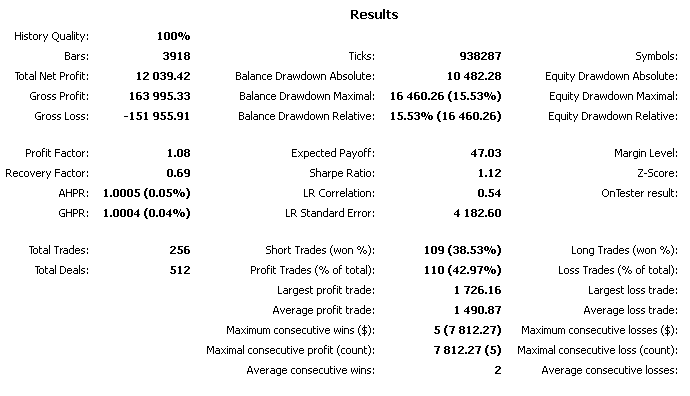
Below is the equity growth curve:
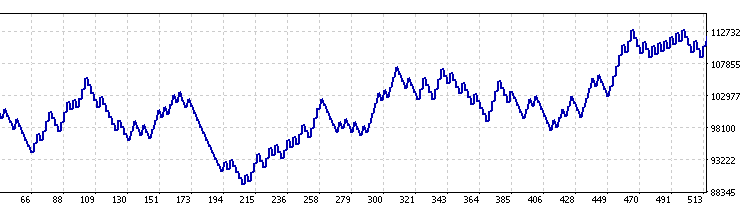
The equity curve indicates that the current strategy is roughly breakeven, which is a positive sign as it demonstrates that the approach is not entirely unprofitable. I believe there is potential to improve its performance further through parameter optimization and incorporating advanced signal filters like trading sessions.
Conclusion
We have successfully wrapped up the development of our Expert Advisor. Together, we walked through every step, from setting up input parameters, enumerations, and global variables, to initializing indicators, reading data from their buffers, and implementing the core trading logic.
We now have a fully functional Expert Advisor that automatically trades using our Heikin Ashi Logic. The backtest on gold showed a relatively stable equity curve, confirming that the logic works as intended and that the EA compiles without errors. This is a powerful milestone.
From here, try optimizing the parameters to see if you can improve profitability, or add extra filters like session timing or volatility checks. The work we have done lays a solid foundation for building more sophisticated automated systems that can handle real-world market conditions.
Warning: All rights to these materials are reserved by MetaQuotes Ltd. Copying or reprinting of these materials in whole or in part is prohibited.
This article was written by a user of the site and reflects their personal views. MetaQuotes Ltd is not responsible for the accuracy of the information presented, nor for any consequences resulting from the use of the solutions, strategies or recommendations described.

 Price movement discretization methods in Python
 Reimagining Classic Strategies (Part 16): Double Bollinger Band Breakouts
 Building AI-Powered Trading Systems in MQL5 (Part 3): Upgrading to a Scrollable Single Chat-Oriented UI
 Visual assessment and adjustment of trading in MetaTrader 5

- Free trading apps
- Over 8,000 signals for copying
- Economic news for exploring financial markets
You agree to website policy and terms of use