

From Basic to Intermediate: Object Events (I)
 904
904
 0
0

Introduction
In the previous article From Basic to Intermediate: Objects (IV) we showed how an object available in MetaTrader 5 can be modified to create another object. This was done for a purpose that may be quite interesting and is, in itself, rather intriguing. In that article, my dear reader, you were also given a small challenge whose solution I will not show. The reason is that I want to encourage you to practice and study the article material so that you learn to solve the problems that will certainly arise on your own as you learn and implement new ideas.
Although this task is very simple to solve, and the issue itself does not prevent the code from being used for study purposes, I think you will be much prouder of yourself and feel more confident in what you are learning if you can solve it on your own, exploring and analyzing each situation until you find the best possible solution. Therefore, in this article we will look at another topic that is, in a certain sense, related to working with graphical objects, although it differs somewhat from what has been shown so far.
You may already suspect that we are giving this topic considerable attention, perhaps even more than many people would consider truly necessary. Before we can go deeper into what MQL5 can do, we need to understand several things. All of this serves a broader goal: creating more complex applications designed for specific purposes, applications unlike anything we will find in any other program, at least when we are talking about MetaTrader 5.
All right, let us move on to a new topic. This will allow us to begin discussing the main subject of this article.
Object Events
Up to this point, we have shown and explained how to work with events generated by the user when interacting with MetaTrader 5, and how we can handle those events at the chart level. For example, when we press a key or use the mouse to perform some action. Placing an object on the chart is one such action: although it is mostly performed with the mouse, it also generates other events related to it.
These events essentially cause MetaTrader 5 to trigger other events, which in this case are related to objects. For that reason, they are handled differently, or at least that is what is expected. MetaTrader 5 generates these events specifically to help the programmer and, consequently, the application itself handle any action performed on an object on the chart.
These events can be triggered by a mouse click, movement, creation, deletion, or even by modifying one of an object’s properties. However, not all events will be triggered, because some of them must be enabled. The reason is very simple: by default, they are disabled in MetaTrader 5. This works in much the same way as mouse events. The application may not be interested in receiving notifications about such events, so MetaTrader 5 simply ignores those events. As a result, we get a relatively faster environment with a lower likelihood of performance problems or even issues with the stability of the platform itself.
But there are cases when such events become necessary. In that situation, we need to understand how to handle them, because it may be necessary to make corrections or adjustments precisely because of changes made by the user to a graphical object.
Manually analyzing changes to a graphical object is not something you, dear reader, will want to do: besides consuming a great deal of CPU time, it makes the code absurdly more complicated. But precisely because MetaTrader 5 provides us with information about changes on the chart, we can greatly reduce the work required to monitor every individual object placed on it. This allows us to know exactly when, where, and why the user changed an object whose sole purpose is to provide information.
At this point, you may not yet realize how important the events generated by MetaTrader 5 to notify our application about object changes really are. Moreover, you may not fully realize how seriously a malicious user can interfere with or damage the operation of your application if they start changing certain properties of some objects. This is exactly why we need to talk about object events. This is undoubtedly a topic that can help you avoid problems, or even understand the causes of certain failures that may occur in your application throughout its lifetime.
By updating your application, you can also reduce the risk of failures. At the same time, however, you may overlook issues that are genuinely important to analyze.
Because certain events generated by MetaTrader 5 as a result of actions on an object can often be interpreted differently depending on the particular application, we will not try to create a fixed model or protocol for implementation. I want you, dear reader, to try to understand the concept that will be used. I also want you to understand that there are times when every action needs to be monitored, and times when we can completely ignore certain types of activity involving an object, whether it is an object our application placed on the chart or one the user added to the same chart manually. There is a time for everything. So first try to understand the concept itself, rather than the code as such, because the code can change radically.
So, before we begin, one thing needs to be made clear. As a rule, the standard way MetaTrader 5 handles an object may not be the most appropriate when we are dealing with a more specific task, where we are implementing something to achieve a very particular goal. In such situations, we need to establish additional rules besides the ones MetaTrader 5 already uses by default.
And in order for the rules we set in our application to be followed, we use the built-in mechanism provided by MetaTrader 5 that lets us know what happened to a particular object. This removes the need to constantly monitor what the user might do with one object or another. If something happens to an object — whether the user adds a new object to the chart, modifies it, or even deletes it — MetaTrader 5 will notify us, and we will be able to take the necessary action.
Understanding this is extremely important, perhaps even more important than understanding the code itself. In any case, some events will need to be enabled, while others will not. Knowing the right time to enable or even disable these events is something you must learn through practice. In any case, we need to start somewhere. So let us approach this as simply and step by step as possible. We will begin with the code shown below:
001. //+------------------------------------------------------------------+
002. #property copyright "Daniel Jose"
003. //+------------------------------------------------------------------+
004. #define def_Prefix  "Demo"
005. //+------------------------------------------------------------------+
006. #define macro_NameObject  def_Prefix + (string)(ObjectsTotal(0) + 1)
007. //+------------------------------------------------------------------+
008. #include <Tutorial\File 01.mqh>
009. //+------------------------------------------------------------------+
010. input double    user01 = 1.5;                   //Stop-Target Relationship
011. input bool      user02 = true;                  //Extend lines to the right
012. //+------------------------------------------------------------------+
013. st_Cross gl_Cross;
014. //+------------------------------------------------------------------+
015. int OnInit()
016. {
017.     gl_Cross.Init();
018.     IndicatorSetString(INDICATOR_SHORTNAME, def_Prefix);
019.     ChartSetInteger(0, CHART_EVENT_MOUSE_MOVE, true);
020.     ChartSetInteger(0, CHART_CROSSHAIR_TOOL, false);
021.
022.     return INIT_SUCCEEDED;
023. };
024. //+------------------------------------------------------------------+
025. int OnCalculate(const int rates_total, const int prev_calculated, const int begin, const double &price[])
026. {
027.     return rates_total;
028. };
029. //+------------------------------------------------------------------+
030. void OnChartEvent(const int id, const long &lparam, const double &dparam, const string &sparam)
031. {
032. #define macro_CLEAN_EVENT   {                               \
033.             isPaint = "";                                   \
034.             gl_Cross.Hide();                                \
035.             bMouseL = false;                                \
036.             ChartSetInteger(0, CHART_MOUSE_SCROLL, true);   \
037.                             }
038.
039.     st_TimePrice    tp;
040.     static string   isPaint = "";
041.     static bool     bMouseL = false;
042.
043.     switch (id)
044.     {
045.         case CHARTEVENT_KEYDOWN:
046.             if (TerminalInfoInteger(TERMINAL_KEYSTATE_ESCAPE)) macro_CLEAN_EVENT;
047.             break;
048.         case CHARTEVENT_MOUSE_MOVE:
049.             tp = gl_Cross.Move((ushort)lparam, (ushort)dparam);
050.             if (((uchar)sparam & MOUSE_LEFT) != 0)
051.             {
052.                 if (isPaint != "")
053.                 {
054.                     bMouseL = true;
055.                     if (!ObjectGetInteger(0, isPaint, OBJPROP_TIME)) ObjectMove(0, isPaint, 0, tp.Time, tp.Price);
056.                     ObjectMove(0, isPaint, 1, tp.Time, tp.Price);
057.                 }
058.             }else if (bMouseL) macro_CLEAN_EVENT;
059.             if ((((uchar)sparam & MOUSE_MIDDLE) != 0) && (isPaint == ""))
060.             {
061.                 ObjectCreate(0, isPaint = macro_NameObject, OBJ_FIBO, 0, 0, 0);
062.                 ChartSetInteger(0, CHART_MOUSE_SCROLL, false);
063.                 Modifier_OBJ_FIBO(isPaint);
064.                 gl_Cross.Show();
065.             }
066.             break;
067.         case CHARTEVENT_MOUSE_WHEEL:
068.             break;
069.         case CHARTEVENT_OBJECT_CLICK:
070.             Comment(StringFormat("CHARTEVENT_OBJECT_CLICK\nX: %03d    Y: %03d    Object: %s", (ushort)lparam, (ushort)dparam, sparam));
071.             break;
072.         case CHARTEVENT_OBJECT_DRAG :
073.             Comment(StringFormat("CHARTEVENT_OBJECT_DRAG\nObject: %s", sparam));
074.             break;
075.     }
076.     ChartRedraw();
077.
078. #undef macro_CLEAN_EVENT
079. };
080. //+------------------------------------------------------------------+
081. void OnDeinit(const int reason)
082. {
083.     Comment("");
084.     ChartSetInteger(0, CHART_EVENT_MOUSE_MOVE, false);
085.     ChartSetInteger(0, CHART_CROSSHAIR_TOOL, true);
086.
087.     gl_Cross.Hide();
088.
089.     if (reason == REASON_REMOVE)
090.         ObjectsDeleteAll(0, def_Prefix);
091. };
092. //+------------------------------------------------------------------+
093. void Modifier_OBJ_FIBO(const string szNameObj)
094. {
095. #define macro_Mod_OBJ_FIBO(txt, pos, cor, width, style) {                       \
096.             ObjectSetDouble(0, szNameObj, OBJPROP_LEVELVALUE, levels, pos);     \
097.             ObjectSetInteger(0, szNameObj, OBJPROP_LEVELCOLOR, levels, cor);    \
098.             ObjectSetInteger(0, szNameObj, OBJPROP_LEVELWIDTH, levels, width);  \
099.             ObjectSetInteger(0, szNameObj, OBJPROP_LEVELSTYLE, levels, style);  \
100.             ObjectSetString(0, szNameObj, OBJPROP_LEVELTEXT, levels, txt);      \
101.             levels++;                                                           \
102.                                                         }
103.
104.     int levels = 0;
105.
106.     ObjectSetInteger(0, szNameObj, OBJPROP_SELECTABLE, false);
107.     ObjectSetInteger(0, szNameObj, OBJPROP_COLOR, clrNONE);
108.     ObjectSetInteger(0, szNameObj, OBJPROP_RAY_RIGHT, user02);
109.
110.     macro_Mod_OBJ_FIBO("Stop", 0, clrRed, 2, STYLE_SOLID);
111.     macro_Mod_OBJ_FIBO("Enter", 1, clrBlue, 2, STYLE_DASH);
112.     macro_Mod_OBJ_FIBO("Partial", 1 + (user01 / 2), clrYellowGreen, 1, STYLE_DASHDOTDOT);
113.     macro_Mod_OBJ_FIBO("Take", 1 + user01, clrGreen, 2, STYLE_SOLID);
114.     ObjectSetInteger(0, szNameObj, OBJPROP_LEVELS, levels);
115.
116. #undef macro_Mod_OBJ_FIBO
117. }
118. //+------------------------------------------------------------------+
Code 01
Here is the code we reviewed, explained, and provided in the previous article. Well, in fact, that is not entirely true, because here we are adding two new elements to the source code. I am doing this intentionally, building on familiar material so that you can see that a highly complex application does not appear in an instant. It is built gradually, step by step. Although here we are not focused on creating any specific application. Our goal is only to demonstrate and explain aspects related to programming in MQL5 in order to control the MetaTrader 5 platform itself.
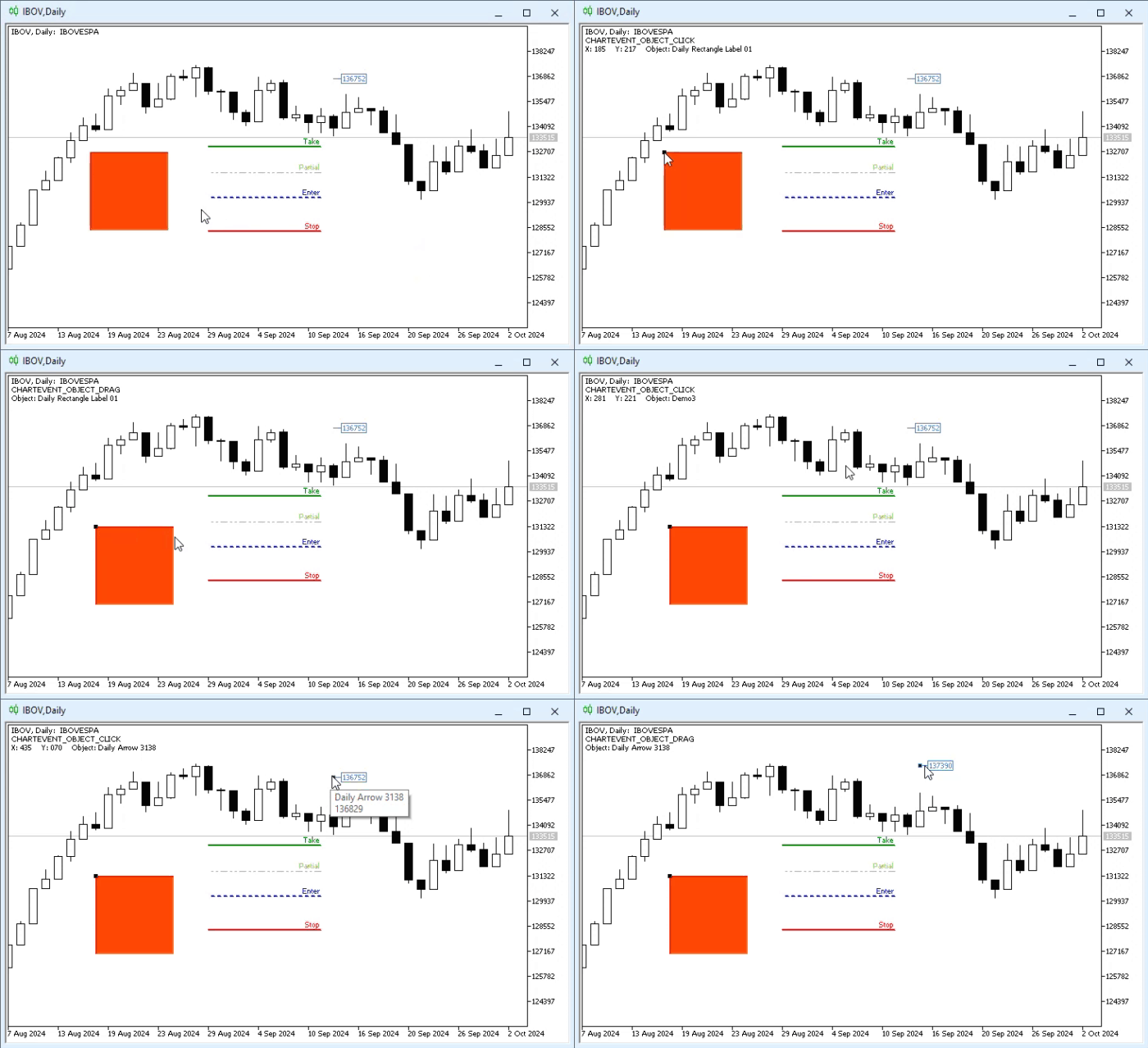
After being compiled and added to a chart, Code 01 will demonstrate some rather interesting behavior that is worth observing. It will now provide us with useful information. Remember that this data is originally generated by MetaTrader 5 based on actions performed on the chart. The following animation shows what to expect when using the application on any chart:
Animation 01
Pay attention to the upper-left corner of Animation 01. You will see messages whose purpose is to inform us when an event occurred on one of the objects present on the chart. Please note that in the case of the CHARTEVENT_OBJECT_CLICK event, we are told not only the name of the object and the mouse position, but also the type of event that occurred. Such events open up a wide range of possible uses. In fact, simply observing these two events opens up many possibilities.
But since we are dealing with something very simple and straightforward, I see no need to explain in detail what is happening in Code 01. It is enough to study it calmly and apply the knowledge gained from the previous articles to understand exactly what is happening in the application. However, keep in mind that the application can even observe objects it did not create.
This is exactly what I want you to understand, dear reader. We are analyzing the standard behavior of MetaTrader 5 to understand how it interacts with objects and exactly how it will notify us when any changes occur.
Although we could continue adding new elements to Code 01, we will not do so. That would ultimately obscure our main objective, which is precisely to teach you and pass on some of my programming experience and knowledge so that you can make the platform work for you, not against you. So let us create a new type of application. It will be dedicated to describing the functionality to be implemented, provided, of course, that you understand how to use MQL5 to control MetaTrader 5.
To do this, you need to grasp the essence of the material covered in the current topic. Without understanding this part, which in my view is the foundation for everything else, it will be quite difficult to understand what we will do next.
Avoiding Duplicate Objects
One of the things that really bothers me is the infamous CTRL+C and CTRL+V. But in MetaTrader 5, this does not work that way, at least not in the way most people expect. This is because, when selecting an object and opening the menu of actions available for it, we can see that by default MetaTrader 5 DOES NOT HAVE CTRL+C and CTRL+V for applying these actions to objects. What may seem perfectly normal and natural to many people can seem somewhat strange and confusing to others. You can see this in the following image.
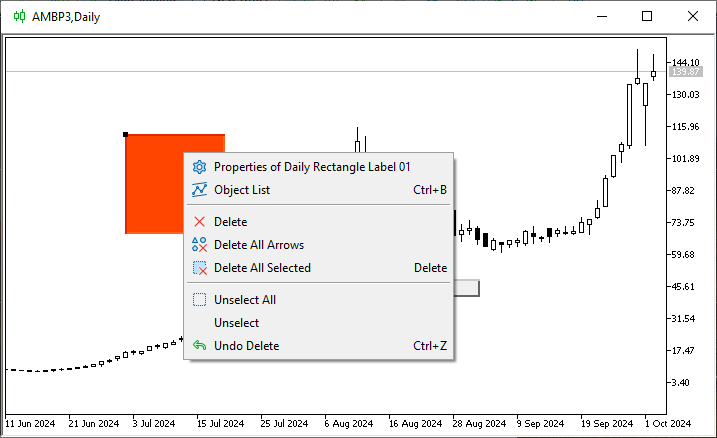
Image 01
Yes, this may seem a little strange. However, in MetaTrader 5, CTRL+C and CTRL+V are available in a different way. And, to be honest, I think very few users know how to use CTRL+C and CTRL+V in MetaTrader 5 to duplicate a graphical object.
Understanding how this is done would require explaining other things. But here, that would make the article very boring and, in my opinion, would not be particularly interesting. The fact is that most users are quite satisfied with the platform as it currently is. So why change it? Right?
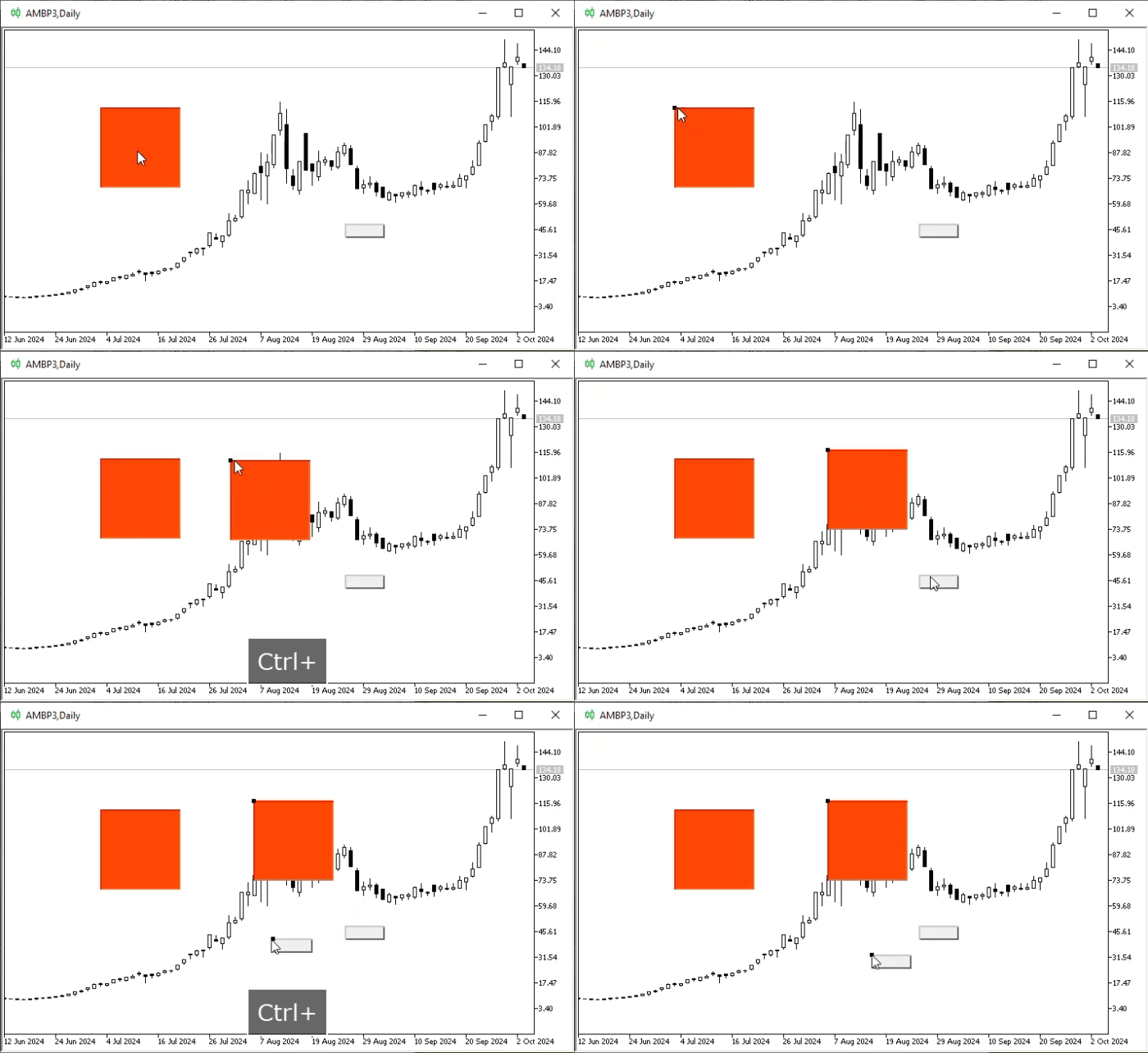
But for what I want to explain later, it is definitely worth showing you how to use CTRL+C and CTRL+V with any object in MetaTrader 5, because I think this is something you do not know how to do. It also becomes a kind of bonus material for those who happen to come across my articles and begin studying them. So, in the following animation we can see how to perform CTRL+C and CTRL+V on any object.
Animation 02
Please note that this is very simple, easy, and even fun. However, few people know that to create a copy of any object on the chart, all you need to do is hold down the CTRL key while dragging the object. By doing this, we create an exact copy of the object. Although in reality it is not a truly exact copy, as will be explained shortly. And thank goodness it is not, because otherwise it would be difficult to do something else that you may not even suspect is possible yet.
So, when we do this, as shown in Animation 02, we create a duplicate of an object that already existed on the chart. But sometimes this is not at all what we want. Or, more precisely, there are certain types of objects for which WE DO NOT WANT duplicates on the chart. This is because such objects may contain information that, if duplicated, can mislead the operator or even the user.
This is even more important when these objects can receive information from our application. In that case, we may end up seeing conflicting information in two objects that look identical. To make this clearer, and so that you can properly understand what I am talking about, let us run a small test. We will do it using the code shown below:
01. //+------------------------------------------------------------------+
02. #property copyright "Daniel Jose"
03. //+------------------------------------------------------------------+
04. #define def_Prefix  "Demo"
05. //+------------------------------------------------------------------+
06. #define macro_NameObject  def_Prefix + (string)(ObjectsTotal(0) + 1)
07. //+------------------------------------------------------------------+
08. string gl_NameObj;
09. //+------------------------------------------------------------------+
10. int OnInit()
11. {
12.     ChartSetInteger(0, CHART_EVENT_MOUSE_MOVE, true);
13.
14.     ObjectCreate(0, gl_NameObj = macro_NameObject, OBJ_LABEL, 0, 0, 0);
15.     ObjectSetInteger(0, gl_NameObj, OBJPROP_SELECTABLE, true);
16.     ObjectSetInteger(0, gl_NameObj, OBJPROP_XDISTANCE, 50);
17.     ObjectSetInteger(0, gl_NameObj, OBJPROP_YDISTANCE, 50);
18.     ObjectSetInteger(0, gl_NameObj, OBJPROP_XSIZE, 150);
19.     ObjectSetInteger(0, gl_NameObj, OBJPROP_COLOR, clrMediumBlue);
20.     ObjectSetInteger(0, gl_NameObj, OBJPROP_FONTSIZE, 20);
21.     ObjectSetString(0, gl_NameObj, OBJPROP_FONT, "Lucida Console");
22.
23.     return INIT_SUCCEEDED;
24. };
25. //+------------------------------------------------------------------+
26. int OnCalculate(const int rates_total, const int prev_calculated, const int begin, const double &price[])
27. {
28.     return rates_total;
29. };
30. //+------------------------------------------------------------------+
31. void OnChartEvent(const int id, const long &lparam, const double &dparam, const string &sparam)
32. {
33.     switch (id)
34.     {
35.         case CHARTEVENT_MOUSE_MOVE:
36.             ObjectSetString(0, gl_NameObj, OBJPROP_TEXT, StringFormat("%03d : %03d", (ushort)lparam, (ushort)dparam));
37.             break;
38.     }
39.     ChartRedraw();
40. };
41. //+------------------------------------------------------------------+
42. void OnDeinit(const int reason)
43. {
44.     ObjectsDeleteAll(0, def_Prefix);
45.     ChartSetInteger(0, CHART_EVENT_MOUSE_MOVE, false);
46.     ChartRedraw();
47. };
48. //+------------------------------------------------------------------+
Code 02
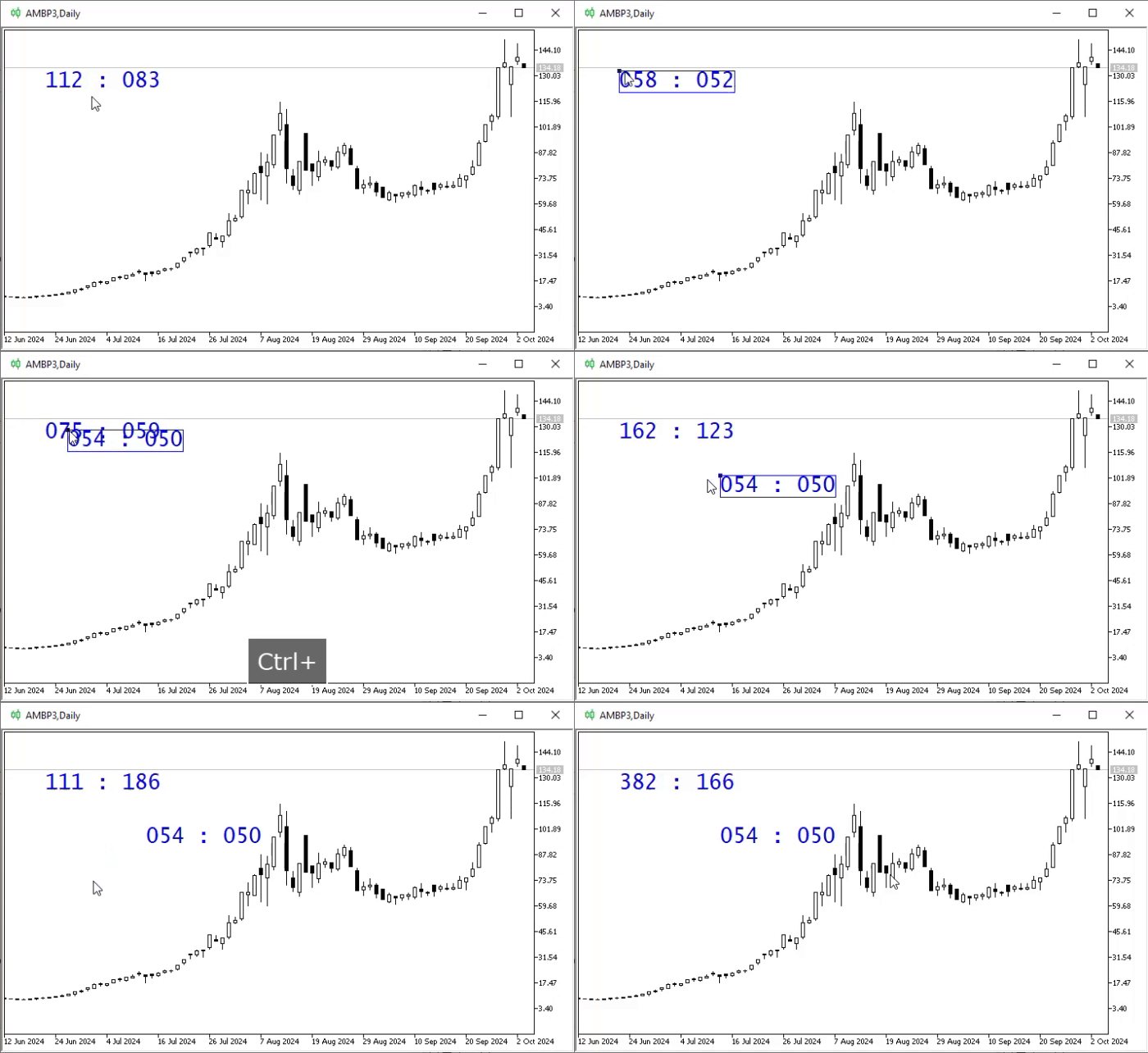
Code 02 will help illustrate what I mean when I talk about duplicating objects. Since it is very simple and you can easily figure everything out, my dear and respected reader, if you have been following my articles, I will not explain what it does. Instead, we will only show the kind of result we can see when the ideas described in the previous paragraphs are applied in practice. The result can be seen in Animation 03 below:
Animation 03
Here we encounter an issue related to the speed at which events are processed. Since we are dealing with mouse events, the processing speed is quite high, and we eventually begin to notice that something strange is happening. But think about events that may occur every five minutes, or even every hour. In that case, it would be difficult to notice. So now you may be starting to see where I am going. Since you probably did not know how to duplicate an object on a chart, a situation like the one we see in Animation 03 would hardly ever occur.
But now that we know how easy it is to create a duplicate of an object in MetaTrader 5, such situations may occur quite often. At some point, this can lead to serious problems, especially if the duplicated object is in front of the object of interest. This happens much more often than one might imagine and, as a result, creates even more confusion.
However, we can prevent an object from being duplicated, or at least reduce the likelihood of conflicts arising because of it. This is because some types of objects can hide other objects depending on how they are configured. Here, fortunately, the object created is completely harmless and intended solely for educational purposes.
Now you need to understand one thing, dear reader. When an object is duplicated, as shown here, MetaTrader 5 creates a name for this new object. This name follows, so to speak, a standardization rule and is divided into three parts. The first part refers to the timeframe we are using on the chart. The second part indicates the type of object being used. The third part is a randomly generated number. We ignore this third part, since its purpose is to avoid collisions between objects of the same type.
All right, but what does this tell us? And how can we use this knowledge to our advantage? Now comes the most interesting part, dear reader. Based on certain characteristics that can be checked using Code 01 while observing how a duplicate is created, we can determine whether a duplicate of an object was created or not. Although this is not an exact science, since there are complications regarding how we can do this and how far we can go without leaving pure MQL5.
One of these complications will become clear shortly. But first, we can do something more interesting: implement functionality whose purpose is to analyze the events that MetaTrader 5 itself generates in response to the user interacting with an object. Thus, Code 02 will become the code we will see below.
01. //+------------------------------------------------------------------+
02. #property copyright "Daniel Jose"
03. //+------------------------------------------------------------------+
04. #define def_Prefix  "Demo"
05. //+------------------------------------------------------------------+
06. #define macro_NameObject  def_Prefix + (string)(ObjectsTotal(0) + 1)
07. //+------------------------------------------------------------------+
08. enum eBtnMouse  {
09.         MOUSE_LEFT      = 0x01,
10.         MOUSE_RIGHT     = 0x02,
11.         MOUSE_KEY_SHIFT = 0x04,
12.         MOUSE_KEY_CTRL  = 0x08,
13.         MOUSE_MIDDLE    = 0x10,
14.         MOUSE_EXTRA_1   = 0x20,
15.         MOUSE_EXTRA_2   = 0x40
16.                 };
17. //+------------------------------------------------------------------+
18. string gl_NameObj;
19. //+------------------------------------------------------------------+
20. int OnInit()
21. {
22.     ChartSetInteger(0, CHART_EVENT_MOUSE_MOVE, true);
23.
24.     ObjectCreate(0, gl_NameObj = macro_NameObject, OBJ_LABEL, 0, 0, 0);
25.     ObjectSetInteger(0, gl_NameObj, OBJPROP_SELECTABLE, true);
26.     ObjectSetInteger(0, gl_NameObj, OBJPROP_XDISTANCE, 50);
27.     ObjectSetInteger(0, gl_NameObj, OBJPROP_YDISTANCE, 50);
28.     ObjectSetInteger(0, gl_NameObj, OBJPROP_XSIZE, 150);
29.     ObjectSetInteger(0, gl_NameObj, OBJPROP_COLOR, clrMediumBlue);
30.     ObjectSetInteger(0, gl_NameObj, OBJPROP_FONTSIZE, 20);
31.     ObjectSetString(0, gl_NameObj, OBJPROP_FONT, "Lucida Console");
32.
33.     ChartSetInteger(0, CHART_EVENT_OBJECT_CREATE, true);
34.
35.     return INIT_SUCCEEDED;
36. };
37. //+------------------------------------------------------------------+
38. int OnCalculate(const int rates_total, const int prev_calculated, const int begin, const double &price[])
39. {
40.     return rates_total;
41. };
42. //+------------------------------------------------------------------+
43. void OnChartEvent(const int id, const long &lparam, const double &dparam, const string &sparam)
44. {
45.     static bool check = true;
46.
47.     switch (id)
48.     {
49.         case CHARTEVENT_MOUSE_MOVE:
50.             ObjectSetString(0, gl_NameObj, OBJPROP_TEXT, StringFormat("%03d : %03d", (ushort)lparam, (ushort)dparam));
51.             if (((uchar)sparam & (MOUSE_LEFT | MOUSE_KEY_CTRL)) == (MOUSE_LEFT | MOUSE_KEY_CTRL))
52.             {
53.                 if (check) Print(StringFormat("CHARTEVENT_MOUSE_MOVE\n%s", StringFormat("%03d : %03d", (ushort)lparam, (ushort)dparam)));
54.                 check = false;
55.             }else
56.                 check = true;
57.             break;
58.         case CHARTEVENT_OBJECT_CREATE:
59.             Print(StringFormat("CHARTEVENT_OBJECT_CREATE\nObject: %s", sparam));
60.             break;
61.         case CHARTEVENT_OBJECT_CLICK:
62.             Print(StringFormat("CHARTEVENT_OBJECT_CLICK\nX: %03d    Y: %03d    Object: %s", (ushort)lparam, (ushort)dparam, sparam));
63.             break;
64.         case CHARTEVENT_OBJECT_DRAG :
65.             Print(StringFormat("CHARTEVENT_OBJECT_DRAG\nObject: %s", sparam));
66.             break;
67.     }
68.     ChartRedraw();
69. };
70. //+------------------------------------------------------------------+
71. void OnDeinit(const int reason)
72. {
73.     Comment("");
74.     ObjectsDeleteAll(0, def_Prefix);
75.     ChartSetInteger(0, CHART_EVENT_MOUSE_MOVE, false);
76.     ChartSetInteger(0, CHART_EVENT_OBJECT_CREATE, false);
77.     ChartRedraw();
78. };
79. //+------------------------------------------------------------------+
Code 03
Looking at this code, you may think: "Come on, this code is very complicated. Do we really need this much complexity just to avoid duplicating objects on the chart?" Well, in Code 03 we are not yet trying to prevent objects from being duplicated. And no, this code is not as complicated as it seems. It may seem that way because you landed on this article by chance, without enough background from what has already been explained in the previous publications. Yes, Code 03 does look like a serious challenge.
Nevertheless, out of respect for those who follow and study my articles, I will focus here only on what is new. Everything else, I believe, even beginners will understand if they study and practice what has been explained.
The first new part that interests us here is line 33. Pay attention to it, dear reader. In MetaTrader 5, the object creation event is disabled by default. However, if we do not want an object created by the application to be detected and to trigger a creation event, we must keep this event disabled until after that object has been created, as is done before enabling it on line 33. Since we enable this event only AFTER creating the OBJ_LABEL object, that object will not trigger the creation event that would in turn be captured by the OnChartEvent procedure.
Now, after this event has been enabled, any object placed on the chart will trigger a creation event. This data will be captured by line 58, which will then print a message to the terminal. Finally, when line 76 is executed, we disable this creation event, thereby preventing MetaTrader 5 from continuing to trigger this event on the chart.
The rest of the code is fairly easy to understand. We can then move on to the part where we apply Code 03 in practice. Let us start with what can be seen in the following animation:
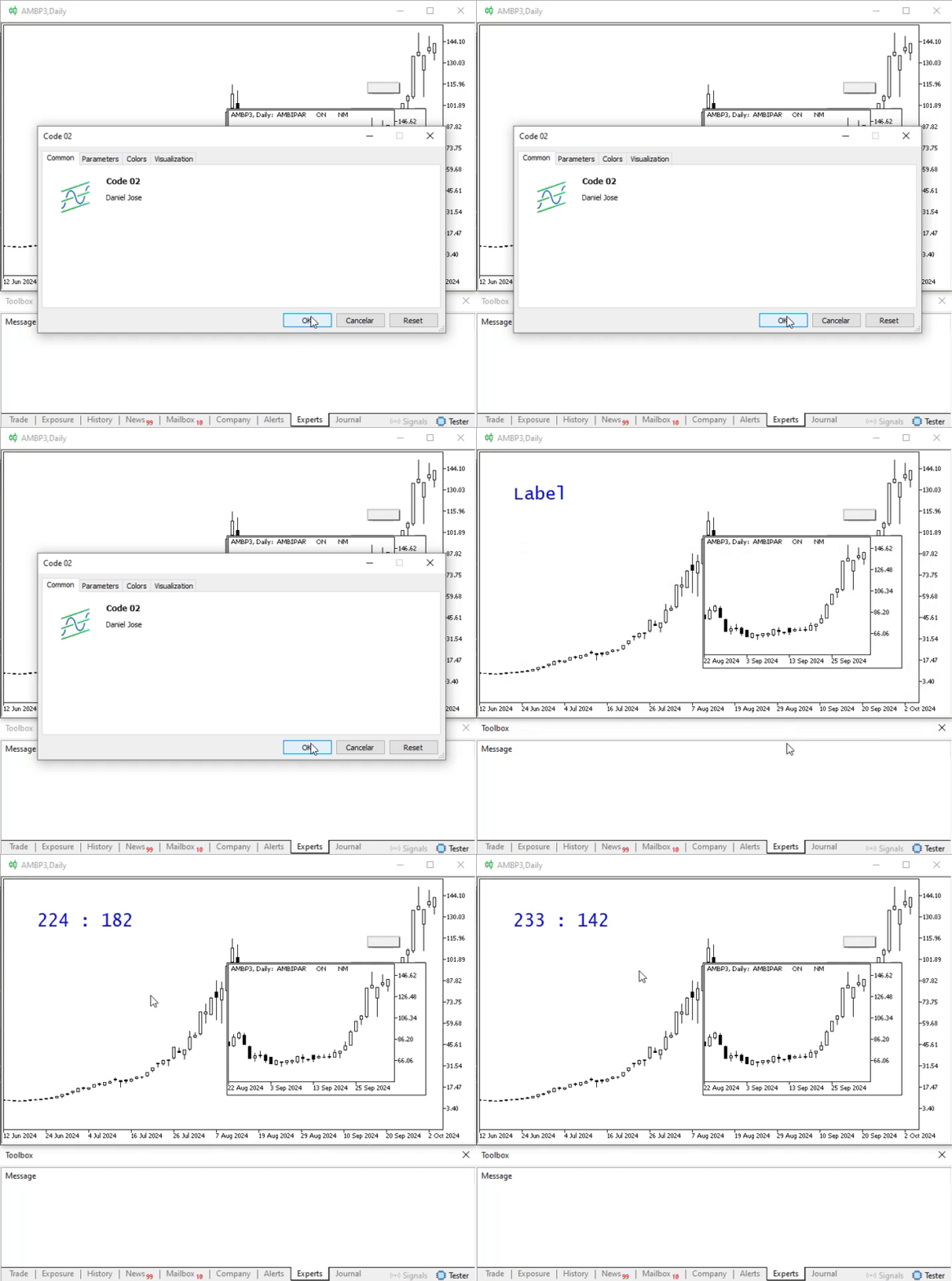
Animation 04
In this animation, we can see which objects are present on the chart. We can also notice that the code did not print any messages, which indicates that the events match what was expected, as explained earlier.
Once Code 03 is running, we can open the window with the list of objects to check which elements are present on the chart. After opening the list, we will see the image shown below.
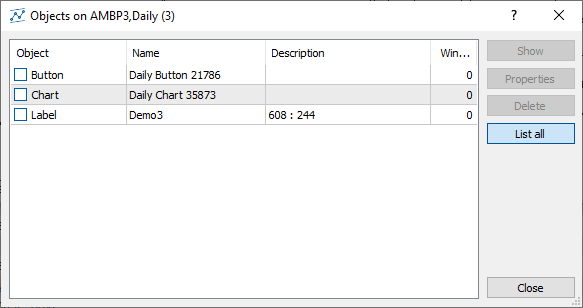
Image 02
Now pay attention to one thing, dear reader. There are two main ways to prevent objects from being duplicated. The first is to keep track of and inspect the object list you see in Image 02. This can be done with code. However, in my view, it leads to unnecessary resource consumption because every time line 58 detects a creation event, we have to analyze what happened to that list of objects. This unnecessarily complicates the code and increases CPU usage.
The other method consists of analyzing the mouse events captured on line 49, especially those that cause the filter on line 51 to evaluate to true. However, this mechanism is not 100% perfect, because there are situations in which the same filter can trigger a false positive.
To understand what can cause false positives, see another article of mine Developing a Trading Expert Advisor from Scratch (Part 23): A New Order System (VI). There we use this combination, which activates line 51 and is used to duplicate an object, precisely so that pending orders can be sent to the trading server. However, with some patience, care, and attention, we can work around this false-positive issue. We will look at this another time, because it involves certain manipulations that would not be appropriate to demonstrate right now. The focus here is something completely different: understanding how to prevent a duplicate object from being created.
Let us now look in more detail at how Code 03 will show us what is happening on the chart. This can be seen in the following animation:
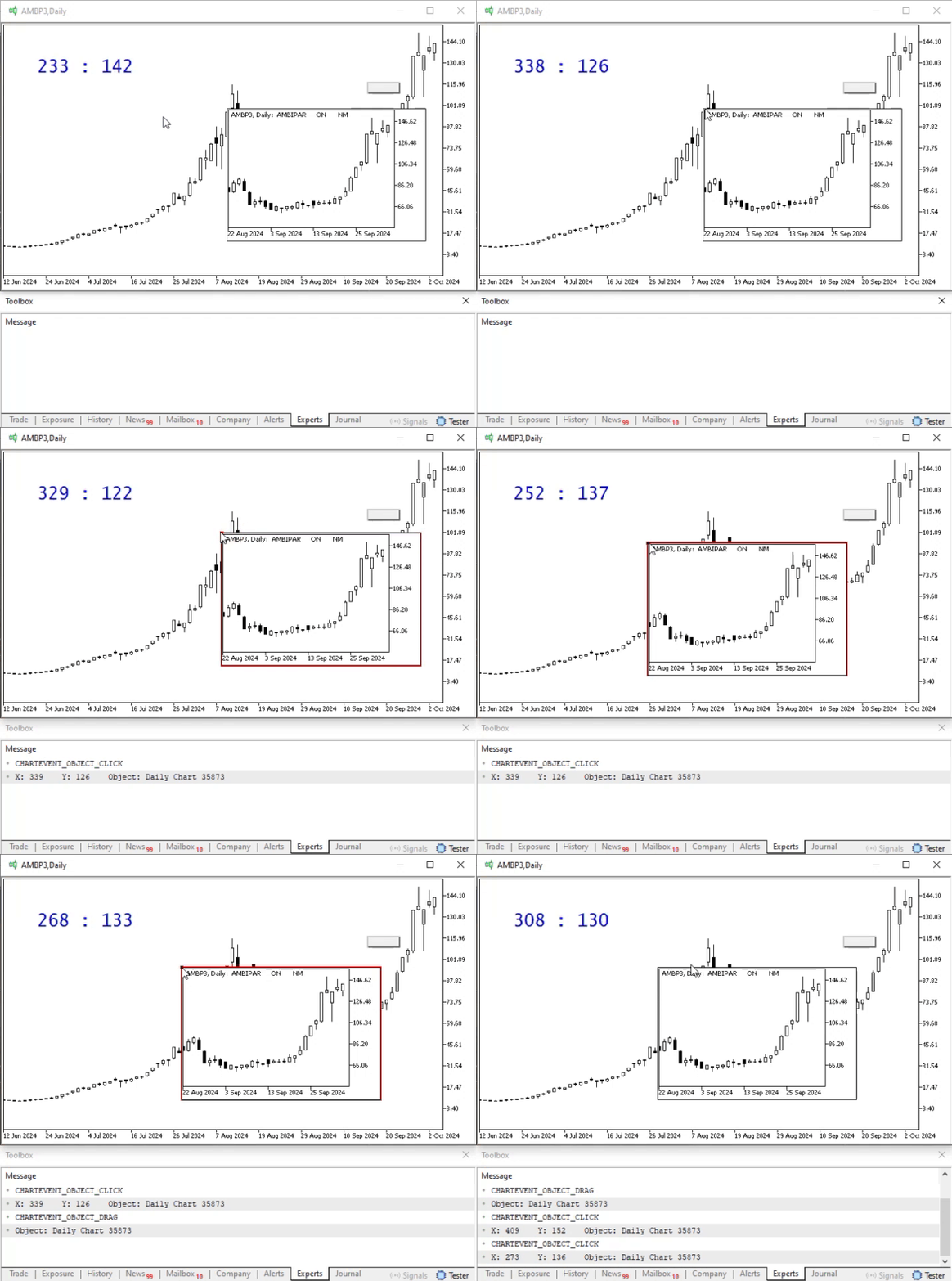
Animation 05
In this case, only the CHARTEVENT_OBJECT_CLICK and CHARTEVENT_OBJECT_DRAG events were generated, confirming that everything happened as expected. Now we will do something slightly different with the button on the chart. This can be seen in the following animation:
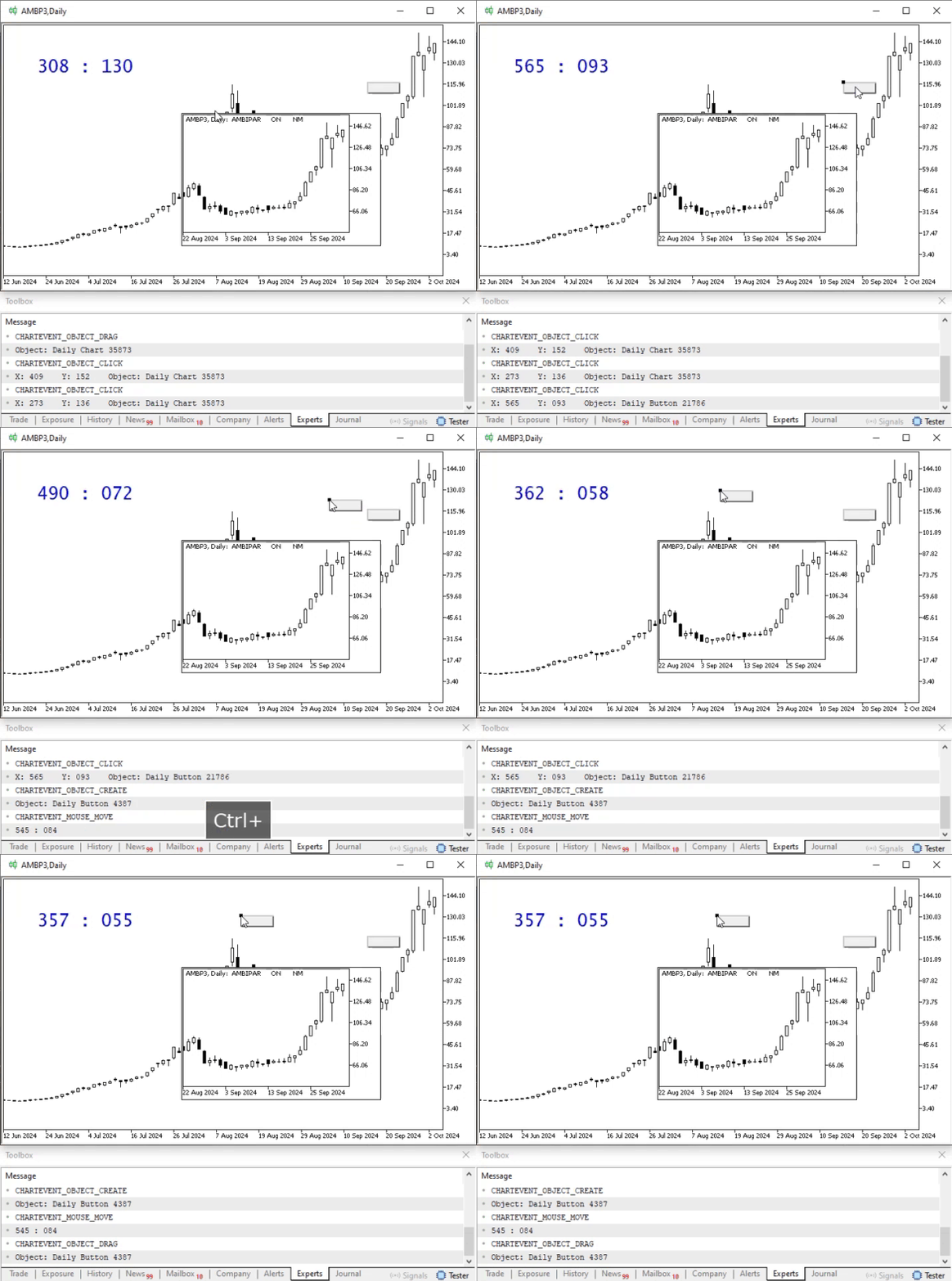
Animation 06
Notice one detail here. At the exact moment the copy is created, that is, when the duplicate is generated, MetaTrader 5 triggers two events. This can be seen more clearly in the following image.
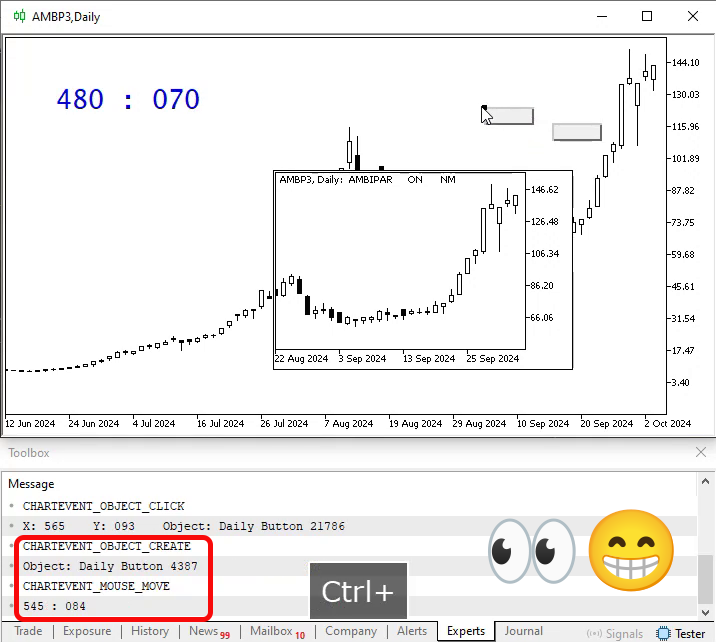
Image 03
In Image 03, we can clearly see the moment when the object is copied, or when the duplicate is generated. Now pay attention! Please note that the original object remained stationary. It was the copy that moved, as can be seen by comparing Image 02 with Image 04 below.
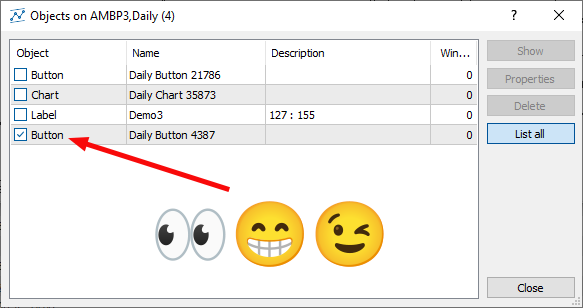
Image 04
Why is this important to know? The reason is that, depending on our task, we may need to delete either the copy or the original object. Personally, I find it simpler to delete the copy, since its name is provided to us when the creation event is captured. However, nothing prevents us from deleting the original and then renaming the copy so that everything remains as before. Perhaps the intention was to move the object and a copy of it was created instead. Nevertheless, I think that requires too much work. So we will continue along the simplest path.
Since the planned changes to Code 03 will remove the functionality that was previously implemented and demonstrated, we will take another approach. We will create a new file. This way, Code 03 will be included in the article attachment so that you can study it calmly without having to type it manually. The new code with the necessary changes is shown below:
01. //+------------------------------------------------------------------+
02. #property copyright "Daniel Jose"
03. //+------------------------------------------------------------------+
04. #define def_Prefix  "Demo"
05. //+------------------------------------------------------------------+
06. #define macro_NameObject  def_Prefix + (string)(ObjectsTotal(0) + 1)
07. //+------------------------------------------------------------------+
08. enum eBtnMouse  {
09.         MOUSE_LEFT      = 0x01,
10.         MOUSE_RIGHT     = 0x02,
11.         MOUSE_KEY_SHIFT = 0x04,
12.         MOUSE_KEY_CTRL  = 0x08,
13.         MOUSE_MIDDLE    = 0x10,
14.         MOUSE_EXTRA_1   = 0x20,
15.         MOUSE_EXTRA_2   = 0x40
16.                 };
17. //+------------------------------------------------------------------+
18. string gl_NameObj;
19. //+------------------------------------------------------------------+
20. int OnInit()
21. {
22.     ChartSetInteger(0, CHART_EVENT_MOUSE_MOVE, true);
23.
24.     ObjectCreate(0, gl_NameObj = macro_NameObject, OBJ_LABEL, 0, 0, 0);
25.     ObjectSetInteger(0, gl_NameObj, OBJPROP_SELECTABLE, true);
26.     ObjectSetInteger(0, gl_NameObj, OBJPROP_XDISTANCE, 50);
27.     ObjectSetInteger(0, gl_NameObj, OBJPROP_YDISTANCE, 50);
28.     ObjectSetInteger(0, gl_NameObj, OBJPROP_XSIZE, 150);
29.     ObjectSetInteger(0, gl_NameObj, OBJPROP_COLOR, clrMediumBlue);
30.     ObjectSetInteger(0, gl_NameObj, OBJPROP_FONTSIZE, 20);
31.     ObjectSetString(0, gl_NameObj, OBJPROP_FONT, "Lucida Console");
32.
33.     ChartSetInteger(0, CHART_EVENT_OBJECT_CREATE, true);
34.
35.     return INIT_SUCCEEDED;
36. };
37. //+------------------------------------------------------------------+
38. int OnCalculate(const int rates_total, const int prev_calculated, const int begin, const double &price[])
39. {
40.     return rates_total;
41. };
42. //+------------------------------------------------------------------+
43. void OnChartEvent(const int id, const long &lparam, const double &dparam, const string &sparam)
44. {
45.     static bool check = true;
46.     static string szObjName = "";
47.
48.     switch (id)
49.     {
50.         case CHARTEVENT_MOUSE_MOVE:
51.             ObjectSetString(0, gl_NameObj, OBJPROP_TEXT, StringFormat("%03d : %03d", (ushort)lparam, (ushort)dparam));
52.             if (((uchar)sparam & (MOUSE_LEFT | MOUSE_KEY_CTRL)) == (MOUSE_LEFT | MOUSE_KEY_CTRL))
53.             {
54.                 if (check)
55.                     if (ObjectDelete(0, szObjName))
56.                         Comment("Removing copy object: " + szObjName);
57.                 check = false;
58.             }else
59.                 check = true;
60.             break;
61.         case CHARTEVENT_OBJECT_CREATE:
62.             szObjName = sparam;
63.             break;
64.         case CHARTEVENT_OBJECT_CLICK:
65.             Comment(StringFormat("CHARTEVENT_OBJECT_CLICK\nX: %03d    Y: %03d    Object: %s", (ushort)lparam, (ushort)dparam, sparam));
66.             break;
67.         case CHARTEVENT_OBJECT_DRAG :
68.             Comment(StringFormat("CHARTEVENT_OBJECT_DRAG\nObject: %s", sparam));
69.             break;
70.     }
71.     ChartRedraw();
72. };
73. //+------------------------------------------------------------------+
74. void OnDeinit(const int reason)
75. {
76.     Comment("");
77.     ObjectsDeleteAll(0, def_Prefix);
78.     ChartSetInteger(0, CHART_EVENT_MOUSE_MOVE, false);
79.     ChartSetInteger(0, CHART_EVENT_OBJECT_CREATE, false);
80.     ChartRedraw();
81. };
82. //+------------------------------------------------------------------+
Code 04
When running this Code 04, we will get a result very similar to the following:
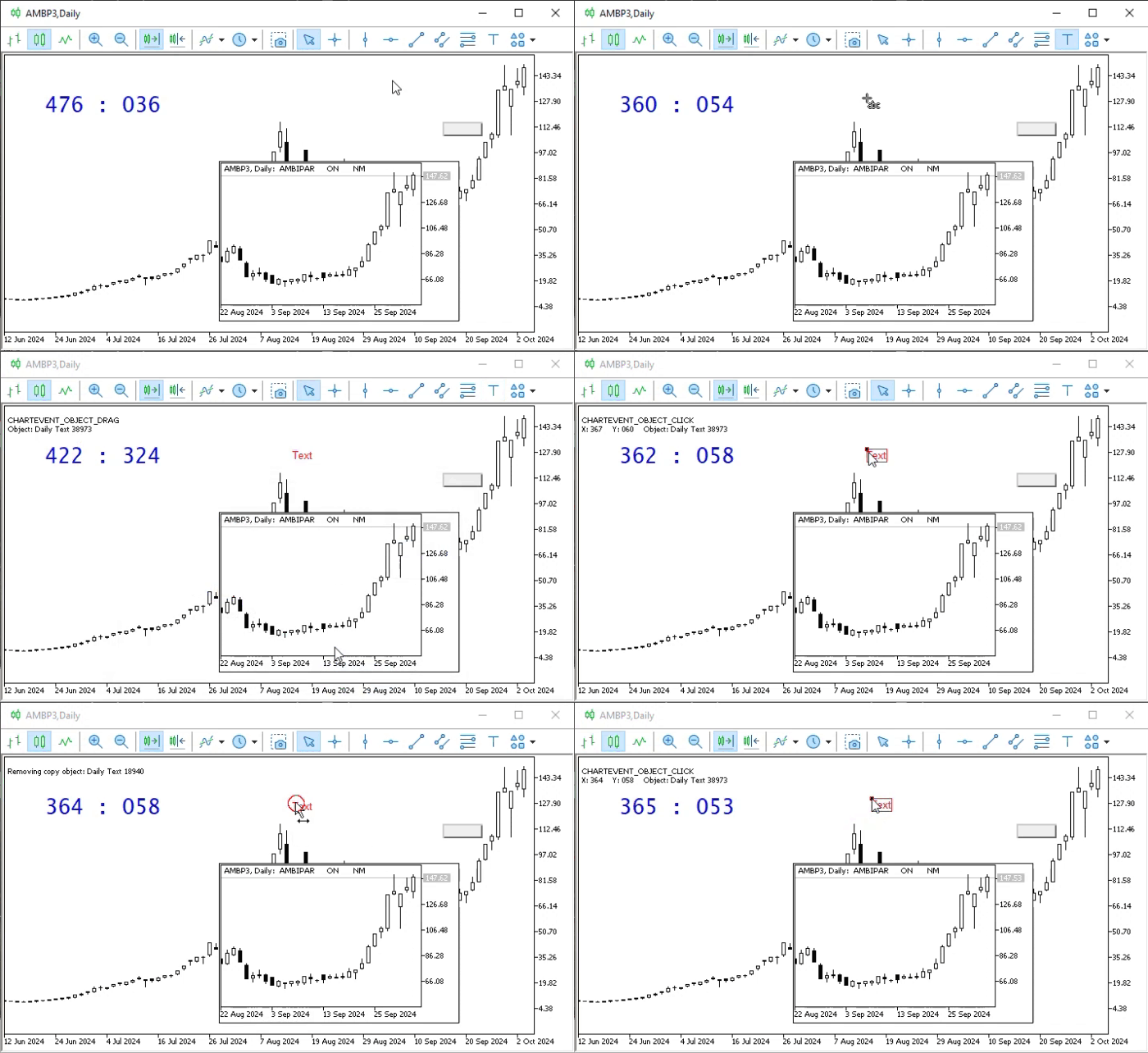
Animation 07
Notice that I added a new object here without any problem. Immediately after that, we tried to create a copy of that object using the mechanism described in this article. And pay attention to what is displayed in the upper-left corner of the chart. In other words, we have just found a way to prevent objects from being duplicated, although other actions could be taken to achieve the same result.
Final Thoughts
Although this article focused exclusively on handling object events, we still need to examine three other events related to objects. We will discuss them in the next article. I do not want to make things too complicated for those who are just beginning to learn how to control MetaTrader 5 using MQL5.
So, dear reader, try to study and put into practice what was covered in this article. This knowledge will certainly help you understand many aspects of how MetaTrader 5 works, and you will need to master it very well before you can say: "Yes, I can program well enough to control MetaTrader 5’s capabilities."
So practice with the code from the attachment, and see you in the next article.
| MQ5 File | Description |
|---|---|
| Code 01 | Demonstration of object events |
| Code 02 | Demonstration of object events |
| Code 03 | Demonstration of object events |
Translated from Portuguese by MetaQuotes Ltd.
Original article: https://www.mql5.com/pt/articles/16035
Warning: All rights to these materials are reserved by MetaQuotes Ltd. Copying or reprinting of these materials in whole or in part is prohibited.
This article was written by a user of the site and reflects their personal views. MetaQuotes Ltd is not responsible for the accuracy of the information presented, nor for any consequences resulting from the use of the solutions, strategies or recommendations described.

 A Practical Kalman Filter Price Smoother in MQL5: Adaptive Noise Estimation Without External Libraries
 From Basic to Intermediate: Objects (III)
 Rolling Sharpe Ratio with Statistical Significance Bands in MQL5
 Quantum Neural Network in MQL5 (Part II): Training a Neural Network with Backpropagation on ALGLIB Markov Matrices

- Free trading apps
- Over 8,000 signals for copying
- Economic news for exploring financial markets
You agree to website policy and terms of use