
AussiKiwi MT5
- Experten
- Daniela Elsner
- Version: 2.33
- Aktualisiert: 12 September 2025
- Aktivierungen: 20
Aussi Kiwi MT5
handelt auf einem Chart das klassische Trio AUDCAD, AUDNZD und NZDCAD, wie andere Expert-Systeme auf dem MQL5-Markt. Die grundlegende Strategie unterscheidet sich kaum von diesen und basiert auf einer Kombination von Indikatoren, wie Moving Average, Standard Deviation, RSI und ATR. Jedoch den wesentlichen Unterschied macht bei AussiKiwi MT5 eine ausgeklügelte Korrelationstechnologie, die entscheidet, welches Paar und mit welchem Volumen, abhängig von dem/den aktuell offenen Paar(en), als nächstes zu platzieren ist.
Es werden keine KI-Algorithmen verwendet, welche sowieso in der Regel keine Leistungs-Vorteile erbringen - dafür aber die System-Ressourcen (wichtig bei VPS-Betrieb) unnötig belasten.
MT4-Version verfügbar hier: https://www.mql5.com/de/market/product/138141
Erfahrene Nutzer können die Einstellungen auch für andere Währungspaare, wie z.B. EURUSD anpassen und/oder optimieren. Dafür steht der Modus "Custom" zur Verfügung. Nur in diesem Modus stehen die Indikatoren zur freien Konfiguration zur Verfügung.
Channel: https://www.mql5.com/en/channels/01be7ce9c7a4db01
Key Features:
| Default Trading pairs: | Settings “Parameter Mode = Predefined”: AUDCAD, AUDNZD and NZDCAD. All together from one single Chart only (One Chart setup) |
| Other Trading pairs: | Settings “Parameter Mode = Custom”: Single pair setup per Chart allows to utilize free parameter setting and optimization. |
| Chart Timeframe: | Doesn’t matter. Just set your preferred Timeframe. Also switching Timeframes around during operational doesn’t influence settings or trading results. |
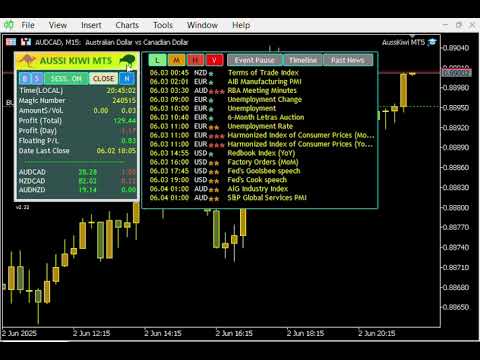
| Onscreen Panel: | Displays important system- and trading-related information, Buy and Sell buttons to enter orders manually or enable/disable trading direction(s), button to close orders manually, button to enable/disable opening of new sessions after closing the currently running session, button to shows up the News Event Table. |
| News Event Filter: | Enable/disable displaying news table by clicking Panel’s “N”-button or pushing “N(n)” key. Enable/disable and setup trading pauses on important news events. |
| Money Management: | Selectable use of Fixed Lotsize or percentual risk setting on account’s available Balance, Equity or Margin. Set percentage will be split between the activated pairs. Example: 10% for 3 pairs results risk of 3.33% per pair. |
| Takeprofit: | Virtual trailing profit trailing and/or averaging virtual profit trailing over all currently profitable and loosing open orders. |
| Stoploss: | Automated calculated by ATR indicator or fixed value set if ATR is disabled. Optional: Innovative management of recovery orders with dynamic drawdown reduction algorithm. |
| Independency: | Only takes care of its own orders and does not influence orders of other experts or outside the expert placed manual orders. |
Detailed Settings and Description to be found in the link below:
https://www.mql5.com/en/blogs/post/760725




















































Der Benutzer hat keinen Kommentar hinterlassen