Kalifx Trade manager


KALI-FX Trade Manager – Advanced Exit & Risk Management Utility for MetaTrader 5

The KALI-FX Trade Manager is a compact utility designed to automate trade-exit and risk management with precision and consistency.
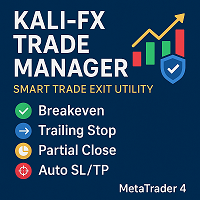
It integrates breakeven control, trailing stop logic, partial closing, automatic SL/TP assignment, and  Equity Protection System — ensuring every position and the overall account are handled according to predefined safety parameters.

This tool supports both manual and EA-initiated trades and works across all instruments and timeframes.

⚙️ Core Functionalities

🟢 Breakeven System

Automatically moves the stop-loss to the entry level once a trade reaches a defined profit threshold.

Parameters:

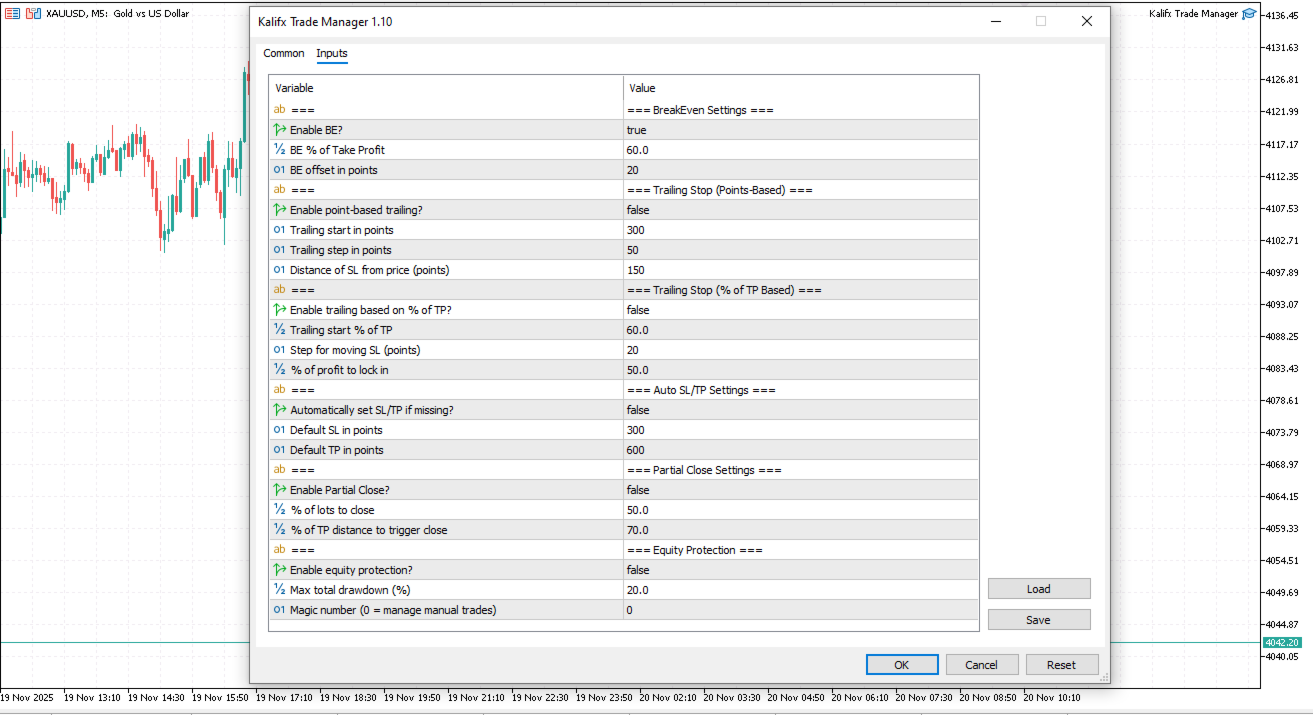
  • Enable BE? – Enable or disable breakeven logic

  • BE % of Take Profit – Percentage of TP distance at which breakeven activates

  • BE Offset (points) – Additional buffer beyond entry

Example:
If TP = 100 pips and BE % = 60, the SL is adjusted to breakeven after a 60-pip move in profit.

🔵 Trailing Stop System (Points-Based)

A classic trailing stop that moves the stop-loss based on fixed point distances.

Behaviour:

  • Activates once price moves a specified number of points in profit.

  • SL trails the price at a fixed point distance (TS_StopPoints).

  • SL only updates when price has moved further by the defined step (TS_StepPoints).

Parameters:

  • Enable trailing? – Turns point-based trailing on/off

  • Trailing start in points – Minimum profit (in points) before trailing begins

  • Trailing step in points – Minimum movement before SL updates

  • Trailing stop in points – Distance between price and SL

🔶 Trailing Stop System (% of TP Based)

A dynamic trailing method that moves the SL based on percentage of the Take Profit distance and percentage of current floating profit.

Behaviour:

  • Activates when price reaches a specified percentage of TP (TS_StartTPPercent).

  • SL is placed to lock in a chosen percentage of the current profit.

  • SL only updates when the new level is farther by the step (TS_StepPoints2).

Parameters:

  • Enable trailing based on % of TP? – Turns percentage-based trailing on/off

  • Trailing start % of TP – How far toward TP price must move before trailing begins

  • Trailing step in points – Minimum movement before SL updates

  • % of profit to lock in – Portion of floating profit preserved


🟡 Partial Close Function

Automatically closes a defined portion of a position once a selected profit level is reached.

Parameters:

  • Enable Partial Close? – Activate or deactivate

  • Close % of Lots – Percentage of position to close

  • Trigger % of TP – Profit level that triggers the partial close

Example:
Closes 50% of the position once price reaches 50% of the TP distance.

🔸 Automatic SL / TP Placement

Ensures that all open trades have protective boundaries applied.

Parameters:

  • Default SL (points) – Default stop-loss distance if none exists

  • Default TP (points) – Default take-profit distance if none exists

Includes validation to comply with broker-minimum distance rules.

🛡️ Equity Protection System 

A safety feature designed to protect total account equity during extreme market conditions.

How It Works:
The EA continuously monitors account equity and automatically closes all open positions once the total floating drawdown reaches your specified maximum drawdown percentage.

Parameters:

  • Enable Equity Protection? – Turn the protection system on or off

  • Max Drawdown Percent – The maximum equity loss (as % of balance) before triggering full position closure

Once protection triggers, all trades are closed and the system automatically resets, resuming monitoring with the new equity level — ensuring continuous, hands-free protection of your trading capital.

💼 Technical Information

  • Works with manual and EA-initiated trades

  • Supports all instruments and timeframes

  • ECN-compatible (modifies orders post-execution)

  • Uses magic-number filtering for trade identification

  • Automatically resets equity protection after execution

📘 Usage Notes

Attach the utility to the chart of the symbol you wish to manage.
Configure all parameters through the input dialog.
For initial setup, it’s recommended to test on a demo account to verify broker-specific execution behavior.

Custom Trial Version Available:
If you would like to test this product on a real chart (not only in Strategy Tester), you may request a free limited trial version.
Send me a message through my MQL5 profile, and I will provide a trial build with limited features or limited time activation.


💬 Support

For assistance, feedback, or customization inquiries, contact the author via the MQL5 comments section or private messaging system.

推荐产品
One Click Trader Utility MT5
AL MOOSAWI ABDULLAH JAFFER BAQER
One-Click Trader Utility for MT5 Professional Trading at Your Fingertips One-Click Trader Utility is a premium MT5 tool designed for active traders who need lightning-fast execution and real-time performance metrics. For just $30, transform your trading experience with institutional-grade technology previously available only to professional traders. Key Features Ultra-Fast Execution - Open and close positions with a single click, critical for scalpers and news traders Real-Time Market Metrics -
Partial
Pablo Filipe Soares De Almeida
部分平仓管理器 – 交易量智能调整工具 部分平仓管理器是一款专为 MetaTrader 5 平台设计的智能交易辅助工具,帮助交易者高效地管理持仓风险和利润。通过该工具,您可以在不完全关闭订单的情况下,仅平掉部分持仓,以锁定部分收益或减少潜在损失。这对于执行复杂的资金管理策略和动态仓位控制尤为有用。 功能特点: 部分平仓操作: 允许用户通过单击一次就能关闭所选持仓的一部分,无需手动输入复杂的数量。 自动计算交易量: 系统自动计算应关闭的手数,确保精确和快速,避免输入错误。 多订单同步支持: 可同时对同一品种下的所有持仓执行部分平仓,极大提高操作效率。 灵活拖拽界面: 用户可以点击并按住表格标题,将其移动到图表任意位置,操作更直观。 无论您是进行短线交易还是中长期策略,该工具都能帮助您更精确地控制交易节奏,实现稳定的资金管理。
核心功能 智能交易管理 一键开仓平仓操作,支持自定义手数设置. 多种平仓模式:全部平仓、按方向平仓、按盈亏状态平仓. 专业风险控制控制风险 实时监控点差,避免高成本交易环境.可视化控制面板。 直观的图形界面所有功能一键操作. 实时显示仓位信息、盈亏状况、点差状态. 支持面板最小化、锁定功能,防止误操作 . 产品优势 高效便捷无需复杂设置,开箱即用 图形化操作,告别繁琐代码.实时数据更新,决策更及时. ️安全可靠点差监控,避免恶劣市场条件交易. 专业实用支持多种订单类型管理,灵活的手数配置 详细的仓位信息展示. 适用场景 手动交易者:提供专业的方便控制工具 效率追求者:一键式操作,提升交易效率.       如果你用的方便的话,记得分享给你的朋友!
FREE
RR Ratio KS Simple Calculator Indicator Overview The RR Ratio KS Simple Calculator Indicator is a free, lightweight tool for MetaTrader 5 that automatically visualizes risk-reward (RR) ratios on your chart. Designed for manual traders and automated systems (EAs), it detects open positions with defined stop-loss (SL) and take-profit (TP) levels, then overlays clear visual zones to show potential risk and reward areas, including precise dollar amounts. This helps traders quickly assess trade setup
FREE
EasyTradePad for MT5
Sergey Batudayev
5 (5)
EasyTradePad – MetaTrader 5 交易面板 EasyTradePad 是一款用于手动和半自动交易的工具。该面板可帮助您快速管理订单和持仓,并可一键计算风险管理参数。 面板功能: 按预设的风险比例(% 或账户货币)开仓和平仓 设置止损(SL)和止盈(TP):以点数、百分比或金额表示 自动计算风险回报比(Risk-to-Reward Ratio) 将止损移动至无损位置(保本) 部分平仓 移动止损(Trailing Stop):按点数或K线影线 加仓与均价操作 修改已开仓订单的参数 额外功能: 金字塔加仓 随着价格朝向预设止盈方向运行,分批加仓。每次新加仓可设置减少风险。加仓次数可灵活设置。 均价操作 在图表上手动选择加仓位置,最终按平均价格平仓。 无损转移 当价格达到设定的利润距离后,止损自动移动到开仓价。考虑点差和掉期。 移动止损 支持两种模式: 按点数(可设置启动点数、距离和步长) 按K线影线(可选时间周期) 核心设计理念: 简单易懂的下单方式 高效直观的操作界面 实盘交易中的稳定性与可靠性 您可通过产品页面提供的 演示版本 体验全部功能。 更多信息和支持
Trailing Stop Manager PRO — 专业追踪止损管理(MT5) Trailing Stop Manager PRO 是一款用于 MetaTrader 5 的自动化追踪止损管理专家顾问(Expert Advisor)。 它可以管理账户中的所有持仓,或仅管理通过品种和/或 MagicNumber 过滤后的持仓。 该 EA 提供多种功能:固定点数追踪止损、基于 ATR 的动态追踪止损、自动保本(Break-Even)、部分平仓以及可视化控制面板(Dashboard)。 工具用途 在所有持仓上标准化追踪止损管理。 通过保本和跟随市场变化的追踪止损来保护已获得的浮盈。 通过品种和 MagicNumber 过滤,管理手动开仓和其他 EA 策略的持仓。 通过集成的可视化面板实现对持仓状态的实时监控。 主要功能 固定点数追踪止损 :可配置的追踪距离和步长。 基于 ATR 的追踪止损 :根据市场波动性动态调整止损位置。 自动保本(Break-Even) :当浮盈达到设定点数后,将止损移动到入场价加一定安全余量。 部分平仓 :当价格到达设定水平时,自动平掉部分仓位。 可视化 Dashb
當蠟燭觸及手動放置的趨勢線時,該實用程式會打開訂單,就好像它是一個更明確的掛單一樣。  它可以用於任何資產,當它打開訂單時,它會消除它所觸及的線並創建箭頭。在這種情況下,它用於價格反轉操作,當看漲蠟燭觸及自下而上的線時,它打開賣單,當看跌蠟燭觸及自上而下的線時,打開買單。  您可以調整停損和止盈,該實用程式非常有用,因為您可以對要打開的訂單進行編程並退出螢幕,對於圖表模式非常有用,當價格達到上升和下降的支撐線和阻力線時,例如水平線和垂直的。 使用最新更新,您可以放置​​多行。 非常重要:Meta trader 5 有交易歷史記錄,當訂單關閉並繪製一條線時,該線可能會與機器人的邏輯混淆並打開不需要的訂單,要解決此問題,請禁用交易歷史記錄,使其不顯示,請參閱列印輸出,如果它已顯示在圖表上,請以滑鼠右鍵按一下「交易記錄」將其隱藏。 注意:無法測試策略測試器。
TP & SL Calculator Indicator for MT5 The Take Profit & Stop Loss Calculator Indicator is an effective risk and capital management tool designed for MetaTrader 5. It helps traders easily determine and set take profit (TP) and stop loss (SL) levels directly on the chart. This indicator improves trading efficiency through its dedicated control panel, which includes: Creating and managing TP and SL levels for both Buy and Sell positions Calculating trade volume in lots Displaying the Risk-to-Reward
FREE
BossFXTradePanelEA (MT5)  [First 10 copies sold at 50 USD price will increase to 99USD] BossFXTradePanelEA is a fully interactive trade management panel designed for MetaTrader 5, providing traders with an easy-to-use, one-click interface to execute and manage trades. This EA simplifies trade execution , risk management, and position control by combining market orders, stop loss, take profit, trailing stops, and breakeven functionalities into a single, intuitive panel.  Key features include: On
Auto set stop loss and take profit and trailing on any open position on chart , Wen you open positions manually it will manage the trade and set the stop loss/take profit and trailing stop  based on Average true range calculation with risk reward factor default 1:3 . also you can use normal stop loss take profit and trailing . Inputs  Stop Loss (in pips) Take Profit (in pips) Trailing Stop (in pips) Trailing Step (in pips)  Use ATR          = true  ATR period  Risk    Reward    chart output f
Utility for know the performance of your acoount. From dialog you can filter data in this modes: - You can include or not include the open positions - You can include or not the closed positions - You can filter the data by date (from, to) - You can filter the data by simbols (multi selection) - You can filter the data by magic number (multi selection) On bottom of table, are show the total of: - Number of data - Total size - Total commissions paid - Total swap paids - Total profits - Total
This Expert Advisor (EA) for MetaTrader 5 (MT5) has been designed to automatically manage Stop Loss (SL) and Take Profit (TP). Main Features Automatic Detection of Manual Positions : Monitors new manual positions without SL/TP and applies the configured rules Multiple Orders : Opening of multiple orders under the same conditions as the original position Hidden SL/TP : The hidden mode allows creating SL/TP invisible to your broker  Equity Protection": Allows defining a threshold for the accou
Close Manager MT5
Biswarup Banerjee
5 (1)
通过 Close Manager MT5 优化您的交易关闭流程,这是一款强大的专家顾问(EA),专为 MetaTrader 5 上的手动或 EA 开立的交易自动执行退出操作,为交易者提供对退出策略的精确控制。在 MQL5、Forex Factory 和 Reddit 的 r/Forex 上广受好评,因其多样化且可定制的关闭标准而备受推崇,这款 EA 深受外汇、指数和加密货币等波动市场中的剥头皮交易者、日内交易者和波段交易者的青睐。用户报告称,手动交易管理时间减少了 30-50%,风险控制得到改善,许多人指出通过遵循严格的退出规则提高了盈利能力。Close Manager MT5 非常适合希望在无需持续监控的情况下优化风险管理和退出效率的交易者,支持新手和经验丰富的交易者采用多样化的交易策略。 Close Manager MT5 提供了一套强大的可定制参数,用于根据利润/损失金额(PROFIT_AMOUNT: 0, LOSS_AMOUNT: 10)、百分比(PROFIT_PERCENT: 0, LOSS_PERCENT: 0)、K 线数量(CLOSE_AFTER_N_CANDLE: 0)
FREE
Help Panel
Bogdan Kupinsky
Данная панель предназначена для удобного совершения сделок в платформе Metatrader. Она позволяет с легкостью открывать позиции, устанавливать стоп лосс и тэйк профит, использовать трейлинг стоп и тд.. Входные параметры : Magic - уникальный номер эксперта Lot step - шаг изменения лота Custom - произвольная сумма для высчитывания риска Risk Value  - тип поиска значения риска (в %) Функции панели : Открытие sell и buy позиций Возможность установки profit / loss для позиции, в том числе и графичес
Quick Exit
Jefferson Judge Metha
This MT5 Utility is designed to simplify the process of managing multiple trades. If you have several open positions, it can be time-consuming to close each one manually. With this tool, you can easily close all profit trades, losing trades, or just the trades that are linked to the chart you're currently viewing. It saves you time and effort by allowing you to manage your trades with just a few clicks, making your trading experience smoother and more efficient. Whether you're focusing on profit
FREE
Trade Control Panel
Jerry Jilun Anak Liban
Trade Control Panel Function Normal One Click Function Close All Close All Profit Close All Loss Close All Pending Order Close All Sell Close All Buy Advance One Click Function 1.  Close Partial Lot Sell by Percent It will help you partial close for all open position by desire percent you wanted. No longer partial close one by one for every open position Manual input for desire percent 2. Close Partial Lot Buy by Percent It will help you partial close for all open position by desire percent
Crash 5 EA
Wayne Ysel
Crash5 EA ,I s a automatic robot that has the level of professional decision when to take a trade without any emotion. The bot will help in your scalping decision making with its own TP (take profit) and SL (stop loss) with the trail stop when in profit. This is a trend based spike catching ,looking on whats happening in real time charts no repainting of any signals. The robot helps in making decisions on the candle stick pattern opened and closed lat price with the help of RSI ,MACD and the EMA
SL Maker
Linas Kucinskas
EA Functionality -------------------------------------------------------------------------------------------------------------------------------- - The EA automatically sets SL (Stop Loss) of the specified size in points for each position immediately after opening position; - EA will close all open positions if their losses exceed the set amount; - Close all positions biggest then set limit; Position automatically closed if it bigger than set limit; - New function how much you can loss per day.
ChangePeriod MT5
Kazuya Yamaoka
You can change the time period of the chart at the touch of a button. You can also change multiple charts at the touch of a button. You can also change multiple charts at the touch of a button,   saving you the trouble of changing time periods. We are live-streaming the actual operation of the system. Please check for yourself if it is usable. Please check it out for yourself. https://www.youtube.com/@ganesha_forex We do not guarantee your investment results. Investments should be made at you

Middle Line
Oleksandr Kashyrnyi
Middle Line —— 管理交易的必备工具! 这款 MetaTrader 5 脚本可以帮助交易者计算两个平均价格水平: 总平均价格 :计算所有未平仓订单的平均入场点。 去掉最优订单后的平均价格 :帮助交易者判断如何调整仓位,降低风险。 功能展示 Middle Line 会直接在图表上显示计算结果: 实线 —— 显示所有订单的总平均价格。 虚线 —— 显示去掉最佳订单后的平均价格。 通过这些数据,您可以快速判断如何调整仓位,优化交易决策。 为什么选择 Middle Line? 省时高效 :自动计算结果,立即显示在图表上。 精确分析 :基于每笔订单的交易量,提供更精确的数据。 通用性强 :适用于各种交易工具和交易策略。 易用性高 :结果不仅显示在图表上,还会在终端窗口显示。 适合谁使用 Middle Line? 适合进行网格交易、加仓或对冲的交易者。 想快速看到关键入场点的交易者。 想省去繁琐计算时间,专注做出决策的交易者。 使用 Middle Line,帮助您更好地管理交易! Middle Line 的最新升级 Middle Line 是脚本 Seredina 的增强版 ( 链
Manual Trade Panel EA MT5
Juvenille Emperor Limited
5 (2)
手动交易面板 EA MT5   是您可以找到的最简单易用的 MT5 交易面板。它的所有选项和功能都集中在一个表面上,无需打开额外的窗户或面板。它是一个订单管理、风险计算器、部分关闭和帐户保护实用程序,都在一个极其方便的界面中使用! 通过使用 手动交易面板 EA MT5 ,您可以比传统的手动交易方法更快、更准确地进行多次交易,这让您有更多时间和更清晰的头脑专注于您的交易决策。 账户保护是我们的首要任务,因此 手动交易面板 EA MT5  也是一个很好的账户保护实用程序,它可以在账户止盈或止损后关闭所有未平仓交易、删除所有挂单并关闭所有附加有任何 EA 的终端图表已达到亏损净额。这在盈利情况下非常方便,当您的资产低于您想要的止损水平时,可以避免您的交易账户进一步亏损。 提示: 您可以在您的模拟账户中下载并试用 手动交易面板 EA MT5   模拟版: 这里 将下载的免费演示文件粘贴到您的 MT5 >> 文件 >> 打开数据文件夹 >> MQL5 >> 专家文件夹并重新启动您的终端。 免费演示版本每次可在 4 小时内发挥全部功能,仅限演示帐户。 要重置试用期,请转至 MT5 >> 工具
执行者 Trader Panel  (Sta)标准版,是一个具有多功能的交易员工具,交易面板内嵌有30+种单一功能,同时具有10+种组合功能,为交易员提供了极大的灵活操作途径。 执行者的主要功能简介: 即时知道是否与交易商之间丢失连接 即时知道当前本地时间与所在交易服务器的时间 可在任何标的中使用 可在任何周期下使用 可灵活的设置标的开仓手数 可设置开仓手数的同时设置止盈 可设置开仓手数的同时设置止损 可设置开仓手数的同时设置是否进行当前手数的(批量开仓),批量开仓可设置订单间距 建仓后可获知全仓位的成本价位 可对(BUY、SELL)开平仓 可快速的处理反手单 可随意点击图表设置挂多单或挂空单 可对挂单进行手工拖拉移位 可对持仓订单进行止盈或止损设定 可对持仓订单进行追踪提损(移动止损) 可观察当前标的即时点差 可开启突破交易策略(EA模式) 可设置突破交易策略的顶部开空(反手模式) 可设置 突破交易策略的 底部开多(反手模式) 可设置突破交易策略的顶底部进行移位调整 可随时改变订单止盈与止损位置 可观察账号资金使用情况(净值、保证金率、日盈、当前持仓赢亏) 可观察多仓头寸已建仓手
Click Trading
Jawad Tauheed
5 (1)
One Click Trading – Auto TP SL Developer TraderLinkz Version 1.00 Category Utility What it does Adds missing TP and SL to your manual trades and pending orders Sets them once per ticket Lets you move TP and SL afterward Works on hedging and netting accounts Scans on every tick and reacts on trade events Why you want it You place faster entries You get consistent risk and exit targets You reduce fat finger errors You keep full manual control Quick start Attach the EA to any chart Keep TP and SL e
FREE
Manus Pro
Itumeleng Mohlouwa Kgotso Tladi
MANUS PRO EA The Trading Revolution You've Been Waiting For Are you TIRED of watching other traders make consistent profits while your account bleeds red?   The financial markets don't wait for anyone – and neither should you. MANUS PRO isn't just another Expert Advisor... it's your   TICKET TO FINANCIAL FREEDOM . Why MANUS PRO is Different (And Why Everyone's Talking About It) FOR BEGINNERS: Your Trading Mentor That Never Sleeps Zero Learning Curve   – Install, activate, and watch it wo
Lot by Risk MT5
Sergey Vasilev
4.93 (14)
风险交易面板是为手动交易而设计的. 这是发送订单的另一种方式。 面板的第一个特点是使用控制线方便地下订单。 第二个特征是在存在止损线的情况下计算给定风险的交易量。 使用热键设置控制行: 获利-默认情况下T键; 价格-默认情况下p键; 止损-默认情况下,S键; 您可以在交易面板的设置中自行配置密钥。 运算算法: 1)-我们把水平在所需的地方(这是没有必要把所有的水平); 2)-指定风险(可选); 3)-点击绿色发送订单按钮; 4)-我们正在等待下订单,或者会出现带有错误消息的警报; 5)-如果我们想关闭当前符号的所有订单,通过魔术链接到专家顾问,然后点击关闭订单按钮。 您不应该多次按下发送订单按钮。 一次就够了。 下单后,按钮将呈现"未按下"状态。 要发送带有风险计算的订单,需要设置止损线并在交易面板的"风险"字段中设置风险。 否则,订单将以当前交易工具的最低手数放置。 风险是从账户余额计算出来的. 由于经纪商对保证金交易细节的限制,不可能承担100%的风险。 在"风险"字段中允许小数(例如,您可以以余额的0.5%的风险进行交易)。 如果指定的风险低于允许
FREE
This tool will perform Trailing stop loss and Break even management for orders. Helps you limit or reduce the time spend watching orders on the screen, especially when you need to go to sleep. Just add this EA to 1 chart, you can manage all pairs. You can filter orders by comment, magic number, symbol and order ticket number. When Breakeven it can add shift/offset pips (to cover the commission...). You can try in strategy tester before purchase. The EA will add Buy and Sell alternately, so you
该智能交易顾问(EA)会在 MetaTrader 5 中监控所有交易品种上的所有持仓。一旦在任意持仓上 手动设置或调整 了止损(SL)或止盈(TP),EA 会将该值 自动应用于其他所有未平仓头寸 ,无论是买单还是卖单、哪个交易品种。这确保整个账户的 SL 和 TP 水平始终保持同步。 非常适合通过平板或智能手机进行移动交易!    ......................................................................................................................................................
Auto Trade Close
Makarii Gubaydullin
自动平仓:按时间或达到盈利/亏损触发 使用此工具,您可以在给定条件下自动平仓。 多功能工具 : 66+ 功能,包括此工具  |   联系我  如有任何问题  |   MT4版本 要激活自动平仓,需要设置以下参数(在面板上): 1. 交易品种   应用此功能的: 特定   [Symbol]   / 或所有   [ALL]   品种。 2. 条件, 何时平仓: [if total] / [if single] / [at time]: 根据此参数,可以选择 达到盈利/亏损时平仓 ,或 在指定时间平仓 。 [按盈利/亏损平仓] 选项设置: 1. [if total] / [if single]: 计算P/L方式:所有 选定交易 合计 ,或每笔交易 单独 ; 2. [Floating] / [Potential]: 计算 浮动P/L (未平仓交易), 或计算 潜在P/L (当达到TP/SL水平时); 3. [Profit] / [Loss] / [P/L]: 计算内容: 盈利、亏损或[盈利或亏损] ; 4. [On active] / [On pending] / [On both]: 应用
This utility provides the ability to use hot keys in manual trading instantly responding to the current market situation. You can assign hot keys to open/close positions by their type, open/close all positions on the current chart and remove all orders on the current chart. You can also assign hot keys for five predefined trade volumes and switch between them if necessary with no need to change the volume manually from time to time. It is also possible to set the auto calculation of a trade volu
Auto Trailing Stop MT5
Volodymyr Hrybachov
2 (1)
通過追踪止損水平自動關閉交易的實用程序。讓您從您的利潤中獲得最大收益。由專業交易者為交易者創建。該實用程序適用於交易者手動或使用顧問打開的任何市場訂單。可以通過幻數過濾交易。該實用程序可以同時處理任意數量的訂單。 MT4 版本 https://www.mql5.com/en/market/product/56487 公用事業可以做什麼: 從 1 點設置虛擬追踪止損水平 設置真正的追踪止損水平 分別處理每個訂單(追踪止損水平分別放置在每個訂單上) 處理一籃子單向訂單(追踪止損水平對所有訂單設置通用,分別買入和賣出) 處理一籃子雙向訂單(追踪止損水平對所有訂單設置通用,一起買入和賣出) 對於測試和工作,您可以使用圖表上的按鈕。 選項: TRAILING_STOP - 價格變動的點數; TRAILING_STEP - 每一步利潤增加的點數; BASKET - 一籃子訂單或每個訂單單獨; MULTIDIRECTIONAL - 雙向或單向訂單; 虛擬 - 真實或虛擬的止損和止盈; MAGIC_NUMBER - 訂單的幻數,如果 = -1,則它適用於所有訂單; ORDERS_COMME
该产品的买家也购买
Trade Assistant MT5
Evgeniy Kravchenko
4.42 (204)
它有助于计算每笔交易的风险,容易安装新的订单,具有部分关闭功能的订单管理, 7 种类型的追踪止损和其他有用的功能。   附加材料和说明 安装说明   -   应用程序说明   -   模拟账户应用程序的试用版 线条功能  - 在图表上显示开仓线、止损线、止盈线。 有了这个功能,就可以很容易地设置一个新的订单,并在开仓前看到它的附加特性。   风险管理  - 风险计算功能在考虑到设定的风险和止损单的大小的情况下,计算新订单的成交量。它允许你设置任何大小的止损,同时观察设定的风险。 批量计算按钮 - 启用 / 禁用风险计算。 在 " 风险 " 一栏中设置必要的风险值,从 0 到 100 的百分比或存款的货币。 在 " 设置 " 选项卡上选择风险计算的变量: $ 货币, % 余额, % 资产, % 自由保证金, % 自定义, %AB 前一天, %AB 前一周, %AB 前一个月。   R/TP 和 R/SL - 设置止盈和止损的关系。 这允许你设置相对于损失的利润大小。 例如, 1 : 1 - 这决定了 TP = SL 的大小。 2 : 1 - 这意味着 TP 是 SL 的两倍。 RR -
欢迎来到 Trade Manager EA——这是一个终极风险管理工具,旨在使交易变得更直观、精准和高效。它不仅仅是一个下单工具,而是一个用于无缝交易计划、仓位管理和风险控制的全面解决方案。不论您是新手交易员、资深交易员,还是需要快速执行的剥头皮交易员,Trade Manager EA 都可以满足您的需求,适用于外汇、指数、大宗商品、加密货币等各种市场。 借助 Trade Manager EA,复杂的计算已成过去。只需分析市场,在图表上用水平线标记入场、止损和止盈,设置您的风险水平,Trade Manager 就会立即计算出理想的头寸规模,并实时显示以点、账户货币计价的止损和止盈。每笔交易都得以轻松管理。 主要功能: 头寸规模计算器 :根据定义的风险瞬间确定交易规模。 简单的交易计划 :在图表上用可拖动的水平线直接计划交易,设置入场、止损和止盈。 实时显示 SL 和 TP :以账户货币、点或分显示止损和止盈,便于分析。 高级保护工具 盈亏平衡选项 : 基本盈亏平衡 :当您的交易达到设定水平时自动保护利润。 多级盈亏平衡 :设置多达 4 个级别以逐步保护利润。 尾随止损选项 : 基本尾随
TradePanel MT5
Alfiya Fazylova
4.86 (143)
交易面板是一个多功能的交易助手。该应用程序包含超过 50 个用于手动交易的交易功能,并允许您自动化大多数交易操作。 注意,该应用程序在策略测试器中不起作用。购买之前,您可以在模拟帐户上测试演示版本。演示版 这里 。 完整说明 这里 。 贸易。 让您一键执行交易操作: 通过自动风险计算打开挂单和仓位。 一键打开多个订单和仓位。 打开订单网格。 按组关闭挂单和持仓。 头寸反转(关闭买入并打开卖出或关闭卖出并打开买入)。 锁定头寸(开立额外头寸,以平衡买入和卖出头寸的交易量)。 一键部分平仓所有仓位。 为同一价格水平的所有头寸设置止盈和止损。 将所有头寸的止损设置为该头寸的盈亏平衡水平。 开单建仓时,您可以应用以下功能: 计算交易量的多个订单或仓位之间的分布(一键开仓多个订单或仓位时)。 图表上未来订单交易水平的可视化。 设置开仓时允许的最大点差大小。 止盈和止损之间的自动比率。 虚拟止损和止盈。 根据当前点差的大小自动增加止损和止盈的大小。 根据 ATR 指标的读数计算止盈和止损。 设置挂单的到期日期。 挂单设置为“追踪”(挂单自动跟随当前价格移动指定距离)。 管理通过移动终端(手机)开立
Local Trade Copier EA MT5
Juvenille Emperor Limited
4.96 (116)
通过 Local Trade Copier EA MT5 获得非常快速的交易复制体验。它的简单1分钟设置,使您可以在同一台Windows计算机或Windows VPS上在多个MetaTrader终端之间复制交易,具有闪电般快速的复制速度,低于0.5秒。 无论您是初学者还是专业交易者, Local Trade Copier EA MT5 都提供了广泛的选项,可根据您的特定需求进行自定义。对于任何希望增加利润潜力的人来说,这都是终极解决方案。 今天就尝试一下,看看为什么它是市场上最快、最简单的贸易复印机! 提示: 您可以在您的模拟账户中下载并试用 Local Trade Copier EA MT5 模拟版: 这里 将下载的免费演示文件粘贴到您的 MT5 >> 文件 >> 打开数据文件夹 >> MQL5 >> 专家文件夹并重新启动您的终端。  免费演示版本每次可在 4 小时内发挥全部功能,仅限演示帐户。 要重置试用期,请转至 MT5 >> 工具 >> 全局变量 >> Control + A >> 删除。 请仅在非关键模拟账户上执行此操作,不要在挑战道具公司账户中执行此操作。 Local
Trade Dashboard MT5
Fatemeh Ameri
4.96 (103)
疲于复杂的订单下达和手动计算?Trade Dashboard 是您的解决方案。凭借其用户友好的界面,订单下达变得轻而易举,只需点击一下,您就可以开设交易、设置止损和止盈水平、管理交易手数,并计算风险回报比,让您只需专注于您的策略。告别手动计算,使用 Trade Dashboard 简化您的交易体验。 立即下载演示版本 。 您可以在这里找到仪表盘功能和特性的详细信息 。 加入 Telegram 频道 。 购买后请给我发消息以获取支持。如果您需要添加更多功能,可以在产品的评论区留下您的想法,我愿意听取任何建议,希望您能在使用我的产品时获得最佳体验 。 这是 MT4 版本。 风险管理:使用 Trade Dashboard,可以将您的风险设置为账户余额或权益的百分比,或将风险设置为总金额。在图表上直观地定义您的止损,让工具准确计算每个货币对的适当手数。该工具还可以根据您期望的风险回报比自动设置止盈水平。它甚至可以在手数计算中涵盖佣金和点差费用。此外,您的止损和止盈可以转变为虚拟水平,隐藏于经纪商。通过 Trade Dashboard 的高级风险管理功能,掌控风险,保护您的资本。 交易线
Ultimate Extractor
Clifton Creath
5 (7)
Ultimate Extractor - Professional Trading Analytics for MT5 Ultimate Extractor transforms your MetaTrader 5 trading history into actionable insights with comprehensive analytics, interactive charts, and real-time performance tracking. What It Does Automatically analyzes your MT5 trading history across all Expert Advisors and generates detailed HTML reports with interactive visualizations. Tracks live performance metrics including open positions, floating P/L, and drawdown in real-time. Supports
测试版发布 Telegram to MT5 Signal Trader 即将进入正式的 Alpha 版本。一些功能仍在开发中,您可能会遇到一些小错误。如果您遇到问题,请反馈,您的意见将帮助我们改进软件。 价格将在售出 20 份后上涨。剩余 $90 的副本: 2/20 。 Telegram to MT5 Signal Trader 是一款强大的工具,能够将 Telegram 频道或群组的交易信号自动复制到您的 MetaTrader 5 账户。 支持公开和私人频道,可将多个信号提供者连接至一个或多个 MT5 账户。软件优化、高效、稳定,精准控制每笔复制交易。 界面简洁,仪表盘美观,图表交互性佳,导航直观。您可以管理多个信号账户,自定义每个提供者的设置,并实时监控所有操作。 系统需求 由于 MQL 限制,EA 需要配合 PC 端应用与 Telegram 通信。 安装程序可通过官方 安装指南 获取。 核心功能 多提供者支持: 从多渠道复制信号至多个 MT5 帐户 高级信号识别: 关键词、模式和标签全面自定义 逐提供者控制: 可启用/禁用特定信号类型、平仓策略等 灵活风险管理: 固定手数、固
Smart Stop Scanner – 多品种结构化止损扫描系统 概述 Smart Stop Scanner 为交易者提供跨市场的专业止损结构监控。系统基于真实市场结构、关键突破点以及价格行为逻辑,自动识别最有意义的止损区域,并在统一的、高度清晰、DPI 自适应面板中展示所有信息。 适用于 Forex、黄金、指数、金属、加密货币等多种资产。 止损如何计算 本系统并未使用传统指标或任意公式,而是通过纯价格行为识别 突破、更高高点、更低低点 等结构事件。 止损位置基于这些结构节点生成,因此更加真实、自然,并与实际市场行为紧密吻合。 核心功能亮点 • 多品种精准兼容 完整支持外汇、黄金、指数、金属、加密资产及其他工具,自动处理不同的点值和小数位。 • 即时结构识别 实时检测新的、失效的和当前有效的止损结构,并提供方向、形成时间、距离等关键信息。 • SL %ADR – 自适应止损质量评估 每个止损都会与该品种历史的结构性止损事件进行统计对比。 自适应颜色区间清晰显示止损是 极紧、紧、适中、宽、非常宽 。 基于真实波动率,而非固定阈值。 • Dist % – 实时止损距离
Copy Cat More Trade Copier MT5 (复制猫MT5) 是一个本地跟单软件,也是一个完整的风险管理和执行框架,专为当今的交易挑战而设计。从资金管理公司挑战到个人投资组合管理,它能适应各种情况,结合了稳健的执行、资本保护、灵活配置和高级交易处理功能。 该跟单软件可在主端(发送方)和从端(接收方)模式下工作,实时同步市价单和挂单、交易修改、部分平仓和对冲平仓操作。它兼容模拟和实盘账户、交易或投资者登录,并通过持久的交易记忆系统确保恢复功能,即使EA、终端或VPS重启也不例外。可以同时管理多个主端和从端,使用唯一ID,并通过前缀/后缀调整或自定义品种映射自动处理跨经纪商差异。 手册/设置  | Copy Cat More MT4 | 频道  特色功能: 易于设置——快至30秒(见视频)。 快速、稳定、准确——Turbo模式下低延迟复制(见截图)。 高安全性——不使用潜在危险的DLL或WebRequest。 持久交易记忆,避免孤立、丢失或不准确的交易。 可从手动或EA复制,支持所有账户类型。 品种自动前缀/后缀,快速设置;支持MT4和MT5之间复制。 非常灵活的多主端
Smart Stop Manager – 专业级自动化止损管理系统 概述 Smart Stop Manager 是 Smart Stop 产品线的执行核心,为需要结构化、可靠且全自动止损管理的交易者而设计。它持续监控所有持仓,根据 Smart Stop 市场结构逻辑计算最佳止损位置,并按照清晰透明的规则自动更新止损。 无论是管理单一品种还是多品种组合,Smart Stop Manager 都能为每笔交易提供纪律性、一致性和全面的风险可视化。它减少情绪化判断,降低手动操作负担,并确保止损始终基于真实的市场结构进行调整。 功能亮点 基于市场结构的自动止损计算 • 自动评估所有持仓,并根据 Smart Stop 逻辑应用最佳止损水平。 一站式组合管理面板 • 显示交易品种、方向、Magic Number、手数、开仓价、当前价、推荐止损、点差距离、浮动盈亏、风险敞口及实时状态标签。 DPI 自适应专业界面 • 在高分辨率屏幕上呈现清晰锐利的显示效果,布局会动态适配窗口。 清晰的状态标签 • 每笔交易都会标注当前状态,让交易者即时了解风险状况。 高级特殊情况识别 • 智能识别逆趋势
Trade Manager DashPlus
Henry Lyubomir Wallace
5 (11)
DashPlus 是一款先进的交易管理工具,旨在提升您在 MetaTrader 5 平台上的交易效率和效果。它提供一整套功能,包括风险计算、订单管理、先进的网格系统、基于图表的工具和绩效分析。 主要功能 1. 恢复网格 实施一个平均和灵活的网格系统,以在不利的市场条件下管理交易。 允许设置战略性进出点,以优化交易恢复。 2. 叠加网格 通过在强劲的市场波动中增加仓位,最大化有利交易的潜在回报。 帮助您通过扩展获利交易来利用趋势市场。 3. 盈亏线 在图表上直接提供潜在利润和损失场景的可视化表示。 调整设置并拖动盈亏线,以在执行之前评估各种交易结果。 4. 篮子模式 简化同一交易品种的多仓位管理,将它们合并为一个聚合仓位。 基于平均价格,便于监控和应用止损、止盈以及其他订单修改。 5. 图表上的新闻 将预定的经济新闻事件整合到您的交易图表中。 帮助您随时掌握可能影响市场波动的即将发生的事件,从而更好地规划交易。 6. 警报 设置基于时间或价格的警报,通知会显示在 MT5 中,或通过 MT5 应用发送到您的移动设备。 对监控关键价格水平或重要的交易时段非常有用。 7. 绩效统计 提供详细的
MT5 to Telegram Signal Provider 是一个易于使用且完全可自定义的工具,它允许向 Telegram 的聊天室、频道或群组发送 指定 的信号,将您的账户变为一个 信号提供商 。 与大多数竞争产品不同,它不使用 DLL 导入。 [ 演示 ] [ 手册 ] [ MT4 版本 ] [ Discord 版本 ] [ Telegram 频道 ]  New: [ Telegram To MT5 ] 设置 提供了逐步的 用户指南 。 不需要了解 Telegram API;开发者提供了您所需的一切。 关键特性 能够自定义发送给订阅者的订单详情 您可以创建分层的订阅模型,例如铜、银、金。其中金订阅获得所有信号等。 通过 id、符号或评论过滤订单 包括执行订单的图表截图 在发送的截图上绘制已关闭的订单,以便额外核实 延迟发送新订单消息的可能性,以便在发送前对位置进行调整 订单详情完全透明: 新的市场订单*带截图 订单修改(止损、获利) 已关闭的订单*带截图 部分关闭的订单** 新的挂单 修改的挂单(进场价格) 挂单激活(作为新的市场订单附加) 已删除的挂单 历史订单报告
Seconds Chart MT5
Boris Sedov
4.59 (17)
秒级图表 (Seconds Chart) — 一款专为 MetaTrader 5 设计的独特工具,用于创建秒级时间框架的图表。 通过 秒级图表 ,您可以构建以秒为单位的时间框架图表,获得标准分钟或小时图表无法提供的极致灵活性和分析精度。例如,时间框架 S15 表示每根蜡烛图持续15秒。您可以使用任何支持自定义交易品种的指标和EA交易系统。操作它们就像在标准图表上交易一样方便。 与标准工具不同, 秒级图表 让您能够在超短时间框架下进行高精度交易,无延迟干扰。 秒级图表的优势 支持 1至900秒 的时间框架图表。 基于内置的实时报价数据库, 即时加载 历史数据。 数据实时更新, 无延迟或滞后 。 可同时创建 多个秒级图表 。 秒级图表的理想应用场景 剥头皮交易 和高频交易。 精确的入场和出场时机。 在短时间框架下测试交易策略。 时间框架设置 默认设置包含以下时间框架: S1、S2、S3、S4、S5、S6、S10、S12、S15、S20、S30 。 您可轻松自定义时间框架组合,只需按升序列出 1至900秒 的数值且避免重复即可。 其他免费工具 快速交易管理器 ( Quick Trade Ma
Grid Manual MT5
Alfiya Fazylova
4.9 (20)
Grid Manual是一个交易面板,用于处理订单网格。 该实用程序是通用的,具有灵活的设置和直观的界面。 它不仅可以在亏损方向上设置订单网格,还可以在盈利方向上设置订单网格。 交易者不需要创建和维护订单网格,实用程序会这样做。 打开一个订单就足够了,Grid manual会自动为它创建一个订单网格,并伴随它直到非常关闭。 完整说明和演示版 此處 。 该实用程序的主要特性和功能: 伴隨以任何方式打開的訂單,包括從移動終端打開的訂單。 適用於兩種類型的網格:“限制”和“停止”。 使用兩種方法計算網格間距:固定和動態(基於 ATR 指標)。 允許您更改未結訂單網格的設置。 顯示圖表上每個網格的盈虧平衡水平。 顯示每個網格的利潤率。 允許您一鍵關閉網格中的盈利訂單。 讓您一鍵關閉每個訂單網格。 允許您對訂單網格應用追踪止損功能。 允許您在訂單網格上應用將訂單網格的止損轉移到盈虧平衡水平的功能。 相對於訂單網格的盈虧平衡水平自動重新排列止盈(僅在限價網格模式下,距離取決於所選的計算類型:“保守”或“激進”)。 最多可管理 20 個訂單網格,每個網格最多可包含 100 個訂單。 計算初始手數時,
HINN MAGIC ENTRY – the ultimate tool for entry and position management! Place orders by selecting a level directly on the chart! Key features: - Market, limit, and pending orders - Automatic lot size calculation - Automatic spread and commission accounting - Unlimited partitial take-profits  - Breakeven and trailing stop-loss  functions - Intuitive, adaptive, and customizable interface - Session and strong algorithmic level visualization - Works with any assets and account types Join the   ALG
Exp COPYLOT CLIENT for MT5
Vladislav Andruschenko
3.82 (34)
MT5 交易复印机是 МetaТrader 5 平台的交易复印机 。 它复制外汇交易 之间   任何账户 MT5   -   MT5, MT4   -   MT5 对于 COPYLOT MT5 版本(或 MT4   - MT4 MT5   -   MT4 对于 COPYLOT MT4 版本) 值得信赖的复印机! MT4版本 详细描述   +DEMO +PDF 如何购买 如何安装     如何获取日志文件     如何测试和优化     Expforex 的所有产品 您还可以在 МТ4 终端 (   МТ4   -   МТ4, МТ5   -   МТ4   ) 中 复制交易: COPYLOT CLIENT for MT4 此版本包括在终端 МТ5   -   МТ5, МТ4   -   МТ5 之间 。 交易复制器用于在 2/3/10 终端之间复制交易/头寸。 支持从模拟账户和投资账户复制。 该程序可以在多个终端绑定上运行。 使用它作为您在一个账户上交易的各种投资者账户的交易的同步器, - COPYLOT 会将您的交易复制到其他终端。 从 多个 终端复制到一个; 从一个终端复
Trade Manager DaneTrades
Levi Dane Benjamin
4.33 (27)
交易管理器可帮助您快速进入和退出交易,同时自动计算风险。 包括帮助您防止过度交易、报复性交易和情绪化交易的功能。 交易可以自动管理,账户绩效指标可以在图表中可视化。 这些功能使该面板成为所有手动交易者的理想选择,并有助于增强 MetaTrader 5 平台。多语言支持。 MT4版本  |  用户指南+演示 交易经理在策略测试器中不起作用。 如需演示,请参阅用户指南 风险管理 根据%或$自动调整风险 可选择使用固定手数或根据交易量和点自动计算手数 使用 RR、点数或价格设置盈亏平衡止损 追踪止损设置 最大每日损失百分比,在达到目标时自动平仓所有交易。 保护账户免遭过多提款并阻止您过度交易 最大每日损失(以美元为单位)在达到目标时自动关闭所有交易。 保护账户免遭过多提款并阻止您过度交易 一键实现所有交易的盈亏平衡 自动计算从手机/电话发送的交易的风险 OCO 在设置中可用 交易和头寸管理 通过设置每月、每周、每天、每小时或每分钟的最大交易次数,停止过度交易和报复性交易。 高级挂单管理。 调整何时关闭挂单的规则 追踪挂单 支持市价订单和挂单 每日最大利润目标(以美元为单位)以确保头寸并停止
EasyInsight AIO MT5
Alain Verleyen
4.91 (11)
EASY Insight AIO – 全能智能交易一站式解决方案 概述 想象一下,您可以在几秒钟内扫描整个市场——外汇、黄金、加密货币、指数,甚至股票——无需手动筛选图表、繁琐安装或配置指标。 EASY Insight AIO 是您专为 AI 交易打造的即装即用数据导出工具。它将整个市场快照一次性输出为简洁的 CSV 文件,直接支持 ChatGPT、Claude、Gemini、Perplexity 等各类 AI 平台的即时分析。 无需窗口切换,无需图表叠加,也没有任何杂乱。只需纯净、结构化的数据自动导出,让您专注于基于数据的高效决策,无需再盯盘耗时。 为什么选择 EASY Insight AIO? 真正的一体化 • 无需设置,无需安装指标,无图表叠加。只需安装、运行并导出——就是这么简单。 多资产全覆盖 • 扫描分析外汇、金属、加密货币、指数、股票——您的券商所能提供的一切市场。 AI 专属数据导出 • 高度结构化、针对 AI 优化的 CSV 文件,直接适配主流智能工具和平台。 完整导出内容: • 三个可选周期的货币强度分析 • 净多头头寸变化体现市场情绪 • 成交量变化、
跟单->方便快捷的界面交互,用户上手即用       ->>>> 推荐在windows电脑,或者VPS Windows上使用 特色功能: 多样化个性跟单设置: 1.对不同的信号源可以设置不同的手数模式 2.不同的信号源分别设置正向反向跟单 3.信号分别设置注释 4.是否根据合约手数校准手数 多样化个性跟单设置2: 1.对不同的品种可以设置不同的手数模式 2.不同的品种分别设置正向反向跟单 3.信号分别设置注释 4.是否根据合约手数校准手数 注释过滤,MAGIC过滤,信号手数过滤,本地品种过滤 净持仓模式(该模式下手数计算仅支持倍率) 工作时间设置 反向同步接收端的平仓 订单绑定功能:任意订单可以绑定到设置信号源订单上( 双击表格更改) 账户风险控制 基本功能: 跟单正常交互速度0.5s以下 自动检测信号源,并显示信号源账号列表 自动匹配品种,不同平台常用交易品种(后缀不同等特殊情况)95%自动匹配,基本无需手动设置,品种映射表可随意双击更改对应品种.(映射表具有快速搜索品种功能) 4种手数计算模式(1.倍率 2.固定手数 3.自适应资金风险 4.源账户资金比例风险) 特殊手数模式:
Cerberus Equity Watcher
Samuel Bandi Roccatello
5 (3)
Cerberus the Equity Watcher 是一种风险管理工具,可以持续监控您的账户资产并避免因错误的 EA 或您的情绪行为(如果您是全权交易者)导致的重大亏损。对于依赖 EA 的系统交易者来说,它非常有用,EA 可能包含错误,或者在意外的市场条件下可能表现不佳。 Cerberus 允许您设置最小净值和(可选)最大值,如果达到其中任何一个,则所有头寸都被平仓,所有挂单被关闭,所有 EA 被“杀死”。在展平所有位置后,将向用户手机发送通知,并在屏幕上显示一条清晰的消息。在“扁平化”之后, Cerberus 继续关注股权价值,并继续扼杀任何进一步的交易尝试,直到它被重新初始化。 Cerberus 执行的任何操作都清楚地显示在屏幕上,报告在“专家顾问”选项卡上,并向用户发送通知。为了避免用户错误,对用户输入的输入值和自动交易的当前状态进行了多次检查。 ****** 特征 最小和最大权益值可以以账户货币或初始权益的百分比设置 最大净值是可选的 如果达到最小/最大净值,则所有 EA 将独立于它们交易的符号被终止 第一次压扁后几秒钟进行双重检查 Cerberus 在拉平后也继续监控股权
交易面板一键交易。 处理仓位和订单! 通过 图表 或 键盘 进行交易 。 使用我们的交易面板,您只需单击一下即可直接从图表中执行交易,执行交易操作的速度比使用标准 MetaTrader 控件快 30 倍。 参数和函数的自动计算使交易者的交易更加快捷、方便。 图形提示、信息标签和有关贸易交易的完整信息均位于图表 MetaTrader 上。 MT4版本 详细描述   +DEMO +PDF 如何购买 如何安装     如何获取日志文件     如何测试和优化     Expforex 的所有产品 打开和关闭、反转和锁定、部分关闭/Autolot。虚拟/真实止损/止盈/追踪止损/盈亏平衡,订单网格... МetaТrader 5 中主要订单的交易控制面板 :买入、卖出、buystop、buylimit、sellstop、selllimit、平仓、删除、修改、追踪止损、止损、获利。 有 5 个选项卡 可用:头寸、挂单、账户信息、信号和总利润。 Description on English VirtualTradePad在“  MQL5语言最佳图形面板  ”竞赛中 获得二等奖 。 注意!如果
Telegram to MT5 Coppy
Sergey Batudayev
5 (7)
Telegram 到 MT5: 终极信号复制解决方案 使用 Telegram 到 MT5 简化您的交易,这款现代化工具可直接从 Telegram 频道和聊天室复制交易信号到您的 MetaTrader 5 平台,无需 DLL 文件。这款强大的解决方案可确保精准的信号执行、丰富的自定义选项,节省时间并提高您的效率。 [ Instructions and DEMO ] 主要特点 直接 Telegram API 集成 通过电话号码和安全码进行身份验证。 通过用户友好的 EXE 桥轻松管理聊天 ID。 添加、删除和刷新多个频道/聊天以同时复制信号。 使用高级过滤器进行信号解析 跳过包含异常词(例如“报告”、“结果”)的不需要的信号。 支持灵活的 SL 和 TP 格式:价格、点数或点数。 自动计算指定点而不是价格的信号的切入点。 订单定制和灵活性 使用多种模式配置订单大小:固定手数、动态手数(% 风险)或特定符号手数。 使用信号数据或自定义参数调整 SL/TP。 设置滑点限制、挂单到期时间和重试参数,以实现无缝执行。 综合符号管理 排除特定符号或映射到特定经纪人的符号。 自定义信号和经纪商符号之间
EasyTrade MT5
Alain Verleyen
5 (2)
Easy Trade – 智能、简洁且强大的交易管理工具 Easy Trade 是为 MetaTrader 用户打造的一体化交易管理解决方案,帮助您轻松掌控风险,实现流畅交易执行。 它是根据交易者的反馈从零开始开发的,简化了多品种交易的执行、监控和管理流程,无需繁琐的操作。 无论您是手动短线交易者,还是管理多个交易设置的小型投资组合,Easy Trade 都能让您专注于明智决策和稳定盈利。 ⸻ 为什么选择 Easy Trade? 精准风险管理:可选择固定手数或按百分比定义每笔交易的风险。实时显示风险与潜在收益。 篮子式跟踪止盈:追踪多笔交易的总利润,目标达成时自动锁定部分收益,适用于组合交易。 交易截图记录:每笔交易都可截图保存,方便日记记录、回顾与绩效分析。 定时自动平仓:可设定具体日期和时间自动关闭持仓,适合日终或周末前平仓。 界面可自定义:可调整按钮排序与大小、线条样式与颜色、缩放比例等,满足个人使用习惯。 ⸻ 主要功能(版本 1.0) 魔术号与策略标签: 使用注释标记轻松区分不同策略的交易,便于统计与复盘。 手数设置: 支持固定手数或基于止损与账户资金百分比的动态手
Trade Assistant 38 in 1
Makarii Gubaydullin
4.91 (22)
Ultimate Trade Assistant MT5 — 多功能智能交易助手 集成超过 66 项专业功能的智能交易面板,帮助您更高效、更安全、更精确地进行交易。 这款多功能交易助手集成了 风险管理、自动下单、仓位控制、市场分析 等核心功能, 让交易者能够更轻松地管理订单、减少失误,并提升整体交易效率。无论是新手还是专业交易员, 都能通过它显著提升操作体验。 为什么选择这款交易助手 一键下单与智能管理,提高交易执行速度 自动 计算仓位大小与风险比例 ,精准控制资金 支持 智能订单系统: 网格、OCO、隐藏止盈止损、虚拟挂单 强大的 仓位管理功能: 部分平仓、保本、移动止损、自动平仓 内置 市场分析模块: 供需区、波动率、货币强弱、交易时段 支持多品种管理与详细 交易统计分析 重要事件 推送与 Telegram 通知 主要功能(66+) 风险管理模块: 自动计算最佳仓位 交易管理模块: 止盈止损、保本、11 种移动止损模式、部分平仓 智能订单系统: 网格策略、OCO、隐藏挂单、虚拟止损 市场分析工具: 供需区、波动率、货币强弱、会话时段显示 绩效与监控: 盈亏、回撤、胜率、资金管理、过
Zentral Trading Manager
Ray Zeanrik Parreno Fredeluces
5 (4)
Zentral Trading Manager Your Command Center for Precision Trading — Now Stronger than Ever Take control of your trades like never before. Zentral Trading Manager is your all-in-one manual trading panel for MetaTrader 5 — built for scalpers, day traders, and serious strategy execution. Fully compatible with both Mac and Windows laptops. High-DPI safe. No more layout issues. Key Features (Latest 2025 Update): • One-Click Close – Instantly close Buy/Sell, winning/losing trades, or even half positi
The product will copy all telegram signal to MT5 ( which you are member) , also it can work as remote copier.  Easy to set up, copy order instant, can work with almost signal formats, image signal,  s upport to translate other language to English Work with all type of channel or group, even channel have "Restrict Saving Content", work with  multi channel, multi MT5 Work as remote copier: with signal have ticket number, it will copy exactly via ticket number. Support to backtest signal. How to s
MT5 To Tradovate
Laurent Xavier Richer
MT5 → Tradovate Bridge (Prop-Firm Ready) Mirror your MT5 trades into Tradovate in real time—perfect for running your favorite indices/gold EA on MT5 while meeting the rules of top prop firms like Apex , etc. What it does Live mirroring: Replicates MT5 market executions (open/close) to Tradovate as market orders. Symbol routing:  Map your chart (e.g., US100/USTEC) to the right futures contract (MNQ/NQ/MES/ES/…); roll-aware (quarterly/monthly). Position cap: Limit how many MT5 positions are mirro
Auto Trade Copier 被设计成多的MT5账户/端子,绝对精度之间复制交易。 有了这个工具,你可以充当要么提供商(源)或接收(目的地) 。每一个交易行为将由提供商克隆到接收器,没有延迟。 以下是亮点功能:     在一个工具提供商或接收器之间转换角色。     一个供应商可以交易复制到多个接收者的账户。     绝对兼容MT5的顺序/位置管理规则,该规则允许与调整容积为每个符号只有一个位置。     自动识别和同步代理之间的符号后缀。     允许高达5特殊符号的设置(即: GOLD - > XAUUSD ,等等) 。     多lotsize设置选项。     允许过滤的订单类型将被复制。     关断端子或电源关闭后恢复以前的设置和状态。     实时控制面板。     使用方便,界面友好。 用法: - 安装工具提供的MT5终端,并选择角色“提供者” ,然后启用它。 - 安装工具接收的MT5终端,并选择角色的“接收器” ,输入提供商的帐号,然后启用它(你可以有很多接收者的帐户,只要你想) 。 设置和参数:      特殊符号设置(菜单) : 配置高达5对特殊
Custom Alerts AIO:多市场智能监控,一键启动,无需设置 概述 Custom Alerts AIO 是一款“开箱即用”的高级市场扫描工具,无需额外安装任何其他指标或进行复杂设置。它内置了 Stein Investments 的所有核心指标(FX Power、FX Volume、FX Dynamic、FX Levels 和 IX Power),可帮助您轻松监控所有主要资产类别,如外汇、黄金、指数和加密货币。如果您的经纪商支持股票,您也可以手动添加个股进行监控。 1. 为什么选择 Custom Alerts AIO? 无需额外购买任何指标 • 所有关键指标均已内置,开箱即用。 • 专注于实时预警,不包含任何图形元素,性能高效,界面简洁。 全面覆盖所有主要市场 • 支持监控外汇、金属、加密货币和指数市场。 • 无需手动输入任何交易品种,只需在设置中勾选资产类别即可启用。 • 股票并不属于默认类别,如有需要可手动通过参数输入添加。 高效、专业、便捷 • 无需图表模板和手动加载,适合自动化或远程交易环境。 • 非常适合 VPS 上长期运行,或作为后台市场预警工具使用。 2
Entry In The Zone and SMC Multi Timeframe   是一款基于   Smart Money Concepts(SMC)   开发的实时市场分析工具,旨在帮助交易者以系统化方式分析市场结构,并更加清晰地掌握整体市场方向。 系统能够在多周期中自动分析   反转点、关键价格区域以及市场结构 ,并显示   兴趣点(POI) 、 无重绘信号   以及   自动斐波那契水平(Auto Fibonacci Levels) ,用于精准识别回调位置与潜在反转点。 系统提供的   实时信号与提醒功能   可确保当价格进入关键区域或在区域内出现反转信号时,交易者不会错过重要机会。 此外,本系统同时具备   指标功能   和   信号系统功能(2 合 1) ,将区域分析与实时入场信号集成于同一工具中。所有参数亦可完全自定义,以适配任何交易风格。 ------------------------------------------------------------------------------  免费赠送!FABLE Pro Suite — 为智能资金交易者打造
作者的更多信息
Kalifx trailing stop EA
Calvin Andile Mahlangu
5 (5)
KALIFX Trailing Stop Utility for MetaTrader 4 The KALIFX Trailing Stop Utility is a tool for automated stop-loss management on the MetaTrader 4 platform. It monitors open positions and dynamically adjusts the stop-loss level as the price moves in favor of the trade. The utility can also place initial stop-loss and take-profit levels and apply breakeven rules once the trade reaches a defined profit distance. Core Functionality 1. Trailing Stop Logic When the market moves in the direction of an o


FREE
Auto BE break even EA
Calvin Andile Mahlangu
5 (2)
AUTO BE Utility – Breakeven Manager for MetaTrader 4 The AUTO BE Utility by KALIFX is a compact and efficient trade-management tool for MetaTrader 4. It automatically adjusts the stop-loss level to the breakeven point once the market price reaches a defined profit distance. This ensures that active trades are protected from reversals once they move into profit, without requiring manual intervention. Main Features Automatic Breakeven Control – Moves the stop-loss to breakeven when the price reac
FREE
TrendSurge EA
Calvin Andile Mahlangu
TRENDSURGE EA – Automated GBPUSD Strategy for MT4 Overview The TrendSurge Expert Advisor is an automated trading system for MetaTrader 4, developed to identify and trade potential short-term trend movements on the GBPUSD currency pair. The EA uses pending orders placed around specific times of the trading day, aiming to participate in periods of increased market activity while maintaining a structured and disciplined trading approach. Trading Logic The Expert Advisor places pending orders durin
FREE
Eurusd Price Pulse
Calvin Andile Mahlangu
EURUSD Price Pulse is a steadfast EA designed purely around price action. Utilizing a fixed take profit (TP) and stop loss (SL), it employs a robust trend detection method to trade in the direction of the trend. It places one order to continue the trend and another to anticipate potential reversals or pullbacks. This EA is not intended for rapid gains over a short period but is crafted to generate steady, long-term profits. Recommendations: - Test the robot with a small amount of money before
FREE
Multi-Order Breakeven Manager – Utility for MT4 Overview The Multi-Order Breakeven Manager is a utility for MetaTrader 4 designed primarily for managing XAUUSD (Gold) trades. It automatically moves stop-loss levels to breakeven when open trades reach a predefined profit target. The tool supports multiple positions and includes a grouping system that manages clustered orders within a user-defined pip distance. It is suitable for both manual and automated trading setups. Features Multi-order manag
FREE
Auto BE 2 Edition
Calvin Andile Mahlangu
Auto BE #2 Edition – Trade Exit and ADR Panel Utility (MT4) Overview Auto BE #2 Edition is a MetaTrader 4 utility that manages trade exits using automatic stop-loss placement, breakeven protection, and an optional partial-close mechanism. It also includes an ADR (Average Daily Range) panel that displays market range and volatility data directly on the chart. The tool helps traders maintain consistent, rules-based trade management whether trading manually or through Expert Advisors. Main Functio
FREE
Kalifx PS Calculator
Calvin Andile Mahlangu
KALIFX Position Size Calculator – Risk Management Utility Overview The KALIFX Position Size Calculator is a MetaTrader utility designed to assist traders in managing risk by calculating precise lot sizes based on account balance, selected risk percentage, and stop loss distance. It operates directly from the chart, allowing users to define entry, stop loss, and take profit levels and instantly view the corresponding lot size and risk amount before placing a trade. Features Interactive chart but
FREE
Kali Layers Toolbox
Calvin Andile Mahlangu
Kali Layers Toolbox – Smart Zone & Layered Trade Management Utility Layers Toolbox is a very useful and smart MT4 utility EA designed for traders who want precision control over zone-based pending orders and break-even (BE) management . Simply draw your trade zone on the chart, and the EA will automatically place multiple pending orders within that zone according to your settings. It works for both single trades and grouped positions , giving you maximum flexibility and accuracy in trade manage
FREE
Bella EA
Calvin Andile Mahlangu
BELLA EA – Breakout Trading System for EURUSD Capture Key Level Breakouts. Ride the Trend. Protect Profits. The   BELLA EA   is a fully automated trading system designed to capture   price breakouts   at key levels (highs and lows) in the forex market. By entering trades when price breaks out of these critical points, BELLA EA aims to take advantage of rapid price movements to generate profits. With a   built-in trailing stop   and   partial profit closure   logic, the EA helps secure gains whi
Red Cross Bot
Calvin Andile Mahlangu
Red Cross – USDJPY Breakout Expert Advisor Capture the Morning Breakout. Ride the Trend. Trade Automatically. The   Red Cross EA   is a fully automated trading system designed specifically for the   USDJPY   pair. Using a proven early-morning breakout strategy, it identifies the trading range, detects the breakout, and rides the trend until the optimal exit point — all without manual intervention. Born from a   battle-tested live trading strategy , the Red Cross EA combines precision, speed, an
Bold AI
Calvin Andile Mahlangu
BOLD AI – Precision Forex Trading with Multi-Indicator Intelligence BOLD AI is a fully automated MetaTrader 4 Expert Advisor designed to capture high-probability trade setups using a powerful combination of Bollinger Bands , RSI , and momentum-based logic . It adapts dynamically to changing market conditions, managing trades with a trailing stop to secure profits while limiting risk. Why Choose BOLD AI? Intelligent Entry Strategy Combines volatility analysis (Bollinger Bands), momentum ass
Kali FX Trade Manager
Calvin Andile Mahlangu
KALI-FX Trade Manager – Advanced Exit & Equity Protection Utility for MetaTrader 4 The KALI-FX Trade Manager is a compact yet powerful utility designed to automate and secure trade-exit management with precision, consistency, and built-in account protection. It integrates breakeven control , trailing-stop logic , partial closing , automatic SL/TP placement , and a daily equity-protection system — ensuring every open position and overall account exposure remain under intelligent control. This
X Tesla EA
Calvin Andile Mahlangu
X Tesla Expert Advisor – Trend-Following System for Tesla Stock Follow the Trend. Filter the Noise. Trade with Precision. The X Tesla EA is a fully automated trading system designed specifically for Tesla (TSLA) . It combines the power of two moving averages , the Parabolic SAR , and a rate of change (ROC) filter to capture strong trends and exit trades at the right moment. The system enters trades when price action aligns with the moving averages and Parabolic SAR, while the ROC filter confirm
Bella Scalper
Calvin Andile Mahlangu
BELLA EA – Breakout Trading System for EURUSD Capture Key Level Breakouts. Ride the Trend. Protect Profits. The BELLA EA is a fully automated trading system designed to capture price breakouts at key levels (highs and lows) in the forex market. By entering trades when price breaks out of these critical points, BELLA EA aims to take advantage of rapid price movements to generate profits. With a built-in trailing stop and partial profit closure logic, the EA helps secure gains while reducing risk
Bantam
Calvin Andile Mahlangu
Bantam EA – Structured Scalping on EUR/USD (H1) Bantam is an automated Expert Advisor developed for the EUR/USD currency pair on the 1-hour timeframe (H1) . It is designed to identify and trade price breakouts around recent high and low levels , based on internal logic derived from price structure. The EA places pending orders at selected price points and manages positions with a built-in trailing stop system . Once a trade is activated, the EA may close the position quickly or allow it to cont
Red Cross
Calvin Andile Mahlangu
Red Cross – USDJPY Breakout Expert Advisor Capture the Morning Breakout. Ride the Trend. Trade Automatically. The Red Cross EA is a fully automated trading system designed specifically for the USDJPY pair. Using a proven early-morning breakout strategy, it identifies the trading range, detects the breakout, and rides the trend until the optimal exit point — all without manual intervention. Born from a battle-tested live trading strategy , the Red Cross EA combines precision, speed, and simplici
筛选:
无评论
回复评论