Linear Regression Mean Reversion PRO
- Uzmanlar
- Sürüm: 1.3
- Etkinleştirmeler: 5

AQS-LinReg MeanReversion PRO
Linear-Regression mean-reversion Expert Advisor for MetaTrader 5
Engineered around statistically-defined deviation bands, execution discipline, and defensive risk controls
Overview
AQS-LinReg MeanReversion PRO is a rule-based mean-reversion EA for MetaTrader 5 that seeks to capture reversion back toward a regression “fair value” line after price deviates beyond statistically-defined bands.
Unlike discretionary “buy low / sell high” approaches, the EA uses an internal linear regression model over a configurable lookback window to compute:
-
a regression line (fair value proxy)
-
residual-based deviation bands (OverSold / OverBought)
-
extreme bands for rare overshoots (LowerExtreme / UpperExtreme)
The strategy is designed as a medium-frequency, risk-controlled mean-reversion component, prioritising repeatability, conservative execution safeguards, and transparent controls over aggressive trade recovery.
Strategy Classification
-
Primary type: Mean-reversion (statistical deviation reversion)
-
Trading style: Regression channel / residual band reversion
-
Time horizon: Intraday-to-swing (depends on preset; logic runs on the chart timeframe)
This EA:
-
✔ trades reversion setups after price crosses back from oversold/overbought bands
-
✔ can scale exposure only via fixed multipliers (no compounding logic)
-
❌ does NOT use grid, martingale, averaging-down recovery, hedging, or counter-trend “rescue” logic
-
❌ is NOT a scalper / HFT system
Core Concept: Regression “Fair Value” + Residual Bands
Instead of relying on moving averages or discretionary zones, the EA builds a regression line on the current timeframe and measures how far price deviates from it using the standard deviation of residuals.
Key design objectives:
-
Define entries using statistical structure (bands) rather than subjective levels
-
Prefer mean-reversion after a deviation has occurred (not prediction)
-
Keep behaviour repeatable using trade limits, cooldowns, spread guards, and stop/level compliance
Trading Logic (High-Level)
1) Internal regression model (on-chart timeframe)
Using the most recent RegressionPeriod bars, the EA computes:
-
Regression line (fair value proxy)
-
Residual dispersion estimate
-
Deviation bands:
-
OverSold / OverBought
-
LowerExtreme / UpperExtreme
-
(Hedge bands computed for parity, not required for core entries)
-
2) Mean-reversion entry triggers (band cross-back)
A trade is considered only when price shows a cross-back behaviour consistent with “exhaustion then reversion”, e.g.:
-
Buy: price crosses back above Oversold / LowerExtreme after being below it
-
Sell: price crosses back below Overbought / UpperExtreme after being above it
This aims to avoid “catching a falling knife” by requiring a confirmation-style cross rather than a simple touch.
3) Optional “regime bias” via regression gradient
The EA can apply different lot multipliers depending on whether the regression line is rising or falling (a simple directional context):
-
“On-trend” multiplier vs “against-trend” multiplier
This is not a trend-following system — it’s a sizing gate for mean-reversion context.
4) Exit logic toward the regression line
Exits are designed around reversion to the fair value region, using:
-
Single-position close signal on regression cross (mean-reversion completion), and/or
-
Basket-style close conditions when multiple positions exist (conservative flattening behaviour)
5) Execution discipline
To reduce over-trading and make behaviour testable/repeatable, the EA includes:
-
Max trades per broker day
-
Minimum bars between entries
-
Max spread filter to avoid poor execution conditions
Risk Management & Execution Controls
AQS-LinReg MeanReversion PRO is designed with explicit, defensive risk controls:
-
ATR-based stop-loss and take-profit (configurable ATR period + multipliers)
-
Broker stop-distance & freeze-level awareness (reduces modification failures)
-
Trailing stop (configurable start and trail distance)
-
Pre-trail risk cut (partial close)
A one-shot defensive reduction when price moves toward SL by a configurable fraction before trailing starts. -
Catastrophic basket stop (money-based)
Optional emergency close of all EA positions if basket P/L breaches a defined loss threshold. -
Optional equity drawdown guard
Can block new entries (and optionally force exit) when equity DD exceeds a threshold vs baseline. -
Trade limiters
Max open positions (symbol + magic), daily cap, and cooldowns.
Important: The EA does not attempt to “recover” losses via martingale/grid behaviour. Risk controls are meant to cap damage, not accelerate exposure.
Timeframe & Environment Testing
-
The EA runs on the chart timeframe (H1 is the recommended and tested timeframe) and is intended for systematic testing per instrument / timeframe preset.
-
Because broker conditions vary (spread, commissions, contract specs, stop/freeze levels), users should validate the EA on their broker before live use.
Note: If an instrument/timeframe produces no trades in a given historical window, it typically means the band-cross conditions were not met under those market dynamics — not that the EA “failed”.
Configurations Included (preset .set files)
This product includes preset configurations provided for the following instruments:
FX configurations (13)
-
AUDJPY
-
AUDUSD
-
CADJPY
-
EURAUD
-
EURNZD
-
EURJPY
-
GBPAUD
-
GBPJPY
-
GBPNZD
-
CHFJPY
-
NZDJPY
-
USDJPY
Index / CFD configurations (6)
-
AUS200
-
EUSTX50
-
FRA40
-
JPN225
-
NAS100
-
US500
Each preset is intended as a starting point and should be used only on the matching symbol/timeframe it was prepared for.
Important: Symbol names may vary by broker (suffixes such as .r , _SB , m , etc.). If your broker uses a different symbol name, load the .set file and apply it to the corresponding instrument on your platform, then validate contract specifications and execution constraints.
How preset (.set) files are provided
To ensure buyers can trade immediately with the exact tested configurations, the corresponding preset files are provided upon request after purchase.
How buyers receive the preset files
After purchase, buyers can request the preset files via:
-
MQL5 private messages, or
-
the official support contact (support@auroraquantsystems.com)
Preset files are delivered promptly and correspond to the same parameters used in testing, including risk, session, and execution settings.
Recommended Usage
-
Designed as a portfolio component, not a single-market “all-in-one” system
-
Use one preset per symbol/timeframe
-
Always validate on demo before live deployment
-
Apply conservative risk settings appropriate to your account size and broker conditions
-
If you modify parameters, re-test execution constraints (stop levels, freeze levels, spread behaviour, slippage tolerance)
Important Notes (Transparency & Risk)
-
No martingale, grid, averaging, hedging, or recovery logic
-
No performance guarantees are made
-
Results are market- and broker-dependent
-
Past performance is not indicative of future results
Always demo-test and apply appropriate risk management before trading live.
FAQ (Frequently Asked Questions)
Q1) What type of strategy is this?
AQS-LinReg MeanReversion PRO is a regression-based mean-reversion EA that trades reversion after statistically-defined deviation conditions (oversold/overbought band cross-back). It is not grid/martingale/averaging.
Q2) What timeframe should I use?
Use the timeframe associated with the provided preset. If you change timeframe, you should re-test and re-validate carefully.
Q3) Does it use martingale or recovery stacking?
No. There is no martingale/grid/recovery logic. Risk is controlled with stops, limits, and defensive mechanisms.
Q4) Does it work in higher-spread environments (e.g., spread-based accounts)?
The EA includes execution safeguards (spread filter, stop/freeze awareness). However, real conditions vary widely. Always demo-test and confirm symbol conditions and execution quality.
Q5) Do I need to optimise the EA?
Not necessarily. Presets are designed to get you started quickly. If you optimise, avoid overfitting and validate using robust out-of-sample and conservative execution assumptions.
Q6) How do I load the .set files?
Open Strategy Tester (or attach EA to a chart) → Inputs → Load → choose the relevant .set file → confirm the symbol/timeframe match.
Q7) What should I do before trading live?
Demo test, confirm correct symbol mapping, verify stop/freeze behaviour and spread conditions, and ensure risk settings match your capital and objectives.
Screenshot provided:
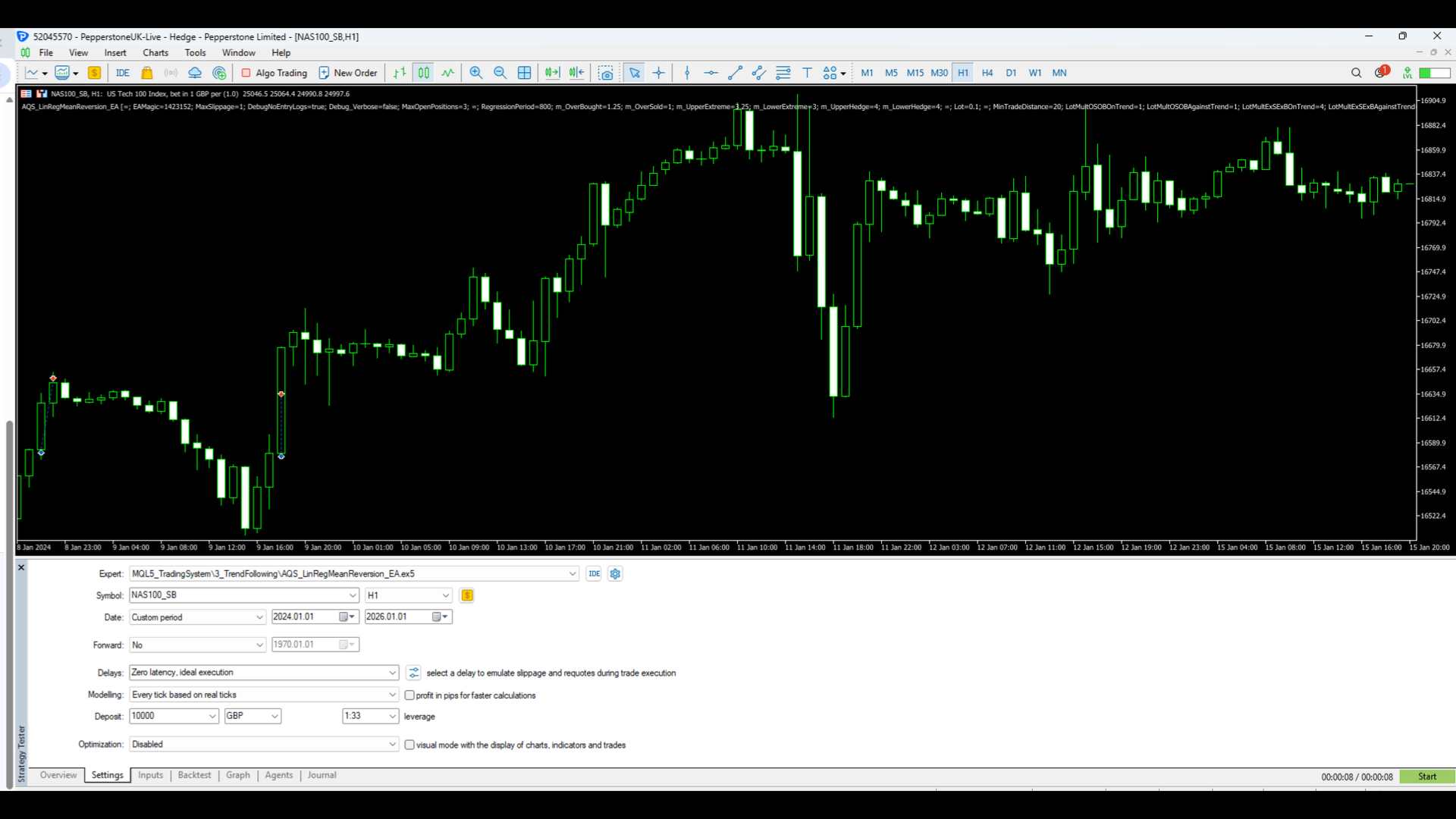
Screenshot 1 – Strategy visual execution on H1 timeframe
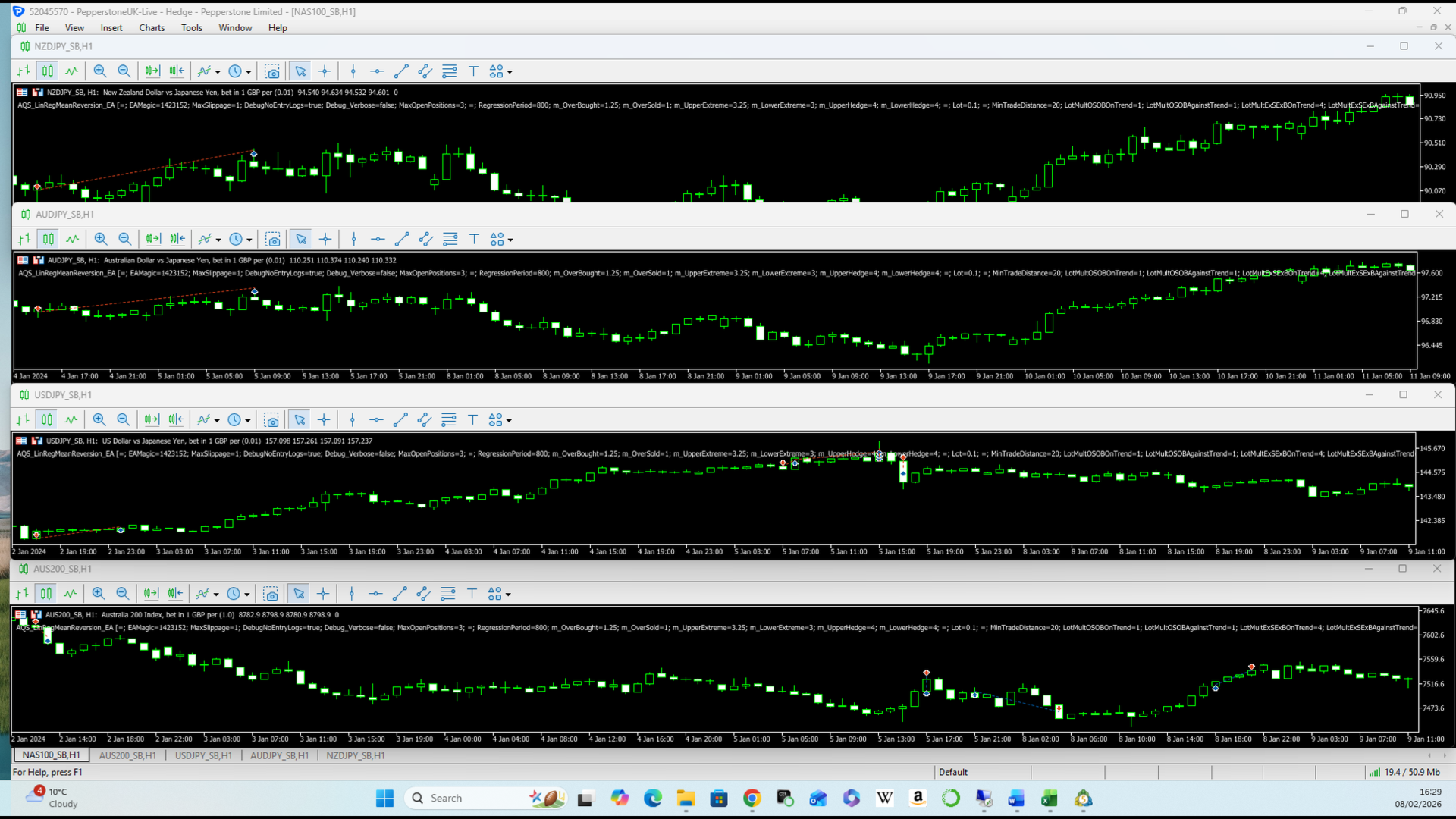
Screenshot 2 – Multi-asset examples (FX & Indices)
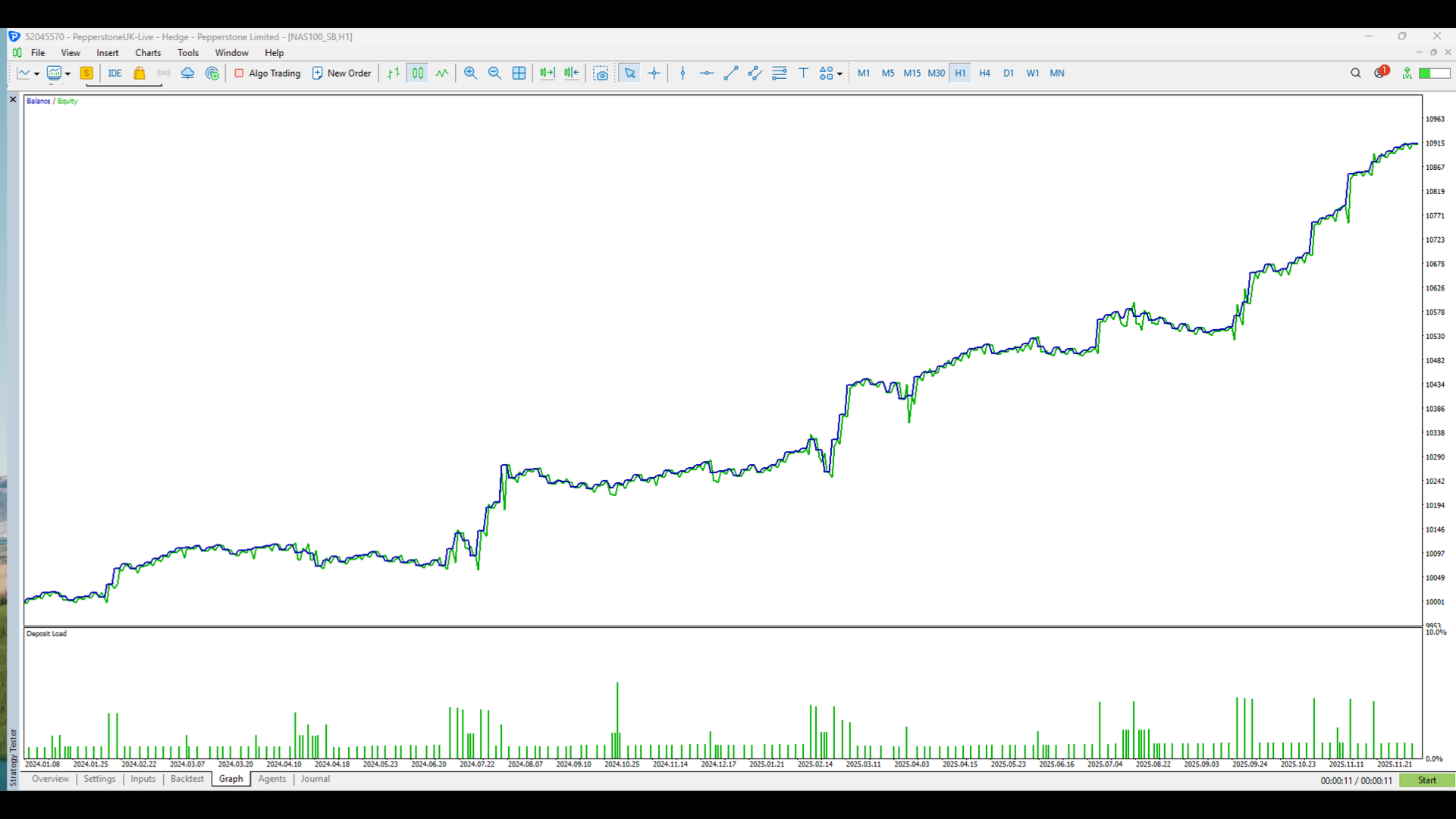
Screenshot 3 – Long-term equity curve (2+ years backtest)
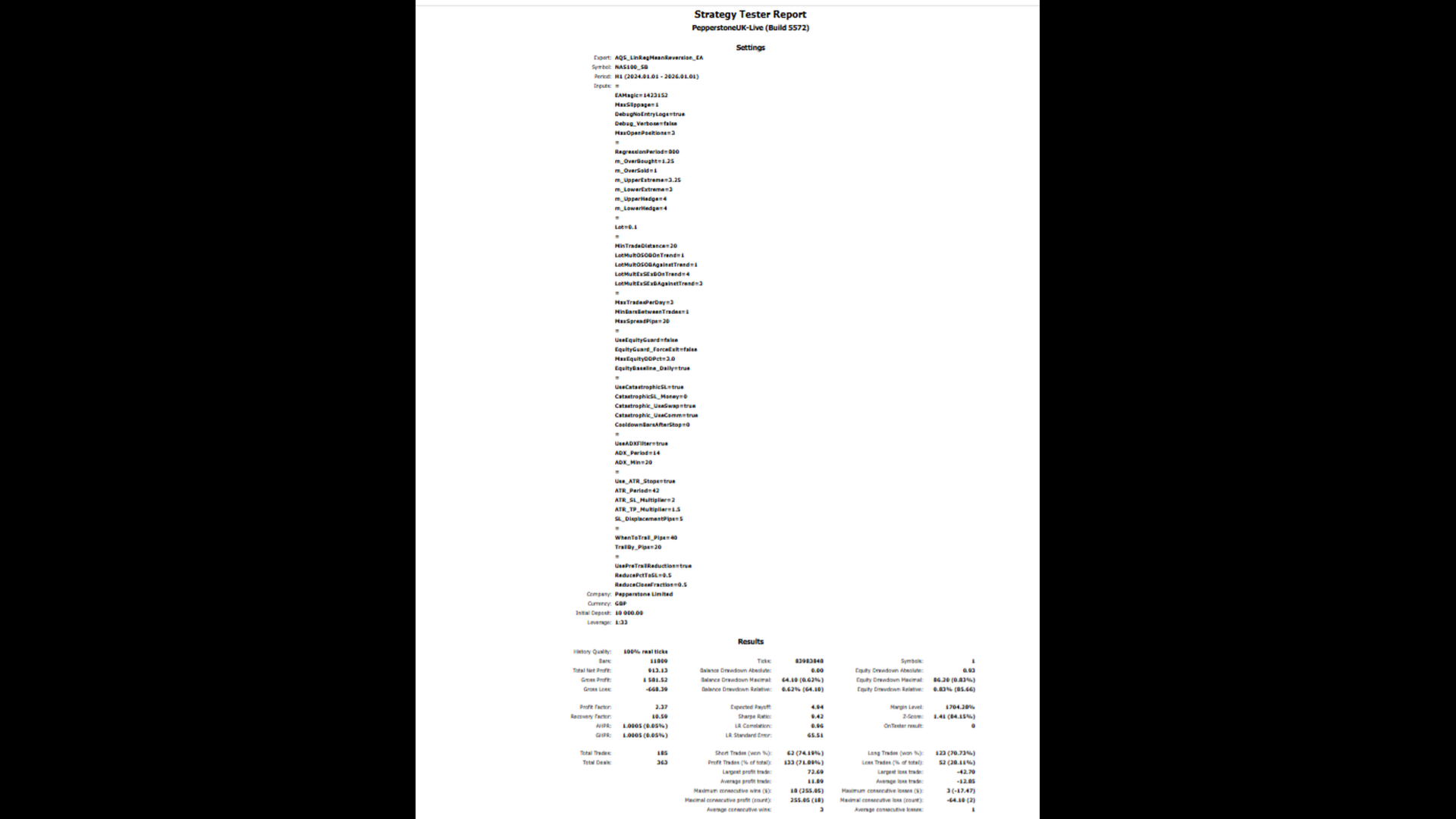
Screenshot 4 – Strategy Tester report (key statistics)
Screenshot 5 – Full input configuration and risk controls