Ultimate Extractor Cloud
- Yardımcı programlar
- Clifton Creath
- Sürüm: 1.4
- Güncellendi: 11 Ocak 2026
Ultimate Extractor Cloud syncs your MT5 trading data to a web dashboard for comprehensive analysis and monitoring across multiple accounts and devices.
WHAT IT DOES
This utility runs in the background and sends trade data to your personal cloud dashboard where you can:
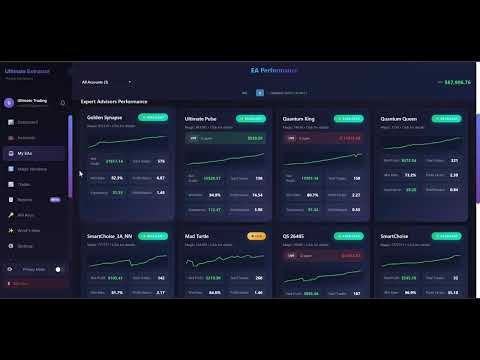
- View real-time P&L, equity, and floating positions across all accounts
- Track equity curves and drawdown history with interactive charts
- Analyze win rates, profit factors, expectancy, and risk/reward ratios
- Monitor individual EA performance by magic number
- Compare EA equity curves side-by-side on a single chart
- View monthly and daily profit heatmaps
- Analyze performance by trading session and time of day
- Track win/loss streaks and largest trades
- Compare your EAs against the community leaderboard
- Analyze strategy tester reports with advanced metrics
- Access your data from any device with a web browser
KEY FEATURES
Automatic Sync - Trades sync automatically at configurable intervals. Real-time metrics update every 60 seconds. No manual export required.
Multi-Account Support - Connect multiple MT5 accounts to one dashboard. View combined or individual account statistics.
EA Performance Tracking - Each EA tracked separately by magic number with dedicated analytics including equity curve, drawdown chart, trade history, and performance metrics.
Multi-EA Comparison - Compare all your EAs on a single equity chart. See which EAs contribute most to profits with percentage gain tracking.
EA Leaderboard - Compare your EA performance against the community. See how your EAs rank by profit factor, win rate, and other key metrics. Discover top-performing strategies used by other traders.
Backtest Analyzer - Upload your MT5 Strategy Tester HTML reports for advanced analysis. Get detailed metrics including:
- Margin usage analysis
- Session-based performance breakdown
- MAE/MFE analysis
- Monte Carlo simulation
- Extended statistics beyond standard MT5 reports
Comprehensive Analytics
- Daily, weekly, monthly P&L breakdown
- Interactive equity curves with hover details
- Drawdown tracking with time range selection (1D, 1W, 1M, 3M, All)
- Win rate, profit factor, expectancy per EA
- Trade duration analysis
- Symbol performance breakdown
- Hourly trading session analysis
Drawdown Analysis - Track current drawdown, max drawdown, and average drawdown. View drawdown history with zoom controls.
Profit Heatmaps - Visual monthly and daily heatmaps showing profitable and losing periods at a glance.
Non-Intrusive - Runs alongside your existing EAs. Does not place or modify trades. Read-only operation.
Lightweight - Optimized data transmission. Minimal resource usage. Does not affect execution speed.
PRIVACY AND SECURITY
- Secure HTTPS encryption for all data transmission
- No broker credentials required
- Read-only access to trade history
- Your data is private to your account only
- Privacy mode to blur sensitive information when screen sharing
HOW TO USE
1. Purchase and install the EA
2. Visit ultimateextractor.com and create a free account
3. Generate your API key from the dashboard
4. Add ultimateextractor.com to allowed URLs in MT5 (Tools → Options → Expert Advisors)
5. Attach the EA to any chart and enter your API key
6. View your analytics on the web dashboard
INPUT PARAMETERS
API Key - Your unique API key from ultimateextractor.com (required)
Sync Interval Seconds - How often to sync data (default: 60, minimum: 30)
Enable Position Tracking - Track open positions in real-time (default: true)
Enable Debug Mode - Show detailed logs in Experts tab for troubleshooting
REQUIREMENTS
- MetaTrader 5 build 2361 or higher
- WebRequest enabled for ultimateextractor.com
- Active internet connection
DATA SYNCED
- Closed trade history with full details
- Open positions with live P&L
- Account balance, equity, and margin
- Deposits and withdrawals
- EA identification by magic number and comment
FREQUENTLY ASKED QUESTIONS
Q: Does this EA place trades?
A: No. It only reads trade history and account information. It never places, modifies, or closes trades.
Q: Will it slow down my other EAs?
A: No. It runs on a timer-based sync, not on every tick. Resource usage is minimal.
Q: Can I use it on multiple accounts?
A: Yes. Connect unlimited MT5 accounts to one dashboard with our Pro plan.
Q: What happens if I lose internet connection?
A: The EA automatically retries when connection is restored. No data is lost.
Q: How far back does it import trade history?
A: Up to 1 year of trade history depending on your subscription tier.
Q: Is my data secure?
A: Yes. All data is transmitted over encrypted HTTPS. We never store broker credentials.
Q: Can I use the Backtest Analyzer without the EA?
A: Yes. The Backtest Analyzer works with any MT5 Strategy Tester HTML report.
SUPPORT
For questions, setup assistance, or feature requests, please use the Comments section below or send a private message through MQL5.
---
Added:
- EA Leaderboard section explaining community comparison
- Backtest Analyzer section with its key features (margin analysis, session breakdown, MAE/MFE, Monte Carlo)
- Extra FAQ about using Backtest Analyzer standalone