Ultimate Extractor Cloud
- Utilitários
- Clifton Creath
- Versão: 1.5
- Atualizado: 11 janeiro 2026
Ultimate Extractor - Professional Trading Analytics for MT5
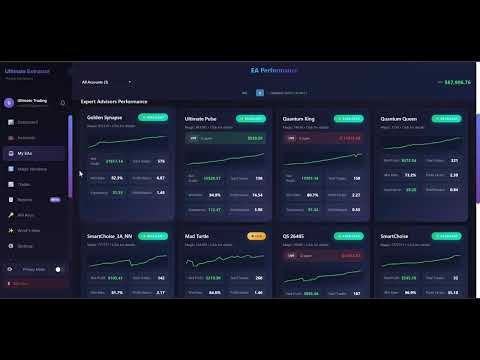
*****this is the Cloud based version of Ultimate Extractor. Check out Ultimate Extractor on mql5 for the local html version******
Ultimate Extractor transforms your MetaTrader 5 trading history into actionable insights with comprehensive analytics, interactive charts, and real-time performance tracking.
What It Does
Automatically analyzes your MT5 trading history across all Expert Advisors and generates detailed HTML reports with interactive visualizations. Tracks live performance metrics including open positions, floating P/L, and drawdown in real-time. Supports multi-account monitoring with a Portfolio Dashboard that consolidates data from multiple MT5 terminals.
Key Features
- Multi-EA Analytics: Track performance of unlimited Expert Advisors simultaneously with individual breakdowns
- Real-Time Monitoring: Live tracking of open positions, floating P/L, and current drawdown with auto-refresh
- Historical Equity Drawdown: Reconstructs true equity curve including unrealized P/L from price history (cached for performance)
- Interactive HTML Reports: Sortable tables, sparkline charts, heatmaps, and monthly calendar views
- Per-EA Analysis: Individual statistics including win/loss streaks, win rates, profit factors, and equity curves
- MAE/MFE Tracking: Maximum Adverse and Favorable Excursion calculated from M1 price data
- Time-of-Day Heatmap: Visual analysis showing which trading hours are most profitable
- Withdrawal Calculator: Calculates take-home profits with configurable tax rates and withdrawal percentages
- Cloud Sync: Optional web dashboard for accessing analytics from any device
Input Parameters
- OutputFileName: Custom report filename
- EnableAutoRefresh: Automatic report updates (configurable interval)
- EnableLiveTracking: Real-time open position monitoring
- CalculateHistoricalEquityDD: Reconstruct equity drawdown from price history
- CalculateRealMAE: Calculate MAE/MFE using M1 High/Low data
- EnableWithdrawalCalculator: Show take-home profit calculations
- WeeklyWithdrawalPercent / MonthlyWithdrawalPercent: Withdrawal rate settings
- TaxRate: Tax percentage for profit calculations
- EnableJSONExport: Export data for multi-account dashboard
- EnableDrawdownAlert: Alert when drawdown exceeds threshold
- Up to 200 EA name mappings and 30 EA group configurations
How To Use
- Attach Ultimate Extractor to any chart
- Configure EA name mappings in inputs (or use auto-detection)
- Report generates automatically in MQL5/Files folder
- Open the HTML file in any browser to view your dashboard
Output Files
- TradeReport_[AccountNumber].html: Main interactive report
- ReportData_[AccountNumber].json: Data export for portfolio dashboard
Support
For documentation, example configurations, or assistance, contact through MQL5 private messages.