MultiAsset SuperTrend Trader Pro
- Uzmanlar
-
Norbert Hubert Pajak
 My professional career and interests are connected to the financial markets. For over a decade, I have attended almost every trading session.
I create automated trading algorithms (robots, bots), known as Expert Advisors, in MQL4 and MQL5. I can also assist with conversions from Pinescript. - Sürüm: 6.0
- Güncellendi: 12 Kasım 2026
- Etkinleştirmeler: 10
MultiAsset SuperTrend Trader Pro is an Expert Advisor that trades a portfolio of up to 10 instruments from one chart.
It follows the trend with the SuperTrend indicator, confirms each signal with up to three filters and keeps the risk of the whole portfolio within one common limit.
Each instrument has its own slot with its own lot size, minimum profit, Take Profit and optional hedge. The EA works on netting and hedging accounts and in any account currency. The interface is available in English, German, Spanish and Polish.
User guide with a description of every input: https://www.mql5.com/en/blogs/post/779479
The MetaTrader 4 Strategy Tester can test only one instrument at a time. On a live or demo account the MetaTrader 4 version trades the whole portfolio. A backtest of the whole portfolio is possible in MetaTrader 5.
How the EA works
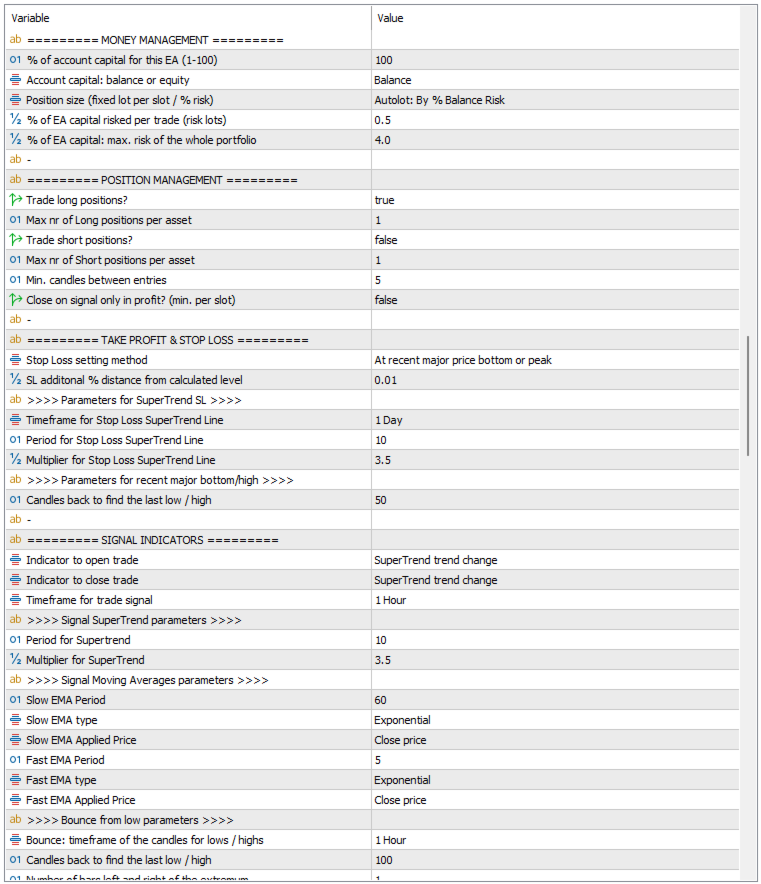
A position is opened only when the entry signal, the active trend filters, the optional distance filter, the time window and the portfolio risk limit all allow it. The default inputs are one example configuration: SuperTrend on H1 (period 10, multiplier 3.5) for entry and exit, long positions only, a trend filter Close versus Exponential Moving Average 20 on D1, Stop Loss at the last D1 low, 0.5 % risk per trade and 4 % maximum risk for the portfolio.
Instrument slots
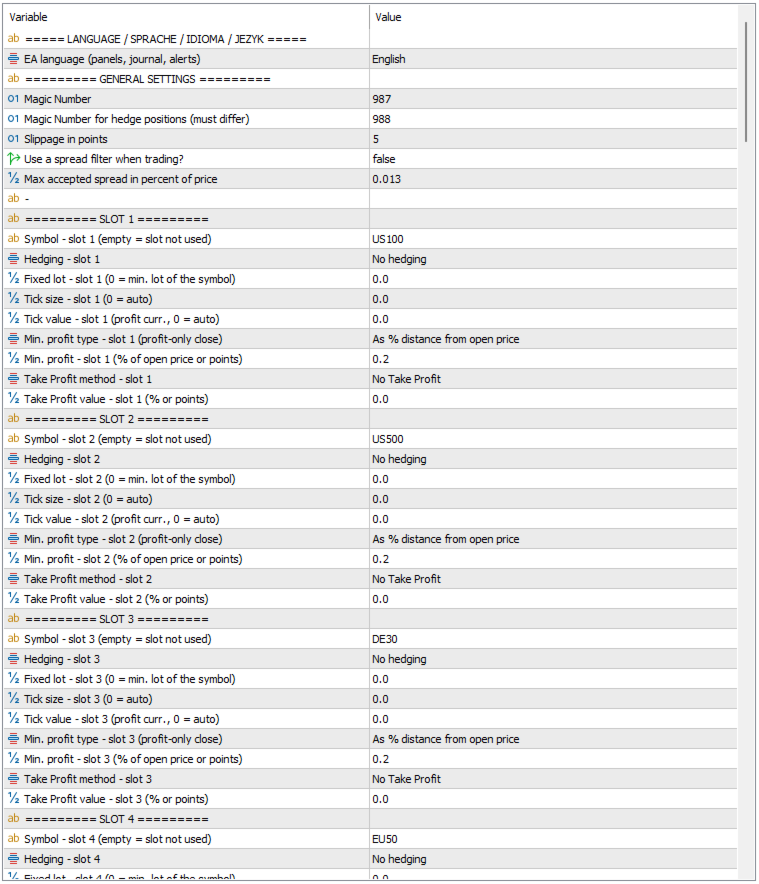
You enter 1 to 10 symbols, for example US100, US500, DE40, GOLD, OIL or BTCUSD. An empty symbol means that the slot is not used. A symbol that the broker does not offer is skipped and reported in the journal.
Tick size and tick value are read from the broker. If the broker does not provide them, the EA calculates them and converts them into the account currency. The currency pair for the conversion is found also when the broker adds a suffix to the name, for example USDPLN.pro. Each slot has inputs to set these values manually; 0 means automatic. Each EA instance has its own Magic Number, so several instances with different baskets can run on one account.
Entry signals
The open method and the close method are selected separately, on any timeframe (default H1):
- SuperTrend trend change,
- Close crosses the Exponential Moving Average,
- Fast Exponential Moving Average crosses the Slow Exponential Moving Average,
- Price rebound from the local low (or from the local high for short positions).
The rebound method has its own timeframe for lows and highs, a minimum and maximum rebound in percent and an optional Relative Strength Index filter: the low must be confirmed by an oversold value, the high by an overbought value. Each low is used for one entry only. Used lows are stored per instrument and restored from the trade history after a restart.
The close method can also be set to None. Positions are then closed only by Stop Loss, Take Profit or Trailing Stop.
Trend filters
You can activate up to three filters, each with its own timeframe and parameters. A trade is allowed only when all active filters agree:
- SuperTrend filter, read from the closed bar or from the current bar,
- Close versus Exponential Moving Average: long positions only above the average, short positions only below it,
- Average Directional Index level: a minimum trend strength is required, for example 25.
An additional filter can check the distance between the price and a SuperTrend line, in percent or in points. Entries are then allowed only between the minimum and maximum distance.
Exit rules
Positions can be closed by the same method as the entry or by a different one. With the option "Close on signal only in profit?" an exit signal is ignored until the position reaches the minimum profit of its slot, in percent of the open price or in points. Commission and swap are included in this calculation. Each slot can also have a Take Profit in percent or in points.
You can choose the trading days and the entry hours, and close positions on Friday at a chosen hour (all positions or only those in profit). The day, time and spread filters apply to entries only; Trailing Stop, exits and the Friday close always work.
Stop Loss and Trailing Stop
Methods for the initial Stop Loss:
- distance in percent from the open price,
- at the recent low or high (search window in candles),
- at the low or high of the previous bar,
- at the SuperTrend line of any timeframe,
- no Stop Loss.
A buffer in percent can be added to the calculated level. Before each entry the EA checks that Stop Loss and Take Profit are on the correct side of the price and respect the minimum distance of the broker. The Trailing Stop follows the SuperTrend line or keeps a distance in percent, in points or based on the Average True Range. It has a minimum step and can start only when the position is in profit.
Hedge per instrument
On a hedging account each slot can use a hedge based on the Exponential Moving Average or on SuperTrend. When the last closed candle of the hedge timeframe turns against the position, the EA opens an opposite position of the same volume. When the trend returns, the hedge is closed. Optionally the hedge can be opened or removed during the candle, when the price crosses the activation level by a buffer in percent (default 1 %).
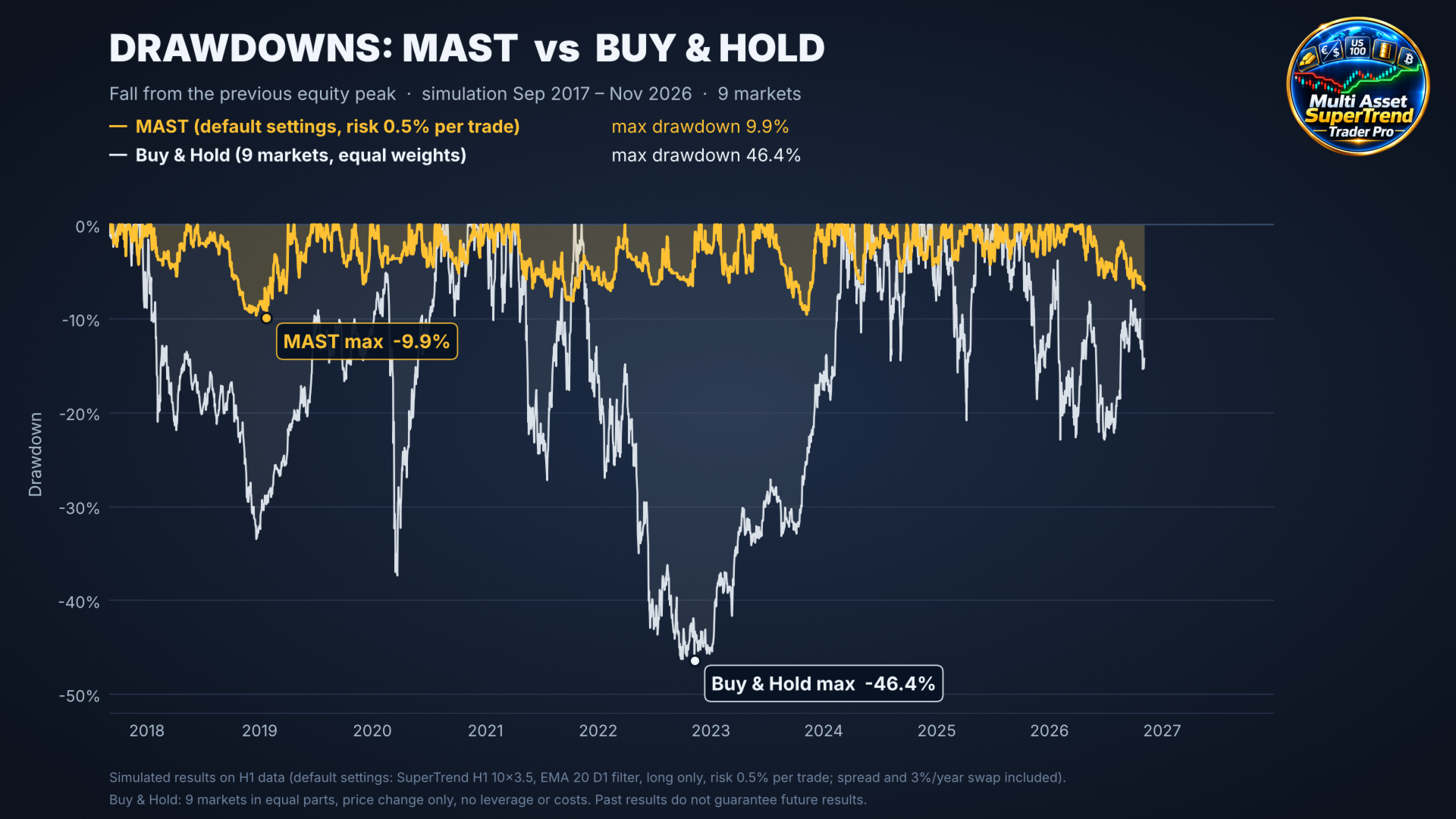
Hedge positions have their own Magic Number, follow the volume of the main positions and are closed together with them. A hedge is intended for strategies without Stop Loss. It reduces the drawdown, but it also reduces the return, and swap is charged on both positions.
Risk management
You decide which part of the account the EA may use (1 to 100 %) and whether it is based on balance or equity. All risk values are calculated from this capital. The position size is a fixed lot per slot or is calculated from the risk per trade and the Stop Loss distance.
The total risk of all open positions, including the new one, may not exceed the portfolio limit (default 4 %). A signal above this limit is skipped. You can also trade long, short or both directions, set the maximum number of positions per instrument and the minimum number of candles between entries, and use a spread filter. Before every order the EA checks the trading permissions, volume limits, free margin and the filling mode of the symbol, and whether the market of this symbol is open.
Panels on the chart
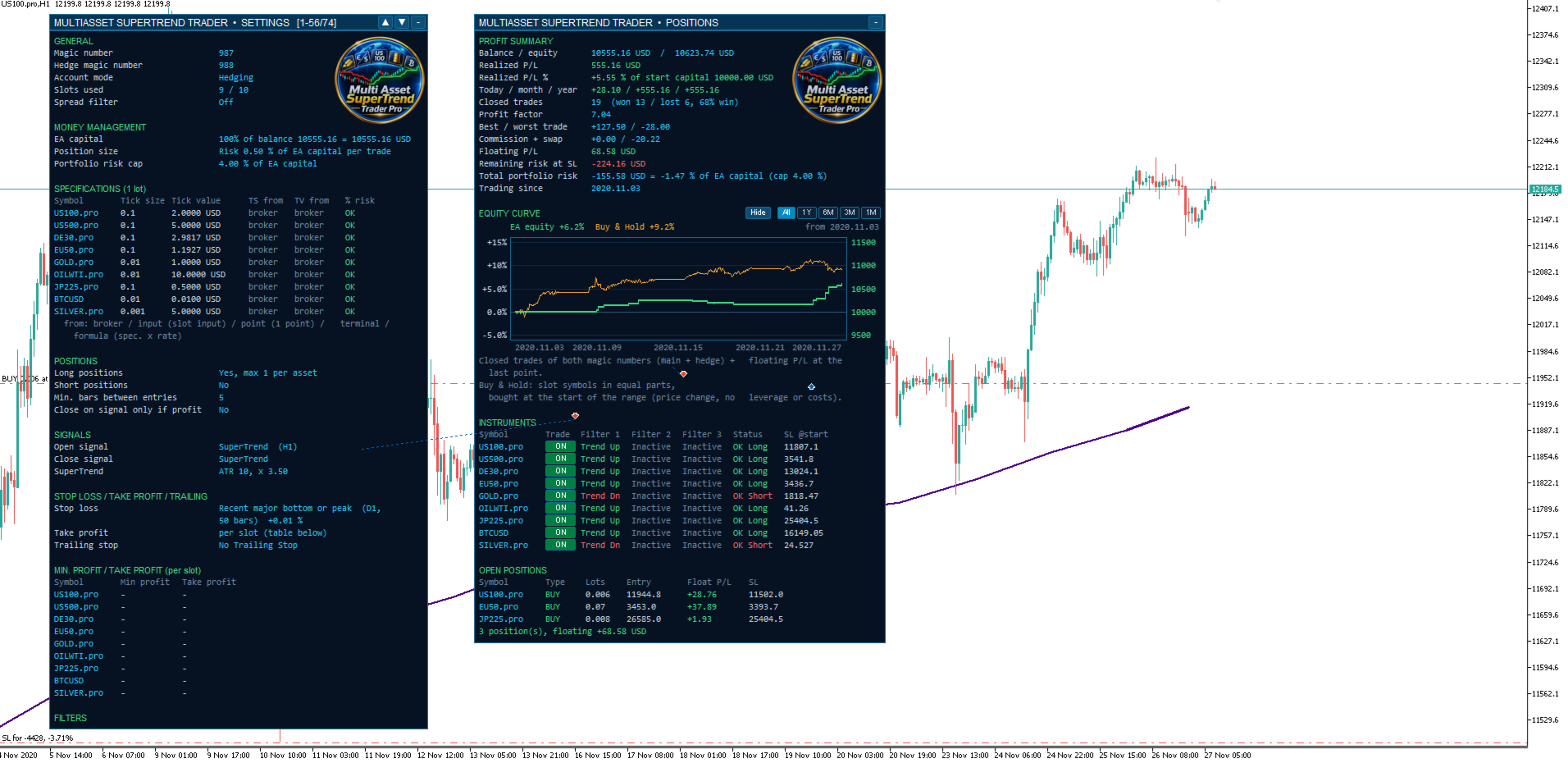
Two panels can be moved, collapsed and scrolled. They adjust their width to the content and keep their position after a restart.
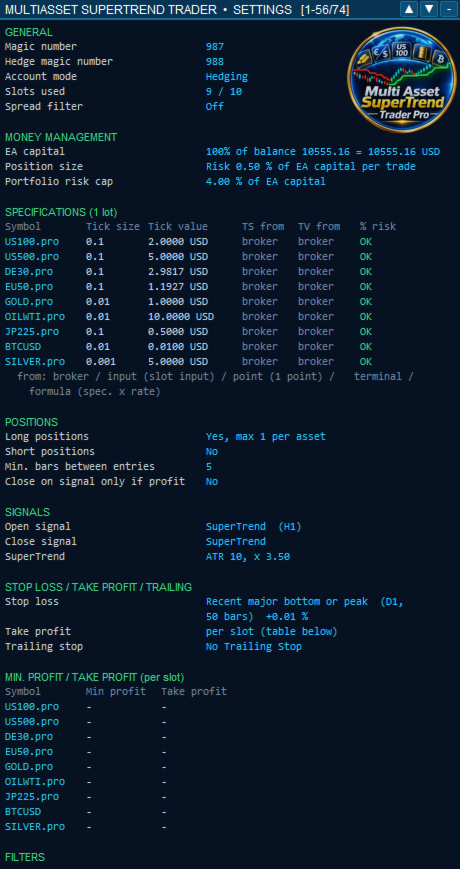
The SETTINGS panel shows a summary of the active strategy and the instrument data in use: tick size, tick value and their source.
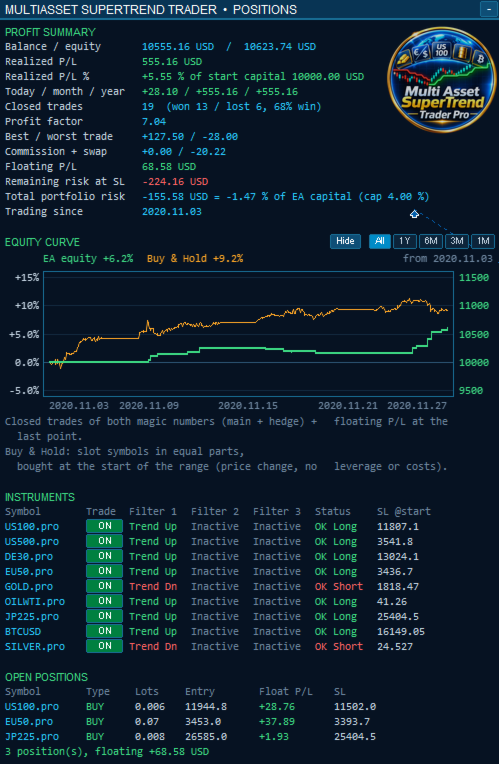
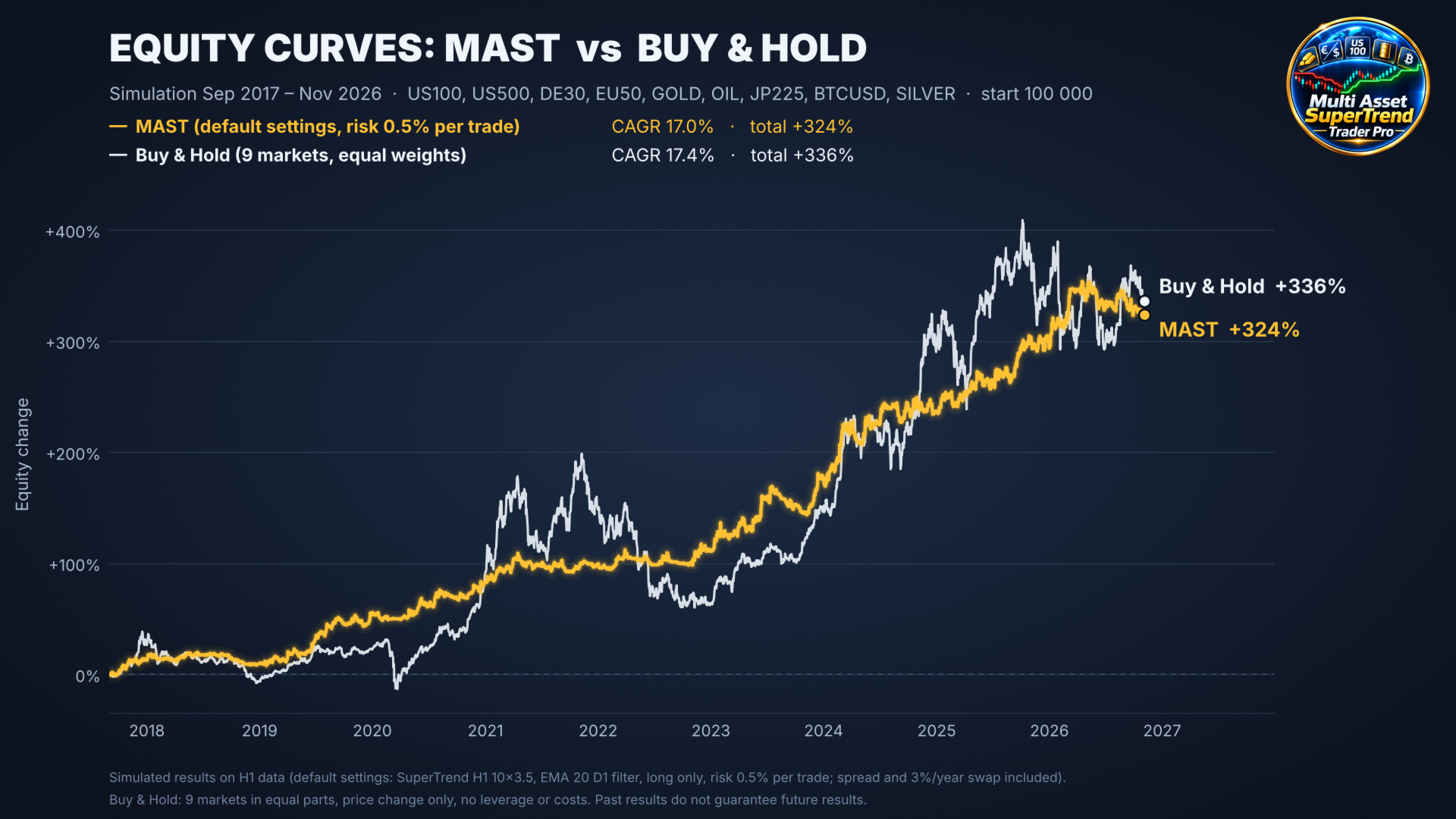
The POSITIONS panel shows the balance and equity, realized and floating profit, results for today, the month and the year, closed trades with win rate and profit factor, commission and swap, and the total portfolio risk. It also contains an equity curve of the EA compared with an equally weighted buy and hold portfolio of the slot symbols, the state of every filter for every instrument with the final decision, and the open positions with the hedge status. Each instrument has an ON/OFF button, so you can stop trading a symbol without changing the inputs. Columns are shown only for the functions you use.
The signal and filter SuperTrend lines and the filter averages are drawn on the chart.
Journal
Every journal entry and alert starts with the server date and time. Every buy or sell signal is written with its result: the opened position with its volume, or the reason why it was rejected, for example a filter, the portfolio risk limit, the spread, the time window or a Stop Loss that is too close. Each reason is written at most once per candle. Daily log files with automatic deletion of old files are optional.
Example configurations
Each example lists the inputs to change from the default values. Test every configuration in the Strategy Tester on your instruments and with your broker before using it on a live account.
Example 1: default inputs. SuperTrend H1 for entry and exit, long only, filter Close versus Exponential Moving Average 20 on D1, Stop Loss at the last D1 low, 0.5 % risk per trade, 4 % portfolio limit. Example instruments: index contracts, gold, oil and crypto.
Example 2: swing trading on H4. Signal SuperTrend H4 for entry and exit. Filter 1: Close versus Exponential Moving Average 200 on D1, filter 2: Average Directional Index 14 with level 25 on H4. Stop Loss at the SuperTrend line of D1, Trailing Stop at the SuperTrend line of H4. Long and short, 1 % risk per trade, portfolio limit 6 %. Example instruments: major currency pairs and gold.
Example 3: intraday trading on M15. Signal Close crosses Exponential Moving Average 14 on M15. Filter 1: SuperTrend H1. Entries only from 08:00 to 11:00 server time, Friday close on. Stop Loss at the low or high of the previous bar, Trailing Stop 0.3 %, risk 0.5 % per trade. Example instruments: DE40, US30 and pound pairs.
Example 4: entries after a pullback. Signal Price rebound from the local low on H1 with the Relative Strength Index filter (oversold level 30). Filter 1: SuperTrend D1, filter 2: Close versus Exponential Moving Average 50 on H4. Stop Loss at the recent low, Trailing Stop based on the Average True Range, only in profit. Portfolio limit 5 %, which limits the number of entries during a strong decline.
Example 5: moving average crossover. Signal Fast Exponential Moving Average 12 crosses Slow Exponential Moving Average 26 on H1, for entry and exit. Filter 1: SuperTrend H4, filter 2: Average Directional Index 14 with level 20 on H1. Stop Loss in percent from the open price, no Trailing Stop.
Example 6: no Stop Loss, with hedge. For index contracts without expiry on a hedging account, long term. No Stop Loss, fixed lot per slot, "Close on signal only in profit?" on with a minimum profit per slot (for example 0.5 %), hedge on Exponential Moving Average 50 on D1.
Quick start
- Attach the EA to one chart of any symbol and enter your symbols in "Symbol - slot 1" to "Symbol - slot 10".
- Keep the default inputs or set one of the examples, then set the risk per trade and the portfolio limit.
- Test in the Strategy Tester in the mode "1 minute OHLC" or "Every tick", with all slot symbols available.
- On the live account check the SETTINGS and POSITIONS panels.
The EA executes a systematic strategy. It does not guarantee profit and cannot prevent losses. Trading without Stop Loss and with leverage can lead to large drawdowns and requires a sufficient margin reserve. Results of tests on historical data do not guarantee future results.