LTS TradeDashboard MT5
- Uzmanlar
- Sürüm: 1.20
- Güncellendi: 30 Ocak 2026

Product Name: LTS TradeDashboard
Short Description: The ultimate visual trading assistant. Drag and drop lines to trade, calculate risk automatically, and execute orders with a single click.
Full Description:
LTS TradeDashboard allows you to stop calculating lot sizes manually and start trading directly from the chart. Designed for traders who need speed and precision, this tool turns your chart into a professional trading cockpit.
Simply drag the Visual Lines (Entry, Stop Loss, Take Profit) to your desired levels, and the dashboard will automatically calculate the correct Lot Size based on your risk appetite. Whether you are a scalper or a swing trader, this tool ensures you never risk more than you intend.
KEY FEATURES
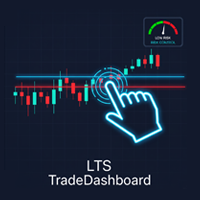
1. Visual Drag & Drop Trading Forget about calculating prices. Three distinct lines (Entry, SL, TP) appear on your chart. Drag them to your technical levels, and the dashboard updates the math in real-time.
-
Blue Line: Entry Price (Auto-detects Market, Limit, or Stop orders).
-
Red Line: Stop Loss (Displays exact Risk in $).
-
Green Line: Take Profit (Displays Potential Profit $ and RR Ratio).
2. Intelligent Risk Calculator Protect your capital on every trade.
-
Auto-Lot Mode: Set your Risk % (e.g., 1%) or Risk Money (e.g., $50), and the tool calculates the Lot Size automatically based on your Stop Loss distance.
-
Fixed-Lot Mode: Prefer to trade a specific lot size? Enter it manually, and the tool will show you exactly how much money you are risking before you click buy.
3. Interactive Dashboard Panel A clean, modern interface that lets you control everything without opening settings.
-
Edit Risk %, Risk $, or Lot Size directly on the panel.
-
Use [+] and [-] buttons for fine-tuning adjustments.
-
Switch between "Auto Risk" and "Fixed Lot" modes instantly.
4. Smart Order Execution No need to select "Buy Limit" or "Sell Stop" manually. The dashboard intelligently detects where your Entry Line is relative to the current price and executes the correct order type (Market, Limit, or Stop) automatically.
5. Risk:Reward (RR) Tools Maintain your edge with built-in Risk:Reward buttons. Click 1:1, 1:2, or 1:3 to instantly snap your Take Profit line to the correct ratio.
WHY USE LTS TRADEDASHBOARD?
-
Speed: Plan and execute trades in seconds.
-
Safety: Never accidentally open a trade with the wrong lot size.
-
Clarity: See your exact Dollar Risk and Dollar Profit on the chart before you commit.
-
Precision: Floating price tags with "Grip Handles" for easy adjustments on any timeframe.
How to Use:
-
Attach the tool to any chart.
-
Drag the Blue line to your entry (or leave it at price for Market execution).
-
Drag the Red line to your invalidation point (Stop Loss).
-
Adjust your Risk % or Lot Size on the panel.
-
Click BUY or SELL.
Dear Logic Trade Solution Community,
Thank you for being part of our journey with the Logical Trading solutions for MT5. Your experience and insights are invaluable to making it even better!
💡 Suggest Improvements or Request Additional Features:
If you have ideas on how we can enhance the indicator, add new trading functionalities, or improve alerts, please share your suggestions. Your feedback helps guide future development.
🛠️ Report Bugs or Share Your Experience:
Encountered any issues, glitches, or unexpected behavior? Or perhaps you want to share how the indicator is working well for you in live trading? We want to hear it all to improve stability and user experience.
🙏 Support Continued Development:
If you appreciate the effort and value the indicator, a small contribution would be a great encouragement to help fund further development and new features. please send me a message so I can share my info.