Pin Closed Bar 5 6 Candle Pattern Multi Filter
- Индикаторы
- Версия: 1.2
- Активации: 5

5 and 6 Candle Pattern Multi Filter No Repaint
A MetaTrader 5 chart indicator that marks Buy and Sell arrows from two closed-candle reversal patterns, then confirms them with optional technical filters and alerts.
This product is a technical indicator, not an Expert Advisor. It does not open, close, or manage trades. It plots arrows on the chart window after a candle has closed and can send popup, sound, push, and email alerts.
WHAT THIS INDICATOR IS FOR
Many candle tools paint a signal while the bar is still forming, then move or delete that signal when the bar closes. This indicator evaluates only completed bars. The current forming candle is not used for the pattern or for the filters.
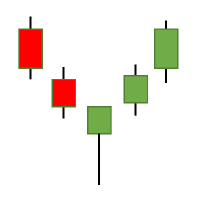
The entry idea is simple: wait for a short run of candles in one direction, then look for a strong candle in the opposite direction. That structure is offered in two versions:
- Signal 1 uses a strict 5-candle sequence
- Signal 2 uses a more flexible 6-candle sequence
Because raw candle patterns appear often in ranging markets, the indicator includes optional confirmation modules: RSI, ADX, moving averages, Ichimoku Senkou Span B, Awesome Oscillator, Parabolic SAR, Heiken Ashi, CCI, RVI, MACD, support and resistance, and Fibonacci retracement.
Every filter is optional. You decide how strict the setup should be. Run the patterns alone for more signals, or switch on two or three filters when you want fewer, more selective arrows.
PRODUCT TYPE
- Platform: MetaTrader 5
- Product type: Custom indicator
- Display: Chart window, two arrow plots
- Buffers: Buy arrow and Sell arrow
- Signal timing: After candle close
- Markets: Forex, metals, indices, crypto, and other MT5 symbols
- Timeframes: Any chart period available in the terminal
- Auto trading: No. This product does not open or close orders
- DLL: Not used
- Repaint: Closed-bar arrows do not repaint when used as designed
- Buy arrows: Wingdings 233 (aqua by default)
- Sell arrows: Wingdings 234 (red by default)
- Arrow distance from the candle is adjustable in points
HOW THE ENTRY SIGNALS WORK
The indicator can use Signal 1, Signal 2, or both. If both are enabled, a bar can become a signal when either pattern is valid. A plotted arrow still requires every enabled filter to agree.
Signal 1 - 5 Candle Pattern
The engine looks at the closed candle plus the previous four candles.
Buy condition
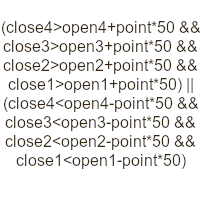
- The four previous candles are all bearish (close below open)
- The current closed candle is bullish (close above open)
- The close of the current candle is above the open of the oldest of those four candles
Sell condition
- The four previous candles are all bullish
- The current closed candle is bearish
- The close of the current candle is below the open of the oldest of those four candles
This is the stricter pattern. It asks for four clean opposite candles and a reclaim of the open from the start of that run.
Signal 2 - 6 Candle Pattern
The engine looks at the closed candle plus the previous five candles.
Buy condition
- At least four of the five previous candles are bearish
- The current closed candle is bullish
- The close of the current candle is above the highest high of those five candles
Sell condition
- At least four of the five previous candles are bullish
- The current closed candle is bearish
- The close of the current candle is below the lowest low of those five candles
This pattern allows one mixed candle inside the prior five bars, but it demands a break of the local high or low.
No-repaint behavior
The calculation processes bars only up to the last fully closed candle. Filter values are read from that same closed bar. Arrows are written to completed bars and are not recalculated from the still-forming candle. Alerts are tied to the time of the closed signal bar.
WHY THE FILTER BLOCK MATTERS
A 5-candle or 6-candle reversal can appear in a quiet range, during a news spike, or against a strong trend. The filter block lets you define the market condition that must exist before an arrow is allowed.
Filters are combined with AND logic. If three filters are enabled, all three must pass. Enabling every filter at once usually produces very few arrows and is not the intended use.
- 0 filters: study raw pattern frequency
- 1-2 filters: daily discretionary use
- 3-4 filters: only when you want a very selective map
KEY FEATURES
- Two independent candle-pattern engines that can be switched on or off
- Closed-bar calculation for pattern and filters
- Sixteen optional confirmation modules, each with its own inputs
- Buy and Sell arrows with adjustable distance in points
- Terminal popup alert, sound alert, push notification, and email alert
- One alert timestamp per signal bar to reduce duplicate messages
- Works on any symbol and timeframe available in MetaTrader 5
- Inputs are grouped in the settings window so related options stay together
WHAT EACH FILTER DOES
RSI Cross Filter
A Buy pattern is kept only when RSI has just crossed up through the oversold level. A Sell pattern is kept only when RSI has just crossed down through the overbought level.
Benefit: focus on turns from an extreme instead of mid-range candles.
ADX Filter
Both Buy and Sell require ADX at or above the minimum level.
Benefit: ignore the same pattern when the market has no directional strength.
Single MA Filter
Buy requires the signal close above the moving average. Sell requires the close below it.
Benefit: a simple trend-side gate.
Ichimoku Senkou Span B Filter
Only Senkou Span B is used. If close is above Senkou Span B, Sell is blocked. If close is below it, Buy is blocked. If price sits exactly on the line, both sides are blocked.
Benefit: a slow equilibrium filter without drawing the full Ichimoku cloud.
RSI 75 Filter
This is not an RSI level 75 rule. It is an RSI whose period default is 75. Buy requires RSI above 50. Sell requires RSI below 50.
Benefit: a slow momentum bias.
Double MA Filter
Buy requires the faster average above the slower average. Sell requires the opposite.
Benefit: classic dual-MA regime filter.
Awesome Oscillator Filter
Optional sub-rules can be combined:
- Volume rule: AO at or above a Buy minimum, or at or below a Sell maximum
- Color rule: AO rising for Buy, falling for Sell
- Zero rule: AO rising and above zero for Buy, falling and below zero for Sell
Note: default AO thresholds of +4 and -4 are large on many forex pairs. Adjust them to the symbol.
Parabolic SAR Filter
Buy requires close above SAR. Sell requires close below SAR.
Benefit: a trailing-stop style direction check.
Heiken Ashi Filter
Heiken Ashi open and close are calculated inside the indicator. Buy requires a bullish HA candle. Sell requires a bearish HA candle.
Benefit: smoother candle direction without adding a second chart.
CCI Trend Filter
Buy requires CCI above zero. Sell requires CCI below zero.
CCI OB and OS Filter
Buy requires CCI above the overbought level. Sell requires CCI below the oversold level. This is a continuation-style extreme filter, not a mean-reversion buy-oversold rule.
RVI Trend Filter
Buy requires RVI above zero. Sell requires RVI below zero.
RVI Signal Filter
Buy requires RVI main line above its signal line. Sell requires the main line below the signal line.
MACD Signal Filter
Uses the MACD histogram (main minus signal). Buy requires histogram above zero. Sell requires histogram below zero.
MACD Level 0 Filter
Buy requires the MACD main line above zero. Sell requires it below zero.
Support and Resistance Filter
Over the previous SR Period bars the indicator stores the lowest low as support and the highest high as resistance. A Buy needs the signal candle to touch the support zone. A Sell needs a touch of the resistance zone. The zone width is SR Zone Points times the symbol point size. A wick through the level also counts as a touch.
Benefit: pattern plus level, instead of pattern in empty space.
Fibonacci Filter
A built-in swing search finds a recent swing high and swing low. The 38.2 and 61.8 levels of that swing become a zone. Both Buy and Sell require the signal candle to overlap that zone. If swings cannot be found, the filter blocks the signal.
Benefit: keep reversals that appear in a common retracement area.
ALERTS AND NOTIFICATIONS
When a closed bar passes the pattern and all enabled filters, the indicator can send:
- A terminal popup alert
- A sound file
- A push notification to the MetaQuotes ID in the terminal
- An email through the terminal mail settings
Message format:
SIDE Signal (5/6 Candle) | SYMBOL TIMEFRAME | Closed Bar DATE TIME
Push and email work only if they are already configured in MetaTrader 5:
- Tools > Options > Notifications
- Tools > Options > Email
INSTALLATION
- Purchase or install the product from the MQL5 Market
- Open MetaTrader 5 and allow the Market product to download
- Open Navigator > Indicators > Market
- Attach the indicator to a chart
- Enable the patterns you want, then enable only the filters you understand
- This is not an Expert Advisor. AutoTrading is not required
- For push alerts, set your MetaQuotes ID in the terminal options
HOW TO USE IT IN PRACTICE
Step 1. Read signals only after the candle closes
Do not act on a forming bar. The indicator itself waits for the close.
Step 2. Start with both patterns enabled and all filters off
Scroll the chart and learn how often each pattern appears on your symbol and timeframe.
Step 3. Add one context filter
- Trend-following: Single MA, Double MA, SAR, or Senkou Span B
- Strength: ADX
- Momentum turn: RSI Cross
- Level: Support and Resistance or Fibonacci
Step 4. Add at most one extra confirmation
Examples: MACD histogram, RVI signal, or Heiken Ashi. Stop adding filters when arrows become too rare to review.
Step 5. Decide your workflow
The indicator does not place stops or targets. Common discretionary use is:
- Treat the arrow as a location of interest, not an automatic order
- Place risk beyond the pattern extreme (below the 5/6-candle low for Buy, above the high for Sell)
- Skip signals during high-impact news if your plan requires it
- Test settings in the Strategy Tester visual mode or on a demo chart before live use
SUGGESTED STARTING POINTS
These are starting profiles only. They are not performance claims.
Conservative swing (H1-H4)
- Enable Signal 1 and Signal 2
- Use MA Filter = true, MA Period 50
- Use ADX Filter = true, ADX Min Level 20
- Use MACD Filter = true
- Other filters off
Momentum reversal (M15-H1)
- Enable Signal 1 and Signal 2
- Use RSI Cross Filter = true
- Use Heiken Ashi Filter = true
- Other filters off
Level reaction (M15-H4)
- Enable Signal 2
- Use SR Filter = true or Use Fib Filter = true
- Use SAR Filter = true
- Other filters off
Do not enable AO Volume, CCI OB/OS, Fibonacci, and SR together on a first test. Each one already cuts a large share of patterns.
FULL INPUT GUIDE
Format: Parameter name. Default. Meaning.
Entry Signal
- Enable Signal 1 (5 Candle Pattern). Default true. Turns the strict 4-opposite-candles plus reclaim pattern on or off
- Enable Signal 2 (6 Candle Pattern). Default true. Turns the 5-bar count plus break of local high/low pattern on or off
- Arrow distance (points). Default 30. Offset of the arrow from the low (Buy) or high (Sell), in points. On a 5-digit FX symbol, 30 points is typically 3 pips. Increase it on gold, indices, or crypto if arrows overlap wicks
Alert and Notification
- Popup alert in terminal. Default true. Shows the standard MT5 alert window
- Alert sound. Default true. Plays the selected wave file
- SoundFile. Default alert2.wav. File name from the terminal Sounds folder
- Push notification to phone (MetaQuotes ID). Default true. Sends the text to the mobile terminal if Notifications are enabled
- Email alert. Default false. Sends mail through the terminal email settings
RSI Cross Filter
- Use RSI Cross Filter. Default false. Enables the oversold/overbought cross rule
- RSI Length. Default 14. RSI period used by this filter
- RSI Price Source. Default PRICE_CLOSE. Applied price for RSI
- Oversold. Default 30. Buy needs RSI to cross up through this value
- Overbought. Default 70. Sell needs RSI to cross down through this value
ADX Filter
- Use ADX Filter. Default false. Enables the strength gate
- ADX Period. Default 10. ADX calculation period
- ADX Min Level. Default 20. Both sides require ADX at or above this value
Single MA Filter
- Use MA Filter. Default false. Enables the single moving-average side filter
- MA Period. Default 50. Average length
- MA Method. Default MODE_SMA. SMA, EMA, SMMA, or LWMA
- MA Shift. Default 0. Forward or backward shift of the average
Ichimoku Senkou Span B Filter
- Use Ichimoku Filter. Default false. Enables the Senkou Span B side filter
- Ichimoku SenkouB. Default 52. Senkou Span B period
- Ichimoku Kijun. Default 26. Kijun period passed to iIchimoku. Tenkan is fixed at 9 in the handle
RSI 75 Filter
- Use RSI75 Filter. Default false. Enables the slow RSI 50-line bias
- RSI Filter Period. Default 75. Period of the second RSI. Buy if above 50, Sell if below 50
Double MA Filter
- Use DoubleMA Filter. Default false. Enables the dual-average regime filter
- MA A Period. Default 30. Fast average length
- MA A Method. Default MODE_EMA. Fast average method
- MA A Applied. Default PRICE_CLOSE. Fast average price
- MA A Shift. Default 0. Fast average shift
- MA B Period. Default 140. Slow average length
- MA B Method. Default MODE_EMA. Slow average method
- MA B Applied. Default PRICE_CLOSE. Slow average price
- MA B Shift. Default 0. Slow average shift
Awesome Oscillator Filter
- Use AO Filter. Default false. Master switch for AO rules
- Use AO Volume Filter. Default false. Compare AO with Buy Min / Sell Max
- AO Buy Min. Default 4.0. Minimum AO value for Buy when the volume rule is on
- AO Sell Max. Default -4.0. Maximum AO value for Sell when the volume rule is on
- Use AO Color Filter. Default false. Buy if AO is rising, Sell if AO is falling
- Use AO Zero Filter. Default false. Buy if AO is rising and positive, Sell if falling and negative
Parabolic SAR Filter
- Use SAR Filter. Default false. Enables close versus SAR
- SAR Step. Default 0.02. Acceleration step
- SAR Maximum. Default 0.2. Maximum acceleration
Heiken Ashi Filter
- Use Heiken Ashi Filter. Default false. Requires the internal HA candle to match the arrow side
CCI Trend Filter
- Use CCI Filter. Default false. Buy if CCI above 0, Sell if CCI below 0
- CCI Period. Default 50. CCI length
- CCI Applied. Default PRICE_CLOSE. Applied price
CCI OB and OS Filter
- Use CCI OBOS Filter. Default false. Continuation extreme filter
- CCI OBOS Period. Default 14. CCI length for this module
- CCI OBOS Applied. Default PRICE_CLOSE. Applied price
- CCI Overbought. Default 100. Buy requires CCI above this value
- CCI Oversold. Default -100. Sell requires CCI below this value
RVI Trend Filter
- Use RVI Filter. Default false. Buy if RVI above 0, Sell if RVI below 0
- RVI Period. Default 75. RVI length
RVI Signal Filter
- Use RVI Signal Filter. Default false. Compares RVI main and signal lines
- RVI Signal Period. Default 20. Period of that RVI
MACD Signal Filter
- Use MACD Filter. Default false. Histogram must be positive for Buy, negative for Sell
- MACD Fast EMA. Default 12. Fast EMA
- MACD Slow EMA. Default 26. Slow EMA
- MACD Signal SMA. Default 9. Signal line
- MACD Applied. Default PRICE_CLOSE. Applied price
MACD Lev 0 Filter
- Use MACD Zero Filter. Default false. MACD main line must be above 0 for Buy, below 0 for Sell. Uses the same MACD handle
Support and Resistance Filter
- Use SR Filter. Default false. Requires a touch of recent support (Buy) or resistance (Sell)
- SR Period. Default 50. Lookback bars used to find the range high and low
- SR Zone Points. Default 80. Zone half-width in points around the level
Fibonacci Filter
- Use Fib Filter. Default false. Requires the candle to overlap the Fib zone
- Fib Level 1. Default 0.382. First retracement ratio
- Fib Level 2. Default 0.618. Second retracement ratio
- ZigZag Depth. Default 12. Minimum bars on each side to accept a swing
- ZigZag Deviation. Default 5. Minimum improvement of a new swing, in points
- ZigZag Backstep. Default 3. Minimum bar distance between accepted swings
Group labels such as Entry_Group, Alert_Group, and RSI_Group are section headers only. They do not change calculations.
LIMITATIONS AND GOOD PRACTICE
- This is a signal and confirmation tool. Results depend on the symbol, timeframe, session, and the filters you enable
- Past arrows on the chart are not a promise of future results
- AO default thresholds may be unsuitable on low-range forex pairs. Always scale them
- The CCI OB/OS module keeps only already-extreme CCI readings. That is intentional
- The Ichimoku module uses Senkou Span B only. It is not a full cloud system
- The Fibonacci module uses an internal swing search, not the platform ZigZag object on the chart
- Always validate a setting profile in the tester or on demo before using it on a live account
Trading leveraged products involves risk of loss. Use position size that you can afford. The author does not provide trade management, money management, or investment advice with this indicator.
THANK YOU
Thank you for viewing this product. If you have a question about a setting or a symbol profile, please use the MQL5 product comments so other users can read the answer as well.