Racing Game 3D
- Утилиты
-
Yu Zhang
 I am a senior practitioner in Fintech industry.
And I have done a lot of academic research on financial markets.
From 2012, I work as a Quant.
Forex, stock and futures are my main trading varieties.
I can use MQL4, MQL5, C++, MySql, and Python. - Версия: 1.0
- Активации: 20
# Racing Game 3D - Candlestick-Driven 3D Racing Game 🎮🏎️
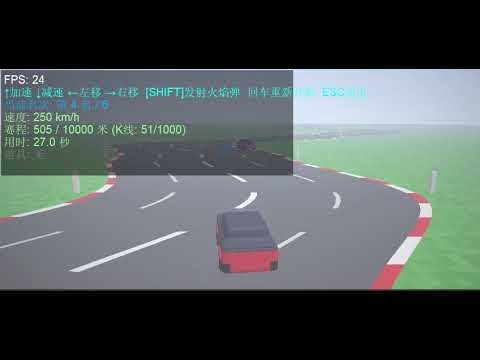
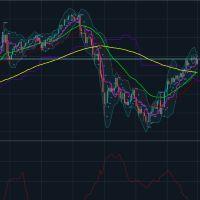
`Racing_Game_3D` is an innovative 3D racing game script running inside the MetaTrader 5 (MT5) platform. the game's core highlights include **generating highly winding 3D tracks from the real-time candlestick data (OHLC) of the current chart**, rendering with native DirectX 3D APIs, implementing interactive item boxes, and racing head-to-head against 5 CPU opponents.
---
## 🌟 Key Concepts & Features
1. **K-Line Driven 3D Winding Track**
* The script queries historical candlesticks from the active symbol (skipping the uncompleted newest bar).
* The body size of each candlestick (Close - Open) determines the lateral curve offset of that road segment. **The more volatile the market, the twistier and more challenging the race track becomes**.
* A built-in centering pull calculation creates dynamic slalom-style curves while preventing the track from drifting away infinitely.
2. **Native DirectX Rendering Engine**
* Operates via MetaTrader 5's internal `DXContext` interface, combined with a custom vertex shader (`Shaders/vertex.hlsl`) and pixel shader (`Shaders/pixel.hlsl`) for GPU-accelerated 3D projection.
* Feeds the pixel shader with a `PSInputBuffer` struct, conveying resolution, time, player coordinates, 5 AI competitor coordinates, local track curvature arrays, active item boxes, and flying projectiles.
3. **Power-Ups & Combat System**
* Item boxes are distributed every 30 meters along the road, containing three distinct abilities:
* 🟦 **Blue Box (Speed Boost)**: Grants nitro acceleration, significantly boosting top speed for 3.0 seconds.
* 🟥 **Red Box (Trap)**: Triggers a spin-out trap, slowing down the car to 2 km/h and disabling steering for 1.5 seconds.
* 🟨 **Yellow Box (Flame Shot)**: Awards a fireball. Press **[SHIFT]** to fire it forward.
* Fireballs follow the curved track lines. Colliding with a vehicle disables them for 1.5 seconds.
4. **Intelligent AI Competitors**
* Race against 5 computer-controlled CPU cars.
* AI vehicles possess different baseline speeds, shift lanes to dodge obstacles, seek blue speed boxes, and fire fireballs when they get close behind the player or other opponents.
5. **Realistic Physics & Visual Polish**
* **3D Yaw Angle**: Computes real-time tilt/yaw angle of the cars based on steering velocity, delivering immersive steering animations.
* **Wall Collisions & friction**: Staying outside the track boundaries (`ROAD_HALF_WIDTH` = 6.0m) slows down the vehicle. Colliding with other racers slows down the car and triggers push-back physics.
* **Translucent HUD Backdrop**: Ensures HUD texts are readable against bright skies or green grass fields.
---
## 🕹️ Controls Guide
* **↑**: Accelerate.
* **↓**: Decelerate / Reverse.
* **←** and **→**: Steer left and right.
* **SHIFT**: Launch Fireball (Requires holding a yellow fireball power-up).
* **Enter**: Reset/Restart the race.
* **ESC**: Exit the game and restore the default chart view.
---
## 🛠️ Code Architecture
1. **`rates[]` Copy & Track Construction**
* Copy candlestick data from index 1 using `CopyRates`.
* Calculates `rates[i].close - rates[i].open` to define curvature offsets and saves them into the global `RoadOffsets[]` array.
2. **`PSInputBuffer` Shader Buffer**
* Packs active render inputs (resolutions, absolute coordinates, AI vehicle vectors, 32 local road offsets, nearest box objects, projectile lists) and registers it to the pixel shader.
3. **`UpdateGame(double dt)` Physics Loop**
* Manages speeds, cooldowns, natural deceleration, and drag.
* Computes absolute 3D world coordinates for all cars.
* Interpolates road centers with `GetRoadXCPU(z)` to enforce boundaries.
* Runs projectile trajectories, hitboxes, and car-to-car collision logic.
* Defines win/loss triggers based on the finish line (`FinishLineDistance`).
4. **Frame Rendering (`DXDrawIndexed` + Bitmaps)**
* Flushes depth, increments shader timelines, and calls `DXDrawIndexed`.
* Exports framebuffers to the CPU `image[]` array via `DXContextGetColors`.
* Overlays HUD texts (race stats, speeds, timings, and item active durations) before updating the chart graphical object.
---
## ⚙️ Configuration Parameters
Adjust these inputs when launching the script:
* **InputKLineCount** (`Track Candlesticks`): Default `1000`. Sets the level's length.
* **CurveIntensity** (`Curvature Intensity`): Default `2.5`. Higher coefficients result in tighter and sharper corners.
* **SegmentLength** (`Segment Depth`): Default `10.0` meters. Represents the physical length of each candlestick segment in 3D space.
---
## 🚀 How to Run
1. Open MetaTrader 5.
2. Select your desired symbol and timeframe (e.g., GBPUSD, M15).
3. Browse the "Navigator" tree: **Scripts -> My_Scripts -> 3D动画 -> Racing_Game_3D**.
4. Double-click or drag `Racing_Game_3D` onto the chart.
5. Set parameters in the dialog window, then click "OK".
6. The trading chart will hide, and the race will start. Press **ESC** at any time to exit.
---