Multi Chart Synchronization OthersToFirstChart

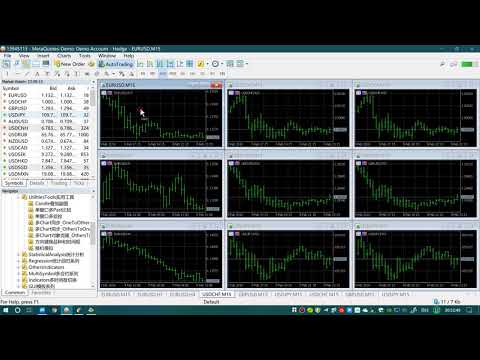
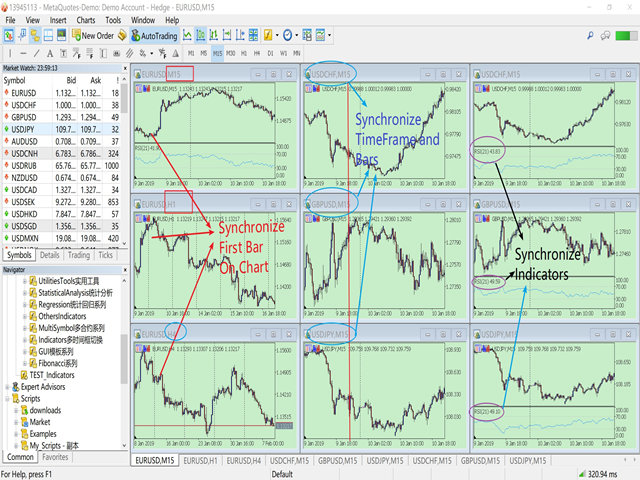
This product can be used to synchronize multiple Charts, and each Chart can be set to a different sync mode. With this product you can better view and manipulate charts: different time frames for a single Symbol, the same time frame for multiple Symbols, system indicators for single/multiple Symbols... and more.


Feature:

  • Chart settings can be synchronized, including : background, indentation, size, etc.
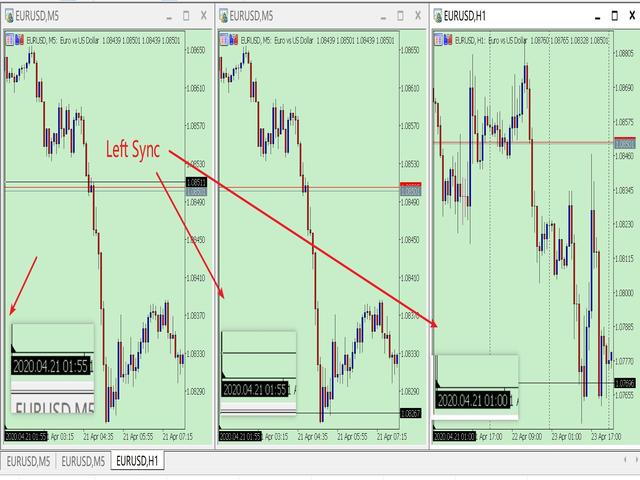
  • Multiple Chart window start times or end times can be synchronized.
  • Multiple Chart time frames can be synchronized.
  • Multiple Chart System Indicators can be synchronized.
  • Multiple Chart Custom Indicators can be synchronized.
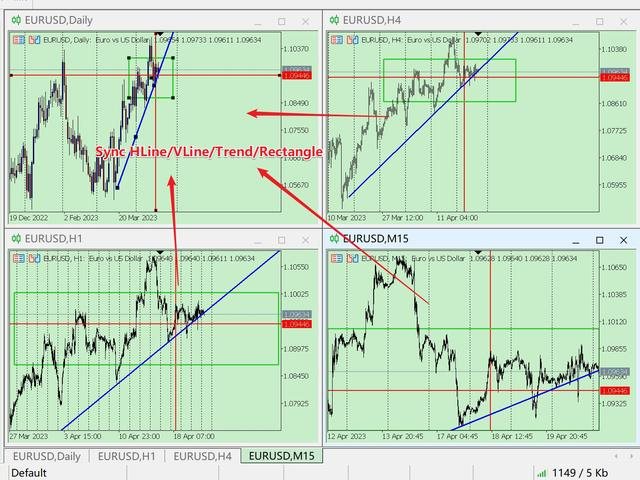
  • Multiple Chart HLine/VLine/Trend/Rectangle can be synchronized.
  • MT5 can only run one EA/Script for a Chart. This product is compiled in the form of Indicator and does not affect the superposition of other EAs/Scripts.
How To Use:
  • Your first open Chart is your operation Chart,  you need to load the program into other Charts,  please do not load this program into your operation Chart.
  • " Your first open Chart " means :  When your Chart is empty,  Your first open Symbol Chart. (Sometimes you open a lot of Symbol charts, and you dragged the Chart in the Chart List, which causes your leftmost chart is not your first.)
Parameter:
  • IsChartSynchronize=true;              // Whether to synchronize chart settings of Chart, including window start time.
  • IsTimeFrameSynchronize=true;     // Whether to synchronize the timeframe of the Chart
  • IsSysIndicatorsSynchronize=true;  // Whether to synchronize the system Indicators of Chart
  • IsCustomIndiSyn = false;               //Whether To Synchronize Custom Indicators.
  • SynRefreshMillisecond=100;          // Set the millisecond frequency of synchronization
  • IsLockShift=true;                          // Is Lock Chart Start_Times And ChartScale
    • ---true  : the default setting just like previous version. 
      ---false : after synchronize to the first chart, you can drag your other charts, and change ChartScale. If you operate the first chart again, Sync again. 
    • This feature makes synchronization flexible, You can also operate other charts while retaining the sync function. 

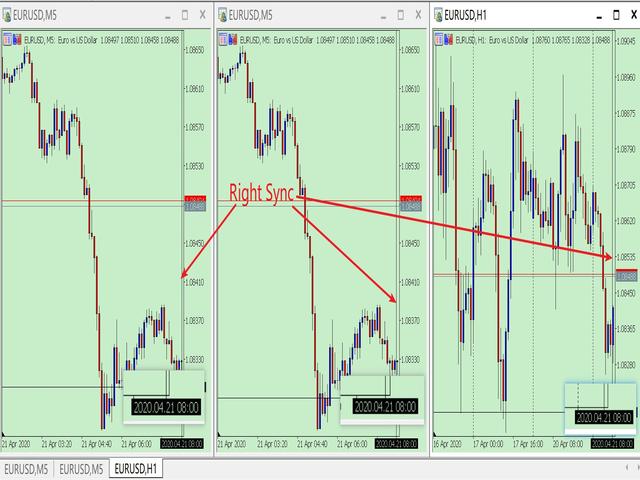
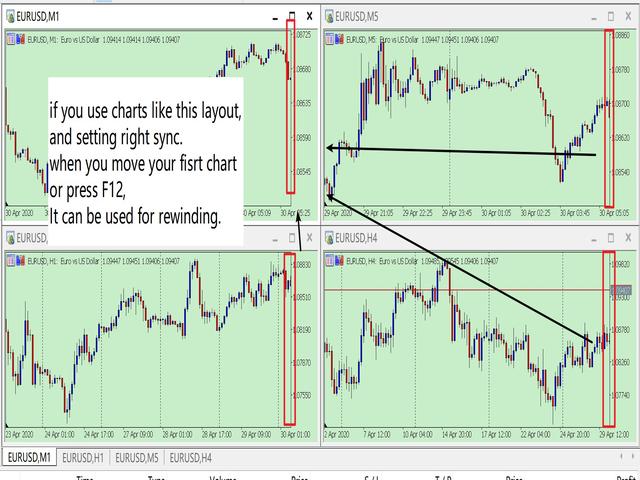
  • LeftSyn=true; //true: left synchronized / false: right synchronized
    • If you setting right sync, this function can be used for rewinding.
  • SynObject = false; // Whether to Syn HLine/VLine/Trend/Rectangle

Synchronize custom indicators should pay attention:
1. Custom indicators are based on the programming ability of the provider. 
2. Synchronization of custom indicators is identified by name. And ex5 file must be placed in the Indicators folder.
3. If you want to synchronize different parameters of the same custom indicator, the custom indicator must use the IndicatorSetString() code to set the indicator name with different parameters.
    for example: SMA(5), SMA(10) is different parameters with same indicator. But some code only named them SMA.
4. If the provider does not set the indicator name with parameters through IndicatorSetString(), custom indicators with the same name cannot be superimposed. However, it does not affect the synchronization once.


New Function:

Now add the function to synchronize HLine/VLine/Trend/Rectangle.  You can see the video link: https://youtu.be/A_3CWyrg3c0


Thanks for using my program.

PS: In my experience, sometimes the Symbol have no data, the MT5 will download the data from the server,  which will lead to slowness. I recommend you my another software,  it will help to download data to your system

https://www.mql5.com/en/market/product/35688


Рекомендуем также
Object Synchronizer MT5 : Лучше сосредоточиться/анализировать ценовой график на нескольких таймфреймах. Вам надоело сохранять и загружать шаблоны по много раз для одного и того же символа для нескольких таймфреймов? Вот альтернатива. С этим индикатором вы будете с удовольствием создавать объекты на нескольких графиках, изменять одинаковые объекты в любом графике, удалять одинаковые объекты с любого графика. Все объекты, которые вы создаете/изменяете всегда синхронизированы на всех окнах графиков
Скрипт показывает время в различных городах мира, выбранных пользователем (более 30 крупнейших городов). Также он показывате время GMT, серверное время и местное время. Список городов сортируется автоматически по времени. Настройки можно сохарнить на вкладке "Входные параметры" для использования при последующих запусках. Примечание: Переход на зимнее/летнее время в скрипте не учитывается.
Entry Orders Pro
Tran Nhat Minh
5 (1)
Pro Minimalist Trade Assistant : Focusing on Risk Management and Strict Trade Discipline for Each Trading Style The benefits of this Utility: 1.Intuitive Graphical Interface:  Take control with an excellent graphical dashboard featuring outstanding parameters for swift order execution. Enjoy a sleek and customizable interface with the option to switch between dark and light themes. 2.Support for Cultivating Trading Discipline Habits Adhering to your trading style is essential. Each Trading styl
Martingale panel MT5
Mohammadbagher Ramezan Akbari
In this article, we would like to introduce the trade panel product with the Martingale panel. This panel is made in such a way that it can meet the needs of traders to a great extent. This trade panel actually consists of two trade panels at the same time, with the first one you can take positions with certain profit and loss limits, and with the second one, you can have positions with profit limits but without loss limits. When positions lose, a new position will be added based on the settings
This EA is primarily used for scalping XAUUSD. Purpose Removes emotion from trade management   - automatically protects positions and takes profits so you don't have to make difficult decisions under pressure. What It Does ️   Auto Stop Loss Sets SL based on recent highs/lows + buffer No more manual placement stress   Auto Partial Profits Two modes: Fixed Movement : Close 50% after X price movement R-Ratio : Close 50% at 1.2R profit target Locks in gains while letting winners run. ️   One
Ping
Vagif Shabanov
Ping: Ваш незаменимый инструмент для надёжной торговли Ваш интернет-провайдер и VPS обещают стабильное соединение, но действительно ли вы можете им доверять? В мире, где каждая миллисекунда имеет значение, медленное или нестабильное соединение может обернуться упущенной прибылью или убытками. Ping позволяет вам:  * Принимать осознанные решения: Наглядно сравнивайте скорость разных VPS-серверов и брокеров, чтобы выбрать самое быстрое и надёжное соединение для вашей стратегии. * Исключить риски: О
Forex 4up MT5
Volodymyr Hrybachov
Хотите торговать и публиковать свои сигналы в телеграм канал? Тогда эта утилита именно для вас. - Торгует в вашем терминале - Публикует сделки в ваш телеграм канал Ваши клиенты будут рады: - от 5 сигналов ежедневно - красивое оформление сигналов Настройка Сервис -> Настройки -> Советники -> Разрешить WebRequest для следующих URL:  https://api.telegram.org В   Telegram   перейдите по адресу @BotFather и создайте бота Скопируйте Token бота, и введите его в параметрах советника Создайте свой кан
N-second K-line chart, customizable, monitoring multiple seconds of multiple symbols simultaneously, all Chinese parameters, easy to use -------------------------------------------------------------------------------------------------------------- You can ask me any questions in private messages https://www.mql5.com/en/users/chaoping0326 Customization of indicators and EA for MT4 and MT5 is available Long term programming project (MT4 from 2012, MT5 from 2016). Good programming skills, reasonabl
XP Trade Manager 1. Overview XP Trade Manager is a professional visual trading panel designed for manual traders on MetaTrader 5. It simplifies execution and provides advanced risk management tools like bulk closures, hedging, and position reversal directly from the chart. 2. Interface & Controls A. Trade Entry Section LOT: Trade volume input. Use the arrows to adjust by the Lot Box Step . TP / SL: Take Profit and Stop Loss inputs (in Points). SELL / BUY: Instant execution buttons. COMMENT: Cu
Trade Panel Pro is a powerful and easy-to-use trading utility designed for traders who need fast execution, accurate position sizing, and complete risk management directly from the chart. Whether you scalp on the 1-minute chart or swing trade on the 4H, Trade Panel Pro gives you the tools to manage trades with confidence and precision — all in one clean interface. Price will double after 5 purchases. Grab this offer Key Features Fast Trade Execution Open Buy/Sell positions instantly from the pan
[Regarding Investment Issues]  Question 1:  When market opportunities arise, most investors tend to place orders frantically. However, when placing orders in such a frantic manner, you have no way of knowing whether you will be liquidated. The only reference is the margin ratio, but the margin ratio cannot accurately determine whether you will be liquidated.  If the order quantity is large or the product order quantity is even larger, you cannot calculate the loss and profit. If there is a t
FREE
This utility tool draws the ticker symbol and timeframe information as a watermark in the background of the chart. It may come in handy if you have multiple charts on the screen at the same time. Inputs: Font Name:  You can change text font by typing in the name of your favorite font installed on your operating system. (e.g.: Verdana, Palatino Linotype, Roboto, etc...)   Font Color: You can choose your favorite from the available colors or type in a custom RGB color (values from 0 to 255, e.g.:
Buy Sell Multiple Panel - Execute Bulk Orders in a Single Click! Description: Save time and seize market opportunities instantly. This powerful panel allows you to place multiple buy or sell orders simultaneously, each with custom lot sizes, take-profit, and stop-loss levels. Perfect for sophisticated entry strategies and managing complex trades efficiently. Key Features: Bulk Order Execution: Open multiple market orders at once with just one click. Flexible Lot Sizing: Set individual lot size
Breakeven Bot
Gabriel Paul Ange Perrin
Optimize your trading management with Breakeven Bot, the essential tool for active traders managing multiple positions at once. No more wasting time manually adjusting your stops—one click is all it takes to secure your profits! Main Feature: ️ "BREAKEVEN" Button – Instantly set all profitable positions to breakeven and protect your gains quickly. ️ Customization Options: Set breakeven in pips or currency, depending on your preference. Choose whether breakeven should be at the entr
Close Positions Current Symbol Простой и надёжный скрипт для закрытия всех позиций по текущему символу. Он избавит вас от рутинной работы и сэкономит драгоценное время. Преимущества: Фокус только на текущем активе: Скрипт закрывает сделки только по выбранному символу, не затрагивая остальные позиции. Скорость и удобство: Всего один запуск, и все позиции закрыты за секунды. Идеально для любой стратегии: Подходит для тех, кто работает с несколькими позициями или сосредоточен на одном активе. Безоп
FREE
Ты сможешь: наблюдать график цены внутри графика другой цены оценивать корреляцию и взаимосвязи видеть разницу графиков в виде гистограммы Возможности: режим "Авто" - автоподстройка графика под другой график "умножитель" - можешь умножить график на любое число сдвиг вверх/вниз на произвольное значение сдвиг графика влево "инверт" - зеркальный переворот графика Важно: используются только графики, добавленные в MarketWatch Версия для MetaTrader 4 -  https://www.mql5.com/ru/market/product/43097
Close All Pro MT5 – Fast PnL Control is a powerful trade manager MT5 utility that gives you total control over your trades. With a single click, you can close all MT5 orders, monitor real-time profit and loss, and manage your floating PnL directly from a clean on-chart panel. The tool is lightweight, responsive, and built to help traders save time, reduce emotional stress, and maintain focus. Whether you trade manually or through an EA, this MT5 profit panel provides the visibility and precisio
JohnApollo
Jonathan Mboya Kinaro
JOHN EA - MANUAL TRADING ASSISTANT Professional Order Management and Risk Control Tool PRODUCT OVERVIEW JOHN EA is a manual trading assistant designed to help you efficiently manage multiple pending orders in MetaTrader 5. This is NOT an automated trading robot - you maintain complete control over all trading decisions while the EA provides advanced order management tools, risk management features, and monitoring capabilities. LICENSING & ACTIVATION Activation Policy: Your purchase includes
FREE
Time Line for MT5 機能: 昨日高値、安値、本日始値、高値、安値の時間から線を引きます。 時間足により表示する時間が変わります。 1分、5分足では1時間ごとの表示 15分、30分足では4時間ごとの表示 1時間、4時間は12時間ごとの表示 日足以降は時間は表示されません。 高値安値は週足より下位足で表示されます。 各ラベルを変更可能になります。 更新頻度を変更できるのでチャート表示が 重くなることはありません。 各パラメータの説明: Server_Time:6 サーバとの時間差を入力 Yesterday_High_Label:昨日高値 Yesterday_Low_Label:昨日安値 Show_Open:true 始値の線を表示するかどうか Today_Open_Label:本日始値 Today_High_Label:本日高値 Today_Low_Label:本日安値 max_bar:true 使用するバーを制限するかどうか Maxbars:1500 制限を使用した場合に1分では5日分 UpdateFrequency:60 更新頻度、ディフォルトは60秒ご
This tool will help you calculate position size based on the lines that you draw on the chart. It will automatically create the trading setup in the background and provide adaptive buttons for market and pending order confirmation. The design is very simple and straightforward, with just a single click you will be able to place the trading setup. Features Set your risk based on your predefined amount or percent of your account balance. Drag the lines to define the entry, take profit target and s
Kronos is a multi-timer that displays local time, server time and the countdown of the current period. The programme is multilingual, with a choice of English, Italian and Spanish Language selectables in input. Available in four colours and with the choise of five types of font to be used. Like any other programme we have created, the graphic interface is developed to be non-invasive and intuitive. At start-up, the three windows that make up the graphic interface of Kronos are closed on the left
Expert TP SL v04 - Профессиональный торговый помощник с ИИ-системой мотивации Продвинутый инструмент для ручной торговли с автоматическим управлением рисками, защитой от переторговли и интеллектуальной психологической поддержкой для дисциплинированной торговли. ОБЗОР ПРОДУКТА Expert TP SL v04 - это комплексный торговый помощник, разработанный для трейдеров, которые предпочитают ручную торговлю, но хотят сохранить эмоциональную дисциплину и автоматизировать расчет рисков. Это не просто инструм
Утилита для загрузки данных истории (Open, High, Low, Close, Volume) любого финансового инструмента, доступного в MetaTrader 5. Вы можете загружать данные нескольких символов и таймфреймов в один и тот же csv-файл. Кроме того, вы можете запланировать частоту загрузки (каждые 5 минут, 60 минут и т.д.). Для получения последних данных не нужно открывать множество графиков, утилита загружает данные напрямую. Файл CSV будет храниться в папке: \MQL5\Files . Принцип работы Выберите символ для загрузки
MARB Trader
Siyabonga Sandile Khanyile
This tool allows you to catch possible entries from the M.A.R.B indicator by entering the trades at a click of a button(use link for details on M.A.R.B * https://www.mql5.com/en/market/product/96635 *).M.A.R.B Trader shows a maximum of 4 different possible trades all with different Take profits and different Risk to Reward ratios and you can choose from one by clicking a button.M.A.R.B Trader also allows you to enter Buy stop,Sell stop and Market trades using buttons.
METATRADER5 This program is designed to monitor and evaluate the market performance of 21 minor currency pairs by tracking key metrics such as maximum spread and the time of occurrence. For each selected currency pair, the program calculates the current spread and compares it against the highest recorded spread. If a new maximum spread is detected, it updates the maximum value and logs the time. The spread information is  dynamically displayed, providing insights into market conditions. Additio
Introducing the utility "   VIRTUAL BREAKEVEN   !" "Current symbol" is the symbol of the chart on which the utility works. The utility keeps a count of all positions on the current symbol and ignores the "Magic number" of these positions. The utility works on the current symbol and tracks the Breakeven level in the deposit money. When the profit of all positions on the current symbol becomes >= «Breakeven» + «Breakeven Step» the utility will start tracking «       Breakeven       ". A common ex
TradingX Hotkeys
Johannes Stephanus Lombard
Inputs Available Lotsizes Partial Close % You can change lotsizes as you require On an open chart click once to select chart to be able to use hotkeys on specific chart. All Pairs can be used with this expert We created this expert to be able to still trade C300 with a 0.06 Lotsize If you enter a 0.6 lot and close 0.90% you can trade with 0.06 Lot Keys to be used: B -Buy S -Sell C -Close Profitable D -Breakeven (Note if stoploss is set it won't break even) P -Partial close X -Close all
“One-Click Flatten — Fast, Clean, Reliable”      Close all orders and positions in your account with a single click — no hassle, no fumbling through tabs.      Time-saving tool for traders needing instant exit from the market—especially during volatile moves or news events.      Emotion-free execution reduces human errors and hesitation—just click and it's done.      Easy to use: load the EA in MT5 and let it handle the rest. Perfect for both beginners and seasoned traders.      Fu
FREE
Trend Wave Analyzer Overview The Trend Wave Analyzer is a specialized MQL5 tool designed for MetaTrader 5 that identifies,analyzes,and visualizes price trend cycles in financial markets.It detects complete up/down/sideways price movements by identifying key turning points(peaks and troughs)in price action,providing traders with valuable insights into market behavior patterns. #Key Features -Multi-symbol Analysis:Analyze multiple trading instruments simultaneously -Trend Identification:Auto
## Features - Download historical rates via `CopyRates()` for many symbols and timeframes. - Works with Market Watch symbols or explicit symbol list. - Optional CSV export into the terminal `Files` folder (per symbol/timeframe). - Configurable retries, pause and exponential backoff. - Verbose logging and progress comments for convenience. ## Usage 1. Copy `AutoHistoryDownloader_mq5.mq5` into `MQL5/Scripts` or open in MetaEditor. 2. Attach / run the script from the Navigator (Scripts). 3. Confi
С этим продуктом покупают
Trade Assistant MT5
Evgeniy Kravchenko
4.42 (204)
Помогает рассчитать риск на сделку, простая установка нового ордера с помощью линий, управление ордерами с функциями частичного закрытия, 7 типов трейлинг-стопа и другие полезные функции. Дополнительные материалы и инструкции Инструкция по установке - Инструкция к приложению - Пробная версия приложения для демо счета Функция Линии   - отображает на графике линию открытия, стоп-лосс, тейк-профит. С помощью этой функции легко установить новый ордер и увидеть его дополнительные характеристики пе
Добро пожаловать в Trade Manager EA — лучший инструмент для управления рисками, предназначенный для упрощения, точности и эффективности торговли. Это не просто инструмент для размещения ордеров; это комплексное решение для удобного планирования торгов, управления позициями и усиленного контроля над рисками. Независимо от того, начинающий вы трейдер, опытный специалист или скальпер, нуждающийся в быстром исполнении, Trade Manager EA адаптируется к вашим потребностям и работает с любыми активами:
Local Trade Copier EA MT5
Juvenille Emperor Limited
4.96 (116)
Опыт экстремально быстрого копирования сделок с помощью Local Trade Copier EA MT5 . Благодаря простой установке в течение 1 минуты этот копировщик сделок позволяет вам копировать сделки между несколькими терминалами MetaTrader на одном компьютере с Windows или на Windows VPS с крайне быстрыми скоростями копирования менее 0.5 секунды. Независимо от того, новичок вы или профессиональный трейдер, Local Trade Copier EA MT5 предлагает широкий спектр опций, чтобы настроить его под ваши конкретные по
TradePanel MT5
Alfiya Fazylova
4.86 (143)
Trade Panel — это многофункциональный торговый помощник. Приложение содержит более 50 торговых функций для ручной торговли и позволяет автоматизировать большинство торговых операций. Внимание приложение не работает в тестере стратегий. Перед покупкой вы можете протестировать демоверсию на демо-счете. Демоверсия здесь . Полная инструкция здесь . Торговля. Позволяет совершать торговые операции в один клик: Открыть отложенные ордера и позиции с автоматическим расчетом риска. Открыть несколько ордер
Trade Dashboard MT5
Fatemeh Ameri
4.96 (103)
Tired of complex order placement and manual calculations? Trade Dashboard is your solution. With its user-friendly interface, placing orders becomes effortless, by a single click, you can open trades, set stop loss and take profit levels, manage trade lot size, and calculate risk to reward ratios, allowing you to only focus on your strategy. Say goodbye to manual calculations and streamline your trading experience with Trade Dashboard. Download  Demo Version  right now. You can find  Details of
Ultimate Extractor - Professional Trading Analytics for MT5 Ultimate Extractor transforms your MetaTrader 5 trading history into actionable insights with comprehensive analytics, interactive charts, and real-time performance tracking. What It Does Automatically analyzes your MT5 trading history across all Expert Advisors and generates detailed HTML reports with interactive visualizations. Tracks live performance metrics including open positions, floating P/L, and drawdown in real-time. Supports
Бета-версия Telegram to MT5 Signal Trader почти готов к официальному альфа-релизу. Некоторые функции все еще находятся в разработке, и вы можете столкнуться с небольшими ошибками. Если вы заметите проблемы, пожалуйста, сообщите о них, ваша обратная связь помогает улучшать программное обеспечение для всех. Цена увеличится после 20 продаж. Оставшиеся копии по $90:   2/20 . Telegram to MT5 Signal Trader — мощный инструмент, который автоматически копирует торговые сигналы из каналов и групп Telegr
Smart Stop Scanner – многоактивный интеллектуальный сканер стоп-лоссов Общее описание Smart Stop Scanner предоставляет профессиональный контроль стоп-лоссов на любом рынке. Он анализирует рыночную структуру, определяет значимые пробои и формирует ключевые защитные уровни по Forex, Золоту, Индексам, Металлам, Криптовалютам и другим инструментам. Все данные отображаются в одном чистом, информативном и DPI-адаптивном панели для максимальной ясности и скорости принятия решений. Как определяется с
Copy Cat More Trade Copier MT5 (Копи-Кот MT5) — это локальный торговый копировщик и полная система управления рисками и исполнения, разработанная для современных торговых задач. От испытаний проп-фирм до управления личным портфелем, он адаптируется к любой ситуации с сочетанием надежного исполнения, защиты капитала, гибкой настройки и продвинутой обработки сделок. Копировщик работает как в режиме Мастер (отправитель), так и в режиме Слейв (получатель), с синхронизацией в реальном времени рыночны
Smart Stop Manager – автоматизированное управление стоп-лоссами с профессиональной точностью Обзор Smart Stop Manager — это исполнительный модуль линейки Smart Stop, созданный для трейдеров, которым требуется структурированное, надежное и полностью автоматизированное управление стоп-лоссами по нескольким открытым позициям одновременно. Панель непрерывно отслеживает активные сделки, рассчитывает оптимальный уровень стоп-лосса на основе рыночной структуры Smart Stop и автоматически обновляет сто
Trade Manager DashPlus
Henry Lyubomir Wallace
5 (11)
DashPlus – это продвинутое средство для управления торговлей, разработанное для повышения эффективности и результативности торговли на платформе MetaTrader 5. Оно предлагает широкий набор функций, включая расчет рисков, управление ордерами, продвинутые системы сеток, инструменты на основе графиков и аналитику производительности. Основные функции Восстановительная Сетка Внедряет систему усреднения и гибкую сетку для управления сделками в неблагоприятных рыночных условиях. Позволяет стратегически
MT5 to Telegram Signal Provider — это простой в использовании полностью настраиваемый инструмент, который позволяет отправлять определённые сигналы в чат, канал или группу Telegram, превращая вашу учётную запись в провайдера сигналов . В отличие от большинства конкурирующих продуктов, он не использует импорт DLL. [ Демо ]   [ Руководство ] [ Версия MT4 ] [ Версия для Discord ] [ Канал в Telegram ]  New: [ Telegram To MT5 ] Настройка Доступно пошаговое руководство пользователя . Никаких знаний A
Grid Manual MT5
Alfiya Fazylova
4.9 (20)
Grid Manual — это торговая панель для работы с сеточными стратегиями. Утилита универсальная, имеет гибкие настройки и понятный интерфейс. Работает с сеткой ордеров не только в сторону усреднения убытков, но и в сторону наращивания прибыли. Трейдеру не нужно создавать и сопровождать сетку ордеров, это сделает утилита. Достаточно открыть ордер и Grid manual автоматически создаст ему сетку ордеров и будет сопровождать его до самого закрытия. Полная инструкция и демо-версия здесь . Основные особенно
Seconds Chart MT5
Boris Sedov
4.59 (17)
Seconds Chart — уникальный инструмент для создания секундных графиков в MetaTrader 5 . С помощью Seconds Chart вы можете построить график с таймфреймом, заданным в секундах, получая идеальную гибкость и точность анализа, недоступную на стандартных минутных или часовых графиках. Например, таймфрейм S15 обозначает график со свечами продолжительностью 15 секунд. Вы можете использовать любые индикаторы и советники с поддержкой пользовательских символов. Работать с ними так же удобно, как и на станда
HINN MAGIC ENTRY - лучший инструмент для входа и менеджмента позиций! Выставляет ордера через выбор уровня на графике! Основные функции: - Рыночные, лимитные и отложенные ордера -  Автоматический подсчет лоттажа  -  Автоматический учет спреда и комиссий -  Неограниченное количество промежуточных тейков для позиций - Перевод в безубыток и трейлинг стоп-лосса - Интуитивно понятный,  адаптивный, настраиваемый интерфейс - Визуализация сессий и сильных алгоритмических уровней - Любые активы и тип
Exp COPYLOT CLIENT for MT5
Vladislav Andruschenko
3.82 (34)
Trade copier for MT5 - копировщик позиций/СДЕЛОК/ордеров для МetaТrader 5  из МТ4/МТ5) Для копирования на терминал MetaTrader 5 между терминалами МТ5 - МТ5, МТ4 - МТ5  для версии COPYLOT MT5 ( или МТ4 - МТ4 МТ5 - МТ4 для версии COPYLOT MT4). Версия МT4 Полное описание +DEMO +PDF Как купить Как установить    Как получить файлы журналов   Как тестировать и оптимизировать    Все продукты от Expforex Вы также можете копировать сделки в терминал МТ4 (МТ4 - МТ4, МТ5 - МТ4):    COPYLOT CLIENT for M
Trade Manager DaneTrades
Levi Dane Benjamin
4.33 (27)
Trade Manager, который поможет вам быстро входить и выходить из сделок, автоматически рассчитывая риск. Включает функции, которые помогут предотвратить чрезмерную торговлю, торговлю из мести и эмоциональную торговлю. Сделками можно управлять автоматически, а показатели эффективности счета можно визуализировать в виде графика. Эти функции делают эту панель идеальной для всех трейдеров, занимающихся ручной торговлей, и помогают улучшить платформу MetaTrader 5. Многоязычная поддержка. Версия для МТ
EasyInsight AIO MT5
Alain Verleyen
4.91 (11)
EASY Insight AIO – Всё-в-одном для умного и простого трейдинга Обзор Представьте, что вы можете просканировать весь рынок — Форекс, золото, криптовалюты, индексы и даже акции — всего за несколько секунд, без ручного просмотра графиков, сложной установки или настройки индикаторов. EASY Insight AIO — это ваш идеальный инструмент экспорта для трейдинга с поддержкой искусственного интеллекта. Он предоставляет полный снимок рынка в одном аккуратном CSV-файле — готовом к мгновенному анализу в ChatGP
Cerberus Equity Watcher
Samuel Bandi Roccatello
5 (3)
Cerberus the Equity Watcher — это инструмент управления рисками, который постоянно отслеживает средства на вашем счете и позволяет избежать крупных просадок, вызванных неисправными советниками или вашим эмоциональным поведением, если вы являетесь дискреционным трейдером. Это чрезвычайно полезно для систематических трейдеров, которые полагаются на советники, которые могут содержать ошибки или могут плохо работать в неожиданных рыночных условиях. Cerberus позволяет вам установить минимальное значе
Торговая панель для торговли в один клик.  Работа с позициями и ордерами!  Торговля с  графика  или  клавиатуры  . Используя нашу торговую панель, вы можете торговать в один клик с графика и совершать торговые операции в 30 раз быстрее, чем стандартное управление MetaTrader. Автоматические расчеты параметров и функций, которые облегчают жизнь трейдеру и помогают трейдеру вести торговую деятельность намного быстрее и удобнее. Графические подсказки и полная информация о торговых сделках на графике
Telegram to MT5: Идеальное решение для копирования сигналов Упростите свою торговлю с Telegram to MT5 — современным инструментом, который копирует торговые сигналы прямо из каналов и чатов Telegram на вашу платформу MetaTrader 5, без необходимости использования DLL. Это мощное решение обеспечивает точное исполнение сигналов, широкие возможности настройки, экономит время и повышает вашу эффективность. [ Instructions and DEMO ] Ключевые возможности Прямая интеграция с Telegram API Аутентификация ч
Trade Assistant 38 in 1
Makarii Gubaydullin
4.91 (22)
Многофункциональный торговый помощник для MT5 Более 66 профессиональных функций для умной, быстрой и точной торговли — всё в одном инструменте. Этот продвинутый торговый ассистент объединяет управление рисками, автоматизацию ордеров, технический анализ и контроль портфеля в одном мощном и интуитивно понятном интерфейсе. Он помогает трейдерам сократить рутину, минимизировать ошибки и принимать более уверенные решения. Почему трейдеры выбирают этот инструмент Открывайте, управляйте и закрывайте сд
Zentral Trading Manager
Ray Zeanrik Parreno Fredeluces
5 (4)
Zentral Trading Manager Your Command Center for Precision Trading — Now Stronger than Ever Take control of your trades like never before. Zentral Trading Manager is your all-in-one manual trading panel for MetaTrader 5 — built for scalpers, day traders, and serious strategy execution. Fully compatible with both Mac and Windows laptops. High-DPI safe. No more layout issues. Key Features (Latest 2025 Update): • One-Click Close – Instantly close Buy/Sell, winning/losing trades, or even half positi
Копир->Удобное и быстрое взаимодействие с интерфейсом, пользователи могут использовать его сразу       ->>>> Рекомендуется использовать на компьютерах Windows или VPS Windows Функции: Разнообразные и персонализированные настройки копирования сделок: 1. Различные режимы лота могут быть установлены для различных источников сигналов. 2. Различные источники сигналов могут быть установлены для прямого и обратного копирования сделок. 3. Сигналы могут быть установлены с комментариями. 4. Следует ли ка
MT5 To Tradovate
Laurent Xavier Richer
MT5 → Tradovate Bridge (Prop-Firm Ready) Mirror your MT5 trades into Tradovate in real time—perfect for running your favorite indices/gold EA on MT5 while meeting the rules of top prop firms like Apex , etc. What it does Live mirroring: Replicates MT5 market executions (open/close) to Tradovate as market orders. Symbol routing:  Map your chart (e.g., US100/USTEC) to the right futures contract (MNQ/NQ/MES/ES/…); roll-aware (quarterly/monthly). Position cap: Limit how many MT5 positions are mirro
The product will copy all telegram signal to MT5 ( which you are member) , also it can work as remote copier.  Easy to set up, copy order instant, can work with almost signal formats, image signal,  s upport to translate other language to English Work with all type of channel or group, even channel have "Restrict Saving Content", work with  multi channel, multi MT5 Work as remote copier: with signal have ticket number, it will copy exactly via ticket number. Support to backtest signal. How to s
Советник Auto Trade Copier предназначен для копирования сделок на нескольких счетах/терминалах MetaTrader 4/MetaTrader 5 со 100% точностью. С помощью этого инструмента вы можете выступать как в роли поставщика (источник), так и получателя (назначение). Все торговые действия будут скопированы от поставщика к получателю без задержки. Ссылки: Если копирование производится через Интернет, посмотрите продукт Trade Copier Pro MT5 по ссылке: https://www.mql5.com/ru/market/product/5531 Если копирование
Custom Alerts AIO: Универсальный сканер рынка — Без настройки Обзор Custom Alerts AIO — это самый быстрый и простой способ отслеживать рыночные сигналы в реальном времени на множестве инструментов без дополнительной настройки и без необходимости покупать другие продукты. В состав входят все необходимые индикаторы от Stein Investments, что делает этот инструмент идеальным решением «всё в одном» для трейдеров, ценящих простоту и эффективность. Просто установите на график и сразу получайте сигнал
EasyTrade MT5
Alain Verleyen
5 (2)
Easy Trade – Умное, простое и мощное управление сделками Easy Trade — это универсальное решение для управления сделками в MetaTrader для тех, кто хочет держать риск под контролем и обеспечить максимально плавное исполнение ордеров. Созданный с нуля на основе обратной связи от трейдеров, Easy Trade позволяет легко открывать, отслеживать и управлять сделками по множеству символов — без лишней сложности. Независимо от того, скальпируете ли вы вручную или управляете несколькими позициями, Easy Tra
*** Entry In The Zone и SMC Multi Timeframe — это инструмент для анализа рынка в реальном времени, разработанный на основе концепций Smart Money Concepts (SMC). Он создан для того, чтобы помочь трейдерам системно анализировать рыночную структуру и получать более ясное представление об общем направлении рынка. Система автоматически анализирует точки разворота, ключевые зоны и рыночную структуру на нескольких таймфреймах, отображая точки интереса (POI), сигналы без перерисовки и автоматические уро
Другие продукты этого автора
This product can be used to synchronize multiple Charts, and each Chart can be set to a different sync mode. With this product you can better view and manipulate charts: different time frames for a single Symbol, the same time frame for multiple Symbols... and more. PS: The link below is the FreeDemo product, you can use it on EURUSD/XUAUSD/USDCNH symbol: https://www.mql5.com/en/market/product/38557 Feature: Chart settings  can be synchronized, including : background, indentation, size, etc. M
Do you think it's a bit cumbersome when you need to switch symbols or timeframes with mouse click? 1. What is this? This is a program that can switch symbols and timeframes with direction keys. Fast switching, very convenient, no mouse click required. For traders, one symbol with multi-timeframe charts are usually added,  you can change symbol on those charts easily. For multi-currency traders, different symbol charts are usually added, you can also change those timeframes easily. I wrote this p
1. What is this         Rising volatility and falling volatility are not the same, whether it is academic research or actual testing has shown this point.         The original ATR indicator is calculated by putting up and down fluctuations together. This indicator is to calculate separately the upward volatility and the downward volatility, which can better help you study the market. 2. Indicator description          There are two modes for the calculation of this indicator, as shown in the fo
Have you ever take a long time to watch a Symbol when the network link is not good ? Have you ever wait for a long time when you switch chart between different Symbols or different TimeFrames ? If you do long-term backtesting , Have you ever to be downloaded datas for a long time ? Yes, If there is no data in the system, those will happen.  1. What is this: Download all the Symbol data in Market Watch to the system. PS: This is not outputting data to Files. This Link go to Demo version: https:/

I see that many tools in the market deal with Position and Order in the form of operation panels. Which is loaded into a Chart in the form of an EA. However, once the operator panel EA is loaded, no other EAs can be loaded. So, I wrote the one-click operation of Position and Order as a script, so you can load other EAs and easily complete one-click operation of Trade. 1. What is this: This is a one-click script to close position order. Now you can close position tickets at high speed, for examp
I see that many tools in the market deal with Position and Order in the form of operation panels. Which is loaded into a Chart in the form of an EA. However, once the operator panel EA is loaded, no other EAs can be loaded. So, I wrote the one-click operation of Position and Order as a script, so you can load other EAs and easily complete one-click operation of Trade. 1. What is this: This is a one-click script to delete the pending order . Now you can delete pending tickets at high speed, for
Do you think it's a bit cumbersome when you need to switch symbols or timeframes with mouse click? 1. What is this? This is a program that can switch symbols and timeframes with direction keys. Fast switching, very convenient, no mouse click required. For traders, one symbol with multi-timeframe charts are usually added,  you can change symbol on those charts  easily . For multi-currency traders, different symbol charts are usually added, you can also change those timeframes easily. I wrote thi
According to trading experience: Some symbols are easy to reverse on certain days, such as Monday, or afternoon, and so on. So comparing the current price with the corresponding historical moment price is valuable. If the price coordinate system uses a logarithmic price, you will get a lot of valuable information. 1. What is this? This program can convert the symbol price and add it to your Chart. You can compare it with your major chart. The DEMO version Link: https://www.mql5.com/en/market/pr
What is this: Violent trading: means sending a large number of orders to your brokerage server,  it can conduct a stress test of the trading. In this program you can run a variety of trading tests.  Now you can trade at high speed, For example 1000 orders in an instant. The Demo version's link:  https://www.mql5.com/en/market/product/38431/ Why to use: Whether manual trading or EA trading,  the status of the broker server is very important. So it is beneficial to conduct a trading stress test on
1. Why did I develop this series of indicators I found that most traders need to use multiple time frame indicators. They usually switch time frame to see indicators. However, once the timeframe is switched, you cannot see the  corresponding relationship  between  the price in the smaller timeframe  and  the indicator in the larger timeframe . For example: if your price chart is in H1 timeframe, you can see H4, D1 and W1 indicators in H1 timeframe Chart. This is more helpful for you to find th
Фильтр:
globalkoinaka
31
globalkoinaka 2020.05.01 02:41 
 

Пользователь не оставил комментарий к оценке

[Удален] 2019.02.10 02:53 
 

Пользователь не оставил комментарий к оценке

Ответ на отзыв