
NASDAQ dominator
- Experts
- Versão: 1.0
- Ativações: 10

An advanced Expert Advisor powered by artificial intelligence and machine learning, specifically designed for analyzing NASDAQ 100 ( US100). It adapts to price movements and market fluctuations to detect potential trading opportunities.
Contact me if you need the settings file, have any questions, or need any assistance.
Artificial Intelligence Integration:
At the heart of this EA lies a sophisticated AI engine capable of recognizing complex patterns in NASDAQ price data. The system continuously processes historical and live US100 price feeds to identify potential entry and exit points with a calculated, data-driven approach.
Adaptive Strategy:
Unlike static rule-based systems, this EA evolves with the market. It uses a flexible decision-making framework that adjusts to NASDAQ’s unique volatility, trend strength, and market behavior.
Settings and Features :
News :
- News Enable : Enables or disables the news filter. When enabled, the EA avoids trading during high-impact news periods.
- News Importance : Selects the minimum news impact level (Low / Medium / High) that the EA will react to.
- News Minutes Before : Number of minutes before a news event during which the EA will stop opening new trades.
- News Minutes After : Number of minutes after a news event during which the EA will continue to block new trades to avoid volatility.
Risk Management :
- Risk (lot) : Defines the base risk value used for position sizing, depending on the selected risk mode.
- Risk Mode : Determines how trade volume is calculated :
- Default : Uses the EA’s internal lot calculation.
- Fixed Volume: Trades with a fixed lot size.
- Min Amount: Uses the minimum allowed lot size.
- % of Equity: Risk is calculated as a percentage of account equity.
- % of Balance: Risk is calculated as a percentage of account balance.
- % of Free Margin: Risk is based on available free margin.
- % of Credit: Risk is calculated based on account credit.
- Trailing Stop : Enables or disables the trailing stop feature.
- Trailing Stop Level (%) : Percentage level at which the trailing stop follows price to lock in profits .
- Equity Drawdown Limit (%) : Maximum allowed equity drawdown. When reached, the EA stops opening new trades to protect the account (Set to 0 to disable).
Closing the position :
- SL Type : Defines how the Stop Loss is calculated:
- Swing: Stop Loss is placed based on recent swing highs/lows.
- Average Range : Stop Loss is based on the average price range.
- Max Range : Stop Loss is based on the maximum recent price range.
- Fixed Points : Stop Loss is set at a fixed number of points.
- SL Deviation (Points) : Sets the Stop Loss distance in points or adjusts its calculation depending on the selected SL type.
- TP Coefficient for SL : Take Profit is calculated as a multiple of the Stop Loss distance (Example: 1.0 = TP equals SL, 2.0 = TP is twice the SL).
Customizable Execution Times:
- You have the flexibility to set specific trading days and time windows as you see fit
This EA’s closing system combines flexibility (different SL/TP methods), protection (risk control & drawdown limits), and dynamic adaptability (trailing stop, news filter), making it suitable for scalpers, swing traders.
How to Use :
- Attach the EA to a NASDAQ 100 (US100) chart.
- Choose your preferred risk management settings and lot sizing.
- Select whether to enable the news filter or no.
- Test different configurations on a demo account to find the setup that matches your style.
- You can specify for each day of the week whether you want the expert to operate or not.
- This feature allows you to define the trading sessions during which the expert will run — meaning you can set a specific start time, followed by the number of hours you want it to trade. You can also choose whether to have two sessions by activating the “Use Two Sessions” option.
- As for the multiple trades feature, it has been enhanced so that you can specify the maximum number of trades of a particular type the expert can open. For example, you can set a maximum of 4 buy trades and 2 sell trades — you can adjust these numbers as you wish

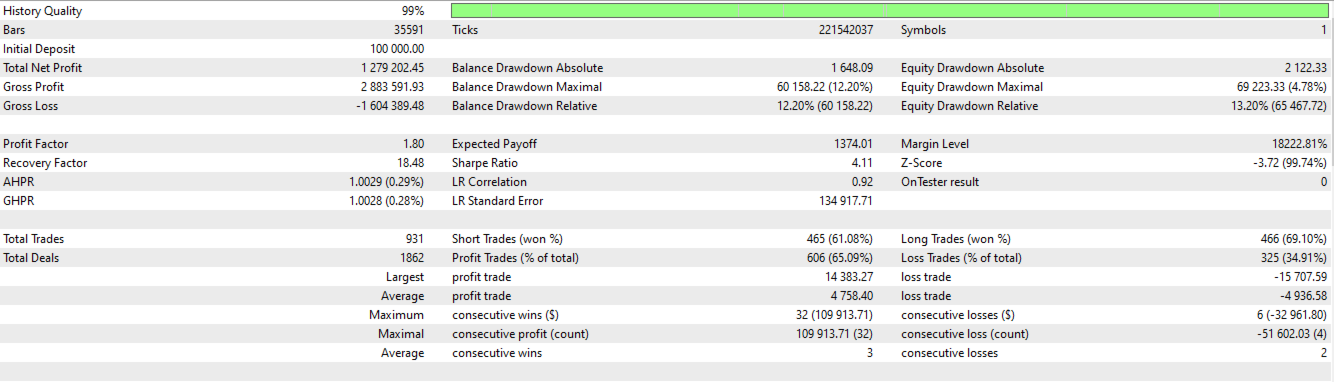








































The support from the author has been excellent. I will evaluate the results again after trading in live for a while; so far, the results are very good.