Pending Order Grid EA MT5

The Pending Order Grid is a multi-symbol multi-timeframe Expert Advisor that enables multi-strategy implementation based on pending order grids. 

General Description 

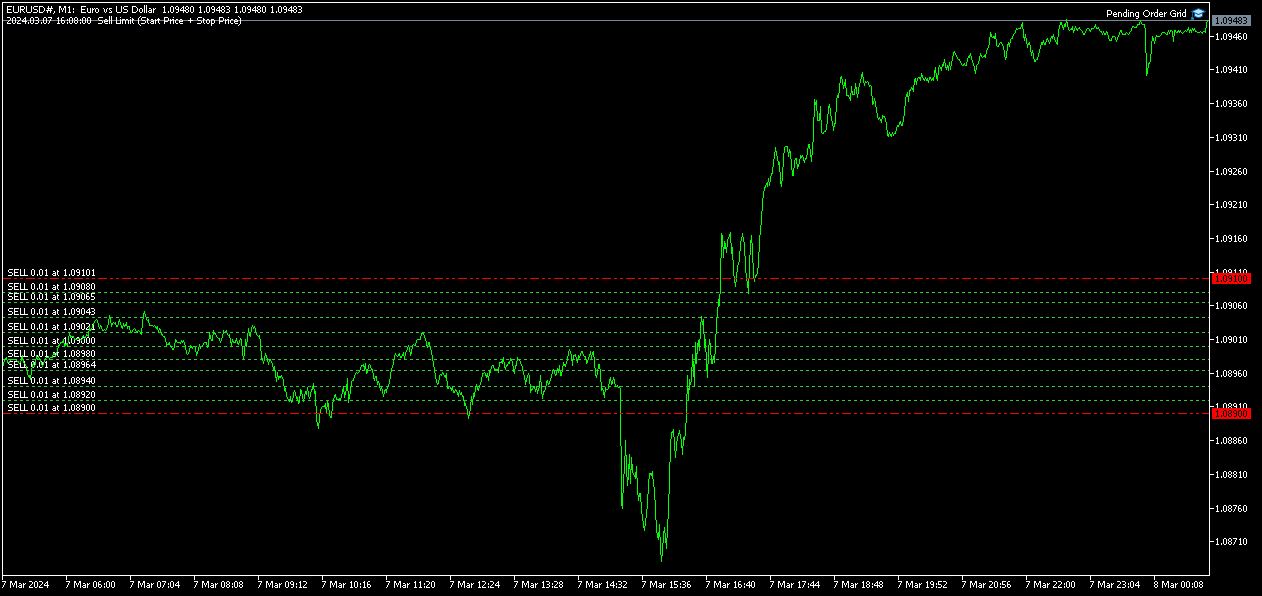
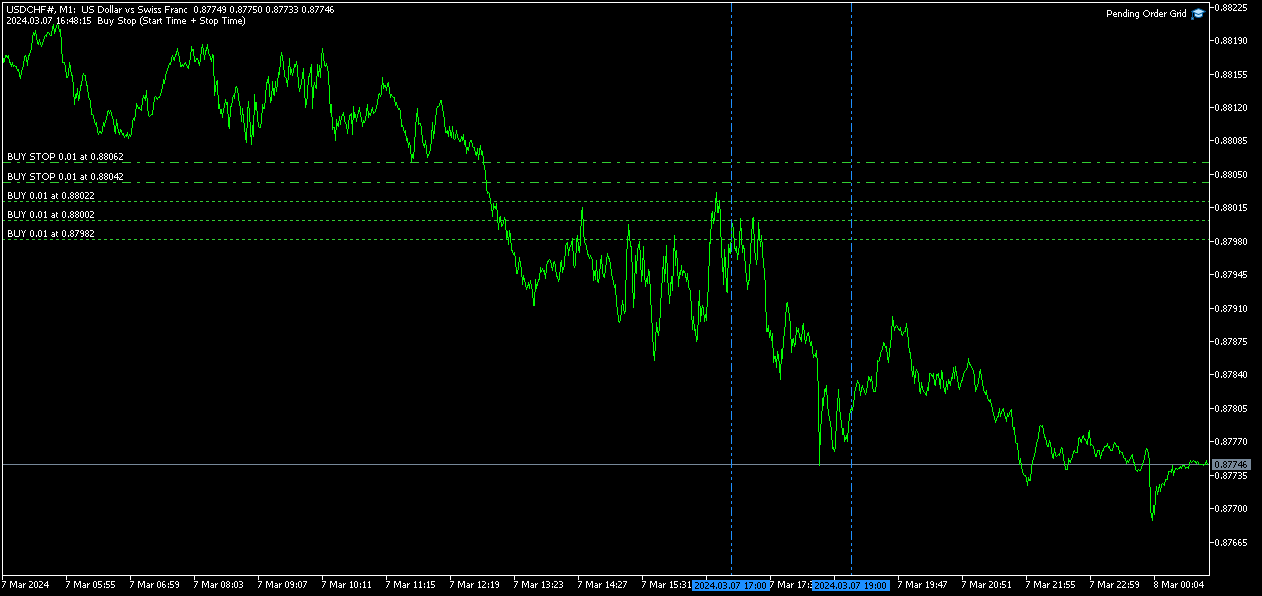
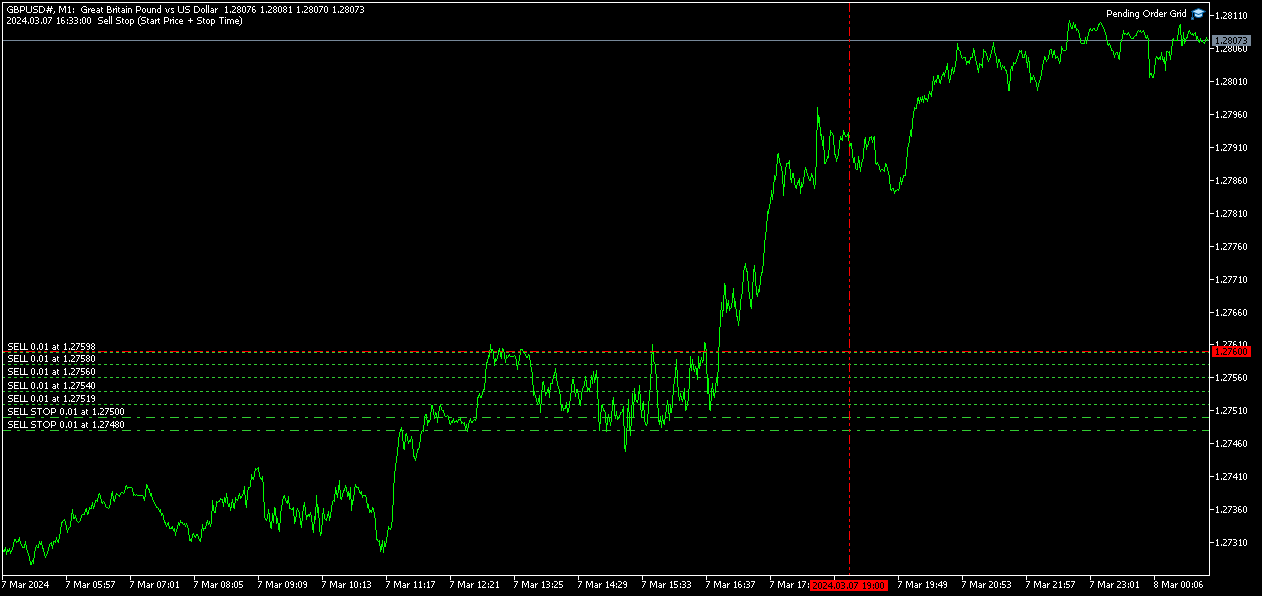
The Pending Order Grid allows the performing of a user-defined strategy through the creation of pending order grids. The Expert Advisor places pending orders of a given type (Buy Limit, Sell Limit, Buy Stop, or Sell Stop) at equidistant price levels to form each grid. The user might set up different grids to exist simultaneously – it's only needed to attach the EA on multiple chart windows of the intended symbol(s). 

The start and stop of a grid might be chosen between two modes: price or time. Depending on the selected modes, the trading robot only starts placing pending orders when the current price is "near" the first target price (Start Price) or the Start Time is reached and stops placing when the last target price exceeds the Stop Price or the Stop Time is reached, where Start Price, Start Time, Stop Price and Stop Time are input parameters. 

A pending order placing is regulated by a price interval, whose limits are at the Stop Level and Stop Level + Extra Level distances from the order’s target price, where Extra Level is an input parameter. Every time new quotes are available, and the symbol's price is at this interval, the pending order is placed. The target price of the next order is simply given by the previous one added (Sell Limit or Buy Stop) or subtracted (Buy Limit or Sell Stop) with the Price Level input parameter. 

An exception to the previous procedure is when the grid’s first pending order is triggered by the Start Time. In this case, the trading robot tries immediately placing the order at the Stop Level distance. In case of rejection by the trade server, it will add 1 pip to the previous distance and try again for the order placing. This procedure will be repeated until the Stop Level + Extra Level distance is reached. 

The maximum number of simultaneous pending orders placed by the EA is given by the expression: 

  • Ceil ( (Stop Level + Extra Level) / Price Level ), for Price Level > 0, 

where Ceil represents the usual maths function. The expression may take the following values: 

  • 1 for Price Level ≥ Stop Level + Extra Level, 
  • 2 for (Stop Level + Extra Level)/2 ≤ Price Level < Stop Level + Extra Level, 
  • 3/more for Price Level < (Stop Level + Extra Level)/2. 

    Risk Management 

    The volume used to place a pending order is chosen between a fixed and a variable lot size, available through the Volume and Free Margin % input parameters, respectively. If there isn't enough money in the account for the chosen volume, a request for placing the order is still sent to the trade server. The purpose is to allow the corresponding position opening if the free margin increases enough until the target price is reached. This increase could be due to an account deposit or position profit between the placing and triggering of the pending order. 

    Input Parameters 

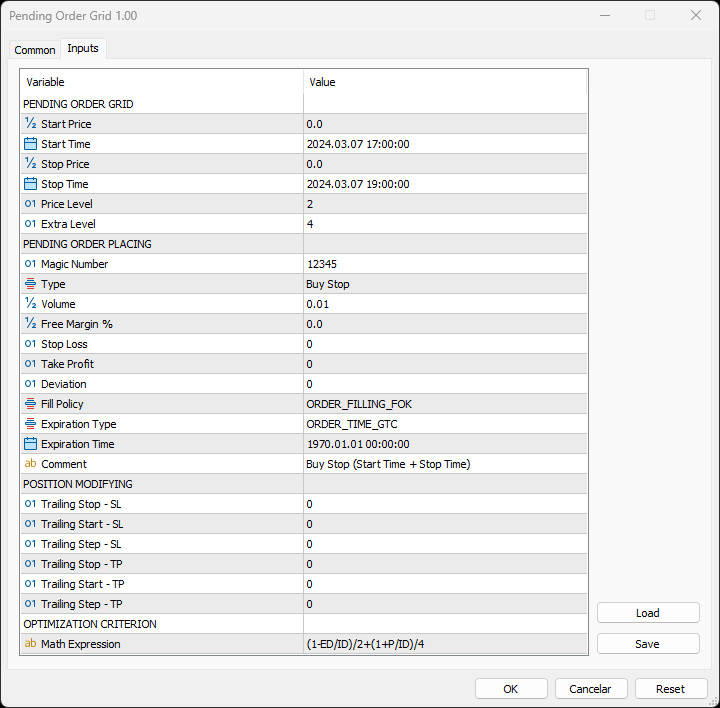
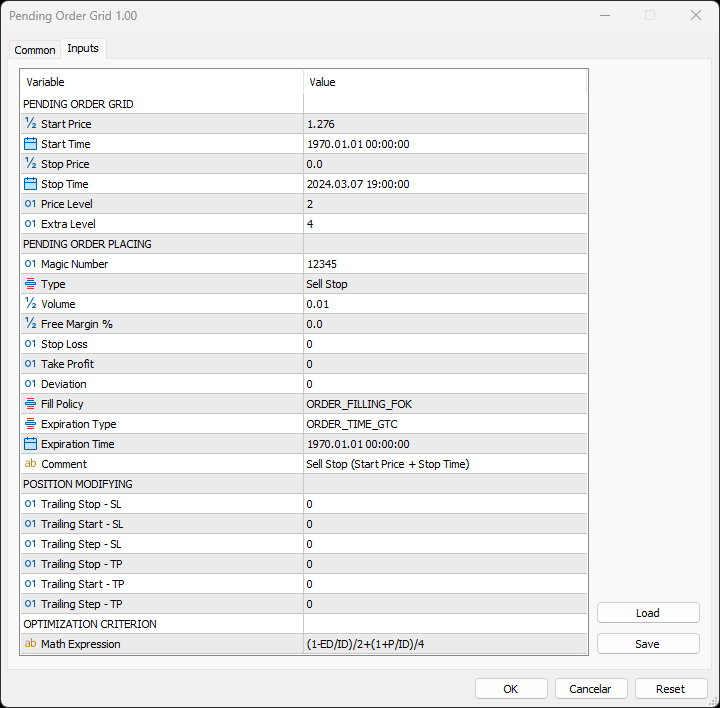
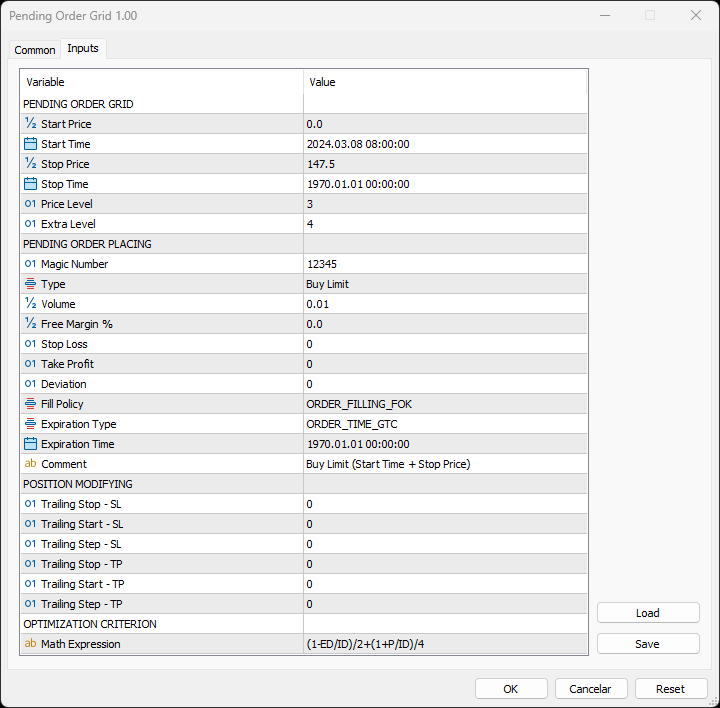
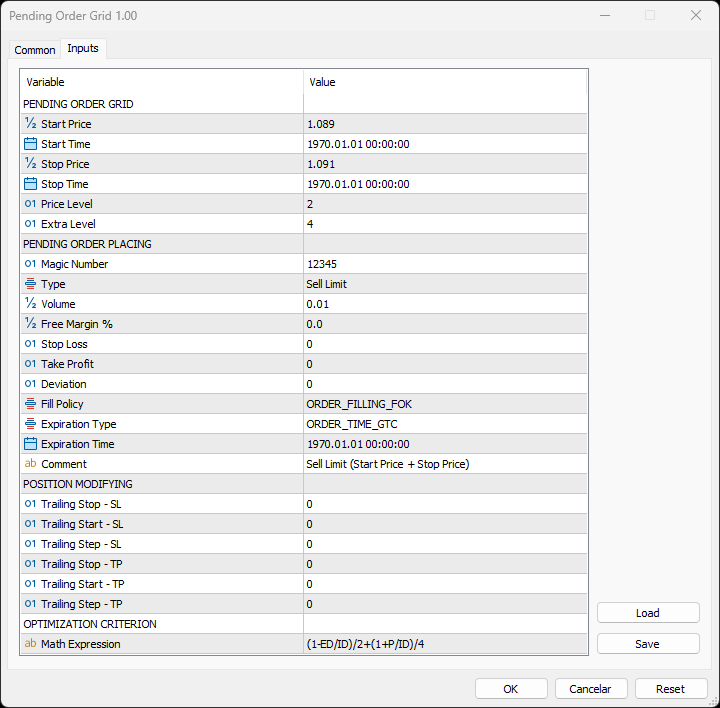
    PENDING ORDER GRID 

    • Start Price: Price used to define the grid’s start. 
    • Start Time: Time used to define the grid’s start. 
    • Stop Price: Price used to define the grid’s stop. 
    • Stop Time: Time used to define the grid’s stop. 
    • Price Level: Distance used between pending orders of the same type (pips). 
    • Extra Level: Distance from the Stop Level, which in turn is a distance from the target price, both represent the limits of price interval where the symbol's price needs to be for the pending order's placing (pips). 

        PENDING ORDER PLACING 

        • Magic Number: Expert Advisor’s identifier. 
        • Type: Pending order type used to form the grid. 
        • Volume: Lot size per deal (lots). 
        • Free Margin %: Percentage of account free margin used to calculate the lot size of the current deal (%). 
        • Stop Loss: Distance from the pending order's target price for placing a Stop Loss (pips). 
        • Take Profit: Distance from the pending order's target price for placing a Take Profit (pips). 
        • Deviation: Maximum allowed slippage from the requested price (pips). 
        • Fill Policy: Volume execution policy. 
        • Expiration Type: Order validity mode. 
        • Expiration Time: Order validity period (used only with the ORDER_TIME_SPECIFIED validity mode). 
        • Comment: Text message displayed in the chart window after a(n) (re)initialization of the EA, in the Objects list after creating a horizontal/vertical line (at each of the grid’s limits) or placing a pending order, and in the Trade or History tabs of the Toolbox window after placing a pending order (it only allows 31 characters). 

          POSITION MODIFYING 

          • Trailing Stop – SL: Distance from the market price for placing a Stop Loss after a favourable price movement (pips). 
          • Trailing Start – SL: Distance from the position’s opening price that must be reached for the “Trailing Stop – SL” function’s activation (pips). 
          • Trailing Step – SL: Distance from the price where the previous Stop Loss modification occurred that must be reached before the placing of a new Stop Loss (pips). 
          • Trailing Stop – TP: Distance from the market price for placing a Take Profit after an unfavourable price movement (pips). 
          • Trailing Start – TP: Distance from the position’s opening price that must be reached for the “Trailing Stop – TP” function’s activation (pips). 
          • Trailing Step – TP: Distance from the price where the previous Take Profit modification occurred that must be reached before the placing of a new Take Profit (pips). 

              OPTIMIZATION CRITERION 

              • Math Expression: Mathematical expression used to calculate a custom statistic parameter to sort the optimization results (see the Optimization Criterion section below). 

              Some of the available parameters accept values that lead to particular options. 

              • Start Price or Stop Price: A null/negative value means the parameter’s inactive function. 
              • Start Time or Stop Time: A value before the current time means the parameter’s inactive function. 
              • Price Level: A null value means that the target price is constant for all pending orders. 
              • Extra Level: A null value means that the symbol’s price needs to be exactly at the Stop Level distance from the target price for the pending order's placing. 
              • Volume: A value lower than the minimum allowed volume by the broker is converted in this last. A value higher than the maximum available volume by the free margin is converted in this last. 
              • Free Margin %: A value whose volume doesn’t reach the minimum allowed volume by the broker is converted in this last. A value whose volume exceeds the maximum available volume by the free margin is converted in this last. 
              • Stop Loss, Take Profit, Trailing Stop – SL or Trailing Stop – TP: A null value means the parameter’s inactive function. Any value between 0 and the Stop Level is converted in this last. 
              • Trailing Start – SL or Trailing Start – TP: A null value means the “Trailing Stop – SL” or “Trailing Stop – TP” function’s immediate activation, respectively. 
              • Trailing Start – SL: The spread value means the “Trailing Stop – SL” function’s activation at breakeven, although such hasn't been guaranteed. The spread + “Trailing Stop – SL” values mean the “Trailing Stop – SL” function’s activation in a profit where breakeven has been guaranteed. 
              • Trailing Step – SL or Trailing Step – TP: A null value means the “Trailing Stop – SL” or “Trailing Stop – TP” function’s continuous operation, respectively. 

                The input parameters that define the limits of the grid must obey a few rules. 

                • Both the start and stop of the grid must be selected, each chosen between a price or time. 
                • Any combination between the start and stop of the grid can be used: Start Price + Stop Price, Start Price + Stop Time, Start Time + Stop Price and Start Time + Stop Time
                • The Start Price cannot exceed the Stop Price in the Sell Limit or Buy Stop orders grid. 
                • The Stop Price cannot exceed the Start Price in the Buy Limit or Sell Stop orders grid. 
                • The Start Time cannot exceed the Stop Time in any pending order grid. 

                    Optimization Criterion 

                    The Expert Advisor allows the creation and use of a new statistical parameter (besides available ones) to sort the optimization results. This custom statistic parameter results from a mathematical expression calculated after the testing. The expression must obey syntax rules and precedence order, being constituted by the following elements: 

                    • Integer and real numbers. 
                    • Statistic parameters
                    • Mathematical operators for addition (+), subtraction (-), multiplication (*), division (/) and exponentiation (^). 
                    • Mathematical and trigonometric functions
                    • Curved parentheses (()) to define the precedence and contain the function’s argument(s). 
                    • Full stop (.) as decimal point and comma (,) as function’s arguments separator. 

                      The statistical parameters are used by writing the respective identifier initial(s) after the term “STAT”. In case there are two identifiers with the same initial(s), it must also be added “1” or “2”, depending on the order in which both appear in the list. For instance, “STAT_PROFIT” and “STAT_MAX_CONLOSS_TRADES” would be “P” and “MCT2”, respectively. List of identifiers, without “STAT_”, whose initial(s) require “1” or “2”: 

                      CONPROFITMAX (C1), CONPROFITMAX_TRADES (CT1), MAX_CONWINS (MC1), MAX_CONPROFIT_TRADES (MCT1), CONLOSSMAX (C2), CONLOSSMAX_TRADES (CT2), MAX_CONLOSSES (MC2), MAX_CONLOSS_TRADES (MCT2), EQUITYDD_PERCENT (EP1), EXPECTED_PAYOFF (EP2), LOSS_TRADES (LT1), LONG_TRADES (LT2). 

                      The mathematical/trigonometric functions are used by writing the respective name after “Math” and one or two arguments inside parentheses, separated by a comma in this last case. For instance, “MathLog10()” and “MathPow()” would be “Log10(argument)” and “Pow(argument1,argument2)”, respectively. List of names that correspond to the available functions: 

                      Abs, Arccos, Arcsin, Arctan, Arctan2, Ceil, Cos, Exp, Floor, Log, Log10, Max, Min, Mod, Pow, Rand, Round, Sin, Sqrt, Tan, Expm1, Log1p, Arccosh, Arcsinh, Arctanh, Cosh, Sinh, Tanh. 

                      Note: “MathRand()” is only executed with “GetTickCount()” as the argument of “MathSrand()”, it’s used without anything inside parentheses – simply writing “Rand()”. 

                      Additionally, the expression has the following properties: 

                      • The scientific, engineering and E notations are allowed. 
                      • The multiplication needs to be explicitly indicated (through the respective symbol). 
                      • The system is case-insensitive. 
                      • The space ( ) is allowed and doesn’t affect the expression’s calculation. 
                      • The input expression is limited to 233 characters. 

                        Examples of a number representation using various notations: “0.0000325” (decimal), “3.25*10^-5” (scientific), “32.5*10^-6” (engineering) and “32.5E-6” (E). 

                        IMPORTANT! The EA doesn’t verify if the input expression fulfils all the requirements, namely if it obeys syntax/standard rules, hence, any infringement of these leads to an unreliable result. 

                        Displayed Information 

                        The Expert Advisor possesses a vast number of messages to inform the user about errors and conditions changes that might occur during its operation. The messages are shown through the Alert function (by a pop-up window), its content includes: 

                        1. The warning that an input parameter has been incorrectly set. 
                        2. The info that the account doesn't have enough money for the chosen volume (see the Risk Management section above). 
                        3. The info that the number of permitted orders by the broker has been reached. 
                        4. The previous and current value of the symbol’s Stop Level when this is updated. 
                        5. The Trade Server Return Codes description. 
                        6. The symbol’s quotes (immediately) before the trade request’s formation, followed by the symbol’s quotes (immediately) after the trade server’s decision. 
                        7. The Runtime Errors description. 
                        8. The standard function in the include file where the runtime error was detected (only relevant to the programmer). 
                        9. The Uninitialization Reason Codes description. 

                                    Note: Some elements of the list are displayed simultaneously (in the same text line): 5, 6 and 7; 7 and 8. 

                                    During the EA’s operation, the messages displayed are grouped by kind of occurrence (related to each list’s element, except the 1, 6 and 8) and counted. Immediately before the EA’s unloading, a final message containing those groups with the respective counts (if these were > 0) is presented. 

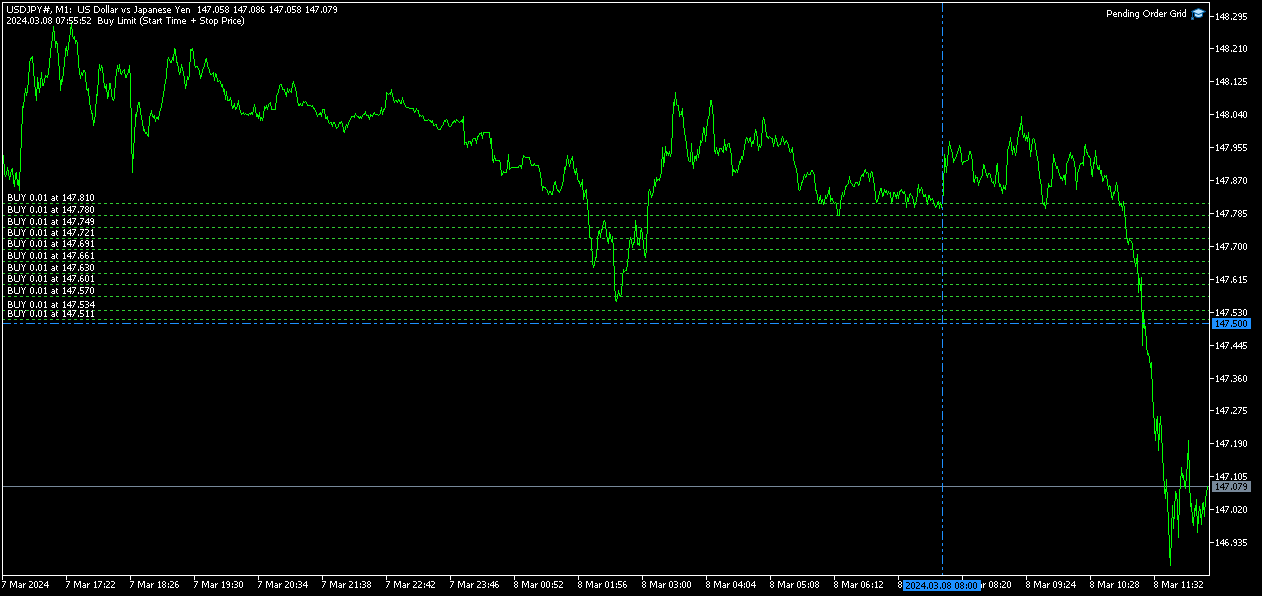
                                    Following the EA's (re)initialization, two reference lines are displayed in the chart at the grid’s limits (start and stop). Each line is horizontal/vertical when the grid’s limit is the price/time, respectively. Both lines are blue/red when the grid’s pending order type is Buy/Sell, respectively. Tip: Place the mouse pointer over one of those lines to see its object name ("Buy/Sell Limit/Stop – Start/Stop Price/Time"). Note: The properties of a graphical object can be edited in the Objects list. 

                                    After the EA’s testing/optimization, the result of the mathematical expression, inserted in the Math Expression input parameter, is presented in the Journal/Optimization Results tabs of the Strategy Tester window, respectively. After the EA’s testing, the values of the available statistic parameters are also presented in the Journal tab. 

                                    Observations 

                                    In some cases, the quoting session might start before or end later than the corresponding trading session (with a five-minute difference, for instance). During the time interval when the quoting session is open, but the trading session is still/already closed, the Expert Advisor initiates/continues to process the available ticks, respectively. If the present conditions satisfy the EA's trading criteria, a trade request is formed and sent to the server. However, it won’t succeed, and an error message is displayed: “Trade request sending failed; Market is closed. 

                                    During high activity periods, the trade server’s decision on whether a trade request is executed or rejected may suffer significant delays. Some data used in the request sent to the server might become incorrect, leading to the order’s rejection. When the server is evaluating a request and the symbol's quotes are updated, three cases might occur: 

                                    1. Pending order placing – the pending order’s target price becomes an incorrect distance. 
                                    2. Position opening/modifying – the position's Stop Loss or Take Profit intended level becomes an incorrect distance. 
                                    3. Position modifying – the position's Stop Loss or Take Profit previous level takes to its closing. 

                                    The symbol’s quotes mentioned in the sixth element of the list in the Displayed Information section are especially useful here (since firsts usually differ from lasts). A careful analysis of these quotes, knowing the implication that certain quote changes have on the request’s evaluation, permits understanding the reason when these cases occur. To avoid the request’s rejection by the trade server due to “invalid stops” (cases 1 and 2), the prices/levels used should exceed the symbol’s Stop Level by a few pips. 

                                    The Start Price, Start Time, Stop Price, Stop Time or Type input parameters have a special status in the program. Every time one is changed, two things happen: the EA ends up the current grid and verifies the conditions to create a new one. Then, if all start/stop values pass this checking, the EA begins a new grid. But, if at least one fails, the EA doesn’t go forward with the new grid and terminates its operation. 

                                    A Buy/Sell position is opened at the Ask/Bid price and closed at the Bid/Ask price. Since the position’s stop orders (Stop Loss and Take Profit) are triggered at this last price, in a pending order, they are calculated from the order's target price -/+ the current spread (Ask - Bid), respectively. 

                                    When placing a pending order, the validity period can’t be less than 1 minute. During a grid creation, the Expert Advisor doesn’t place pending orders if the current time exceeds the Expiration Time minus 1 minute (when the validity period is previously selected). 

                                    Conclusion 

                                    The Pending Order Grid is a helpful and efficient tool regarding the automatic creation of pending order grids, especially when the grids consist of a significant number of orders, enabling a simple and intuitive setting of the grids to form.
                                    Produtos recomendados
                                    FX28 Trader MT5
                                    Tsvetan Tsvetanov
                                    3 (1)
                                    Apresentamos o FX28 Trader Dashboard: Seu Gerenciador de Operações Definitivo Desbloqueie todo o potencial de sua experiência de negociação com o FX28 Trader Dashboard, um gerenciador de operações abrangente e intuitivo projetado para elevar o seu trading de Forex a novos patamares. Seja você um trader experiente ou esteja começando sua jornada financeira, esta poderosa ferramenta foi desenvolvida para simplificar suas atividades comerciais e aprimorar seu processo de tomada de decisões. Recurs
                                    Binance Grid Pro offers an alternative to the built in Grid systems Binance Platform offers. This utility let you define a grid parameters for interact with your Binance account using an Isolated Margin account. This is, similar to Spot Grid in Binance. This is not for handle with derivatives contracts, is for handle with Spot through Isolated Margin Account. But obviosly this utility offers a different approach than built in Binance Grid to handle the Grid, which I have found useful based on
                                    Remote Trade Copier is an advanced tool designed for efficiently copying trades between accounts in both local and remote modes. It allows for lightning-fast order replication from a master account to a slave account. In local mode, trades are copied instantly, while in remote mode, the copying process takes less than 1 second. MT4 Version (Only Local) MT5 Version (Only Local) MT4 Full Version (Local & Remote) Local mode refers to both MetaTrader platforms being installed on the same system,
                                    Money Mind BTC
                                    Antonio Simon Del Vecchio
                                    4.77 (22)
                                    Money Mind BTC — BTCUSD em H1 (v13.00) Sistema automatizado com gestão global de risco e comportamento adaptativo Money Mind BTC 13.00 é um Expert Advisor desenvolvido para operar em BTCUSD com controle total de risco e lógica de adaptação automática. Combina estabilidade operacional, flexibilidade de configuração e uma estrutura de gestão global que ajusta seu comportamento às condições do mercado. Principais características Símbolo: BTCUSD Timeframe recomendado: H1 Filtros internos com sensibi
                                    The Realtime Statistics MT5  is an innovative tool designed for traders who want to keep track of their trading performance in real-time. This MetaTrader 5 Expert Advisor (EA) is packed with customizable features that allow you to monitor crucial trading statistics directly on your chart, ensuring you always have the insights you need to make informed trading decisions. Check out the Realtime Statistics MT5 User Guide Here Try out the  FREE  Realtime Statistics MT5 Demo  Here Key Features: Compr
                                    Quant Panel
                                    Kevin Craig E Gittins
                                    Quant Panel Pro O Painel Definitivo de Desempenho Multi-EA para Traders Quantitativos Pare de alternar entre múltiplos gráficos ou ferramentas externas para monitorar suas estratégias algorítmicas! O Quant Panel Pro oferece monitoramento de portfólio em nível institucional em uma interface profissional e elegante. Principais Recursos Análise Quantitativa ao Seu Alcance Agregação de lucros/perdas (P&L) em tempo real para todos seus Expert Advisors Análise estatística de taxa de acerto com métric
                                    Binance Copier allows to seamlessly and easily copy trades between MT5 and Binance Futures! The tool's main feature is to replicate trades and all available orders between MetaTrader 5 and Binance that can be applied to both Expert Advisors and manually opened ones. Key Features: Bidirectional Copying - MT5 → Binance (Master Mode): Copy your MT5 trades to Binance - Binance → MT5 (Slave Mode): Mirror Binance positions in MT5 - Real-time synchronization with configurable delays Complete Trade M
                                    Overview : The Advanced News Trading Panel is a versatile tool designed for traders who rely on news-based trading strategies. This Expert Advisor (EA) provides an intuitive graphical interface that allows users to quickly set up pending orders and manage risk with ease. With the ability to automatically place Buy/Sell Stop orders based on your pre-set stop order distance from the bid/ask price, stop-loss and take-profit levels, the EA allows for precision trading during high-volatility news eve
                                    Sharp Edge
                                    Md Wakiluzzaman Raz
                                    Sharp Edge EA – Pure Price Action for Gold This isn't just another indicator-based bot. I developed Sharp Edge specifically to handle the modern volatility of Gold (XAUUSD) that we've seen in 2024–2026. It is tuned to understand how the market moves right now , making it a strong performer for the years ahead. The Strategy: 100% Price Action The core of this EA is built on Pure Price Action . It does not use dangerous Grid systems or blind Martingale entries to force a profit. It waits for the r
                                    Tiger Lite
                                    Dang Cong Duong
                                    Tiger Lite recreate the history of entry and exit orders. The goal is that you can grasp their strategy how to play. CSV format support for WEB, MT4 and MT5 platforms. The sequence of steps is described in the photo. Note: Please choose the existing date and symbol on the CSV file. For MT4/5, export historical data and copy the records to excel, save it with the extension CSV. For MT4/MT5/WEB, save the name with format mt4.csv/mt5.csv/web.csv If you get the history from another source and your
                                    FREE
                                    NanoTrade Pro
                                    Vadim Podoprigora
                                    NanoTrade Pro NanoTrade Pro   is a state-of-the-art automated trading advisor designed to optimize your trading strategy in the fast-paced financial markets. Leveraging advanced algorithms and real-time data analysis, NanoTrade Pro automates the scalping process, enabling traders to capitalize on small price movements with remarkable precision and efficiency. Basically, the advisor does not use any risk systems with increasing volume or increasing the number of open orders. Before buying, be s
                                    Pending Order Grid MT5
                                    Francisco Manuel Vicente Berardo
                                    The Pending Order Grid is a multi-symbol multi-timeframe script that enables multi-strategy implementation based on pending order grids.  General Description   The Pending Order Grid allows the performing of a user-defined strategy through the creation of pending order grids. The script places pending orders of a given type (Buy Limit, Sell Limit, Buy Stop, or Sell Stop) at equidistant price levels to form each grid. The beginning and finish of every grid are defined by the Start Price and Sto
                                    QFT Scalp Gold is a XAUUSD scalping Robot designed for the M1 timeframe.  The trading system is designed to identify high probability market action and  capitalize on such information.  The trouble with most scalping systems is the general lack of a credible response when the market makes very large moves against a huge number of open trades, often relying on very low reward to risk ratio.  QFT Scalp Gold solves this problem with a unique recovery system that uses the unfavorable market  mov
                                    Equity Tracker MT5 O Equity Tracker MT5 é um Expert Advisor de monitorização para o MetaTrader 5 que reporta a atividade de trading, o estado da conta e as condições técnicas através de mensagens de notificação. O Expert Advisor funciona de forma independente da lógica de trading e não influencia a execução de ordens nem a gestão de operações. O produto não abre, modifica nem fecha operações. Executa apenas tarefas de observação e notificação. Objetivo O Equity Tracker MT5 destina-se a traders q
                                    Equity Gaurd
                                    Eredewei Henry Tiemo
                                    ️ Equity Protector EA – Auto SL & Trailing Stop for MT5 Protect your capital. Automate your risk. Maximize your control. The Equity Protector EA is a powerful risk management tool designed for Meta Trader 5 traders who prioritize capital preservation and smart trade automation. Whether you're a scalper, swing trader, or long-term investor, this EA ensures your account stays protected while optimizing trade exits with precision. Key Benefits Drawdown Shield Automatically monitors your accoun
                                    Chart Navigator Pro
                                    ELITE FOREX TRADERS LLC
                                    Introducing the   Elite Chart Navigator   — your ultimate MetaTrader 5 Expert Advisor designed to revolutionize multi-symbol trading with seamless chart navigation and superior usability. Product Overview The   Elite Chart Navigator EA   is a sophisticated trading utility enabling rapid switching between multiple trading pairs through an intuitive on-chart button interface. Built for professional traders managing numerous instruments, this EA dramatically improves workflow efficiency, ensuring
                                    O que é o Grid Trading? O Grid Trading é uma estratégia automatizada que coloca ordens de compra e venda em intervalos predefinidos, criando uma "grade" de negociações. Essa técnica permite capturar a volatilidade do mercado, maximizando ganhos em movimentos laterais e minimizando riscos. Nosso Painel de Grid Trading oferece uma interface intuitiva e poderosa para que traders possam configurar, monitorar e otimizar suas operações de forma eficiente. Funcionalidades 1️⃣ Configuração Flexível d
                                    Binance é uma bolsa de criptomoedas de renome mundial! Para facilitar aos usuários do MT5 a negociação direta de Futuros Binance, o programa oferece as seguintes funções de negociação: 1. Imitar o estilo de negociação de Binance Futures e fornecer um painel de operação amigável; 2. Insira api e secret por conta própria (você precisa abrir permissão de negociação de futuros na API Binance) para obter alavancagem, saldo e outras informações; 3. Suporte limitOrder (ordem de limite), marketOrder
                                    StopAndTake
                                    Oleksandr Kashyrnyi
                                    5 (1)
                                    Nome do Produto: StopAndTake — Um script simples para gestão rápida e precisa de SL/TP Descrição do Produto: StopAndTake é um script leve e intuitivo, desenvolvido para traders que valorizam velocidade, precisão e confiabilidade na gestão de suas posições. Essa ferramenta permite atualizar instantaneamente os níveis de Stop Loss (SL) e Take Profit (TP) para todas as posições no gráfico selecionado, garantindo máxima facilidade de uso. Vantagens e Benefícios: Simplicidade: Interface minimalista
                                    FREE
                                    Range Breakout EA – Catch the Moves in the Asian Session! Hey there! Our Range Breakout EA is built to help you take advantage of those early moves in the Asian session. Here’s how it works: during a specific time window, it marks the highest and lowest points to create a range. Then, it sets up buy and sell limit orders just outside that range, so you’re ready to catch a breakout in either direction! :) For safety, the stop loss goes at the opposite end of the range, but you can customize it i
                                    AO Trade
                                    Ka Lok Louis Wong
                                    O sistema de negociação AO Trade é especificamente projetado para negociação de tendências, aproveitando os horários de leilão ou de notícias como pontos de referência para comparação com outros horários de ordem específicos para antecipar tendências de mercado. **Todos os parâmetros de tempo utilizados no EA são baseados no horário do seu terminal. Diferentes corretores podem operar em fusos horários GMT diferentes, o que pode variar ainda mais devido a ajustes de Horário de Verão.** **Por fa
                                    Pro Trade Utility for MetaTrader 5 Pro Trade Utility is a professional manual trading assistant designed for traders who want precision, speed and clarity — without automated strategies. This tool does not trade automatically . It helps you execute and manage trades correctly with proper risk control. Key Features  Risk & Position Management Risk-based automatic lot size calculation Risk shown clearly in account currency Adjustable Stop Loss (points) Fixed Risk:Reward display  Trade Executio
                                    XAU Precision Flow
                                    Samuel Kiniu Njoroge
                                    XAU Precision Flow EA is a professional-grade trading system designed specifically for XAUUSD (Gold) . It applies a multi-layered confirmation framework using higher-timeframe market structure, momentum alignment, and trend continuation behavior. This ensures that every trade is taken with directional bias already established , significantly reducing noise and false entries that are common in lower-timeframe gold trading. Monitor Live Signal :  https://www.mql5.com/en/signals/2357926 The EA focu
                                    Capitalrecover2
                                    Mr Nisit Noijeam
                                    HFT  ZONE MOMENTUM RECOVERY EA_Name ค่า: HFT MTRADER ใช้สำหรับระบุชื่อของ EA เพื่อให้ง่ายต่อการจัดการหรือตรวจสอบในประวัติการเทรด (History) Lot_fix ค่า: 0.02 ใช้กำหนดขนาดของล็อตคงที่ (Fixed Lot Size) ที่ EA จะเปิดในแต่ละคำสั่งเทรด โดยไม่ขึ้นอยู่กับเงื่อนไขอื่น ๆ Lots_X ค่า: 1.5 ตัวคูณล็อต (Lot Multiplier) ซึ่งมักใช้ในการเพิ่มขนาดล็อตในลักษณะการ Martingale หรือ Hedging โดยเมื่อขาดทุนหรือเปิดคำสั่งถัดไป ระบบจะเพิ่มล็อตตามค่าที่กำหนดไว้ High_Low_end_candle ค่า: 10 จำนวนแท่งเทียนที่ใช้ในการคำนวณระ
                                    Range Brain Ai
                                    Bosco Antonio Vega
                                    Range Brain AI - Neural Network Range Trading Expert Advisor AI-powered range breakout Expert Advisor using volume-based neural networks to identify and trade pre-market consolidation ranges on US30. Trading Strategy Range Brain AI is a volume-based neural network Expert Advisor designed specifically for trading the Dow Jones 30 (US30) during optimal market conditions. The EA identifies consolidation ranges during specified time windows and executes breakout trades when price breaches these lev
                                    Welcome to Smart Algo Trade Panel Manager MT5 - the ultimate   risk management tool designed to make trading more effective based on user needs.  It is a comprehensive solution for seamless trade planning, position management, and enhanced control over risk. It does not matter weather you a beginner or an advanced trader, or a scalper needing rapid executions, SmartAlgo Trade Panel  adapts to your needs offering flexibility across all markets of your choice. You can put SL, Lot and TP of choice
                                    Nas100 Ny Open Breakout
                                    Raul Alberto Galdames Soto
                                    NAS100 NY Open Breakout NAS100 NY Open Breakout es un Asesor Experto diseñado para operar de forma automática el índice NASDAQ 100 durante uno de los momentos más líquidos y decisivos del día: la apertura de la sesión de Nueva York . El sistema se basa en la detección de rupturas reales de precio en los primeros minutos posteriores a la apertura, combinando gestión de riesgo estricta y control avanzado de la posición. Características principales Operativa automática enfocada exclusivamente en
                                    BlackBox XAU
                                    Enrique Van Rooyen
                                    BlackBox XAU — Expert Advisor Avançado para Ouro Visão Geral O BlackBox XAU é um sistema de trading cuidadosamente desenvolvido para gerar lucros no mercado de ouro, mantendo um controle rigoroso sobre o drawdown. Em vez de perseguir todos os movimentos do mercado, aplica uma abordagem disciplinada e baseada em regras, que se adapta à volatilidade e seleciona apenas as oportunidades de maior probabilidade . O EA avalia constantemente as condições de mercado em tempo real, filtrando sinais fracos
                                    Magic EA MT5
                                    Kyra Nickaline Watson-gordon
                                    Magic EA is an Expert Advisor based on Scalping, Elliot Waves and with filters such as RSI, Stochastic and 3 other strategies managed and decided with the robot smartly. Large number of inputs and settings are tested and optimized and embedded in the program thus inputs are limited and very simple. Using EA doesn't need any professional information or Forex Trading Knowledge. EA can trade on all symbols and all time frames, using special and unique strategies developed by the author. The EA w
                                    Os compradores deste produto também adquirem
                                    Trade Assistant MT5
                                    Evgeniy Kravchenko
                                    4.42 (208)
                                    Ajuda a calcular o risco por comércio, a fácil instalação de uma nova encomenda, gestão de encomendas com funções de fecho parcial, trailing stop de 7 tipos e outras funções úteis. Materiais e instruções adicionais Instruções de instalação   -   Instruções para a aplicação   -   Versão de teste da aplicação para uma conta de demonstração Função de linha Mostra no gráfico a linha de Abertura, Stop Loss, Take Profit. Com esta função é fácil definir uma nova ordem e ver as suas características ad
                                    Bem-vindo ao Trade Manager EA—uma ferramenta de gestão de risco criada para tornar o trading mais intuitivo, preciso e eficiente. Não é apenas uma ferramenta para executar ordens, mas uma solução abrangente para planejamento de operações, gerenciamento de posições e controle de risco. Seja você um iniciante, trader avançado ou scalper que precisa de execução rápida, o Trade Manager EA adapta-se às suas necessidades, oferecendo flexibilidade em todos os mercados, desde forex e índices até commodi
                                    TradePanel MT5
                                    Alfiya Fazylova
                                    4.87 (149)
                                    Trade Panel é um assistente de negociação multifuncional. O aplicativo contém mais de 50 funções de negociação para trading manual e permite automatizar a maioria das tarefas de negociação. Antes da compra, você pode testar a versão de demonstração em uma conta demo. Baixe a versão experimental do aplicativo para uma conta de demonstração: https://www.mql5.com/pt/blogs/post/762547 . Instruções completas aqui . Comércio. Permite realizar operações de negociação com um clique: Abrir ordens pendent
                                    Versão Beta O Telegram to MT5 Signal Trader está quase no lançamento oficial da versão alfa. Alguns recursos ainda estão em desenvolvimento e você pode encontrar pequenos erros. Se tiver problemas, por favor reporte, seu feedback ajuda a melhorar o software para todos. Telegram to MT5 Signal Trader é uma ferramenta poderosa que copia automaticamente sinais de trading de canais ou grupos do Telegram diretamente para sua conta MetaTrader 5 . Suporta canais públicos e privados do Telegram, e você
                                    VERIFIED TRADING RESULTS - Farmed Hedge Yield Axi Copy:  https://www.mql5.com/en/signals/2356376 - Farmed Hedge Yield Exn Copy:   https://www.mql5.com/en/signals/2356404 - Farmed Hedge Yield V Copy:  https://www.mql5.com/en/signals/2357156 Contact me via private message to receive the User Manual and Setup. * Thai Lauguage Support Available Farmed Hedge Yield Farming - Professional Pair Trading Dashboard (Manual - Hybrid - Semi/Automated EA) VERSION 3 - WILD HARVEST UPDATE Trading Approac
                                    Ultimate Extractor
                                    Clifton Creath
                                    5 (9)
                                    Ultimate Extractor - Professional Trading Analytics for MT5 *****this is the local HTML version of Ultimate Extractor. For the online version please reach out to me directly****** Ultimate Extractor transforms your MetaTrader 5 trading history into actionable insights with comprehensive analytics, interactive charts, and real-time performance tracking. What It Does Automatically analyzes your MT5 trading history across all Expert Advisors and generates detailed HTML reports with interactive vi
                                    Pulsar Terminal é um produto da Pulsar Technologies, uma marca registrada da Astralys LLC . Pulsar Terminal é um complemento utilitário para MetaTrader 5. É uma interface visual combinada com ferramentas de execução em um aplicativo complementar conectado à sua conta MetaTrader 5 através de um Expert Advisor . Utilizamos um aplicativo complementar para maximizar as capacidades da ferramenta e fornecer uma interface visual e um fluxo de trabalho mais avançados do que os painéis padrão do MT5. Pu
                                    YuClusters
                                    Yury Kulikov
                                    4.93 (43)
                                    Atenção: A versão demo para revisão e teste está aqui . YuClusters é um sistema profissional de análise de mercado. O trader tem oportunidades únicas para analisar o fluxo de pedidos, volumes de negociação, movimentos de preços usando vários gráficos, perfis, indicadores e objetos gráficos. O YuClusters opera com base em dados de Tempos e Negócios ou informações de ticks, dependendo do que está disponível nas cotações de um instrumento financeiro. O YuClusters permite que você crie gráficos com
                                    The product will copy all telegram signal to MT5 ( which you are member) , also it can work as remote copier.  Easy to set up, copy order instant, can work with almost signal formats, image signal,  s upport to translate other language to English Work with all type of channel or group, even channel have "Restrict Saving Content", work with  multi channel, multi MT5 Work as remote copier: with signal have ticket number, it will copy exactly via ticket number. Support to backtest signal. How to s
                                    Comprehensive on chart trade panel with the unique ability to be controllable from mobile as well. Plus has a library of downloadable configuration, e.g. exit rules, extra panel buttons, pending order setup and more. Please see our product video. Works with all symbols not just currency pairs. Features On chart panel plus controllable from free app for Windows, iPhone and Android Built-in script engine with library of downloadable configuration, e.g. add 'Close All Trades in Profit' button, exit
                                    Telegram To MT5 Receiver
                                    Levi Dane Benjamin
                                    4.31 (16)
                                    Copie os sinais de qualquer canal do qual você seja membro (incluindo privados e restritos) diretamente para o seu MT5.  Esta ferramenta foi projetada com o usuário em mente, oferecendo muitos recursos que você precisa para gerenciar e monitorar as negociações. Este produto é apresentado em uma interface gráfica fácil de usar e visualmente atraente. Personalize suas configurações e comece a usar o produto em minutos! Guia do usuário + Demo  | Versão MT4 | Versão Discord Se deseja experimentar
                                    Custom Alerts AIO: Monitoramento inteligente de múltiplos mercados – pronto para uso, sem configuração Visão geral Custom Alerts AIO é uma ferramenta avançada de varredura de mercado que funciona imediatamente após a instalação — sem necessidade de configurar indicadores adicionais. Inclui internamente todos os principais indicadores da Stein Investments (FX Power, FX Volume, FX Dynamic, FX Levels e IX Power), permitindo que você monitore facilmente todas as principais classes de ativos: Forex
                                    The Expert Advisor will help you forward all alert from  MetaTrader 5 to Telegram channel/ group.  All alert must save to folder <Data folder>MQL5\Files\Alerts\ , text file with format *.txt and screenshot with format *.gif or *.png. Parameters: - Telegram Bot Token: - create bot on Telegram and get token. - Telegram Chat ID:  - input your Telegram user ID,  group / channel ID - Forward Alert: - default true, to forward alert. - Send message as caption of Screenshot: - default false, set true t
                                    Prop Guardian Risk Manager MT5 – Daily and Overall Drawdown Protection for Prop Firm Traders Prop Guardian Risk Manager is a professional risk-control utility for MetaTrader 5, created for traders who operate under prop firm rules. It does not open trades and does not implement any trading strategy. Instead, it runs in the background, monitors your account risk and can automatically block trading or close positions when your own limits are reached. Use it as a safety layer on top of your manual
                                    Footprint Chart Pro — Professional Order Flow EA for MetaTrader 5 Version 6.34 | Professional tool for real traders | Institutional-Grade Visualization DEMO USERS - PLEASE SELECT EVERY TICK / REAL TICK WHEN TESTING AND YOU HAVE DOWNLOADED HISTORICAL DATA. IF YOU SEE A WAITING SCREEN AND IT IS NOT DOWNLOADING, IT MEANS YOU HAVE LOW HISTORICAL DATA. TRY 1 MIN AND 5 MIN FIRST ON 1 DAY DATA. ONE DAY DATA SHOULD BE THE NEWEST AND MOST CURRENT DATE. PLEASE WAIT UNTIL THE MARKET HAS ROLLED OVER PERIOD
                                    Este é um painel de negociação visual que ajuda você a realizar e gerenciar operações facilmente, evitando erros humanos e aprimorando sua atividade comercial. Ele combina uma interface visual fácil de usar com uma abordagem sólida de gerenciamento de riscos e posições. [ Guia de instalação | Guia de atualização | Solução de problemas | FAQ | Todos os produtos ] Surpreendentemente fácil de usar Negocie facilmente a partir do gráfico Negocie com gerenciamento preciso de riscos, sem complicações
                                    Unlimited Trade Copier Pro MT5 is a tool to copy trade remotely to multiple MT4, MT5 and cTrader accounts at different computers/locations over internet. This is an ideal solution for you if you are a signal provider and want to copy your trades to other receivers globally on your own rules. One provider can copy trades to multiple receivers and one receiver can get trade from multiple providers as well. The provider can even set the subscription expiry for each receiver, so that receiver will n
                                    ManHedger MT5
                                    Peter Mueller
                                    4.8 (5)
                                    THIS EA IS A SEMI-AUTO EA, IT NEEDS USER INPUT. Manual & Test Version Please TEST this product before BUYING  and watch my video about it. The price of the ManHedger will increase to 250$ after 20 copies sold. Contact me for user support or bug reports or if you want the MT4 version! MT4 Version  I do not guarantee any profits or financial success using this EA. With this Expert Advisor, you can: Implement your own Zone Recovery strategy to capitalize on trending markets. Create Grid trading s
                                    HINN Lazy Trader
                                    ALGOFLOW OÜ
                                    5 (2)
                                    The core idea: using the user interface, you configure the parameters the chart must meet before entering a position (or positions), choose which entry models to use, and set the rules for when trading and planning should end. Lazy Trader takes over all the routine chart watching and execution.  Lazy Trader  handles the rest. full description  :: 3 key videos [1] ->  [2]   ->  [3] What can it do? - Understands Larry Williams market structure - Understands swing market structure by Michael Hu
                                    Patrex pro
                                    Chioma Obunadike
                                    5 (1)
                                    Patrex Pro: Maximize Your Trading Potential Patrex Pro is an advanced trading bot designed to help traders optimize their trading strategies and maximize their potential returns. With its cutting-edge technology and user-friendly interface, Patrex Pro is the ultimate tool for traders seeking to elevate their trading game. Get MT4 Version Key Features: 1. Position Hedging: Patrex Pro allows users to hedge their positions based on their individual risk tolerance and market analysis. 2. Advanced R
                                    EasyInsight AIO MT5
                                    Alain Verleyen
                                    4.92 (12)
                                    EASY Insight AIO – A solução tudo-em-um para trading inteligente e sem esforço Visão geral Imagine analisar todo o mercado — Forex, Ouro, Cripto, Índices e até Ações — em segundos, sem precisar examinar gráficos manualmente, instalar indicadores ou lidar com configurações complicadas. EASY Insight AIO é sua ferramenta definitiva de exportação para trading com IA, pronta para usar. Ela oferece um panorama completo do mercado em um único arquivo CSV limpo — pronto para análise imediata no ChatGP
                                    O Local Trade Copier EA é uma solução para traders individuais ou gerentes de contas que precisam executar sinais de negociação de fontes externas ou que precisam gerenciar várias contas ao mesmo tempo, sem a necessidade de uma conta MAM ou PAMM. Copia de até 8 contas mestras para contas escravas ilimitadas [ Guia de instalação | Guia de atualização | Solução de problemas | Perguntas frequentes | Todos os produtos ] 100% auto-hospedado Fácil de instalar e usar Nenhum instalador, arquivos de con
                                    Telegram Broadcast MT5
                                    Volodymyr Hrybachov
                                    3.67 (3)
                                    O utilitário TELEGRAM BROADCAST ajuda você a publicar instantaneamente sua negociação no canal do Telegram. Se há muito você deseja criar seu próprio canal de Telegram com sinais FOREX, então é disso que você precisa. TELEGRAM BROADCAST pode enviar mensagens: Abertura e fechamento de negócios; Colocação e exclusão de pedidos pendentes; Modificação de stop loss e take provision (último pedido); Stop loss e take prov acionados; Ativação e exclusão de um pedido pendente: Envio de relatórios de ne
                                    TradeMirror é uma ferramenta local de cópia de ordens desenvolvida para as plataformas MT4/MT5, com suporte à sincronização de negociações em tempo real. Vantagens do Produto Alinhado com os altos padrões de segurança, estabilidade e privacidade para softwares financeiros, otimizamos três aspectos fundamentais: Interface gráfica intuitiva para operação simplificada Proteção de privacidade reforçada para isolamento de dados sensíveis em cenários financeiros Sincronização de ordens em milissegundo
                                    EchoTrade Telegram to MT5 Copier
                                    Perpetual Chinemerem Vincent
                                    5 (1)
                                    EchoTrade Telegram to MT5 Copier Seamless, Instant, and Reliable Signal Copying - Direct from Telegram to MetaTrader 5! The product does not run in the strategy tester but you can get free trial version here  for testing before purchase. Tired of manually executing trades from Telegram signals? EchoTrade automates the process, instantly copying trades from any Telegram channel or group directly into your MT5 account—accurately, efficiently, and without delay. Key Features: Universal Compatibi
                                    Active Lines
                                    Yury Kulikov
                                    5 (2)
                                    Attention: Demo version for review and testing can be downloaded here . It does not allow trading and can only be run on one chart. Active Lines - a powerful professional tool for operations with lines on charts. Active Lines provides a wide range of actions for events when the price crosses lines. For example: notify, open/modify/close a position, place/remove pending orders. With Active Lines you can assign several tasks to one line, for each of which you can set individual trigger conditions
                                    PortfolioLab Pro
                                    Antonello Belgrano
                                    PortfolioLab Pro – Monitoramento Avançado de Portfólio Multi-EA e Análise de Risco para MT5 PortfolioLab Pro é o centro de controle em tempo real definitivo para traders que executam múltiplos Expert Advisors (EAs) no MetaTrader 5. Pare de voar às cegas com gráficos básicos de equity. O PortfolioLab Pro revela riscos ocultos, descobre hedges naturais e quantifica a verdadeira robustez do portfólio — antes que um drawdown apague meses de progresso. Principais Recursos que o Diferenciam: Mapa de
                                    Ultimate Trailing Stop EA MT5
                                    BLAKE STEVEN RODGER
                                    4.13 (8)
                                    This EA Utility allows you to manage (with advanced filtering) unlimited open orders (manual or EA) with 16 trailing stop methods: fixed, percent, ATR Exit, Chandelier Exit, Moving Average, Candle High Low Exit, Bollinger Bands, Parabolic, Envelope, Fractal, Ichimoku Kijun-Sen, Alligator, Exit After X Minutes or Bars, RSI and Stochastic. The trailing stop can be either real or virtual, and you can exit fully or with a partial close percent on touch or bar close.  Moreover, you can add (override
                                    Dhokiyas Market Screener
                                    Dhokiyas Money Map Investment Consultants - FZCO
                                    Dhokiya's Market Screener Guia do Usuario Painel de analise multi simbolo para MetaTrader 5 com trading em um clique e visao tecnica completa Canal Oficial para Atualizações Entre no canal : Dhokiyas Suporte Envie mensagem direta : Contact 1. O Que Este Produto Faz Dhokiya's Market Screener e uma ferramenta de analise tecnica multi simbolo para MetaTrader 5. Ele escaneia uma lista de simbolos e mostra possiveis direcoes de operacao com uma pontuacao baseada em multiplas confirmacoes. Foi d
                                    Crystal Trade Manager – Advanced MT5 Risk and Trade Control Utility Overview Crystal Trade Manager (CTM) is a professional MetaTrader 5 utility designed for risk management, trade automation, and instant execution control. It provides traders with an integrated system for protecting equity, managing daily drawdowns, controlling lot sizes, and applying automation features such as automatic SL/TP, break-even, and trailing stop. The tool is suitable for manual traders, prop-firm challenge particip
                                    Mais do autor
                                    Pending Order Grid MT5
                                    Francisco Manuel Vicente Berardo
                                    The Pending Order Grid is a multi-symbol multi-timeframe script that enables multi-strategy implementation based on pending order grids.  General Description   The Pending Order Grid allows the performing of a user-defined strategy through the creation of pending order grids. The script places pending orders of a given type (Buy Limit, Sell Limit, Buy Stop, or Sell Stop) at equidistant price levels to form each grid. The beginning and finish of every grid are defined by the Start Price and Sto
                                    Double Trailing Stop MT5
                                    Francisco Manuel Vicente Berardo
                                    The Double Trailing Stop is a multi-symbol multi-timeframe Expert Advisor that allows the Stop Loss and Take Profit trailing of positions.  General Description   The Double Trailing Stop’s purpose is to secure profit and minimize losses of the opened positions. The Expert Advisor places stop orders (Stop Loss or Take Profit) at the Trailing Stop distance from the market price when the symbol's quote reaches/overcomes the Trailing Start distance from the position’s opening price (a single-time
                                    Scientific Calculator MT5
                                    Francisco Manuel Vicente Berardo
                                    The Scientific Calculator is a script designed to compute science, engineering and mathematics expressions.  General Description   The expression to calculate must obey syntax rules and precedence order, being constituted by the following elements:   Integer and real numbers.  Mathematical operators for addition (+), subtraction (-), multiplication (*), division (/) and exponentiation (^).  Mathematical and trigonometric functions .  Curved parentheses (()) to define the precedence and contain
                                    FREE
                                    Tick Data Record MT5
                                    Francisco Manuel Vicente Berardo
                                    The Tick Data Record is a multi-symbol multi-timeframe Expert Advisor that records tick data for later graphical representation and analysis.  General Description  The Tick Data Record offers a(n) alternative/complement to the online/offline price charts displayed through the MT4/MT5 platform. The Expert Advisor permits to write and save the current/history values of Time, Bid, Ask, Spread, Last and Volume to a text file (“.txt”). The idea is to copy/open the obtained register to/in a spreadshe
                                    FREE
                                    Tick Data Record MT4
                                    Francisco Manuel Vicente Berardo
                                    The Tick Data Record is a multi-symbol multi-timeframe Expert Advisor that records tick data for later graphical representation and analysis.  General Description   The Tick Data Record offers a(n) alternative/complement to the online/offline price charts displayed through the MT4/MT5 platform. The Expert Advisor   permits   to write and save the current/history values of Time, Bid, Ask, Spread, Last and Volume to a text file (“.txt”). The idea is to copy/open the obtained register to/in a spr

                                    FREE
                                    Environment State Info Print MT5
                                    Francisco Manuel Vicente Berardo
                                    The Environment State Info Print is a script to display the constants that describe the current runtime environment of a MQL5 program.  General Description   The constants are divided into four groups in the   Environment State section of the MQL5 documentation and each group is divided into enumerations/subgroups (with designations  “Integer”, “Double” or “String”). The script displays constants in two ways: a single constant or all group constants. The constants are obtained by selecting the

                                    FREE
                                    Environment State Info Print MT4
                                    Francisco Manuel Vicente Berardo
                                    The Environment State Info Print is a script to display the constants that describe the current runtime environment of a MQL4 program.  General Description   The constants are divided into four groups in the Environment State section of the MQL4  documentation and each group is divided into enumerations/subgroups (with designations “ Market Info”, “Integer”, “Double” or “String”). The script displays constants in two ways: a single constant or all group constants. The constants are obtained by
                                    FREE
                                    Scientific Calculator MT4
                                    Francisco Manuel Vicente Berardo
                                    The Scientific Calculator is a script designed to compute science, engineering and mathematics expressions.   General Description   The expression to calculate must obey syntax rules and precedence order, being constituted by the following elements:   Integer and real numbers.   Mathematical operators for addition (+), subtraction (-), multiplication (*), division (/) and exponentiation (^).   Mathematical and trigonometric functions .   Curved parentheses (()) to define the precedence and co
                                    FREE
                                    Order Selective Delete MT5
                                    Francisco Manuel Vicente Berardo
                                    The Order Selective Delete is a multi-symbol multi-timeframe script used to delete simultaneously various pending orders.  General Description   The Order Selective Delete   possesses   three operation modes (Intersection,   Union   and All) that control the way   as   three pending order features (symbol, magic   number   and type) are used. The modes, available through the Selection Mode input parameter, relate to the features, available through the “Select by Feature” and “Feature” input pa
                                    FREE
                                    Position Selective Close MT5
                                    Francisco Manuel Vicente Berardo
                                    The Position Selective Close is a multi-symbol multi-timeframe script used to close simultaneously various positions.  General Description   The Position Selective Close   possesses   three operation modes (Intersection,   Union   and All) that control the way   as   four position features (symbol, magic number,   type   and profit) are used. The modes, available through the Selection Mode input parameter, relate to the features, available through the “Select by Feature” and “Feature” input pa
                                    FREE
                                    Position Selective Close MT4
                                    Francisco Manuel Vicente Berardo
                                    The Position Selective Close is a multi-symbol multi-timeframe script used to close simultaneously various positions.  General Description   The Position Selective Close   possesses   three operation modes (Intersection,   Union   and All) that control the way   as   four position features (symbol, magic number,   type   and profit) are used. The modes, available through the Selection Mode input parameter, relate to the features, available through the “Select by Feature” and “Feature” input pa
                                    FREE
                                    Order Selective Delete MT4
                                    Francisco Manuel Vicente Berardo
                                    The Order Selective Delete is a multi-symbol multi-timeframe script used to delete simultaneously various pending orders.  General Description   The Order Selective Delete   possesses   three operation modes (Intersection,   Union   and All) that control the way   as   three pending order features (symbol, magic   number   and type) are used. The modes, available through the Selection Mode input parameter, relate to the features, available through the “Select by Feature” and “Feature” input pa
                                    FREE
                                    Double Trailing Stop MT4
                                    Francisco Manuel Vicente Berardo
                                    The Double Trailing Stop is a multi-symbol multi-timeframe Expert Advisor that allows the Stop Loss and Take Profit trailing of positions.  General Description   The Double Trailing Stop’s purpose is to secure profit and minimize losses of the opened positions. The Expert Advisor places stop orders (Stop Loss or Take Profit) at the Trailing Stop distance from the market price when the symbol's quote reaches/overcomes the Trailing Start distance from the position’s opening price (a single-time
                                    Multiple Position Opening MT4
                                    Francisco Manuel Vicente Berardo
                                    The Multiple Position Opening is a multi-symbol multi-timeframe script used to open simultaneously various positions.  Risk Management   The volume used to open a position is chosen between a fixed and a variable lot size, available through the Volume and Free Margin % input parameters, respectively. If there isn't enough money in the account for the chosen volume, this is reduced to the highest possible value (corresponding to free margin). If this reduction leads to a correct volume (if the
                                    Pending Order Grid MT4
                                    Francisco Manuel Vicente Berardo
                                    The Pending Order Grid is a multi-symbol multi-timeframe script that enables multi-strategy implementation based on pending order grids.  General Description   The Pending Order Grid allows the performing of a user-defined strategy through the creation of pending order grids. The script places pending orders of a given type (Buy Limit, Sell Limit, Buy Stop, or Sell Stop) at equidistant price levels to form each grid. The beginning and finish of every grid are defined by the Start Price and Sto
                                    Pending Order Grid EA MT4
                                    Francisco Manuel Vicente Berardo
                                    The Pending Order Grid is a multi-symbol multi-timeframe Expert Advisor that enables multi-strategy implementation based on pending order grids.  General Description   The Pending Order Grid allows the performing of a user-defined strategy through the creation of pending order grids. The Expert Advisor places pending orders of a given type (Buy Limit, Sell Limit, Buy Stop, or Sell Stop) at equidistant price levels to form each grid. The user might set up different grids to exist simultaneously
                                    Multiple Position Opening MT5
                                    Francisco Manuel Vicente Berardo
                                    1 (1)
                                    The Multiple Position Opening is a multi-symbol multi-timeframe script used to open simultaneously various positions.  Risk Management   The volume used to open a position is chosen between a fixed and a variable lot size, available through the Volume and Free Margin % input parameters, respectively. If there isn't enough money in the account for the chosen volume, this is reduced to the highest possible value (corresponding to free margin). If this reduction leads to a correct volume (if the
                                    Filtro:
                                    md hazly
                                    33
                                    md hazly 2024.10.09 18:55 
                                     

                                    O usuário não deixou nenhum comentário para sua avaliação

                                    Responder ao comentário