Pending Order Grid EA MT5

The Pending Order Grid is a multi-symbol multi-timeframe Expert Advisor that enables multi-strategy implementation based on pending order grids. 

General Description 

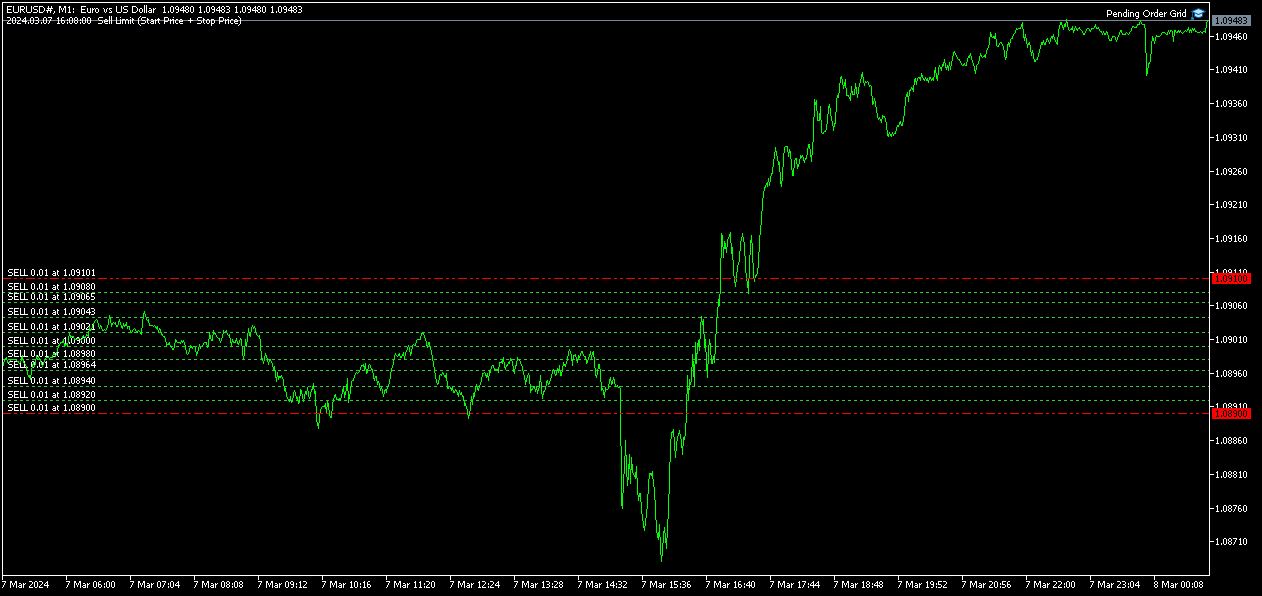
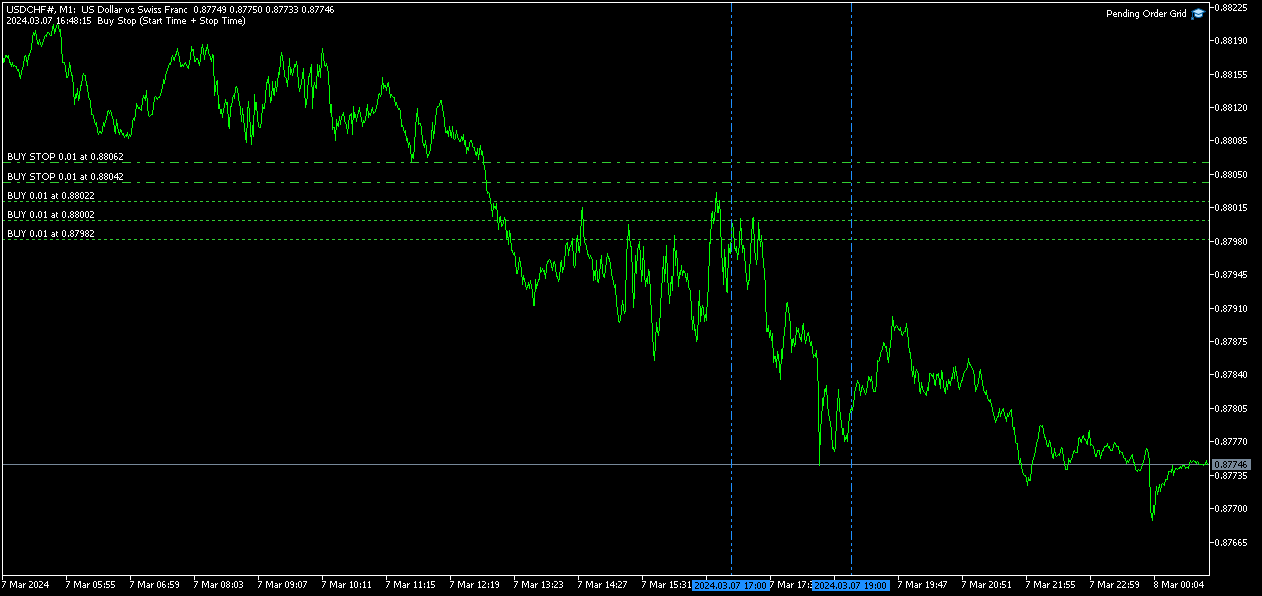
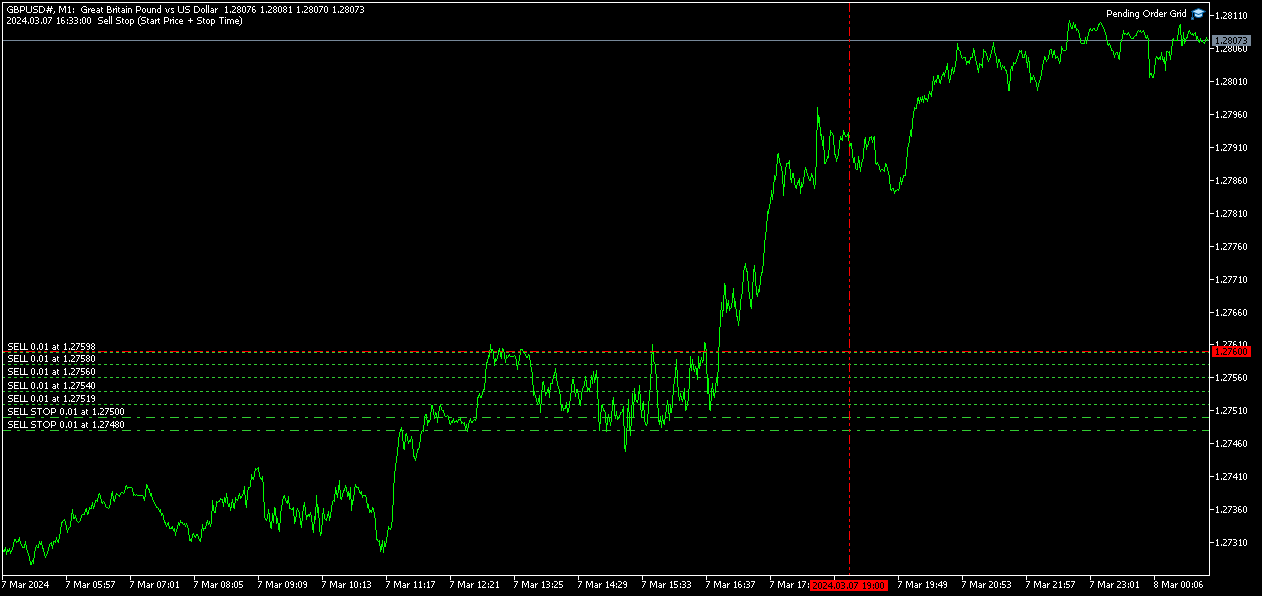
The Pending Order Grid allows the performing of a user-defined strategy through the creation of pending order grids. The Expert Advisor places pending orders of a given type (Buy Limit, Sell Limit, Buy Stop, or Sell Stop) at equidistant price levels to form each grid. The user might set up different grids to exist simultaneously – it's only needed to attach the EA on multiple chart windows of the intended symbol(s). 

The start and stop of a grid might be chosen between two modes: price or time. Depending on the selected modes, the trading robot only starts placing pending orders when the current price is "near" the first target price (Start Price) or the Start Time is reached and stops placing when the last target price exceeds the Stop Price or the Stop Time is reached, where Start Price, Start Time, Stop Price and Stop Time are input parameters. 

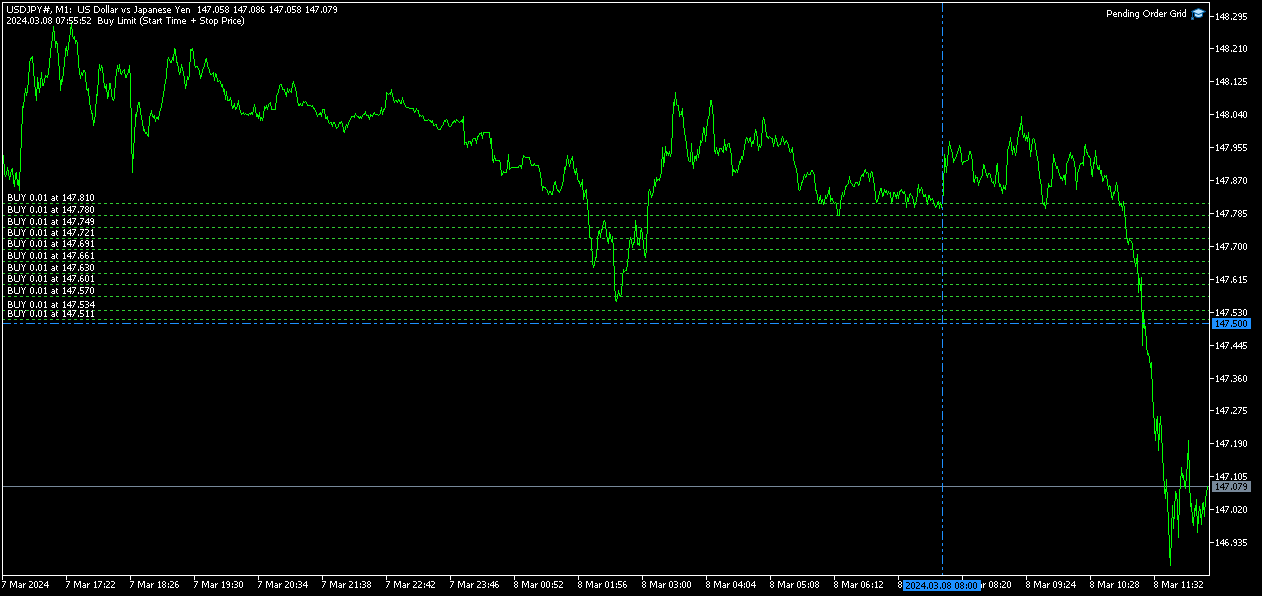
A pending order placing is regulated by a price interval, whose limits are at the Stop Level and Stop Level + Extra Level distances from the order’s target price, where Extra Level is an input parameter. Every time new quotes are available, and the symbol's price is at this interval, the pending order is placed. The target price of the next order is simply given by the previous one added (Sell Limit or Buy Stop) or subtracted (Buy Limit or Sell Stop) with the Price Level input parameter. 

An exception to the previous procedure is when the grid’s first pending order is triggered by the Start Time. In this case, the trading robot tries immediately placing the order at the Stop Level distance. In case of rejection by the trade server, it will add 1 pip to the previous distance and try again for the order placing. This procedure will be repeated until the Stop Level + Extra Level distance is reached. 

The maximum number of simultaneous pending orders placed by the EA is given by the expression: 

  • Ceil ( (Stop Level + Extra Level) / Price Level ), for Price Level > 0, 

where Ceil represents the usual maths function. The expression may take the following values: 

  • 1 for Price Level ≥ Stop Level + Extra Level, 
  • 2 for (Stop Level + Extra Level)/2 ≤ Price Level < Stop Level + Extra Level, 
  • 3/more for Price Level < (Stop Level + Extra Level)/2. 

    Risk Management 

    The volume used to place a pending order is chosen between a fixed and a variable lot size, available through the Volume and Free Margin % input parameters, respectively. If there isn't enough money in the account for the chosen volume, a request for placing the order is still sent to the trade server. The purpose is to allow the corresponding position opening if the free margin increases enough until the target price is reached. This increase could be due to an account deposit or position profit between the placing and triggering of the pending order. 

    Input Parameters 

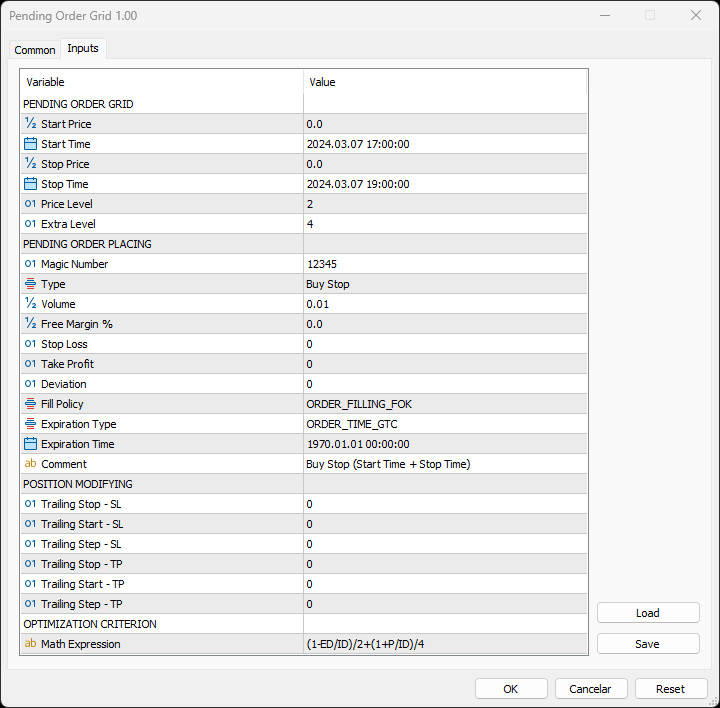
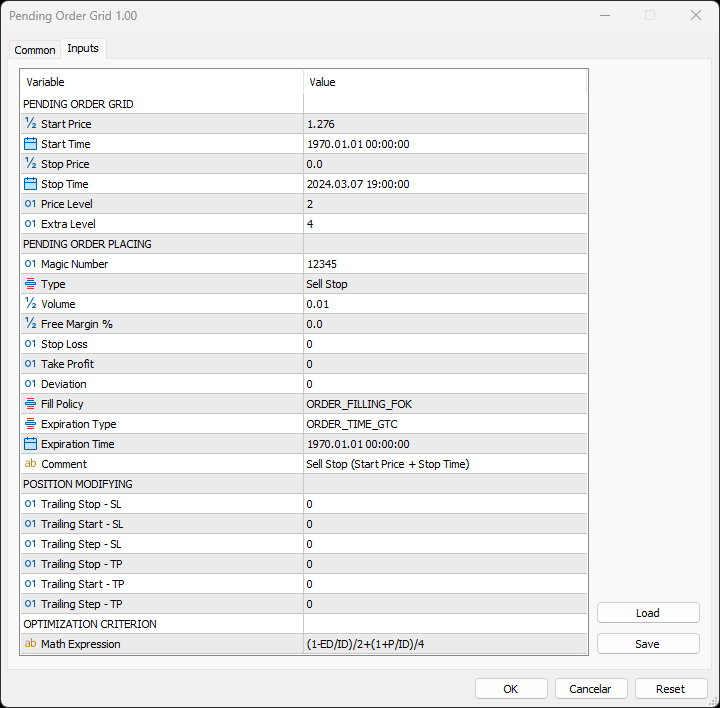
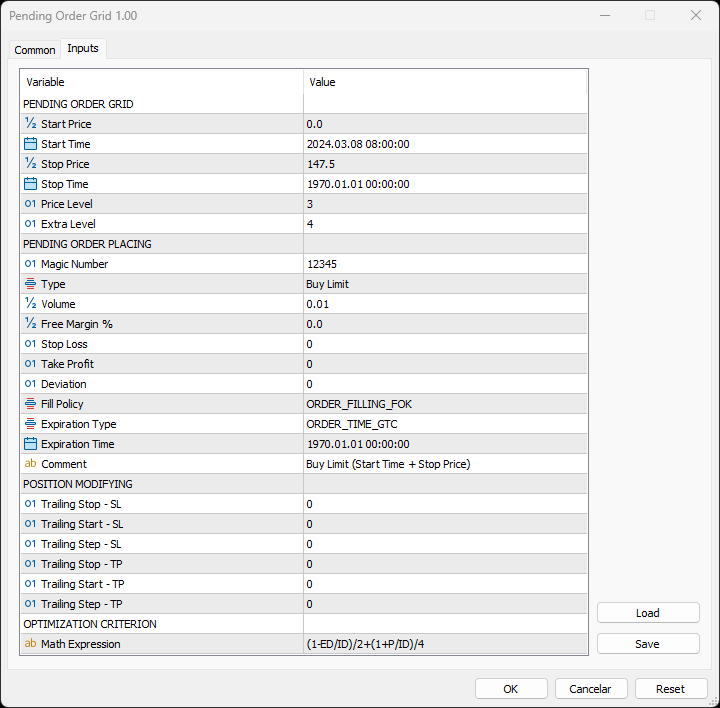
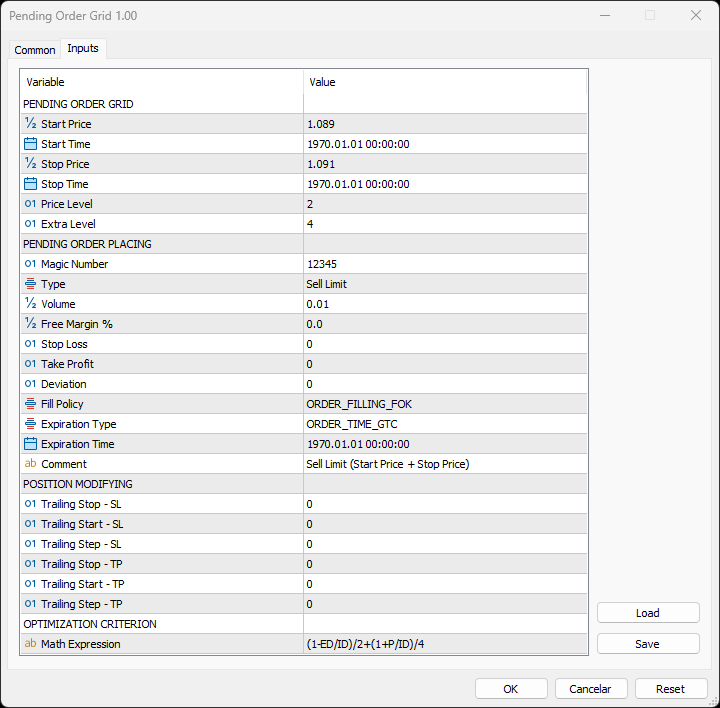
    PENDING ORDER GRID 

    • Start Price: Price used to define the grid’s start. 
    • Start Time: Time used to define the grid’s start. 
    • Stop Price: Price used to define the grid’s stop. 
    • Stop Time: Time used to define the grid’s stop. 
    • Price Level: Distance used between pending orders of the same type (pips). 
    • Extra Level: Distance from the Stop Level, which in turn is a distance from the target price, both represent the limits of price interval where the symbol's price needs to be for the pending order's placing (pips). 

        PENDING ORDER PLACING 

        • Magic Number: Expert Advisor’s identifier. 
        • Type: Pending order type used to form the grid. 
        • Volume: Lot size per deal (lots). 
        • Free Margin %: Percentage of account free margin used to calculate the lot size of the current deal (%). 
        • Stop Loss: Distance from the pending order's target price for placing a Stop Loss (pips). 
        • Take Profit: Distance from the pending order's target price for placing a Take Profit (pips). 
        • Deviation: Maximum allowed slippage from the requested price (pips). 
        • Fill Policy: Volume execution policy. 
        • Expiration Type: Order validity mode. 
        • Expiration Time: Order validity period (used only with the ORDER_TIME_SPECIFIED validity mode). 
        • Comment: Text message displayed in the chart window after a(n) (re)initialization of the EA, in the Objects list after creating a horizontal/vertical line (at each of the grid’s limits) or placing a pending order, and in the Trade or History tabs of the Toolbox window after placing a pending order (it only allows 31 characters). 

          POSITION MODIFYING 

          • Trailing Stop – SL: Distance from the market price for placing a Stop Loss after a favourable price movement (pips). 
          • Trailing Start – SL: Distance from the position’s opening price that must be reached for the “Trailing Stop – SL” function’s activation (pips). 
          • Trailing Step – SL: Distance from the price where the previous Stop Loss modification occurred that must be reached before the placing of a new Stop Loss (pips). 
          • Trailing Stop – TP: Distance from the market price for placing a Take Profit after an unfavourable price movement (pips). 
          • Trailing Start – TP: Distance from the position’s opening price that must be reached for the “Trailing Stop – TP” function’s activation (pips). 
          • Trailing Step – TP: Distance from the price where the previous Take Profit modification occurred that must be reached before the placing of a new Take Profit (pips). 

              OPTIMIZATION CRITERION 

              • Math Expression: Mathematical expression used to calculate a custom statistic parameter to sort the optimization results (see the Optimization Criterion section below). 

              Some of the available parameters accept values that lead to particular options. 

              • Start Price or Stop Price: A null/negative value means the parameter’s inactive function. 
              • Start Time or Stop Time: A value before the current time means the parameter’s inactive function. 
              • Price Level: A null value means that the target price is constant for all pending orders. 
              • Extra Level: A null value means that the symbol’s price needs to be exactly at the Stop Level distance from the target price for the pending order's placing. 
              • Volume: A value lower than the minimum allowed volume by the broker is converted in this last. A value higher than the maximum available volume by the free margin is converted in this last. 
              • Free Margin %: A value whose volume doesn’t reach the minimum allowed volume by the broker is converted in this last. A value whose volume exceeds the maximum available volume by the free margin is converted in this last. 
              • Stop Loss, Take Profit, Trailing Stop – SL or Trailing Stop – TP: A null value means the parameter’s inactive function. Any value between 0 and the Stop Level is converted in this last. 
              • Trailing Start – SL or Trailing Start – TP: A null value means the “Trailing Stop – SL” or “Trailing Stop – TP” function’s immediate activation, respectively. 
              • Trailing Start – SL: The spread value means the “Trailing Stop – SL” function’s activation at breakeven, although such hasn't been guaranteed. The spread + “Trailing Stop – SL” values mean the “Trailing Stop – SL” function’s activation in a profit where breakeven has been guaranteed. 
              • Trailing Step – SL or Trailing Step – TP: A null value means the “Trailing Stop – SL” or “Trailing Stop – TP” function’s continuous operation, respectively. 

                The input parameters that define the limits of the grid must obey a few rules. 

                • Both the start and stop of the grid must be selected, each chosen between a price or time. 
                • Any combination between the start and stop of the grid can be used: Start Price + Stop Price, Start Price + Stop Time, Start Time + Stop Price and Start Time + Stop Time
                • The Start Price cannot exceed the Stop Price in the Sell Limit or Buy Stop orders grid. 
                • The Stop Price cannot exceed the Start Price in the Buy Limit or Sell Stop orders grid. 
                • The Start Time cannot exceed the Stop Time in any pending order grid. 

                    Optimization Criterion 

                    The Expert Advisor allows the creation and use of a new statistical parameter (besides available ones) to sort the optimization results. This custom statistic parameter results from a mathematical expression calculated after the testing. The expression must obey syntax rules and precedence order, being constituted by the following elements: 

                    • Integer and real numbers. 
                    • Statistic parameters
                    • Mathematical operators for addition (+), subtraction (-), multiplication (*), division (/) and exponentiation (^). 
                    • Mathematical and trigonometric functions
                    • Curved parentheses (()) to define the precedence and contain the function’s argument(s). 
                    • Full stop (.) as decimal point and comma (,) as function’s arguments separator. 

                      The statistical parameters are used by writing the respective identifier initial(s) after the term “STAT”. In case there are two identifiers with the same initial(s), it must also be added “1” or “2”, depending on the order in which both appear in the list. For instance, “STAT_PROFIT” and “STAT_MAX_CONLOSS_TRADES” would be “P” and “MCT2”, respectively. List of identifiers, without “STAT_”, whose initial(s) require “1” or “2”: 

                      CONPROFITMAX (C1), CONPROFITMAX_TRADES (CT1), MAX_CONWINS (MC1), MAX_CONPROFIT_TRADES (MCT1), CONLOSSMAX (C2), CONLOSSMAX_TRADES (CT2), MAX_CONLOSSES (MC2), MAX_CONLOSS_TRADES (MCT2), EQUITYDD_PERCENT (EP1), EXPECTED_PAYOFF (EP2), LOSS_TRADES (LT1), LONG_TRADES (LT2). 

                      The mathematical/trigonometric functions are used by writing the respective name after “Math” and one or two arguments inside parentheses, separated by a comma in this last case. For instance, “MathLog10()” and “MathPow()” would be “Log10(argument)” and “Pow(argument1,argument2)”, respectively. List of names that correspond to the available functions: 

                      Abs, Arccos, Arcsin, Arctan, Arctan2, Ceil, Cos, Exp, Floor, Log, Log10, Max, Min, Mod, Pow, Rand, Round, Sin, Sqrt, Tan, Expm1, Log1p, Arccosh, Arcsinh, Arctanh, Cosh, Sinh, Tanh. 

                      Note: “MathRand()” is only executed with “GetTickCount()” as the argument of “MathSrand()”, it’s used without anything inside parentheses – simply writing “Rand()”. 

                      Additionally, the expression has the following properties: 

                      • The scientific, engineering and E notations are allowed. 
                      • The multiplication needs to be explicitly indicated (through the respective symbol). 
                      • The system is case-insensitive. 
                      • The space ( ) is allowed and doesn’t affect the expression’s calculation. 
                      • The input expression is limited to 233 characters. 

                        Examples of a number representation using various notations: “0.0000325” (decimal), “3.25*10^-5” (scientific), “32.5*10^-6” (engineering) and “32.5E-6” (E). 

                        IMPORTANT! The EA doesn’t verify if the input expression fulfils all the requirements, namely if it obeys syntax/standard rules, hence, any infringement of these leads to an unreliable result. 

                        Displayed Information 

                        The Expert Advisor possesses a vast number of messages to inform the user about errors and conditions changes that might occur during its operation. The messages are shown through the Alert function (by a pop-up window), its content includes: 

                        1. The warning that an input parameter has been incorrectly set. 
                        2. The info that the account doesn't have enough money for the chosen volume (see the Risk Management section above). 
                        3. The info that the number of permitted orders by the broker has been reached. 
                        4. The previous and current value of the symbol’s Stop Level when this is updated. 
                        5. The Trade Server Return Codes description. 
                        6. The symbol’s quotes (immediately) before the trade request’s formation, followed by the symbol’s quotes (immediately) after the trade server’s decision. 
                        7. The Runtime Errors description. 
                        8. The standard function in the include file where the runtime error was detected (only relevant to the programmer). 
                        9. The Uninitialization Reason Codes description. 

                                    Note: Some elements of the list are displayed simultaneously (in the same text line): 5, 6 and 7; 7 and 8. 

                                    During the EA’s operation, the messages displayed are grouped by kind of occurrence (related to each list’s element, except the 1, 6 and 8) and counted. Immediately before the EA’s unloading, a final message containing those groups with the respective counts (if these were > 0) is presented. 

                                    Following the EA's (re)initialization, two reference lines are displayed in the chart at the grid’s limits (start and stop). Each line is horizontal/vertical when the grid’s limit is the price/time, respectively. Both lines are blue/red when the grid’s pending order type is Buy/Sell, respectively. Tip: Place the mouse pointer over one of those lines to see its object name ("Buy/Sell Limit/Stop – Start/Stop Price/Time"). Note: The properties of a graphical object can be edited in the Objects list. 

                                    After the EA’s testing/optimization, the result of the mathematical expression, inserted in the Math Expression input parameter, is presented in the Journal/Optimization Results tabs of the Strategy Tester window, respectively. After the EA’s testing, the values of the available statistic parameters are also presented in the Journal tab. 

                                    Observations 

                                    In some cases, the quoting session might start before or end later than the corresponding trading session (with a five-minute difference, for instance). During the time interval when the quoting session is open, but the trading session is still/already closed, the Expert Advisor initiates/continues to process the available ticks, respectively. If the present conditions satisfy the EA's trading criteria, a trade request is formed and sent to the server. However, it won’t succeed, and an error message is displayed: “Trade request sending failed; Market is closed. 

                                    During high activity periods, the trade server’s decision on whether a trade request is executed or rejected may suffer significant delays. Some data used in the request sent to the server might become incorrect, leading to the order’s rejection. When the server is evaluating a request and the symbol's quotes are updated, three cases might occur: 

                                    1. Pending order placing – the pending order’s target price becomes an incorrect distance. 
                                    2. Position opening/modifying – the position's Stop Loss or Take Profit intended level becomes an incorrect distance. 
                                    3. Position modifying – the position's Stop Loss or Take Profit previous level takes to its closing. 

                                    The symbol’s quotes mentioned in the sixth element of the list in the Displayed Information section are especially useful here (since firsts usually differ from lasts). A careful analysis of these quotes, knowing the implication that certain quote changes have on the request’s evaluation, permits understanding the reason when these cases occur. To avoid the request’s rejection by the trade server due to “invalid stops” (cases 1 and 2), the prices/levels used should exceed the symbol’s Stop Level by a few pips. 

                                    The Start Price, Start Time, Stop Price, Stop Time or Type input parameters have a special status in the program. Every time one is changed, two things happen: the EA ends up the current grid and verifies the conditions to create a new one. Then, if all start/stop values pass this checking, the EA begins a new grid. But, if at least one fails, the EA doesn’t go forward with the new grid and terminates its operation. 

                                    A Buy/Sell position is opened at the Ask/Bid price and closed at the Bid/Ask price. Since the position’s stop orders (Stop Loss and Take Profit) are triggered at this last price, in a pending order, they are calculated from the order's target price -/+ the current spread (Ask - Bid), respectively. 

                                    When placing a pending order, the validity period can’t be less than 1 minute. During a grid creation, the Expert Advisor doesn’t place pending orders if the current time exceeds the Expiration Time minus 1 minute (when the validity period is previously selected). 

                                    Conclusion 

                                    The Pending Order Grid is a helpful and efficient tool regarding the automatic creation of pending order grids, especially when the grids consist of a significant number of orders, enabling a simple and intuitive setting of the grids to form.
                                    Prodotti consigliati
                                    FX28 Trader MT5
                                    Tsvetan Tsvetanov
                                    3 (1)
                                    Presentazione del FX28 Trader Dashboard - Il tuo gestore di trading definitivo Scopri tutto il potenziale della tua esperienza di trading con il FX28 Trader Dashboard, un gestore di trading completo e intuitivo progettato per portare il tuo trading Forex a nuove vette. Che tu sia un trader esperto o stia iniziando il tuo percorso finanziario, questo potente strumento è stato sviluppato per semplificare le tue attività di trading e migliorare il processo decisionale. Caratteristiche principali:
                                    Binance Grid Pro offers an alternative to the built in Grid systems Binance Platform offers. This utility let you define a grid parameters for interact with your Binance account using an Isolated Margin account. This is, similar to Spot Grid in Binance. This is not for handle with derivatives contracts, is for handle with Spot through Isolated Margin Account. But obviosly this utility offers a different approach than built in Binance Grid to handle the Grid, which I have found useful based on
                                    Remote Trade copieur
                                    Rashed Samir
                                    5 (3)
                                    Remote Trade Copier is an advanced tool designed for efficiently copying trades between accounts in both local and remote modes. It allows for lightning-fast order replication from a master account to a slave account. In local mode, trades are copied instantly, while in remote mode, the copying process takes less than 1 second. MT4 Version (Only Local) MT5 Version (Only Local) MT4 Full Version (Local & Remote) Local mode refers to both MetaTrader platforms being installed on the same system,
                                    Money Mind BTC
                                    Antonio Simon Del Vecchio
                                    4.77 (22)
                                    Money Mind BTC — BTCUSD su H1 (v13.00) Sistema automatizzato con gestione globale del rischio e comportamento adattivo Money Mind BTC 13.00 è un Expert Advisor progettato per operare su BTCUSD con un controllo totale del rischio e una logica di adattamento automatico. Combina stabilità operativa, flessibilità di configurazione e una struttura di gestione globale che adatta il suo comportamento alle condizioni di mercato. Caratteristiche principali Simbolo: BTCUSD Timeframe consigliato: H1 Filtri
                                    The Realtime Statistics MT5  is an innovative tool designed for traders who want to keep track of their trading performance in real-time. This MetaTrader 5 Expert Advisor (EA) is packed with customizable features that allow you to monitor crucial trading statistics directly on your chart, ensuring you always have the insights you need to make informed trading decisions. Check out the Realtime Statistics MT5 User Guide Here Try out the  FREE  Realtime Statistics MT5 Demo  Here Key Features: Compr
                                    Quant Panel
                                    Kevin Craig E Gittins
                                    Quant Panel Pro The Ultimate Multi-EA Performance Dashboard for Quantitative Traders Stop juggling multiple charts or external tools to monitor your algorithmic strategies! Quant Panel Pro delivers institutional-grade portfolio monitoring in one sleek, professional interface. Key Features Quantitative Analytics at Your Fingertips Real-time P&L aggregation   across all Expert Advisors Statistical win rate analysis   with trade frequency metrics Advanced drawdown tracking   (realized & unrealized
                                    Binance Copier allows to seamlessly and easily copy trades between MT5 and Binance Futures! The tool's main feature is to replicate trades and all available orders between MetaTrader 5 and Binance that can be applied to both Expert Advisors and manually opened ones. Key Features: Bidirectional Copying - MT5 → Binance (Master Mode): Copy your MT5 trades to Binance - Binance → MT5 (Slave Mode): Mirror Binance positions in MT5 - Real-time synchronization with configurable delays Complete Trade M
                                    Overview : The Advanced News Trading Panel is a versatile tool designed for traders who rely on news-based trading strategies. This Expert Advisor (EA) provides an intuitive graphical interface that allows users to quickly set up pending orders and manage risk with ease. With the ability to automatically place Buy/Sell Stop orders based on your pre-set stop order distance from the bid/ask price, stop-loss and take-profit levels, the EA allows for precision trading during high-volatility news eve
                                    Tiger Lite
                                    Dang Cong Duong
                                    Tiger Lite recreate the history of entry and exit orders. The goal is that you can grasp their strategy how to play. CSV format support for WEB, MT4 and MT5 platforms. The sequence of steps is described in the photo. Note: Please choose the existing date and symbol on the CSV file. For MT4/5, export historical data and copy the records to excel, save it with the extension CSV. For MT4/MT5/WEB, save the name with format mt4.csv/mt5.csv/web.csv If you get the history from another source and your
                                    FREE
                                    NanoTrade Pro
                                    Vadim Podoprigora
                                    NanoTrade Pro NanoTrade Pro   is a state-of-the-art automated trading advisor designed to optimize your trading strategy in the fast-paced financial markets. Leveraging advanced algorithms and real-time data analysis, NanoTrade Pro automates the scalping process, enabling traders to capitalize on small price movements with remarkable precision and efficiency. Basically, the advisor does not use any risk systems with increasing volume or increasing the number of open orders. Before buying, be s
                                    Pending Order Grid MT5
                                    Francisco Manuel Vicente Berardo
                                    The Pending Order Grid is a multi-symbol multi-timeframe script that enables multi-strategy implementation based on pending order grids.  General Description   The Pending Order Grid allows the performing of a user-defined strategy through the creation of pending order grids. The script places pending orders of a given type (Buy Limit, Sell Limit, Buy Stop, or Sell Stop) at equidistant price levels to form each grid. The beginning and finish of every grid are defined by the Start Price and Sto
                                    QFT Scalp Gold is a XAUUSD scalping Robot designed for the M1 timeframe.  The trading system is designed to identify high probability market action and  capitalize on such information.  The trouble with most scalping systems is the general lack of a credible response when the market makes very large moves against a huge number of open trades, often relying on very low reward to risk ratio.  QFT Scalp Gold solves this problem with a unique recovery system that uses the unfavorable market  mov
                                    Equity Gaurd
                                    Eredewei Henry Tiemo
                                    ️ Equity Protector EA – Auto SL & Trailing Stop for MT5 Protect your capital. Automate your risk. Maximize your control. The Equity Protector EA is a powerful risk management tool designed for Meta Trader 5 traders who prioritize capital preservation and smart trade automation. Whether you're a scalper, swing trader, or long-term investor, this EA ensures your account stays protected while optimizing trade exits with precision. Key Benefits Drawdown Shield Automatically monitors your accoun
                                    Chart Navigator Pro
                                    ELITE FOREX TRADERS LLC
                                    Introducing the   Elite Chart Navigator   — your ultimate MetaTrader 5 Expert Advisor designed to revolutionize multi-symbol trading with seamless chart navigation and superior usability. Product Overview The   Elite Chart Navigator EA   is a sophisticated trading utility enabling rapid switching between multiple trading pairs through an intuitive on-chart button interface. Built for professional traders managing numerous instruments, this EA dramatically improves workflow efficiency, ensuring
                                    Features 1️⃣ Flexible Grid Order Configuration Set price levels and spacing between orders. Customize order sizes and maximum number of positions for better risk control. 2️⃣ Hedge and Netting Modes Hedge Mode : Allows simultaneous long and short positions , ideal for advanced strategies. Netting Mode : Consolidates positions for easier balance management. 3️⃣ Supported Order Types Limit Orders : Buy and sell at predetermined prices. Market Orders : Instant execution. Integrated Take-Profit : Wi
                                    AuRange Hunter EA
                                    Akapop Srisang
                                    5 (1)
                                    AuRange Hunter EA AuRange Hunter EA is an Expert Advisor designed exclusively for trading Gold (XAUUSD). It executes trades at two scheduled times each day, focusing on high probability breakout opportunities. The EA automatically calculates breakout levels and places both Buy Stop and Sell Stop orders around these levels. Once one side is activated, the opposite order is instantly canceled, ensuring that only a single position is ever open. The system employs two distinct strategies to capture
                                    Binance is a world-renowned cryptocurrency exchange! In order to facilitate MT5 users to directly trade Binance Futures, the program provides the following trading functions: 1. Imitate the trading style of Binance Futures and provide a friendly operation panel; 2. Enter api and secret by yourself (you need to open futures trading permission in Binance api) to get leverage, balance and other information; 3. Support limitOrder (limit order), marketOrder (market order), stopLimit (limit stop p
                                    StopAndTake
                                    Oleksandr Kashyrnyi
                                    5 (1)
                                    Nome del prodotto: StopAndTake — Uno script semplice per la gestione rapida e precisa di SL/TP Descrizione del prodotto: StopAndTake è uno script leggero e intuitivo, progettato per trader che danno importanza alla velocità, precisione e affidabilità nella gestione delle posizioni. Questo strumento consente di aggiornare istantaneamente i livelli di Stop Loss (SL) e Take Profit (TP) per tutte le posizioni sul grafico selezionato, garantendo la massima semplicità d’uso. Vantaggi e benefici: Semp
                                    FREE
                                    Range Breakout EA – Catch the Moves in the Asian Session! Hey there! Our Range Breakout EA is built to help you take advantage of those early moves in the Asian session. Here’s how it works: during a specific time window, it marks the highest and lowest points to create a range. Then, it sets up buy and sell limit orders just outside that range, so you’re ready to catch a breakout in either direction! :) For safety, the stop loss goes at the opposite end of the range, but you can customize it i
                                    AO Trade
                                    Ka Lok Louis Wong
                                    Il sistema di trading AO è specificamente progettato per il trading di tendenza, utilizzando i tempi di asta o di notizie come punti di riferimento per confrontarli con altri tempi di ordine specifici al fine di anticipare le tendenze di mercato. **Tutti i parametri temporali utilizzati nell'EA si basano sull'orario del tuo terminale. I diversi broker possono operare in fusi orari GMT differenti, il che può variare ulteriormente a causa degli aggiustamenti legati all'ora legale.** **Assicurati
                                    Pro Trade Utility
                                    Alexandr Malanici
                                    Pro Trade Utility for MetaTrader 5 Pro Trade Utility is a professional manual trading assistant designed for traders who want precision, speed and clarity — without automated strategies. This tool does not trade automatically . It helps you execute and manage trades correctly with proper risk control. Key Features  Risk & Position Management Risk-based automatic lot size calculation Risk shown clearly in account currency Adjustable Stop Loss (points) Fixed Risk:Reward display  Trade Executio
                                    FREE
                                    Capitalrecover2
                                    Mr Nisit Noijeam
                                    HFT  ZONE MOMENTUM RECOVERY EA_Name ค่า: HFT MTRADER ใช้สำหรับระบุชื่อของ EA เพื่อให้ง่ายต่อการจัดการหรือตรวจสอบในประวัติการเทรด (History) Lot_fix ค่า: 0.02 ใช้กำหนดขนาดของล็อตคงที่ (Fixed Lot Size) ที่ EA จะเปิดในแต่ละคำสั่งเทรด โดยไม่ขึ้นอยู่กับเงื่อนไขอื่น ๆ Lots_X ค่า: 1.5 ตัวคูณล็อต (Lot Multiplier) ซึ่งมักใช้ในการเพิ่มขนาดล็อตในลักษณะการ Martingale หรือ Hedging โดยเมื่อขาดทุนหรือเปิดคำสั่งถัดไป ระบบจะเพิ่มล็อตตามค่าที่กำหนดไว้ High_Low_end_candle ค่า: 10 จำนวนแท่งเทียนที่ใช้ในการคำนวณระ
                                    Range Brain Ai
                                    Bosco Antonio Vega
                                    Range Brain AI - Neural Network Range Trading Expert Advisor AI-powered range breakout Expert Advisor using volume-based neural networks to identify and trade pre-market consolidation ranges on US30. Trading Strategy Range Brain AI is a volume-based neural network Expert Advisor designed specifically for trading the Dow Jones 30 (US30) during optimal market conditions. The EA identifies consolidation ranges during specified time windows and executes breakout trades when price breaches these lev
                                    Welcome to Smart Algo Trade Panel Manager MT5 - the ultimate   risk management tool designed to make trading more effective based on user needs.  It is a comprehensive solution for seamless trade planning, position management, and enhanced control over risk. It does not matter weather you a beginner or an advanced trader, or a scalper needing rapid executions, SmartAlgo Trade Panel  adapts to your needs offering flexibility across all markets of your choice. You can put SL, Lot and TP of choice
                                    Nas100 Ny Open Breakout
                                    Raul Alberto Galdames Soto
                                    NAS100 NY Open Breakout NAS100 NY Open Breakout es un Asesor Experto diseñado para operar de forma automática el índice NASDAQ 100 durante uno de los momentos más líquidos y decisivos del día: la apertura de la sesión de Nueva York . El sistema se basa en la detección de rupturas reales de precio en los primeros minutos posteriores a la apertura, combinando gestión de riesgo estricta y control avanzado de la posición. Características principales Operativa automática enfocada exclusivamente en
                                    BlackBox XAU
                                    Enrique Van Rooyen
                                    BlackBox XAU — Expert Advisor Avanzato per l’Oro Panoramica BlackBox XAU è un sistema di trading progettato con cura per generare profitti sul mercato dell’oro mantenendo al tempo stesso un controllo rigoroso sul drawdown. Invece di inseguire ogni movimento del mercato, applica un approccio disciplinato e basato su regole, capace di adattarsi alla volatilità e di selezionare esclusivamente le opportunità ad alta probabilità . L’EA valuta costantemente le condizioni di mercato in tempo reale, fil
                                    Magic EA MT5
                                    Kyra Nickaline Watson-gordon
                                    Magic EA is an Expert Advisor based on Scalping, Elliot Waves and with filters such as RSI, Stochastic and 3 other strategies managed and decided with the robot smartly. Large number of inputs and settings are tested and optimized and embedded in the program thus inputs are limited and very simple. Using EA doesn't need any professional information or Forex Trading Knowledge. EA can trade on all symbols and all time frames, using special and unique strategies developed by the author. The EA w
                                    Copier MT5
                                    Volodymyr Hrybachov
                                    5 (1)
                                    Copier MT5  is the fastest and most reliable copier of transactions between several MetaTrader 4 (MT4) and MetaTrader 5 (MT5) accounts installed on one computer or VPS server. Transactions are copied from the MASTER account to the SLAVE account, copying occurs due to the exchange of information through a text file with a speed of less than 0.5 sec., The parameter is configured. The transaction copier monitors all changes in the MASTER account with high accuracy, adjusts SL and TP levels, support
                                    Presentazione: Quant Fleet MT5 2.0! Quant Fleet opera su USDJPY utilizzando cinque strategie indipendenti per una diversificazione ampia. La differenza rispetto a Quant Fleet MT5 1.0 è che nella versione 2.0 ci sono sei sotto-strategie aggiuntive che supportano la performance. Promo di lancio: Il prezzo aumenterà dopo la vendita delle prime 20 copie. Gruppo pubblico:  Join Documentazione e preset:  click here Segnale:  click here Caratteristiche principali: Installazione semplice: Pronto
                                    EasyInsight MT5
                                    Alain Verleyen
                                    5 (7)
                                    EASY Insight – Il trading intelligente inizia qui Panoramica E se potessi analizzare l’intero mercato – Forex, Oro, Cripto, Indici e persino Azioni – in pochi secondi, senza dover controllare manualmente ogni grafico? EASY Insight è il tuo strumento di esportazione pronto per l’IA, che trasforma i dati degli indicatori in informazioni di trading operative. Pensato per i trader che vogliono smettere di perdere tempo con ipotesi e sovraccarico visivo, offre una panoramica completa del mercato in
                                    Gli utenti di questo prodotto hanno anche acquistato
                                    Trade Assistant MT5
                                    Evgeniy Kravchenko
                                    4.41 (205)
                                    It helps to calculate the risk per trade, the easy installation of a new order, order management with partial closing functions, trailing stop of 7 types and other useful functions. Additional materials and instructions Installation instructions - Application instructions - Trial version of the application for a demo account Line function -   shows on the chart the Opening line, Stop Loss, Take Profit. With this function it is easy to set a new order and see its additional characteristics bef
                                    Forex Trade Manager MT5
                                    InvestSoft
                                    4.97 (586)
                                    Benvenuto a Trade Manager EA, lo strumento definitivo per la gestione del rischio , progettato per rendere il trading più intuitivo, preciso ed efficiente. Non è solo uno strumento per l'esecuzione degli ordini, ma una soluzione completa per la pianificazione delle operazioni, la gestione delle posizioni e il controllo del rischio. Che tu sia un principiante, un trader avanzato o uno scalper che necessita di esecuzioni rapide, Trade Manager EA si adatta alle tue esigenze, offrendo flessibilità s
                                    TradePanel MT5
                                    Alfiya Fazylova
                                    4.86 (148)
                                    Trade Panel è un assistente commerciale multifunzionale. L'applicazione contiene più di 50 funzioni di trading per il trading manuale e consente di automatizzare la maggior parte delle operazioni di trading. Attenzione, l'applicazione non funziona nel tester di strategia. Prima dell'acquisto, puoi testare la versione demo su un conto demo. Versione demo qui . Istruzioni complete qui . Commercio. Ti consente di eseguire operazioni di trading con un clic: Apri ordini e posizioni pendenti con calco
                                    Ultimate Extractor
                                    Clifton Creath
                                    5 (9)
                                    Ultimate Extractor - Professional Trading Analytics for MT5 *****this is the local HTML version of Ultimate Extractor. Check out Ultimate Extractor Cloud on mql5 for the Cloud version****** Ultimate Extractor transforms your MetaTrader 5 trading history into actionable insights with comprehensive analytics, interactive charts, and real-time performance tracking. What It Does Automatically analyzes your MT5 trading history across all Expert Advisors and generates detailed HTML reports with inte
                                    YuClusters
                                    Yury Kulikov
                                    4.93 (43)
                                    Attention: You can view the program operation in the free version  YuClusters DEMO .  YuClusters is a professional market analysis system. The trader has unique opportunities to analyze the flow of orders, trade volumes, price movements using various charts, profiles, indicators, and graphical objects. YuClusters operates on data based on Time&Sales or ticks information, depending on what is available in the quotes of a financial instrument. YuClusters allows you to build graphs by combining da
                                    The product will copy all telegram signal to MT5 ( which you are member) , also it can work as remote copier.  Easy to set up, copy order instant, can work with almost signal formats, image signal,  s upport to translate other language to English Work with all type of channel or group, even channel have "Restrict Saving Content", work with  multi channel, multi MT5 Work as remote copier: with signal have ticket number, it will copy exactly via ticket number. Support to backtest signal. How to s
                                    ManHedger MT5
                                    Peter Mueller
                                    4.8 (5)
                                    THIS EA IS A SEMI-AUTO EA, IT NEEDS USER INPUT. Manual & Test Version Please TEST this product before BUYING  and watch my video about it. The price of the ManHedger will increase to 250$ after 20 copies sold. Contact me for user support or bug reports or if you want the MT4 version! MT4 Version  I do not guarantee any profits or financial success using this EA. With this Expert Advisor, you can: Implement your own Zone Recovery strategy to capitalize on trending markets. Create Grid trading s
                                    Telegram To MT5 Receiver
                                    Levi Dane Benjamin
                                    4.53 (15)
                                    Copia i segnali da qualsiasi canale di cui sei membro (compresi quelli privati e ristretti) direttamente sul tuo MT5.  Questo strumento è stato progettato con l'utente in mente offrendo molte funzionalità necessarie per gestire e monitorare gli scambi. Questo prodotto è presentato in un'interfaccia grafica facile da usare e visivamente accattivante. Personalizza le tue impostazioni e inizia ad utilizzare il prodotto in pochi minuti! Guida per l'utente + Demo  | Versione MT4 | Versione Discord
                                    Farmed Hedge Yield Farming - Professional Pair Trading Dashboard (Manual-Hybrid-Fully Automated EA) LAUNCH PROMOTION - 40% OFF! Regular Price: $599 Launch Price: $359 (Limited Time!) ( ภาษาไทย -  ระบบเทรดฟาร์มเห็ด by FX2TRADE รายละเอียดเต็มภาษาไทยติดตามได้ที่เพจ Facebook มี Support คนไทย / สามารถพูดคุย ติดต่อ ภาษาไทยได้  ซื้อแล้วอย่าลืม ติดต่อเข้ากลุ่ม ระบบเทรดฟาร์มเห็ดได้ฟรี) VERIFIED TRADING RESULTS Farmed Hedge Yield O:   https://www.mql5.com/en/signals/2354372   New Up
                                    EasyInsight AIO MT5
                                    Alain Verleyen
                                    4.91 (11)
                                    EASY Insight AIO – La soluzione all-in-one per un trading intelligente e senza sforzo Panoramica Immagina di poter analizzare l’intero mercato — Forex, Oro, Cripto, Indici e persino Azioni — in pochi secondi, senza dover controllare manualmente i grafici, installare indicatori o affrontare configurazioni complicate. EASY Insight AIO è il tuo strumento definitivo di esportazione per il trading alimentato dall’IA, pronto all’uso. Offre una panoramica completa del mercato in un unico file CSV pul
                                    Advanced trading tool: One click smart orders that execute under your conditions Developed by trader for trading community:  position size calculator (lot size), open position after price action, strategy builder, set and forget trading, mobile notifications Risk Management -  Risk percentage position size calculator, gain percentage, target risk reward ratio, spread and commissions are included in calculations 7 Advanced order types  - Set and forget trading with price action automation (OCO,
                                    Crypto Charting
                                    Rajesh Kumar Nait
                                    5 (5)
                                    Crypto Charting for MT5 – Integrazione grafici criptovalute in MetaTrader 5 Panoramica Crypto Charting for MT5 offre dati OHLC in tempo reale tramite WebSocket. Supporta più exchange e aggiorna automaticamente i dati in MT5. Funzionalità Dati in tempo reale via WebSocket Aggiornamento automatico dei dati storici Sincronizzazione pianificata dopo interruzioni Compatibile con tutti i timeframe MT5 Dati OHLCV completi Supporto per il tester di strategia Riconnessione automatica Exchange supportati
                                    Strumento di trading Binance per MT5 1. Questo prodotto include grafici in tempo reale da websocket, grafici storici e aggiornamenti automatici al riavvio del terminale MT5 per un funzionamento fluido senza alcun intervento manuale, consentendoti di fare trading su Binance senza intoppi. Trading, grafici in tempo reale e dati storici disponibili per Spot e Futures Funzionalità del grafico: 1. Grafico OHLC in tempo reale tramite Websocket (WSS) 2. Cronologia degli aggiornamenti tramite API 3.
                                    HINN Lazy Trader
                                    ALGOFLOW OÜ
                                    5 (2)
                                    Lazy Trader is your personal risk management assistant that independently finds the best market entries, manages positions, and helps you extract maximum profit from every trading idea! It monitors charts from M1 to W1 , finds optimal entry points based on your parameters, and manages trades without your involvement: - Got an idea on the daily chart? No need to wait for lower timeframes to form a signal — Lazy Trader will check everything and open all necessary positions while you live your lif
                                    Ultimate Trailing Stop EA MT5
                                    BLAKE STEVEN RODGER
                                    4.13 (8)
                                    This EA Utility allows you to manage (with advanced filtering) unlimited open orders (manual or EA) with 16 trailing stop methods: fixed, percent, ATR Exit, Chandelier Exit, Moving Average, Candle High Low Exit, Bollinger Bands, Parabolic, Envelope, Fractal, Ichimoku Kijun-Sen, Alligator, Exit After X Minutes or Bars, RSI and Stochastic. The trailing stop can be either real or virtual, and you can exit fully or with a partial close percent on touch or bar close.  Moreover, you can add (override
                                    R Levels Trade Manager Mt5
                                    Snapdragon Systems Ltd
                                    Introduction The SDS_TradeManager EA is a powerful EA designed to manage your positions once you have been filled. It basically works a break-even stop and also a trailing stop where the trigger levels and trail levels are all specified in "R's", that is to say multiples of the initial trade risk. Many successful professional traders think about all their trades and profit taking in terms of multiples of the initial risk R. So for example, if your initial risk on your trade is 50 pips and you wa
                                    The panel was created to manage trading positions: to open new trades and close existing ones. To open new transactions, you can set the position volume, Stop Loss in points, risk in dollars or as a percentage, Take Profit in points or Profit in dollars, you can set the Profit/Risk parameter. It is possible to place a panel on the active chart to visually set the parameters of a new transaction, select a market order or a pending one. If you fix the RR parameter, then when Risk changes, Profit w
                                    Mt5 To InterativeBrokers Copier allows you to copy deals from MT5 account to Interactive Brokers. With this, you can run your EA strategy on a MT5 Demo/Real Account, then copy all the deals to Interactive Brokers account real time. Features: 1. Copy or Invert-Copy deals Realtime from MT5 to IB Account. 2. Synchronizing positions of both accounts periodicaly, in case any missing copying. 3. You can choose only Buy position or Sell position. Symbols Setup: General Format:  {MT Symbol} -> {IB S
                                    Comprehensive on chart trade panel with the unique ability to be controllable from mobile as well. Plus has a library of downloadable configuration, e.g. exit rules, extra panel buttons, pending order setup and more. Please see our product video. Works with all symbols not just currency pairs. Features On chart panel plus controllable from free app for Windows, iPhone and Android Built-in script engine with library of downloadable configuration, e.g. add 'Close All Trades in Profit' button, exit
                                    Bots Builder Pro MT5
                                    Andrey Barinov
                                    4.17 (6)
                                    This is exactly what the name says. Visual strategy builder . One of a kind. Turn your trading strategies and ideas into Expert Advisors without writing single line of code. Generate mql source code files with a few clicks and get your fully functional Expert Advisors, which are ready for live execution, strategy tester and cloud optimization. There are very few options for those who have no programming skills and can not create their trading solutions in the MQL language. Now, with Bots Builde
                                    Unlimited Trade Copier Pro MT5 is a tool to copy trade remotely to multiple MT4, MT5 and cTrader accounts at different computers/locations over internet. This is an ideal solution for you if you are a signal provider and want to copy your trades to other receivers globally on your own rules. One provider can copy trades to multiple receivers and one receiver can get trade from multiple providers as well. The provider can even set the subscription expiry for each receiver, so that receiver will n
                                    Binance Quotes Updater
                                    Andrey Khatimlianskii
                                    5 (1)
                                    This service is designed to stream online cryptocurrency quotes   from the Binance exchange to your MetaTrader 5 terminal. You will find it perfectly suitable if you want to see the quotes of cryptocurrencies in real time — in the Market watch window and on the MetaTrader 5 charts. After running the service, you will have fully featured and automatically updated  cryptocurrency charts in your MetaTrader 5. You can apply templates, color schemes, technical indicators and any non-trading tools to
                                    EchoTrade Telegram to MT5 Copier
                                    Perpetual Chinemerem Vincent
                                    5 (1)
                                    EchoTrade Telegram to MT5 Copier Seamless, Instant, and Reliable Signal Copying - Direct from Telegram to MetaTrader 5! The product does not run in the strategy tester but you can get free trial version here  for testing before purchase. Tired of manually executing trades from Telegram signals? EchoTrade automates the process, instantly copying trades from any Telegram channel or group directly into your MT5 account—accurately, efficiently, and without delay. Key Features: Universal Compatibi
                                    Strategy Builder offers an incredible amount of functionality. It combines a trade panel with configurable automation (covert indicators into an EA), real-time statistics (profit & draw down) plus automatic optimization of SL, TP/exit, trading hours, indicator inputs. Multiple indicators can be combined into an single alert/trade signal and can include custom indicators, even if just have ex4 file or purchased from Market. The system is easily configured via a CONFIG button and associated pop-u
                                    Crypto Ticks and Depth
                                    Rajesh Kumar Nait
                                    5 (1)
                                    Crypto Ticks per MetaTrader 5 – Dati in tempo reale e integrazione libro ordini per criptovalute Panoramica Crypto Ticks trasmette dati tick-by-tick e profondità del book ordini dalle principali borse di criptovalute direttamente su MetaTrader 5. Ideale per scalping, trading algoritmico e test di strategie. Exchange supportati Binance: Spot (con profondità libro su grafico attivo) e Futures (multi-simbolo) KuCoin: Spot e Futures Bybit: Futures e Inverse Futures XT.com: Spot e Futures Caratteris
                                    Custom Alerts AIO: Monitora tutti i mercati — senza alcuna configurazione Panoramica Custom Alerts AIO è una soluzione di monitoraggio dei mercati pronta all’uso che non richiede alcuna configurazione. Tutti gli indicatori necessari — FX Power, FX Volume, FX Dynamic, FX Levels, IX Power — sono integrati internamente. Non vengono mostrati grafici, rendendolo ideale per generare alert in tempo reale in modo discreto ed efficiente. Supporta tutte le classi di asset offerte dal tuo broker: Forex,
                                    Presentazione dell’ultima versione del Dynamic Fibonacci Grid Dashboard per MT5. Ora dotato di molte nuove funzionalità, questo nuovo dashboard trasforma la tua esperienza di trading e ti permette di osservare il mercato e l’azione dei prezzi da una prospettiva completamente nuova. Scopri nuove possibilità grazie all’analisi simultanea di più timeframe e simboli. Interfaccia user-friendly per il trading manuale e la gestione delle posizioni, con capacità ampliata di applicare strategie automati
                                    FiboPlusWaves MT5
                                    Sergey Malysh
                                    5 (1)
                                    FiboPlusWave Series products Ready-made trading system based on Elliott waves and Fibonacci retracement levels . It is simple and affordable. Display of the marking of Elliott waves (main or alternative option) on the chart. Construction of horizontal levels, support and resistance lines, a channel. Superposition of Fibonacci levels on waves 1, 3, 5, A Alert system (on-screen, E-Mail, Push notifications).    Features: without delving into the Elliott wave theory, you can immediately open one of
                                    The product will copy all  Discord  signal   to MT5   ( which you are member  ) , also it can work as remote copier.  Easy to set up. Work with almost signal formats, support to translate other language to English Work with multi channel, multi MT5. Work with Image signal. Copy order instant, auto detect symbol. Work as remote copier: with signal have ticket number, it will copy exactly via ticket number. How to setup and guide: Let read all details about setup and download Discord To MetaTrader
                                    Ultimate Trade Copier MT5
                                    BLAKE STEVEN RODGER
                                    5 (2)
                                    This trade copy utility allows you to instantly and seamlessly replicate and synchronize unlimited orders from multiple master accounts to multiple slave accounts on your local machine. You can create custom channels (or portfolios) with advanced filtering capabilities to copy from multiple master accounts to multiple slave accounts. Moreover, you can tailor these channels with a range of lot sizing and trade condition options to ensure that copied trades outperform the original source. You can
                                    Altri dall’autore
                                    Multiple Position Opening MT5
                                    Francisco Manuel Vicente Berardo
                                    1 (1)
                                    The Multiple Position Opening is a multi-symbol multi-timeframe script used to open simultaneously various positions.  Risk Management   The volume used to open a position is chosen between a fixed and a variable lot size, available through the Volume and Free Margin % input parameters, respectively. If there isn't enough money in the account for the chosen volume, this is reduced to the highest possible value (corresponding to free margin). If this reduction leads to a correct volume (if the
                                    Tick Data Record MT5
                                    Francisco Manuel Vicente Berardo
                                    The Tick Data Record is a multi-symbol multi-timeframe Expert Advisor that records tick data for later graphical representation and analysis.  General Description  The Tick Data Record offers a(n) alternative/complement to the online/offline price charts displayed through the MT4/MT5 platform. The Expert Advisor permits to write and save the current/history values of Time, Bid, Ask, Spread, Last and Volume to a text file (“.txt”). The idea is to copy/open the obtained register to/in a spreadshe
                                    FREE
                                    Tick Data Record MT4
                                    Francisco Manuel Vicente Berardo
                                    The Tick Data Record is a multi-symbol multi-timeframe Expert Advisor that records tick data for later graphical representation and analysis.  General Description   The Tick Data Record offers a(n) alternative/complement to the online/offline price charts displayed through the MT4/MT5 platform. The Expert Advisor   permits   to write and save the current/history values of Time, Bid, Ask, Spread, Last and Volume to a text file (“.txt”). The idea is to copy/open the obtained register to/in a spr

                                    FREE
                                    Environment State Info Print MT5
                                    Francisco Manuel Vicente Berardo
                                    The Environment State Info Print is a script to display the constants that describe the current runtime environment of a MQL5 program.  General Description   The constants are divided into four groups in the   Environment State section of the MQL5 documentation and each group is divided into enumerations/subgroups (with designations  “Integer”, “Double” or “String”). The script displays constants in two ways: a single constant or all group constants. The constants are obtained by selecting the

                                    FREE
                                    Position Selective Close MT5
                                    Francisco Manuel Vicente Berardo
                                    The Position Selective Close is a multi-symbol multi-timeframe script used to close simultaneously various positions.  General Description   The Position Selective Close   possesses   three operation modes (Intersection,   Union   and All) that control the way   as   four position features (symbol, magic number,   type   and profit) are used. The modes, available through the Selection Mode input parameter, relate to the features, available through the “Select by Feature” and “Feature” input pa
                                    FREE
                                    Scientific Calculator MT5
                                    Francisco Manuel Vicente Berardo
                                    The Scientific Calculator is a script designed to compute science, engineering and mathematics expressions.  General Description   The expression to calculate must obey syntax rules and precedence order, being constituted by the following elements:   Integer and real numbers.  Mathematical operators for addition (+), subtraction (-), multiplication (*), division (/) and exponentiation (^).  Mathematical and trigonometric functions .  Curved parentheses (()) to define the precedence and contain
                                    FREE
                                    Order Selective Delete MT5
                                    Francisco Manuel Vicente Berardo
                                    The Order Selective Delete is a multi-symbol multi-timeframe script used to delete simultaneously various pending orders.  General Description   The Order Selective Delete   possesses   three operation modes (Intersection,   Union   and All) that control the way   as   three pending order features (symbol, magic   number   and type) are used. The modes, available through the Selection Mode input parameter, relate to the features, available through the “Select by Feature” and “Feature” input pa
                                    FREE
                                    Environment State Info Print MT4
                                    Francisco Manuel Vicente Berardo
                                    The Environment State Info Print is a script to display the constants that describe the current runtime environment of a MQL4 program.  General Description   The constants are divided into four groups in the Environment State section of the MQL4  documentation and each group is divided into enumerations/subgroups (with designations “ Market Info”, “Integer”, “Double” or “String”). The script displays constants in two ways: a single constant or all group constants. The constants are obtained by
                                    FREE
                                    Position Selective Close MT4
                                    Francisco Manuel Vicente Berardo
                                    The Position Selective Close is a multi-symbol multi-timeframe script used to close simultaneously various positions.  General Description   The Position Selective Close   possesses   three operation modes (Intersection,   Union   and All) that control the way   as   four position features (symbol, magic number,   type   and profit) are used. The modes, available through the Selection Mode input parameter, relate to the features, available through the “Select by Feature” and “Feature” input pa
                                    FREE
                                    Order Selective Delete MT4
                                    Francisco Manuel Vicente Berardo
                                    The Order Selective Delete is a multi-symbol multi-timeframe script used to delete simultaneously various pending orders.  General Description   The Order Selective Delete   possesses   three operation modes (Intersection,   Union   and All) that control the way   as   three pending order features (symbol, magic   number   and type) are used. The modes, available through the Selection Mode input parameter, relate to the features, available through the “Select by Feature” and “Feature” input pa
                                    FREE
                                    Scientific Calculator MT4
                                    Francisco Manuel Vicente Berardo
                                    The Scientific Calculator is a script designed to compute science, engineering and mathematics expressions.   General Description   The expression to calculate must obey syntax rules and precedence order, being constituted by the following elements:   Integer and real numbers.   Mathematical operators for addition (+), subtraction (-), multiplication (*), division (/) and exponentiation (^).   Mathematical and trigonometric functions .   Curved parentheses (()) to define the precedence and co
                                    FREE
                                    Double Trailing Stop MT4
                                    Francisco Manuel Vicente Berardo
                                    The Double Trailing Stop is a multi-symbol multi-timeframe Expert Advisor that allows the Stop Loss and Take Profit trailing of positions.  General Description   The Double Trailing Stop’s purpose is to secure profit and minimize losses of the opened positions. The Expert Advisor places stop orders (Stop Loss or Take Profit) at the Trailing Stop distance from the market price when the symbol's quote reaches/overcomes the Trailing Start distance from the position’s opening price (a single-time
                                    Multiple Position Opening MT4
                                    Francisco Manuel Vicente Berardo
                                    The Multiple Position Opening is a multi-symbol multi-timeframe script used to open simultaneously various positions.  Risk Management   The volume used to open a position is chosen between a fixed and a variable lot size, available through the Volume and Free Margin % input parameters, respectively. If there isn't enough money in the account for the chosen volume, this is reduced to the highest possible value (corresponding to free margin). If this reduction leads to a correct volume (if the
                                    Pending Order Grid MT4
                                    Francisco Manuel Vicente Berardo
                                    The Pending Order Grid is a multi-symbol multi-timeframe script that enables multi-strategy implementation based on pending order grids.  General Description   The Pending Order Grid allows the performing of a user-defined strategy through the creation of pending order grids. The script places pending orders of a given type (Buy Limit, Sell Limit, Buy Stop, or Sell Stop) at equidistant price levels to form each grid. The beginning and finish of every grid are defined by the Start Price and Sto
                                    Pending Order Grid EA MT4
                                    Francisco Manuel Vicente Berardo
                                    The Pending Order Grid is a multi-symbol multi-timeframe Expert Advisor that enables multi-strategy implementation based on pending order grids.  General Description   The Pending Order Grid allows the performing of a user-defined strategy through the creation of pending order grids. The Expert Advisor places pending orders of a given type (Buy Limit, Sell Limit, Buy Stop, or Sell Stop) at equidistant price levels to form each grid. The user might set up different grids to exist simultaneously
                                    Double Trailing Stop MT5
                                    Francisco Manuel Vicente Berardo
                                    The Double Trailing Stop is a multi-symbol multi-timeframe Expert Advisor that allows the Stop Loss and Take Profit trailing of positions.  General Description   The Double Trailing Stop’s purpose is to secure profit and minimize losses of the opened positions. The Expert Advisor places stop orders (Stop Loss or Take Profit) at the Trailing Stop distance from the market price when the symbol's quote reaches/overcomes the Trailing Start distance from the position’s opening price (a single-time
                                    Pending Order Grid MT5
                                    Francisco Manuel Vicente Berardo
                                    The Pending Order Grid is a multi-symbol multi-timeframe script that enables multi-strategy implementation based on pending order grids.  General Description   The Pending Order Grid allows the performing of a user-defined strategy through the creation of pending order grids. The script places pending orders of a given type (Buy Limit, Sell Limit, Buy Stop, or Sell Stop) at equidistant price levels to form each grid. The beginning and finish of every grid are defined by the Start Price and Sto
                                    Filtro:
                                    md hazly
                                    33
                                    md hazly 2024.10.09 18:55 
                                     

                                    L'utente non ha lasciato alcun commento sulla valutazione.

                                    Rispondi alla recensione