Pending Order Grid EA MT5

The Pending Order Grid is a multi-symbol multi-timeframe Expert Advisor that enables multi-strategy implementation based on pending order grids. 

General Description 

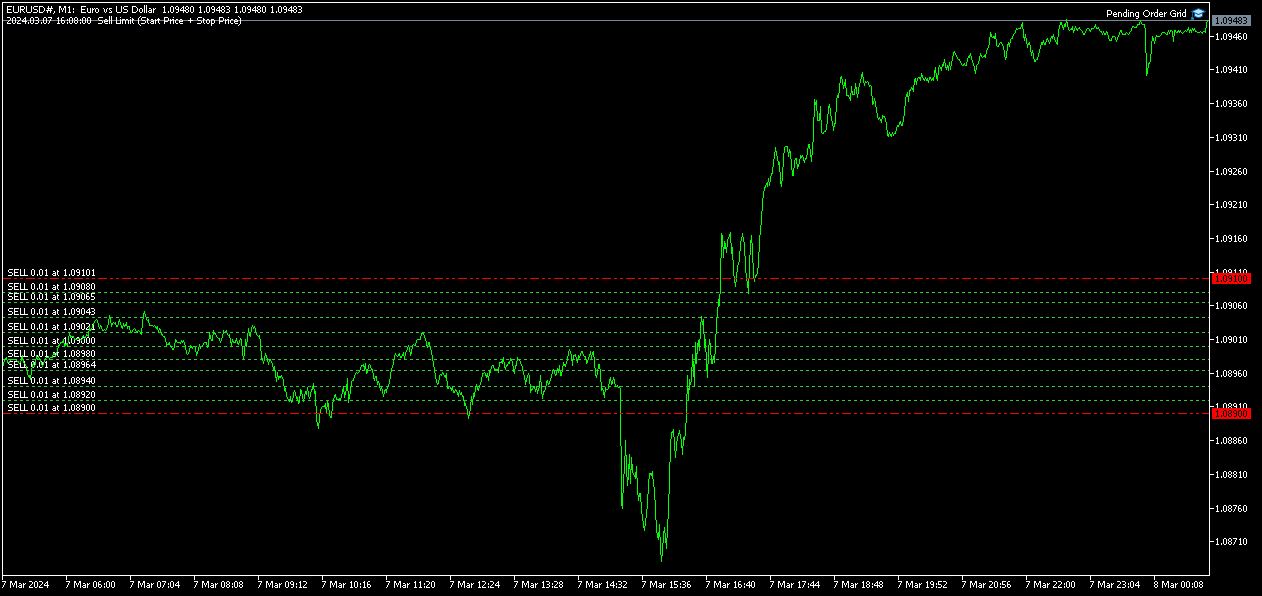
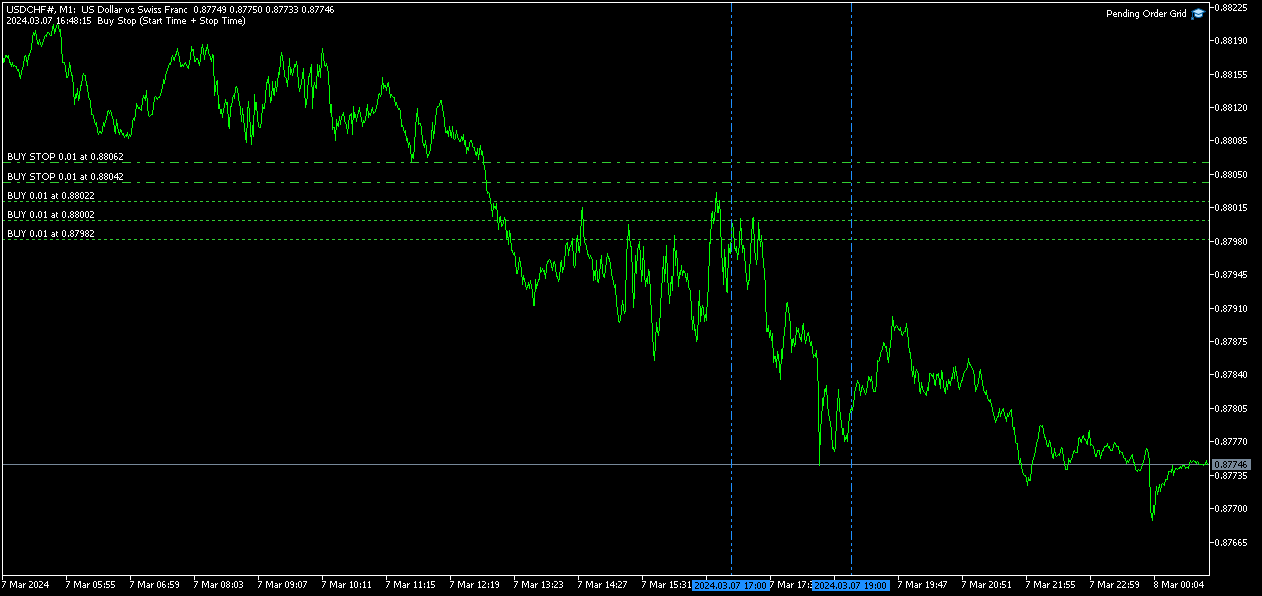
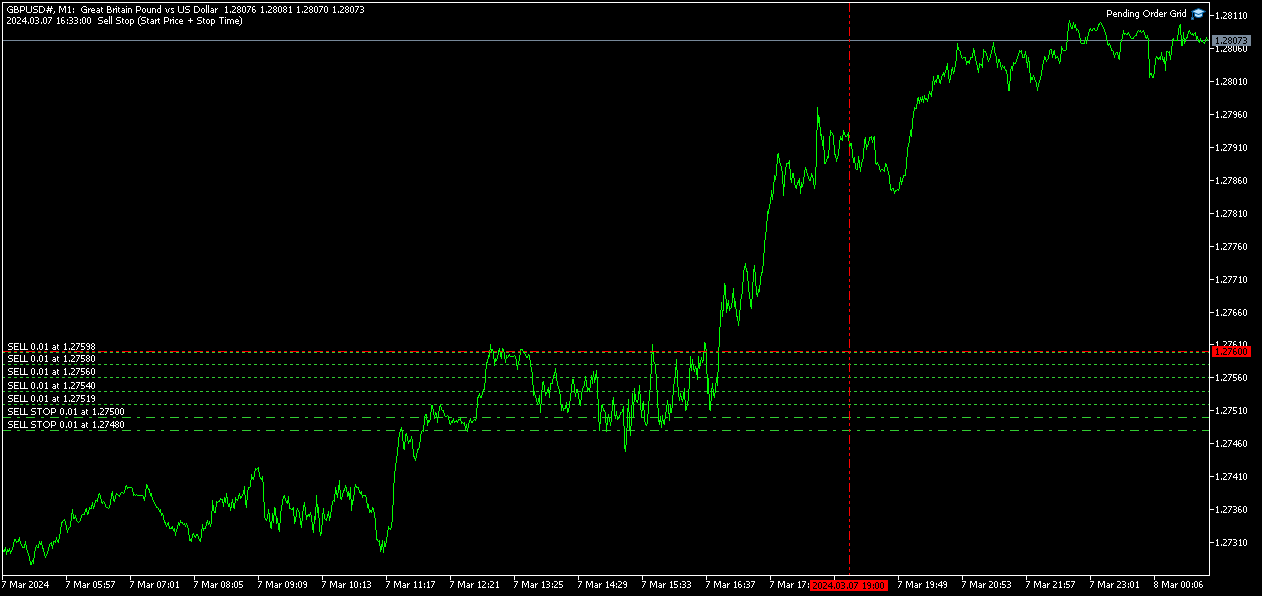
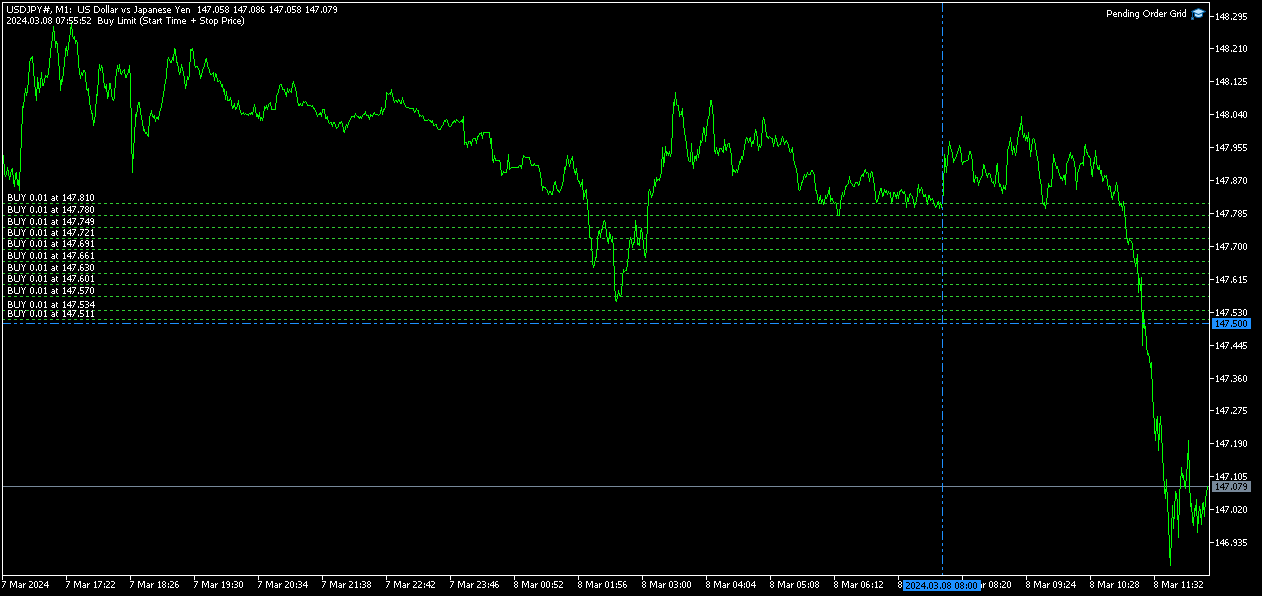
The Pending Order Grid allows the performing of a user-defined strategy through the creation of pending order grids. The Expert Advisor places pending orders of a given type (Buy Limit, Sell Limit, Buy Stop, or Sell Stop) at equidistant price levels to form each grid. The user might set up different grids to exist simultaneously – it's only needed to attach the EA on multiple chart windows of the intended symbol(s). 

The start and stop of a grid might be chosen between two modes: price or time. Depending on the selected modes, the trading robot only starts placing pending orders when the current price is "near" the first target price (Start Price) or the Start Time is reached and stops placing when the last target price exceeds the Stop Price or the Stop Time is reached, where Start Price, Start Time, Stop Price and Stop Time are input parameters. 

A pending order placing is regulated by a price interval, whose limits are at the Stop Level and Stop Level + Extra Level distances from the order’s target price, where Extra Level is an input parameter. Every time new quotes are available, and the symbol's price is at this interval, the pending order is placed. The target price of the next order is simply given by the previous one added (Sell Limit or Buy Stop) or subtracted (Buy Limit or Sell Stop) with the Price Level input parameter. 

An exception to the previous procedure is when the grid’s first pending order is triggered by the Start Time. In this case, the trading robot tries immediately placing the order at the Stop Level distance. In case of rejection by the trade server, it will add 1 pip to the previous distance and try again for the order placing. This procedure will be repeated until the Stop Level + Extra Level distance is reached. 

The maximum number of simultaneous pending orders placed by the EA is given by the expression: 

  • Ceil ( (Stop Level + Extra Level) / Price Level ), for Price Level > 0, 

where Ceil represents the usual maths function. The expression may take the following values: 

  • 1 for Price Level ≥ Stop Level + Extra Level, 
  • 2 for (Stop Level + Extra Level)/2 ≤ Price Level < Stop Level + Extra Level, 
  • 3/more for Price Level < (Stop Level + Extra Level)/2. 

    Risk Management 

    The volume used to place a pending order is chosen between a fixed and a variable lot size, available through the Volume and Free Margin % input parameters, respectively. If there isn't enough money in the account for the chosen volume, a request for placing the order is still sent to the trade server. The purpose is to allow the corresponding position opening if the free margin increases enough until the target price is reached. This increase could be due to an account deposit or position profit between the placing and triggering of the pending order. 

    Input Parameters 

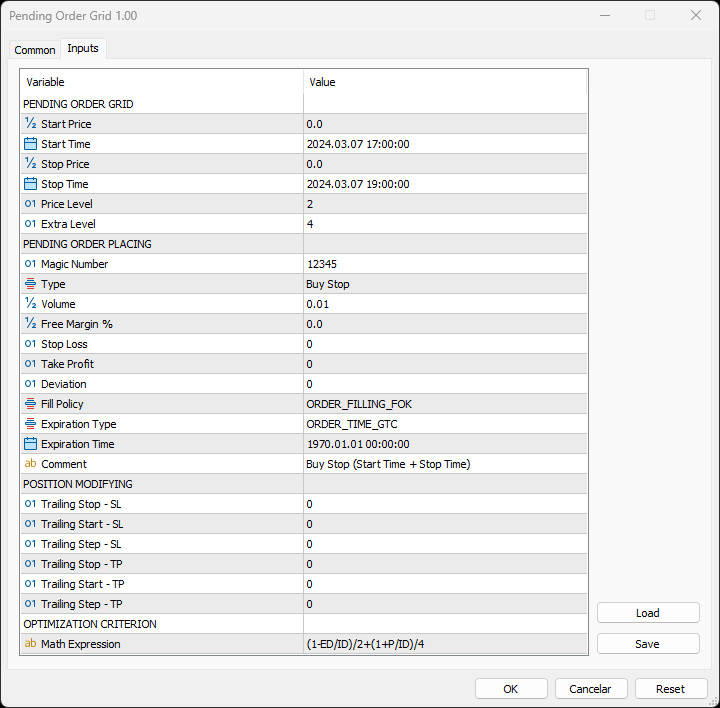
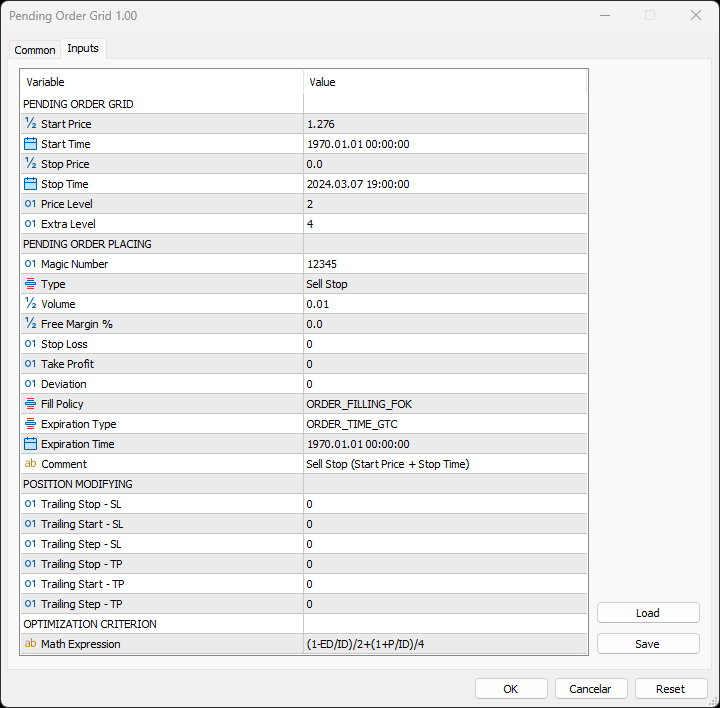
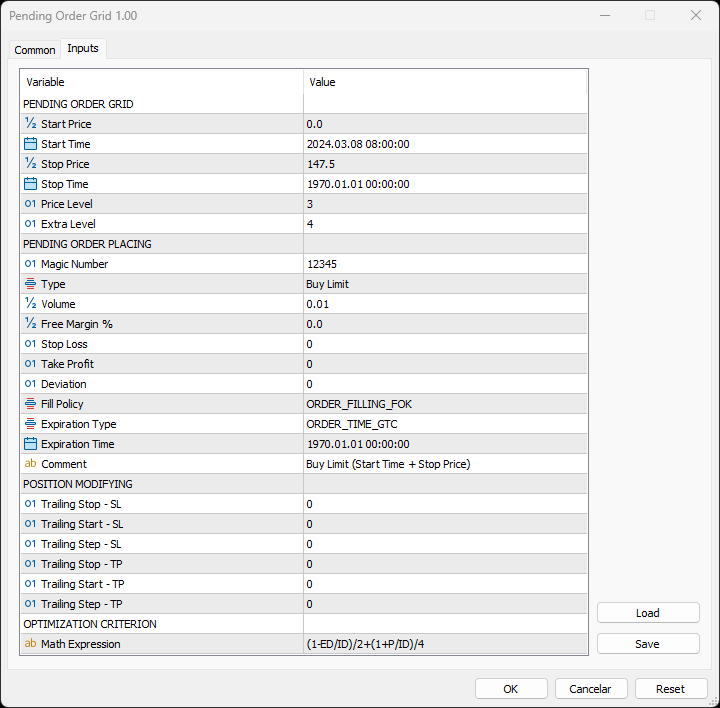
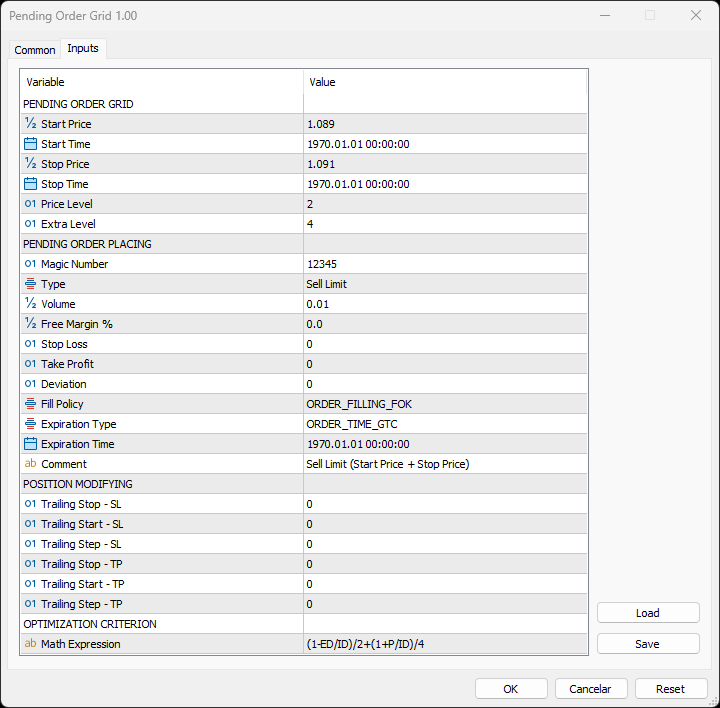
    PENDING ORDER GRID 

    • Start Price: Price used to define the grid’s start. 
    • Start Time: Time used to define the grid’s start. 
    • Stop Price: Price used to define the grid’s stop. 
    • Stop Time: Time used to define the grid’s stop. 
    • Price Level: Distance used between pending orders of the same type (pips). 
    • Extra Level: Distance from the Stop Level, which in turn is a distance from the target price, both represent the limits of price interval where the symbol's price needs to be for the pending order's placing (pips). 

        PENDING ORDER PLACING 

        • Magic Number: Expert Advisor’s identifier. 
        • Type: Pending order type used to form the grid. 
        • Volume: Lot size per deal (lots). 
        • Free Margin %: Percentage of account free margin used to calculate the lot size of the current deal (%). 
        • Stop Loss: Distance from the pending order's target price for placing a Stop Loss (pips). 
        • Take Profit: Distance from the pending order's target price for placing a Take Profit (pips). 
        • Deviation: Maximum allowed slippage from the requested price (pips). 
        • Fill Policy: Volume execution policy. 
        • Expiration Type: Order validity mode. 
        • Expiration Time: Order validity period (used only with the ORDER_TIME_SPECIFIED validity mode). 
        • Comment: Text message displayed in the chart window after a(n) (re)initialization of the EA, in the Objects list after creating a horizontal/vertical line (at each of the grid’s limits) or placing a pending order, and in the Trade or History tabs of the Toolbox window after placing a pending order (it only allows 31 characters). 

          POSITION MODIFYING 

          • Trailing Stop – SL: Distance from the market price for placing a Stop Loss after a favourable price movement (pips). 
          • Trailing Start – SL: Distance from the position’s opening price that must be reached for the “Trailing Stop – SL” function’s activation (pips). 
          • Trailing Step – SL: Distance from the price where the previous Stop Loss modification occurred that must be reached before the placing of a new Stop Loss (pips). 
          • Trailing Stop – TP: Distance from the market price for placing a Take Profit after an unfavourable price movement (pips). 
          • Trailing Start – TP: Distance from the position’s opening price that must be reached for the “Trailing Stop – TP” function’s activation (pips). 
          • Trailing Step – TP: Distance from the price where the previous Take Profit modification occurred that must be reached before the placing of a new Take Profit (pips). 

              OPTIMIZATION CRITERION 

              • Math Expression: Mathematical expression used to calculate a custom statistic parameter to sort the optimization results (see the Optimization Criterion section below). 

              Some of the available parameters accept values that lead to particular options. 

              • Start Price or Stop Price: A null/negative value means the parameter’s inactive function. 
              • Start Time or Stop Time: A value before the current time means the parameter’s inactive function. 
              • Price Level: A null value means that the target price is constant for all pending orders. 
              • Extra Level: A null value means that the symbol’s price needs to be exactly at the Stop Level distance from the target price for the pending order's placing. 
              • Volume: A value lower than the minimum allowed volume by the broker is converted in this last. A value higher than the maximum available volume by the free margin is converted in this last. 
              • Free Margin %: A value whose volume doesn’t reach the minimum allowed volume by the broker is converted in this last. A value whose volume exceeds the maximum available volume by the free margin is converted in this last. 
              • Stop Loss, Take Profit, Trailing Stop – SL or Trailing Stop – TP: A null value means the parameter’s inactive function. Any value between 0 and the Stop Level is converted in this last. 
              • Trailing Start – SL or Trailing Start – TP: A null value means the “Trailing Stop – SL” or “Trailing Stop – TP” function’s immediate activation, respectively. 
              • Trailing Start – SL: The spread value means the “Trailing Stop – SL” function’s activation at breakeven, although such hasn't been guaranteed. The spread + “Trailing Stop – SL” values mean the “Trailing Stop – SL” function’s activation in a profit where breakeven has been guaranteed. 
              • Trailing Step – SL or Trailing Step – TP: A null value means the “Trailing Stop – SL” or “Trailing Stop – TP” function’s continuous operation, respectively. 

                The input parameters that define the limits of the grid must obey a few rules. 

                • Both the start and stop of the grid must be selected, each chosen between a price or time. 
                • Any combination between the start and stop of the grid can be used: Start Price + Stop Price, Start Price + Stop Time, Start Time + Stop Price and Start Time + Stop Time
                • The Start Price cannot exceed the Stop Price in the Sell Limit or Buy Stop orders grid. 
                • The Stop Price cannot exceed the Start Price in the Buy Limit or Sell Stop orders grid. 
                • The Start Time cannot exceed the Stop Time in any pending order grid. 

                    Optimization Criterion 

                    The Expert Advisor allows the creation and use of a new statistical parameter (besides available ones) to sort the optimization results. This custom statistic parameter results from a mathematical expression calculated after the testing. The expression must obey syntax rules and precedence order, being constituted by the following elements: 

                    • Integer and real numbers. 
                    • Statistic parameters
                    • Mathematical operators for addition (+), subtraction (-), multiplication (*), division (/) and exponentiation (^). 
                    • Mathematical and trigonometric functions
                    • Curved parentheses (()) to define the precedence and contain the function’s argument(s). 
                    • Full stop (.) as decimal point and comma (,) as function’s arguments separator. 

                      The statistical parameters are used by writing the respective identifier initial(s) after the term “STAT”. In case there are two identifiers with the same initial(s), it must also be added “1” or “2”, depending on the order in which both appear in the list. For instance, “STAT_PROFIT” and “STAT_MAX_CONLOSS_TRADES” would be “P” and “MCT2”, respectively. List of identifiers, without “STAT_”, whose initial(s) require “1” or “2”: 

                      CONPROFITMAX (C1), CONPROFITMAX_TRADES (CT1), MAX_CONWINS (MC1), MAX_CONPROFIT_TRADES (MCT1), CONLOSSMAX (C2), CONLOSSMAX_TRADES (CT2), MAX_CONLOSSES (MC2), MAX_CONLOSS_TRADES (MCT2), EQUITYDD_PERCENT (EP1), EXPECTED_PAYOFF (EP2), LOSS_TRADES (LT1), LONG_TRADES (LT2). 

                      The mathematical/trigonometric functions are used by writing the respective name after “Math” and one or two arguments inside parentheses, separated by a comma in this last case. For instance, “MathLog10()” and “MathPow()” would be “Log10(argument)” and “Pow(argument1,argument2)”, respectively. List of names that correspond to the available functions: 

                      Abs, Arccos, Arcsin, Arctan, Arctan2, Ceil, Cos, Exp, Floor, Log, Log10, Max, Min, Mod, Pow, Rand, Round, Sin, Sqrt, Tan, Expm1, Log1p, Arccosh, Arcsinh, Arctanh, Cosh, Sinh, Tanh. 

                      Note: “MathRand()” is only executed with “GetTickCount()” as the argument of “MathSrand()”, it’s used without anything inside parentheses – simply writing “Rand()”. 

                      Additionally, the expression has the following properties: 

                      • The scientific, engineering and E notations are allowed. 
                      • The multiplication needs to be explicitly indicated (through the respective symbol). 
                      • The system is case-insensitive. 
                      • The space ( ) is allowed and doesn’t affect the expression’s calculation. 
                      • The input expression is limited to 233 characters. 

                        Examples of a number representation using various notations: “0.0000325” (decimal), “3.25*10^-5” (scientific), “32.5*10^-6” (engineering) and “32.5E-6” (E). 

                        IMPORTANT! The EA doesn’t verify if the input expression fulfils all the requirements, namely if it obeys syntax/standard rules, hence, any infringement of these leads to an unreliable result. 

                        Displayed Information 

                        The Expert Advisor possesses a vast number of messages to inform the user about errors and conditions changes that might occur during its operation. The messages are shown through the Alert function (by a pop-up window), its content includes: 

                        1. The warning that an input parameter has been incorrectly set. 
                        2. The info that the account doesn't have enough money for the chosen volume (see the Risk Management section above). 
                        3. The info that the number of permitted orders by the broker has been reached. 
                        4. The previous and current value of the symbol’s Stop Level when this is updated. 
                        5. The Trade Server Return Codes description. 
                        6. The symbol’s quotes (immediately) before the trade request’s formation, followed by the symbol’s quotes (immediately) after the trade server’s decision. 
                        7. The Runtime Errors description. 
                        8. The standard function in the include file where the runtime error was detected (only relevant to the programmer). 
                        9. The Uninitialization Reason Codes description. 

                                    Note: Some elements of the list are displayed simultaneously (in the same text line): 5, 6 and 7; 7 and 8. 

                                    During the EA’s operation, the messages displayed are grouped by kind of occurrence (related to each list’s element, except the 1, 6 and 8) and counted. Immediately before the EA’s unloading, a final message containing those groups with the respective counts (if these were > 0) is presented. 

                                    Following the EA's (re)initialization, two reference lines are displayed in the chart at the grid’s limits (start and stop). Each line is horizontal/vertical when the grid’s limit is the price/time, respectively. Both lines are blue/red when the grid’s pending order type is Buy/Sell, respectively. Tip: Place the mouse pointer over one of those lines to see its object name ("Buy/Sell Limit/Stop – Start/Stop Price/Time"). Note: The properties of a graphical object can be edited in the Objects list. 

                                    After the EA’s testing/optimization, the result of the mathematical expression, inserted in the Math Expression input parameter, is presented in the Journal/Optimization Results tabs of the Strategy Tester window, respectively. After the EA’s testing, the values of the available statistic parameters are also presented in the Journal tab. 

                                    Observations 

                                    In some cases, the quoting session might start before or end later than the corresponding trading session (with a five-minute difference, for instance). During the time interval when the quoting session is open, but the trading session is still/already closed, the Expert Advisor initiates/continues to process the available ticks, respectively. If the present conditions satisfy the EA's trading criteria, a trade request is formed and sent to the server. However, it won’t succeed, and an error message is displayed: “Trade request sending failed; Market is closed. 

                                    During high activity periods, the trade server’s decision on whether a trade request is executed or rejected may suffer significant delays. Some data used in the request sent to the server might become incorrect, leading to the order’s rejection. When the server is evaluating a request and the symbol's quotes are updated, three cases might occur: 

                                    1. Pending order placing – the pending order’s target price becomes an incorrect distance. 
                                    2. Position opening/modifying – the position's Stop Loss or Take Profit intended level becomes an incorrect distance. 
                                    3. Position modifying – the position's Stop Loss or Take Profit previous level takes to its closing. 

                                    The symbol’s quotes mentioned in the sixth element of the list in the Displayed Information section are especially useful here (since firsts usually differ from lasts). A careful analysis of these quotes, knowing the implication that certain quote changes have on the request’s evaluation, permits understanding the reason when these cases occur. To avoid the request’s rejection by the trade server due to “invalid stops” (cases 1 and 2), the prices/levels used should exceed the symbol’s Stop Level by a few pips. 

                                    The Start Price, Start Time, Stop Price, Stop Time or Type input parameters have a special status in the program. Every time one is changed, two things happen: the EA ends up the current grid and verifies the conditions to create a new one. Then, if all start/stop values pass this checking, the EA begins a new grid. But, if at least one fails, the EA doesn’t go forward with the new grid and terminates its operation. 

                                    A Buy/Sell position is opened at the Ask/Bid price and closed at the Bid/Ask price. Since the position’s stop orders (Stop Loss and Take Profit) are triggered at this last price, in a pending order, they are calculated from the order's target price -/+ the current spread (Ask - Bid), respectively. 

                                    When placing a pending order, the validity period can’t be less than 1 minute. During a grid creation, the Expert Advisor doesn’t place pending orders if the current time exceeds the Expiration Time minus 1 minute (when the validity period is previously selected). 

                                    Conclusion 

                                    The Pending Order Grid is a helpful and efficient tool regarding the automatic creation of pending order grids, especially when the grids consist of a significant number of orders, enabling a simple and intuitive setting of the grids to form.
                                    Produits recommandés
                                    FX28 Trader MT5
                                    Tsvetan Tsvetanov
                                    3 (1)
                                    Présentation du FX28 Trader Dashboard - Votre gestionnaire de transactions ultime Découvrez tout le potentiel de votre expérience de trading avec le FX28 Trader Dashboard, un gestionnaire de transactions complet et intuitif conçu pour élever votre trading Forex à de nouveaux sommets. Que vous soyez un trader expérimenté ou que vous débutiez votre parcours financier, cet outil puissant a été développé pour simplifier vos activités de trading et améliorer votre processus de prise de décision. Car
                                    Binance Grid Pro offers an alternative to the built in Grid systems Binance Platform offers. This utility let you define a grid parameters for interact with your Binance account using an Isolated Margin account. This is, similar to Spot Grid in Binance. This is not for handle with derivatives contracts, is for handle with Spot through Isolated Margin Account. But obviosly this utility offers a different approach than built in Binance Grid to handle the Grid, which I have found useful based on
                                    Remote Trade Copier is an advanced tool designed for efficiently copying trades between accounts in both local and remote modes. It allows for lightning-fast order replication from a master account to a slave account. In local mode, trades are copied instantly, while in remote mode, the copying process takes less than 1 second. MT4 Version (Only Local) MT5 Version (Only Local) MT4 Full Version (Local & Remote) Local mode refers to both MetaTrader platforms being installed on the same system,
                                    The Realtime Statistics MT5  is an innovative tool designed for traders who want to keep track of their trading performance in real-time. This MetaTrader 5 Expert Advisor (EA) is packed with customizable features that allow you to monitor crucial trading statistics directly on your chart, ensuring you always have the insights you need to make informed trading decisions. Check out the Realtime Statistics MT5 User Guide Here Try out the  FREE  Realtime Statistics MT5 Demo  Here Key Features: Compr
                                    Quant Panel
                                    Kevin Craig E Gittins
                                    Quant Panel Pro The Ultimate Multi-EA Performance Dashboard for Quantitative Traders Stop juggling multiple charts or external tools to monitor your algorithmic strategies! Quant Panel Pro delivers institutional-grade portfolio monitoring in one sleek, professional interface. Key Features Quantitative Analytics at Your Fingertips Real-time P&L aggregation   across all Expert Advisors Statistical win rate analysis   with trade frequency metrics Advanced drawdown tracking   (realized & unrealized
                                    Binance Copier allows to seamlessly and easily copy trades between MT5 and Binance Futures! The tool's main feature is to replicate trades and all available orders between MetaTrader 5 and Binance that can be applied to both Expert Advisors and manually opened ones. Key Features: Bidirectional Copying - MT5 → Binance (Master Mode): Copy your MT5 trades to Binance - Binance → MT5 (Slave Mode): Mirror Binance positions in MT5 - Real-time synchronization with configurable delays Complete Trade M
                                    Overview : The Advanced News Trading Panel is a versatile tool designed for traders who rely on news-based trading strategies. This Expert Advisor (EA) provides an intuitive graphical interface that allows users to quickly set up pending orders and manage risk with ease. With the ability to automatically place Buy/Sell Stop orders based on your pre-set stop order distance from the bid/ask price, stop-loss and take-profit levels, the EA allows for precision trading during high-volatility news eve
                                    Tiger Lite
                                    Dang Cong Duong
                                    Tiger Lite recreate the history of entry and exit orders. The goal is that you can grasp their strategy how to play. CSV format support for WEB, MT4 and MT5 platforms. The sequence of steps is described in the photo. Note: Please choose the existing date and symbol on the CSV file. For MT4/5, export historical data and copy the records to excel, save it with the extension CSV. For MT4/MT5/WEB, save the name with format mt4.csv/mt5.csv/web.csv If you get the history from another source and your
                                    FREE
                                    Ashinton Smart Ultra Pro – Structured Trading Automation Ashinton Smart Ultra Pro is a trend-following,  risk-controlled MT5 Expert Advisor designed to trade identified trend continuation  opportunities using a multi-stage entry confirmation aligned with directional bias, and price structure-based swing levels. It focuses on clean execution, strict money management, and safety protections (daily drawdown lock, spread protection, cooldown rules, and more), making it suitable for traders who want
                                    NanoTrade Pro
                                    Vadim Podoprigora
                                    NanoTrade Pro NanoTrade Pro   is a state-of-the-art automated trading advisor designed to optimize your trading strategy in the fast-paced financial markets. Leveraging advanced algorithms and real-time data analysis, NanoTrade Pro automates the scalping process, enabling traders to capitalize on small price movements with remarkable precision and efficiency. Basically, the advisor does not use any risk systems with increasing volume or increasing the number of open orders. Before buying, be s
                                    Pending Order Grid MT5
                                    Francisco Manuel Vicente Berardo
                                    The Pending Order Grid is a multi-symbol multi-timeframe script that enables multi-strategy implementation based on pending order grids.  General Description   The Pending Order Grid allows the performing of a user-defined strategy through the creation of pending order grids. The script places pending orders of a given type (Buy Limit, Sell Limit, Buy Stop, or Sell Stop) at equidistant price levels to form each grid. The beginning and finish of every grid are defined by the Start Price and Sto
                                    QFT Scalp Gold is a XAUUSD scalping Robot designed for the M1 timeframe.  The trading system is designed to identify high probability market action and  capitalize on such information.  The trouble with most scalping systems is the general lack of a credible response when the market makes very large moves against a huge number of open trades, often relying on very low reward to risk ratio.  QFT Scalp Gold solves this problem with a unique recovery system that uses the unfavorable market  mov
                                    Equity Tracker MT5 Equity Tracker MT5 est un Expert Advisor de surveillance pour MetaTrader 5 qui rapporte l’activité de trading, l’état du compte et les conditions techniques via des messages de notification. L’Expert Advisor fonctionne indépendamment de la logique de trading et n’influence ni l’exécution des ordres ni la gestion des positions. Le produit n’ouvre, ne modifie et ne ferme aucune position. Il effectue uniquement des tâches d’observation et de notification. Objectif Equity Tracker
                                    Equity Gaurd
                                    Eredewei Henry Tiemo
                                    ️ EA Protecteur d'Équité - SL Automatique et Stop Suivant pour MT5Protégez votre capital. Automatisez vos risques. Maximisez votre contrôle.L'EA Protecteur d'Équité est un puissant outil de gestion des risques conçu pour les traders de Meta Trader 5 qui privilégient la préservation du capital et l'automatisation intelligente des transactions. Que vous soyez scalpeur, trader de swing ou investisseur à long terme, cet EA garantit la protection de votre compte tout en optimisant les sorties de tr
                                    ================================================== DeepNero Xtreme Ultimate MT5 (Market Edition) ================================================== DeepNero Xtreme Ultimate MT5 stands as the absolute flagship of the DeepNero systematic ecosystem. This elite iteration harnesses the maximum capacity of our ONNX neural evaluations combined with a comprehensive 20-tier market assessment architecture. Designed for zero-compromise precision, the Ultimate version scans deeply for intricate market dis
                                    Chart Navigator Pro
                                    ELITE FOREX TRADERS LLC
                                    Introducing the   Elite Chart Navigator   — your ultimate MetaTrader 5 Expert Advisor designed to revolutionize multi-symbol trading with seamless chart navigation and superior usability. Product Overview The   Elite Chart Navigator EA   is a sophisticated trading utility enabling rapid switching between multiple trading pairs through an intuitive on-chart button interface. Built for professional traders managing numerous instruments, this EA dramatically improves workflow efficiency, ensuring
                                    Features 1️⃣ Flexible Grid Order Configuration Set price levels and spacing between orders. Customize order sizes and maximum number of positions for better risk control. 2️⃣ Hedge and Netting Modes Hedge Mode : Allows simultaneous long and short positions , ideal for advanced strategies. Netting Mode : Consolidates positions for easier balance management. 3️⃣ Supported Order Types Limit Orders : Buy and sell at predetermined prices. Market Orders : Instant execution. Integrated Take-Profit : Wi
                                    StopAndTake
                                    Oleksandr Kashyrnyi
                                    5 (1)
                                    Nom du produit : StopAndTake — Un script simple pour une gestion rapide et précise des SL/TP Description du produit : StopAndTake est un script léger et intuitif, conçu pour les traders qui valorisent la rapidité, la précision et la fiabilité dans la gestion de leurs positions. Cet outil permet de mettre à jour instantanément les niveaux de Stop Loss (SL) et Take Profit (TP) pour toutes les positions sur le graphique sélectionné, en toute simplicité. Avantages et bénéfices : Simplicité : Une int
                                    FREE
                                    Range Breakout EA – Profitez des mouvements de la session asiatique ! Salut ! Notre Range Breakout EA est conçu pour vous aider à tirer parti des mouvements précoces de la session asiatique. Voici comment il fonctionne : pendant une période définie, l’EA marque les points les plus hauts et les plus bas pour créer une plage de prix. Ensuite, il place des ordres limite d’achat et de vente juste en dehors de cette plage, vous permettant de saisir les cassures dans les deux directions ! :) Pour plus
                                    LastStand Type13 The Pullback King
                                    Nothpone Thamrongarchariyakul
                                    The Pullback King (Type 13) The Pullback King is an expert advisor designed for traders who value systematic entry and disciplined risk management. This EA focuses on "Pullback" trading opportunities by combining trend-following indicators with price action confirmation. It is designed to be a reliable assistant for both prop firm challenges and personal account growth. Core Trading Logic The EA utilizes a multi-layered filter system to ensure high-quality entries: Trend Filtering (VIDYA): Uses
                                    AO Trade
                                    Ka Lok Louis Wong
                                    Le système de trading AO est spécifiquement conçu pour le trading de tendance, en utilisant les heures d'enchères ou de nouvelles comme points de référence pour les comparer avec d'autres heures de commande spécifiques afin d'anticiper les tendances du marché. **Tous les paramètres de temps utilisés dans l'EA sont basés sur l'heure de votre terminal. Différents courtiers peuvent fonctionner dans différents fuseaux horaires GMT, ce qui peut varier davantage en raison des ajustements liés à l'he
                                    Pro Trade Utility for MetaTrader 5 Pro Trade Utility is a professional manual trading assistant designed for traders who want precision, speed and clarity — without automated strategies. This tool does not trade automatically . It helps you execute and manage trades correctly with proper risk control. Key Features  Risk & Position Management Risk-based automatic lot size calculation Risk shown clearly in account currency Adjustable Stop Loss (points) Fixed Risk:Reward display  Trade Executio
                                    Capitalrecover2
                                    Mr Nisit Noijeam
                                    HFT  ZONE MOMENTUM RECOVERY EA_Name ค่า: HFT MTRADER ใช้สำหรับระบุชื่อของ EA เพื่อให้ง่ายต่อการจัดการหรือตรวจสอบในประวัติการเทรด (History) Lot_fix ค่า: 0.02 ใช้กำหนดขนาดของล็อตคงที่ (Fixed Lot Size) ที่ EA จะเปิดในแต่ละคำสั่งเทรด โดยไม่ขึ้นอยู่กับเงื่อนไขอื่น ๆ Lots_X ค่า: 1.5 ตัวคูณล็อต (Lot Multiplier) ซึ่งมักใช้ในการเพิ่มขนาดล็อตในลักษณะการ Martingale หรือ Hedging โดยเมื่อขาดทุนหรือเปิดคำสั่งถัดไป ระบบจะเพิ่มล็อตตามค่าที่กำหนดไว้ High_Low_end_candle ค่า: 10 จำนวนแท่งเทียนที่ใช้ในการคำนวณระ
                                    Range Brain Ai
                                    Bosco Antonio Vega
                                    Range Brain AI - Neural Network Range Trading Expert Advisor AI-powered range breakout Expert Advisor using volume-based neural networks to identify and trade pre-market consolidation ranges on US30. Trading Strategy Range Brain AI is a volume-based neural network Expert Advisor designed specifically for trading the Dow Jones 30 (US30) during optimal market conditions. The EA identifies consolidation ranges during specified time windows and executes breakout trades when price breaches these lev
                                    Welcome to Smart Algo Trade Panel Manager MT5 - the ultimate   risk management tool designed to make trading more effective based on user needs.  It is a comprehensive solution for seamless trade planning, position management, and enhanced control over risk. It does not matter weather you a beginner or an advanced trader, or a scalper needing rapid executions, SmartAlgo Trade Panel  adapts to your needs offering flexibility across all markets of your choice. You can put SL, Lot and TP of choice
                                    Nas100 Ny Open Breakout
                                    Raul Alberto Galdames Soto
                                    NAS100 NY Open Breakout NAS100 NY Open Breakout es un Asesor Experto diseñado para operar de forma automática el índice NASDAQ 100 durante uno de los momentos más líquidos y decisivos del día: la apertura de la sesión de Nueva York . El sistema se basa en la detección de rupturas reales de precio en los primeros minutos posteriores a la apertura, combinando gestión de riesgo estricta y control avanzado de la posición. Características principales Operativa automática enfocada exclusivamente en
                                    BlackBox XAU
                                    Enrique Van Rooyen
                                    BlackBox XAU — Expert Advisor Avancé pour l’Or Aperçu BlackBox XAU est un système de trading soigneusement conçu pour générer des profits sur le marché de l’or tout en gardant un contrôle strict sur le drawdown. Plutôt que de courir après chaque mouvement du marché, il applique une approche disciplinée et basée sur des règles, capable de s’adapter à la volatilité et de sélectionner uniquement les opportunités à forte probabilité . L’EA évalue en continu les conditions de marché en temps réel, fi
                                    Gold Smc Apex Scalping h1
                                    Chaibadee Dechtanankul
                                    Here is a breakdown of how the GOLD SMC APEX SCALPER (H1 BUY EDITION) operates specifically on the H1 (1-Hour) timeframe. This Expert Advisor (EA) uses a hybrid approach , combining Smart Money Concepts (SMC) for entry zones with a Grid & Martingale system for trade execution and recovery. 1. Execution on the H1 Timeframe (The "New Bar" Rule) Strict H1 Lock: The EA checks its environment during initialization ( OnInit ). If you attach it to any timeframe other than H1, it will trigger an alert a
                                    Magic EA MT5
                                    Kyra Nickaline Watson-gordon
                                    Magic EA is an Expert Advisor based on Scalping, Elliot Waves and with filters such as RSI, Stochastic and 3 other strategies managed and decided with the robot smartly. Large number of inputs and settings are tested and optimized and embedded in the program thus inputs are limited and very simple. Using EA doesn't need any professional information or Forex Trading Knowledge. EA can trade on all symbols and all time frames, using special and unique strategies developed by the author. The EA w
                                    AZ Aurum Breakout EA is a fully automated trading system developed specifically for Gold (XAUUSD). It is designed to capture strong price movements during breakout conditions by identifying key volatility zones and executing trades with precise timing. The system focuses on disciplined risk management and structured trade execution. It operates without using high-risk techniques such as martingale or grid strategies. Every position is protected with predefined Stop Loss and Take Profit levels, e
                                    Les acheteurs de ce produit ont également acheté
                                    Trade Assistant MT5
                                    Evgeniy Kravchenko
                                    4.42 (210)
                                    It helps to calculate the risk per trade, the easy installation of a new order, order management with partial closing functions, trailing stop of 7 types and other useful functions. Additional materials and instructions Installation instructions - Application instructions - Trial version of the application for a demo account Line function -   shows on the chart the Opening line, Stop Loss, Take Profit. With this function it is easy to set a new order and see its additional characteristics bef
                                    Bienvenue sur Trade Manager EA, l’outil ultime de gestion des risques conçu pour rendre le trading plus intuitif, précis et efficace. Ce n’est pas seulement un outil d’exécution d’ordres ; c’est une solution complète pour la planification des trades, la gestion des positions et le contrôle des risques. Que vous soyez débutant, trader expérimenté ou scalpeur ayant besoin d’une exécution rapide, Trade Manager EA s’adapte à vos besoins, offrant une flexibilité sur tous les marchés, des devises et i
                                    TradePanel MT5
                                    Alfiya Fazylova
                                    4.87 (154)
                                    Trade Panel est un assistant commercial multifonction. L'application contient plus de 50 fonctions de trading pour le trading manuel et permet d'automatiser la plupart des tâches commerciales. Avant l'achat, vous pouvez tester la version de démonstration sur un compte de démonstration. Télécharger la version d'essai de l'application pour un compte de démonstration : https://www.mql5.com/fr/blogs/post/762644 . Instructions complètes ici . Commerce. Permet d'effectuer des opérations commerciales e
                                    Version Bêta Le Telegram to MT5 Signal Trader est presque prêt pour la sortie officielle en version alpha. Certaines fonctionnalités sont encore en développement et vous pourriez rencontrer de petits bugs. Si vous rencontrez des problèmes, merci de les signaler, vos retours aident à améliorer le logiciel pour tout le monde. Telegram to MT5 Signal Trader est un outil puissant qui copie automatiquement les signaux de trading depuis des chaînes ou groupes Telegram vers votre compte MetaTrader 5 .
                                    Farmed Hedge Yield Farming | All Markets (Manual - Hybrid - Semi/Automated EA) MULTI-ASSET SUPPORT Trade any asset available on your broker - Forex: Major, Minor, Exotic pairs - Crypto: BTC, ETH, XRP, SOL, BNB - Stocks: Apple, Tesla, Amazon, Google, etc. - Commodities: Gold, Silver, Oil, Gas - Indices: US30, NAS100, SPX500, DAX40 - Any CFD your broker offers VERIFIED TRADING RESULTS - Farmed Hedge Yield Axi Copy:  https://www.mql5.com/en/signals/2356376 - Farmed Hedge Yield Exn Copy:   https:/
                                    Power Candles Strategy Scanner - Outil de recherche de configurations multi-symboles à optimisation automatique Le Power Candles Strategy Scanner utilise le même moteur d'auto-optimisation que celui qui alimente l'indicateur Power Candles, pour chaque symbole de votre Market Watch, en parallèle. Un panneau vous indique quels symboles sont statistiquement négociables à l'instant, quelle stratégie est la plus performante pour chacun, la paire Stop Loss / Take Profit optimale, et vous alerte dès qu
                                    YuClusters
                                    Yury Kulikov
                                    4.93 (43)
                                    Attention: You can view the program operation in the free version  YuClusters DEMO .  YuClusters is a professional market analysis system. The trader has unique opportunities to analyze the flow of orders, trade volumes, price movements using various charts, profiles, indicators, and graphical objects. YuClusters operates on data based on Time&Sales or ticks information, depending on what is available in the quotes of a financial instrument. YuClusters allows you to build graphs by combining da
                                    AntiOverfit PRO MT5
                                    Enrique Enguix
                                    5 (4)
                                    Avant d’acheter un EA, vérifiez s’il tient vraiment la route ou s’il a simplement eu de la chance en backtest. La plupart des robots se vendent avec un beau backtest. Une courbe qui monte. Un bon profit factor. Très peu de doutes. Et pourtant, beaucoup de ces EA s’effondrent dès que le marché cesse de se comporter comme dans cet historique précis. Pourquoi ? Parce qu’un backtest ne prouve qu’une seule chose : que cette stratégie a fonctionné sur un parcours de prix bien précis. Il ne prouve pas
                                    The product will copy all telegram signal to MT5 ( which you are member) , also it can work as remote copier.  Easy to set up, copy order instant, can work with almost signal formats, image signal,  s upport to translate other language to English Work with all type of channel or group, even channel have "Restrict Saving Content", work with  multi channel, multi MT5 Work as remote copier: with signal have ticket number, it will copy exactly via ticket number. Support to backtest signal. How to s
                                    Footprint Chart Pro — Professional OrderFlow EA for MetaTrader 5 Version 6.34 | Professional tool for real traders | Institutional-Grade Visualization DEMO USERS - PLEASE SELECT EVERY TICK / REAL TICK WHEN TESTING AND YOU HAVE DOWNLOADED HISTORICAL DATA. IF YOU SEE A WAITING SCREEN AND IT IS NOT DOWNLOADING, IT MEANS YOU HAVE LOW HISTORICAL DATA. TRY 1 MIN AND 5 MIN FIRST ON 1 DAY DATA. ONE DAY DATA SHOULD BE THE NEWEST AND MOST CURRENT DATE. PLEASE WAIT UNTIL THE MARKET HAS ROLLED OVER PERIOD.
                                    Bots Builder Pro MT5
                                    Andrey Barinov
                                    4.17 (6)
                                    This is exactly what the name says. Visual strategy builder . One of a kind. Turn your trading strategies and ideas into Expert Advisors without writing single line of code. Generate mql source code files with a few clicks and get your fully functional Expert Advisors, which are ready for live execution, strategy tester and cloud optimization. There are very few options for those who have no programming skills and can not create their trading solutions in the MQL language. Now, with Bots Builde
                                    Le Local Trade Copier EA est une solution pour les commerçants individuels ou les gestionnaires de compte qui ont besoin d'exécuter des signaux commerciaux à partir de sources externes ou qui ont besoin de gérer plusieurs comptes en même temps, sans avoir besoin d'un compte MAM ou PAMM. Il copie jusqu'à 8 comptes maîtres vers un nombre illimité de comptes esclaves [ Guide d'installation | Guide de mise à jour | Dépannage | FAQ | Tous les produits ] 100% auto-hébergé Facile à installer et à util
                                    HINN Lazy Trader
                                    ALGOFLOW OÜ
                                    5 (2)
                                    The core idea: using the user interface, you configure the parameters the chart must meet before entering a position (or positions), choose which entry models to use, and set the rules for when trading and planning should end. Lazy Trader  handles the rest: it  takes over all the routine chart watching and execution! full description  :: 3 key videos [1] ->  [2]   ->  [3] What can it do? - Understands Larry Williams market structure - Understands swing market structure by Michael Huddleston
                                    Trade Copier Pro MT5 is a tool to copy trade remotely to multiple MT4, MT5 and cTradfer accounts at different computers/locations over internet. This is an ideal solution for you if you are a signal provider and want to copy your trades to other receivers globally on your own rules. One provider can copy trades to multiple receivers and one receiver can get trade from multiple providers as well. The provider can even set the subscription expiry for each receiver, so that receiver will not be abl
                                    Prop Guardian Risk Manager MT5 – Daily and Overall Drawdown Protection for Prop Firm Traders Prop Guardian Risk Manager is a professional risk-control utility for MetaTrader 5, created for traders who operate under prop firm rules. It does not open trades and does not implement any trading strategy. Instead, it runs in the background, monitors your account risk and can automatically block trading or close exposure when your own limits are reached. Use it as a safety layer on top of your manual t
                                    EchoTrade Telegram to MT5 Copier
                                    Perpetual Chinemerem Vincent
                                    5 (1)
                                    EchoTrade Telegram to MT5 Copier Seamless, Instant, and Reliable Signal Copying - Direct from Telegram to MetaTrader 5! The product does not run in the strategy tester but you can get free trial version here  for testing before purchase. Tired of manually executing trades from Telegram signals? EchoTrade automates the process, instantly copying trades from any Telegram channel or group directly into your MT5 account—accurately, efficiently, and without delay. Key Features: Universal Compatibi
                                    Ultimate Extractor
                                    Clifton Creath
                                    5 (9)
                                    Ultimate Extractor - Professional Trading Analytics for MT5 *****this is the local HTML version of Ultimate Extractor. !!!!!it is not compatible with Cloud!!!! For the online version please reach out to me directly****** Ultimate Extractor transforms your MetaTrader 5 trading history into actionable insights with comprehensive analytics, interactive charts, and real-time performance tracking. What It Does Automatically analyzes your MT5 trading history across all Expert Advisors and generates
                                    Custom Alerts AIO : Surveillez tous les marchés à la fois — sans aucune configuration Présentation Custom Alerts AIO est une solution de surveillance du marché prête à l’emploi, sans configuration nécessaire. Tous les indicateurs requis — FX Power, FX Volume, FX Dynamic, FX Levels, IX Power — sont directement intégrés. Aucun graphique n’est affiché, ce qui rend cet outil idéal pour la génération d’alertes en temps réel. Il prend en charge toutes les classes d’actifs proposées par votre courtie
                                    Telegram To MT5 Receiver
                                    Levi Dane Benjamin
                                    4.31 (16)
                                    Copiez les signaux de n'importe quel canal dont vous êtes membre (y compris les canaux privés et restreints) directement sur votre MT5.  Cet outil a été conçu en pensant à l'utilisateur et offre de nombreuses fonctionnalités nécessaires pour gérer et surveiller les trades. Ce produit est présenté dans une interface graphique conviviale et attrayante. Personnalisez vos paramètres et commencez à utiliser le produit en quelques minutes ! Guide de l'utilisateur + Démo  | Version MT4 | Version Disc
                                    RiskGuard Management
                                    MONTORIO MICHELE
                                    5 (22)
                                    ATTENTION : Pour une version d’essai gratuite, visitez mon site web. Manuel d’utilisation RiskGuard Management — Votre allié ultime pour un trading sans compromis. Lot Calculator — Calcul automatique de la taille de la position. Quantum — Risque automatique pour maximiser les profits et réduire les drawdowns. Automatic Journal — Inclus et téléchargeable gratuitement sur mon site. Automatic Screenshot — Deux captures d’écran : une à l’ouverture et une à la fermeture du trade. Partial Profit — S
                                    AlgoRadar
                                    Stephen J Martret
                                    5 (4)
                                    AlgoRadar is an on-chart analytics dashboard for MT5 that aggregates Expert Advisor performance across multiple accounts, brokers, and platforms, including both MT4 and MT5 data, into a single live view on your MT5 chart. All analysis runs from the chart interface, with no external applications or manual report processing required. EA Analysis and Ranking For traders running multiple Expert Advisors, AlgoRadar provides a consolidated view of each EA's performance across accounts. Active EAs a
                                    Ultimate Trailing Stop EA MT5
                                    BLAKE STEVEN RODGER
                                    4.13 (8)
                                    This EA Utility allows you to manage (with advanced filtering) unlimited open orders (manual or EA) with 16 trailing stop methods: fixed, percent, ATR Exit, Chandelier Exit, Moving Average, Candle High Low Exit, Bollinger Bands, Parabolic, Envelope, Fractal, Ichimoku Kijun-Sen, Alligator, Exit After X Minutes or Bars, RSI and Stochastic. The trailing stop can be either real or virtual, and you can exit fully or with a partial close percent on touch or bar close.  Moreover, you can add (override
                                    EA Auditor
                                    Stephen J Martret
                                    5 (2)
                                    EA Auditor is an independent analysis tool for traders evaluating Expert Advisors and trading signals on MetaTrader 5. It audits backtest reports, reviews posted developer signals, and cross-verifies the two against each other to help traders assess strategies before committing capital. The MQL5 market offers a wide range of Expert Advisors from many developers, with varying approaches, quality, and transparency. EA Auditor provides a consistent, data-driven framework for reviewing them, answer
                                    FUTURES ORDERFLOW FOOTPRINT CHART Professional OrderFlow EA for MetaTrader 5 Version 1.01| Professional tool for real traders | Institutional-Grade Visualization STRATEGY TESTER USERS - PLEASE SELECT EVERY REAL TICK WHEN TESTING AND YOU HAVE DOWNLOADED HISTORICAL DATA. IF YOU SEE A WAITING SCREEN AND IT IS NOT DOWNLOADING, IT MEANS YOU HAVE LOW HISTORICAL DATA. TRY 1 MIN AND 5 MIN FIRST ON 1 DAY DATA. ONE DAY DATA SHOULD BE THE NEWEST AND MOST CURRENT DATE. PLEASE WAIT UNTIL THE MARKET HAS ROL
                                    TradeMirror est un outil de copie d'ordres localisé, spécialement conçu pour les plateformes MT4/MT5, qui synchronise les opérations de trading en temps réel. Avantages du produit En se basant sur les normes élevées des logiciels financiers en matière de sécurité, de stabilité et de protection de la vie privée, nous avons procédé à des optimisations en profondeur sur trois dimensions principales : Une interface graphique simple et intuitive, permettant une utilisation sans aucune barrière Des mé
                                    PineChart
                                    Muhammad Minhas Qamar
                                    Developed by MMQ —  PineChart: Run PineScript Inside MT5 With A Modern Charting Experience An MQL5 Expert Advisor that runs Pine Script indicators and strategies directly inside MetaTrader 5. PineChart includes a full Pine Script interpreter so you can use your existing Pine Script v5/v6 source code without manually rewriting anything in MQL5. Links [  Website  |  Documentation  |  Demo ] NOTE: Downloading demo through MQL5 will give you limited functionality. To experience PineChart fully, dow
                                    EA Performance Logger Telegram
                                    Abdulqudus Tomiwa Akande-owoo
                                    The Performance Logger is a utility for MetaTrader 5 designed to track and report account metrics. It identifies trades based on specific criteria and provides summaries of account activity. Main Functions Automated Reporting : Generates summaries of account performance and sends them to specified communication channels (Telegram or Discord) on a weekly, monthly, or yearly basis. Strategy Analysis : Organizes performance data based on the specific Expert Advisor or strategy used for each trade.
                                    VOLUME BUBBLES ORDERFLOW FOOTPRINT PROFESSIONAL Expert Advisor for MetaTrader 5 Complete Feature Documentation Introduction: Volume Bubbles OrderFlow Footprint Professional is an advanced order flow visualization tool designed for the MetaTrader 5 platform. It provides institutional-grade market analysis through real-time volume bubbles visualization, volume profiling, and sophisticated order flow analysis. This Expert Advisor transforms raw market data into actionable trading intelligence, hel
                                    Vous avez trouvé un excellent signal, mais le lot d'un fournisseur est trop petit ? Vous avez besoin d'un volume de position plus important, mais les paramètres du terminal sont trop pauvres ? Signal Lot Manager augmentera le volume de position du fournisseur au moyen d'une commande en double du volume nécessaire. Définissez simplement une taille de lot et un nom de signal à partir duquel copier les commandes. Signal Lot Manager est un utilitaire multiplicateur de lots pour dupliquer les command
                                    MT5-StreamDeck offers the possibility to use a certain number of pre-programmed Hot-keys with a clearly defined role. So by the push of a button you can open a trade with a pre-defined lot size, stoploss and take profit. Close all your trades, close the ones in profit, or in loss, set Break-even or set a trailing stop. All this with a Hot key button. See the feature list for all the actions that can take place at the push of a button. Ideal for Quick Scalping or day trading with set risk managem
                                    Plus de l'auteur
                                    Pending Order Grid MT5
                                    Francisco Manuel Vicente Berardo
                                    The Pending Order Grid is a multi-symbol multi-timeframe script that enables multi-strategy implementation based on pending order grids.  General Description   The Pending Order Grid allows the performing of a user-defined strategy through the creation of pending order grids. The script places pending orders of a given type (Buy Limit, Sell Limit, Buy Stop, or Sell Stop) at equidistant price levels to form each grid. The beginning and finish of every grid are defined by the Start Price and Sto
                                    Multiple Position Opening MT5
                                    Francisco Manuel Vicente Berardo
                                    1 (1)
                                    The Multiple Position Opening is a multi-symbol multi-timeframe script used to open simultaneously various positions.  Risk Management   The volume used to open a position is chosen between a fixed and a variable lot size, available through the Volume and Free Margin % input parameters, respectively. If there isn't enough money in the account for the chosen volume, this is reduced to the highest possible value (corresponding to free margin). If this reduction leads to a correct volume (if the
                                    Double Trailing Stop MT5
                                    Francisco Manuel Vicente Berardo
                                    The Double Trailing Stop is a multi-symbol multi-timeframe Expert Advisor that allows the Stop Loss and Take Profit trailing of positions.  General Description   The Double Trailing Stop’s purpose is to secure profit and minimize losses of the opened positions. The Expert Advisor places stop orders (Stop Loss or Take Profit) at the Trailing Stop distance from the market price when the symbol's quote reaches/overcomes the Trailing Start distance from the position’s opening price (a single-time
                                    Tick Data Record MT5
                                    Francisco Manuel Vicente Berardo
                                    The Tick Data Record is a multi-symbol multi-timeframe Expert Advisor that records tick data for later graphical representation and analysis.  General Description  The Tick Data Record offers a(n) alternative/complement to the online/offline price charts displayed through the MT4/MT5 platform. The Expert Advisor permits to write and save the current/history values of Time, Bid, Ask, Spread, Last and Volume to a text file (“.txt”). The idea is to copy/open the obtained register to/in a spreadshe

                                    FREE
                                    Position Selective Close MT5
                                    Francisco Manuel Vicente Berardo
                                    The Position Selective Close is a multi-symbol multi-timeframe script used to close simultaneously various positions.  General Description   The Position Selective Close   possesses   three operation modes (Intersection,   Union   and All) that control the way   as   four position features (symbol, magic number,   type   and profit) are used. The modes, available through the Selection Mode input parameter, relate to the features, available through the “Select by Feature” and “Feature” input pa
                                    FREE
                                    Position Selective Close MT4
                                    Francisco Manuel Vicente Berardo
                                    The Position Selective Close is a multi-symbol multi-timeframe script used to close simultaneously various positions.  General Description   The Position Selective Close   possesses   three operation modes (Intersection,   Union   and All) that control the way   as   four position features (symbol, magic number,   type   and profit) are used. The modes, available through the Selection Mode input parameter, relate to the features, available through the “Select by Feature” and “Feature” input pa
                                    FREE
                                    Scientific Calculator MT5
                                    Francisco Manuel Vicente Berardo
                                    The Scientific Calculator is a script designed to compute science, engineering and mathematics expressions.  General Description   The expression to calculate must obey syntax rules and precedence order, being constituted by the following elements:   Integer and real numbers.  Mathematical operators for addition (+), subtraction (-), multiplication (*), division (/) and exponentiation (^).  Mathematical and trigonometric functions .  Curved parentheses (()) to define the precedence and contain
                                    FREE
                                    Tick Data Record MT4
                                    Francisco Manuel Vicente Berardo
                                    The Tick Data Record is a multi-symbol multi-timeframe Expert Advisor that records tick data for later graphical representation and analysis.  General Description   The Tick Data Record offers a(n) alternative/complement to the online/offline price charts displayed through the MT4/MT5 platform. The Expert Advisor   permits   to write and save the current/history values of Time, Bid, Ask, Spread, Last and Volume to a text file (“.txt”). The idea is to copy/open the obtained register to/in a spr
                                    FREE
                                    Scientific Calculator MT4
                                    Francisco Manuel Vicente Berardo
                                    The Scientific Calculator is a script designed to compute science, engineering and mathematics expressions.   General Description   The expression to calculate must obey syntax rules and precedence order, being constituted by the following elements:   Integer and real numbers.   Mathematical operators for addition (+), subtraction (-), multiplication (*), division (/) and exponentiation (^).   Mathematical and trigonometric functions .   Curved parentheses (()) to define the precedence and co
                                    FREE
                                    Order Selective Delete MT4
                                    Francisco Manuel Vicente Berardo
                                    The Order Selective Delete is a multi-symbol multi-timeframe script used to delete simultaneously various pending orders.  General Description   The Order Selective Delete   possesses   three operation modes (Intersection,   Union   and All) that control the way   as   three pending order features (symbol, magic   number   and type) are used. The modes, available through the Selection Mode input parameter, relate to the features, available through the “Select by Feature” and “Feature” input pa
                                    FREE
                                    Environment State Info Print MT5
                                    Francisco Manuel Vicente Berardo
                                    The Environment State Info Print is a script to display the constants that describe the current runtime environment of a MQL5 program.  General Description   The constants are divided into four groups in the   Environment State section of the MQL5 documentation and each group is divided into enumerations/subgroups (with designations  “Integer”, “Double” or “String”). The script displays constants in two ways: a single constant or all group constants. The constants are obtained by selecting the

                                    FREE
                                    Environment State Info Print MT4
                                    Francisco Manuel Vicente Berardo
                                    The Environment State Info Print is a script to display the constants that describe the current runtime environment of a MQL4 program.  General Description   The constants are divided into four groups in the Environment State section of the MQL4  documentation and each group is divided into enumerations/subgroups (with designations “ Market Info”, “Integer”, “Double” or “String”). The script displays constants in two ways: a single constant or all group constants. The constants are obtained by
                                    FREE
                                    Order Selective Delete MT5
                                    Francisco Manuel Vicente Berardo
                                    The Order Selective Delete is a multi-symbol multi-timeframe script used to delete simultaneously various pending orders.  General Description   The Order Selective Delete   possesses   three operation modes (Intersection,   Union   and All) that control the way   as   three pending order features (symbol, magic   number   and type) are used. The modes, available through the Selection Mode input parameter, relate to the features, available through the “Select by Feature” and “Feature” input pa
                                    FREE
                                    Double Trailing Stop MT4
                                    Francisco Manuel Vicente Berardo
                                    The Double Trailing Stop is a multi-symbol multi-timeframe Expert Advisor that allows the Stop Loss and Take Profit trailing of positions.  General Description   The Double Trailing Stop’s purpose is to secure profit and minimize losses of the opened positions. The Expert Advisor places stop orders (Stop Loss or Take Profit) at the Trailing Stop distance from the market price when the symbol's quote reaches/overcomes the Trailing Start distance from the position’s opening price (a single-time
                                    Multiple Position Opening MT4
                                    Francisco Manuel Vicente Berardo
                                    The Multiple Position Opening is a multi-symbol multi-timeframe script used to open simultaneously various positions.  Risk Management   The volume used to open a position is chosen between a fixed and a variable lot size, available through the Volume and Free Margin % input parameters, respectively. If there isn't enough money in the account for the chosen volume, this is reduced to the highest possible value (corresponding to free margin). If this reduction leads to a correct volume (if the
                                    Pending Order Grid MT4
                                    Francisco Manuel Vicente Berardo
                                    The Pending Order Grid is a multi-symbol multi-timeframe script that enables multi-strategy implementation based on pending order grids.  General Description   The Pending Order Grid allows the performing of a user-defined strategy through the creation of pending order grids. The script places pending orders of a given type (Buy Limit, Sell Limit, Buy Stop, or Sell Stop) at equidistant price levels to form each grid. The beginning and finish of every grid are defined by the Start Price and Sto
                                    Pending Order Grid EA MT4
                                    Francisco Manuel Vicente Berardo
                                    The Pending Order Grid is a multi-symbol multi-timeframe Expert Advisor that enables multi-strategy implementation based on pending order grids.  General Description   The Pending Order Grid allows the performing of a user-defined strategy through the creation of pending order grids. The Expert Advisor places pending orders of a given type (Buy Limit, Sell Limit, Buy Stop, or Sell Stop) at equidistant price levels to form each grid. The user might set up different grids to exist simultaneously
                                    Filtrer:
                                    md hazly
                                    33
                                    md hazly 2024.10.09 18:55 
                                     

                                    L'utilisateur n'a laissé aucun commentaire sur la note

                                    Répondre à l'avis