Pending Order Grid EA MT5

The Pending Order Grid is a multi-symbol multi-timeframe Expert Advisor that enables multi-strategy implementation based on pending order grids. 

General Description 

The Pending Order Grid allows the performing of a user-defined strategy through the creation of pending order grids. The Expert Advisor places pending orders of a given type (Buy Limit, Sell Limit, Buy Stop, or Sell Stop) at equidistant price levels to form each grid. The user might set up different grids to exist simultaneously – it's only needed to attach the EA on multiple chart windows of the intended symbol(s). 

The start and stop of a grid might be chosen between two modes: price or time. Depending on the selected modes, the trading robot only starts placing pending orders when the current price is "near" the first target price (Start Price) or the Start Time is reached and stops placing when the last target price exceeds the Stop Price or the Stop Time is reached, where Start Price, Start Time, Stop Price and Stop Time are input parameters. 

A pending order placing is regulated by a price interval, whose limits are at the Stop Level and Stop Level + Extra Level distances from the order’s target price, where Extra Level is an input parameter. Every time new quotes are available, and the symbol's price is at this interval, the pending order is placed. The target price of the next order is simply given by the previous one added (Sell Limit or Buy Stop) or subtracted (Buy Limit or Sell Stop) with the Price Level input parameter. 

An exception to the previous procedure is when the grid’s first pending order is triggered by the Start Time. In this case, the trading robot tries immediately placing the order at the Stop Level distance. In case of rejection by the trade server, it will add 1 pip to the previous distance and try again for the order placing. This procedure will be repeated until the Stop Level + Extra Level distance is reached. 

The maximum number of simultaneous pending orders placed by the EA is given by the expression: 

  • Ceil ( (Stop Level + Extra Level) / Price Level ), for Price Level > 0, 

where Ceil represents the usual maths function. The expression may take the following values: 

  • 1 for Price Level ≥ Stop Level + Extra Level, 
  • 2 for (Stop Level + Extra Level)/2 ≤ Price Level < Stop Level + Extra Level, 
  • 3/more for Price Level < (Stop Level + Extra Level)/2. 

    Risk Management 

    The volume used to place a pending order is chosen between a fixed and a variable lot size, available through the Volume and Free Margin % input parameters, respectively. If there isn't enough money in the account for the chosen volume, a request for placing the order is still sent to the trade server. The purpose is to allow the corresponding position opening if the free margin increases enough until the target price is reached. This increase could be due to an account deposit or position profit between the placing and triggering of the pending order. 

    Input Parameters 

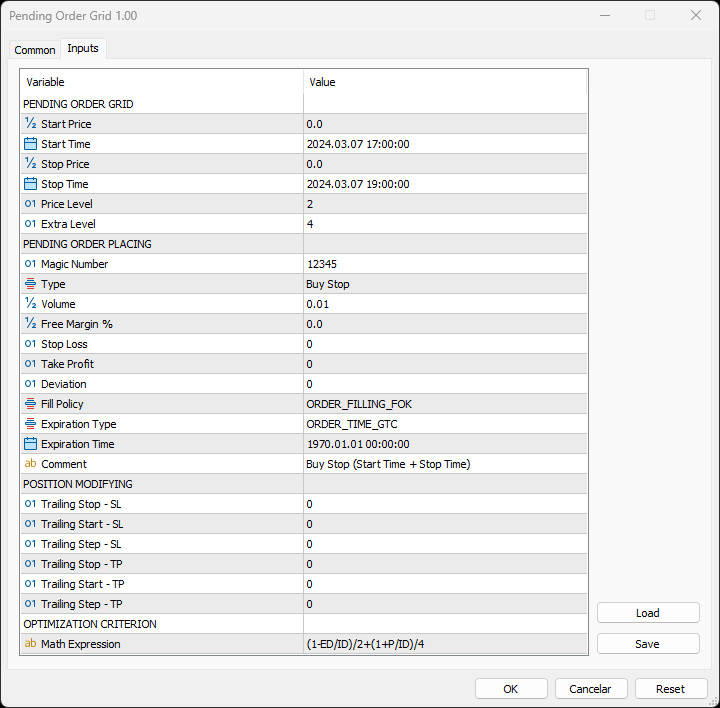
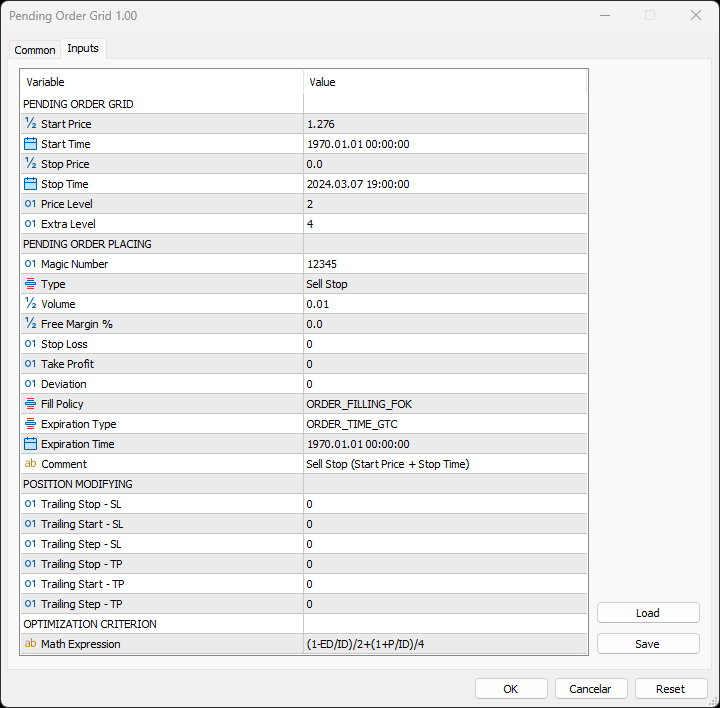
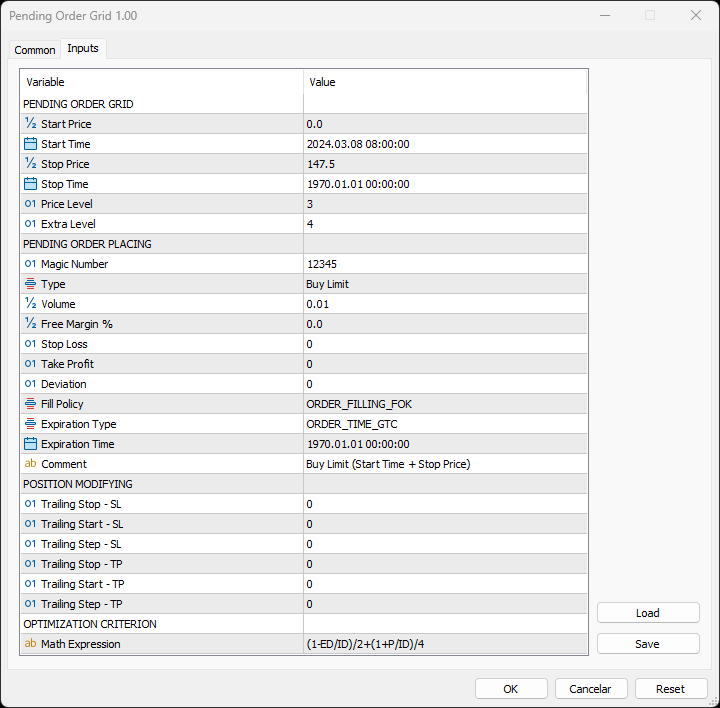
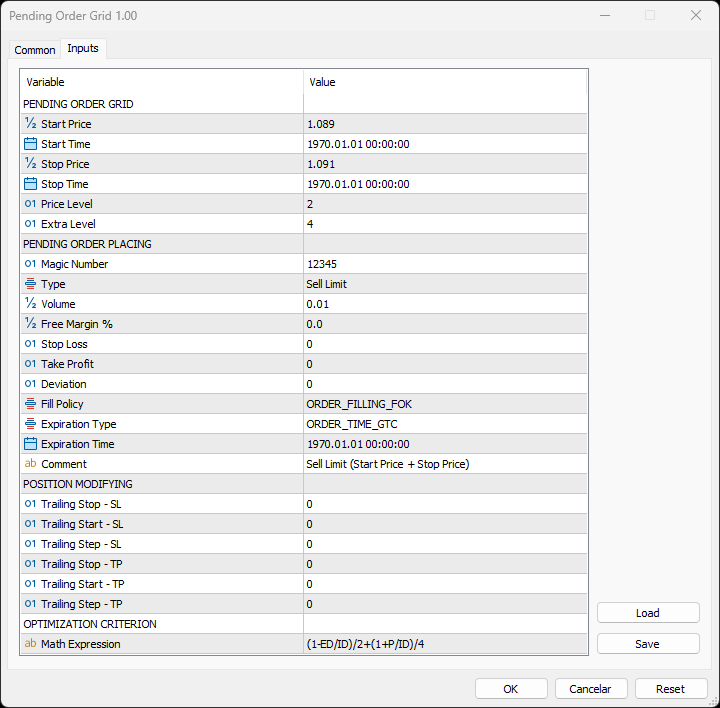
    PENDING ORDER GRID 

    • Start Price: Price used to define the grid’s start. 
    • Start Time: Time used to define the grid’s start. 
    • Stop Price: Price used to define the grid’s stop. 
    • Stop Time: Time used to define the grid’s stop. 
    • Price Level: Distance used between pending orders of the same type (pips). 
    • Extra Level: Distance from the Stop Level, which in turn is a distance from the target price, both represent the limits of price interval where the symbol's price needs to be for the pending order's placing (pips). 

        PENDING ORDER PLACING 

        • Magic Number: Expert Advisor’s identifier. 
        • Type: Pending order type used to form the grid. 
        • Volume: Lot size per deal (lots). 
        • Free Margin %: Percentage of account free margin used to calculate the lot size of the current deal (%). 
        • Stop Loss: Distance from the pending order's target price for placing a Stop Loss (pips). 
        • Take Profit: Distance from the pending order's target price for placing a Take Profit (pips). 
        • Deviation: Maximum allowed slippage from the requested price (pips). 
        • Fill Policy: Volume execution policy. 
        • Expiration Type: Order validity mode. 
        • Expiration Time: Order validity period (used only with the ORDER_TIME_SPECIFIED validity mode). 
        • Comment: Text message displayed in the chart window after a(n) (re)initialization of the EA, in the Objects list after creating a horizontal/vertical line (at each of the grid’s limits) or placing a pending order, and in the Trade or History tabs of the Toolbox window after placing a pending order (it only allows 31 characters). 

          POSITION MODIFYING 

          • Trailing Stop – SL: Distance from the market price for placing a Stop Loss after a favourable price movement (pips). 
          • Trailing Start – SL: Distance from the position’s opening price that must be reached for the “Trailing Stop – SL” function’s activation (pips). 
          • Trailing Step – SL: Distance from the price where the previous Stop Loss modification occurred that must be reached before the placing of a new Stop Loss (pips). 
          • Trailing Stop – TP: Distance from the market price for placing a Take Profit after an unfavourable price movement (pips). 
          • Trailing Start – TP: Distance from the position’s opening price that must be reached for the “Trailing Stop – TP” function’s activation (pips). 
          • Trailing Step – TP: Distance from the price where the previous Take Profit modification occurred that must be reached before the placing of a new Take Profit (pips). 

              OPTIMIZATION CRITERION 

              • Math Expression: Mathematical expression used to calculate a custom statistic parameter to sort the optimization results (see the Optimization Criterion section below). 

              Some of the available parameters accept values that lead to particular options. 

              • Start Price or Stop Price: A null/negative value means the parameter’s inactive function. 
              • Start Time or Stop Time: A value before the current time means the parameter’s inactive function. 
              • Price Level: A null value means that the target price is constant for all pending orders. 
              • Extra Level: A null value means that the symbol’s price needs to be exactly at the Stop Level distance from the target price for the pending order's placing. 
              • Volume: A value lower than the minimum allowed volume by the broker is converted in this last. A value higher than the maximum available volume by the free margin is converted in this last. 
              • Free Margin %: A value whose volume doesn’t reach the minimum allowed volume by the broker is converted in this last. A value whose volume exceeds the maximum available volume by the free margin is converted in this last. 
              • Stop Loss, Take Profit, Trailing Stop – SL or Trailing Stop – TP: A null value means the parameter’s inactive function. Any value between 0 and the Stop Level is converted in this last. 
              • Trailing Start – SL or Trailing Start – TP: A null value means the “Trailing Stop – SL” or “Trailing Stop – TP” function’s immediate activation, respectively. 
              • Trailing Start – SL: The spread value means the “Trailing Stop – SL” function’s activation at breakeven, although such hasn't been guaranteed. The spread + “Trailing Stop – SL” values mean the “Trailing Stop – SL” function’s activation in a profit where breakeven has been guaranteed. 
              • Trailing Step – SL or Trailing Step – TP: A null value means the “Trailing Stop – SL” or “Trailing Stop – TP” function’s continuous operation, respectively. 

                The input parameters that define the limits of the grid must obey a few rules. 

                • Both the start and stop of the grid must be selected, each chosen between a price or time. 
                • Any combination between the start and stop of the grid can be used: Start Price + Stop Price, Start Price + Stop Time, Start Time + Stop Price and Start Time + Stop Time
                • The Start Price cannot exceed the Stop Price in the Sell Limit or Buy Stop orders grid. 
                • The Stop Price cannot exceed the Start Price in the Buy Limit or Sell Stop orders grid. 
                • The Start Time cannot exceed the Stop Time in any pending order grid. 

                    Optimization Criterion 

                    The Expert Advisor allows the creation and use of a new statistical parameter (besides available ones) to sort the optimization results. This custom statistic parameter results from a mathematical expression calculated after the testing. The expression must obey syntax rules and precedence order, being constituted by the following elements: 

                    • Integer and real numbers. 
                    • Statistic parameters
                    • Mathematical operators for addition (+), subtraction (-), multiplication (*), division (/) and exponentiation (^). 
                    • Mathematical and trigonometric functions
                    • Curved parentheses (()) to define the precedence and contain the function’s argument(s). 
                    • Full stop (.) as decimal point and comma (,) as function’s arguments separator. 

                      The statistical parameters are used by writing the respective identifier initial(s) after the term “STAT”. In case there are two identifiers with the same initial(s), it must also be added “1” or “2”, depending on the order in which both appear in the list. For instance, “STAT_PROFIT” and “STAT_MAX_CONLOSS_TRADES” would be “P” and “MCT2”, respectively. List of identifiers, without “STAT_”, whose initial(s) require “1” or “2”: 

                      CONPROFITMAX (C1), CONPROFITMAX_TRADES (CT1), MAX_CONWINS (MC1), MAX_CONPROFIT_TRADES (MCT1), CONLOSSMAX (C2), CONLOSSMAX_TRADES (CT2), MAX_CONLOSSES (MC2), MAX_CONLOSS_TRADES (MCT2), EQUITYDD_PERCENT (EP1), EXPECTED_PAYOFF (EP2), LOSS_TRADES (LT1), LONG_TRADES (LT2). 

                      The mathematical/trigonometric functions are used by writing the respective name after “Math” and one or two arguments inside parentheses, separated by a comma in this last case. For instance, “MathLog10()” and “MathPow()” would be “Log10(argument)” and “Pow(argument1,argument2)”, respectively. List of names that correspond to the available functions: 

                      Abs, Arccos, Arcsin, Arctan, Arctan2, Ceil, Cos, Exp, Floor, Log, Log10, Max, Min, Mod, Pow, Rand, Round, Sin, Sqrt, Tan, Expm1, Log1p, Arccosh, Arcsinh, Arctanh, Cosh, Sinh, Tanh. 

                      Note: “MathRand()” is only executed with “GetTickCount()” as the argument of “MathSrand()”, it’s used without anything inside parentheses – simply writing “Rand()”. 

                      Additionally, the expression has the following properties: 

                      • The scientific, engineering and E notations are allowed. 
                      • The multiplication needs to be explicitly indicated (through the respective symbol). 
                      • The system is case-insensitive. 
                      • The space ( ) is allowed and doesn’t affect the expression’s calculation. 
                      • The input expression is limited to 233 characters. 

                        Examples of a number representation using various notations: “0.0000325” (decimal), “3.25*10^-5” (scientific), “32.5*10^-6” (engineering) and “32.5E-6” (E). 

                        IMPORTANT! The EA doesn’t verify if the input expression fulfils all the requirements, namely if it obeys syntax/standard rules, hence, any infringement of these leads to an unreliable result. 

                        Displayed Information 

                        The Expert Advisor possesses a vast number of messages to inform the user about errors and conditions changes that might occur during its operation. The messages are shown through the Alert function (by a pop-up window), its content includes: 

                        1. The warning that an input parameter has been incorrectly set. 
                        2. The info that the account doesn't have enough money for the chosen volume (see the Risk Management section above). 
                        3. The info that the number of permitted orders by the broker has been reached. 
                        4. The previous and current value of the symbol’s Stop Level when this is updated. 
                        5. The Trade Server Return Codes description. 
                        6. The symbol’s quotes (immediately) before the trade request’s formation, followed by the symbol’s quotes (immediately) after the trade server’s decision. 
                        7. The Runtime Errors description. 
                        8. The standard function in the include file where the runtime error was detected (only relevant to the programmer). 
                        9. The Uninitialization Reason Codes description. 

                                    Note: Some elements of the list are displayed simultaneously (in the same text line): 5, 6 and 7; 7 and 8. 

                                    During the EA’s operation, the messages displayed are grouped by kind of occurrence (related to each list’s element, except the 1, 6 and 8) and counted. Immediately before the EA’s unloading, a final message containing those groups with the respective counts (if these were > 0) is presented. 

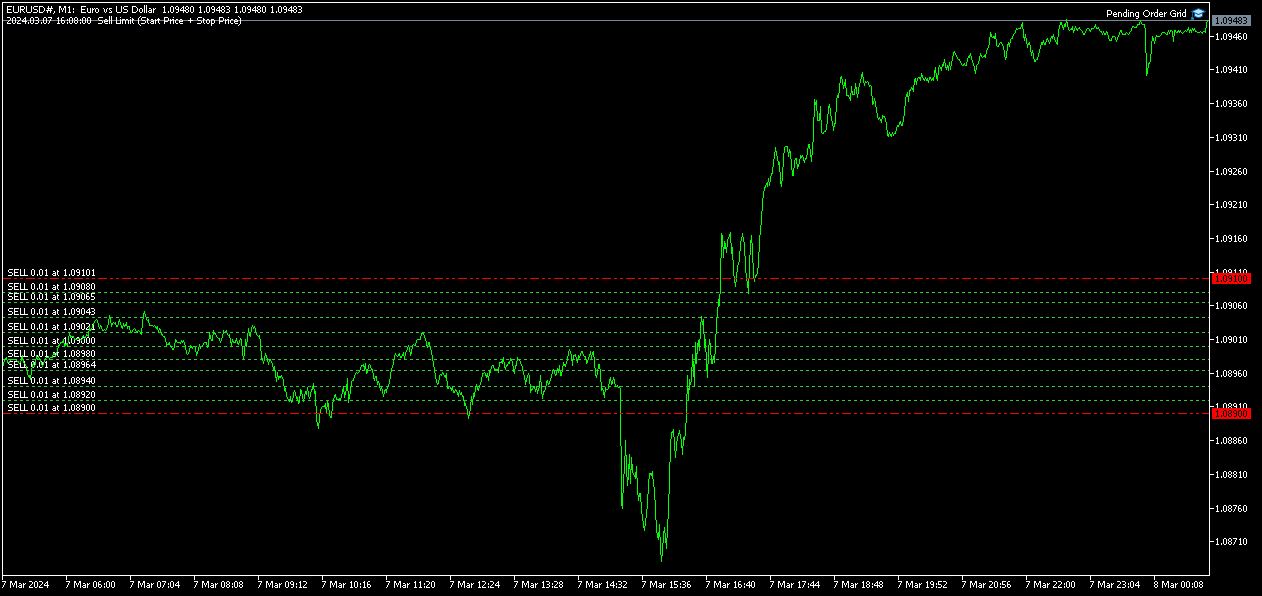
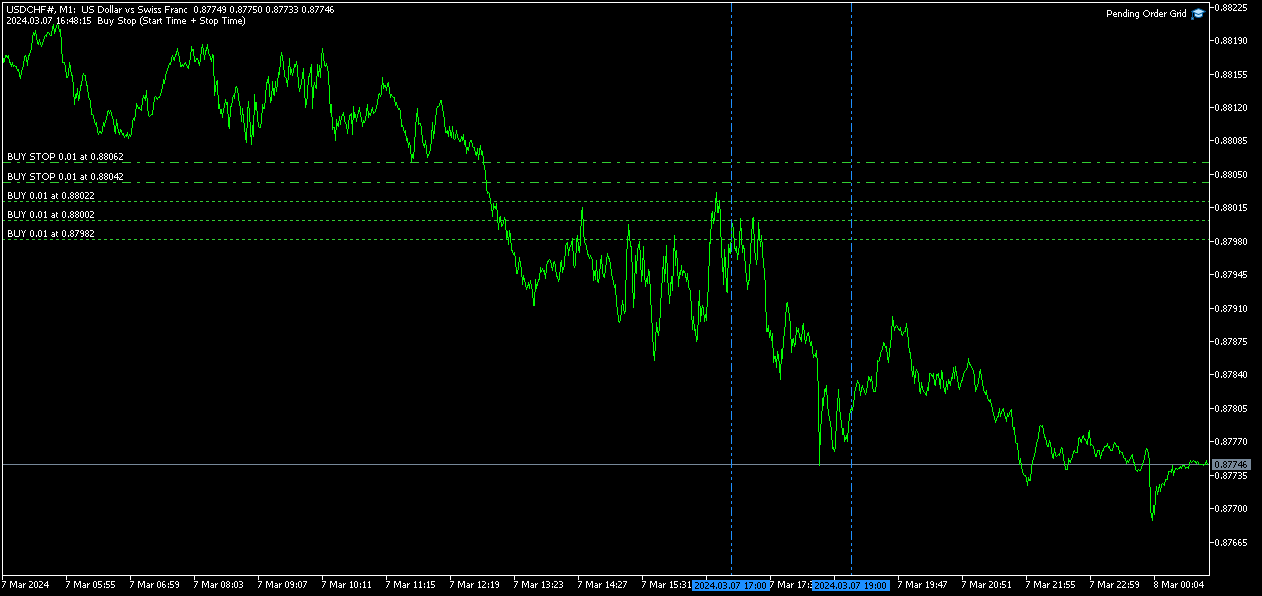
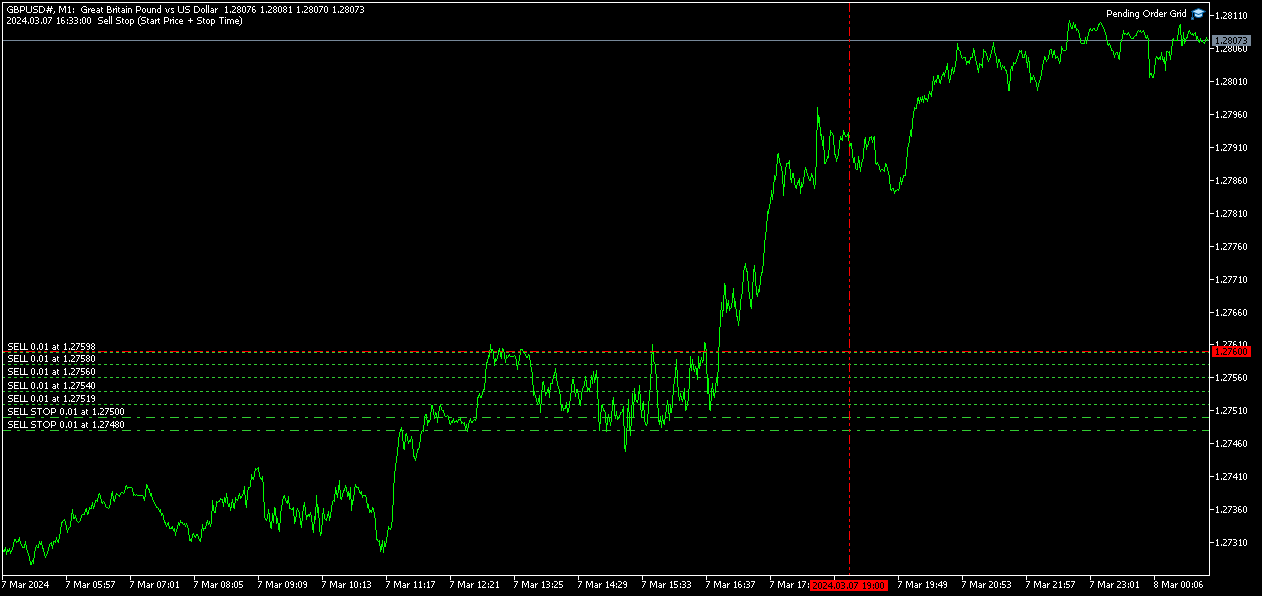
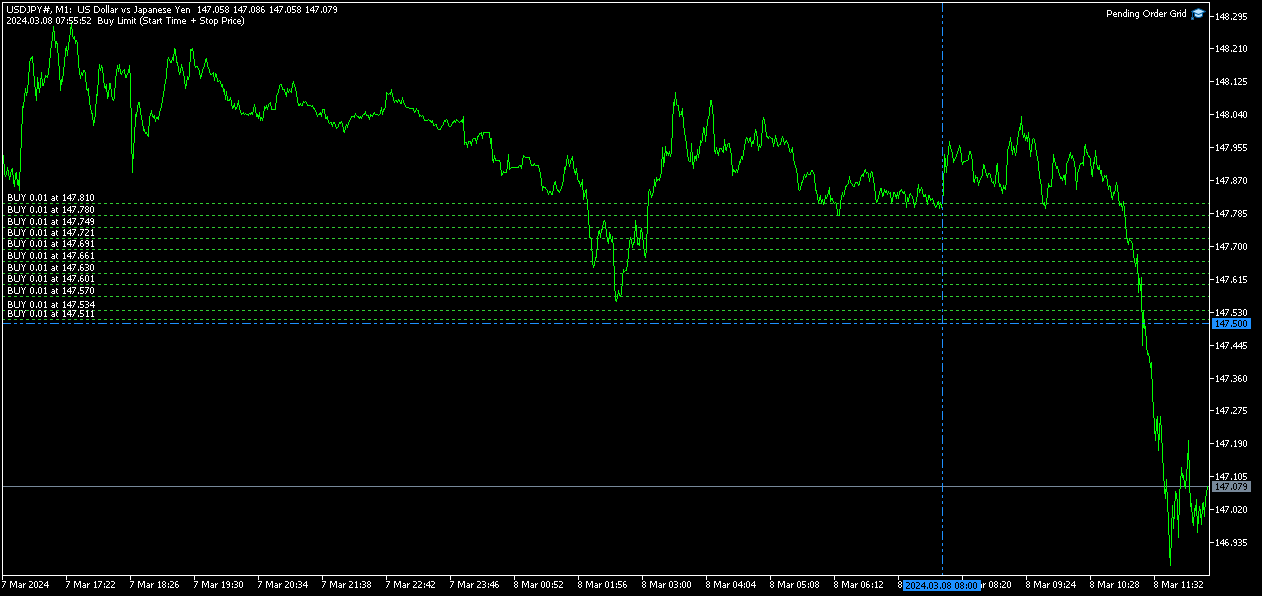
                                    Following the EA's (re)initialization, two reference lines are displayed in the chart at the grid’s limits (start and stop). Each line is horizontal/vertical when the grid’s limit is the price/time, respectively. Both lines are blue/red when the grid’s pending order type is Buy/Sell, respectively. Tip: Place the mouse pointer over one of those lines to see its object name ("Buy/Sell Limit/Stop – Start/Stop Price/Time"). Note: The properties of a graphical object can be edited in the Objects list. 

                                    After the EA’s testing/optimization, the result of the mathematical expression, inserted in the Math Expression input parameter, is presented in the Journal/Optimization Results tabs of the Strategy Tester window, respectively. After the EA’s testing, the values of the available statistic parameters are also presented in the Journal tab. 

                                    Observations 

                                    In some cases, the quoting session might start before or end later than the corresponding trading session (with a five-minute difference, for instance). During the time interval when the quoting session is open, but the trading session is still/already closed, the Expert Advisor initiates/continues to process the available ticks, respectively. If the present conditions satisfy the EA's trading criteria, a trade request is formed and sent to the server. However, it won’t succeed, and an error message is displayed: “Trade request sending failed; Market is closed. 

                                    During high activity periods, the trade server’s decision on whether a trade request is executed or rejected may suffer significant delays. Some data used in the request sent to the server might become incorrect, leading to the order’s rejection. When the server is evaluating a request and the symbol's quotes are updated, three cases might occur: 

                                    1. Pending order placing – the pending order’s target price becomes an incorrect distance. 
                                    2. Position opening/modifying – the position's Stop Loss or Take Profit intended level becomes an incorrect distance. 
                                    3. Position modifying – the position's Stop Loss or Take Profit previous level takes to its closing. 

                                    The symbol’s quotes mentioned in the sixth element of the list in the Displayed Information section are especially useful here (since firsts usually differ from lasts). A careful analysis of these quotes, knowing the implication that certain quote changes have on the request’s evaluation, permits understanding the reason when these cases occur. To avoid the request’s rejection by the trade server due to “invalid stops” (cases 1 and 2), the prices/levels used should exceed the symbol’s Stop Level by a few pips. 

                                    The Start Price, Start Time, Stop Price, Stop Time or Type input parameters have a special status in the program. Every time one is changed, two things happen: the EA ends up the current grid and verifies the conditions to create a new one. Then, if all start/stop values pass this checking, the EA begins a new grid. But, if at least one fails, the EA doesn’t go forward with the new grid and terminates its operation. 

                                    A Buy/Sell position is opened at the Ask/Bid price and closed at the Bid/Ask price. Since the position’s stop orders (Stop Loss and Take Profit) are triggered at this last price, in a pending order, they are calculated from the order's target price -/+ the current spread (Ask - Bid), respectively. 

                                    When placing a pending order, the validity period can’t be less than 1 minute. During a grid creation, the Expert Advisor doesn’t place pending orders if the current time exceeds the Expiration Time minus 1 minute (when the validity period is previously selected). 

                                    Conclusion 

                                    The Pending Order Grid is a helpful and efficient tool regarding the automatic creation of pending order grids, especially when the grids consist of a significant number of orders, enabling a simple and intuitive setting of the grids to form.
                                    추천 제품
                                    FX28 Trader MT5
                                    Tsvetan Tsvetanov
                                    3 (1)
                                    FX28 Trader Dashboard 소개 - 귀하의 궁극적인 트레이드 매니저 FX28 Trader Dashboard는 외환 거래를 새로운 차원으로 끌어올릴 수 있는 포괄적이고 직관적인 트레이드 매니저로 귀하의 거래 경험의 전체 잠재력을 발휘합니다. 귀하가 경험이 풍부한 트레이더이든, 금융 여정을 시작한 지 얼마 안 된 초보자이든, 이 강력한 도구는 귀하의 거래 활동을 효율적으로 정리하고 의사 결정 과정을 향상시키기 위해 개발되었습니다. 주요 특징: 사용자 친화적 인터페이스: FX28 Trader Dashboard는 모든 수준의 트레이더에게 적합한 사용자 친화적 인터페이스를 자랑합니다. 다양한 기능과 도구를 쉽게 탐색하여 몇 번의 클릭으로 거래를 완전히 통제할 수 있습니다. 실시간 시장 데이터: 실시간 시장 데이터 피드를 통해 통화 쌍, 트렌드 및 시장 변동에 대한 최신 정보를 얻어 자신감 있게 거래를 실행하세요. 고급 트레이드 분석: FX28 Trader Dashboard를 사
                                    Binance Grid Pro offers an alternative to the built in Grid systems Binance Platform offers. This utility let you define a grid parameters for interact with your Binance account using an Isolated Margin account. This is, similar to Spot Grid in Binance. This is not for handle with derivatives contracts, is for handle with Spot through Isolated Margin Account. But obviosly this utility offers a different approach than built in Binance Grid to handle the Grid, which I have found useful based on
                                    Remote Trade Copier is an advanced tool designed for efficiently copying trades between accounts in both local and remote modes. It allows for lightning-fast order replication from a master account to a slave account. In local mode, trades are copied instantly, while in remote mode, the copying process takes less than 1 second. MT4 Version (Only Local) MT5 Version (Only Local) MT4 Full Version (Local & Remote) Local mode refers to both MetaTrader platforms being installed on the same system,
                                    Money Mind BTC
                                    Antonio Simon Del Vecchio
                                    4.77 (22)
                                    Money Mind BTC — BTCUSD H1 (v13.00) 글로벌 리스크 관리 및 적응형 동작을 갖춘 자동화 시스템 Money Mind BTC 13.00은 BTCUSD 거래를 위해 설계된 전문가용 어드바이저입니다. 완전한 리스크 제어와 자동 적응 논리를 갖추고 있으며, 안정적인 작동, 유연한 설정, 그리고 시장 상황에 따라 동작을 조정하는 글로벌 관리 구조를 결합했습니다. 주요 특징 심볼: BTCUSD 권장 타임프레임: H1 조정 가능한 감도를 가진 내부 필터 적응형 간격으로 점진적 진입 거래 방향 설정 가능 (매수 전용, 매도 전용, 양방향) 고정, 산술 또는 기하학적 로트 크기 잔액 비율에 따른 글로벌 테이크 프로핏 및 스톱 로스 계좌 잔액 증가 시 자동 로트 스케일링 최대 오픈 포지션 수 제한 새로운 포지션 오픈 전 내부 리스크 검증 버전 13.00의 새로운 기능 새로운 진입 감도 구조 (레벨 1–5) 시장 조건에 따른 동적 포지션 간 거리 시스템 반응을 조정하기 위한 새
                                    AuRange Hunter EA
                                    Akapop Srisang
                                    5 (2)
                                    AuRange Hunter EA AuRange Hunter EA is an Expert Advisor designed exclusively for trading Gold (XAUUSD). It executes trades at two scheduled times each day, focusing on high probability breakout opportunities. The EA automatically calculates breakout levels and places both Buy Stop and Sell Stop orders around these levels. Once one side is activated, the opposite order is instantly canceled, ensuring that only a single position is ever open. The system employs two distinct strategies to capture
                                    The Realtime Statistics MT5  is an innovative tool designed for traders who want to keep track of their trading performance in real-time. This MetaTrader 5 Expert Advisor (EA) is packed with customizable features that allow you to monitor crucial trading statistics directly on your chart, ensuring you always have the insights you need to make informed trading decisions. Check out the Realtime Statistics MT5 User Guide Here Try out the  FREE  Realtime Statistics MT5 Demo  Here Key Features: Compr
                                    Quant Panel
                                    Kevin Craig E Gittins
                                    Quant Panel Pro The Ultimate Multi-EA Performance Dashboard for Quantitative Traders Stop juggling multiple charts or external tools to monitor your algorithmic strategies! Quant Panel Pro delivers institutional-grade portfolio monitoring in one sleek, professional interface. Key Features Quantitative Analytics at Your Fingertips Real-time P&L aggregation   across all Expert Advisors Statistical win rate analysis   with trade frequency metrics Advanced drawdown tracking   (realized & unrealized
                                    Binance Copier allows to seamlessly and easily copy trades between MT5 and Binance Futures! The tool's main feature is to replicate trades and all available orders between MetaTrader 5 and Binance that can be applied to both Expert Advisors and manually opened ones. Key Features: Bidirectional Copying - MT5 → Binance (Master Mode): Copy your MT5 trades to Binance - Binance → MT5 (Slave Mode): Mirror Binance positions in MT5 - Real-time synchronization with configurable delays Complete Trade M
                                    Overview : The Advanced News Trading Panel is a versatile tool designed for traders who rely on news-based trading strategies. This Expert Advisor (EA) provides an intuitive graphical interface that allows users to quickly set up pending orders and manage risk with ease. With the ability to automatically place Buy/Sell Stop orders based on your pre-set stop order distance from the bid/ask price, stop-loss and take-profit levels, the EA allows for precision trading during high-volatility news eve
                                    Sharp Edge
                                    Md Wakiluzzaman Raz
                                    Sharp Edge EA – Pure Price Action for Gold This isn't just another indicator-based bot. I developed Sharp Edge specifically to handle the modern volatility of Gold (XAUUSD) that we've seen in 2024–2026. It is tuned to understand how the market moves right now , making it a strong performer for the years ahead. The Strategy: 100% Price Action The core of this EA is built on Pure Price Action . It does not use dangerous Grid systems or blind Martingale entries to force a profit. It waits for the r
                                    Tiger Lite
                                    Dang Cong Duong
                                    Tiger Lite recreate the history of entry and exit orders. The goal is that you can grasp their strategy how to play. CSV format support for WEB, MT4 and MT5 platforms. The sequence of steps is described in the photo. Note: Please choose the existing date and symbol on the CSV file. For MT4/5, export historical data and copy the records to excel, save it with the extension CSV. For MT4/MT5/WEB, save the name with format mt4.csv/mt5.csv/web.csv If you get the history from another source and your
                                    FREE
                                    NanoTrade Pro
                                    Vadim Podoprigora
                                    NanoTrade Pro NanoTrade Pro   is a state-of-the-art automated trading advisor designed to optimize your trading strategy in the fast-paced financial markets. Leveraging advanced algorithms and real-time data analysis, NanoTrade Pro automates the scalping process, enabling traders to capitalize on small price movements with remarkable precision and efficiency. Basically, the advisor does not use any risk systems with increasing volume or increasing the number of open orders. Before buying, be s
                                    Pending Order Grid MT5
                                    Francisco Manuel Vicente Berardo
                                    The Pending Order Grid is a multi-symbol multi-timeframe script that enables multi-strategy implementation based on pending order grids.  General Description   The Pending Order Grid allows the performing of a user-defined strategy through the creation of pending order grids. The script places pending orders of a given type (Buy Limit, Sell Limit, Buy Stop, or Sell Stop) at equidistant price levels to form each grid. The beginning and finish of every grid are defined by the Start Price and Sto
                                    QFT Scalp Gold is a XAUUSD scalping Robot designed for the M1 timeframe.  The trading system is designed to identify high probability market action and  capitalize on such information.  The trouble with most scalping systems is the general lack of a credible response when the market makes very large moves against a huge number of open trades, often relying on very low reward to risk ratio.  QFT Scalp Gold solves this problem with a unique recovery system that uses the unfavorable market  mov
                                    Equity Tracker MT5 Equity Tracker MT5는 MetaTrader 5용 계좌 모니터링 Expert Advisor로, 거래 활동, 계좌 상태 및 기술적 조건을 알림 메시지를 통해 보고합니다. 이 Expert Advisor는 거래 로직과 독립적으로 작동하며 주문 실행이나 거래 관리에 어떠한 영향도 미치지 않습니다. 본 제품은 거래를 열거나 수정하거나 종료하지 않습니다. 관찰 및 알림 기능만 수행합니다. 목적 Equity Tracker MT5는 터미널을 지속적으로 모니터링하지 않고도 거래 계좌의 상태를 파악하고자 하는 트레이더를 위해 설계되었습니다. 어떤 거래 전략이나 다른 Expert Advisor와도 함께 사용할 수 있습니다. 계좌 단위 모니터링 거래 활동 알림 기술적 상태 인식 계좌 및 리스크 상태 모니터링 이 Expert Advisor는 계좌 파라미터를 지속적으로 평가하고, 사전에 정의된 조건이 충족되면 변경 사항을 보고합니다. 에퀴티 및 드로우다운 수준 알
                                    Equity Gaurd
                                    Eredewei Henry Tiemo
                                    ️ Equity Protector EA – Auto SL & Trailing Stop for MT5 Protect your capital. Automate your risk. Maximize your control. The Equity Protector EA is a powerful risk management tool designed for Meta Trader 5 traders who prioritize capital preservation and smart trade automation. Whether you're a scalper, swing trader, or long-term investor, this EA ensures your account stays protected while optimizing trade exits with precision. Key Benefits Drawdown Shield Automatically monitors your accoun
                                    Chart Navigator Pro
                                    ELITE FOREX TRADERS LLC
                                    Introducing the   Elite Chart Navigator   — your ultimate MetaTrader 5 Expert Advisor designed to revolutionize multi-symbol trading with seamless chart navigation and superior usability. Product Overview The   Elite Chart Navigator EA   is a sophisticated trading utility enabling rapid switching between multiple trading pairs through an intuitive on-chart button interface. Built for professional traders managing numerous instruments, this EA dramatically improves workflow efficiency, ensuring
                                    Features 1️⃣ Flexible Grid Order Configuration Set price levels and spacing between orders. Customize order sizes and maximum number of positions for better risk control. 2️⃣ Hedge and Netting Modes Hedge Mode : Allows simultaneous long and short positions , ideal for advanced strategies. Netting Mode : Consolidates positions for easier balance management. 3️⃣ Supported Order Types Limit Orders : Buy and sell at predetermined prices. Market Orders : Instant execution. Integrated Take-Profit : Wi
                                    Binance is a world-renowned cryptocurrency exchange! In order to facilitate MT5 users to directly trade Binance Futures, the program provides the following trading functions: 1. Imitate the trading style of Binance Futures and provide a friendly operation panel; 2. Enter api and secret by yourself (you need to open futures trading permission in Binance api) to get leverage, balance and other information; 3. Support limitOrder (limit order), marketOrder (market order), stopLimit (limit stop p
                                    StopAndTake
                                    Oleksandr Kashyrnyi
                                    5 (1)
                                    제품 이름: StopAndTake — 간단하고 빠르며 정확한 SL/TP 관리 스크립트 제품 설명: StopAndTake 는 자신의 포지션을 관리하는 데 있어 속도, 정확성 및 신뢰성을 중시하는 트레이더를 위해 설계된 가볍고 직관적인 스크립트입니다. 이 도구를 사용하면 선택한 차트의 모든 포지션에 대해 **스톱로스(SL)**와 테이크프로핏(TP) 수준을 즉시 업데이트할 수 있습니다. 사용법은 매우 간단합니다. 장점과 혜택: 간단한 사용법: 초보자도 쉽게 이해할 수 있는 최소한의 인터페이스. 초고속 실행: 모든 작업이 몇 초 내에 완료됩니다. 정확성: SL/TP 수준을 마지막 소수점까지 정확하게 설정. 편리함: 스크립트를 차트에 드래그하기만 하면 나머지는 자동으로 처리됩니다. 안정성: 변경 전 모든 데이터를 검증하여 오류나 원치 않는 동작을 방지합니다. 주요 기능: 자동 SL/TP 조정: 현재 심볼의 모든 포지션에 대해 수준을 즉시 업데이트. 다양한 거래 유형 지원: BUY 및 SEL
                                    FREE
                                    Range Breakout EA – Catch the Moves in the Asian Session! Hey there! Our Range Breakout EA is built to help you take advantage of those early moves in the Asian session. Here’s how it works: during a specific time window, it marks the highest and lowest points to create a range. Then, it sets up buy and sell limit orders just outside that range, so you’re ready to catch a breakout in either direction! :) For safety, the stop loss goes at the opposite end of the range, but you can customize it i
                                    AO Trade
                                    Ka Lok Louis Wong
                                    AO Trade 시스템은 경매 또는 뉴스 시간을 기준으로 하여 다른 특정 주문 시간과 비교하여 시장 트렌드를 예측하기 위해 특별히 설계되었습니다. **EA에서 사용하는 모든 시간 매개 변수는 귀하의 터미널 시간을 기반으로 합니다. 다양한 브로커들은 서로 다른 GMT 시간대에서 작동할 수 있으며, 여름 시간 조정으로 인해 더욱 다양할 수 있습니다.** **구현하기 전에 귀하의 터미널에 맞는 시간 설정을 주의 깊게 확인하십시오.** 권장 설정: M1 시간대에서 사용 HK50 / DE40 / ustec / UK100 시간 체크 중에는 특정 체크 시간 분(1.2 체크 시간 분) 후에 가격 확인이 발생한다는 것을 알 수 있습니다. 이 설계는 의도적으로 이루어졌으며, 참조중인 바(bar)가 완료되도록하고, 주문 시간과의 정확한 비교를 위해 개방, 고점, 저점 및 종가 값을 활용할 수 있도록 합니다. 설정 -----------------1 타이머------------------- 1.1
                                    Pro Trade Utility for MetaTrader 5 Pro Trade Utility is a professional manual trading assistant designed for traders who want precision, speed and clarity — without automated strategies. This tool does not trade automatically . It helps you execute and manage trades correctly with proper risk control. Key Features  Risk & Position Management Risk-based automatic lot size calculation Risk shown clearly in account currency Adjustable Stop Loss (points) Fixed Risk:Reward display  Trade Executio
                                    FREE
                                    XAU Precision Flow
                                    Samuel Kiniu Njoroge
                                    XAU Precision Flow EA is a professional-grade trading system designed specifically for XAUUSD (Gold) . It applies a multi-layered confirmation framework using higher-timeframe market structure, momentum alignment, and trend continuation behavior. This ensures that every trade is taken with directional bias already established , significantly reducing noise and false entries that are common in lower-timeframe gold trading. Monitor Live Signal :  https://www.mql5.com/en/signals/2357926 The EA focu
                                    Capitalrecover2
                                    Mr Nisit Noijeam
                                    HFT  ZONE MOMENTUM RECOVERY EA_Name ค่า: HFT MTRADER ใช้สำหรับระบุชื่อของ EA เพื่อให้ง่ายต่อการจัดการหรือตรวจสอบในประวัติการเทรด (History) Lot_fix ค่า: 0.02 ใช้กำหนดขนาดของล็อตคงที่ (Fixed Lot Size) ที่ EA จะเปิดในแต่ละคำสั่งเทรด โดยไม่ขึ้นอยู่กับเงื่อนไขอื่น ๆ Lots_X ค่า: 1.5 ตัวคูณล็อต (Lot Multiplier) ซึ่งมักใช้ในการเพิ่มขนาดล็อตในลักษณะการ Martingale หรือ Hedging โดยเมื่อขาดทุนหรือเปิดคำสั่งถัดไป ระบบจะเพิ่มล็อตตามค่าที่กำหนดไว้ High_Low_end_candle ค่า: 10 จำนวนแท่งเทียนที่ใช้ในการคำนวณระ
                                    Range Brain Ai
                                    Bosco Antonio Vega
                                    Range Brain AI - Neural Network Range Trading Expert Advisor AI-powered range breakout Expert Advisor using volume-based neural networks to identify and trade pre-market consolidation ranges on US30. Trading Strategy Range Brain AI is a volume-based neural network Expert Advisor designed specifically for trading the Dow Jones 30 (US30) during optimal market conditions. The EA identifies consolidation ranges during specified time windows and executes breakout trades when price breaches these lev
                                    Welcome to Smart Algo Trade Panel Manager MT5 - the ultimate   risk management tool designed to make trading more effective based on user needs.  It is a comprehensive solution for seamless trade planning, position management, and enhanced control over risk. It does not matter weather you a beginner or an advanced trader, or a scalper needing rapid executions, SmartAlgo Trade Panel  adapts to your needs offering flexibility across all markets of your choice. You can put SL, Lot and TP of choice
                                    Nas100 Ny Open Breakout
                                    Raul Alberto Galdames Soto
                                    NAS100 NY Open Breakout NAS100 NY Open Breakout es un Asesor Experto diseñado para operar de forma automática el índice NASDAQ 100 durante uno de los momentos más líquidos y decisivos del día: la apertura de la sesión de Nueva York . El sistema se basa en la detección de rupturas reales de precio en los primeros minutos posteriores a la apertura, combinando gestión de riesgo estricta y control avanzado de la posición. Características principales Operativa automática enfocada exclusivamente en
                                    BlackBox XAU
                                    Enrique Van Rooyen
                                    BlackBox XAU — 골드 전용 고급형 자동매매 프로그램 (EA) 개요 BlackBox XAU는 골드 시장에서 수익을 추구하면서도 드로다운을 철저히 관리하도록 정밀하게 설계된 트레이딩 시스템입니다. 모든 가격 움직임을 따라가는 대신, 규칙 기반의 엄격한 접근 방식을 적용하여 변동성에 적응하고 확률이 높은 거래 기회 만을 선별합니다. EA는 실시간으로 시장 상황을 지속적으로 평가하며, 품질이 낮거나 불확실한 신호를 걸러내고 리스크 대비 보상이 뚜렷하게 유리해지는 순간을 인내심 있게 기다립니다. 조건이 충족되면 정밀한 진입과 함께 시장 상황에 따라 동적으로 조정되는 보호 기능을 갖춘 거래를 실행합니다. 이러한 설계 덕분에 BlackBox는 차트를 불필요한 다수의 거래로 채우지 않고, 양보다 질 을 중시합니다. 통계적으로 우위를 가진 기회에 집중함으로써 트레이더는 안정적인 수익성, 통제 가능한 드로다운, 일관된 위험 대비 성과 를 기대할 수 있습니다. 작동 원리 BlackBox의 핵
                                    Magic EA MT5
                                    Kyra Nickaline Watson-gordon
                                    Magic EA is an Expert Advisor based on Scalping, Elliot Waves and with filters such as RSI, Stochastic and 3 other strategies managed and decided with the robot smartly. Large number of inputs and settings are tested and optimized and embedded in the program thus inputs are limited and very simple. Using EA doesn't need any professional information or Forex Trading Knowledge. EA can trade on all symbols and all time frames, using special and unique strategies developed by the author. The EA w
                                    이 제품의 구매자들이 또한 구매함
                                    Trade Assistant MT5
                                    Evgeniy Kravchenko
                                    4.42 (207)
                                    거래당 위험 계산, 라인을 사용한 손쉬운 신규 주문, 부분 청산 기능을 통한 주문 관리, 7가지 유형의 트레일링 스탑 및 기타 유용한 기능을 제공합니다. 추가 자료 및 지침 설치 지침   -   애플리케이션 지침   -   데모 계정용 애플리케이션 평가판 라인 기능       - 차트에 개시선, 손절매, 차익실현을 표시합니다. 이 기능을 사용하면 새로운 주문을 쉽게 하고 개봉 전에 추가 특성을 볼 수 있습니다. 위기 관리       -       위험 계산 기능은 설정된 위험과 손절매 주문의 크기를 고려하여 새 주문의 볼륨을 계산합니다. 이를 통해 손절매 크기를 설정하고 동시에 설정된 위험을 존중할 수 있습니다. 로트 계산 버튼 - 위험 계산을 활성화/비활성화합니다. 필요한 위험 값은 위험 필드에 0에서 100 사이의 백분율 또는 예금 통화로 설정됩니다. 설정 탭에서 위험 계산 옵션을 선택합니다. $ 통화, % 잔액, % 지분, % 자유 마진, % 사용자 정의, % AB 이전
                                    Trade Manager EA에 오신 것을 환영합니다. 이 도구는 거래를 보다 직관적이고 정확하며 효율적으로 만들기 위해 설계된 궁극적인 리스크 관리 도구 입니다. 단순한 주문 실행 도구가 아닌, 원활한 거래 계획, 포지션 관리 및 리스크 제어를 위한 종합 솔루션입니다. 초보자부터 고급 트레이더, 빠른 실행이 필요한 스캘퍼에 이르기까지 Trade Manager EA는 외환, 지수, 상품, 암호화폐 등 다양한 시장에서 유연성을 제공합니다. Trade Manager EA를 사용하면 복잡한 계산은 이제 과거의 일이 됩니다. 시장을 분석하고 진입, 손절 및 익절 수준을 차트의 수평선으로 표시한 후 리스크를 설정하면, Trade Manager가 이상적인 포지션 크기를 즉시 계산하고 SL 및 TP 값을 실시간으로 표시합니다. 모든 거래가 간편하게 관리됩니다. 주요 기능: 포지션 크기 계산기 : 정의된 리스크에 따라 거래 크기를 즉시 결정합니다. 간단한 거래 계획 : 진입, 손절, 익절을 위한
                                    TradePanel MT5
                                    Alfiya Fazylova
                                    4.86 (148)
                                    Trade Panel은 다기능 거래 보조원입니다. 이 애플리케이션에는 수동 거래를 위한 50개 이상의 거래 기능이 포함되어 있으며 대부분의 거래 작업을 자동화할 수 있습니다. 전략 테스터에서는 애플리케이션이 작동하지 않습니다. 구매하기 전에 데모 계정에서 데모 버전을 테스트할 수 있습니다. 데모 버전 여기 . 전체 지침 여기 . 거래. 한 번의 클릭으로 거래 작업을 수행할 수 있습니다: 자동 위험 계산을 통해 지정가 주문 및 포지션을 엽니다. 한 번의 클릭으로 여러 주문과 포지션을 열 수 있습니다. 주문 그리드를 엽니다. 그룹별 대기 주문 및 포지션을 마감합니다. 포지션 반전(매수 청산 후 매도 개시 또는 매도 청산 후 매수 개시). 포지션 고정(매수 포지션과 매도 포지션의 양을 동일하게 하는 추가 포지션 개설). 한 번의 클릭으로 모든 포지션을 부분 청산합니다. 모든 포지션의 이익실현과 손절매를 동일한 가격 수준으로 설정합니다. 모든 포지션에 대한 손절매를 해당 포지션의 손익 분기
                                    Farmed Hedge Yield Farming - Professional Pair Trading Dashboard (Manual - Hybrid - Semi/Automated EA) VERSION 3 - WILD HARVEST UPDATE Trading Approach: - Manual Trading: Primary focus - Auto Pilot: Optional supplementary feature - Full Automation: Not the main purpose Recommended Timeframe: H1-H4 DEMO VERSION Download the free demo to test functionality. Use Strategy Tester with Visual Mode to see how it works. VERIFIED TRADING RESULTS - Farmed Hedge Yield Axi Copy: https://www.mql5.com/en/si
                                    Ultimate Extractor
                                    Clifton Creath
                                    5 (9)
                                    Ultimate Extractor - Professional Trading Analytics for MT5 *****this is the local HTML version of Ultimate Extractor. Check out Ultimate Extractor Cloud on mql5 for the Cloud version****** Ultimate Extractor transforms your MetaTrader 5 trading history into actionable insights with comprehensive analytics, interactive charts, and real-time performance tracking. What It Does Automatically analyzes your MT5 trading history across all Expert Advisors and generates detailed HTML reports with inte
                                    The product will copy all telegram signal to MT5 ( which you are member) , also it can work as remote copier.  Easy to set up, copy order instant, can work with almost signal formats, image signal,  s upport to translate other language to English Work with all type of channel or group, even channel have "Restrict Saving Content", work with  multi channel, multi MT5 Work as remote copier: with signal have ticket number, it will copy exactly via ticket number. Support to backtest signal. How to s
                                    YuClusters
                                    Yury Kulikov
                                    4.93 (43)
                                    Attention: You can view the program operation in the free version  YuClusters DEMO .  YuClusters is a professional market analysis system. The trader has unique opportunities to analyze the flow of orders, trade volumes, price movements using various charts, profiles, indicators, and graphical objects. YuClusters operates on data based on Time&Sales or ticks information, depending on what is available in the quotes of a financial instrument. YuClusters allows you to build graphs by combining da
                                    Custom Alerts AIO: 다중 시장을 동시에 모니터링 – 설정 없이 즉시 사용 가능 개요 Custom Alerts AIO 는 복잡한 설정 없이 즉시 사용할 수 있는 통합 시장 모니터링 도구입니다. FX Power, FX Volume, FX Dynamic, FX Levels, IX Power 등 필요한 모든 지표가 내장되어 있어 별도의 설치나 구성 없이 알림 기능을 바로 사용할 수 있습니다. 차트 그래픽 없이 작동하며, Forex, 금속, 지수, 암호화폐 등 주요 자산군을 모두 지원합니다. 주식(Symbols)은 별도로 입력하여 추가할 수 있으나, MetaTrader에서는 일반적으로 제한적으로만 사용됩니다. 1. 왜 Custom Alerts AIO를 선택해야 하나요? 추가 라이선스가 필요 없습니다 • 모든 Stein Investments 지표가 내장되어 있어 별도 구매가 필요 없습니다. • 즉시 알림 기능을 시작할 수 있어 빠르고 간편합니다. 모든 시장을 하나의 도구로
                                    Dynamic Fibonacci Grid
                                    Tsvetan Tsvetanov
                                    5 (1)
                                    MT5용 Dynamic Fibonacci Grid Dashboard 최신 버전을 소개합니다. 많은 새로운 기능이 추가된 이번 대시보드는 거래 경험을 완전히 변화시키며, 시장과 가격 움직임을 완전히 새로운 관점에서 볼 수 있게 합니다. 여러 시간대와 여러 심볼을 동시에 분석하여 새로운 가능성을 발견하세요. 수동 거래와 포지션 관리에 친화적인 사용자 인터페이스와 미리 정의된 자동 전략을 적용할 수 있는 확장된 기능을 제공합니다. 또한 DFG는 이제 전략 테스터(Strategy Tester)에서 트레이딩 시뮬레이터로 완벽하게 작동하며, 과거 데이터를 사용하여 다양한 거래 조건을 재현할 수 있습니다. 시각 모드에서 수동 거래를 연습하고, 고속 모드에서 자동 전략을 테스트할 수 있습니다. 주요 기능 • Dynamic Fibonacci Bands 개념을 기반으로 한 다중 시간대 및 다중 심볼 고급 기술 분석 실시간 시장 모니터링 대시보드를 통해 탁월한 효율성을 경험할 수 있습니다. M1,
                                    Comprehensive on chart trade panel with the unique ability to be controllable from mobile as well. Plus has a library of downloadable configuration, e.g. exit rules, extra panel buttons, pending order setup and more. Please see our product video. Works with all symbols not just currency pairs. Features On chart panel plus controllable from free app for Windows, iPhone and Android Built-in script engine with library of downloadable configuration, e.g. add 'Close All Trades in Profit' button, exit
                                    Telegram To MT5 Receiver
                                    Levi Dane Benjamin
                                    4.53 (15)
                                    가입한 모든 채널에서 (개인 및 제한된 채널 포함) 시그널을 바로 MT5로 복사합니다.   이 도구는 사용자를 고려하여 설계되었으며 거래를 관리하고 모니터하는 데 필요한 많은 기능을 제공합니다. 이 제품은 사용하기 쉽고 시각적으로 매력적인 그래픽 인터페이스로 제공됩니다. 설정을 사용자 정의하고 제품을 몇 분 안에 사용할 수 있습니다! 사용자 가이드 + 데모  | MT4 버전 | 디스코드 버전 데모를 시도하려면 사용자 가이드로 이동하십시오. Telegram To MT5 수신기는 전략 테스터에서 작동하지 않습니다! Telegram To MT5 특징 여러 채널에서 동시에 신호를 복사합니다. 개인 및 제한된 채널에서 신호를 복사합니다. Bot 토큰이나 채팅 ID가 필요하지 않습니다.   (원하는 경우에는 사용할 수 있습니다) 위험 % 또는 고정된 로트로 거래합니다. 특정 심볼을 제외합니다. 모든 신호를 복사할지 또는 복사할 신호를 사용자 정의할지 선택할 수 있습니다. 모든 신호를 인
                                    ManHedger MT5
                                    Peter Mueller
                                    4.8 (5)
                                    THIS EA IS A SEMI-AUTO EA, IT NEEDS USER INPUT. Manual & Test Version Please TEST this product before BUYING  and watch my video about it. The price of the ManHedger will increase to 250$ after 20 copies sold. Contact me for user support or bug reports or if you want the MT4 version! MT4 Version  I do not guarantee any profits or financial success using this EA. With this Expert Advisor, you can: Implement your own Zone Recovery strategy to capitalize on trending markets. Create Grid trading s
                                    Mentfx Mmanage mt5
                                    Anton Jere Calmes
                                    4.25 (8)
                                    The added video will showcase all functionality, effectiveness, and uses of the trade manager. Drag and Drop Trade Manager. Draw your entry and have the tool calculate the rest. Advanced targeting and close portions of a trade directly available in tool (manage trades while you sleep). Market order or limit order on either side with factored spread. Just draw the entry, the tool does the rest. Hotkey setup to make it simple. Draw where you want to enter, and the stop loss, the tool calculates al
                                    The product will copy all  Discord  signal   to MT5   ( which you are member  ) , also it can work as remote copier.  Easy to set up. Work with almost signal formats, support to translate other language to English Work with multi channel, multi MT5. Work with Image signal. Copy order instant, auto detect symbol. Work as remote copier: with signal have ticket number, it will copy exactly via ticket number. How to setup and guide: Let read all details about setup and download Discord To MetaTrader
                                    EasyInsight AIO MT5
                                    Alain Verleyen
                                    4.92 (12)
                                    EASY Insight AIO – 스마트하고 손쉬운 트레이딩을 위한 올인원 솔루션 개요 외환, 금, 암호화폐, 지수, 심지어 주식까지 — 전 시장을 몇 초 만에, 수동 차트 확인이나 복잡한 설치, 인디케이터 설정 없이 스캔할 수 있다고 상상해 보세요. EASY Insight AIO 는 AI 기반 트레이딩을 위한 궁극의 플러그 앤 플레이(Plug & Play) 데이터 내보내기 도구입니다. 단 하나의 깔끔한 CSV 파일로 전체 시장 스냅샷을 제공하며, ChatGPT, Claude, Gemini, Perplexity 등 다양한 AI 플랫폼에서 즉시 분석할 수 있습니다. 창 전환, 복잡함, 차트 오버레이는 더 이상 필요 없습니다. 자동으로 내보내지는 순수하고 구조화된 데이터 인사이트만으로, 반복적인 차트 감시 대신 데이터 기반의 스마트한 의사결정에 집중할 수 있습니다. 왜 EASY Insight AIO인가요? 진정한 올인원 • 별도의 설정, 인디케이터 설치, 차트 오버레이가 필요 없습
                                    Professional Footprint Chart EA - Complete Order Flow Trading Suite DEMO USERS - PLEASE SELECT EVERY TICK WHEN TESTING AND YOU HAVE DOWNLOADED HISTORICAL DATA. IF YOU SEE A WAITING SCREEN AND IT IS NOT DOWNLOADING, IT MEANS YOU HAVE LOW HISTORICAL DATA. TRY 1 MIN AND 5 MIN FIRST ON 1 DAY DATA. ONE DAY DATA SHOULD BE THE NEWEST AND MOST CURRENT DATE. See What Market Makers See! The most comprehensive order flow analysis tool for MetaTrader 5. Get institutional-grade volume analysis, real-time DO
                                    Tick Charts
                                    Vasily Kravtsov
                                    4 (1)
                                    **** New version - 1.66 **** Bug fixes, small improvements. A Tick Chart app. It lets you create real-time tick charts, based on number of ticks per candle. You can choose the amount of ticks per candle, and the amount of ticks to load. Supports showing trade history and trade levels.   When you add this EA to an instrument it automatically generates a custom symbol with the _Tick added to the name. The tick chart should open automatically. Make sure the timeframe of the tick chart is set to M
                                    GRat Crypto
                                    Ivan Titov
                                    4.5 (2)
                                    Trade on crypto exchanges in MT5! GRat_Crypto is a tool for manual and automated trading , including ANY available EA, ANY  cryptocurrency  on most popular crypto exchanges in the familiar MT5 environment 24/7. Features 1. ALL instruments of the 9 most popular crypto exchanges are available: Binance, BingX, Bybit, Coinbase, CoinEx, Kraken,   KuCoin, MEXC and OKX . 2. The ability to place ANY type of order available in MT5, both market and pending, to modify orders and positions, to delete order
                                    Unlimited Trade Copier Pro MT5 is a tool to copy trade remotely to multiple MT4, MT5 and cTrader accounts at different computers/locations over internet. This is an ideal solution for you if you are a signal provider and want to copy your trades to other receivers globally on your own rules. One provider can copy trades to multiple receivers and one receiver can get trade from multiple providers as well. The provider can even set the subscription expiry for each receiver, so that receiver will n
                                    Local Trade Copier EA 는 외부 소스에서 거래 신호를 실행해야 하거나 MAM 또는 PAMM 계정 없이 동시에 여러 계정을 관리해야 하는 개인 거래자 또는 계정 관리자를 위한 솔루션입니다. 최대 8개의 마스터 계정에서 무제한 슬레이브 계정으로 복사합니다. [ 설치 가이드 | 업데이트 가이드 | 문제 해결 | 자주하는 질문 | 모든 제품 ] 100% 자체 호스팅 설치 및 사용이 간편함 설치 프로그램, 구성 파일, 서버, 메모리 파이프 또는 DLL이 사용되지 않음 EA를 영원히 사용하기 위한 1000번의 활성화 로컬 실행, 네트워크 대기 시간 없음 필요한 모든 기능을 구현합니다. 최대 8개의 마스터 계정 및 무제한 슬레이브 계정 모든 브로커 및 DD/NDD/ECN/STP 실행과 함께 작동 다른 계정 통화를 사용하는 계정에서 작동 라이브 계정과 데모 계정 간에 구분 없이 작동 마스터 및 슬레이브 계정에서 기호 이름의 접미사 지원 매직 넘버 및 주문 댓글로 필터링 다른 거래
                                    AZ Trade Recovery Assistant MT5 combines manual trading flexibility with intelligent automated management.This advanced on-chart panel isn’t just for trade execution — it’s a complete trade management assistant. You can open or close positions instantly, adjust lot size, manage trailing stops, and modify Take Profit or Stop Loss — all directly from the panel. It’s built for traders who want full control of their trades with smart automation running in the background. What truly makes this assist
                                    Crypto Charting
                                    Rajesh Kumar Nait
                                    5 (5)
                                    Crypto Charting for MT5 – MetaTrader 5용 암호화폐 차트 통합 도구 개요 Crypto Charting for MT5는 WebSocket을 통해 실시간 OHLC 차트 데이터를 제공합니다. 여러 거래소를 지원하며 MT5에서 자동으로 데이터가 동기화됩니다. 기능 WebSocket을 통한 실시간 차트 자동 역사 데이터 업데이트 네트워크 중단 시 예약된 동기화 모든 MT5 타임프레임 지원 OHLCV 데이터 지원 전략 테스터 지원 자동 재연결 기능 지원 거래소 Binance, Bybit, OKX, KuCoin, MEXC, Gate.io, Bitget, XT.com 추가 정보 Crypto Ticks 라는 별도 제품에서 틱 데이터와 오더북 정보를 제공합니다. 참고 사항 DLL 미사용, VPS 환경에 적합합니다. Strategy Tester에서는 WebRequest 기능이 작동하지 않습니다. 데모가 필요하신 경우 MQL5의 개인 메시지를 통해 문의하십시오. Full
                                    MT5용 바이낸스 거래 도구 1. 이 제품은 웹소켓 실시간 차트, 과거 차트, 그리고 MT5 터미널 재시작 시 자동 업데이트 기능을 제공하여 수동 개입 없이 원활하게 작동하여 바이낸스 거래를 원활하게 진행할 수 있도록 지원합니다. 현물 및 선물 거래, 실시간 차트 및 과거 데이터 제공 차트 기능: 1. 웹소켓(WSS)을 통한 실시간 OHLC 차트 2. API를 통한 과거 데이터 업데이트 3. MT5를 열 때마다 차트에 과거 데이터 자동 업데이트 4. M1부터 MN1까지 모든 시간대 지원 5. 사용 가능한 데이터: 시가 고점, 저점, 종가, 실제 거래량 및 틱 거래량 6. 전략 테스터를 사용하여 암호화폐 데이터를 기반으로 모든 전략을 EA(Expert Advisor)로 백테스트할 수 있습니다. 차트 및 과거 데이터 지침: 1. MT5 옵션에 URL을 추가합니다. 2. 모든 차트에 유틸리티를 로드하고 모드를 라이브로 선택한 후, 거래소(예: 바이낸스 현물)를 선택하고, 최초
                                    EchoTrade Telegram to MT5 Copier
                                    Perpetual Chinemerem Vincent
                                    5 (1)
                                    EchoTrade Telegram to MT5 Copier Seamless, Instant, and Reliable Signal Copying - Direct from Telegram to MetaTrader 5! The product does not run in the strategy tester but you can get free trial version here  for testing before purchase. Tired of manually executing trades from Telegram signals? EchoTrade automates the process, instantly copying trades from any Telegram channel or group directly into your MT5 account—accurately, efficiently, and without delay. Key Features: Universal Compatibi
                                    HINN Lazy Trader
                                    ALGOFLOW OÜ
                                    5 (2)
                                    Lazy Trader is your personal risk management assistant that independently finds the best market entries, manages positions, and helps you extract maximum profit from every trading idea! It monitors charts from M1 to W1 , finds optimal entry points based on your parameters, and manages trades without your involvement: - Got an idea on the daily chart? No need to wait for lower timeframes to form a signal — Lazy Trader will check everything and open all necessary positions while you live your lif
                                    HotkeyTrader
                                    Leonardo Andriulli
                                    5 (1)
                                    HotkeyTrader V5 – Your Ultimate Fast Trading Ally! ️ Enter the market, exit in profit – all with one key! Ever dreamed of buying, selling, setting break-even, or closing all trades with a simple keyboard shortcut or Stream Deck button? With HotkeyTrader V5, it's reality. No clicks, no distractions. Just pure speed. Description HotkeyTrader V5 is an advanced utility for manual traders, designed to simplify and execute scaling IN/OUT strategies precisely, quickly, and in a structured way
                                    TradeMirror 은 MT4/MT5 플랫폼을 위해 특별히 설계된 현지화된 주문 복사 도구로, 실시간 거래 작업을 동기화합니다. 제품 장점 금융 소프트웨어의 보안성, 안정성 및 개인정보 보호에 대한 높은 표준 요구사항을 기반으로, 우리는 세 가지 핵심 차원에서 심층 최적화를 수행했습니다: 직관적이고 간결한 그래픽 인터페이스로 누구나 쉽게 조작 가능 강화된 개인정보 보호 메커니즘으로 금융 환경의 민감한 데이터 격리 요구 충족 밀리초 단위의 주문 동기화로 신호 분배의 정확성과 지연 없음 보장 MT4/MT5 양 플랫폼과 완전히 호환되어 다양한 거래 환경에 원활하게 적용 지능형 시스템 모니터링과 이메일 알림을 결합하여 거래 안정성을 실시간으로 보장 핵심 기능 특성 제품은 다음과 같은 전문적인 복사 기능을 탑재하고 있습니다: 다중 계정 병렬 연결 이메일 실시간 푸시 맞춤형 로트 크기 조정 신호 필터링 메커니즘 역방향 거래 모드 손절매/이익실현 재설정 무료 체험 절차 정식 구매 전, 다음 단
                                    CRT Pro Trading EA Ultimate v10 - 전문 패턴 스캐너 개요 CRT Pro Trading EA Ultimate v10은 Helios Technologies가 개발한 고급 멀티 심볼 Expert Advisor로, 지능형 추세 정렬을 갖춘 CRT(통합-조작-분배) 패턴을 감지하고 거래하는 데 특화되어 있습니다. 이 EA는 기관 거래 개념과 스마트 신호 관리를 결합하여 여러 시장에서 고확률 거래 기회를 제공합니다. 주요 기능 추세 정렬 신호 생성 스마트 추세 분석: 지배적인 시장 추세와 일치하는 신호만 생성 다중 타임프레임 확인: 상위 타임프레임 분석을 사용하여 낮은 확률 설정 필터링 적응형 신호 방향: 강세 추세 = 매수 신호만, 약세 추세 = 매도 신호만, 중립 추세 = 양방향 허용 다중 심볼 시장 스캐너 12개 이상의 상품 지원: EURUSD, GBPUSD, USDJPY, USDCHF, AUDUSD, USDCAD, EURGBP, XAUUSD, US30
                                    Effortlessly calculate lot sizes and manage trades to save time and avoid costly errors The Trade Pad Pro EA is a tool for the Metatrader Platform that aims to help traders manage their trades more efficiently and effectively. It has a user-friendly visual interface that allows users to easily place and manage an unlimited number of trades, helping to avoid human errors and enhance their trading activity. One of the key features of the Trade Pad Pro EA is its focus on risk and position manageme
                                    Crystal Trade Manager – Advanced MT5 Risk and Trade Control Utility Overview Crystal Trade Manager (CTM) is a professional MetaTrader 5 utility designed for risk management, trade automation, and instant execution control. It provides traders with an integrated system for protecting equity, managing daily drawdowns, controlling lot sizes, and applying automation features such as automatic SL/TP, break-even, and trailing stop. The tool is suitable for manual traders, prop-firm challenge particip
                                    제작자의 제품 더 보기
                                    Pending Order Grid MT5
                                    Francisco Manuel Vicente Berardo
                                    The Pending Order Grid is a multi-symbol multi-timeframe script that enables multi-strategy implementation based on pending order grids.  General Description   The Pending Order Grid allows the performing of a user-defined strategy through the creation of pending order grids. The script places pending orders of a given type (Buy Limit, Sell Limit, Buy Stop, or Sell Stop) at equidistant price levels to form each grid. The beginning and finish of every grid are defined by the Start Price and Sto
                                    Double Trailing Stop MT5
                                    Francisco Manuel Vicente Berardo
                                    The Double Trailing Stop is a multi-symbol multi-timeframe Expert Advisor that allows the Stop Loss and Take Profit trailing of positions.  General Description   The Double Trailing Stop’s purpose is to secure profit and minimize losses of the opened positions. The Expert Advisor places stop orders (Stop Loss or Take Profit) at the Trailing Stop distance from the market price when the symbol's quote reaches/overcomes the Trailing Start distance from the position’s opening price (a single-time
                                    Tick Data Record MT5
                                    Francisco Manuel Vicente Berardo
                                    The Tick Data Record is a multi-symbol multi-timeframe Expert Advisor that records tick data for later graphical representation and analysis.  General Description  The Tick Data Record offers a(n) alternative/complement to the online/offline price charts displayed through the MT4/MT5 platform. The Expert Advisor permits to write and save the current/history values of Time, Bid, Ask, Spread, Last and Volume to a text file (“.txt”). The idea is to copy/open the obtained register to/in a spreadshe
                                    FREE
                                    Tick Data Record MT4
                                    Francisco Manuel Vicente Berardo
                                    The Tick Data Record is a multi-symbol multi-timeframe Expert Advisor that records tick data for later graphical representation and analysis.  General Description   The Tick Data Record offers a(n) alternative/complement to the online/offline price charts displayed through the MT4/MT5 platform. The Expert Advisor   permits   to write and save the current/history values of Time, Bid, Ask, Spread, Last and Volume to a text file (“.txt”). The idea is to copy/open the obtained register to/in a spr
                                    FREE
                                    Position Selective Close MT5
                                    Francisco Manuel Vicente Berardo
                                    The Position Selective Close is a multi-symbol multi-timeframe script used to close simultaneously various positions.  General Description   The Position Selective Close   possesses   three operation modes (Intersection,   Union   and All) that control the way   as   four position features (symbol, magic number,   type   and profit) are used. The modes, available through the Selection Mode input parameter, relate to the features, available through the “Select by Feature” and “Feature” input pa
                                    FREE
                                    Scientific Calculator MT5
                                    Francisco Manuel Vicente Berardo
                                    The Scientific Calculator is a script designed to compute science, engineering and mathematics expressions.  General Description   The expression to calculate must obey syntax rules and precedence order, being constituted by the following elements:   Integer and real numbers.  Mathematical operators for addition (+), subtraction (-), multiplication (*), division (/) and exponentiation (^).  Mathematical and trigonometric functions .  Curved parentheses (()) to define the precedence and contain
                                    FREE
                                    Scientific Calculator MT4
                                    Francisco Manuel Vicente Berardo
                                    The Scientific Calculator is a script designed to compute science, engineering and mathematics expressions.   General Description   The expression to calculate must obey syntax rules and precedence order, being constituted by the following elements:   Integer and real numbers.   Mathematical operators for addition (+), subtraction (-), multiplication (*), division (/) and exponentiation (^).   Mathematical and trigonometric functions .   Curved parentheses (()) to define the precedence and co
                                    FREE
                                    Position Selective Close MT4
                                    Francisco Manuel Vicente Berardo
                                    The Position Selective Close is a multi-symbol multi-timeframe script used to close simultaneously various positions.  General Description   The Position Selective Close   possesses   three operation modes (Intersection,   Union   and All) that control the way   as   four position features (symbol, magic number,   type   and profit) are used. The modes, available through the Selection Mode input parameter, relate to the features, available through the “Select by Feature” and “Feature” input pa
                                    FREE
                                    Environment State Info Print MT5
                                    Francisco Manuel Vicente Berardo
                                    The Environment State Info Print is a script to display the constants that describe the current runtime environment of a MQL5 program.  General Description   The constants are divided into four groups in the   Environment State section of the MQL5 documentation and each group is divided into enumerations/subgroups (with designations  “Integer”, “Double” or “String”). The script displays constants in two ways: a single constant or all group constants. The constants are obtained by selecting the

                                    FREE
                                    Order Selective Delete MT5
                                    Francisco Manuel Vicente Berardo
                                    The Order Selective Delete is a multi-symbol multi-timeframe script used to delete simultaneously various pending orders.  General Description   The Order Selective Delete   possesses   three operation modes (Intersection,   Union   and All) that control the way   as   three pending order features (symbol, magic   number   and type) are used. The modes, available through the Selection Mode input parameter, relate to the features, available through the “Select by Feature” and “Feature” input pa
                                    FREE
                                    Environment State Info Print MT4
                                    Francisco Manuel Vicente Berardo
                                    The Environment State Info Print is a script to display the constants that describe the current runtime environment of a MQL4 program.  General Description   The constants are divided into four groups in the Environment State section of the MQL4  documentation and each group is divided into enumerations/subgroups (with designations “ Market Info”, “Integer”, “Double” or “String”). The script displays constants in two ways: a single constant or all group constants. The constants are obtained by
                                    FREE
                                    Order Selective Delete MT4
                                    Francisco Manuel Vicente Berardo
                                    The Order Selective Delete is a multi-symbol multi-timeframe script used to delete simultaneously various pending orders.  General Description   The Order Selective Delete   possesses   three operation modes (Intersection,   Union   and All) that control the way   as   three pending order features (symbol, magic   number   and type) are used. The modes, available through the Selection Mode input parameter, relate to the features, available through the “Select by Feature” and “Feature” input pa
                                    FREE
                                    Double Trailing Stop MT4
                                    Francisco Manuel Vicente Berardo
                                    The Double Trailing Stop is a multi-symbol multi-timeframe Expert Advisor that allows the Stop Loss and Take Profit trailing of positions.  General Description   The Double Trailing Stop’s purpose is to secure profit and minimize losses of the opened positions. The Expert Advisor places stop orders (Stop Loss or Take Profit) at the Trailing Stop distance from the market price when the symbol's quote reaches/overcomes the Trailing Start distance from the position’s opening price (a single-time
                                    Multiple Position Opening MT4
                                    Francisco Manuel Vicente Berardo
                                    The Multiple Position Opening is a multi-symbol multi-timeframe script used to open simultaneously various positions.  Risk Management   The volume used to open a position is chosen between a fixed and a variable lot size, available through the Volume and Free Margin % input parameters, respectively. If there isn't enough money in the account for the chosen volume, this is reduced to the highest possible value (corresponding to free margin). If this reduction leads to a correct volume (if the
                                    Pending Order Grid MT4
                                    Francisco Manuel Vicente Berardo
                                    The Pending Order Grid is a multi-symbol multi-timeframe script that enables multi-strategy implementation based on pending order grids.  General Description   The Pending Order Grid allows the performing of a user-defined strategy through the creation of pending order grids. The script places pending orders of a given type (Buy Limit, Sell Limit, Buy Stop, or Sell Stop) at equidistant price levels to form each grid. The beginning and finish of every grid are defined by the Start Price and Sto
                                    Pending Order Grid EA MT4
                                    Francisco Manuel Vicente Berardo
                                    The Pending Order Grid is a multi-symbol multi-timeframe Expert Advisor that enables multi-strategy implementation based on pending order grids.  General Description   The Pending Order Grid allows the performing of a user-defined strategy through the creation of pending order grids. The Expert Advisor places pending orders of a given type (Buy Limit, Sell Limit, Buy Stop, or Sell Stop) at equidistant price levels to form each grid. The user might set up different grids to exist simultaneously
                                    Multiple Position Opening MT5
                                    Francisco Manuel Vicente Berardo
                                    1 (1)
                                    The Multiple Position Opening is a multi-symbol multi-timeframe script used to open simultaneously various positions.  Risk Management   The volume used to open a position is chosen between a fixed and a variable lot size, available through the Volume and Free Margin % input parameters, respectively. If there isn't enough money in the account for the chosen volume, this is reduced to the highest possible value (corresponding to free margin). If this reduction leads to a correct volume (if the
                                    필터:
                                    md hazly
                                    33
                                    md hazly 2024.10.09 18:55 
                                     

                                    사용자가 평가에 대한 코멘트를 남기지 않았습니다

                                    리뷰 답변