Trade Manager DaneTrades

4.33

거래 관리자는 위험을 자동으로 계산하는 동시에 거래를 빠르게 시작하고 종료하는 데 도움을 줍니다. 과잉 거래, 복수 거래 및 감정 거래를 방지하는 데 도움이 되는 기능이 포함되어 있습니다. 거래를 자동으로 관리할 수 있으며 계정 성과 지표를 그래프로 시각화할 수 있습니다. 이러한 기능은 이 패널을 모든 수동 거래자에게 이상적으로 만들고 MetaTrader 5 플랫폼을 향상시키는 데 도움이 됩니다. 다중 언어 지원.

MT4 버전 | 사용자 가이드 + 데모

트레이드 매니저는 전략 테스터에서 작동하지 않습니다. 데모를 보려면 사용자 가이드로 이동하세요.

위기 관리

  • % 또는 $를 기준으로 위험 자동 조정
  • 고정 로트 크기 또는 거래량과 핍을 기반으로 한 자동 로트 크기 계산을 사용하는 옵션
  • RR, Pips 또는 Price를 사용한 손익분기점 손실 설정
  • 추적 중지 손실 설정
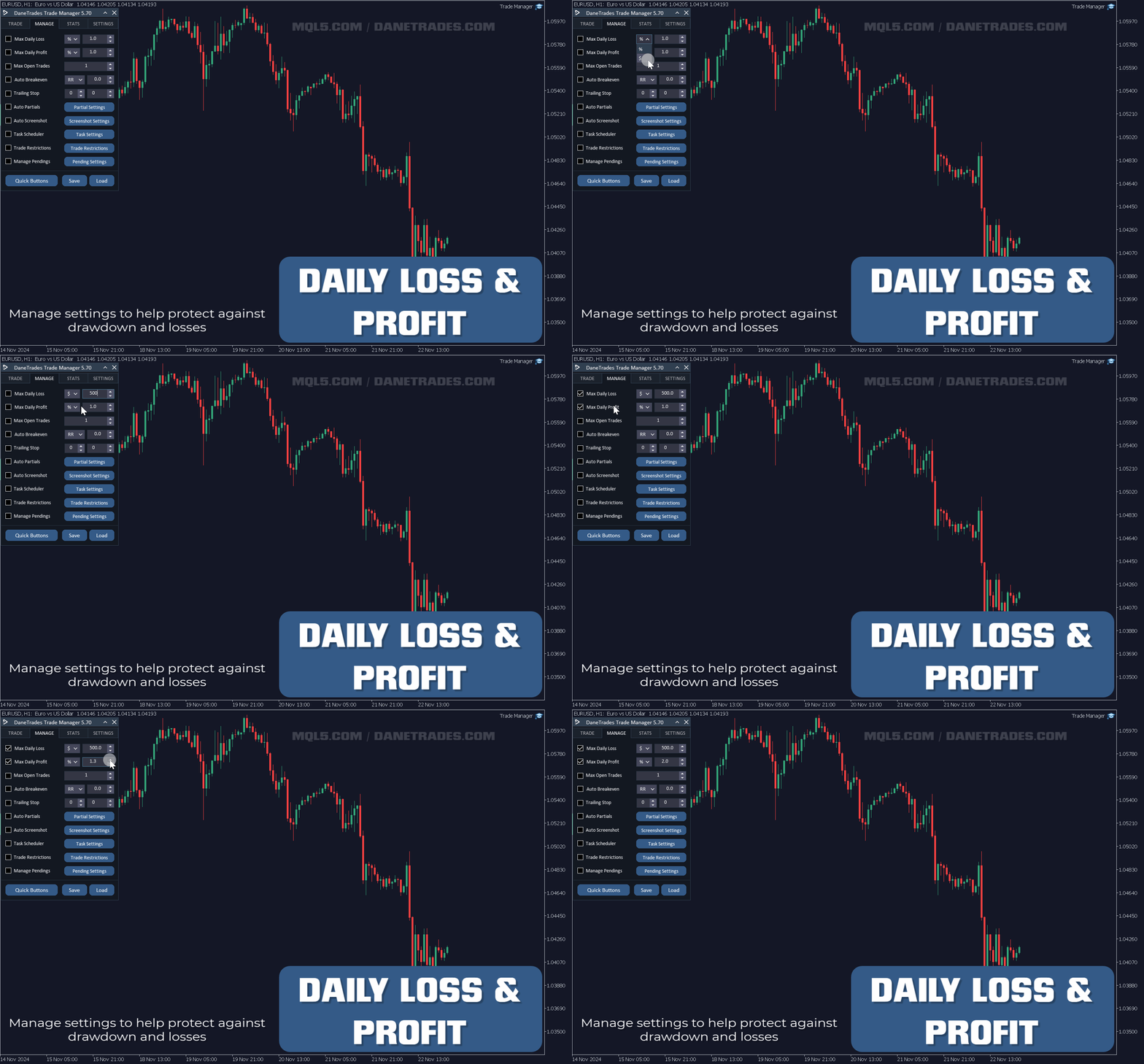
  • 목표 달성 시 모든 거래를 자동으로 마감하는 최대 일일 손실률(%)입니다. 과도한 손실로부터 계정을 보호하고 과도한 거래를 방지합니다.
  • 목표 달성 시 모든 거래를 자동으로 마감하기 위한 최대 일일 손실($). 과도한 손실로부터 계정을 보호하고 과도한 거래를 방지합니다.
  • 버튼 하나로 모든 거래의 손익분기점 달성
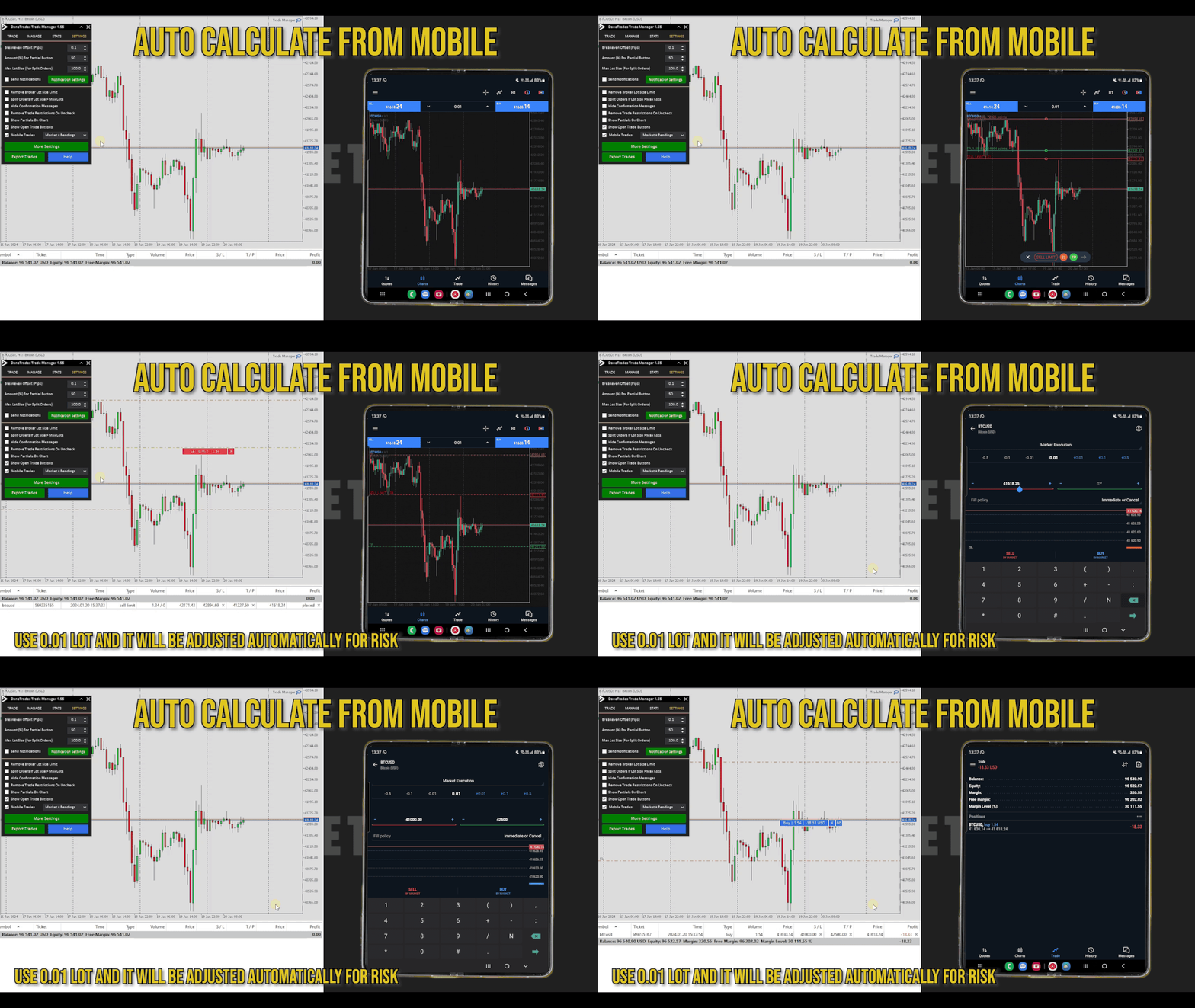
  • 모바일/전화에서 보낸 거래에 대한 위험을 자동으로 계산합니다.
  • 설정에서 OCO를 사용할 수 있습니다.

거래 및 포지션 관리

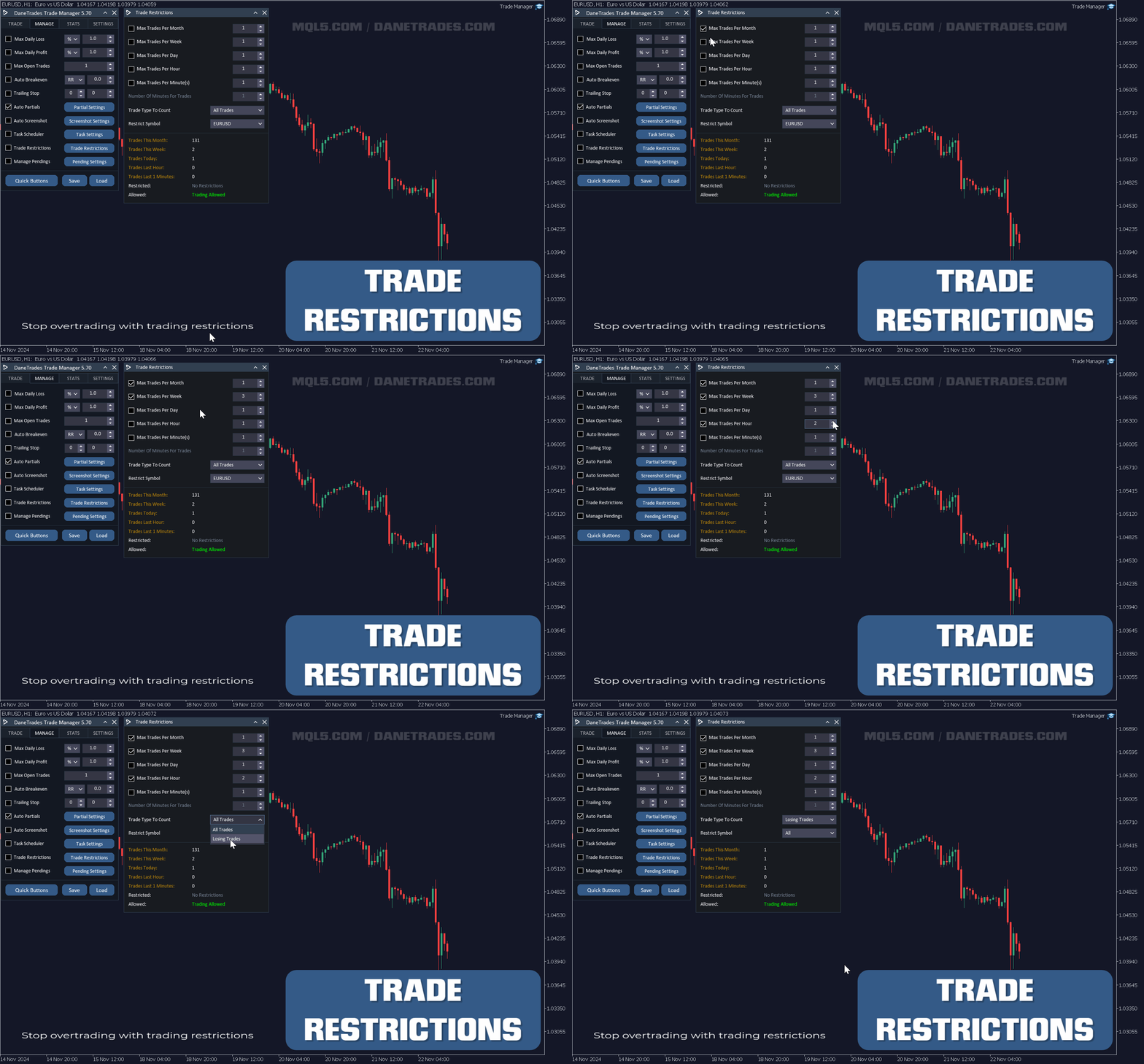
  • 월, 주, 일, 시간 또는 분당 최대 거래를 설정하여 과잉 거래 및 복수 거래를 중지하세요.
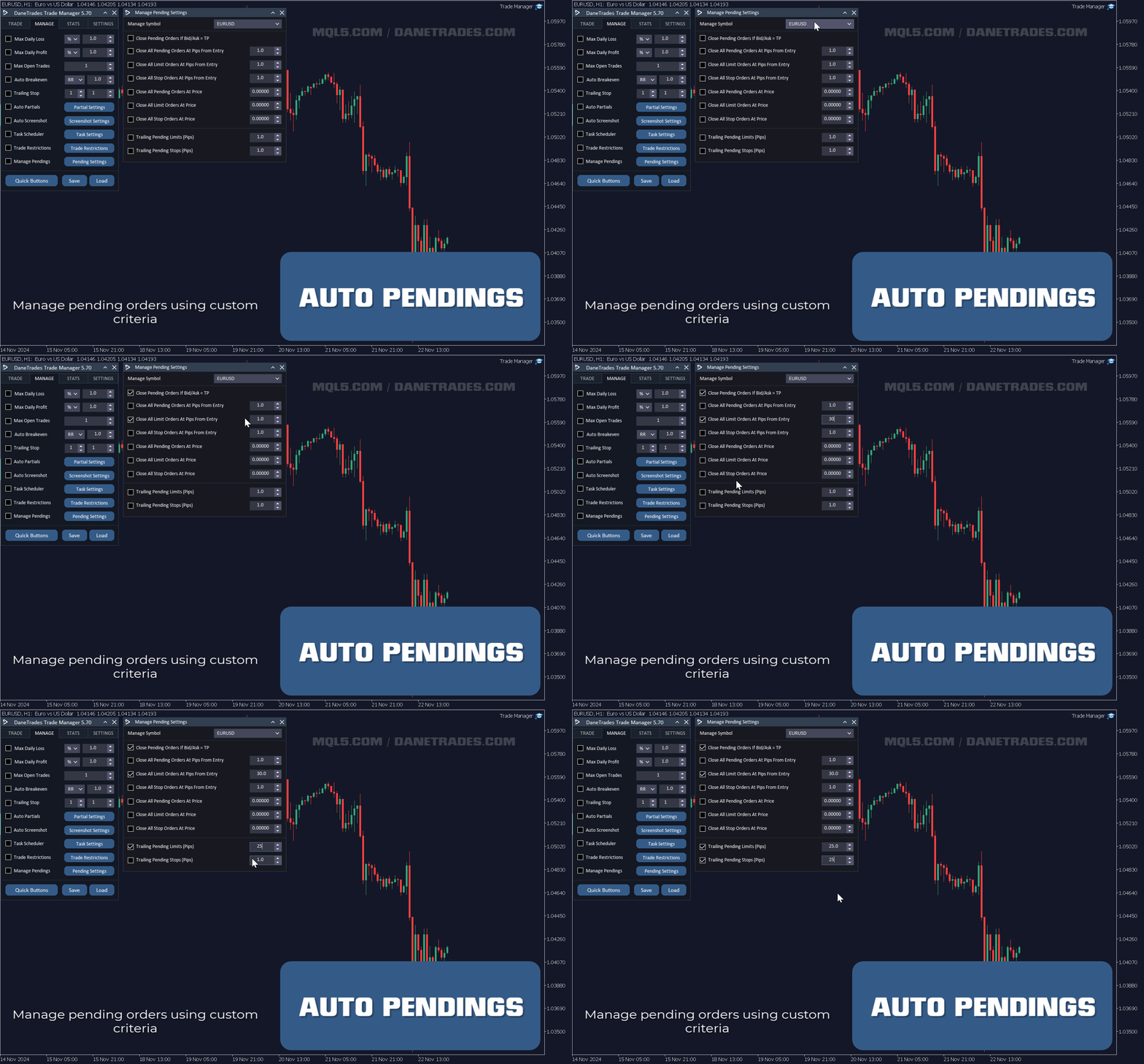
  • 고급 보류 주문 관리. 보류 주문 마감 시기에 대한 규칙 조정
  • 추적 보류 주문
  • 시장가 주문과 지정가 주문 모두 지원
  • 포지션을 확보하고 과잉 거래를 막기 위한 최대 일일 이익 목표($)
  • 포지션 확보를 위한 최대 일일 이익 목표(%)
  • 위험과 노출을 제한하기 위한 Max Open Trades.
  • RR, Pips 또는 Price를 사용하여 자동으로 부분 가져오기
  • 1:2, 1:3, 1:4 등 고정 RR 목표를 사용하여 진입하고 해당 포지션의 계산된 수익을 확인하세요.
  • 버튼 하나로 모든 보류 주문을 마감하세요

그래픽 패널 기능

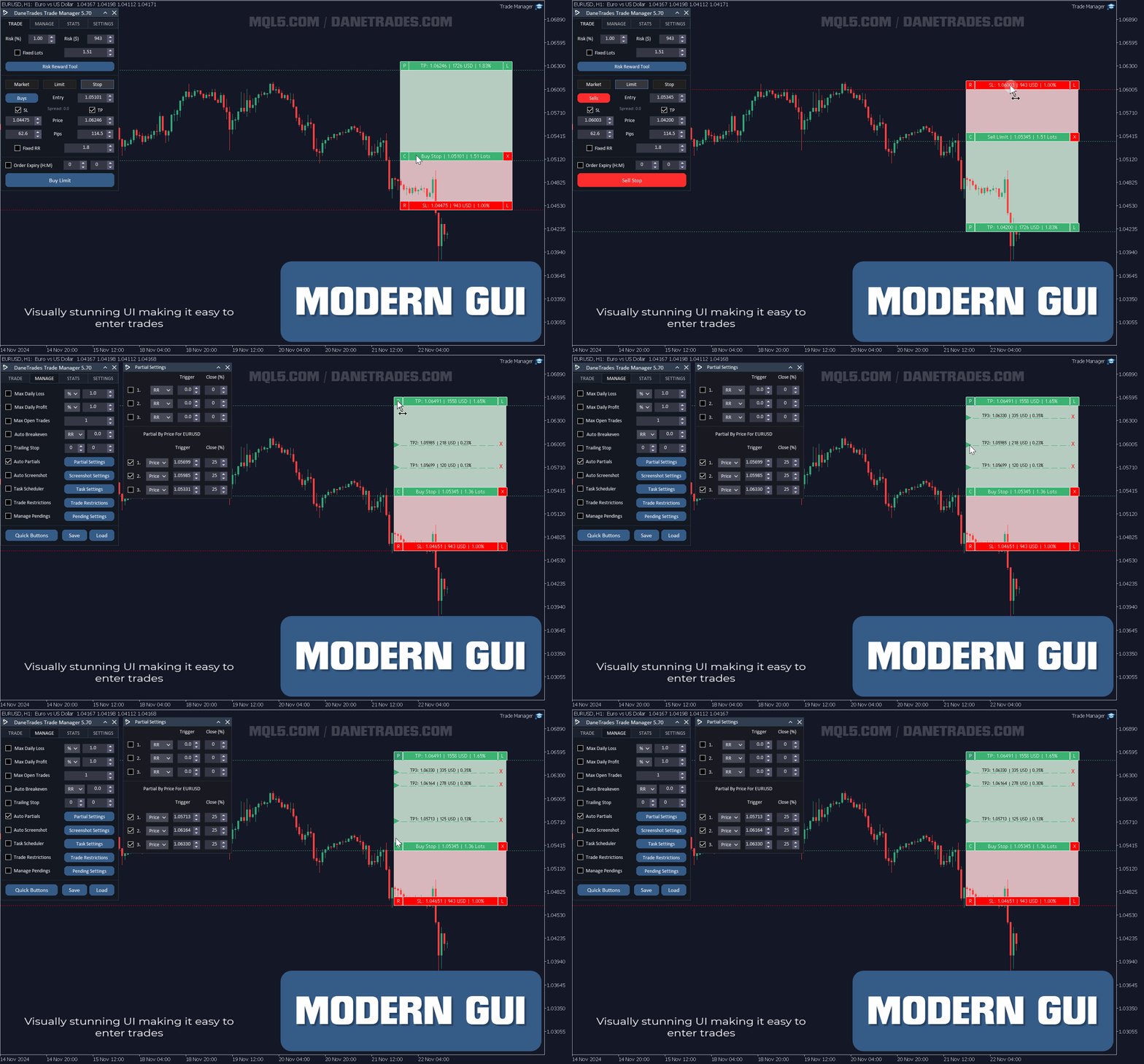
  • 시각적 위험 보상 도구를 사용하여 거래를 시작하세요. 거래를 시각화하고 라인을 사용하여 입력하세요.
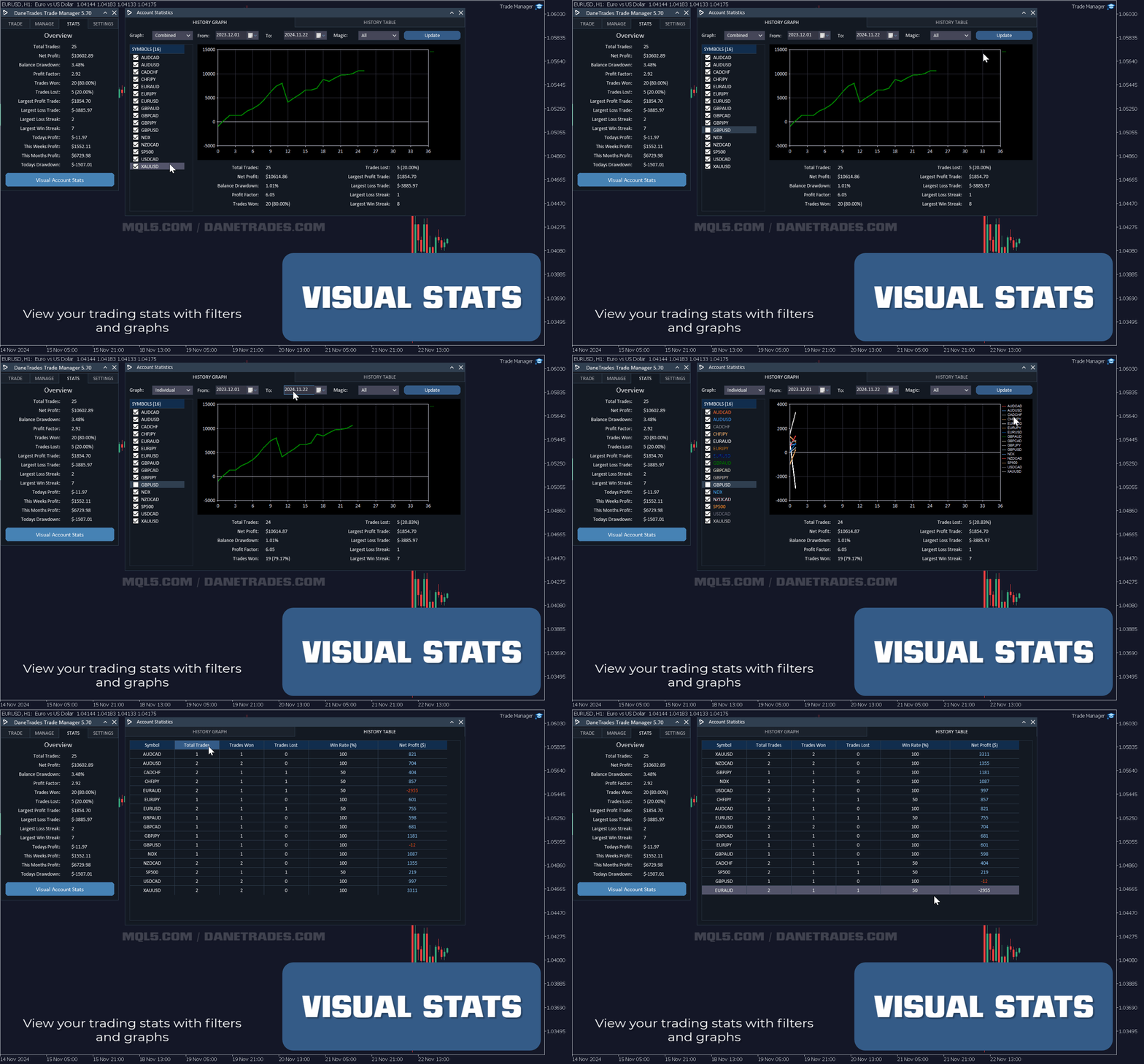
  • 승률, 손실률, 총 거래량 등과 같은 계정 성과 및 통계를 확인하세요.
  • 거래 실적을 시각화하고 기호, 날짜 범위 등의 필터를 사용하여 통계 그래프를 확인하세요.
  • 관리되는 설정에 대해 최대 3개의 설정 파일 템플릿을 저장합니다.
  • 가장 선호하는 설정을 빠르게 사용하려면 설정 파일을 로드하세요.
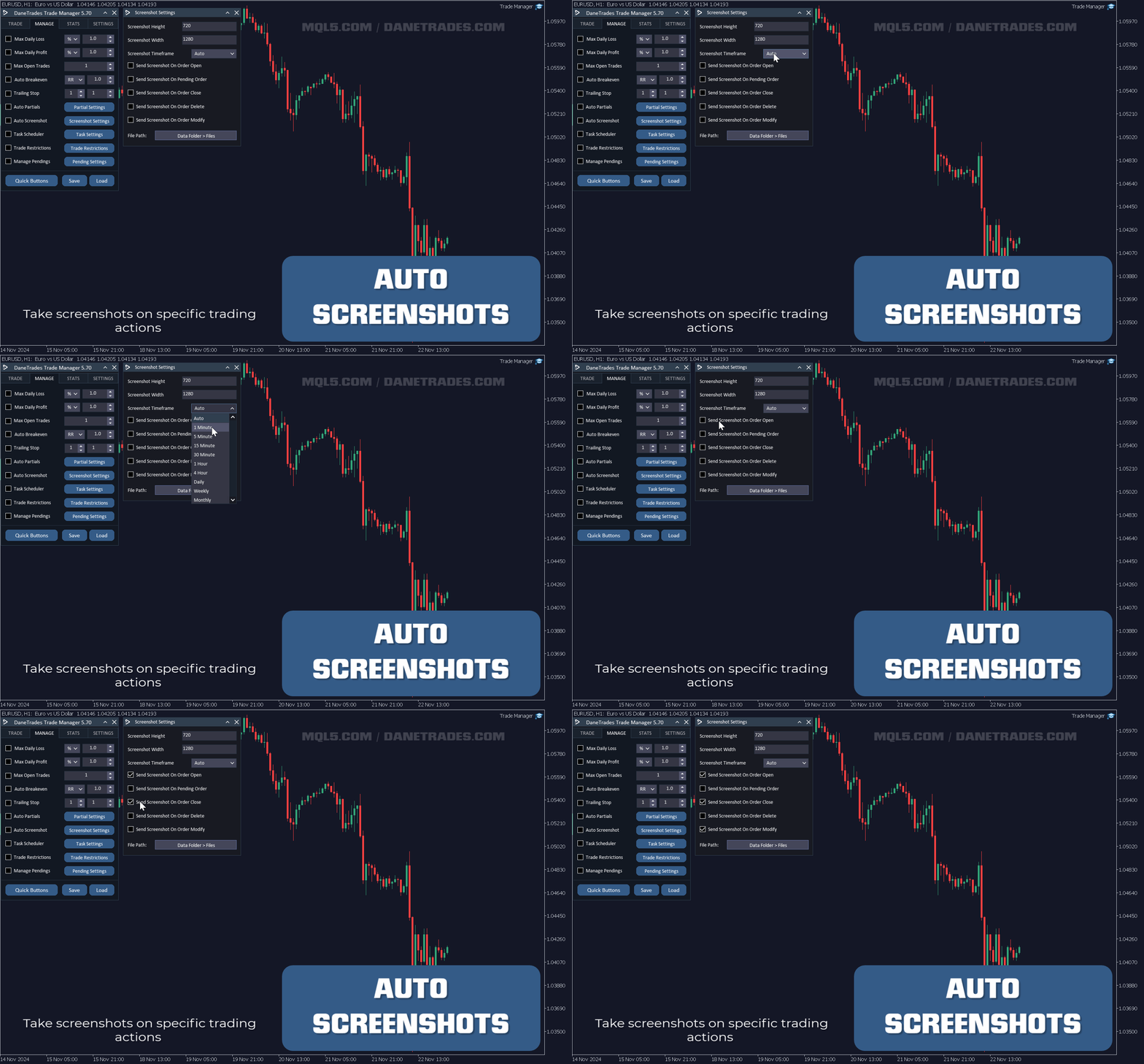
  • 자동 스크린샷. 기간과 스크린샷 크기를 맞춤설정하세요.
  • 보류 중인 주문, 삭제, 열기, 닫기, 만료, TP 또는 SL 히트에 대한 자동 스크린샷.
  • 버튼 하나로 모든 거래를 스프레드시트로 내보낼 수 있습니다.
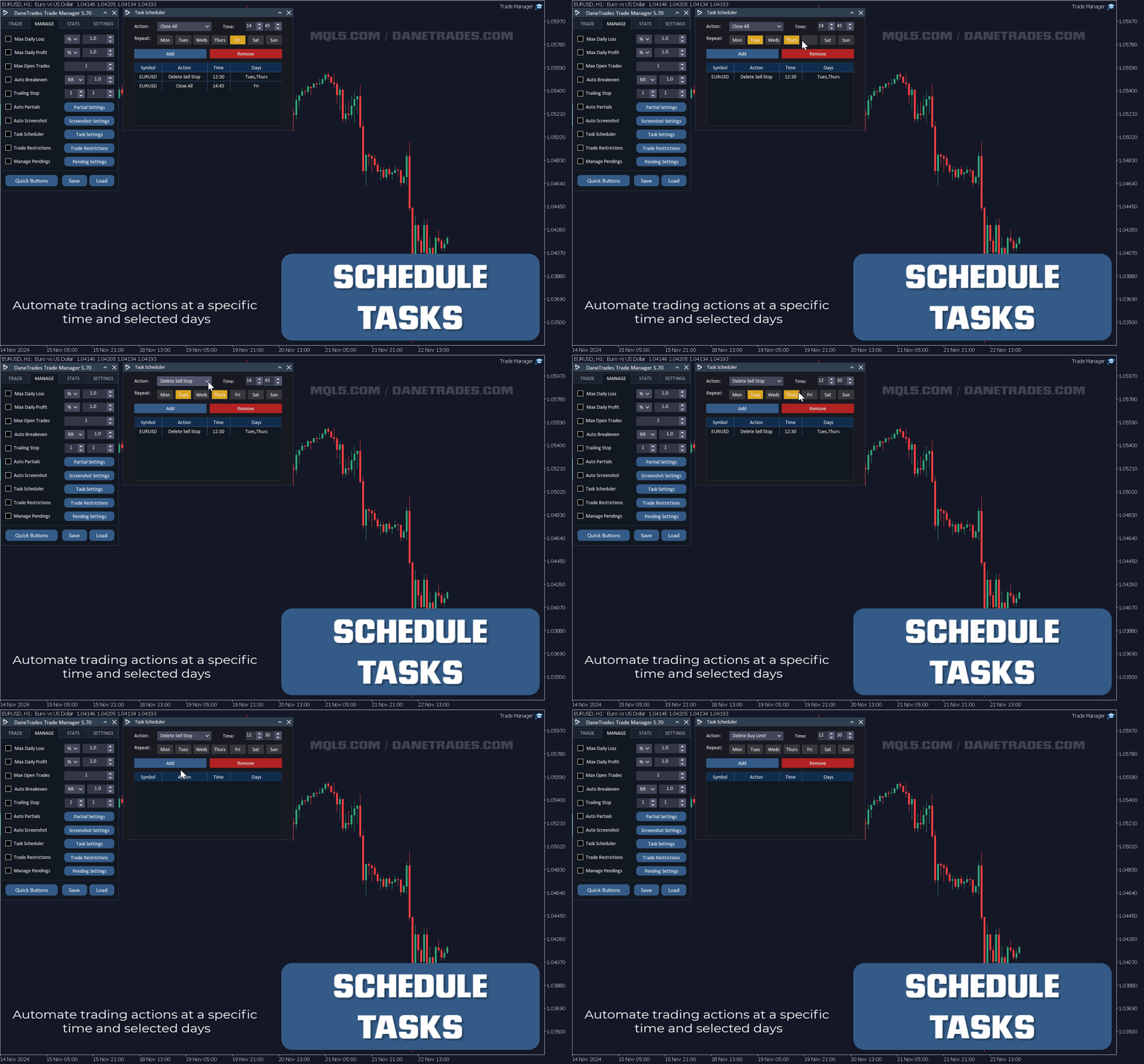
  • 작업 스케줄러를 사용하면 특정 날짜와 시간에 작업을 수행할 수 있습니다.
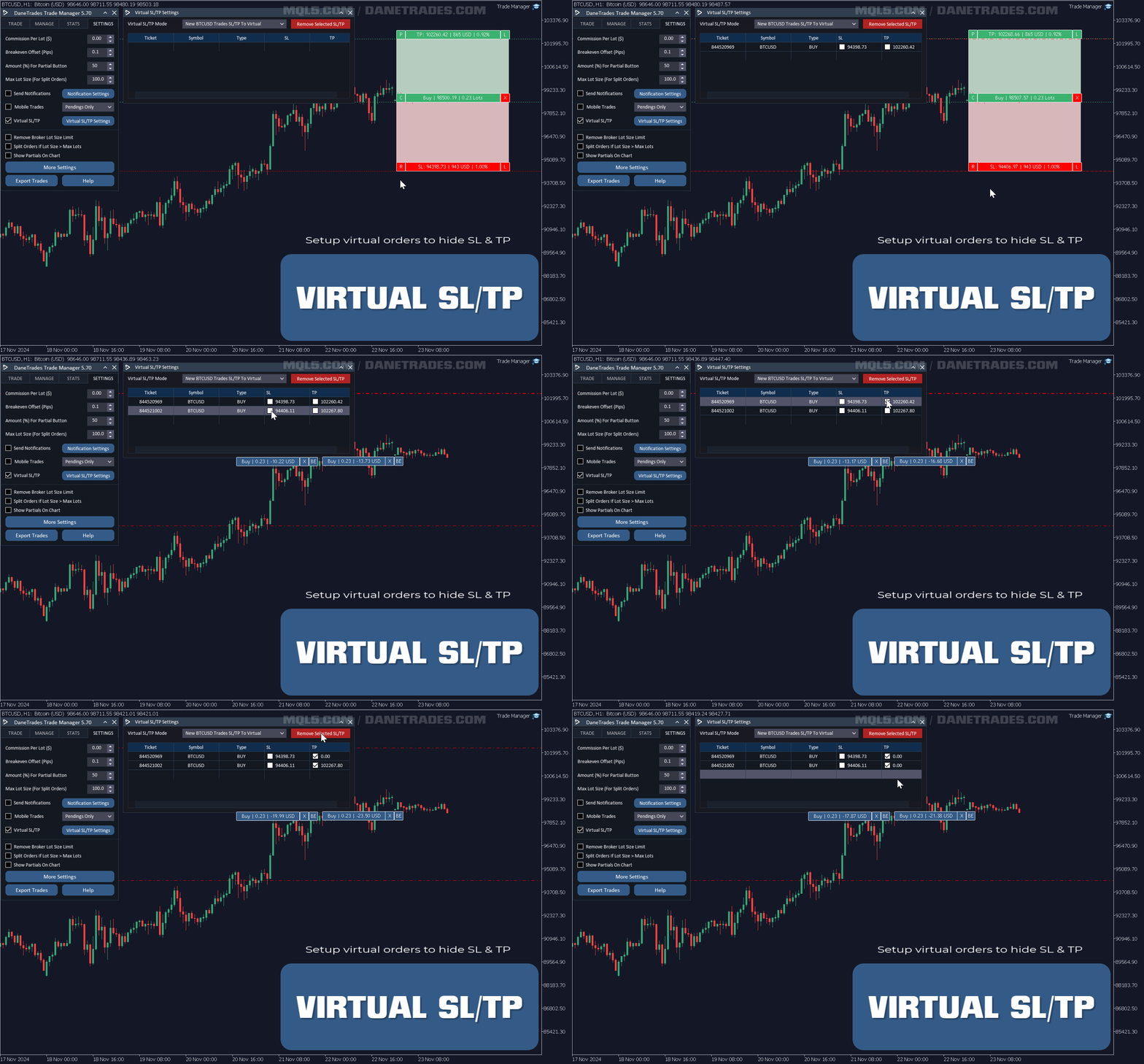
  • 가상 정지 손실 및 이익 실현 관리자
  • 동일한 기호에 대해 손절매 및 이익 실현 수준을 대량 편집합니다.

알림 보내기

  • 경고, 푸시, 이메일 알림 중에서 선택하세요
  • 주문이 SL 또는 TP에 도달하면 알림
  • 주문이 손익분기점에 도달하면 알림
  • 부분이 촬영되면 알림
  • 최대 일일 손실량에 도달하면 알림
  • 최대 일일 이익에 도달하면 알림
  • 거래가 제한되면 알림
  • 거래가 허용되면 알림

단축키 및 단축키 거래

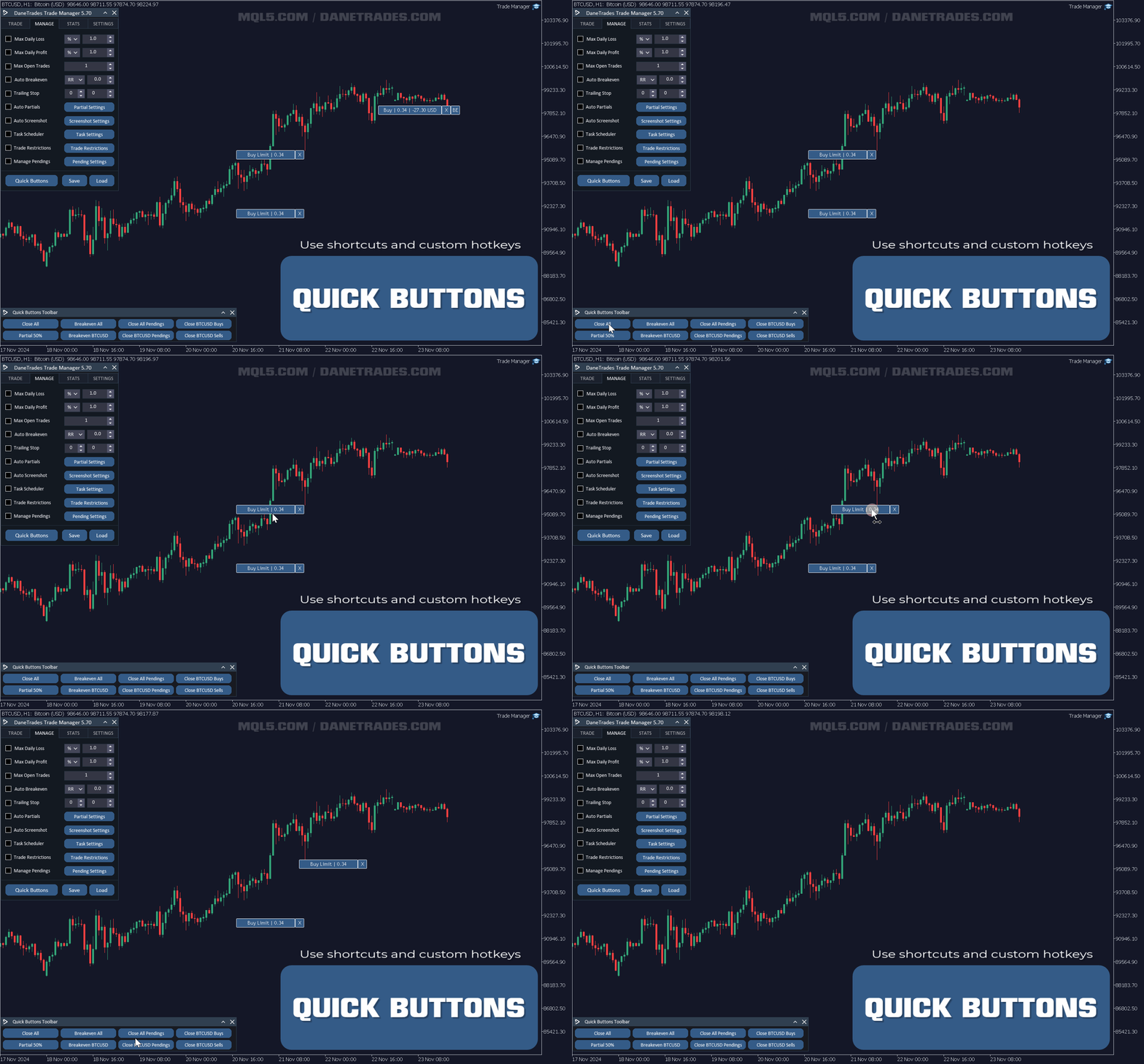
  • 패널의 주요 기능에 대해 완전히 사용자 정의 가능한 단축키 및 단축키

문제가 있으면 메시지를 보내주세요. 최선을 다해 도와드리겠습니다.


#태그: Prop Firm, Trading Panel, Trade Manager, Order Management, Trailing Stop, Break Even, Partial Close, Manual Trading, Trading Assistant, Trade Assistant, Risk Management, Overtrading, Position Management, Max Loss, History Stat, virtual tp, 가상 sl, 숨겨진 정지 손실, 숨겨진 이익 실현, 대량 sl, 대량 tp, 모바일 거래
리뷰 34
Silver Rondo
43
Silver Rondo 2025.11.09 13:20 
 

Best trade manager out there!

zsuga01
19
zsuga01 2024.11.28 21:15 
 

Amazing

m.eo
15
m.eo 2024.10.16 17:09 
 

Great tool, better than trade assistant imho. Dane is very responsive & is all ears to any suggestions on improving the tool which is fantastic. I will be using Danes Trade Manager for the foreseeable future. Cheers Dane

추천 제품
This tool will perform Trailing stop loss and Break even management for orders. Helps you limit or reduce the time spend watching orders on the screen, especially when you need to go to sleep. Just add this EA to 1 chart, you can manage all pairs. You can filter orders by comment, magic number, symbol and order ticket number. When Breakeven it can add shift/offset pips (to cover the commission...). You can try in strategy tester before purchase. The EA will add Buy and Sell alternately, so you
Symbol Manager for MT5
Taras Slobodyanik
5 (3)
Symbol Manager or Grid Manager, designed to group orders into one position (by Symbol or by Magic Number). This utility will be useful to multi-currency traders (many EAs), who can have multiple orders on several pairs. You will be able to see the total number of lots, the total profit, and set virtual stop loss and virtual take profit. To set a real TP (or SL), you must first set the virtual value, and then enter the command in this cell: "set". If you want to set real TP/SL for all orders at
Nebula Trading Manager
Sina Mohammadamin Shahriari Moghadam
This expert advisor named   TradeManager   provides a manual trading management panel in MetaTrader 5 that allows precise control over open positions. It is designed for traders who want dynamic management of Stop Loss (SL), Take Profit (TP), Break Even (BE), and Partial Close functionality. Key Features: Dynamic Trade Management : Manually set or drag-and-drop SL, TP, and BE levels. Supports partial closing at different profit levels (1:1, 1:1.5, 1:2). Automated Drawing : Automatically draw
TP SL Bot MT5
Ruslan Brezovskiy
TP SL Bot is a utility that automatically sets Stop Loss and Take Profit for newly opened orders in several ways. There is also a function for calculating the volume that you need to open the trade to get the desired amount with the specified Stop Loss / Take Profit size. There are several options for calculating the size and setting parameters: 1. Setting based on the amount specified by the user as a percentage of the current deposit balance. 2. Setting as the amount entered by the user. 3. Se
GGP Trade Copier MT5
Mohammadmahmood Pirayeh
GGP Trade Copier  EA is an automatic trading bot that can help traders automatically replicate the trading strategies and operations from one trading terminal to others by experiencing exceptionally fast trade copying system. Its easy-to-use setup allows you to copy trades between multiple MetaTrader terminals on the same Windows computer or Windows VPS with lightning-fast copying speeds of under 0.5 seconds. The software supports multiple trading varieties, including Forex, commodities, stocks
SLTPSetter
Raphael Djangmah Osro Agbo
SLTPSetter - StopLoss Take Profit Setter HOW DOES IT WORK? Risk and account management is a very critical aspect of trading. Before entering a position, you must be fully aware how much you will be willing to loss both in percentage and value. This is where SLTPSetter gets you covered.  All you need to do is attach the indicator on the chart and PRESS BUY OR SELL automatically, all parameters needed for placing the trades will be provided at the top left corner of the screen. Feel free to adjust
Expert TP SL v04 - Professional Trading Assistant with AI Motivation System Advanced manual trading tool with automatic risk management, overtrading protection, and intelligent psychological support for disciplined trading. PRODUCT OVERVIEW Expert TP SL v04 is a comprehensive trading assistant designed for manual traders who want to maintain emotional discipline while automating risk calculations. This isn't just another order placement tool - it's a complete trading psychology system that pr
Click Trading
Jawad Tauheed
5 (1)
One Click Trading – Auto TP SL Developer TraderLinkz Version 1.00 Category Utility What it does Adds missing TP and SL to your manual trades and pending orders Sets them once per ticket Lets you move TP and SL afterward Works on hedging and netting accounts Scans on every tick and reacts on trade events Why you want it You place faster entries You get consistent risk and exit targets You reduce fat finger errors You keep full manual control Quick start Attach the EA to any chart Keep TP and SL e
FREE
Trade assistant pro v8
Ahmed Mohammed Bakr Bakr
FREE FREE FREE Trade Assistant MT5 – Professional Trading & Risk Management Panel Trade Assistant MT5 is an advanced trading panel designed to help traders execute orders faster, safer, and more professionally . It simplifies manual trading by combining smart order management , precise risk control , and one-click execution , making it ideal for both beginners and advanced traders. This tool does not trade automatically . Instead, it empowers you with full control while applying professional-gra
FREE
King ElChart Manual Trade Panel
Mohammed Maher Al-sayed Mohammed Ahmed Saleh
King Chart – Manual Trading Panel for MetaTrader 5 Overview King Chart is a simple yet powerful manual trading panel built for traders who want speed, precision, and clarity. It enables quick order execution, clear lot control, and real-time account monitoring — all directly on your MT5 chart. Main Features Multi-Lot Trade Execution 3 Buy and 3 Sell buttons for instant execution Each button is tied to a custom lot size field Designed for flexible scaling in or out of trades Position Management
Breakevan Utility
Jose Luis Thenier Villa
BreakEvan Utility  Is a simple tool in a panel with this utilities: This utility will draw a Golden Line in the chart applied showing the breakeven price, considering all the positions opened for that specific symbol. Also the information panel shows: Balance Breakeven Price for that chart Force Breakeven (for that symbol) as ON/OFF Force Breakeven Global (takes into account all trades opened) as ON/OFF Total Lots opened for Symbol Total Lots opened Global And two buttons: Force Breakeven: Whe
This EA is there to take your trade closing stress away. Quickly close as many trades as you have opened at the click of a button, INCLUDING PENDING ORDERS. This works on the MT5 platform whether it be currencies, Indices, stocks or Deriv synthetic indices. I have saved it under utilities as it is a utility, however, to install this, you have to save the file in you "EA" folder. That is; Go to "File", then "Open Data Folder", "MQL5" and then "Experts". Paste this file there. Restart MT5 and you'
Quick Close Panel
Boaz Nyagaka Moses
5 (1)
'Quick Close Panel' is an easy to use interface for managing orders. It has a button for closing all winning trades on the current chart, a button for closing all losing trades and another button for closing   all running trades (Losing and Winning)   on the current chart. It is very responsive and quick to execute operations due to the effective time complexity of the algorithm used in the  program.  Vist this link to download demo:  https://www.mql5.com/en/market/product/62901?source=Site+Mark
Equity monitor This is a simple means change informer. I wrote it for myself, maybe someone will need it... 1. Displays the change in funds for the day. Every day, when the terminal is first launched, it remembers the current funds and monitors changes throughout the day. 2. The first day of the month, well remembers the money and, within months, to monitor changes. 3. Well, it displays the profit of the open position. To work, you need to create 4 global variables: gvarEqityDay , gvarEq
FREE
MultiTimeframe Info Feed (MIF) Indicator Description: MultiTimeframe Info Feed (MIF) is a smart MQL5 indicator that displays a dynamic, real-time info panel directly on your chart, offering powerful insight into current market conditions. Key features include: Real-time display of Open, High, Low, Close, and live Tick price Tick Rate (ticks per second) for assessing market activity Auto-calculated Entry Price on new candle formation Signal direction detection (BUY / SELL) Price action pattern re
FREE
Trading Utility for Forex Currency Pairs Only not for Gold  Functions Auto Lot Calculation based on Risk Auto stoploss  Auto TakeProfit Breakeven Auto Close Half % Close in percentage with respect to the PIPs Pending Orders BuyLimit Sell Limit with distances BuyStop Sell Stop    with distances Trading Informations Risk in percentage For Multiple trades Combine Takeprofit and Combine Stoplosses
Total trade manager allows you to manage your trade to maximise your profits and minimise your losses. This is an essential for traders that are looking for consistency within their trading.  The features: Partial Stop Loss: This feature allows you to close a partial percentage of your trade once it goes into negative. So if your stop loss is 20 pips, you could close 75% of your trade at 10 pips and let the remainder of the position to continue running. Auto Stop Loss: This means that once you p
Automatic Trade Calculation Panel   One-Klick-Trading Automatic calculation of Lot sice Atuomatic calulation of Stop-Loss and TakeProfit Up to 3 partial closings Trailingstop (Stop-Loss moves automatically)   The lot size is calculated by the previously determined risk (e.g. 1.0% of the account size) and the distance of the Stop Loss from the entry point. The distance from the Stop Loss to the entry point results from the ATR indicator multiplied by a freely selectable factor. The Stop Loss and
Overview Mirror Signals Service EA (Text only)   is a powerful monitoring Expert Advisor that automatically sends   real-time Telegram notifications   for all important trade events on your MetaTrader 5 account. It is engineered specifically for   signal providers ,   trade-copier operators ,   auditors ,   educators , and   professional trading services   that require immediate, detailed, and reliable reporting. Everything from   entries, exits, SL/TP changes, comment changes, trailing sto
MANAGING YOUR FOREX TRADING LIKE A PROFESSIONAL WITH   POSITION SIZE   CALCULATOR Position Size Calculator – an MT5 indicator, is a user-friendly tool that allows you to determine your required forex trading size for each trade based on how much you want to risk and available capital in your forex trading account. Load the calculator onto your chart and simply draglines to show your stop loss and take profit level. The calculator will automatically calculate the trade size instantly. This indica
Trader SWORD
Tiofelo Da Olga Gilbert Teles
Trader [SWORD] is a panel EA designed to help the trader [scalper]. From the dashboard, the trader can: set the order volume, stop loss and take profit values [in points]; open a market order with its respective stop loss and take profit values. close all [win only, loss only or win and loss] positions opened through the EA.  On the panel we have:   the buttons to open new market orders [buy and sell];   the buttons to set the order volume [increasing and decreasing de volume order]; the buttons
안티 그리드 포지션 프로텍터(Anti Grid Position Protector)   는 하락세 회복을 희망하면서 손실 포지션에 추가하려는 유혹이나 의도하지 않은 헤징을 시도하는 유혹으로부터 사용자를 보호하기 위해 설계된 유틸리티 도구입니다. ------------------------입력------------ ---- 손실 포지션에 대한 헤징을 허용하시겠습니까? -   기존   손실   포지션(동일 기호) 에서   반대 방향   으로 거래 개시(보류 주문 또는 시장 실행)를 허용/불허하는 참/거짓 입력   (값을 전환하려면 두 번 클릭)   입니다. "손실" 포지션을 식별하는 방법   - 두 가지 옵션(   손절매   및   손익   ). "StopLoss"를 선택하면 실행 중인 포지션에 손실 영역에 손절매가 있는 경우 손절매가 손익 분기점 수준을 초과하지 않는 한 도구에서 새 거래를 허용하지 않습니다. 마찬가지로, "PnL"을 선택하면 부동 포지션이 이익(>$0)이 아닌 이상
Imagine flying a real aircraft without ever stepping into a flight simulator. That's what trading is like. You have to simulate your strategy before you can take it to a live market. It is good if you can simulate things speedily before even stepping into any live market, or before coming up with an automated system.  People don't have all day to stare at a higher timeframe chart until the entry signal finally arrives. That's why I built this so that you can simulate your strategy with speed. Th
FREE
SmartRAL
Jemy Yeferson Dimu Ludji
SmartRAL (Smart Risk Auto-Lot EA) SmartRAL: The Ultimate Risk & Lot Management Expert Advisor (EA) SmartRAL is an essential tool for traders who demand precise risk management and automated position sizing in MetaTrader 5. Stop guessing your lot size and let the algorithm handle the calculations. This EA allows you to trade with confidence by guaranteeing your risk exposure on every single trade, while offering absolute flexibility in setting your Stop Loss (SL). Key Features & Benefits Guarante
Professional automated trade management utility that instantly sets Take Profit and Stop Loss on all your trades, with advanced Breakeven and Trailing Stop features. Perfect for scalpers and day traders who want hands-free risk management. Key Features: Instant TP/SL placement on all trades (manual or automated) Smart Breakeven system - locks profits automatically Advanced Trailing Stop - follows winning trades dynamically Fully customizable - adjust all parameters to your strategy
EasyTradePad for MT5
Sergey Batudayev
5 (5)
EasyTradePad – MetaTrader 5용 트레이딩 패널 EasyTradePad   는 수동 및 반자동 거래를 위한 도구입니다. 이 패널을 통해 주문 및 포지션을 빠르게 관리하고, 한 번의 클릭으로 위험 관리 계산을 수행할 수 있습니다. 패널 특징: 사전 정의된 위험(% 또는 예치 통화)으로 거래를 시작하고 마감합니다. SL 및 TP를 포인트, 백분율 또는 금전적 가치로 설정하세요 위험 대비 보상 비율을 자동으로 계산합니다 손절매를 손익분기점으로 이동 부분 포지션 마감 트레일링 스톱(포인트 또는 캔들 섀도우 기준) 위치 평균화 및 피라미딩 활성 거래의 매개변수 수정 [   데모   ] [   지침   ] 추가 기능: 피라미딩 가격이 이익실현을 향해 움직일 때마다 거래를 단계적으로 추가합니다. 각 새 거래의 위험을 줄일 수 있습니다. 추가되는 거래 수는 쉽게 설정할 수 있습니다. 평균화 차트에서 사용자 지정 수준으로 추가 주문을 할 수 있습니다. 포지션은 평균 진입 가
Help Panel
Bogdan Kupinsky
Данная панель предназначена для удобного совершения сделок в платформе Metatrader. Она позволяет с легкостью открывать позиции, устанавливать стоп лосс и тэйк профит, использовать трейлинг стоп и тд.. Входные параметры : Magic - уникальный номер эксперта Lot step - шаг изменения лота Custom - произвольная сумма для высчитывания риска Risk Value  - тип поиска значения риска (в %) Функции панели : Открытие sell и buy позиций Возможность установки profit / loss для позиции, в том числе и графичес
EA 자동 이익 실현, 자동 매수/매도, 볼륨 관리자, 사이드웨이 거래, 트레일링 오픈 포인트 1 – 자동 매수/매도 오픈 EA는 이익, 손절매, 볼륨 설정에 따라 매수 또는 매도를 자동으로 오픈합니다. 볼륨 관리: 총 주문 수와 고정 크기 2 – 자동 이익 실현: 설정에 따라 최소 이익으로 이익 실현, 최소 및 최대 이익에 따라 이익 실현 버튼 3 – 주문 처리: EA에 설정된 핍 수에 따라 포지션의 손절매 수준이 3단계입니다. 4 – 사이드웨이 거래: 사이드웨이 피크 영역에서 매도 주문 오픈 – 사이드웨이 바닥 영역에서 매수 오픈, EA에 설정된 사이드웨이 피크 및 바닥 값 5 – 트레일링 오픈 포지션: 1개 가격 포인트를 추적하고 가격이 해당 지점까지 오르면 매도를 오픈하고 EA의 설정에 따라 핍 수를 줄이며, 가격이 매수 주시 지점까지 오르면 매수를 오픈하고 가격이 설정에 설정된 핍 수로 회복되면 오픈
Profit or Loss Pad
Vladislav Andruschenko
4.27 (11)
이익 추적 기능으로 총 이익/손실에 도달하면 MetaTrader 5에서 포지션을 청산합니다.   CloseIfProfitorLoss with Trailing 가상 정류장(별도 주문)을   활성화할 수 있습니다. BUY 및 SELL 포지션을 별도로   계산 및 마감(BUY SELL 별도) , 모든 기호 또는 현재 기호만   닫고 계산(모든 기호) , 이익을 위해   후행   활성화( 후행 이익) 포지션은 예치 통화, 포인트, % 및 인출 금액을   기준으로 마감됩니다. 응용 프로그램은 다른 EA와 함께 또는 수동 거래와 함께 모든 계정에서 사용하도록 설계되었습니다. MT4 버전 전체 설명   +DEMO +PDF 구입 방법 설치하는 방법     로그 파일을 얻는 방법     테스트 및 최적화 방법     Expforex의 모든 제품 일부 쌍 또는 모든 쌍의 총 거래 잔액이 설정에 지정된 값보다 크거나 같으면 모든 위치가 닫히고 주문이 삭제됩니다. 이 버전은 지정된 이익 수준에서
Lot calculator tool MT5
Ernestas Kvedaras
3.67 (3)
More stable MetaTrader 4 version is available here:  Lot Calculator Tool . This tool helps you to automatically calculate and manage risk, conveniently place orders visually, schedule orders, trail stops, move them to break-even and more. Features Place market or pending orders using draggable lines Schedule orders Calculate and limit risk using various methods See current spread See time till next candle Set custom order comments Trail stops Move stops to break-even See order profit/loss in p
이 제품의 구매자들이 또한 구매함
Trade Manager EA에 오신 것을 환영합니다. 이 도구는 거래를 보다 직관적이고 정확하며 효율적으로 만들기 위해 설계된 궁극적인 리스크 관리 도구 입니다. 단순한 주문 실행 도구가 아닌, 원활한 거래 계획, 포지션 관리 및 리스크 제어를 위한 종합 솔루션입니다. 초보자부터 고급 트레이더, 빠른 실행이 필요한 스캘퍼에 이르기까지 Trade Manager EA는 외환, 지수, 상품, 암호화폐 등 다양한 시장에서 유연성을 제공합니다. Trade Manager EA를 사용하면 복잡한 계산은 이제 과거의 일이 됩니다. 시장을 분석하고 진입, 손절 및 익절 수준을 차트의 수평선으로 표시한 후 리스크를 설정하면, Trade Manager가 이상적인 포지션 크기를 즉시 계산하고 SL 및 TP 값을 실시간으로 표시합니다. 모든 거래가 간편하게 관리됩니다. 주요 기능: 포지션 크기 계산기 : 정의된 리스크에 따라 거래 크기를 즉시 결정합니다. 간단한 거래 계획 : 진입, 손절, 익절을 위한
TradePanel MT5
Alfiya Fazylova
4.86 (147)
Trade Panel은 다기능 거래 보조원입니다. 이 애플리케이션에는 수동 거래를 위한 50개 이상의 거래 기능이 포함되어 있으며 대부분의 거래 작업을 자동화할 수 있습니다. 전략 테스터에서는 애플리케이션이 작동하지 않습니다. 구매하기 전에 데모 계정에서 데모 버전을 테스트할 수 있습니다. 데모 버전 여기 . 전체 지침 여기 . 거래. 한 번의 클릭으로 거래 작업을 수행할 수 있습니다: 자동 위험 계산을 통해 지정가 주문 및 포지션을 엽니다. 한 번의 클릭으로 여러 주문과 포지션을 열 수 있습니다. 주문 그리드를 엽니다. 그룹별 대기 주문 및 포지션을 마감합니다. 포지션 반전(매수 청산 후 매도 개시 또는 매도 청산 후 매수 개시). 포지션 고정(매수 포지션과 매도 포지션의 양을 동일하게 하는 추가 포지션 개설). 한 번의 클릭으로 모든 포지션을 부분 청산합니다. 모든 포지션의 이익실현과 손절매를 동일한 가격 수준으로 설정합니다. 모든 포지션에 대한 손절매를 해당 포지션의 손익 분기
Ultimate Extractor
Clifton Creath
5 (7)
Ultimate Extractor - Professional Trading Analytics for MT5 Ultimate Extractor transforms your MetaTrader 5 trading history into actionable insights with comprehensive analytics, interactive charts, and real-time performance tracking. What It Does  Phase 1: Automatically analyzes your MT5 trading history across all Expert Advisors and generates detailed HTML reports with interactive visualizations. Tracks live performance metrics including open positions, floating P/L, and drawdown in real-time.
베타 출시 Telegram to MT5 Signal Trader 는 곧 공식 알파 버전을 출시할 예정입니다. 일부 기능은 아직 개발 중이며, 작은 버그가 발생할 수 있습니다. 문제가 있으면 꼭 보고해 주세요. 여러분의 피드백은 소프트웨어 개선에 도움이 됩니다. 가격은 20건 판매 후 인상됩니다. 남은 $90 카피: 2/20 . Telegram to MT5 Signal Trader 는 Telegram 채널 또는 그룹의 거래 신호를 자동으로 MetaTrader 5 계정으로 복사하는 강력한 도구입니다. 공개 및 비공개 채널을 모두 지원하며, 여러 신호 제공자를 여러 MT5 계정에 연결할 수 있습니다. 소프트웨어는 빠르고 안정적으로 동작하며, 복사된 거래를 완벽히 제어할 수 있습니다. 인터페이스는 깔끔하며 대시보드와 차트가 시각적으로 구성되어 있고, 직관적인 네비게이션이 가능합니다. 여러 Signal Account를 관리하고, 공급자별 설정을 세밀하게 조정하며, 모든 동작을 실시간으로
YuClusters
Yury Kulikov
4.93 (42)
Attention: You can view the program operation in the free version  YuClusters DEMO .  YuClusters is a professional market analysis system. The trader has unique opportunities to analyze the flow of orders, trade volumes, price movements using various charts, profiles, indicators, and graphical objects. YuClusters operates on data based on Time&Sales or ticks information, depending on what is available in the quotes of a financial instrument. YuClusters allows you to build graphs by combining da
Trade Manager DashPlus
Henry Lyubomir Wallace
5 (12)
DashPlus 는 MetaTrader 5 플랫폼에서 거래 효율성과 효과를 향상시키기 위해 설계된 고급 거래 관리 도구입니다. 리스크 계산, 주문 관리, 고급 그리드 시스템, 차트 기반 도구 및 성과 분석 등 포괄적인 기능을 제공합니다. 주요 기능 1. 리커버리 그리드 불리한 시장 상황에서 거래를 관리하기 위한 평균화 및 유연한 그리드 시스템을 구현합니다. 거래 회복을 최적화할 수 있도록 전략적인 진입 및 종료 포인트를 제공합니다. 2. 스택 그리드 강한 시장 움직임 동안 포지션을 추가하여 유리한 거래에서 잠재적 수익을 극대화하도록 설계되었습니다. 유리한 시장 트렌드에서 승률을 높이며 거래를 확장할 수 있도록 합니다. 3. 손익(P&L) 라인 차트에서 잠재적인 수익 및 손실 시나리오를 시각적으로 표현합니다. 설정을 조정하고 P&L 라인을 드래그하여 실행 전에 다양한 거래 결과를 평가할 수 있습니다. 4. 바스켓 모드 동일한 심볼에 여러 포지션을 단일 집계 포지션으로 결합하여 관리합니
The product will copy all telegram signal to MT5 ( which you are member) , also it can work as remote copier.  Easy to set up, copy order instant, can work with almost signal formats, image signal,  s upport to translate other language to English Work with all type of channel or group, even channel have "Restrict Saving Content", work with  multi channel, multi MT5 Work as remote copier: with signal have ticket number, it will copy exactly via ticket number. Support to backtest signal. How to s
Crypto Charting
Rajesh Kumar Nait
5 (5)
Crypto Charting for MT5 – MetaTrader 5용 암호화폐 차트 통합 도구 개요 Crypto Charting for MT5는 WebSocket을 통해 실시간 OHLC 차트 데이터를 제공합니다. 여러 거래소를 지원하며 MT5에서 자동으로 데이터가 동기화됩니다. 기능 WebSocket을 통한 실시간 차트 자동 역사 데이터 업데이트 네트워크 중단 시 예약된 동기화 모든 MT5 타임프레임 지원 OHLCV 데이터 지원 전략 테스터 지원 자동 재연결 기능 지원 거래소 Binance, Bybit, OKX, KuCoin, MEXC, Gate.io, Bitget, XT.com 추가 정보 Crypto Ticks 라는 별도 제품에서 틱 데이터와 오더북 정보를 제공합니다. 참고 사항 DLL 미사용, VPS 환경에 적합합니다. Strategy Tester에서는 WebRequest 기능이 작동하지 않습니다. 데모가 필요하신 경우 MQL5의 개인 메시지를 통해 문의하십시오. Full
EasyInsight AIO MT5
Alain Verleyen
4.91 (11)
EASY Insight AIO – 스마트하고 손쉬운 트레이딩을 위한 올인원 솔루션 개요 외환, 금, 암호화폐, 지수, 심지어 주식까지 — 전 시장을 몇 초 만에, 수동 차트 확인이나 복잡한 설치, 인디케이터 설정 없이 스캔할 수 있다고 상상해 보세요. EASY Insight AIO 는 AI 기반 트레이딩을 위한 궁극의 플러그 앤 플레이(Plug & Play) 데이터 내보내기 도구입니다. 단 하나의 깔끔한 CSV 파일로 전체 시장 스냅샷을 제공하며, ChatGPT, Claude, Gemini, Perplexity 등 다양한 AI 플랫폼에서 즉시 분석할 수 있습니다. 창 전환, 복잡함, 차트 오버레이는 더 이상 필요 없습니다. 자동으로 내보내지는 순수하고 구조화된 데이터 인사이트만으로, 반복적인 차트 감시 대신 데이터 기반의 스마트한 의사결정에 집중할 수 있습니다. 왜 EASY Insight AIO인가요? 진정한 올인원 • 별도의 설정, 인디케이터 설치, 차트 오버레이가 필요 없습
Crypto Ticks and Depth
Rajesh Kumar Nait
5 (1)
MetaTrader 5용 Crypto Ticks – 실시간 암호화폐 틱 데이터 및 오더북 통합 개요 Crypto Ticks는 주요 암호화폐 거래소의 실시간 틱 데이터와 오더북 깊이를 MetaTrader 5에 직접 스트리밍합니다. 스캘핑, 알고리즘 트레이딩, 전략 테스트를 위한 정밀 데이터를 원하는 트레이더를 위해 설계되었습니다. 지원 거래소 Binance: 스팟 (차트창에 오더북 표시) 및 선물 (다중 종목 오더북 지원) KuCoin: 스팟 및 선물 (차트 오더북 지원) Bybit: 선물 및 역방향 선물 XT.com: 스팟 및 선물 주요 기능 WebSocket을 통한 실시간 틱 스트리밍 Binance 스트림 지원: @trade, @ticker, @bookTicker, @aggTrade API를 통한 완전한 OHLCV 히스토리 업데이트 오더북 시각화 (최고 매수/매도 + 레벨) 자동 재연결로 안정성 유지 정확한 캔들 차트를 위한 예약 데이터 교체 MT5 재시작 시 자동 히스토리 업데
Strategy Builder offers an incredible amount of functionality. It combines a trade panel with configurable automation (covert indicators into an EA), real-time statistics (profit & draw down) plus automatic optimization of SL, TP/exit, trading hours, indicator inputs. Multiple indicators can be combined into an single alert/trade signal and can include custom indicators, even if just have ex4 file or purchased from Market. The system is easily configured via a CONFIG button and associated pop-u
HINN Lazy Trader
ALGOFLOW OÜ
5 (2)
Lazy Trader is your personal risk management assistant that independently finds the best market entries, manages positions, and helps you extract maximum profit from every trading idea! It monitors charts from M1 to W1 , finds optimal entry points based on your parameters, and manages trades without your involvement: - Got an idea on the daily chart? No need to wait for lower timeframes to form a signal — Lazy Trader will check everything and open all necessary positions while you live your lif
Remote Trade Copier is an advanced tool designed for efficiently copying trades between accounts in both local and remote modes. It allows for lightning-fast order replication from a master account to a slave account. In local mode, trades are copied instantly, while in remote mode, the copying process takes less than 1 second. MT4 Version (Only Local) MT5 Version (Only Local) MT4 Full Version (Local & Remote) Local mode refers to both MetaTrader platforms being installed on the same system,
Advanced trading tool: One click smart orders that execute under your conditions Developed by trader for trading community:  position size calculator (lot size), open position after price action, strategy builder, set and forget trading, mobile notifications Risk Management -  Risk percentage position size calculator, gain percentage, target risk reward ratio, spread and commissions are included in calculations 7 Advanced order types  - Set and forget trading with price action automation (OCO,
Comprehensive on chart trade panel with the unique ability to be controllable from mobile as well. Plus has a library of downloadable configuration, e.g. exit rules, extra panel buttons, pending order setup and more. Please see our product video. Works with all symbols not just currency pairs. Features On chart panel plus controllable from free app for Windows, iPhone and Android Built-in script engine with library of downloadable configuration, e.g. add 'Close All Trades in Profit' button, exit
Custom Alerts AIO: 다중 시장을 동시에 모니터링 – 설정 없이 즉시 사용 가능 개요 Custom Alerts AIO 는 복잡한 설정 없이 즉시 사용할 수 있는 통합 시장 모니터링 도구입니다. FX Power, FX Volume, FX Dynamic, FX Levels, IX Power 등 필요한 모든 지표가 내장되어 있어 별도의 설치나 구성 없이 알림 기능을 바로 사용할 수 있습니다. 차트 그래픽 없이 작동하며, Forex, 금속, 지수, 암호화폐 등 주요 자산군을 모두 지원합니다. 주식(Symbols)은 별도로 입력하여 추가할 수 있으나, MetaTrader에서는 일반적으로 제한적으로만 사용됩니다. 1. 왜 Custom Alerts AIO를 선택해야 하나요? 추가 라이선스가 필요 없습니다 • 모든 Stein Investments 지표가 내장되어 있어 별도 구매가 필요 없습니다. • 즉시 알림 기능을 시작할 수 있어 빠르고 간편합니다. 모든 시장을 하나의 도구로
EchoTrade Telegram to MT5 Copier
Perpetual Chinemerem Vincent
5 (1)
EchoTrade Telegram to MT5 Copier Seamless, Instant, and Reliable Signal Copying - Direct from Telegram to MetaTrader 5! The product does not run in the strategy tester but you can get free trial version here  for testing before purchase. Tired of manually executing trades from Telegram signals? EchoTrade automates the process, instantly copying trades from any Telegram channel or group directly into your MT5 account—accurately, efficiently, and without delay. Key Features: Universal Compatibi
Mentfx Mmanage mt5
Anton Jere Calmes
4.25 (8)
The added video will showcase all functionality, effectiveness, and uses of the trade manager. Drag and Drop Trade Manager. Draw your entry and have the tool calculate the rest. Advanced targeting and close portions of a trade directly available in tool (manage trades while you sleep). Market order or limit order on either side with factored spread. Just draw the entry, the tool does the rest. Hotkey setup to make it simple. Draw where you want to enter, and the stop loss, the tool calculates al
Trade Assistant 38 in 1
Makarii Gubaydullin
4.91 (22)
Ultimate Trade Assistant MT5 — 다기능 트레이딩 어시스턴트 66개 이상의 전문 기능을 하나의 인터페이스로 통합. 더 빠르고 안전한 트레이딩을 경험하세요. 리스크 관리, 주문 자동화, 포지션 제어, 시장 분석 을 한 번에 수행할 수 있는 강력한 도구입니다. 초보자부터 전문 트레이더까지 모두에게 적합합니다. 트레이더가 선택하는 이유 원클릭으로 빠른 주문 실행 및 관리 자동 로트 및 리스크 계산 스마트 주문: 그리드, OCO, 가상 SL/TP, 숨김 주문 포지션 관리: 부분 청산, 브레이크이븐, 자동 트레일링 스톱 시장 분석: 수요/공급 구역, 변동성, 통화 강도, 세션 상세 통계 및 다중 심볼 지원 Telegram 알림 기능 주요 기능 (66+) 리스크 관리: 자동 로트 계산, 손익비 관리 주문 관리: SL/TP, 트레일링 스톱(11가지 모드), 부분 청산 스마트 주문: 그리드, OCO, 가상 및 예약 주문 시장 분석: 변동성, 지지/저항, 세션 인디케이터 통계:
Trade Copy is an EA-shaped tool that replicates the trades done on a Meta Trader 5 to all Meta Traders 5 opened on same computer. Is useful if you want to trade more than once account yours or if you want to work with third party account management. Demo version:  https://www.mql5.com/pt/market/product/40906 MT4 version:  https://www.mql5.com/pt/market/product/40902/ Configurations: MAIN OPTIONS Idiom - change to English or Portuguese. Copy trades from - specify if the trades will be copied fro
AlgoRadar
Stephen J Martret
ALGORADAR - REAL-TIME TRADE ANALYTICS The Most Powerful On-Chart Performance Analyzer for MetaTrader 5 NO EXTERNAL SOFTWARE. NO DIGGING THROUGH FILES. LIVE STATS RIGHT ON YOUR CHART. Unlike other portfolio analyzers that force you to run standalone apps or hunt through MT5 folders for reports, AlgoRadar displays your complete trading performance directly on your charts in real-time. ANALYZE & RANK ALL YOUR EAs ON ONE CHART! Running multiple Expert Advisors? Which one is actually your BEST perfor
The product will copy all  Discord  signal   to MT5   ( which you are member  ) , also it can work as remote copier.  Easy to set up. Work with almost signal formats, support to translate other language to English Work with multi channel, multi MT5. Work with Image signal. Copy order instant, auto detect symbol. Work as remote copier: with signal have ticket number, it will copy exactly via ticket number. How to setup and guide: Let read all details about setup and download Discord To MetaTrader
HYT utility
Sergey Batudayev
HYT(Help Your Trading)   는 두 가지 주요 기술을 사용하여 손실 포지션의   평균을 낮추는 데   도움이 되도록 설계된 도구입니다. 표준 평균화. 추세 방향으로 포지션을 개시하여 헤지하는 방식입니다. 이 도구를 사용하면 매수와 매도 모두에서 여러 방향으로 개설된 여러 포지션을 관리할 수 있습니다. HYT는 다음 포지션의 크기, 주문 가격, 평균화 방향, 지정된 이익 실현 수준으로 포지션을 마감하는 것을 자동으로 계산합니다. 또한 매수 및 매도 버튼을 사용하여 포지션을 개설하고, 원하는 이익 실현 수준과 초기 로트를 지정하는 옵션도 제공합니다. 사용을 시작   하려면 도구를 차트로 끌어다 놓고, 이익 실현 수준을 설정한 후 "평균화 시작" 버튼을 클릭하면 됩니다. 초기 포지션이 너무 크지 않도록   주의하고, 평균화할 때 도구가 포지션 크기를 늘리므로 추가 비용이 발생할 수 있음을 대비하세요. HYT는   자동 거래   도 가능합니다. 자동 거래가 활성화되면, 도구
Telegram To MT5 Receiver
Levi Dane Benjamin
4.53 (15)
가입한 모든 채널에서 (개인 및 제한된 채널 포함) 시그널을 바로 MT5로 복사합니다.   이 도구는 사용자를 고려하여 설계되었으며 거래를 관리하고 모니터하는 데 필요한 많은 기능을 제공합니다. 이 제품은 사용하기 쉽고 시각적으로 매력적인 그래픽 인터페이스로 제공됩니다. 설정을 사용자 정의하고 제품을 몇 분 안에 사용할 수 있습니다! 사용자 가이드 + 데모  | MT4 버전 | 디스코드 버전 데모를 시도하려면 사용자 가이드로 이동하십시오. Telegram To MT5 수신기는 전략 테스터에서 작동하지 않습니다! Telegram To MT5 특징 여러 채널에서 동시에 신호를 복사합니다. 개인 및 제한된 채널에서 신호를 복사합니다. Bot 토큰이나 채팅 ID가 필요하지 않습니다.   (원하는 경우에는 사용할 수 있습니다) 위험 % 또는 고정된 로트로 거래합니다. 특정 심볼을 제외합니다. 모든 신호를 복사할지 또는 복사할 신호를 사용자 정의할지 선택할 수 있습니다. 모든 신호를 인
Riskless Pyramid Mt5
Snapdragon Systems Ltd
3.5 (2)
Introduction This powerful MT4 trade mangement EA offers a way potentially to aggressively multiply trade profits in a riskfree manner. Once a trade has been entered with a defined stoploss and take profit target then the EA will add three pyramid add-on trades in order to increase the overall level of profit. The user sets the total combined profit target to be gained if everything works out. This can be specified either as a multiple of the original trade profit or as a total dollar amount. Fo
Patrex pro
Chioma Obunadike
5 (1)
Patrex Pro: Maximize Your Trading Potential Patrex Pro is an advanced trading bot designed to help traders optimize their trading strategies and maximize their potential returns. With its cutting-edge technology and user-friendly interface, Patrex Pro is the ultimate tool for traders seeking to elevate their trading game. Get MT4 Version Key Features: 1. Position Hedging: Patrex Pro allows users to hedge their positions based on their individual risk tolerance and market analysis. 2. Advanced R
Bots Builder Pro MT5
Andrey Barinov
4.17 (6)
This is exactly what the name says. Visual strategy builder . One of a kind. Turn your trading strategies and ideas into Expert Advisors without writing single line of code. Generate mql source code files with a few clicks and get your fully functional Expert Advisors, which are ready for live execution, strategy tester and cloud optimization. There are very few options for those who have no programming skills and can not create their trading solutions in the MQL language. Now, with Bots Builde
Mt5 To InterativeBrokers Copier allows you to copy deals from MT5 account to Interactive Brokers. With this, you can run your EA strategy on a MT5 Demo/Real Account, then copy all the deals to Interactive Brokers account real time. Features: 1. Copy or Invert-Copy deals Realtime from MT5 to IB Account. 2. Synchronizing positions of both accounts periodicaly, in case any missing copying. 3. You can choose only Buy position or Sell position. Symbols Setup: General Format:  {MT Symbol} -> {IB S
Everything for chart Technical Analysis indicator MT5 in one tool Draw your supply demand zone with rectangle and support resistance with trendline and get alerts to mobile phone or email alert -  Risk reward indicator mt5 Video tutorials, manuals, DEMO download   here .   Find contacts on my   profile . 1.   Extended rectangles and trendlines Object will be extended to the right edge of the chart when price will draw new candles on chart. This is rectangle extender or trendline extender. 2. Pri
제작자의 제품 더 보기
Telegram To MT5 Receiver
Levi Dane Benjamin
4.53 (15)
가입한 모든 채널에서 (개인 및 제한된 채널 포함) 시그널을 바로 MT5로 복사합니다.   이 도구는 사용자를 고려하여 설계되었으며 거래를 관리하고 모니터하는 데 필요한 많은 기능을 제공합니다. 이 제품은 사용하기 쉽고 시각적으로 매력적인 그래픽 인터페이스로 제공됩니다. 설정을 사용자 정의하고 제품을 몇 분 안에 사용할 수 있습니다! 사용자 가이드 + 데모  | MT4 버전 | 디스코드 버전 데모를 시도하려면 사용자 가이드로 이동하십시오. Telegram To MT5 수신기는 전략 테스터에서 작동하지 않습니다! Telegram To MT5 특징 여러 채널에서 동시에 신호를 복사합니다. 개인 및 제한된 채널에서 신호를 복사합니다. Bot 토큰이나 채팅 ID가 필요하지 않습니다.   (원하는 경우에는 사용할 수 있습니다) 위험 % 또는 고정된 로트로 거래합니다. 특정 심볼을 제외합니다. 모든 신호를 복사할지 또는 복사할 신호를 사용자 정의할지 선택할 수 있습니다. 모든 신호를 인
Trade Manager MT4 DaneTrades
Levi Dane Benjamin
4.09 (11)
거래 관리자는 위험을 자동으로 계산하는 동시에 거래를 빠르게 시작하고 종료하는 데 도움을 줍니다. 과잉 거래, 복수 거래 및 감정 거래를 방지하는 데 도움이 되는 기능이 포함되어 있습니다. 거래를 자동으로 관리할 수 있으며 계정 성과 지표를 그래프로 시각화할 수 있습니다. 이러한 기능은 이 패널을 모든 수동 거래자에게 이상적으로 만들고 MetaTrader 4 플랫폼을 향상시키는 데 도움이 됩니다. 다중 언어 지원. MT5 버전  |  사용자 가이드 + 데모 트레이드 매니저는 전략 테스터에서 작동하지 않습니다. 데모를 보려면 사용자 가이드로 이동하세요. 위기 관리 % 또는 $를 기준으로 위험 자동 조정 고정 로트 크기 또는 거래량과 핍을 기반으로 한 자동 로트 크기 계산을 사용하는 옵션 RR, Pips 또는 Price를 사용한 손익분기점 손실 설정 추적 중지 손실 설정 목표 달성 시 모든 거래를 자동으로 마감하는 최대 일일 손실률(%)입니다. 과도한 손실로부터 계정을 보호하고 과도한
MT5 To Notion
Levi Dane Benjamin
5 (3)
이 프로그램을 사용하면 메타 트레이더 계정에서 모든 거래를 매우 친숙한 사용자 인터페이스를 통해 직접 노션으로 내보낼 수 있습니다. MT4 버전  |  사용자 가이드 + 데모 시작하려면 사용자 가이드를 사용하고 노션 템플릿을 다운로드하십시오. 데모를 원하는 경우 사용자 가이드로 이동하십시오. 전략 테스터에서 작동하지 않습니다! 주요 기능 거래 계정에서 모든 거래를 노션에 내보내기 진행 중인 거래 및 대기 중인 주문을 노션에 내보내고 업데이트하기 템플릿 생성 전일부터의 거래 내보내기 지난 주부터의 거래 내보내기 지난 달부터의 거래 내보내기 사용자 정의 시간 범위에서 거래 내보내기 모든 새로운 종료된 거래를 자동으로 노션에 보내기 주문 유형, 거래량, 시작 시간, 종료 시간 등을 포함하여 내보낼 필드 선택 시작하는 방법 위의 사용자 가이드로 이동하거나 EA를 시작하고 '연결 도움말 받기'를 클릭하십시오. 연결된 후에는 '시작: 모두 내보내기'를 클릭하여 현재 모든 거래를 내력에서 노션
Telegram To MT4 Receiver
Levi Dane Benjamin
3.67 (6)
당신이 멤버인 어떤 채널에서든(비공개 및 제한된 채널 포함) 신호를 직접 MT4로 복사하세요.  이 도구는 사용자를 고려하여 설계되었으며 거래를 관리하고 모니터하는 데 필요한 많은 기능을 제공합니다. 이 제품은 사용하기 쉽고 시각적으로 매력적인 그래픽 인터페이스로 제공됩니다. 설정을 사용자 정의하고 제품을 몇 분 안에 사용하십시오! 사용자 가이드 + 데모  | MT5 버전 | Discord 버전 데모를 시도하려면 사용자 가이드로 이동하십시오. Telegram To MT5 수신기는 전략 테스터에서 작동하지 않습니다! Telegram To MT4 특징 한 번에 여러 채널에서 신호를 복사합니다. 비공개 및 제한된 채널에서 신호를 복사합니다. Bot 토큰이나 채팅 ID가 필요하지 않습니다(필요한 경우 계속 사용할 수 있음). 위험 % 또는 고정된 로트를 사용하여 거래합니다. 특정 심볼을 제외합니다. 모든 신호를 복사할지 복사할 신호를 사용자 정의할지 선택합니다. 모든 신호를 인식하기
Discord To MT5 Receiver
Levi Dane Benjamin
3 (2)
회원인 모든 채널에서 신호를 복사하세요 ( 봇 토큰이나 관리자 권한이 필요하지 않음  MT5로 직접 이동합니다. 사용자를 고려하여 설계되었으며 필요한 많은 기능을 제공합니다 이 제품은 사용하기 쉽고 시각적으로 매력적인 그래픽 인터페이스로 제공됩니다. 설정을 사용자 정의하고 제품을 몇 분 안에 사용을 시작하세요! 사용자 가이드 + 데모  | MT4 버전 | 텔레그램 버전 데모를 시도하려면 사용자 가이드로 이동하십시오. Discord   에서 MT5로는 전략 테스터에서 작동하지 않습니다. Discord   에서 MT5로의 기능 회원인 모든 채널에서 복사합니다. 봇 토큰이나 채팅 ID가 필요하지 않습니다 위험 % 또는 고정 로트를 사용하여 거래하세요 특정 심볼 제외 모든 신호를 복사하거나 복사할 신호를 사용자 정의하세요 모든 신호를 인식하도록 단어 및 구를 구성합니다 (기본 설정은 99%의 신호 제공 업체에 작동해야 함) 원하는 경우 시간 및 날짜 설정을 구성하여 신호를 복사하세요
MT5 To Telegram Copier
Levi Dane Benjamin
3 (2)
MT5에서 Telegram으로 완전히 사용자 정의 가능한 신호를 보내고 신호 제공자가 되세요! 이 제품은 사용하기 쉽고 시각적으로 매력적인 그래픽 사용자 인터페이스로 제공됩니다. 설정을 사용자 정의하고 제품을 몇 분 안에 사용할 수 있습니다! 사용자 가이드 + 데모  | MT4 버전  | Discord 버전 데모를 시도하려면 사용자 가이드를 참조하십시오. MT5에서 Telegram으로 보내는 기능은 전략 테스터에서 작동하지 않습니다. MT5에서 Telegram으로의 기능 다양한 옵션으로 신호를 완전히 사용자 정의합니다 신호 앞이나 뒤에 자체 사용자 지정 메시지를 추가합니다. 태그, 링크, 채널 또는 기타 모든 것이 될 수 있습니다 신호에 이모티콘을 추가, 제거 또는 사용자 정의합니다. 또는 모두 제거할 수도 있습니다. 심볼 또는 매직 번호로 보낼 거래를 필터링합니다 특정 심볼의 전송 제외 특정 매직 번호의 전송 제외 신호와 함께 전송할 거래 세부 정보를 사용자 정의합니다 신호와
Indicator Alert
Levi Dane Benjamin
This powerful tool ensures you never miss important trading signals by providing instant Alerts whenever specific indicators generate signals. With its sleek and user-friendly interface, you can effortlessly stay on top of market opportunities. Once an alert is received, you have the flexibility to decide your next move, putting you in full control of your trading decisions. Does not work in the Strategy Tester! Indicator Alert Features Automatically get alerted when a chosen indicator produce
FREE
Copy trades locally between MetaTrader terminals with a simple interface and professional risk controls. Use it to mirror trades across accounts, brokers, and platforms in any MT4/MT5 combination. Designed for reliability : supports trade updates such as breakeven, trailing stop, partial closes, and more. User Guide + Demo | MT4 Version Important notes Local Trade Copier MT5 does not work in the Strategy Tester. For a demo, please use the User Guide + Demo link above. To copy to MT4, you will n
MT4 To Notion
Levi Dane Benjamin
5 (2)
이 프로그램을 사용하면 매우 친숙한 사용자 인터페이스를 사용하여 MetaTrader 계정에서 모든 거래를 직접 Notion으로 내보낼 수 있습니다.  MT5 버전  |  사용자 가이드 + 데모 시작하려면 사용자 가이드를 사용하고 Notion 템플릿을 다운로드하십시오. 데모를 원하는 경우 사용자 가이드로 이동하십시오. 전략 테스터에서 작동하지 않습니다! 주요 기능 거래 계정의 모든 거래를 Notion으로 내보내기 최근 일부터 거래 내보내기 최근 주부터 거래 내보내기 최근 달부터 거래 내보내기 사용자 정의 시간 범위에서 거래 내보내기 모든 새로운 종료된 거래를 자동으로 Notion으로 보내기 주문 유형, 거래량, 개시 시간, 종료 시간 등을 포함하여 내보내기에 포함할 필드 선택 시작하는 방법 위의 사용자 가이드로 이동하거나 EA를 시작하고 '연결 도움말 받기'를 클릭하십시오. 연결된 후에는 '시작: 모두 내보내기'를 클릭하여 현재 트레이드를 모두 내역에서 Notion으로 보내십시오.
MT4 To Telegram Sender
Levi Dane Benjamin
3.5 (4)
MT4에서 Telegram으로 완전히 사용자 정의 가능한 신호를 보내고 신호 제공자가 되세요! 이 제품은 사용하기 쉽고 시각적으로 매력적인 그래픽 인터페이스로 제공됩니다. 설정을 사용자 정의하고 제품을 몇 분 안에 사용 시작하세요! 사용자 가이드 + 데모  | MT5 버전  | 디스코드 버전 데모를 시도하려면 사용자 가이드로 이동하십시오. MT4에서 Telegram으로 보내는 것은 전략 테스터에서 작동하지 않습니다. MT4에서   Telegram 기능 많은 옵션으로 신호를 완전히 사용자 정의하세요 신호 전후에 사용자 정의 메시지를 추가하세요. 태그, 링크, 채널 또는 기타 모든 것이 될 수 있습니다. 신호에 이모티콘을 추가, 제거 또는 사용자 정의하세요. 또는 모두 제거할 수도 있습니다. 실행될 거래를 심볼 또는 매직 넘버로 필터링하세요 특정 심볼의 전송을 제외하세요 특정 매직 넘버의 전송을 제외하세요 신호와 함께 전송될 거래 세부 정보를 사용자 정의하세요 스크린샷을 함께 신호
MT4 To Discord Sender
Levi Dane Benjamin
3.67 (3)
MT4에서 Discord로 완전히 사용자 정의 가능한 신호를 보내고 Signal Provider가 되세요! 이 제품은 사용하기 쉽고 시각적으로 매력적인 그래픽 인터페이스로 제공됩니다. 설정을 사용자 정의하고 제품을 몇 분 안에 사용을 시작하세요! 사용자 가이드 + 데모  | MT5 버전  | 텔레그램 버전 데모를 시도하려면 사용자 가이드를 참조하십시오. MT4에서 Discord로 보내는 송신기는 전략 테스트에서 작동하지 않습니다. MT4에서 Discord로의 특징 많은 옵션으로 신호를 완전히 사용자 정의합니다. 신호 앞이나 뒤에 사용자 정의 메시지를 추가합니다. 태그, 링크, 채널 또는 기타 모든 것이 될 수 있습니다. 신호에 이모지를 추가, 제거 또는 사용자 정의합니다. 또는 모두 제거할 수 있습니다. 심볼 또는 Magic Number로 보낼 거래를 필터링합니다. 특정 심볼의 전송 제외 특정 Magic Number의 전송 제외 신호와 함께 보낼 거래 세부 정보를 사용자 정의합
Discord To MT4 Receiver
Levi Dane Benjamin
5 (1)
회원으로서 어떤 채널에서도 신호를 복사하세요 (   Bot 토큰이나 관리자 권한이 필요하지 않음  바로 MT4로. 사용자를 고려하여 설계되었으며 관리 및 모니터링에 필요한 많은 기능을 제공합니다. 이 제품은 직관적이고 시각적으로 매력적인 그래픽 인터페이스로 제공됩니다. 설정을 사용자 정의하고 제품을 몇 분 안에 사용을 시작하세요! 사용자 가이드 + 데모  | MT5 버전 | 텔레그램 버전 데모를 시도하려면 사용자 가이드로 이동하세요. 디스코드를 MT4로 보내는 것은 전략 테스터에서 작동하지 않습니다. 디스코드   MT4 기능 회원으로서 어떤 채널에서도 복사하세요. Bot 토큰이나 채팅 ID가 필요하지 않음 위험 % 또는 고정된 로트로 거래하세요 특정 기호 제외 모든 신호를 복사할 것인지 또는 복사할 신호를 사용자 정의하세요 모든 신호를 인식하기 위해 단어 및 구문을 구성하세요 (기본 설정은 신호 제공자의 99%에 대해 작동해야 함) 원하는 경우 시간 및 날짜 설정을 구성하여 신
Copy trades locally between MetaTrader terminals with a simple interface and strong risk controls. Mirror trades across accounts, brokers, and platforms in any MT4/MT5 combination. Designed for reliability : supports trade updates such as breakeven, trailing stop, partial closes, and more. User Guide + Demo | MT5 Version Important notes Local Trade Copier MT4 does not work in the Strategy Tester. For a demo, please use the User Guide + Demo link above. To copy to MT5, you will need to purchase
MT5 To Discord Sender
Levi Dane Benjamin
3.33 (3)
MT5에서 Discord로 완전히 사용자 정의 가능한 신호를 보내고 Signal Provider가 되세요! 이 제품은 사용자 친화적이고 시각적으로 매력적인 그래픽 인터페이스로 제공됩니다. 설정을 사용자 정의하고 제품을 몇 분 안에 사용하기 시작하세요! 사용자 가이드 + 데모  | MT4 버전 |  Telegram 버전 데모를 시도하려면 사용자 가이드로 이동하십시오. MT5에서 Discord로 보내기는 전략 테스터에서 작동하지 않습니다. MT5에서 Discord로 기능 다양한 옵션으로 신호를 사용자 정의하세요 신호 앞이나 뒤에 사용자 정의된 메시지를 추가하세요. 태그, 링크, 채널 또는 기타 내용이 될 수 있습니다 신호에 이모티콘을 추가, 제거 또는 사용자 정의하세요. 모두 제거할 수도 있습니다. 심볼 또는 매직 번호에 따라 전송할 거래를 필터링하세요 특정 심볼의 전송 제외 특정 매직 번호의 전송 제외 신호와 함께 전송할 거래 세부 정보를 사용자 정의하세요 신호와 함께 스크린샷을
Revert Edge
Levi Dane Benjamin
2.8 (10)
Revert Edge는 7년 이상의 라이브 트레이딩 경험을 바탕으로 신중하게 제작된 알고리즘입니다. 핵심은 장기적 성과에 중점을 두고 지속 불가능한 빠르고 단기적 이익이 아닌 느리고 꾸준한 계정 성장입니다. EA는 AUDCAD, AUDNZD, AUDUSD, EURUSD, EURAUD 등 여러 통화를 거래하도록 개발되었습니다! 평균 회귀 전략을 사용하고 EA가 활용하는 어떤 종류의 반응에 민감한 가격 수준을 활용합니다. 저는 EA가 설정 파일 없이 바로 작동하도록 설계했습니다. 저는 개인적으로 규제된 브로커인 Darwinex와 IC Markets에서 거래하는 데 사용합니다. 라이브 신호 EA Setup & Set Files 투명성 저는 prop 회사에 의존하지 않기 때문에 개인 라이브 계정 자금을 늘리는 방법으로만 제 작업 시스템을 판매하고 있습니다. 저는 EA의 성과를 알고 있으며 이 EA를 제거할 수 있는 유기적인 성장을 기다리는 것도 기쁩니다. 하지만 그동안 관심이 있든 없든
Trend Alpha
Levi Dane Benjamin
5 (1)
Trend Alpha is an automated Expert Advisor from the DaneTrades EA portfolio. It is built around a rules-based trend-following breakout approach using price action, with additional price-action filters designed to help qualify setups. The EA is multi-currency and commonly used on trend-driven instruments such as JPY pairs, NAS100, SP500, XAUUSD, and BTCUSD. It is designed for minimal configuration and a straightforward setup process. Trend Alpha can be used alongside other systems that trade dif
Trend Apex
Levi Dane Benjamin
Trend Apex is an automated, trend-following Expert Advisor from the DaneTrades portfolio. It is designed for traders who want a clear rules-based approach, structured risk controls, and minimal day-to-day interaction. The system focuses on trend conditions using MACD with additional price-action filters to help qualify entries and manage exits. Instruments it is commonly used on include major JPY pairs, NAS100, SP500, US30, and XAUUSD. Important notes Trading involves risk and results vary by br
필터:
Silver Rondo
43
Silver Rondo 2025.11.09 13:20 
 

Best trade manager out there!

neuktdg
87
neuktdg 2025.05.19 16:57 
 

Same like the last commets... Its imposible to use... It doesn't flow, you have to keep entering parameters, it doesn't charge properly... impossible to operate like this. I've requested a refund, and I hope they take responsibility until they fix the product's malfunction.

"Unfortunately you have to contact the service desk (to refund payment). Mql5 doesn't give us sellers any control or authorisation which is very annoying

15:33

I am releasing quite a big update which should resolve some compatibility bugs. However this won't be ready for at least a week"

Admitting the problems privately, "incompatibilitie... BIG UPDATE needed", but no one taking responsibility for users' money. Very nice.

Levi Dane Benjamin
17390
개발자의 답변 Levi Dane Benjamin 2025.05.19 18:05
Thanks for your feedback. There is no malfunction that you speak of and the tool works fine as testified by many people. If you are having issues please send me a video or screenshot of the issue. I would appreciate this rather than a negative review giving others the wrong impression
Jasvir Singh
267
Jasvir Singh 2025.05.04 13:24 
 

I bought Trade manager on 4/09/2025 and realized that it's slowing down my MT5. Then I tested on 32 different pairs. I use a few indicators on my chart. I think it is conflicting with my indicators. I reached out to the developer, explained my situation and requested a refund. Instead take a look at my issue. The developer sent me a screenshot of General Provisions and Conditions of Use service Market and I was told to read line 14. Here is line 14. " Products purchased through the Market service can not returned" * If you use Indicators like me, this product may not work properly.

Simon Peter Ward
511
Simon Peter Ward 2025.03.24 18:32 
 

Don't bother with this unless you have a fast VPS or Windows machine, i bought it and was excited to use it, but when i loaded it up, it was too heavy to run so i cant use it at all.. waste of money, Author says no refunds!!

junior garcia
23
junior garcia 2024.12.20 13:22 
 

사용자가 평가에 대한 코멘트를 남기지 않았습니다

Levi Dane Benjamin
17390
개발자의 답변 Levi Dane Benjamin 2024.12.20 13:29
Hi, are you having an issue? If so please dm me. Otherwise thanks for the positive review
zsuga01
19
zsuga01 2024.11.28 21:15 
 

Amazing

Levi Dane Benjamin
17390
개발자의 답변 Levi Dane Benjamin 2024.11.28 21:54
Thank you for the support
AK Land
23
AK Land 2024.10.21 06:57 
 

Overall, I find Dane Trade Manager to be a very useful tool that offers significant assistance to traders. However, I have a few suggestions for improvements. The main issue I encountered is that order execution is not immediate—it can take up to 10 seconds, during which MetaTrader freezes, and you're unable to perform any actions until the order is processed. Another problem is with the screenshot feature. I couldn't find an option to choose where screenshots are saved, making it difficult to benefit from this functionality. Lastly, there's an issue with locking the risk-to-reward ratio. Even if I save the settings, I have to lock the ratio each time I open a new financial instrument, which becomes repetitive and inconvenient.

m.eo
15
m.eo 2024.10.16 17:09 
 

Great tool, better than trade assistant imho. Dane is very responsive & is all ears to any suggestions on improving the tool which is fantastic. I will be using Danes Trade Manager for the foreseeable future. Cheers Dane

INZU PK
43
INZU PK 2024.08.06 19:21 
 

Nice tool that every trader must have, especially day traders and scalpers. could you please post a video about how to install it on multiple MT5s from different brokers in the same laptop,

Levi Dane Benjamin
17390
개발자의 답변 Levi Dane Benjamin 2024.08.06 20:28
Hi, we really appreciate your review. You can install it on all 3. In your other terminals, make sure your logged into your MT5 account
Go to tools > MQL5 Market > browse to the tool > install
Mmdwh Ahmd Slyman Ahmd Mhmd
397
Mmdwh Ahmd Slyman Ahmd Mhmd 2024.06.15 21:41 
 

사용자가 평가에 대한 코멘트를 남기지 않았습니다

Anton Hassan
42
Anton Hassan 2024.06.04 14:10 
 

I have used the Trade Manager for 3 months (on subscription basis). Now, I cannot trade without it, so I purchased it.

oela
19
oela 2024.05.24 18:26 
 

사용자가 평가에 대한 코멘트를 남기지 않았습니다

Levi Dane Benjamin
17390
개발자의 답변 Levi Dane Benjamin 2024.05.25 09:37
Hi, what do you mean you cannot use it on your live account? There are no account restrictions Did you download/install the paid version?
Blakouu
59
Blakouu 2024.04.18 20:07 
 

Many lag, Not ajusting the risk with the rr tools, many bugs, close trade on different account even the trade manager is not on my chart, many to improve

Levi Dane Benjamin
17390
개발자의 답변 Levi Dane Benjamin 2024.04.19 14:19
Hi, I've not seen the errors you've described and I have not heard from you before about any issues. Can you message me and show me the issues you experience please. I am happy to resolve if there are issues
Steunis
159
Steunis 2024.04.16 04:37 
 

Excellent product, works well. For years I have been using and still use a different Trade Manager FX Synergy which is great for managing multiple accounts all under one banner but it only works currently with MT4. Trade manager from Dane works very well so far and he responds quickly. Give it a go, I am pleased I did.

Bigcheese2014
29
Bigcheese2014 2024.03.20 21:53 
 

The interface sometimes gets laggy. After resizing strange boxes appear outside and around the interface. Save buttons don't work. Doesn't relaunch with the set settings even though have saved it in a slot and checked that it should. Instead i use the metatrader save template feature. Also the risk tool should stick to the actual trade lines not move around so you could see what is your rr after changing the tp for example. Overall not impressed. But at least risk calculation works which is why we need this tool. So will keep using it for now to see how it goes.

Levi Dane Benjamin
17390
개발자의 답변 Levi Dane Benjamin 2024.03.20 21:58
Hi, Thanks for the feedback. When resizing its better to load the EA from scratch with the settings you want instead of changing the parameters while its running. This can cause unwanted behaviour. Loading from a chart template can also cause unwanted behaviour. The RR tools is not meant for your trades you are in. It is purely for entering new trades this is why it follows price. If you follow what I have said your issues should disappear
Artfuldodger
19
Artfuldodger 2024.02.11 10:45 
 

This is a really great tool for making a challenging platform much easier to use. Dane is amazingly responsive on Discord and constantly updating based on feedback.

Levi Dane Benjamin
17390
개발자의 답변 Levi Dane Benjamin 2024.02.11 14:31
Thank you I'm glad you like the product
tamaui
29
tamaui 2024.02.09 18:28 
 

사용자가 평가에 대한 코멘트를 남기지 않았습니다

Levi Dane Benjamin
17390
개발자의 답변 Levi Dane Benjamin 2024.02.09 18:30
Thank you for the feedback. I'm glad you're happy!
alexvan247
37
alexvan247 2024.01.08 11:19 
 

Great tool and support. Asked a question on a Sunday and had a very quick response and was able to help on an unrelated matter for MT5. Thank you

Orlando Zapata
68
Orlando Zapata 2023.12.22 23:36 
 

I wanted to share how this trade manager has been a game-changer, especially when it comes to keeping my trading risks in check. First off, the customization options are a lifesaver. I can set how much I'm willing to risk on each trade, making sure I stay within my comfort zone. This alone has helped me stick to a smart, disciplined strategy. The real-time risk analysis is like having a safety net. It shows me the potential risks before I make a move, so I can adjust and make smarter decisions. It's like having a second pair of eyes on my trades! The automation feature is gold for risk management. It takes care of executing my trades according to my risk limits, so I'm not relying on my emotions in the heat of the moment. And the best part? The tool's performance stats help me learn from my past trades, so I can keep getting better at managing risks over time. If you want to keep your trading safe and simple this is the way to go. It's made a big difference for me! ⭐️⭐️⭐️⭐️⭐️

Samuel Pointner
43
Samuel Pointner 2023.12.22 08:15 
 

Absolutely the top-notch trade management tool! Plus, the developer is fantastic and genuinely committed to delivering a high-quality product.

Levi Dane Benjamin
17390
개발자의 답변 Levi Dane Benjamin 2023.12.22 08:52
I'm glad you're happy!
12
리뷰 답변