ModernUI Library

MetaTrader 5용 ModernUI 라이브러리

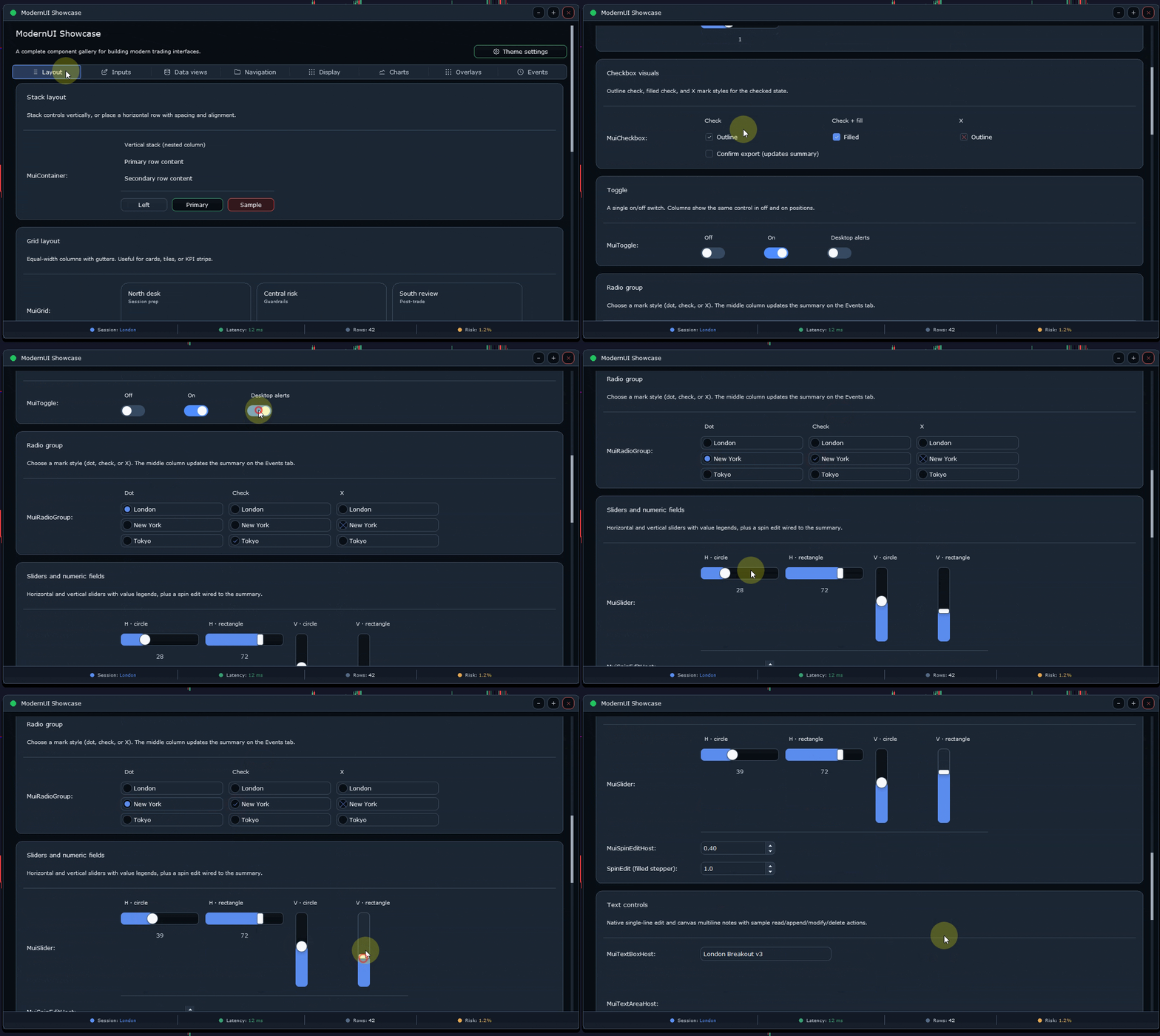
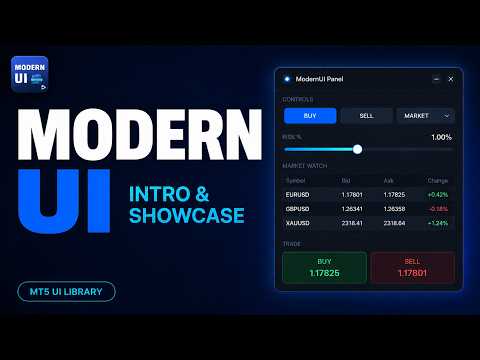
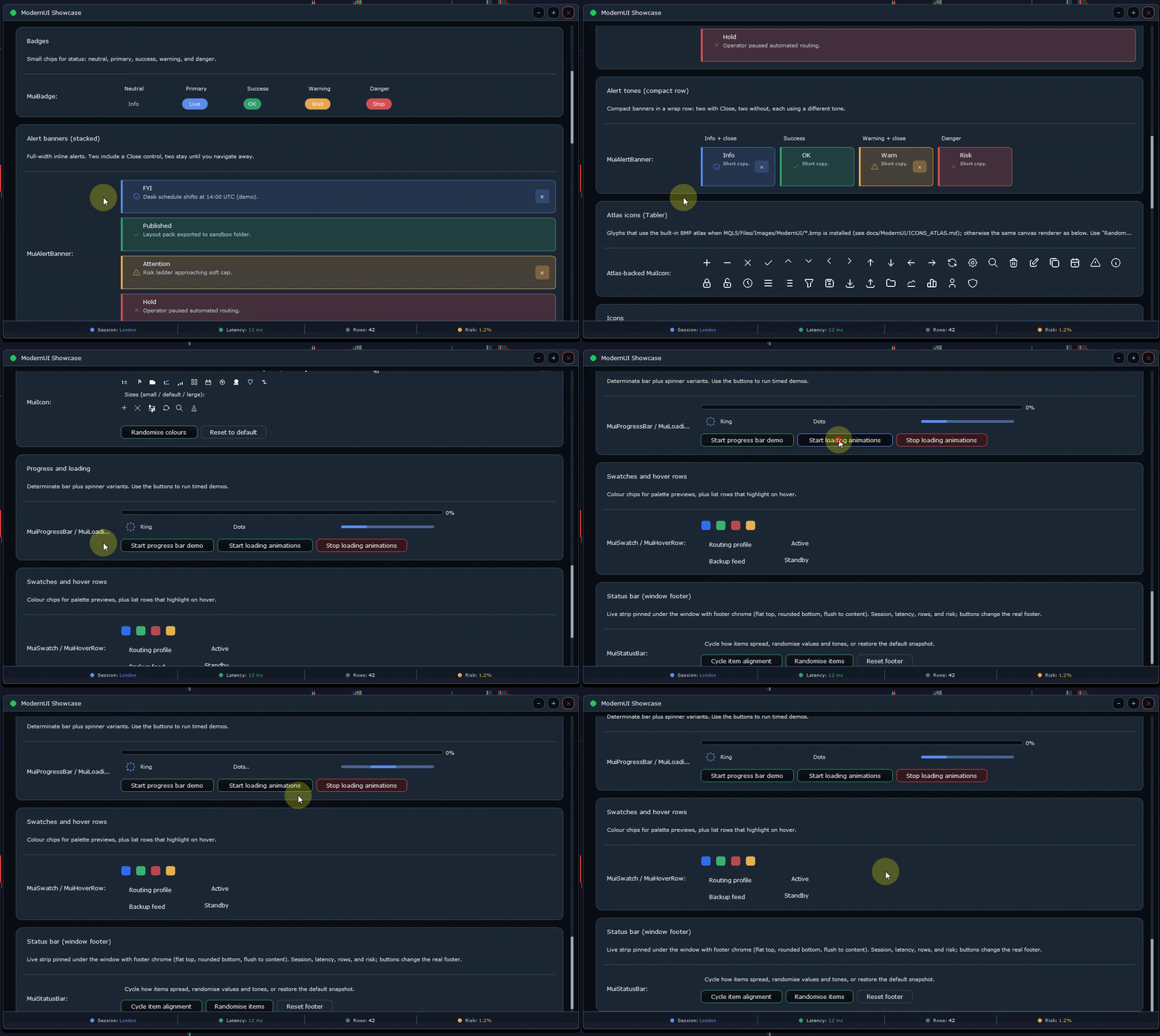
ModernUI는 MetaTrader 5 차트 위에서 동작하는 사용자 인터페이스 라이브러리입니다. MQL5 개발자가 MT5 차트 환경 안에서 더 깔끔한 EA 패널, 대시보드, 설정 창, 폼, 테이블, 다이얼로그, 드로어, 컴팩트한 트레이딩 스타일 인터페이스를 만들 수 있도록 도와줍니다.

흩어진 차트 객체보다 더 전문적인 인터페이스 레이어를 원하면서도, 자신의 EA, 인디케이터 또는 유틸리티 로직은 계속 완전히 직접 제어하고 싶은 개발자를 위해 만들어졌습니다.

무엇을 만들 수 있나요?

ModernUI는 한 가지 유형의 패널에만 제한되지 않습니다. MetaTrader 5 차트 위에 배치할 거의 모든 도구를 만들 수 있는 재사용 가능한 인터페이스 레이어를 제공합니다.

간단한 설정 화면, 컴팩트한 트레이딩 패널, 전체 대시보드, 데이터 뷰, 컨트롤 패널, 계정 도구, 워크플로 화면, 모니터링 인터페이스, 유틸리티 창, 상업용 EA 프론트엔드 등 다양한 용도로 사용할 수 있습니다.

포함된 데모는 몇 가지 실용적인 예시를 보여주지만, 이는 시작점일 뿐입니다. MQL5 프로젝트에 버튼, 입력 필드, 테이블, 다이얼로그, 탭, 드로어, 차트, 상태 영역 또는 차트 위에서 정보를 더 깔끔하게 표시하는 방법이 필요하다면 ModernUI가 이를 만들 수 있는 구성 요소를 제공합니다.

주요 기능

  • MetaTrader 5 차트 위에서 동작하는 UI 컨트롤
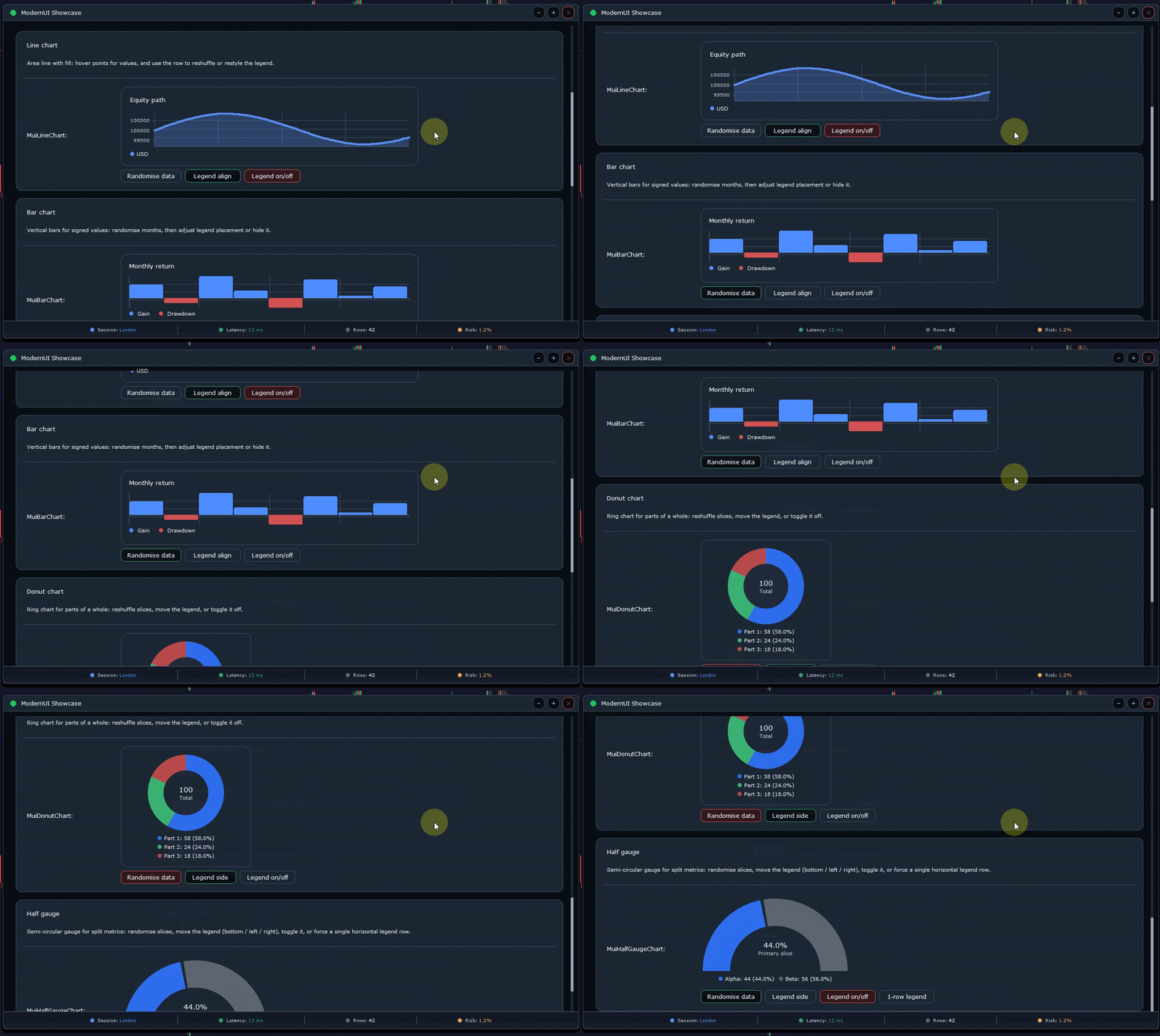
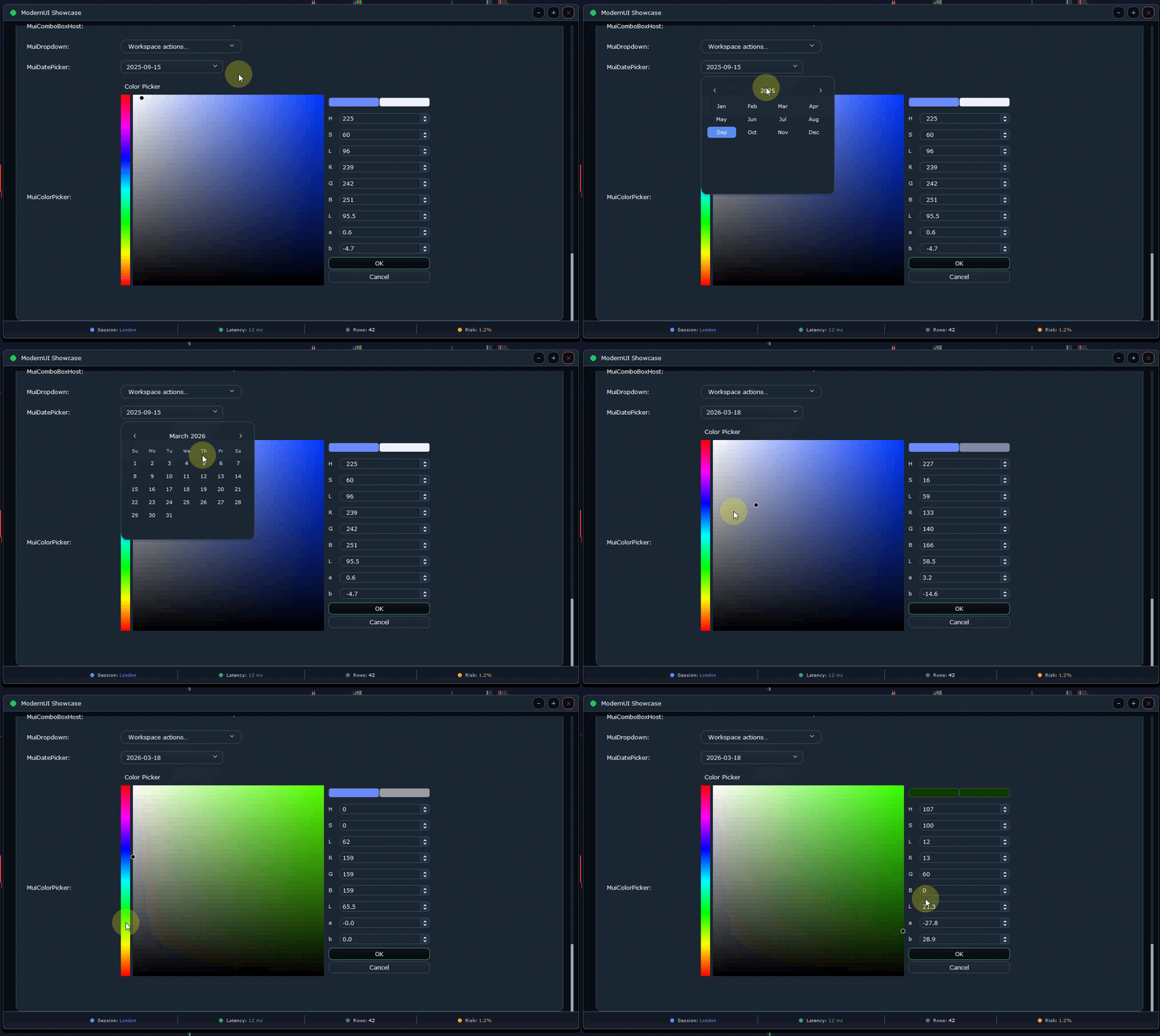
  • 버튼, 라벨, 배지, 입력 필드, 스핀 에디트, 슬라이더, 콤보 박스, 탭, 드로어, 다이얼로그, 메뉴, 리스트, 테이블, 차트, 통계 카드
  • 앱 창, 섹션, 라벨이 있는 입력 필드, 버튼 행, 상태 행, 토스트 메시지, 간단한 테이블을 위한 빠른 래퍼
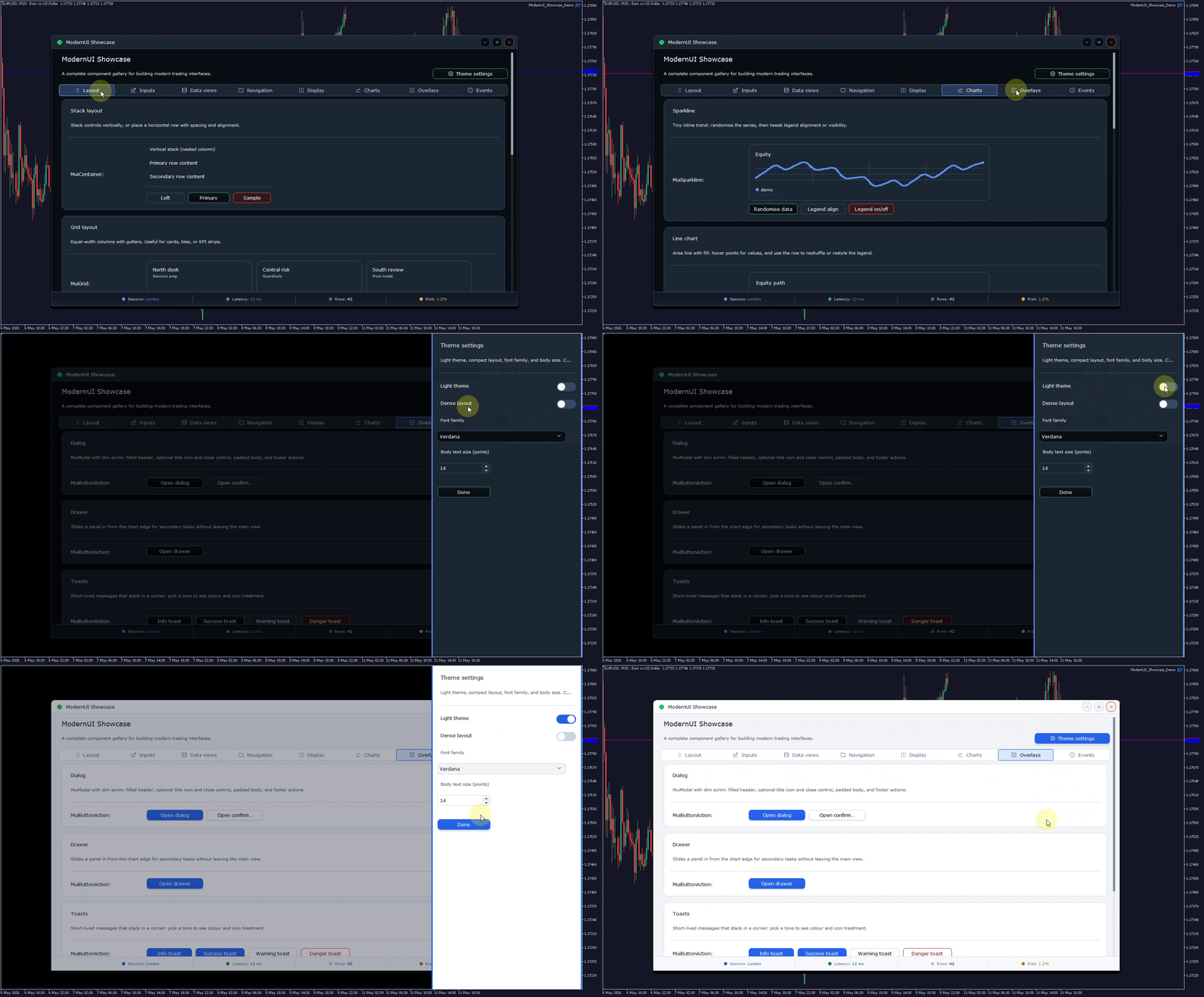
  • 다크 테마와 라이트 테마 지원
  • 재사용 가능한 레이아웃 및 스타일링 헬퍼
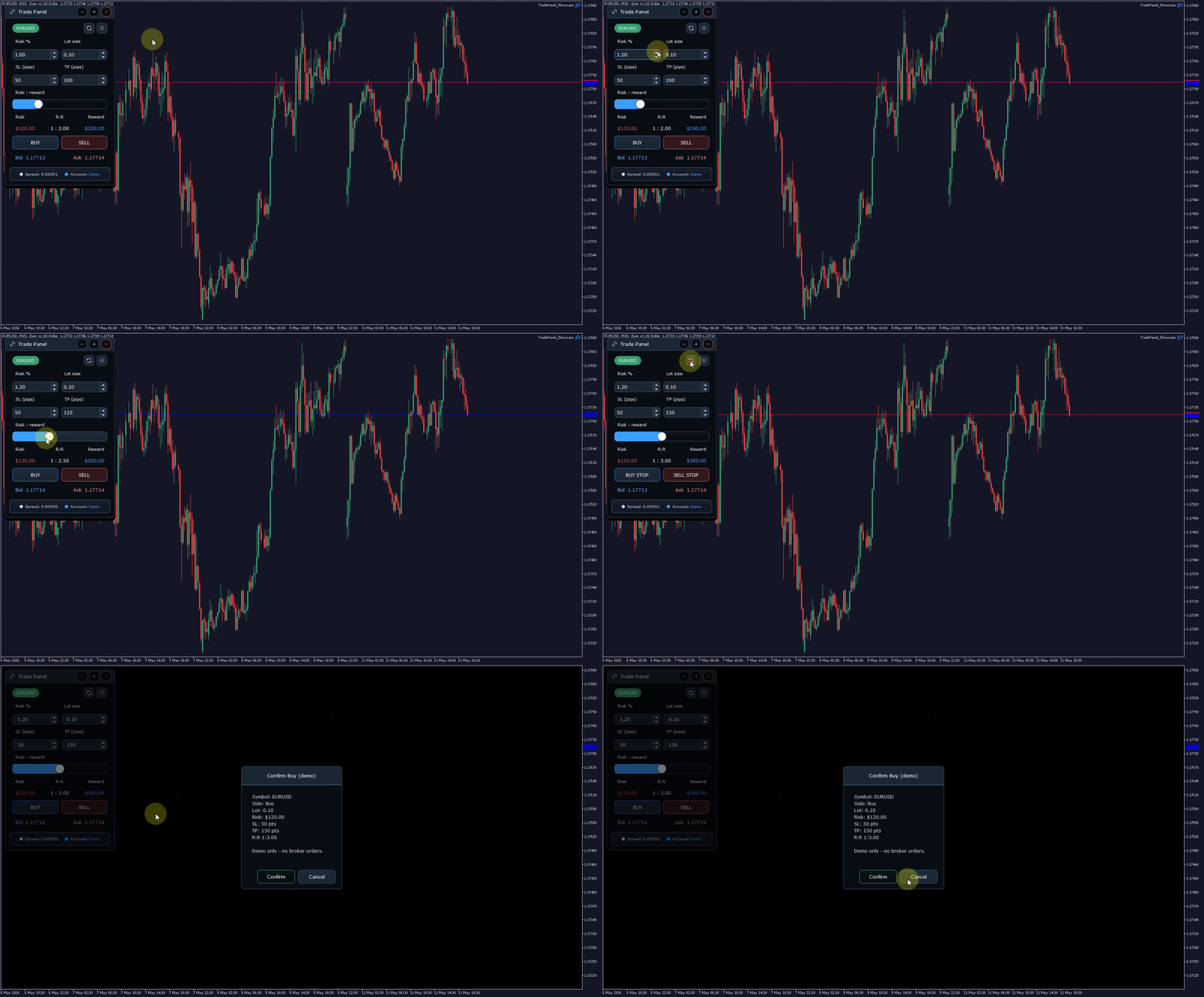
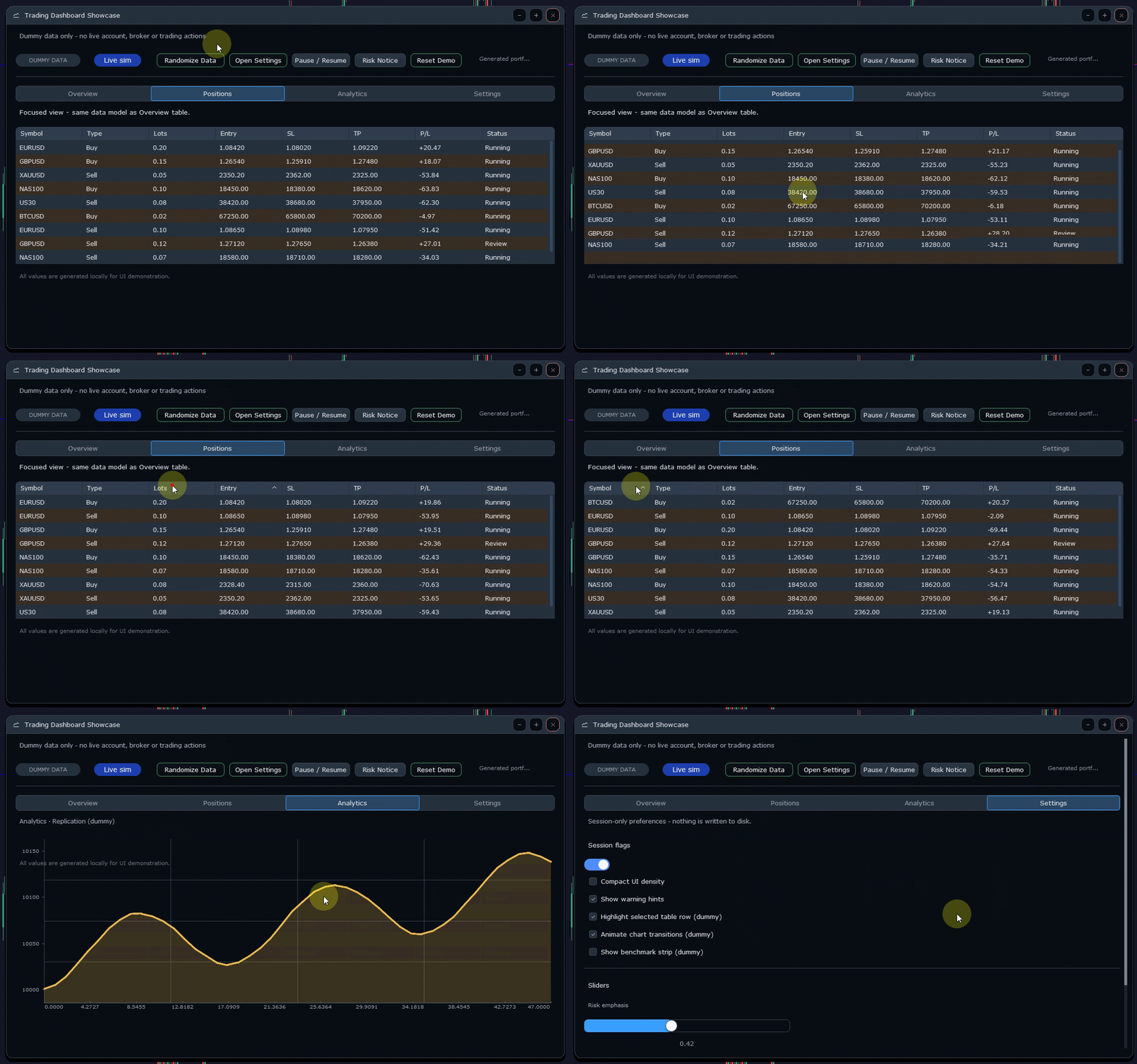
  • 3개의 공개 쇼케이스 데모 포함
  • 빠른 시작 문서, 예제, 문제 해결 노트 포함

빠른 래퍼

ModernUI에는 일반적인 인터페이스 패턴을 위한 선택적 빠른 래퍼가 포함되어 있습니다. 앱 창, 그룹화된 섹션, 라벨이 있는 입력 필드, 버튼 행, 상태 행, 간단한 테이블을 빠르게 만들 수 있으며, 더 깊은 사용자 지정이 필요할 때는 내부 컨트롤에도 계속 접근할 수 있습니다.

빠른 개발을 위해 빠른 래퍼를 사용할 수도 있고, 커스텀 레이아웃, 핸들러, 데이터 소스, 동작이 필요한 경우 하위 레벨 컨트롤을 직접 사용할 수도 있습니다.

포함된 쇼케이스 데모

  • ModernUI Showcase Demo — 주요 컨트롤과 인터페이스 구성 요소를 폭넓게 보여주는 데모입니다.
  • Trading Dashboard Showcase — 패널, 카드, 상태 영역, 데이터 중심 레이아웃을 사용하는 대시보드 스타일 예제입니다.
  • Trade Panel Showcase — 실용적인 차트 패널을 어떻게 구성할 수 있는지 보여주는 컴팩트한 트레이딩 스타일 인터페이스입니다.

ModernUI를 받는 방법

MQL5 Market 제품에는 유료 ModernUI Launcher EA가 포함되어 있습니다. Launcher는 쇼케이스 데모로 동작하며 현재 ModernUI 라이브러리 패키지에 접근할 수 있도록 제공합니다.

전체 설치 방법은 연결된 빠른 시작 가이드와 지원 게시글에 제공됩니다.

중요한 트레이딩 참고 사항

ModernUI는 사용자 인터페이스 라이브러리일 뿐입니다. 트레이딩 전략, 트레이드 복사기, 브로커 실행 시스템 또는 자동매매 제품이 아닙니다.

트레이딩 스타일 데모는 인터페이스 데모입니다. 데모 자체는 주문을 열거나 수정하거나 청산하지 않습니다. 자신의 트레이딩 로직, 검증, 리스크 처리, 브로커 실행 코드는 직접 책임지고 구현해야 합니다.

기본 사용법

일반적인 include:

#include <ModernUI\ModernUI.mqh>

ModernUI 프로젝트는 일반적으로 MuiRoot 인스턴스를 초기화하고, OnInit에서 패널을 구성하며, OnChartEvent를 통해 차트 이벤트를 전달하고, OnTimer를 통해 업데이트하며, OnDeinit에서 깔끔하게 종료합니다.

ModernUI가 아닌 것

  • 트레이딩 전략이 아닙니다
  • 트레이드 복사기가 아닙니다
  • 그 자체로 완성된 트레이드 매니저가 아닙니다
  • 사용자를 대신해 주문을 실행하지 않습니다
  • 트레이딩 결과를 보장하지 않습니다
  • 사용자의 EA 로직을 대체하지 않습니다

지원

ModernUI 지원은 공식 ModernUI MQL5 지원 스레드와 제품 댓글을 통해 공개적으로 처리됩니다. 이렇게 하면 일반적인 질문, 수정 사항, 사용 예제가 다른 개발자에게도 보이도록 남습니다.

지원을 요청할 때는 사용 중인 ModernUI 버전, 관련 데모 또는 파일, 정확한 컴파일러 오류 또는 Experts 로그 메시지, 그리고 해당 문제가 포함된 데모 중 하나에서도 발생하는지 여부를 함께 알려주세요.

요약

ModernUI는 MQL5 개발자가 MetaTrader 5 차트 위에서 더 깔끔한 인터페이스를 만들 수 있는 실용적인 방법을 제공합니다. 재사용 가능한 컨트롤, 빠른 래퍼, 테마, 쇼케이스 데모, 문서를 포함하여 매번 처음부터 인터페이스를 만들지 않고도 전문적인 패널을 구축할 수 있습니다.
추천 제품
Key Features: 200+ Fully Implemented Patterns   across all categories Advanced Market Structure Analysis Smart Money Integration   (Wyckoff, Order Blocks, Liquidity) Professional Risk Management Multi-Timeframe Analysis AI-Powered Confidence Scoring Advanced Visualization Real-time Alerts Pattern Categories: Single Candle Patterns (Hammer, Doji, Marubozu, etc.) Multi-Candle Patterns (Engulfing, Stars, Harami, etc.) Chart Patterns (Head & Shoulders, Cup & Handle, Triangles, etc.) Harmonic Pattern
FREE
Scan a fixed list of assets (Ibovespa) in the chosen timeframe (TimeFrame). For each pair and for various periods. Calculate a regression model between the two assets (and, if desired, using the bova11 index as a normalizer). Generate the spread of this relationship, its mean, standard deviation, speculative deviation, and betas (B1 and B2). Apply an ADF test without exclusion (cointegration/stationarity). Calculate the Z-score of the current exclusion (how many standard deviations are away from
FREE
Order Book, known also as Market Book, market depth, Level 2, - is a dynamically updated table with current volumes of orders to buy and to sell specific financial instument at price levels near Bid and Ask. MetaTrader 5 provides the means for receiving market book from your broker, but in real time only, without access to its history. The library OrderBook History Library reads market book state in the past from archive files, created by OrderBook Recorder . The library can be embedded into you
DRS Semi Automated
Enrique Alexander Madera Pimentel
DRS Semi Automated: Fair Value Gap Trading Inspired by the DRS strategy made by SMT FX. To learn more, visit their website. Key Features: 1. Fair Value Gap Detection: Identifies bullish and bearish Fair Value Gaps on the 5-minute timeframe. 2. Customizable Trading Sessions: Trade London, New York, or both sessions with adjustable start times. 3. Risk Management: Set risk percentage and choose between equity-based or fixed balance risk calculation. 4. Bias Selection: Manually select bullish or
Volume Profile Utility
AL MOOSAWI ABDULLAH JAFFER BAQER
Volume Profile Discover where the market really trades. Make decisions based on volume, not guesswork. Volume Profile is a professional MetaTrader utility that analyzes trading activity across different price levels, allowing traders to identify where the highest concentration of market participation has occurred. Instead of focusing only on price movement over time, Volume Profile reveals the price levels where buyers and sellers have been most active, providing valuable insight into market str
Trade Manger
Israr Hussain Shah
Here   our more valuable tools SMC Trend Trading   ,  Easy SMC Trading  ,  Institutional SMC Architect Volume Analysis Tools  ,  Volume flow Profile  ,  Market volume profile  , FVG with Volume  , Liquidity Heatmap Profile  ,  Volume Spread Analysis You Give an Instruction: When you run the script, a window pops up with a dropdown menu. You choose exactly what you want it to do from the list (e.g., "Close Profit Only" or "Delete Pending Orders"). It Scans Your Positions: The script then reads
Trading Utility for Forex Currency Pairs Only not for Gold  Functions Auto Lot Calculation based on Risk Auto stoploss  Auto TakeProfit Breakeven Auto Close Half % Close in percentage with respect to the PIPs Pending Orders BuyLimit Sell Limit with distances BuyStop Sell Stop    with distances Trading Informations Risk in percentage For Multiple trades Combine Takeprofit and Combine Stoplosses
중요 공지 – 라이선스 및 활성화 필요 활성화 안내: 구매를 완료한 후 즉시 저희에게 연락하여 라이선스 키, 비밀번호 또는 활성화 세부 정보를 받아주세요. 이 정보가 없으면 소프트웨어가 작동하지 않습니다. 저희는 원활한 활성화 과정을 보장하고 궁금한 점을 해결해 드리기 위해 여기 있습니다. 다국어 사용자 맞춤 귀하의 트레이딩 경험을 향상시키기 위해 소프트웨어를 여러 언어로 완전히 맞춤화할 수 있습니다. 저희 팀은 다음 언어로 번역을 제공할 수 있습니다: 중국어 | 프랑스어 | 포르투갈어 | 스페인어 | 러시아어 일본어 | 독일어 | 한국어 | 이탈리아어 | 터키어 선호하는 언어를 알려주시면 사용자 친화적인 경험을 보장하기 위해 인디케이터를 맞춤화하겠습니다. MT5용 마켓 프로필 인디케이터 – 고급 경매 시장 분석 마켓 프로필은 모든 시장 움직임을 주도하는 양방향 경매 과정을 트레이더가 관찰할 수 있게 해주는 강력한
This is a multipurpose indicator and has the following indicators in it with dashboard ( scanner) and chart indicator on multi time frames . Divergent Bar Market Profile  ( Daily Weekly Monthly Intraday and Custom Period , Market Profile Day type ) Order Block Inside Bars  Higher High Higher Close and Lower Low and Lower Close  Imbalance Finder Scalping Currency Strength Meter Momentum candles VSA Setups Much more  See for your self Who am I? - https://www.linkedin.com/in/adnanreh
중요 공지 – 라이선스 및 활성화 필요 =================================== 활성화 안내: 구매 완료 후 라이선스 키, 비밀번호 또는 활성화 정보를 받으시려면 즉시 당사에 연락해 주십시오. 이 정보가 없으면 소프트웨어가 작동하지 않습니다. 저희는 원활한 활성화 과정을 보장하고 질문 사항에 대해 도움을 드리기 위해 항상 대기하고 있습니다. --- Volume Delta Profile V2 Enhanced ================================ 전문가용 거래량 & 델타 분석 도구 --------------------------------- 개요 ---- **Volume Delta Profile**은 전통적인 거래량 프로파일 분석과 고급 델타 및 불균형 탐지를 결합한 전문가급 분석 도구입니다. 이 포괄적인 지표는 트레이더에게 시장 역학에 대한 정교한 시각을 제공하며, 경매 데이터의 실시간 그래픽 표현을 통해 시간 경과에
Bastion is a monitor-and-close-only risk manager for prop-firm traders. It watches your account against your firm's daily-loss and maximum-drawdown limits in real time and force-closes your open positions BEFORE you cross a line. It never opens a trade of its own, so it stays fully within the tools allowed by FTMO, FundedNext, The5ers, FTUK and FXIFY. Why traders fail challenges A large share of failed evaluations end on a single daily-loss breach: a moment of inattention, a news spike, one tra
TRADEX EDGE MANAGER V1.00 – Configuration Overview  The Tradex Edge Manager V1.00 offers an intuitive and powerful set of customizable inputs, designed for precision trading and seamless automation with MT5. Below is a breakdown of its configuration categories and parameters: TELEGRAM SETTINGS Telegram Bot Token: Unique token to connect your EA to your Telegram bot. Telegram Chat ID: Destination group or channel where messages will be sent. Enable Telegram Notifications: Set to true to activ
Mine Farm
Maryna Kauzova
Mine Farm is one of the most classic and time-tested scalping strategies based on the breakdown of strong price levels. Mine Farm is the author's modification of the system for determining entry and exit points into the market... Mine Farm - is the combination of great potential with reliability and safety. Why Mine Farm?! - each order has a short dynamic Stop Loss - the advisor does not use any risky methods (averaging, martingale, grid, locking, etc.) - the advisor tries to get the most
Painel Nelogica ChartTrading
Tiago Silvano Souza Felipe
Painel Profit is an operational trading panel for MetaTrader 5 created to make manual execution and visual order management easier directly on the chart. The operating principle is simple: the trader selects the symbol, timeframe, volume, entry type, and exit strategy. Based on these commands, the panel sends or organizes the trade through the interface, displaying the entry, take profit, and stop loss levels on the chart for visual monitoring. This product is not a signal robot and does not mak
Overview of "TPS Manual Pro" TPS Manual Pro is an advanced MQL5 Expert Advisor (EA) designed for the MetaTrader 5 (MT5) platform. It serves as a comprehensive "trading cockpit" that combines manual trade execution with automated risk management and institutional-grade market analysis tools. Unlike a fully automated bot that makes trading decisions on its own, this EA is designed to assist you—the trader—by automating the repetitive, high-stress tasks of order management, risk calculation, and st
CoPilot dashboard MT5
Frederic Jacques Collomb
CoPilot — 일일 트레이딩 대시보드 숫자를 파악하세요. 명확하게 트레이딩하세요. MT4 버전 CoPilot이란? CoPilot은 전문가 수준의 트레이딩 어시스턴트로, 모든 일일 성과 통계를 실시간으로 차트에 직접 표시합니다 — 라이브 에퀴티 커브 는 거래마다 업데이트됩니다. 차트를 벗어나지 않고 세션을 즉시 파악해야 하는 활발한 트레이더를 위해 설계되었으며, CoPilot은 모든 심볼의 당일 모든 청산된 거래 를 집계하여 깔끔하고 색상 코딩된 인터랙티브 패널로 표시합니다. 터미널 히스토리 탭으로 전환할 필요가 없습니다. 수동 계산도 필요 없습니다. CoPilot은 당신의 부조종사 로서 — 항상 주시하고, 항상 계산하며, 항상 눈앞에 있습니다. 실시간 통계 패널 CoPilot은 세 섹션으로 구성된 완전한 일일 성과 지표를 표시합니다: 활동 — 오늘의 총 거래 수, 청산된 거래, 오픈 포지션, 수익/손실 횟수, 승률 (%) 및 손익분기 거래. 승률 색상은 동적으로 변경: 50% 초
Ziwox Global Economy Tools What are the Ziwox Global Economy Tools? The Ziwox Global Economy Tool is a comprehensive solution for forex traders, providing historical economic data and index charts for the most critical countries in global trading. Designed to enhance trading decisions, this tool allows you to easily access, analyze, and visualize key economic indicators from countries like the EU, US, GB, CA, AU, NZ, JP, CH, CN, IT, DE, FR, BR, MX, ZA, SG, HK, IN, NO, KR, ES, and SE. Traders can
Mean Volume indicator for MT5
Renaud Herve Francois Candel
Mean Volume Most indicators are based on price analysis. This indicator is based on volume. Volume is overlooked piece of information in most trading systems. And this is a big mistake since volume gives important information about market participants. Mean Volume is an indicator that can be used to spot when volume is above average. It usually means that institutional traders are active. Peak in volume can be used to confirm an entry since increased volume can sustain the move in one or anot
The VWAP indicator is our version of the popular Volume-Weighted Average Price indicator. The VWAP is the ratio between the value traded (price multiplied by the number of volume traded) and the total volume traded over a specific time period. As a result, it measures the average price of the instrument much better than the simple moving average. Although there are many ways to use the VWAP, most investors use it to calculate the daily average.  The indicator works in five modes: Moving  - In
Chimera Volume
Marko Milenkovic
MetaTrader 5용 Chimera Volume 고급 거래량 분석 및 시장 활동 시각화 Chimera Volume은 MetaTrader 5 전용 사용자 정의 지표로, 정규화된 거래량 활동을 분석하고 역동적인 시각적 프레임워크를 통해 시장 참여도의 변화를 보여주도록 설계되었습니다. 이 지표는 적응형 정규화 알고리즘을 사용하여 틱 거래량 데이터를 처리하며, 다양한 시장 상황 속에서 거래량의 강도, 매집 단계, 활동 변화를 구조화된 형태로 생성합니다. 원시 거래량 값을 표시하는 일반 거래량 지표와 달리, Chimera Volume은 추가 계산을 적용하여 시장 활동의 상대적 변화를 강조하고 차트의 가독성을 향상시킵니다. 주요 기능 루트 인텐트 히스토그램 (Root Intent Histogram): 정규화된 거래량 강도와 시장 참여도를 시각화하는 동적 히스토그램입니다. 적응형 색상 전환을 사용하여 활동 증가 시기와 참여 감소 시기를 명확하게 구분합니다. 관성 라인 (Inertia Line
Trade Manager Pro A complete discretionary trade-management cockpit for MetaTrader 5 — direction-aware position planning, prop-firm rule enforcement, a live correlation heat map, a pre-trade checklist gate, and one-click execution, all in a single on-chart panel. Overview Trade Manager Pro is not a signal-generating "black box" EA. It does not predict market direction and makes no profitability promises. Instead, it is a risk and execution management tool built for discretionary traders — partic
TradePad
Ruslan Khasanov
5 (1)
TradePad는 수동 및 알고리즘 트레이딩을 위한 도구입니다. 여러 거래 상품에 대한 빠른 거래 작업과 포지션 제어를 위한 간단한 솔루션을 제공합니다. 주의, 이 애플리케이션은 전략 테스터에서 작동하지 않습니다! 데모 계정을 위한 애플리케이션의 평가판과 모든 도구에 대한 설명 애플리케이션 인터페이스는 고해상도 모니터에 맞게 조정되었으며 간단하고 직관적입니다. 편안한 작업을 위해 트레이더에게 다음과 같은 도구 세트가 제공됩니다. 거래 작업 관리, 메인 차트 기간 간 전환, TradePad 상품 간 전환을 위한 핫키 관리자; 포지션을 개설하거나 보류 주문을 설정할 때 하락 위험을 평가하고 잠재적 이익을 계산하기 위한 거래 수준 표시 도구; 여러 거래 심볼을 시각적으로 모니터링하고 알고리즘 트레이딩을 위한 거래 신호를 수신하기 위한 MultiCharts 도구. 편의를 위해 거래 쌍 세트를 구성하여 여러 시간대의 가격을 모니터링하고 다중 통화 거래를 수행할 수 있습니다. 확장된 HTML
Quantum Force
Mohamed Samsudeen
5 (1)
Quantum Force EA Disciplined Automated Gold Trading System (No Martingale / No Grid Trading) Short Description Designed Around a 1:3 Risk-reward Structure on MQL5 MetaTrader 5 A disciplined and fully automated trading system for XAUUSD (Gold). Quantum Force EA combines adaptive logic gold scalping, volatility filters, trend following and capital protection techniques to rule-based trade execution without using martingale or grid strategies. Fully customize Full Description Quantum Force EA is an
Auto Orders Manager EA
Mohamed Abdulmohsen Mohamed Saeed Ali
Professional Trading Orders Manager for MT5 with Signal-Analyzer-Direction-Power-Orders control - Scalping tools - Risk management - all in one trade panel and dashboard  A sophisticated Expert Advisor that transforms your MT5 platform into a complete trading command center. This tool seamlessly blends automated trading logic with comprehensive manual controls through dual interactive dashboards. Key Features: Automated Trading : advanced scalping strategy on M3 timeframe as a signal sample can
This indicator presents an alternative approach to identify Market Structure. The logic used is derived from learning material created by   DaveTeaches (on X) Upgrade v1.10: + add option to put protected high/low value to buffer (figure 11, 12) + add  Retracements  value to buffer when Show Retracements When quantifying Market Structure, it is common to use fractal highs and lows to identify "significant" swing pivots. When price closes through these pivots, we may identify a Market Structure S
Time and Sales Tick
Pablo Filipe Soares De Almeida
Time & Sales Tick Indicator 는 MetaTrader 5 차트에서 실시간 거래 틱 정보를 표시하는 지표입니다. 가격, 틱 거래량 및 시간을 시각적으로 보여주며, 사용자가 시장 미세 구조를 분석할 수 있도록 도와줍니다. 기능 설명 가격, 거래량 및 시간을 포함한 틱 데이터를 차트 내 패널에 실시간으로 표시합니다. 틱 데이터를 사용자가 지정한 시간 또는 수량 간격으로 그룹화하고, 상승 틱은 녹색, 하락 틱은 빨간색으로 구분하여 표시합니다. 패널은 차트의 네 모서리 중 원하는 위치로 자유롭게 이동할 수 있으며, 표시 크기와 글꼴도 사용자 설정이 가능합니다. 모든 통화쌍 및 상품에 대응하며 MetaTrader 5 플랫폼 내에서 안정적으로 작동합니다. 이 인디케이터는 스캘핑 및 틱 기반 전략을 사용하는 트레이더에게 유용합니다.
Active Lines
Yury Kulikov
5 (2)
Attention: Demo version for review and testing can be downloaded here . It does not allow trading and can only be run on one chart. Active Lines - a powerful professional tool for operations with lines on charts. Active Lines provides a wide range of actions for events when the price crosses lines. For example: notify, open/modify/close a position, place/remove pending orders. With Active Lines you can assign several tasks to one line, for each of which you can set individual trigger conditions
Modern Dark Chart Theme for MT5 Upgrade your MetaTrader 5 chart into a clean, dark, professional trading workspace. Your chart is your trading office. It is where you analyze the market, test Expert Advisors, review setups, record videos, share screenshots, and make trading decisions. If your MT5 chart looks old, bright, noisy, or unprofessional, your trading environment can feel distracted before you even start your analysis. Modern Dark Chart Theme for MT5 helps you create a cleaner, darker,
FREE
Usdjpy Trend Follower
Marcos Ramon Aparicio Pelaez
강력하고 백테스트된 MetaTrader 5 로봇으로 USDJPY를 자동으로 거래하세요. Momentum Master H1은 동적 Bulls Power 및 ATR 기반 항목을 기반으로 하는 높은 확률의 장기 전용 전략을 사용합니다. 주요 기능은 다음과 같습니다 시간 테스트: 2019–2025년부터 H1 차트에서 백테스트를 거쳤습니다. 정밀 진입: 단기 하락 및 확인된 추세 신호로 인해 장기 거래가 촉발되었습니다. 스마트 위험 관리: 적응형 규모 조정을 위한 ATR 기반 손절매 및 이익 목표. 유연한 거래 시간: 일주일 내내 작동하며 세션 제한을 구성할 수 있습니다. 쉬운 통합: 브로커 제한 없음, MT4 에 최적화. 자동화된 규율로 추세 포착 극대화 – USDJPY에서 장기 전용 모멘텀 전략을 원하는 거래자에게 이상적입니다.

Zigzag Price Arrows 1
Aiman Saeed Salem Dahbag
The Zigzag Price Arrow indicator   is an enhanced version of the classic Zigzag indicator, combining the traditional zigzag pattern with advanced visual features. It not only identifies major market turning points but also provides clear trading signals through: •   Directional arrows:   Displays colored arrows (green for buy, magenta for sell) indicating potential trend directions. •   Price labels:   Shows the exact price values at each pivot point directly on the chart. •   Improved visual c
이 제품의 구매자들이 또한 구매함
The library is dedicated to help manage your trades, calculate lot, trailing, partial close and other functions. Lot Calculation Mode 0: Fixed Lot. Mode 1: Martingale Lot (1,3,5,8,13) you can use it in different way calculate when loss=1 ,when profit=0. Mode 2: Multiplier Lot (1,2,4,8,16) you can use it in different way calculate when loss=1 ,when profit=0. Mode 3: Plus Lot (1,2,3,4,5) you can use it in different way calculate when loss=1 ,when profit=0. Mode 4: SL/Risk Lot calculate based on s
Cryptocurrency analysis has never been easier with Crypto Charts for MetaTrader 5. Now, trading on BitMEX has never been easier with BitMEX Trading API for MetaTrader 5. BitMEX Trading API library was built to be as easy to use as possible. Just include the library into your Expert Advisor or Script, call the corresponding methods and start trading! Features Trade on BitMEX and BitMEX Testnet. Build and automate your strategies. Concern more with the trading strategy logic and less with the co
Goliath Mt5
Nicolokondwani Biscaldi
Goliath MT5 - scalper fully automated Expert Advisor for medium-volatile forex markets P roperties: The Library trades 10 currency pairs (USDCHF, EURCHF, EURGBP, AUDUSD, USDCAD, GBPUSD, EURUSD, NZDUSD, CADCHF, EURAUD, EURCAD, AUDJPY) The Library does not use martingale The Library sets a fixed stop loss and take profit for all orders The Library only trades a user input volume The Library can be installed on any currency pair and any timeframe Recommendations: Before using on a real account, t
Binance Library
Hadil Mutaqin SE
5 (1)
The library is used to develop automatic trading on Binance Spot Market from MT5 platform. Support all order types: Limit, Market, StopLimit and StopMarket Support Testnet mode Automatically display the chart on the screen Usage: 1. Open MQL5 demo account 2. Download Header   file and EA sample   https://drive.google.com/uc?export=download&id=1kjUX7Hyy02EiwTLgVi8qdaCNvNzazjln Copy Binance.mqh to folder \MQL5\Include Copy  BinanceEA-Sample.mq5 to folder \MQL5\Experts 3. Allow WebRequest from MT5
The library is used to develop automatic trading on Binance Futures Market from MT5 platform. Support Binance Futures USD-M and COIN-M Support Testnet mode Support all order types: Limit, Market, StopLimit, StopMarket, StopLoss and TakeProfit Automatically display the chart on the screen Usage: 1. Open MQL5 demo account 2. Download Header file and EA sample https://drive.google.com/uc?export=download&id=17fWrZFeMZoSvH9-2iv4WDJhcyxG2eW17 Copy BinanceFutures.mqh to folder \MQL5\Include Copy  Bina
EA Toolkit
Esteban Thevenon
EA Toolkit   is a library that allows any developer to quickly and easily program Advisor experts. It includes many functions and enumerations such as trailing stop, lot, stop loss management, market trading authorisations, price table updates, trading conditions and many more. Installation + Documentation : You will find all the information to install this library and the documentation of its functions on this GitHub : https://github.com/Venon282/Expert-Advisor-Toolkit WARNING : The installat
Hello everyone! I am a professional MQL programmer , Making EAs, Indicators and Trading Tools for my clients all over the world. I build 3-7 programs every week but I seldomly sell any ready-made Robots. Because I am fastidious and good strategy is so few...  this EA is the only one so far I think its good enough to be published here.  As we all know, the Ichimoku indicator has become world popular for decades, but still, only few people knows the right way of using it, and if we check the clo
Applying these methods, I managed to arrive at a nuanced conclusion that is crucial to understanding the importance of unique strategies in contemporary trading. Although the neural network advisor showed impressive efficiency in the initial stages, it proved to be highly unstable in the long run. Various factors such as market fluctuations, trend changes, external events, etc. cause its operation to be chaotic and eventually lead to instability. With these experiences, I accepted the challenge
The following library is proposed as a means of being able to use the OpenAI API directly on the metatrader, in the simplest way possible. For more on the library's capabilities, read the following article: https://www.mql5.com/en/blogs/post/756098 The files needed to use the library can be found here: Manual IMPORTANT: To use the EA you must add the following URL to allow you to access the OpenAI API as shown in the attached images In order to use the library, you must include the following Hea
Kaseki
Ben Mati Mulatya
The Hybrid Metaheuristic Algorithm (HMA) is a cutting-edge optimization approach that combines the strengths of genetic algorithms with the best features of population-based algorithms. Its high-speed computation ensures unparalleled accuracy and efficient search capabilities, significantly reducing the total time required for optimization while identifying optimal solutions in fewer iterations. HMA outperforms all known population optimization algorithms in both speed and accuracy. Use Cases AO
* * * * * * * 주로 XAUUSD를 거래하고 테스트할 때 XAUUSD로 조정하는 것을 권장하며 다른 거래 대상은 수익 효과를 보장할 수 없습니다 * * * * * * * * * * * * 테스트가 필요한 경우 메모 (본 후 가장 먼저 회신) 를 남겨 주십시오. 작업 성과를 보호하기 위해 특정한 매개 변수를 입력해야 합니다. 시스템의 기본 매개 변수는 캡처하여 철회하는 효과를 실현할 수 없습니다! 테스트가 필요한 경우 메모 (본 후 가장 먼저 회신) 를 남겨 주십시오. 작업 성과를 보호하기 위해 특정한 매개 변수를 입력해야 합니다. 시스템의 기본 매개 변수는 캡처하여 철회하는 효과를 실현할 수 없습니다! 테스트가 필요한 경우 메모 (본 후 가장 먼저 회신) 를 남겨 주십시오. 작업 성과를 보호하기 위해 특정한 매개 변수를 입력해야 합니다. 시스템의 기본 매개 변수는 캡처하여 철회하는 효과를 실현할 수 없습니다! *******************************
이 제품은 지난 3년 동안 개발되었습니다. 이는 MQL5 프로그래밍 언어에서 모든 유형의 인공지능 및 머신러닝 코드를 다룰 수 있는 가장 진보된 코드베이스입니다. MetaTrader 5에서 많은 AI 기반의 트레이딩 로봇과 인디케이터를 만드는 데 사용되었습니다. 이 제품은 MQL5용 머신러닝에 대한 무료 오픈 소스 프로젝트의 프리미엄 버전입니다. 프로젝트 링크:  https://github.com/MegaJoctan/MALE5 . 무료 버전은 기능이 제한적이며, 문서화가 부족하고 유지보수가 원활하지 않습니다. 소규모 AI 모델을 위한 제품입니다. 이 프리미엄 제품은 AI 기반 트레이딩 로봇을 효과적으로 개발하는 데 필요한 모든 기능을 제공합니다. 이 라이브러리를 구매해야 하는 이유? 사용이 매우 간편하며, 코드 문법이 Python의 인기 있는 AI 라이브러리인 Scikit-learn, TensorFlow, Keras와 유사합니다. 잘 문서화됨 – 시작을 돕기 위한 다양한 동영상, 예
Shawrie
Kevin Kipkoech
This Pine Script implements a Gaussian Channel + Stochastic RSI Strategy for TradingView . It calculates a Gaussian Weighted Moving Average (GWMA) and its standard deviation to form an upper and lower channel. A Stochastic RSI is also computed to determine momentum. A long position is entered when the price closes above the upper Gaussian band and the Stoch RSI K-line crosses above D-line . The position is exited when the price falls back below the upper band. The script includes commission, cap
Bookeepr
Marvellous Peace Kiragu
Bookeepr is an advanced MQL5 trading bookkeeping software that automates trade logging, tracks real-time P&L, and integrates a ledger-style financial system for deposits, withdrawals, and expenses. It supports multi-currency assets , generates detailed performance reports , and provides risk management tools to help traders optimize their strategies. With secure cloud storage, exportable reports, and seamless MetaTrader 5 integration , Bookeepr ensures accurate, transparent, and hassle-free fina
A free indicator for those who purchase the full version This indicator is created by this Ai, with your desired settings Artificial Intelligence at your service Have a complete artificial intelligence and use it in your codes This artificial intelligence is trained to tell you on each candle whether the market is moving up or down. In general, artificial intelligence can be used in all markets, all timeframes and all symbols However, due to the increasing complexity and decreasing accuracy of
快速关仓,无需任何操作。 当前版本的一键关仓主要针对的是来不及手动关仓的情况,目前是不分交易标的类别,是对所有的持仓进行关仓。 未来可能升级的方向: 1、分类别、分标的关仓。 适用场景:开了多个标的的仓位,并且波动不一,快速频繁的波动影响了整体的判断。 2、增加只关闭盈利仓位、只关闭亏损仓位。 适用场景:持仓较多,趋势发生变化。 个人建议:一般建议选择一键全部关仓,因为如果行情与持仓方向一致,只关闭盈利仓位无形就是扩大了亏损。如果行情方向与持仓方向相反,只关闭亏损仓位,当前已盈利的后面又会变为亏损,盈利无法变现。 3、按照仓位顺序由大到小关仓、按照仓位顺序由小到大关仓。 适用 场景:行情发生波动,对于未来行情判断把握不确定的,可根据自己需求选择仓位关仓顺序,由大到小关仓的话,可以避免亏损的进一步扩大。 4、减小仓位量,保持绝对的安全距离。 适用 场景:对未来趋势相对确定,不想错过当前行情,但是认为当前持仓体量又有点大,想降低仓位。
[Gold Intelligent Trading EA | Risk Control is Steady, Profit Breakthrough] The intelligent trading EA, which is customized for the fluctuation characteristics of gold, takes the hard-core trading system as the core, and each order is derived from the accurate judgment of market trends and supporting pressures by quantitative models, so as to eliminate subjective interference and make trading decisions more objective and efficient. Equipped with multi-dimensional risk control system, dynamic s
Questo Expert Advisor (EA) è stato progettato per offrire un'esperienza di trading automatizzata di alto livello, adatta sia ai trader principianti che a quelli esperti. Utilizzando algoritmi avanzati e tecniche di analisi del mercato, l'EA è in grado di identificare opportunità di trading redditizie con precisione e velocità. L'EA è configurabile per operare su vari strumenti finanziari, tra cui forex, indici e materie prime, garantendo una flessibilità senza pari. Le caratteristiche princip
LSTM Library
Thalles Nascimento De Carvalho
LSTM Library - MetaTrader 5용 고급 신경망 알고리즘 트레이딩을 위한 전문 신경망 라이브러리 LSTM Library는 MQL5 트레이딩 전략에 순환 신경망의 힘을 가져다줍니다. 이 전문적인 구현에는 일반적으로 특수 기계 학습 프레임워크에서만 볼 수 있는 고급 기능을 갖춘 LSTM, BiLSTM 및 GRU 네트워크가 포함되어 있습니다. "트레이딩을 위한 기계 학습의 성공 비결은 적절한 데이터 처리에 있습니다. 쓰레기를 넣으면 쓰레기가 나옵니다 – 예측의 품질은 절대 훈련 데이터의 품질을 넘을 수 없습니다." — 마르코스 로페즈 데 프라도 박사, Advances in Financial Machine Learning 주요 기능 LSTM, BiLSTM 및 GRU의 완전한 구현 더 나은 일반화를 위한 재귀 드롭아웃 다양한 최적화 알고리즘(Adam, AdamW, RAdam) 고급 정규화 기술 포괄적인 지표 평가 시스템 훈련 진행 시각화 클래스 가중치를 통한 불균형 데이터 지

Automatic Replenishment Trading Within a Defined Range The EA operates only within the predefined price range . When an order is closed, filled, or cancelled (reducing the total number of orders), the EA will automatically place new orders to maintain the continuous operation of the trading strategy. This EA is designed for ranging / sideways market conditions . You can control the total number of orders using Max Orders . Example: Max Orders: 8 Active trades: 2 Pending Buy Limit orders: 6 In t
Automatic Replenishment Trading Within a Defined Range The EA operates   only within the predefined price range . When an order is   closed, filled, or cancelled   (reducing the total number of orders), the EA will   automatically place new orders   to maintain the continuous operation of the trading strategy. This EA is   designed for ranging / sideways market conditions . You can control the total number of orders using   Max Orders . Example: Max Orders:   8 Active trades:   2 Pending Sell L
A complete PostgreSQL client implemented in pure MQL5 over native MetaTrader 5 TCP sockets. The library implements the PostgreSQL client with MD5 and SCRAM-SHA-256 authentication, SSL/TLS, the Simple Query Protocol, and explicit transactions. No DLLs, no external dependencies, no third-party services. Features Direct TCP connection to any PostgreSQL-compatible database MD5 and SCRAM-SHA-256 authentication, auto-detected SSL/TLS via PostgreSQL's SSLRequest flow Full transaction support Typed res
ProTradeLib - Professional MQL5 Trading Library Complete Developer Toolkit for MetaTrader 5 ProTradeLib is a production-ready, single-file MQL5 include library designed for professional developers building Expert Advisors and trading systems. With seven integrated modules, it provides all the essential building blocks needed to create robust, feature-rich trading applications. Key Features 1. Risk Manager Calculate lot sizes based on account balance percentage, fixed USD risk, or fixed lots Enfo
SmartStructureLib — Smart Money Concepts Engine for MQL5 Developers SmartStructureLib is a professional-grade MQL5 library that gives developers a complete Smart Money Concepts calculation engine they can embed directly into any Expert Advisor or indicator. Instead of building SMC detection logic from scratch, you include one file and call clean, readable methods that handle all the heavy lifting behind the scenes. The library is built around seven focused modules. The Structure Engine detects B
WalkForwardOptimizer MT5
Stanislav Korotky
3.78 (9)
WalkForwardOptimizer library allows you to perform rolling and cluster walk-forward optimization of expert advisers (EA) in MetaTrader 5. To use the library include its header file WalkForwardOptimizer.mqh into your EA source code, add call provided functions as appropriate. Once the library is embedded into EA, you may start optimization according to the procedure described in the User guide . When it's finished, intermediate results are saved into a CSV file and some special global variables.
MetaTrader 5용 ModernUI 라이브러리 ModernUI는 MetaTrader 5 차트 위에서 동작하는 사용자 인터페이스 라이브러리입니다. MQL5 개발자가 MT5 차트 환경 안에서 더 깔끔한 EA 패널, 대시보드, 설정 창, 폼, 테이블, 다이얼로그, 드로어, 컴팩트한 트레이딩 스타일 인터페이스를 만들 수 있도록 도와줍니다. 흩어진 차트 객체보다 더 전문적인 인터페이스 레이어를 원하면서도, 자신의 EA, 인디케이터 또는 유틸리티 로직은 계속 완전히 직접 제어하고 싶은 개발자를 위해 만들어졌습니다. Modern UI - 사용자 가이드   | EA 예제 데모 무엇을 만들 수 있나요? ModernUI는 한 가지 유형의 패널에만 제한되지 않습니다. MetaTrader 5 차트 위에 배치할 거의 모든 도구를 만들 수 있는 재사용 가능한 인터페이스 레이어를 제공합니다. 간단한 설정 화면, 컴팩트한 트레이딩 패널, 전체 대시보드, 데이터 뷰, 컨트롤 패널, 계정 도구, 워크플로

Binance Library MetaTrader 5 connects your Expert Advisors, indicators, and scripts to Binance.com and Binance.US directly from MetaTrader 5. It is a developer library for building custom Binance integrations inside MT5, not a standalone trading robot or copier. The library helps you add Binance instruments to Market Watch, read symbol specifications, load current and historical market data, check wallet balances, manage orders, and track open positions. It supports Spot, USD-M futures, and COI

The library is dedicated to help manage your trades, calculate lot, trailing, partial close and other functions. Lot Calculation Mode 0: Fixed Lot. Mode 1: Martingale Lot (1,3,5,8,13) you can use it in different way calculate when loss=1 ,when profit=0. Mode 2: Multiplier Lot (1,2,4,8,16) you can use it in different way calculate when loss=1 ,when profit=0. Mode 3: Plus Lot (1,2,3,4,5) you can use it in different way calculate when loss=1 ,when profit=0. Mode 4: SL/Risk Lot calculate based on s
Friends, join us! Ask questions and connect with like-minded traders: MetaCOT Public Group MetaCOT Information Channel: news, CFTC reports, and signals: MetaCOT Channel Here’s to successful trading and new profitable signals for us all! Attention! Recently, certain countries have been blocking access to the cftc.gov website. As a result, users in these countries are giving the product low ratings. MetaCOT has always adhered to the highest quality standards and is in no way associated with th
This is a simplified and effective version of the library for walk forward analysis of trading experts. It collects data about the expert's trade during the optimization process in the MetaTrader tester and stores them in intermediate files in the "MQL5\Files" directory. Then it uses these files to automatically build a cluster walk forward report and rolling walk forward reports that refine it (all of them in one HTML file). Using the WalkForwardBuilder MT5 auxiliary script allows building othe
제작자의 제품 더 보기
Trade Manager DaneTrades
Levi Dane Benjamin
4.23 (30)
거래 관리자는 위험을 자동으로 계산하는 동시에 거래를 빠르게 시작하고 종료하는 데 도움을 줍니다. 과잉 거래, 복수 거래 및 감정 거래를 방지하는 데 도움이 되는 기능이 포함되어 있습니다. 거래를 자동으로 관리할 수 있으며 계정 성과 지표를 그래프로 시각화할 수 있습니다. 이러한 기능은 이 패널을 모든 수동 거래자에게 이상적으로 만들고 MetaTrader 5 플랫폼을 향상시키는 데 도움이 됩니다. 다중 언어 지원. MT4 버전  |  사용자 가이드 + 데모 트레이드 매니저는 전략 테스터에서 작동하지 않습니다. 데모를 보려면 사용자 가이드로 이동하세요. 위기 관리 % 또는 $를 기준으로 위험 자동 조정 고정 로트 크기 또는 거래량과 핍을 기반으로 한 자동 로트 크기 계산을 사용하는 옵션 RR, Pips 또는 Price를 사용한 손익분기점 손실 설정 추적 중지 손실 설정 목표 달성 시 모든 거래를 자동으로 마감하는 최대 일일 손실률(%)입니다. 과도한 손실로부터 계정을 보호하고 과도한
Revert Edge
Levi Dane Benjamin
2.64 (11)
Revert Edge는 H1 차트에서 지수의 일중 평균회귀 거래를 위해 설계된 멀티 심볼 Expert Advisor입니다. Revert Edge는 마틴게일, 그리드 또는 헤징 로직 없이 주요 지수를 규칙 기반으로 거래하고자 하는 트레이더를 위해 설계되었습니다. EA는 중요한 시장 기준점 근처에서 통제된 반전 기회를 찾고, 설정 가능한 리스크, 일일 보호, 선택적 트레일링 기능으로 거래를 관리합니다. EA 설정 가이드 Revert Edge가 거래하는 시장 Revert Edge는 주요 지수와 금 시장을 위해 설계되었습니다. 기본 구성은 US30, US500, GER40/DE40, JP225에 중점을 두며, 브로커와 선택한 설정에 따라 XAUUSD 및 US100도 지원할 수 있습니다. EA는 1시간 차트 에서 실행되도록 설계되었습니다. 하나의 차트에 적용하고 거래할 심볼을 활성화하면, Revert Edge가 단일 차트에서 여러 시장을 스캔하고 관리할 수 있습니다. 전략 개요 Revert
Telegram To MT5 Receiver
Levi Dane Benjamin
4.53 (15)
가입한 모든 채널에서 (개인 및 제한된 채널 포함) 시그널을 바로 MT5로 복사합니다.   이 도구는 사용자를 고려하여 설계되었으며 거래를 관리하고 모니터하는 데 필요한 많은 기능을 제공합니다. 이 제품은 사용하기 쉽고 시각적으로 매력적인 그래픽 인터페이스로 제공됩니다. 설정을 사용자 정의하고 제품을 몇 분 안에 사용할 수 있습니다! 사용자 가이드 + 데모  | MT4 버전 | 디스코드 버전 데모를 시도하려면 사용자 가이드로 이동하십시오. Telegram To MT5 수신기는 전략 테스터에서 작동하지 않습니다! Telegram To MT5 특징 여러 채널에서 동시에 신호를 복사합니다. 개인 및 제한된 채널에서 신호를 복사합니다. Bot 토큰이나 채팅 ID가 필요하지 않습니다.   (원하는 경우에는 사용할 수 있습니다) 위험 % 또는 고정된 로트로 거래합니다. 특정 심볼을 제외합니다. 모든 신호를 복사할지 또는 복사할 신호를 사용자 정의할지 선택할 수 있습니다. 모든 신호를 인
Trade Manager MT4 DaneTrades
Levi Dane Benjamin
4.09 (11)
거래 관리자는 위험을 자동으로 계산하는 동시에 거래를 빠르게 시작하고 종료하는 데 도움을 줍니다. 과잉 거래, 복수 거래 및 감정 거래를 방지하는 데 도움이 되는 기능이 포함되어 있습니다. 거래를 자동으로 관리할 수 있으며 계정 성과 지표를 그래프로 시각화할 수 있습니다. 이러한 기능은 이 패널을 모든 수동 거래자에게 이상적으로 만들고 MetaTrader 4 플랫폼을 향상시키는 데 도움이 됩니다. 다중 언어 지원. MT5 버전  |  사용자 가이드 + 데모 트레이드 매니저는 전략 테스터에서 작동하지 않습니다. 데모를 보려면 사용자 가이드로 이동하세요. 위기 관리 % 또는 $를 기준으로 위험 자동 조정 고정 로트 크기 또는 거래량과 핍을 기반으로 한 자동 로트 크기 계산을 사용하는 옵션 RR, Pips 또는 Price를 사용한 손익분기점 손실 설정 추적 중지 손실 설정 목표 달성 시 모든 거래를 자동으로 마감하는 최대 일일 손실률(%)입니다. 과도한 손실로부터 계정을 보호하고 과도한
MT5 To Notion
Levi Dane Benjamin
5 (3)
이 프로그램을 사용하면 메타 트레이더 계정에서 모든 거래를 매우 친숙한 사용자 인터페이스를 통해 직접 노션으로 내보낼 수 있습니다. MT4 버전  |  사용자 가이드 + 데모 시작하려면 사용자 가이드를 사용하고 노션 템플릿을 다운로드하십시오. 데모를 원하는 경우 사용자 가이드로 이동하십시오. 전략 테스터에서 작동하지 않습니다! 주요 기능 거래 계정에서 모든 거래를 노션에 내보내기 진행 중인 거래 및 대기 중인 주문을 노션에 내보내고 업데이트하기 템플릿 생성 전일부터의 거래 내보내기 지난 주부터의 거래 내보내기 지난 달부터의 거래 내보내기 사용자 정의 시간 범위에서 거래 내보내기 모든 새로운 종료된 거래를 자동으로 노션에 보내기 주문 유형, 거래량, 시작 시간, 종료 시간 등을 포함하여 내보낼 필드 선택 시작하는 방법 위의 사용자 가이드로 이동하거나 EA를 시작하고 '연결 도움말 받기'를 클릭하십시오. 연결된 후에는 '시작: 모두 내보내기'를 클릭하여 현재 모든 거래를 내력에서 노션
Indicator Alert
Levi Dane Benjamin
This powerful tool ensures you never miss important trading signals by providing instant Alerts whenever specific indicators generate signals. With its sleek and user-friendly interface, you can effortlessly stay on top of market opportunities. Once an alert is received, you have the flexibility to decide your next move, putting you in full control of your trading decisions. Does not work in the Strategy Tester! Indicator Alert Features Automatically get alerted when a chosen indicator produce
FREE
MT4 To Notion
Levi Dane Benjamin
5 (2)
이 프로그램을 사용하면 매우 친숙한 사용자 인터페이스를 사용하여 MetaTrader 계정에서 모든 거래를 직접 Notion으로 내보낼 수 있습니다.  MT5 버전  |  사용자 가이드 + 데모 시작하려면 사용자 가이드를 사용하고 Notion 템플릿을 다운로드하십시오. 데모를 원하는 경우 사용자 가이드로 이동하십시오. 전략 테스터에서 작동하지 않습니다! 주요 기능 거래 계정의 모든 거래를 Notion으로 내보내기 최근 일부터 거래 내보내기 최근 주부터 거래 내보내기 최근 달부터 거래 내보내기 사용자 정의 시간 범위에서 거래 내보내기 모든 새로운 종료된 거래를 자동으로 Notion으로 보내기 주문 유형, 거래량, 개시 시간, 종료 시간 등을 포함하여 내보내기에 포함할 필드 선택 시작하는 방법 위의 사용자 가이드로 이동하거나 EA를 시작하고 '연결 도움말 받기'를 클릭하십시오. 연결된 후에는 '시작: 모두 내보내기'를 클릭하여 현재 트레이드를 모두 내역에서 Notion으로 보내십시오.
Telegram To MT4 Receiver
Levi Dane Benjamin
3.67 (6)
당신이 멤버인 어떤 채널에서든(비공개 및 제한된 채널 포함) 신호를 직접 MT4로 복사하세요.  이 도구는 사용자를 고려하여 설계되었으며 거래를 관리하고 모니터하는 데 필요한 많은 기능을 제공합니다. 이 제품은 사용하기 쉽고 시각적으로 매력적인 그래픽 인터페이스로 제공됩니다. 설정을 사용자 정의하고 제품을 몇 분 안에 사용하십시오! 사용자 가이드 + 데모  | MT5 버전 | Discord 버전 데모를 시도하려면 사용자 가이드로 이동하십시오. Telegram To MT5 수신기는 전략 테스터에서 작동하지 않습니다! Telegram To MT4 특징 한 번에 여러 채널에서 신호를 복사합니다. 비공개 및 제한된 채널에서 신호를 복사합니다. Bot 토큰이나 채팅 ID가 필요하지 않습니다(필요한 경우 계속 사용할 수 있음). 위험 % 또는 고정된 로트를 사용하여 거래합니다. 특정 심볼을 제외합니다. 모든 신호를 복사할지 복사할 신호를 사용자 정의할지 선택합니다. 모든 신호를 인식하기
MT4 To Telegram Sender
Levi Dane Benjamin
3.5 (4)
MT4에서 Telegram으로 완전히 사용자 정의 가능한 신호를 보내고 신호 제공자가 되세요! 이 제품은 사용하기 쉽고 시각적으로 매력적인 그래픽 인터페이스로 제공됩니다. 설정을 사용자 정의하고 제품을 몇 분 안에 사용 시작하세요! 사용자 가이드 + 데모  | MT5 버전  | 디스코드 버전 데모를 시도하려면 사용자 가이드로 이동하십시오. MT4에서 Telegram으로 보내는 것은 전략 테스터에서 작동하지 않습니다. MT4에서   Telegram 기능 많은 옵션으로 신호를 완전히 사용자 정의하세요 신호 전후에 사용자 정의 메시지를 추가하세요. 태그, 링크, 채널 또는 기타 모든 것이 될 수 있습니다. 신호에 이모티콘을 추가, 제거 또는 사용자 정의하세요. 또는 모두 제거할 수도 있습니다. 실행될 거래를 심볼 또는 매직 넘버로 필터링하세요 특정 심볼의 전송을 제외하세요 특정 매직 넘버의 전송을 제외하세요 신호와 함께 전송될 거래 세부 정보를 사용자 정의하세요 스크린샷을 함께 신호
MT4 To Discord Sender
Levi Dane Benjamin
3.67 (3)
MT4에서 Discord로 완전히 사용자 정의 가능한 신호를 보내고 Signal Provider가 되세요! 이 제품은 사용하기 쉽고 시각적으로 매력적인 그래픽 인터페이스로 제공됩니다. 설정을 사용자 정의하고 제품을 몇 분 안에 사용을 시작하세요! 사용자 가이드 + 데모  | MT5 버전  | 텔레그램 버전 데모를 시도하려면 사용자 가이드를 참조하십시오. MT4에서 Discord로 보내는 송신기는 전략 테스트에서 작동하지 않습니다. MT4에서 Discord로의 특징 많은 옵션으로 신호를 완전히 사용자 정의합니다. 신호 앞이나 뒤에 사용자 정의 메시지를 추가합니다. 태그, 링크, 채널 또는 기타 모든 것이 될 수 있습니다. 신호에 이모지를 추가, 제거 또는 사용자 정의합니다. 또는 모두 제거할 수 있습니다. 심볼 또는 Magic Number로 보낼 거래를 필터링합니다. 특정 심볼의 전송 제외 특정 Magic Number의 전송 제외 신호와 함께 보낼 거래 세부 정보를 사용자 정의합
Copy trades locally between MetaTrader terminals with a simple interface and strong risk controls. Mirror trades across accounts, brokers, and platforms in any MT4/MT5 combination. Designed for reliability : supports trade updates such as breakeven, trailing stop, partial closes, and more. User Guide + Demo | MT5 Version Important notes Local Trade Copier MT4 does not work in the Strategy Tester. For a demo, please use the User Guide + Demo link above. To copy to MT5, you will need to purchase
MT5 To Telegram Copier
Levi Dane Benjamin
3 (2)
MT5에서 Telegram으로 완전히 사용자 정의 가능한 신호를 보내고 신호 제공자가 되세요! 이 제품은 사용하기 쉽고 시각적으로 매력적인 그래픽 사용자 인터페이스로 제공됩니다. 설정을 사용자 정의하고 제품을 몇 분 안에 사용할 수 있습니다! 사용자 가이드 + 데모  | MT4 버전  | Discord 버전 데모를 시도하려면 사용자 가이드를 참조하십시오. MT5에서 Telegram으로 보내는 기능은 전략 테스터에서 작동하지 않습니다. MT5에서 Telegram으로의 기능 다양한 옵션으로 신호를 완전히 사용자 정의합니다 신호 앞이나 뒤에 자체 사용자 지정 메시지를 추가합니다. 태그, 링크, 채널 또는 기타 모든 것이 될 수 있습니다 신호에 이모티콘을 추가, 제거 또는 사용자 정의합니다. 또는 모두 제거할 수도 있습니다. 심볼 또는 매직 번호로 보낼 거래를 필터링합니다 특정 심볼의 전송 제외 특정 매직 번호의 전송 제외 신호와 함께 전송할 거래 세부 정보를 사용자 정의합니다 신호와
MT5 To Discord Sender
Levi Dane Benjamin
3.33 (3)
MT5에서 Discord로 완전히 사용자 정의 가능한 신호를 보내고 Signal Provider가 되세요! 이 제품은 사용자 친화적이고 시각적으로 매력적인 그래픽 인터페이스로 제공됩니다. 설정을 사용자 정의하고 제품을 몇 분 안에 사용하기 시작하세요! 사용자 가이드 + 데모  | MT4 버전 |  Telegram 버전 데모를 시도하려면 사용자 가이드로 이동하십시오. MT5에서 Discord로 보내기는 전략 테스터에서 작동하지 않습니다. MT5에서 Discord로 기능 다양한 옵션으로 신호를 사용자 정의하세요 신호 앞이나 뒤에 사용자 정의된 메시지를 추가하세요. 태그, 링크, 채널 또는 기타 내용이 될 수 있습니다 신호에 이모티콘을 추가, 제거 또는 사용자 정의하세요. 모두 제거할 수도 있습니다. 심볼 또는 매직 번호에 따라 전송할 거래를 필터링하세요 특정 심볼의 전송 제외 특정 매직 번호의 전송 제외 신호와 함께 전송할 거래 세부 정보를 사용자 정의하세요 신호와 함께 스크린샷을
Copy trades locally between MetaTrader terminals with a simple interface and professional risk controls. Use it to mirror trades across accounts, brokers, and platforms in any MT4/MT5 combination. Designed for reliability : supports trade updates such as breakeven, trailing stop, partial closes, and more. User Guide + Demo | MT4 Version Important notes Local Trade Copier MT5 does not work in the Strategy Tester. For a demo, please use the User Guide + Demo link above. To copy to MT4, you will n
Trend Alpha
Levi Dane Benjamin
5 (1)
Trend Alpha는 H1 시간대에서 지수와 골드의 장중 추세 돌파 매매를 위한 다중 심볼 Expert Advisor입니다. Trend Alpha는 마틴게일, 그리드 또는 헤징 로직 없이 주요 시장을 구조적이고 규칙 기반으로 거래하고자 하는 트레이더를 위해 설계되었습니다. EA는 정의된 장중 범위에서 통제된 돌파 기회를 찾고, 설정 가능한 리스크, 일일 보호 및 선택적 트레일링 로직으로 거래를 관리합니다. Trend Alpha가 거래하는 시장 Trend Alpha는 주요 지수와 골드 시장을 위해 설계되었습니다. 기본 설정은 브로커의 제공 여부와 선택한 설정에 따라 US30, US500, GER40/DE40, JP225, US100 및 XAUUSD에 중점을 둡니다. EA는 1시간 차트 에서 실행하도록 설계되었습니다. 하나의 차트에 적용하고 거래할 심볼을 활성화하면 Trend Alpha는 단일 차트에서 여러 시장을 스캔하고 관리할 수 있습니다. 전략 개요 Trend Alpha는 장중
필터:
리뷰 없음
리뷰 답변