Telegram To MT4 Receiver

3.67

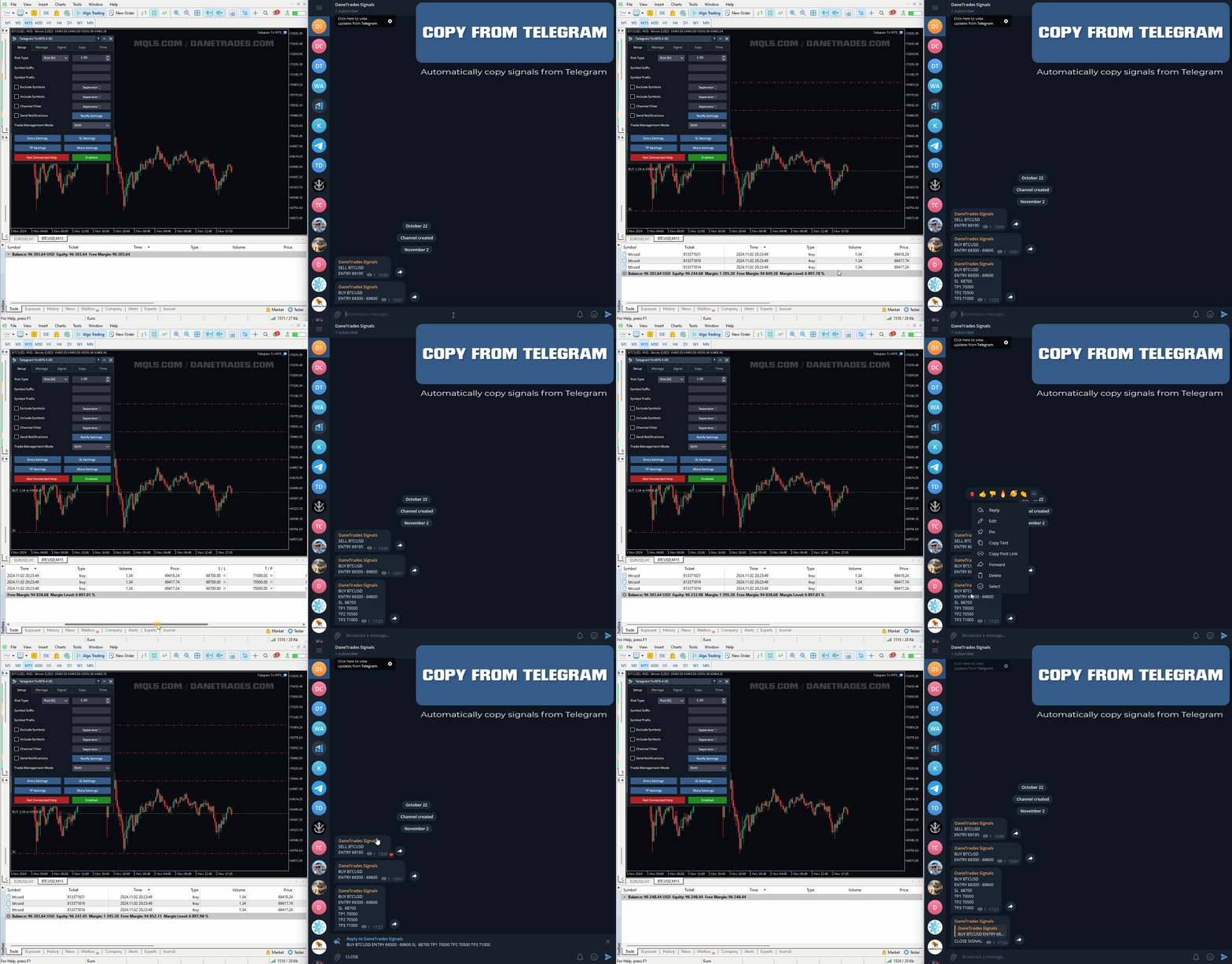
당신이 멤버인 어떤 채널에서든(비공개 및 제한된 채널 포함) 신호를 직접 MT4로 복사하세요. 

이 도구는 사용자를 고려하여 설계되었으며 거래를 관리하고 모니터하는 데 필요한 많은 기능을 제공합니다.

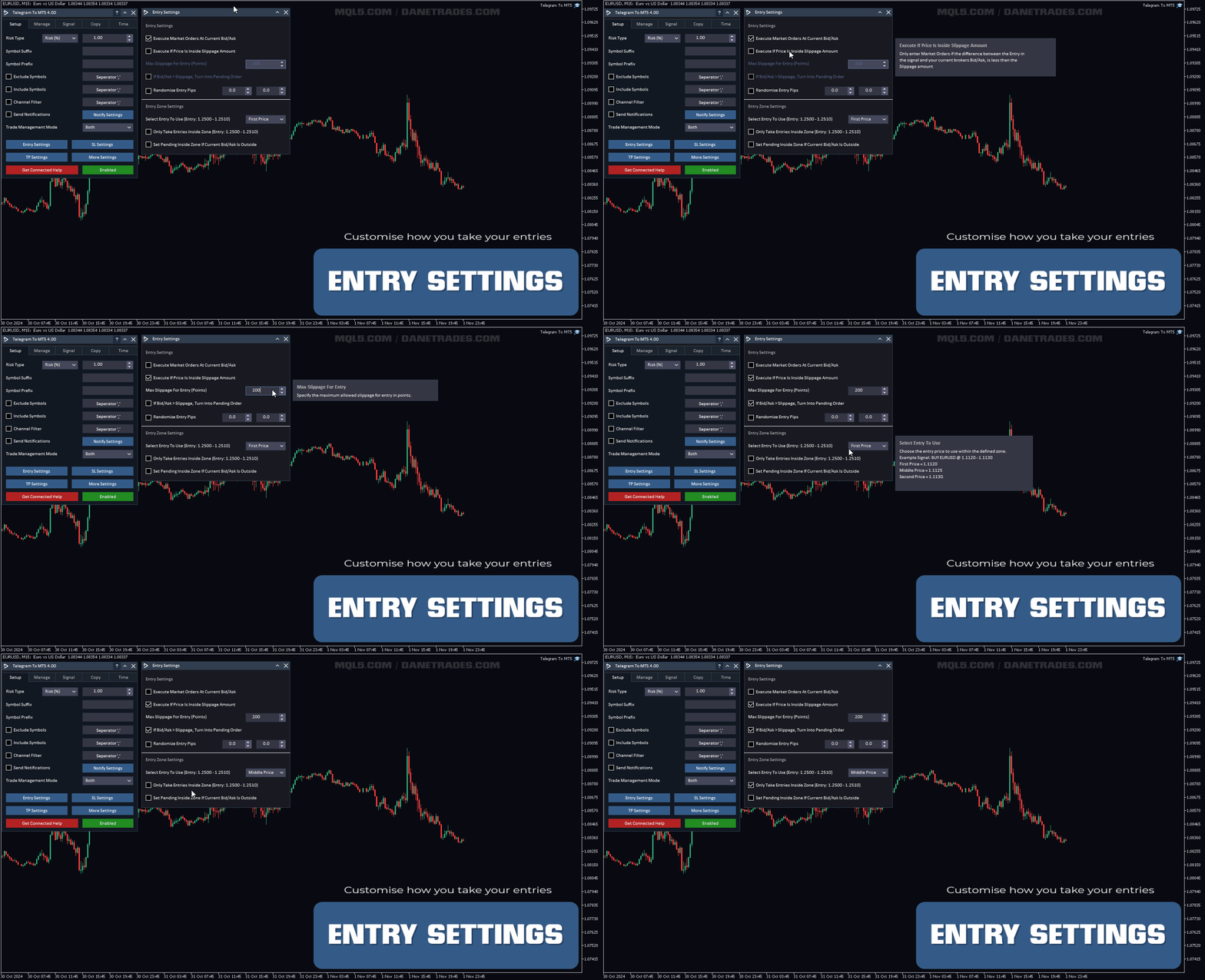
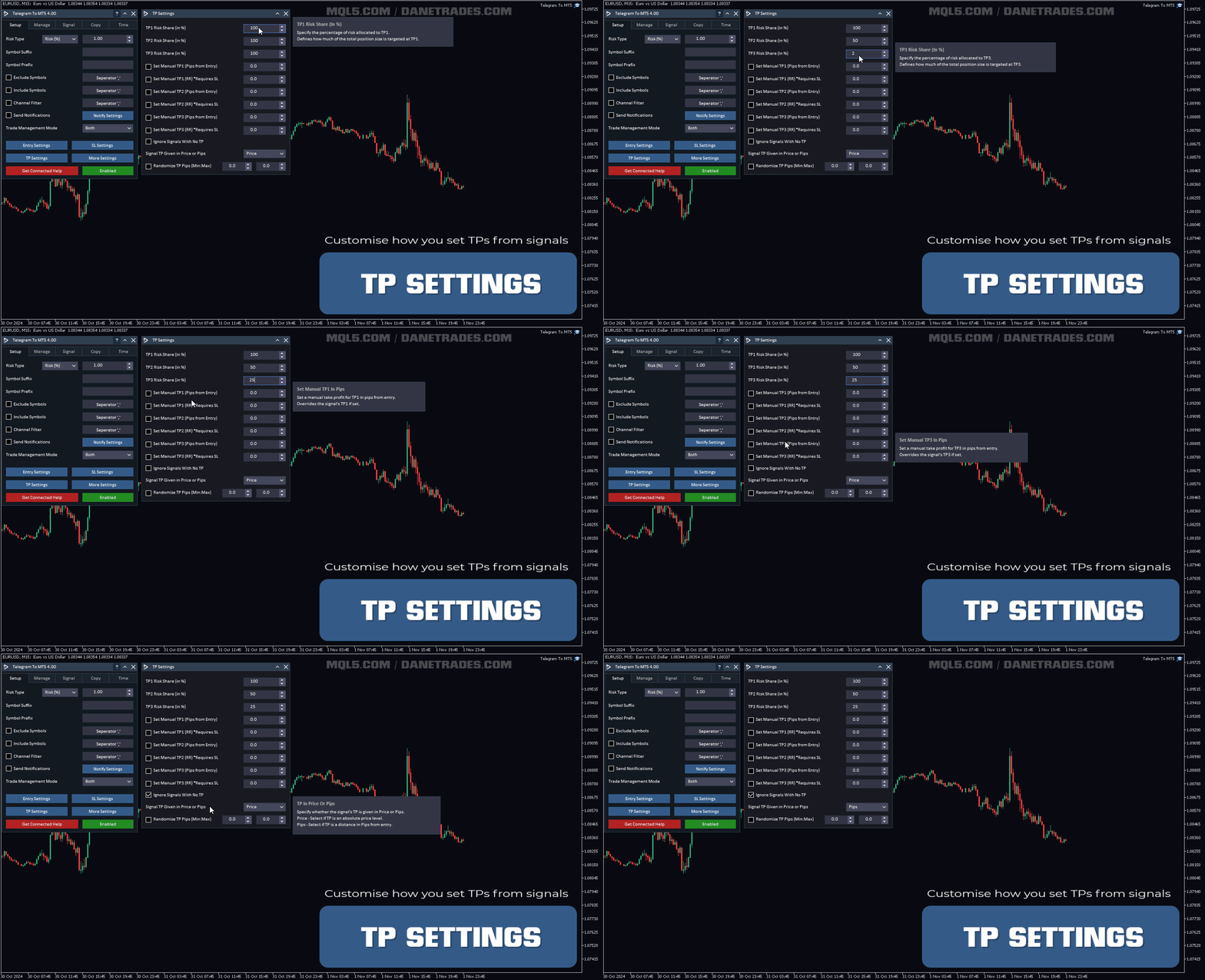
이 제품은 사용하기 쉽고 시각적으로 매력적인 그래픽 인터페이스로 제공됩니다. 설정을 사용자 정의하고 제품을 몇 분 안에 사용하십시오!

사용자 가이드 + 데모  | MT5 버전 | Discord 버전

데모를 시도하려면 사용자 가이드로 이동하십시오.

Telegram To MT5 수신기는 전략 테스터에서 작동하지 않습니다!


Telegram To MT4 특징

  • 한 번에 여러 채널에서 신호를 복사합니다.
  • 비공개 및 제한된 채널에서 신호를 복사합니다.
  • Bot 토큰이나 채팅 ID가 필요하지 않습니다(필요한 경우 계속 사용할 수 있음).
  • 위험 % 또는 고정된 로트를 사용하여 거래합니다.
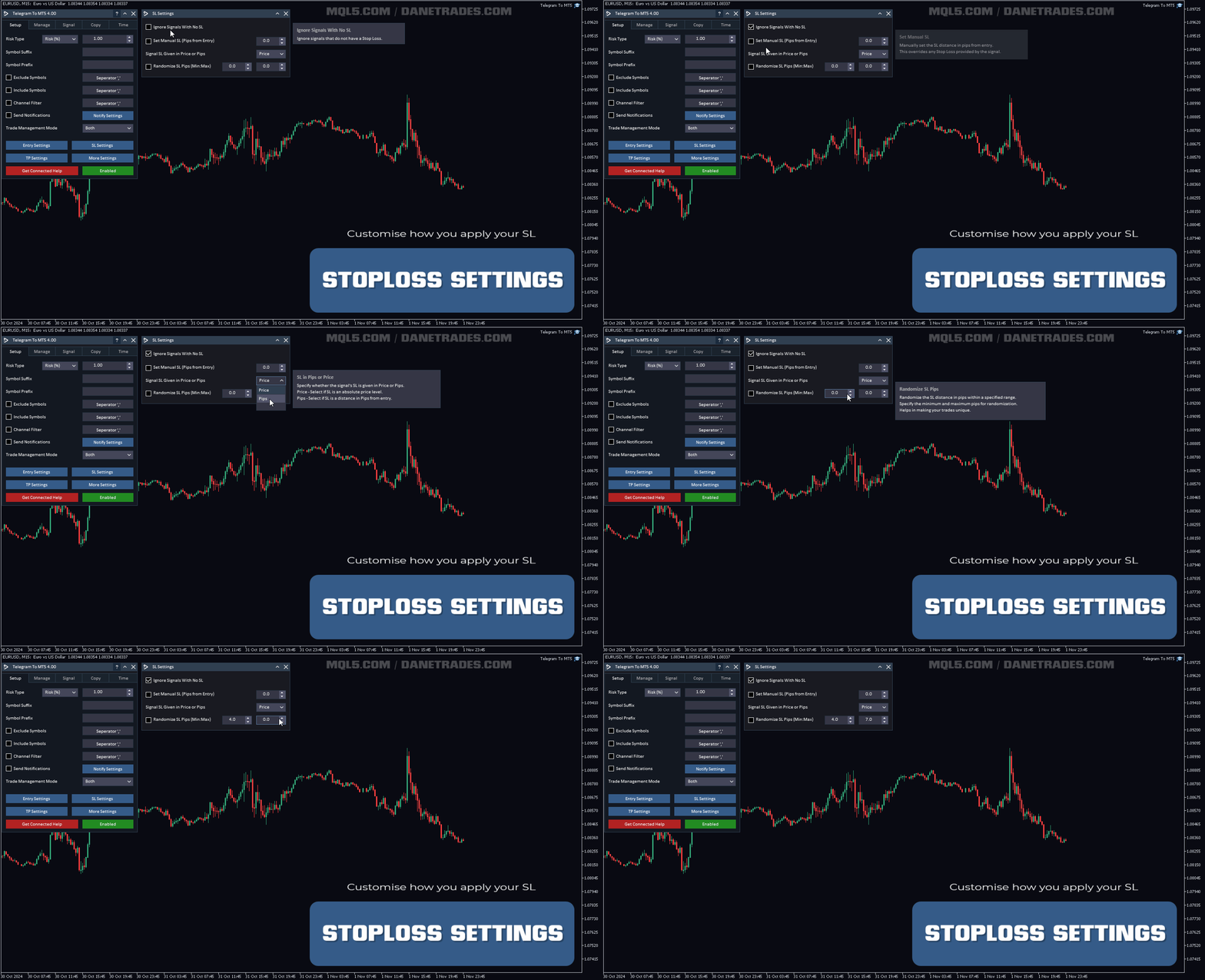
  • 특정 심볼을 제외합니다.
  • 모든 신호를 복사할지 복사할 신호를 사용자 정의할지 선택합니다.
  • 모든 신호를 인식하기 위해 단어 및 구문을 구성합니다(기본 설정은 99%의 신호 제공 업체에 대해 작동해야 함).
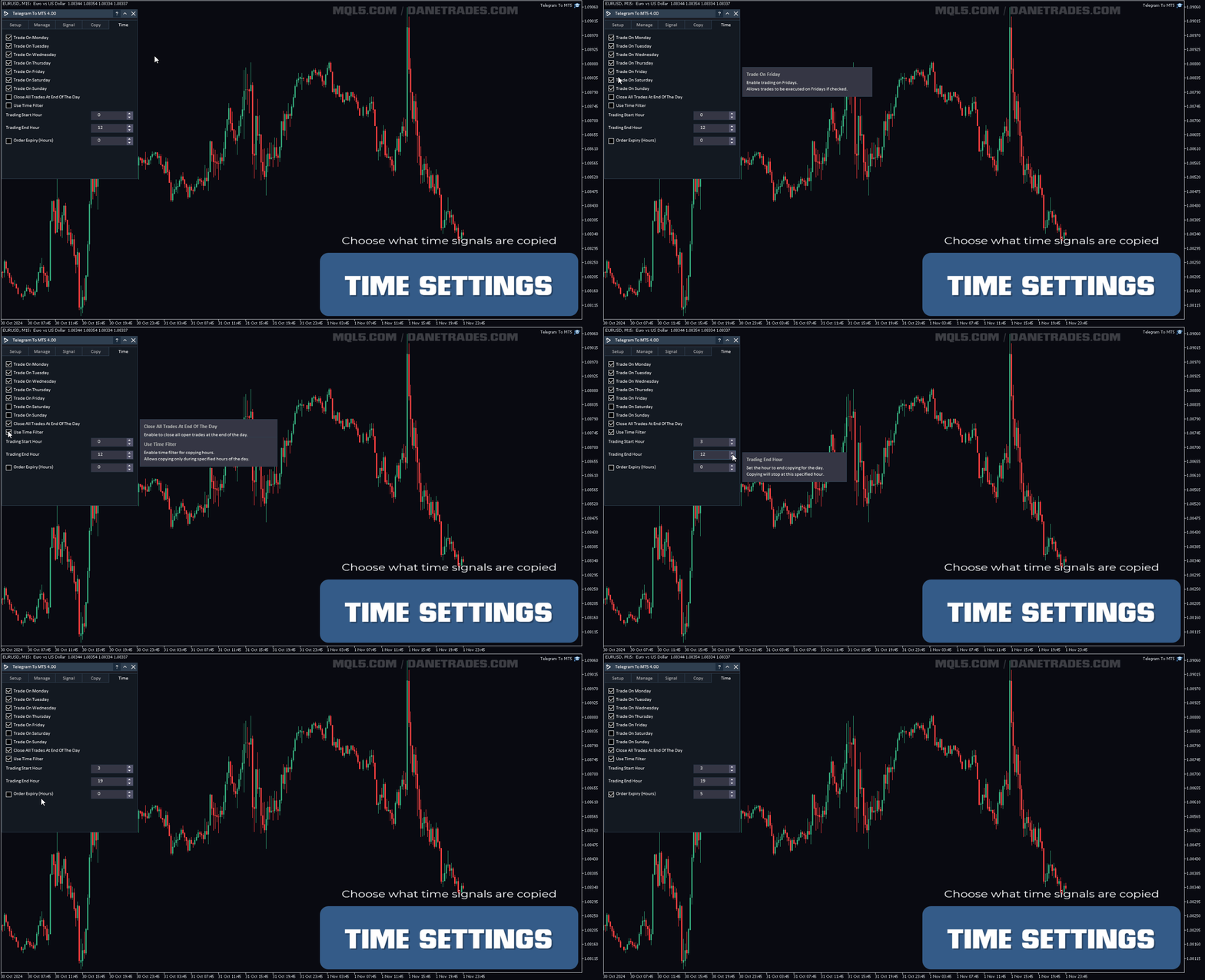
  • 원하는 경우 시간 및 일 설정을 구성하여 원하는 시기에만 신호를 복사합니다.
  • 한 번에 열 수 있는 최대 거래 수를 설정합니다.

거래 및 포지션 관리

  • 신호 또는 자동 설정에서 관리를 사용합니다.
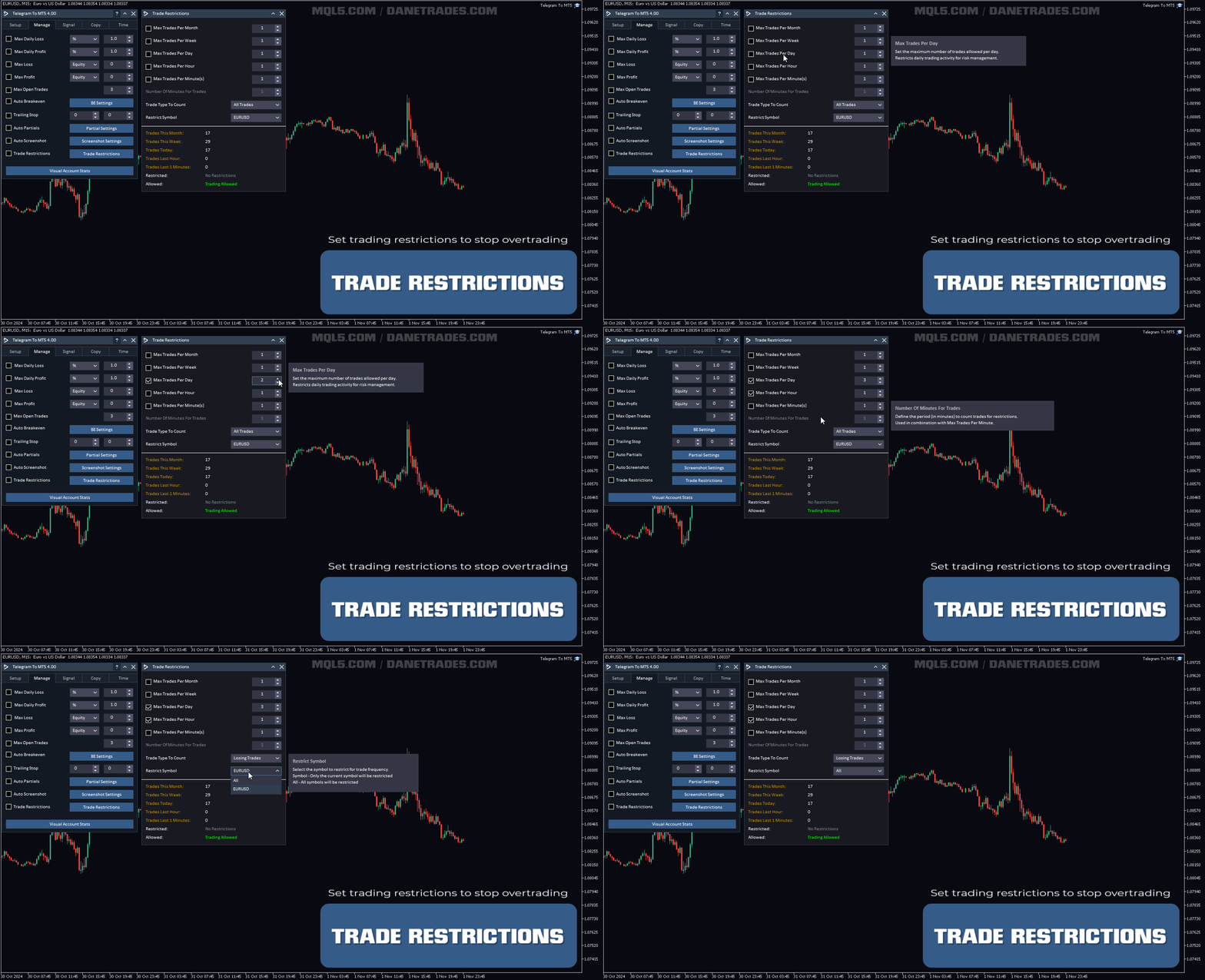
  • 월, 주, 일, 시간 또는 분당 최대 거래 수를 설정하여 과다 거래 및 복수 거래를 중지합니다.
  • 시장 주문 및 보류 주문 모두 지원
  • 포지션을 보호하고 과다 거래를 중지하기 위한 매일 최대 이익 목표($)
  • 포지션을 보호하기 위한 매일 최대 이익 목표(%)
  • 위험 및 노출을 제한하기 위한 최대 개방 거래
  • RR, Pips 또는 가격을 사용하여 자동으로 부분 거래를 수행합니다.
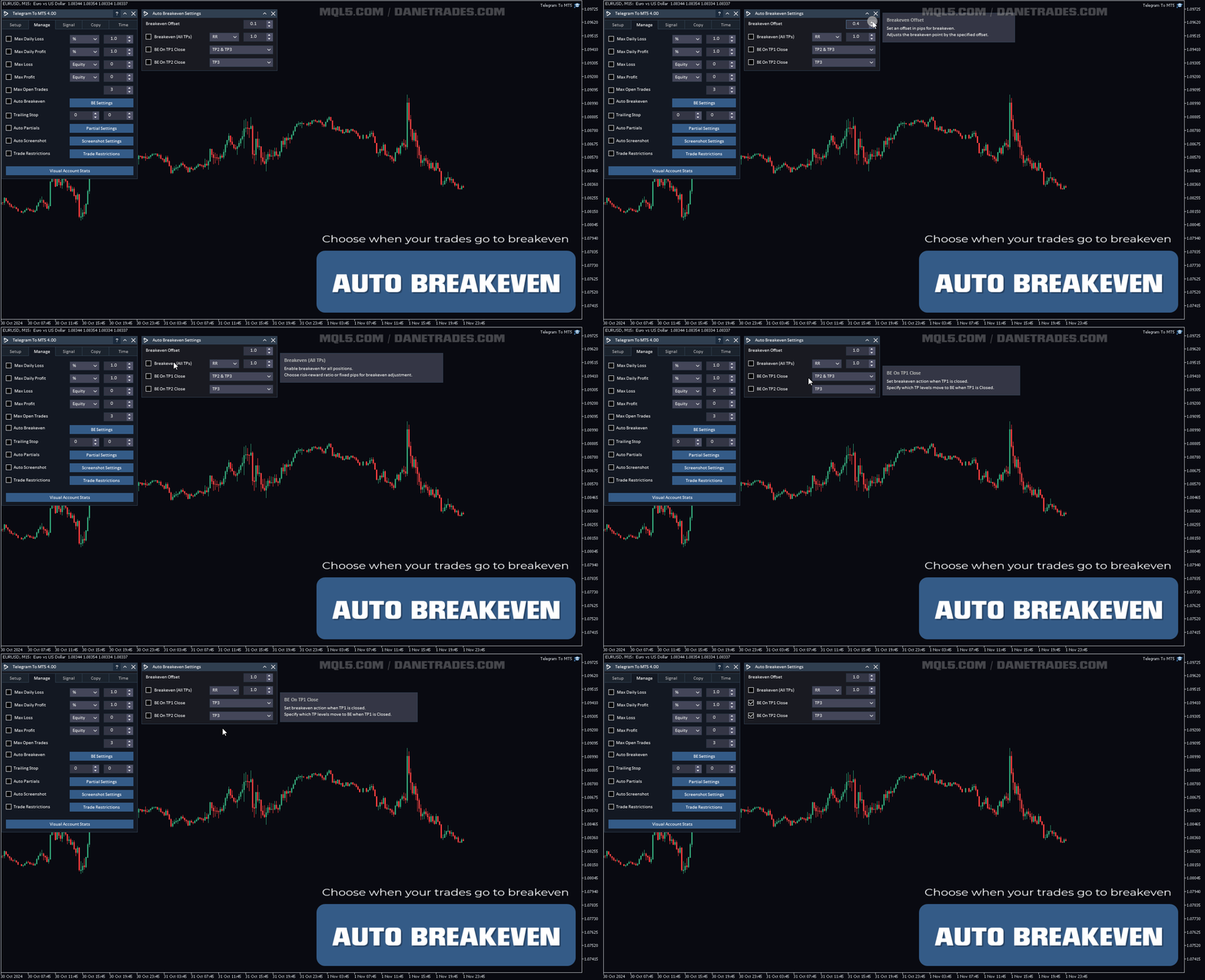
  • TP1 또는 TP2가 달성되었을 때 자동으로 브레이크 이븐으로 이동합니다.

알림 전송

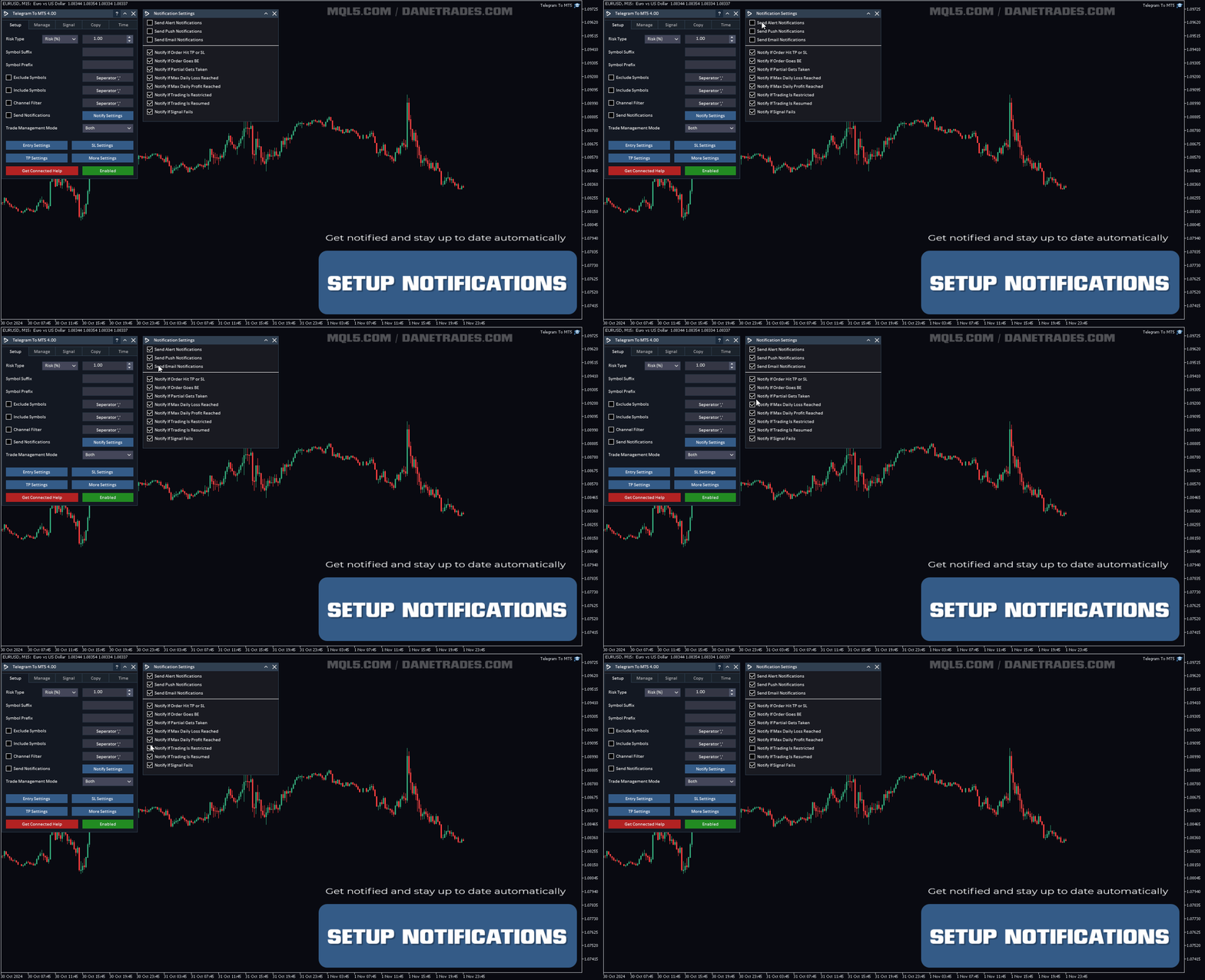
  • 알림, 푸시 알림 및 이메일 알림 중 선택합니다.
  • 주문이 SL 또는 TP에 달성했을 때 알립니다.
  • 주문이 브레이크 이븐으로 이동했을 때 알립니다.
  • 부분 거래가 이루어졌을 때 알립니다.
  • 매일 최대 손실이 도달했을 때 알립니다.
  • 매일 최대 이익이 도달했을 때 알립니다.
  • 거래가 제한되었을 때 알립니다.
  • 거래가 허용되었을 때 알립니다.

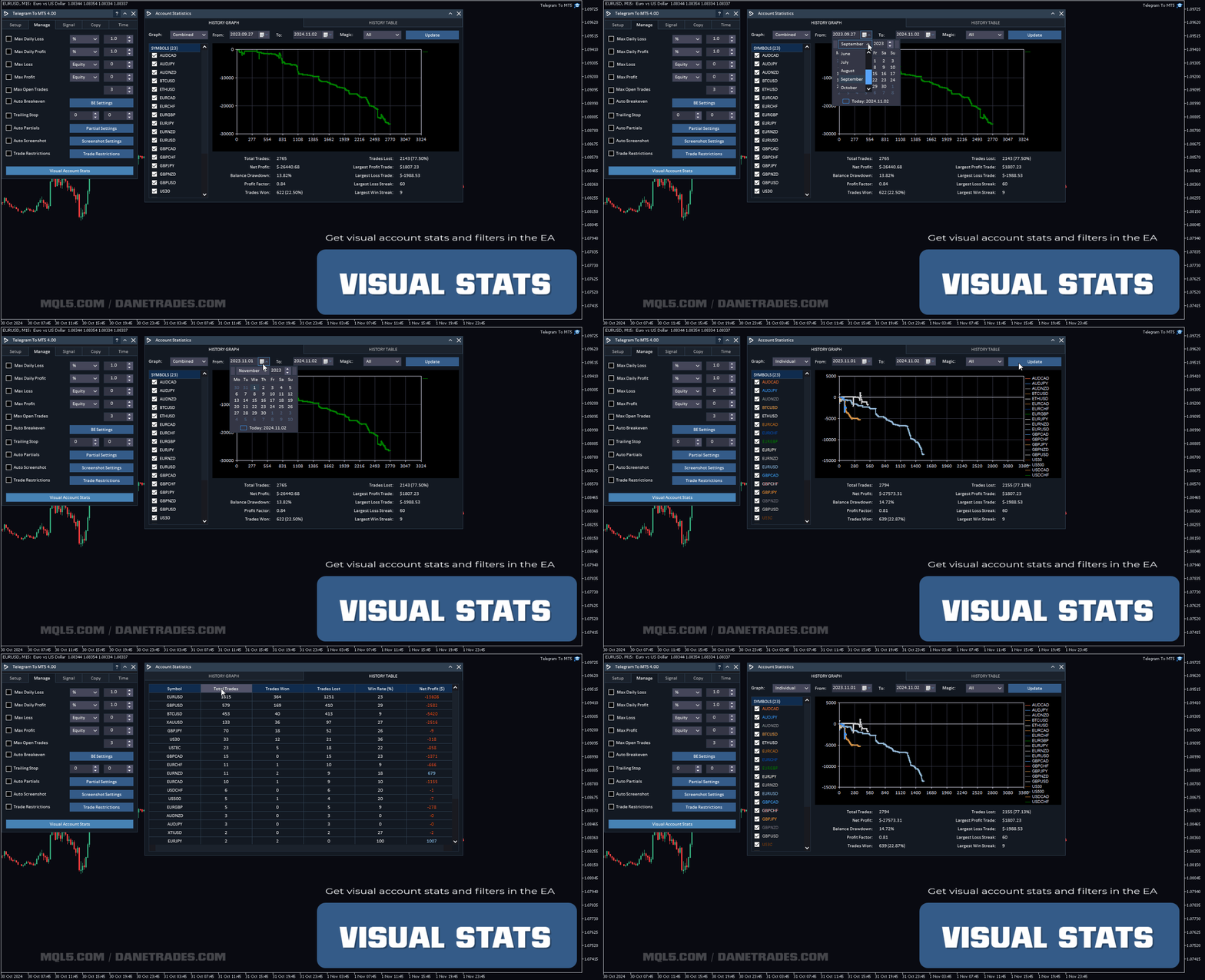
시각적 계정 통계

  • 계정 성능 및 통계(승률, 손실률, 총 거래 등)를 확인합니다.
  • 거래 성능을 시각화하고 심볼, Magic No 및 날짜 범위와 같은 필터를 사용하여 통계의 그래프를 얻습니다.
  • 가장 수익성이 높은 신호를 확인합니다.
  • 심볼 성능 및 통계 요약을 확인합니다.

제품을 개선하기 위해 항상 노력하고 있습니다. 원하시는 기능이 있으시면 댓글을 남기시거나 메시지를 보내주십시오.
리뷰 6
lbbfr
19
lbbfr 2024.11.28 12:10 
 

Everything is ok, last update is pretty good

HIRONAGA INOUE
45
HIRONAGA INOUE 2024.05.30 17:33 
 

With XMTrading MT4JP, GOLD did not work even if I set it, but it worked fine with a different broker.

Very good and convenient.

John Dorelus
347
John Dorelus 2023.11.24 21:54 
 

Excellent product this has all the features I was looking for.

추천 제품
This tool will perform Trailing stop loss and Break even management for orders. Helps you limit or reduce the time spend watching orders on the screen, especially when you need to go to sleep. Just add this EA to 1 chart, you can manage all pairs. You can filter orders by comment, magic number, symbol, and order ticket number. When Breakeven it can add shift/offset pips (to cover the commission...). You can try in strategy tester before purchase. The EA will add Buy and Sell alternately, so yo
Trade Manager MT4 DaneTrades
Levi Dane Benjamin
4.09 (11)
거래 관리자는 위험을 자동으로 계산하는 동시에 거래를 빠르게 시작하고 종료하는 데 도움을 줍니다. 과잉 거래, 복수 거래 및 감정 거래를 방지하는 데 도움이 되는 기능이 포함되어 있습니다. 거래를 자동으로 관리할 수 있으며 계정 성과 지표를 그래프로 시각화할 수 있습니다. 이러한 기능은 이 패널을 모든 수동 거래자에게 이상적으로 만들고 MetaTrader 4 플랫폼을 향상시키는 데 도움이 됩니다. 다중 언어 지원. MT5 버전  |  사용자 가이드 + 데모 트레이드 매니저는 전략 테스터에서 작동하지 않습니다. 데모를 보려면 사용자 가이드로 이동하세요. 위기 관리 % 또는 $를 기준으로 위험 자동 조정 고정 로트 크기 또는 거래량과 핍을 기반으로 한 자동 로트 크기 계산을 사용하는 옵션 RR, Pips 또는 Price를 사용한 손익분기점 손실 설정 추적 중지 손실 설정 목표 달성 시 모든 거래를 자동으로 마감하는 최대 일일 손실률(%)입니다. 과도한 손실로부터 계정을 보호하고 과도한
The Simple Lot Size Calculator can help you with risk management. Just type risk percentage, stop loss points and click calculate to get required lot size. The Simple Lot Size Calculator calculates a current chart's instrument. It's lightweight. Just load it to your chart then The Simple Lot Size Calculator will apper in the left upper corner of your chart.
How to Use the Features       MT5 VERSION   TRADE COPIER Select Role: On the account sending trades, choose Sender (Master Account) . On the account receiving trades, choose Copier (Receiver Account) . Lot Size Mode: Same Lot Size as Master: Ignores multipliers, copies exactly what the Master has. Multiply Master Lot Size: Uses the "Lot Multiplier" field (e.g., Master 0.10, Multiplier 2.0 = Copier 0.20). Use Fixed Lot Size: Ignores Master's volume entirely, uses the "Fixed Lot Size" field for ev
TesterPro
Miguel Angel Barahona Ochoa
TesterPro 는 MT4 *Strategy Tester* 용으로 설계된 패널입니다. 매수 및 매도 주문을 시뮬레이션하고, 로트 크기, *take profit*, *stop loss* 를 설정할 수 있습니다. 열린 주문을 언제든지 수정하거나 부분 청산할 수 있습니다. 또한 마우스로 해당 라인을 드래그하여 *take profit* 및 *stop loss* 수준을 쉽게 조정할 수 있습니다. 백테스트 중에 ** TesterPro ** 는 실시간으로 상세한 성과 보고서를 제공하며, 이에는 승리한 거래, 손실 거래, 총 이익 및 미실현 이익이 포함됩니다. 패널은 클릭 한 번으로 쉽게 숨기거나 표시할 수 있습니다. ** TesterPro ** 는 효율적이고 현실적인 전략 백테스트를 수행하도록 돕기 위해 만들어진 시뮬레이터입니다. 직관적인 패널을 통해 간단하게 거래를 실행하고, 모든 심볼과 시간 프레임에서 전략을 테스트하며, 결과를 분석하고 거래 기술을 향상시킬 수 있습니다. 모든 것은
Trade Auto Close
Makarii Gubaydullin
자동 거래 종료: 시간 또는 이익/손실 트리거 시 이 유틸리티를 사용하면 주어진 조건에서 거래를 자동으로 종료할 수 있습니다. 다기능 유틸리티 : 66+ 기능, 이 도구 포함  |   질문이 있으면 연락주세요   |   MT5 버전 자동 종료를 활성화하려면 다음 매개변수를 설정해야 합니다(패널에서): 1. 심볼   기능이 적용될: 특정   [Symbol]   / 또는   [ALL]   모든 심볼. 2.   조건,   종료 시기: [if total] / [if single] / [at time]:   이 매개변수에 따라  이익/손실 도달 시 종료 옵션 또는  지정 시간 종료 옵션이 표시됩니다. [close at Profit / Loss] 옵션 설정: 1. [if total] / [if single]:   P/L 계산 방식: 모든  선택된 거래를  합산,  또는 각 거래  개별 계산; 2. [Floating] / [Potential]:  부동 P/L  (미결제 거래), 또는  잠재적
Risk Commander
Adisorn Soodkanueng
Product Name: Risk Commander: Trade Assistant & Strategy Simulator Risk Commander is more than just a trade panel—it is a complete Manual Trading Ecosystem . It serves two powerful purposes: Live Assistant: Helps you execute trades with speed, precision, and perfect risk management in real-time markets. Training Simulator: Fully compatible with the Strategy Tester (Visual Mode) , allowing you to practice manual trading on historical data without risking a cent. NEW! Built-in Simulator Mode S
Introducing the Revolutionary   Trade Closing Assistant ! Are you tired of manually closing hundreds trades? Are you a   scalper ,   day trader ,   swing trader   and  you want to maximize your profits and minimize your losses by closing multiple positions at thesame time under different conditions? Are you a   Prop Firm Trader  who wishes to avoid hitting maximum daily drawdown? Search no further. This kit is the ultimate solution for all you. GUIDE TO USE THE KIT 1. Shows the total profit/lo
Trade Assistant Pro 36 in 1
Makarii Gubaydullin
4.76 (21)
다기능 거래 도구: 로트 계산기, 그리드 주문, 위험/보상 비율, 거래 관리자, 수급 구역, 가격 행동 분석 등 데모 버전   |   사용자 설명서 트레이딩 어시스턴트 는 전략 테스터에서 작동하지 않습니다: 이 유틸리티 를 테스트하려면 데모 버전을 여기서 다운로드하세요. 질문 /개선 아이디어/버그 발견 시 저에게 연락 하세요 MT5 버전이 필요하시면, 여기서 사용 가능합니다 거래 프로세스 를 단순화, 가속화, 자동화하세요. 이 대시보드 로 표준 터미널 기능을 확장합니다. 트레이딩 패널 은 모든 거래 상품에서 작동합니다: 외환, 주식, 지수, 암호화폐 등. 1. 새로운 거래 열기 : 로트/위험/위험보상비 계산: 수동 거래의 위험 관리 로트 계산기 (위험 크기 기반 거래량 계산) 위험 계산기 (로트 크기 기반 위험 금액) 위험 보상 비율 그리드 주문: + 동적 거리 옵션 및 분할 로트 옵션 주문 활성화 트리거, + Buy StopLimit/Sell StopLimit: Mt4에서도 가능

STRATEGY - We use risk and reward ratio of 1:5 to maximize the profit - We use trailing stop to lock profit and minimize loss ALERT User will get notified with alert with the following condition: - Max  Spread - Max  Orders UPDATE - Free Update and Support COMPATIBILITY - MT4 and MT5 - M1 Timeframe - All Currency Pair WHAT YOU GET 1) Free Online Forex Training (Normal Price: USD 299) 2) Free Expert Advisor (EA) (Normal Price: USD 288) 3) Free Copy Trading (CT) (Normal Service Fee: 20%) *Aft
Trade panel manual is a multifunctional trading assistant. It allows you to open market and pending orders in one click. Value is set via button menu edit or deleted by specific buttons pending orders and the value of take profit and stop loss in one click. Through the edit menu of the button, a value is set that can be easily changed by simply moving level_tp lines for take profit or stop loss levels and for pending orders. It is possible to select orders and determine for them and set the leve
Virtual Collider Manual   is a trading assistant with a built-in panel for manual trading. It automatically moves a position opened by a trader in profit using innovative adaptive grid algorithm of averaging and adaptive pyramiding Know-how of the grid algorithm of averaging and pyramiding of the   Virtual Collider Manual   trading robot is based on fully automatic adaptation of all characteristics of dynamically build order grid and pyramid with actual price movement with no need for adjusting
Take a Break
Eric Emmrich
5 (31)
One tool to protect all your EAs — news filter, equity protection, time filter and more — free demo available Take a Break has evolved from a basic news filter into a comprehensive account protection solution. It pauses your other Expert Advisors during news events or based on custom filters. When trading resumes, it automatically restores your entire chart setup , including all EA settings. Typical use cases: One news filter for all your EAs. Pause trading during news or high volatility — and c
Expert Advisor for MT4 Useful utility MUST have for all traders.  With 1 click button, you're able to close all your open positions. Its come with a warning pop up notification when you click to close all your trades, to avoid an accident press the button. Just press 'Yes' to confirm or 'No' to cancel it. The expert will close all your open positions no matter what pairs you currently open or directions. Just attach the expert on 1 of your chart, and you're good to go.
SmartDash Trader EA This is MT4 Semi Automated EA which trade using BUY, SELL and CLOSE Buttons to executes trade actions. You can use Auto Set SL/TP/Lot of your choice since the EA comes with only 0.01 lot and 0 for TP/SL. Set 10 pips for TP to take advantage of trades. NOTE: THIS EA DOES NOT BACKTEST. ITS BUTTON TRADER EA HOW THE STRATEGIES TO USE THE DASHBOARD TRADER Wait for a weaker or stronger currency means the currency strength meter should show less than 15% for SELL and more than 88% f
SFG Grid Manager MT4 – Intelligentes Grid- und Spiegel-System Der SFG Grid Manager MT4 ist ein professioneller, automatischer Grid-Manager, der eine bestehende Position (manuell oder durch einen anderen EA eröffnet) verfolgt und bei jedem definierten Schritt ( GridPips ) eine Durchschnittsorder eröffnet. Sobald die Hauptposition geschlossen oder entfernt wird, schließt der Manager automatisch alle von ihm eröffneten Grid-Trades. Er funktioniert mit allen Brokern, die Netting- oder Hedging-Kon
Verdure Lot Calculator
Olawale Adenagbe
5 (1)
Overview Money management is an all-important aspect of trading that many traders often overlook. It is very possible that even with a winning strategy, bad money management can often result in huge loses. Verdure Lot Calculator aims to help traders minimize risk and exposure in the Forex market. Verdure Forex Calculators implements Lot (Trade or Contract Size) Calculator as an indicator on MT4 platform. Lot Calculator (trade or contract size) A lot refers to a bundle of units in trade. In Fore
Trading Control Pad
Sukunthakan Ngernbamrung
Trading Control Pad is a useful tool for all traders. To send BUY/SELL, pending order, modify and automatic setting SL and TP in one click by the current symbol. The Trading Control Pad can help you being comfortable and quickly trading.  Pad can help you automatic and manual partially close some lot at the target, breakeven and trailing stop. The Trading Control Pad features / Functionality Showing the currency pair, the total positions, the number of buy and sell orders. Standard tools for op
Golden Gestion TP SL
Matthias Hubert Patrick Snidaro
Auto SL/TP Manager EA – Gestion Automatique Intelligente Auto SL/TP Manager EA est un Expert Advisor conçu pour automatiser la gestion des commandes avec une efficacité maximale et une grande discrétion. Il gère automatiquement : Le Stop Loss (SL) et le Take Profit (TP) Le Profit Lock (verrouillage progressif des bénéfices) Le Trailing Stop avec plusieurs méthodes avancées L' affichage masqué du SL et du TP pour plus de discrétion (non visible par le courtisan) C'est l'outil idéal pour les
Basket Trades Panel
Opengates Success International
Basket trading is very interesting for those who are familiar with it. It is also very profitable if you know your way round BUT can be very destructive to anyone’s account if care is not taken. However, there are Basket traders all around making good incomes with it with ease. What it can do: This utility is created for them to remove the stress of opening trade on each of the currency symbol group. At just a click, it opens the symbol’s entire group of currency pair ORDERS in any of the direct
YPY Check Your Broker is a universal multifunctional software complex which uses primary tick data. It allows traders to perform comparative analysis of the trading conditions and execution quality, identify abnormal BID prices outside the indicative quotes. It also reflects the facts of redrawing bars in the terminal, spread extension, controls the leverage stop out level values, speed of execution and server connection breaks, maintains a detailed statistics on the slippages. The YPY Check You
It is so very disappointing when the price does not have enough points to achieve Take Profit and makes a reversal. This EA sets virtual levels near the TakeProfit levels. This EA sets virtual levels next to TakeProfit orders. If these levels are reached by price, breakeven or trailing stop is applied for an order. Features This EA does not set new orders. The aim of this EA is to manage stop losses of existing orders that are set by another EA or manually (magic number equals 0). For correct w
Slow Pips OCO Trade Panel is an advanced trading panel for placing pending orders. Traders can use this panel to place two pending orders at once. One pending order would be of buy entry type and the other one would be of sell entry type. Both orders will have Stop Loss and Take Profit parameters. Since two pending orders are placed at the same time, the pending order for which the price hits first gets converted into a market order and the other pending order gets deleted (one order cancels the
This is a script used for placing pending orders. However, this does not create a trivial grid of orders, but a little "thinks and counts" ;) The general idea that guided me when writing this script is the concept of playing the demand and supply zones by setting pending "limits", but with a predetermined level of risk that I accept. Operating principles: - put a rectangle on the graph, which is supposed to reflect the "zone" we are going to play, - drag the Pending_Orders_1v6_Rectangle script t
AZ Trade Recovery Assistant MT4   combines manual trading flexibility with intelligent automated management.This advanced on-chart panel isn’t just for trade execution — it’s a complete trade management assistant. You can open or close positions instantly, adjust lot size, manage trailing stops, and modify Take Profit or Stop Loss — all directly from the panel. It’s built for traders who want full control of their trades with smart automation running in the background. What truly makes this assi
SwiftEdge Scalper 완전한 수동 제어 기능을 갖춘 전문 틱 스캘핑 EA 스캘핑은 순간적인 결정, 정밀한 리스크 관리, 원활한 주문 실행을 요구합니다. 가격 움직임을 관찰하면서 손익분기점 계산, 트레일링 스탑, 여러 포지션을 관리하는 것은 적절한 도구 없이는 압도적입니다. SwiftEdge Scalper는 활발한 스캘퍼와 데이 트레이더를 위해 설계된 전문 트레이딩 어시스턴트입니다. 원클릭 또는 키보드 단축키로 거래를 실행하고 EA가 자동으로 손익분기점, 트레일링 스탑, 포지션 관리를 처리합니다. 이것은 자동 거래 로봇이 아닙니다 — 당신이 결정할 때만 거래합니다. 자세히 알아보기:   완전한 설정 가이드 및 문서 (English) 한정 제공:   처음 50회 다운로드는 무료입니다! 그 후에는 이 제품이 유료로 전환됩니다. 지금 다운로드하여 무료 사본을 확보하세요. 주요 기능 원클릭 거래:   패널 버튼 또는 사용자 정의 키보드 단축키(B/S/A/C/E/M)를 통해 즉시 B


한 번에   모든   거래를   종료   ,   모바일  MT4  앱 에서 직접 관리하세요 . 이  유틸리티   는   9   가지   다양한   거래   카테고리를 종료할 수 있습니다. 작업을   활성화하려면   미리 정해진   가격에   보류 주문을   배치하기만 하면 됩니다 (모바일  MT4 앱을 통해   원격으로   수행 가능). 그 후   유틸리티는   주문을   감지하고   모든   필요한   거래를   종료합니다. 이렇게 하면   거래   그룹을   빠르게   관리할 수 있습니다. 다기능 유틸리티 : 66개 이상의 기능 포함  |   질문이 있으면 저에게 연락하세요   |    MT5 버전 사용 가능한   거래   카테고리 : 모든 거래 (활성 및 보류); 활성 포지션; 보류 주문; 수익; 손실; 리미트 보류 주문 (Buy Limit / Sell Limit); 스톱 보류 주문 (Buy Stop / Sell Stop); 매수 거래 (활성 매수 및 보류 매도); 매도 거
Forex Gump
Andrey Kozak
2.4 (5)
Forex Gump is a fully finished semi-automatic trading system. In the form of arrows, signals are displayed on the screen for opening and closing deals. All you need is to follow the instructions of the indicator. When the indicator shows a blue arrow, you need to open a buy order. When the indicator shows a red arrow, you need to open a sell order. Close orders when the indicator draws a yellow cross. In order to get the most effective result, we recommend using the timeframes H1, H4, D1. There
이 제품을 사용하면 다양한 기능으로 주문과 계정을 관리할 수 있습니다. 1- 계정 크기/SL 크기/1 로트 크기의 페어 포인트 값에 따라 올바른 로트 크기를 계산합니다. 2- 라인 위치(타겟 sl tp)에 따라 현재 주문 상황을 알려줍니다. 3- 버튼을 1번 누르면 모든 주문 target/sl이 이동합니다. 4- 귀하의 계정에 대한 정보와 주문을 개시하는 데 필요한 증거금이 제공됩니다. 5- 모든 주문(기호 또는 전체)을 청산하는 기능이 있습니다. 6- 손익분기점 및 이익 보호 기능이 있습니다. 7- 모든 쌍에서 사용하기 쉽습니다. 리뷰를 추가하는 것을 잊지 마세요. 이 제품을 사용하면 다양한 기능으로 주문과 계정을 관리할 수 있습니다. 1- 계정 크기/SL 크기/1 로트 크기의 페어 포인트 값에 따라 올바른 로트 크기를 계산합니다. 2- 라인 위치(타겟 sl tp)에 따라 현재 주문 상황을 알려줍니다. 3- 버튼을 1번 누르면 모든 주문 target/sl이 이
Managing Trades With Trendline EA : Trendline EA  is a very good tool for using trend at your advantage &  can be used for managing both take profit & stop loss . ​ Can be used in all time frames and uses close price of Candle as stop loss therefore it will close the trade only if candle closes above or below trendline , this function saves traders from wicks and market noise . ​ Where as Take profit is by simple touch of trendline. check link below for examples : https://www.noemotionfx.com/
이 제품의 구매자들이 또한 구매함
The product will copy all telegram signal to MT4   ( which you are member  ) , also it can work as remote copier.  Easy to set up, copy order instant, can work with almost signal formats, image signal, s upport to translate other language to English Work with all type of channel or group, even channel have "Restrict Saving Content", work with  multi channel, multi MT5 Work as remote copier: with signal have ticket number, it will copy exactly via ticket number. Support to backtest signal. How to
Crystal Trade Manager PRO – MT4 고급 리스크 및 트레이드 관리 시스템 무료 버전: https://www.mql5.com/en/market/product/150632 개요 Crystal Trade Manager PRO(CTM)는 MetaTrader 4를 위한 전문급 거래 실행 및 리스크 관리 유틸리티입니다. 엄격한 실행, 견고한 자본 보호, 그리고 똑똑한 자동화를 필요로 하는 트레이더를 위해 설계되었습니다. 본 시스템은 계좌 리스크를 관리하고, 자본(EQ)을 보호하며, 일일 제한을 적용하고, SL/TP를 자동으로 설정하며, 전문급 기능을 갖춘 초고속 원클릭 트레이딩 패널을 제공합니다. Prop Firm 챌린지, 데이트레이딩, 스캘핑, 포트폴리오 매니저에게 최적화되어 있습니다. MT5 버전도 제공됩니다. 주요 기능 1. 고급 리스크 및 드로우다운 보호 기능 하루 드로우다운을 1%~70% 범위에서 설정 가능 설정한 한도를 초과할 경우 모든 포지션 즉시 종료 조건
Smart Channel M4
Vahidreza Heidar Gholami
The trend in the market can be predicted using trend lines but the problem is you don’t know where exactly the price is going to touch the trend line where you can put your pending orders on. Smart Channel Expert Advisor makes it possible to put an advanced channel around the price data, which can be configured to handle placing orders, opening and closing positions, managing risk per trade, spread, slippage, and trailing stop-loss and take-profit automatically. Features Money Management (Calcul
Custom Alerts AIO: 다중 시장을 동시에 모니터링 – 설정 없이 즉시 사용 가능 개요 Custom Alerts AIO 는 복잡한 설정 없이 즉시 사용할 수 있는 통합 시장 모니터링 도구입니다. FX Power, FX Volume, FX Dynamic, FX Levels, IX Power 등 필요한 모든 지표가 내장되어 있어 별도의 설치나 구성 없이 알림 기능을 바로 사용할 수 있습니다. 차트 그래픽 없이 작동하며, Forex, 금속, 지수, 암호화폐 등 주요 자산군을 모두 지원합니다. 주식(Symbols)은 별도로 입력하여 추가할 수 있으나, MetaTrader에서는 일반적으로 제한적으로만 사용됩니다. 1. 왜 Custom Alerts AIO를 선택해야 하나요? 추가 라이선스가 필요 없습니다 • 모든 Stein Investments 지표가 내장되어 있어 별도 구매가 필요 없습니다. • 즉시 알림 기능을 시작할 수 있어 빠르고 간편합니다. 모든 시장을 하나의 도구로
Ultimate Extractor - Professional Trading Analytics for MT4 Ultimate Extractor transforms your MetaTrader 4 trading history into actionable insights with comprehensive analytics, interactive charts, and real-time performance tracking. Ability to combine multiple accounts and MT4 and MT5 into a single dashboard. What It Does Automatically analyzes your MT4 trading history across all Expert Advisors and generates detailed HTML reports with interactive visualizations. Tracks live performance metric
ManHedger MT4
Peter Mueller
5 (1)
THIS EA IS A SEMI-AUTO EA, IT NEEDS USER INPUT. Manual & Test Version Please TEST this product before   BUYING  and watch my video about it. Contact me for user support or bug reports, or if you want the MT5 version! MT5 Version I do not guarantee any profits or financial success using this EA. With this Expert Advisor, you can: Implement your own   Zone Recovery   strategy to capitalize on trending markets. Create   Grid   trading strategies, to profit from ranging markets. Place orders easil
The product will copy all  Discord  signal   to MT4   ( which you are member  ) , also it can work as remote copier.  Easy to set up. Work with almost signal formats, support to translate other language to English Work with multi channel, multi MT4. Work with Image signal. Copy order instant, auto detect symbol. Work as remote copier: with signal have ticket number, it will copy exactly via ticket number. How to setup and guide: Let read all details about setup and download Discord To MetaTrader
Averaging Helper
Sergey Batudayev
5 (2)
평균화 도우미 - 이러한 종류의 거래 도우미 도구는 두 가지 기술을 사용하여 이전에는 수익성이 없었던 포지션의 평균을 맞추는 데 도움이 됩니다. 표준 평균화 추세에 따라 포지션을 이후 오픈하여 헤지 이 유틸리티는 매수 및 매도 포지션 모두 여러 방향의 여러 미결제 포지션을 한 번에 정리할 수 있습니다   . 예를 들어, 하나는 매도 포지션이고 다른 하나는 매수 포지션인데, 두 포지션 모두 수익이 없거나, 하나는 수익이 없고 하나는 수익이지만 수익이 충분하지 않은 경우, 두 포지션의 평균을 계산하여 더 높은 수익률로 거래를 마감하려는 경우, 이 유틸리티는 평균화 도우미(Averaging Helper)를 사용하는 데 도움이 될 것입니다. 평균화 도우미 유틸리티를 사용하면 다음 포지션의 크기, 주문 가격, 포지션을 평균화하고 지정한 이익 실현 크기에 맞춰 포지션을 마감하는 방향을 자동으로 계산할 수 있습니다. 이 유틸리티는 매수 및 매도 버튼을 사용하여 포지션을 오픈할 수 있도록 지원합니
With this Expert Advisor, you can seamlessly integrate various channel, arrow, and reversal indicators. It offers the flexibility to use all popular channel trading strategies, while also providing powerful tools to customize your trading conditions and risk management system.   The Expert Advisor opens orders when the price crosses the channel boundaries. Multiple crossing conditions are available for customization: Price touches boundary on re-entry into the channel Price touches boundary on
EasyInsight AIO MT4
Alain Verleyen
4 (2)
EASY Insight AIO – 스마트하고 손쉬운 트레이딩을 위한 올인원 솔루션 개요 외환, 금, 암호화폐, 지수, 심지어 주식까지 — 전 시장을 몇 초 만에, 수동 차트 확인이나 복잡한 설치, 인디케이터 설정 없이 스캔할 수 있다고 상상해 보세요. EASY Insight AIO 는 AI 기반 트레이딩을 위한 궁극의 플러그 앤 플레이(Plug & Play) 데이터 내보내기 도구입니다. 단 하나의 깔끔한 CSV 파일로 전체 시장 스냅샷을 제공하며, ChatGPT, Claude, Gemini, Perplexity 등 다양한 AI 플랫폼에서 즉시 분석할 수 있습니다. 창 전환, 복잡함, 차트 오버레이는 더 이상 필요 없습니다. 자동으로 내보내지는 순수하고 구조화된 데이터 인사이트만으로, 반복적인 차트 감시 대신 데이터 기반의 스마트한 의사결정에 집중할 수 있습니다. 왜 EASY Insight AIO인가요? 진정한 올인원 • 별도의 설정, 인디케이터 설치, 차트 오버레이가 필요 없습
Unlimited Trade Copier Pro is a tool to copy trade remotely to multiple MT4, MT5 and cTrader accounts at different computers/locations over internet. This is an ideal solution for you if you are a signal provider and want to copy your trades to other receivers globally on your own rules. One provider can copy trades to multiple receivers and one receiver can get trade from multiple providers as well. The provider can even set the subscription expiry for each receiver, so that receiver will not b
--------------Welcome to use [MQL5 Signal Analyze Master]------------------  Function: Draw order tracks of MQL5 MT4 and MT5 signal on MT4 chart. [Using guide] 1.Use it as Experts. 2.Download history record from MQL5 signal(MT4 signal or MT5 signal).  3.Paste history record file below "MQL4/Files/" 4.Load [Signal Analyze Master] on the symbol chart what you want to analyze. 5.Paste the history record file name to parameter 'FileName' 6.Select  SignalType  match the history you download on MT4
Strategy Builder offers an incredible amount of functionality. It combines a trade panel with configurable automation (covert indicators into an EA), real-time statistics (profit & draw down) plus automatic optimization of SL, TP/exit, trading hours, indicator inputs. Multiple indicators can be combined into an single alert/trade signal and can include custom indicators, even if just have ex4 file or purchased from Market. The system is easily configured via a CONFIG button and associated pop-up
RedFox Copier Pro
Rui Manh Tien
4.7 (10)
Time saving and fast execution Whether you’re traveling or sleeping, always know that Telegram To Mt4 performs the trades for you. In other words, Our   Telegram MT4 Signal Trader  will analyze the trading signals you receive on your selected Telegram channels and execute them to your Telegram to MT4 account. Reduce The Risk Telegram To Mt4   defines the whole experience of copying signals from   Telegram signal copier to mt4 platforms. Users not only can follow all instructions from the signa
Remote Trade Copier   is an advanced tool designed for efficiently copying trades between accounts in both   local   and   remote   modes. It allows for lightning-fast order replication from a master account to a slave account. In local mode, trades are copied instantly, while in remote mode, the copying process takes a second.  In new version, in remote mode , the copy operation can be performed with a delay of milliseconds or zero . After purchase, ask how to activate it MT4 Version (Only Loc
Trade Copier Pro
Vu Trung Kien
4.57 (14)
Trade Copier Pro is a tool to copy trade remotely to MT4, MT5 and cTrader accounts at different computers/locations over internet. This is an ideal solution for you if you are a signal provider and want to copy your trades to other receivers globally on your own rules. One provider can copy trades to multiple receivers and one receiver can get trade from multiple providers as well. The provider can even set the subscription expiry for each receiver, so that receiver will not be able to receive t
FiboPlusMultiTF
Sergey Malysh
5 (1)
A ready-made multitimeframe trading system based on automatic plotting and tracking of Fibonacci levels for buying and selling any symbol. Advantages Determines the trend direction based on a complex of 14 indicators ( Cx ), extremums of ZigZag ( Z ), RSI ( R ), Impulse ( I ) Displaying the values of 14 indicators comprising the trend direction ( Cx ) Plotting horizontal levels, support and resistance lines, channels View the plotting option of Fibonacci levels on any timeframe, with the abilit
This is an Expert Adviser use for manual trading as a background EA or combine with external EA to open orders. Loss Recovery Trading is one of your options to handle the lose positions instead of using stop loss by setting a zone recovery area and target to exit the turn rounds sequence. How It Work? If the market goes against your first positions direction at the specific of losing points, the EA will open an opposite direction position with calculated larger lot size and also keep the first
Trade Copier for MT4   Supports multiple master and slave terminals   Local operation without DLL usage   Optional slow monitoring mode   Compatible with prop firm and personal accounts Trade Copier MT4 To MT4 Advanced Multi-Account Trade Copier for MT4/MT5 – Master & Slave Synchronization This Expert Advisor is a fully automated multi-account trade copying system designed for professional traders who require fast, stable, and flexible synchronization between MT4/MT5 accounts. It supports
This means now you can trade on multiple MetaTrader 4 accounts simultaneously, mirror the trades of any trading bot to your friends and family accounts (even if it is locked to your MT4 account number), create investment portfolios of many MT4 accounts, remove risk of unregulated Forex brokers, turn losing trading strategy into a winner and become an independent account manager immediately without the need to sign any contracts or opening expensive PAMM accounts with the broker. Reverse Trading
The FFx Hidden Manager panel will help you to manage easily your orders directly on the chart. Below all features described: TP, SL and TrailingStop are hidden Each order has its own lines on chart Drag & Drop any line to change the TP/SL as per your need Option to move automatically the SL line at breakeven when TP #1 is reached Option to choose the TP/SL type (by pips or price) Option to choose the TrailingStop type (by pips, MA, Fractals, PSAR or ATR) Define which order(s) you want to manage
FFx Risk Calculator panel will help you to calculate very easily your trades size, SL or the risk directly on the chart. All features are described below: Option to select which parameter to calculate: Risk, Stop Loss or Lot Size The panel will show if the lot size is allowed according to the current account free margin Button to maximize/minimize the panel Drag and Drop the panel anywhere on the chart How to use it? Select the parameter you want to be calculated. It will be based on the 2 other
News Trader Pro
Vu Trung Kien
4.38 (16)
News Trader Pro is a unique robot that allows you to trade the news by your predefined strategy. It loads every piece of news from several popular Forex websites. You can choose any news and preset the strategy to trade it, and then News Trader Pro will trade that news by selected strategy automatically when the news comes. News release gives opportunity to have pips since the price usually has big move at that time. Now, with this tool, trading news becomes easier, more flexible and more exciti
FFx Watcher PRO
Eric Venturi-Bloxs
The FFx Watcher PRO is a dashboard displaying on a single chart the current direction of up to 15 standard indicators and up to 9 timeframes. It has 2 different modes: 1. Watcher mode: Multi Indicators User is able to select up to 15 indicators to be displayed User is able to select up to 9 timeframes to be displayed 2. Watcher mode: Multi Pairs User is able to select any number of pairs/symbols User is able to select up to 9 timeframes to be displayed This mode uses one of the standard indicat
Transaction Repeater Full
Alexandr Bryzgalov
5 (4)
Copies transactions between MT4 terminals. Possibilities: quick copy start minimum processor load direct and reverse (reverse) copying. copying Take Profit and Stop Loss levels copying deferred and their changes copy transactions one to many copy trades many to one local copy only Attention: The product is designed for copying trades only within a single computer or VPS with access to the desktop. The product will not work on the built-in Virtual Hosting of the terminal. We will help you set up
The product combines a manual trade panel with the ability to perform actions automatically in a highly configurable way. Actions include capturing indicator values and then based on those values raising alerts, open/close or partially close trades, scale-in, setting up pending orders, adjusting stop loss, take profit and more. On-chart controls can be configured, such as tick boxes and buttons, so can be fully interactive. The EA also handles money management, news events, hidden stop loss, tak
Binary Options Copier Remote is an EA that allows to copy binary options trades between MT4 accounts at different computers. This is an ideal solution for signal provider, who want to share his trade with the others globally on his own rules. Provider can give free bonus license to 10 receivers. That means those 10 receivers can copy from provider by using Binary Options Receiver Free (no cost). From 11th one, receiver have to buy Binary Options Receiver Pro (paid version) in order to copy from
The Price Action Dashboard is an innovative tool to help the trader to control a large number of financial instruments. This tool is designed to automatically suggest signals and price conditions. The Dashboard analyzes all major Time Frame suggesting price action conditions with graphic elements. The Dashboard can suggest you the strength of the trend identifying directional movement, it is an indispensable tool for those who want to open position themselves using market trends identifiers. The
Elliott Wave Counter는 Elliott 파동의 빠르고 사용자 친화적인 수동 마크업을 위한 패널입니다. 색상과 마크 수준을 선택할 수 있습니다. 도구에서 만든 마지막 마크업과 전체 마크업을 제거하는 기능도 있습니다. 한 번의 클릭으로 마크업이 이루어집니다. 5번 클릭 - 5개의 웨이브가 있습니다! Elliott Wave Counter는 Elliott 파동의 초보자와 전문 분석가 모두에게 훌륭한 도구가 될 것입니다. Elliott Wave Counter 설치 및 입력 가이드 당신이 얻고 싶다면       EA 추가 URL(   http://autofxhub.com   ) MT5 터미널에 대한   알림   (스크린샷 참조). MT4 버전   https://www.mql5.com/en/market/product/14016 MT5 버전   https://www.mql5.com/en/market/product/15081 일반 입력: 웨이브 유형 버튼:   이 버튼을 사용하면 차트
If you wish to draw Support and Resistance lines, view: daily market opening, classical pivot levels, Fibonacci pivot levels, trend lines, Fibonacci levels, the remaining time to candle closing, and current spread. If you seek to place your orders with the exact lot that meets your desired stop loss risk. If you wish to do all this and more with just one click, then this is the perfect tool to use. This tool will allow you to feel more relaxed when deciding to open orders, as well as predicting
제작자의 제품 더 보기
Trade Manager DaneTrades
Levi Dane Benjamin
4.36 (28)
거래 관리자는 위험을 자동으로 계산하는 동시에 거래를 빠르게 시작하고 종료하는 데 도움을 줍니다. 과잉 거래, 복수 거래 및 감정 거래를 방지하는 데 도움이 되는 기능이 포함되어 있습니다. 거래를 자동으로 관리할 수 있으며 계정 성과 지표를 그래프로 시각화할 수 있습니다. 이러한 기능은 이 패널을 모든 수동 거래자에게 이상적으로 만들고 MetaTrader 5 플랫폼을 향상시키는 데 도움이 됩니다. 다중 언어 지원. MT4 버전  |  사용자 가이드 + 데모 트레이드 매니저는 전략 테스터에서 작동하지 않습니다. 데모를 보려면 사용자 가이드로 이동하세요. 위기 관리 % 또는 $를 기준으로 위험 자동 조정 고정 로트 크기 또는 거래량과 핍을 기반으로 한 자동 로트 크기 계산을 사용하는 옵션 RR, Pips 또는 Price를 사용한 손익분기점 손실 설정 추적 중지 손실 설정 목표 달성 시 모든 거래를 자동으로 마감하는 최대 일일 손실률(%)입니다. 과도한 손실로부터 계정을 보호하고 과도한
Telegram To MT5 Receiver
Levi Dane Benjamin
4.53 (15)
가입한 모든 채널에서 (개인 및 제한된 채널 포함) 시그널을 바로 MT5로 복사합니다.   이 도구는 사용자를 고려하여 설계되었으며 거래를 관리하고 모니터하는 데 필요한 많은 기능을 제공합니다. 이 제품은 사용하기 쉽고 시각적으로 매력적인 그래픽 인터페이스로 제공됩니다. 설정을 사용자 정의하고 제품을 몇 분 안에 사용할 수 있습니다! 사용자 가이드 + 데모  | MT4 버전 | 디스코드 버전 데모를 시도하려면 사용자 가이드로 이동하십시오. Telegram To MT5 수신기는 전략 테스터에서 작동하지 않습니다! Telegram To MT5 특징 여러 채널에서 동시에 신호를 복사합니다. 개인 및 제한된 채널에서 신호를 복사합니다. Bot 토큰이나 채팅 ID가 필요하지 않습니다.   (원하는 경우에는 사용할 수 있습니다) 위험 % 또는 고정된 로트로 거래합니다. 특정 심볼을 제외합니다. 모든 신호를 복사할지 또는 복사할 신호를 사용자 정의할지 선택할 수 있습니다. 모든 신호를 인
MT5 To Discord Sender
Levi Dane Benjamin
3.33 (3)
MT5에서 Discord로 완전히 사용자 정의 가능한 신호를 보내고 Signal Provider가 되세요! 이 제품은 사용자 친화적이고 시각적으로 매력적인 그래픽 인터페이스로 제공됩니다. 설정을 사용자 정의하고 제품을 몇 분 안에 사용하기 시작하세요! 사용자 가이드 + 데모  | MT4 버전 |  Telegram 버전 데모를 시도하려면 사용자 가이드로 이동하십시오. MT5에서 Discord로 보내기는 전략 테스터에서 작동하지 않습니다. MT5에서 Discord로 기능 다양한 옵션으로 신호를 사용자 정의하세요 신호 앞이나 뒤에 사용자 정의된 메시지를 추가하세요. 태그, 링크, 채널 또는 기타 내용이 될 수 있습니다 신호에 이모티콘을 추가, 제거 또는 사용자 정의하세요. 모두 제거할 수도 있습니다. 심볼 또는 매직 번호에 따라 전송할 거래를 필터링하세요 특정 심볼의 전송 제외 특정 매직 번호의 전송 제외 신호와 함께 전송할 거래 세부 정보를 사용자 정의하세요 신호와 함께 스크린샷을
Trade Manager MT4 DaneTrades
Levi Dane Benjamin
4.09 (11)
거래 관리자는 위험을 자동으로 계산하는 동시에 거래를 빠르게 시작하고 종료하는 데 도움을 줍니다. 과잉 거래, 복수 거래 및 감정 거래를 방지하는 데 도움이 되는 기능이 포함되어 있습니다. 거래를 자동으로 관리할 수 있으며 계정 성과 지표를 그래프로 시각화할 수 있습니다. 이러한 기능은 이 패널을 모든 수동 거래자에게 이상적으로 만들고 MetaTrader 4 플랫폼을 향상시키는 데 도움이 됩니다. 다중 언어 지원. MT5 버전  |  사용자 가이드 + 데모 트레이드 매니저는 전략 테스터에서 작동하지 않습니다. 데모를 보려면 사용자 가이드로 이동하세요. 위기 관리 % 또는 $를 기준으로 위험 자동 조정 고정 로트 크기 또는 거래량과 핍을 기반으로 한 자동 로트 크기 계산을 사용하는 옵션 RR, Pips 또는 Price를 사용한 손익분기점 손실 설정 추적 중지 손실 설정 목표 달성 시 모든 거래를 자동으로 마감하는 최대 일일 손실률(%)입니다. 과도한 손실로부터 계정을 보호하고 과도한
MT5 To Telegram Copier
Levi Dane Benjamin
3 (2)
MT5에서 Telegram으로 완전히 사용자 정의 가능한 신호를 보내고 신호 제공자가 되세요! 이 제품은 사용하기 쉽고 시각적으로 매력적인 그래픽 사용자 인터페이스로 제공됩니다. 설정을 사용자 정의하고 제품을 몇 분 안에 사용할 수 있습니다! 사용자 가이드 + 데모  | MT4 버전  | Discord 버전 데모를 시도하려면 사용자 가이드를 참조하십시오. MT5에서 Telegram으로 보내는 기능은 전략 테스터에서 작동하지 않습니다. MT5에서 Telegram으로의 기능 다양한 옵션으로 신호를 완전히 사용자 정의합니다 신호 앞이나 뒤에 자체 사용자 지정 메시지를 추가합니다. 태그, 링크, 채널 또는 기타 모든 것이 될 수 있습니다 신호에 이모티콘을 추가, 제거 또는 사용자 정의합니다. 또는 모두 제거할 수도 있습니다. 심볼 또는 매직 번호로 보낼 거래를 필터링합니다 특정 심볼의 전송 제외 특정 매직 번호의 전송 제외 신호와 함께 전송할 거래 세부 정보를 사용자 정의합니다 신호와
MT5 To Notion
Levi Dane Benjamin
5 (3)
이 프로그램을 사용하면 메타 트레이더 계정에서 모든 거래를 매우 친숙한 사용자 인터페이스를 통해 직접 노션으로 내보낼 수 있습니다. MT4 버전  |  사용자 가이드 + 데모 시작하려면 사용자 가이드를 사용하고 노션 템플릿을 다운로드하십시오. 데모를 원하는 경우 사용자 가이드로 이동하십시오. 전략 테스터에서 작동하지 않습니다! 주요 기능 거래 계정에서 모든 거래를 노션에 내보내기 진행 중인 거래 및 대기 중인 주문을 노션에 내보내고 업데이트하기 템플릿 생성 전일부터의 거래 내보내기 지난 주부터의 거래 내보내기 지난 달부터의 거래 내보내기 사용자 정의 시간 범위에서 거래 내보내기 모든 새로운 종료된 거래를 자동으로 노션에 보내기 주문 유형, 거래량, 시작 시간, 종료 시간 등을 포함하여 내보낼 필드 선택 시작하는 방법 위의 사용자 가이드로 이동하거나 EA를 시작하고 '연결 도움말 받기'를 클릭하십시오. 연결된 후에는 '시작: 모두 내보내기'를 클릭하여 현재 모든 거래를 내력에서 노션
Indicator Alert
Levi Dane Benjamin
This powerful tool ensures you never miss important trading signals by providing instant Alerts whenever specific indicators generate signals. With its sleek and user-friendly interface, you can effortlessly stay on top of market opportunities. Once an alert is received, you have the flexibility to decide your next move, putting you in full control of your trading decisions. Does not work in the Strategy Tester! Indicator Alert Features Automatically get alerted when a chosen indicator produce
FREE
Copy trades locally between MetaTrader terminals with a simple interface and professional risk controls. Use it to mirror trades across accounts, brokers, and platforms in any MT4/MT5 combination. Designed for reliability : supports trade updates such as breakeven, trailing stop, partial closes, and more. User Guide + Demo | MT4 Version Important notes Local Trade Copier MT5 does not work in the Strategy Tester. For a demo, please use the User Guide + Demo link above. To copy to MT4, you will n
MT4 To Notion
Levi Dane Benjamin
5 (2)
이 프로그램을 사용하면 매우 친숙한 사용자 인터페이스를 사용하여 MetaTrader 계정에서 모든 거래를 직접 Notion으로 내보낼 수 있습니다.  MT5 버전  |  사용자 가이드 + 데모 시작하려면 사용자 가이드를 사용하고 Notion 템플릿을 다운로드하십시오. 데모를 원하는 경우 사용자 가이드로 이동하십시오. 전략 테스터에서 작동하지 않습니다! 주요 기능 거래 계정의 모든 거래를 Notion으로 내보내기 최근 일부터 거래 내보내기 최근 주부터 거래 내보내기 최근 달부터 거래 내보내기 사용자 정의 시간 범위에서 거래 내보내기 모든 새로운 종료된 거래를 자동으로 Notion으로 보내기 주문 유형, 거래량, 개시 시간, 종료 시간 등을 포함하여 내보내기에 포함할 필드 선택 시작하는 방법 위의 사용자 가이드로 이동하거나 EA를 시작하고 '연결 도움말 받기'를 클릭하십시오. 연결된 후에는 '시작: 모두 내보내기'를 클릭하여 현재 트레이드를 모두 내역에서 Notion으로 보내십시오.
MT4 To Telegram Sender
Levi Dane Benjamin
3.5 (4)
MT4에서 Telegram으로 완전히 사용자 정의 가능한 신호를 보내고 신호 제공자가 되세요! 이 제품은 사용하기 쉽고 시각적으로 매력적인 그래픽 인터페이스로 제공됩니다. 설정을 사용자 정의하고 제품을 몇 분 안에 사용 시작하세요! 사용자 가이드 + 데모  | MT5 버전  | 디스코드 버전 데모를 시도하려면 사용자 가이드로 이동하십시오. MT4에서 Telegram으로 보내는 것은 전략 테스터에서 작동하지 않습니다. MT4에서   Telegram 기능 많은 옵션으로 신호를 완전히 사용자 정의하세요 신호 전후에 사용자 정의 메시지를 추가하세요. 태그, 링크, 채널 또는 기타 모든 것이 될 수 있습니다. 신호에 이모티콘을 추가, 제거 또는 사용자 정의하세요. 또는 모두 제거할 수도 있습니다. 실행될 거래를 심볼 또는 매직 넘버로 필터링하세요 특정 심볼의 전송을 제외하세요 특정 매직 넘버의 전송을 제외하세요 신호와 함께 전송될 거래 세부 정보를 사용자 정의하세요 스크린샷을 함께 신호
MT4 To Discord Sender
Levi Dane Benjamin
3.67 (3)
MT4에서 Discord로 완전히 사용자 정의 가능한 신호를 보내고 Signal Provider가 되세요! 이 제품은 사용하기 쉽고 시각적으로 매력적인 그래픽 인터페이스로 제공됩니다. 설정을 사용자 정의하고 제품을 몇 분 안에 사용을 시작하세요! 사용자 가이드 + 데모  | MT5 버전  | 텔레그램 버전 데모를 시도하려면 사용자 가이드를 참조하십시오. MT4에서 Discord로 보내는 송신기는 전략 테스트에서 작동하지 않습니다. MT4에서 Discord로의 특징 많은 옵션으로 신호를 완전히 사용자 정의합니다. 신호 앞이나 뒤에 사용자 정의 메시지를 추가합니다. 태그, 링크, 채널 또는 기타 모든 것이 될 수 있습니다. 신호에 이모지를 추가, 제거 또는 사용자 정의합니다. 또는 모두 제거할 수 있습니다. 심볼 또는 Magic Number로 보낼 거래를 필터링합니다. 특정 심볼의 전송 제외 특정 Magic Number의 전송 제외 신호와 함께 보낼 거래 세부 정보를 사용자 정의합
Copy trades locally between MetaTrader terminals with a simple interface and strong risk controls. Mirror trades across accounts, brokers, and platforms in any MT4/MT5 combination. Designed for reliability : supports trade updates such as breakeven, trailing stop, partial closes, and more. User Guide + Demo | MT5 Version Important notes Local Trade Copier MT4 does not work in the Strategy Tester. For a demo, please use the User Guide + Demo link above. To copy to MT5, you will need to purchase
Revert Edge
Levi Dane Benjamin
2.56 (9)
Revert Edge는 7년 이상의 라이브 트레이딩 경험을 바탕으로 신중하게 제작된 알고리즘입니다. 핵심은 장기적 성과에 중점을 두고 지속 불가능한 빠르고 단기적 이익이 아닌 느리고 꾸준한 계정 성장입니다. EA는 AUDCAD, AUDNZD, AUDUSD, EURUSD, EURAUD 등 여러 통화를 거래하도록 개발되었습니다! 평균 회귀 전략을 사용하고 EA가 활용하는 어떤 종류의 반응에 민감한 가격 수준을 활용합니다. 저는 EA가 설정 파일 없이 바로 작동하도록 설계했습니다. 저는 개인적으로 규제된 브로커인 Darwinex와 IC Markets에서 거래하는 데 사용합니다. 라이브 신호 EA Setup & Set Files 투명성 저는 prop 회사에 의존하지 않기 때문에 개인 라이브 계정 자금을 늘리는 방법으로만 제 작업 시스템을 판매하고 있습니다. 저는 EA의 성과를 알고 있으며 이 EA를 제거할 수 있는 유기적인 성장을 기다리는 것도 기쁩니다. 하지만 그동안 관심이 있든 없든
Trend Alpha
Levi Dane Benjamin
5 (1)
Trend Alpha is an automated Expert Advisor from the DaneTrades EA portfolio. It is built around a rules-based trend-following breakout approach using price action, with additional price-action filters designed to help qualify setups. The EA is multi-currency and commonly used on trend-driven instruments such as JPY pairs, NAS100, SP500, XAUUSD, and BTCUSD. It is designed for minimal configuration and a straightforward setup process. Trend Alpha can be used alongside other systems that trade dif
Trend Apex
Levi Dane Benjamin
Trend Apex is an automated, trend-following Expert Advisor from the DaneTrades portfolio. It is designed for traders who want a clear rules-based approach, structured risk controls, and minimal day-to-day interaction. The system focuses on trend conditions using MACD with additional price-action filters to help qualify entries and manage exits. Instruments it is commonly used on include major JPY pairs, NAS100, SP500, US30, and XAUUSD. Important notes Trading involves risk and results vary by br
필터:
mt4kit
19
mt4kit 2025.12.26 07:27 
 

waste of money and time. skip and find better options. response time for support is also slow and not too much information.

Ruben Casado Martin
492
Ruben Casado Martin 2025.07.10 10:48 
 

I purchased this EA, but unfortunately it has many errors. I do not recommend purchasing this Telegram Copy MT4 copier.

The errors detected are the following:

1. It doesn't read the signals correctly; the EA doesn't detect them and doesn't apply them to the MT4. There are errors in the reading. Sometimes it executes operations, and other times it doesn't.

1.2. The Keywords: I correctly apply the keywords in the EA, but it doesn't apply them correctly. 80% of the time, it fails because the signal group reading doesn't reach the EA.

2. The autosave has errors. It isn't applied correctly.

3. Improvements that could be applied to pending orders

3.1, Close orders in X minutes

3.2, Close orders if the TP of that pending order is applied

I've been unable to get this EA to work for almost two months due to these errors. The developer indicates that everything is fine and doesn't acknowledge that it has flaws, which is why we can't reach an agreement. I DO NOT RECOMMEND THE PURCHASE OF THIS EA. If you update it and it works correctly, I will modify the comments.

----------------------------------------------------------------TRADUCIDO ESPAÑOL----------------------------------------------------------------

Compré este EA, pero lamentablemente tiene muchos errores. No recomiendo comprar este copiador de Telegram Copy para MT4.

Los errores detectados son los siguientes:

1. No lee las señales correctamente; el EA no las detecta y no las aplica a MT4. Hay errores en la lectura. A veces ejecuta operaciones y otras no.

1.2. Las palabras clave: Aplico correctamente las palabras clave en el EA, pero este no las aplica correctamente. El 80 % de las veces falla porque la lectura del grupo de señales no llega al EA.

2. El autoguardado tiene errores. No se aplica correctamente.

3. Mejoras que se podrían aplicar a las órdenes pendientes

3.1. Cerrar órdenes en X minutos

3.2. Cerrar órdenes si se aplica el tiempo de respuesta de esa orden pendiente

Llevo casi dos meses sin poder hacer funcionar este EA debido a estos errores. El desarrollador indica que todo está bien y no reconoce sus defectos, por lo que no podemos llegar a un acuerdo. NO RECOMIENDO LA COMPRA DE ESTE EA. Si lo actualizan y funciona correctamente, modificaré los comentarios.

Levi Dane Benjamin
17641
개발자의 답변 Levi Dane Benjamin 2025.07.10 11:53
Hi, We've been trying to help you for a few weeks and have investigated with you. You have been threatening to leave bad reviews if we do not implement every new feature you request. Please don't be dishonest. If you have genuine issues we are happy to resolve them
lbbfr
19
lbbfr 2024.11.28 12:10 
 

Everything is ok, last update is pretty good

HIRONAGA INOUE
45
HIRONAGA INOUE 2024.05.30 17:33 
 

With XMTrading MT4JP, GOLD did not work even if I set it, but it worked fine with a different broker.

Very good and convenient.

John Dorelus
347
John Dorelus 2023.11.24 21:54 
 

Excellent product this has all the features I was looking for.

Omar Alsaleem
1676
Omar Alsaleem 2023.10.31 08:00 
 

I liked it because it's easy and understandable.

리뷰 답변