MT5 Trading Deck

5

One button. One trade. MT5 Trading Deck is a hotkey trading panel for MetaTrader 5 that turns the platform into a keyboard-driven execution cockpit. Stop loss, take profit and lot size are pre-calculated for every key; the moment you press, a market order is live on the broker.

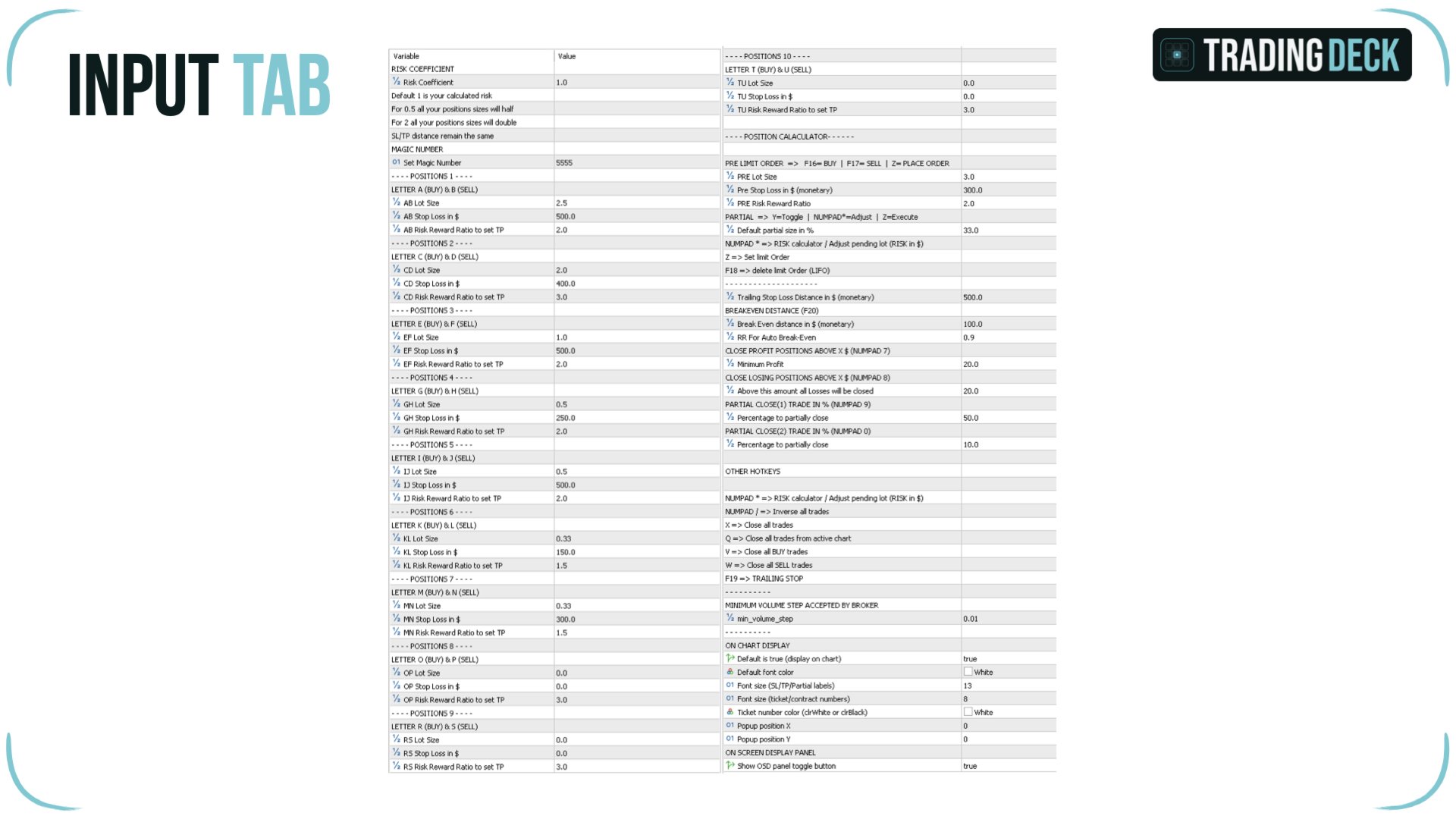
A complete technical user manual is attached in the product Comments section. It documents every input parameter, the full hotkey map, the recommended Stream Deck XL layout, and the advanced workflows for Pre-Limit orders, partial closes and the inverse-trade feature. Read it before purchase if you want the full technical picture.

Why Trading Deck stands apart

Two design choices separate this hotkey trading panel for MT5 from every other one-click EA and position size calculator on the MQL5 Market.

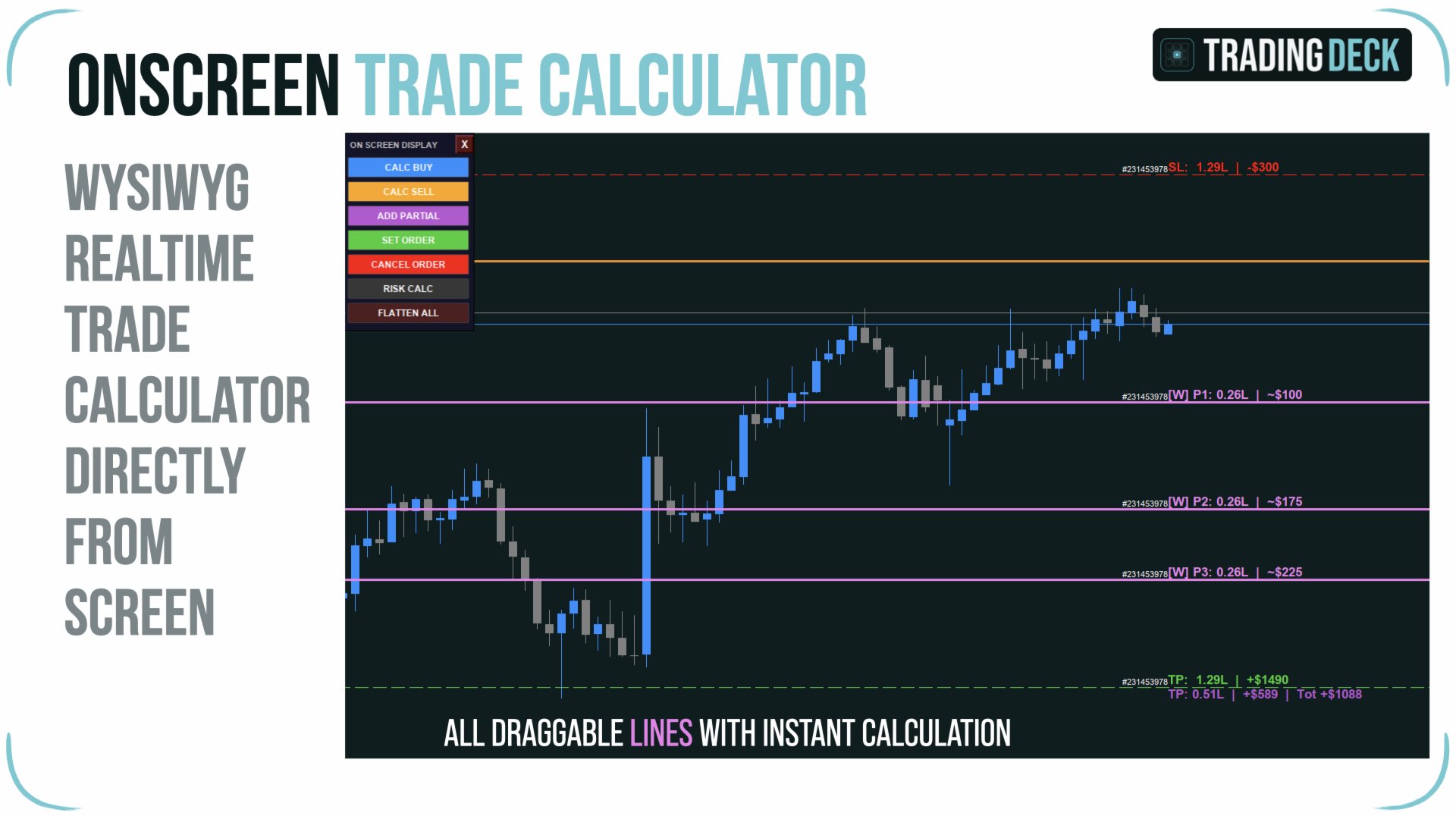
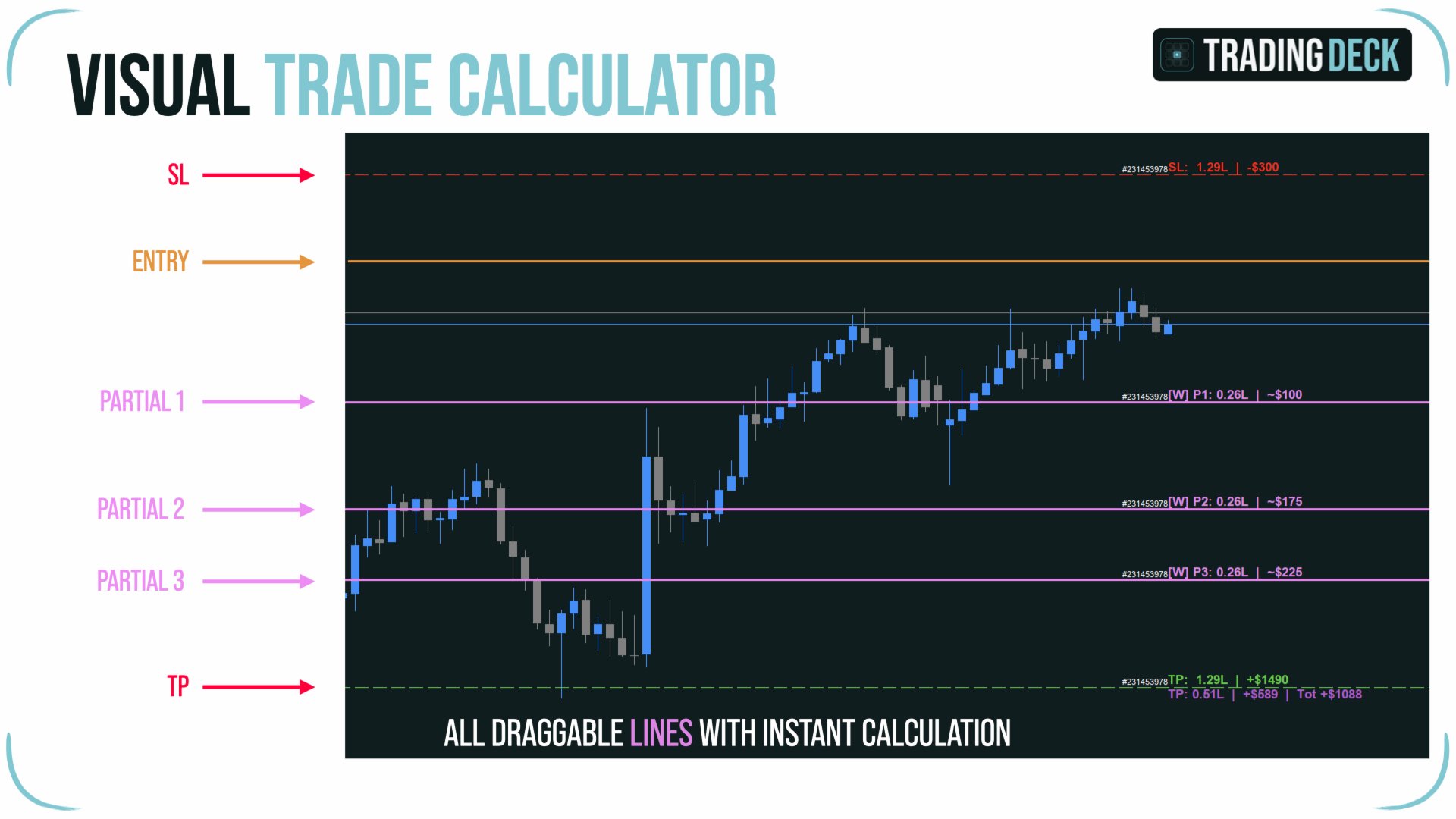
Your chart stays visible at all times. Conventional position size calculators overlay a floating panel on top of the price action. Trading Deck does the opposite: Entry, Stop Loss and Take Profit are three draggable lines drawn directly on the chart. Lot size, monetary risk and monetary reward update in real time as you slide each line, but the chart itself is never covered by a UI element. You read price structure and you plan the order on the same surface.

The Stream Deck is optional. Trading Deck is built around an Elgato Stream Deck workflow, but no hardware is required to use the EA. A built-in on-chart control panel exposes the essential functions as clickable buttons, and every action is bound to a standard keyboard shortcut. Start trading on any Windows or Mac MetaTrader 5 installation today; add a Stream Deck later when you want the physical cockpit experience.

Twenty instant order slots

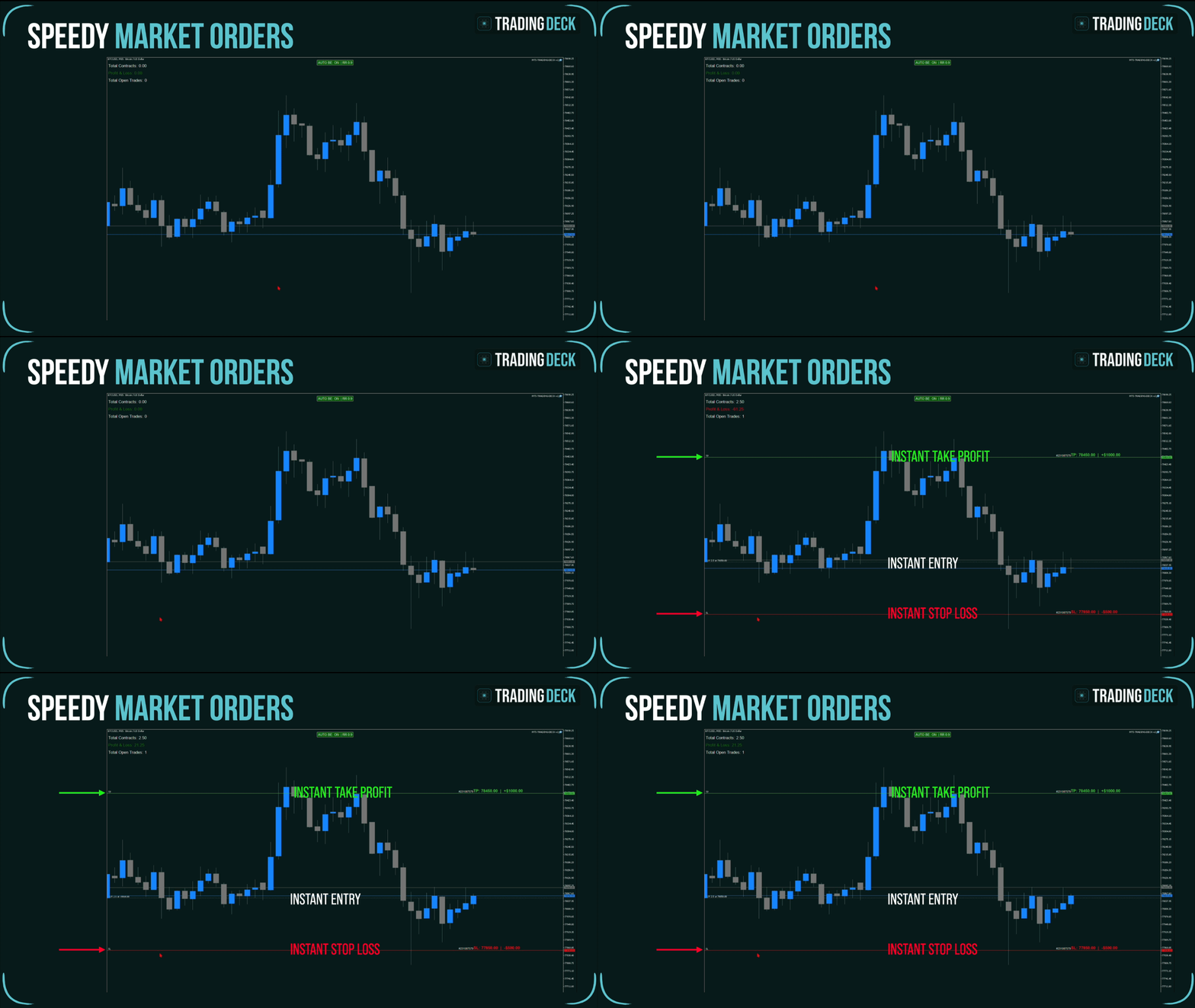
The core idea of Trading Deck is to remove every decision from the moment of execution. Twenty order slots are configured up front: 10 BUY slots on keys A, C, E, G, I, K, M, O, R, T and 10 SELL slots on keys B, D, F, H, J, L, N, P, S, U. Each slot carries its own pre-configured lot size, monetary stop loss and risk/reward ratio. Press the key and a market order is sent immediately, the stop is placed at the configured monetary distance, and the take profit is placed at the configured R/R multiple.

Stops and targets are defined in account currency, not in pips or points. If your stop is set at fifty units of your account currency, that is the actual loss you risk if the SL is hit. The EA reads the broker's tick value for the active symbol and converts the monetary amount to the correct number of points. The same slot configuration works on EURUSD, XAUUSD, US500 or BTCUSD without any retuning.

A global Risk Coefficient multiplier scales all twenty slots simultaneously. Set it to 0.5 before a high-impact news event to halve every position size at once. Set it to 1.5 on your highest-conviction setups. Set it to 0 to lock the EA into observation mode. One input parameter, twenty positions resized in a single move.

On-chart visual position calculator

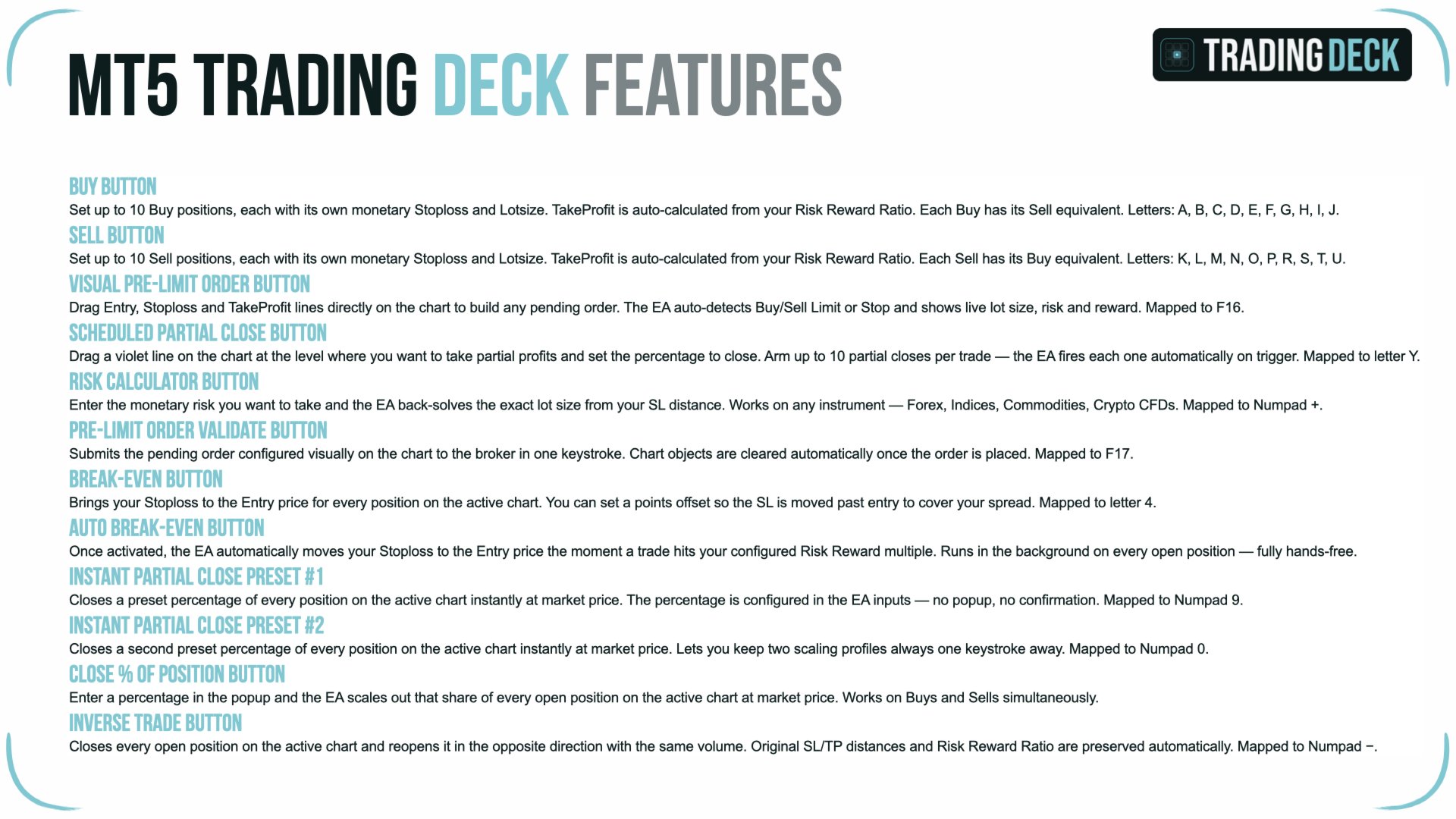
For pre-planned trades, Trading Deck provides a visual lot size calculator MT5 traders can actually use without losing sight of the chart. Press F16 to arm a BUY plan or F17 to arm a SELL plan. Three horizontal lines appear directly on the price: a blue line for a BUY entry (or orange for a SELL), a red line for the stop loss and a green line for the take profit.

Drag any of the three lines to set your levels. The EA reads the geometry and auto-detects the correct MT5 order type — Buy Stop, Buy Limit, Sell Stop or Sell Limit are chosen automatically based on the position of the Entry line relative to the current market price. Labels next to the SL and TP lines display the exact stop price, the lot size that respects your monetary risk, and the resulting monetary loss and gain.

The Numpad * key opens the Risk Calculator panel. Enter the monetary risk you want to commit and the EA back-calculates the exact lot size that respects your stop loss distance, while honouring the broker's minimum lot, maximum lot and minimum lot increment. When the Entry line is moved, the SL and TP lines preserve their relative distance from it; your original risk-to-reward ratio is never accidentally distorted by a chart adjustment.

Press Z to submit the pending order. Press F18 to open the LIFO cancel popup that lists every pending order and every armed partial on the active symbol, most recent first, and lets you cancel any of them in one click.

Stream Deck integration

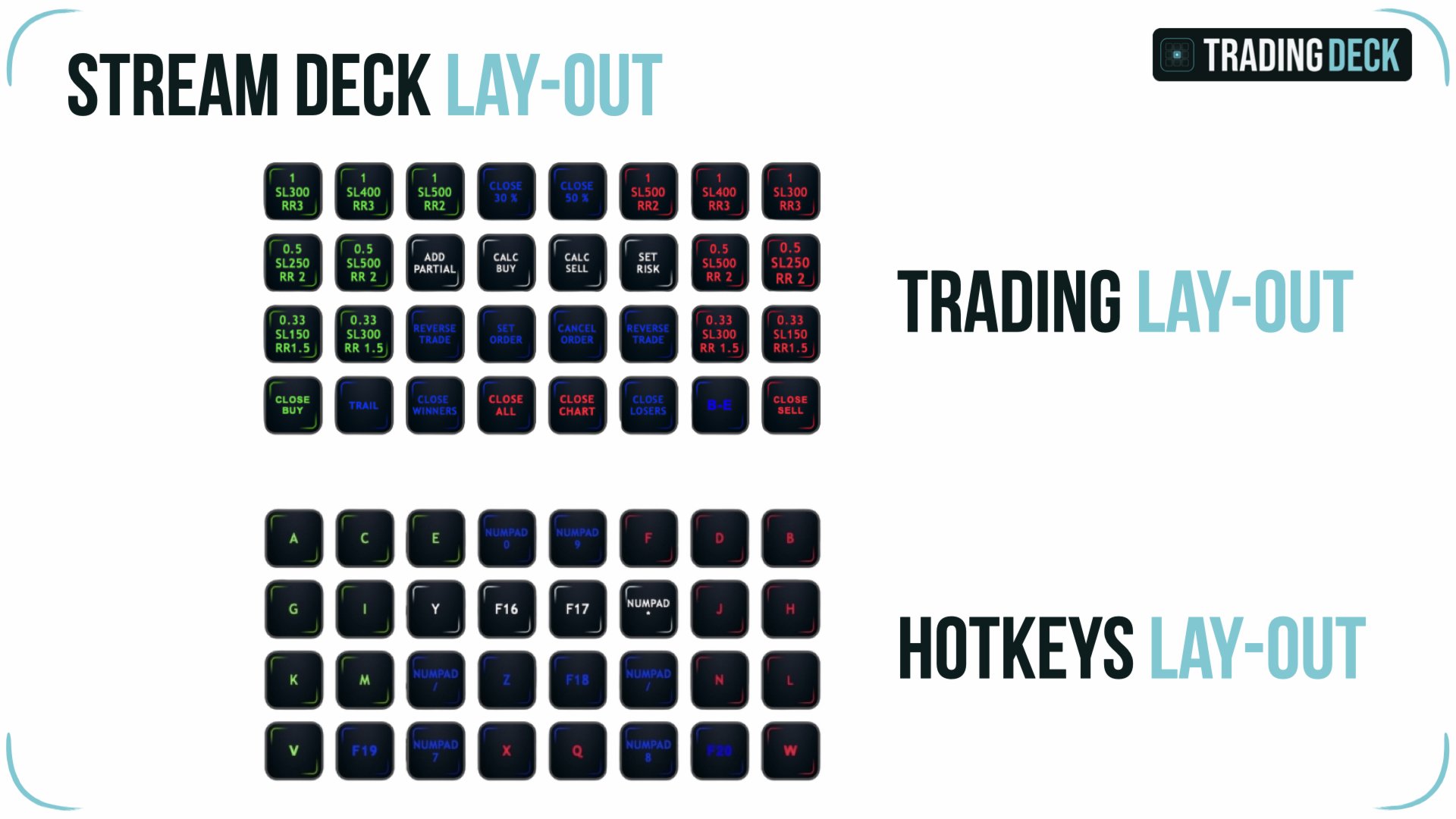
For traders who already own an Elgato Stream Deck, Trading Deck provides a documented Stream Deck XL button layout that maps every essential function to a backlit physical key. Order execution slots, Pre-Limit BUY and SELL, partial close presets, auto break-even toggle, trailing stop, inverse trade and the close-all hotkey all sit on the device in a logical grid. The mapping is done through the standard Stream Deck Hotkey action: each button sends the keystroke the EA expects, so the EA itself does not require any external integration.

The full layout file and a step-by-step setup guide are included in the user manual. You can also rebuild the layout from scratch and assign the functions to your own preferred buttons in a few minutes.

Full hotkey reference

Every action in Trading Deck is bound to a single, dedicated key. Below is the full reference. F-keys F13 to F20 and the full Numpad work on both Windows and macOS, which makes the panel fully usable on a MacBook keyboard.

Twenty instant order slots
A / B — slot 1 BUY / SELL
C / D — slot 2 BUY / SELL
E / F — slot 3 BUY / SELL
G / H — slot 4 BUY / SELL
I / J — slot 5 BUY / SELL
K / L — slot 6 BUY / SELL
M / N — slot 7 BUY / SELL
O / P — slot 8 BUY / SELL
R / S — slot 9 BUY / SELL
T / U — slot 10 BUY / SELL

Close and cancel
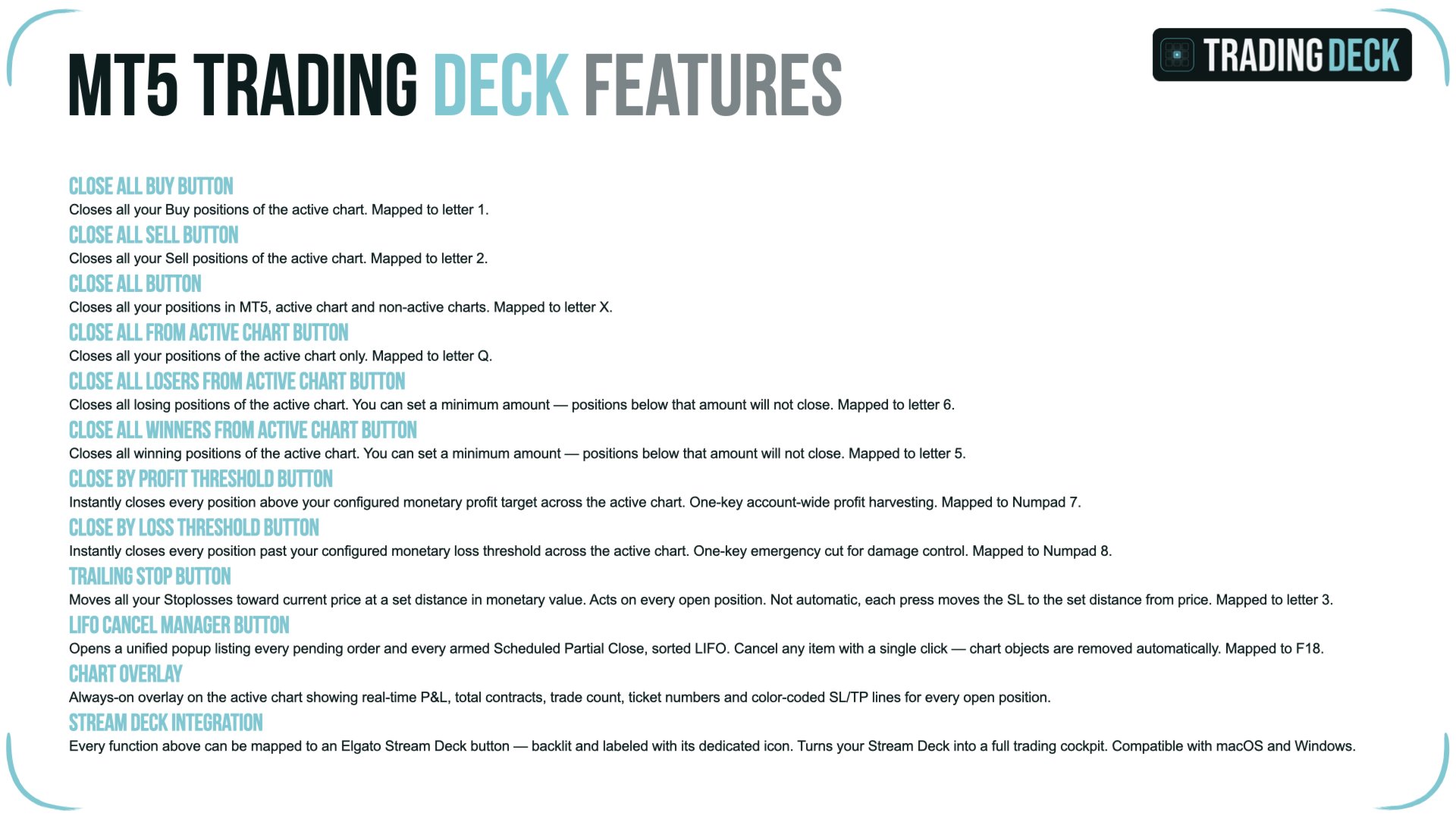
X — close every open position on every chart
Q — close every open position on the active symbol
V — close every open BUY on the active symbol
W — close every open SELL on the active symbol

Pre-Limit order workflow
F16 — toggle Pre-Limit BUY lines on the chart
F17 — toggle Pre-Limit SELL lines on the chart
Z — submit the pending order
F18 — open the LIFO cancel popup
Numpad * — open the Risk Calculator panel

Position management
F19 — trailing stop on every open position
F20 — manual break-even on eligible positions
Numpad 7 — close every position above a profit threshold
Numpad 8 — close every position below a loss threshold
Numpad 9 — partial close preset 1 (default 50%)
Numpad 0 — partial close preset 2 (default 30%)
Numpad / — inverse trade on every open position
Y — arm a price-triggered partial close on a position

Risk management built in

Trading Deck is designed as a risk management EA MT5 traders can rely on under pressure. Every protection is a single keystroke away.

Auto break-even. When a position reaches a configurable unrealised R/R threshold, the EA automatically moves the stop loss to the entry price. The on-chart AUTO BE toggle button shows the current state in green or red, and a single click flips it. A manual break-even key (F20) is also available for traders who prefer to trigger it themselves.

Trailing stop. F19 activates a monetary-distance trailing stop on every open position on the active chart. The trailing distance is configured in account currency, so the behaviour is consistent across instruments without any per-symbol tuning.

Partial closes. Two presets (Numpad 9 and Numpad 0) close a configurable percentage of every open position instantly. For more granular work, the advanced partial system lets you arm up to ten price-triggered partials per position, each closing a custom percentage at a specific level. Partials can also be attached to pending orders and are promoted to live positions automatically when the order fills.

Profit harvest and loss cutoff. Numpad 7 closes every position whose unrealised profit exceeds a configurable amount. Numpad 8 closes every position whose unrealised loss exceeds a configurable amount — a session-level emergency brake when the market turns against the open book.

Inverse trade. Numpad / closes every open position on the active chart and immediately reopens each one in the opposite direction at the current market price. Stop loss and take profit distances in points are preserved relative to the new entry, so the original risk-to-reward ratio survives the flip. If the broker's minimum stop distance is reached, the take profit is scaled proportionally rather than rejected.

Three workflows the panel was built for

Fast manual scalping. Pre-configure your favourite slot sizes and risk values up front. When a setup prints, press the slot key for the right size and direction. The order is live with stop loss and take profit before you would have finished clicking through the standard MetaTrader order dialog.

News and event-driven trading. Lower the global Risk Coefficient to 0.5 or 0.3 in the minutes before a release. After the release, your usual slot keys keep working, but every position size is automatically scaled down. Restore the coefficient when conditions normalise.

Pre-planned swing entries. Draw the Pre-Limit lines at your invalidation and target levels while you wait for price to reach the trigger. The EA submits the correct Buy Limit, Buy Stop, Sell Limit or Sell Stop automatically. Walk away from the screen knowing the lot size respects your monetary risk and the order will only execute on your level.

Compatibility and requirements

MetaTrader 5 on Windows or macOS. Works on any broker MT5 build that supports live trading from an Expert Advisor. Compatible with both hedging and netting account types. Symbol-agnostic and timeframe-agnostic; you can attach Trading Deck to any chart at any timeframe. The EA respects the broker's minimum lot, maximum lot and minimum lot increment, and queries the broker's tick value to convert monetary stops into instrument points.

AutoTrading must be enabled in the MetaTrader 5 toolbar. Each EA instance can carry a unique Magic Number to manage multiple instances on the same account, or zero to manage every trade on the symbol.

FAQ

Is a Stream Deck required?
No. Every function is also bound to a standard keyboard shortcut and to an on-chart control button. A Stream Deck adds physical, backlit buttons, but the EA is fully usable without one.

Does the EA take signals or place trades on its own?
No. Trading Deck is a discretionary execution and risk management tool. It never opens a position on its own initiative. You decide when and where to enter; the EA handles the mechanics, the sizing and the protections.

How is the stop loss defined?
In account currency. You specify the monetary amount you accept to lose on a slot or on a Pre-Limit order, and the EA converts it to the correct distance in points using the broker's tick value for the symbol.

Does the position calculator hide my chart?
No. Entry, Stop Loss and Take Profit are drawn as draggable horizontal lines on the price itself. The chart remains fully visible at all times. The Risk Calculator popup is a small, repositionable window that you can drag away from your analysis area.

Does it work on MetaTrader 4?
No. Trading Deck is sold exclusively for MetaTrader 5. The hedging-and-netting handling, the symbol tick conversion and the order workflow are all built on the MT5 trading API and would not transfer cleanly to MT4.

Can I run several instances on the same account?
Yes. Each instance carries its own Magic Number and operates only on the positions tagged with that number. You can attach Trading Deck to several charts and isolate each instance to its own set of trades.

About the project

Trading Deck is the result of a personal need: a hotkey trading panel for MT5 that respects monetary risk, never hides the chart, and works equally well with a Stream Deck or with a bare keyboard. Every feature in the panel exists because the workflow of a manual trader demands it. The product is maintained, updated, and supported through the MQL5 platform. Our goal is to grow Trading Deck alongside the traders who use it. We are actively listening for new workflows, risk tools and quality-of-life improvements to add in upcoming versions. If you have a feature request or a scenario you want the EA to handle, share it with us and we will consider it for a future update on the MQL5 platform.
리뷰 2
Akara Saguanwongse
197
Akara Saguanwongse 2026.05.10 03:53 
 

Been looking for something like this to use with stream deck Neo, works great and responsive seller. Thank you. I recommend. AKARA

Mr.AB
20
Mr.AB 2024.10.02 08:32 
 

Great tool that would help traders creating quick orders with a press of a button. I am new to MT5 platform and I had some difficulties getting the EA to work on my Mac. Manuel was extremely helpful in solving the issue. Thank You very much

추천 제품
This utility sends notification to trader’s MT5 (for MT4 version, checkout this link ) mobile app, to remind traders about their open positions. Super useful for part time traders to keep track and not forget any positions. To turn on notification, please visit   this link   (https://www.metatrader4.com/en/trading-platform/help/setup/settings_notifications) Features Keep track on open orders (pending orders, running orders) Customize time to send notification Customize notification interval (se
**MT5 → Telegram & Discord Auto Post Bot** Want to automate your trading and stop wasting time on manual posting? This bot is for you. **What does it do?** It connects directly to MetaTrader 5 and automatically posts to Telegram & Discord: ️ Open trades ️ Closed trades ️ SL / TP levels ️ Profit and loss ️ Real-time signals **Advantages:** • Fully automated process • No delay – posts in real time • Perfect for signal groups and channels • Increases trust and transparency • Works
One Click Trader  is a tool designed for MetaTrader 4 platform, which enables you to take your trading to the next level. It enables you to open, manage and close your trades in simple an efficient way by just one click of your mouse button. "-"   ,  "+"  change OCT window size  Up arrow minimizes the OCT panel Down arrow maximizes the OCT panel Right arrow displays the next panel with additional features Left arrow hides the panel with additional features Red  SELL  button enables you to open s
이 도구를 사용하면 한 번의 클릭으로 열려 있는 모든 주문을 닫을 수 있습니다. "모두 닫기"를 클릭하기만 하면 됩니다. 수익성 있는 주문만 청산하려면 "수익성 있는 청산" 버튼을 클릭하세요. 클릭한 후 모든 변동 주문이 청산됩니다. 변동 손실이 있는 주문만 종료하려면 "손실 가능 청산" 버튼을 클릭하세요. 클릭한 후 변동 손실이 있는 모든 주문이 종료됩니다. 이 도구는 1년 동안 테스트를 거쳤으며 원클릭 포지션 청산 기능이 매우 완벽합니다. 포지션 청산은 적시에 이루어지며 지연 범위는 작습니다. 물론 지연은 귀하가 속한 지역 및 네트워크 환경과도 관련이 있습니다. 이에 주의하시기 바랍니다. 과거 데이터의 백테스트 과정에서 도구는 더욱 완벽하게 작동했으며 100개의 주문을 모두 마감하는 데 최대 0.495초밖에 걸리지 않았습니다. 실제 거래 과정에서 나의 최대 포지션 주문 수는 26개에 불과했고, 모든 포지션이 청산되는 데 걸리는 시간은 1.28초였습니다.
Expert was built on the basis of Trap . EA can trade in automatic and semi-automatic mode. In automatic mode, it will place pending orders. However, in semi-automatic mode, it will wait for the first manually opened order. It will then go into automatic mode. Before starting work, the expert will download 28 currency pairs:         "AUDCAD","AUDCHF","AUDJPY","AUDNZD","AUDUSD","CADCHF","CADJPY",         "CHFJPY","EURAUD","EURCAD","EURCHF","EURGBP","EURJPY","EURNZD",         "EURUSD","GBPAUD","GBP
Superior Telegram Signals Multi-Platform Trade Copier & Notification System   Available for MetaTrader 4 and MetaTrader 5 Superior Telegram Signals   is a utility that connects a trading terminal to the Telegram application. It is designed to send automated trade notifications, chart screenshots, and account status updates to a specified Telegram chat, channel, or group. Use Cases This tool can be used by: Signal Providers:   To automate the broadcasting of trade signals, modifications, and clos
Telegram ChartSnap MT5 is an utility tool to bridge your MetaTrader 5 activities to your Telegram chat/group/channel. It will screen shot your MetaTrader 5 chart and send it to your dedicated Telegram chat/group/channel through a Telegram bot. The whole process will keep repeating based on a time cycle that predetermined by the user. It is a convenient tool for those who like to get access to their favorite system/dashboard that only available at MetaTrader Desktop. Beside that, trader can easi
EA SB8 Panel Trade
Juan Manuel Bernal Martin
SB-8 – Manual Trading Panel with Fixed Risk & TradingView-Style Visualization for MT5 SB-8 is an advanced manual trading panel for MetaTrader 5 , designed to execute trades visually, quickly and without calculations . It is especially built for traders coming from TradingView , who often find MT5 confusing when it comes to risk management and trade visualization. With SB-8, you don’t calculate lot size, percentages or risk . You simply move the Stop Loss line , and the panel handles everything a
BuyLimit and SellLimit Buttons opens any combination of Buy Limit and Sell Limit pending orders and closes all existing pending orders. Inputs Before placing all pending orders, the input window is opened allowing you to modify all input parameters: DeleteAllPendings ; if true , all pending orders (for the current currency) can be deleted. BuyLimit ; if true , Buy Stop orders can be opened. SellLimit ; if true , Sell Stop orders can be opened. InitLot ; initial lot size. LotCoeff ; next lot siz
브로커의 스톱 헌팅을 이제 중단시키십시오! 가격이 정확히 손절매(Stop Loss) 지점만 건드리고 바로 유리한 방향으로 반전되는 상황에 지치셨습니까? 이는 종종 시장의 노이즈나 이른바 '스톱 헌팅(Stop Hunting)'으로 인해 발생합니다. TrailGuardian 은 청산 가격을 시장에 노출하지 않고 수익을 보호하도록 설계된 전문적인 '스텔스(Stealth)' 거래 관리 도구입니다. 내부적으로 가상의 손절매 라인을 생성하여, 실제 실행 순간까지 브로커가 귀하의 전략을 알 수 없도록 숨깁니다. ️ 주요 기능 인비저블(Stealth) 모드: 브로커 서버로 하드 스톱로스를 전송하지 않습니다. EA가 로컬에서 가격을 모니터링하다가 가격이 가상의 라인을 교차하는 정확한 순간에만 시장가 실행(Market Execution)으로 포지션을 종료합니다. 브로커는 귀하의 청산 지점을 볼 수 없습니다! 네팅 및 거래소(선물/주식) 최적화: 대부분의 트레일링 EA는 네팅(N
# Universal Smart Manual Trade Manager MT5 v1.00 ## What the EA does Universal Smart Manual Trade Manager MT5 is a protective and management Expert Advisor for manually opened trades. It does not open new entries by itself. It only adopts already open positions that pass the selected filters, and can add missing SL/TP, manage break-even, profit lock, ATR trailing, send Telegram notifications, and display status information on the chart. The default setup is intentionally safe: the EA manages
Phoenix MT5 Telegram Notifier is a trading utility that integrates with both MetaTrader5 and Telegram. The utility publishes all your trades as signals in your channels or groups. This allows you to track in real time what is happening with your account via Telegram. Notifications for : Opened order Closed order Modified order Parameters : Telegram Bot Token - create a bot on Telegram and get a token Telegram Chat Id  - input your Telegram group/channel Id Notify for opened order - notifies wh
Galaxy Elegance
Gezani Paulus Nkuna
G.X.L (GALAXY ELEGANCE) Product Overview G.X.L is an automated trading robot for MetaTrader 5 that operates based on price action analysis. The system processes real-time market data to identify trading opportunities. It provides information and recommendations aligned with user-defined trading preferences. Core Functionality The robot analyzes price movements without relying on traditional lagging indicators. It focuses on current market structure, including swing points and fractals, to determ
기관 투자자용 데이트레이드 툴 수동 거래를 위한 고급 시각적 지원 도구 데이레이드 툴 인스티튜셔널은 가격 움직임(Price Action), CRT, PO3, ICT/SMC 등을 활용하며 차트에서 기관 투자자 수준의 명확성을 필요로 하는 수동 트레이더를 위해 개발된 전문 시각화 전문가 어드바이저(EA)입니다. 데이레이드 툴 인스티튜셔널은 차트를 기관 투자자 수준의 분석 대시보드로 변환하여 트레이더가 실행을 완벽하게 제어할 수 있도록 지원합니다. 시각적 명확성, 전문적인 맥락, 인간의 판단력 이 EA는 주문을 자동으로 개설, 청산 또는 관리하지 않습니다. 오로지 시각적 차트 및 분석 도구로만 작동합니다. EA 목표 차트를 지능적으로 구성하고, 기관 투자자 수준의 도면, 중요 레벨, 위험 영역, 고위험 시간대(HTF) 맥락 및 시각적 관리를 자동화하여 더 빠르고, 체계적이며, 정확한 의사 결정을 지원합니다. 주요 기능 제어판 (켜기/끄기) 깔끔하고 전문적인 인터페이스 모
Bober Real MT5
Arnold Bobrinskii
4.88 (16)
Bober Real MT5 is a fully automatic Forex trading Expert Advisor. This robot was made in 2014 year and did a lot of profitbale trades during this period. So far over 7000% growth on my personal account. There was many updates but 2019 update is the best one. The robot can run on any instrument, but the results are better with EURGBP, GBPUSD, on the M5 timeframe. Robot doesn't show good results in tester or live account if you run incorrect sets. Set files for Live accounts availible only for cu
KS Multiple Independent Strategies Auto Trading 1.9 EA 개요 이 EA(Expert Advisor)는 MetaTrader 5 플랫폼에서 주로 금(XAUUSD) 거래를 위해 설계된 전문가 수준의 MQL5 자동매매 프로그램입니다. 다수의 독립적인 거래 전략, 정교한 리스크 관리 기능, 그리고 성과 최적화를 위한 다양한 필터 기능을 지원합니다. 이 EA는 자동화, 수익 보호, 그리고 Telegram 및 Discord와 같은 외부 도구와의 연동 기능을 중점적으로 강조합니다. 모든 시간봉(timeframe)에서 작동 가능하며, 특정 거래 세션이나 주요 뉴스 이벤트에 맞춰 설정을 조정할 수도 있습니다. 주요 기능들은 아래와 같이 분류되어 있습니다. **핵심 거래 전략** 이 EA는 입력(Inputs) 설정을 통해 하나 이상의 독립적인 전략을 동시에 활성화할 수 있도록 지원합니다: - **Persistence/Anti-Persistence**: 특정
1. Brief Description of Gina Panel Code Functionality for End User The "Gina Panel" is a customizable trading dashboard Expert Advisor (EA) for MetaTrader 5 (MT5). It provides a graphical user interface (GUI) overlay on your chart to simplify trading and account management. Key functionalities include: Account Monitoring : Displays real-time balance, equity, profit/loss, margin levels, and net positions in a compact panel. Trade Execution : Quick buttons for buying/selling at market, setting lot
Chart Copilot
George Angelo Boutselis
Chart Copilot은 두 가지 핵심 방식을 결합한 트레이딩 어시스턴트입니다. 먼저 버튼, 입력창 등을 사용해 수동으로 거래를 관리하고 주문할 수 있습니다. 여기에 더해 챗봇 기능을 활용해 Chart Copilot에게 무엇을 할지 지시하기만 하면 됩니다. 차트에서 라인 선택기를 활성화하면 클릭 후 드래그하는 것만으로 원하는 이익 실현, 손절, 진입 가격을 설정할 수 있습니다. 또한 이 값들을 포인트, 계좌 통화 또는 가격으로 정확하게 지정할 수 있습니다. 고급 리스크 관리 기능도 제공됩니다. Chart Copilot은 감수할 계좌 잔고의 비율(%)을 고정할 수 있으며, 손절 수준에 따라 랏 크기를 자동으로 조정합니다. 또한 Chart Copilot을 사용하면 주문을 넣기 전에 가상 이익 실현 또는 손절을 설정하여 자신의 가격 수준을 브로커로부터 숨길 수 있습니다. 기능: 예약 주문 및 시장가 주문, 가상 손절 및 이익 실현 지원. 부분 청산 - 랏의 % 또는 고정 랏으로
Risk Control Utility MT5 designed for manual trading. It helps to calculate and control your risks, transfer transactions to breakeven and accompany positions with trailing stop. Easy to set up and use. It can be used for calculating a trading lot, calculating stop loss and take profit levels. Works with currency pairs, CFDs, stocks, indices, futures, cryptocurrencies Displays   volume,   potential loss and profit before   placing an order Ability to set the expiration time of a pending order Tr
Telegram Services
Ramesh Maharjan
5 (1)
텔레그램 서비스는 이 EA와 사용자의 텔레그램 채널 간의 통신을 제공하는 트레이딩 애플리케이션입니다. 이 앱은 거래 보고서를 생성하고, 거래 개시, 종료 및 수정 시 알림을 보내며, 새로운 거래를 시작하고, 기존 거래를 종료하고, 기존 거래를 수정하고, 거래 내역을 보여주고, 차트 스크린샷을 찍고, 손절매 및 이익 실현 값을 계산해 줍니다. 또한 현재 시장 상황을 표시하고, 시장 뉴스를 제공하며, 로그 파일을 분석합니다. 가장 중요한 기능은 다른 채널의 거래 신호를 복사하여 붙여넣어 유효한 거래를 실행할 수 있다는 점입니다. 이 애플리케이션 소개와 채널 및 봇 생성 방법, 그리고 애플리케이션 실행에 필요한 채널 ID와 봇 토큰을 얻는 방법에 대한 영상은 이 YouTube 영상에서 확인하실 수 있습니다. 아래는 사용 가능한 명령어입니다. 대괄호([]) 안의 값은 선택 사항입니다. 계좌 및 보고서: /account_status 또는 /as - 계좌 잔액 및 자산 /daily_r
PropFirm Challenge Risk Control EA Introduction Close all positions when reaching maximum capital loss percentage/amount Close all positions when reaching daily maximum capital loss percentage/amount Close single orders when reaching single trade maximum loss percentage/amount Filter & close restricted symbols positions during high-impact economic news events(Support optional modes for FTMO / The 5%ers and other prop trading platforms) Liquidate positions upon reaching profit target percentage
Time saving and fast execution Whether you’re traveling or sleeping, always know that Telegram To MT5 performs the trades for you. In other words, Our   Telegram MT5 Signal Trader  will analyze the trading signals you receive on your selected Telegram channels and execute them to your Telegram to MT5 account. Reduce The Risk Telegram To Mt5   defines the whole experience of copying signals from   Telegram signal copier to MT5 platforms. Users not only can follow all instructions from the signal
Close All and Change Take Profit and Stop Loss All Orders. Main Features     Ability to Close All Orders the Symbol you put this EA.     Ability to Change Take Profit to All Order.     Ability to Change Stop Loss to All Order.     Show Order count.     Show Average price with info and Horizontal Line.     Show lot open.     Show Price diff from average to price now     Show broken price with info and Horizontal Line.     Easy to use . How to use Close All (Symbol) PC : you can click on CloseAl
C Evolution MT5
Antonis Michos
5 (1)
Join the Out of the Box Telegram Group search for "Out of the Box" on Telegram or contact me This is not just a simple copier program that ONLY allows you to locally copy transactions between different MetaTrader 4 a accounts in any direction and quantity as quickly and easily as possible .Of course it does that. This copier DOES MUCH MUCH MORE!!! PLEASE READ BELOW AND SEE SCREENSHOTS. Many of us have martingale EAs or none martingale that are good but some point you wish to had opened the
Telegram to mt5 pro
Janet Abu Khalil
4 (4)
Telegram to MT5 Pro — Advanced Telegram Signal Copier with Auto-Fix, Multi-TP, Risk Control and Full Trade Management Telegram to MT5 Pro — 전문 텔레그램 신호 복사기 Telegram to MT5 Pro는 텔레그램 신호를 MetaTrader 5 계정으로 자동으로 직접 실행하는 고성능 트레이드 복사기로, 리스크, 실행, 트레이드 관리에 대한 완전한 제어를 제공합니다. 이 시스템은 두 가지 구성 요소로 이루어져 있습니다: • MetaTrader 5 내부에서 실행되는 Expert Advisor (EA) • 텔레그램에 연결되어 신호를 로컬로 EA에 전송하는 데스크톱 브리지 애플리케이션 두 구성 요소는 동일한 컴퓨터에서 실행되어야 합니다. MQL5 플랫폼 제한으로 인해 EA는 텔레그램에 직접 연결할 수 없습니다. 브리지는 텔레그램을 처리하고 EA는 거래를 실행합니다. 지원 및 설치
This utility provides the ability to use hot keys in manual trading instantly responding to the current market situation. You can assign hot keys to open/close positions by their type, open/close all positions on the current chart and remove all orders on the current chart. You can also assign hot keys for five predefined trade volumes and switch between them if necessary with no need to change the volume manually from time to time. It is also possible to set the auto calculation of a trade volu
이 어드바이저는 한 번의 클릭으로 여러 쌍을 거래할 수 있는 대시보드입니다. 딸깍 하는 소리       열려 있는       선택한 쌍에 대한 주문을 여는 버튼입니다. 딸깍 하는 소리       닫다       선택한 쌍의 주문을 마감하는 버튼입니다. 주문 로트는 사용자가 입력한 번호입니다. 양수는 매수 주문에 해당하고, 음수는 매도 주문에 해당합니다. 일부 주문이 아닌 전체 주문을 종료하려면   닫기 버튼을   클릭하세요. 최종 조치는 티켓 번호에 따라 달라지지 않습니다. 매직 입력을 0으로 설정하면 어드바이저가 수동 주문 마감을 동시에 도와줍니다. 다른 Advisor의 매직으로 Entry Magic을 구성함으로써 Advisor는 다른 Advisor가 개설한 주문을 동시에 마감할 수 있습니다. 삼각형 울타리       단 한 번의 클릭으로. 거래 기호는 사용자 정의 가능합니다. 시장 관찰에서 가져오거나 사용자가 입력합니다. 반: Magic – 조언자의 매직 넘버입니다. MaxLo
TradeMind Assistant — панель дисциплины и риск-контроля для MetaTrader 5 Привет, трейдер. TradeMind Assistant — это утилита-панель для MT5, созданная для того, чтобы вы торговали спокойнее, структурнее и безопаснее. Я не торговый советник и не открываю сделки вместо вас. Моя задача — дать вам контроль, подсказки и понятные расчёты прямо на графике. Что я делаю в этой версии: Работа прямо в MT5 Устанавливаюсь на график как обычный инструмент и отображаю всю ключевую информацию без лишних настрое
This EA is based loosely off the ICT Silver Bullet Strategy with a decent amount of    modifications such as time settings being widened for better trade entry.        The main signal is a high probability Fair Value Gap (FVG), with "high probability"    referring to the fact that not all FVGs will be considered as a signal unlike in    the original strategy taught by ICT. This modification serves as a filter to only take     trades with high profit potential, hence the wide TP in the default s
Introducing Neural Bitcoin Impulse - an innovative trading bot created using neural network training technology on voluminous market data sets. The built-in mathematical model of artificial intelligence searches for the potential impulse of each next market bar and uses the resulting patterns of divergence and convergence between the predictive indicators and the price to form high-precision reversal points for opening trading positions. The trading robot is based on the Neural Bar Impulse ind
이 제품의 구매자들이 또한 구매함
Farmed Hedge Yield Farming | All Markets (Manual - Hybrid - Semi/Automated EA) MULTI-ASSET SUPPORT Trade any asset available on your broker - Forex: Major, Minor, Exotic pairs - Crypto: BTC, ETH, XRP, SOL, BNB - Stocks: Apple, Tesla, Amazon, Google, etc. - Commodities: Gold, Silver, Oil, Gas - Indices: US30, NAS100, SPX500, DAX40 - Any CFD your broker offers VERIFIED TRADING RESULTS - Farmed Hedge Yield Axi Copy:  https://www.mql5.com/en/signals/2356376 - Farmed Hedge Yield Exn Copy:   https:/
HINN Lazy Trader
ALGOFLOW OÜ
5 (1)
LIMITED SUMMER SALE -40% ! ONLY $470 insead of $790!  Maximum real discount! The core idea: using the user interface, you configure the parameters the chart must meet before entering a position (or positions), choose which entry models to use, and set the rules for when trading and planning should end. Lazy Trader  handles the rest: it  takes over all the routine chart watching and execution! full description  :: 3 key videos [1] ->  [2]   ->  [3] What can it do? - Understands Larry Williams
Quant AI Agents
Ho Tuan Thang
5 (1)
Quant AI Agents are independent trading Expert Advisors. Instead of trading using a fixed strategy like other conventional EAs, Quant AI Agents   is a   multi-agent AI trading framework   that turns natural-language strategy prompts into live.  WANT THE SAME RESULTS AS MY LIVE SIGNAL?   Use the exact same brokers I do:   IC MARKETS , IC TRADING   .  Unlike the centralized stock market, Forex has no single, unified price feed.  Every broker sources liquidity from different providers, creating un
YuClusters
Yury Kulikov
4.93 (43)
Attention: You can view the program operation in the free version  YuClusters DEMO .  YuClusters is a professional market analysis system. The trader has unique opportunities to analyze the flow of orders, trade volumes, price movements using various charts, profiles, indicators, and graphical objects. YuClusters operates on data based on Time&Sales or ticks information, depending on what is available in the quotes of a financial instrument. YuClusters allows you to build graphs by combining da
AI Agent Supervisor is NOT an Expert Advisor. AI Agent Supervisor   is a   multi-agent AI risk & portfolio supervisor   that watches every EA on your account and intervenes in real time.  WANT AN AI PORTFOLIO MANAGER WATCHING YOUR FLEET 24/7?   Run your fleet on the same brokers I do:   IC MARKETS , IC TRADING   .  Unlike the centralized stock market, Forex has no single, unified price feed.  Every broker sources liquidity from different providers, creating unique data streams. The Supervisor r
Discord Signal Notifications — это мощный инструмент для трейдеров, проповодов и управляющих счетами, который автоматически отправляет все ваши торговые события в канал или чат Discord. Главное преимущество — Глобальный мониторинг. Вам не нужно устанавливать советник на каждый график. Достаточно запустить одну копию утилиты на одном любом окне, и она будет отслеживать действия по всем инструментам и всем счетам в вашем терминале одновременно. Основные возможности Глобальный мониторинг счёта Ути
# If you have any other requirements or are interested in collaboration, please contact  dev.quantech.london@gmail.com . Flash Trade (FT) Most friendly manual trading tool. Easy operation to secure your funds. Features of FT Click the chart to trade fast FT supports market orders and pending orders Click twice to complete the order and set SL and TP Click trice to complete the pending order and set SL and TP Automatically set the stop-loss amount of each order to a fixed percentage of the bala
QCML Assistant
Maxime Turcotte-lafreniere
QCML Assistant MT5 Your Trading. Our Assistant. Your Edge. Looking for a tool that completely transforms your experience on MetaTrader 5? QCML Assistant is the all-in-one solution built by traders, for traders. Just one tool installed on your chart, and you get access to an ultra-complete, ultra-fast, and ultra-simple trading platform. No more hours wasted setting up your workspace. No more complicated trade entries. With QCML Assistant, everything becomes simple, smooth, and efficient right fro
************************************************************************************************************************************** GoldMine Train은 Gold를 위한 트렌드 트레이딩 전략 EA입니다. 운영자는 주요 트렌드 방향을 결정하고 Train에 이동을 지시합니다. Train은 해당 방향으로 지속적으로 매수/매도를 합니다. Lot 볼륨은 계정 잔액과 사전 설정된 레버리지 비율에 따라 달라집니다. 운영자가 트렌드 방향을 변경하면 Train이 멈추고 이익을 잠급니다. 사용자는 차트의 버튼을 사용하여 트렌드 방향을 쉽게 선택할 수 있습니다. ******************************* ***************** ********************** ***************** ********************** *********
Introduction Our system is more than just a tool—it’s your personal guide in the dynamic trading landscape. Expertly developed and optimized using advanced strategies, this groundbreaking predictor gives traders a powerful edge. It’s not just about the features; it’s about a trading journey that stands out from the crowd. Get ready for an enhanced trading experience like never before! What It Does Next Candle Prediction: Imagine gaining insights into the market’s next move before it happens. Our
Gamma Edge Pro MT5 — GexBot Classic API Integration Gamma Edge Pro   brings institutional-grade   Gamma Exposure (GEX) data   directly onto your MetaTrader 5 chart — the same data used by professional options traders to anticipate price magnets, hedging flows, and dealer positioning. Powered by the   GexBot Classic API , this indicator automatically maps options market data from US-listed instruments onto any   MT5 CFD instrument   — Forex pairs, Gold, indices, and more — with intelligent price
EA price is reduced to 50% discount for limited time period. Check EA performance  https://www.mql5.com/en/signals/2376164?source=Site +Profile+Seller Spot vs Future Arbitrage EA for MT5 Spot vs Future Arbitrage EA is an automated Expert Advisor designed for MetaTrader 5 that operates using price differences between Gold spot and Gold futures instruments. The strategy opens positions on both instruments simultaneously to take advantage of temporary differences between spot and futures prices.
Reward Multiplier is a semi-automatic trade manager based on pyramid trading that opens additional orders with the running profit of your trades to maximize return exponentially without increasing the risk. Unlike other similar EAs, this tool shows potential profit/loss and reward to risk ratio before even entering the first trade! Download Demo here  (starting lot is fixed at 0.01) Contact me to get a 7 days trial version of the product with full functionality. Guide + tips here MT4 version  
ENGLISH VERSION tg @eeevleee TICK CHART SERVICE - Professional Tick Ch
Trading Chaos Expert
Gennadiy Stanilevych
5 (11)
This software has no equals in the world and represents a universal trade "console" covering trading signals, automated market entry, setting of Stop Loss and Take Profit, as well as Trailing Profit for multiple trades at the same time in a single open window. Intuitive control of the Expert Advisor in "three clicks" ensures a comprehensive use of all its functions on different computers, including tablets PCs. Interacting with additional signal indicators that mark the chart to give a real mark
News Trader Pro is a unique robot that allows you to trade the news by your predefined strategy. It loads every piece of news from several popular Forex websites. You can choose any news and preset the strategy to trade it, and then News Trader Pro will trade that news by selected strategy automatically when the news comes. News release gives opportunity to have pips since the price usually has big move at that time. Now, with this tool, trading news becomes easier, more flexible and more exciti
If you wish to draw Support and Resistance lines, view: daily market opening, classical pivot levels, Fibonacci pivot levels, trend lines, Fibonacci levels, the remaining time to candle closing, and current spread. If you seek to place your orders with the exact lot that meets your desired stop loss risk. If you wish to do all this and more with just one click, then this is the perfect tool to use. This tool will allow you to feel more relaxed when deciding to open orders, as well as predicting
Unlimited Trade Copier Pro MT5 is a tool to copy trade remotely to multiple MT4, MT5 and cTrader accounts at different computers/locations over internet. This is an ideal solution for you if you are a signal provider and want to copy your trades to other receivers globally on your own rules. One provider can copy trades to multiple receivers and one receiver can get trade from multiple providers as well. The provider can even set the subscription expiry for each receiver, so that receiver will n
The new version of  MirrorSoftware 2021  has been completely rewriten and optimized.  This version requires to be loaded only on a single chart because  it can detect all actions on every symbol and not only the actions of symbol where it is loaded. Even the  graphics and the configuration mode  have been completely redesigned. The MirrorSoftware is composed of two components (all components are required to work):  MirrorController  (free indicator): This component must be loaded into the MASTER
The  Easy Strategy Builder (ESB)  is a " Do It Yourself " solution that allows you to create a wide range of the automated trading strategies without any line of codes. This is the world’s easiest method to automate your strategies that can be used in STP, ECN and FIFO brokers. No drag and drop is needed. Just by set conditions of your trading strategy and change settings on desired values and let it work in your account. ESB has hundreds of modules to define unlimited possibilities of strategi
1. Record the price data for each Tick transaction. Data file contents: "Tick time", "ASK price", "BID price", "SPREAD SPREAD", "Tick quoted quantity". 2. Meanwhile, generate a quotation data file with a 1-minute period. Content of 1min data file: "ASK time", "ASK OPEN price", "ASK HIGH price", "ASK LOW price", "ASK CLOSE price", "BID time", "BID OPEN price", "BID HIGH price", "BID LOW price", "BID CLOSE price", "Tick quoted quantity". 3. Save all quotation data in one file every day, which is c
Mt5BridgeBinary
Leandro Sanchez Marino
I automated its commercial strategies for use of binary in MT5 and with our Mt5BridgeBinary I sent the orders to its Binary account and I list: begin to operate this way of easy! The expert advisers are easy to form, to optimize and to realize hardiness tests; also in the test we can project its long-term profitability, that's why we have created Mt5BridgeBinary to connect its best strategies to Binary. Characteristics: - It can use so many strategies as I wished. (Expert Advisor). - He does
FiboPlusWaves MT5
Sergey Malysh
5 (1)
FiboPlusWave Series products Ready-made trading system based on Elliott waves and Fibonacci retracement levels . It is simple and affordable. Display of the marking of Elliott waves (main or alternative option) on the chart. Construction of horizontal levels, support and resistance lines, a channel. Superposition of Fibonacci levels on waves 1, 3, 5, A Alert system (on-screen, E-Mail, Push notifications).    Features: without delving into the Elliott wave theory, you can immediately open one of
Xrade EA
Yao Maxime Kayi
Xrade EA is an expert advisor as technical indicator. For short period trade it's the best for next previsions of the trend of the market. +--------------------------------------------------------------------------------------- Very Important Our robot(data anylizer) does'nt take a trade procedure. If using only our robot you must take positions by yoursels +--------------------------------------------------------------------------------------- The technical indiator provide for a given sma
News: IDEA 2.0 is out with lot of features, like telegram bot notifications and Limits order! Check the changelog at bottom of page (*). Hi all, here you can find my Expert Advisor, called IDEA  (Intelligent Detection & managEr Algorithm) . In short, with this software you can: Have   a clear view of market status , with an indication of current trend. Simply add symbols you want to monitor to your market watch, and IDEA will notify you if some of them are in trend; Have an   automatic lots ca
Oracle
Denis Sotnikov
5 (2)
Эксперт - торговый помощник, созданный по одноимённой торговой стратегии Оракул в сотрудничестве с ее автором Нео. Определяет на графиках в автоматическом режиме разворотные импульсные модели и строит по ним Вилки Нео - авторский инструмент, позволяющий определять циклы движения цены и указывающий на ожидаемую цель TakeProfit . Поиск ведется на всех заданных периодах графиков одновременно с фильтрацией совпадений. Осуществляется фильтрация неверных Вилок с указанием кода ошибки. Утилита имеет
SystemLiveMxPips
Harold Alonso Hernandez
Automatice sus estrategias comerciales con nuestra sencilla herramienta de creación de estrategias "similar a un rompecabezas".   Cree fácilmente estrategias que operen por usted en modo de piloto automático.   También puede cargar estrategias creadas por otras personas, como la clásica   Estrategia Martingala,   para usarla como muestra para su propia estrategia. Características clave Cree su estrategia a través de funciones simples de arrastrar y soltar, sin necesidad de conocimientos de pro
Binance Full Trader
Arash Rezaeian
2 (1)
Binance Full Trader is developed for connection to your Binance account and get data, draw price charts and trade easily with any strategy by an indicator. A user-friendly interface has developed for it and has tried to give access to the necessary information such as open orders and wallet balances. ·        There are two sample indicators (one for trade signal and another for price) that you can download it from these links: https://drive.google.com/file/d/1w2CGuu3rArWKMhS9LkepT9zhVkGR1AO7/vie
As add-on to our professional divergence indicators we also created superb divergence scanners. These scanners give an overview of the different timeframes of the selected instruments and can save your tons of time. You can instantly see which instrument has a divergence on which timeframe. So no need to run through the charts manually anymore searching for good setups, with this scanner you see the whole market and you know where to look for a good trade opportunity. Even when you are not in fr
필터:
Akara Saguanwongse
197
Akara Saguanwongse 2026.05.10 03:53 
 

Been looking for something like this to use with stream deck Neo, works great and responsive seller. Thank you. I recommend. AKARA

Mr.AB
20
Mr.AB 2024.10.02 08:32 
 

Great tool that would help traders creating quick orders with a press of a button. I am new to MT5 platform and I had some difficulties getting the EA to work on my Mac. Manuel was extremely helpful in solving the issue. Thank You very much

리뷰 답변