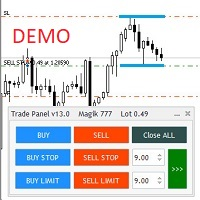
Trade Panel Pro DEMO

1

Бесплатная версия советника Trade Panel PRO

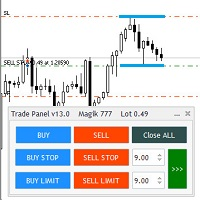
Данная торговая панель предназначена для быстрой и удобной торговли в один клик.

Создавался продукт для частичной автоматизации своей личной ручной торговли https://www.mql5.com/ru/signals/1040299?source=Site+Profile+Seller

Советник имеет ряд возможностей, а именно:

  • Открытие BUY или SELL ордеров. SL выставляется ниже (выше)  минимальной (максимальной) цены, задаваемых в параметрах количества свечей. Размер TP рассчитывается в соотношении от размера SL (по умолчанию 0.618).
  • Выставление BUYSTOP и SELLSTOP ордеров. SL и TP устанавливаются аналогично.
  • Выставление BUYLIMIT и SELLLIMIT ордеров. SL и TP устанавливаются аналогично.
  • В советнике присутствует возможность при открытии BUY и SELL ордеров выставлять стоповые ордера на уровне SL рыночного ордера для осуществления переворота.
  • Так же присутствует опция включения удвоения объем ордеров при перевороте позиции.   

ОГРАНИЧЕНИЯ НА ДЕМО ВЕРСИЮ - выставление ордеров исключительно объемом 0,01 лот.

Входные данные советника

  • Number of candles to determine tht highest value - Задаваемое количество свечей для расчета наивысшего значения.
  • Number of candles to determine the lowest value - Задаваемое количество свечей для расчета наинизшего значения.
  • Offset from highest / lowest - Отступ, на который будут выставляться стоповые ордера и SL от наивысшего или наинизшего значения.
  • Indent from for limit orders - Отступ для выставления лимитных ордеров от текущей цены.
  • TP to SL ratio - Соотношение TP к SL (по умолчанию 0,618)
  • Automatic order placement mode - Включение режима автоматического выставления стоповых ордеров на уровень SL рыночного ордера для "переворота".
  • Automatic orders modification - Включение режима автоматической модификации TP и SL ордеров.
  • Dubling orders upon reversal - Удвоение объема ордеров при "перевороте".
  • Send Push - Отправка Push сообщений на телефон о факте открытия / закрытия позиции.
  • Magik Number - Магик номер.
  • Line Color - Цвет линий отмечающих max/min значения на графике.

추천 제품
Trading Lab Trade Copier Master
Nasimul Haque Choudhury
3.67 (3)
Copy trades with ease using the MetaTrader5 trade copier - the quickest and easiest way to copy transactions between different MetaTrader 5 accounts! This innovative tool allows you to locally copy trades in any direction and quantity, giving you full control over your investments. Attention!   You need to download the Trade Copier Slave mq5 file as well to run this EA. Download it from here  https://www.mql5.com/en/market/product/96541 Designed to work on both Windows PC and Windows VPS, this
FREE
Hard Scalping Assistant
Jorge Javier Catalan Garcia
Hard Scalping Assistant is a semi-automatic Expert Advisor for MetaTrader 5 created for traders who want to keep making their own decisions, but with a much more advanced, organized and professional execution. It does not enter the market on its own: you choose the direction, define the trade idea and adjust the zone directly on the chart, while the assistant automatically calculates the risk, lot size and the full execution structure. With just a few clicks, you can prepare BUY or SELL trades
FREE
* This product was converted using  "BRiCK Convert4To5 MT4 "  based on the MQL4 source file of  "BRiCK Convert4To5 MT4 Free" . "Convert4To5" is a Script that converts MQL4 source files into MQL5 source files. Experts, Indicators, Scripts, and Libraries with extension ".mq4" will be available for MT5. Parameter None. Procedure 1. Open the following folder.     terminal_data_folder\MQL4\Files\ (in the terminal menu select to view "File" - "Open the data directory") 2. Confirm that the BRiCK_Conv
FREE
Global Market Sessions – Visual Analyzer for MT5 A lightweight MT5 indicator that visually maps Tokyo, London and New York sessions, auto-detects broker timezone & DST, and highlights the best liquidity windows for smarter trading. See the market’s rhythm at a glance. Trade with clarity, precision, and confidence. Overview Global Market Sessions is a powerful yet easy-to-use MT5 indicator that visually displays the world’s major trading sessions (Tokyo, London, New York) directly on your chart
FREE
AntaresX Volume Profile — Indicator for MetaTrader 5 AntaresX Volume Profile is an indicator that displays the price levels where the highest trading activity was concentrated during a selected period, and calculates the historical probability of the price reacting when it reaches each of those levels. What the indicator draws The indicator identifies three levels on the chart: POC (Point of Control): the price where the highest trading activity was recorded during the selected period. Displaye
FREE
Exact Time — detailed time on the seconds chart. The utility shows the opening time of the selected candle. This is necessary when working with seconds charts. For example, it can be used on a seconds chart built using the Seconds Chart utility. Inputs Base corner — the chart corner to which an object Is attached. X distance — the horizontal distance from the chart corner. Y distance — the vertical distance from the chart corner. Text font — font name Font size — font size Color — text color
FREE
Binary Profit Gainer
Myo Min Aung
5 (2)
This indicator is especially for the binary trading. Time frame is 1 minutes and exp time 5 or 3 minutes only. You must be use martingale 3 step. So you must put lots size is 10 % at most. You should use Mt2 trading platform to connect with my indicator to get more signal without human working. This indicator wining rate is over 80% but you may get 100% of profit by using martingale 3 step. You should use MT2 Trading Platform to connect meta trader platform and binary platform . You can get mt2
FREE
Quick Scale Trading Panel FREE Quick Scale Trading Panel FREE is a manual trading utility for MetaTrader 5 designed to simplify order execution and position sizing directly from the chart. The panel allows traders to open and manage trades using predefined lot multipliers, reducing the need for manual calculations during fast market conditions. Users can define a base lot size and execute trades using multiplier buttons (1x, 2x, 4x, 8x). This helps maintain consistent position sizing and improv
FREE
Stop Loss Magic Number  Description All offsets in this utility are calculated in USD. A reliable Stop Loss manager for loss protection, auto trailing and profit locking. Suitable for both beginners and advanced traders thanks to simple and extended modes. Fully automates trade management and helps eliminate emotional decision-making. Utility Features   Default Mode — simple mode Designed for quick and easy use. Includes basic trade management logic: • loss protection (Loss Protection Offset)
FREE
1. Introduction Collective TP Manager v2 is a MetaTrader 5 Expert Advisor designed to automatically manage the collective Take Profit and Stop Loss of multiple open positions on a single symbol. Instead of setting individual TP/SL for each order, this EA monitors the combined profit/loss of all (or filtered) positions and takes action when your targets are reached. 1.1 Why You Need This EA In modern trading, especially scalping and multi-EA environments, manually tracking the net profit of doze
FREE
심볼 스위처 프로 심볼 스위처 프로는 MetaTrader 5용 무료 유틸리티 패널로, 드래그 가능한 단일 인터페이스에서 최대 40개의 거래 심볼을 탐색할 수 있습니다. 각 통화쌍의 실시간 손익이 표시되므로 차트를 벗어나지 않고도 항상 현재 상황을 파악할 수 있습니다. 개요 MetaTrader 5에서 여러 심볼을 관리하려면 일반적으로 차트 창을 전환해야 하므로 컨텍스트를 놓치고 시간을 낭비하게 됩니다. 심볼 스위처는 차트에 표시되는 간편하고 사용자 정의 가능한 버튼 패널을 통해 이러한 문제를 해결합니다. 한 번의 클릭으로 활성 심볼을 전환할 수 있으며, 모든 통화쌍의 현재 손익이 실시간으로 표시됩니다. 패널은 필요한 위치에 정확하게 배치되고 원하는 모양으로 디자인할 수 있습니다. 무료이며 아무런 제약이 없습니다. 주요 기능 최대 40개 심볼 외환 통화쌍, 금속, 지수 또는 기타 금융 상품을 원하는 조합으로 최대 40개까지 하나의 패널에 추가할 수 있습니다. 모든 심볼은 사용자가
FREE
Jvh Protection MT5
Jeremy Nicolaj Van Hoorn
JVH Protection – Universal Prop Firm Risk Manager (MT5) Broker-Time Reset | Daily Max Loss | Overall Drawdown | Trailing Lock | Full Account Guard JVH Protection is a professional-grade equity protection tool for MetaTrader 5, built for prop firm traders, EA users, and anyone who wants strict automated risk control. This EA acts as a real-time risk firewall for your entire MT5 trading account. Key Features Full Account Protection Monitors all symbols Covers all magic numbers Works with m
FREE
AutoLotEqualizer – Smart Position Balancing Tool AutoLotEqualizer is a precision trade management utility designed to keep your total BUY and SELL volumes balanced automatically. It detects differences between your open BUY and SELL positions and opens compensating trades — ensuring both sides stay equal in exposure. This helps grid, hedge, and basket systems maintain symmetry and control over total position risk — all while saving you time and manual effort. ️ Key Features Automatic Lot Ba
FREE
Hi you, I need your help! Be my Patron, let's make it possible! https://www.patreon.com/joaopeuko https://github.com/Joaopeuko/Mql5-Python-Integration Channel: English version - Versão Inglês: https://www.mql5.com/en/channels/Mql5_Python_Integration_EN Portuguese version - Versão Português: https://www.mql5.com/en/channels/Mql5_Python_Integration_PT Free version with 5 indicators: https://www.mql5.com/en/market/product/57574 This version has 38 indicators, 5 from the free version plus
FREE
Axilgo PipPiper CoPilot
Theory Y Technologies Pty Ltd
5 (2)
Axilgo Pip Piper CoPilot Elevate your trading game with the Axilgo Pip Piper CoPilot, the first in our revolutionary Pip Piper Series. This all-inclusive toolset is meticulously crafted for serious traders, focusing on key areas such as Risk Management, Trade Management, Prop Firm Rule Compliance, and Advanced Account Management . With CoPilot, you’re not just investing in a tool—you’re gaining a strategic partner in the intricate world of trading. Important Notice: To ensure you receive the fu
FREE
V-Connect Tick Data Validator is a utility for MetaTrader 5. It checks each tick and rejects invalid data. Features - Checks bid and ask prices - Checks spread and time - Uses only MQL5 functions - Logs results in the Experts tab - Real-time filtering: - Negative or zero spreads - Stale timestamps (>60 seconds) - Reversed bid/ask - **<1ms overhead** — runs on low-spec VPS - **Journal audit trail** — "TICK PASSED" / "TICK REJECTED" How to Use Attach to a chart. In your EA: if (validate_tick(tick
FREE
Exp Assistant 5
Vladislav Andruschenko
4.77 (125)
자동 설정, 손실 중지, 이익 실현, 추적 중지, 손익분기 수준,   가상   중지 손실 및 이익 실현. Exp Assistant는   귀하의 직위 유지 관리를 조직하는 데 도움을 줄 것입니다. Expert Advisor라는 이 프로그램은   Real 또는 Virtual을   자동으로 설정하도록 설계되었습니다.       거래하는 동안 포지션에 대한   손실 중지 및 이익 실현   수준. Expert Advisor의 모든 작업을 차트의 제어판에서 쉽게 관리할 수 있습니다. 미결 포지션   에 대해 손절매, 이익실현,   추적 손절매   ,   손익분기   점을 설정하는 데 어려움이 있거나 수동으로 거래하는 것을 선호하는 경우 보조 도구를 사용할 수 있습니다. 거래에 대한 손절매 설정 및 이익 실현, 추적 손절 설정, 필요한 경우 손절매를 손익분기점으로 이동하는 등 필요한 작업을 자동으로 수행합니다. 보조 도구에는   포물선형 Sar   표시를   기반으로 하는 후행 중지 기능도 있습
FREE
Trade assistant pro v8
Ahmed Mohammed Bakr Bakr
FREE FREE FREE Trade Assistant MT5 – Professional Trading & Risk Management Panel Trade Assistant MT5 is an advanced trading panel designed to help traders execute orders faster, safer, and more professionally . It simplifies manual trading by combining smart order management , precise risk control , and one-click execution , making it ideal for both beginners and advanced traders. This tool does not trade automatically . Instead, it empowers you with full control while applying professional-gra
FREE
Fast Copy cp
Alireza Kalamati
5 (7)
FastCopy cp : Professional Offline Local Trade Copier This tool is a 100% Offline-Capable (Local Mode) copier, designed to communicate directly between terminals on your PC/VPS for near-instant execution. [Why FastCopy cp ? v3.0 Update] Instant Execution: Uses "Dirty Flag" logic to detect trades the millisecond they happen. Simple Setup: No complicated URL lists or DLL imports required. [Key Features] Ultra-Low Latency: Direct file exchange ensures copying speeds under 50ms locally. Smart Symbol
FREE
Smart Ruler MT5
Serhii Shevchuk
5 (1)
This tool is designed to measure the distance between two points on a chart and much more. List of measured values:  Distance in points  Profit (with and without spread)  Time difference  Percentage price change  Slope angle  Number of bars (various variations)  Ratio of distance in points to the reference value Features:  Snap to OHLC prices  Automatic color profile setting based on chart background color  Various types of pointers to choose from  Display of values ​​of selected points on th
FREE
SPECIAL ANNOUNCEMENT: Get the Ultimate Trading Suite! Before you grab this utility, did you know? The LogicLadder Visual Trade Planner is so powerful that it serves as the core visual execution engine for my flagship MT5 trading systems! If you are looking for a massive, all-in-one trading dashboard, advanced trade management, or strict prop-firm guardrails, you can get this exact visual planner already included inside my premium and free full-suite EAs: Pro LTS TradeDashboard MT5 (Paid
FREE
VadineroLab MT5 Export Master to CSV EXEL JSON - Expert Advisor for exporting and analyzing symbols, account, terminal parameters, active trades, current account state, trading history, global variables.   Generates the following report types: * Symbols Parameters — spread, tick size, min/max lot, swap, … * Account Parameters — balance, equity, leverage, currency, margin info, … * Terminal Parameters — server, version, language, date, environment, … * Trade History — orders, deals, positions, se
FREE
Crimson FX
Michael Prescott Burney
Crimson EA emerges as a force to be reckoned with on the USDJPY M15 chart, embodying the perfect fusion of 50 meticulously crafted strategies that span across trend analysis, hedging, and scalping disciplines. This powerhouse operates beyond the confines of conventional stop-loss and take-profit mechanisms, relying instead on precise entry and exit signals generated from its strategic arsenal. Coupled with an advanced reversal function, Crimson EA offers a protective shield to safeguard invest
FREE
이전 버전의 인디케이터 개발 ZigZag WaveSize MT4 ZigZag WaveSize - 표준 ZigZag 인디케이터를 수정하여 포인트, 레벨 및 다양한 경고 로직에 대한 정보 추가 일반적인 개선 사항: MetaTrader 5 코드 적응 그래픽 객체 작업 최적화 새로운 기능: 극점에서의 수평 수준 수준 유형 선택: 수평/광선/세그먼트 유동성 수준 필터 (가격에 의해 돌파되지 않음) 돌파 버퍼: 거짓 돌파에 대한 민감도 설정 레이블 및 기능 설정: 수량, 외관, 오래된 레이블 삭제 구조 돌파 알림 (BoS) 움직임 성격 변경 알림 (ChoCH) 최적화: 극값 업데이트 로직 수정 새로운 객체의 동적 업데이트 바 출현 시 하중 감소 레이블의 중앙 집중 시스템 수정 사항: 배열 범위 초과 수정 레이블의 정확한 위치 지정 중복 파라미터 제거 ZigZag WaveSize 인디케이터를 귀하의 트레이딩 시스템의 보완재로 사용하세요   또한 시장에서의 나의 다른 제품도 시도해 보세요 
FREE
Mini Panel Plus
PATRICK ANTONIO MORELO A.
4.33 (15)
Remodeling the BoletaMiniPanel, the Mini Panel Plus has the same functionalities, but is now in the form of a box that allows it to be minimized and placed anywhere on the chart. Simple Panel with Stop loss (Loss), Stop gain (Gain), Trailing stop (TS) and Breakeven (BE-P). The Lot is the number of contracts to be traded. Gain is the number, in points, at which the stop gain will be positioned. If you don't want to place a stop gain, just put 0 (zero) in its place and when you open the order it w
FREE
Smart Volatility Indicator – Precise Volatility Detection for MetaTrader 5 The Smart Volatility Indicator is an innovative tool for accurately measuring market volatility – specifically developed for MetaTrader 5. It combines candle range, wick ratios, and smart filtering logic into a clear, scalable volatility score from 0 to 100 . Perfect for traders who want to respond to breakouts, trend dynamics, or consolidating markets – manually or via Expert Advisors (EAs). Key Features Smart Volatility
FREE
SignalXpert
Steve Rosenstock
5 (2)
여기를 클릭하여 제 모든 무료 제품을 확인하세요 SignalXpert 는 RangeXpert 인디케이터를 사용하는 트레이더에게 강력한 분석 도구를 제공하기 위해 제가 개발한 것입니다. RangeXpert 는 시스템의 기반 역할을 하며, 시장의 정확한 영역을 감지하고 해당 데이터를 제공하고, SignalXpert 는 이를 실시간으로 분석하여 명확하고 실행 가능한 신호를 생성합니다. 이를 통해 시스템은 여러 시간대에서 최대 25개의 다양한 자산을 동시에 모니터링할 수 있으며 , 가장 중요한 시장 움직임을 실시간으로 포착합니다. 통합된 알림 기능 덕분에 알림, 푸시, 이메일로 신호를 전달할 수 있어 , 트레이딩 기회를 놓치지 않게 됩니다. MetaTrader VPS 에 설치하면 SignalXpert 는 24/7 중단 없이 실행되며 안정적인 신호 모니터링을 제공합니다. 진입 또는 청산을 계획 중이든, SignalXpert 는 빠르고 정확한 지원을 제공하여 높은 변동성 시장에서도 자신 있
FREE
Lot Size Ruler
Joshua Akinetos Malik
SI Ruler A clean, one-click price ruler that shows points and exact dollar cost between any two levels on your chart. Every trader needs to quickly measure the distance between two price levels and know what it costs in real money. Most platforms make this harder than it should be. SI Ruler puts a single icon in the corner of your chart — click it, click your entry level, and drag to your stop or target. The label tells you instantly how many points that distance is and exactly what it costs in
FREE
This tool allows you to export Ticks for any financial instrument available in MetaTrader 5. You can download multiple symbols into the same CSV file. You can also schedule the download frequency (every 5 minutes, 60 minutes, etc.). There is no need to open multiple charts to get the latest data—the tool downloads the data directly. The CSV file will be stored in the following folder: \MQL5\Files . How it works Select the symbols to download: Click an item to select or deselect it. Enter the CSV
FREE
EA Zone Recovery Assistant เป็น EA ที่ช่วยเปิดออเดอร์ Recovery ตามระดับราคาที่ผู้ใช้กำหนดได้อัตโนมัติ //โดยหลักการทำงานมีดังนี้// เมื่อผู้ใช้เปิดออเดอร์ Buy หรือ Sell (Market Order) EA จะตรวจสอบจุด SL ภายในเวลาที่กำหนดในตัวแปร Input Delay Check for setting Price Recovery ถ้าผู้ใช้วาง SL วางภายในเวลาที่กำหนด ระบบจะลบ SL ออกแล้วใช้จุดที่วาง SL เปิดออเดอร์ Recovery เมื่อกราฟวิ่งผิดทางถึงจุดที่กำหนด //แต่ถ้าผู้ใช้ไม่วาง SL ภายในเวลาที่กำหนดระบบจะไม่มีการทำ Recovery ในออเดอร์นั้นแม้ผู้ใช้มีการวาง SL
FREE
이 제품의 구매자들이 또한 구매함
Trade Assistant MT5
Evgeniy Kravchenko
4.43 (211)
거래당 위험 계산, 라인을 사용한 손쉬운 신규 주문, 부분 청산 기능을 통한 주문 관리, 7가지 유형의 트레일링 스탑 및 기타 유용한 기능을 제공합니다. 추가 자료 및 지침 설치 지침   -   애플리케이션 지침   -   데모 계정용 애플리케이션 평가판 라인 기능       - 차트에 개시선, 손절매, 차익실현을 표시합니다. 이 기능을 사용하면 새로운 주문을 쉽게 하고 개봉 전에 추가 특성을 볼 수 있습니다. 위기 관리       -       위험 계산 기능은 설정된 위험과 손절매 주문의 크기를 고려하여 새 주문의 볼륨을 계산합니다. 이를 통해 손절매 크기를 설정하고 동시에 설정된 위험을 존중할 수 있습니다. 로트 계산 버튼 - 위험 계산을 활성화/비활성화합니다. 필요한 위험 값은 위험 필드에 0에서 100 사이의 백분율 또는 예금 통화로 설정됩니다. 설정 탭에서 위험 계산 옵션을 선택합니다. $ 통화, % 잔액, % 지분, % 자유 마진, % 사용자 정의, % AB 이전
Trade Manager EA에 오신 것을 환영합니다. 이 도구는 거래를 보다 직관적이고 정확하며 효율적으로 만들기 위해 설계된 궁극적인 리스크 관리 도구 입니다. 단순한 주문 실행 도구가 아닌, 원활한 거래 계획, 포지션 관리 및 리스크 제어를 위한 종합 솔루션입니다. 초보자부터 고급 트레이더, 빠른 실행이 필요한 스캘퍼에 이르기까지 Trade Manager EA는 외환, 지수, 상품, 암호화폐 등 다양한 시장에서 유연성을 제공합니다. Trade Manager EA를 사용하면 복잡한 계산은 이제 과거의 일이 됩니다. 시장을 분석하고 진입, 손절 및 익절 수준을 차트의 수평선으로 표시한 후 리스크를 설정하면, Trade Manager가 이상적인 포지션 크기를 즉시 계산하고 SL 및 TP 값을 실시간으로 표시합니다. 모든 거래가 간편하게 관리됩니다. 주요 기능: 포지션 크기 계산기 : 정의된 리스크에 따라 거래 크기를 즉시 결정합니다. 간단한 거래 계획 : 진입, 손절, 익절을 위한
Local Trade Copier EA MT5
Juvenille Emperor Limited
4.96 (139)
Local Trade Copier EA MT5 를 사용하여 매우 빠른 거래 복사 경험을 해보세요. 1분 안에 간편하게 설정할 수 있으며, 이 거래 복사기를 사용하면 Windows 컴퓨터 또는 Windows VPS에서 여러 개의 MetaTrader 터미널 간에 거래를 0.5초 미만의 초고속 복사 속도로 복사할 수 있습니다. 초보자든 전문가든   Local Trade Copier EA MT5 는 다양한 옵션을 제공하여 사용자의 특정 요구에 맞게 맞춤 설정할 수 있습니다. 이는 수익 잠재력을 높이려는 모든 사람을 위한 최고의 솔루션입니다. 지금 사용해보시고 이것이 왜 시장에서 가장 빠르고 쉬운 무역용 복사기인지 알아보세요! 팁: 여기 에서 데모 계정에서 Local Trade Copier EA MT5 데모 버전을 다운로드하여 사용해 볼 수 있습니다. 다운로드한 무료 데모 파일을 MT5 >> File >> Open Data Folder >> MQL5 >> Experts 폴더에 붙여넣고 터
AI Agent Supervisor is NOT an Expert Advisor. AI Agent Supervisor   is a   multi-agent AI risk & portfolio supervisor   that watches every EA on your account and intervenes in real time.  WANT AN AI PORTFOLIO MANAGER WATCHING YOUR FLEET 24/7?   Run your fleet on the same brokers I do:   IC MARKETS , IC TRADING   .  Unlike the centralized stock market, Forex has no single, unified price feed.  Every broker sources liquidity from different providers, creating unique data streams. The Supervisor r
TradePanel MT5
Alfiya Fazylova
4.87 (156)
Trade Panel은 다기능 거래 도우미입니다. 이 애플리케이션에는 50개 이상의 수동 거래 기능이 포함되어 있으며 대부분의 거래 작업을 자동화할 수 있습니다. 구매하기 전에 데모 계정에서 데모 버전을 테스트할 수 있습니다. 데모 계정용 애플리케이션 체험판 다운로드: https://www.mql5.com/en/blogs/post/750865 . 전체 지침 여기 . 거래. 한 번의 클릭으로 거래를 수행할 수 있습니다: 리스크 자동 계산과 함께 예약 주문 및 포지션 열기. 한 번의 클릭으로 여러 주문 및 포지션 열기. 주문 그리드 열기. 예약 주문 및 포지션을 그룹별로 닫기. 포지션 방향 전환 (Buy 닫기 > Sell 열기, Sell 닫기 > Buy 열기). 포지션 잠금 (부족한 포지션을 열어 Buy와 Sell 포지션의 수량을 동일하게 만들기). 모든 포지션 한 번의 클릭으로 부분적으로 닫기. 모든 포지션의 테이크 프로핏과 스톱로스를 같은 가격 수준에 설정. 모든 포지션의 스톱로스를
베타 출시 Telegram to MT5 Signal Trader 는 곧 공식 알파 버전을 출시할 예정입니다. 일부 기능은 아직 개발 중이며, 작은 버그가 발생할 수 있습니다. 문제가 있으면 꼭 보고해 주세요. 여러분의 피드백은 소프트웨어 개선에 도움이 됩니다. Telegram to MT5 Signal Trader 는 Telegram 채널 또는 그룹의 거래 신호를 자동으로 MetaTrader 5 계정으로 복사하는 강력한 도구입니다. 공개 및 비공개 채널을 모두 지원하며, 여러 신호 제공자를 여러 MT5 계정에 연결할 수 있습니다. 소프트웨어는 빠르고 안정적으로 동작하며, 복사된 거래를 완벽히 제어할 수 있습니다. 인터페이스는 깔끔하며 대시보드와 차트가 시각적으로 구성되어 있고, 직관적인 네비게이션이 가능합니다. 여러 Signal Account를 관리하고, 공급자별 설정을 세밀하게 조정하며, 모든 동작을 실시간으로 모니터링할 수 있습니다. 필수 조건 MQL의 제한으로 인해 EA는 Te
Quant AI Agents are independent trading Expert Advisors. Instead of trading using a fixed strategy like other conventional EAs, Quant AI Agents   is a   multi-agent AI trading framework   that turns natural-language strategy prompts into live.  WANT THE SAME RESULTS AS MY LIVE SIGNAL?   Use the exact same brokers I do:   IC MARKETS , IC TRADING   .  Unlike the centralized stock market, Forex has no single, unified price feed.  Every broker sources liquidity from different providers, creating un
Exp COPYLOT CLIENT for MT5
Vladislav Andruschenko
3.91 (33)
MetaTrader 5용 전문 트레이드 복사기 MetaTrader 용 빠르고 전문적이며 신뢰할 수 있는 트레이드 복사기 입니다. COPYLOT 은 MT4와 MT5 터미널 간의 Forex 거래 복사를 지원하며, Hedge 및 Netting 계좌를 모두 지원합니다. COPYLOT MT5 버전 지원 구성: - MT5 Hedge → MT5 Hedge - MT5 Hedge → MT5 Netting - MT5 Netting → MT5 Hedge - MT5 Netting → MT5 Netting - MT4 → MT5 Hedge - MT4 → MT5 Netting MT4 버전 전체 설명 + DEMO + PDF 구매 방법 설치 방법 로그 파일 확인 방법 테스트 및 최적화 방법 Expforex의 모든 제품 MT4 터미널로도 거래를 복사할 수 있습니다(MT4 → MT4, MT5 → MT4): COPYLOT CLIENT for MT4 COPYLOT은 2개, 3개, 심지어 10개의 터미널과 동시에 작동할
AntiOverfit PRO MT5
Enrique Enguix
5 (6)
EA를 구매하기 전에, 이 시스템이 정말 버티는지 아니면 백테스트에서 운 좋게 좋아 보였던 것뿐인지 먼저 확인하세요. 대부분의 로봇은 보기 좋은 백테스트와 함께 판매됩니다. 우상향 곡선. 좋은 Profit Factor. 의심할 이유가 거의 없어 보입니다. 그런데도 그런 EA들 중 많은 수가 시장이 그 과거 구간처럼 움직이지 않기 시작하는 순간 무너지기 시작합니다. 왜 그럴까요? 백테스트가 증명하는 것은 딱 한 가지뿐이기 때문입니다. 그 전략이 특정한 하나의 가격 경로에서는 작동했다는 것. 다른 경로에서도 버틴다는 뜻은 아닙니다. 견고하다는 뜻도 아닙니다. 당연히 당신의 돈을 쓸 가치가 있다는 뜻도 아닙니다. 당신이 EA를 사는 이유는 과거의 예쁜 곡선을 감상하기 위해서가 아닙니다. 계속 변하는 시장에서 실제로 쓰기 위해서입니다. AntiOverfit PRO가 하는 일 AntiOverfit PRO는 MetaTrader 5용 Expert Advisor가 정말 탄탄한지, 아니면 특정한
Farmed Hedge Yield Farming | All Markets (Manual - Hybrid - Semi/Automated EA) MULTI-ASSET SUPPORT Trade any asset available on your broker - Forex: Major, Minor, Exotic pairs - Crypto: BTC, ETH, XRP, SOL, BNB - Stocks: Apple, Tesla, Amazon, Google, etc. - Commodities: Gold, Silver, Oil, Gas - Indices: US30, NAS100, SPX500, DAX40 - Any CFD your broker offers VERIFIED TRADING RESULTS - Farmed Hedge Yield Axi Copy:  https://www.mql5.com/en/signals/2356376 - Farmed Hedge Yield Exn Copy:   https:/
Trade Dashboard MT5
Fatemeh Ameri
4.94 (126)
Trade Dashboard simplifies how you open, manage, and control your trades, with built-in lot size calculation. It allows you to execute trades, manage risk, and control positions directly on the chart, with tools such as partial close, breakeven, and trailing stop. Designed to reduce manual work and help you stay focused on your trading decisions. A demo version is available for testing. Detailed explanations of features are provided within the MQL5 platform. Installation instructions are include
The News Filter MT5
Leolouiski Gan
4.78 (23)
이 제품은 뉴스 시간 동안 모든 전문가 어드바이저 및 수동 차트를 필터링하여 수동 거래 설정이나 다른 전문가 어드바이저가 입력한 거래가 파괴될 수 있는 급격한 가격 상승으로부터 걱정하지 않아도 됩니다. 이 제품은 또한 뉴스 발표 전에 열린 포지션과 대기 주문을 처리할 수 있는 완전한 주문 관리 시스템이 함께 제공됩니다.   The News Filter  를 구매하면 더 이상 내장 뉴스 필터에 의존할 필요가 없으며 이제부터 모든 전문가 어드바이저를 여기서 필터링할 수 있습니다. 뉴스 선택 뉴스 소스는 Forex Factory의 경제 캘린더에서 얻어집니다. USD, EUR, GBP, JPY, AUD, CAD, CHF, NZD 및 CNY와 같은 어떤 통화 기준으로 선택할 수 있습니다. Non-Farm (NFP), FOMC, CPI 등과 같은 키워드 식별을 기준으로 선택할 수도 있습니다. 저, 중, 고 영향을 가지는 뉴스를 필터링할 수 있도록 선택할 수 있습니다. 차트와 관련된 뉴스만 선
파워 캔들 전략 스캐너 - 자체 최적화 다중 종목 설정 찾기 도구 파워 캔들 전략 스캐너는 마켓 워치에 등록된 모든 종목에 대해 파워 캔들 지표와 동일한 자체 최적화 엔진을 동시에 실행합니다. 하나의 패널에서 현재 통계적으로 거래 가능한 종목, 각 종목별 최적의 전략, 최적의 손절매/익절 조합을 알려주며, 새로운 신호가 발생하면 즉시 알림을 전송합니다. 이 도구는 Stein Investments 에코시스템의 일부입니다. 18개 이상의 도구와 함께 당신의 1대1 AI 트레이딩 멘토 Max.  항상 대기 중, 모든 인디케이터를 깊이 있게 이해, 무언가를 차근차근 생각해보고 싶은 순간에 도움을 줍니다.  https://stein.investments 에서 만나보세요 완벽한 시장 모니터링. 종목당 3,000건 이상의 자동 최적화. 2가지 알림 유형. 한 번의 클릭으로 차트를 전환하고 바로 거래하세요. 이 도구가 필요한 이유 대부분의 다중 종목 스캐너는 가격 변동만 보여줍니다. 티커별
Premium Trade Manager - MetaTrader 5를 위한 빠르고 규율 있는 거래 관리 도구 Premium Trade Manager 는 결정에만 집중하고 나머지 루틴은 패널이 처리하길 원하는 트레이더를 위한 도구입니다. 크기 계산, 주문 배치, 분할 청산, 트레일링, 뉴스 대응, 프롭 펌 한도 관리까지, 모든 거래에서 동일하게 규율 있는 방식으로 실행됩니다. MetaTrader 5용 빠른 온차트 패널로, 모든 거래에서 기계적인 작업을 완전히 없애줍니다. 방향, 종목, 타이밍은 당신이 결정합니다. 패널이 리스크에 맞춰 포지션 크기를 계산하고, 스톱과 타겟이 설정된 주문을 배치하고, 분할 청산으로 스케일아웃하고, 나머지를 트레일합니다. 펀디드 트레이더에게는 한 걸음 더 나아갑니다. 8개 주요 외환 프롭 펌의 실제 규칙을 내장하고, 각 한도까지 남은 거리를 실시간으로 표시하며, 하드 한도를 위반할 주문은 차단합니다. 구매 전에 직접 체험해 보세요. 인터랙티브 walkthro
Footprint Chart Pro — Professional OrderFlow EA for MetaTrader 5 Version 6.34 | Professional tool for real traders | Institutional-Grade Visualization DEMO USERS - PLEASE SELECT EVERY TICK / REAL TICK WHEN TESTING AND YOU HAVE DOWNLOADED HISTORICAL DATA. IF YOU SEE A WAITING SCREEN AND IT IS NOT DOWNLOADING, IT MEANS YOU HAVE LOW HISTORICAL DATA. TRY 1 MIN AND 5 MIN FIRST ON 1 DAY DATA. ONE DAY DATA SHOULD BE THE NEWEST AND MOST CURRENT DATE. PLEASE WAIT UNTIL THE MARKET HAS ROLLED OVER PERIOD.
Trade copier MT5
Alfiya Fazylova
4.55 (44)
Trade Copier는 거래 계정 간의 거래를 복사하고 동기화하도록 설계된 전문 유틸리티입니다. 복사는 공급자의 계정/단말기에서 동일한 컴퓨터 또는 vps에 설치된 수신자의 계정/단말기로 발생합니다. 프로모션 - 이미 "Trade copier MT5"를 구매하셨다면, "Trade copier MT4"를 무료로 받으실 수 있습니다 (MT4 → MT5 및 MT4 ← MT5 복사용). 조건에 대한 자세한 정보를 원하시면, 개인 메시지를 통해 저희에게 문의해 주시기 바랍니다! 구매하기 전에 데모 계정에서 데모 버전을 테스트할 수 있습니다. 데모 버전 여기 . 전체 지침 여기 . 주요 기능 및 이점: 복사기는 "МТ5> МТ5", "МТ4> МТ5", "МТ5> МТ4" 복사를 지원합니다. 복사기는 데모 계정 > 실 계정, 실 계정 > 데모 계정, 데모 계정 > 데모 계정 및 실제 계정 > 실 계정 복사를 지원합니다. 복사기는 읽기 전용 암호가 적용된 투자자 계정에서 복사를 지원합니다. 하
Telegram To MT5 Receiver
Levi Dane Benjamin
4.31 (16)
가입한 모든 채널에서 (개인 및 제한된 채널 포함) 시그널을 바로 MT5로 복사합니다.   이 도구는 사용자를 고려하여 설계되었으며 거래를 관리하고 모니터하는 데 필요한 많은 기능을 제공합니다. 이 제품은 사용하기 쉽고 시각적으로 매력적인 그래픽 인터페이스로 제공됩니다. 설정을 사용자 정의하고 제품을 몇 분 안에 사용할 수 있습니다! 사용자 가이드 + 데모  | MT4 버전 | 디스코드 버전 데모를 시도하려면 사용자 가이드로 이동하십시오. Telegram To MT5 수신기는 전략 테스터에서 작동하지 않습니다! Telegram To MT5 특징 여러 채널에서 동시에 신호를 복사합니다. 개인 및 제한된 채널에서 신호를 복사합니다. Bot 토큰이나 채팅 ID가 필요하지 않습니다.   (원하는 경우에는 사용할 수 있습니다) 위험 % 또는 고정된 로트로 거래합니다. 특정 심볼을 제외합니다. 모든 신호를 복사할지 또는 복사할 신호를 사용자 정의할지 선택할 수 있습니다. 모든 신호를 인
Timeless Charts
Samuel Manoel De Souza
5 (6)
Timeless Charts is an all-in-one trading utility for professional traders. It combines custom chart types such as Seconds Charts and Renko with advanced order flow analysis using Footprints , Clusters , Volume Profiles , VWAP studies, and anchored analysis tools for deeper market insight. Trading and position management are handled directly from the chart through an integrated trade management panel , while Market Replay and Virtual Accounts provide environments for practicing trading skills and
Prop Firm Os
Gayathiri Gopalakrishnan
5 (1)
PROP FIRM OS Structured Trading Assistant for MetaTrader 5 PROP FIRM OS is a structured trading assistant designed for MetaTrader 5 users who prefer rule-based market analysis and organized trading workflows. The Expert Advisor combines market analysis tools, scanner functions, dashboard monitoring, alerts, risk-control settings, and trade management features inside one system. PROP FIRM OS is designed to help traders follow selected rules, filters, and monitoring conditions during trading activ
Telegram to mt5 pro
Janet Abu Khalil
3.67 (3)
Telegram to MT5 Pro — Advanced Telegram Signal Copier with Auto-Fix, Multi-TP, Risk Control and Full Trade Management Telegram to MT5 Pro — 전문 텔레그램 신호 복사기 Telegram to MT5 Pro는 텔레그램 신호를 MetaTrader 5 계정으로 자동으로 직접 실행하는 고성능 트레이드 복사기로, 리스크, 실행, 트레이드 관리에 대한 완전한 제어를 제공합니다. 이 시스템은 두 가지 구성 요소로 이루어져 있습니다: • MetaTrader 5 내부에서 실행되는 Expert Advisor (EA) • 텔레그램에 연결되어 신호를 로컬로 EA에 전송하는 데스크톱 브리지 애플리케이션 두 구성 요소는 동일한 컴퓨터에서 실행되어야 합니다. MQL5 플랫폼 제한으로 인해 EA는 텔레그램에 직접 연결할 수 없습니다. 브리지는 텔레그램을 처리하고 EA는 거래를 실행합니다. 지원 및 설치
HINN MagicEntry Extra
ALGOFLOW OÜ
4.73 (15)
HINN MAGIC ENTRY – the ultimate tool for entry and position management! Place orders by selecting a level directly on the chart! full description   ::  demo-version  :: 60-sec-video-description Key features: - Market, limit, and pending orders - Automatic lot size calculation - Automatic spread and commission accounting - Unlimited partitial take-profits  - Breakeven and trailing stop-loss and take-profit  functions - Invalidation leves - Intuitive, adaptive, and customizable interface - Works
Copy Cat More Trade Copier MT5 (복사 고양이 MT5) 는 오늘날의 거래 과제를 위해 설계된 로컬 거래 복사기이자 완전한 위험 관리 및 실행 프레임워크입니다. 프롭펌 챌린지부터 개인 포트폴리오 관리까지, 견고한 실행, 자본 보호, 유연한 구성 및 고급 거래 처리의 조합으로 모든 상황에 적응합니다. 복사기는 마스터(송신자)와 슬레이브(수신자) 모드 모두에서 작동하며, 시장 주문과 예약 주문, 거래 수정, 부분 청산 및 헷지 청산 작업의 실시간 동기화를 제공합니다. 데모 및 실계좌, 거래 또는 투자자 로그인과 호환되며, EA, 터미널 또는 VPS가 재시작되어도 지속적인 거래 메모리 시스템을 통해 복구를 보장합니다. 고유 ID로 여러 마스터와 슬레이브를 동시에 관리할 수 있으며, 브로커 간 차이는 접두사/접미사 조정 또는 사용자 정의 심볼 매핑을 통해 자동으로 처리됩니다. 매뉴얼/설정  | Copy Cat More MT4 | 채널  특별 기능: 설정이 간편함 —
YuClusters
Yury Kulikov
4.93 (43)
Attention: You can view the program operation in the free version  YuClusters DEMO .  YuClusters is a professional market analysis system. The trader has unique opportunities to analyze the flow of orders, trade volumes, price movements using various charts, profiles, indicators, and graphical objects. YuClusters operates on data based on Time&Sales or ticks information, depending on what is available in the quotes of a financial instrument. YuClusters allows you to build graphs by combining da
The Ultimate TradingView to MT5 Bridge Automation 수동 매매와 지연 시간(Latency) 문제에서 벗어나세요. TradingView to MT5 Copier PRO 는 트레이딩뷰(TradingView) 알람을 메타트레이더 5(MT5)에서 직접 실행할 수 있는 가장 빠르고 안정적인 브릿지입니다. 사용자 지정 지표, 전략 테스터 스크립트, 수동 작도 등 무엇을 사용하든, 이 EA는 초고속 웹소켓(WebSocket) 기술 을 사용하여 매매를 즉시 실행합니다. 단순한 복사기와 달리, 이 PRO 버전에는 Arena Statistics 가 포함되어 있습니다. 이는 차트에서 직접 매매 성과, 드로다운(Drawdown), 샤프 지수(Sharpe ratio)를 분석할 수 있는 전문적인 내장 대시보드입니다. 주요 기능 트레이드 복사기 (Trade Copier) 초고속 실행: 표준 WebRequest보다 빠른 WebSocket 연결을 사용하여 슬리피지(Slippa
MT5 to Telegram Signal Provider 는 사용하기 쉽고 완전히 커스터마이즈 가능한 유틸리티로, 특정 신호를 Telegram의 채팅, 채널 또는 그룹으로 전송하고, 귀하의 계정을 신호 제공자 로 만듭니다. 경쟁 제품과 달리 DLL 임포트를 사용하지 않습니다. [ 데모 ] [ 매뉴얼 ] [ MT4 버전 ] [ 디스코드 버전 ] [ 텔레그램 채널 ]  New: [ Telegram To MT5 ] 설정 단계별 사용자 가이드 가 제공됩니다. 텔레그램 API에 대한 지식은 필요하지 않습니다; 개발자가 제공하는 모든 것이 필요합니다. 주요 특징 구독자에게 보낸 주문 상세 정보를 커스터마이즈할 수 있습니다. 예를 들어, 브론즈, 실버, 골드와 같은 계층 구독 모델을 만들 수 있습니다. 골드 구독에서는 모든 신호를 받습니다. id, 심볼, 또는 코멘트로 주문을 필터링할 수 있습니다. 주문이 실행된 차트의 스크린샷이 포함됩니다 보낸 스크린샷에 닫힌 주문을 그려 추가 검증을 합니다
Trade Manager DaneTrades
Levi Dane Benjamin
4.28 (29)
거래 관리자는 위험을 자동으로 계산하는 동시에 거래를 빠르게 시작하고 종료하는 데 도움을 줍니다. 과잉 거래, 복수 거래 및 감정 거래를 방지하는 데 도움이 되는 기능이 포함되어 있습니다. 거래를 자동으로 관리할 수 있으며 계정 성과 지표를 그래프로 시각화할 수 있습니다. 이러한 기능은 이 패널을 모든 수동 거래자에게 이상적으로 만들고 MetaTrader 5 플랫폼을 향상시키는 데 도움이 됩니다. 다중 언어 지원. MT4 버전  |  사용자 가이드 + 데모 트레이드 매니저는 전략 테스터에서 작동하지 않습니다. 데모를 보려면 사용자 가이드로 이동하세요. 위기 관리 % 또는 $를 기준으로 위험 자동 조정 고정 로트 크기 또는 거래량과 핍을 기반으로 한 자동 로트 크기 계산을 사용하는 옵션 RR, Pips 또는 Price를 사용한 손익분기점 손실 설정 추적 중지 손실 설정 목표 달성 시 모든 거래를 자동으로 마감하는 최대 일일 손실률(%)입니다. 과도한 손실로부터 계정을 보호하고 과도한
Signal TradingView to MT5 Pro Automator TradingView와 MetaTrader 5 간의 즉각적인 전문 실행 TradingView 알림과 MT5의 실제 실행을 연결하는 가장 강력한 커뮤니케이션 브리지로 거래 전략을 자동화하세요. 속도, 유연성 및 완벽한 위험 관리를 요구하는 트레이더를 위해 설계된 이 Expert Advisor는 모든 알림 메시지를 정확한 시장가 또는 지정가 주문으로 변환합니다. 강점 및 이점 범용 파싱 엔진(독점 기술): 모든 알림 형식에서 데이터를 자동으로 인식하고 추출할 수 있는 고급 기술입니다. 단일하고 엄격한 형식에 얽매일 필요가 없습니다. 시스템은 심볼, 액션, 가격, SL 및 TP를 자동으로 이해합니다. 실시간 실행: 지연 시간을 최소화하도록 최적화된 1초 미만의 초고속 폴링 기술. 신호 수신 후 몇 밀리초 내에 주문 실행이 이루어집니다. 기관 수준의 위험 관리: 다음 기준에 따른 자동적이고 정확한 로트(Lot) 크기 계
SMC Trade Pilot MT5 Smart Money Concepts 트레이더를 위한 반자동 트레이딩 어시스턴트. 차트 스크린샷이 포함된 신호를 Telegram에서 받고, 한 번의 탭으로 트레이드를 실행하세요. 컴퓨터에서 떨어져 있어도 휴대폰에서 포지션을 관리할 수 있습니다. 해결하는 문제 Smart Money 셋업은 당신을 기다리지 않습니다. Order Blocks와 Liquidity Sweeps는 런던 개장, 뉴욕 개장 또는 아시아 세션 중에 형성되며, 이때 당신은 업무 중이거나 회의 중이거나 화면에서 떨어져 있을 때가 많습니다. 차트를 확인할 즈음이면 셋업은 이미 지나갔습니다. SMC Trade Pilot은 당신의 휴대폰을 실시간 트레이딩 콕핏으로 바꿔줍니다. 어시스턴트는 SMC 신호를 찾기 위해 차트를 24시간 스캔합니다. 셋업이 형성되면 완전한 트레이드 티켓을 Telegram 채팅에 전송합니다: 차트 스크린샷, 방향, 진입 가격, 권장 손절, 권장 익절, 품질 점수. 결
The product will copy all telegram signal to MT5 ( which you are member) , also it can work as remote copier.  Easy to set up, copy order instant, can work with almost signal formats, image signal,  s upport to translate other language to English Work with all type of channel or group, even channel have "Restrict Saving Content", work with  multi channel, multi MT5 Work as remote copier: with signal have ticket number, it will copy exactly via ticket number. Support to backtest signal. How to s
EA Portfolio Analyzer
Jimmy Peter Eriksson
4 (1)
설치 가이드:    여기를 클릭하세요! 여러 전문가 자문가의 의견을 종합적으로 분석합니다. 매직 넘버를 기준으로 EA 결과를 비교해 보세요. 수익성 및 손실 추이 추적 날짜 범위를 기준으로 결과 필터링 시각적 형평성 곡선 및 상세 지표 1분 안에 사용 준비 완료 EA 포트폴리오 분석기 EA 포트폴리오 분석기는   여러 전문가용 투자 자문 시스템(EA)의 실시간 성과를   명확하고 체계적인 방식으로   모니터링하도록 설계된   전문 분석 도구 입니다. 동일한 계정에서 여러 개의 EA를 실행할 때 각 EA가 전체 결과에 어떻게 기여하는지 파악하기 어려울 수 있습니다. EA 포트폴리오 분석기를 사용하면   매직 넘버를 기준으로 EA를 필터링하고 조합하여 특정   EA 하나, 선택한 몇 개의 EA 또는 전체 포트폴리오   의 성과를 확인할 수 있습니다   . 이를 통해 다양한 EA 조합을   쉽게 테스트하고   자산 곡선이 어떻게 함께 움직이는지 확인할 수 있습니다. 이를 통해   보다
제작자의 제품 더 보기
Общие сведения Данная торговая панель предназначена для быстрой и удобной торговли в один клик. Создавался продукт для частичной автоматизации своей личной ручной торговли  https://www.mql5.com/ru/signals/1040299?source=Site+Profile+Seller Советник имеет ряд возможностей, а именно: Открытие BUY или SELL ордеров. SL выставляется ниже (выше)  минимальной (максимальной) цены, задаваемых в параметрах количества свечей. Размер TP рассчитывается в соотношении от размера SL (по умолчанию 0.618). Выстав
Correct Grid
Anton Zavialov
Общие сведения Индикатор отображает правильную сетку с задаваемым в параметрах шага в пунктах , что позволяет более точно визуально оценить масштаб и размер ценовых движений. Параметры индикатора Step - шаг сетки в пунктах по вертикали Figure - шаг фигуры MaxBars - ограничение истории (0 - вся история) Цвет вертикальных лини color                                   new_day - Цвет новый день new_week - Цвет новая неделя new_mon - Цвет новый месяц Цвет горизонтальных линий new_Hfigure - Цвет нов
Statistics for each day Индикатор показывает статистику - итоговую конечную прибыль/убыток по каждому отдельному торговому дню с учетом свопов и комиссий. Параметры : Dey - количество анализируемых дней; Weekday color - цвет будних дней; Weekend color - цвет выходных дней; Loss color - цвет убытка; font_size - размер шрифта; font_face - название шрифта; Для удобства просмотра статистики за большие временные периоды, при инициализации индикатор выгружает данные в Statistics.csv Созданный файл иск
필터:
Jose Antonio Soto Mendoza
270
Jose Antonio Soto Mendoza 2025.07.15 15:22 
 

hola amigo oye puede poner un video donde esplique como configurar esta herramienta paso a paso

ya lo tienes

리뷰 답변