
Astro Trade MT5
- 유틸리티
- 버전: 1.21
- 업데이트됨: 17 8월 2026
- 활성화: 20

25% discount on the release of the tool: only for the next 3 buyers
Send a message to receive a demo version.
AstroTrade Trading Assistant
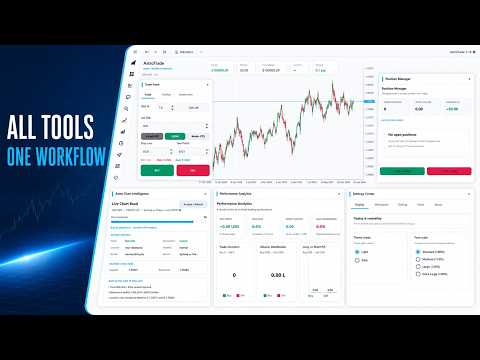
AstroTrade is a comprehensive multi-functional trading utility developed for the MetaTrader 5 platform. It integrates essential tools for trade execution, risk management, and technical monitoring into a single unified interface. The application is designed to assist traders in managing their daily operations through a visual and structured environment.
Visual Trade Execution and Risk Management
The application includes a specialized trading panel that assists in calculating position sizes based on the user's account balance. It provides visual aids on the chart to define risk parameters before an order is placed.
- Lot Size Calculation: Automatic calculation based on a user-defined percentage of the account balance.
- Visual Risk Levels: Stop Loss and Take Profit lines can be positioned and adjusted directly on the chart.
- Risk Metrics: Real-time display of the risk-to-reward ratio and projected profit or loss in account currency.
- Safety Features: Tools to help limit the maximum allowable risk per transaction.
Position Monitoring and Card Interface
Each open position is represented as an individual information card within the application. This approach provides a clear overview of active trades without overcrowding the workspace.
Individual Trade Cards: Displaying symbol, volume, and current profit status.
Equity Progression: Miniature line charts (Sparklines) for each position to show the progression of the trade.
Quick Management: Actions for position management, including closing a trade or reducing its volume by half.
Order Management Utilities
The system provides several automated utilities to assist with the management of active positions:
Independent Trailing Stop: Each position can be managed with its own trailing parameters.
Break Even Logic: Adjustment of Stop Loss to the entry price once a certain profit level is achieved.
Profit-Based Closing: Options to close positions when a specific profit target is met in currency or points.
Scheduled Termination: A utility to close open positions at a specified date and time.
Command-Based Assistant
AstroTrade features an integrated assistant that provides data retrieval and utility functions through a text interface. This module is designed for quick access to chart controls and information.
Technical Data: Check indicator status (RSI, MACD) through text queries.
Chart Control: Change symbols or timeframes instantly using text commands.
Utility Tools: Access margin requirements, pip value calculations, and market session information.
Price Alerts: Set visual and acoustic alerts for specific price levels directly through the interface.
Interface Customization and Persistence
The application is built with a focus on user experience and flexibility using vector-based rendering.
Persistent Settings: User selections, including UI themes and panel states, are saved and restored upon terminal restart.
Theming: Support for both light and dark visual themes.
Responsive Design: High-quality elements for clarity across various screen resolutions, including 4K displays.
Input Parameters
Default Risk Percentage: The base percentage of account balance used for calculations.
Maximum Allowable Risk: A limit for risk management settings.
Notifications: Configurable options for terminal alerts regarding activity.
Support and Documentation
Support for this product is provided exclusively through the MQL5.com messaging system and the comments section.
For a detailed usage guide, please visit the "Blogs" section of my MQL5 profile.
Frequently Asked Questions (FAQ)
Can I use AstroTrade on multiple charts simultaneously?
Yes, you can attach it to multiple charts independently.
Does automation work if the terminal is closed?
No, the MT5 terminal must remain open. Using a VPS is recommended for 24/7 operation.
Is it compatible with FIFO regulations?
Yes, AstroTrade is compatible with FIFO rules.
How does the "Risk %" calculation work?
It calculates the lot size based on your SL distance and the percentage of balance you choose to risk.
What symbols are supported?
It supports Forex, Indices, Commodities, and Crypto pairs offered by your broker.
What is the "Event Console"?
A transparent log window that shows the status of automated tasks like trailing stops or scheduled closures.
Links:
Guide to using the Astro Trade:https://www.mql5.com/en/blogs/post/774182














































The best tool ever made for MetaTrader