Equity Protect Pro

5

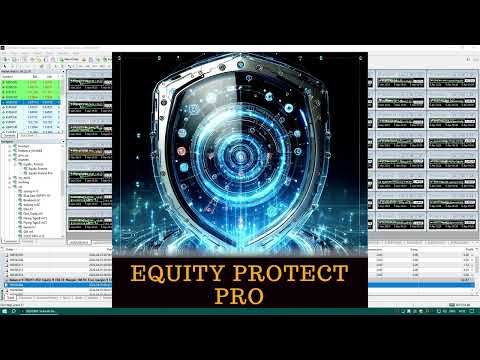
Equity Protect Pro: 안심 거래를 위한 종합 계좌 보호 전문가

계좌 보호, 자산 보호, 포트폴리오 보호, 다중 전략 보호, 수익 보호, 수익 확보, 거래 보안, 위험 관리 프로그램, 자동 위험 관리, 자동 청산, 조건부 청산, 예약 청산, 동적 청산, 추적 손절매, 원클릭 종료, 원클릭 청산, 원클릭 복원 등의 기능을 찾고 있다면 Equity Protect Pro가 바로 필요한 프로그램입니다.

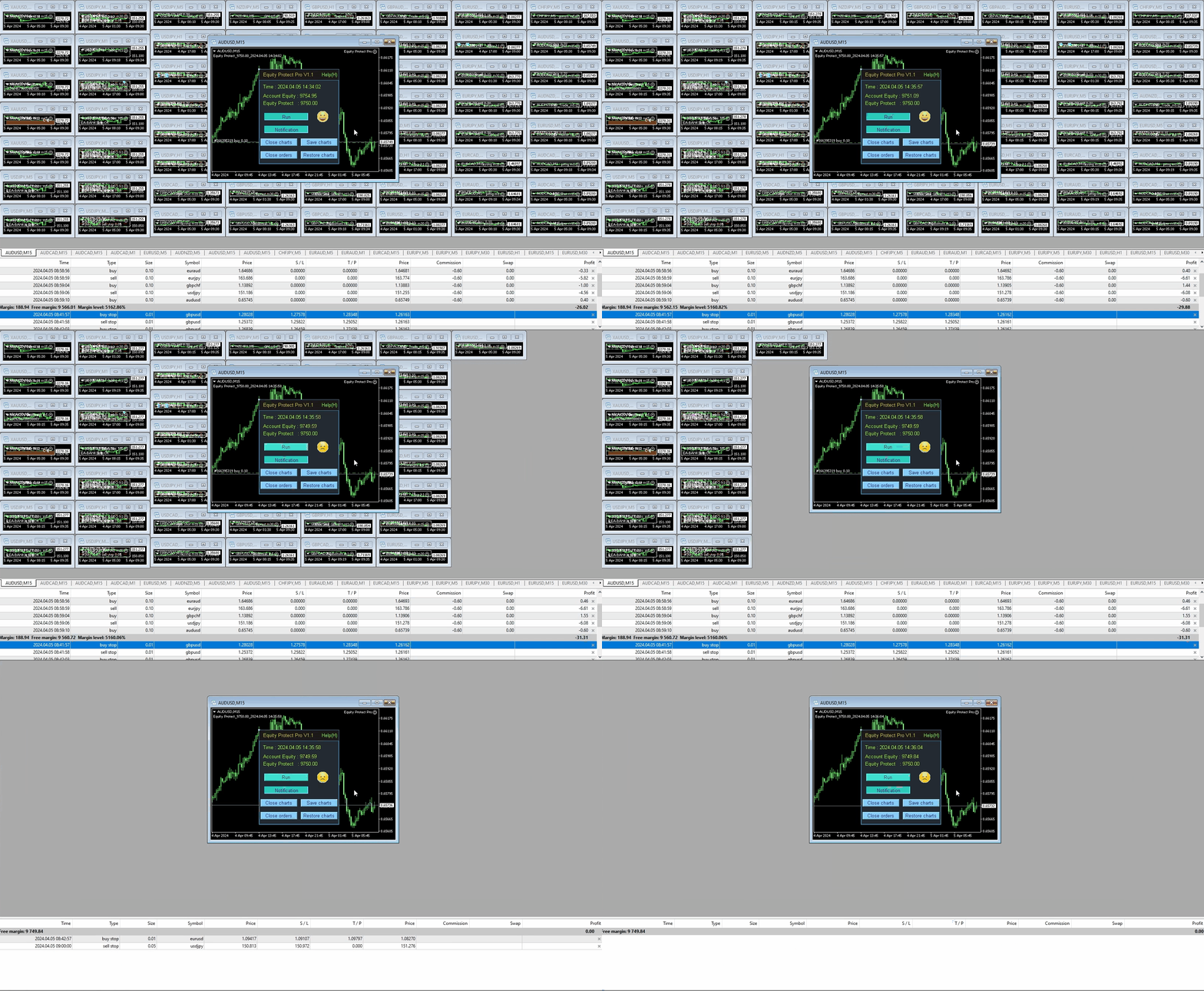
설정이 간편하고 사전 설정된 조건이 충족되면 모든 차트를 닫을 수 있으며 신호 구독 취소도 지원합니다(이는 모든 거래 프로그램도 중지됨을 의미합니다). 이 시점에서 새로운 주문이 생성되지 않으며 최종적으로 모든 주문이 종료되어 예상치 못한 손실을 효과적으로 방지하고 안심하고 거래할 수 있습니다.

Equity Protect Pro (Technical Manual)

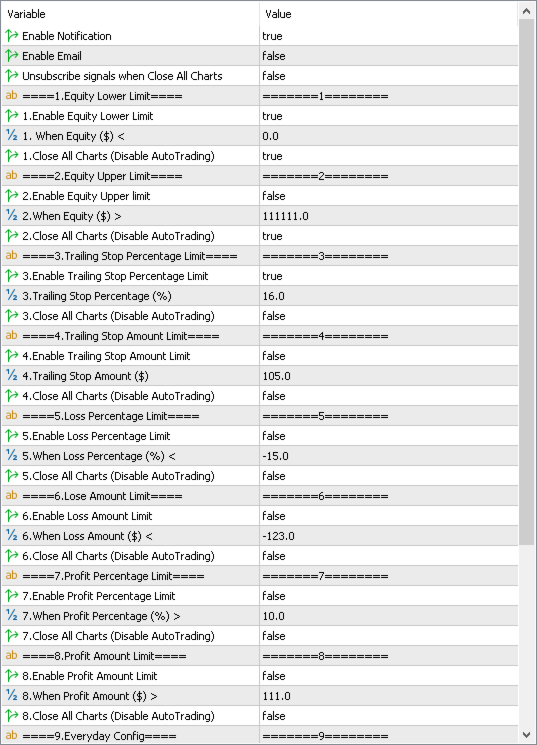
Equity Protect Pro는 14가지 핵심 기능을 갖추고 있으며 모두 독립적으로 작동합니다. 거래 전략에 따라 적절한 기능 조합을 선택하여 사용할 수 있습니다. 이러한 기능은 기본적으로 꺼져 있으며 사용하지 않을 때는 수정할 필요가 없습니다. 사용해야 하는 경우 "enable (function)"을 true로 설정하고 해당 매개변수를 입력하기만 하면 됩니다. 필요에 따라 보호를 실행할 때 다른 EA를 닫을지 여부를 고려하십시오. 다음은 주요 기능에 대한 설명입니다.

  • Equity Lower Limit: 계정 자산이 이 사전 설정값 아래로 떨어지면 보호가 즉시 트리거됩니다. 대부분의 트레이더에게 강력히 권장되며, 상당한 손실을 효과적으로 방지합니다.
  • Equity Upper Limit: 계정 자산이 이 사전 설정값 위로 상승하면 보호가 트리거됩니다. 극히 소수의 특별한 경우에 적용됩니다.
  • Trailing Stop Percentage Limit: 계정의 과거 최대 자산의 백분율을 기준으로 트레일링 스톱을 설정합니다. 동적 로트 크기를 사용하는 거래 전략에 적합합니다.
  • Trailing Stop Amount Limit: 사전 설정된 금액을 기준으로 트레일링 스톱을 설정합니다. 고정 로트 크기를 사용하는 거래 전략에 적합합니다.
  • Loss Percentage Limit: 현재 계정의 미실현 손실 백분율이 이 값 아래로 떨어지면 보호가 트리거됩니다. 신중하게 사용하고, 손실을 나타내기 위해 음수를 사용하십시오.
  • Loss Amount Limit: 현재 계정의 미실현 손실이 이 값 아래로 떨어지면 보호가 트리거됩니다. 신중하게 사용하고, 손실을 나타내기 위해 음수를 사용하십시오.
  • Profit Percentage Limit: 현재 계정의 미실현 이익 백분율이 이 값 위로 상승하면 보호가 트리거됩니다. 다중 전략 트레이더의 수익성 관리에 유용합니다.
  • Profit Amount Limit: 현재 계정의 미실현 이익이 이 값 위로 상승하면 보호가 트리거됩니다. 다중 전략 트레이더의 수익 목표 관리에도 유용합니다.
  • Accumulated Profit: 현재 계정의 누적 이익이 이 값 위로 상승하면 보호가 트리거됩니다. 다중 전략 트레이더의 수익 목표 관리에도 유용합니다.
  • Everyday Close: 매일 지정된 시간에 모든 포지션을 자동으로 청산하여 야간의 낮은 유동성 위험 및 스왑 비용을 방지합니다.
  • Friday Close: 주말 시장 불확실성을 피하기 위해 금요일에만 청산을 실행합니다.
  • Datetime Close: 지정된 날짜 및 시간에 포지션을 청산합니다. 중요한 이벤트 또는 공휴일 전에 적용할 수 있습니다.
  • Restore Config: 다른 차트가 실행되고 있지 않으면 매일 지정된 시간에 이전에 닫힌 Expert Advisor (EA)를 자동으로 복원합니다.
  • Remote Protect: 외출 중 예상치 못한 시장 움직임에 직면했을 때 특히 유용합니다. 휴대폰을 사용하여 현재 차트에 미결 주문을 하면 보호가 트리거됩니다.

또한 Equity Protect Pro에는 다음과 같은 기능도 있습니다.

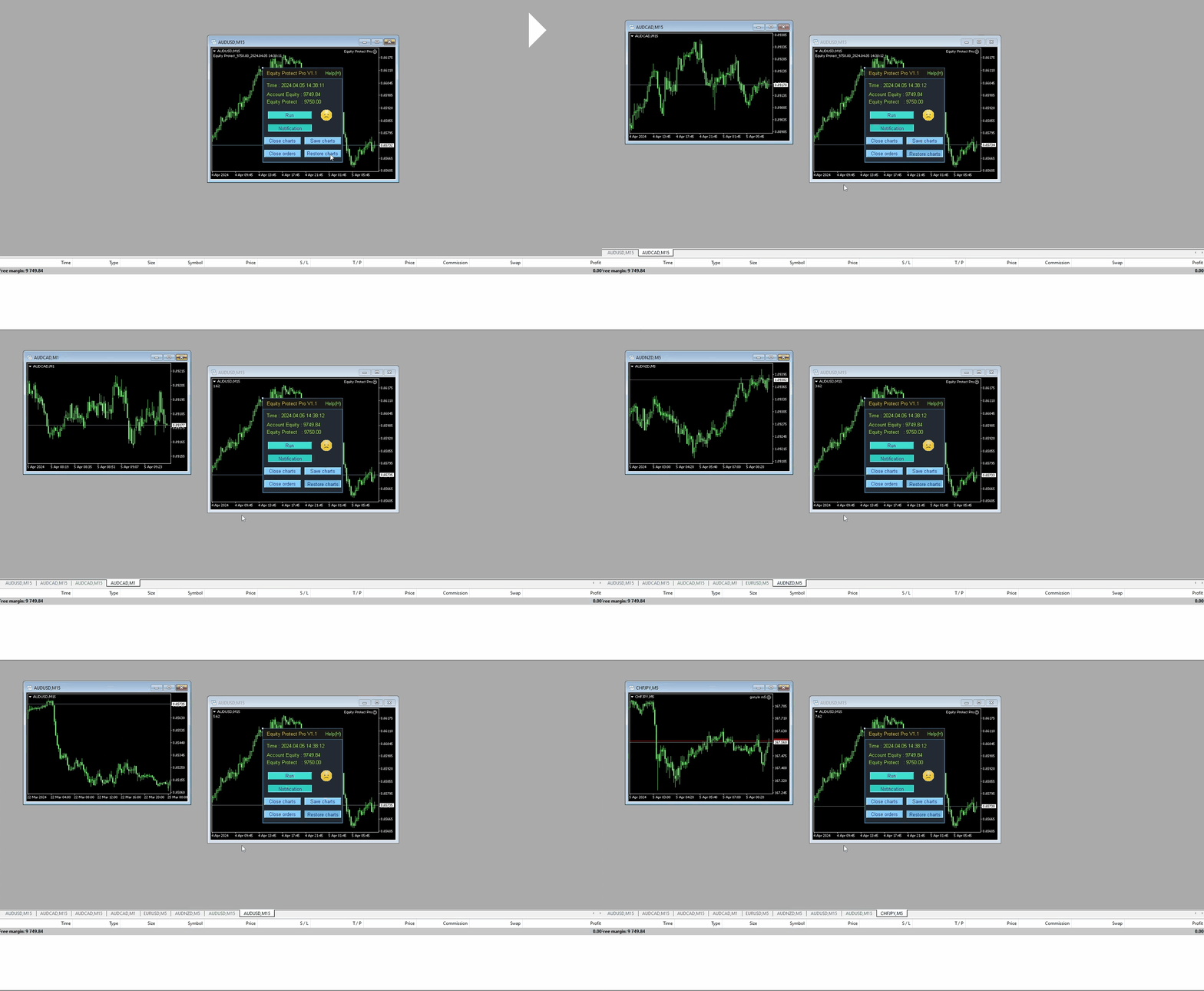
  • 동일한 기호, 시간 프레임 및 매개변수로 이전에 닫은 프로그램을 원클릭으로 복원합니다.
  • 모든 차트를 원클릭으로 닫습니다(다른 거래 프로그램을 닫습니다).
  • 원클릭 청산: 모든 미결제 주문을 즉시 닫습니다.
  • MQL 가상 서버에서의 사용을 지원합니다.
  • 메시지 알림: 계정 상태를 추적하기 위한 휴대폰 메시지 및 이메일 알림을 지원합니다.
  • 거래 신호 취소: 보호를 실행할 때 거래 신호 구독을 취소하고 모든 자동 거래를 중지하도록 선택할 수 있습니다.

테스트 지침:

  • 테스트 중에 프로그램은 현재 기호로 자동으로 1 로트 매수 주문을 합니다. 사용자는 테스트 결과를 기준으로 초기 자본과 매개변수를 반복적으로 조정하여 프로그램의 작동 효과를 이해할 수 있습니다.

중요 알림:

  • 일부 고객은 "이미 손실 제한을 설정했는데 자산 하한선을 설정할 필요가 없습니까?"라고 묻습니다. 답변은 권장되지 않는다는 것입니다. 고객이 손실 비율 제한을 -10%로 설정했지만 다른 거래 EA에도 손절매가 있고 각 손절매가 -5%라고 가정합니다. 이러한 손절매는 손실 제한의 보호 조건을 트리거하지 않지만 여러 손절매 후 계좌 손실은 -10%를 훨씬 초과합니다. 이 경우 자산 하한선도 설정하면 이러한 일이 발생하지 않습니다.
  • 이 프로그램은 현재 터미널에서 실행되는 거래 프로그램만 닫을 수 있으며 동일한 계정으로 다른 터미널에서 실행되는 프로그램은 닫을 수 없습니다. 원하는 효과를 얻으려면 모든 거래 프로그램을 하나의 터미널에서 실행하십시오.
  • “enable (function)”은 기능 그룹의 마스터 스위치입니다. “enable (function)”이 true로 설정되지 않은 경우 “다른 차트 닫기”의 관련 구성은 활성화되어 있어도 실행되지 않습니다.

유용한 팁:

  • 구매, 설치 및 업데이트 방법
  • 휴대폰 메시지 알림 구성 방법
  • 이메일 알림 구성 방법
  • 이 프로그램은 다양한 방법으로 사용할 수 있습니다. 데모 계정에서 철저한 테스트를 수행하고 매개변수를 조정하고 프로그램의 작동 메커니즘에 익숙해지고 라이브 거래에서 모든 것이 확실한지 확인하는 것이 좋습니다.
  • 질문이 있으시면 댓글 섹션에 댓글을 남겨주시면 즉시 답변해 드리겠습니다. 개인적으로 연락하셔도 됩니다.
    리뷰 2
    Eric Schneider
    117
    Eric Schneider 2025.01.07 11:45 
     

    Very good EA. Very effective and practical

    추천 제품
    Fx Technical Analysis Sharing System, Experts make technical analysis and you can see the analysis. Analyses are updated during the day. One-click analysis with MetaTrader is displayed on the screen. If there are pending orders for these analyses, you will open the transaction with a single click. It is quite easy and easy to use. Related analysis , period and information is saved as template to your computer. You can then download and view it from the files folder. It is quite educational and a
    RTX Master Scalp
    Septian Heri Priyatmo
    RTX EA — Precision Trading Intelligence RTX EA is a next-generation Expert Advisor designed for traders seeking   consistency, stability, and long-term measurable results . Built with advanced algorithmic architecture and real-time market analysis, RTX EA delivers optimized trade execution under both low and high-volatility conditions. With its intelligent multi-filter logic system, RTX EA is capable of   identifying high-probability market setups , avoiding unnecessary entries, and maximizing
    Eagle Dive EA
    AL MOOSAWI ABDULLAH JAFFER BAQER
    Eagle Dive EA – A Strategy for Traders Who Love Optimization! Attention traders! This Expert Advisor (EA) is designed for those who enjoy testing and refining their own strategies. It is not pre-optimized, giving you full control over fine-tuning it to suit your trading style. How Does Eagle Dive EA Work? Eagle Dive EA is built around the Williams %R indicator, a momentum-based tool that identifies potential market reversals. The strategy follows these key principles: Sell Condition: The Willia
    News Scalping Executor is an advisor which helps to trade news with high impact and huge volatility. This advisor helps to create two opposite orders with risk management. It moves automatically stop loss level to avoid losses as much as possible by using many different algorithms. It helps to avoid trading the news if spread suddenly becomes very huge. To be profitable with this type of trading you should choose the most volatile types of news such as: GDP, CPI, Unemployment Claims, Interest
    AEC Scalper
    Gennady Kuznetsov
    AEC Scalper I bring to your attention the AEC Scalper trading Advisor. The adviser works from 20:00 to 22:00 GMT. For testing in the strategy tester, the trading time should be set from 23:00 to 1:00. The EA works well on the following currency pairs: AUDCAD, AUDCHF, AUDJPY, CADCHF, CADJPY, EURAUD, EURCAD, EURCHF, EURGBP, EURUSD, GBPAUD, GBPCAD, GBPUSD  M5 Timeframe. Minimum deposit from $100 Trading is conducted on ECN accounts with a low spread.  Leverage from 1:100 Trading is conducted in a
    Live grid
    Aleksej Shcherbak
    Dedicated to grid trading fans. For a long period I was trading using Manual Trader by Ramil Minniakmetov. I liked this program but soon I came up with an idea to improve the program by making the grid vivid and adding something mine. 1) I taught the program to take swaps and commission into account. 2) If the market allows, the program trails a gain by moving Profit. 3) The program spends a part of the gain partially killing the lower order and moving to a smaller lot, preventing it from going
    TimeLS_LightSpeed는 MetaTrader 4/5용 시간 기반 전문가 어드바이저(EA)로, 사용자가 지정한 특정 시간에 맞춰 정밀하게 거래를 실행하고 관리하도록 설계되었습니다. 이 EA는 거래 가능 시간, 포지션 유형, 개별 매개변수를 가진 단일 예약 거래(Exclusive Deals) 등을 유연하게 제어할 수 있도록 다양한 설정 옵션을 제공합니다. 질문이 있으시면 언제든지 메시지 주세요. 일부 시장에 맞는 미리 설정된 .set 파일들이 있습니다. 주요 기능 및 설정 거래 허용 설정 롱(매수) 또는 숏(매도) 포지션의 개시 여부를 개별적으로 활성화하거나 비활성화할 수 있습니다. 일일 스왑이 양수일 때만 거래를 허용하는 옵션이 있으며, 이는 오버나이트 포지션을 유지하는 전략에 유리합니다. 요일별 거래 제어 월요일부터 일요일까지 원하는 요일을 선택하여 EA가 거래할 수 있도록 설정할 수 있습니다. 이는 시장 변동성 주기나 주요 뉴스 이벤트에 맞춰 전략을 조정하는 데 도움이 됩
    Alpha Striker SMC KING is unique Expert Advisor that continues the Alpha Striker series of  expert advisors. Innovative methods of the programme's approach to trading, and promising performance results are possible thanks to the use of modern technologies and methods. The Alpha Striker SMC KING is a fully automated EA designed to trade currencies only. Working pairs recommended EURUSD. Expert showed stable results on currencies in 2022-2024 period. No dangerous methods of money management used,
    Rhythm Master EA - A Five-Year Journey to Master the Market's Pulse Core Value Proposition Forged over five years of development and market testing, Rhythm Master EA is built with one core principle: survival first. Sets files:  https://www.mql5.com/zh/market/product/157626/comments?source=Site+Market+Product+Page#comment_58671939 Trading Philosophy & Core Advantages Three Core Trading Principles Rhythm is King : Doesn't predict direction, only follows the natural ebb and flow of market vola
    CRAZZ Winter EA
    Low Chun Chiat
    1. Intro: Like the cold weather and freezing of winter, Crazz Winter EA’s open trades can be held for one day or TP within minutes. Aiming to have a high consistency and profitable amount, Crazz Winter EA is designed to trade with only two kinds of currency which are EURUSD and AUDUSD and there will only one trade open for each currency at the same time. With the combination of Moving Average and Relative Strength Index, it may detect and identify the current and following market trade. The EA h
    KT Renko Patterns Robot MT4
    KEENBASE SOFTWARE SOLUTIONS
    수동 거래에서는 KT Renko Patterns 인디케이터 가 제공하는 많은 거래 기회와 설정이 Renko 차트의 급격한 가격 변동으로 인해 놓쳐질 수 있습니다. KT Renko Patterns EA는 "KT Renko Patterns 인디케이터"를 기반으로 한 100% 자동화된 거래 전략을 구현하여 이러한 문제를 해결합니다. EA는 인디케이터에서 직접 패턴 및 신호를 가져온 후 사전 점검 및 평가를 수행하여 효율적으로 거래 포지션을 실행합니다. 모든 필수 종속 항목이 EA에 포함되어 있습니다. 성공적으로 이 EA를 사용하기 위해 KT Renko Patterns 인디케이터 를 반드시 구매할 필요는 없습니다. 10핍 Renko 박스용 설정 파일 을 다운로드하여 유사한 백테스트를 수행하세요. 기능 KT Renko Patterns 인디케이터 를 사용하여 완전 자동 거래 가능, 시간 절약. 무료 Renko 차트 생성기와 완벽하게 호환됨. 추가 다운로드 없이 모든 필수 요소가 EA에
    DoubleEverest
    Eduard Khisamov
    The DoubleEverest Expert Advisor is a pure, distilled idea. This automated EA follows its own unique mathematical algorithm. DoubleEverest : no indicators no martingale, locking, averaging, other risky money management techniques trades every day DoubleEverest catches the price in the European and American sessions. Considers the volatility and dynamics of the market. DoubleEverest places pending orders on the price extremes: of the past and current day, fractals, significant resistance and supp
    Pivot Levels EA
    Aleksey Semenov
    5 (2)
    The Pivot Levels Expert Advisor is based on the Pivot levels indicator. The EA trades a very simple strategy - daily reversal. Averaging and martingale are used in the process of trading, it trades instant and pending orders, does not use stop loss or take profit. Orders are opened and closed only at a signal. System settings martingale mode – martingale type. martingale geometric progression – geometric progression step. martingale arithmetic progression – arithmetic progression step. lotsize
    快捷下单控件EA,可以实现很多实用功能,不仅可以实盘中操作,也可以在复盘中使用,大家知道一般情况下复盘只能使用复盘软件,占用多达10个G的内存呢,而且贵的让人难以接受,如今这个EA控件可以让你直接在MT4里实现复盘,实时下单,占用内存几乎可以忽略不计,对于交易者来说,复盘的重要性不用多说了吧,很多时候,盘感都来自于一次次的复盘,那是经验积累的必经之路,如果你需要提升自身的交易能力,需要快速累积盘感,需要快速实现稳定盈利,那么这个复盘EA工具将是你的不二选择,你也可以直接加VX:EURNZD,它集诸多功能于一身,如果你想试用它,不要犹豫,联系我,我会让你高兴而来,满意而归,如果你不想复盘,那么还是花更多的时间来积累经验吧
    Exp Averager
    Vladislav Andruschenko
    4.82 (22)
    MetaTrader 4용 Averager — 전문적인 평균 단가 조정 및 포지션 시리즈 관리 시스템 드로우다운에 들어간 포지션을 더 체계적으로 복구하고, 평균 진입가를 개선하며, 전체 포지션 바스켓을 하나의 전략적 구조로 관리하기 위해 설계된 Expert Advisor입니다. 이것은 단순한 물타기 도구가 아니라, 손실 구간의 포지션을 더 효율적으로 재구성하고, 공통 청산 지점까지 더 현실적으로 접근하도록 돕는 실전형 관리 시스템입니다. Averager는 독립적인 자동매매 시스템이 아닙니다. 스스로 진입 신호를 찾는 전략이 아니라, 이미 열려 있는 거래를 추적하면서 평균화, 추가 진입, 공통 트레일링 스톱을 통해 포지션 시리즈 전체를 더 정교하게 관리하는 데 목적이 있습니다. 수동 매매를 하는 트레이더, 자신만의 진입 신호를 사용하는 트레이더, 또는 다른 거래 시스템과 함께 운용하려는 사용자에게 적합합니다. 단일 포지션이 아니라 여러 포지션을 하나의 바스켓으로 운영하고 싶은 경우 특
    JumpLump
    Olga Zhdanova
    A great addition to your lucrative portfolio of expert advisors. The strategy is based on an algorithm for breaking through the built levels for a certain period of time. The EA has a fixed StopLoss, which allows you to keep the minimum drawdown. Tested on all ticks using the Tick Data Suite , with the closest possible real trading conditions, watch the video. Price for the first 10 buyers $ 75 (I beg you to post your reports in the comments) Recommendations: Good ECN broker with low spread.
    About The Secret of Dow The Secret of Dow  is an unique system running on a complex set of algorithms and advanced machine learning computation mechanism to analyze massive sets of data from the neural network, and combines with a special set of price action movement analysis to optimize the trading decision, and it will then predicts the next best possible and potential moves of the Dow Jones (US30) prices. The advantages of The Secret of Dow:- Easy plug and play, worry free with easy param
    The Super scalper universal is a fully automated scalping Expert Advisor, which uses five indicators. Each open position is protected by a hidden stop order managed by an advanced modification algorithm. When searching for the suitable signals, the EA uses the integrated indicator in conjunction with the trend and time filters, as well as the volatility filter. It use dynamic position closure, which considers the location where the order had been opened and the subsequent price action. Profit is
    This EA trades a narrow range at night. At the top and bottom of the range, the EA will try to generate trades in the opposite direction. To open suitable trades, the Expert Advisor uses several indicators and analyzes several timeframes. In order to maintain the quality of the EA, we may choose to stop selling new licenses at any time. Current price $50 , finally price will be $499. By prioritising quality over quantity, we are able to ensure that the product remains a reliable and effectiv
    Bear vs Bull EA MT4
    Nguyen Nghiem Duy
    Bear vs Bull EA Is a automated adviser for daily operation of the FOREX currency market in a volatile and calm market. Suitable for both experienced traders and beginners. It works with any brokers, including American brokers, requiring FIFO to close primarily previously opened transactions. *In order to enable the panel, it is necessary to set the parameter DRAW_INFORMATION = true in the settings; -  Recommendations Before using on real money, test the adviser with minimal risk on a cent trad
    Hello traders! I present to you Argo Gold Edition - an expert built for gold trading, which is tailored to the specifics of gold movements on international markets. The basis of its logic is that it follows profitable patterns drawn from past periods. Mathematical algorithms are based on the correlation between the values of the indicators used and the corresponding movement of the price of gold. The expert is built on the basis of the ARGO series. It specializes in GOLD / XAUUSD trading. 2 or 3
    MARTINGALE & HEDGING https://www.mql5.com/en/users/earobotkk/seller#products MARTINGALE & HEDGING is a fully automated EA that uses martingale and hedging strategy. This expert is designed to make quick profit as fast as possible. INPUTS Trade Comment: user comment Magic No: unique EA Number Time Frame: default is H1   Lot: lot size. Take Profit: value in pips. Max Spread: EA will not open new order if spread is more than maximum spread allowed. Multiplier: lot multiplier. Pip Step: distance in
    Calmed
    Jennifer Afi Azasoo
    5 (3)
    EA Calmed Gold We have tried to optimise Calmed Expert Advisor  for Gold but works with any other forex pairs and stocks. This expert uses  martingale (optionally) for recovery. Please, backtest for at least 1 year and run a demo for at least one whole month before going live; that way, you will know how the Calmed Expert Advisor behaves across the various markets. Please do not just purchase and start using the EA, as past performance cannot guarantee future results. Backtest results may be di
    Expert Grid rsi Pro
    Mykhailo Zakervashevych
    General Description Grid RSI Pro v3.1 is an advanced trading Expert Advisor for MetaTrader 4 that uses a grid strategy with RSI indicator filtering. The EA automatically opens orders at specified levels, creating a grid of orders to capture market fluctuations. Version 3.1 includes enhanced risk management features and improved signal filtering systems. Key Features 1. Trading Strategies RSI Strategy : Position opening when RSI reaches overbought (80) or oversold (20) levels Fixed Points : Posit
    Harmonica Japan
    Alexander Chertnik
    3 (1)
    Expert Advisor trading Harmonic Patterns. All trades covered by fixed   Stop Loss &   Take Profit. Minimum trading deposit   150 $ . Expert designer to run on USDJPY 15m . chart. No Grid. No Martingale. Works with high spread This EA operates only once per bar opening.       EA uses several different strategies and enters sometimes both directions. part of the patterns the EA will ignore and not trade. 4 different ATR indicators used as filters. SL & TP calculated by the pattern size, the use
    News Scalping Executor is an utility which helps to trade high impact and huge volatility   news . This utility helps to create two opposite orders with risk management and profit protection. It moves automatically stop loss level to avoid losses as much as possible by using many different algorithms. It helps to avoid trading the news if spread suddenly becomes very huge. It can lock profit by moving stop loss or partially closing of orders. To be profitable with this type of trading you shou
    Umagads Lot Calculation V2 MT4 - 프랍 펌 에디션 (Prop Firm Edition) MetaTrader 4를 위한 전문적인 리스크 관리 및 일일 보호 솔루션 "XAUUSD(골드) 트레이더 강력 추천: 골드의 높은 변동성과 MT4 특유의 소수점 자릿수 체계에 최적화되어 설계되었습니다. 급변하는 시장 상황에서도 소수점 단위까지 정밀한 로트 크기 계산을 도와줍니다." 리스크를 지배하고, 귀중한 자산을 보호하십시오. 엄격한 리스크 관리 없는 트레이딩은 계좌를 잃는 가장 빠른 지름길입니다. Umagads Lot Calculation V2 MT4 는 단순한 로트 계산기가 아닙니다. 즉각적인 정확성과 일일 잔고 보호를 필요로 하는 전문 트레이더와 프랍 펌(Prop Firm) 도전자를 위해 설계된 '규율 유지 어시스턴트'입니다. 주요 기능: ️ 프랍 펌 일일 드로다운 가드 (신기능): **미실현 손익(Floating PnL)**을 포함한 당일 손익을 실시간으로 모니
    MA Grid
    Olesya Galyamova
    1 (2)
    The MA Grid Expert Advisor trades a grid of orders using moving averages to determine market entries. Take Profit is used for exits. You can limit the number of open orders in the grid and also limit the loss in the deposit currency. Autolot calculation can be used (Autolot = Balance/Autolot Step*Lot). The EA is based on the averaging principle, but it can also be configured to work with loss fixing. Inputs Lot - fixed lot value if Autolot is disabled; Autolot - enable automated lot calculation
    The EA is based on a scalping strategy in a calm market time. In quiet times, the price on the chart is almost always in the Flat, and the EA trades in the flat. The EA provide a variety of filters to filter out trend situations and trade only during flat price periods. Each trade uses a stop loss and take profit. Also, smart filters for fixing the transfer of stops to profit. To create a strategy, we used historical data with a history quality of 99.9%. The EA has the following features: Uses a
    Make grid trading safe again | Built by a grid trader >> for grid traders.    Walkthrough Video  <== Get Grid Rescue up and running in 5 minutes  This is MT4 version, click  here  for  BlueSwift GridRescue MT5  (settings and logics are same in both versions) BlueSwift Grid Rescue MT4  is a risk management utility  EA  (used together with other grid trading experts) that can help you trade aggressive grid systems with manageable drawdown, therefore reduce substanstially margin call risk as we
    이 제품의 구매자들이 또한 구매함
    Trade Manager EA에 오신 것을 환영합니다. 이 도구는 거래를 보다 직관적이고 정확하며 효율적으로 만들기 위해 설계된 궁극적인 리스크 관리 도구 입니다. 단순한 주문 실행 도구가 아닌, 원활한 거래 계획, 포지션 관리 및 리스크 제어를 위한 종합 솔루션입니다. 초보자부터 고급 트레이더, 빠른 실행이 필요한 스캘퍼에 이르기까지 Trade Manager EA는 외환, 지수, 상품, 암호화폐 등 다양한 시장에서 유연성을 제공합니다. Trade Manager EA를 사용하면 복잡한 계산은 이제 과거의 일이 됩니다. 시장을 분석하고 진입, 손절 및 익절 수준을 차트의 수평선으로 표시한 후 리스크를 설정하면, Trade Manager가 이상적인 포지션 크기를 즉시 계산하고 SL 및 TP 값을 실시간으로 표시합니다. 모든 거래가 간편하게 관리됩니다. 주요 기능: 포지션 크기 계산기 : 정의된 리스크에 따라 거래 크기를 즉시 결정합니다. 간단한 거래 계획 : 진입, 손절, 익절을 위한
    Trade Assistant MT4
    Evgeniy Kravchenko
    4.43 (195)
    거래당 위험 계산, 라인을 사용한 손쉬운 신규 주문, 부분 청산 기능을 통한 주문 관리, 7가지 유형의 트레일링 스탑 및 기타 유용한 기능을 제공합니다. 추가 자료 및 지침 설치 지침 - 애플리케이션 지침 - 데모 계정용 애플리케이션 평가판 라인 기능       - 차트에 개시선, 손절매, 차익실현을 표시합니다. 이 기능을 사용하면 새로운 주문을 쉽게 하고 개봉 전에 추가 특성을 볼 수 있습니다. 위기 관리       -       위험 계산 기능은 설정된 위험과 손절매 주문의 크기를 고려하여 새 주문의 볼륨을 계산합니다. 이를 통해 손절매 크기를 설정하고 동시에 설정된 위험을 존중할 수 있습니다. 로트 계산 버튼 - 위험 계산을 활성화/비활성화합니다. 필요한 위험 값은 위험 필드에 0에서 100 사이의 백분율 또는 예금 통화로 설정됩니다. 설정 탭에서 위험 계산 옵션을 선택합니다. $ 통화, % 잔액, % 지분, % 자유 마진, % 사용자 정의, % AB 이전 일, % AB
    Local Trade Copier EA MT4
    Juvenille Emperor Limited
    4.96 (110)
    Local Trade Copier EA MT4 를 사용하여 매우 빠른 거래 복사 경험을 해보세요. 1분 안에 간편하게 설정할 수 있으며, 이 거래 복사기를 사용하면 Windows 컴퓨터 또는 Windows VPS에서 여러 개의 MetaTrader 터미널 간에 거래를 0.5초 미만의 초고속 복사 속도로 복사할 수 있습니다. 초보자든 전문가든 Local Trade Copier EA MT4 는 다양한 옵션을 제공하여 사용자의 특정 요구에 맞게 맞춤 설정할 수 있습니다. 이는 수익 잠재력을 높이려는 모든 사람을 위한 최고의 솔루션입니다. 지금 사용해보시고 이것이 왜 시장에서 가장 빠르고 쉬운 무역용 복사기인지 알아보세요! 팁: 여기 에서 데모 계정에서 Local Trade Copier EA MT4 데모 버전을 다운로드하여 사용해 볼 수 있습니다. 다운로드한 무료 데모 파일을 MT4 >> File >> Open Data Folder >> MQL4 >> Experts 폴더에 붙여넣고 터미널
    Custom Alerts AIO: 다중 시장을 동시에 모니터링 – 설정 없이 즉시 사용 가능 개요 Custom Alerts AIO 는 복잡한 설정 없이 즉시 사용할 수 있는 통합 시장 모니터링 도구입니다. FX Power, FX Volume, FX Dynamic, FX Levels, IX Power 등 필요한 모든 지표가 내장되어 있어 별도의 설치나 구성 없이 알림 기능을 바로 사용할 수 있습니다. 차트 그래픽 없이 작동하며, Forex, 금속, 지수, 암호화폐 등 주요 자산군을 모두 지원합니다. 주식(Symbols)은 별도로 입력하여 추가할 수 있으나, MetaTrader에서는 일반적으로 제한적으로만 사용됩니다. 1. 왜 Custom Alerts AIO를 선택해야 하나요? 추가 라이선스가 필요 없습니다 • 모든 Stein Investments 지표가 내장되어 있어 별도 구매가 필요 없습니다. • 즉시 알림 기능을 시작할 수 있어 빠르고 간편합니다. 모든 시장을 하나의 도구로
    Exp COPYLOT CLIENT for MT4
    Vladislav Andruschenko
    4.69 (65)
    MetaTrader 4용 전문 트레이드 복사기 MetaTrader 4 용 빠르고 안정적이며 전문적인 트레이드 복사기입니다. COPYLOT 은 MetaTrader 4 와 MetaTrader 5 터미널 간에 Forex 거래를 복사할 수 있으며, 다양한 계좌 유형과 운용 방식에 맞춰 유연한 동기화 환경을 제공합니다. COPYLOT MT4 버전 지원 방식: MetaTrader 4 → MetaTrader 4 MetaTrader 5 Hedge → MetaTrader 4 MetaTrader 5 Netting → MetaTrader 4   MT5 버전 상세 설명 + DEMO + PDF 구매 방법 설치 방법 로그 파일 확인 방법 테스트 및 최적화 방법 Expforex의 모든 제품 MetaTrader 5 버전 을 사용하면 MetaTrader 5 → MetaTrader 5 및 MetaTrader 4 → MetaTrader 5 복사도 지원됩니다: COPYLOT CLIENT for MT5 COPYLOT 은
    Copy Cat More Trade Copier MT4 (복사 고양이 MT4) 는 단순한 로컬 트레이드 카피어가 아니라, 오늘날의 거래 환경을 위해 설계된 완전한 리스크 관리 및 실행 프레임워크입니다. Prop Firm 챌린지부터 개인 계좌 관리까지, 강력한 실행력, 자본 보호, 유연한 설정, 고급 거래 처리 기능을 통해 모든 상황에 적응합니다. 이 카피어는 Master(송신자) 와 Slave(수신자) 모드 모두에서 작동하며, 실시간으로 시장가/지정가 주문, 거래 수정, 부분 청산, Close By 작업을 동기화합니다. 데모 및 실계좌 모두 호환되며, 거래용 비밀번호 또는 투자자 비밀번호로도 사용할 수 있습니다. Persistent Trade Memory 기술을 통해 EA, 터미널, VPS가 재시작되더라도 거래가 복원됩니다. 여러 Master와 Slave를 동시에 관리할 수 있으며, 브로커 간 차이는 접두사/접미사 자동 감지 또는 심볼 매핑으로 처리됩니다. 매뉴얼/설정: Copy C
    TradePanel MT4
    Alfiya Fazylova
    4.84 (95)
    Trade Panel은 다기능 거래 도우미입니다. 이 애플리케이션에는 50개 이상의 수동 거래 기능이 포함되어 있으며 대부분의 거래 작업을 자동화할 수 있습니다. 구매하기 전에 데모 계정에서 데모 버전을 테스트할 수 있습니다. 데모 계정용 애플리케이션 체험판 다운로드: https://www.mql5.com/en/blogs/post/750865 . 전체 지침 여기 . 거래. 한 번의 클릭으로 거래를 수행할 수 있습니다: 리스크 자동 계산과 함께 예약 주문 및 포지션 열기. 한 번의 클릭으로 여러 주문 및 포지션 열기. 주문 그리드 열기. 예약 주문 및 포지션을 그룹별로 닫기. 포지션 방향 전환 (Buy 닫기 > Sell 열기, Sell 닫기 > Buy 열기). 포지션 잠금 (부족한 포지션을 열어 Buy와 Sell 포지션의 수량을 동일하게 만들기). 모든 포지션 한 번의 클릭으로 부분적으로 닫기. 모든 포지션의 테이크 프로핏과 스톱로스를 같은 가격 수준에 설정. 모든 포지션의 스톱로스를
    The product will copy all telegram signal to MT4   ( which you are member  ) , also it can work as remote copier.  Easy to set up, copy order instant, can work with almost signal formats, image signal, s upport to translate other language to English Work with all type of channel or group, even channel have "Restrict Saving Content", work with  multi channel, multi MT5 Work as remote copier: with signal have ticket number, it will copy exactly via ticket number. Support to backtest signal. How to
    The News Filter
    Leolouiski Gan
    5 (25)
    이 제품은 뉴스 시간 동안 모든 전문가 어드바이저 및 수동 차트를 필터링하여 수동 거래 설정이나 다른 전문가 어드바이저가 입력한 거래가 파괴될 수 있는 급격한 가격 상승으로부터 걱정하지 않아도 됩니다. 이 제품은 또한 뉴스 발표 전에 열린 포지션과 대기 주문을 처리할 수 있는 완전한 주문 관리 시스템이 함께 제공됩니다. The News Filter  를 구매하면 더 이상 내장 뉴스 필터에 의존할 필요가 없으며 이제부터 모든 전문가 어드바이저를 여기서 필터링할 수 있습니다. 뉴스 선택 뉴스 소스는 Forex Factory의 경제 캘린더에서 얻어집니다. USD, EUR, GBP, JPY, AUD, CAD, CHF, NZD 및 CNY와 같은 어떤 통화 기준으로 선택할 수 있습니다. Non-Farm (NFP), FOMC, CPI 등과 같은 키워드 식별을 기준으로 선택할 수도 있습니다. 저, 중, 고 영향을 가지는 뉴스를 필터링할 수 있도록 선택할 수 있습니다. 차트와 관련된 뉴스만 선택하
    Smart Channel M4
    Vahidreza Heidar Gholami
    The trend in the market can be predicted using trend lines but the problem is you don’t know where exactly the price is going to touch the trend line where you can put your pending orders on. Smart Channel Expert Advisor makes it possible to put an advanced channel around the price data, which can be configured to handle placing orders, opening and closing positions, managing risk per trade, spread, slippage, and trailing stop-loss and take-profit automatically. Features Money Management (Calcul
    Trade copier MT4
    Alfiya Fazylova
    4.58 (33)
    Trade Copier는 거래 계정 간의 거래를 복사하고 동기화하도록 설계된 전문 유틸리티입니다. 복사는 공급자의 계정/단말기에서 동일한 컴퓨터 또는 vps에 설치된 수신자의 계정/단말기로 발생합니다. 프로모션 - 이미 "Trade copier MT5"를 구매하셨다면, "Trade copier MT4"를 무료로 받으실 수 있습니다 (MT4 → MT5 및 MT4 ← MT5 복사용). 조건에 대한 자세한 정보를 원하시면, 개인 메시지를 통해 저희에게 문의해 주시기 바랍니다! 구매하기 전에 데모 계정에서 데모 버전을 테스트할 수 있습니다. 데모 버전 여기 . 전체 지침 여기 . 주요 기능 및 이점: 복사기는 "МТ4> МТ4", "МТ4> МТ5", "МТ5> МТ4" 복사를 지원합니다. 복사기는 데모 계정 > 실 계정, 실 계정 > 데모 계정, 데모 계정 > 데모 계정 및 실제 계정 > 실 계정 복사를 지원합니다. 복사기는 읽기 전용 암호가 적용된 투자자 계정에서 복사를 지원합니다. 하
    Trade Dashboard MT4
    Fatemeh Ameri
    4.96 (53)
    Trade Dashboard simplifies how you open, manage, and control your trades, with built-in lot size calculation. It allows you to execute trades, manage risk, and control positions directly on the chart, with tools such as partial close, breakeven, and trailing stop. Designed to reduce manual work and help you stay focused on your trading decisions. A demo version is available for testing. Detailed explanations of features are provided within the MQL5 platform. Installation instructions are include
    CloseIfProfitorLoss with Trailing
    Vladislav Andruschenko
    4.87 (31)
    이익 추적 기능으로 총 이익/손실에 도달하면 MetaTrader 4에서 포지션을 청산합니다. 가상 정지 (별도 주문) 을 활성화할 수 있습니다. BUY 및 SELL 포지션을 별도로 계산하고 마감합니다 (BUY SELL 별도). 모든 심볼 또는 현재 심볼 만 닫고 계산합니다 (모든 심볼). 이익을 위해 후행 추적 을 활성화합니다 (후행 이익). 예금 통화, 포인트, 잔액의 %에 대한 총 손익을 마감합니다. 이 애플리케이션은 다른 EA와 함께 또는 수동 거래와 함께 모든 계정에서 사용하도록 설계되었습니다. MT5 버전 전체 설명 + DEMO + PDF 구입 방법 설치하는 방법 로그 파일을 얻는 방법 테스트 및 최적화 방법 Expforex의 모든 제품 일부 쌍 또는 모든 쌍의 총 거래 잔액이 설정에서 지정된 값보다 크거나 같으면 모든 포지션이 닫히고 주문이 삭제됩니다. 이 버전은 지정된 이익 수준에서 포지션을 마감할 수 있을 뿐만 아니라 더 나은 결과를 위해 이익을 추적할 수도 있습니다
    Elevate Your Trading Signals with Our Advanced Telegram Bridge EA It’s time to captivate your audience with real-time trading updates that are both professional and visually appealing. Contact me to receive a trial and see the demo channel! We have significantly invested in user friendly features that create a unique experience for customers and providers.  SIGNAL BRIDGE is able to deliver 100% COPIER FRIENDLY SIGNALS for all business cases, even bypassing Metatrader logics where other EAs stru
    Trade Manager MT4 DaneTrades
    Levi Dane Benjamin
    4.09 (11)
    거래 관리자는 위험을 자동으로 계산하는 동시에 거래를 빠르게 시작하고 종료하는 데 도움을 줍니다. 과잉 거래, 복수 거래 및 감정 거래를 방지하는 데 도움이 되는 기능이 포함되어 있습니다. 거래를 자동으로 관리할 수 있으며 계정 성과 지표를 그래프로 시각화할 수 있습니다. 이러한 기능은 이 패널을 모든 수동 거래자에게 이상적으로 만들고 MetaTrader 4 플랫폼을 향상시키는 데 도움이 됩니다. 다중 언어 지원. MT5 버전  |  사용자 가이드 + 데모 트레이드 매니저는 전략 테스터에서 작동하지 않습니다. 데모를 보려면 사용자 가이드로 이동하세요. 위기 관리 % 또는 $를 기준으로 위험 자동 조정 고정 로트 크기 또는 거래량과 핍을 기반으로 한 자동 로트 크기 계산을 사용하는 옵션 RR, Pips 또는 Price를 사용한 손익분기점 손실 설정 추적 중지 손실 설정 목표 달성 시 모든 거래를 자동으로 마감하는 최대 일일 손실률(%)입니다. 과도한 손실로부터 계정을 보호하고 과도한
    This is a simple utility which will put Automatic Stop Loss and Take Profit. It also has Trailing Stop Loss and Break Even features. The input value of the Stop Loss and Take Profit is in Pips. Whenever you open a trade it will put stop loss and take profit in pips automatically. *If you need a more practical stop loss and take profit for your trades then you may like this ATR based stop loss utility,  Here! Inputs: 1. SL and Trailing SL - This is the Stop Loss value in Pips. Also used as Traili
    Managing trades MT4
    David Julio Cuenca Oliver
    Managing Trades 3.0 MT5 version:  https://www.mql5.com/en/market/product/172666?source=Site With Managing Trades 3.0, you can manage your trades quickly and efficiently. It features an intuitive visual interface with large buttons, allowing you to manage your trades as quickly as possible. With Managing Trades 3.0 you can: - Open a Buy and Sell order instantly with a single click, using any lot size you want. You can also optionally set Stop Loss and Take Profit. - Close all open trades in
    Ultimate Trailing Stop EA
    BLAKE STEVEN RODGER
    4.33 (15)
    This EA Utility allows you to manage (with advanced filtering) unlimited open orders (manual or EA) with 16 trailing stop methods: fixed, percent, ATR Exit, Chandelier Exit, Moving Average, Candle High Low Exit, Bollinger Bands, Parabolic, Envelope, Fractal, Ichimoku Kijun-Sen, Alligator, Exit After X Minutes or Bars, RSI and Stochastic. The trailing stop can be either real or virtual, and you can exit fully or with a partial close percent on touch or bar close.  Moreover, you can add (overrid
    Telegram to MT4 Multi-Channel Copier 는 Telegram 채널의 트레이딩 신호를 MetaTrader 4로 자동 복사합니다. 봇 불필요, 브라우저 확장 불필요, 수동 복사 불필요. Telegram에서 신호를 받으면 EA가 몇 초 안에 터미널에서 거래를 엽니다. 이 제품은 두 가지 구성 요소로 이루어져 있습니다: Telegram 채널을 모니터링하는 Windows 애플리케이션과 MT4 터미널에서 신호를 실행하는 Expert Advisor입니다. 앱 다운로드 가이드:   https://www.mql5.com/en/blogs/post/768988 작동 방식 Windows 앱은 귀하의 API 자격 증명을 사용하여 Telegram에 연결합니다(봇이 아니므로 비공개 및 VIP 채널을 포함하여 구독 중인 모든 채널을 읽을 수 있습니다). 신호를 감지하면 파싱하여 EA로 전송합니다. EA는 신호를 읽고, 브로커에 맞게 심볼 이름을 해석하며, 리스크 설정에 따라 랏 크기를
    Auto Trade Copier
    Vu Trung Kien
    4.76 (85)
    Auto Trade Copier is designed to copy trades to multiple MT4, MT5 and cTrader accounts/terminals with 100% accuracy. The provider and receiver accounts must be on the same PC/VPS. With this tool, you can copy trades to receiver accounts on the same PC/VPS. All trading actions will be copied from provider to receiver perfectly. This version can be used on MT4 accounts only. For MT5 accounts, you must use Auto Trade Copier for MT5 . Reference: - For MT4 receiver, please download Trade Receiver Fre
    Trading History MT4
    Siarhei Vashchylka
    5 (9)
    Trading History - A program for trading and money management on the history of quotes in stratagy tester. It can work with pending and immediate orders, and is equipped with trailing stop, breakeven and take profit functions. Very good for training and testing different strategies. Manual (Be sure to read before purchasing) Advantages 1. Allows you to test any trading strategy in the shortest possible time 2. An excellent simulator for trading training. You can gain months of trading experience
    EchoTrade Telegram to MT4 Copier
    Perpetual Chinemerem Vincent
    5 (2)
    EchoTrade Telegram to MT5 Copier Seamless, Instant, and Reliable Signal Copying - Direct from Telegram to MetaTrader 4! The product does not run in the strategy tester but you can get free trial version   here  for testing before purchase. Tired of manually executing trades from Telegram signals? EchoTrade automates the process, instantly copying trades from any Telegram channel or group directly into your MT5 account—accurately, efficiently, and without delay. Key Features: Universal Compatib
    The product will copy all  Discord  signal   to MT4   ( which you are member  ) , also it can work as remote copier.  Easy to set up. Work with almost signal formats, support to translate other language to English Work with multi channel, multi MT4. Work with Image signal. Copy order instant, auto detect symbol. Work as remote copier: with signal have ticket number, it will copy exactly via ticket number. How to setup and guide: Let read all details about setup and download Discord To MetaTrader
    Telegram to MT4 Coppy
    Sergey Batudayev
    4 (10)
    Telegram에서 MT4로:   최고의 신호 복사 솔루션 최첨단 유틸리티인   Telegram to MT4를   사용하여 거래를 간소화하세요. DLL 없이도 Telegram 채널과 채팅에서 MetaTrader 4 플랫폼으로 거래 신호를 직접 복사할 수 있습니다. 이 강력한 솔루션은 탁월한 정밀도와 맞춤 설정 옵션을 통해 원활한 신호 실행을 보장하여 시간을 절약하고 효율성을 높여줍니다. [ Instructions and DEMO ] 주요 특징 직접 Telegram API 통합 전화번호와 보안 코드를 통해 인증하세요. 사용자 친화적인 EXE 브리지를 사용하여 채팅 ID를 손쉽게 가져오고 관리하세요. 여러 채널/채팅을 추가, 삭제, 새로 고침하여 동시에 신호를 복사합니다. 고급 필터를 사용한 신호 파싱 사용자 정의 예외 단어(예: "보고서", "요약")가 포함된 원치 않는 신호를 건너뜁니다. 유연한 SL 및 TP 형식을 지원합니다: 가격, 핍 또는 포인트. 신호가 가격 대신 지점을 지정
    Grid Manual MT4
    Alfiya Fazylova
    4.71 (17)
    "Grid Manual"은 주문 그리드 작업을 위한 거래 패널입니다. 이 유틸리티는 보편적이며 유연한 설정과 직관적인 인터페이스를 제공합니다. 그것은 손실을 평균화하는 방향뿐만 아니라 이익을 증가시키는 방향으로 주문 그리드와 함께 작동합니다. 거래자는 주문 그리드를 만들고 유지할 필요가 없으며 유틸리티에서 수행합니다. 거래자가 주문을 시작하는 것으로 충분하며 "Grid Manual"는 자동으로 그를 위한 주문 그리드를 생성하고 거래가 마감될 때까지 그와 동행할 것입니다. 전체 설명 및 데모 버전 여기 . 유틸리티의 주요 기능: 모바일 터미널을 포함하여 어떤 방식으로든 열린 주문과 함께 작동합니다. "제한" 및 "중지"의 두 가지 유형의 그리드와 함께 작동합니다. 고정 및 동적(ATR 표시기 기반)의 두 가지 유형의 그리드 간격 계산과 함께 작동합니다. 오픈 오더 그리드의 설정을 변경할 수 있습니다. 차트에서 각 주문 그리드의 손익분기점 수준을 표시합니다. 각 주문 그리드에 대한 이익
    EAs Manager MT4
    Abdeljalil El Kedmiri
    The  MT4  EAs Manager   is a professional risk management and trade assistance tool designed to monitor, control, and optimize all trading activities on your MT5 account. It acts as a   central command center   that oversees every trade - whether opened by other Expert Advisors or manually by you. How it's work with other EAs :   Blog post  MT5 version :  https://www.mql5.com/en/market/product/166211 Only 10 copies will be sold at the early-bird price. After 10 copies, the price jumps directly t
    Riskless Pyramid
    Snapdragon Systems Ltd
    5 (1)
    Introduction This powerful MT4 trade mangement EA offers a way potentially to aggressively multiply trade profits in a riskfree manner. Once a trade has been entered with a defined stoploss and take profit target then the EA will add three pyramid add-on trades in order to increase the overall level of profit. The user sets the total combined profit target to be gained if everything works out. This can be specified either as a multiple of the original trade profit or as a total dollar amount. Fo
    If you need an advisor on any arrow indicator signals - this utility will definitely help you.  You will be able, with the help of this utility to form an unlimited number of EAs on YOUR signals , with your set of settings, with your copyright and complete source code . You will be able to use the resulting EAs unlimitedly , including adding them to the Market and other resources. Free simple version of the generation script to help you understand how it works - here What does the utility do? 
    Take a Break
    Eric Emmrich
    5 (31)
    News filter, equity guard & session control for all your EAs — one tool, full protection Take a Break has evolved from a basic news filter into a comprehensive account protection solution . It pauses your other Expert Advisors during news events or based on custom filters. When trading resumes, it automatically restores your entire chart setup , including all EA settings. Why traders choose Take a Break One news filter for all your EAs — no more relying on individual built-in filters that may o
    Edge Zone EA
    FXsolutions
    5 (1)
    With this Expert Advisor you will follow the sound trading principle Buy Low and Sell High by default ! And you can do that even with a normal day job . You will be even able to trade on lower timeframes which you could never do without such an Expert Advisor. And the best thing is that you are in control! You can tell the Edge Zone EA where it has to enter and where it has to exit. And you can do that even many hours before the trade will occur . This EA is therefore an excellent assistant for
    제작자의 제품 더 보기
    Equity Protect Pro: 안심 거래를 위한 종합 계좌 보호 전문가 계좌 보호, 자산 보호, 포트폴리오 보호, 다중 전략 보호, 수익 보호, 수익 확보, 거래 보안, 위험 관리 프로그램, 자동 위험 관리, 자동 청산, 조건부 청산, 예약 청산, 동적 청산, 추적 손절매, 원클릭 종료, 원클릭 청산, 원클릭 복원 등의 기능을 찾고 있다면 Equity Protect Pro가 바로 필요한 프로그램입니다. 설정이 간편하고 사전 설정된 조건이 충족되면 모든 차트를 닫을 수 있으며 신호 구독 취소도 지원합니다(이는 모든 거래 프로그램도 중지됨을 의미합니다). 이 시점에서 새로운 주문이 생성되지 않으며 최종적으로 모든 주문이 종료되어 예상치 못한 손실을 효과적으로 방지하고 안심하고 거래할 수 있습니다. Equity Protect Pro (Technical Manual) Equity Protect Pro Demo Version for yo u to test   Equity Protect
    계정 순자산 보호 도구는 계정 순자산을 보호하기 위한 필수 도구입니다. 계정이 여러 개의 자동 거래 프로그램을 동시에 실행하는 경우, 특히 밤에 잠을 자는 동안 블랙 스완 이벤트나 거래 프로그램의 오류가 발생하면 예상치 못한 손실을 입을 수 있습니다. 이 도구는 이러한 문제를 효과적으로 방지하는 데 도움을 줄 것입니다. 설정은 매우 간단하며, 보호하려는 금액을 입력하기만 하면 됩니다. 현재 계정 순자산을 기준으로 합리적인 설정을 권장합니다. 설정을 완료한 후 "확인"을 클릭하여 프로그램 인터페이스로 이동한 다음 "실행"을 클릭하십시오. 오른쪽에 있는 아이콘이 웃는 얼굴로 변하면 프로그램이 올바르게 실행되었음을 나타냅니다. 계정 순자산이 설정한 보호 값보다 낮아지면 모든 차트가 즉시 닫히며, 이는 거래 프로그램도 중지됨을 의미합니다. 동시에 모든 주문이 삭제되고 계정은 더 이상 어떠한 위험에도 노출되지 않습니다. Equity Protect free MT4: https://www
    FREE
    계정 순자산 보호 도구는 계정 순자산을 보호하기 위한 필수 도구입니다. 계정이 여러 개의 자동 거래 프로그램을 동시에 실행하는 경우, 특히 밤에 잠을 자는 동안 블랙 스완 이벤트나 거래 프로그램의 오류가 발생하면 예상치 못한 손실을 입을 수 있습니다. 이 도구는 이러한 문제를 효과적으로 방지하는 데 도움을 줄 것입니다. 설정은 매우 간단하며, 보호하려는 금액을 입력하기만 하면 됩니다. 현재 계정 순자산을 기준으로 합리적인 설정을 권장합니다. 설정을 완료한 후 "확인"을 클릭하여 프로그램 인터페이스로 이동한 다음 "실행"을 클릭하십시오. 오른쪽에 있는 아이콘이 웃는 얼굴로 변하면 프로그램이 올바르게 실행되었음을 나타냅니다. 계정 순자산이 설정한 보호 값보다 낮아지면 모든 차트가 즉시 닫히며, 이는 거래 프로그램도 중지됨을 의미합니다. 동시에 모든 주문이 삭제되고 계정은 더 이상 어떠한 위험에도 노출되지 않습니다. Equity Protect free MT4: https://www
    FREE
    Mouse Calculation은 마우스로 가리킨 가격에서 청산한다고 가정했을 때, 각 주문의 손익을 빠르게 계산해 줍니다. 그리드, 마틴, 분할 진입 등 다수 주문 운용 시 빠른 의사결정에 적합합니다. 손익분기 가격과 목표 가격을 한눈에 확인할 수 있습니다. 핵심 기능 Mouse PnL (M) : 주문별/총 손익 미리보기(스왑 swap 포함). Break even Price (B) : 전체 포지션의 손익분기 가격/라인 표시. Time_Sync_Lines (T) : 최근 N일의 동일한 시각을 맞춰 비교; 드래그로 핵심 구간 복기. Panel (P) : 패널 표시/숨김. About (A) : 사용 안내 및 정보. 차트 표시 안내 B / S : 주문의 현재 손익 M : 마우스 가격 기준 “해당 가격 청산 시 손익” 추정 T : 총 손익 추천 사용 시나리오 그리드 : 바스켓 익절 구간을 빠르게 결정. 마틴 : 손익분기/플러스 전환에 필요한 반등 범위를 빠르게 확인. 다수 주문 : 부분 청
    FREE
    차트가 너무 많아서 찾기 힘드신가요? 프로그램이 실행 중인 차트를 찾기 힘드신가요? 터미널을 재시작할 때마다 프로그램 오류가 발생하나요? 이러한 문제에 직면해 있다면 EA Manager가 도와드리겠습니다! EA Manager는 포괄적인 솔루션을 제공합니다. 심볼 이름, 시간 틀, 프로그램 이름으로 편리하게 정렬할 수 있는 차트 정보 목록을 표시합니다. 모든 차트 구성을 저장합니다. 재시작이나 구성 변경에 관계없이 언제든지 복원하여 일관된 매개변수를 유지할 수 있습니다. 동시 복원으로 인한 충돌이나 프로그램 오류를 방지하기 위해 지연 복원을 활용합니다. 한 번의 클릭으로 모든 차트를 삭제하는 기능을 제공합니다. 감사합니다. 제안이나 의견이 있으시면 언제든지 댓글을 남겨주세요. 좋아요를 눌러주시면 감사하겠습니다! EA Manager MT4  
    Mouse Calculation은 마우스로 가리킨 가격에서 청산한다고 가정했을 때, 각 주문의 손익을 빠르게 계산해 줍니다. 그리드, 마틴, 분할 진입 등 다수 주문 운용 시 빠른 의사결정에 적합합니다. 손익분기 가격과 목표 가격을 한눈에 확인할 수 있습니다. 핵심 기능 Mouse PnL (M) : 주문별/총 손익 미리보기(스왑 swap 포함). Break even Price (B) : 전체 포지션의 손익분기 가격/라인 표시. Time_Sync_Lines (T) : 최근 N일의 동일한 시각을 맞춰 비교; 드래그로 핵심 구간 복기. Panel (P) : 패널 표시/숨김. About (A) : 사용 안내 및 정보. 차트 표시 안내 B / S : 주문의 현재 손익 M : 마우스 가격 기준 “해당 가격 청산 시 손익” 추정 T : 총 손익 추천 사용 시나리오 그리드 : 바스켓 익절 구간을 빠르게 결정. 마틴 : 손익분기/플러스 전환에 필요한 반등 범위를 빠르게 확인. 다수 주문 : 부분 청
    FREE
    AI Advisor – AI가 당신의 실제 트레이딩 세계를 보게 만드는 도구 AI Advisor는 당신의 실제 계좌 정보를 바탕으로 고품질 프롬프트를 자동 생성해, 어떤 AI 채팅창이든 바로 붙여넣어 쓸 수 있게 해줍니다. 계좌 현황을 빠르게 정리하고, 현재 종목 구조를 이해하며, 위험 지점을 파악하고, 잠재적인 수익 기회를 탐색할 수 있도록 도와줍니다. 즉, AI가 아무 근거 없이 추측하는 것이 아니라, 당신의 실제 트레이딩 상황 을 기반으로 생각하도록 만드는 도구입니다. 빠른 링크 Download:      AI Advisor v1.02.ex4      AI Advisor   v1.02.ex5 Installation guide AI Advisor  Version Overview FAQ & troubleshooting 사용 방법 – 3단계면 충분합니다 분석하고 싶은 종목 차트에서 AI Advisor를 실행합니다. 오른쪽 목록에서 현재 질문에 맞는 “AI Advisor 모드”(AI
    FREE
    정확한 거래 분석을 손끝에서: 차세대 거래 분석 소프트웨어 시중에 나와 있는 일반적인 거래 분석 소프트웨어는 종종 시간별 또는 주별 손익 비율 통계만 제공하여 더 정확한 거래 분석의 필요성을 충족하지 못합니다. 그러나 실제 거래 시장에서는 매일마다 고유한 상황이 발생합니다. 월요일은 조용하고, 수요일은 3배의 오버나이트 금리로 활발하며, 금요일은 주요 데이터 발표로 인해 매우 활발합니다. 분명히 매일 통계 분석을 수행하는 것은 과학적이지 않으며, 주 단위로 분석하는 것이 더 합리적입니다. 그러나 주간 차트는 각 날의 통계적 조건만을 보여주고 시간별 변화를 포착할 수 없습니다. 또한 특정 상품은 롱 포지션과 숏 포지션 간에 상당한 차이를 보이며, 이는 현재 거래 분석 소프트웨어에는 없는 별도의 분석이 필요합니다. 시간 단위가 너무 거친 것 외에도 기존 거래 분석 소프트웨어는 전략 필터링 측면에서도 부족합니다. 한 상품에 여러 전략이 동시에 실행될 수 있기 때문에 상품 이름만으로 필
    FREE
    정확한 거래 분석을 손끝에서: 차세대 거래 분석 소프트웨어 시중에 나와 있는 일반적인 거래 분석 소프트웨어는 종종 시간별 또는 주별 손익 비율 통계만 제공하여 더 정확한 거래 분석의 필요성을 충족하지 못합니다. 그러나 실제 거래 시장에서는 매일마다 고유한 상황이 발생합니다. 월요일은 조용하고, 수요일은 3배의 오버나이트 금리로 활발하며, 금요일은 주요 데이터 발표로 인해 매우 활발합니다. 분명히 매일 통계 분석을 수행하는 것은 과학적이지 않으며, 주 단위로 분석하는 것이 더 합리적입니다. 그러나 주간 차트는 각 날의 통계적 조건만을 보여주고 시간별 변화를 포착할 수 없습니다. 또한 특정 상품은 롱 포지션과 숏 포지션 간에 상당한 차이를 보이며, 이는 현재 거래 분석 소프트웨어에는 없는 별도의 분석이 필요합니다. 시간 단위가 너무 거친 것 외에도 기존 거래 분석 소프트웨어는 전략 필터링 측면에서도 부족합니다. 한 상품에 여러 전략이 동시에 실행될 수 있기 때문에 상품 이름만으로 필
    FREE
    This is a special program that provides extra protection for each of your positions. Symbol Filter: Filter by trading symbol. The default is to select the symbol on the current chart, or you can choose all symbols. Magic Filter: Filter by magic number. You can specify a magic number. The default value of 0 means processing all orders. TakeProfit Point: Set the take-profit level in points. 0 means this function is not used. StopLoss Point: Set the stop-loss level in points. 0 means this function
    AI Advisor – AI가 당신의 실제 트레이딩 세계를 보게 만드는 도구 AI Advisor는 당신의 실제 계좌 정보를 바탕으로 고품질 프롬프트를 자동 생성해, 어떤 AI 채팅창이든 바로 붙여넣어 쓸 수 있게 해줍니다. 계좌 현황을 빠르게 정리하고, 현재 종목 구조를 이해하며, 위험 지점을 파악하고, 잠재적인 수익 기회를 탐색할 수 있도록 도와줍니다. 즉, AI가 아무 근거 없이 추측하는 것이 아니라,   당신의 실제 트레이딩 상황 을 기반으로 생각하도록 만드는 도구입니다. 빠른 링크 Download:      AI Advisor v1.02.ex4      AI Advisor   v1.02.ex5 Installation guide AI Advisor  Version Overview FAQ & troubleshooting 사용 방법 – 3단계면 충분합니다 분석하고 싶은 종목 차트에서 AI Advisor를 실행합니다. 오른쪽 목록에서 현재 질문에 맞는 “AI Advisor 모드”(
    FREE
    This is a special program that provides extra protection for each of your positions. Symbol Filter: Filter by trading symbol. The default is to select the symbol on the current chart, or you can choose all symbols. Magic Filter: Filter by magic number. You can specify a magic number. The default value of 0 means processing all orders. TakeProfit Point: Set the take-profit level in points. 0 means this function is not used. StopLoss Point: Set the stop-loss level in points. 0 means this function
    필터:
    Joe Majestic
    220
    Joe Majestic 2025.04.24 10:18 
     

    사용자가 평가에 대한 코멘트를 남기지 않았습니다

    Eric Schneider
    117
    Eric Schneider 2025.01.07 11:45 
     

    Very good EA. Very effective and practical

    리뷰 답변